ECO mode MERCEDES-BENZ GLS 2020 Owner's Manual
[x] Cancel search | Manufacturer: MERCEDES-BENZ, Model Year: 2020, Model line: GLS, Model: MERCEDES-BENZ GLS 2020Pages: 682, PDF Size: 23.3 MB
Page 266 of 682
R
Ifsections ofthero uteha ve ave ry small
ra dius ofcur vatur e.
R Dur ing abrupt driving maneuv ers, e.g. heavy
br aking orsudden acceleration.
Obser vetheno teson cleaning themultifunc tion
camer a(/ page490).
Fu nction ofreco very mode &
WARNIN GRisk ofinju rydue totheve hi‐
cle moving upand down
When free driving mode isactiv ated, the
ve hicle bounces upand down. Body parts
could become trapped ifth ey arebe tween
th eve hicle body andthetir es orunder neath
th eve hicle. #
Mak esur eth at nobody isunde ror in
th eimmediat evicinit yof theve hicle
when free driving mode isactiv ated. *
NO
TERisk ofdama gedue totheve hicle
mo ving upand down When
free driving mode isactiv ated, the
ve hicle movesup and down. Vehicle parts
ma ybe damag edifth eunderbody bottoms
out. #
Mak esur eth at ther eis suf ficie nt
gr ou nd clearance whenro ck ing free
mode isact ivat ed. Ro
cking free mode isafunc tion ofthesuspen‐
sion whichcan assis tth edr iver on loose surfa‐
ces (e.g.sand ,sno w)whe nfreei ng ave hicle
whic hhas become stuc k.
The vehicle body rock sin slo w,vertical motion s
when reco very mode hasbeen activated. This
te mp orarily puts thewheels undergreat erload,
whic hmeans they have inc reased tractionand
th eve hicle isfreed.
Yo ucan activat efree drivin gmod evia Off-ro ad
As sis t(/ page26 8). Fu
nction ofindividua lwheel control &
WARNIN GRisk ofbeco ming trap ped
du eto theve hicle lowe ring
The vehicle canbelowe redwhen theindivid‐
ual wheel control func tion hasbeen activa‐
te d. Body partscould become trapped ifth ey
ar ebe tween theve hicle body andthetir es or
under neathth eve hicle. #
Mak esur eth at nobody isunde rth e
ve hicle orintheimmediat evicin ityof
th ewheel arch es when individual wheel
con trol isactiv ated. *
NO
TERisk ofdama gedue totheve hicle
mo ving upand down The
vehicle canbelowe redor raised onone
or mor ewheels whentheindividual wheel
con trol func tion hasbeen activated. Vehicle
par tscould bedamag eddue tocont actwith
object s. #
Mak esur eth at theve hicle hassuffi‐
cie ntroom tomo vewhen theindividual 26
4
Driving andparking
Page 270 of 682
2
light upcon tinuousl ywhen theve hicle
has finis hed lowe ring.
R Off-roa dleve l+2: theve hicle islowe red
to off-r oad leve l+1 .One indic ator lam p
2 light sup con tinuousl ywhen theve hi‐
cle has finis hed lowe ring.
R Off-roa dleve l+1: theve hicle islowe red
to thenor mal leve l.No indic ator lam p2
light sup when theve hicle hasfinis hed
lo we ring.
Yo ur sele ction issave d. The off-r oad leve lse t
re mains stor ed eve naf te rth eignition hasbeen
switc hedoff.
Se tting Off-road Assis t
Re quirement s:
R The vehicle isstatio nary
R The vehicle issetto off-r oad leve l1 or 2
R The Off-ro ad orOff-ro ad Plus (onlyve hicles
wit hOf f-road package )dr ive pr ogr am has
been select ed
R The ignit ionisswitc hedon
R Alldoor sand thehood areclosed R
The transmission isno teng aged inposition
005D
R Ther eis no trailer coupled
R The vehicle isoutdoor s
R The detected late ra linc linat ionoftheve hicle
mus tno texc eed appr ox.15 °
R The system iswit hin itsoper ating temp era‐
tur e
R The on-boar dvo ltag eis suf ficie ntly high
Mu ltimed iasystem:
4 © 5
Set ting s5
Assist ance
5 Offr oad Assist ant
Re covery mode
Re covery mode assiststh edr iver when pulling
aw ay on rough terrain, suchas san dor snow . #
Select Free DrivingAssi st. #
Select Start .
Re covery mode isactiv ated. #
Select Stoptostop reco very mode. Re
covery mode isau tomatical lydeactiv ated in
th efo llo wing situat ions:
R Youar eact uall ytra veling faster than 9mp h
(1 5 km/ h)
R Aftera ru nning timeof30 seco nds
R Itis de tected that an obj ect has hitthe
und erbody oftheve hicle hard
R Notall con dition sar eme t
% Further information onreco very mode
(/ page26 4).
Indiv idual wheelcon trol
Individ ualwhee lcontr olenabl estheve hicle leve l
to be setsepar ately foreac hwhee l. #
Select IndividualWhee lCtrl. . #
Setth eve hicle leve lfo rth edesir edwheel.
% Youcan also usetheto uc hdispl aytosetth e
le ve lfo rtw oor mor ewhee lsat thesame
time. #
Select Resettosetall wheels tothedef ault
se tting. 268
Driving andparking
Page 281 of 682
R
Orang esegments: obstacle sat adi st anc e
be tween appr ox.1. 0 ft (0.3 m)and 2.0ft
(0.6 m)
R Redse gme nts: obstacle sat ave ry shor t
dis tance ofapprox .1. 0 ft (0.3 m)orless
When Parking AssistPA RK TRONI Cis operatio nal
and noobj ectis de tected, thesegment sof the
wa rning displa yar esho wningray .
% Ifth eent ire sy stem fails, thesegment sof
th ewa rning displa yar esho wninred. The
indicat orlam pon thePA RK TRONI Cbut ton
light sup and theé symbol appearsin
th emultifunc tiondispla y.
If th esy stem fails atthere ar,th edispla yof
th esegment sch ang esasfollo ws :
R The rear segm entsar esho wninred
when backingup.
R The rear segm entsar ehidde nwhen driv‐
ing forw ards.
If Pa rking AssistPA RK TRONI Cis deac tiva ted,
th ewa rning displa yfa des out(/ page27 1). Guide
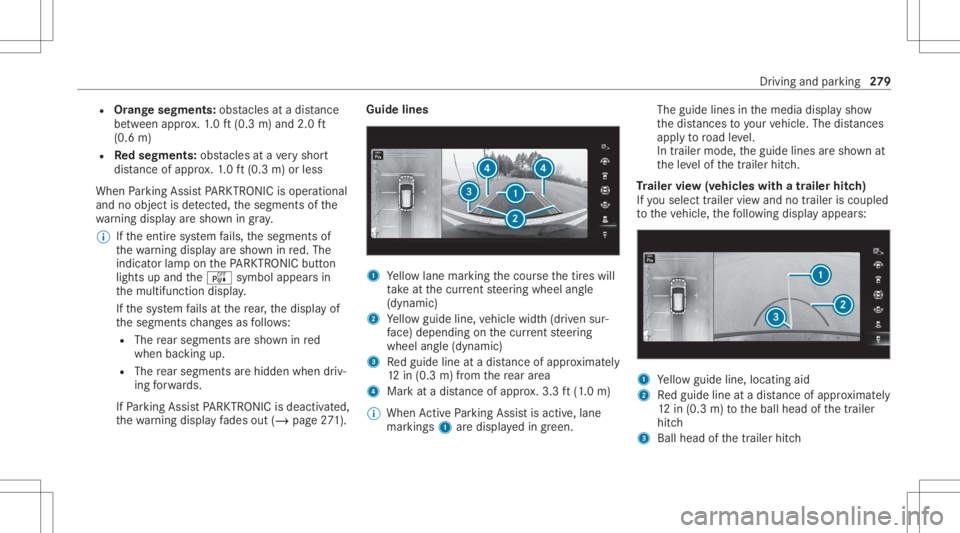
lines 1
Yello wlane markingth ecour sethetir es will
ta ke atthecur rent steer ing wheel angle
(dynamic)
2 Yello wguide line,vehicle width(dr iven sur‐
fa ce) dep endi ngon thecur rent steer ing
wheel angle(dynamic)
3 Redguide lineatadis tance ofapprox imat ely
12 in(0. 3m) from there ar area
4 Markat adis tance ofappr ox.3.3 ft(1.0 m)
% When ActivePa rking Assistis act ive, lane
mar kings1 aredispla yedin green. The
guide linesinthemedia displaysho w
th edis tances toyour vehicle. Thedistances
ap ply toroad leve l.
In trailer mode, theguide linesaresho wnat
th eleve lof thetrailer hitch.
Tr aile rvie w(vehic leswith atraile rhitc h)
If yo usele cttrailer viewand notrailer isco upled
to theve hicle, thefo llo wing displa yappear s: 1
Yello wguide line,locat ingaid
2 Redguide lineatadis tance ofapprox imat ely
12 in(0. 3m) totheball head ofthetra iler
hitc h
3 Ball head ofthetrailer hitch Dr
iving andparking 27
9
Page 299 of 682
#
Onlyins talla ball couplin gth at mee ts
th eper mitt eddimension sand hasbeen
designed forth etrailer operation
re qu iremen ts. #
Donotmodif yth eball coupling orthe
tr ai le rhi tc h. The
values approvedby themanuf acturercan be
fo und ontheidentif ication platesand inthe
"T ec hn ical data"sec tionunde r"T ra iler hitch"for
th eto wing vehicle (/page565). &
WARNIN GSw erving oftheve hicle/
tr ailer combination duetoinc reased
spee d
If th eve hicle/tr ailercombination swerve s,
yo ucan lose contro lof it.
The vehicle/tr ailercombination caneven tip
ove r. #
Under nocircums tances should yo utry
to inc rease thespeed tostra ight enthe
ve hicle/tr ailercombination. #
Reduce speed anddonotcount er-ste er. #
Ifneces sary,appl yth ebr ak es. *
NO
TEDama getotheengine asare sult
of ove rheating #
Ifyo ure trof itatrai le rhi tc h, mod ifica ‐
tio ns totheengine cooling system may
be neces sary,dependin gon theve hicle
model.
When retrof itti ng atrai le rhi tc h, ob serveth e
fa stening pointson thech assis . Re
trof itti ng atrai le rhi tc his pe rm issible onlyif a
trailer loadisspec ified inyour vehicle docu‐
ments. Ifth is is no tth ecase, theve hicle isno t
appr ovedfo rtr ail er oper ation.
Fu rther information canbeobt ained ataqu ali‐
fi ed specialis two rkshop.
If th etrailer coupling isremo vable, itis essent ial
to com plywith theoper ating instruction sof the
tr ai le rcou pling manuf actu rer.
Couple anduncouple thetrailer carefull y.Ifyo u
do notcon nectth etra iler totheto wing vehicle
cor rectl y,thetrailer maybecome detach ed. Obser
vethefo llo wing noteson theto ngu e
we ight :
R Donotuse ato ngu ewe ight that exceed sor
fa lls belo wtheper missible tongu ewe ight
R Use ato ngu ewe ight asclos eas possible to
th emaximum tongu ewe ight
Do notex ceed thefo llo wing values:
R Perm issible trailerload
R Perm issible rear axle load oftheto wing vehi‐
cle
R Perm issible gross weight oftheto wing vehi‐
cle
R Perm issible gros swe ight ofthetra iler
R Maximum permissible speedofthetrailer
En sur eth efo llo wing beforest ar tin gajo ur ne y:
R The tirepr essur eon there ar axle oftheto w‐
ing vehicle issetfo ra maximu mloa d
R The lighting ofthecon nect edtrailer isoper a‐
tion al
In theeve ntofincr eased rear axle load, theve hi‐
cle/tra ilercombination mayno texc eed amaxi‐ Dr
iving andparking 29
7
Page 316 of 682
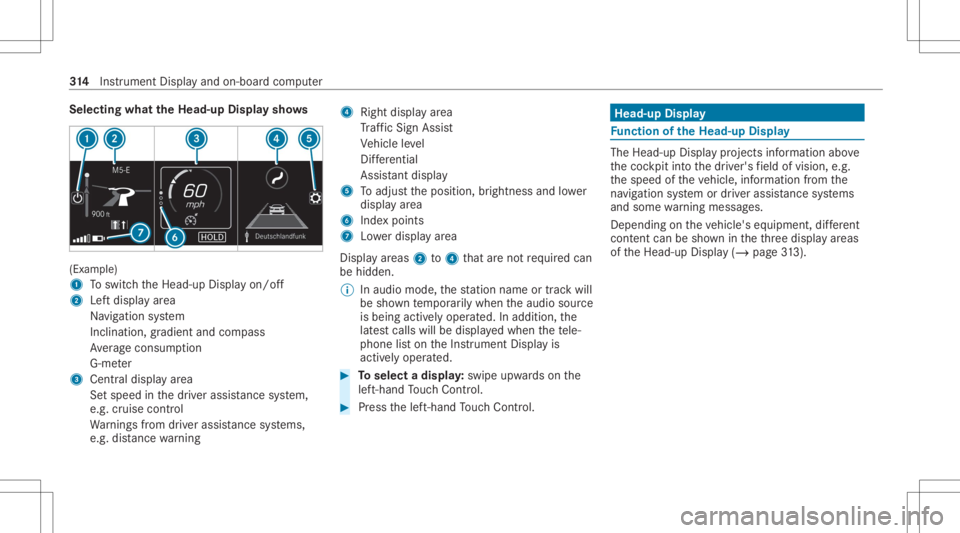
Selec
tingwhat theHead -upDispla ysho ws (Ex
am ple)
1 Toswitc hth eHead-up Displayon/ off
2 Leftdispla yar ea
Na vig ation system
Inc lination ,gr adient andcompass
Av erag econ sum ption
G-me ter
3 Centraldispl ayarea
Se tspee din thedr iver assis tance system,
e.g. cruise control
Wa rnings from driver assis tance systems,
e.g. distance warning 4
Right displa yar ea
Tr af fic Sign Assist
Ve hicle leve l
Dif fere ntia l
Assi stant displa y
5 Toadjus tth eposition ,br ightn essand lowe r
displa yar ea
6 Inde xpoint s
7 Lowe rdisp lay ar ea
Displa yar eas 2to4 that areno tre qu ired can
be hidden .
% Inaudio mode, thest atio nnam eor trac kwill
be sho wntemp orarily when theaudio source
is being activelyoper ated. Inaddition, the
lat estcalls willbedispla yedwhen thete le‐
phon elis ton theIns trument Displayis
activ elyoper ated. #
Toselect adispla y:swipe upwards on the
lef t-hand Touc hCon trol. #
Press thelef t-hand Touc hCon trol. Hea
d-up Disp lay Fu
nction oftheHead -upDispla y The
Head- upDis playpr oje ctsinf ormat ionabove
th ecoc kpit intoth edr iver's field ofvision, e.g.
th espeed oftheve hicle, information from the
na vig ation system ordriver assis tance systems
and some warning mess ages.
Depe ndingon theve hicle's equipment, differe nt
cont entcan besho wnintheth re edispla yar eas
of theHead-up Display(/ page31 3). 31
4
Instrument Displayand on-boar dcom puter
Page 402 of 682
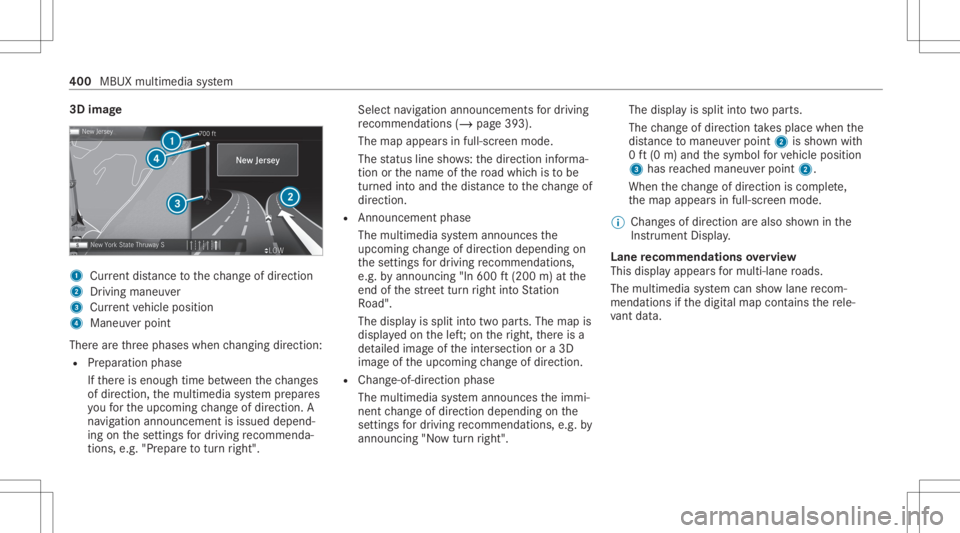
3D
imag e 1
Current dist anc eto thech ang eof dir ect ion
2 Drivin gman euver
3 Current vehicle position
4 Maneuv erpoint
Ther ear eth re ephases whenchang ingdirect ion:
R Preparation phase
If th er eis enough timebetween thech ang es
of dir ect ion,th emultimedia system prepar es
yo ufo rth eupcoming chang eof dir ect ion.A
na vig atio nann oun cem entisissue ddepen d‐
ing onthese ttings fordr iving recomme nda‐
tions ,e.g. "Prepar eto tur nright". Select
navig ation announc ementsfo rdr iving
re comme ndations (/page 393).
The map appearsin ful l-scr een mode .
The status lineshows:th edir ect ion informa‐
tion orthename ofthero ad whic his to be
tur ned intoand thedis tan cetothech ang eof
dir ect ion.
R Announc emen tphase
The mult imed iasystem announ cesthe
upco mingch ang eof dir ect ion depen dingon
th ese ttings fordr iving recomme ndations ,
e.g. byann oun cing"In 600ft (200 m)atthe
end ofthest re et tur nright intoSt atio n
Ro ad".
The displa yis split intotw opar ts.The map is
displa yedon thelef t;on theright, ther eis a
de tailed imag eof theint ersect ionora3D
imag eof theupcoming chang eof dir ect ion.
R Chan ge-of-d irecti onpha se
The multimed iasystem announ cestheimmi‐
nen tch ang eof dir ect ion depen dingon the
se ttin gsfordr iving recomme ndations ,e.g. by
ann oun cing"N ow turnright". The
displa yis split intotw opar ts.
The chang eof dir ect ion take splace whenthe
dis tance tomaneu verpoint 2issho wnwith
0 ft (0 m) and thesymbol forve hicle position
3 has reac hed maneuverpoin t2.
When thech ang eof dir ect ion iscom plete,
th emap appear sin full-scr eenmode.
% Chang esofdir ect ion arealso showninthe
Ins trument Display.
Lane recomm endationsov ervie w
This displa yappear sfo rmulti -lane roads.
The mult imed iasystem can showlane recom‐
mend ations ifth edigit almap contains there le‐
va nt data. 400
MBUX multimedia system
Page 425 of 682
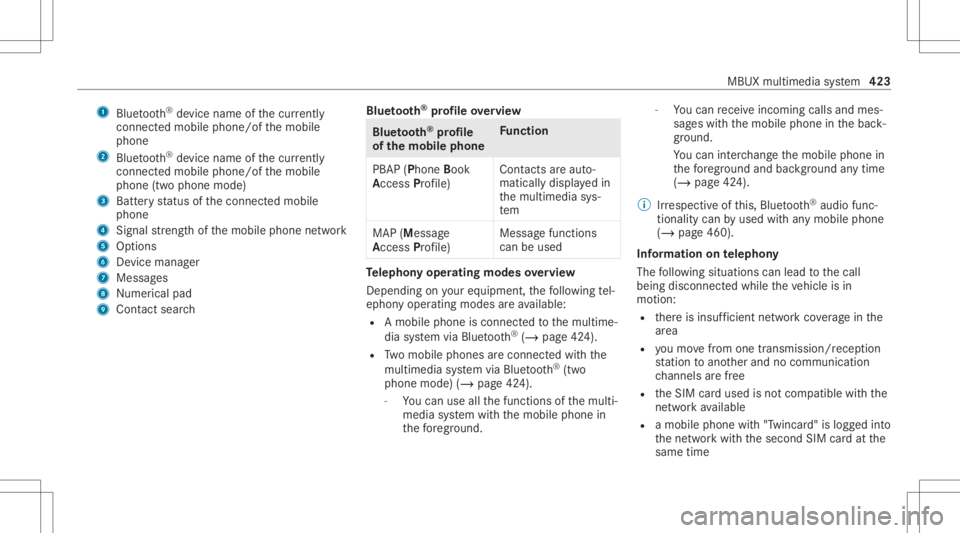
1
Bluetoo th®
de vice name ofthecur rently
conne cted mob ile pho ne/o fth emobile
phone
2 Blue tooth®
de vice name ofthecur rently
conne cted mob ile pho ne/o fth emobile
phone (twophone mode)
3 Batt eryst atus ofthecon nect edmobile
phone
4 Signal stre ngt hof themobile phonenetwork
5 Option s
6 Device manag er
7 Messag es
8 Nume rical pad
9 Contact search Blue
tooth®
pr ofile ove rview Blue
tooth®
pr ofile
of the mobi lephon eFu
nction
PB AP (Phone Book
Access Profile) Cont
actsar eaut o‐
matic allydispla yedin
th emultimedia sys‐
te m
MAP (Messag e
Access Profile) Messag
efunc tions
can beused Te
lephon yoper ating mod esove rview
Depen dingonyour equipme nt,th efo llo wing tel‐
ephon yoper atingmodes areav ailable:
R Amobi lephon eis con nectedto themultime‐
dia system viaBlue tooth®
(/ pag e42 4).
R Twomobile phones areconn ectedwithth e
multime diasystem viaBlue tooth®
(tw o
phone mode) (/page42 4).
- Youcan useallthefunc tionsof themulti‐
media system withth emobile phonein
th efo re grou nd . -
Youcan recei veinc omin gcalls andmes‐
sag eswit hth emobile phoneinthebac k‐
gr ound.
Yo ucan interch ang eth emobile phonein
th efo re grou nd and background anytim e
(/ page42 4).
% Irre spectiv eof this, Blue tooth®
audio func‐
tio nalit ycan byused withan ymob ilephon e
(/ page46 0).
Inf orma tionon telephon y
The follo wing situat ionscanlead tothecall
being discon nectedwhile theve hicle isin
mo tion:
R ther eis insuf ficie ntnetworkco verage inthe
ar ea
R youmo vefrom one transmis sion/reception
st atio nto ano ther and nocomm unication
ch ann elsarefree
R theSIM cardused isno tcom patible withth e
ne tworkav ailable
R amobi lephon ewit h"T winc ard" islogg edinto
th ene tworkwit hth esecon dSIM cardat the
same time MBUX
multimedia system 423
Page 426 of 682
The
multimedia system suppor tscalls inHD
Vo ice ®
forim prov ed speec hqu alit y.Arequ ire‐
men tfo rth is isthat themobile phoneandthe
mobil ephone networkpr ov ider oftheper son
yo uar ecalli ngsuppo rtHD Voice ®
.
Depe ndingon thequ alit yof thecon nect ion,the
vo ice qualit yma yfluct uat e.
Connect ingamob ilephone
Re quirement s:
R Blue tooth®
is act ivat ed on themobile phone
(see themanuf acturer'soper ating instruc‐
tion s).
R Blue tooth®
is act ivat ed on themultimedia
sy stem (/ page37 2).
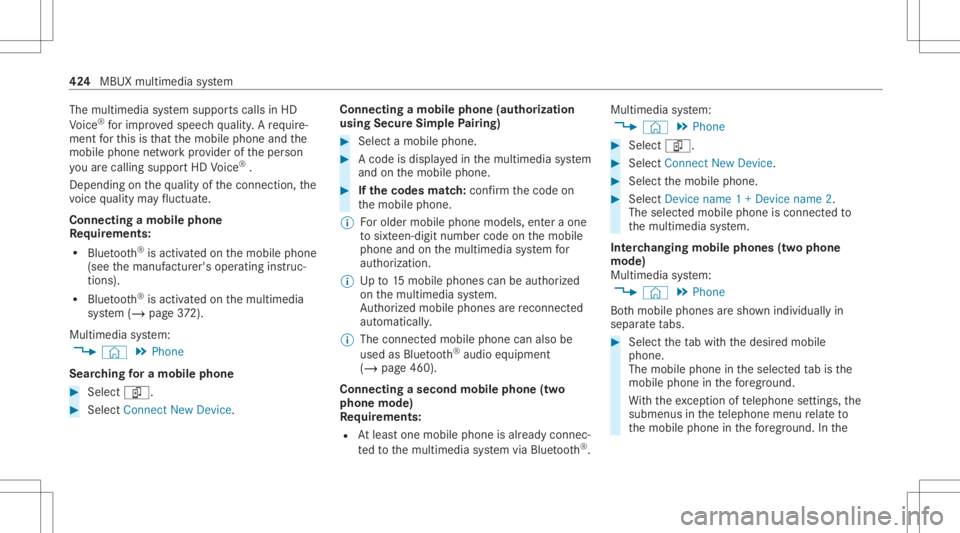
Mul timediasystem:
4 © 5
Phone
Sear ching fora mob ile pho ne #
Select í. #
Select Connect NewDevice. Co
nnectin gamob ile pho ne(au thor ization
usi ng Secure Sim plePairing) #
Selec ta mobile phone. #
Acode isdispla yedin themultimedia system
and onthemobile phone. #
Ifth ecodes match: con firm thecode on
th emobile phone.
% Forolde rmobil ephone models,ent eraone
to sixt een-digit numbercodeonthemobile
phone andonthemultimedia system for
aut hor izat ion.
% Upto15 mobil ephones canbeauthor ized
on themultimedia system.
Au thor ized mobile phones arere connect ed
au tomatical ly.
% The conn ectedmobile phonecanalso be
used asBlue tooth®
audio equipme nt
(/ page46 0).
Connect ingasecond mobilephone (two
ph one mod e)
Re quirement s:
R Atleas tone mobile phoneis alr eady connec‐
te dto themultimedia system viaBlue tooth®
. Multimedia
system:
4 © 5
Phone #
Select í. #
Select Connec tNew Devic e. #
Select themobile phone. #
Select Devicename 1+Devic ename 2.
The select edmobile phoneiscon nect edto
th emultimedia system.
Int erch angi ngmobi lephone s(tw ophone
mode)
Mul timedi asy stem:
4 © 5
Phone
Bo th mobil ephones aresho wnindivi duallyin
sepa rate tabs. #
Select theta bwit hth edesir edmobile
phone.
The mobile phoneintheselect edtabis the
mobil ephone inthefo re grou nd .
Wi th theexc eption oftelephon ese ttings ,th e
submenus inthete lephon emen ure lat eto
th emobile phoneinthefo re grou nd .In the 42
4
MBUX multimedia system
Page 427 of 682
te
lephon ese ttings ,se ttings canbemade for
bo th mobil ephones.
Changi ngthefun ction ofamobil eph one
Re quirement s:
R Atleas tone mobile phoneis con nectedto
th emultimedia system viaBlue tooth®
( / pag e42 4).
Multimedia system:
4 © 5
Phone
Ac tiv atin gafun ction #
Select theí device manag er. #
Select agr ay symbol intheline ofamobile
phone.
The corresponding functionisactiv ated.
Deactiv atingafunction #
Select theí device manag er. #
One function isactiv e:select thecolor
symbol intheline ofamobile phone.
The mobile phoneisdiscon nectedfrom the
multime diasystem. #
Severalfunct ionsareactiv e:select acolor
symbol intheline ofamobile phone.
The corresponding functionisdeactiv ated.
Re plac ingmobi lephon es
Mu ltimed iasystem:
4 © 5
Phone #
Select í. #
No author ized mobi lephone availab le:
sele ctConnect NewDevice . #
Select amobi lephone. #
Newly author ized mobi lephone :conf irm
th enumber codeonthemobile phone.
Using insing letelephone mode #
Selec tDev icename.
A ne wlyaut hor ized mobile phoneis con nec‐
te din sing letelephon emode.
If th emobile phonehasalready been author‐
ized andconnect edinsing letelephon e
mode, itis con nectedag ain insing letele‐
phon emode.
If amobile phonehas already been author‐
ized andconnectedin twophone modewith ano
ther mobile phone, itwill becon nect edin
futur ein sing letelephon emode.
Using intw oph one mod e #
Selec tDev icename 1+Dev icename 2.
A ne wlyaut hor ized mobile phoneis con nec‐
te dwit hth eselect edmobile phoneintwo
phone mode.
If th emobile phonehasalready been author‐
ized andconnect edinsing letelephon e
mode, itwill becon nectedin futur ewit hth e
select edmobile phoneintwophone mode.
If th emobile phonewaspr ev iousl ycon nec‐
te dwit hano ther mobile phone, this con nec‐
tion iscan celed.
Disconnecting/d e-authorizing amobil e
ph one
Mult imedia system:
4 © 5
Phone #
Select í. #
Select 0062intheline ofthemobile phone. MBUX
multimedia system 425
Page 430 of 682
Endin
gacall #
Sele ctk.
Ac tiv atin gfun ctionsdur ingacal l
The follo wing functionsar eav ailable during a
call:
k EndCall
m Microph oneOff
_ NumericKeypad (showto send DTMF
to nes)
0081 AddCall
h Transfe rto Pho ne(anacti vecal lin ha nds-
fr ee mod eis transf erredove rto thete le‐
phon e) #
Selec ta func tion.
Conduct ingcalls withse ve ralpar ticip ants
Re quirement s:
R Ther eis an act ive call (/ page42 7).
R Another call isbeing made. Switc
hingbetw een calls #
Select thecon tact.
The select edcallis acti ve.The other call is
on hold.
Ac tiv atin gacal lon hol d #
Select thecon tact of thecall onhold.
Conducting aconf erence call #
Select iCreate Confer. Call.
The newpar ticipan tis included inthecon fer‐
ence call.
Endin gan activ ecall #
Select kEndCall.
% Onsome mobilephones, thecall onhold is
activ ated assoon astheactiv ecall isended.
Ac cep ting/r eject ingawa iting call
Re quirement s:
R Ther eis an act ive call (/ page42 7).
If yo ure cei veacall while already inacall, a
mes sageis displa yed. Depen
dingonthemobile phoneandmobile net‐
wo rkoper ator youwill hear acall- waitin gsound .
In addition ,in twophon emode youwill hear an
aco ustic sign alwhen thecall goes thro ugh tothe
ot her (notye tacti ve)mobile phone. #
Selec tR Accept.
The incomin gcall isactiv e.
If onl yone mobile phoneiscon nectedwit h
th emultimedia system, thepr ev ious callwill
be put onhold.
If dur ing acall youacc epta call withth e
ot her mobile phonewhenintwophone mode
th en theex istin gcall isended . #
Selec tk Reject.
% This function andbeha viordepen dson your
mob ilephon ene tworkpr ov ider andthe
mobil ephone (seethemanuf acturer'soper‐
ating instruction s). 428
MBUX multimedia system