P button drive MERCEDES-BENZ GLS 2021 Owners Manual
[x] Cancel search | Manufacturer: MERCEDES-BENZ, Model Year: 2021, Model line: GLS, Model: MERCEDES-BENZ GLS 2021Pages: 510, PDF Size: 7.26 MB
Page 43 of 510
Fa
stening andadjust ing theseat belts If
th eseat beltispulled quickl yor shar ply, the
seat beltretract orlock s. The seat beltstra pcan‐
no tbe pulled outanyfur ther. #
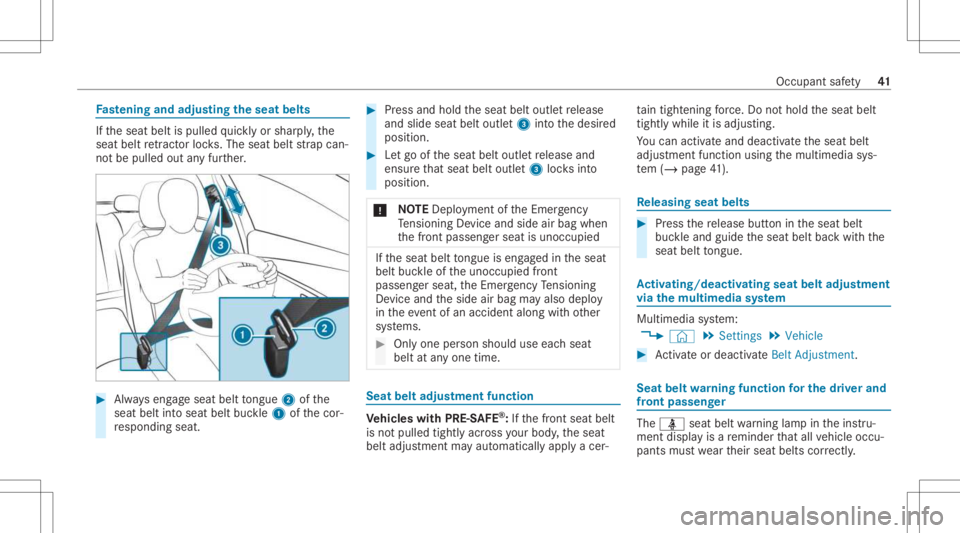
Alw ayseng ageseat belttongu e2 ofthe
seat beltintoseat beltbuckle1 ofthecor‐
re sponding seat. #
Press and hold theseat beltoutle tre lease
and slide seatbeltoutle t3 intoth edesir ed
position . #
Letgo oftheseat beltoutle tre lease and
ens ureth at seat beltoutlet3 locksinto
posit ion.
* NO
TEDep loym ent oftheEmer gency
Te nsi oni ng Device andside airba gwh en
th efront passeng erseat isunocc upied If
th eseat belttongu eis eng aged intheseat
belt buckleoftheunocc upied front
passeng erseat, theEmer gency Tensi oni ng
De vice andtheside airbag mayalso deplo y
in theev ent ofan acciden talong withot her
sy stems. #
Onlyone person should useeachseat
belt atanyone time. Seat
beltadjustm ent function Ve
hicl eswith PRE-S AFE®
:If th efront seat belt
is no tpulled tightlyacr oss your body ,th eseat
belt adjus tmentma yaut omaticall yapply acer‐ ta
in tigh tening forc e. Do nothold theseat belt
tight lywhile itis adjus ting.
Yo ucan activat eand deac tivateth eseat belt
adjus tmentfunc tion using themultimedia sys‐
te m (/ page41 ). Re
leasing seatbelts #
Press there lease buttonintheseat belt
buc kleand guide theseat beltbackwit hth e
seat belttongu e. Ac
tiv atin g/deac tivatin gse at beltadjus tment
vi athe multi mediasy stem Multi
media system:
4 © 5
Set ting s5
Vehicle #
Activateor deacti vate Belt Adjus tment . Sea
tbe ltwa rning funct ionforthe driver and
fr on tpass enger The
00E9 seatbeltwarning lam pin theins tru‐
ment displa yis are minder that all vehicle occu‐
pants mustwe artheir seat belts correctly . Occu
pant saf ety 41
Page 73 of 510
#
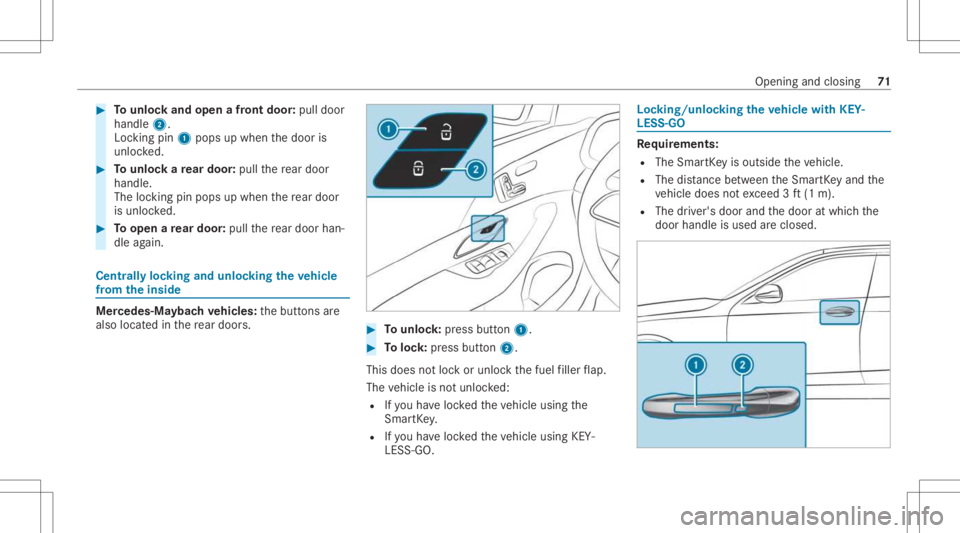
Tounlo ckand open afront door :pul ldoor
handl e2.
Loc king pin1pops upwhe nth edoor is
unloc ked. #
Tounlo ckare ar door :pul lth ere ar door
han dle.
The lockin gpin pops upwhen there ar door
is unlo cked. #
Toopen are ar door :pul lth ere ar door han‐
dle again. Cent
rally loc king andunloc kingtheve hicl e
fr om theinsid e Mer
cedes- Maybac hve hicl es:thebutt ons are
also locat edinthere ar door s. #
Tounlo ck:pr ess button 1. #
Toloc k:press butt on2.
This does notloc kor unloc kth efuel filler flap.
The vehicle isno tunloc ked:
R Ifyo uha ve loc kedth eve hicle using the
Smar tKey .
R Ifyo uha ve loc kedth eve hicle using KEY‐
LESS -GO. Loc
king/unloc kingtheve hicl ewith KEY‐
LES S-GO Re
quirement s:
R The Smar tKey isouts idetheve hicle.
R The distance betwee nth eSmar tKey and the
ve hicle does notexc eed 3ft (1 m).
R The driver's door andthedoor atwhic hth e
door handle isused areclosed. Openin
gand closin g71
Page 110 of 510
#
b)Press amemor yposition buttonora
seat adjus tmentswitc hon thedr iver's
door .
The adjus tmentpr ocess isstopped. Re
quirement s:
R Adaptin gth edr iver's seat andsteer ing wheel
position tothebody size:automatic seat
adjus tmenthas been switchedon.
Multimedia system:
4 © 5
Set ting s5
Vehicle
5 Autom aticSeat Adjustmen t
Switc hingautomat icseat adjustm ent on/of f
When theactiv euser profile isch ang edwhile
th eve hicle isstatio nary,thedr iver's seat, steer‐
ing wheel, outside mirrors and seat contour will
aut omat icallybe adap tedto thedr iver . #
Select OnorOff.
% This setting isavailable onlyforindivi dual
user profile s. Fo rth egues tpr ofile, auto‐
matic seatadjus tmentcann otbe switc hed
on oroff.Fu rther information aboutuser
pr ofiles . Ad
jus tingdr iver' sse at and steer ing wheel
posit iontobody size
The vehicle calculat esasuit able driver's seat
and steer ing wheel position onthebasis ofthe
dr iver's body sizeandsets this dir ect ly. #
Tosetth eunit ofmea surement :selec tcm
or ft/in. #
Setth esize using thescale. #
Select Start Position ing.
The driver's seat andsteer ing wheel position
is adjus tedto thebody sizethat has been
se t.
% Ifth edr iver's seat andsteer ing wheel posi‐
tion calculat edbytheve hicle isno tpr actical
or comf ortable, itcan bemanuall ych ang ed
at anytim evia thebutt ons.
The exterior mir rors areno tse tvia this func ‐
tion .Ins tead, they have tobe setmanually
via theswitc hes.
% Youcan also maketh ese settings viathe
Mer cedes meportalfo ryo ur user profile. By
syn chronis ing thepr ofiles intheve hicle and
th eMer cedes meconnect profiles, youcan
car ryove rth ese settings foryo ur vehicle. Fu
rther information aboutsynchronising
user profiles .
Se tting theeasy entryand exitfeatur e #
Select Steering Wheel& Seat ,Steering
Whee lOnly orOff.
% Ifyo uuse anind ivid ual user profile and have
se tyo ur body size,this inf ormatio nis car ried
ove rfo rth eeasy entryand exitfeatur e.This
caus esthedr iver's seat andsteer ing wheel
to aut omat icallymo veintoth ecor rect pos i‐
tion . Ov
ervie wof massag epr og rams R
Hot Relaxing BackCo mbi nati onofheat and
ma ssa ge.It star ts by massa gingthebac k.In
addi tion, warm pressur epoint sbecome
no ticeable, star tin gin thepel vic area.
R Hot Relaxing Shoulder Combination ofheat
and massag e.Itstar ts by massa gingthe
shoulde rs.In addition, warm pressur epoint s
become noticeable, star tin gin thepel vic
ar ea. 10
8
Sea tsand stow ing
Page 118 of 510
#
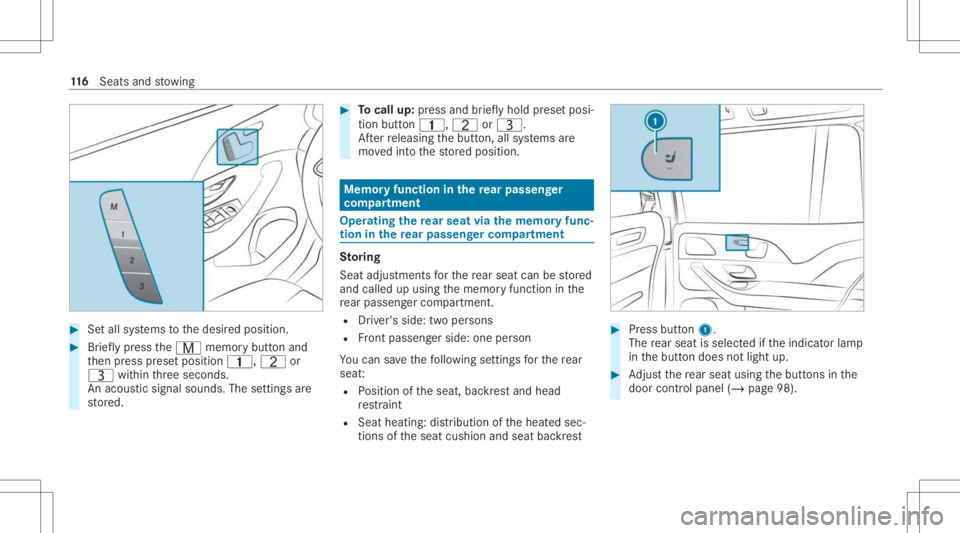
Setal lsy stems tothedesir edposition . #
Brief lypress theV memor ybutt onand
th en press prese tposition 0037,Tor
U within thre esecon ds.
An acous ticsignal sounds. Thesettings are
st or ed. #
Tocall up:pr ess and brief lyhold prese tposi‐
tion button0037, TorU.
Af terre leasing thebutt on,allsystems are
mo vedint oth estor ed position. Memor
yfunction inthere ar passe nger
co mp artment Oper
ating there ar seat viathemem oryfun c‐
tion inthere ar passe nger comp artment St
oring
Seat adjus tment sfo rth ere ar seat canbestor ed
and called upusing thememor yfunc tion inthe
re ar passe nger com partment .
R Driver' sside: twoper son s
R Front passeng erside: oneperson
Yo ucan save thefo llo wing settings forth ere ar
seat :
R Position oftheseat, backres tand head
re stra int
R Seat heatin g:dis tribution oftheheat edsec‐
tion sof theseat cushion andseat backres t #
Press butt on1.
The rear seat isselec tedifth eindicat orlam p
in thebutt ondoes notlight up. #
Adjus tth ere ar seat usingth ebutt ons inthe
door control panel (/page98). 11
6
Sea tsand stow ing
Page 164 of 510
Contr
olling there ar climat eco ntr olaut omat‐
ical ly #
Select REAR AUTO.
Re ar clim atecon trol iscon trolled automat i‐
call y.
Deact ivat ing rear climat eco ntr ol #
Select REAROFF.
Re ar clim atecon trol isdeac tivated. Ac
tiv atin g/deac tivatin gthe climat eco ntr ol
syn chronizat ionfunction viathecontr ol
pa nel Climat
econ trol can besetcen trall yusing the
sync hronization function.Thetemp eratur eand
air distribution setting forth edr iver's side willbe
adop tedaut omatic allyfo rall clima tecontr ol
zones. #
Press the 0 button.
The sync hroniz ation function willbedeactiv ated
if th ese ttings forone oftheot her climat ezones
ar ech ang ed. Ac
tiv atin g/deac tivatin gthe climat eco ntr ol
syn chronizat ionfunction viathemu ltim edia
sy stem Climat
econ trol can besetcen trall yusing the
sync hronization function.Thedriver's settin gs
fo rte mp eratur e,air quant ityand airdistribut ion
ar eadop tedaut omatic allyfo rall clima tezone s. #
Callup theair con ditionin gmenu
(/ page16 0). #
Select FirstRowofSeats . #
Select SYNC. Re
mo ving conde nsatio nfrom the windo ws Wi
ndo wsfogg ed up ontheinsid e #
Press the0058 button. #
Ifth ewindo wscontinu eto fogup: press the
0064 button.
Wi ndo wsfogg ed up ontheout side #
Swit chon thewindshield wipers. #
Press the 0058 button. Switc
hingair-recir culation modeon/off #
Press the0072 button.
The interior airwill berecir cul ated.
Air -reci rculati onmod eaut omat icallyswit ches to
fr esh airmode afte rsome time.
% Ifair -recir cula tion mode isswi tched on,the
windo wsmayfo gup mor equ ickl y. Swi tchon
ai r-re cir cul ation mod eonly briefly. Switc
hingthere sidual heatonoroff Re
quirement s:
R The vehicle ispar ked.
It is possible tomak euse ofthere sidua lheat
fr om theengine tocontinu ehea ting orventil at‐
ing thefront com partmen tof theve hicle for
appr oximat ely30 min utes, depen dingonthe
te mp eratur ese t. #
Toactiv ate: press 0056 button.
Re sidua lheat willbeswitc hedoffaut omaticall y. 16
2
Climat eco ntro l
Page 182 of 510
If
yo udo notswit choffth eignition ,th eignition
is aut omaticall yswitc hedoffaf te rth re e
minut es.
De activ ating oractiv ating theECO star t/
sto pfunc tion #
Press button 1.
A displ ayappear sin theins trument cluster
when switching theEC Ostar t/ stop funct ion
of f/on .
% Acont inuous sdispla yappear sin the
ins trumen tclus terwhi letheEC Ostar t/ stop
funct ionisdeactiv ated. ECO
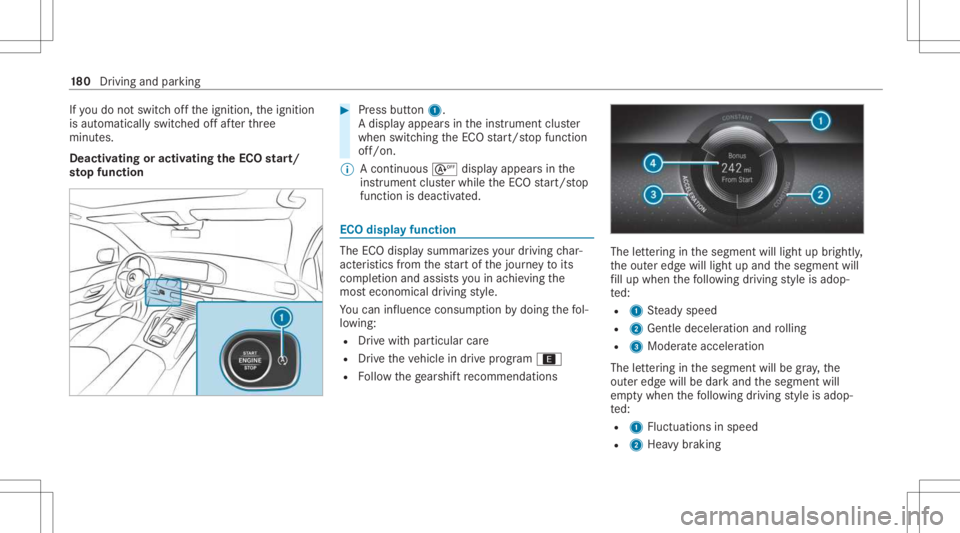
displa yfunction The
ECOdispla ysummar izesyour drivin gch ar‐
act eristic sfrom thest ar tof thejour neyto its
com pletion andassis tsyouin achie vingth e
mos teconomical driving style.
Yo ucan influen ceconsum ption bydoing thefo l‐
lo wing:
R Drive wit hpar ticular care
R Drive th eve hicle indrive pr ogr am ;
R Followthege arshif tre comme ndations The
letter ing inthesegment willlight upbrightl y,
th eout eredg ewill light upand thesegmen twill
fi ll up when thefo llo wing drivin gst yle is adop‐
te d:
R 1 Steady speed
R 2 Gentle deceler ationandrolling
R 3 Moderat eacc eler ation
The letter ing inthesegment willbegra y,the
out eredg ewill bedar kand thesegment will
em ptywhen thefo llo wing drivin gst yle is adop‐
te d:
R 1 Fluct uations inspeed
R 2 Hea vybraking 18
0
Driving and parking
Page 199 of 510
%
The remo tecontr olforth edoor drive is no t
included inthescope ofdeliv eryof the
ga rage door opener .
Sync hronizing thero lling code
Re quirement s:
R The door system uses aro lling code.
R The vehicle mustbe within rang eof the
ga rage door ordoor drive.
R The vehicle aswellas per son sand obje cts
ar elocat edouts idethera ng eof mo vement
of thedoor . #
Press thepr ogr amming buttononthedoor
dr ive unit.
Init iateth ene xt step within appr oximat ely
30 seco nds. #
Press prev iousl ypr og rammed button1, 2
or 3 repeat edlyuntil thedoor closes.
When thedoor closes, progr amming iscom‐
ple ted.
% Please alsoread theoper ating instruction s
fo rth edoor drive. Tr
oublesh ooting when prog rammin gthe
re mo tecont rol #
Chec kif th etra nsmit terfr eq uency ofremo te
contr ol5 issu ppo rted. #
Replace thebatt eries inremo tecontr ol5. #
Holdre mo tecontr ol5 atvarious angles
fr om adis tance of0.4 in(1 cm) to3in
(8 cm) front oftheinside rear vie wmir ror.
Yo usho uld test eve ryposition forat lea st
25 seconds beforetrying ano ther position . #
Hold remo tecontr ol5 atthesame angles
at various distances infront oftheinside
re ar vie wmir ror.Yo usho uld test eve ryposi‐
tion forat lea st25 seconds beforetrying
ano ther position . #
Notethat som ere mo tecontr olstransm it
only fora limi tedper iod, press butt on6 on
re mo tecontr ol5 again bef oretransm ission
ends . #
Align theant enn aline ofthedoor opener unit
wit hth ere mo tecontr ol. %
Supportand additiona linf ormati ononpro‐
gr amm ing:
R Ontheto llfree Hom eLink®
Ho tlin eon
1- 800 -355- 3515
R OntheInt erne tat htt ps:/ /
www .homelin k.com/me rcedes
Opening orclosing thega rage doo r
Re quirement s:
R The corresponding buttonisprogr ammed to
oper ateth edoor . #
Press and hold buttons 1,2or3 until
th edoor opens orcloses. #
Ifindicat orlam p4 flashes yello wafte r
appr oximat ely20 seco nds:pr ess and hold
th epr ev iousl ypr essed buttonagain untilth e
door opens orcloses.
Clear ingthega rage doo rope nermemo ry #
Press and hold buttons 1and 3.
Indicat orlam p4 lights upyello w. #
Ifindicat orlam p4 flashes gree n: release
butt ons 1and 3.
The entire memo ryhas been deleted. Dr
iving andparking 19
7
Page 221 of 510
R
The driver's door isclosed.
R Chec kof thera dar sensor system has been
success fullycompleted.
R Parking AssistPA RK TRONI Cis no tbein g
used topar kth eve hicle ortoexitfrom a
par kingspace.
R DSRis deact ivat ed.
R Vehicl eswith Off-road package:th eG
dr ive pr og ram isdea ctivated. #
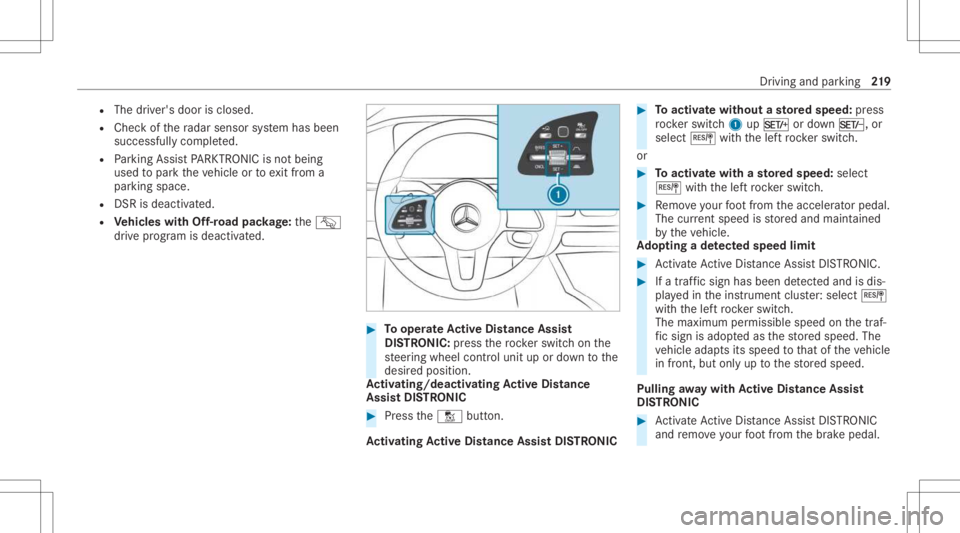
Tooper ateAc tiv eDi stance Assist
DI ST RO NIC :press thero ck er switc hon the
st eer ing wheel control unit upordown tothe
desir edposition .
Ac tiv atin g/deac tivatin gAc tiv eDi stance
Ass istDI ST RO NIC #
Press theH button.
Ac tiv atin gAc tiv eDi stance AssistDI ST RO NIC #
Toactiv atewi thout ast or ed speed :pr ess
ro ck er switc h1 upM ordown N, or
select Jwithth elef tro ck er switc h.
or #
Toactiv atewi th ast or ed speed :selec t
J withth elef tro ck er switc h. #
Remo veyour foot from theacceler ator pedal.
The current spe edisstor ed and maint ained
by theve hicle.
Ad opting ade tected spe edlim it #
ActivateAc tiveDis tance AssistDIS TRONI C. #
Ifatraf fic sig nha sbee nde tected and isdis‐
pl ay ed intheins trument cluster: select J
wit hth elef tro ck er switc h.
The maximum permissible speedonthetraf‐
fi c sig nis ad op tedas thestor ed speed. The
ve hicle adaptsits speed tothat oftheve hicle
in front, butonlyup tothestor ed speed.
Pulling away wit hAc tiv eDi stance Assist
DI ST RO NIC #
ActivateAc tiveDis tance AssistDIS TRONI C
and remo veyour foot from thebr ak epedal. Dr
iving andparking 21
9
Page 225 of 510
%
Dep endingonthecount ry,in thelowe r
speed rang eAc tiveSt eer ing Assis tcan use
th esur round ingtraf fic as are fere nce. Ifnec‐
ess ary, Ac tiveSt eer ing Assis tcan then also
pr ov ide assis tance when drivi ng outsid eth e
cent erofthelane, forex am ple toform are s‐
cue lane.
If th ede tection oflane mar kings andvehicles
ahead isim pair ed,ActiveSt eer ing Assis t
switc hestopassiv emode. Thesystem prov ides
no suppor tin this case.
St atus displa yof Activ eSte ering Assis tin
th emu ltifunct iondisp lay
R Ø (gra y): act ivat ed and pass ive
R Ø (green ):act ivat ed and active
R Ø (red): system limits detected
R Ø (whit e,redhands): "handsonthesteer‐
ing wheel" prom pt
% During thetransition from activ eto passiv e
st atus ,th eØ symbol issho wnas
enlar gedand flashin g.On ce thesy stem is
passiv e,theØ symbol issho wnasgray in
th emultifunc tiondispla y. %
Dep endingontheselect edvehicle settin gs,
Ac tiveSt eer ing Assis tma ybe una vailable.
Ste ering and touc hde tection
The driver isrequ ired tokeep their hands onthe
st eer ing wheel atall times andbeable tointer‐
ve ne atanytime tocor rect thecour seofthe
ve hicle andkeep itin lane. Thedriver mus t
ex pect ach ang efrom active to passiv emode or
vice versaat anytim e. If
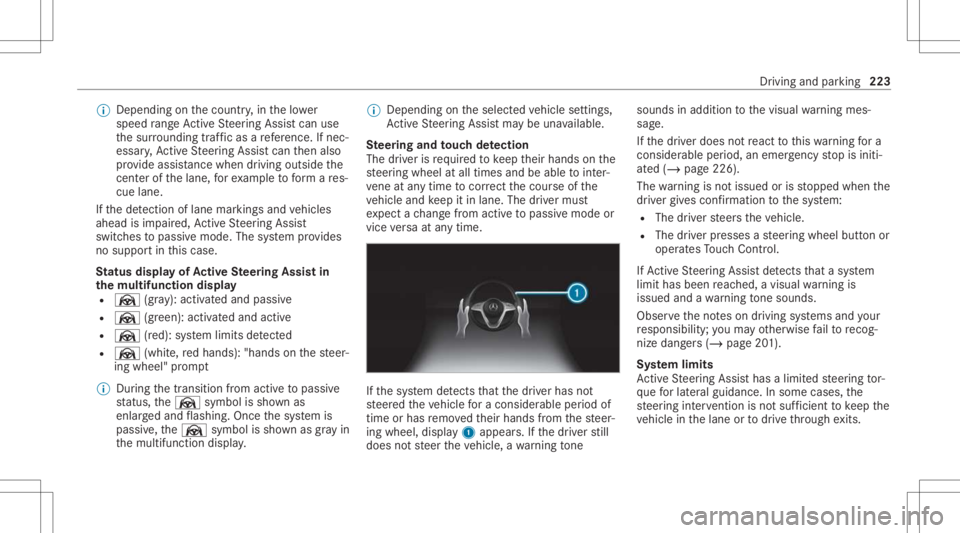
th esy stem detects that thedr iver has not
st eer edtheve hicle fora consider ableper iod of
time orhas remo vedth eir hands from thesteer‐
ing wheel, display1 appear s.Ifth edr iver still
does notst eer theve hicle, awa rning tone sou
nds inad ditio nto thevisual warning mes‐
sag e.
If th edr iver does notre act tothis wa rning fora
consider ableper iod, anemerg encystop isiniti‐
at ed (/ page226).
The warning isno tissued orisstopped whenthe
dr iver giv es con firm atio nto thesy stem:
R The driver steer sth eve hicle.
R The driver presses ast eer ing wheel buttonor
oper ates Touc hCon trol.
If Ac tiveSt eer ing Assis tde tects that asy stem
limit hasbeen reac hed, avisual warning is
issued andawa rning tone sou nds.
Obs erve theno teson driving systems andyour
re sponsibili ty;yo uma yot her wise failto recog‐
nize dangers(/ page 201).
Sy stem limit s
Ac tiveSt eer ing Assis thas alimit edsteer ing tor‐
qu efo rlat eral gui dance. Insome cases, the
st eer ing interve ntio nis no tsu fficien tto keep the
ve hicle inthelane ortodrive th ro ugh exits. Dr
ivin gand parking223
Page 262 of 510
Take
Control ofVehicle messagepr om ptyouto
ta ke contr olof theve hicle.
The vehicle isno taut omatically brak ed and can
ro llaw ay.Yo uha ve toacc eler ate, brak e, steer
and chang ege ar yourself again.
Fu nction ofDrive Awa yAssis t
Dr ive Aw ayAssi stcan reduce these verity of an
impact when pulling away.If an obs tacle is
de tected inthedir ect ion oftrav el, theve hicle's
speed isbrief lyreduced toappr ox.1 mp h
(2 km/ h).Ifacr itic alsituat ionisde tected, the
É symbol appearsinthemedia display.
% Youcan cancelaninterve ntio nby Drive
Aw ayAssi stat anytim eby pressing the
é button. &
WARNIN GRisk ofacci dent caused by
limit eddetection perform anc eof Drive
Aw ayAssi st
Dr ive Aw ayAssi stcanno tal wa ys cle arly iden‐
tify obje ctsand traf fic situ ations. #
Alw ayspa ycar eful attention tothetra f‐
fi c situ ation; donotre ly on Drive Aw ay
Assi stalon e. #
Beprepar edtobrak eor sw erve as nec ‐
essar y,prov ided thetra ffic situat ion
per mitsand that itis saf eto take eva‐
siv eact ion. Dr
ive Aw ayAssi stisonl yan aid. Itis no ta sub‐
st itut efo ryo ur att entio nto thesur round ings.
The responsibili tyforsaf emaneu vering and
pa rking remains withyo u. Mak esur eth at no
per son s,anim alsorobj ect set c. arein the
maneu vering rang e.
A risk ofacollision mayar ise inthefo llo wing sit‐
uation s,forex am ple:
R Ifth edr iver mix esup theaccelera torand
br ak epeda ls.
R Ifan incor rect transm ission position is
eng aged.
Dr ive Aw ayAssi stisact ive under thefo llo wing
con dition s:
R IfPa rking AssistPA RK TRONI Cis act ivat ed. R
Ifyo ushif tth etra nsmiss ionposition to005E or
005B when theve hicle isstatio nary.
R Ifth ede tected obs tacle isless than appr ox.
3.3 ft(1.0 m) away.
R Ifth emaneuv ering assis tant func tionis acti ‐
va tedin themultimedia system.
Sy stem limit s
The perform anc eof Drive Aw ayAssi stislimit ed
on inclines .
When drivin gwit hatrailer ,Dr ive Aw ayAssi stis
no tav ailable.
% Alsoobse rveth esy stem limits ofParking
Ass istPA RK TRONI C(/ page24 4).
Fu nction ofCross Traf fic Aler t
% Alsoobse rveth eins truction son Blind Spot
Assis tand ActiveBli nd Spo tAssi st
( / pag e26 4).
Ve hicl eswith Blind SpotAss istor Activ e
Bli nd Spo tAs sist :Cr oss Traf fic Aler tcan warn
dr iver sof anycr ossing traf fic whe nba cking up
and mane uvering out ofapar kingspace. The
ra dar sensor sin thebum peralso monit orthe
ar ea adjac enttotheve hicle. Ifacr itical situation 260
Driving andparking