attention assist MERCEDES-BENZ GLS-Class SUV 2017 X166 Owner's Guide
[x] Cancel search | Manufacturer: MERCEDES-BENZ, Model Year: 2017, Model line: GLS-Class SUV, Model: MERCEDES-BENZ GLS-Class SUV 2017 X166Pages: 390, PDF Size: 9.71 MB
Page 212 of 390
Rthe road is narrow and winding
Rthere are strong shadows cast on the road
Switching on Lane Keeping Assist
XSwitch on Active Lane Keeping Assist using
the on-board computer; to do so, select
Standard
orAdaptive(Ypage 238).
If you drive at speeds above 40 mph
(60 km/h) and lane markings are detected,
the lines in the assistance graphics display
(
Ypage 237) are shown in green. Lane Keep-
ing Assist is ready for use.
Standard
If Standardis selected, no warning vibration
occurs if:
Ryou switch on the turn signals. In this event,
the warnings are suppressed for a certain
period of time.
Ra driving safety system intervenes, such as
ABS, BAS or ESP®.
Adaptive
When Adaptiveis selected, no warning vibra-
tion occurs if:
Ryou switch on the turn signals. In this event,
the warnings are suppressed for a certain
period of time.
Ra driving safety system intervenes, e.g. ABS,
BAS or ESP®.
Ryou accelerate hard, e.g. kickdown.
Ryou brake hard.
Ryou steer actively, e.g. swerve to avoid an
obstacle or change lanes quickly.
Ryou cut the corner on a sharp bend.
In order that you are warned only when neces-
sary and in good time if you cross the lane mark-
ing, the system recognizes certain conditions
and warns you accordingly.
The warning vibration occurs earlier if:
Ryou approach the outer lane marking on a
bend.
Rthe road has very wide lanes, e.g. a highway.
Rthe system recognizes solid lane markings.
The warning vibration occurs later if:
Rthe road has narrow lanes.
Ryou cut the corner on a bend.
Driving Assistance PLUS package
General notes
The Driving Assistance Plus package consists of
Distance Pilot DISTRONIC (Ypage 174), Active
Blind Spot Assist (Ypage 210) and Active Lane
Keeping Assist (Ypage 213).
Active Blind Spot Assist
General notes
Active Blind Spot Assist monitors the areas on
either side of the vehicle that are not directly
visible to the driver with two lateral, rear-facing
radar sensors. A warning lamp lights up in the
exterior mirrors and draws your attention to
vehicles detected in the monitored area. If you
then switch on the corresponding turn signal to change lanes, you will also receive a visual and
audible collision warning. If a risk of lateral col-
lision is detected, corrective braking may help
you avoid a collision. Before a course-correcting
brake application, Active Blind Spot Assist eval-
uates the space in the direction of travel and at the sides of the vehicle. For this, Active Blind
Spot Assist uses the forward-facing radar sen-
sors.
Active Blind Spot Assist supports you from a
speed of approximately 20 mph (30 km/h).
Important safety notes
Active Blind Spot Assist is only an aid and is not
a substitute for attentive driving.
GWARNING
Active Blind Spot Assist does not react to:
Rvehicles overtaken too closely on the side,
placing them in the blind spot area
Rvehicles which approach with a large speed
differential and overtake your vehicle
As a result, Active Blind Spot Assist may nei-
ther give warnings nor intervene in such sit-
uations. There is a risk of an accident.
Always observe the traffic conditions care-
fully, and maintain a safe lateral distance.
iUSA only: This device has been approved by
the FCC as a "Vehicular Radar System". The
radar sensor is intended for use in an auto-
motive radar system only. Removal, tamper-
ing, or altering of the device will void any war-
210Driving system s
Driving an d parking
Page 215 of 390
Rthe LOW RANGE offroad gear is activated
(vehicles with the Offroad Engineering pack-
age).
Ra loss of tire pressure or a defective tire is
detected.
Switching on Active Blind Spot Assist
XMake sure that Active Blind Spot Assist is
activated in the on-board computer
(
Ypage 238).
XTurn the SmartKey to position2in the ignition
lock.
Warning lamps :in the exterior mirrors light
up red for approximately 1.5 seconds and
then turn yellow.
Towing a trailer
When you attach a trailer, make sure you have
correctly established the electrical connection.
This can be accomplished by checking the trailer
lighting. Active Blind Spot Assist is then deacti-
vated. The indicator lamp lights up yellow in the
exterior mirrors and the Active Blind Spot
Asst. Not Available When Towing aTrailer See Operator's Manualmessage
appears in the multifunction display.
Active Lane Keeping Assist
General notes
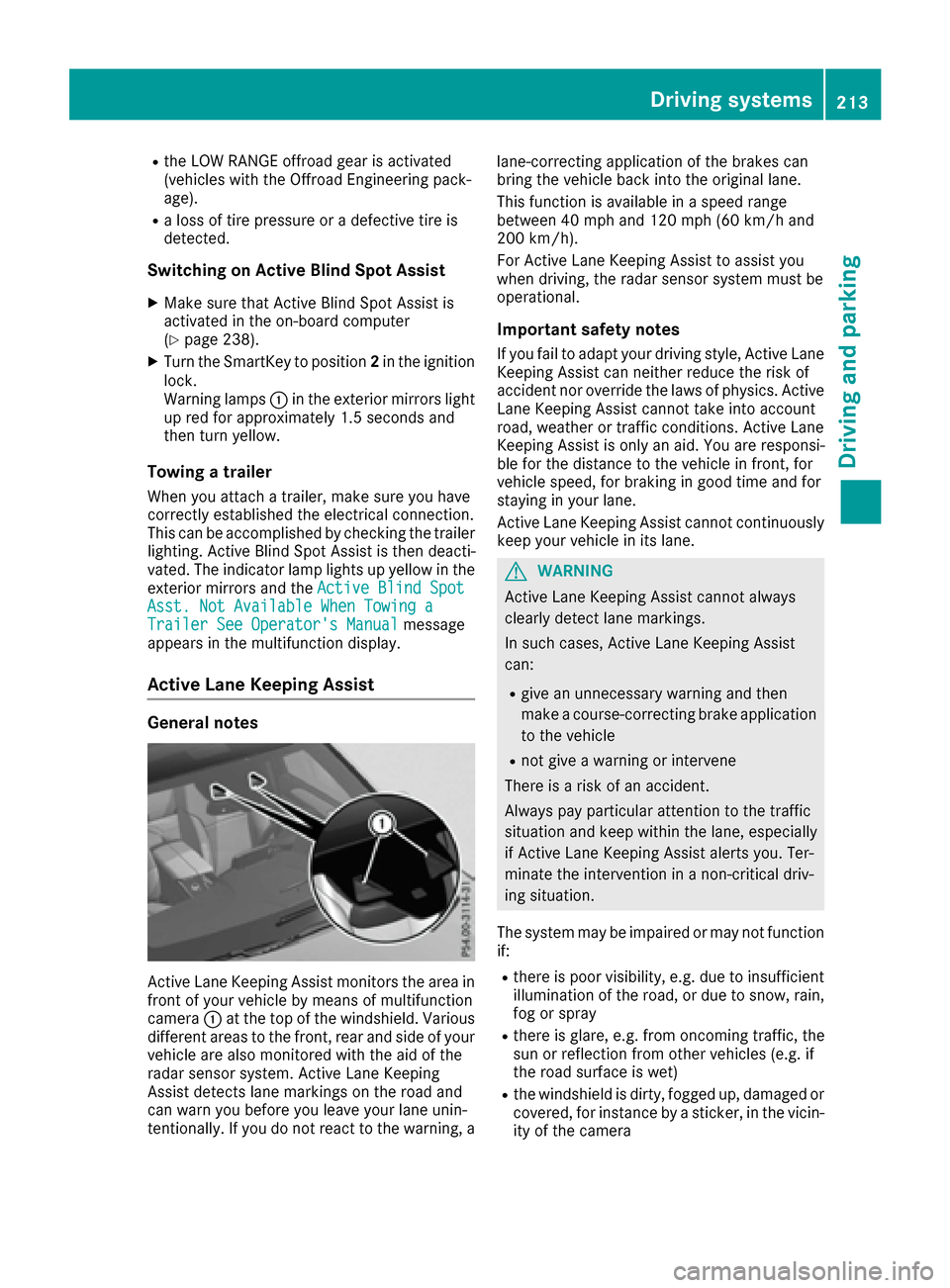
Active Lane Keeping Assist monitors the area in
front of your vehicle by means of multifunction
camera :at the top of the windshield. Various
different areas to the front, rear and side of your
vehicle are also monitored with the aid of the
radar sensor system. Active Lane Keeping
Assist detects lane markings on the road and
can warn you before you leave your lane unin-
tentionally. If you do not react to the warning, a lane-correcting application of the brakes can
bring the vehicle back into the original lane.
This function is available in a speed range
between 40 mph and 120 mph (60 km/h and
200 km/h).
For Active Lane Keeping Assist to assist you
when driving, the radar sensor system must be
operational.
Important safety notes
If you fail to adapt your driving style, Active Lane
Keeping Assist can neither reduce the risk of
accident nor override the laws of physics. Active
Lane Keeping Assist cannot take into account
road, weather or traffic conditions. Active Lane
Keeping Assist is only an aid. You are responsi-
ble for the distance to the vehicle in front, for
vehicle speed, for braking in good time and for
staying in your lane.
Active
Lane Ke
eping Assist cannot continuously
keep your vehicle in its lane.
GWARNING
Active Lane Keeping Assist cannot always
clearly detect lane markings.
In such cases, Active Lane Keeping Assist
can:
Rgive an unnecessary warning and then
make a course-correcting brake application
to the vehicle
Rnot give a warning or intervene
There is a risk of an accident.
Always pay particular attention to the traffic
situation and keep within the lane, especially
if Active Lane Keeping Assist alerts you. Ter-
minate the intervention in a non-critical driv-
ing situation.
The system may be impaired or may not function
if:
Rthere is poor visibility, e.g. due to insufficient
illumination of the road, or due to snow, rain,
fog or spray
Rthere is glare, e.g. from oncoming traffic, the
sun or reflection from other vehicles (e.g. if
the road surface is wet)
Rthe windshield is dirty, fogged up, damaged or
covered, for instance by a sticker, in the vicin-
ity of the camera
Driving system s213
Driving an d parking
Z
Page 238 of 390
You will see one of the following display mes-
sages in the multifunction display:
RPhone READYor the name of the network
provider: the mobile phone has found a net-
work and is ready to receive.
RPhone No Service: there is no network
available or the mobile phone is searching for
a network.
Accepting a call
If someone calls you when you are in the Telmenu, a display message appears in the multi-
function display.
You can accept a call at any time regardless of
the menu selected.
XPress the6button on the steering wheel
to accept an incoming call.
Rejecting or ending a call
You can end or reject a call even if you are not in
the Telmenu.
XPress the ~button on the steering wheel
to reject or end a call.
Selecting an entry from the telephone
book
XPress the =or; button on the steering
wheel to select the Telmenu.
XPress the9,:ora button to
switch to the phone book.
XAuthorize access to the phone book on the
phone.
XPress the 9or: button to select the
desired name.
or
XTo start rapid scrolling: press and hold the
9 or: button for longer than one sec-
ond.
Rapid scrolling stops when you release the
button or reach the end of the list.
XIf only one telephone number is stored for
a name: press the 6ora button to
start dialing.
or
XIf there is more than one number for a
particular name: press the6ora
button to display the numbers.
XPress the 9or: button to select the
number you want to dial.
XPress the 6ora button to start dialing.
or
XTo exit the telephone book: press the~
or % button.
Redialing
The on-board computer saves the last names or
numbers dialed in the redial memory.
XPress the =or; button on the steering
wheel to select the Telmenu.
XPress the6button to switch to the redial
memory.
XPress the 9or: button to select the
desired name or number.
XPress the 6ora button to start dialing.
or
XTo exit the redial memory: press the~
or % button.
Assistance menu
Introduction
Depending on the equipment installed in the
vehicle, you have the following options in the
DriveAssist
menu:
RDisplaying the assistance graphic
(Ypage 237)
RActivating or deactivating Steering Pilot
(Ypage 237)
RActivating or deactivating Active Brake Assist
(Ypage 237)
RActivating or deactivating Active Brake Assist with cross-traffic function (Ypage 237)
RActivating/deactivating ATTENTION ASSIST
(Ypage 237)
RActivating/deactivating Blind Spot Assist or
Active Blind Spot Assist (Ypage 238)
RActivating/deactivating Lane Keeping Assist
or Active Lane Keeping Assist (Ypage 238)
236Menus and submenus
On-board computer and displays
Page 239 of 390
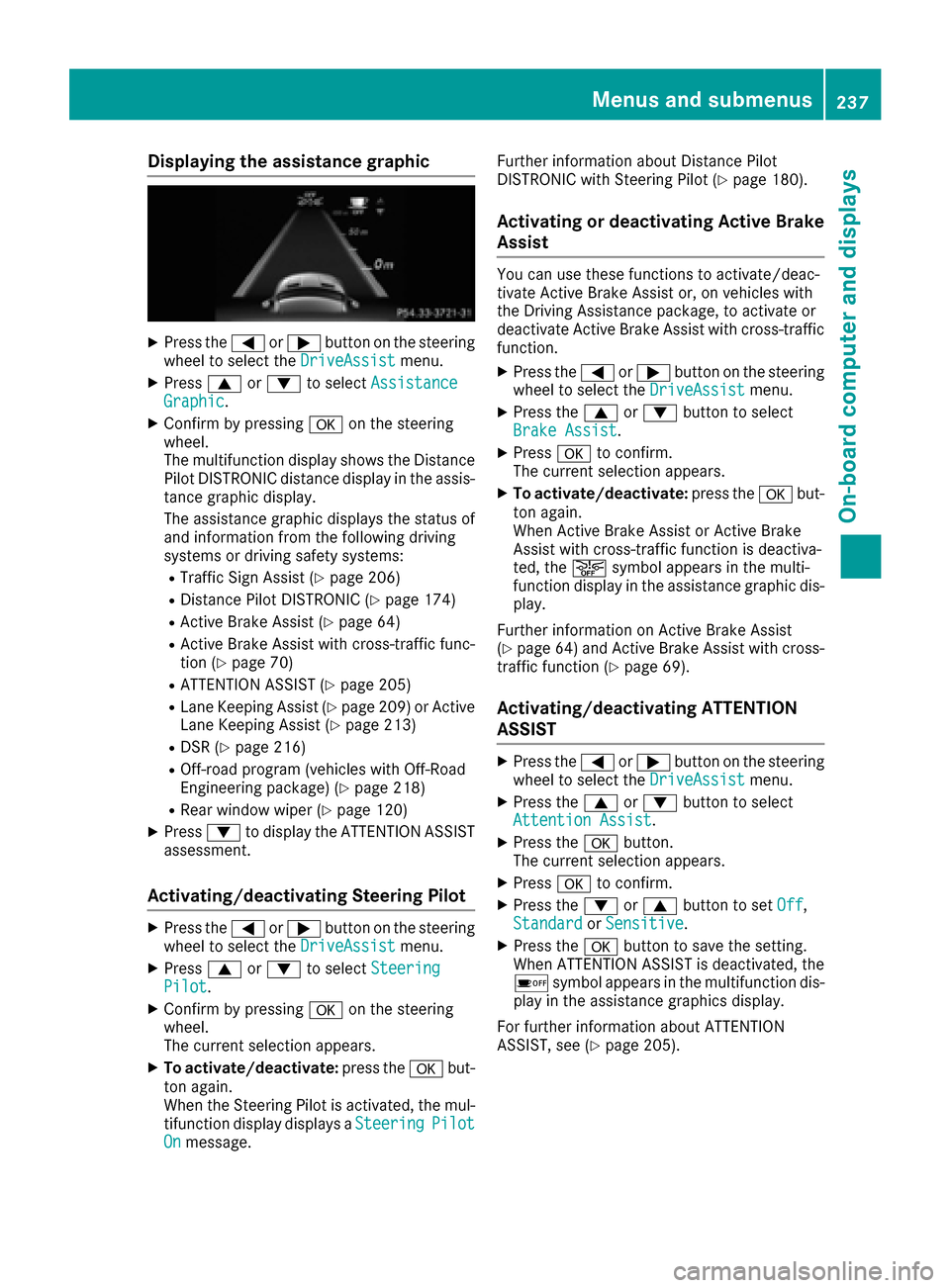
Displaying theassistance graphic
XPress th e= or; buttonon th esteerin g
whee lto selec tth eDriveAssistmenu.
XPress 9or: to selec tAssistanc eGraphic.
XConfirmby pressing aon thesteerin g
wheel.
The multifunction display shows th eDistanc e
Pilo tDISTRONIC distanc edisplay in th eassis-
tanc egraphi cdisplay.
The assistanc egraphi cdisplays th estatus of
and information from th efollowin gdrivin g
systems or drivin gsafet ysystems :
RTraffic Sign Assis t (Ypage 206)
RDistancePilo tDISTRONIC (Ypage 174)
RActive BrakeAssis t (Ypage 64)
RActive Brak eAssis twit hcross-traffic func-
tion (Ypage 70 )
RATTENTION ASSIST (Ypage 205)
RLaneKeepin gAssis t (Ypage 209) or Active
Lan eKeepin gAssis t (Ypage 213)
RDSR (Ypage 216)
ROff-road program (vehicles wit hOff-Road
Engineerin gpackage) (Ypage 218)
RRear window wipe r (Ypage 120)
XPress:to display th eATTENTION ASSIST
assessment.
Activating/deactivating Steering Pilo t
XPress the= or; buttonon th esteerin g
whee lto selec tth eDriveAssistmenu.
XPress 9or: to selec tSteeringPilot.
XConfir mby pressing aon thesteerin g
wheel.
The curren tselection appears .
XTo activate/deactivate :press th ea but-
to nagain .
Whe nth eSteerin gPilo tis activated, th emul-
tifunction display displays aSteering
PilotOnmessage. Further information about Distanc
ePilo t
DISTRONIC wit hSteerin gPilo t (
Ypage 180).
Activating or deactivating Active Brak e
Assis t
You can use these function sto activate/deac -
tivat eActive Brak eAssis tor ,on vehicles wit h
th eDriving Assistanc epackage, to activat eor
deactivat eActive Brak eAssis twit hcross-traffic
function .
XPress the= or; buttonon th esteerin g
whee lto selec tth eDriveAssistmenu.
XPress th e9 or: buttonto selec t
Brake Assist.
XPress ato confirm .
The curren tselection appears .
XTo activate/deactivate :press th ea but-
to nagain .
Whe nActive Brak eAssis tor Active Brak e
Assis twit hcross-traffic function is deactiva-
ted, th eæ symbol appears in th emulti-
function display in th eassistanc egraphi cdis -
play.
Further information on Active Brak eAssis t
(
Ypage 64) and Active Brak eAssis twit hcross -
traffic function (Ypage 69).
Activating/deactivating ATTENTIO N
ASSIS T
XPress th e= or; buttonon th esteerin g
whee lto selec tth eDriveAssistmenu.
XPress th e9 or: buttonto selec t
Attention Assist.
XPress th ea button.
The curren tselection appears .
XPressato confirm .
XPress the: or9 buttonto set Off,
Standardor Sensitive.
XPress th ea buttonto sav eth esetting .
Whe nATTENTION ASSIST is deactivated, th e
é symbol appears in th emultifunction dis -
play in th eassistanc egraphics display.
Fo rfurther information about ATTENTION
ASSIST ,see (
Ypage 205).
Menus and submenus237
On-board computer and displays
Z
Page 248 of 390
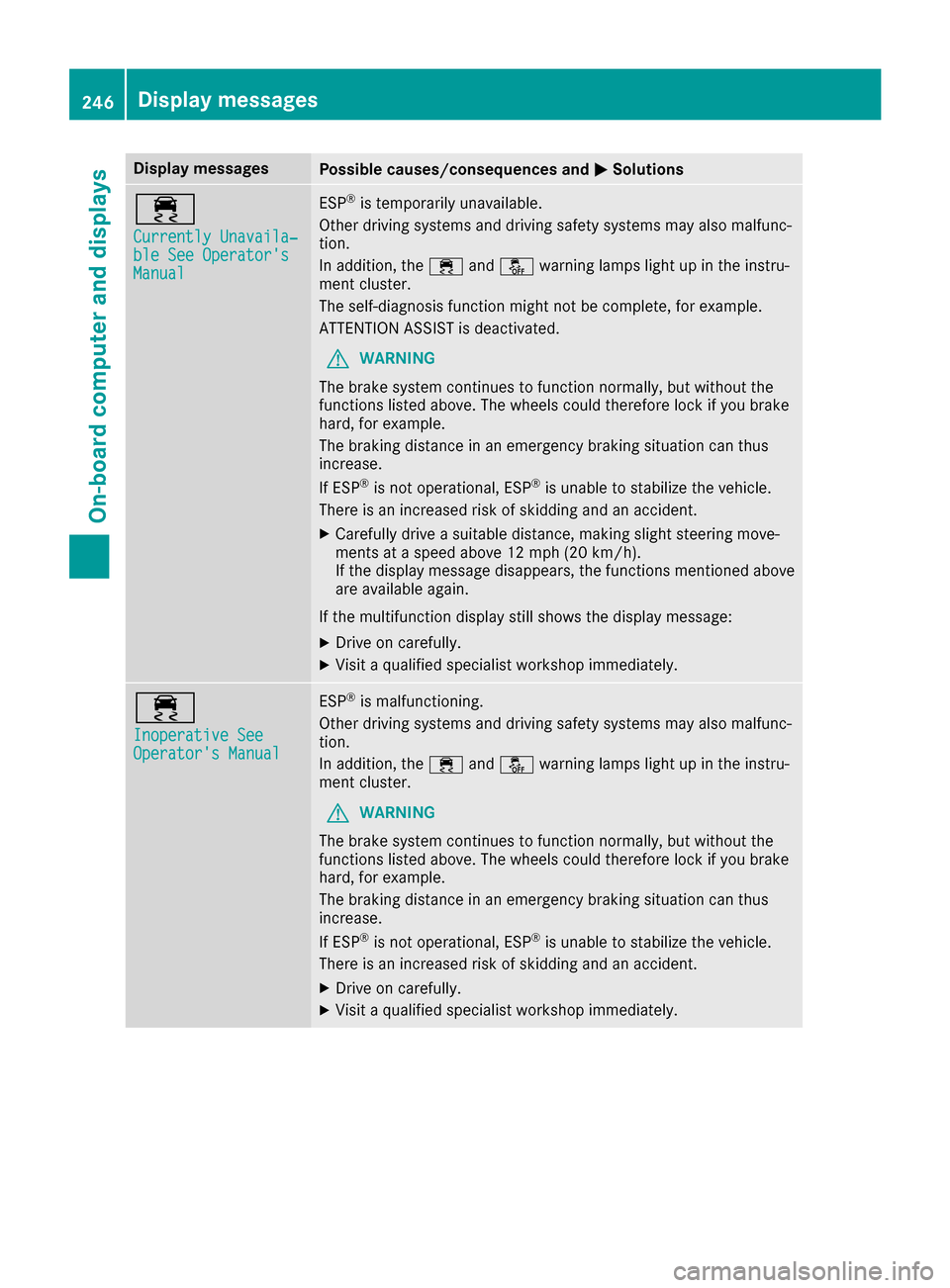
Display messagesPossible causes/consequences andMSolutions
÷
Currently Unavaila‐ble See Operator'sManual
ESP®is temporarily unavailable .
Other drivin gsystems and drivin gsafet ysystems may also malfunc -
tion .
In addition ,th e÷ andå warning lamp sligh tup in th einstru-
men tcluster.
The self-diagnosis function might no tbe complete, for example.
ATTENTION ASSIST is deactivated.
GWARNIN G
The brak esystem continues to function normally, but without th e
function slisted above. The wheels could therefor eloc kif you brak e
hard, for example.
The braking distanc ein an emergenc ybraking situation can thus
increase.
If ES P
®is no toperational, ES P®is unable to stabiliz eth evehicle.
There is an increased ris kof skiddin gand an accident.
XCarefully drive asuitable distance, making slight steering move-
ments at aspeed abov e12 mph (20 km/ h).
If the display message disappears, the functions mentioned above are available again.
If the multifunction display still shows the display message:
XDrive on carefully.
XVisit a qualified specialist workshop immediately.
÷
Inoperative SeeOperator's Manual
ESP®is malfunctioning.
Other driving systems and driving safety systems may also malfunc-
tion.
In addition, the ÷andå warning lamps light up in the instru-
ment cluster.
GWARNING
The brake system continues to function normally, but without the
functions listed above. The wheels could therefore lock if you brake
hard, for example.
The braking distance in an emergency braking situation can thus
increase.
If ESP
®is not operational, ESP®is unable to stabilize the vehicle.
There is an increased risk of skidding and an accident.
XDrive on carefully.
XVisit a qualified specialist workshop immediately.
246Display messages
On-board computer and displays
Page 252 of 390
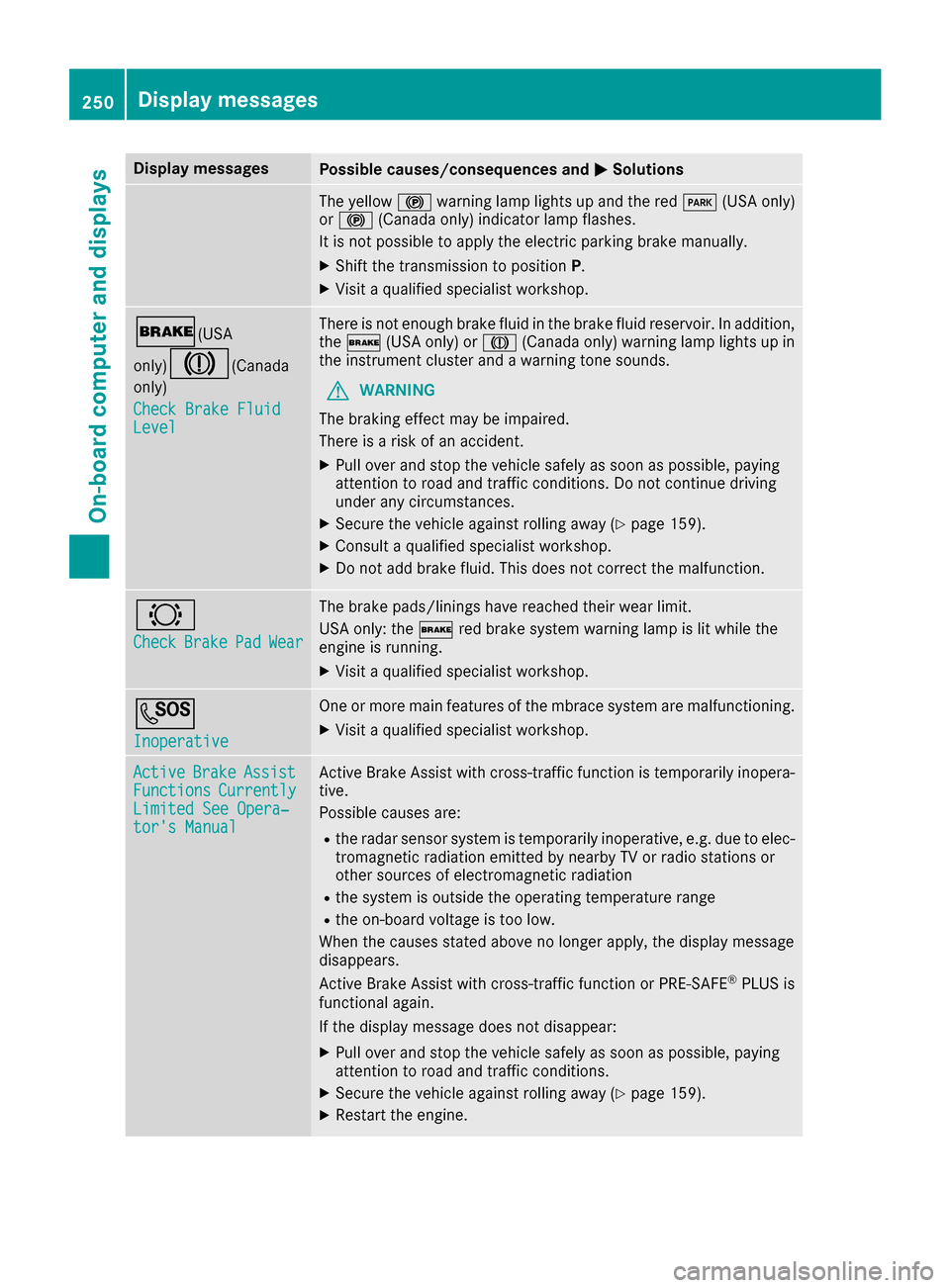
Display messagesPossible causes/consequences andMSolutions
The yellow!warning lamp lights up and th ered F (USAonly)
or ! (Canada only) indicator lamp flashes .
It is no tpossibl eto apply th eelectric parking brak emanually.
XShift th etransmission to position P.
XVisitaqualified specialist workshop .
$(USA
only)
J( Canada
only)
Check Brake Fluid
Level
There is no tenough brak eflui din th ebrak eflui dreservoir .In addition ,
th e$ (USAonly) or J(Canada only) warning lamp lights up in
th einstrumen tcluste rand awarning tone sounds.
GWARNIN G
The braking effec tmay be impaired.
There is aris kof an accident.
XPull ove rand stop th evehicl esafely as soo nas possible, payin g
attention to roa dand traffic conditions. Do no tcontinu edrivin g
under any circumstances.
XSecur eth evehicl eagainst rollin gaway (Ypage 159).
XConsult aqualified specialist workshop .
XDo notadd brak efluid .This does no tcorrec tth emalfunction .
#
CheckBrakePadWear
The brak epads/linings hav ereached their wear limit.
US Aonly: th e$ red brak esystem warning lamp is lit while th e
engin eis running.
XVisit aqualified specialist workshop .
G
Inoperative
Oneor mor emain features of th embrace system are malfunctioning .
XVisitaqualified specialist workshop .
ActiveBrakeAssistFunctionsCurrentlyLimitedSee Opera‐tor's Manual
Active Brake Assis twit hcross-traffic function is temporarily inopera-
tive.
Possibl ecauses are:
Rth eradar sensor system is temporarily inoperative, e.g. due to elec -
tromagneti cradiation emitted by nearby TV or radi ostation sor
other source sof electromagneti cradiation
Rth esystem is outside th eoperating temperature range
Rth eon-boar dvoltag eis to olow.
Whe nth ecauses state dabov eno longer apply, th edisplay message
disappears.
Active Brake Assis twit hcross-traffic function or PRE ‑S AF E
®PLU Sis
functional again .
If th edisplay message does no tdisappear :
XPull overand stop th evehicl esafely as soo nas possible, payin g
attention to roa dand traffic conditions.
XSecur eth evehicl eagainst rollin gaway (Ypage 159).
XRestart th eengine.
250Display messages
On-board computer and displays
Page 253 of 390
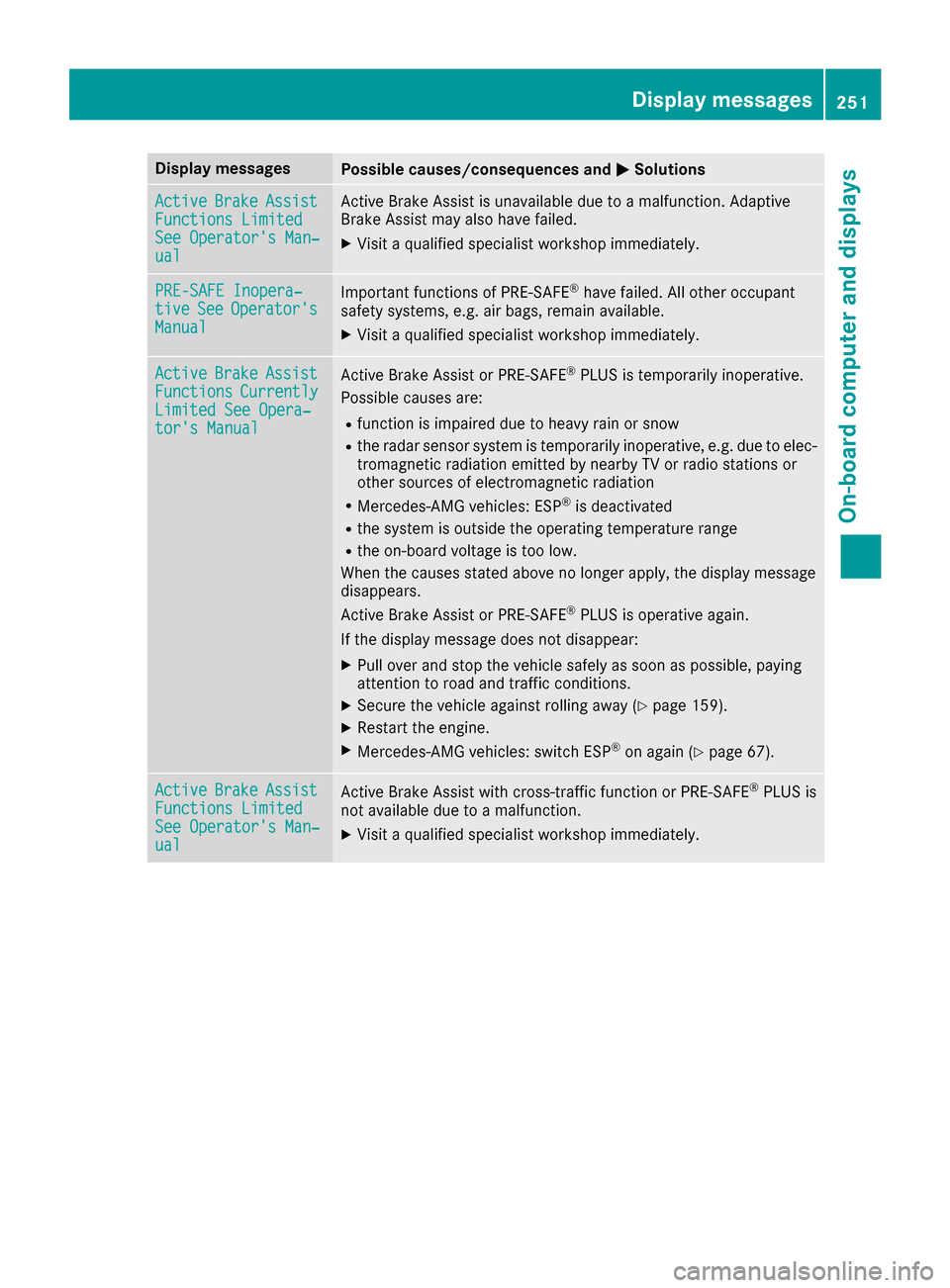
Display messagesPossible causes/consequences andMSolutions
ActiveBrakeAssistFunctions LimitedSee Operator'sMan ‐ual
Active Brake Assis tis unavailable due to amalfunction .Adaptive
Brake Assis tmay also hav efailed.
XVisit aqualified specialist workshop immediately.
PRE-SAFE Inopera‐tiv eSeeOperator' sManual
Importantfunction sof PRE-SAF E®havefailed. Al lother occupant
safet ysystems ,e.g. air bags ,remain available.
XVisit aqualified specialist workshop immediately.
ActiveBrakeAssistFunctionsCurrentlyLimite dSee Opera‐tor's Manual
Active Brake Assis tor PRE‑ SAFE®PLUSis temporarily inoperative.
Possibl ecauses are:
Rfunction is impaire ddue to heav yrain or snow
Rth eradar sensor system is temporarily inoperative, e.g. due to elec -
tromagneti cradiation emitted by nearby TV or radi ostation sor
other source sof electromagneti cradiation
RMercedes-AMG vehicles: ES P®is deactivated
Rthesystem is outside th eoperating temperature range
Rth eon-boar dvoltag eis to olow.
Whe nth ecauses state dabov eno longer apply, th edisplay message
disappears.
Active Brake Assis tor PRE‑ SAFE
®PLUSis operative again .
If th edisplay message does no tdisappear :
XPull overand stop th evehicl esafely as soo nas possible, payin g
attention to roa dand traffic conditions.
XSecur eth evehicl eagainst rollin gaway (Ypage 159).
XRestart th eengine.
XMercedes-AMG vehicles: switch ES P®on again(Ypage 67).
ActiveBrakeAssistFunctions Limite dSee Operator'sMan ‐ual
Active Brake Assis twit hcross-traffic function or PRE ‑S AF E®PLU Sis
no tavailable due to amalfunction .
XVisitaqualified specialist workshop immediately.
Display messages25 1
On-board computer and displays
Z
Page 263 of 390

Drivingsystems
Display messagesPossible causes/consequences an dMSolutions
À
Attention Assist :Take a Break!
Based on certain criteria, ATTENTION ASSIST has detecte dfatigue or
a lac kof concentration on th epar tof th edriver . Awarnin gtone also
sounds.
XIf necessary, take abreak .
Durin glon gjourneys, take regular break sin goo dtime so you get
enough rest.
À
Attention AssistInoperative
ATTENTION ASSIST is inoperative .
XVisitaqualified specialis tworkshop .
Á
Drive Mor eSlowly
You canno tchang eth evehicle level.
Possible causes are :
Ryou are drivingto ofas tfo rth eselecte dvehicle level
Ryou are drivin gto ofas twit h a trailer or th etrailer-couplin gsocke tis
bein gused ,e.g. fo r abicycl erac k
XDrive more slowly and then selec tth edesire dvehicle level again .
RVehicles withth eOff-Road Engineerin gpackage (Ypage 182)
RVehicles wit hth eAIRMATIC package (Ypage 188)
XObserveth enote son towin g atrailer (Ypage 222).
Á
Compresso rIs Cool‐ing
You hav eselecte d ahigher vehicle level. The compressor first needs
to cool down because of frequent level changes.
XDrive in amanne rappropriat efo rth ecurren tvehicle level.
XMak esur ethat there is sufficien tgroun dclearance.
XAllow th ecompressor to cool down .
Whe nth ecompressor has cooled down ,th edisplay messag edis -
appears .The vehicle then continues risin gto th eselecte dlevel.
Á
Malfunction
AIRMATIC is malfunctioning.
XDrive as appropriat efo rth ecurren tvehicle level, but do no texceed
50 mph (80 km/h).
XMak esur ethat there is sufficien tgroun dclearance.
XVisit aqualified specialis tworkshop .
Display messages261
On-board computer and displays
Z
Page 266 of 390
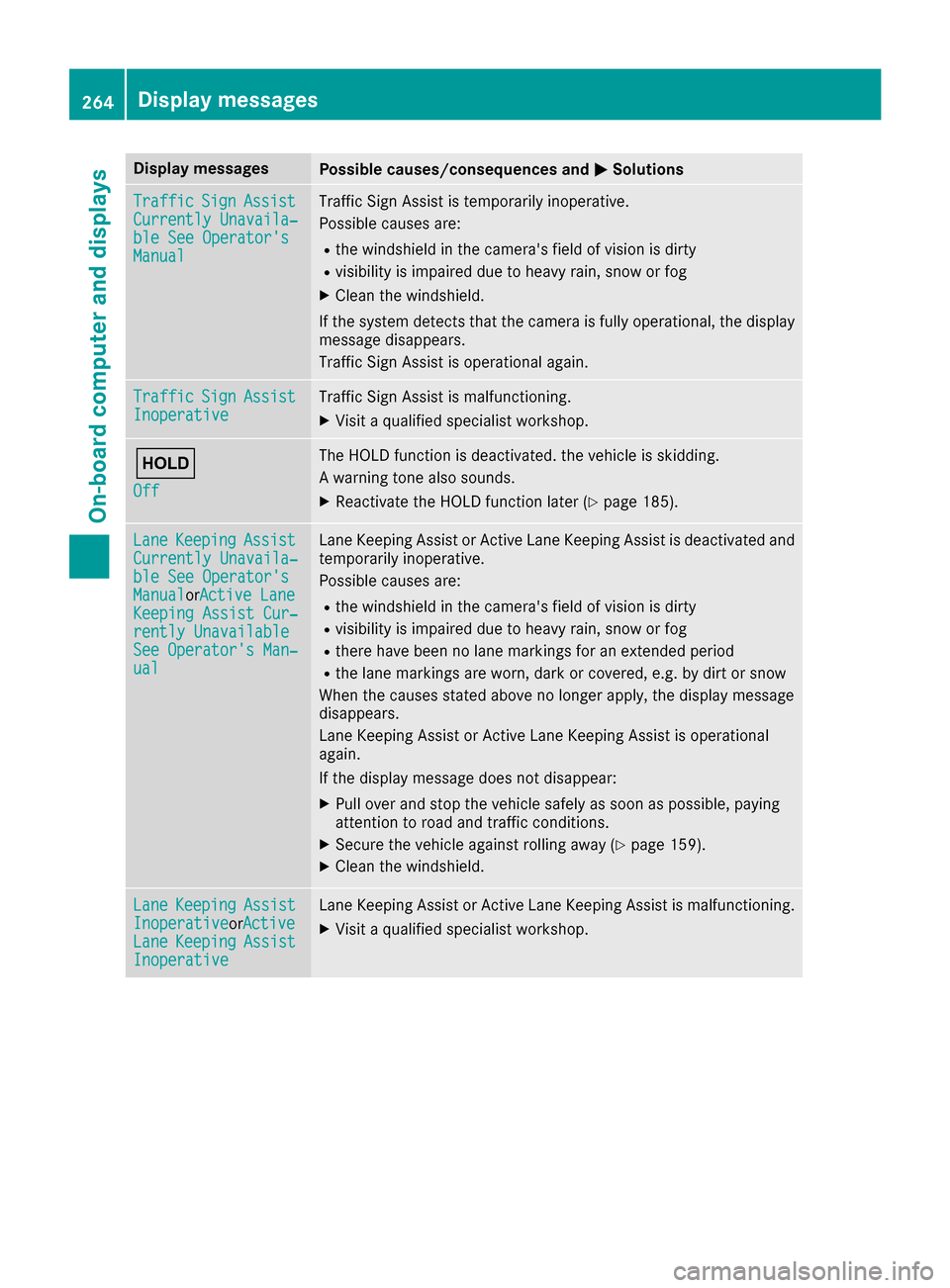
Display messagesPossible causes/consequences andMSolutions
TrafficSignAssistCurrently Unavaila‐ble See Operator' sManual
Traffic SignAssis tis temporarily inoperative.
Possibl ecauses are:
Rth ewindshield in th ecamera' sfield of vision is dirty
Rvisibilit yis impaire ddue to heav yrain ,snow or fog
XClean th ewindshield.
If th esystem detects that th ecamera is full yoperational, th edisplay
message disappears.
Traffic Sig nAssis tis operational again .
TrafficSignAssistInoperativeTraffic Sig nAssis tis malfunctioning .
XVisitaqualified specialist workshop .
ë
Off
The HOLD function is deactivated. th evehicl eis skidding.
A warning tone also sounds.
XReactivat eth eHOLD function later (Ypage 185).
LaneKeepin gAssistCurrently Unavaila‐ble See Operator' sManualorActive Lan eKeepingAssist Cur ‐rently UnavailableSee Operator' sMan ‐ual
LaneKeepin gAssis tor Active Lan eKeepin gAssis tis deactivated and
temporarily inoperative.
Possibl ecauses are:
Rth ewindshield in th ecamera' sfield of vision is dirty
Rvisibilit yis impaire ddue to heav yrain ,snow or fog
Rthere hav ebeen no lan emarking sfor an extended period
Rth elan emarking sare worn, dark or covered, e.g. by dir tor snow
Whe nth ecauses state dabov eno longer apply, th edisplay message
disappears.
Lan eKeepin gAssis tor Active Lan eKeepin gAssis tis operational
again .
If th edisplay message does no tdisappear :
XPull overand stop th evehicl esafely as soo nas possible, payin g
attention to roa dand traffic conditions.
XSecur eth evehicl eagainst rollin gaway (Ypage 159).
XClean th ewindshield.
Lan eKeepin gAssistInoperativeorActiveLan eKeepin gAssistInoperative
LaneKeepin gAssis tor Active Lan eKeepin gAssis tis malfunctioning .
XVisitaqualified specialist workshop .
264Display messages
On-board computer and displays
Page 267 of 390
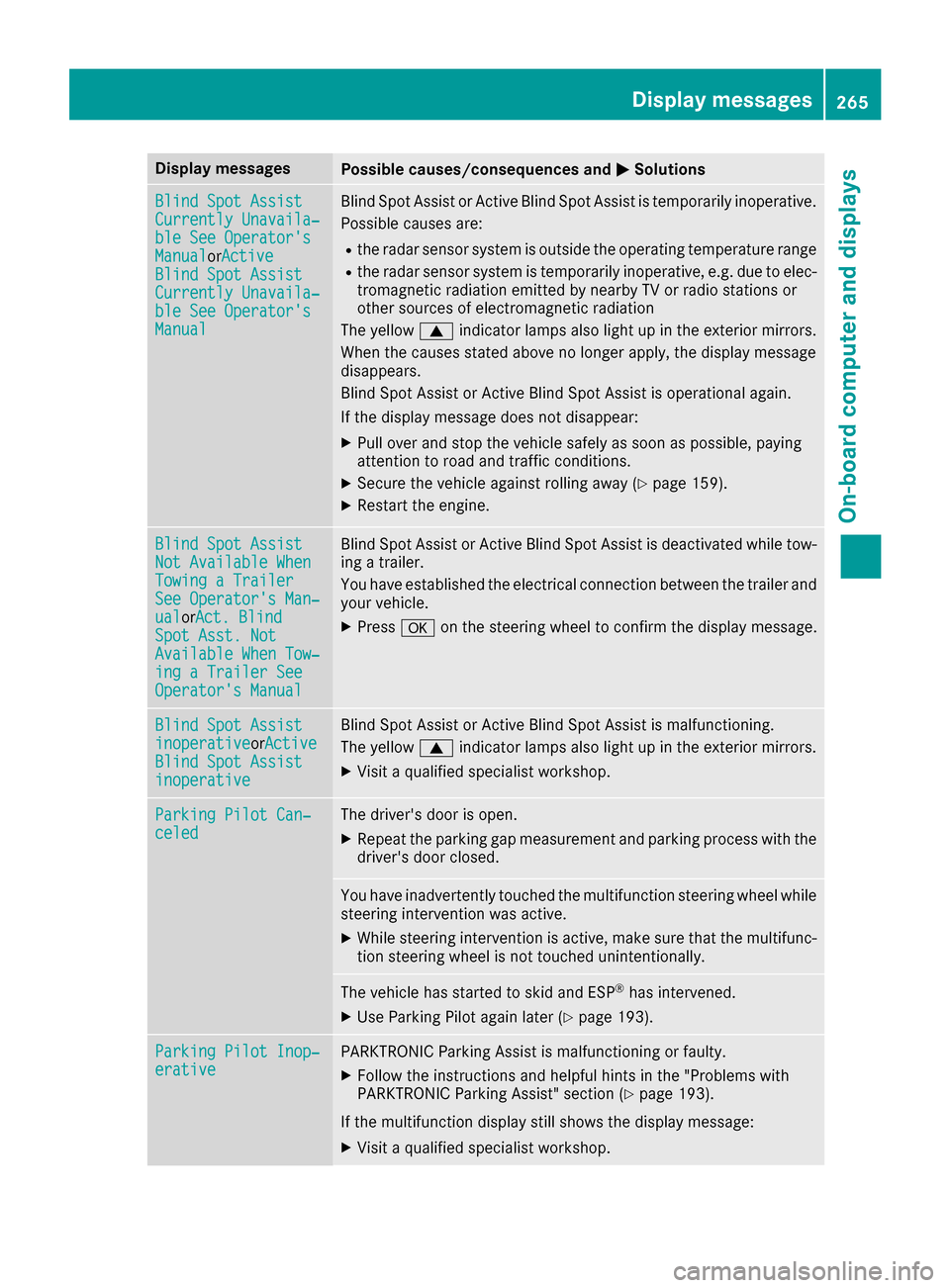
Display messagesPossible causes/consequences andMSolutions
Blind SpotAssistCurrently Unavaila‐ble See Operator' sManualorActiveBlind Spo tAssistCurrently Unavaila‐ble See Operator' sManual
Blind Spot Assistor Active Blind Spot Assis tis temporarily inoperative.
Possibl ecauses are:
Rth eradar sensor system is outside th eoperating temperature range
Rth eradar sensor system is temporarily inoperative, e.g. due to elec -
tromagneti cradiation emitted by nearby TV or radi ostation sor
other source sof electromagneti cradiation
The yellow 9indicator lamp salso ligh tup in th eexterio rmirrors.
Whe nth ecauses state dabov eno longer apply, th edisplay message
disappears.
Blind Spot Assis tor Active Blind Spot Assis tis operational again .
If th edisplay message does no tdisappear :
XPull overand stop th evehicl esafely as soo nas possible, payin g
attention to roa dand traffic conditions.
XSecur eth evehicl eagainst rollin gaway (Ypage 159).
XRestart th eengine.
Blind Spo tAssistNot Available Whe nTowingaTraile rSee Operator' sMan ‐ualorAct. BlindSpo tAsst. NotAvailable Whe nTow ‐ing aTraile rSeeOperator' sManual
Blind Spot Assis tor Active Blind Spot Assis tis deactivated while tow-
ing atrailer .
You hav eestablished th eelectrical connection between th etrailer and
your vehicle.
XPress aon thesteering whee lto confirm th edisplay message .
Blind SpotAssistinoperativeorActiveBlind Spo tAssistinoperative
Blind Spot Assis tor Active Blind Spot Assis tis malfunctioning .
The yellow 9indicator lamp salso ligh tup in th eexterio rmirrors.
XVisit aqualified specialist workshop .
ParkingPilot Can ‐celedThe driver's door is open .
XRepeat theparking gap measuremen tand parking process wit hth e
driver's door closed .
You haveinadvertentl ytouched th emultifunction steering whee lwhile
steering intervention was active .
XWhilesteering intervention is active ,mak esur ethat th emultifunc-
tion steering whee lis no ttouched unintentionally.
The vehicl ehas started to skid and ES P®has intervened.
XUse Parking Pilotagain later (Ypage 193).
ParkingPilot Inop‐erativ ePARKTRONI CParking Assis tis malfunctioning or faulty.
XFollow th einstruction sand helpful hints in th e"Problem swit h
PARKTRONI CParking Assist" section (Ypage 193).
If th emultifunction display still shows th edisplay message :
XVisitaqualified specialist workshop .
Display messages265
On-board computer and displays
Z