brake MERCEDES-BENZ GLS SUV 2016 User Guide
[x] Cancel search | Manufacturer: MERCEDES-BENZ, Model Year: 2016, Model line: GLS SUV, Model: MERCEDES-BENZ GLS SUV 2016Pages: 397, PDF Size: 14.21 MB
Page 34 of 397
It is advisable to register your vehicle with a
Mercedes-Benz Service Centre.
Inform Mercedes-Benz as soon as possible
about any change in address or vehicle owner-
ship. You can do this at a Mercedes-Benz Ser-
vice Centre, for example. Correct use
If you remove any warning stickers, you or oth-
ers could fail to recognise certain dangers.
Leave warning stickers in position.
Observe the following information when driving your vehicle:
R the safety notes in this manual
R the vehicle technical data
R traffic rules and regulations
R laws and safety standards pertaining to motor
vehicles Implied warranty
! Follow the instructions in this manual about
the proper operation of your vehicle as well as
about possible vehicle damage. Damage to
your vehicle that arises from culpable contra- ventions against these instructions are not
covered either by Mercedes-Benz implied
warranty or by the New or Used-Vehicle War-
ranty. QR code for rescue card
The QR code is secured in the fuel filler flap and
on the opposite side on the B-pillar. In the event
of an accident, rescue services can use the QR
code to quickly find the appropriate rescue card for your vehicle. The current rescue card con-
tains, in a compact form, the most important
information about your vehicle, e.g. the routing
of the electric cables.
You can find more information under http://
portal.aftersales.i.daimler.com/public/
content/asportal/en/communication/
informationen_fuer/QRCode.html. Data stored in the vehicle
Many of the electronic components in your vehi-
cle can store data.
These data memories temporarily or perma-
nently store technical information about:
R the vehicle's operating state
R events
R faults
In general, this technical information docu-
ments the state of a component, a module, a
system or the surroundings.
This includes, for example:
R operating conditions of system components,
e.g. fluid levels
R status messages concerning the vehicle and
its individual components, e.g. number of
wheel revolutions/speed, deceleration in
movement, lateral acceleration, accelerator
pedal position
R malfunctions and defects in important system
components, e.g. lights, brakes
R vehicle reactions and operating conditions in
special driving situations, e.g. airbag deploy-
ment, intervention of stability control sys-
tems
R ambient conditions, e.g. outside temperature
These data are of an exclusively technical nature
and can be used to:
R assist in detecting and rectifying faults and
defects
R analyse vehicle functions, e.g. after an acci-
dent
R optimise vehicle functions
The data cannot be used to trace the vehicle's
movements.
When your vehicle is serviced, technical infor-
mation can be read from the event data memory
and fault data memory.
Services include, for example:
R repair services
R service processes
R warranty events
R quality assurance
The information is read out by employees of the service network (including the manufacturer)
using special diagnostic testers. You can obtain more information there, if required. Introduction
31 Z
Page 36 of 397
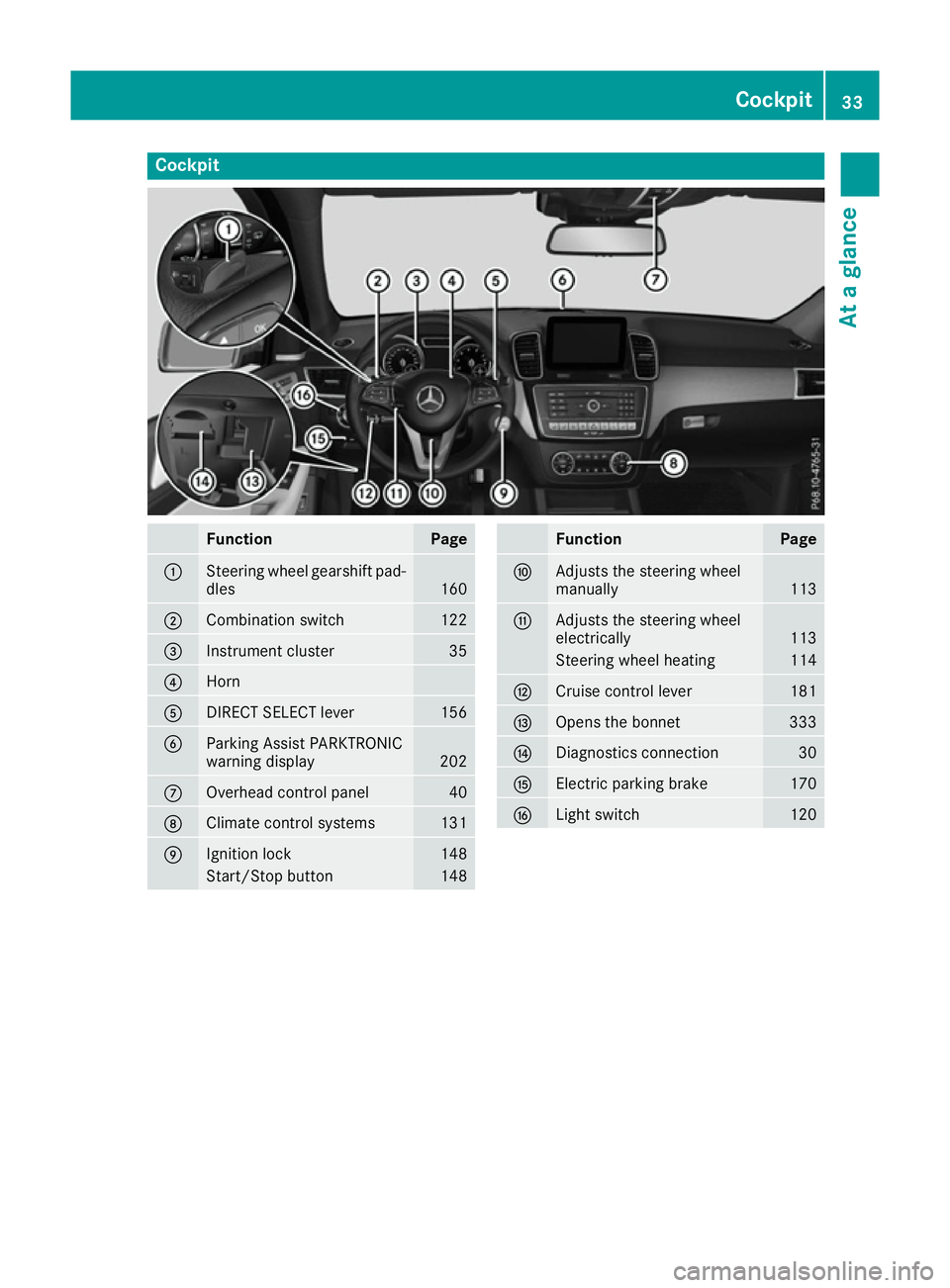
Cockpit
Function Page
:
Steering wheel gearshift pad-
dles 160
;
Combination switch 122
=
Instrument cluster 35
?
Horn
A
DIRECT SELECT lever 156
B
Parking Assist PARKTRONIC
warning display
202
C
Overhead control panel 40
D
Climate control systems 131
E
Ignition lock 148
Start/Stop button 148 Function Page
F
Adjusts the steering wheel
manually
113
G
Adjusts the steering wheel
electrically
113
Steering wheel heating 114
H
Cruise control lever 181
I
Opens the bonnet 333
J
Diagnostics connection 30
K
Electric parking brake 170
L
Light switch 120Cockpit
33At a glance
Page 37 of 397
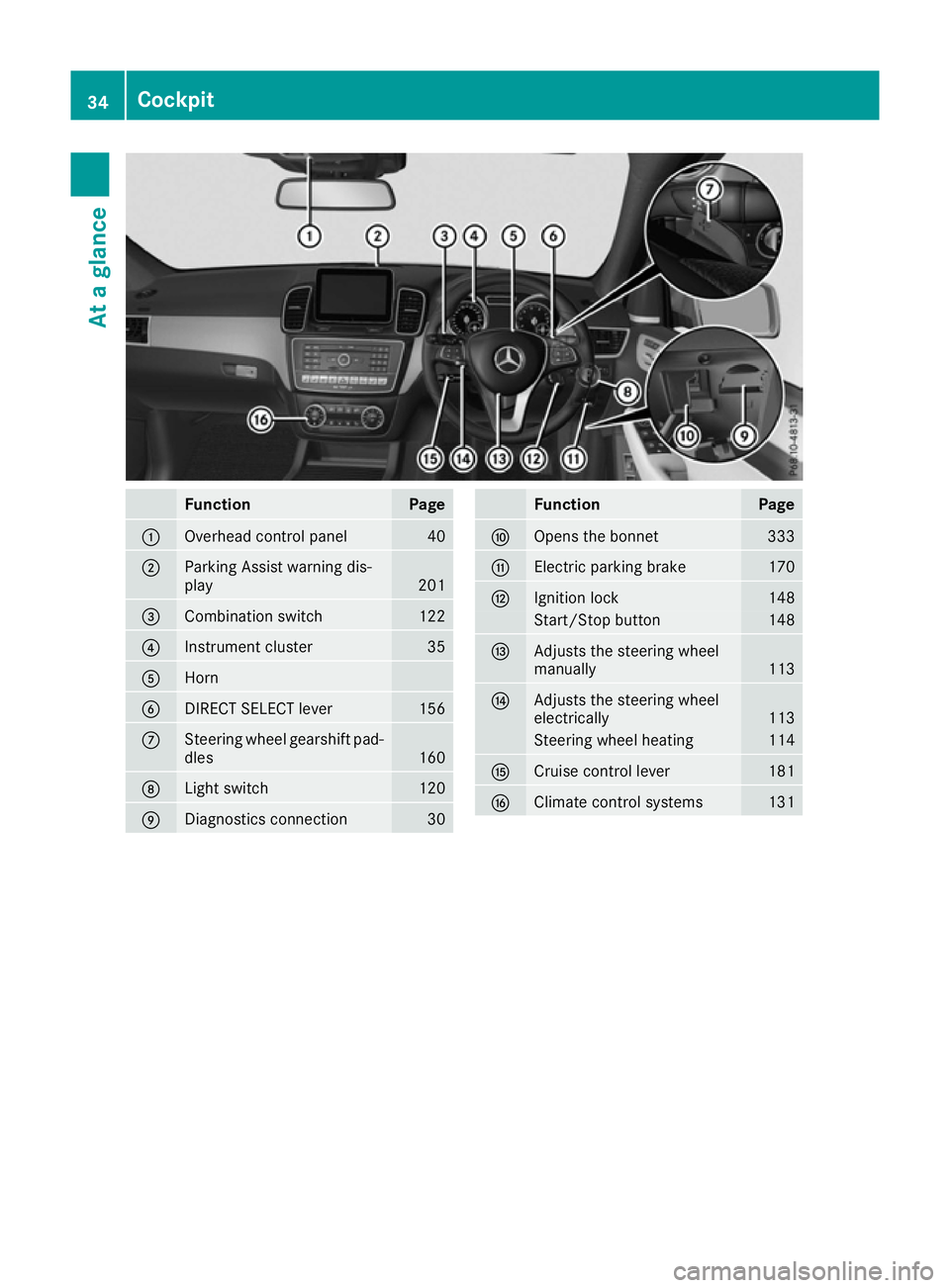
Function Page
:
Overhead control panel 40
;
Parking Assist warning dis-
play
201
=
Combination switch 122
?
Instrument cluster 35
A
Horn
B
DIRECT SELECT lever 156
C
Steering wheel gearshift pad-
dles 160
D
Light switch 120
E
Diagnostics connection 30 Function Page
F
Opens the bonnet 333
G
Electric parking brake 170
H
Ignition lock 148
Start/Stop button 148
I
Adjusts the steering wheel
manually
113
J
Adjusts the steering wheel
electrically
113
Steering wheel heating 114
K
Cruise control lever 181
L
Climate control systems 13134
CockpitAt a glance
Page 38 of 397
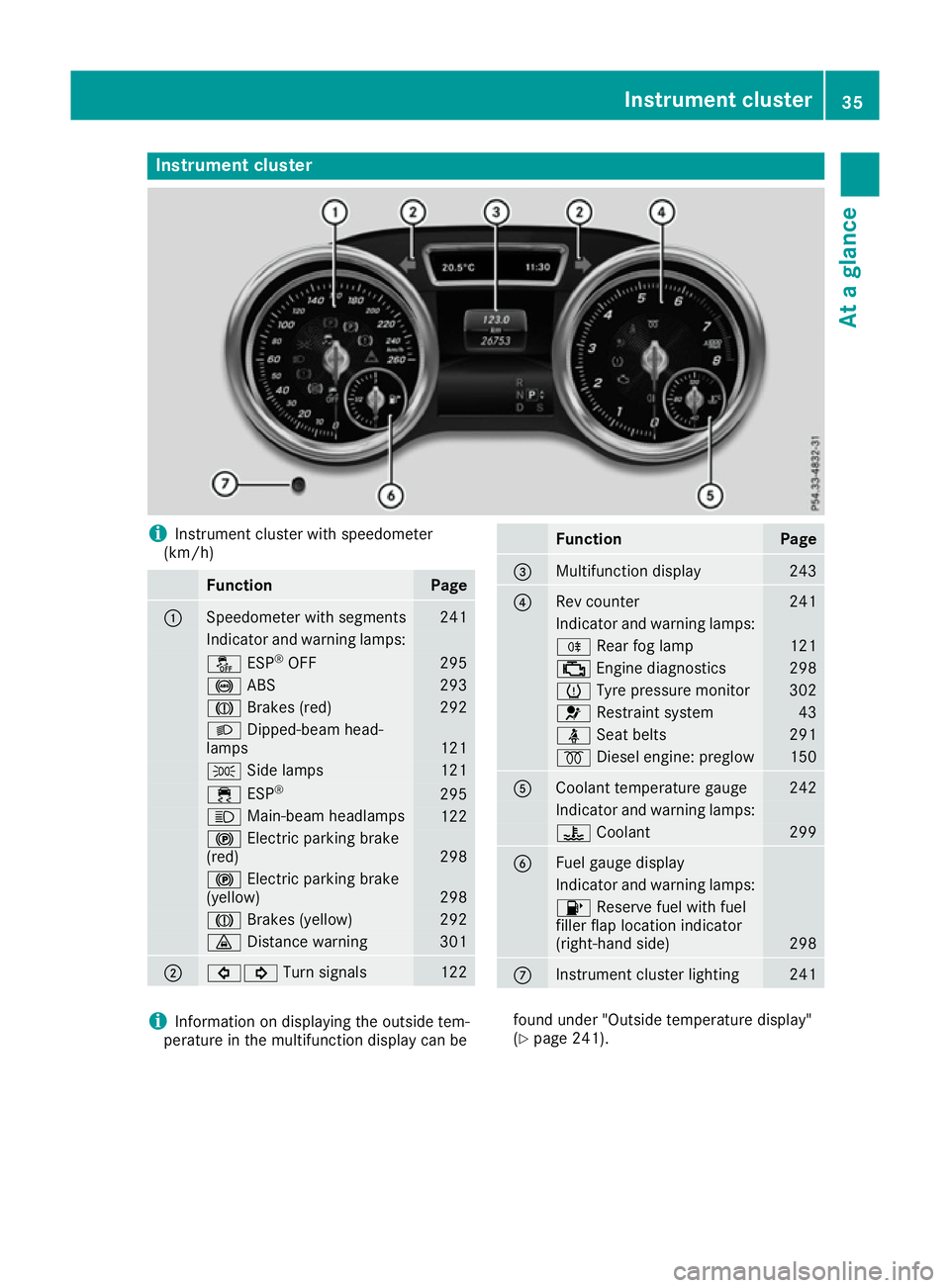
Instrument cluster
i
Instrument cluster with speedometer
(km/h) Function Page
:
Speedometer with segments 241
Indicator and warning lamps:
å
ESP®
OFF 295
!
ABS 293
J
Brakes (red) 292
L
Dipped-beam head-
lamps 121
T
Side lamps 121
÷
ESP® 295
K
Main-beam headlamps 122
!
Electric parking brake
(red) 298
!
Electric parking brake
(yellow) 298
J
Brakes (yellow) 292
·
Distance warning 301
;
#!
Turn signals 122 Function Page
=
Multifunction display 243
?
Rev counter 241
Indicator and warning lamps:
R
Rear fog lamp 121
;
Engine diagnostics 298
h
Tyre pressure monitor 302
6
Restraint system 43
ü
Seat belts 291
%
Diesel engine: preglow 150
A
Coolant temperature gauge 242
Indicator and warning lamps:
?
Coolant 299
B
Fuel gauge display
Indicator and warning lamps:
8
Reserve fuel with fuel
filler flap location indicator
(right-hand side) 298
C
Instrument cluster lighting 241
i
Information on displaying the outside tem-
perature in the multifunction display can be found under "Outside temperature display"
(Y
page 241). Instrument cluster
35At a glance
Page 60 of 397
uations, PRE-SAFE
®
PLUS takes pre-emptive
measures to protect the vehicle occupants.
Important safety notes The intervention of PRE-SAFE
®
PLUS cannot
prevent an imminent collision.
The driver is not warned before the intervention
of PRE-SAFE ®
PLUS.
PRE-SAFE ®
PLUS does not intervene:
R if the vehicle is reversing
R when the vehicle is towing a trailer and there
is a risk of a rear-end collision
When driving, or when parking or exiting a park-
ing space with assistance from Parking Pilot,
PRE-SAFE ®
PLUS will not apply the brakes.
Function PRE-SAFE
®
PLUS intervenes in certain situa-
tions if the radar sensor system detects an
imminent head-on or rear-end collision.
PRE-SAFE ®
PLUS takes the following measures
depending on the hazardous situation detected:
R if the radar sensor system detects that a
head-on collision is imminent, the seat belts
are pre-tensioned
R if the radar sensor system detects that a rear-
end collision is imminent:
- the rear hazard warning lamps are activa-
ted and flash at a higher frequency
- the brake pressure is increased if the driver
applies the brakes when the vehicle is sta- tionary
- the seat belts are pre-tensioned
The PRE-SAFE ®
PLUS braking application is can-
celled:
R if the accelerator pedal is depressed when a
gear is engaged
R if the risk of a collision passes or is no longer
detected
R if Distance Pilot DISTRONIC indicates an
intention to pull away
If the hazardous situation passes without result- ing in an accident, the original settings are
restored. Automatic measures after an acci-
dent
Immediately after an accident, the following
measures may be implemented, depending on
the type and severity of the impact:
R the hazard warning lamps are activated
R the emergency lighting is activated
R the vehicle doors are unlocked
R the front side windows are lowered
R vehicles with a memory function: the electri-
cally adjustable steering wheel is raised
R the engine is switched off and the fuel supply
is cut off
R vehicles with the Mercedes-Benz emergency
call system: automatic emergency call Children in the vehicle
Important safety notes
Accident statistics show that children secured
in the rear seats are safer than children secured in the front seats. For this reason, Mercedes-
Benz strongly advises that you fit a child
restraint system on a rear seat. Children are
generally better protected there.
If a child younger than twelve years old and
under 1.50 m in height is travelling in the vehi-
cle:
R always secure the child in a child restraint
system suitable for Mercedes-Benz vehicles.
The child restraint system must be appropri-
ate to the age, weight and size of the child.
R be sure to observe the instructions and safety
notes in this section in addition to the child
restraint system manufacturer's installation
instructions
R be sure to observe the instructions and safety
notes on the automatic front-passenger front
airbag deactivation system (Y page 50). Children in the vehicle
57Safety Z
Page 61 of 397

G
WARNING
If you leave children unattended in the vehi-
cle, they may be able to set the vehicle in
motion if, for example, they:
R release the parking brake
R shift the automatic transmission out of park
position P
R start the engine
In addition, they may operate vehicle equip-
ment and become trapped. There is a risk of
an accident and injury.
When leaving the vehicle, always take the key
with you and lock the vehicle. Never leave
children unattended in the vehicle. G
WARNING
If persons (particularly children) are exposed
to heat or cold for a prolonged period, there is a risk of serious or even fatal injuries. Never
leave persons (particularly children) unatten-
ded in the vehicle. G
WARNING
If the child restraint system is placed in direct sunlight, the parts could become very hot.
Children could be suffer burns by touching
these parts, in particular on the metallic parts
of the child restraint system. There is a risk of injury.
If you and your child leave the vehicle, always
make sure that the child restraint system is
not in direct sunlight. Cover it with a blanket, for example. If the child restraint system has
been exposed to direct sunlight, leave it to
cool down before securing the child in it.
Never leave children unattended in the vehi-
cle.
Always ensure that all vehicle occupants have
their seat belts fastened correctly and are sitting
properly. Particular attention must be paid to
children.
Observe the safety notes on the seat belt
(Y page 44) and the notes on how to use the seat
belt properly (Y page 45). Child restraint system
If you fit a rearward-facing child restraint system
to the centre rear seat, the rear arm rest must be folded back as far as possible.
Observe the instructions for correct use of the
child restraint system (Y page 62).
For safety reasons, Mercedes-Benz recom-
mends that you use only a child restraint system recommended by Mercedes-Benz
(Y page 65). G
WARNING
If the child restraint system is incorrectly fit-
ted on the seat position suitable for this pur-
pose, it cannot perform its intended protec-
tive function. In the event of an accident,
sharp braking or a sudden change in direction, the child may not be held securely. There is an
increased risk of serious or even fatal injuries.
Observe the manufacturer's installation
instructions and the correct use for the child
restraint system. Make sure that the entire
surface of the child restraint system is resting
on the seat surface. Never place objects
under or behind the child restraint system,
e.g. cushions. Only use child restraint sys-
tems with the original cover designed for
them. Only replace damaged covers with gen- uine covers. G
WARNING
If the child restraint system is fitted incor-
rectly or is not secured, it can come loose in
the event of an accident, heavy braking or a
sudden change in direction. The child
restraint system could be thrown about, strik- ing vehicle occupants. There is an increased
risk of injury, possibly even fatal.
Always fit child restraint systems properly,
even if they are not being used. Make sure
that you observe the child restraint system
manufacturer's installation instructions.
Further information on stowing objects, luggage and loads securely can be found under "Loading
guidelines" (Y page 312).58
Children in the vehicleSafety
Page 70 of 397

Child-proof locks
Important safety notes G
WARNING
If children are travelling in the vehicle, they
could:
R open doors, thus endangering other people
or road users
R exit the vehicle and be caught by oncoming
traffic
R operate vehicle equipment and become
trapped, for example
There is a risk of an accident and injury.
Always activate the child-proof locks and
override feature if children are travelling in the vehicle. When leaving the vehicle, always take the key with you and lock the vehicle. Never
leave children unattended in the vehicle.
Override feature for:
R the rear doors (Y page 67)
R the rear side windows (Y page 68)
Observe the important safety notes on the dou- ble-lock function (Y page 81). G
WARNING
If you leave children unattended in the vehi-
cle, they may be able to set the vehicle in
motion if, for example, they:
R release the parking brake
R shift the automatic transmission out of park
position P
R start the engine
In addition, they may operate vehicle equip-
ment and become trapped. There is a risk of
an accident and injury.
When leaving the vehicle, always take the key
with you and lock the vehicle. Never leave
children unattended in the vehicle. G
WARNING
If persons (particularly children) are exposed
to heat or cold for a prolonged period, there is a risk of serious or even fatal injuries. Never leave persons (particularly children) unatten-
ded in the vehicle.
G
WARNING
If the child restraint system is placed in direct sunlight, the parts could become very hot.
Children could be suffer burns by touching
these parts, in particular on the metallic parts
of the child restraint system. There is a risk of injury.
If you and your child leave the vehicle, always
make sure that the child restraint system is
not in direct sunlight. Cover it with a blanket, for example. If the child restraint system has
been exposed to direct sunlight, leave it to
cool down before securing the child in it.
Never leave children unattended in the vehi-
cle.
Child-proof locks for the rear doors You secure each door individually with the child-
proof locks on the rear doors. A door secured
with a child-proof lock cannot be opened from
inside the vehicle. When the vehicle is unlocked, the door can be opened from the outside.
X To activate: press the child-proof lock lever
up in the direction of arrow :.
X Make sure that the child-proof locks are work-
ing properly.
X To deactivate: press the child-proof lock
lever down in the direction of arrow ;. Children in the vehicle
67Safety Z
Page 71 of 397
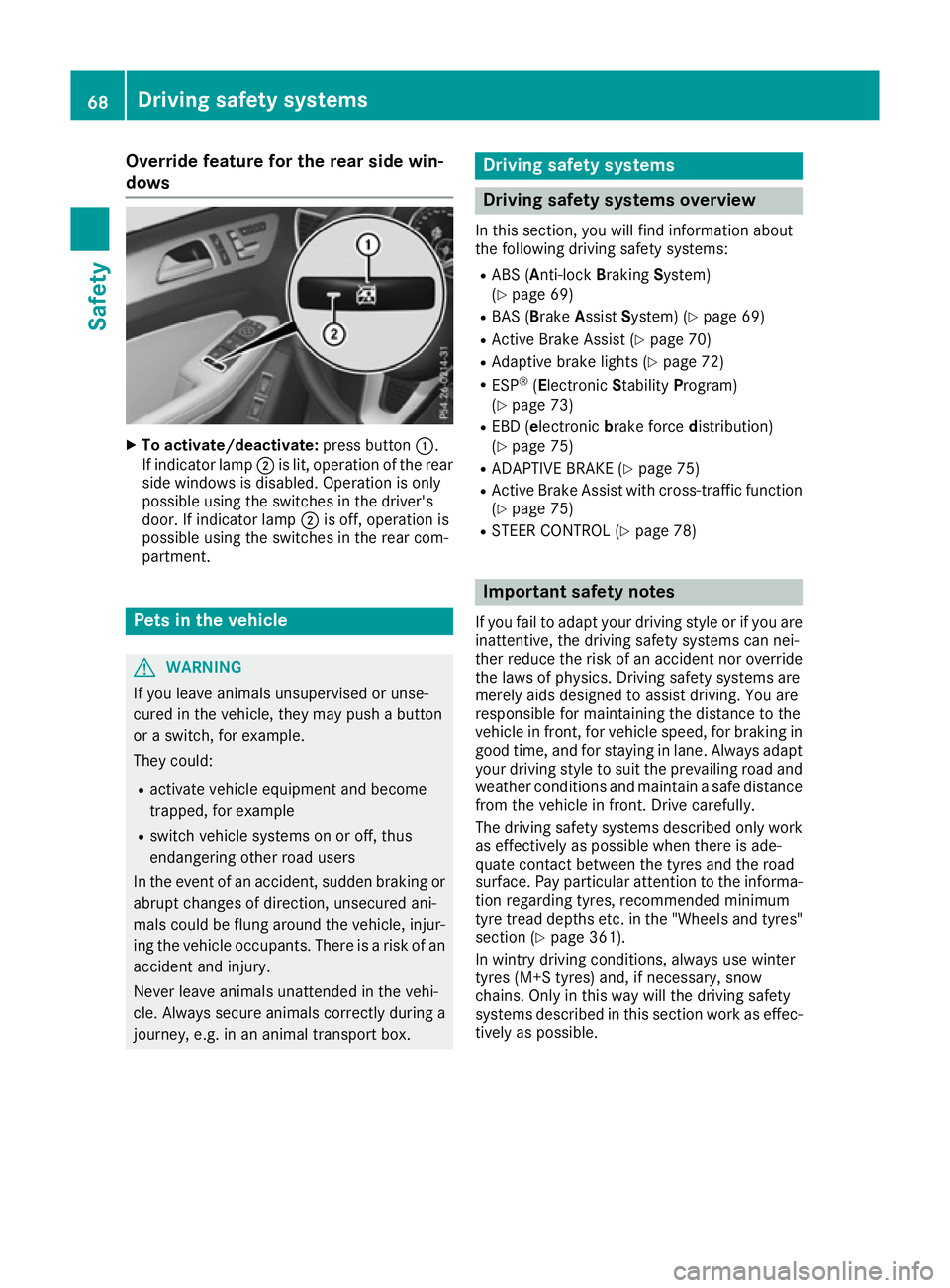
Override feature for the rear side win-
dows X
To activate/deactivate: press button:.
If indicator lamp ;is lit, operation of the rear
side windows is disabled. Operation is only
possible using the switches in the driver's
door. If indicator lamp ;is off, operation is
possible using the switches in the rear com-
partment. Pets in the vehicle
G
WARNING
If you leave animals unsupervised or unse-
cured in the vehicle, they may push a button
or a switch, for example.
They could:
R activate vehicle equipment and become
trapped, for example
R switch vehicle systems on or off, thus
endangering other road users
In the event of an accident, sudden braking or
abrupt changes of direction, unsecured ani-
mals could be flung around the vehicle, injur-
ing the vehicle occupants. There is a risk of an accident and injury.
Never leave animals unattended in the vehi-
cle. Always secure animals correctly during a
journey, e.g. in an animal transport box. Driving safety systems
Driving safety systems overview
In this section, you will find information about
the following driving safety systems:
R ABS (A nti-lock Braking System)
(Y page 69)
R BAS (Brake AssistSystem) (Y page 69)
R Active Brake Assist (Y page 70)
R Adaptive brake lights (Y page 72)
R ESP ®
(Electronic StabilityProgram)
(Y page 73)
R EBD (e lectronic brake force distribution)
(Y page 75)
R ADAPTIVE BRAKE (Y page 75)
R Active Brake Assist with cross-traffic function
(Y page 75)
R STEER CONTROL (Y page 78) Important safety notes
If you fail to adapt your driving style or if you are
inattentive, the driving safety systems can nei-
ther reduce the risk of an accident nor override the laws of physics. Driving safety systems are
merely aids designed to assist driving. You are
responsible for maintaining the distance to the
vehicle in front, for vehicle speed, for braking in
good time, and for staying in lane. Always adapt your driving style to suit the prevailing road and
weather conditions and maintain a safe distance from the vehicle in front. Drive carefully.
The driving safety systems described only work
as effectively as possible when there is ade-
quate contact between the tyres and the road
surface. Pay particular attention to the informa- tion regarding tyres, recommended minimum
tyre tread depths etc. in the "Wheels and tyres" section (Y page 361).
In wintry driving conditions, always use winter
tyres (M+S tyres) and, if necessary, snow
chains. Only in this way will the driving safety
systems described in this section work as effec-
tively as possible. 68
Driving safety systemsSafety
Page 72 of 397
ABS (Anti-lock Braking System)
General notes ABS regulates brake pressure in such a way that
the wheels do not lock when you brake. This
allows you to continue steering the vehicle when braking.
The ! ABS warning lamp in the instrument
cluster lights up when the ignition is switched
on. It goes out when the engine is running.
ABS works from a speed of about 8 km/h,
regardless of road-surface conditions. ABS
works on slippery surfaces, even when you only
brake gently.
Important safety notes i
Observe the "Important safety notes" sec-
tion (Y page 68). G
WARNING
If ABS is faulty, the wheels could lock when
braking. The steerability and braking charac-
teristics may be severely impaired. Addition-
ally, further driving safety systems are deac-
tivated. There is an increased danger of skid- ding and accidents.
Drive on carefully. Have ABS checked imme-
diately at a qualified specialist workshop.
If ABS is malfunctioning, other systems, includ-
ing driving safety systems, will also become
inoperative. Observe the information on the ABS warning lamp (Y page 293) and display mes-
sages which may be shown in the instrument
cluster (Y page 259).
Braking X
If ABS intervenes: continue to depress the
brake pedal with force until the braking sit-
uation is over.
X To make a full brake application: depress
the brake pedal with full force.
If ABS intervenes when braking, you will feel a
pulsing in the brake pedal.
The pulsating brake pedal can be an indication
of hazardous road conditions; this serves as a
reminder to take extra care while driving. Off-road ABS An ABS system specifically suited to off-road
terrain is activated automatically once an off-
road program is activated:
R Vehicles without the Off-Road Engineering
package (Y page 228)
R Vehicles with the Off-Road Engineering pack-
age (Y page 229)
At speeds below 30 km/h the front wheels lock cyclically during braking. The digging-in effect
achieved in the process reduces the stopping
distance when driving off-road. This limits steer- ing capability. BAS (Brake Assist System)
General notes BAS operates in emergency braking situations.
If you depress the brake pedal quickly, BAS
automatically boosts the braking force, thus
shortening the stopping distance.
Important safety notes i
Observe the "Important safety notes" sec-
tion (Y page 68). G
WARNING
If BAS is malfunctioning, the braking distance
in an emergency braking situation is
increased. There is a risk of accident.
In an emergency braking situation, depress
the brake pedal with full force. ABS prevents
the wheels from locking.
Braking X
Keep the brake pedal depressed firmly until
the emergency braking situation is over.
ABS prevents the wheels from locking.
The brakes will function as usual once you
release the brake pedal. BAS is deactivated. Driving safety systems
69Safety Z
Page 73 of 397
Active Brake Assist
General information i
Observe the "Important safety notes" sec-
tion (Y page 68).
Active Brake Assist consists of a distance warn-
ing function with an autonomous braking func-
tion and Adaptive Brake Assist.
Active Brake Assist can help you to minimise the
risk of a collision with the vehicle travelling in
front or reduce the effects of such a collision.
If Active Brake Assist detects that there is a risk of collision, you will be warned visually and
acoustically. If you do not react to the visual and
audible collision warning, autonomous braking
can be initiated in critical situations. If you apply
the brake yourself in a critical situation, Adap-
tive Brake Assist of the Active Brake Assist sys- tem supports you.
Important safety notes In particular, the detection of obstacles can be
impaired in the following situations:
R dirt on the sensors or obscured sensors
R snow or heavy rain
R interference by other radar sources
R strong radar reflections, for example, in multi-
storey car parks
R a narrow vehicle travelling in front, e.g. a
motorcycle
R a vehicle travelling in front on a different line
R new vehicles or after servicing is carried out
on the Active Brake Assist system
Please observe the information in the section on running-in the vehicle (Y page 147).
Following damage to the front end of the vehicle, have the configuration and operation of the
radar sensor checked at a qualified specialist
workshop. This also applies to collisions at low
speeds where no damage to the front of the
vehicle is visible.
Activating/deactivating Active Brake Assist is automatically active after
switching on the ignition.
You can activate or deactivate Active Brake
Assist (Y page 250) in the on-board computer.
When the system is deactivated, the distance warning function and the autonomous braking
function are also deactivated.
If Active Brake Assist is deactivated, the
æ
symbol appears in the assistance graphic dis-
play.
If DSR (Y page 227) is activated, Active Brake
Assist is deactivated.
Distance warning function General information
The distance warning function can help you to
minimise the risk of collision with the vehicle in
front or reduce the effects of such a collision. If the distance warning function detects a risk of
collision with the vehicle in front, you will be
warned visually and acoustically.
Important safety notes i Observe the "Important safety notes" sec-
tion for driving safety systems (Y page 68). G
WARNING
The distance warning function does not react:
R to people or animals
R to oncoming vehicles
R to crossing traffic
R when cornering
Thus, the distance warning function cannot
provide a warning in all critical situations.
There is a risk of an accident.
Always pay careful attention to the traffic sit-
uation and be ready to brake. G
WARNING
The distance warning function cannot always
clearly identify objects and complex traffic
situations.
In such cases, the distance warning function
may:
R give an unnecessary warning
R not give a warning
There is a risk of an accident.
Always pay careful attention to the traffic sit-
uation; do not rely on the distance warning
function alone. 70
Driving safety systemsSafety