light MERCEDES-BENZ GLS SUV 2016 User Guide
[x] Cancel search | Manufacturer: MERCEDES-BENZ, Model Year: 2016, Model line: GLS SUV, Model: MERCEDES-BENZ GLS SUV 2016Pages: 397, PDF Size: 14.21 MB
Page 19 of 397
Installation .....................................3
79
Menu (on-board computer) ............ 248
Notes/placing in the bracket ......... 325
Transmission output (maximum) .... 379
Modifying the programming (key) ..... 83
MOExtended tyres .............................347
Motorway mode ................................ 123
MP3
Operating ....................................... 247
See also Digital Owner's Manual ... 303
see Separate operating instructions
Multifunction display
Function/notes ............................ .243
Permanent display ......................... 251
Multifunction steering wheel
Operating the on-board computer .. 242
Overview .......................................... 36
Multimedia system
see Separate operating instructions
Music files
See also Digital Owner's Manual ... 303 N
Navigation Menu (on-board computer) ............ 245
See also Digital Owner's Manual ... 303
see separate operating instructions
Notes on running in a new vehicle .. 147O
Occupant safety Airbags ............................................ 47
Automatic front-passenger front
airbag deactivatio n.......................... 50
Automatic measures after an acci-
dent ................................................. 57
Children in the vehicle ..................... 57
Important safety notes .................... 42
PASSENGER AIRBAG indicator
lamp ................................................. 43
Pets in the vehicle ........................... 68
PRE-SAFE ®
(anticipatory occu-
pant protection) ............................... 56
PRE-SAFE ®
PLUS (anticipatory
occupant protection PLUS) .............. 56
Restraint system introduction .......... 42 Restraint system warning lamp ........ 43
Seat belts ........................................ 44
Odometer
see Total distance recorder
see Trip meter
Off-road driving
Approach/departure angle ............ 389
Checklist after driving off-road ...... 178
Checklist before driving off-road .... 178
Fording depth ................................ 388
General information ....................... 177
Important safety notes .................. 176
Maximum gradient climbing abil-
ity .................................................. 389
Travelling uphill .............................. 179
Off-road lights .................................... 123
Off-Road program (vehicles with-
out Off-Road Engineering package)
Function/note s............................. 228
Off-road programs (vehicles with
Off-Road Engineering package)
Function/note s............................. 229
Off-road drive program .................. 229
Offroad Plus drive progra m............ 230
Off-road programs (vehicles with
the Off-Road Engineering package)
Displays in the COMAND display ... 232
Off-road system
4MATIC .......................................... 227
DSR ............................................... 227
LOW RANGE off-road gear ............. 230
Off-road 4ETS .................................. 72
Off-road ABS .................................... 69
Off-road ESP ®
.................................. 74
Off-road programs (vehicles with
Off-Road Engineering package) ...... 229
Oil
see Engine oil
On and Offroad menu (on-board
computer) .......................................... 255
On-board computer
AMG menu ..................................... 255
Assistance menu ........................... 249
Audio menu ................................... 247
Convenience submenu .................. 254
Display messages .......................... 258
Displaying a service message ........ 337
Distance Pilot DISTRONIC ............. 190 16
Index
Page 20 of 397
Factory setting submenu ............... 255
Heating submenu ........................... 253
Important safety notes .................. 241
Instrument cluster submenu .......... 251
Light submenu ............................... 252
Menu overview .............................. 244
Message memory .......................... 258
Navigation menu ............................ 245
On and Offroad menu .................... 255
Operating the TV ............................ 248
Operating video DVD ..................... 247
Operation ....................................... 242
RACETIMER ................................... 256
Service menu ................................ .251
Settings menu ............................... 251
Standard displa y............................ 244
Telephone menu ............................ 248
Trip menu ...................................... 244
Vehicle submenu ........................... 252
Operating instructions
Vehicle equipment ........................... 27
Operating safety
Declaration of conformity ................ 28
Important safety note ...................... 27
Operating system
see On-board computer
Outside temperature display ........... 241
Overhead control panel ...................... 40
Override feature
Rear side window s........................... 68
Owner's Manual
Overview .......................................... 27 P
Paint code .......................................... 380
Paintwork (cleaning instructions) ... 339
Panic alarm .......................................... 42
Panorama sliding sunroof
Convenience opening/closing
(air-recirculation mode) ................. 139
Important safety information ........... 97
Opening/closing the roller sun-
blind ............................................... 100
Operating ......................................... 99
Operating the roller sunblinds for
the sliding sunroof ........................... 99
Problem (malfunction) ................... 100 Rain closing feature ......................... 99
Reversing feature ............................. 97
Parking
Important safety notes .................. 168
Parking brake ................................ 170
Position of exterior mirror, front-
passenger side ............................... 118
Reversing camera .......................... 207
see PARKTRONIC
Parking aid
Parking Pilot .................................. 204
see 360° camera
see Exterior mirrors
see PARKTRONIC
Parking Assist PARKTRONIC
Deactivating/activating ................. 203
Driving system ............................... 201
Function/note s............................. 201
Important safety notes .................. 201
Problems (faults) ........................... 203
Sensor rang e................................. 201
Towing a trailer .............................. 201
Warning display ............................. 202
Parking brake
Applying automaticall y................... 170
Applying or releasing manually ...... 170
Display message ............................ 261
Electric parking brake .................... 170
Emergency braking ........................ 171
General information ....................... 170
Releasing automaticall y................. 171
Warning lamp ................................. 298
Parking lamps
Display message ............................ 270
Switching on/of f........................... 121
Parking Pilot
Display Message ............................ 279
Exiting a parking space .................. 206
Function/note s............................. 204
Important safety notes .................. 204
Parking .......................................... 205
PASSENGER AIR BAG
Display message ............................ 268
Indicator lamps ................................ 43
Problems (malfunctions) ................ 268
Pets in the vehicle ............................... 68
Phone book
See also Digital Owner's Manua l... 303 Index
17
Page 26 of 397
Lights display messag
e.................. 270
Power supply ................................. 238
Problem (fault) ............................... 239
Trailer load s................................... 390
Transmission
see Automatic transmission
Transmission position display ......... 158
Transporting the vehicle .................. 358
Travelling uphill
Brow of hill ..................................... 180
Driving downhill ............................. 180
Maximum gradient-climbing capa-
bility ............................................... 180
Trim pieces (cleaning instruc-
tions) .................................................. 343
Trip computer (on-board com-
puter) .................................................. 244
Trip meter
Calling up ....................................... 244
Resetting (on-board computer) ...... 245
Turn signals
Replacing bulbs (front) ................... 128
Switching on/of f........................... 122
TV
Operating (on-board computer) ..... 248
see Separate operating instructions
Two-way radio
Frequencies ................................... 379
Installation ..................................... 379
Transmission output (maximum) .... 379
Type identification plate
see Vehicle identification plate
Tyre inflation compressor
see TIREFIT kit
Tyre pressure
Calling up (on-board computer) ..... 367
Display message ............................ 283
Not reached (TIREFIT) .................... 350
Reached (TIREFIT) .......................... 350
Recommended ............................... 364
Tyre pressure loss warning
General notes ................................ 366
Important safety notes .................. 366
Restarting ...................................... 366
Tyre pressure monitor
Checking the tyre pressure elec-
tronically ........................................ 367
Function/note s............................. 367 General notes ................................ 367
Important safety notes .................. 367
Radio type approval for the tyre
pressure monitor ........................... 369
Restarting ...................................... 368
Warning lamp ................................. 302
Warning message .......................... 368
Tyres
Changing a whee l.......................... 369
Checking ........................................ 361
Direction of rotation ...................... 370
Display message ............................ 283
Important safety notes .................. 361
Information on driving .................... 361
M+S tyres ...................................... 363
MOExtended tyre s......................... 363
Replacing ....................................... 369
Service life ..................................... 362
Snow chains .................................. 364
Storing ........................................... 370
Summer tyres in winter ................. 363
Tyre size (data ).............................. 374
Tyre tread ...................................... 362
Wheel and tyre combinations ........ 374
see Flat tyre U
Unlocking Emergency unlocking ....................... 89
From inside the vehicle (central
unlocking button) ............................. 88
Upshift indicator (on-board com-
puter, Mercedes-AMG vehicles) ....... 255
USB devices
Connecting to the Media Inter-
face ............................................... 311 V
Vanity mirror (in sun visor) .............. 322
Vehicle
Correct use ...................................... 31
Data acquisition ............................... 31
Display message ............................ 285
Electronics ..................................... 379
Equipment ....................................... 27
Implied warranty .............................. 31
Individual settings .......................... 251 Index
23
Page 34 of 397
It is advisable to register your vehicle with a
Mercedes-Benz Service Centre.
Inform Mercedes-Benz as soon as possible
about any change in address or vehicle owner-
ship. You can do this at a Mercedes-Benz Ser-
vice Centre, for example. Correct use
If you remove any warning stickers, you or oth-
ers could fail to recognise certain dangers.
Leave warning stickers in position.
Observe the following information when driving your vehicle:
R the safety notes in this manual
R the vehicle technical data
R traffic rules and regulations
R laws and safety standards pertaining to motor
vehicles Implied warranty
! Follow the instructions in this manual about
the proper operation of your vehicle as well as
about possible vehicle damage. Damage to
your vehicle that arises from culpable contra- ventions against these instructions are not
covered either by Mercedes-Benz implied
warranty or by the New or Used-Vehicle War-
ranty. QR code for rescue card
The QR code is secured in the fuel filler flap and
on the opposite side on the B-pillar. In the event
of an accident, rescue services can use the QR
code to quickly find the appropriate rescue card for your vehicle. The current rescue card con-
tains, in a compact form, the most important
information about your vehicle, e.g. the routing
of the electric cables.
You can find more information under http://
portal.aftersales.i.daimler.com/public/
content/asportal/en/communication/
informationen_fuer/QRCode.html. Data stored in the vehicle
Many of the electronic components in your vehi-
cle can store data.
These data memories temporarily or perma-
nently store technical information about:
R the vehicle's operating state
R events
R faults
In general, this technical information docu-
ments the state of a component, a module, a
system or the surroundings.
This includes, for example:
R operating conditions of system components,
e.g. fluid levels
R status messages concerning the vehicle and
its individual components, e.g. number of
wheel revolutions/speed, deceleration in
movement, lateral acceleration, accelerator
pedal position
R malfunctions and defects in important system
components, e.g. lights, brakes
R vehicle reactions and operating conditions in
special driving situations, e.g. airbag deploy-
ment, intervention of stability control sys-
tems
R ambient conditions, e.g. outside temperature
These data are of an exclusively technical nature
and can be used to:
R assist in detecting and rectifying faults and
defects
R analyse vehicle functions, e.g. after an acci-
dent
R optimise vehicle functions
The data cannot be used to trace the vehicle's
movements.
When your vehicle is serviced, technical infor-
mation can be read from the event data memory
and fault data memory.
Services include, for example:
R repair services
R service processes
R warranty events
R quality assurance
The information is read out by employees of the service network (including the manufacturer)
using special diagnostic testers. You can obtain more information there, if required. Introduction
31 Z
Page 36 of 397
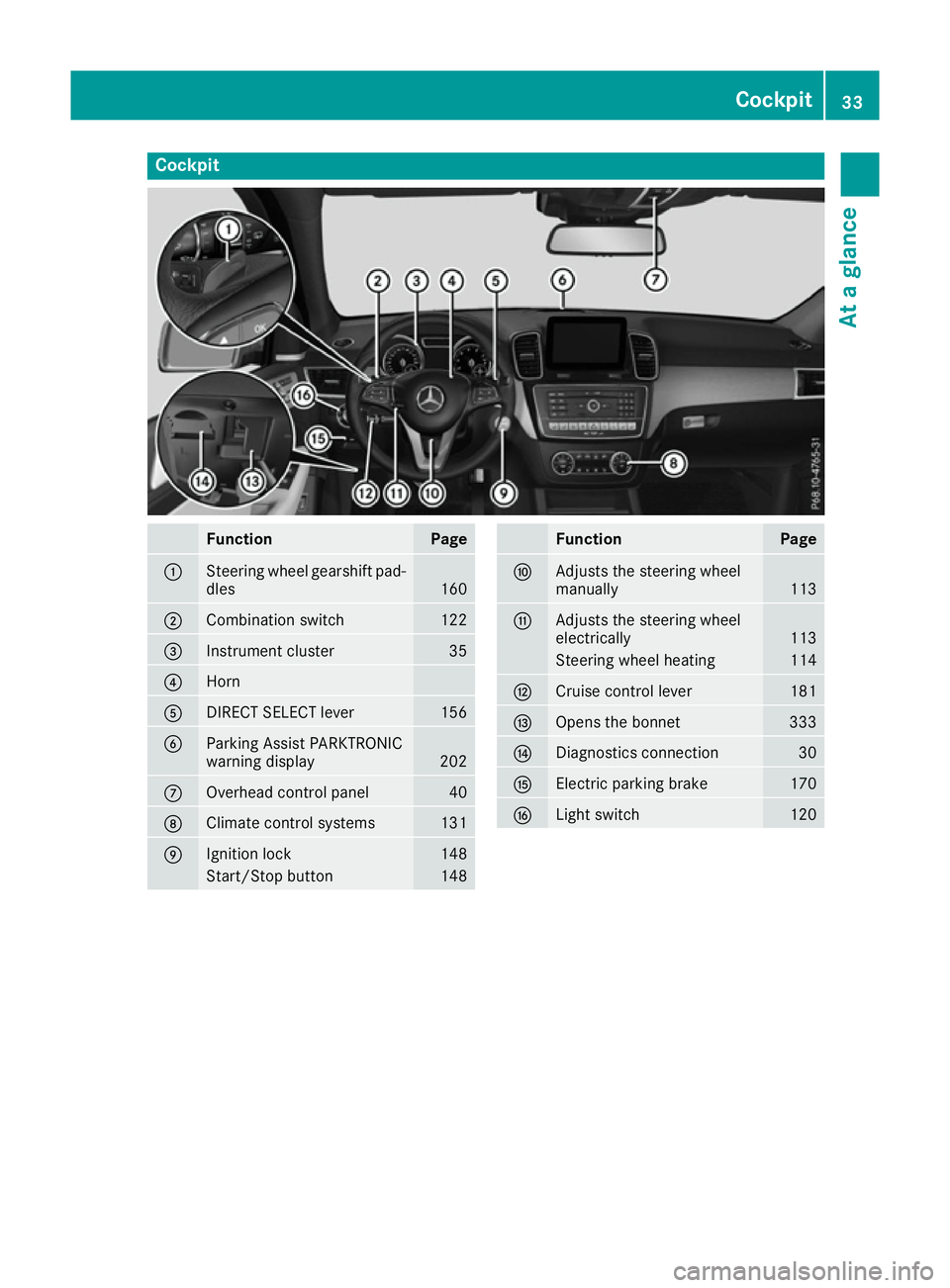
Cockpit
Function Page
:
Steering wheel gearshift pad-
dles 160
;
Combination switch 122
=
Instrument cluster 35
?
Horn
A
DIRECT SELECT lever 156
B
Parking Assist PARKTRONIC
warning display
202
C
Overhead control panel 40
D
Climate control systems 131
E
Ignition lock 148
Start/Stop button 148 Function Page
F
Adjusts the steering wheel
manually
113
G
Adjusts the steering wheel
electrically
113
Steering wheel heating 114
H
Cruise control lever 181
I
Opens the bonnet 333
J
Diagnostics connection 30
K
Electric parking brake 170
L
Light switch 120Cockpit
33At a glance
Page 37 of 397
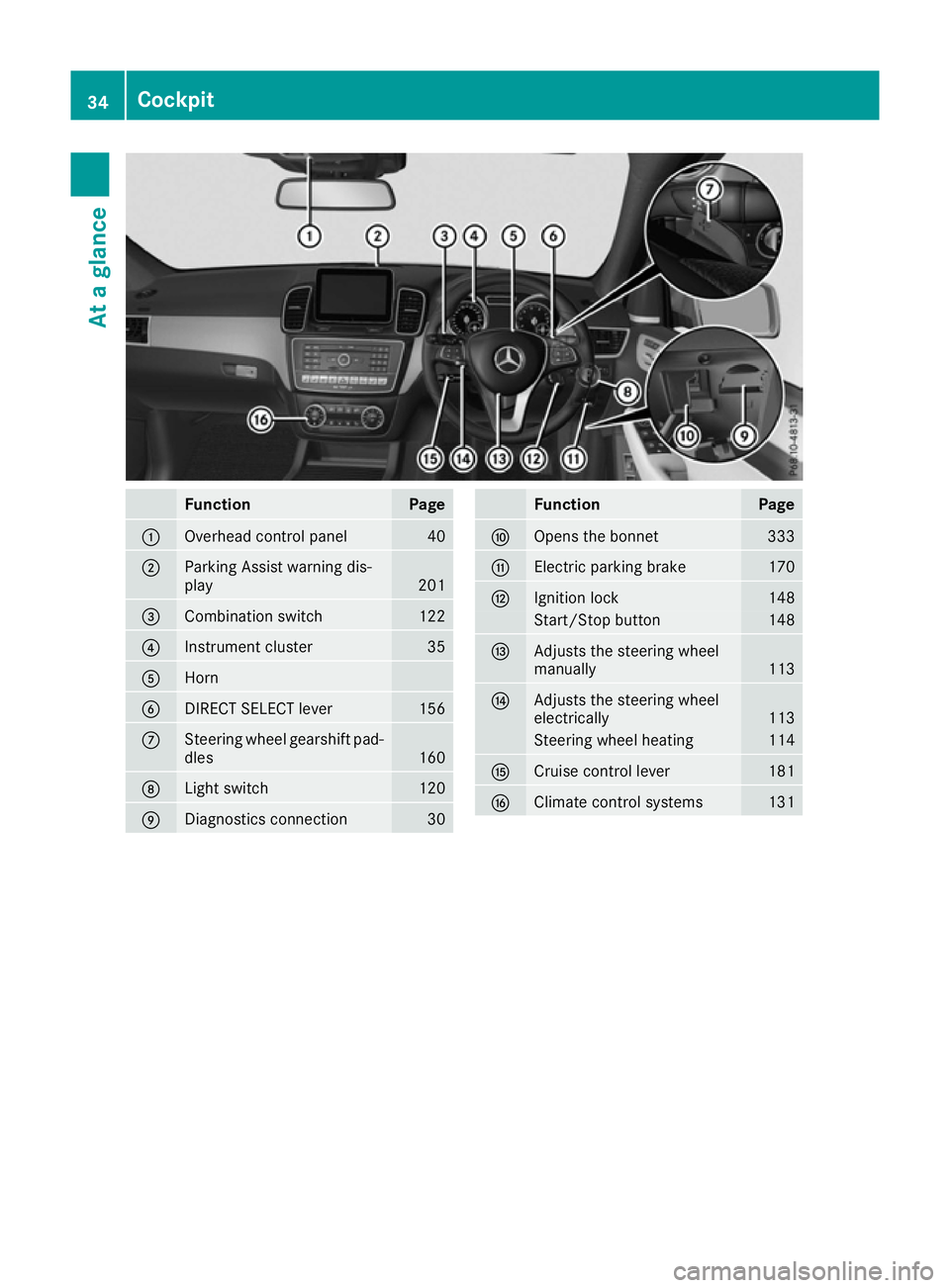
Function Page
:
Overhead control panel 40
;
Parking Assist warning dis-
play
201
=
Combination switch 122
?
Instrument cluster 35
A
Horn
B
DIRECT SELECT lever 156
C
Steering wheel gearshift pad-
dles 160
D
Light switch 120
E
Diagnostics connection 30 Function Page
F
Opens the bonnet 333
G
Electric parking brake 170
H
Ignition lock 148
Start/Stop button 148
I
Adjusts the steering wheel
manually
113
J
Adjusts the steering wheel
electrically
113
Steering wheel heating 114
K
Cruise control lever 181
L
Climate control systems 13134
CockpitAt a glance
Page 38 of 397
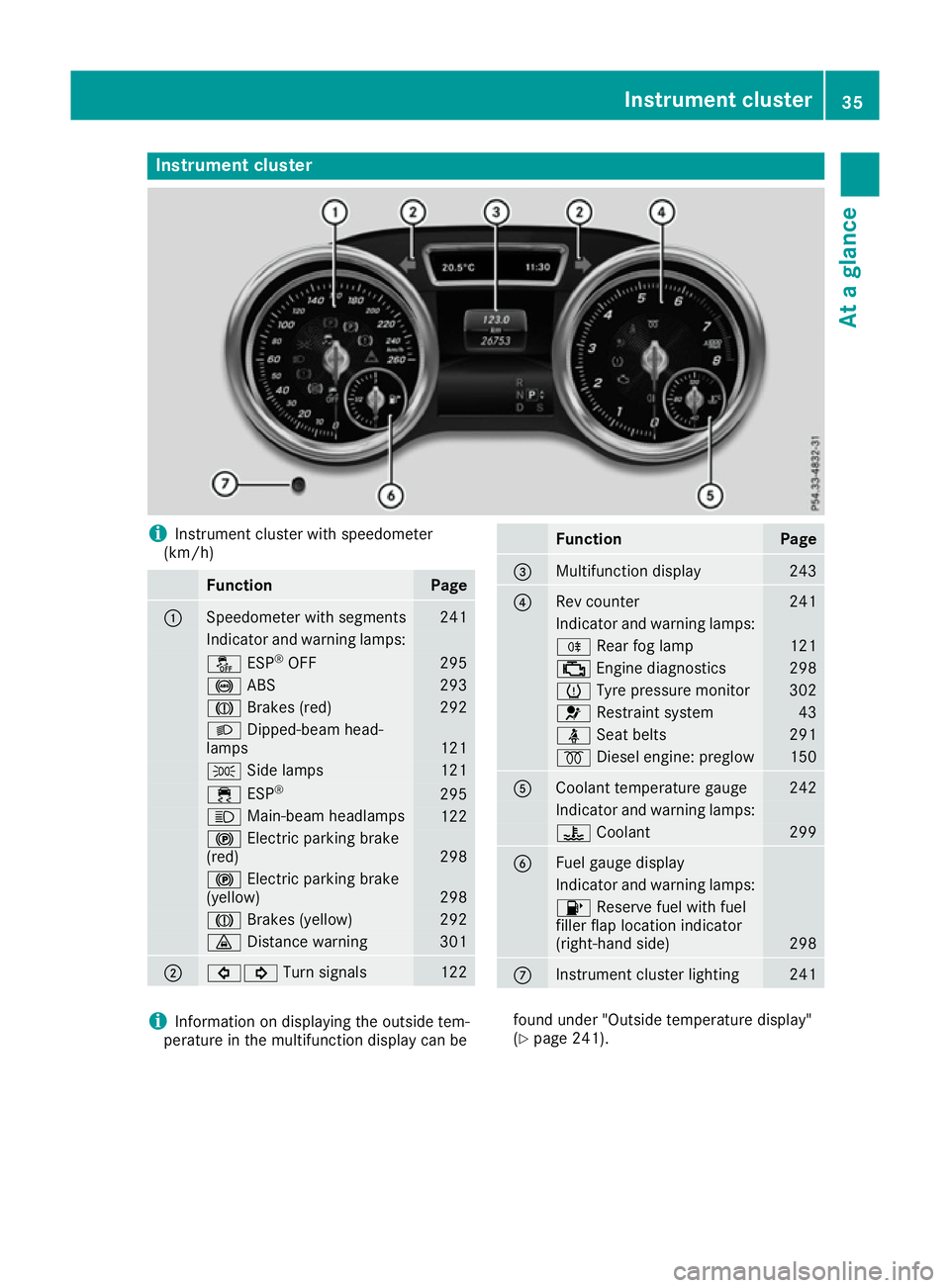
Instrument cluster
i
Instrument cluster with speedometer
(km/h) Function Page
:
Speedometer with segments 241
Indicator and warning lamps:
å
ESP®
OFF 295
!
ABS 293
J
Brakes (red) 292
L
Dipped-beam head-
lamps 121
T
Side lamps 121
÷
ESP® 295
K
Main-beam headlamps 122
!
Electric parking brake
(red) 298
!
Electric parking brake
(yellow) 298
J
Brakes (yellow) 292
·
Distance warning 301
;
#!
Turn signals 122 Function Page
=
Multifunction display 243
?
Rev counter 241
Indicator and warning lamps:
R
Rear fog lamp 121
;
Engine diagnostics 298
h
Tyre pressure monitor 302
6
Restraint system 43
ü
Seat belts 291
%
Diesel engine: preglow 150
A
Coolant temperature gauge 242
Indicator and warning lamps:
?
Coolant 299
B
Fuel gauge display
Indicator and warning lamps:
8
Reserve fuel with fuel
filler flap location indicator
(right-hand side) 298
C
Instrument cluster lighting 241
i
Information on displaying the outside tem-
perature in the multifunction display can be found under "Outside temperature display"
(Y
page 241). Instrument cluster
35At a glance
Page 41 of 397
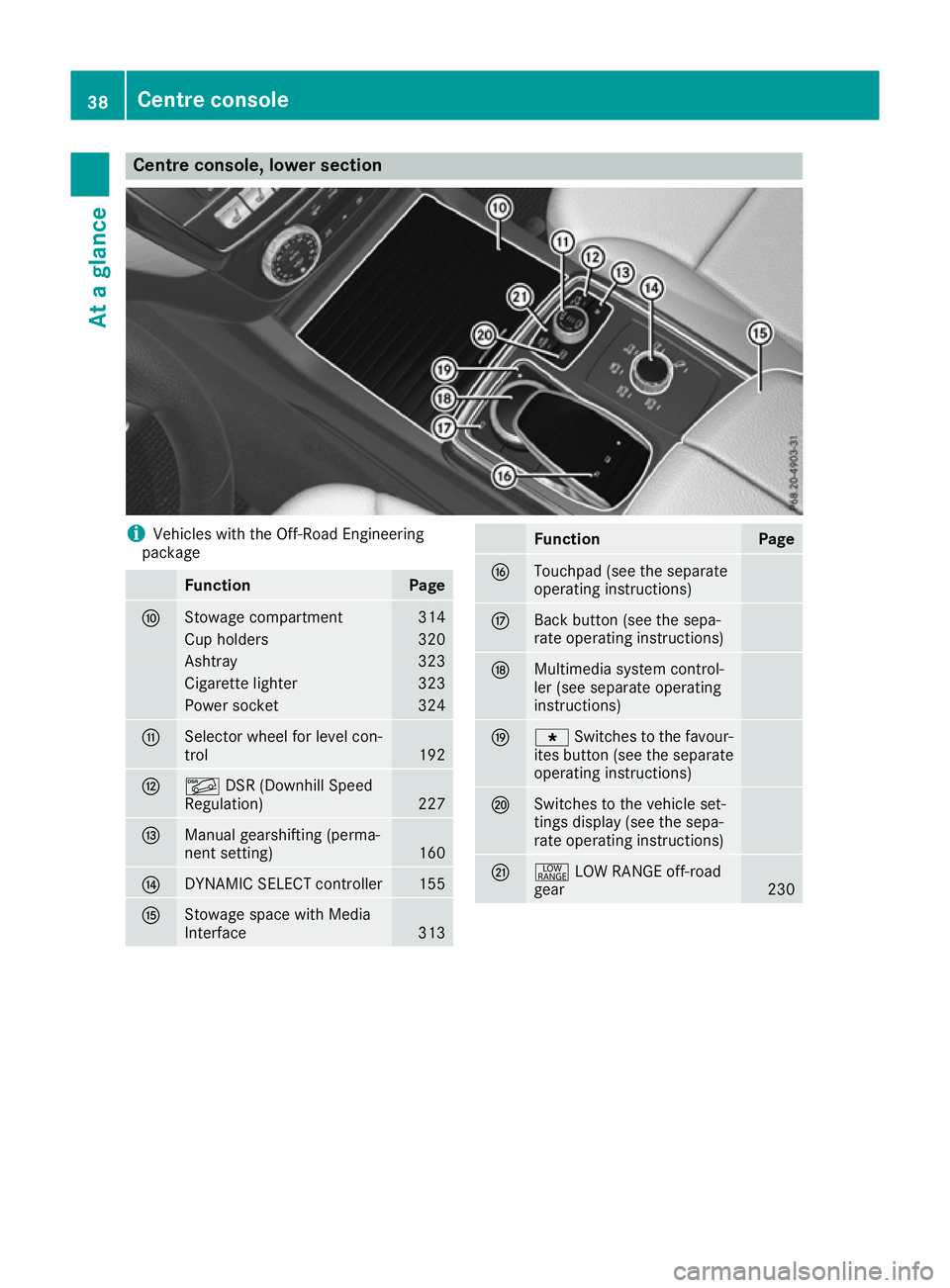
Centre console, lower section
i
Vehicles with the Off-Road Engineering
package Function Page
F
Stowage compartment 314
Cup holders 320
Ashtray 323
Cigarette lighter 323
Power socket 324
G
Selector wheel for level con-
trol
192
H
Ã
DSR (Downhill Speed
Regulation) 227
I
Manual gearshifting (perma-
nent setting)
160
J
DYNAMIC SELECT controller 155
K
Stowage space with Media
Interface
313 Function Page
L
Touchpad (see the separate
operating instructions) M
Back button (see the sepa-
rate operating instructions) N
Multimedia system control-
ler (see separate operating
instructions) O
g
Switches to the favour-
ites button (see the separate
operating instructions) P
Switches to the vehicle set-
tings display (see the sepa-
rate operating instructions)
Q
+
LOW RANGE off-road
gear 23038
Centre consoleAt a glance
Page 42 of 397
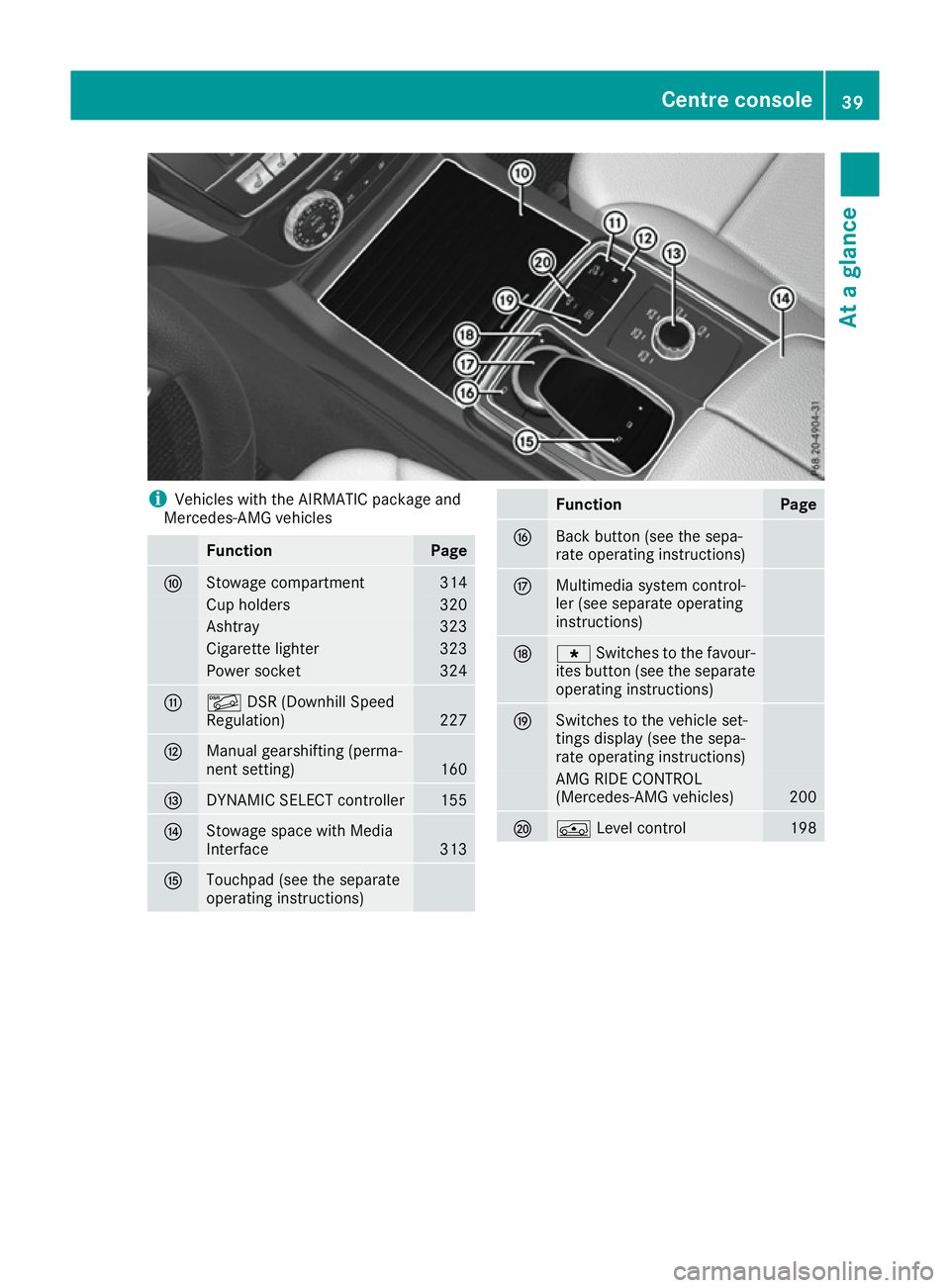
i
Vehicles with the AIRMATIC package and
Mercedes-AMG vehicles Function Page
F
Stowage compartment 314
Cup holders 320
Ashtray 323
Cigarette lighter 323
Power socket 324
G
Ã
DSR (Downhill Speed
Regulation) 227
H
Manual gearshifting (perma-
nent setting)
160
I
DYNAMIC SELECT controller 155
J
Stowage space with Media
Interface
313
K
Touchpad (see the separate
operating instructions) Function Page
L
Back button (see the sepa-
rate operating instructions)
M
Multimedia system control-
ler (see separate operating
instructions)
N
g
Switches to the favour-
ites button (see the separate
operating instructions) O
Switches to the vehicle set-
tings display (see the sepa-
rate operating instructions) AMG RIDE CONTROL
(Mercedes-AMG vehicles)
200
P
Á
Level control 198Centre console
39At a glance
Page 43 of 397
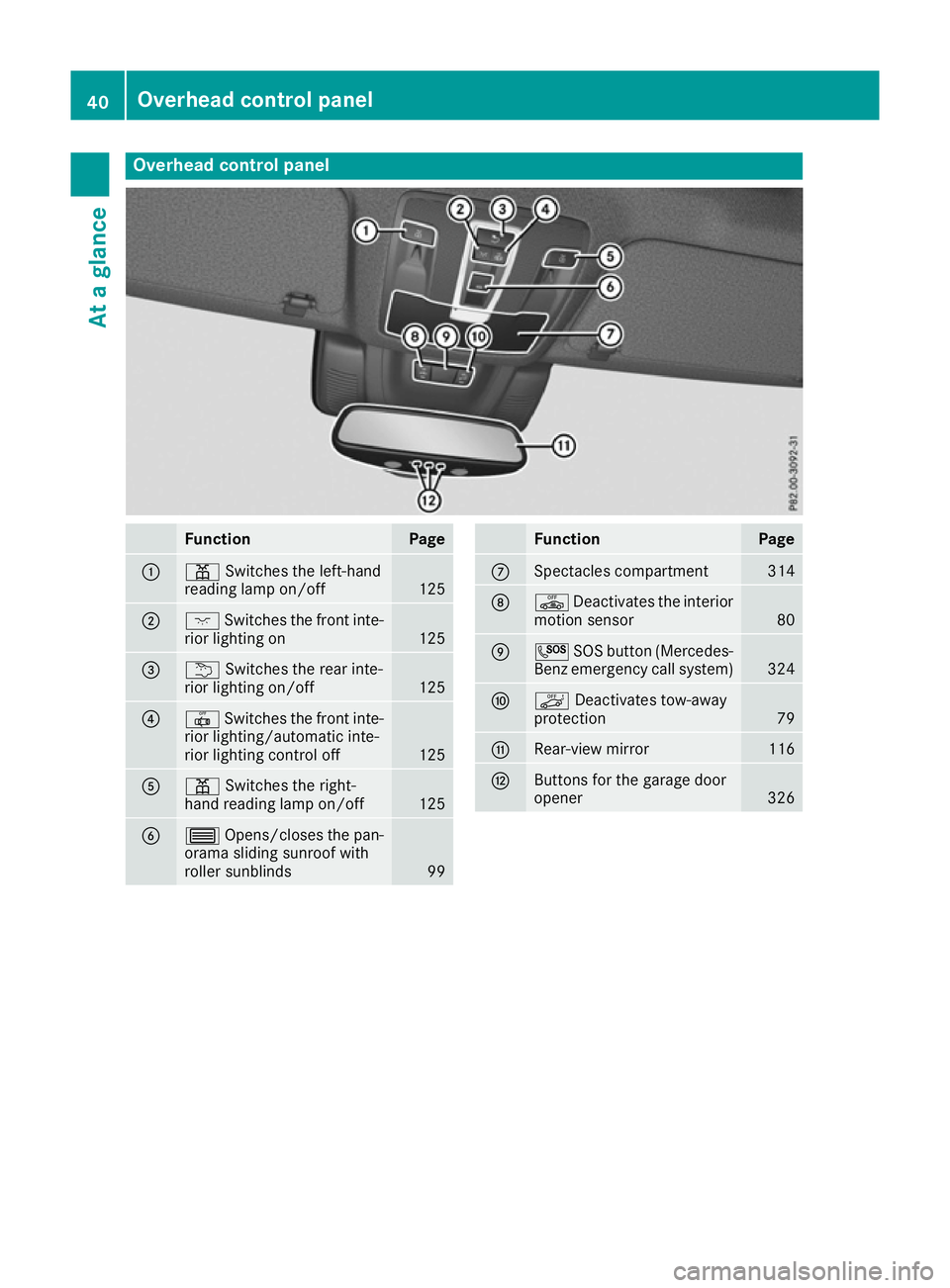
Overhead control panel
Function Page
:
p
Switches the left-hand
reading lamp on/off 125
;
c
Switches the front inte-
rior lighting on 125
=
u
Switches the rear inte-
rior lighting on/off 125
?
|
Switches the front inte-
rior lighting/automatic inte-
rior lighting control off 125
A
p
Switches the right-
hand reading lamp on/off 125
B
3
Opens/closes the pan-
orama sliding sunroof with
roller sunblinds 99 Function Page
C
Spectacles compartment 314
D
ê
Deactivates the interior
motion sensor 80
E
G
SOS button (Mercedes-
Benz emergency call system) 324
F
ë
Deactivates tow-away
protection 79
G
Rear-view mirror 116
H
Buttons for the garage door
opener
32640
Overhead control panelAt a glance