ECO mode MERCEDES-BENZ GLS SUV 2018 COMAND Manual
[x] Cancel search | Manufacturer: MERCEDES-BENZ, Model Year: 2018, Model line: GLS SUV, Model: MERCEDES-BENZ GLS SUV 2018Pages: 194, PDF Size: 4.5 MB
Page 36 of 194
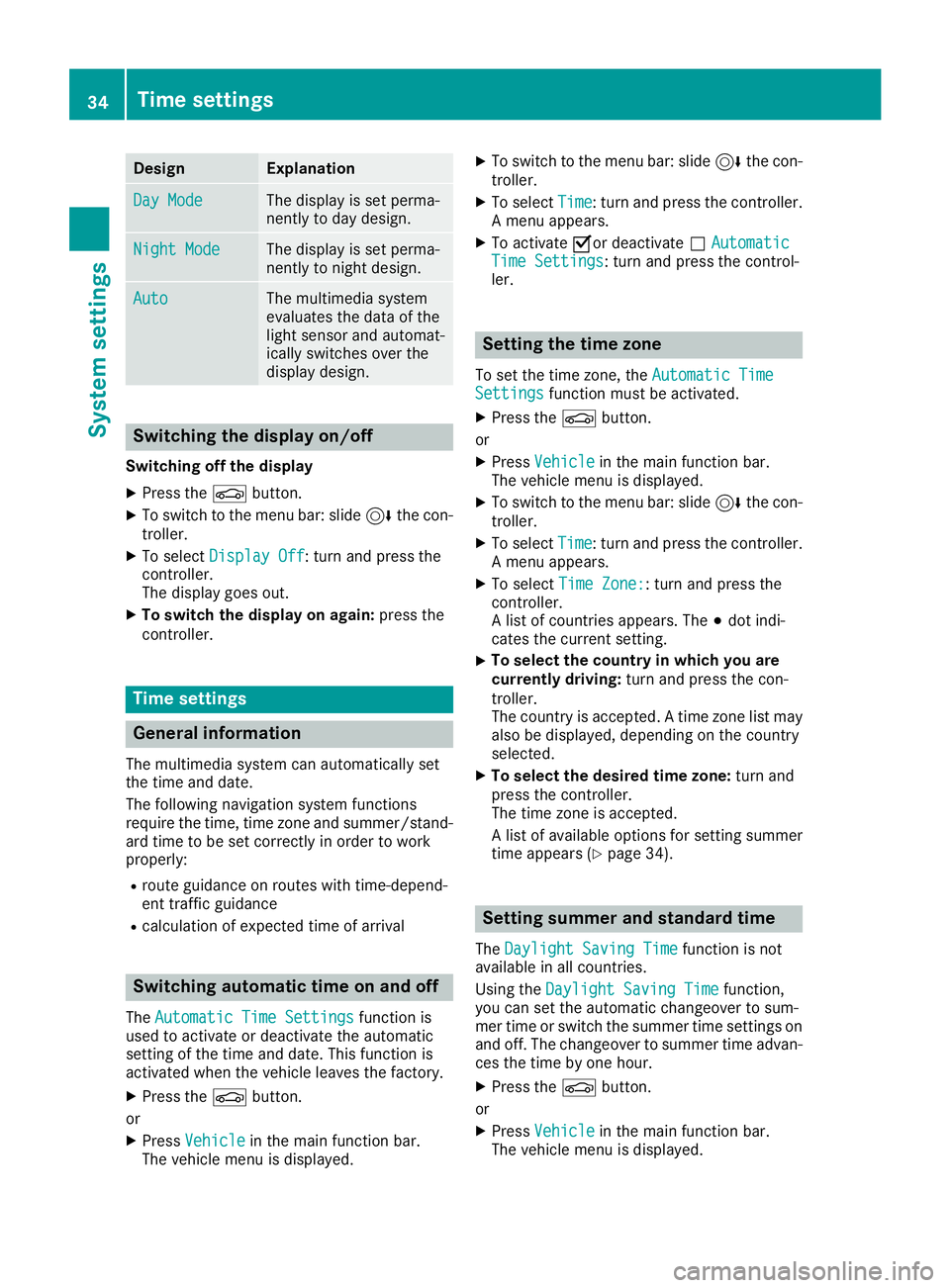
DesignExplanation
Day ModeThe display is set perma-
nently to day design .
Night ModeThe display is set perma-
nently to night design .
AutoThe multimedia system
evaluate sth edat aof th e
ligh tsensor and automat -
ically switches ove rth e
display design .
Switching the display on/off
Switchingoff th edispla y
XPress th eØ button.
XTo switch to th emen ubar: slid e6 thecon-
troller.
XTo select DisplayOff:tur nand press th e
controller .
The display goe sout .
XTo switch th edispla yon again: press the
controller .
Time settings
Gene ral inform ation
The multimedia system can automatically set
thetime and date.
The followin gnavigation system function s
require th etime, time zone and summer/stand-
ard time to be set correctl yin order to wor k
properly:
Rrout eguidance on routes wit htime-depend -
en ttraffic guidance
Rcalculation of expecte dtime of arrival
Switching automatic ti me onand off
TheAutomatic Tim eSettingsfunction is
used to activat eor deactivat eth eautomatic
setting of th etime and date. This function is
activated when th evehicl eleaves th efactory.
XPress th eØ button.
or
XPress Vehicl ein themain function bar.
The vehicl emen uis displayed.
XTo switch to th emen ubar: slid e6 thecon-
troller.
XTo select Time:tur nand press th econtroller .
A men uappears.
XTo activat eOor deactivat eª AutomaticTim eSettings:tur nand press th econtrol -
ler .
Setting the ti mezone
To set th etime zone ,th eAutomatic Tim eSettingsfunction mustbe activated.
XPress th eØ button.
or
XPress Vehicl ein themain function bar.
The vehicl emen uis displayed.
XTo switch to th emen ubar: slid e6 thecon-
troller.
XTo select Time:tur nand press th econtroller .
A men uappears.
XTo select TimeZone::tur nand press th e
controller .
A list of countrie sappears. The #dot indi-
cates th ecurren tsetting .
XTo select th ecountr yin which you ar e
currentl ydriving: turnand press th econ-
troller.
The country is accepted. Atime zone list may
also be displayed, depending on th ecountry
selected.
XTo select th edesired time zone: turnand
press th econtroller .
The time zone is accepted.
A list of available option sfor setting summer
time appear s (
Ypage 34).
Setting sum mer and standard ti me
TheDaylight Saving Tim efunction is not
available in all countries.
Using th eDaylight Saving Tim e
function,
you can set th eautomatic changeover to sum -
mer time or switch th esummer time setting son
and off .The changeover to summer time advan -
ce sth etime by on ehour .
XPress th eØ button.
or
XPress Vehicl ein themain function bar.
The vehicl emen uis displayed.
34Time settings
System settings
Page 46 of 194
You can find further information on the interior
lighting in the vehicle Operator's Manual.
Switching locator lighting on/off
If you switch on theLocator Lightingfunc-
tion, the exterior lighting is switched on for a
short time when it is dark. The light switch must
be set to Ã.
The exterior lighting remains on for 40 seconds
after the vehicle is unlocked. When you start the
engine, the locator lighting is switched off and
the automatic driving lights are activated.
You can find further information on the auto-
matic headlamp mode in the vehicle Operator's
Manual.
XCall up Vehicle Settings(Ypage 43).
XTo select LocatorLighting: turn and press
the controller.
XPress the controller.
The function is switched on or off, depending
on the previous status.
You can find further information on the locking
feature in the vehicle Operator's Manual.
iThere may be fewer settings or none
depending on your vehicle's equipment.
Setting the switch-off delay time
Interior lighting switch-off delay time
The interior lighting is activated for the duration
of the switch-off delay time when the SmartKey is removed from the ignition lock.
XCall up Vehicle Settings(Ypage 43).
XTo select Interior Lighting DelayedSwitch-off: turn and press the controller.
The setting element is active.
XTo change the delayed switch-off time: turn
and press the controller.
You can find further information on the interior
lighting in the vehicle Operator's Manual.
Exterior lighting switch-off delay time
If you switch on the Exterior LightingDelayed Switch-offfunction, the exterior
lighting is switched on for a short time after the
engine is switched off. The light switch must be
set to Ã. The exterior lighting remains lit for 60 seconds
after the engine is switched off. If you close all
the doors and the tailgate, the exterior lighting
switches off after the set time.
XCall up
Vehicle Settings(Ypage 43).
XTo select Exterior Lighting DelayedSwitch-off: turn and press the controller.
The setting element is active.
XTo change the delayed switch-off time: turn
and press the controller.
Displaying energy consumption and
generated electrical energy
A bar graph displays the energy consumption
and the generated electrical energy.
XPress Vehiclein the main function bar.
The vehicle menu is displayed.
XTo select Consumption: turn and press the
controller.
The energy consumption and the generated
electrical energy for the last 15 minutes of the
journey is shown.
For further information on energy consumption,
see the vehicle Operator's Manual.
Displaying the fuel consumption
A bar graph displays the fuel consumption.
XPress Vehiclein the main function bar.
The vehicle menu is displayed.
XTo select Consumption: turn and press the
controller.
The fuel consumption for the last 15 minutes
of the journey is shown.
Switching the ionization on/off
The ionization has a cleansing effect on the air in
the vehicle interior. Further information (see the
vehicle Operator's Manual).
XCall up Vehicle Settings(Ypage 43).
XTo select Ionization: turn and press the
controller.
The ionization is switched on or off, depend-
ing on the previous status: press and turn the
controller.
XTo exit the menu: press the%button.
44Vehicle settings
Vehicle functions
Page 49 of 194
Switching the display off manually
XTo select&: slide 6and press the con-
troller.
Switching the display on automatically
XYou can switch on the 360 camera display
automatically using the reverse gear
(
Ypage 47).
Switching the 360° camera auto-
matic mode on/off
This function activates the 360° camera when
reverse gear is engaged.
XPress Vehiclein the main function bar.
The vehicle menu is displayed.
XTo switch to the menu bar: slide 6the con-
troller.
XTo select System Settings: turn and press
the controller.
XTo select 360° Camera: turn and press the
controller.
The 360° Camera
menu appears.
XSelect Activation by R gear.
The function is switched on Oor off ª.
Opening the camera cover for clean-
ing
XTo select Open Camera Coverin the 360°
camera menu: turn the controller and press to
confirm.
The Please Wait...
message appears for
approximately three seconds.
The camera cover opens.
The camera cover closes automatically if:
Rthe ignition is switched off
Rthe vehicle exceeds a moderate speed
iDepending on the vehicle's equipment, this
function is not available.
Rear view camera
General notes
The rear view camera covers the immediate sur-
roundings behind the vehicle and assists you
when parking. The rear view camera is only an aid. It is not a
replacement for your attention to your immedi-
ate surroundings. You are always responsible
for safe maneuvering and parking. Make sure
that there are no persons, animals or objects in
the maneuvering area while maneuvering and
parking in parking spaces.
There may be fewer settings depending on your
vehicle's equipment.
You can find further information about the rear
view camera in the vehicle Operator's Manual.
Switching the rear view camera auto-
matic mode on/off
This function activates the rear view camera
when reverse gear is engaged.
XPress the
Øbutton.
or
XPress Vehiclein the main function bar.
The vehicle menu is displayed.
XSlide 6the controller.
XTo select System Settings: turn and press
the controller.
XSelect Rear View Camera.
The Rear View Cameramenu appears.
XSelect Activation by R gear.
The function is switched on Oor off ª,
depending on the previous status.
When you start the vehicle and engage
reverse gear, the area behind the vehicle is
shown with guide lines in the display. For fur-
ther information on the rear view camera; see
the vehicle Operator's Manual.
Opening the camera cover for clean-
ing
XTo select Open Camera Coverin the rear
view camera menu: turn and press the con-
troller.
The Please Wait...
message appears for
approximately three seconds.
The camera cover opens.
The camera cover closes automatically if:
Rthe ignition is switched off
Rthe vehicle pulls away
Rear view camera47
Vehicle functions
Z
Page 55 of 194
Basic settings
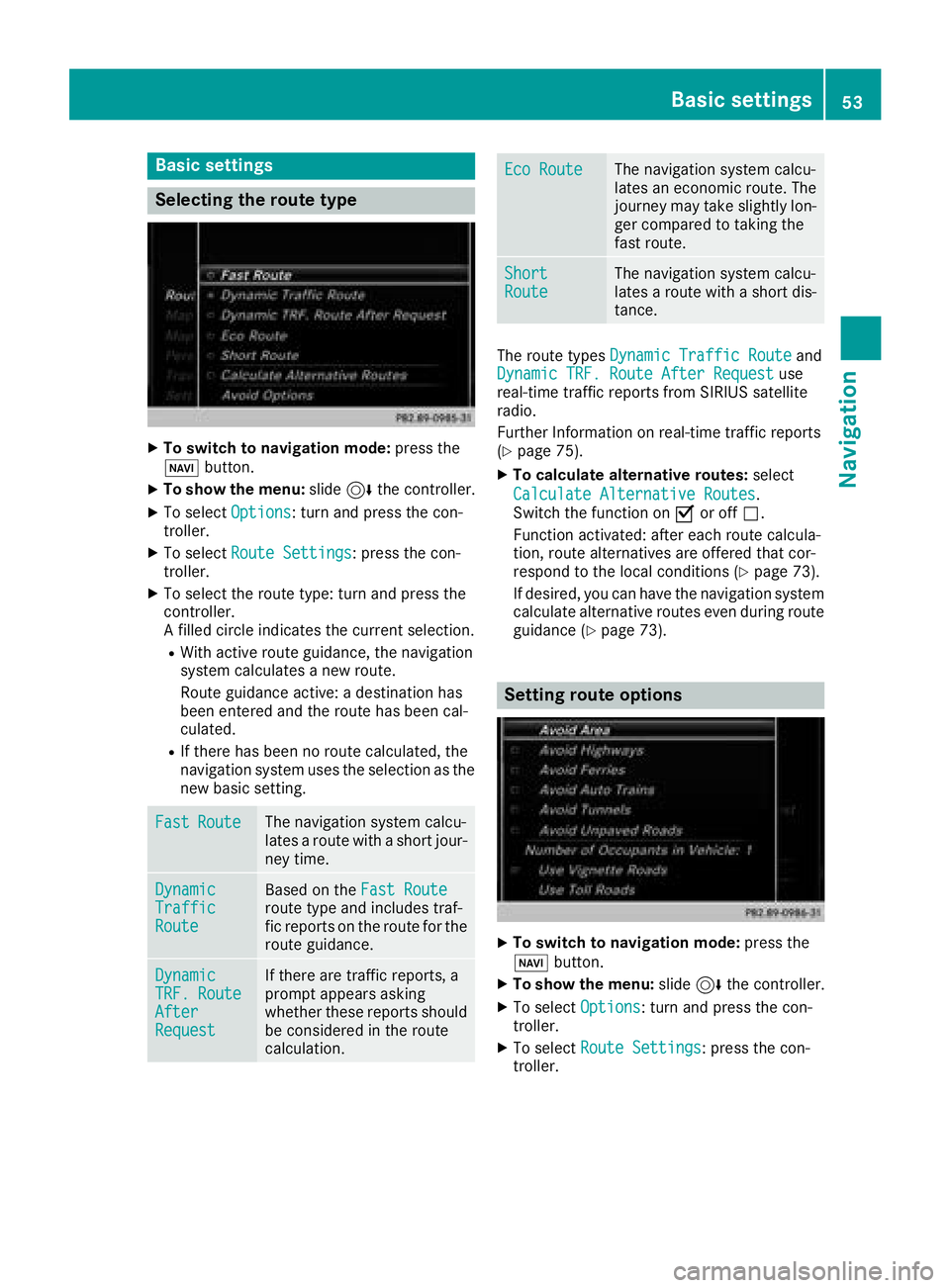
Selecting the route type
XTo switch to navigation mode:press the
Ø button.
XTo show the menu: slide6the controller.
XTo select Options: turn and press the con-
troller.
XTo select Route Settings: press the con-
troller.
XTo select the route type: turn and press the
controller.
A filled circle indicates the current selection.
RWith active route guidance, the navigation
system calculates a new route.
Route guidance active: a destination has
been entered and the route has been cal-
culated.
RIf there has been no route calculated, the
navigation system uses the selection as the
new basic setting.
FastRouteThe navigation system calcu-
lates a route with a short jour-
ney time.
DynamicTrafficRoute
Based on the Fast Routeroute type and includes traf-
fic reports on the route for the
route guidance.
DynamicTRF.RouteAfterRequest
If there are traffic reports, a
prompt appears asking
whether these reports should
be considered in the route
calculation.
Eco RouteThe navigation system calcu-
lates an economic route. The
journey may take slightly lon-
ger compared to taking the
fast route.
ShortRouteThe navigation system calcu-
lates a route with a short dis-
tance.
The route types Dynamic Traffic Routeand
Dynamic TRF. Route After Requestuse
real-time traffic reports from SIRIUS satellite
radio.
Further Information on real-time traffic reports
(
Ypage 75).
XTo calculate alternative routes: select
Calculate Alternative Routes
.
Switch the function on Oor off ª.
Function activated: after each route calcula-
tion, route alternatives are offered that cor-
respond to the local conditions (
Ypage 73).
If desired, you can have the navigation system
calculate alternative routes even during route
guidance (
Ypage 73).
Setting route options
XTo switch to navigation mode: press the
Ø button.
XTo show the menu: slide6the controller.
XTo select Options: turn and press the con-
troller.
XTo select Route Settings: press the con-
troller.
Basic settings53
Navigation
Z
Page 67 of 194
Accepting intermediate destinations
for theroute
XTo select Start Route Guidancein the
intermediat edestination smenu: press th e
controller .
The rout eis calculated wit hth eentered inter-
mediat edestinations.
If Calculate Alternative Routes
is ena-
bled in th ebasic settings, th eContinuemen u
item is displayed (Ypage 53).
If an intermediat edestination was passed
during rout eguidance , agreen tick mar kwill
be entered in th eintermediat edestination s
menu. Once th erout ehas been recalculated,
th eintermediat edestination is delete dfrom
th eintermediat edestination smenu.
Saving as a personal route
XInser tth eSD memory car d (Ypage 145).
XTo selectSaveAs Personal Routein th e
intermediat edestination smenu: tur nand
press th econtroller .
The rout eis saved on th eSD car dunder Per‐
sonal Routes.
Searching for a gas station when the
fuel level is low
Requirement :th esetting GasonReserv emust
be enabled (Ypage 54).
If th efuel tan kreserv elevel is displayed, you will
see th eReserv eFue lWould you lik eto
start asearch for surrounding gasstations?message .
XTo select YesorNo:tur nand press th econ-
troller .
If you select Yes
:th egas station search
starts. When th esearch is complete, alist of
th egas station savailable alon gth erout eor in
th evicinity is displayed.
If you select No
:th esearch is canceled.
XSelec tth egas station .
The address of th egas station is displayed.
XTo select Start:press th econtroller .
The gas station selected is set in th einter-
mediat edestination smen uas th enext inter-
mediat edestination no tyet reached. Rout e
guidance begins .
Entering a destination fr om
Mercedes-Benz Apps
Requirement (USA) :mbrace is activated for th e
Mercedes-Benz Apps (Ypage 122).
Requirement (Canada): amobile phone is con-
nected to th emultimedia system via Bluetoot h
®
(Ypage 90)or US B (Ypage 154).
XTo switch to navigation mode: press the
Ø button.
XTo sho wthemenu: slide6 thecontroller .
XTo select Destination:tur nand press th e
controller .
XSelectFro mMercedes-Ben zApp s.
The list of Mercedes-Benz Apps appears.
Using geo-coor dinates
XTo switch to navigation mode: press the
ß button.
XTo sho wthemenu: slide6 thecontroller .
XTo select Destination:tur nand press th e
controller .
XSelectUsing Geo-Coordinates.
Geo-coordinate sare entered in degrees ,
minute sand seconds.
XTo enter th elatitud eand longitude coor -
dinates: turnth econtroller to chang eth e
value .
XTo mov eth eselection within th eline: slid e
1 thecontroller .
XTo moveth eselection between lines: slid e
4 thecontroller .
XTo confirm th evalue :press th econtroller .
XTo save adestination :to select Save:tur n
and press th econtroller .
The destination can be store das:
Rahom eaddress in th eaddress book
Ranavigabl eaddress book contact
Fo rfurther information on th eaddress
book ,see (
Ypage 103)
Rapersonal destination on th eSD car d
(Ypage 79)
Starting route calculation
XTo select Start Route Guidance:tur nand
press th econtroller .
Destination entry65
Navigation
Z
Page 70 of 194
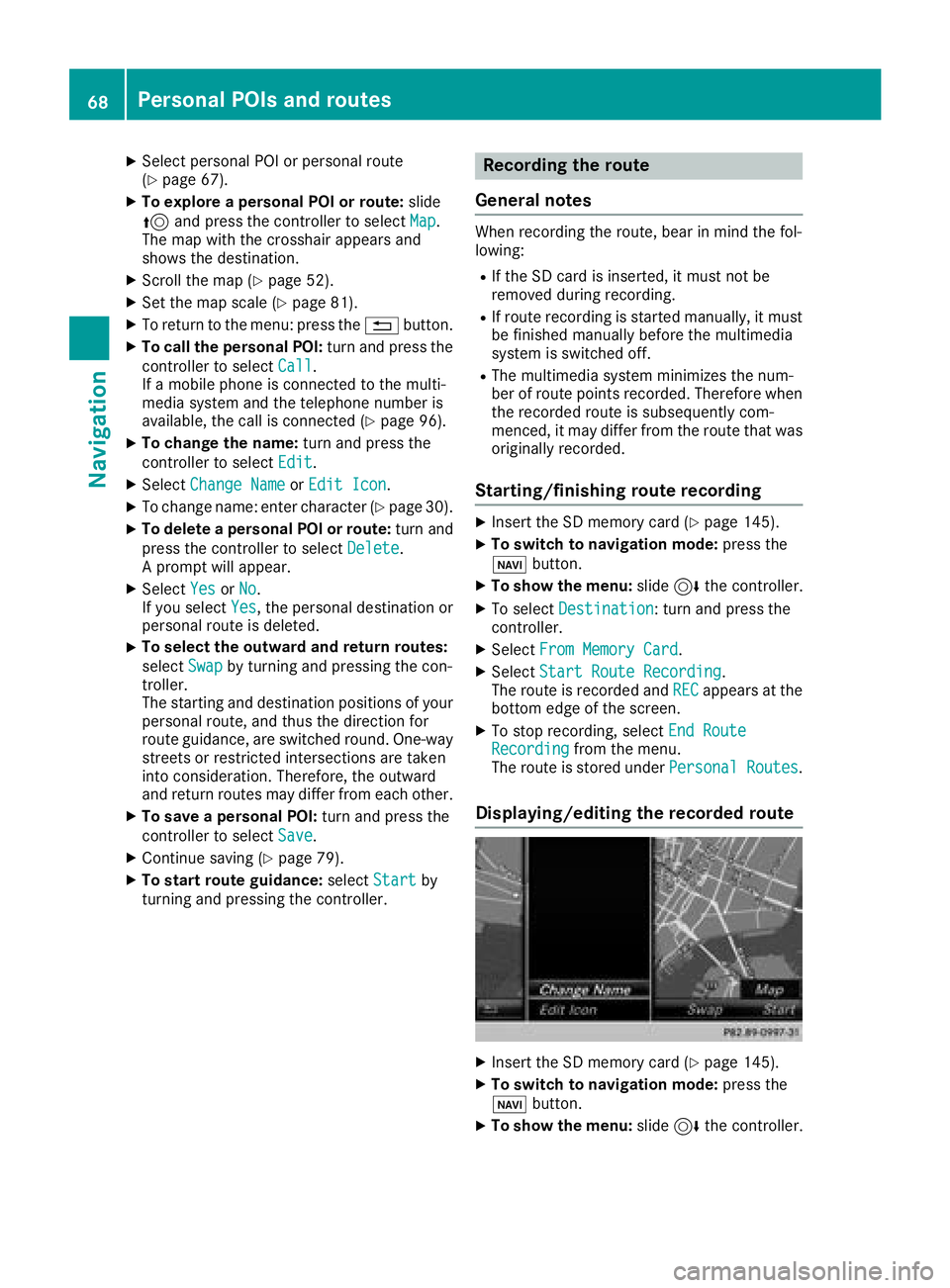
XSelect personal POI or personal route
(Ypage 67).
XTo explore a personal POI or route:slide
5 and press the controller to select Map
.
The map with the crosshair appears and
shows the destination.
XScroll the map (Ypage 52).
XSet the map scale (Ypage 81).
XTo return to the menu: press the %button.
XTo call the personal POI: turn and press the
controller to select Call
.
If a mobile phone is connected to the multi-
media system and the telephone number is
available, the call is connected (
Ypage 96).
XTo change the name: turn and press the
controller to select Edit
.
XSelectChange NameorEdit Icon.
XTo change name: enter character (Ypage 30).
XTo delete a personal POI or route: turn and
press the controller to select Delete
.
A prompt will appear.
XSelect YesorNo.
If you select Yes, the personal destination or
personal route is deleted.
XTo select the outward and return routes:
select Swap
by turning and pressing the con-
troller.
The starting and destination positions of your
personal route, and thus the direction for
route guidance, are switched round. One-way
streets or restricted intersections are taken
into consideration. Therefore, the outward
and return routes may differ from each other.
XTo save a personal POI: turn and press the
controller to select Save
.
XContinue saving (Ypage 79).
XTo start route guidance: selectStartby
turning and pressing the controller.
Recording the route
General notes
When recording the route, bear in mind the fol-
lowing:
RIf the SD card is inserted, it must not be
removed during recording.
RIf route recording is started manually, it must
be finished manually before the multimedia
system is switched off.
RThe multimedia system minimizes the num-
ber of route points recorded. Therefore when
the recorded route is subsequently com-
menced, it may differ from the route that was
originally recorded.
Starting/finishing route recording
XInsert the SD memory card (Ypage 145).
XTo switch to navigation mode: press the
ß button.
XTo show the menu: slide6the controller.
XTo select Destination: turn and press the
controller.
XSelect From Memory Card.
XSelectStart Route Recording.
The route is recorded and RECappears at the
bottom edge of the screen.
XTo stop recording, select End RouteRecordingfrom the menu.
The route is stored under Personal Routes.
Displaying/editing the recorded route
XInsert the SD memory card (Ypage 145).
XTo switch to navigation mode: press the
ß button.
XTo show the menu: slide6the controller.
68Personal POIs and routes
Navigation
Page 71 of 194
XTo selectDestination: turn and press the
controller.
XSelect From Memory Card.
XSelectPersonal Routes.
Previously recorded routes are displayed.
XTo select a route: turn and press the control-
ler.
The map appears with a menu. The recorded
route is shown on the map in blue.
XTo start route calculation: selectStart.
XTo change the name and symbol: select
Edit
.
XSelect Change NameorEdit Icon.
XTo change name: enter character (Ypage 30).
XTo change symbol: select a symbol.
The symbol is saved.
Route guidance
General notes
Always observe the traffic regulations when
driving. Road and traffic rules and regulations
always have priority over system driving recom-
mendations.
The multimedia system calculates the route to
the destination without taking account of the
following, for example:
Rtraffic lights
Rstop and yield signs
Rparking or stopping restrictions
Rroad narrowing
Rtemporary traffic rules and regulations
The multimedia system may give differing navi-
gation commands if the actual street/traffic sit-
uation does not correspond with the digital
map's data. For example, if the road layout or
the direction of a one-way street has been
changed.
Route guidance begins once a route has been
calculated (
Ypage 57).
The multimedia system guides you to your des-
tination by means of navigation announcements
in the form of audible navigation announce-
ments and route guidance displays.
Navigation messages guide you during the jour-
ney without distracting you from traffic condi-
tions or driving. Please always use this feature
instead of consulting the map display for direc- tions. The symbols or the map display could dis-
tract you from traffic conditions and driving.
The route guidance displays can be seen if nav-
igation mode is switched on.
If you do not follow the navigation announce-
ments or if you leave the calculated route, the
multimedia system automatically calculates a
new route to the destination.
If the digital map contains the corresponding
information, the following applies:
RDuring route guidance, the multimedia sys-
tem tries to avoid roads with restricted
access. These include, for example, roads
which are closed to through-traffic.
RRoads that have time restrictions (e.g. closed
on Sundays and public holidays) are consid-
ered for route guidance on days when they are
open. For this purpose, the relevant times
must be correctly stored in the database.
Change of direction
Overview
Changes of direction have three phases:
RPreparation phase
RAnnouncement phase
RChange-of-direction phase
Changes in direction are also shown in the mul-
tifunction display of the instrument cluster (see
the vehicle Operator's Manual).
Preparation phase
The multimedia system prepares you for the
upcoming driving maneuver, e.g. with the
announcement "Prepare to turn right". You see
the full-screen map.
Route guidance69
Navigation
Z
Page 73 of 194
Lane recommendations are also shown in the
multifunction display of the instrument cluster
(see the vehicle Operator's Manual).
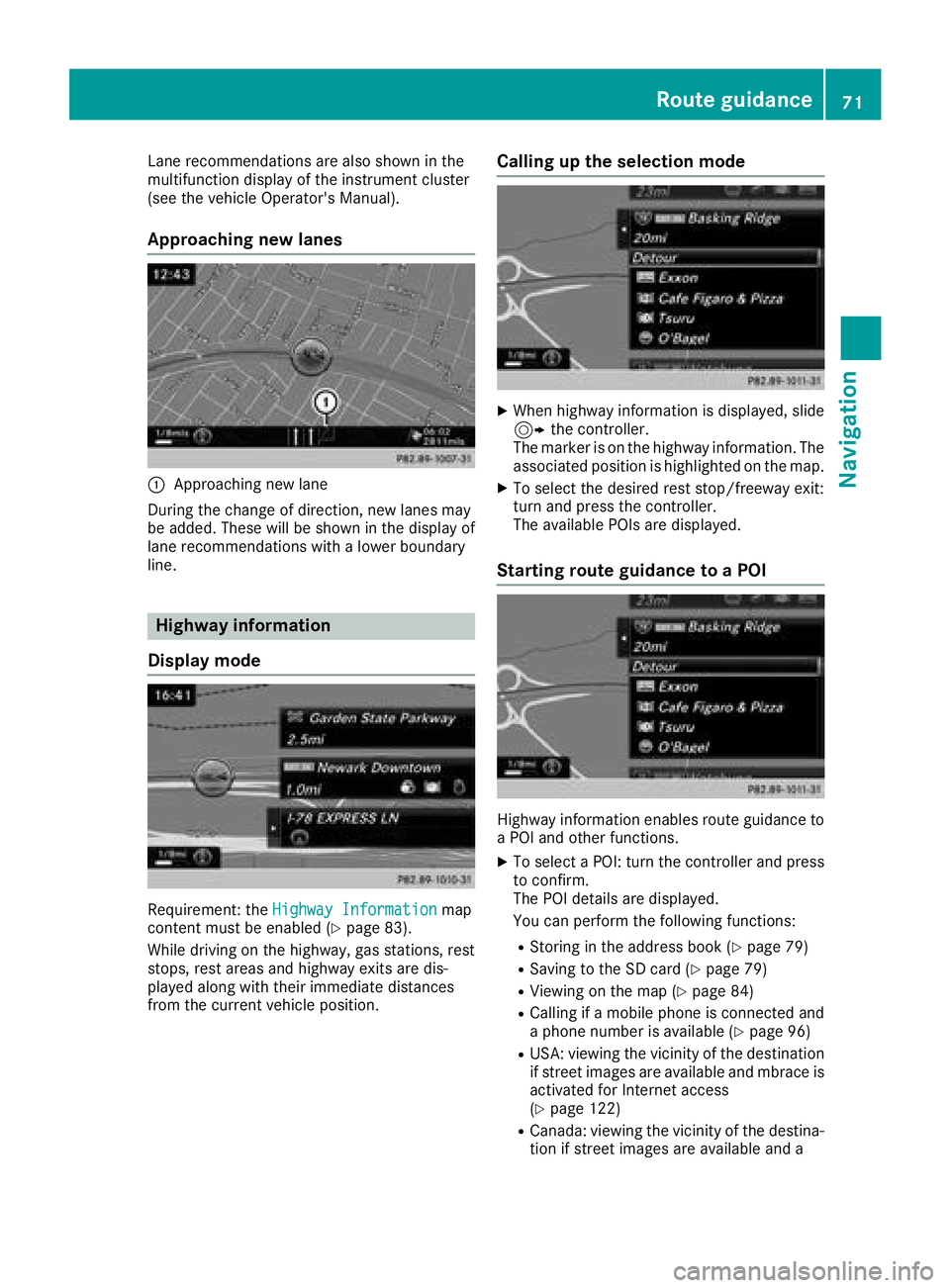
Approaching new lanes
:Approaching new lane
During the change of direction, new lanes may
be added. These will be shown in the display of
lane recommendations with a lower boundary
line.
Highway information
Display mode
Requirement: the Highway Informationmap
content must be enabled (Ypage 83).
While driving on the highway, gas stations, rest
stops, rest areas and highway exits are dis-
played along with their immediate distances
from the current vehicle position.
Calling up the selection mode
XWhen highway information is displayed, slide 9 the controller.
The marker is on the highway information. The
associated position is highlighted on the map.
XTo select the desired rest stop/freeway exit:
turn and press the controller.
The available POIs are displayed.
Starting route guidance to a POI
Highway information enables route guidance to
a POI and other functions.
XTo select a POI: turn the controller and press to confirm.
The POI details are displayed.
You can perform the following functions:
RStoring in the address book (Ypage 79)
RSaving to the SD card (Ypage 79)
RViewing on the map (Ypage 84)
RCalling if a mobile phone is connected and
a phone number is available (Ypage 96)
RUSA: viewing the vicinity of the destination
if street images are available and mbrace is
activated for Internet access
(
Ypage 122)
RCanada: viewing the vicinity of the destina- tion if street images are available and a
Route guidance71
Navigation
Z
Page 74 of 194
mobile phone is connected to the multime-
dia system via Bluetooth®(Ypage 90) or
USB (Ypage 154)
RUSA: downloading data from the Internet if
an Internet address is available and mbrace
is activated for Internet access
(
Ypage 90)
RCanada: downloading data from the Inter-
net if an Internet address is available and a
mobile phone is connected to the multime-
dia system via Bluetooth
®(Ypage 90) or
USB (Ypage 154)
RSelecting for route guidance and calculat-
ing a route to it (Ypage 57)
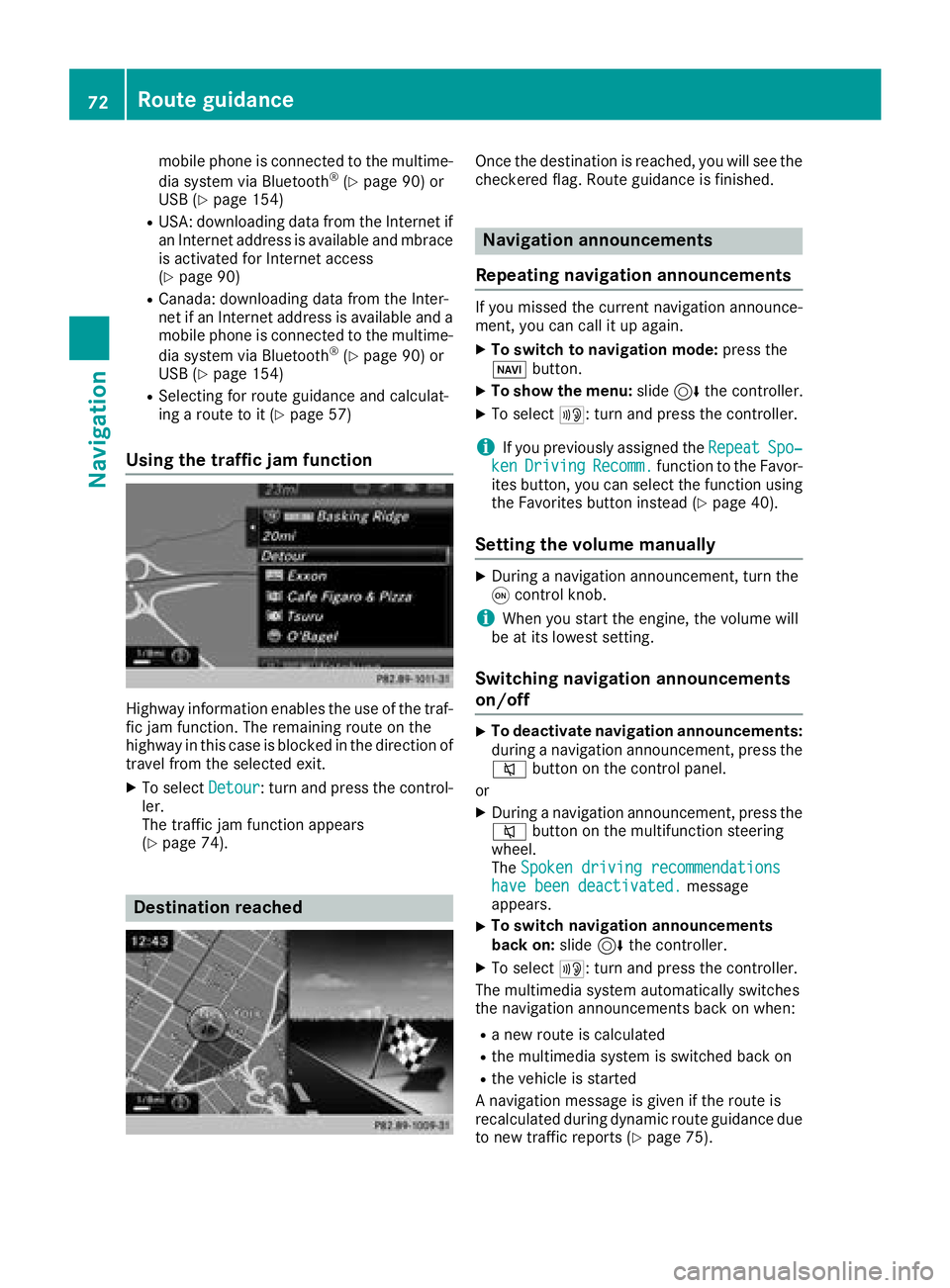
Using the traffic jam function
Highway information enables the use of the traf-
fic jam function. The remaining route on the
highway in this case is blocked in the direction of
travel from the selected exit.
XTo select Detour: turn and press the control-
ler.
The traffic jam function appears
(
Ypage 74).
Destination reached
Once the destination is reached, you will see the
checkered flag. Route guidance is finished.
Navigation announcements
Repeating navigation announcements
If you missed the current navigation announce-
ment, you can call it up again.
XTo switch to navigation mode: press the
Ø button.
XTo show the menu: slide6the controller.
XTo select +: turn and press the controller.
iIf you previously assigned the RepeatSpo‐kenDrivingRecomm.function to the Favor-
ites button, you can select the function using
the Favorites button instead (
Ypage 40).
Setting the volume manually
XDuring a navigation announcement, turn the
q control knob.
iWhen you start the engine, the volume will
be at its lowest setting.
Switching navigation announcements
on/off
XTo deactivate navigation announcements:
during a navigation announcement, press the
8 button on the control panel.
or
XDuring a navigation announcement, press the
8 button on the multifunction steering
wheel.
The Spoken driving recommendations
have been deactivated.message
appears.
XTo switch navigation announcements
back on: slide6the controller.
XTo select +: turn and press the controller.
The multimedia system automatically switches
the navigation announcements back on when:
Ra new route is calculated
Rthe multimedia system is switched back on
Rthe vehicle is started
A navigation message is given if the route is
recalculated during dynamic route guidance due
to new traffic reports (
Ypage 75).
72Route guidance
Navigation
Page 76 of 194
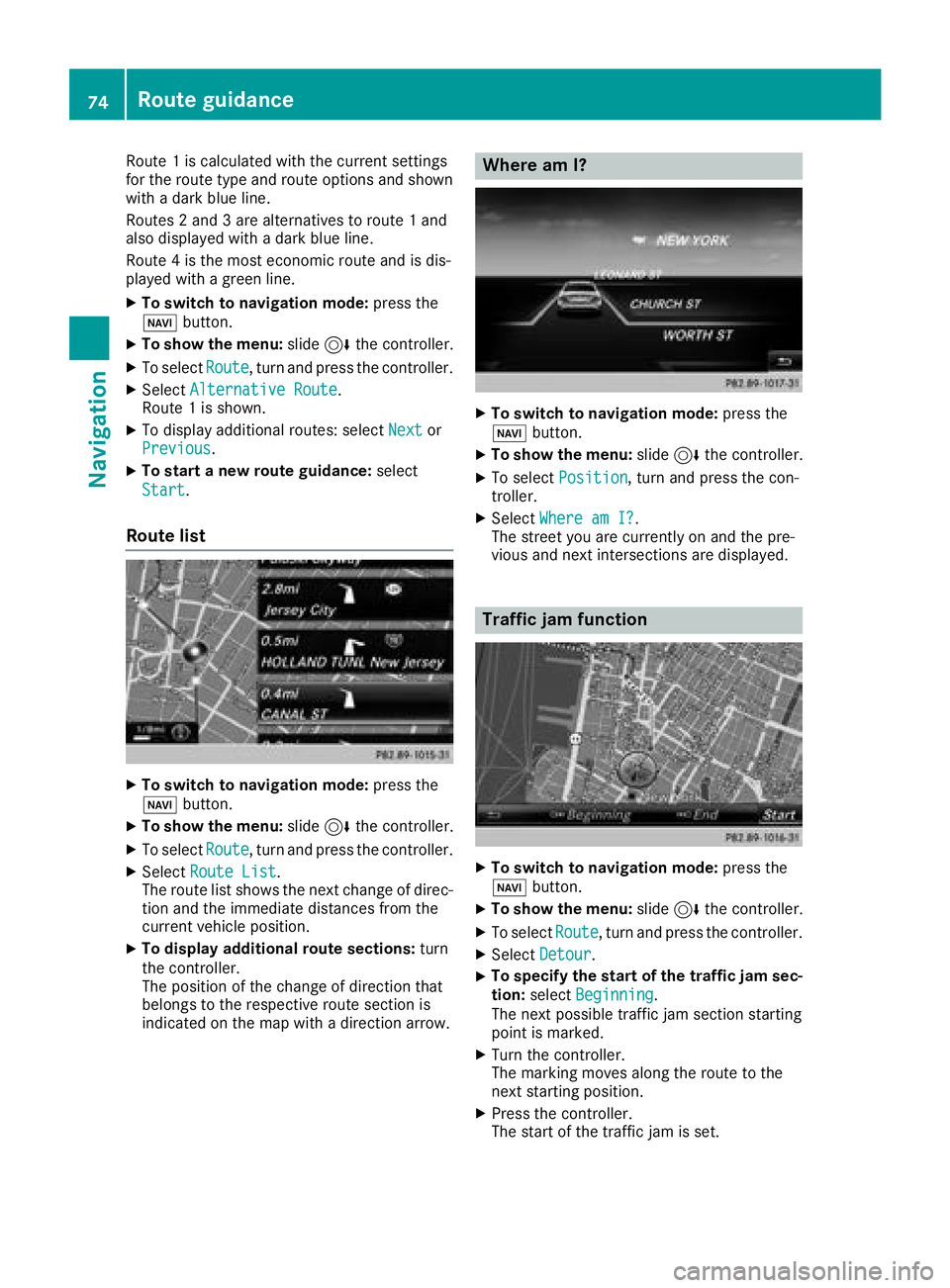
Route 1is calculated wit hth ecurren tsetting s
for th erout etyp eand rout eoption sand shown
wit h a dark blue line.
Routes 2and 3are alternatives to rout e 1and
also displayed wit h adark blue line.
Rout e 4is th emos teconomi crout eand is dis-
played wit h agreen line.
XTo switch to navigation mode: press the
Ø button.
XTo sho wthemenu: slide6 thecontroller .
XTo selectRoute,tur nand press th econtroller .
XSelectAlternative Route.
Rout e 1is shown.
XTo display additional routes: select Nextor
Previous.
XTo star t anew route guidance: select
Start
.
Route list
XTo switch to navigation mode: press the
Ø button.
XTo sho wthemenu: slide6 thecontroller .
XTo selectRoute,tur nand press th econtroller .
XSelectRoute Lis t.
The rout elist shows th enext chang eof direc-
tion and th eimmediat edistances from th e
curren tvehicl eposition .
XTo displa yadditiona lroute sections: turn
th econtroller .
The position of th echang eof direction that
belong sto th erespective rout esection is
indicated on th emap wit h adirection arrow.
Where am I?
XTo switch to navigation mode: press the
Ø button.
XTo sho wthemenu: slide6 thecontroller .
XTo select Position,tur nand press th econ-
troller .
XSelectWhere am I?.
The stree tyou are currentl yon and th epre -
vious and next intersection sare displayed.
Traffic jam function
XTo switch to navigation mode: press the
Ø button.
XTo sho wthemenu: slide6 thecontroller .
XTo selectRoute,tur nand press th econtroller .
XSelectDetour.
XTo specify th estar tof th etraffic ja msec-
tion: select Beginning
.
The next possibl etraffic jam section starting
poin tis marked.
XTurn th econtroller .
The markin gmoves alon gth erout eto th e
next starting position .
XPress thecontroller .
The start of th etraffic jam is set .
74Route guidance
Navigation