climate control MERCEDES-BENZ GLS SUV 2019 User Guide
[x] Cancel search | Manufacturer: MERCEDES-BENZ, Model Year: 2019, Model line: GLS SUV, Model: MERCEDES-BENZ GLS SUV 2019Pages: 729, PDF Size: 12.03 MB
Page 187 of 729
#
Press and hold theu button.
Setting the departu retime #
Brie fly press theu button. #
Press the, or. button repeatedly
until the time tobe changed appears on the
displa y. #
Press theu and^ buttons simultane‐
ousl y.
The Îsymbol on there mo tecontrol displ ay
fl ashes. #
Press the, and. buttons toset the
desired departure time. #
Press theu and^ buttons simultane‐
ousl y.
The new departure time will be stored.
Up tothre e departure times can be stored. #
Toactivate the departu retime: select the
desired departure time and press and hold
th eu button.
The Ísymbol, the departure time and,
depending on the selected departure time,
th e letter A, BorCappear on the displa y. #
Todeactivate the departure time: select
th e desired departure time and press and
hold the^ button.
OFF will appear on the displa y. #
Tocheck thest atus of thest ationary
heater: briefly press theu button.
Switching off immediately #
Press and hold the^ button.
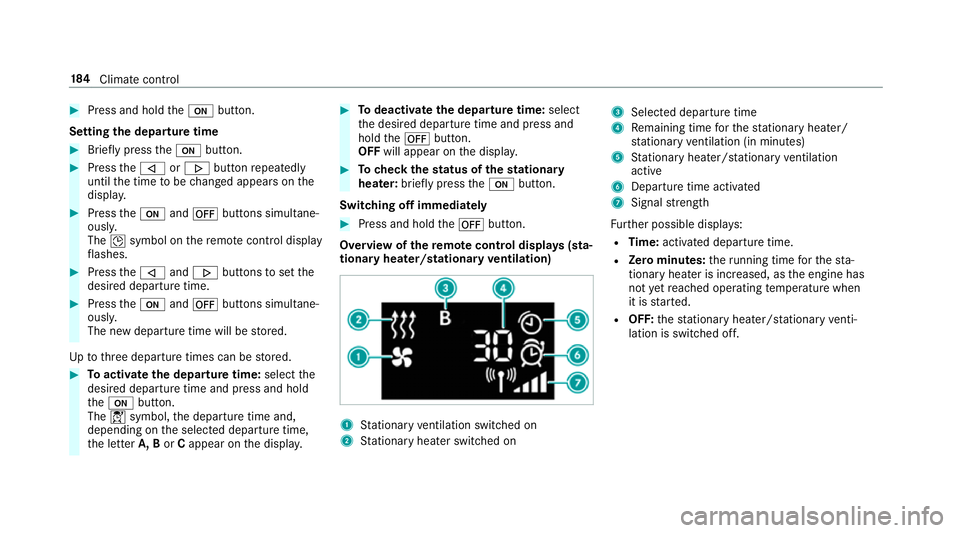
Overview of there mo tecont rol displa ys(sta‐
tiona ryheater/stationary ventilation) 1
Stationary ventilation switched on
2 Stationary heater swit ched on 3
Selected departure time
4 Remaining time forth est ationary heater/
st ationary ventilation (in minu tes)
5 Stationary heater/ stationary ventilation
acti ve
6 Departure time acti vated
7 Signal stre ngth
Fu rther possible displa ys:
R Time: activated departure time.
R Zero minutes: theru nning time forth est a‐
tionary heater is inc reased, as the engine has
not yetre ached operating temp erature when
it is star ted.
R OFF: thest ationary heater/ stationary venti‐
lation is switched off. 184
Climate cont rol
Page 188 of 729
Re
placing the remo tecont rol bat tery (sta‐
tiona ryheater) &
DANG ER Serious damage tohealth
caused byswallowing batteries
Batteries contain toxic and cor rosive sub‐
st ances. Swallowing bat teries may cause
serious damage tohealth.
There is a risk of fata l injur y. #
Keep batteries out of there ach of chil‐
dren. #
If batteries are swallo wed, seek medical
attention immediately. +
ENVIRONMEN
TALNO TEEnvironmental
dama gedue toimproper disposal of bat‐
te ries Batteries conta
intoxic and cor ro‐
sive subs tances. #
Ta
ke dischar ged batteries to a
qu alified specialist workshop or to a
collection point for used batteries. Re
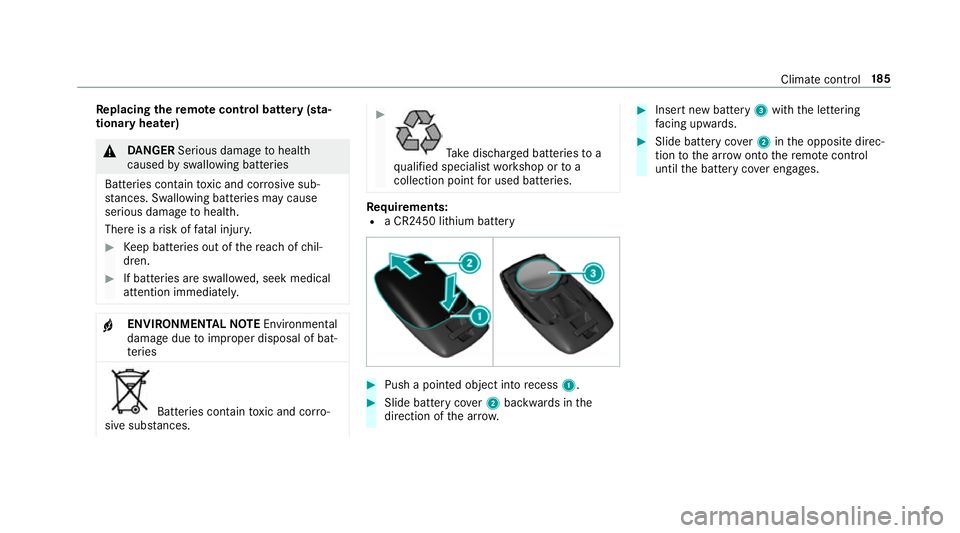
quirements:
R a CR2450 lithium battery #
Push a pointed object into recess 1. #
Slide battery co ver2 backwards in the
direction of the ar row. #
Insert new battery 3with the lettering
fa cing up wards. #
Slide battery co ver2 inthe opposite direc‐
tion tothe ar row onto there mo tecontrol
until the battery co ver engages. Climate control
18 5
Page 191 of 729
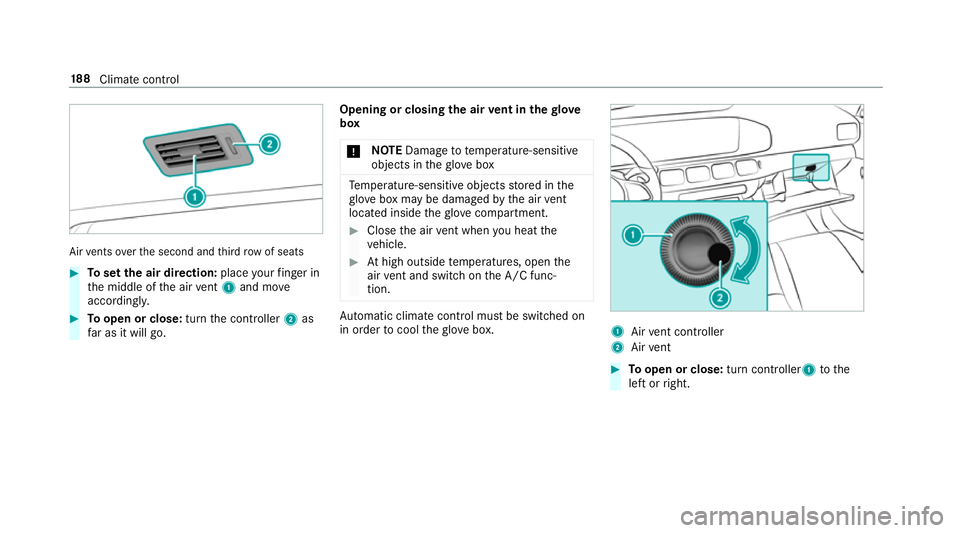
Air
vents overth e second and third row of seats #
Toset the air direction: placeyour finger in
th e middle of the air vent 1 and mo ve
accordin gly. #
Toopen or close: turnthe controller 2as
fa r as it will go. Opening or closing
the air vent in thegl ove
box
* NO
TEDama geto te mperature-sensitive
objects in theglove box Te
mp erature-sensitive objects stored in the
gl ove box may be damaged bythe air vent
located inside theglove compa rtment. #
Close the air vent when you heat the
ve hicle. #
Athigh outside temp eratures, open the
air vent and switch on the A/C func‐
tion. Au
tomatic clima tecontrol must be switched on
in order tocool theglove box. 1
Airvent controller
2 Airvent #
Toopen or close: turn controller1 tothe
left or right. 18 8
Climate cont rol
Page 200 of 729

R
Do not drive on unknown terrain that is not
easily visible and stay on mar kedro utes.
R Alw ayske ep the doors and windo wsclosed
while theve hicle is in motion.
R Deactivate Active Dis tance Assi st
DISTRONIC, cruise control and theva riable
limiter.
R Adapt your driving style to thete rrain.
R Do not use the HOLD function on steep
downhill or uphill gradients with slippery or
loose sur faces.
Driving on sand
When driving on sand, also obser vethefo llowing
instructions:
R Select theF drive prog ram.
R Select a higher vehicle le vel.
R Shift toa lo werge ar.
R Drive quickly toove rcome thero lling resist‐
ance, otherwise theve hicle may dig itself in.
R Drive in the trac ksofother vehicles if possi‐
ble. Make sure that thefo llowing prerequi‐
sites are me t: -
the tyre ruts are not too deep
- the sand is firm enough
- the ground clearance is suf ficient
Fo rding
Also obser vethefo llowing information when
fo rd ing:
R Drive at no more than 10 km/h.
R Obser vethe maximum permissible ford ing
dep th (/ page 607).
R Switch off automatic climate control
(/ page 177).
R Vehicles with stationary heater/ventila‐
tion: switch thest ationary heater/ ventilation
off (/ page 182).
R Ensu rethat a bow wave does not form asyou
drive.
R Do not stop in thewa ter and do not switch
off the engine. Ensure the ECO start/ stop
function is switched off (/ page 200).
Driving in mountainous terrain Also obse
rveth efo llowing information when
driving in moun tainous terrain:
R Obse rveth eva lues of the approach/depar‐
ture angle and of the maximum gradient
(/ page 607).
R Avoid high engine speeds.
R Use the braking po wer of the engine when
driving downhill.
R Shift toa lo werge ar on uphill gradients and
on long, steep downhill gradients.
R Activate DSR be fore driving downhill, if nec‐
essary (/ page245).
Che cklist af ter driving off-road
Off-road driving terrain places greater demands
on your vehicle than driving on no rmalroads.
Check the entire vehicle for dama geand fore ign
bodies everytime af ter driving off-road. Foreign
bodies in the wheels or driv etra in can lead to
imbalances and therefore vibrations.
R Ifth eF orG drive prog ram is selec‐
te d: select the;, =,CorA
drive prog ram. Driving and parking
197
Page 353 of 729
Vo
ice command Colloquialexample Function
Automatic climate control driver on I would like to switch on the auto- matic climate control for the driv-
er's seatSwitches on automatic climate cont
rolfo rth e driver's or front passenger
side
Ambient light blue Switch ambient light to blueSwitches ambient lighting, e.g.
toblue
Wave massage driver on I would like to switch on the wave
massage for the driver's seatSwitches on
thewav e massage forth e driver's or front passenger seat
Massage driver's seat off Switch the driver's side massage
offSwitches off
the massage function forth e driver's or front passenger seat
Seat heating driver on I would like to switch on the seat
heating for the driver's seatSwitches on
the seat heating forth e driver's or front passenger seat
Seat heating front passenger level
2 Seat heating front-passenger on
level 2 Sets
the seat heating forth e driver's or front passenger seat toleve l 2
Current speed limit I would like to hear the speed limitCalls up
the cur rent speed limit
Outside temperature I would like to find out what the
temperature outside is likeCalls up
the outside temp erature
Average consumption I would like to know the average
fuel consumptionCalls up
average consu mption 350
LINGU ATRO NIC
Page 354 of 729
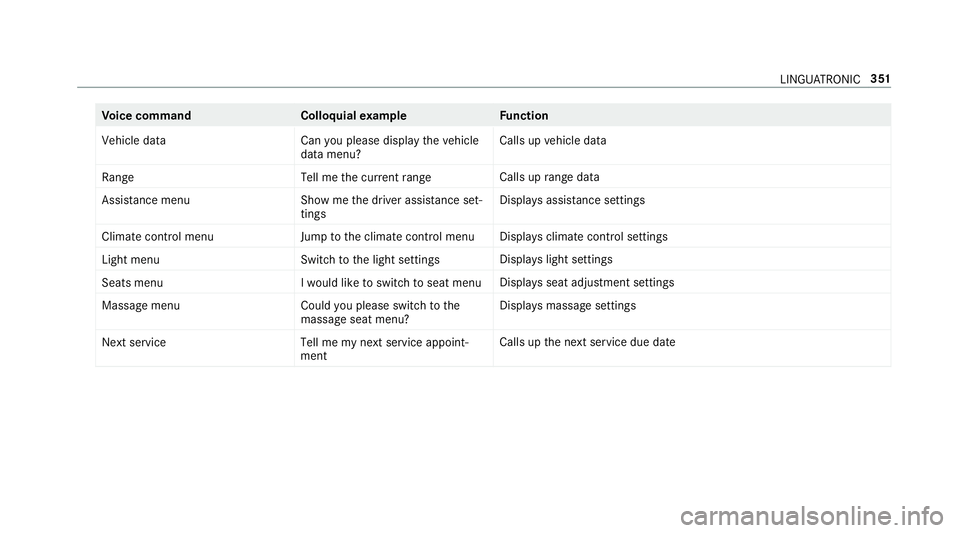
Vo
ice command Colloquialexample Function
Vehicle data Can you please display the vehicle
data menu?Calls up
vehicle data
Range Tell me the current rangeCalls up
range da ta
Assistance menu Show me the driver assistance set-
tingsDispl
ays assis tance settings
Climate control menu Jump to the climate control menuDispla
ysclimate control settings
Light menu Switch to the light settingsDispla
yslight settings
Seats men uI would like to switch to seat menu Displa
ysseat adjustment settings
Massage menu Could you please switch to the
massage seat menu?Displa
ysmassa gesettings
Next service Tell me my next service appoint-
mentCalls up
the next service due date LINGU
ATRO NIC 351
Page 369 of 729
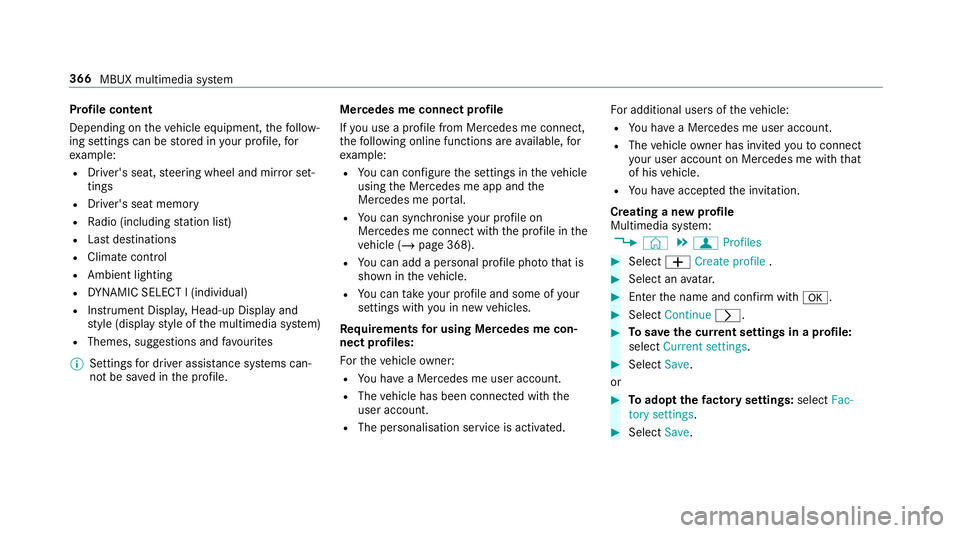
Profile content
Depending on
theve hicle equipment, thefo llow‐
ing settings can be stored in your profile, for
ex ample:
R Driver's seat, steering wheel and mir ror set‐
tings
R Driver's seat memory
R Radio (including station list)
R Last destinations
R Climate control
R Ambient lighting
R DYNA MIC SELECT I (individual)
R Instrument Displa y,Head-up Display and
st yle (display style of the multimedia sy stem)
R Themes, suggestions and favo urites
% Settings for driver assi stance sy stems can‐
not be sa ved in the profile. Mercedes me connect profile
If
yo u use a profile from Mercedes me connect,
th efo llowing online functions are available, for
ex ample:
R You can configure the settings in theve hicle
using the Mercedes me app and the
Mercedes me por tal.
R You can syn chronise your profile on
Mercedes me connect with the profile in the
ve hicle (/ page 368).
R You can add a personal profile pho tothat is
shown in theve hicle.
R You can take your profile and some of your
settings with you in new vehicles.
Requ irements for using Me rcedes me con‐
nect profiles:
Fo rth eve hicle owner:
R You ha vea Mercedes me user account.
R The vehicle has been connected with the
user account.
R The personalisation service is activated. Fo
r additional users of theve hicle:
R You ha vea Mercedes me user account.
R The vehicle owner has invited youto connect
yo ur user account on Mercedes me with that
of his vehicle.
R You ha veaccep tedth e invitation.
Creating a new profile
Multimedia sy stem:
4 © 5
f Profiles #
Select WCreate profile . #
Select an avatar. #
Enterth e name and confi rmwith a. #
Select Continue r. #
Tosave the cur rent settings in a profile:
select Current settings. #
Select Save.
or #
Toadopt thefa ctory settings: selectFac-
tory settings. #
Select Save. 366
MBUX multimedia sy stem
Page 527 of 729
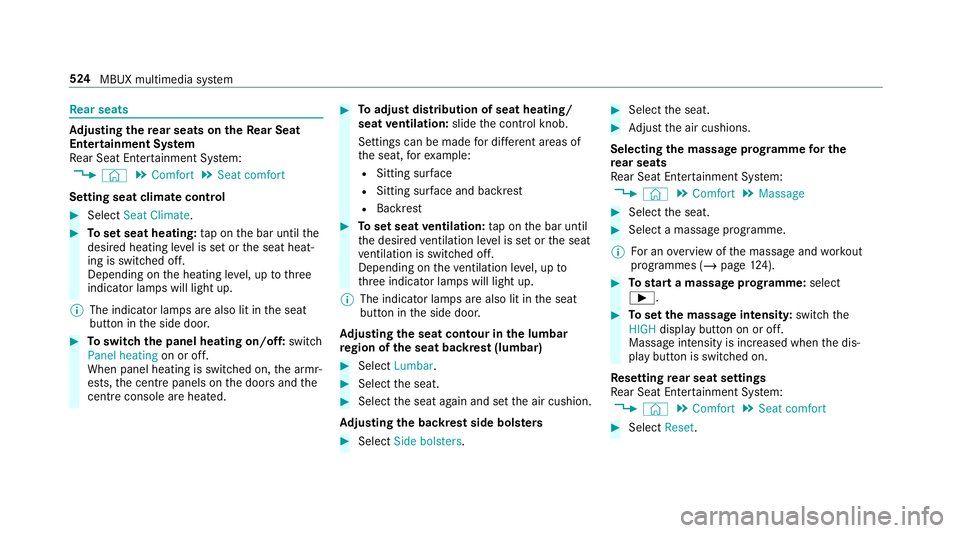
Re
ar seats Ad
justing the rear seats on theRe ar Seat
Entertainment Sy stem
Re ar Seat En tertainment Sy stem:
4 © 5
Comfort 5
Seat comfort
Setting seat climate control #
Select Seat Climate. #
Toset seat heating: tap on the bar until the
desired heating le vel is set or the seat heat‐
ing is switched off.
Depending on the heating le vel, up tothree
indicator lamps will light up.
% The indicator lamps are also lit in the seat
button in the side door. #
Toswitch the panel heating on/off: switch
Panel heating on or off.
When panel heating is switched on, the armr‐
ests, the cent repanels on the doors and the
centre console are hea ted. #
Toadjust distribution of seat heating/
seat ventilation: slidethe control knob.
Settings can be made for dif fere nt areas of
th e seat, forex ample:
R Sitting sur face
R Sitting su rface and backrest
R Backrest #
Toset seat ventilation: tap on the bar until
th e desired ventilation le vel is set or the seat
ve ntilation is switched off.
Depending on theve ntilation le vel, up to
th re e indicator lamps will light up.
% The indicator lamps are also lit in the seat
button in the side door.
Ad justing the seat contour in the lumbar
re gion of the seat backrest (lumbar) #
Select Lumbar . #
Select the seat. #
Select the seat again and set the air cushion.
Ad justing the backrest side bols ters #
Select Side bolsters . #
Select the seat. #
Adjust the air cushions.
Selecting the massage prog ramme for the
re ar seats
Re ar Seat En tertainment Sy stem:
4 © 5
Comfort 5
Massage #
Select the seat. #
Select a massage programme.
% For an overview of the massage and workout
programmes (/ page124). #
Tostart a massage prog ramme: select
Ì. #
Toset the massage intensit y:switch the
HIGH display button on or off.
Massage intensity is increased when the dis‐
play button is switched on.
Re setting rear seat settings
Re ar Seat En tertainment Sy stem:
4 © 5
Comfort 5
Seat comfort #
Select Reset. 524
MBUX multimedia sy stem
Page 528 of 729
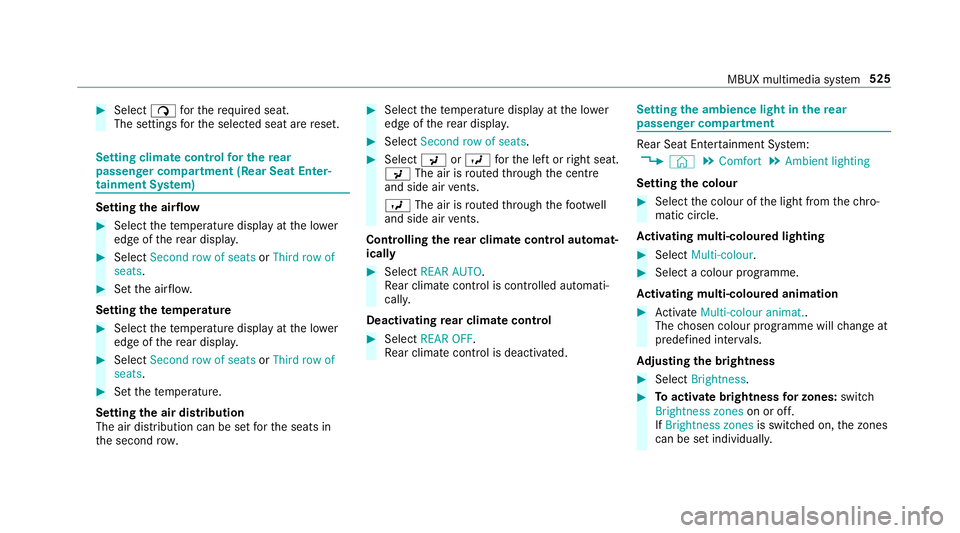
#
Select ßforth ere qu ired seat.
The settings forth e selected seat are reset. Setting climate control
for the rear
passenger comp artment (Rear Seat Enter‐
tainment Sy stem) Setting
the airflow #
Select thete mp erature display at the lo wer
edge of there ar displa y. #
Select Second row of seats orThird row of
seats. #
Set the air flow.
Setting thetemp erature #
Select thete mp erature display at the lo wer
edge of there ar displa y. #
Select Second row of seats orThird row of
seats. #
Set thete mp erature.
Setting the air distribution
The air distribution can be set forth e seats in
th e second row. #
Select thete mp erature display at the lo wer
edge of there ar displa y. #
Select Second row of seats . #
Select PorO forth e left or right seat.
P The air is routed thro ugh the cent re
and side air vents.
O The air is routed thro ugh thefo ot we ll
and side air vents.
Controlling the rear climate control automat‐
ical ly #
Select REAR AUTO .
Re ar climate control is controlled automati‐
call y.
Deactivating rear climate control #
Select REAR OFF.
Re ar climate control is deactivated. Setting
the ambience light in there ar
passenger comp artment Re
ar Seat En tertainment Sy stem:
4 © 5
Comfort 5
Ambient lighting
Setting the colour #
Select the colour of the light from thech ro‐
matic circle.
Ac tivating multi-coloured lighting #
Select Multi-colour. #
Select a colour programme.
Ac tivating multi-coloured animation #
Activate Multi-colour animat..
The chosen colour programme will change at
predefined inter vals.
Ad justing the brightness #
Select Brightness . #
Toactivate brightness for zones: switch
Brightness zones on or off.
If Brightness zones is switched on,the zones
can be set individually. MBUX multimedia sy
stem 525
Page 684 of 729
Ad
justing the mid- range, treble and
bass
Burmes ter®
high-end 3D sur round
sound sy stem ....................................... 51 8
Ad justing the sound focus
Burmes ter®
sur round sound sy stem ....5 17
Ad justing the sound optimisation
Burmes ter®
high-end 3D sur round
sound sy stem ....................................... 51 8
Ad justing treble, mid- range and bass
settings
Burmes ter®
high-end 3D sur round
sound sy stem ....................................... 51 8
Burmes ter®
sur round sound sy stem ....5 16
ADS PLUS da mping sy stem
see AIRMATIC
Af ter-sales service centre
see ASS YST PLUS
Air conditioning menu Calling up ............................................ 17 7
Air conditioning sy stem
see Climate control Air distribution
........................................ .175
Setting (multimedia sy stem) ................1 78
Air freshener sy stem
see Frag rance sy stem
Air inlet see Air-water duct
Air pressure see Tyre pressure
Air suspension see AIRMATIC
Air vents ................................................... 186
Ad justing (front) .................................. 186
Ad justing (rear) .................................... 187
Glo vebox .............................................1 88
Air vents
see Air vents
Ai r-re circulation mode ............................ 17 9
Air-water duct .......................................... 538
Ke eping free ........................................5 38
Airbag ........................................................ .42
Ac tivation .............................................. 37
Fr ont airbag (driver, front passenger) ....42
Ins tallation locations ............................ .42Knee airbag ........................................... 42
Overview ............................................... 42
PA SSENGER AIR BAG indicator lamp .... .47
Pr otection ..............................................44
Re duced pr otection ...............................45
Side impact airbag ................................ 42
Wi ndow airbag ....................................... 42
Ai rflow ...................................................... 175
AIRM ATIC ................................................ .262
Setting ................................................. 265
Suspension .......................................... 262
Alarm see Panic alarm
Alarm sy stem
see ATA (anti-theft alarm sy stem)
All-wheel drive see 4MATIC
Alternative route
see Route
Ambiance light Setting (Rear Seat En tertainment
Sy stem) ............................................... 525 Index
681