display MERCEDES-BENZ GLS SUV 2019 User Guide
[x] Cancel search | Manufacturer: MERCEDES-BENZ, Model Year: 2019, Model line: GLS SUV, Model: MERCEDES-BENZ GLS SUV 2019Pages: 729, PDF Size: 12.03 MB
Page 73 of 729
#
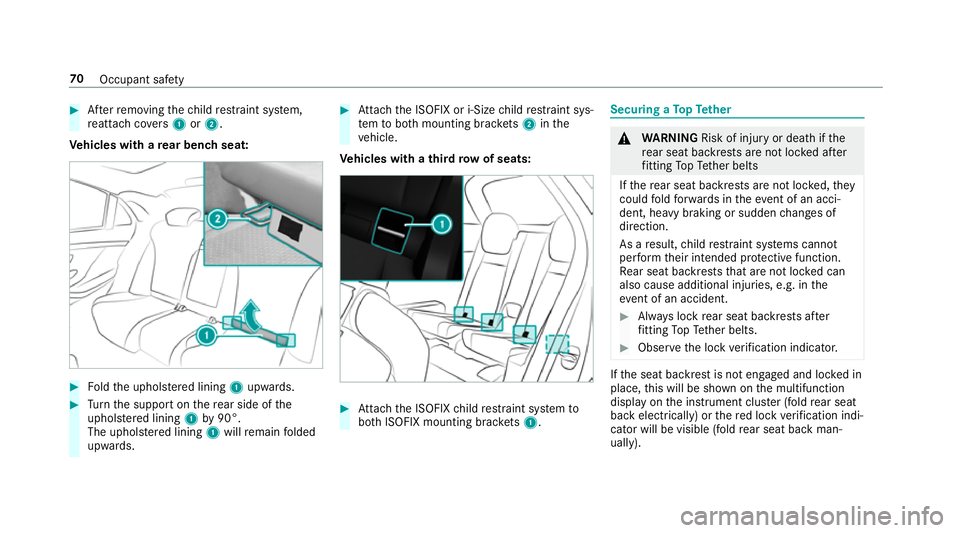
Afterre moving thech ild restra int sy stem,
re attach co vers 1 or2.
Ve hicles with a rear ben chseat: #
Foldthe uphols tere d lining 1upwards. #
Turn the support on there ar side of the
uphol stered lining 1by90°.
The uphols tere d lining 1will remain folded
upwards. #
Attach the ISOFIX or i‑Size child restra int sys‐
te m to both mounting brac kets 2 inthe
ve hicle.
Ve hicles with a third row of seats: #
Attach the ISOFIX child restra int sy stem to
bo th ISOFIX mounting brac kets 1. Secu
ring a TopTe ther &
WARNING Risk of inju ryor death if the
re ar seat backrests are not loc ked af ter
fi tting TopTe ther belts
If th ere ar seat backrests are not loc ked, they
could fold forw ards in theeve nt of an acci‐
dent, heavy braking or sudden changes of
direction.
As a result, child restra int sy stems cann ot
per form their intended pr otective function.
Re ar seat backrests that are not loc ked can
also cause additional injuries, e.g. in the
ev ent of an accident. #
Alw ays lock rear seat backrests af ter
fi tting TopTe ther belts. #
Obser vethe lock verification indicator. If
th e seat backrest is not engaged and loc ked in
place, this will be shown on the multifunction
display on the instrument clus ter (fold rear seat
back electrically) or there d lock verification indi‐
cator will be visible (fold rear seat back man‐
ually). 70
Occupant saf ety
Page 78 of 729
We
ight category
Front passenger front airbag enabled 1
Front passenger front airbag disabled 1, 2
Category III: 22to36 kg UF U, L
X Not suitable forch ildren in this we ight categor y.
UF Suitable forfo rw ard-facing child restrai nt sy stems of the "Universal" category
in this we ight categor y. U Suitable
forch ild restrai nt sy stems of the "Universal" category in this we ight cat‐
egor y.
L Suitable for semi-universal child restrai nt sy stems according totheta ble in "Rec‐
ommended child restra int sy stems", or if theve hicle and the seat are lis ted in the
ch ild restra int sy stem manufacturer's vehicle model list. Securing
thech ild restra int sy stem with the
seat belt on there ar seat &
WARNING Risk of inju ryifth ere ar
ben chseat/rear seat and seat backrest
are not engaged
If th ere ar ben chseat/rear seat and seat
backrest are not engaged they could fold for‐
wa rds, e.g. when braking suddenly or in the
ev ent of an accident.
R Ifth is is the case, theve hicle occupant
wo uld be forc ed into the seat belt bythe re
ar ben chseat/rear seat or bythe seat
backrest. The seat belt cann otprotect as
intended and could result in additional
injur y.
R Objects or loads in the boot/load com‐
partment cann otbe restra ined bythe
seat backrest. #
Make sure that the seat backrest and
th ere ar ben chseat/rear seat are
engaged before everytrip. If
th e seat backrest is not engaged and loc ked,
th is will be shown on the multifunction display on
the instrument clus ter (fold back rear seat
electrically) or there d lock verification indicator
will be visible (fold ba ckrear seat mechanically).
When fitting a belt-secu redch ild restra int sys‐
te m, obser vethefo llowing:
O Be sure
toobser vethe ins tallation and oper‐
ating instructions pr ovided bythe manufac‐
turer forth ech ild restra int sy stem being
used.
O Fo
r a child restra int sy stem in the "Univer‐
sal" or "Semi-Universal" categor y,make
sure that the sy stem has been appr oved for
th eve hicle seat. Occupant saf
ety75
Page 120 of 729
R
Ach ild restra int sy stem will then no lon‐
ge r be suppor ted cor rectly or positioned
cor rectly and will no longer per form its
intended function.
R The seat backrest cannot restra in objects
or goods in the luggage compartment.
Alw ays ensure that the seat and seat back‐
re st are engaged:
R before passengers tr avel on a seat with
th e EASY -ENTRY/EXIT feature
R afte r adju sting the seat
R afte rth e EASY -ENTRY/EXIT feature is
used
R afte rth e load compartment enlar gement
has been folded down. &
WARNING Risk of inju rydue toseat
backrest folded forw ards
If th ere ar seat backrest is folded forw ards,
persons in theth ird row of seats could col‐
lide with parts of the seat adjustment mech‐ anism, in particular in
theeve nt of an acci‐
dent, sudden braking or an ab rupt change of
direction. #
Ifth ere is a person in theth ird row of
seats, there ar seat in front of that per‐
son must be folded back into the driv‐
ing position before starting the journe y. #
People in theth ird row of seats must
not place their legs on a rear seat back‐
re st that has been folded forw ards. Alw
ays ensure that all vehicle occupants ha ve
th eir seat belts fastened cor rectly and are sitting
prope rly. Pa rticular attention must be paid to
ch ildren.
If yo u no lon gerre qu ire thefo lded-d own seat
ba ckrest for loading or forge tting in and out,
fo ld it back into place. &
WARNING Risk of becoming trapped if
th e seat is not engaged
The seat does not engage when folded for‐
wa rds. The seat can fold backwards unex‐ pectedl
y,e.g. when accelerating, braking or
in theev ent of an abrupt change of direction
or an accident.
Pe ople in the seat's sweep can become trap‐
ped. #
If a seat is folded forw ards, alw aysfo ld
it back before driving off. #
Make sure that the seat is engaged. If a seat in
the second rowof seats is not
engaged, this will be shown on the multifunction
display on the instrument clus ter.
Yo u can fold forw ards the seats in the second
row of seats forth efo llowing situations:
R Toget in or out
R For easier access tothe load compartment
Ve hicles with a centre seat backrest:the cent re
seat folds forw ards and backwards, toge ther
with the left-hand seat.
Re quirements:
R The area into which the seat is folded is free.
R The seat has been folded up (/ page138). Seats and
stowing 117
Page 135 of 729

#
During the adjustment process of the
memory function, make sure that no
one has any body parts in the sweep of
th e seat. #
If someone becomes trapped, press a
memory position switch or seat adjust‐
ment switch immediately. &
WARNING Risk of entrapment if the
memory function is activated bychildren
Children could become trapped if they acti‐
va te the memory function, particularly when
unattended. #
Never lea vechildren unat tended in the
ve hicle. #
When leaving theve hicle, alw aysta ke
th eke y with you and lock theve hicle. This also applies
tothe Digital Vehicle Key if the
"Digital Vehicle Key" function is activated via
Mercedes me connect.
The memory function can be used when the igni‐
tion is switched off. St
oring
Seat adjustments for up tothre e people can be
st ored and called up using the memory function.
The following sy stems can be selected:
R Seat
R Outside mir rors
R Head-up display
R Steering column
R Seat conto ur #
Set the seat, the seat conto ur,the head-up
display and the outside mir rors to the
desired position. #
Press memory button M and then press pre‐
set position button 1,2 or 3 within thre e sec‐
onds.
An acoustic signal sounds. The settings are
st ored. 13 2
Seats and stowing
Page 140 of 729
Fo
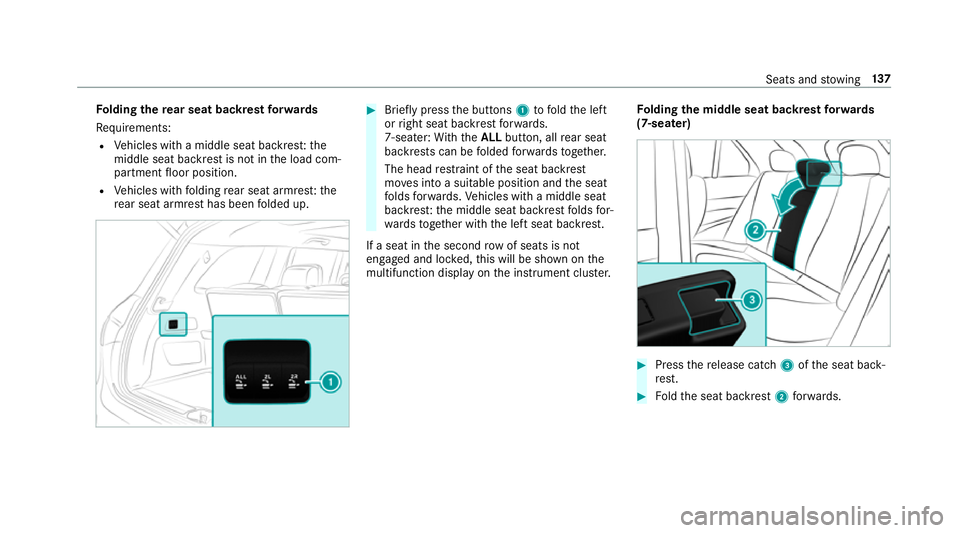
lding there ar seat backrest forw ards
Re quirements:
R Vehicles with a middle seat backres t:the
middle seat backrest is not in the load com‐
partment floor position.
R Vehicles with folding rear seat armres t:the
re ar seat armrest has been folded up. #
Brief lypress the buttons 1tofold the left
or right seat backrest forw ards.
7-seater: With th eALL button, all rear seat
backrests can be folded forw ards toget her.
The head restra int of the seat backrest
mo ves into a suitable position and the seat
fo lds forw ards. Vehicles with a middle seat
backres t:the middle seat backrest folds for‐
wa rdsto ge ther with the left seat backrest.
If a seat in the second rowof seats is not
engaged and loc ked, this will be shown on the
multifunction display on the instrument clus ter. Fo
lding the middle seat backrest forw ards
(7-seater) #
Press there lease cat ch3 ofthe seat back‐
re st. #
Foldthe seat backrest 2forw ards. Seats and
stowing 137
Page 142 of 729
intended and could
result in additional
injur y.
R Objects or loads in the boot/load com‐
partment cann otbe restra ined bythe
seat backrest. #
Make sure that the seat backrest and
th ere ar ben chseat/rear seat are
engaged before everytrip. *
NO
TEDama getothe seat belt The seat belt could become trapped and
thus
damaged when folding back the seat back‐
re st. #
Make sure that the seat belt is not trap‐
ped when folding back the seat back‐
re st. Fo
lding back there ar seat backrests
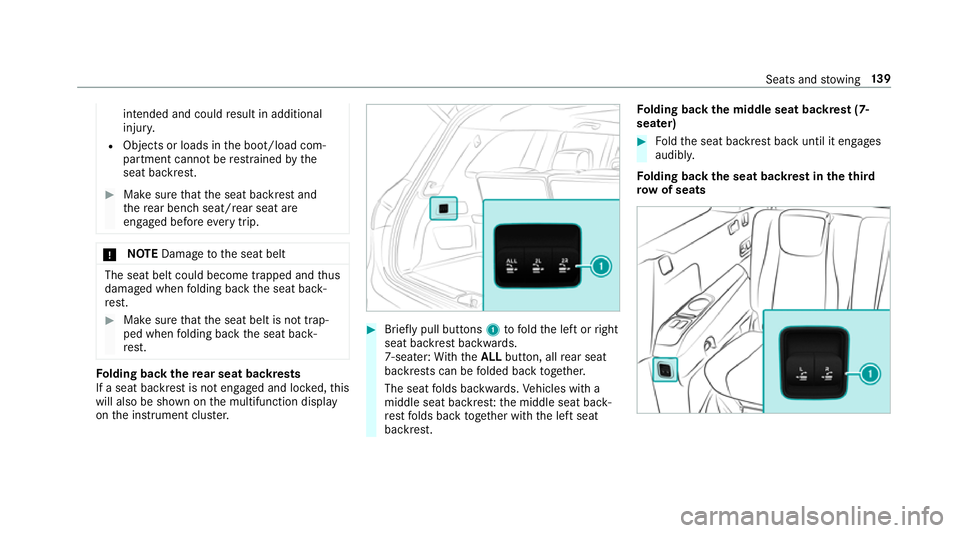
If a seat backrest is not engaged and loc ked, this
will also be shown on the multifunction display
on the instrument clus ter. #
Brief lypull buttons 1tofold the left or right
seat backrest backwards.
7-seater: With th eALL button, all rear seat
backrests can be folded back toge ther.
The seat folds backwards. Vehicles with a
middle seat backres t:the middle seat back‐
re st folds back toge ther with the left seat
backrest. Fo
lding back the middle seat backrest (7-
seater) #
Foldthe seat backrest back until it engages
audibl y.
Fo lding back the seat backrest in theth ird
ro w of seats Seats and
stowing 13 9
Page 158 of 729
R
The charging function and wireless connec‐
tion of the mobile phone totheve hicle's
ex terior aerial are only available if the ignition
is switched on.
R Small mobile phones may not be able tobe
ch arge d in everyposition of the mobile
phone stowage compartment.
R Largemobile phones which do not rest flat in
th e mobile phone stowage compartment may
not be able tobe charge d or connec ted with
th eve hicle's exterior aerial.
R The mobile phone may heat up during the
ch arging process. This may also depend on
th e applications (apps) cur rently open.
R Toensure more ef ficient charging and con‐
nection with theve hicle's exterior aerial,
re mo vethe pr otective co ver from the mobile
phone. Pr otective co vers which are neces‐
sary for wireless charging are excluded. Wire
lesscharging of a mobile phone in the
cockpit Re
quirements:
R The mobile phone is suitable for wireless
ch arging.
% A list of compatible mobile phones can be
found at: http://www.mercedes-benz.com/
connect. #
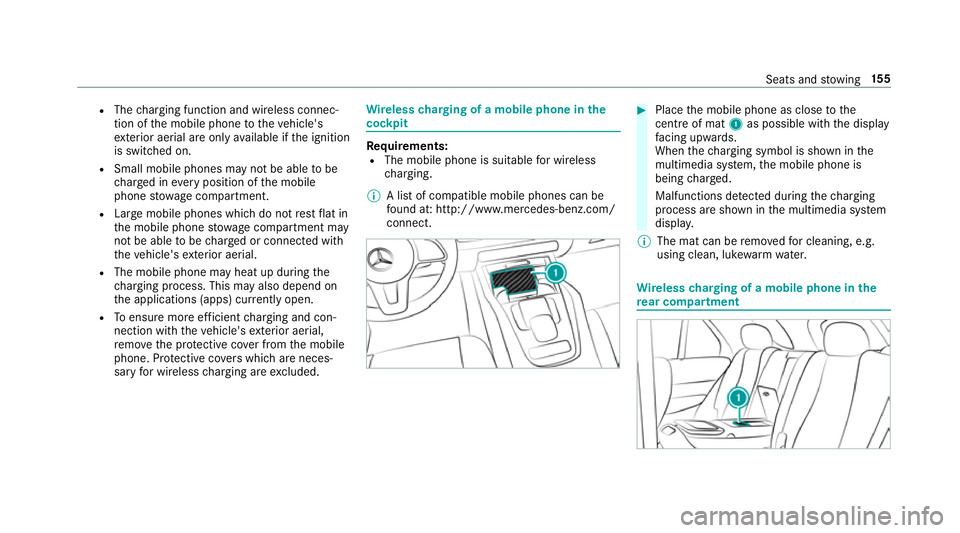
Place the mobile phone as close tothe
centre of mat 1as possible wi th the display
fa cing up wards.
When thech arging symbol is shown in the
multimedia sy stem, the mobile phone is
being charge d.
Malfunctions de tected du ring thech arging
process are shown in the multimedia sy stem
displa y.
% The mat can be remo vedfo r cleaning, e.g.
using clean, luk ewarmwate r. Wire
lesscharging of a mobile phone in the
re ar comp artment Seats and
stowing 15 5
Page 159 of 729
#
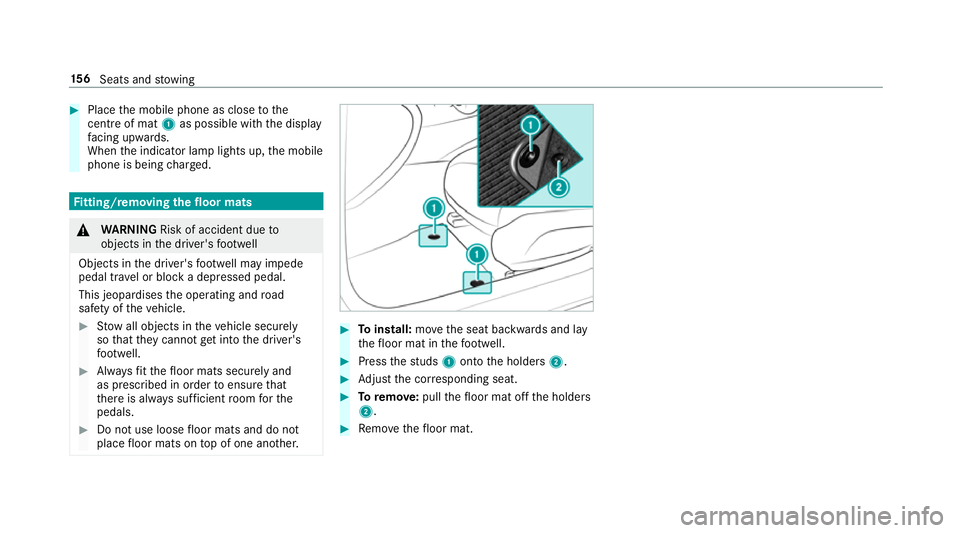
Place the mobile phone as close tothe
centre of mat 1as possible wi th the display
fa cing up wards.
When the indicator lamp lights up, the mobile
phone is being charge d. Fi
tting/ removing the floormats &
WARNING Risk of accident due to
objects in the driver's foot we ll
Objects in the driver's foot we ll may impede
pedal tr avel or block a depressed pedal.
This jeopardises the operating and road
saf ety of theve hicle. #
Stow all objects in theve hicle securely
so that they cannot getinto the driver's
fo ot we ll. #
Alw aysfit th efloor mats securely and
as prescribed in order toensure that
th ere is alw ays suf ficient room forthe
pedals. #
Do not use loose floor mats and do not
place floor mats on top of one ano ther. #
Toinstall: movethe seat backwards and lay
th efloor mat in thefo ot we ll. #
Press thest uds 1onto the holders 2. #
Adjust the cor responding seat. #
Toremo ve: pull thefloor mat off the holders
2. #
Remo vethefloor mat. 15 6
Seats and stowing
Page 166 of 729
The
vehicle in front will be illuminated bythe low
beam.
At speeds abo ve30 km/h:
R If no other road users are de tected, the high
beam will be switched on automaticall y.
R Ifot her road users are de tected, the partial
high beam will be switched on automaticall y.
At speeds below 25 km/h or when there is suf fi‐
cient stre et lighting:
R The partial high beam will switch off auto‐
matically.
R The high beam will switch off automaticall y.
At speeds abo veappr oximately 50 km/h:
R The headlamp range of the low beam is regu‐
lated automatically based on the dis tance to
ot her road users.
The sy stem's optical sensor is located behind
th e windscreen near theov erhead control panel. Switching
Adaptive Highbeam Assist Plus
on/off #
Toswitch on: turnthe light switch tothe
à position. #
Switch on the main beam using the combina‐
tion switch.
When the main beam is switched on auto‐
matically in the dar k,the _ indicator
lamp on the multifunction display will light
up. #
Toswitch off: switch offthe main beam
using the combination switch. Setting
theex terior lighting switch-off delay
time Re
quirements:
R The light switch is in theà position.
Multimedia sy stem:
4 © 5
Settings 5
Lights
5 Ext. light. del. shut-off
The exterior lighting is activated forth e confi g‐
ured time when theve hicle is par ked. #
Set the switch-off delay time. Switching
the sur round lighting on or off Multimedia sy
stem:
4 © 5
Settings 5
Lights
5 Surround lighting
When Surround lighting is active,theex terior
lighting lights up for 40 seconds af terth eve hicle
is unloc ked. When youstart theve hicle, the sur‐
ro und lighting is deactivated and the automatic
driving lights are activated.
Illuminated running boards: WhenSurround
lighting is activated, there spective running
boards are also illumina ted when a door is
opened. The illumination of theru nning boards is
not bound tothe 40 second light-up duration of
th eex terior lighting. #
Activate or deacti vate the function. Light and sight
16 3
Page 171 of 729
#
Switch on the ignition. #
Press theî button on the combination
switch.
The wiper arms will mo veinto the original
position.
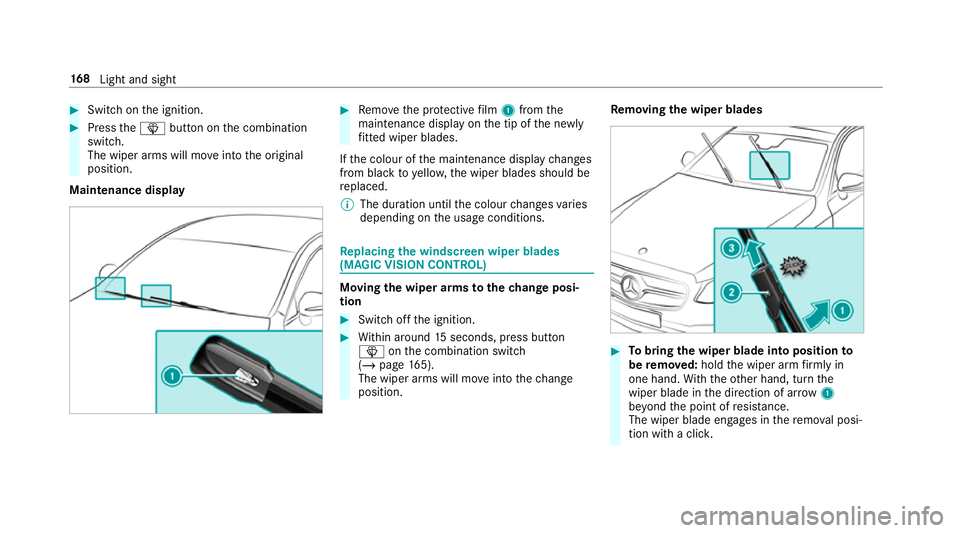
Maintenance display #
Remo vethe pr otective film 1 from the
maintenance display on the tip of the newly
fi tted wiper blades.
If th e colour of the maintenance display changes
from black to yellow, the wiper blades should be
re placed.
% The duration until the colour changes varies
depending on the usage conditions. Re
placing the windsc reen wiper blades
(MAGIC VISION CONT ROL) Moving
the wiper arms tothech ange posi‐
tion #
Switch off the ignition. #
Within around 15seconds, press button
î onthe combination switch
(/ page 165).
The wiper arms will mo veinto thech ange
position. Re
moving the wiper blades #
Tobring the wiper blade into position to
be remo ved: hold the wiper arm firm ly in
one hand. With th eot her hand, turn the
wiper blade in the direction of ar row1
be yond the point of resis tance.
The wiper blade engages in there mo val posi‐
tion with a clic k.16 8
Light and sight