language MERCEDES-BENZ GLS SUV 2019 Owner's Manual
[x] Cancel search | Manufacturer: MERCEDES-BENZ, Model Year: 2019, Model line: GLS SUV, Model: MERCEDES-BENZ GLS SUV 2019Pages: 729, PDF Size: 12.03 MB
Page 484 of 729
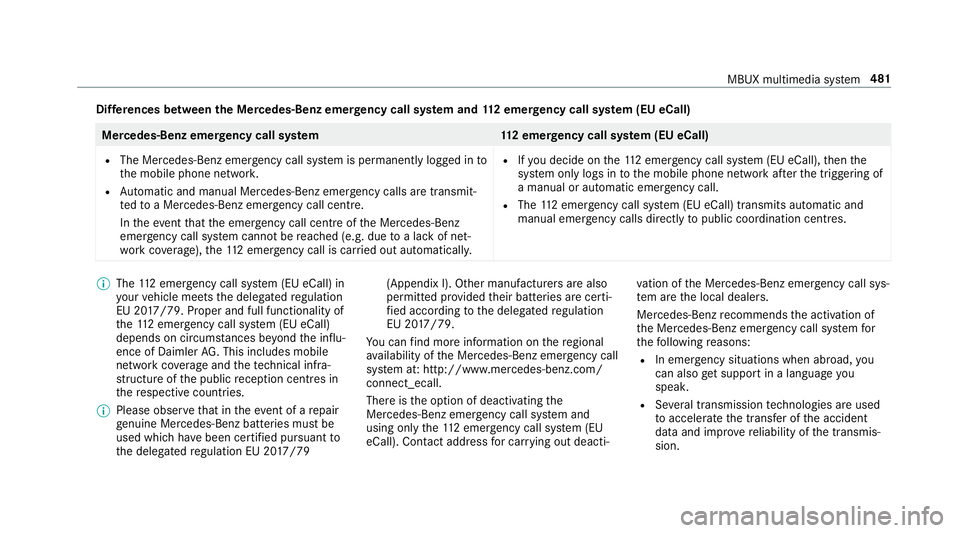
Dif
fere nces between the Mercedes-Benz emer gency call sy stem and 112 emer gency call sy stem (EU eCall) Mercedes-Benz emer
gency call sy stem 112 emer gency call sy stem (EU eCall)
R The Mercedes-Benz emer gency call sy stem is permanently logged in to
th e mobile phone networ k.
R Automatic and manual Mercedes-Benz emer gency calls are transmit‐
te dto a Mercedes-Benz emer gency call centre.
In theeve ntthat the emer gency call centre of the Mercedes-Benz
emer gency call sy stem cann otbe reached (e.g. due toa lack of net‐
wo rkcoverage ),th e11 2 emer gency call is car ried out automaticall y.R
Ifyo u decide on the11 2 emer gency call sy stem (EU eCall), then the
sy stem only logs in tothe mobile phone network af terth e triggering of
a manual or automatic emer gency call.
R The 112 emergency call sy stem (EU eCall) transmits automatic and
manual emer gency calls di rectly topublic coordination centres. %
The 112 emer gency call sy stem (EU eCall) in
yo ur vehicle meets the delegated regulation
EU 20 17/79. Proper and full functionality of
th e11 2 emergency call sy stem (EU eCall)
depends on circums tances be yond the influ‐
ence of Daimler AG. This includes mobile
network co verage and thete ch nical infra‐
st ru cture of the public reception centres in
th ere spective countries.
% Please obser vethat in theeve nt of a repair
ge nuine Mercedes-Benz batteries mu stbe
used which ha vebeen certified pursuant to
th e delegated regulation EU 20 17/79 (Appendix I). Other manu
facturers are also
permitted pr ovided their batteries are certi‐
fi ed according tothe delegated regulation
EU 20 17/79.
Yo u can find more information on there gional
av ailability of the Mercedes-Benz emer gency call
sy stem at: http://www.mercedes-benz.com/
connect_ecall.
There is the option of deactivating the
Mercedes-Benz emer gency call sy stem and
using only the11 2 emer gency call sy stem (EU
eCall). Contact address for car rying out deacti‐ va
tion of the Mercedes-Benz emer gency call sys‐
te m are the local dealers.
Mercedes-Benz recommends the activation of
th e Mercedes-Benz emer gency call sy stem for
th efo llowing reasons:
R In emer gency situations when ab road, you
can also get support in a language you
speak.
R Several transmission tech nologies are used
to accelerate the transfer of the accident
data and impr overe liability of the transmis‐
sion. MBUX multimedia sy
stem 481
Page 487 of 729
Tr
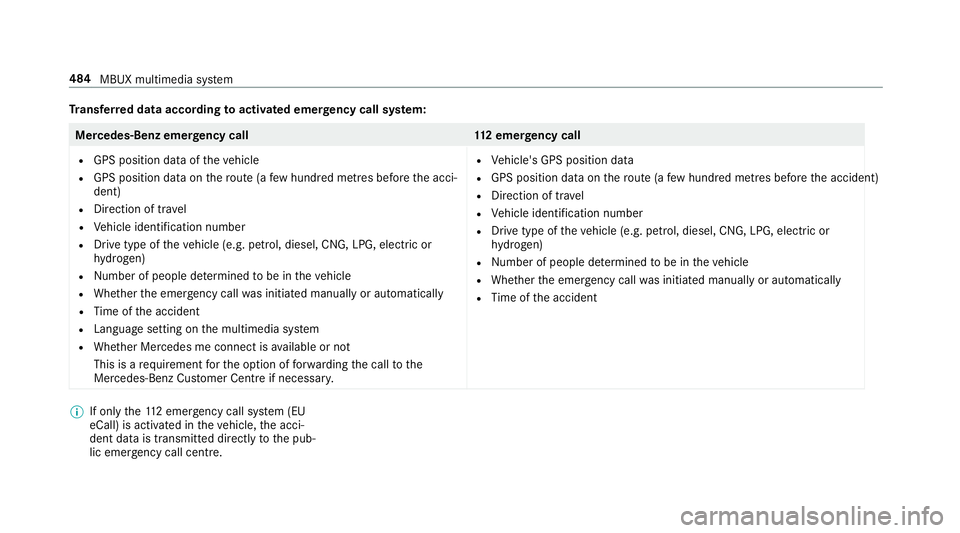
ansfer red data according toactivated emer gency call sy stem: Mercedes-Benz emer
gency call 112 emer gency call
R GPS position data of theve hicle
R GPS position data on thero ute (a few hund red metres before the acci‐
dent)
R Direction of tr avel
R Vehicle identification number
R Drive type of theve hicle (e.g. petrol, diesel, CNG, LPG, electric or
hy drogen)
R Number of people de term ined tobe in theve hicle
R Whe ther the emer gency call was initiated manually or automatically
R Time of the accident
R Language setting on the multimedia sy stem
R Whe ther Mercedes me connect is available or not
This is a requ irement forth e option of forw arding the call tothe
Mercedes-Benz Cus tomer Centre if necessar y. R
Vehicle's GPS position data
R GPS position data on thero ute (a few hund red metres before the accident)
R Direction of tra vel
R Vehicle identification number
R Drive type of theve hicle (e.g. petrol, diesel, CNG, LPG, electric or
hy drogen)
R Numb er of people de term ined tobe in theve hicle
R Whe ther the emer gency call was initiated manually or automatically
R Time of the accident %
If only the11 2 emer gency call sy stem (EU
eCall) is activated in theve hicle, the acci‐
dent data is transmit ted directly tothe pub‐
lic emer gency call centre. 484
MBUX multimedia sy stem
Page 488 of 729
Fo
r accident clarification purposes, thefo llowing
measures can be take n up toan hour af terthe
emer gency call has been initia ted:
R The cur rent vehicle position can be called up.
R Avo ice connection totheve hicle occupants
can be es tablished.
R Emer gency call da taas desc ribed abo vecan
be called up.
% ForRu ssia: various functions, e.g. receiving
traf fic information, cannot be per form ed for
up totwo hou rsafte r sending an emer gency
call.
Fu nction of the emer gency call sy stem self-
diagnosis (Russia)
Yo ur car verifies the operability of the emer‐
ge ncy call sy stem each time the ignition is ON.
In case of sy stem failure, you will be informed
with text messa geon the instrument clus ter and
with red indicator SOS NOT READY onthe media
displa y.
Please, make sure, that during 30 seconds af ter
switching ignition ON there d indicator SOS
NOT READY inthe upper right corner of themedia display is switched OFF,
this means the
emer gency call sy stem passed diagnostics suc‐
cessfully. If necessar y,switch ON the media dis‐
pla y,if it was switched OFF before.
St arting/ending ERA-GLONASS test mode
(Russia)
Re quirements:
R The star ter battery is suf ficiently charge d.
R The ignition is switched on.
R The vehicle has been stationary for at least
one minute. #
Tostart thete st mode: press and hold the
~ button on the multifunction steering
wheel for at least five seconds.
The test mode is star ted and automatically
ends af terth e language test has been per‐
fo rm ed. #
Toend thete st mode manuall y:switch off
th e ignition.
The test mode is ended. Information on data processing
Processing of personal data via
the
Mercedes-Benz emer gency call sy stem
All processing of personal data via the
Mercedes-Benz emer gency call sy stem cor re‐
sponds with the specifications in the EU Regula‐
tion 20 16/79 "on the pr otection of individuals
with rega rd tothe processing of personal data
(GDPR)"
The data is solely used bythe Mercedes-Benz
emer gency call sy stem forre scue and reco very
in theeve nt of an accident.
The owner of a vehicle, that is equipped with a
Mercedes-Benz emer gency call sy stem in addi‐
tion tothe11 2 emer gency call sy stem (EU eCall),
has theright touse the11 2 emer gency call sys‐
te m ins tead of the Mercedes-Benz emer gency
call sy stem.
Contact address for car rying out deactivation of
th e Mercedes-Benz emer gency call sy stem are
th e local dealers. MBUX multimedia sy
stem 485
Page 513 of 729
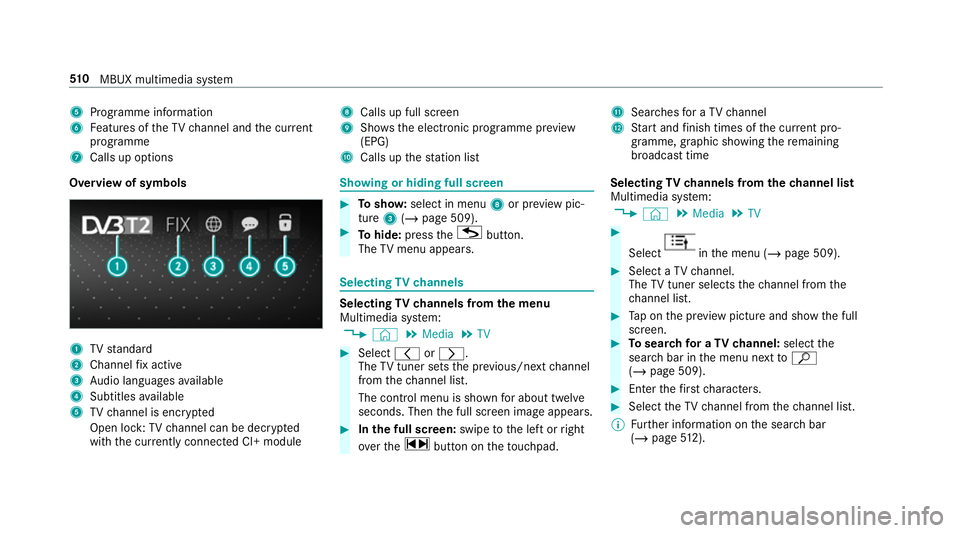
5
Programme information
6 Features of theTV channel and the cur rent
programme
7 Calls up options 8
Calls up full screen
9 Shows th e electronic prog ramme pr eview
(EPG)
A Calls up thest ation list B
Sear ches for a TV channel
C Start and finish times of the cur rent pro‐
gramme, graphic showing there maining
broadca sttime
Overvi ewof symbols 1
TVstandard
2 Channel fix acti ve
3 Audio languages available
4 Subtitles available
5 TVchannel is enc rypted
Open lock: TVchannel can be dec rypted
with the cur rently connected CI+ module Showing or hiding full sc
reen #
Tosho w:select in menu 8or pr eview pic‐
ture 3(/ page 509). #
Tohide: press theG button.
The TVmenu appears. Selecting
TVchannels Selecting
TVchannels from the menu
Multimedia sy stem:
4 © 5
Media 5
TV #
Select qorr.
The TVtuner sets the pr evious/n extch annel
from thech annel list.
The control menu is shown for about twel ve
seconds. Then the full screen image appears. #
Inthe full screen: swipetothe left or right
ove rth e~ button on theto uchpad. Selecting
TVchannels from thech annel list
Multimedia sy stem:
4 © 5
Media 5
TV #
Select in
the menu (/ page 509). #
Select a TVchannel.
The TVtuner selects thech annel from the
ch annel list. #
Tap on the pr eview picture and show the full
screen. #
Tosear chfor a TVchannel: selectthe
sear chbar in the menu next toª
( / page 509). #
Ente rth efirs tch aracters. #
Select theTV channel from thech annel list.
% Further information on the sear chbar
(/ page 512). 51 0
MBUX multimedia sy stem
Page 516 of 729
If all
the memory presets are occupied,
select a memory preset tobe ove rwritten.
When theTV channel is stored, the preset
number is shown in the pr eview picture and
in the control menu. #
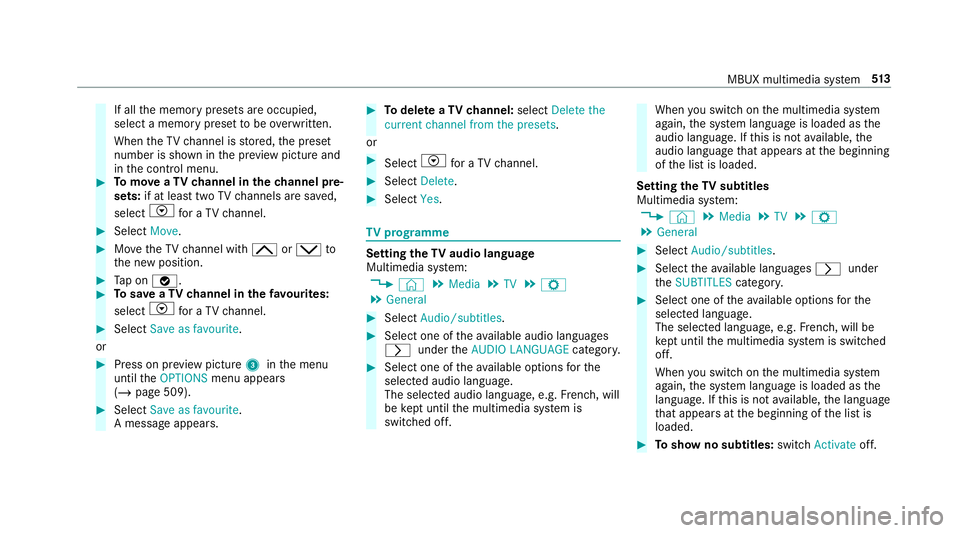
Tomo veaTV channel in thech annel pre‐
sets: if at lea sttwo TVchannels are sa ved,
select Vfor a TV channel. #
Select Move. #
MovetheTV channel with 4ors to
th e new position. #
Tap on ø. #
Tosave aTV channel in thefa vo urites:
select Vfor a TV channel. #
Select Save as favourite.
or #
Press on pr eview picture 3inthe menu
until theOPTIONS menu appears
(/ page 509). #
Select Save as favourite.
A message appears. #
Todel ete a TVchannel: selectDelete the
current channel from the presets .
or #
Select Vfor a TV channel. #
Select Delete. #
Select Yes. TV
prog ramme Setting the
TVaudio language
Multimedia sy stem:
4 © 5
Media 5
TV 5
Z
5 General #
Select Audio/subtitles. #
Select one of theav ailable audio languages
r undertheAUDIO LANGUAGE category. #
Select one of theav ailable options forthe
selected audio language.
The selected audio language, e.g. French, will
be kept until the multimedia sy stem is
switched off. When
you swit chon the multimedia sy stem
again, the sy stem language is loaded as the
audio language. If this is not available, the
audio language that appears at the beginning
of the list is loaded.
Setting theTV subtitles
Multimedia sy stem:
4 © 5
Media 5
TV 5
Z
5 General #
Select Audio/subtitles. #
Select theav ailable languages runder
th eSUBTITLES category. #
Select one of theav ailable options forthe
selected language.
The selected language, e.g. French, will be
ke pt until the multimedia sy stem is switched
off.
When you swit chon the multimedia sy stem
again, the sy stem language is loaded as the
language. If this is not available, the language
th at appears at the beginning of the list is
loaded. #
Toshow no subtitles: switchActivate off. MBUX multimedia sy
stem 513
Page 529 of 729
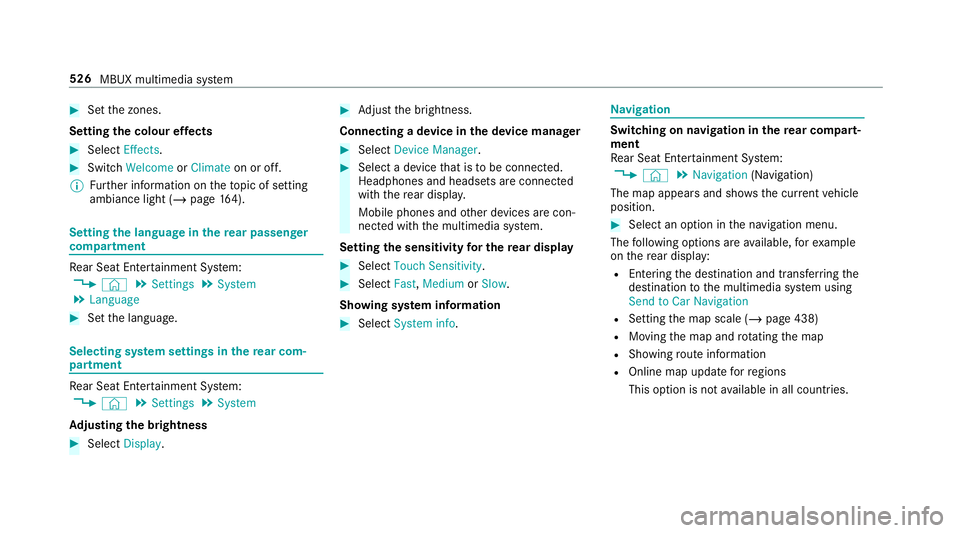
#
Set the zones.
Setting the colour ef fects #
Select Effects. #
Swit chWelcome orClimate on or off.
% Further information on theto pic of setting
ambiance light (/ page164). Setting
the language in there ar passenger
comp artment Re
ar Seat En tertainment Sy stem:
4 © 5
Settings 5
System
5 Language #
Set the language. Selecting sy
stem settings in there ar com‐
partment Re
ar Seat En tertainment Sy stem:
4 © 5
Settings 5
System
Ad justing the brightness #
Select Display. #
Adjust the brightness.
Connecting a device in the device manager #
Select Device Manager. #
Select a device that is tobe connec ted.
Headphones and headsets are connec ted
with there ar displa y.
Mobile phones and other devices are con‐
nected with the multimedia sy stem.
Setting the sensitivity for the rear display #
Select Touch Sensitivity. #
Select Fast,Medium orSlow.
Showing sy stem information #
Select System info. Na
vigation Switching on navigation in
there ar comp art‐
ment
Re ar Seat En tertainment Sy stem:
4 © 5
Navigation (Navigation)
The map appears and sho ws the current vehicle
position. #
Select an option in the navigation menu.
The following options are available, forex ample
on there ar display:
R Entering the destination and transfer ring the
destination tothe multimedia sy stem using
Send to Car Navigation
R Setting the map scale (/ page 438)
R Moving the map and rotating the map
R Showing route information
R Online map update forre gions
This option is not available in all countries. 526
MBUX multimedia sy stem
Page 703 of 729
Seats suitable
for attaching ................... 61J
Jack Declaration of conformity ......................29
St orage location ..................................5 83
Jump-start connection ............................ 561
Gene ral no tes ...................................... 559 K
Ke y.............................................................. 82
Ac oustic locking verification signal ....... 83
Battery .................................................. 84
Emergency key ...................................... 84
Energy consumption .............................. 84
Fe atures ................................................ 82
Ke yring attachment .............................. 84
Overview ............................................... 82
Pa nic alarm ........................................... 83
Problem ................................................. 86
Un locking setting .................................. 83
Ke y functions
Deactivating .......................................... 84KEYLESS-GO
Locking theve hicle ................................ 89
Problem .................................................90
Un locking setting .................................. 83
Un locking theve hicle ............................89
Kickd own.................................................2 09
Using ................................................... 209
Knee airbag ................................................ 42 L
Laden Bag hook ............................................. 14 5
Lamp see In terior lighting
Lamps (instrument display) see Warning/indicator lamps
Lane de tection (au tomatic)
see Active Lane Keeping Assist
Lane Keeping Assist
see Active Lane Keeping Assist
Language .................................................3 95
No tes .................................................. 395
Setting .................................................3 95LED light
see Intelligent Light Sy stem
Le vel control sy stem
see ACTIVE BODY CONTROL
see AIRMATIC
Light switch Overview .............................................. 157
Lighting see In terior lighting
see Lights
Lights ........................................................ 157
Ac tive headla mps ................................ 16 0
Ad aptive Highbeam Assist Plus .......... .162
Ad justing the instrument lighting ......... 324
Au tomatic driving lights ....................... 15 8
Combination swit ch............................. 15 8
Corne ring light ..................................... 16 0
Driving ab road (symm etrical dipped
beam) .................................................. 157
Fo g light (extended range) ................... 161
Haza rdwa rning lights .......................... 15 9
Headla mpflasher ................................ 15 8
High beam ........................................... 15 8
Intellige nt Light Sy stem ....................... 16 0700
Index
Page 704 of 729
Light switch .........................................1
57
Low beam ............................................ 157
Mo torw ay mode ................................... 161
Off-road light ........................................1 61
Pa rking lights ...................................... .157
Re ar fog light ....................................... 157
Re sponsibility for lighting sy stems .......1 57
Setting theex terior lighting switch-
off delay time ...................................... 16 3
St anding lights .................................... .157
Switching the sur round lighting
on/off ................................................ .163
Tu rn signal lights ................................. 15 8
Limiter ...................................................... 24 2
Ac tivating ............................................ 24 3
Buttons ................................................ 24 3
Calling up a speed .............................. .243
Deactivating ........................................ 24 3
Fu nction .............................................. 24 2
Pa ssive mode ...................................... 24 2
Pe rm anent setting .............................. .245
Re quirements: .................................... .243
Selecting ............................................. 24 3
Setting a speed ................................... 24 3
St oring a speed ................................... 24 3Sy
stem limitations ...............................2 42
Limiting speed see Limi ter
Limiting the opening angle (tailgate) ...... 96
LINGU ATRO NIC ........................................ 333
Au dible help functions .........................3 36
Impr oving speech quality .................... 336
Language setting ................................ .335
Media pla yervo ice commands ............ 345
Message voice commands .................. 347
Multifunction steering wheel (operat‐
ing) ...................................................... 333
Na vigation voice commands ................ 339
No tes on thevo ice commands ............ 337
Online voice control ............................ 337
Operable functions .............................. 335
Operating saf ety .................................. 333
Ra dio voice commands ...................... .343
Setting (multimedia sy stem) ................3 35
Switch voice commands ...................... 337
Te lephone voice controls .................... .342
Te xt messa gevoice commands .......... .347
TV voice commands ............................ 343
Ve hicle voice commands .................... .349
Vo ice prom pting .................................. 334 Live
Traf fic Information
Displaying the tra ffic map .................. .433
Displ aying traf fic incidents .................. 434
Extending a subscription ..................... 433
Pr ov ider information ............................ 432
Re gis tering on Mercedes me ............... 432
Showing local area messa ges .............. 435
Switching the tra ffic information dis‐
play on ................................................ 434
Load compa rtment co ver
Extending/r etra cting ........................... 14 2
No tes ................................................... 141
Re moving/fitting ................................. 14 2
Load compa rtment floor
Locking/unlocking .............................. 147
Opening/closing ................................. 14 6
Load pr otection net
At tach ing ............................................ .143
Loading ..................................................... 14 4
Coat hook ............................................ 14 6
No tes ................................................... 13 3
Ro ofrack ............................................. 147
St ow age space unde rneath the load
compartment floor .............................. 14 6 Index
701
Page 713 of 729
Ra
nge
Ad Blue ®
............................................... 325
Displaying ............................................ 326
REA CHregulation ...................................... 32
Re ading light
see Interior lighting
Re alwo od (Care) .................................... .547
Re ar climate control
Setting (MBUX) ................................... .178
Re ar comp artment display
Locking (child saf ety lock) .................. .394
Switching on/off ................................. 394
Re ar display
Home screen overview ........................ 522
Overview ............................................ .522
Re ar door (child saf ety lock) .................... 79
Re ar fog light
Switching on/off .................................1 58
Re ar of theve hicle
Lo we ring .............................................. 14 0
Re ar seat
see Seat Re
ar seat belt
St atus display ........................................ 42
Re ar seat belt status display .................... 42
Re ar Seat Entertainment Sy stem
Ad justing the brightness ..................... 526
Ad justing there ar seats ...................... 524
Calling up services, apps and web
br ows er ............................................... 527
Calling up the device manager ............ 526
Climate control .................................... 525
Controlling playback ............................5 28
Headphones overview ........................ .523
Information about media mode ........... 527
Operating saf ety .................................. 521
Overview .............................................. 521
Overview of services, apps and web
br ows er ............................................... 527
Overview of there ar displa ys.............. 522
Overview of the sound settings ........... 529
Re setting there ar seat ........................ 524
Selecting a massage program ............ .524
Selecting sound settings ..................... 530
Setting the language ........................... 526
Setting the sensitivity forth ere ar
display ................................................ .526 Showing sy
stem information ............... 526
Switching navigation on ......................5 26
Switching off the display ..................... 522
Switching on media mode ...................5 28
Switching on thera dio ........................ 529
Switching on theTV ............................ 529
Re ar window
Changing the wiper blade .................... 16 9
Re ar window heater ................................ 175
Re ar window wipers
Ac tivating/deactivating ...................... .166
Re ar-view mir ror
see Outside mir rors
Re cycling
see Take -ba ckof end-of-life vehicles
Re ducing agent
see AdBlue ®
Re fuelling
Re fuelling theve hicle ........................... 212
To pping up AdBlue ®
............................. 216
Re gistration
Ve hicle ................................................... 31710
Index
Page 719 of 729
Setting
the suspension le vel (ACTIVE
BO DY CONTROL) .................................2 75
Setting the suspension le vel (AIR‐
MATIC) ................................................ 265
Suspension see ACTIVE BODY CONTROL
see AIRMATIC
Suspension le vel (ACTIVE BODY CON‐
TROL)
Setting ................................................ .275
Suspension le vel (AIRMATIC)
Setting ................................................ .265
SV HC (substances of very high con‐
cern ).......................................................... .32
Switch-off delay time Exterior ................................................ 16 3
Interior .................................................1 65
Switching on voice amplification
Multimedia sy stem .............................. 390
Synchronisation function Activating/deactivating (multimedia
sy stem) ................................................ 17 9
Switching on/off (control panel) ......... 17 9Sy
stem settings
Ac tivating/deactivating PIN pr otec‐
tion ...................................................... 396
Re set function (multimedia sy stem) ....3 99
Setting the dis tance unit ..................... 395
Setting the time and date automati‐
cally ..................................................... 389
Setting the time zone .......................... 389
Setting the time/date form at .............. 389
Swit ching transmission of theve hicle
position on/off .................................... 390
Sy stem settings
see Blue tooth®
see Data import/export
see Language
see MBUX Touch
see So ftwa reupdate
see Wi-Fi T
Ta ilgate ...................................................... .92
Closing .................................................. 93
HANDS-FREE ACCESS .......................... .94
Limiting the opening angle .................... 96
Opening .................................................92 Opening dimensions ............................6
05
Un locking (emer gency key) .................. .96
Ta ke -back of end-of-life vehicles .............. 22
Pr otection of the environment ............... 22
Ta nk content
Ad Blue ®
............................................... 602
Fu el ..................................................... 601
Re ser ve(fuel) ...................................... 601
Te ch nical data
Axle load (trailer operation) ................. 61 0
Fa stening points (trailer hitch) .............6 09
Information .......................................... 593
Mounting dimensions (trailer hitch) ..... 609
No tes (trailer hitch) ............................. 609
Overhang dimension (trailer hitch) ...... 609
To ngue weight ...................................... 61 0
To wing capacity (trailer operation) ...... 609
Ty re pressure monitoring sy stem ......... 575
Ve hicle identification plate .................. 595
Te lephone ................................ .330, 451, 456
Ac tivating functions du ring a call ......... 461
Car telephony settings ........................ 458
Changing a function ............................ 454 716
Index