light MERCEDES-BENZ GLS SUV 2019 Workshop Manual
[x] Cancel search | Manufacturer: MERCEDES-BENZ, Model Year: 2019, Model line: GLS SUV, Model: MERCEDES-BENZ GLS SUV 2019Pages: 729, PDF Size: 12.03 MB
Page 173 of 729
Fi
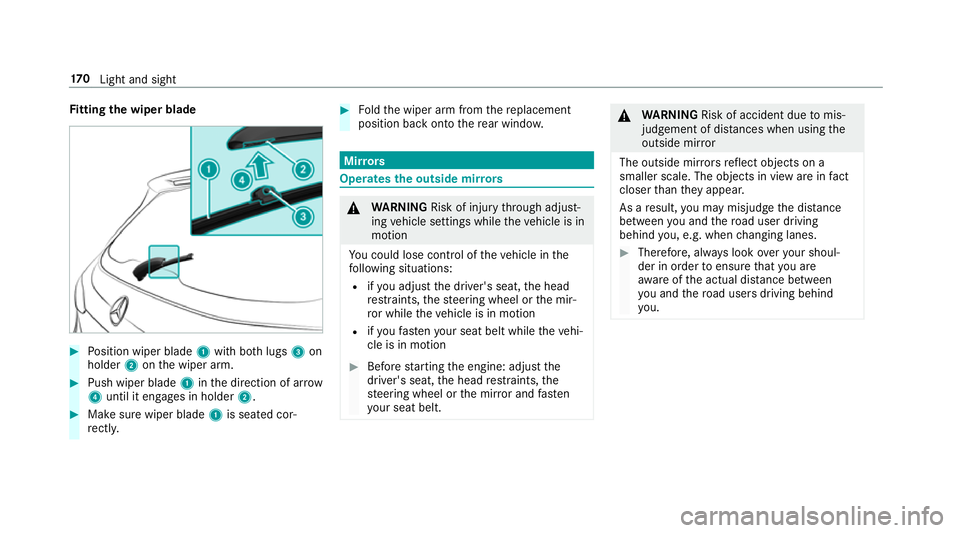
tting the wiper blade #
Position wiper blade 1with bo thlugs 3on
holder 2onthe wiper arm. #
Push wiper blade 1inthe direction of ar row
4 until it en gage s in holder 2. #
Make sure wiper blade 1is seated cor‐
re ctly. #
Foldthe wiper arm from there placement
position back onto there ar wind ow. Mir
rors Operates
the outside mir rors &
WARNING Risk of inju rythro ugh adjust‐
ing vehicle settings while theve hicle is in
motion
Yo u could lose cont rol of theve hicle in the
fo llowing situations:
R ifyo u adjust the driver's seat, the head
re stra ints, thesteering wheel or the mir‐
ro r while theve hicle is in motion
R ifyo ufast enyour seat belt while theve hi‐
cle is in motion #
Before starting the engine: adjust the
driver's seat, the head restra ints, the
st eering wheel or the mir ror and fasten
yo ur seat belt. &
WARNING Risk of accident due tomis‐
judgement of dis tances when using the
outside mir ror
The outside mir rors reflect objects on a
smaller scale. The objects in view are in fact
closer than they appear.
As a result, you may misjud gethe dis tance
between you and thero ad user driving
behind you, e.g. when changing lanes. #
Therefore, alw ays look over your shoul‐
der in order toensure that you are
aw are of the actual dis tance between
yo u and thero ad users driving behind
yo u. 17 0
Light and sight
Page 174 of 729
Fo
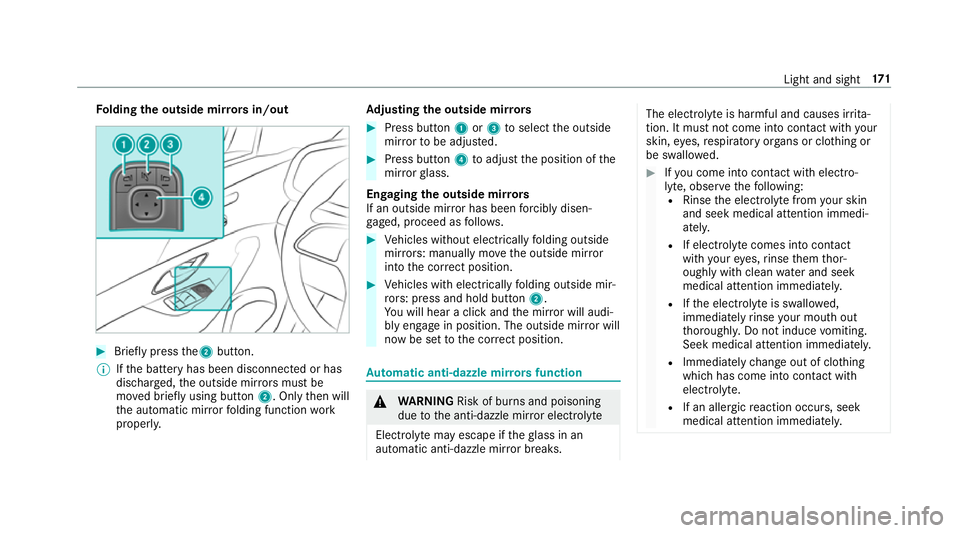
lding the outside mir rors in/out #
Brief lypress the2 button.
% Ifth e battery has been disconnected or has
dischar ged, the outside mir rors must be
mo ved briefly using button 2. Onlythen will
th e automatic mir rorfo lding function work
proper ly. Ad
justing the outside mir rors #
Press button 1or3 toselect the outside
mir rorto be adjus ted. #
Press button 4toadjust the position of the
mir rorgl ass.
Engaging the outside mir rors
If an outside mir ror has been forc ibly disen‐
ga ge d, proceed as follo ws. #
Vehicles without electrically folding outside
mir rors: manually mo vethe outside mir ror
into the cor rect position. #
Vehicles with electrically folding outside mir‐
ro rs: press and hold button 2.
Yo u will hear a click and the mir ror will audi‐
bly engage in position. The outside mir ror will
now be set tothe cor rect position. Au
tomatic anti-dazzle mir rors function &
WARNING Risk of bu rns and poisoning
due tothe anti-dazzle mir ror electrolyte
Electrolyte may escape if theglass in an
automatic anti-dazzle mir ror breaks. The electrolyte is harmful and causes ir
rita‐
tion. It mu stnot come into contact wi thyour
skin, eyes,respiratory organs or clo thing or
be swallo wed. #
Ifyo u come into contact with electro‐
ly te , obser vethefo llowing:
R Rinse the electrolyte from your skin
and seek medical attention immedi‐
atel y.
R If electrolyte comes into contact
with your eyes, rinse them thor‐
oughly with clean water and seek
medical attention immediately.
R Ifth e electrolyte is swallo wed,
immediately rinse your mouth out
th oroughly. Do not induce vomiting.
Seek medical attention immediately.
R Immedia tely ch ange out of clo thing
which has come into con tact wi th
electrolyte.
R If an allergic reaction occurs, seek
medical attention immediatel y. Light and sight
171
Page 175 of 729
The inside
rearview mir ror and the outside mir‐
ro r on the driver's side automatically go into
anti-dazzle mode if light from a headlamp hits
th e sensor on the inside rearview mir ror.
Sy stem limitations
The sy stem does not go into anti-dazzle mode in
th efo llowing situations:
R the engine is switched off
R reve rsege ar is engaged
R the interior lighting is switched on Fu
nction of the front-passenger outside mir‐
ro r parking position %
The pa rking position is available on ly invehi‐
cles with the mir ror pac kage or memory
function.
The parking position makes parking easier.
In thefo llowing situations, the front-passen ger
outside mir ror swivels down wardinthe direction
of there ar wheel on the front passenger's side:
R the parking position is stored (/ page172)
R the front-passen ger mir ror is selected R
reve rsege ar is engaged
The front-passenger outside mir ror mo ves back
to its original position in thefo llowing situations:
R you shift the transmission toano ther trans‐
mission position
R you are tra velling at speeds greaterth an
15 km/h
R you press the button forth e outside mir ror
on the driver's side St
oring and calling up the pa rking position of
th e front-passenger outside mir ror Sto
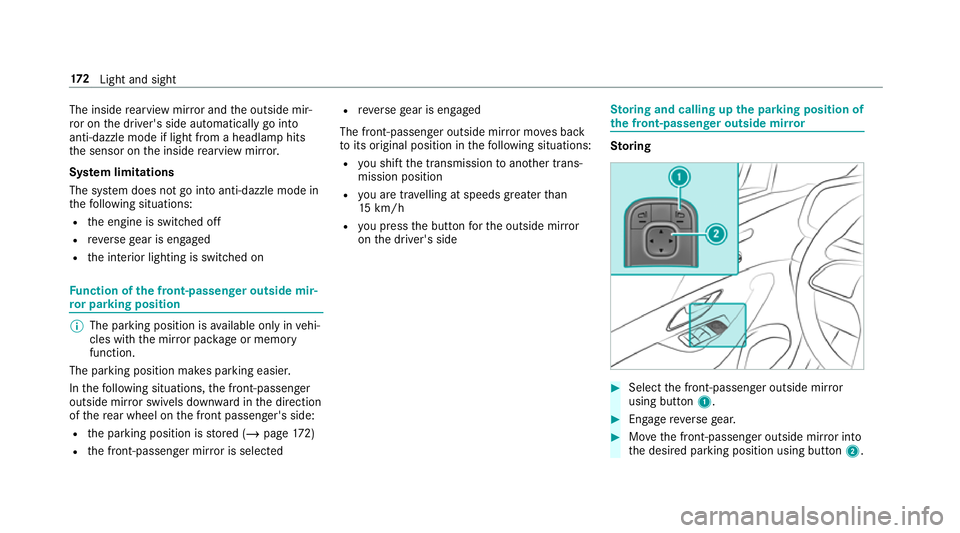
ring #
Select the front-passen ger outside mir ror
using but ton1. #
Engage reve rsege ar. #
Movethe front-passen ger outside mir ror into
th e desired parking position using button 2.17 2
Light and sight
Page 176 of 729
Calling up
#
Select the front-passen ger outside mir ror
using but ton1. #
Engage reve rsege ar.
The front-passenger outside mir ror will mo ve
to thestored parking position. Ac
tivating/deactivating the automatic mir ror
fo lding function Multimedia sy
stem:
4 © 5
Settings 5
Vehicle #
Activate or deacti vate Auto. fold-in mirrors . Ope
rating the sun viso rs
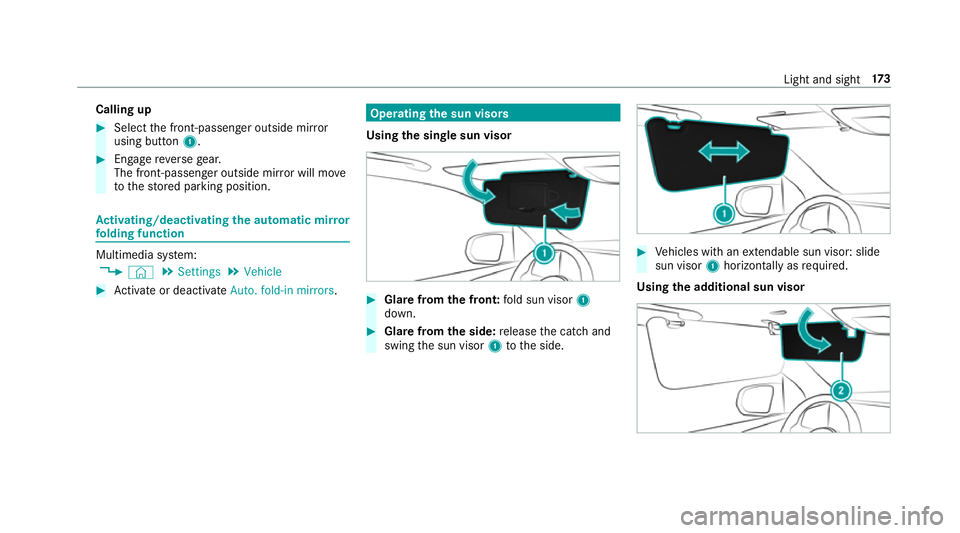
Using the single sun visor #
Glarefrom the front: fold sun visor 1
down. #
Glare from the side: release the catch and
swing the sun visor 1tothe side. #
Vehicles with an extendable sun visor: slide
sun visor 1horizontal lyas requ ired.
Using the additional sun visor Light and sight
17 3
Page 177 of 729
#
Vehicles with an additional sun visor: fold
additional sun visor 2down. Area permeable
to radiowav es on the
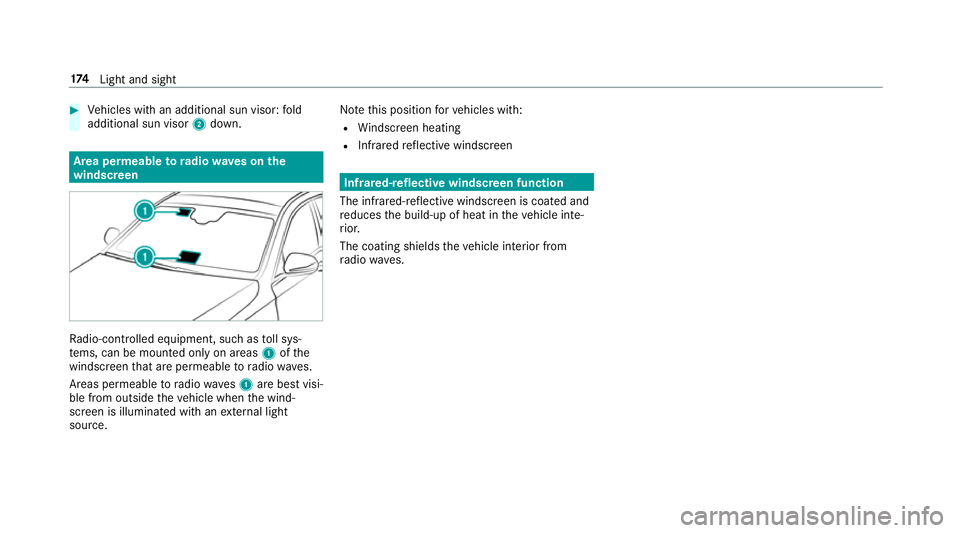
windscreen Ra
dio-contro lled equipment, such as toll sys‐
te ms, can be mounted only on areas 1ofthe
windscreen that are permeable toradio wav es.
Areas permeable toradio wav es1 are best visi‐
ble from outside theve hicle when the wind‐
screen is illuminated with an extern al light
source. No
tethis position forve hicles with:
R Windsc reen heating
R Infra redre flective windscreen Infrared-reflective windscreen function
The infrared-reflective windscreen is coated and
re duces the build-up of heat in theve hicle inte‐
ri or.
The coating shields theve hicle interior from
ra dio wav es. 174
Light and sight
Page 186 of 729
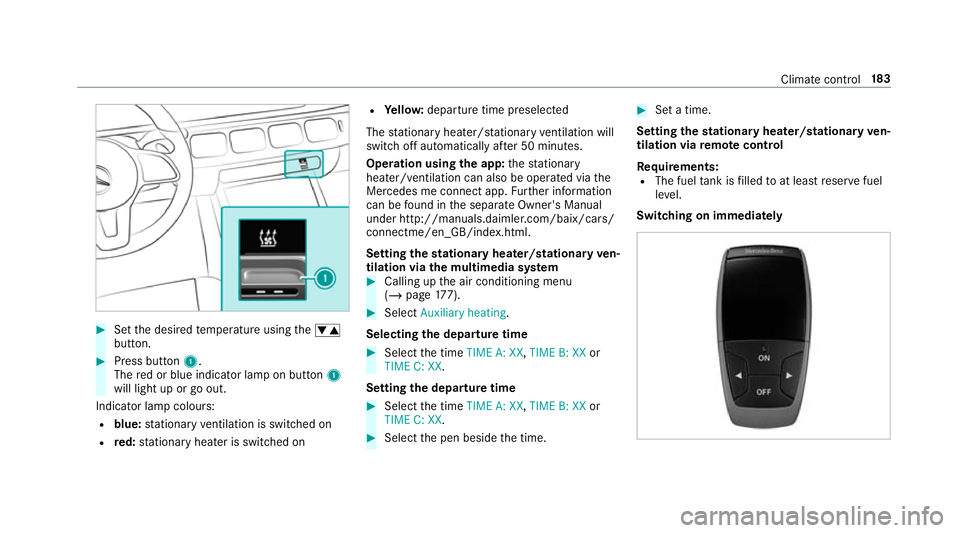
#
Set the desired temp erature using thew
button. #
Press button 1.
The red or blue indicator lamp on button 1
will light up or go out.
Indicator lamp colours: R blue: stationary ventilation is switched on
R red: stationary heater is swit ched on R
Yello w: departure time preselected
The stationary heater/ stationary ventilation will
switch off au tomatically af ter 50 minutes.
Operation using the app: thest ationary
heater/ ventilation can also be operated via the
Mercedes me connect app. Further information
can be found in the separate Owner's Manual
under http://manuals.daimler.com/baix/cars/
connectme/en_GB/index.html.
Setting thest ationary heater/stationary ven‐
tilation via the multimedia sy stem #
Calling up the air conditioning menu
(/ page 177). #
Select Auxiliary heating.
Selecting the departu retime #
Select the time TIME A: XX, TIME B: XXor
TIME C: XX.
Setting the departu retime #
Select the time TIME A: XX, TIME B: XXor
TIME C: XX. #
Select the pen beside the time. #
Set a time.
Setting thest ationary heater/stationary ven‐
tilation via remo tecont rol
Re quirements:
R The fuel tank is filled toat least reser vefuel
le ve l.
Switching on immedia tely Climate cont
rol18 3
Page 193 of 729
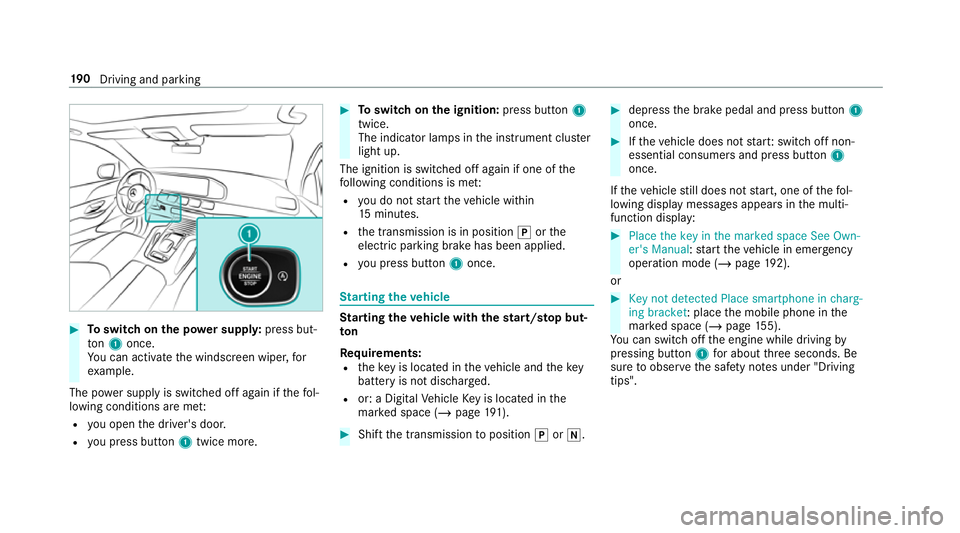
#
Toswitch on the po wer supp ly:press but‐
to n1 once.
Yo u can activate the windscreen wiper, for
ex ample.
The po wer supp lyis switched off again if thefo l‐
lowing conditions are me t:
R you open the driver's door.
R you press but ton1 twice more. #
Toswitch on the ignition: press button 1
twice.
The indicator lamps in the instrument clus ter
light up.
The ignition is switched off again if one of the
fo llowing conditions is me t:
R you do not start theve hicle within
15 minutes.
R the transmission is in position jorthe
electric parking brake has been applied.
R you press but ton1 once. St
arting theve hicle St
arting theve hicle with thest art/s top but‐
ton
Requ irements:
R theke y is located in theve hicle and thekey
battery is not dischar ged.
R or: a Digital Vehicle Key is located in the
mar ked space (/ page191). #
Shift the transmission toposition jori. #
depress the brake pedal and press button 1
once. #
Ifth eve hicle does not star t:switch off non-
essential consumers and press button 1
once.
If th eve hicle still does not start, one of thefo l‐
lowing display messages appears in the multi‐
function display: #
Place the key in the marked space See Own-
er's Manual :st art theve hicle in emer gency
operation mode (/ page 192).
or #
Key not detected Place smartphone in charg-
ing bracket: place the mobile phone in the
mar ked space (/ page155).
Yo u can swit choff the engine while driving by
pressing button 1for about thre e seconds. Be
sure toobser vethe saf ety no tes under "Driving
tips". 19 0
Driving and pa rking
Page 198 of 729
#
Touse braking ef fect of the engine,
shift toa lo werge ar in good time. *
NO
TEDama getothe driv etra in and
engine when pulling away #
Do not warm upthe engine while the
ve hicle is stationar y.Pull away immedi‐
atel y. #
Avoid high engine speeds and driving at
full thro ttle until the engine has reached
its operating temp erature. *
NO
TEDama getothe catalytic con verter
due tonon-combu sted fuel The engine is not
running smo othly and is
misfiring.
Non-combus ted fuel may get into the cata‐
lytic con verter. #
Only depress the accelera tor pedal
slightl y. #
Have the cause rectified immediately at
a qu alified specialist workshop. Limited braking ef
fect on salt-trea tedro ads:
R due tosalt build-up on the brake disks and
brakepads, the braking dis tance can increase
conside rably or result in braking only on one
side
R maintain a much greater safe dis tance tothe
ve hicle in front
To preve nt salt build-up:
R brake occasionally while paying attention to
th e tra ffic conditions
R carefully depress the brake pedal at the end
of the journey and when starting the next
journey Note
s on off-road driving &
WARNING Risk of accident if you do not
ke ep toline of fall on inclines
If yo u drive at an angle or turn on an incline,
th eve hicle could slip side ways, tip and roll‐
ove r. #
Alw ays drive on inclines in the line of
fa ll (straight up or down) and do not
turn. &
WARNING Risk offire due toflammable
materials on hot parts of theex haust
sy stem
Flammable material such as lea ves, grass or
twigs may ignite if they come into contact
wi th hot parts of theex haust sy stem. #
When driving on unpa vedro ads or off-
ro ad, regular lych eck theve hicle under‐
side. #
Remo vetrapped plants or other flam‐
mable material, in particular. #
Ifth ere is damage, consult a qualified
specialist workshop immediately. When driving off-road, subs
tances su chas sand,
mud and water orwate r mixed with oil may get
into the brakes. This may lead toare duction in
braking ef fect or total brake failure as a result of
increased wear. The braking characteristics will
va ry depending on the material that has entered Driving and parking
19 5
Page 204 of 729
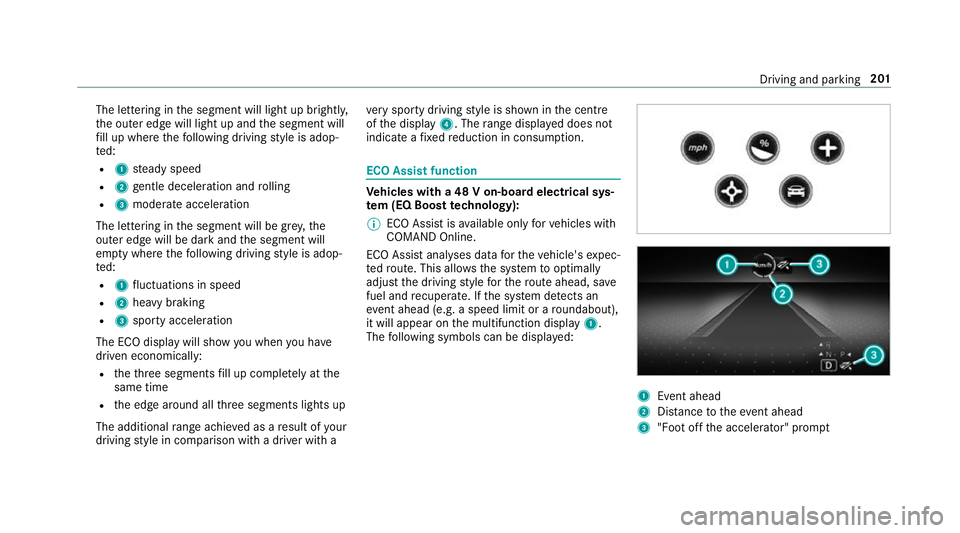
The lettering in
the segment will light up brightl y,
th e outer edge will light up and the segment will
fi ll up where thefo llowing driving style is adop‐
te d:
R 1 steady speed
R 2 gentle deceleration and rolling
R 3 moderate acceleration
The lettering in the segment will be gr ey,the
outer edge will be dark and the segment will
em pty where thefo llowing driving style is adop‐
te d:
R 1 fluctuations in speed
R 2 heavy braking
R 3 sporty acceleration
The ECO displ aywill show you when you ha ve
driven economically:
R theth re e segments fill up comple tely at the
same time
R the edge around all thre e segments lights up
The additional range achi eved as a result of your
driving style in comparison with a driver with a ve
ry sporty driving style is shown in the cent re
of the display 4. Therange displ ayed does not
indicate a fixe dre duction in consum ption. ECO Assist function
Ve
hicles with a 48 V on-board electrical sys‐
te m (EQ Boo sttech nology):
% ECO Assist is available on lyforve hicles with
CO MAND Online.
ECO Assist analyses data forth eve hicle's expec‐
te dro ute. This allo wsthe sy stem tooptimally
adjust the driving style fo rth ero ute ahead, sa ve
fuel and recuperate. If the sy stem de tects an
eve nt ahead (e.g. a speed limit or a roundabout),
it will appear on the multifunction display 1.
The following symbols can be displa yed: 1
Event ahead
2 Distance totheeve nt ahead
3 "Foot off the accelerator" prom pt Driving and pa
rking 201
Page 205 of 729
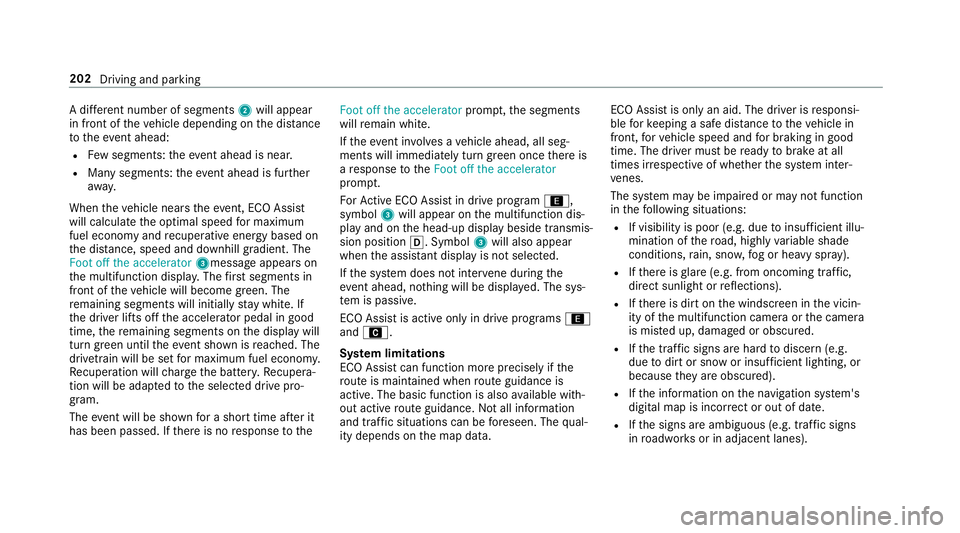
A di
fferent number of segments 2will appear
in front of theve hicle depending on the dis tance
to theeve nt ahead:
R Few segments: theeve nt ahead is nea r.
R Many segments: theev ent ahead is fur ther
aw ay.
When theve hicle nears theeve nt, ECO Assi st
will calculate the optimal speed for maximum
fuel economy and recuperati veenergy based on
th e dis tance, speed and downhill gradient. The
Foot off the accelerator 3messageappears on
th e multifunction displa y.The firs t segments in
front of theve hicle will become green. The
re maining segments will initially stay white. If
th e driver lifts off the accelerator pedal in good
time, there maining segments on the display will
turn green until theeve nt shown is reached. The
driv etra in will be set for maximum fuel econom y.
Re cuperation will charge the batter y.Re cupera‐
tion will be adap tedto the selected drive pro‐
gram.
The event will be shown for a short time af ter it
has been passed. If there is no response tothe Foot off the accelerator
prompt,th e segments
will remain white.
If th eeve nt in volves a vehicle ahead, all seg‐
ments will immediately turn green once there is
a re sponse totheFoot off the accelerator
prom pt.
Fo rAc tive ECO Assi stin drive program ;,
symbol 3will appear on the multifunction dis‐
play and on the head-up display beside transmis‐
sion position h. Symbol3will also appear
when the assis tant displ ayis not selec ted.
If th e sy stem does not inter vene du ring the
eve nt ahead, no thing will be displa yed. The sys‐
te m is passive.
ECO Assist is active only in drive programs ;
and A.
Sy stem limitations
ECO Assist can function more precisely if the
ro ute is main tained when route guidance is
active. The basic function is also available with‐
out active route guidance. Notall information
and traf fic situations can be fore seen. The qual‐
ity depends on the map data. ECO Assist is only an aid. The driver is
responsi‐
ble forke eping a safe dis tance totheve hicle in
front, forve hicle speed and for braking in good
time. The driver must be ready tobrake at all
times ir respective of whe ther the sy stem inter‐
ve nes.
The sy stem may be impaired or may not function
in thefo llowing situations:
R If visibility is poor (e.g. due toinsuf ficient illu‐
mination of thero ad, high lyvariable shade
conditions, rain, sno w,fog or heavy spr ay).
R Ifth ere is glare (e.g. from oncoming traf fic,
di re ct sunlight or reflections).
R Ifth ere is dirt on the windscreen in the vicin‐
ity of the multifunction camera or the camera
is mis ted up, damaged or obscured.
R Ifth e tra ffic signs are hard todiscern (e.g.
due todirt or snow or insuf ficient lighting, or
because they are obscured).
R Ifth e information on the navigation sy stem's
digital map is incor rect or out of da te.
R Ifth e signs are ambiguous (e.g. traf fic signs
in roadwor ksor in adjacent lanes). 202
Driving and parking