seats MERCEDES-BENZ GLS SUV 2020 Manual Online
[x] Cancel search | Manufacturer: MERCEDES-BENZ, Model Year: 2020, Model line: GLS SUV, Model: MERCEDES-BENZ GLS SUV 2020Pages: 549, PDF Size: 9.9 MB
Page 399 of 549
If
th e preceding tyre sizes are complemented by
th e+ symbol, the tyre pressure information
fo llowing sho wsalternative tyre pressures. Fuel
consum ption may then increase slightl y.
The load conditions "partially laden" and "fully
laden" are defined in theta ble for dif fere nt num‐
be rs of passengers and amounts of luggage. The
actual number of seats may dif fer from this. Ty
re pressure moni toring sy stem Fu
nction of the ty repressure moni toring sys‐
tem
The sy stem checks the tyre pressure and the
tyre temp erature of the tyres fitted totheve hicle
by means of a tyre pressu resensor.
The tyre pressure and the tyre temp erature
appear in the on-board computer (/ page 396).
If th ere is a subs tantial pressure loss or if the
tyre temp erature is excessive, you will be
wa rned in thefo llowing ways:
R via display messa ges (/ page 482).
R viatheh warning lamp in the instrument
clus ter (/ page 504) The tyre pressu
remonitoring sy stem is only an
aid. It is the driver's responsibility toset the tyre
pressure tothere commended cold tyre pressure
suitable forth e operating situation.
In most cases, the tyre pressure monitoring sys‐
te m will auto maticallyupdate the new refere nce
va lues af teryo u ha vechanged the tyre pressure.
Yo u can, ho wever,also update there fere nce val‐
ues byrestarting the tyre pressure monitoring
sy stem manually (/ page 397).
Sy stem limits
The sy stem may be impaired or may not function
particular lyin thefo llowing situations:
R the tyre pressure has been set incor rectly
R sudden pressure loss caused byafo re ign
object penetrating the tyre, forex ample
R there is a malfunction caused byano ther
ra dio signal source
Checking the ty repressure with the tyre
pressure moni toring sy stem
Re quirements:
R The ignition is switched on. On-board computer:
4 Service 5
Tyres
One of thefo llowing displa ysappears:
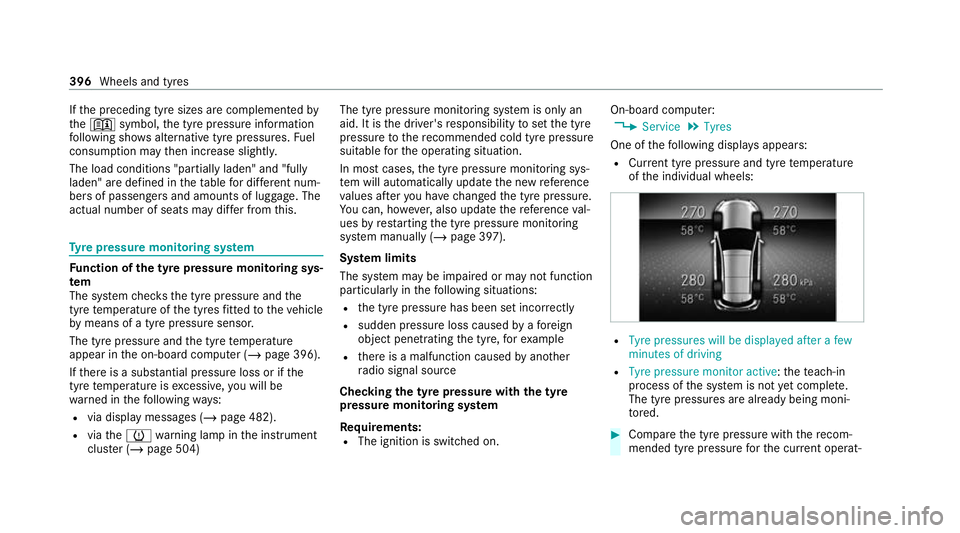
R Cur rent tyre pressure and tyre temp erature
of the individual wheels: R
Tyre pressures will be displayed after a few
minutes of driving
R Tyre pressure monitor active: thete ach-in
process of the sy stem is not yet compl ete.
The tyre pressures are already being moni‐
to re d. #
Compare the tyre pressure with there com‐
mended tyre pressure forth e cur rent operat‐ 396
Wheels and tyres
Page 514 of 549
Ru
nning boards..................................... 369
Seat belt................................................ 370
Seat co ver............................................. 370
Senso rs................................................. 369
St eering wheel....................................... 370
Ta ilpipes................................................ 369
Tr ailer hit ch........................................... 369
Wa shing byhand................................... 367
Wheels/rims.........................................3 69
Wi ndo ws................................................ 369
Wi per blades.........................................3 69
Carpet (Care)............................................. 370
Changing gears
Manually. ............................................... 207
Changing hub caps................................... 402
Changing the lights Driving ab road (symm etrical low
beam).................................................... 15 6
Cha rging
Bat tery (vehicle).................................... 384
Mobile phone (wireless).........................1 51
USB port................................................1 50
Child saf ety lock
Re ar door................................................ .75Re
ar side wind ows................................... 77
Child seat App rova l categories................................ .60
At tach ing (no tes).....................................59
Basic instructions.................................... 55
Fr ont passenger seat (no tes)...................73
Fr ont passenger seat (without auto‐
matic airbag shutoff)...............................73
ISOFIX/i-Size (fitting).............................. 64
No tes on risks and dangers..................... 56
Re commended child restra int sy stems.... 58
Seats suitable for belt-secu redch ild
re stra int sy stems..................................... 69
Seats suitable for i‑Size child
re stra int sy stems..................................... 64
Seats suitable for ISOFIX child
re stra int sy stems..................................... 62
Securing on the co-driver seat................. 74
Secu ring on there ar seat........................ 71
To pTe ther............................................... 68
Children Avoiding dangers in theve hicle............... 56
Basic instructions.................................... 55
Chock Storage location.................................... 401 Chock
see Chock
Cleaning see Care
Climate control Activating/deactivating (rear operat‐
ing unit)................................................ .175
Ac tivating/deactivating the A/C
function (cont rol panel)........................ .175
Ac tivating/deactivating the A/C
function (MBUX multimedia sy stem)...... 176
Ac tivating/deactivating the synchro‐
nisation function (cont rol panel)............ 17 7
Ac tivating/deactivating the synchro‐
nisation function (MBUX multimedia
sy stem).................................................. 17 7
Air-reci rculation mode.......................... .177
Au tomatic control.................................. 176
Au tomatically controlling (rear oper‐
ating unit).............................................. 176
Calling up the air conditioning menu..... 175
Demi sting the windscreen..................... 174
Demi sting windo ws................................ 17 7
Fr ont air vents....................................... 184
Glo vebox air vent.................................. 186 Index
511
Page 525 of 549
Opening or closing
the door..................2 20
Programming buttons............................ 219
Re solving problems...............................2 20
Synchronising thero lling code............. .220
Gearshift recommendation..................... .208
Gene ral operating permit number (EU)... 41 5
Genuine parts.............................................. 23
Genuine wood (Care) ................................ .370
Glide mode................................................. 208
Glo vebox
Air vent.................................................. 186H
Handbrake see Electric parking brake
Handling characteristics (unusual)......... 393
HANDS-FREE ACCESS ................................ .89
Handset Stow age compartment......................... .136
Hazard warning lights.............................. .158 Head
restra int
At tach ing/ removing the supplemen‐
ta ry cushion........................................... 11 9
EASY ADJU STluxury head restra int
(front).................................................... .117
Fr ont (adjusting mechanically)............... 11 5
Fr ont (luxury head restra int)................. .116
Re ar (adjusting)...................................... 11 7
Re ar (fitting/removing)......................... .118
Re ar (luxury head restra int )................... 11 8
Head-up display Adjusting display elements (on-board
compu ter)............................................. 309
Ad justing the brightness (on-board
computer).............................................3 09
Fu nction................................................ 308
Menu (on-board compu ter)................... 309
Operating the memory function.............1 28
Setting the position (on-board com‐
puter)....................................................3 09
Switching on/of f................................... 310
Headlamp flashing.................................... 15 8
Headlamps see Automatic driving lights Heating
see Climate control
Help call see Mercedes-Benz emergency call sy stem
High beam Activating/deactivating......................... 15 8
Ad aptive Highbeam Assist Plus.............. 161
HIGH RANGE Shifting.................................................. 210
High-pressure cleaner (care)................... 366
Hill Start Assist......................................... 231
HOLD function Function/no tes..................................... 230
Switching on/of f................................... 230
Home sc reen (media display)
Overview............................................... .312 I
i-Size child seat securing sy stem
Fitting..................................................... .64
i‑Size child seat securing sy stem
Seats suitable for attaching..................... 64522
Index
Page 526 of 549
Identification pla
te
Engine.................................................... 41 5
ve hicle................................................... 41 5
Ignition Swit ching on (S tart/S top button).......... 187
Ignition key
see Key
Immobiliser ................................................ 102
Implied warranty
Ve hicle.................................................... 34
In-Car Of fice
Fe atures................................................ 339
Indicator lamps see Warning/indicator lamps
Individual drive prog ram
Con figuring........................................... 203
Selecting............................................... 203
Inspection see ASS YST PLUS
Instrument clus ter
Fu nction/no tes............................. 304, 305
In stru ment display
Fu nction/no tes..................................... 305 Instrument clu
ster................................... 10
Wa rning/indicator lamps...................... 490
Instrument display and on-boa rd
compu ter
Fu nction/no tes..................................... 304
In te lligent Light Sy stem
Ac tive headla mps.................................. 15 9
Ad aptive Highbeam Assist Plus.............. 161
Corne ring light....................................... 15 9
Fo g light (extended range)..................... 16 0
Mo torw ay mode..................................... 16 0
Overview............................................... 15 9
Switching on/of f.................................... 161
Interior lighting Adjusting............................................... 16 3
Ambient lighting.................................... 16 4
Re ading lam p......................................... 16 3
Switch-off del aytime............................. 16 4
Interior pr otection
Fu nction................................................ 103
Priming/deactivating.............................1 04
Internet radio
see TuneIn Ionisation
Activating/deactivating (MBUX mul‐
timedia sy stem).....................................1 78
iPhone ®
see Smartphone integ ration
ISOFIX child seat securing sy stem
Fitting..................................................... .64
Seats suitable for attaching..................... 62 J
Jack Declaration of conformity........................ 30
Storage location.................................... 401
Jump-start connection General no tes........................................ 382 K
Key Acoustic locking verification signal......... 79
Battery.................................................... 80
Emer gency key........................................ 79
Energy consum ption................................ 79
Fe atures................................................. .78
Ke yring attachment................................ 79 Index
523
Page 529 of 549
Displ
aying weather information............ .329
Moving.................................................. 328
Selecting the map orientation............... 328
Setting the map scale............................ 328
Switching mo torw ay information on/
off......................................................... 328
Massage prog rammes
Overview................................................ 121
Re setting the settings............................1 22
Massage prog rams
Selecting the front seats........................ 121
Massage settings Resetting...............................................1 22
Maximum gross vehicle weight ................ 41 5
Maximum permissible gross vehicle
we ight ........................................................ .415
Maximum speed see Limiter
MBUX Interior Assistant Switching there ading light forthe
driver and front passenger on/off
con tact-free........................................... 318Switching
the sear chlight forthe
driver on/off.......................................... 318
MBUX Interior Assistant (multimedia sy stem)
Overview............................................... .315
MBUX multimedia sy stem
Ac tivating/deactivating standby
mode.................................................... .224
Con figuring drive program I...................203
No tes..................................................... 311
Overview................................................3 11
Setting route-based speed adap tation... 24 3
Setting there ar climate control............ .176
St andby mode function........................ .223
Media Overview of the functions and sym‐
bols....................................................... 349
Media mode Connecting Blue tooth®
audio equip‐
ment...................................................... 351
Medical aids ................................................ .33
Memory function Function................................................ 127
Head-up display — Calling up stored
settings................................................. 12 8Head-up display —
Storing settings........ 12 8
Operating..............................................1 28
Outside mir rors — Calling up stored
settings................................................. 12 8
Outside mir rors —St oring settings........1 28
Seat — Calling up stored settings........... 12 8
Seat — Storing settings.......................... 12 8
Memory function in there ar
passenger comp artment
Fu nction................................................ 12 8
Operating rear seat s.............................. 12 9
Operating the front passenger seat
and rear seat........................................ .130
Menu (on-board comp uter)
Head-up displa y..................................... 309
Overview............................................... 306
Mercedes me app Information............................................ 339
Mercedes me calls Arranging a service appointment.......... 337
Calling the Mercedes-Benz Cus tomer
Centr e................................................... 336 526
Index
Page 534 of 549
Re
ar seat
Seat....................................................... 11 0
Re ar seat
see Seat
see Third rowof seats
Re ar seat belt
St atus display......................................... .44
Re ar seat belt status display ..................... 44
Re ar window
Changing the wiper blade......................1 69
Re ar window heater.................................. 174
Re ar window wipers
Ac tivating/deactivating......................... 16 5
Re ar-view mir ror
see Outside mir rors
Re cycling
see Take -ba ckof end-of-life vehicles
Re ducing agent
see AdBlue ®
Re frigerator box
Using..................................................... 15 0Re
fuelling
Re fuelling theve hicle............................. 211
To pping up AdBlue ®
............................... 215
Re gistration
Ve hicle.................................................... 33
Re mo tecont rol (stationa ryheater/
ve ntilation)
Displa ys................................................. 182
Problems............................................... 183
Re placing the battery............................ 182
Setting................................................... 181
Re mo teOnline
Charging thest ar ter battery.................. 189
Cooling or heating theve hicle interior... 189
St arting theve hicle...............................1 90
Re scue card................................................. 34
Re ser ve
Fu el....................................................... 421
Re sidual heat
Re ar operating unit................................ 178
Re stra int sy stem
Basic instructions forch ildren................ .55
Fu nction in an accident.......................... .40Fu
nctionality............................................ 39
Malfunction............................................. 40
Pr otection................................................ 39
Re duced pr otection.................................39
Self-test................................................... 39
Wa rning lamp......................................... .39
Re versege ar
Inserting................................................ 205
Re versing camera
Care..................................................... .369
Fu nction................................................ 277
Opening the camera co ver (360°
Camera)................................................ 283
Switching auto matic operation
on/off (360° Camera)........................... 283
Rims (care)................................................. 369
RO AD SUR FACE SCAN
Multifunction camera............................ 272
RO AD SUR FACE SCAN
see Camera
Ro llaw ay protection
see HOLD function Index
531
Page 535 of 549
Ro
ller sunblind
Pa norama sliding sunroof........................ 96
Side windo ws(elect ric).......................... 101
Ro of lining (care) ...................................... .370
Ro of load .................................................... 427
Ro of load display
In fo rm ation............................................ 202
Ro of luggage rack
Loading................................................. 14 5
Secu ring................................................ 14 5
Ro ute
Calculating............................................ 327
Selecting options................................... 327
Ro ute guidance with augmented real‐
ity
Activating.............................................. 327
Displ aying stre et names and house
numbe rs................................................ 327
Ro ute-based speed adaptation
Fu nction................................................ 24 2
Setting................................................... 24 3
Ru n-flat characteristics
MOExtended tyres................................. 375Ru
nning boards
Care...................................................... 369
Exte nding/r etra cting............................... 86
Ope ration................................................ 85
Ru nning-in no tes....................................... 19 0 S
Saf ety sy stems
see Driving saf ety sy stem
Saf etyve st................................................. 372
Sear chlight
Swit ching on/off with hand mo ve‐
ments.................................................... 318
Seat 4-waylumbar suppor t........................... 109
Ad justing (electrically)........................... 105
Ad justing a reclining rear seat.............. .110
Ad justing the front passenger seat
from there ar........................................ .109
Au tomatic seat adju stment................... 12 0
Con figuring the settings......................... 11 9
Cor rect driver's seat position................ 105
Fo lding back the backrest on the
th ird row of seats.................................. 14 0Fo
lding the backrest (rear) back.... 112, 13 8
Fo lding the backrest (rear) forw ards...... 13 6
Fo lding the backrest (rear) forw ards
to get in (thi rdrow of seats)................... 11 2
Fo lding the backrest on theth ird row
of seats forw ards................................... 13 9
Massage programme overview. ............. 121
Mechanically unlocking the backrest
(rear)...................................................... 11 2
Operating the memory function.............1 28
Pa nel heating......................................... 12 3
Re ar (adjusting electrically).................... 11 0
Re ar (seat com fort)................................ 11 0
Re setting the settings............................1 22
Setting options........................................ 14
Setting the fully reclined position........... 111
Wo rkout programme overview............... 121
Seat see Front passenger seat
Seat (rear) Setting options........................................ 16
Seat belt Activating/deactivating seat belt
adjustment.............................................. 44
Ad justing the height................................ 43 532
Index
Page 539 of 549
Fa
stening points (trailer hitch)............... 431
Information............................................ 413
Mounting dimensions (trailer hitch)....... 431
No tes (trailer hitch)............................... 430
Overhang dimension (trailer hitch)........4 31
Ra dio operating permits.........................4 15
To ngue weight...................................... .432
To wing capacity (trailer operation )........ 431
Te lephone
Connecting a mobile phone (Passk ey)... 333
Connecting a mobile phone (Secure
Simple Pairing)...................................... 333
Fu nctions in thete lephone men u.......... 333
No tes....................................................3 30
Operating modes................................... 332
Te lephone menu overvie w..................... 332
Wi reless charging (mobile phone in
th ere ar)............................................... .153
Wi reless charging (mobile phone).......... 15 3
Te lephony operating modes
Blue tooth ®
Te lephony........................... .332
Making calls in theve hicle....................3 32
Te mp erature
Setting theve hicle interior temp era‐
ture........................................................ 174Themes
Fastening.............................................. 320
Third row of seats
Fo lding back the backrest on the
th ird row of seats.................................. 14 0
Fo lding the backrest on theth ird row
of seats forw ards................................... 13 9
Getting in/out........................................ 11 2
Through-loading feature
see Seat
see Third rowof seats
Ti e-d owney es ............................................ 14 3
TIREFIT kit Declaration of conformity........................ 31
St orage location.................................... 376
Using.....................................................3 76
To ll sy stem
Wi ndsc reen............................................ 173
To ngue weight .......................................... .432
To ol
see Vehicle tool kit
To pTe ther.................................................... 68 To
uch Control
On-board computer............................... 306
Operating.............................................. .313
To uchpad
Operating.............................................. .313
To uchscreen (media display)
Operating.............................................. .313
To w- aw ay protection
Fu nction................................................ 103
Priming/deactivating.............................1 03
To w- bar sy stem........................................ .302
To w- starting............................................... 390
To wing away.............................................. 386
To wing eye
Ins talling............................................... .389
St orage location.................................... 389
To wing me thods ........................................ 385
Tr af fic information
Swit ching on the display....................... 329
Tr af fic Sign Assist
Fu nction/no tes..................................... 255
Setting................................................... 256 536
Index