USB MERCEDES-BENZ GLS SUV 2020 Owners Manual
[x] Cancel search | Manufacturer: MERCEDES-BENZ, Model Year: 2020, Model line: GLS SUV, Model: MERCEDES-BENZ GLS SUV 2020Pages: 549, PDF Size: 9.9 MB
Page 39 of 549
In cer
tain cases, it may be requ ired tostore data
th at wo uld ha veotherwise been used only tem‐
porarily. This may be the case if theve hicle has
de tected a malfunction, forex ample.
If yo u use services, such as repair services and
maintenance work,st ored operational data as
we ll as theve hicle identification number can be
re ad out and used. They can be read out by
service network emplo yees, such as workshops
and manufacturers or third parties, such as
breakdown services. The same is true in the
case of warranty claims and quality assurance
measures.
In general, there ad out is per form ed via the
legally prescribed port forth e diagnostics con‐
nection in theve hicle. The operational data that
are read out document tech nical states of the
ve hicle or of individual components and assist in
th e diagnosis of malfunctions, compliance with
wa rranty obligations and quality impr ovement.
To that end, these data, in particular information
about component loads, tech nical events, mal‐
functions and other faults may be transmit ted
along with theve hicle identification number to
th e manufacturer. Furthermore, the manufac‐ turer is subject
toproduct liability. Forth is rea‐
son the manufacturer also uses operational data
from theve hicle, forex ample, forre calls. These
da ta can also be used toexamine the cus tom‐
er's warranty and guarantee claims.
Fa ult memories in theve hicle can be reset by a
service outlet or at your requ est as part of repair
or maintenance work.
Con venience and inf otainment functions
Yo u can store con venience settings and individ‐
ual settings in theve hicle and change or reset
th em at any time.
Depending on theve hicle equipment, this
includes thefo llowing settings, forex ample:
R seat and steering wheel positions
R suspension and climate control settings
R individual settings, such as interior lighting
Depending on the selected equipment, you can
import data into vehicle inf otainment functions
yo urself. Depending on
theve hicle equipment, this
includes thefo llowing data, forex ample:
R multimedia data, such as music, films or pho‐
to sfo r playback in an integrated multimedia
sy stem
R address book data for use in connection with
an integrated hands-free sy stem or an inte‐
grated navigation sy stem
R entered navigation destinations
R data about the use of Internet services
These data for con venience and inf otainment
functions may be sa ved locally in theve hicle or
th ey may be located on a device which you ha ve
connected totheve hicle, such as a smartphone,
USB flash drive or MP3 pla yer.If yo u ha ve
entered these data yourself, you can dele tethem
at any time.
This data is transmit ted from theve hicle tothird
parties only at your requ est. This applies, in par‐
ticular, when you use online services in accord‐
ance with the settings that you ha veselected. 36
General no tes
Page 137 of 549
&
WARNING Risk of bu rns from theta il‐
pipe and tailpipe trims
The exhaust tailpipe and tailpipe trims can
become very hot. If you come into contact
with these parts of theve hicle, you could
burn yourself. #
Alw ays be particular lycareful around
th eta ilpipe and theta ilpipe trims and
supervise children especially closely in
th is area. #
Allow vehicle parts tocool down before
to uching them. The driving
characteristics of your vehicle are
dependent on the distribution of the load within
th eve hicle. You should bear thefo llowing in
mind when loading theve hicle:
R neverex ceed the permissible gross mass or
th e permissible axle loads forth eve hicle
(including occupants).
Information can be found on theve hicle iden‐
tification plate (/ page415). R
the load must not pr otru de abo vethe upper
edge of the seat backrests.
R allvehicles except Mercedes-Maybach vehi‐
cles: alw ays use the partition net when trans‐
porting objects in the load compartment.
R always place the load behind unoccupied
seats if possible.
R secure the load using the tie-down eyes and
distribute the load evenly. St
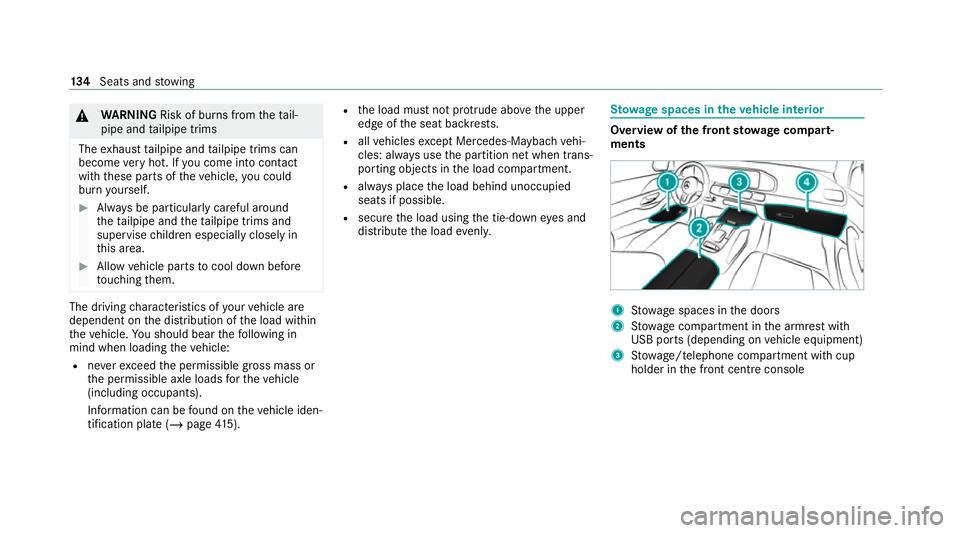
ow age spaces in theve hicle interior Overview of
the front stowage compa rt‐
ments 1
Stow age spaces in the doors
2 Stow age compartment in the armrest with
USB ports (depending on vehicle equipment)
3 Stow age/telephone compartment with cup
holder in the front cent reconsole 134
Seats and stowing
Page 138 of 549
3
Mercedes-Maybach vehicles: stowage/tele‐
phone compartment with temp erature-con‐
trolled cup holder, USB ports (depending on
th eve hicle equipment) and charging module
fo r wireless charging of mobile phones
(depending on theve hicle equipment) in the
front centre console
4 Glovecompa rtment
Fo lding thefo lding table out or in &
WARNING Risk of inju ryfrom an open
fo lding table
Ve hicle occupants may bump into thefo lding
ta ble and injure themselves. #
Close thefo lding table before each jour‐
ne y. *
NO
TEDama getothefo lding tables when
moving the seats back Open
folding tables may be damaged when
th e seats are mo ved bac k. #
Make sure that thefo lding tables are
fo lded in when moving the front seats
bac k. Fo
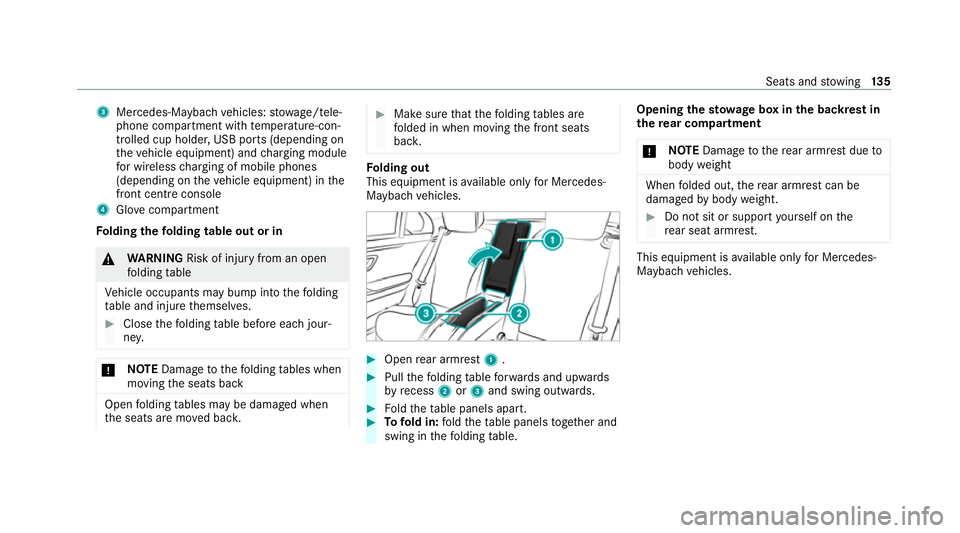
lding out
This equipment is available on lyfor Mercedes-
Maybach vehicles. #
Open rear armrest 1. #
Pull thefo lding table forw ards and upwards
by recess 2or3 and swing outwards. #
Foldtheta ble panels apart. #
Tofold in: fold theta ble panels toget her and
swing in thefo lding table. Opening
thesto wage box in the backrest in
th ere ar comp artment
* NO
TEDama getothere ar armrest due to
body weight When
folded out, there ar armrest can be
damaged bybody weight. #
Do not sit or support yourself on the
re ar seat armrest. This equipment is
available on lyfor Mercedes-
Maybach vehicles. Seats and
stowing 13 5
Page 153 of 549
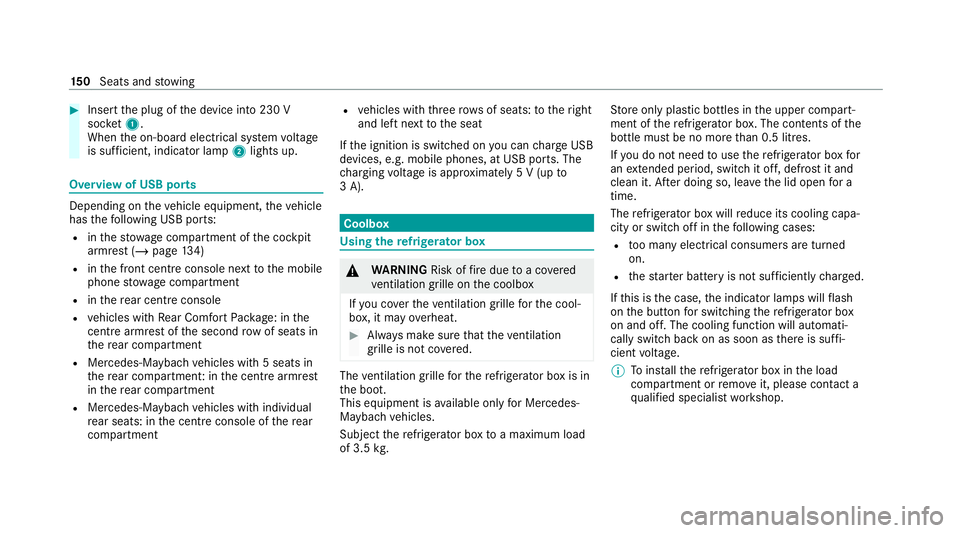
#
Insert the plug of the device into 230 V
soc ket1.
When the on-board electrical sy stem voltage
is suf ficient, indicator la mp2lights up. Overview of USB ports
Depending on
theve hicle equipment, theve hicle
has thefo llowing USB ports:
R inthestow age compartment of the cockpit
armrest (/ page134)
R inthe front cent reconsole next tothe mobile
phone stowage compartment
R inthere ar centre console
R vehicles with Rear Comfort Package: in the
centre armrest of the second row of seats in
th ere ar compartment
R Mercedes-Maybach vehicles with 5 seats in
th ere ar compartment: in the cent rearmrest
in there ar compartment
R Mercedes-Maybach vehicles with individual
re ar seats: in the cent reconsole of there ar
compartment R
vehicles with thre erow s of seats: totheright
and left next tothe seat
If th e ignition is switched on you can charge USB
devices, e.g. mobile phones, at USB ports. The
ch arging voltage is appr oximately 5 V (up to
3 A). Coolb
ox Using
there frigerator box &
WARNING Risk offire due toa co vered
ve ntilation grille on the coolbox
If yo u co verth eve ntilation grille forth e cool‐
box, it may overheat. #
Alw ays make sure that theve ntilation
grille is not co vered. The
ventilation grille forth ere frigerator box is in
th e boot.
This equipment is available on lyfor Mercedes-
Maybach vehicles.
Subject there frigerator box toa maximum load
of 3.5 kg. St
ore only plastic bottles in the upper compart‐
ment of there frigerator box. The contents of the
bottle must be no more than 0.5 lit res.
I f yo u do not need touse there frigerator box for
an extended pe riod, switch it off, defrost it and
clean it. Af ter doing so, lea vethe lid open for a
time.
The refrigerator box will reduce its cooling capa‐
city or switch off in thefo llowing cases:
R too many electrical consumers are turned
on.
R thest ar ter battery is not suf ficiently charge d.
If th is is the case, the indicator lamps will flash
on the button for switching there frigerator box
on and off. The cooling function will auto mati‐
cally switch back on as soon as there is suf fi‐
cient voltage.
% Toinstallth ere frigerator box in the load
compartment or remo veit, please con tact a
qu alified specialist workshop. 15 0
Seats and stowing
Page 344 of 549
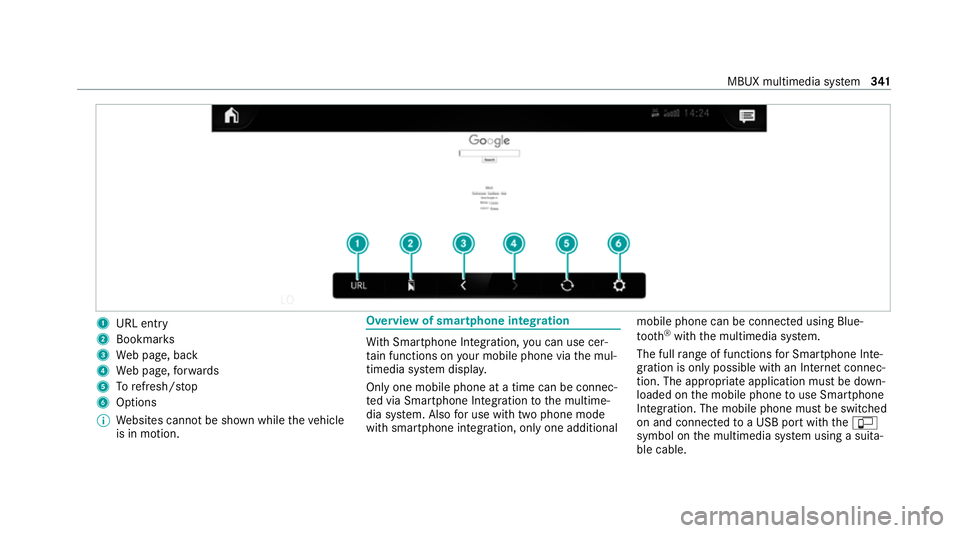
1
URL entry
2 Bookmar ks
3 Web page, back
4 Web page, forw ards
5 Torefresh/s top
6 Options
% Websites cann otbe shown while theve hicle
is in motion. Overview of smartphone integ
ration Wi
th Smartphone Integration, you can use cer‐
ta in functions on your mobile phone via the mul‐
timedia sy stem displa y.
Only one mobile phone at a time can be connec‐
te d via Smartphone Integ ration tothe multime‐
dia sy stem. Also for use with two phone mode
with smartphone integration, only one additional mobile phone can be connected using Blue‐
tooth
®
with the multimedia sy stem.
The full range of functions for Smartphone Inte‐
gration is only possible with an Internet connec‐
tion. The appro priate application must be down‐
loaded on the mobile phone touse Smartphone
In te gration. The mobile phone must be switched
on and connected toa USB port with theç
symbol on the multimedia sy stem using a suita‐
ble cable. MBUX multimedia sy
stem 341
Page 353 of 549
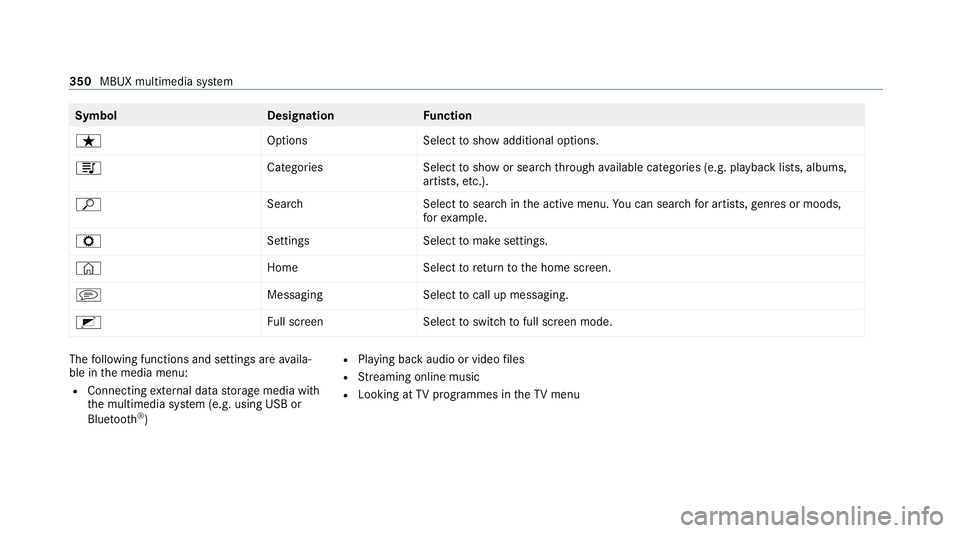
Symbol
DesignationFunction
ß OptionsSelecttoshow additional options.
5 CategoriesSelecttoshow or sear chthro ugh available categories (e.g. playback lists, albums,
artists, etc.).
ª SearchS electtosear chinthe active menu. You can sear chfor artists, genres or moods,
fo rex ample.
Z SettingsS electtomake settings.
© HomeSelecttoreturn tothe home screen.
j MessagingSelecttocall up messaging.
2 Full screen Selecttoswitch tofull screen mode. The
following functions and settings are availa‐
ble in the media menu:
R Connecting extern al data storage media with
th e multimedia sy stem (e.g. using USB or
Blue tooth ®
) R
Playing back audio or video files
R Streaming online music
R Looking at TVprogrammes in theTV menu 350
MBUX multimedia sy stem
Page 514 of 549
Ru
nning boards..................................... 369
Seat belt................................................ 370
Seat co ver............................................. 370
Senso rs................................................. 369
St eering wheel....................................... 370
Ta ilpipes................................................ 369
Tr ailer hit ch........................................... 369
Wa shing byhand................................... 367
Wheels/rims.........................................3 69
Wi ndo ws................................................ 369
Wi per blades.........................................3 69
Carpet (Care)............................................. 370
Changing gears
Manually. ............................................... 207
Changing hub caps................................... 402
Changing the lights Driving ab road (symm etrical low
beam).................................................... 15 6
Cha rging
Bat tery (vehicle).................................... 384
Mobile phone (wireless).........................1 51
USB port................................................1 50
Child saf ety lock
Re ar door................................................ .75Re
ar side wind ows................................... 77
Child seat App rova l categories................................ .60
At tach ing (no tes).....................................59
Basic instructions.................................... 55
Fr ont passenger seat (no tes)...................73
Fr ont passenger seat (without auto‐
matic airbag shutoff)...............................73
ISOFIX/i-Size (fitting).............................. 64
No tes on risks and dangers..................... 56
Re commended child restra int sy stems.... 58
Seats suitable for belt-secu redch ild
re stra int sy stems..................................... 69
Seats suitable for i‑Size child
re stra int sy stems..................................... 64
Seats suitable for ISOFIX child
re stra int sy stems..................................... 62
Securing on the co-driver seat................. 74
Secu ring on there ar seat........................ 71
To pTe ther............................................... 68
Children Avoiding dangers in theve hicle............... 56
Basic instructions.................................... 55
Chock Storage location.................................... 401 Chock
see Chock
Cleaning see Care
Climate control Activating/deactivating (rear operat‐
ing unit)................................................ .175
Ac tivating/deactivating the A/C
function (cont rol panel)........................ .175
Ac tivating/deactivating the A/C
function (MBUX multimedia sy stem)...... 176
Ac tivating/deactivating the synchro‐
nisation function (cont rol panel)............ 17 7
Ac tivating/deactivating the synchro‐
nisation function (MBUX multimedia
sy stem).................................................. 17 7
Air-reci rculation mode.......................... .177
Au tomatic control.................................. 176
Au tomatically controlling (rear oper‐
ating unit).............................................. 176
Calling up the air conditioning menu..... 175
Demi sting the windscreen..................... 174
Demi sting windo ws................................ 17 7
Fr ont air vents....................................... 184
Glo vebox air vent.................................. 186 Index
511
Page 538 of 549
St
ow age comp artment
Fo lding table..........................................1 35
Handset (rear)....................................... 13 6
Re ar seat backrest............................... .135
St ow age comp artments
see Loading
see Stow age space
St ow age space
Armrest................................................. 13 4
Centre console..................................... .134
Door...................................................... 13 4
Glo vecompa rtment............................... 13 4
USB ports.............................................. 13 4
Suggestions Configuring...........................................3 20
Sulphur content......................................... 419
Sur round lighting
Switching on/of f................................... 16 3
Sur round View
see 360° Camera
Suspension Individual wheel contro l (E-ACTIVE
BO DY CONTROL)...................................2 73Ro
cking free mode (E- ACTIVE BODY
CO NTROL)............................................. 272
Setting the suspension le vel (AIR‐
MATIC)................................................. .265
Setting the suspension le vel (E-
AC TIVE BODY CONTROL)....................... 273
Suspension see AIRMATIC
see E- ACTIVE BODY CONTROL
Suspension le vel (AIRMATIC)
Setting................................................... 265
Suspension le vel (E- ACTIVE BODY
CONT ROL)
Setting.................................................. .273
SV HC (substances of very high con‐
cern) ............................................................. 33
Switch-off del aytime
Exterio r.................................................. 16 3
Interior.................................................. 16 4
Synchronisation function Activating/deactivating (MBUX mul‐
timedia sy stem).....................................1 77
Switching on/off (control panel )........... 17 7Sy
stem settings
Overview of the sy stem settings
menu.....................................................3 20 T
Ta ble
see Folding table
Ta ilgate
Closing.................................................... 87
Emergency release.................................. 91
HANDS-FREE ACCES S............................. 89
Limiting the opening angle......................91
Opening................................................... 86
Opening dimensions.............................. 426
Un locking (emer gency key)..................... 92
Ta ilpipes (care)......................................... .369
Ta ke -back of end-of-life vehicles
Pr otection of the environmen t................. 22
Ta nk content
Ad Blue ®
................................................ 422
Fu el....................................................... 421
Re ser ve(fuel)........................................ 421
Te ch nical data
Axle load (trailer operation)...................4 32 Index
535
Page 541 of 549
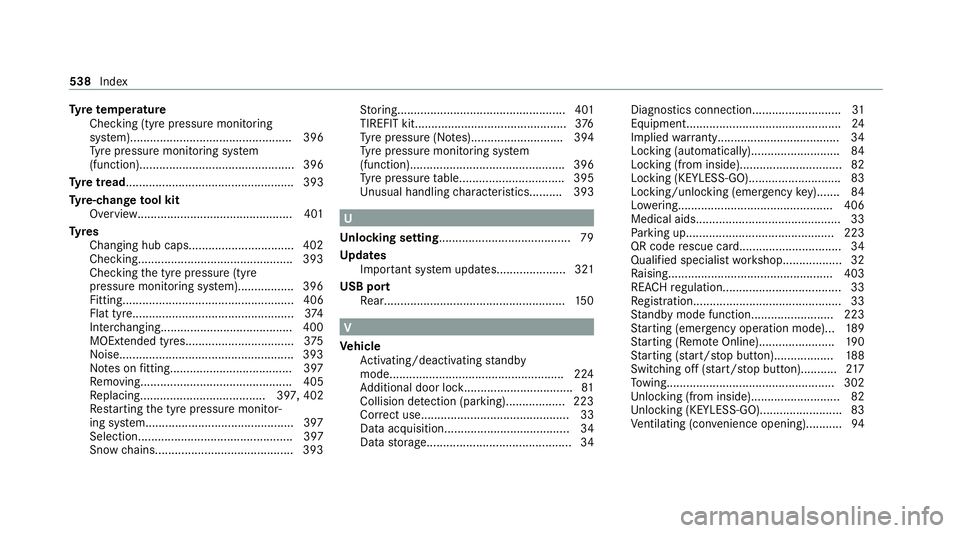
Ty
re temp erature
Checking (tyre pressure monitoring
sy stem)................................................. 396
Ty re pressure monitoring sy stem
(function)............................................... 396
Ty re tread ................................................... 393
Ty re-change tool kit
Overview............................................... 401
Ty res
Changing hub caps................................ 402
Checking............................................... 393
Checking the tyre pressure (tyre
pressure monitoring sy stem)................. 396
Fitting.................................................... 406
Flat tyre.................................................3 74
Inter changing........................................ 400
MOExtended tyres................................ .375
No ise.................................................... .393
No tes on fitting..................................... 397
Re moving.............................................. 405
Re placing...................................... 397, 402
Re starting the tyre pressure monitor‐
ing sy stem.............................................3 97
Selection............................................... 397
Snow chains.......................................... 393 St
oring................................................... 401
TIREFIT kit..............................................3 76
Ty re pressure (N otes)............................ 394
Ty re pressure monitoring sy stem
(function)............................................... 396
Ty re pressure table................................ 395
Un usual handling characteristic s.......... 393 U
Un locking setting ........................................ 79
Up dates
Impor tant sy stem updates..................... 321
USB port Rear...................................................... .150 V
Ve hicle
Ac tivating/deactivating standby
mode.................................................... .224
Ad ditional door loc k................................ .81
Collision de tection (pa rking).................. 223
Cor rect use............................................. 33
Data acquisition...................................... 34
Data storage............................................ 34 Diagnostics connection...........................
31
Equipment............................................... 24
Implied warrant y..................................... 34
Locking (automatically). ..........................84
Locking (from inside)...............................82
Locking (KEYLESS-GO)............................ 83
Locking/unlocking (emergency key)....... 84
Lo we ring............................................... 406
Medical aids............................................ 33
Pa rking up............................................ .223
QR code rescue card............................... 34
Qualifi ed specialist workshop.................. 32
Ra ising.................................................. 403
REA CHregulation.................................... 33
Re gistration............................................. 33
St andby mode function........................ .223
St arting (eme rgency operation mode).. .189
St arting (Remo teOnline).......................1 90
St arting (s tart/s top button).................. 188
Switching off (s tart/s top button)...........2 17
To wing.................................................. .302
Un locking (from inside).......................... .82
Un locking (KEYLESS-GO)........................ .83
Ve ntilating (co nvenience opening)........... 94538
Index