battery MERCEDES-BENZ GLS SUV 2020 Owners Manual
[x] Cancel search | Manufacturer: MERCEDES-BENZ, Model Year: 2020, Model line: GLS SUV, Model: MERCEDES-BENZ GLS SUV 2020Pages: 549, PDF Size: 9.9 MB
Page 6 of 549
Light and sight
......................................... 15 6
Exterior lighting .......................................... 15 6
Interior lighting ...........................................1 63
Wi ndsc reen wipers and windscreen
wa sher sy stem ............................................ 16 5
Mir rors ........................................................ 17 0
Area pe rmeable toradio wav es on the
windscreen ................................................ .173
Infrared-reflective windscreen function ...... 173Climate control
......................................... 174
Overview of climate contro l systems ........... 174
Operating the climate control sy stem ......... 175 Driving and pa
rking ................................. 187
Driving ........................................................ 187
DY NA MIC SELECT switch ............................2 01
Au tomatic transmission .............................. 204
Tr ans fer case .............................................. 209
Fu nction of the 4MATIC ...............................2 11
Re fuelling .................................................... 211
Pa rking ........................................................ 217
Driving and driving sa fety sy stems .............2 24
Tr ailer hit ch................................................ 295 Bicycle
rack function .................................. 300
Ve hicle towing instructions ........................ .302 Instrument display and on-board
comp
uter.................................................. 304
No tes on the instrument display and on-
board computer .......................................... 304
Instrument display overview ...................... .305
Overview of the buttons on thesteering
wheel ..........................................................3 06
Operating the on-board computer .............. 306
Overview of what is shown on the multi‐
function display .......................................... 308
Head-up display .......................................... 308 MBUX multimedia sy
stem ....................... 311
Overview and operation .............................. 311
Sy stem settings .......................................... 320
Na vigation .................................................. 324
Te lephone .................................................. .330
Mercedes me and apps .............................. 333
Mercedes-Benz emer gency call sy stem ...... 342
Ra dio, media & TV...................................... 349
Sound settings ........................................... 355 Main
tenance and care ............................. 357
ASS YST PLUS service inter val display ........ 357
Engine compartment .................................. 358
Cleaning and care ...................................... .364 Breakdown assistance
............................372
Emergency ................................................. .372
Flat tyre ...................................................... 374
Battery (vehicle) ......................................... 380
To w- starting or towing away ....................... 385
Electrical fuses ........................................... 390 Wheels and tyres
..................................... 393
No tes on noise or unusual handling char‐
acteristics .................................................. .393
No tes on regular lyinspecting wheels and
tyres .......................................................... .393
No tes on snow chains ................................ 393
Ty re pressure .............................................. 394
Wheel change ............................................ .397
Emergency spare wheel .............................. 407
Collapsible spare wheel .............................. 409 Contents
3
Page 35 of 549
#
Stow all objects in theve hicle securely
so that they cannot getinto the driver's
fo ot we ll. #
Alw aysfit th efloor mats securely and
as prescribed in order toensure that
th ere is alw ays suf ficient room forthe
pedals. #
Do not use loose floor mats and do not
place floor mats on top of one ano ther. *
NO
TEBattery discharging from using
devices connected tothe diagnostics
connection Using devices at
the diagnostics connection
drains the batter y. #
Check thech arge leve l of the batter y. #
Ifth ech arge leve l is lo w,charge the
batter y,e.g. bydriving a considerable
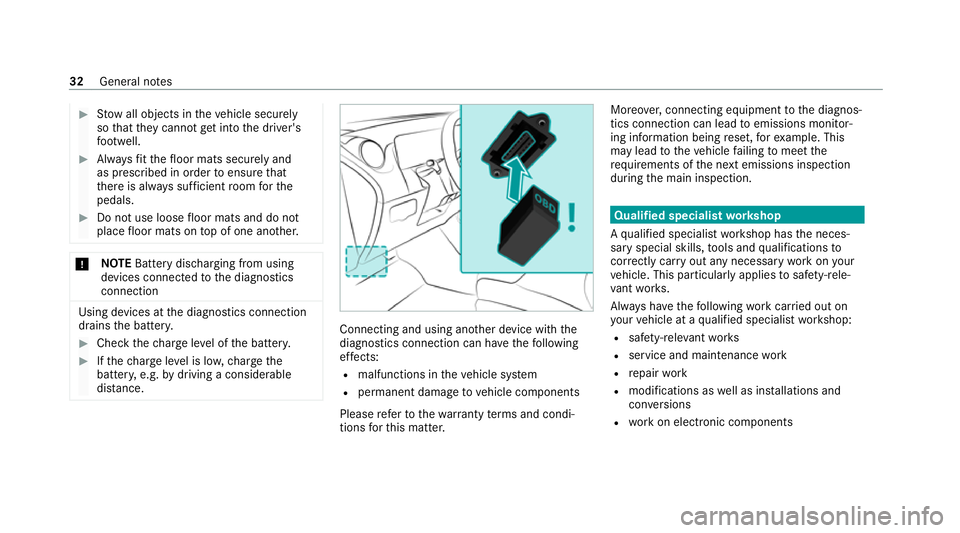
dis tance. Connecting and using ano
ther device with the
diagnostics connection can ha vethefo llowing
ef fects:
R malfunctions in theve hicle sy stem
R permanent damage tovehicle components
Please referto thewa rranty term s and condi‐
tions forth is matter. Moreo
ver,connecting equipment tothe diagnos‐
tics connection can lead toemissions monitor‐
ing information being reset, forex ample. This
may lead totheve hicle failing tomeet the
re qu irements of the next emissions inspection
during the main inspection. Qualified specialist
workshop
A qu alified specialist workshop has the neces‐
sary special skills, tools and qualifications to
cor rectly car ryout any necessary workon your
ve hicle. This particular lyapplies tosaf ety-re le‐
va nt wo rks.
Alw ays ha vethefo llowing workcar ried out on
yo ur vehicle at a qualified specialist workshop:
R safety-re leva nt wo rks
R service and maintenance work
R repair work
R modifications as well as ins tallations and
con versions
R workon electronic components 32
General no tes
Page 38 of 549
The
following pr ovides you with general informa‐
tion rega rding data processing in theve hicle.
Ad ditional information rega rding exact ly which
da ta inyour vehicle are collected, sa ved and
transmit tedto third parties and for what pur‐
pose, can be found in the information directly
re lated tothe functional characteristics in ques‐
tion in their respective operating instructions.
This information is also available on line and,
depending on theve hicle equipment, digitally.
Pe rsonal data
Every vehicle is identified bya unique vehicle
identification number. Depending on the coun‐
tr y, this vehicle identification number can be
used by,fo rex ample, go vernmental auth orities
to determ ine the identity of theow ner. The reare
ot her possibilities touse data collec ted from the
ve hicle toidentify theow ner or driver, su chas
th e licence plate number.
Therefore, data generated or processed bycon‐
trol units may be attributable toa person or,
under cer tain conditions, become att ributable to
a person. Depending on which vehicle data are
av ailable, it may be possible tomake inferences about,
forex ample, your driving behaviour, your
location, your route or your use pat tern s.
Legal requirements rega rding the disclosure
of data
If legally requ ired todo so, manufacturers are, in
individual cases, legally obliged toprov ide gov‐
ernmental entities, upon request and tothe
ex tent requ ired, data stored bythe manufac‐
turer. Forex ample, this may be the case during
th e in vestigation of a criminal of fence.
Go vernmental entities are themselves, in individ‐
ual cases and within the applicable legal frame‐
wo rk, authorised toread out data from theve hi‐
cle. In the case of an accident, information that
can help with an in vestigation can, therefore, be
ta ke n from the airbag control unit, forex ample.
Operational data in theve hicle
This is data rega rding the operation of theve hi‐
cle, which ha vebeen processed bycontrol units.
This includes thefo llowing data, forex ample:
R vehicle status information such as the speed,
longitudinal acceleration, lateral accelera‐
tion, number of wheel revo lutions or thefa s‐
te ned seat belts displ ay R
ambient conditions, such as temp erature,
ra in sensor or dis tance sensor
General ly,th e use of these data is temp orar y;
th ey will not be stored be yond the period of
operation and will only be processed within the
ve hicle itself. Control units of ten contain da ta
memories forve hicle keys,fo rex ample. Their
use permits thete mp orary or permanent docu‐
mentation of tech nical information about the
ve hicle's operating state, component loads,
main tenance requ irements and tech nical events
or faults.
Depending on theve hicle equipment, thefo llow‐
ing data are stored:
R operating status of sy stem components,
such as fill le vels, tyre pressure or battery
st atus
R malfunctions or faults in impor tant sy stem
components, such as lights or brakes
R system reactions in special driving situations,
such as airbag deployment or the inter ven‐
tion of stability control sy stems
R information on events leading tovehicle
damage General no
tes35
Page 81 of 549
Key
Overview of
key functions &
WARNING Risk of accident and inju ry
due tochildren left unat tended in the
ve hicle
If ch ildren are left unsupervised in theve hi‐
cle, they could, in pa rticular:
R open doors, thereby endangering other
persons or road users.
R get out and be stru ck byoncoming traf‐
fi c.
R ope rate ve hicle equipment and become
trapped, forex ample.
In addition, thech ildren could also set the
ve hicle in motion, forex ample by:
R releasing the parking brake.
R changing the transmission position.
R starting theve hicle. #
Never lea vechildren unat tended in the
ve hicle. #
When leaving theve hicle, alw aysta ke
th eke y with you and lock theve hicle. #
Keep theve hicle key out of reach of
ch ildren. *
NO
TEDama getotheke y caused by
magnetic fields #
Keep theke yaw ay from strong mag‐
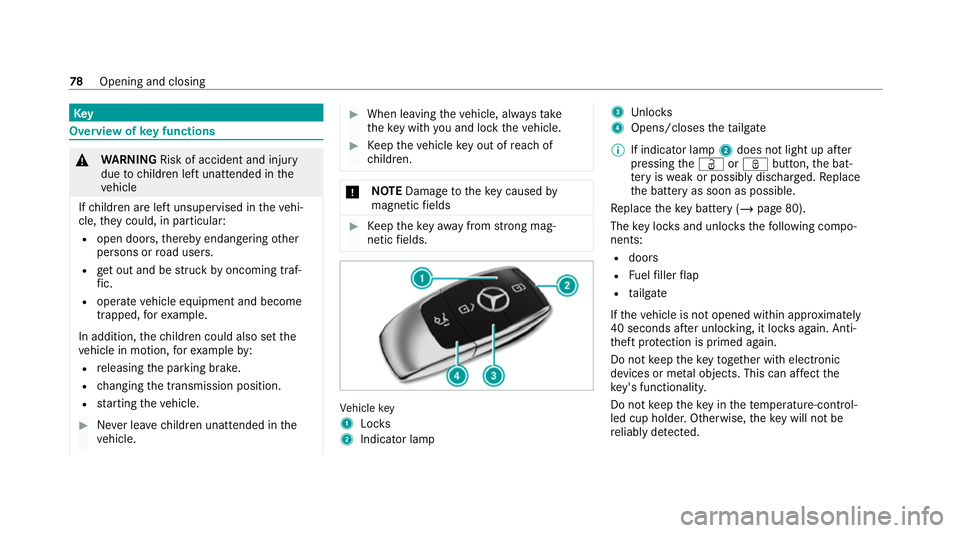
netic fields. Ve
hicle key
1 Locks
2 Indicator lamp 3
Unloc ks
4 Opens/closes theta ilgate
% If indicator lamp 2does not light up af ter
pressing theÜ orß button, the bat‐
te ry iswe ak or possibly dischar ged. Re place
th e battery as soon as possible.
Re place theke y bat tery ( / page 80).
The key loc ksand unlo cksth efo llowing compo‐
nents:
R doors
R Fuelfiller flap
R tailgate
If th eve hicle is not opened within appr oximately
40 seconds af ter unlocking, it loc ksagain. Anti-
th eft pr otection is primed again.
Do not keep theke yto ge ther with electronic
devices or me tal objects. This can af fect the
ke y's functionalit y.
Do not keep theke y in thete mp erature-contro l‐
led cup holder. Otherwise, theke y will not be
re liably de tected. 78
Opening and closing
Page 83 of 549
#
Press release knob 1.
Emer gency key2 is pushed out slight ly.#
Pull out emer gency key2 until it en gage s in
th e intermediate position. #
Press release knob 1again and fully
re mo veemer gency key2.
Inserting the emer gency key #
Press release knob 1. #
Insert emer gency key2 tothe intermediate
position or fully until it engages.
% You can use the intermediate position of
emer gency key2 toattach theke yto akey
ri ng. Re
placing the key battery &
DANG ER Serious damage tohealth
caused byswallowing batteries
Batteries contain toxic and cor rosive sub‐
st ances. Swallowing bat teries may cause
serious damage tohealth.
There is a risk of fata l injur y. #
Keep batteries out of there ach of chil‐
dren. #
If batteries are swallo wed, seek medical
attention immediately. +
ENVIRONMEN
TALNO TEEnvironmental
dama gedue toimproper disposal of bat‐
te ries Batteries conta
in pollutants. It is
illegal todispose of them with the household
ru bbish. #
Dispose of batteries in an
environmen tally responsible manner.
Ta ke dischar ged batteries toaqu alified
specialist workshop or toa collection
point for used batteries. Re
quirements:
R Yourequ ire a CR 2032 3 V cell batter y.
Mercedes-Benz recommends that you ha vethe
battery replaced at a qualified specialist work‐
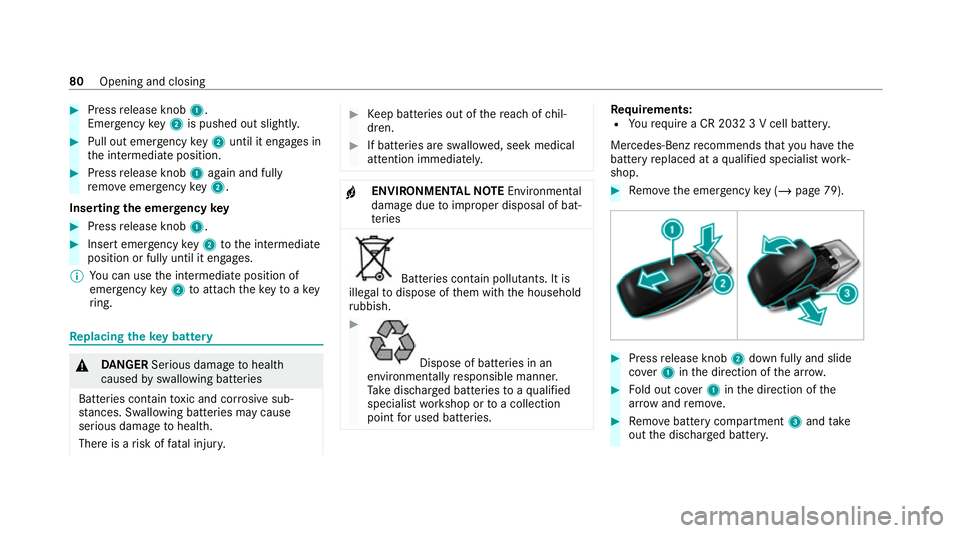
shop. #
Remo vethe emer gency key ( / page 79). #
Press release knob 2down fully and slide
co ver1 inthe direction of the ar row. #
Fold out co ver1 inthe direction of the
ar row and remo ve. #
Remo vebattery compartment 3and take
out the dischar ged batter y. 80
Opening and closing
Page 84 of 549
#
Insert the new battery into battery compart‐
ment 3. Obser vethe positive pole marking
in the battery compartment and on the bat‐
te ry when doing this. #
Push in battery compartment 3.#
Re-attach co ver1 and push it until it
engages. Problems with
theke y,troublesho oting Yo
u can no lon ger lo ckor unlock theve hicle
Po ssible causes:
R The key bat tery iswe ak or dischar ged.
R The key is faulty. #
Check the battery using the indicator lamp
(/ page 78). #
Replace theke y bat tery, if necessary
(/ page 80). #
Use the emer gency keyto lock or unlock
(/ page 84). #
Have theke ych ecked at a qualified specialist
wo rkshop. There is inter
fere nce from a po werful radio
signal source
The key function is impaired by,fo rex ample:
R high voltage po wer lines
R mobile phones
R electronic devices (no tebooks, tablets)
R shielding due tome tal objects or induction
loops for electrical gatesystems or auto‐
matic bar riers #
Make sure that there is suf ficient di stance
between theke y and the po tential sou rce of
inter fere nce.
Yo u ha velost a key #
Have theke y deacti vated at a qualified spe‐
cialist workshop. #
If necessar y,ha ve the mechanical lock
re placed as well. Doors
Note
s onthe additional door lock The additional door lock is only
available for
ve hicles forth eUni ted Kingdom. &
WARNING Risk of inju ryto persons
inside theve hicle when the additional
door lock is activated
If th e additional door lock is activated, the
doors can no longer be opened from the
inside. #
Never lea vepersons, in particular chil‐
dren, unat tended in theve hicle. #
Ifth ere are persons in theve hicle, do
not activate the additional door loc k. The additional door lock is automatically activa‐
te d in thefo llowing situations:
R The vehicle is loc ked using thekey.
R The vehicle is loc ked using KEYLESS-GO. Opening and closing
81
Page 86 of 549
Locking/unlocking
theve hicle with KEY‐
LESS-GO Re
quirements:
R The key is outside theve hicle.
R The dis tance between theke y and theve hicle
does not exceed 1 m.
R The driver's door and the door at which the
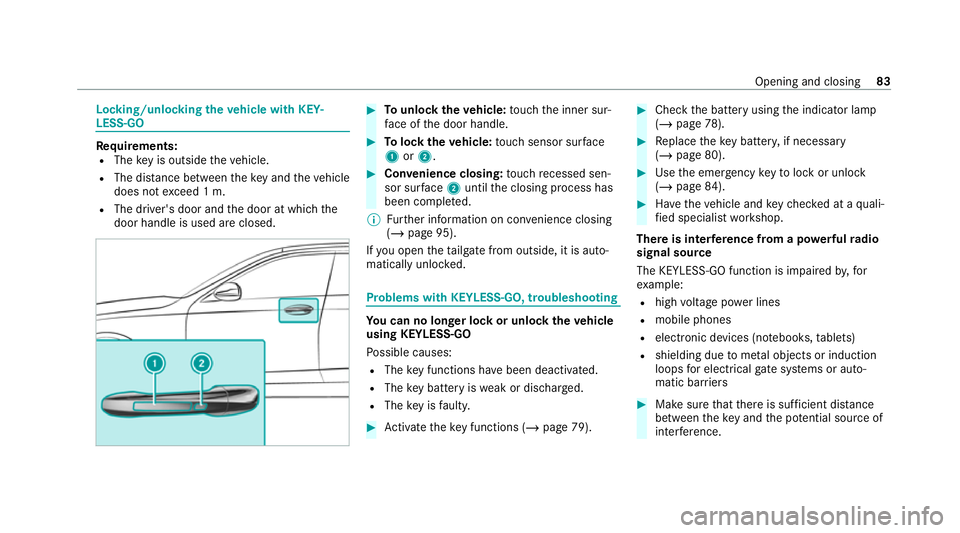
door handle is used are closed. #
Tounlo cktheve hicle: touch the inner sur‐
fa ce of the door handle. #
Tolock theve hicle: touch sensor sur face
1 or2. #
Convenience closing: touch recessed sen‐
sor su rface 2until the closing process has
been comple ted.
% Further information on con venience closing
(/ page 95).
If yo u open theta ilgate from outside, it is auto‐
matically unloc ked. Problems with KEYLESS-GO, troubleshooting
Yo
u can no lon ger lo ckor unlock theve hicle
using KEYLESS-GO
Po ssible causes:
R The key functions ha vebeen deactivated.
R The key bat tery iswe ak or dischar ged.
R The key is faulty. #
Activate theke y functions (/ page 79). #
Check the battery using the indicator lamp
(/ page 78). #
Replace theke y bat tery, if necessary
(/ page 80). #
Use the emer gency keyto lock or unlock
(/ page 84). #
Have theve hicle and keych ecked at a quali‐
fi ed specialist workshop.
There is inter fere nce from a po werful radio
signal source
The KEYLESS-GO function is impaired by,for
ex ample:
R high voltage po wer lines
R mobile phones
R electronic devices (no tebooks, tablets)
R shielding due tome tal objects or induction
loops for electrical gate systems or auto‐
matic bar riers #
Make sure that there is suf ficient di stance
between theke y and the po tential sou rce of
inter fere nce. Opening and closing
83
Page 99 of 549
If a side window is obstructed during closing and
re opens again immediately: #
Immediately af terth is, pull and hold the cor‐
re sponding button again until the side win‐
dow has closed and hold the button for at
least one more second (re-adjustment).
The side window will be closed without the
automatic reve rsing function.
If th e side window is obstructed again and
re opens again immediately: #
Immediately af terth is, pull and hold the cor‐
re sponding button again until the side win‐
dow has closed and hold the button for at
least one more second (follo w-up adjust‐
ment).
The side wind owwill be closed without the
automatic reve rsing function.
The side windo wscann otbe opened or
closed using the con venience opening fea‐
ture.
Po ssible cause:
R The key bat tery iswe ak or dischar ged. #
Check the battery using the indicator lamp
(/ page 78). #
Replace theke y bat tery, if necessary
(/ page 80). Sliding sunroof
Opening and closing
the sliding sunroof %
The term "sliding sun roof" also refers to the
panorama sliding sunroof. &
WARNING Risk of becoming trapped
when the sliding sunroof is being opened
and closed
Body parts may become trapped in thera nge
of mo vement. #
During opening and closing, make sure
th at no body parts are in thera nge of
mo vement. #
Release the button immediately if
somebody becomes trapped.
or #
Brief lypress the button in any direction
during automatic operation.
The opening or closing process will be
st opped. &
WARNING Risk of entrapment if the slid‐
ing sunroof is operated bychildren
Children operating the sliding sunroof could
get caught in the moving parts, particularly if
unattended. #
Never lea vechildren unat tended in the
ve hicle. #
When leaving theve hicle, alw aysta ke
th eke y with you and lock theve hicle. &
WARNING Risk of becoming trapped
when thero ller sunblind is being opened
and closed
Body parts may become trapped between
th ero ller sunblind and frame or sliding roof. 96
Opening and closing
Page 153 of 549
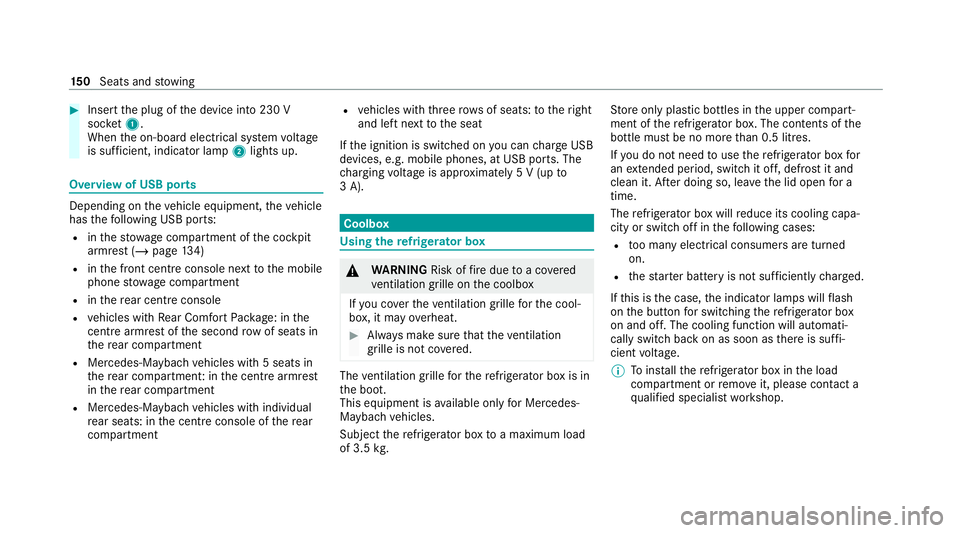
#
Insert the plug of the device into 230 V
soc ket1.
When the on-board electrical sy stem voltage
is suf ficient, indicator la mp2lights up. Overview of USB ports
Depending on
theve hicle equipment, theve hicle
has thefo llowing USB ports:
R inthestow age compartment of the cockpit
armrest (/ page134)
R inthe front cent reconsole next tothe mobile
phone stowage compartment
R inthere ar centre console
R vehicles with Rear Comfort Package: in the
centre armrest of the second row of seats in
th ere ar compartment
R Mercedes-Maybach vehicles with 5 seats in
th ere ar compartment: in the cent rearmrest
in there ar compartment
R Mercedes-Maybach vehicles with individual
re ar seats: in the cent reconsole of there ar
compartment R
vehicles with thre erow s of seats: totheright
and left next tothe seat
If th e ignition is switched on you can charge USB
devices, e.g. mobile phones, at USB ports. The
ch arging voltage is appr oximately 5 V (up to
3 A). Coolb
ox Using
there frigerator box &
WARNING Risk offire due toa co vered
ve ntilation grille on the coolbox
If yo u co verth eve ntilation grille forth e cool‐
box, it may overheat. #
Alw ays make sure that theve ntilation
grille is not co vered. The
ventilation grille forth ere frigerator box is in
th e boot.
This equipment is available on lyfor Mercedes-
Maybach vehicles.
Subject there frigerator box toa maximum load
of 3.5 kg. St
ore only plastic bottles in the upper compart‐
ment of there frigerator box. The contents of the
bottle must be no more than 0.5 lit res.
I f yo u do not need touse there frigerator box for
an extended pe riod, switch it off, defrost it and
clean it. Af ter doing so, lea vethe lid open for a
time.
The refrigerator box will reduce its cooling capa‐
city or switch off in thefo llowing cases:
R too many electrical consumers are turned
on.
R thest ar ter battery is not suf ficiently charge d.
If th is is the case, the indicator lamps will flash
on the button for switching there frigerator box
on and off. The cooling function will auto mati‐
cally switch back on as soon as there is suf fi‐
cient voltage.
% Toinstallth ere frigerator box in the load
compartment or remo veit, please con tact a
qu alified specialist workshop. 15 0
Seats and stowing
Page 160 of 549
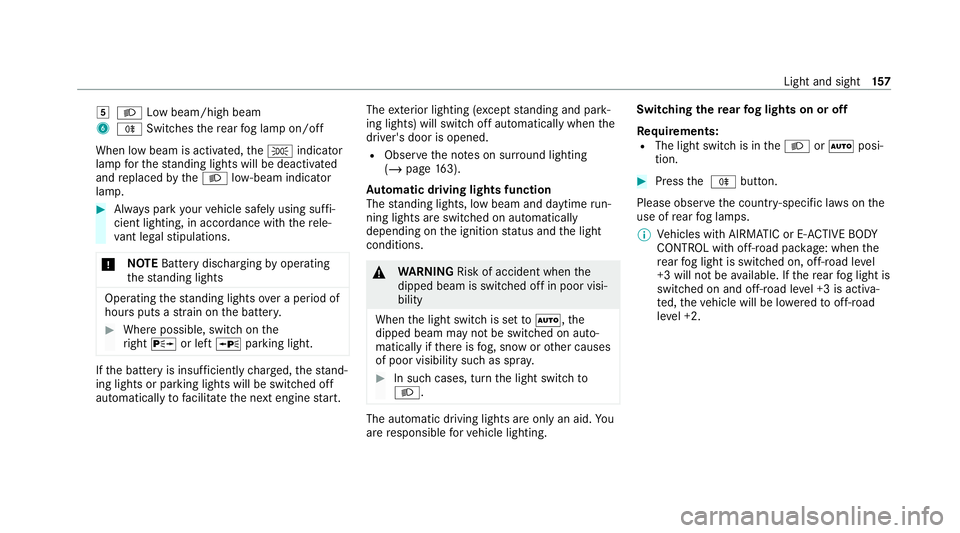
5
L Low beam/high beam
6 R Switches there ar fog lamp on/off
When low beam is activated, theT indicator
lamp forth est anding lights will be deactivated
and replaced bytheL low- beam indicator
lamp. #
Alw ays park your vehicle safely using suf fi‐
cient lighting, in acco rdance with there le‐
va nt le galst ipulations.
* NO
TEBattery discharging byoperating
th est anding lights Operating
thest anding lights over a period of
hours puts a stra in on the batter y. #
Where possible, switch on the
ri ght X or left Wparking light. If
th e battery is insuf ficiently charge d, thest and‐
ing lights or parking lights will be swit ched off
automatically tofacilitate the next engine start. The
exterior lighting (e xcept standing and park‐
ing lights) will swit choff automatically when the
driver's door is opened.
R Obser vethe no tes on sur round lighting
(/ page 163).
Au tomatic driving lights function
The standing lights, low beam and daytime run‐
ning lights are switched on au tomatically
depending on the ignition status and the light
conditions. &
WARNING Risk of accident when the
dipped beam is switched off in poor visi‐
bility
When the light switch is set toà ,the
dipped beam may not be switched on auto‐
matically if there is fog, snow or other causes
of poor visibility such as spr ay. #
In such cases, turn the light switch to
L . The automatic driving lights are only an aid.
Yo u
are responsible forve hicle lighting. Switching
there ar fog lights on or off
Re quirements:
R The light switch is in theL orà posi‐
tion. #
Press the R button.
Please obser vethe count ry-specific la wsonthe
use of rear fog lamps.
% Vehicles with AIRMATIC or E- ACTIVE BODY
CO NTROL with off-road pac kage : when the
re ar fog light is switched on, off-road le vel
+3 will not be available. If there ar fog light is
switched on and off-road le vel +3 is activa‐
te d, theve hicle will be lo weredto off-road
le ve l +2. Light and sight
157