glove box MERCEDES-BENZ GLS SUV 2020 Owners Manual
[x] Cancel search | Manufacturer: MERCEDES-BENZ, Model Year: 2020, Model line: GLS SUV, Model: MERCEDES-BENZ GLS SUV 2020Pages: 549, PDF Size: 9.9 MB
Page 138 of 549
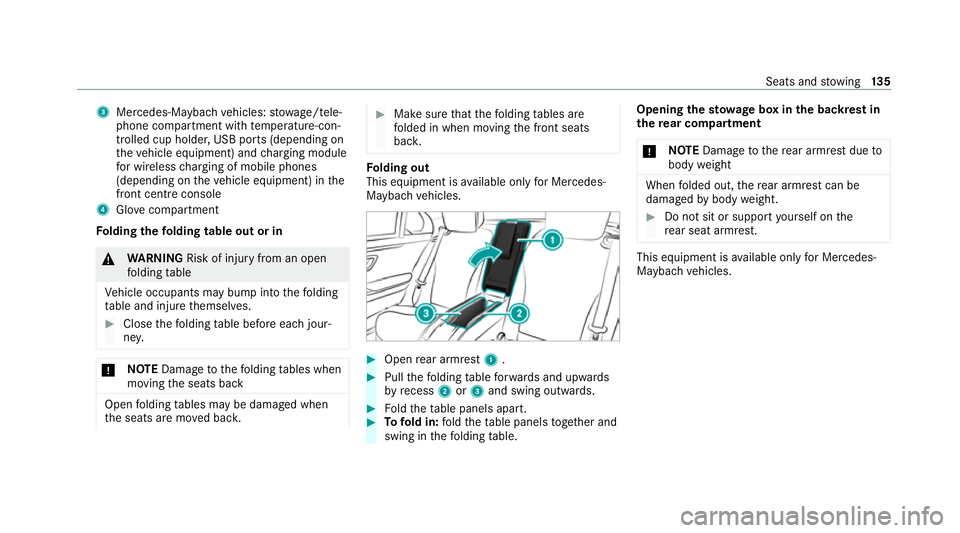
3
Mercedes-Maybach vehicles: stowage/tele‐
phone compartment with temp erature-con‐
trolled cup holder, USB ports (depending on
th eve hicle equipment) and charging module
fo r wireless charging of mobile phones
(depending on theve hicle equipment) in the
front centre console
4 Glovecompa rtment
Fo lding thefo lding table out or in &
WARNING Risk of inju ryfrom an open
fo lding table
Ve hicle occupants may bump into thefo lding
ta ble and injure themselves. #
Close thefo lding table before each jour‐
ne y. *
NO
TEDama getothefo lding tables when
moving the seats back Open
folding tables may be damaged when
th e seats are mo ved bac k. #
Make sure that thefo lding tables are
fo lded in when moving the front seats
bac k. Fo
lding out
This equipment is available on lyfor Mercedes-
Maybach vehicles. #
Open rear armrest 1. #
Pull thefo lding table forw ards and upwards
by recess 2or3 and swing outwards. #
Foldtheta ble panels apart. #
Tofold in: fold theta ble panels toget her and
swing in thefo lding table. Opening
thesto wage box in the backrest in
th ere ar comp artment
* NO
TEDama getothere ar armrest due to
body weight When
folded out, there ar armrest can be
damaged bybody weight. #
Do not sit or support yourself on the
re ar seat armrest. This equipment is
available on lyfor Mercedes-
Maybach vehicles. Seats and
stowing 13 5
Page 181 of 549
#
Toactivate: press button Á.
Re sidual heat will be switched off automaticall y.Switching
there sidual heat in there ar
on/off Re
quirements:
R The vehicle is par ked.
When there sidual heat of the engine is activated
in there ar compartment, you can heat or venti‐
la te there ar compartment for appro ximately
30 minutes. #
Press button 5(/ page 175). Ac
tivating/deactivating ionisation Ionisation impr
oves thequ ality of theve hicle's
interior air. Ionisation of the interior air is odour‐
less. #
Call up the air conditioning menu
(/ page 175). #
Select Air quality. #
Select IONISATION . Fr
ag rance sy stem Setting
the frag rance sy stem
Re quirements:
R Automatic clima tecontrol is acti vated.
R The glove box is closed.
The fragrance sy stem distributes a pleasant fra‐
grance thro ughout theve hicle interior from a fla‐
con located in theglov e box. #
Call up the climate control menu
(/ page 175). #
Select Air quality. #
Select AIR FRESHENER . #
Keep pressing until the desired intensity is
re ached. Inserting or
removing the flacon ofthe fra‐
gr ance sy stem &
WARNING Risk of inju ryfrom liquid per‐
fume
If ch ildren open theflacon, they could drink
th e liquid perfume or it could come into con‐
ta ct wi th theireyes. #
Do not lea vechildren unat tended in the
ve hicle. #
Consult a doctor immediately if liquid
perfume has been drunk. #
If liquid perfume comes into contact
with your eyes or skin, rinse your eyes
with clean water. #
If sym ptoms continue, consult a doctor. 17 8
Climate cont rol
Page 189 of 549
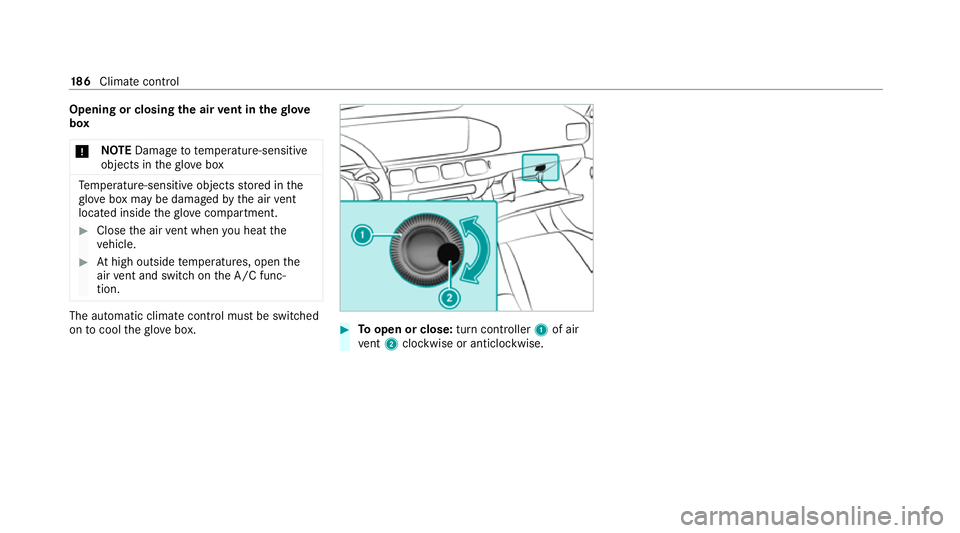
Opening or closing
the air vent in thegl ove
box
* NO
TEDama geto te mperature-sensitive
objects in theglove box Te
mp erature-sensitive objects stored in the
gl ove box may be damaged bythe air vent
located inside theglove compa rtment. #
Close the air vent when you heat the
ve hicle. #
Athigh outside temp eratures, open the
air vent and switch on the A/C func‐
tion. The automatic climate control must be switched
on tocool theglove box. #
Toopen or close: turn controller1of air
ve nt 2 clockwise or anticlockwise. 18 6
Climate cont rol
Page 355 of 549
#
Toplay back audio files using the multimedia
sy stem, authorise theex tern al data storage
medium on the MBUX multimedia sy stem.
Au thorising a new Blu etoo th®
audio device #
Select Connect new device .#
Select an audio device.
Auth orisation starts. A code is displa yed on
th e multimedia sy stem and on the mobile
phone. #
Ifth e codes are identical, confi rmonthe
audio equipment. #
Select Only as Bluetooth audio device .
The Blue tooth®
audio equipment is connec‐
te d with the multimedia sy stem.
Connecting pr eviously authorised Blue tooth ®
audio equipment #
Select a Blue tooth®
audio device from the
list.
The connection is being es tablished. Re
ceiving TVchannels in HD quality *
NO
TEDama getothe CI+ module and
Smart Card The CI+ module is designed
for use in the
home. The CI+ module can overheat and be
damaged bycontinuous exposure tohigh
outside temp eratures. #
Make sure that the CI+ module is not
subject tohigh temp eratures forex ten‐
ded pe riods of time.
If th e CI+ module is damaged, no
encryp tedch annels can be recei ved. %
The CI+ module is not available in all coun‐
tries.
A CI+ module (Common In terface Module),
which is not included in the scope of deliver y,is
used todecrypt HD programmes according to
th e CI+ standard.
In some countries, an additional smart card is
re qu ired, which is inse rted into the CI+ module
(see the manufacturer's operating manual). The CI+ module is connected in
the CI+ box in
th eglove compa rtment. #
Toinsert the sma rtcard in the CI+ mod‐
ule: ifre qu ired (countr y-dependent), insert
th e smart card into the CI+ module slot.
% The CI+ box is designed for operation at
te mp eratures between 0 °C and 65 °C. At
operating temp eratures that are higher or
to o low a message appears in the multime‐
dia sy stem and the CI+ module is switched
off automaticall y.Ifth e CI+ module is
switched off, no encryp tedch annels can be
re cei ved. 352
MBUX multimedia sy stem