navigation system MERCEDES-BENZ GT COUPE 2021 AMG User Guide
[x] Cancel search | Manufacturer: MERCEDES-BENZ, Model Year: 2021, Model line: GT COUPE, Model: MERCEDES-BENZ GT COUPE 2021Pages: 422, PDF Size: 32.51 MB
Page 203 of 422
#
Select õ Audio. #
Select Nav igati on and Traffic Announce -
ments . #
Swi tchVoi ceGuidance DuringCallon 0073 or
of f0053.
Ad jus tingthe volum eof navig ation
announ cement s
Re quirement s:
R Routeguidan ceisact ive. #
On themu ltifunct ionsteer ing wheel or
on themu ltim edia system: turnth evo lume
con trol on themultifunc tionsteer ing wheel
dur ing ana vig ation announ cement.
or #
Dur ing ana vig ation announ cementpr ess the
vo lume rock er switc hon thecent ercon sole
up ordown (/ page16 9).
% Inthefo llo wing situat ions,th evo lume is
ra ised tothemaximum volume orlowe redto
th eminimum volume:
R Ane wrouteguidan ceisstar ted.
R The routeis recal cul ated. %
The mini mum volume canbeindiv iduall yse t
at an aut hor ized Mercedes -Benz Cent er. #
Viasy stem settings: selectSyst em. #
Sele ctõ Audio. #
Sele ctNavig ation andTrafficAnnoun ce-
men ts. #
Sele ctVoic eGuidanc eVolume . #
Setth evo lume. #
Toswitc haud iofadeo uton/o ffdur ing
na vig atio nanno unceme nts: select System . #
Select õ Audio. #
Select Nav igation andTraffic Announce -
ments . #
Swi tchAud ioFad eou tDuri ngVoi ceGuidance
on 0073 oroff0053.
Re peati ngnavig atio nanno unceme nts
Re quirement s:
R Aro utehas already been creat ed.
R Routeguidan ceisact ive. Mult
imed iasystem:
4 Navigation #
Select !Voice Guidance . #
Select #Voice Guidance .
The current navig ation anno uncement is
re peat ed.
% Youcan add andcallupthis func tion asa
fa vo rite und erRepeat VoiceGuidan ce.
Cancel ingrout eguidanc e
Re quirement s:
R Aro utehas already been creat ed.
R Routeguidan ceisact ive.
Mult imed iasystem:
4 Navigation #
Select %Cancel RouteGuidance .
Ov ervie wof routeguidanc eto an off-r oad
des tinatio n
An off-r oad destinatio nis wit hin thedigit almap.
The map contains noroads that lead tothedes‐
tinat ion. Multimedia
system 20
1
Page 204 of 422
Yo
ucan enterge o-coor dinatesorath re ewo rd
addr essforof f-r oad destinations onthemap.
Ro uteguidan ceguides youfo ras long aspossi ‐
ble withna vig ation announcements anddisplays
on roads that arekn ow nto themultimedia sys‐
te m.
Shor tlybef oreyo ure ac hth elas tkn ow npo sitio n
on themap, youwill hear the"Please follo wthe
dir ect ion arrow "ann oun cem ent.The displ ay
sho wsadir ect ion arrow and thelinear distance
to thedes tinat ion.
Ov ervie wof routeguidanc efrom anoff-r oad
loc ation toades tinatio n
Of f-road position: thecur rent vehicle position is
locat edwithin thedigit almap onroads that are
no tav ailable.
When routeguidan cebegin sth efo llo wing dis‐
pla ysappear :
R The Road NotMapped messageis sho wn.
R Adir ect ion arro w sho wing thelinear direc‐
tion tothePOI. When
theve hicle isbac kon aro ad know nto the
multime diasystem, routeguidan cecontinue sas
no rm al.
Ov ervie wof off-ro ad status during route
guidanc e
Due toroadw orks ,fo rex am ple, ther ema ybe dif‐
fe re nces betwee nth edat aon thedigit almap
and theactual courseofthero ad. Insuc hcas es,
th emultimedia system will temp orarily be
unable tolocat eth eve hicle's current positio non
th edigit almap. Thevehicle isoff-r oad.
If th eve hicle isdispla yedas being offroad, the
fo llo wing displa ysappear :
R The Road NotMapped message
R Adir ect ion arro w sho wing thelinear direc‐
tion tothePOI
When theve hicle isbac kon aro ad know nto the
multime diasystem, routeguidan cecontinue sas
no rm al. Des
tination Sa
ving thecur rent vehicl eposi tion
Mul timedi asy stem:
4 Navigation #
Ifth emap isdispla yedin full screen mode,
pr ess thecent ralcon trol elemen t.
The map menuappear s. #
Selec t1 onthemap menu (/page206).
The current vehicle position issave dto the
"Pr evious destination s"memo ry.
St oring ama pposit ion
Mult imedia system:
4 Navigation
The map isin full-scr eenmode. #
Select "movemap" inmap menu 2
(/ page206) . #
Select aposi tion onthemap.
If multiple entries areav ailable fora map
posi tion, alis tapp ears. #
Highl ightanentr y. 202
Multimedia system
Page 205 of 422
#
Select ¥ Store in"Previ ousDesti na-
tions ".
The map position issave dto the"Pr evious
des tination s"memo ry.
Edit ingthepr ev ious destina tions
Multime diasystem:
4 Navigation
5 ¬ Previous andOther Destination s
5 Previous Destination s #
Highlight oneofthepr ev ious destination s. #
Tosave asafa vo rite :sel ect ¥ SaveMy
Fav orite.
The favo rite sar edispla yed. #
Movethefa vo rite to thedesir edposition .
If afa vo rite has already been added atthis
posit ion,itwill beove rwritt en. #
Tosave as"Home "addr ess:sele ct¥
Save as"Home ". #
Tosave as"W ork" addr ess:sele ct¥
Save as"Wo rk". #
Todel eteasing leor all des tina tions :
selec t¥ Deleteor Dele teAll.
A pr om ptappear s. #
Select Yes. #
Todispl aydes tina tioninf ormatio n:sel ect
¥ Details.
Usi ngextern al des tinatio ns
Ext ernal destinatio nscan berecei vedfrom the
fo llo wing sources:
R Mer cedes -Benz Apps
R Doo r-to -doo rna vig ation with Com panionapp
(US A)
% Recei veddes tinations aresa ve din thepr ev i‐
ous destination s.
A pr om ptappear son themedia display. #
Ades tination hasbeen receiv edwit hou t
pict ureinf orma tion :selec tYes . #
Ifro uteguidan ceisno tact ive, sele ctStart
Rout eGuidan ce.
The routeto thedes tinat ioniscalculat ed.
The map showsthero ute. Ro uteguidan ce
th en begins. or #
Ifro uteguidan ceisact ive, sele ctStart New
Rout eGuidan ceorSet asNex tWay Point.
St art New RouteGuidan ce:th ere cei veddes‐
tin ation addressissetas ane wdes tination.
The prev ious destination sand intermediat e
des tination sar edele ted. Ro uteguidan ceto
th ene wdes tinat ionbegins.
Set asNext WayPoint :th ere cei veddes tina‐
tion addr essissetas thene xt int ermediat e
des tinat ion.Routeguidan cebegin s. #
Ades tination hasbeen receiv edwit hpic‐
tu re informa tion: select Start Route Guid-
ance .
Ro uteguidan cestar ts. Ro
uteguidanc ewith current traf fic re por ts Tr
af fic inf orma tion overview
Tr af fic re por tsarere cei vedusing LiveTr af fic
Inf ormation andareused forro uteguidan ce.
This serviceis una vailable insome countries. Multim
ediasystem 203
Page 206 of 422
Ther
ema ybe differe nces betwee nth etraf fic
re por tsrecei vedand theactual road and traffic
condi tions.
Im por tant informa tionon LiveTr af fic Inf orma‐
tion:
R Current traffic repor tsarere cei vedvia the
Int erne tconnection.
R The traf fic situ ation isup datedat shor t,re gu‐
lar interva ls.
R The subsc ript ion informatio nsho wsthest a‐
tus (/ page20 4).
In fo rm atio non theve hicle's position isregular ly
sent toMer cedes-Ben zAG .The data isimmed i‐
at elyre nde redanon ymous byMer cedes-Ben zAG
and forw arded tothetra ffic dat apr ov ider .Usin g
th is dat a,traf fic re por tsreleva nt totheve hicle's
position aresent totheve hicle. Thevehicle acts
as asensor forth eflow oftraf fic and helpsto
im prove thequ alit yof thetra ffic repor ts.
If yo udo notwish totrans mityo ur vehicle posi‐
tion, youcan have this ser vice deact ivat ed atan
aut hor ized Mercedes -Benz Cent er. Displa
yingsubscr iption informa tion
Re quirement s:
R The vehicle iseq uipped withLiv eTr af fic
Inf ormation.
Multime diasystem:
4 Navigation 5
Z Option s
The subscr iption expir ation dateis aut omatic ally
displa yed:
R one mont hbef oreth eex pir ation date.
R one week bef oreth eex pir ation date.
R ontheex pir ation date. #
Todispl aymanu ally:select LiveTraffic Sub-
scription Info.
Depending onthest atus ,on eof thefo llo wing
mess ages appear s:
R theper iod ofvalidity forth esubscr iption
is displa yed.
R thesubscr iption hasexpir ed.
% The subscr iption canbeextende d:
R Atan aut hor izedMer cedes-Ben zCent er R
viaanMB Info cal lto theMer cedes- Benz
Cus tomer Assis tance Center
Di spl aying thetraf fic ma p
Re quirement s:
R ForLiv eTr af fic Inf ormati on:theve hicle is
eq uipped withacommunication modulefea‐
tur ing anact ivat ed, integrat edSIM car d.
R When theve hicle isstar ted, thecomm unica‐
tion module automaticall yes tablishes an
Int erne tcon nection .Tr af fic inf ormati onis
mad eav ailable shortly af te rw ards.
Mult imed iasystem:
4 Navigation 5
Z Option s
5 Map Menu #
Alternativ ely:ifth emap isdispla yedin full
scr een mode, press theTo uc hCon trol, the
contr oller or theto uc hpad.
The map menuappear s. #
Activate0073 º.
Th etraf fic map showsthefo llo wing informatio n,
fo rex am ple:
R Traf fic inci dents ,fo rex am ple: 20
4
Mult imed iasystem
Page 207 of 422
-
Roadw orks
- Road bloc ks
- Warning mess ages
The symbols fortr af fic inci dents aredis‐
pl ay ed incolor (onthero ute) or gra y(of fth e
ro ute).
R Traf fic flow informatio n:
- Traf fic jam (red line)
- Slow-mo ving traf fic (or ang eline)
- Hea vytraf fic (yel lo w line)
- Free-f lowing traffic (gr een line)
R Disp lay fo rtr af fic del ayson thero utelas ting
at leas ton emin ute
R Warning mess agesymbols:
- Symbo lÔ
- Addition alroad safetyno teswhen
appr oaching atraf fic inci dent, e.g.the
end ofatra ffic jam
If th eve hicle approaches adang erarea
on thero ute, awa rning mess ageis dis‐ pla
yedon themap. Awa rning mess age
ma yalso beissued (/page206) .
Displa yingtraf fic incid ents
Mult imed iasystem:
4 Navigation 5
Z Option s
5 Map Conten t #
Activate0073 TrafficInci dents .
Ro adw orks ,ro ad bloc ks,local area repor ts
(e.g. fog) and warning mess ages aredis‐
pla yed.
Ac tiv atin gfree flowan dtraf fic dis pla y #
Activate0073 FreeFlo wing Tra fficand Traffic
Del ays.
% Thetraf fic del ayisdispla yedfo rth ecur rent
ro ute. Traf fic del ayslas ting oneminut eor
long erareta ke nint oconsi deratio n.
Di spl aying details #
Displa ysthetraf fic map (/page 204). #
Movesth emap (/page20 7). #
When atra ffic repor tsymbol isunder the
cr oss hair,pr ess onthecent ralcon trol ele‐
men t.
The traffic re por tde tails aredispla yed.
or #
Press onthecent ralcon trol elemen t. #
Selec tInf ormat iononTraff icReport s.
The map showsthetraf fic re por tsymbols in
th evicinit y.
Tr af fic re por tinf ormation isdispla yedin the
st atus line:
R Traf fic re por tsymbol
R Reason forth etraf fic re por t,e.g. traffic
con gestion
R Warning mess age(highligh tedin red) #
Toselect atraf fic re por tsymb ol:sel ect
Next orPre vious. #
Press onthecent ralcon trol elemen t.
The traffic re por tde tails aredispla yed. Multimedia
system 205
Page 208 of 422
Issu
inghazard wa rnings
Multime diasystem:
4 Navigation 5
Z Option s
5 Announc ement s #
Activate0073 Annou nceTrafficWa rnings .
Wa rning mess ages areissued andtailbac ks
whic hpose arisk areannounced. Map
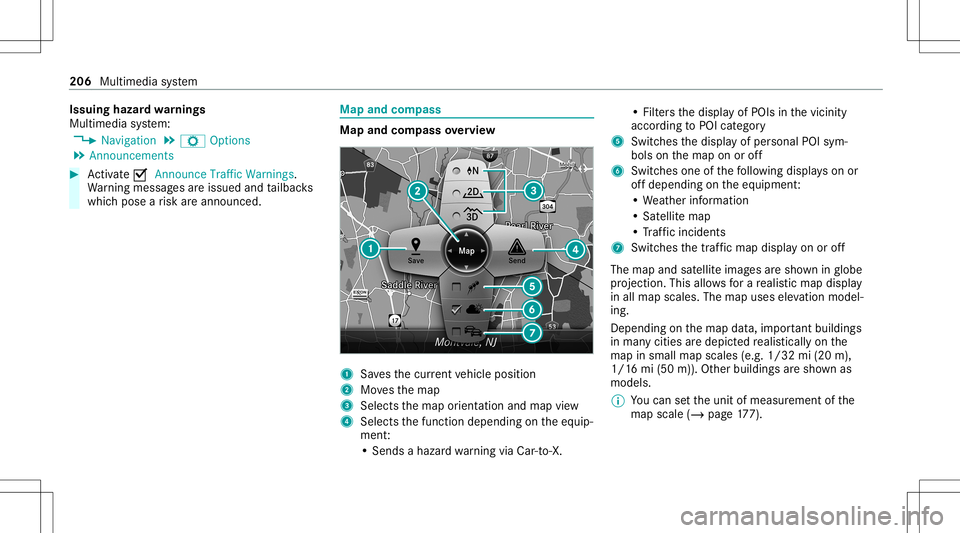
andcom pass Map
andcom pass overview 1
Savesth ecur rent vehicle position
2 Movesth emap
3 Select sth emap orient ation andmap view
4 Select sth efunc tion depending ontheeq uip‐
ment :
• Sends ahazar dwa rning viaCar -to-X . •
Filt ersth edispla yof POIs inthevicin ity
accor dingtoPOI categor y
5 Switc hesthedispla yof per sonal POIsym‐
bols onthemap onoroff
6 Switc hesone ofthefo llo wing displa yson or
of fdepending ontheeq uipment :
• We ather informat ion
• Sat ellit emap
• Traf fic inci dents
7 Switches thetra ffic map displa yon oroff
The map andsatellit eimag esaresho wninglobe
pr oject ion.This allowsfora re alis ticmap displa y
in all map scales. Themap uses elevatio nmod el‐
ing .
Dep endingonthemap data,im por tant buildi ngs
in ma nyciti esaredep icted realis ticallyon the
map insmal lmap scale s(e.g. 1/32 mi(20 m),
1/1 6mi (50 m)). Other buildings aresho wnas
model s.
% Youcan setth eunit ofmeasur ementofthe
map scale (/page17 7). 206
Multimedi asy stem
Page 209 of 422
If
online information isavailable, fuelprice sand
th eav ailabilit yof par kingspac esinpar king
ga rage sar edispla yed, forex am ple.
% Requiremen ts:
R Mer cedes meconnectis available.
R Youha ve auser accoun tfo rth e
Mer cedes mePortal.
R The servicehas been activat ed atan
aut hor izedMer cedes-Ben zCent er.
Fu rther information canbefound at:
ht tp s:// www .merced es.me
% The onlineinf ormat ionisno tav ailable inall
coun tries.
% Com panylogos displayedon themap are
tra demar ksofthere spectiv ecom panies and
used solely forth epur pose ofindicat ingthe
locat ionsofthese com panies. Theuseof
suc hlogos onthemap does notindicat e
appr oval of, suppo rtof or adv ertising by
th ese com panies forth ena vig ation system
itself.
Se tting thema pscale
Re quirement s: R
The map issho wn.
Multime diasystem:
4 Navigation #
Tozoo min: swi pedown ontheTo uc hCon ‐
tr ol.
or #
Turn thecon troller count er-cloc kwise.
or #
Movetwofing ersap arton theto uc hpad. #
Tozoo mout: swipeup on theTo uc hCon trol.
or #
Turn thecon troller clockwise.
or #
Movetwofing ersto ge ther on theto uc hpad. Mo
ving thema p
Multi media system:
4 Navigation 5
Z Option s
5 Map Menu #
Alternativ ely,if th emap isdispla yedin full
scr een mode, press thecent ralcon trol ele‐
men t.
The map menuappear s. #
Selec t"Mo vemap" inmap menu 2
(/ page206) .
Sele cting thema por ientat ion
Multi media system:
4 Navigation 5
Z Option s
5 Map Menu #
Alternativ ely,if th emap isdispla yedin full
scr een mode, press thecent ralcon trol ele‐
men t.
The map menuappear s. #
Inmap menu3 ,selec tN, 2D or
3D( /pag e206 ).
R N:the2D map viewisdispla yedso that
no rth is alw aysat theto p. Multimedia
system 20
7
Page 210 of 422
R
2D: the2D map viewisaligned tothe
dir ect ion oftra vel.
R 3D:th e3D map viewisaligned tothe
dir ect ion oftra vel.
Selecting POIsym bols
Multim ediasystem:
4 Navigation 5
Z Option s
5 Map Conten t #
Select POISymbols.
The 003Bdo tindicat esthecur rent setting.
Stand arddispl ayssymbols ofpredef ined cat‐
egor iesonthemap.
User Definedallo wsyouto per sonall yselect
th esymbols forth eav ailable categor ies.
Non eswit ches thedispla yof f. #
Select ase tting. #
User Defined:select categor ies.
The POIsymbols oftheselect edcat egor ies
ar edispla yed0073 ornotdispla yed0053. Selecting
thedisp layof text inf ormat ionin
th ema p
Multi media system:
4 Navigation 5
Z Option s
5 Text Information #
Select text informati on.
Cu rrent Streetsho wsthest re et youar ecur ‐
re ntly drivi ng on atthebo ttom ofthedispla y.
When themap ismo ved, thefo llo wing infor‐
matio nappear sunder thecr osshair :
R Street nam e
R POI nam e
R Area nam e
Ge o-co ordinates displ aysth efo llo wing infor‐
matio n:
R Lon gitude andlatitude
R Elevatio n
Th eelev atio nsho wnmayde viat efrom
th eactual elevatio n.
R Number ofsat ellites from whic hasignal
can berecei ved When
themap ismo ved, this inf ormatio n
does notappear .
Climate Controldispla ysthecur rent clima te
contr olsettings.
None switches thedispla yof f.
Displa yingthene xt int ersectin gst re et
Re quirement s:
R Routeguidan ceisno tact ive.
Mult imed iasystem:
4 Navigation 5
Z Option s #
Activate0073 NextInter secting Street.
Th enam eof thene xt int ersect ingstre et will
be displa yedat theupper edgeof thedispla y.
Disp laying thema pve rsion
Multime diasystem:
4 Navigation 5
Z Option s #
Select MapVersion . #
Select Details.
% Information aboutnewversions ofthedigit al
map canbeobt ained from anaut hor ized
Mer cedes- BenzCenter. 208
Multimedia system
Page 211 of 422
Ov
ervie wof avo iding anarea
Yo ucan define areas alon garo uteth at you
wo uld liketo avoid.
The routecan include anarea that isto be avoi‐
ded inthefo llo wing situat ions:
R thedes tinat ionislocat edinan area that isto
be avo ided
R iffree wa ys areloc ated within thear ea that is
to be avoided
Fr ee wa ys arealw aysta ke nint oacco untfor
th ero ute.
R ther eis no sensible alternativ ero ute
Av oiding ane warea
Multi media system:
4 Navigation 5
À Route andPosition
5 Avoid Option s5
Areas #
Select AvoidNewArea. #
Tosear chforan area viathe map: select
Usi ngMa p. #
Movethemap.
or #
Tosear chforan area usi ng anaddr ess:
sel ect Add ressEntry . #
Entertheaddr ess. #
Select SelectDestination.
The map appear s. #
Todispl ayan area: press theTo uc hCon trol,
th eto uc hpad orthecon troller .
A redre ctang leap pea rs.Thi sdes ignat esthe
ar ea that shoul dbe avo ided. #
Tochang eth esize ofthear ea: swipe upor
do wn ontheTo uc hCon trol or theto uc hpad.
or #
Slid eth econ troller upordown.
The map scale isenlar gedor reduced and
ch ang esthesize ofthear ea. #
Tosetth ear ea: press theTo uc hCon trol,
th eto uc hpad orthecon troller .
The area isent ered intoth elis t. Changing
anarea
Multimedia system:
4 Navigation 5
À Route andPosition
5 Avoid Option s5
Areas #
Highlight anarea inthelis t. #
Select ¥Edit.
Mo ving thear ea on thema p #
Swipe inanydir ect ion ontheTo uc hCon trol
or touc hpad.
or #
Slid eth econ troller inanydir ect ion.
Changing thesize ofthear ea #
Tostar t:press theTo uc hCon trol, theto uc h‐
pad orthecon troller . #
Tochang e:swi peup ordown ontheTo uc h
Con trol or theto uc hpad.
or #
Slid eth econ troller upordown. #
Tosto p:press theTo uc hCon trol, theto uc h‐
pad orthecon troller . Multimedia
system 209
Page 212 of 422
Ta
king thear ea forthe routeint oacc ount #
Avoid 0073anarea inthelis t.
If ro uteguidan ceisact ive, ane wrouteis cal‐
culat ed.
If th er eis no routeye t,th ese tting iscar ried
ove rto thene xt routeguidan ce.
Dele tingone orall areas
Mult imed iasystem:
4 Navigation 5
À Route andPosition
5 Avoid Option s5
Areas #
Highlight anarea inthelis t. #
Select ¥Deleteor ¥ DeleteAll. #
Conf irm thepr om ptwit hYes .
On eor all areas aredele ted.
Map data updateov ervie w
Up datin gat the author izedMer cedes -Ben z
Ce nter
The digit almap sge ner ated bythemap software
become outdatedinthesame wayas conven‐
tion alroad maps .Op tim alrouteguidan cecan
on lybe prov ided bythena vig ation system in
con junc tion withup-t o-dat emap data.Inf orma‐ tion
about newversions ofthedigit almap can
be obt ained from anaut hor ized Mercedes- Benz
Cent er.
Yo ucan have updat estothedigit almap imple‐
ment edther e.
% Addition alcos tscan beincur redin this proc‐
ess.
Online mapupd ate
The onlin emap updat eser vice from Mer cedes
me connectcan beused toupdat emap data.
% The onlinemap updat eser viceis no tav aila‐
ble inall coun tries.
The follo wing option sar eav ailable forth e
updat e:
R The automat icmap updat eupdat esmap data
fo rone region.
Fo rau tomatic mapupdates Automatic
Online Updatemus tbe activ ated inthesy s‐
te m settings (/page18 1).
R Thema nua lma pup date updat esmap data
fo rse veralor all regions. Fu
rther information ontheonline mapupdat eis
av ailable atan aut hor izedMer cedes-Ben zCent er
or athttp s:// www .merced es.me.
Ov ervie wof ma pda ta
Yo ur vehicle issuppli edwithmap dataat thefa c‐
to ry.Depe nding on thecount ry,map datafo r
yo ur region iseit her pre-ins talled orthemap
dat ais supplied onadat ast or ag emedium.
If th emap dataon your vehicle hasbeen instal‐
led atthefa ct or yand youwish toreins tallit, you
do notneed toent ertheactiv ation code.
Fo rmap datath at youha ve pur chased inthe
fo rm ofadat ast or ag emedium, youmus ten ter
th eaccom panying activ ation code.
% Ifyo usa ve themap dataon adat ast or ag e
medium withth eonline mapupdat eser vice,
no ent ryisrequ ired. The activation codeis
st or ed on thedat ast or ag emedium during
th edo wnloading process.
Obser vethefo llo wing when entering theactiv a‐
tion code:
R The activ ation codecanbeused forone vehi‐
cle 21
0
Multimedia system