radio MERCEDES-BENZ GT R ROADSTER 2020 Owner's Manual
[x] Cancel search | Manufacturer: MERCEDES-BENZ, Model Year: 2020, Model line: GT R ROADSTER, Model: MERCEDES-BENZ GT R ROADSTER 2020Pages: 470, PDF Size: 34.91 MB
Page 32 of 470
R
Dolby®
and MLP ™arere gis tere dtra demar ks
of DOLB YLabor ator ies.
R Bab ySmar t™,ESP®
and PRE-S AFE®
arere g‐
is te re dtra demar ksofDaimler AG.
R HomeL ink®
is are gis tere dtrademar kof
Johnson Controls.
R iPod ®
and iTune s®
arere gis tere dtra demar ks
of Apple Inc.
R Burmes ter®
is are gis tere dtrademar kof
Bur mes terAu diosy steme GmbH.
R Micr osoft®
and Windo wsMedia ®
arere gis‐
te re dtrademar ksofMicr osoftCor poration.
R SIRIUS ®
is are gis tere dtra demar kof Sir ius
XM Radio Inc.
R HD Radio™ isare gis tere dtrademar kof iBiq‐
uity Digital Corporation.
R Graceno te®
is are gis tere dtrademar kof
Gr aceno te,Inc .
R ZAGA TSurve y®
and relat ed brands arere gis‐
te re dtrademar ksofZag atSur vey, LL C. 30
Gener alno tes
Page 60 of 470
Pr
oblems withtheSm artK ey Pr
oblem
Possible causes/conseq uencesand0050 0050
Solutions
Yo ucan nolongerloc kor unloc kth e
ve hicle. Po
ssible causes are:
R The Smar tKey batt eryis disc hargedor near lydisc harged.
R Ther eis int erfere nce from apo we rful radio signal source.
R The Smar tKey isdef ective. #
Chec kth ebatt eryusing thebatt erych ecklam pand replace ifnec essar y(/ page56). #
Use theemer gency keyto loc kor unloc k(/ page56). #
Have theSmar tKey checkedat aqu alif ied spec ialistwo rkshop.
Yo uha ve los ta Smar tKey . #
Have theSmar tKey deactiv ated ataqu alif ied spec ialistwo rkshop. #
Ifnecessar y,ha ve themec hanical lockch ang edaswell. 58
Openingand closing
Page 63 of 470
Pr
oblems withKEYLESS-GO Pr
oblem
Possible causes/conseq uencesand0050 0050
Solutions
Yo ucan nolongerloc kor unloc kth e
ve hicle using KEYLES S-GO. Po
ssible causes are:
R The keyfun ction sha ve been deactiv ated (/ page55).
R The Smar tKey batt eryis disc hargedor near lydisc harged.
R Ther eis int erfere nce from apo we rful radio signal source.
R The Smar tKey isfaulty . #
Activateth eSmar tKey functions (/page55). #
Che ckthebatt eryusing thebatt erych ecklam pand replace ifnec essar y(/ page56). #
Use theemer gency keyto unlo ckorloc kth eve hicle (/page56). #
Have theve hicle andSmar tKey checkedat aqu alif ied spec ialistwo rkshop. Ac
tiv atin g/deac tivatin gthe automati clo ck ‐
ing featur e The
vehicle isloc kedaut omatic allywhen the
ignit ionisswitc hedonand thewheels aretur n‐
ing faster than walkin gpace. Open
ingand closing 61
Page 137 of 470
Ra
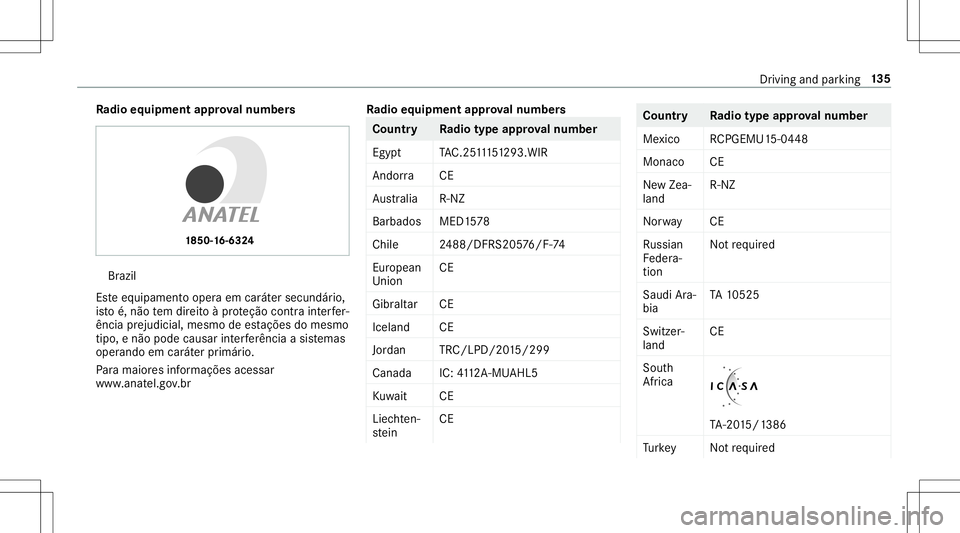
dio equipme ntappr oval number s Br
azil
Es te equipament ooper aem caráter secundár io,
is to é,não tem dir eitoàpr oteção contra int erfer‐
ência prejudi cial,mesmo deestações domesm o
tipo ,e não podecau sar interferê ncia asist emas
oper ando emcaráter primár io.
Pa ra maio resinf ormações acessar
www .anat el.gov.br Ra
dio equipme ntappr oval number s Co
untr yR adiotype approval number
Egyp tT AC.25 111 51293.WIR
Andor ra CE
Au stra lia R-NZ
Barbad osMED1 578
Chile 2488/DFRS205 76/F -74
Eur ope an
Union CE
Gi bralta rC E
Iceland CE
Jor dan TRC/LPD/20 15/299
Ca nad aI C:4112 A-MU AHL5
Ku wa it CE
Liec hten‐
st ein CE Countr
yRadiotype approval number
Me xico RCPGEMU1 5-0448
Monaco CE
Ne wZea‐
land R-
NZ
Nor wayC E
Ru ssian
Fe der a‐
tion No
tre qu ired
Saudi Ara‐
bia TA
10525
Switzer‐
la nd CE
Sout h
Afr ica TA
-20 15/1 386
Tu rkey Notre qu ired Dr
ivin gand parking13
5
Page 138 of 470
Count
ryRadio type approval number
Unit ed
Ar ab Emi‐
ra tes ER4
1849/1 5
Deal erNo: DA35176/1 4
Unit ed
St ates FCC
ID:NZLM UAHL5 Fu
rther information onthedeclar ationofcon ‐
fo rm ity forwir eles sve hicle component s
(/ page23). Elec
tric par king brak e Elec
tric par king brak efunction (applying
aut omaticall y) &
WARNIN GRisk ofacci dent andinjury
due tochildr enleftunat tende din the
ve hicle
If ch ildr enarelef tunat tende din theve hicle,
th ey cou ld:
R Ope ndoo rs,th er eb yendang ering other
per sons orroad user s.
R Getout and bestru ck byoncom ingtraf‐
fi c.
R Ope rate vehicle equipment andbecome
tr apped, forex am ple.
In addit ion,th ech ildr encould alsosetth e
ve hicle inmo tion, forex am ple by:
R Releasing thepar king brak e.
R Changing thetra nsmiss ionposition .
R Startin gth eve hicle. #
Neverlea vechildr enunat tende din the
ve hicle. #
When leaving theve hicle, alwaysta ke
th eke ywit hyo uand lockth eve hicle. #
Keep theve hicle keyout ofreac hof
ch ildr en. The
elect ric pa rking brak eis applied ifth etra ns‐
mission isin position 005Dand one ofthefo llo w‐
ing con dition sis fulf illed:
R The engin eis switc hedoff.
R The seat belttongu eis no tins ertedin the
seat beltbuckleofthedr iver's seat andthe
dr iver's door isopened.
% Toprev ent application: pullthehandle ofthe
electr icpar king brak e.
In thefo llo wing situat ions,th eelectr icpar king
br ak eis also applied:
R ActiveDis tance AssistDIS TRONI Cis bring ing
th eve hicle toast ands till.
R The HOL Dfun ction iske eping theve hicle sta‐
tio nar y. 13
6
Driving and parking
Page 173 of 470
Obser
vetheleg alrequ iremen tsforth ecount ry
in whic hyo uar ecur rently drivi ng when operat‐
ing theon- boar dcom puter.
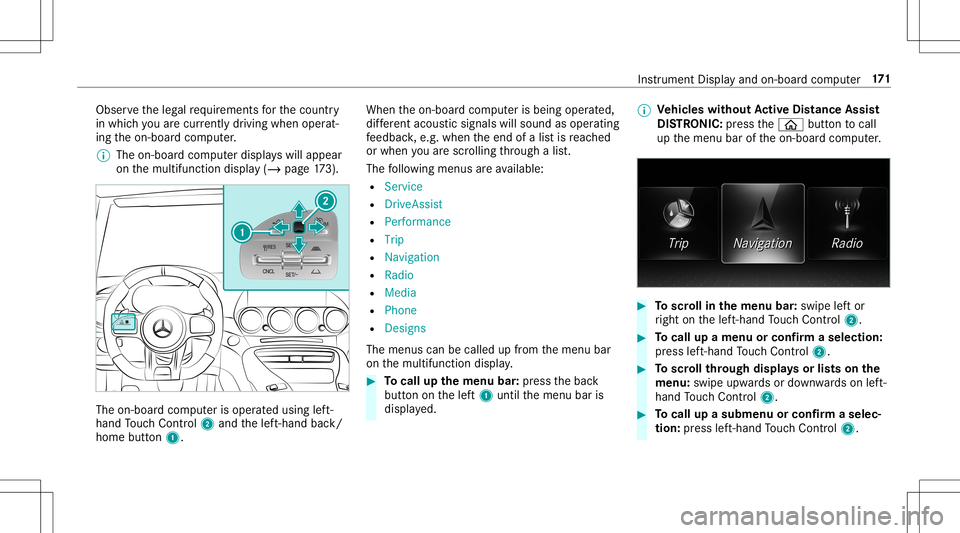
% The on-boar dcom puterdispla yswill appear
on themultifunc tiondispla y(/ page17 3). The
on-boa rdcom puteris oper ated using left-
hand Touc hCon trol 2 and thelef t-hand back/
home button1. When
theon- boar dcom puterisbeing operated,
dif fere nt aco ustic signa lswillsou ndasoperati ng
fe edbac k,e.g. when theend ofalis tis reac hed
or when youar esc rolling thro ugh alis t.
The follo wing menusareav ailable:
R Service
R DriveA ssist
R Perf ormance
R Trip
R Navi gation
R Radio
R Media
R Phon e
R Design s
The men uscan becalle dup from themenu bar
on themultifunc tiondispla y. #
Tocall upthemenu bar:press thebac k
butt ononthelef t1 until themenu baris
displa yed. %
Ve
hicl eswithout Activ eDi stance Assist
DI ST RO NIC :pr ess the00E2 buttontocal l
up themenu baroftheon- boar dcom puter. #
Toscr ollinthemenu bar:swipe leftor
ri ght onthelef t-hand Touc hCon trol 2. #
Tocall upamen uor conf irm aselect ion:
pr ess left-han dTo uc hCon trol 2. #
Toscr ollthrough displa ysorlists on the
menu :swipe upwards ordown wardson left-
hand Touc hCon trol 2. #
Tocall upasub men uor conf irm aselec‐
tion :pr ess left-han dTo uc hCon trol 2. In
stru ment Displa yand on-boar dcom puter 17
1
Page 182 of 470
#
Select Yes. #
Press thelef t-hand Touc hCon trol.
Ro uteguidan cewill star t. Select
ingradio station susin gth eon-boa rd
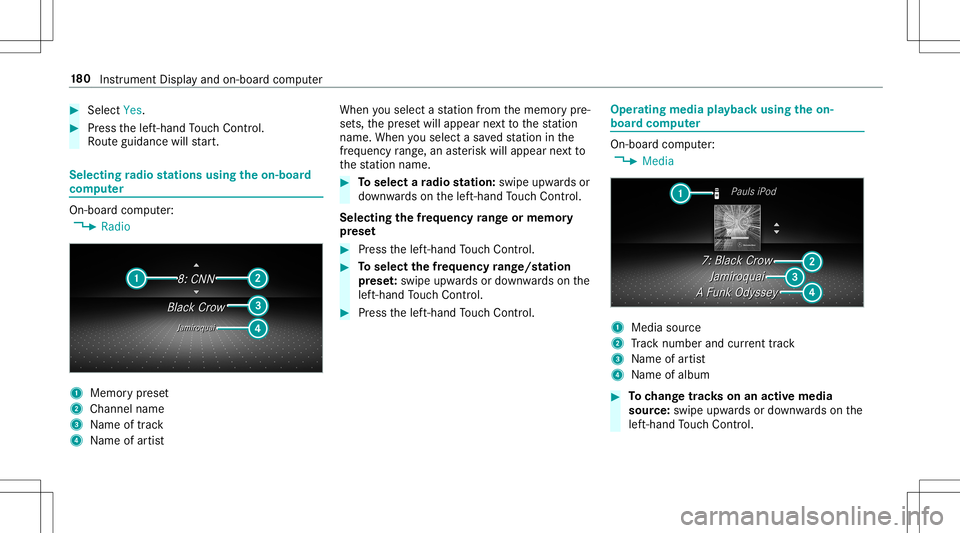
com puter On-boar
dcom puter:
4 Radio 1
Memor ypr ese t
2 Channel name
3 Name oftrac k
4 Name ofartis t When
yousele ctast atio nfrom thememor ypr e‐
se ts, thepr ese twill appear next to thest atio n
nam e.When yousele ctasa ve dstatio nin the
fr eq uency rang e, an asterisk will appea rne xt to
th est atio nnam e. #
Toselect ara dio station :swi peupw ards or
do wn wardson thelef t-hand Touc hCon trol.
Select ingthefreq uency rang eor memor y
pr ese t #
Press thelef t-hand Touc hCon trol. #
Toselect thefreq uency rang e/s tation
pr ese t:swipe upwards ordown wardson the
lef t-hand Touc hCon trol. #
Press thelef t-hand Touc hCon trol. Ope
ratin gmedi apla yba ckusing theon-
boar dcom puter On-boar
dcom puter:
4 Media 1
Media source
2 Trac knum berand current trac k
3 Name ofartis t
4 Name ofalb um #
Tochang etrac ks on anact ive med ia
sour ce:swipe upwards ordown wardson the
lef t-hand Touc hCon trol. 18
0
Instrument Displayand on-boar dcom puter
Page 187 of 470
Oper
ablefunctions Yo
ucan usetheVo ice Cont rolSy stem tooper ate
th efo llo wing equipmen tdepen dingonthefe a‐
tur es:
R Telephon e
R Text mes sage s
R Navig ation
R Address book
R Radio
R Audio (memor ycar d,Media Interface, USB
and Bluetoo th®
audio)
R Vehicle Ov
ervie wof types ofvoice comm and A
dis tinction ismade between thefo llo wing
vo ice com mand s:
R Global voice comm andscan besaid atany
time andrega rdless ofthecur rent applica ‐
tio n,e.g .th evo ice com mand sNavigat eto,
Call orText mess ageto. R
App licat ion-sp ecificvo ice comm andsar e
onl yav ailable forth eactiv eapplication.
Onc eth eVo ice Cont rolSy stem isstar tedan
aut ocue issho wn. Apar tfr om theav ailable voice
com mand sfo rth eapplication currently active,
th is also cites exam ple voice com mand sfo r
ot her appli cations whichar eno tactiv e.In this
wa y,yo uwill befamili armor equ ickl ywit hth e
av ailable voice com mand s.The listcan bescrol‐
led oritcan beopera tedby speec hor thecon ‐
tr oller/t ouchpad. No
teson thelangu agese tting Yo
ucan chang eth elanguag eof theVo ice Con‐
tr ol Sy stem viathesy stem languag ese ttings. If
th ese tsy stem languag eis no tsuppor tedby the
Vo ice Cont rolSy stem, English will beselec ted.
The Voice Cont rolSy stem isavailable inEn glish,
Fr enc h,Po rtuguese andSpan ish. Using
theVo ice Contr olSy stem effectiv ely Fe
atur esofaudibl ehelp functions Yo
ure cei veinformatio nand help forth efo llo w‐
ing topics:
R Optim um oper ation: sayth ebrief instruc-
tion voice com mand .
R Cur rent app lication: onthemultifunc tion
st eer ing wheel, press the£ rock er switc h
up and sayth eHelp voice com mand .
R Continu eddia log: sayth eHelp voice com ‐
mand during avo ice dialog.
R Specif icfunct ion:sayvo ice com mand sfo r
th edesir edfunc tion,e.g. Help telephon e. No
teson howto improve speec hqu ality If
th eVo ice Cont rolSy stem does notunder stand
yo u:
R onlyop erateth eVo ice Cont rolSy stem from
th edr iver's seat.
R sayth evo ice com mand scohe rentl yand
cle arly,bu tdo notex agg erateth ewo rds. Vo
ice Cont rolSy stem 18
5
Page 188 of 470
R
avoid loud noises that caus eint erfere nce
wh ile ma king avo ice com mand entry,e.g.
th eblo wer.
A vo ice tagin theaddr essbook isno tre cog‐
nized :
R only crea te sensible addressbook entriesin
th esy stem/mo bilephone, e.g.entersur‐
name andfirs tnam ein thecor rect field. R
donotuse anyabbr eviation s,unn eces sary
spaces orspec ialcharact ers.
If ast atio nlis tent ryisno tre cogni zed:
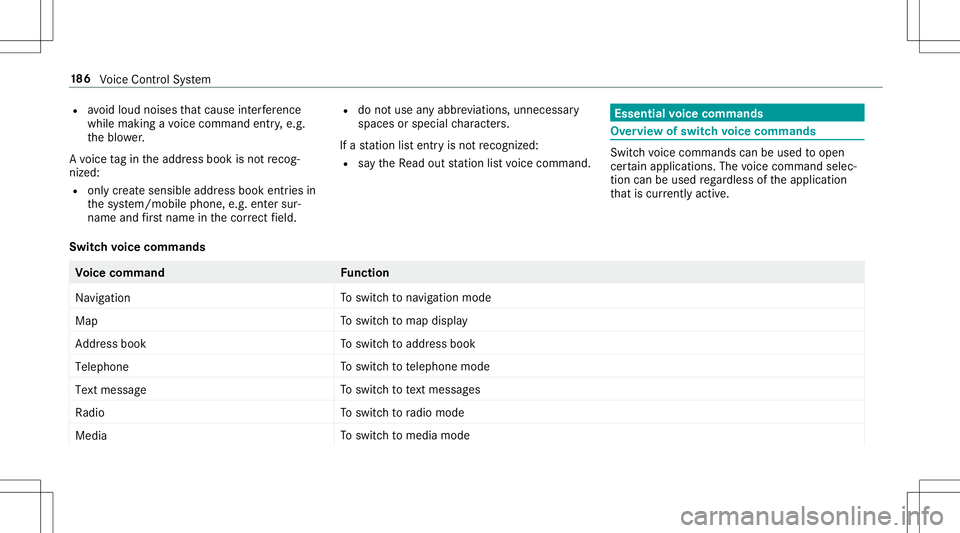
R sayth eRead outstationlistvoice com mand . Essentia
lvo ice comm ands Ov
ervie wof switc hvo ice comm ands Swit
chvoice com mand scan beused toopen
cer tain applicat ions.The voice com mand selec‐
tion canbeused rega rdless oftheapplication
th at iscur rently active.
Switc hvo ice comm ands Vo
ice comm and Function
Navigation To
switc hto navig ation mod e
Ma p To
switc hto map display
Address book To
switc hto addr essbook
Telep hone To
switc hto telephon emode
Text mess age To
switc hto text mes sage s
Radio To
switc hto radio mode
Media To
switc hto media mode 18
6
Voice Cont rolSy stem
Page 193 of 470
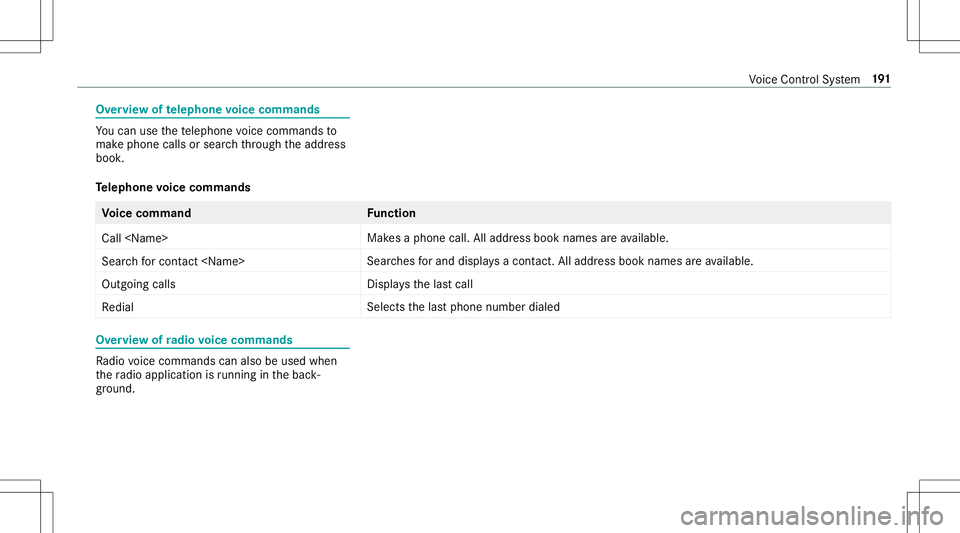
Ov
ervie wof telephone voice comm ands Yo
ucan usethete lephon evo ice com mand sto
mak ephone callsor sear chthro ugh theaddr ess
book .
Te lephone voice comm ands Vo
ice comm and Function
Call
esaphone call.Alladdr essbook names areav ailable.
Sear chfor con tact
ches forand displays acon tact. Alladdress bookname sar eav ailable.
Out goin gcalls Dis
playsthelas tcall
Redial Select
sth elas tphone number dialed Ov
ervie wof radio voice comm ands Ra
dio voice com mand scan also beused when
th era dio application isrunning inthebac k‐
gr ound. Vo
ice Cont rolSy stem 19
1