sport mode MERCEDES-BENZ GT R ROADSTER 2020 Owner's Manual
[x] Cancel search | Manufacturer: MERCEDES-BENZ, Model Year: 2020, Model line: GT R ROADSTER, Model: MERCEDES-BENZ GT R ROADSTER 2020Pages: 470, PDF Size: 34.91 MB
Page 124 of 470
-
When ESP®
is activ ated, agility function
Pr ois select edindrive pr ogr am I
RA CE. The Masterfunction isau tomati‐
cally selected when ESP®
is dea ctivated.
R Position oftheex haus tga sflaps
R Sus pen sion
R Steer ing
R Availabilit yof glide mode
R The I(RA CE)drive pr ogr am has thefo l‐
lo wing proper ties:
- The vehicle exhibits driving charact eris‐
tic ssuit edforra ce circui ts.
- Allvehicle systems aredesigned formaxi‐
mum sportiness.
- The automatic transmiss ionshiftsup
lat er.
- The chassis hasapar ticular lytig ht sus‐
pe nsi on and damp ing system.
- Glide mode isno tav ailable.
- The spor tysoun dch aract eristic ofthe
ex haus tsy stem isactiv ated. %
Youcan callupvehicle charact eristic svia
th ePe rfor mance menuintheon- boar dcom‐
put er(/ page17 4).
Yo ucan also chang eth efo llo wing vehicle char‐
act eristic susin gth ebutt ons inthecent ercon ‐
sole:
R Position oftheex haus tga sflaps
R Sus pen sion Select
ingthedr ive pr og ram #
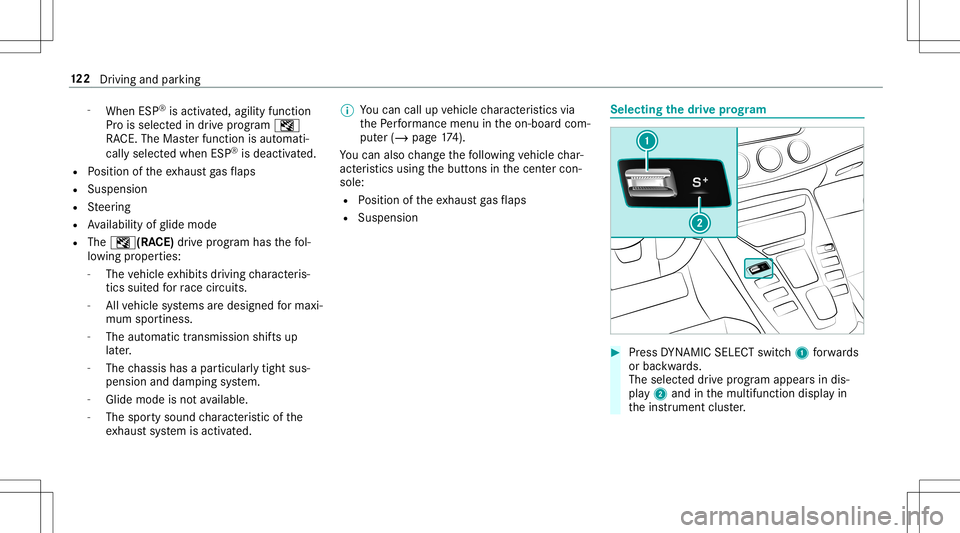
Press DYNA MIC SELE CTswitc h1 forw ards
or bac kwards.
The selec teddr ive pr ogr am appear sin dis‐
pla y2 and inthemultifunc tiondispla yin
th eins trument cluster. 12
2
Driving and parking
Page 177 of 470
Wa
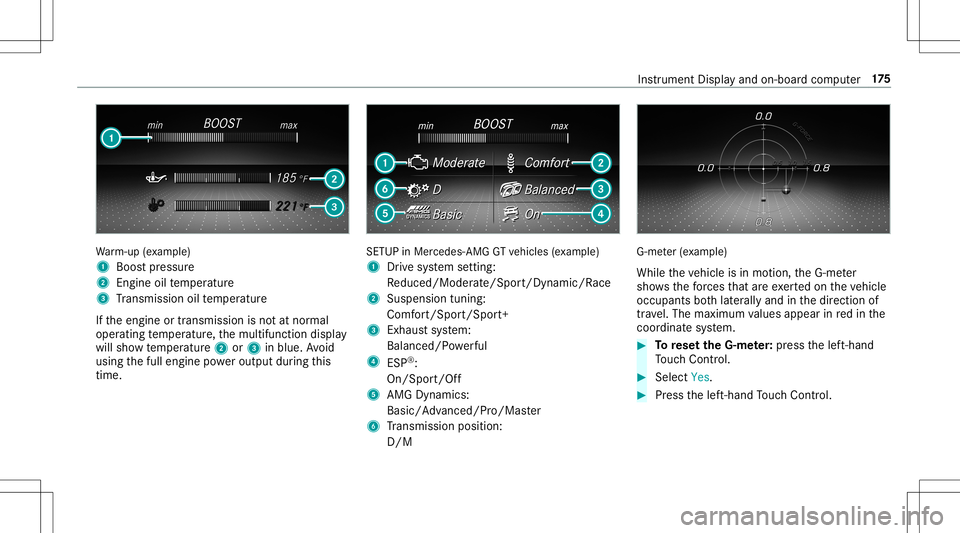
rm-up (exa mp le)
1 Boos tpr essur e
2 Engine oiltemp eratur e
3 Trans miss ionoiltemp eratur e
If th eengine ortransmission isno tat nor mal
oper ating temp eratur e,themultifunc tiondispla y
will showtemp eratur e2 or3 inblue. Avoid
using thefull engine powe routpu tdur ing this
tim e. SE
TUP inMer cedes -AMG GTvehicles (exa mp le)
1 Drive sy stem setting:
Re duced/Moder ate/Spo rt/Dyna mic/Race
2 Susp ensiontuning :
Co mfort/Spor t/Sport+
3 Exhau stsystem:
Balanced/ Powe rful
4 ESP®
:
On /Spor t/Of f
5 AMGDyn amic s:
Bas ic/Advanced /Pro/Ma ster
6 Trans miss ionposit ion:
D/ M G-m
eter (exa mp le)
While theve hicle isin mo tion, theG-me ter
sho wsthefo rc es that areexe rted on theve hicle
occupants both laterally and inthedir ect ion of
tr av el. The maximum values appear inredin the
coordinat esy stem. #
Torese tth eG-m eter: press thelef t-hand
To uc hCon trol. #
Select Yes. #
Press thelef t-hand Touc hCon trol. In
stru ment Displa yand on-boar dcom puter 17
5
Page 293 of 470
R
Mark AllEnt ries
R Unmark AllEnt ries
R Delete ThisEntry
R Delete AllEnt ries #
Select anoption. #
Activate Artist &Song Alerts 0073.
The alertis setfo rth ecur rent artis tor trac k.
If amatc his found, apr om ptappear sask ing
whe ther youwish tochang eto thest atio n.
Se tting aspor taler t #
Select Add New Alert.
or #
Select Man ageSports Ale rts. #
Select Select New Alerts.
or #
Select EditAle rts. #
Select ate am from aleague. #
Activate Spo rts Ale rts 0073. Inf
orma tion onSm artFa vo rite sand Tune
St art
St atio nsinthest atio npr ese tscan beadded as
Sm artFa vorite s. Smar tFa vorite sst atio nsare
aut omat icallysa ve dto temp orar yst or ag ein the
bac kground .If yo uch ang eto aSm artFa vorite s
st atio n,youcan repla y,pause oractiv elyskip
fo rw ardor bac kto broadcas tswhic hyo uha ve
missed .If Tu ne Startis act ivat ed and youch ang e
to ano ther Smar tFa vorite sst atio n,themusic
tra ck cur rentl ypl ay ing onthest atio nis aut omat ‐
icall yre star tedfrom thebeginnin gof thetra ck.
Ad ding ach anne lto Smar tFa vo rite s
Multimedia system:
4 Radio 5
Þ Radio Source
5 SiriusXM Radio #
Select theactiv efreq uency band. #
Highlight anent ry. #
Select ¥. #
Select Add Highlighte dCh anne lto Smar t
Favo rites. Ac
tiv atin g/deac tivatin gTu neS tart
Multimedia system:
4 Radio 5
Z Option s5
TuneSt art #
Activate0073 ordeacti vate 0053 thefunc tion.
Contr olling playbac k
Multimedia system:
4 Radio 5
Y Playback Control
Yo ucan pause thepla ybac kof thecur rent sta‐
tio nor skip forw ardor bac kwardin thetimelin e.
This leavesliv emode toacc ess theint ernal tem‐
por aryst or ag e. #
Topause playbac k:sel ect 00CF. #
Toretur nto livemod e:navig ateto theend
of thetimeline.
Displa yingsatellit era dio service informa tion
Multime diasystem:
4 Radio 5
Þ Radio Source
5 SiriusXM Radio5
Z Option s #
Select ServiceInformation. Multimedia
system 29
1