radio MERCEDES-BENZ M-Class 2010 W219 Comand Manual
[x] Cancel search | Manufacturer: MERCEDES-BENZ, Model Year: 2010, Model line: M-Class, Model: MERCEDES-BENZ M-Class 2010 W219Pages: 224, PDF Size: 7 MB
Page 24 of 224
Rthe telephone and the address book
function
R DVD video
R systems settings
You can call up the main functions:
R using the hard keys Ø, $ , % ,
h or W .
R using the main function line in the
COMAND display
COMAND Display
i Do not touch the COMAND display. The
display has a very sensitive high-gloss
surface; there is a risk of scratching. Should
the display need cleaning, use a mild
cleaning agent and a soft, antistatic, lint-
free cloth. Commercially available alcohol
and ammonia-free TFT or LCD cleaners are
recommended.
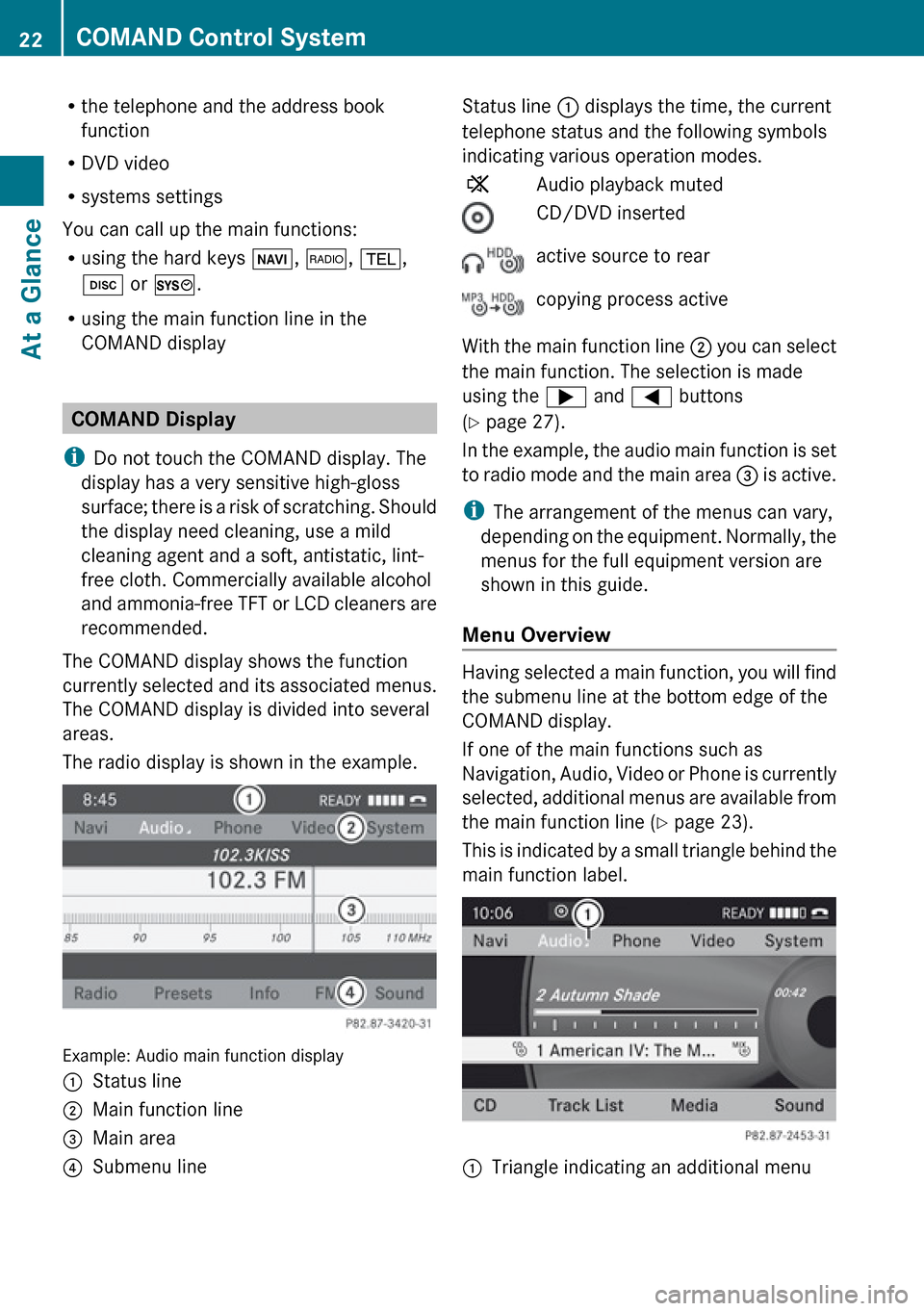
The COMAND display shows the function
currently selected and its associated menus.
The COMAND display is divided into several
areas.
The radio display is shown in the example.
Example: Audio main function display
1Status line2Main function line3Main area4Submenu lineStatus line 1 displays the time, the current
telephone status and the following symbols
indicating various operation modes.XAudio playback mutedCD/DVD insertedactive source to rearcopying process active
With the main function line 2 you can select
the main function. The selection is made
using the ; and = buttons
( Y page 27).
In the example, the audio main function is set
to radio mode and the main area 3 is active.
i The arrangement of the menus can vary,
depending on the equipment. Normally, the
menus for the full equipment version are
shown in this guide.
Menu Overview
Having selected a main function, you will find
the submenu line at the bottom edge of the
COMAND display.
If one of the main functions such as
Navigation, Audio, Video or Phone is currently
selected, additional menus are available from
the main function line ( Y page 23).
This is indicated by a small triangle behind the
main function label.
1Triangle indicating an additional menu22COMAND Control SystemAt a Glance
Page 25 of 224
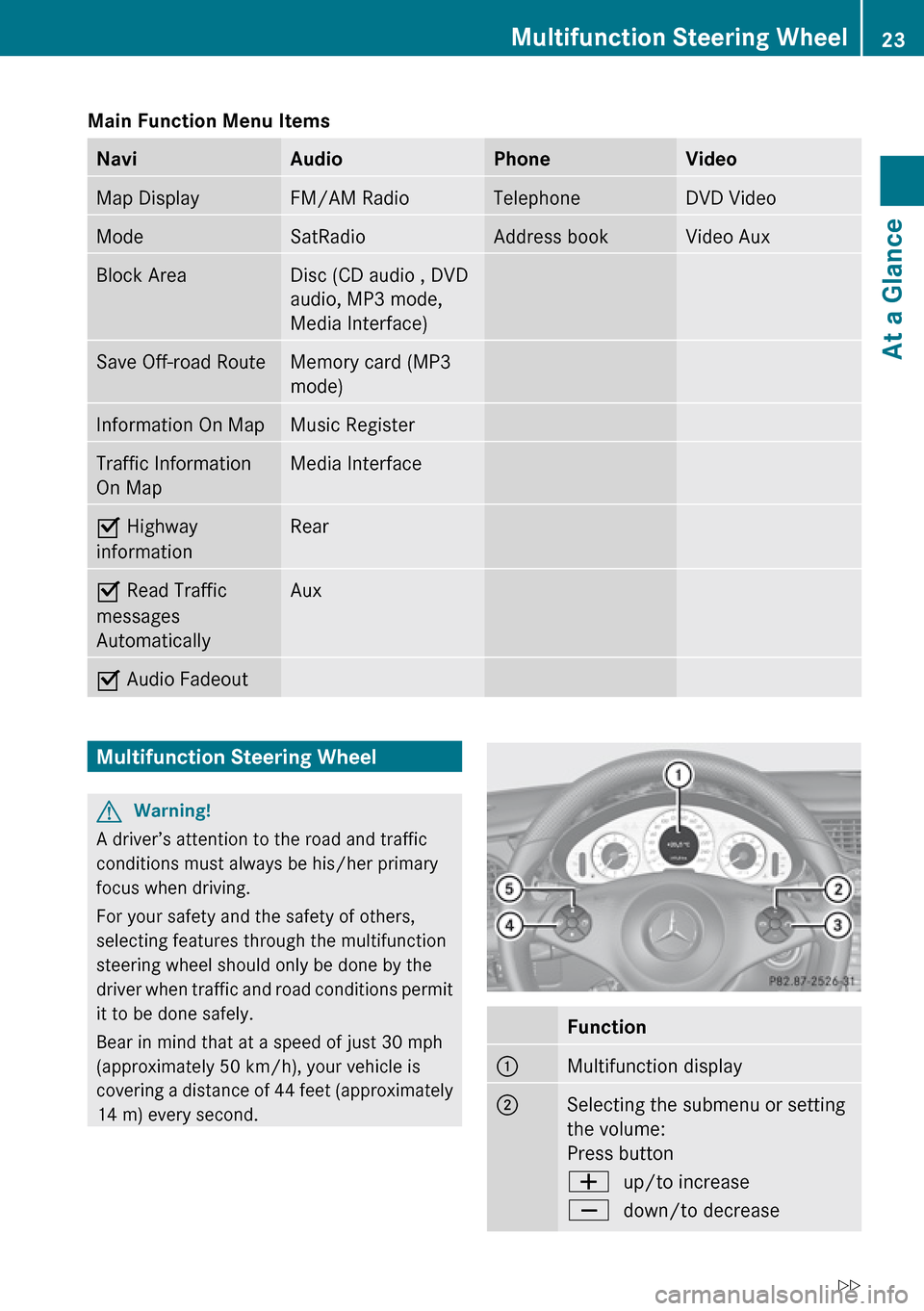
Main Function Menu Items NaviAudioPhoneVideoMap DisplayFM/AM RadioTelephoneDVD VideoModeSatRadioAddress bookVideo AuxBlock AreaDisc (CD audio , DVD
audio, MP3 mode,
Media Interface)Save Off-road RouteMemory card (MP3
mode)Information On MapMusic RegisterTraffic Information
On MapMedia InterfaceÇ Highway
informationRearÇ Read Traffic
messages
AutomaticallyAuxÇ Audio FadeoutMultifunction Steering WheelGWarning!
A driver’s attention to the road and traffic
conditions must always be his/her primary
focus when driving.
For your safety and the safety of others,
selecting features through the multifunction
steering wheel should only be done by the
driver when traffic and road conditions permit
it to be done safely.
Bear in mind that at a speed of just 30 mph
(approximately 50 km/h), your vehicle is
covering a distance of 44 feet (approximately
14 m) every second.
Function1Multifunction display2Selecting the submenu or setting
the volume:
Press buttonWup/to increaseXdown/to decreaseMultifunction Steering Wheel23At a GlanceZ
Page 26 of 224
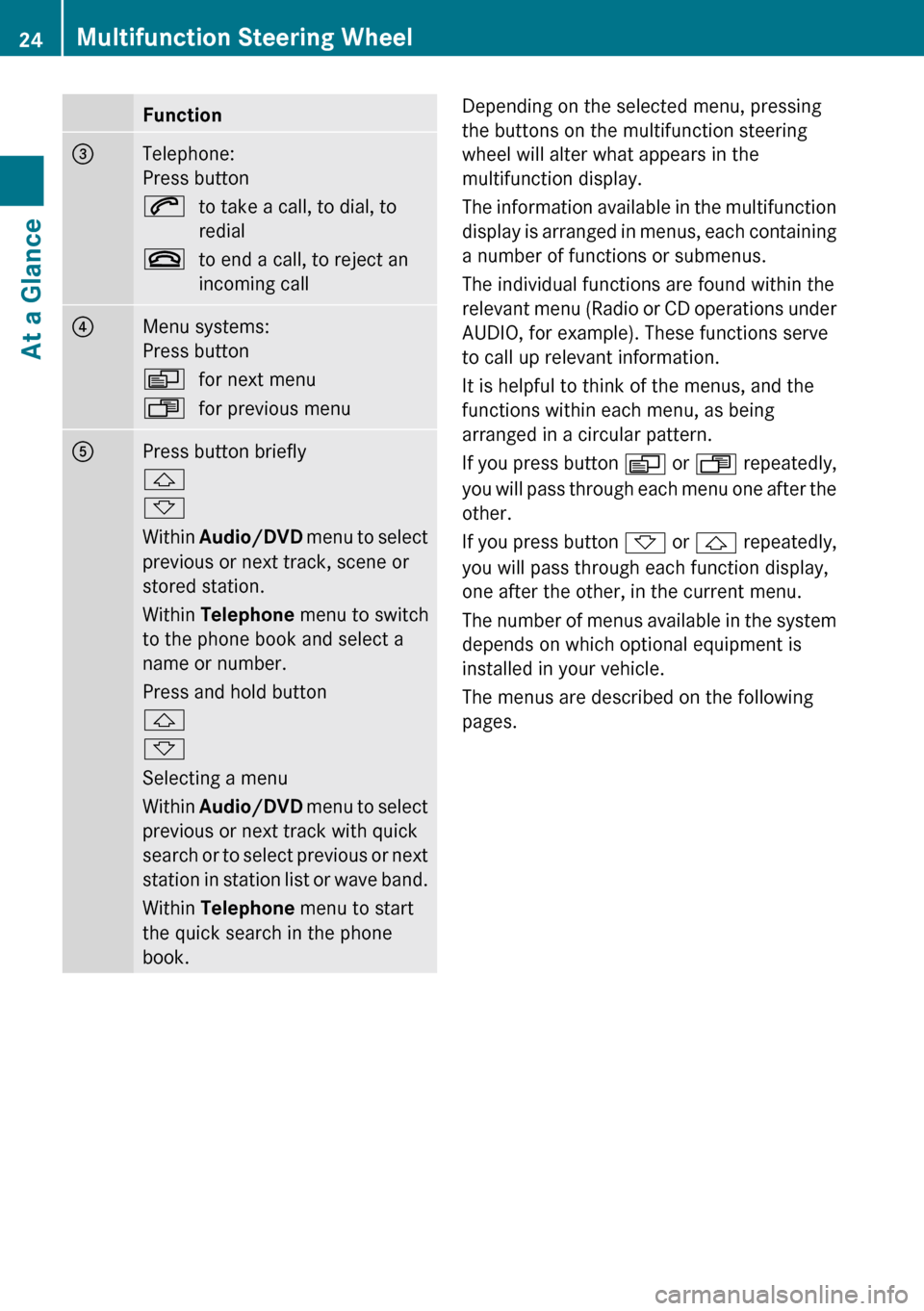
Function3Telephone:
Press button6to take a call, to dial, to
redial~to end a call, to reject an
incoming call4Menu systems:
Press buttonVfor next menuUfor previous menu5Press button briefly
&
*
Within Audio/DVD menu to select
previous or next track, scene or
stored station.
Within Telephone menu to switch
to the phone book and select a
name or number.
Press and hold button
&
*
Selecting a menu
Within Audio/DVD menu to select
previous or next track with quick
search or to select previous or next
station in station list or wave band.
Within Telephone menu to start
the quick search in the phone
book.Depending on the selected menu, pressing
the buttons on the multifunction steering
wheel will alter what appears in the
multifunction display.
The information available in the multifunction
display is arranged in menus, each containing
a number of functions or submenus.
The individual functions are found within the
relevant menu (Radio or CD operations under
AUDIO, for example). These functions serve
to call up relevant information.
It is helpful to think of the menus, and the
functions within each menu, as being
arranged in a circular pattern.
If you press button V or U repeatedly,
you will pass through each menu one after the
other.
If you press button * or & repeatedly,
you will pass through each function display,
one after the other, in the current menu.
The number of menus available in the system
depends on which optional equipment is
installed in your vehicle.
The menus are described on the following
pages.24Multifunction Steering WheelAt a Glance
Page 27 of 224
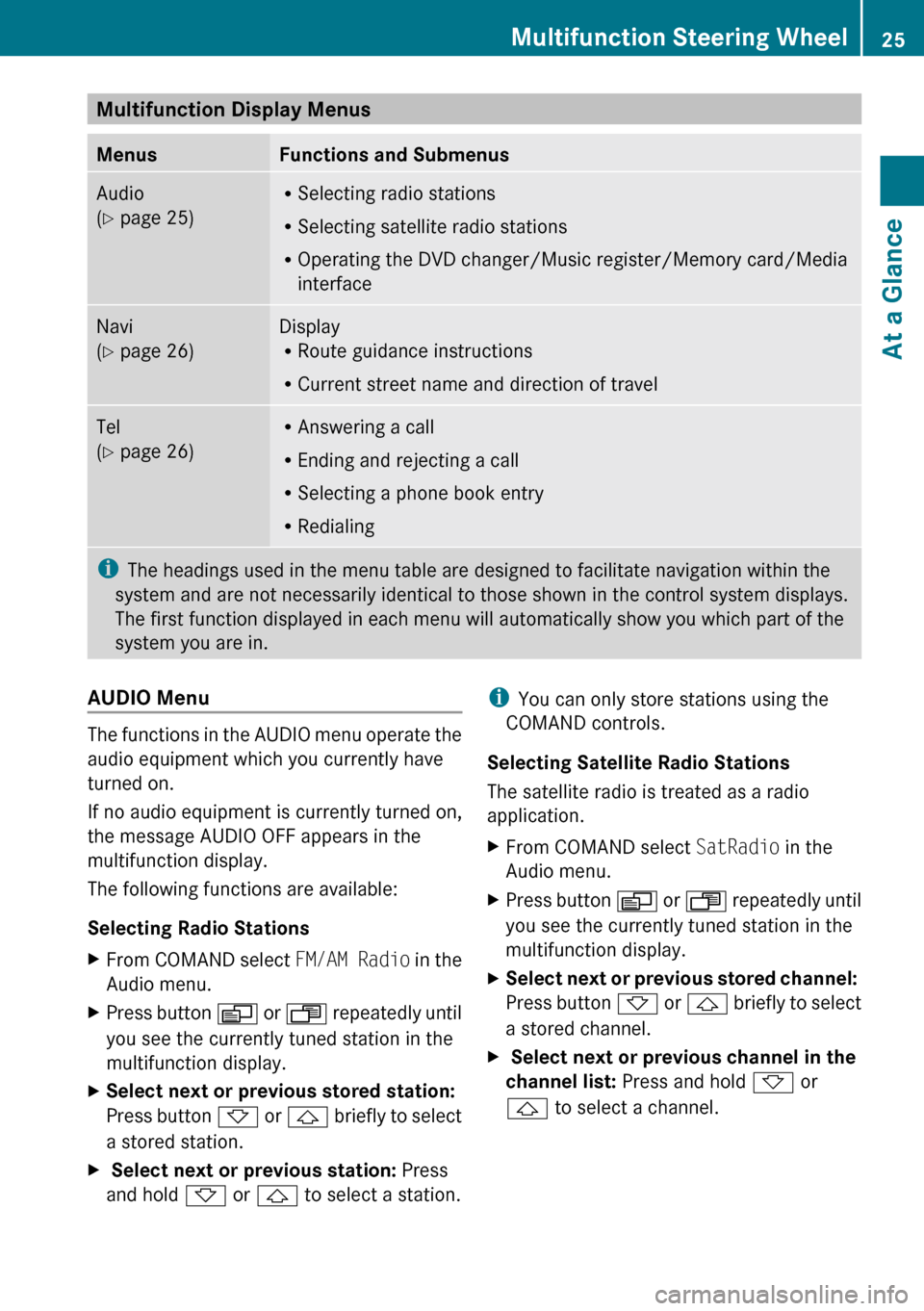
Multifunction Display Menus MenusFunctions and SubmenusAudio
( Y page 25)R
Selecting radio stations
R Selecting satellite radio stations
R Operating the DVD changer/Music register/Memory card/Media
interfaceNavi
( Y page 26)Display
R Route guidance instructions
R Current street name and direction of travelTel
( Y page 26)R
Answering a call
R Ending and rejecting a call
R Selecting a phone book entry
R Redialingi The headings used in the menu table are designed to facilitate navigation within the
system and are not necessarily identical to those shown in the control system displays.
The first function displayed in each menu will automatically show you which part of the
system you are in.AUDIO Menu
The functions in the AUDIO menu operate the
audio equipment which you currently have
turned on.
If no audio equipment is currently turned on,
the message AUDIO OFF appears in the
multifunction display.
The following functions are available:
Selecting Radio Stations
XFrom COMAND select FM/AM Radio in the
Audio menu.XPress button V or U repeatedly until
you see the currently tuned station in the
multifunction display.XSelect next or previous stored station:
Press button * or & briefly to select
a stored station.X Select next or previous station: Press
and hold * or & to select a station.i
You can only store stations using the
COMAND controls.
Selecting Satellite Radio Stations
The satellite radio is treated as a radio
application.XFrom COMAND select SatRadio in the
Audio menu.XPress button V or U repeatedly until
you see the currently tuned station in the
multifunction display.XSelect next or previous stored channel:
Press button * or & briefly to select
a stored channel.X Select next or previous channel in the
channel list: Press and hold * or
& to select a channel.Multifunction Steering Wheel25At a GlanceZ
Page 30 of 224
Press ; or = .XTo confirm selection: Press 9.
You will see the main display for the
selected audio mode.XTo switch back to the main function
line 1 :
Press 9 and 9.
The Audio menu appears.
Selecting Menu Item
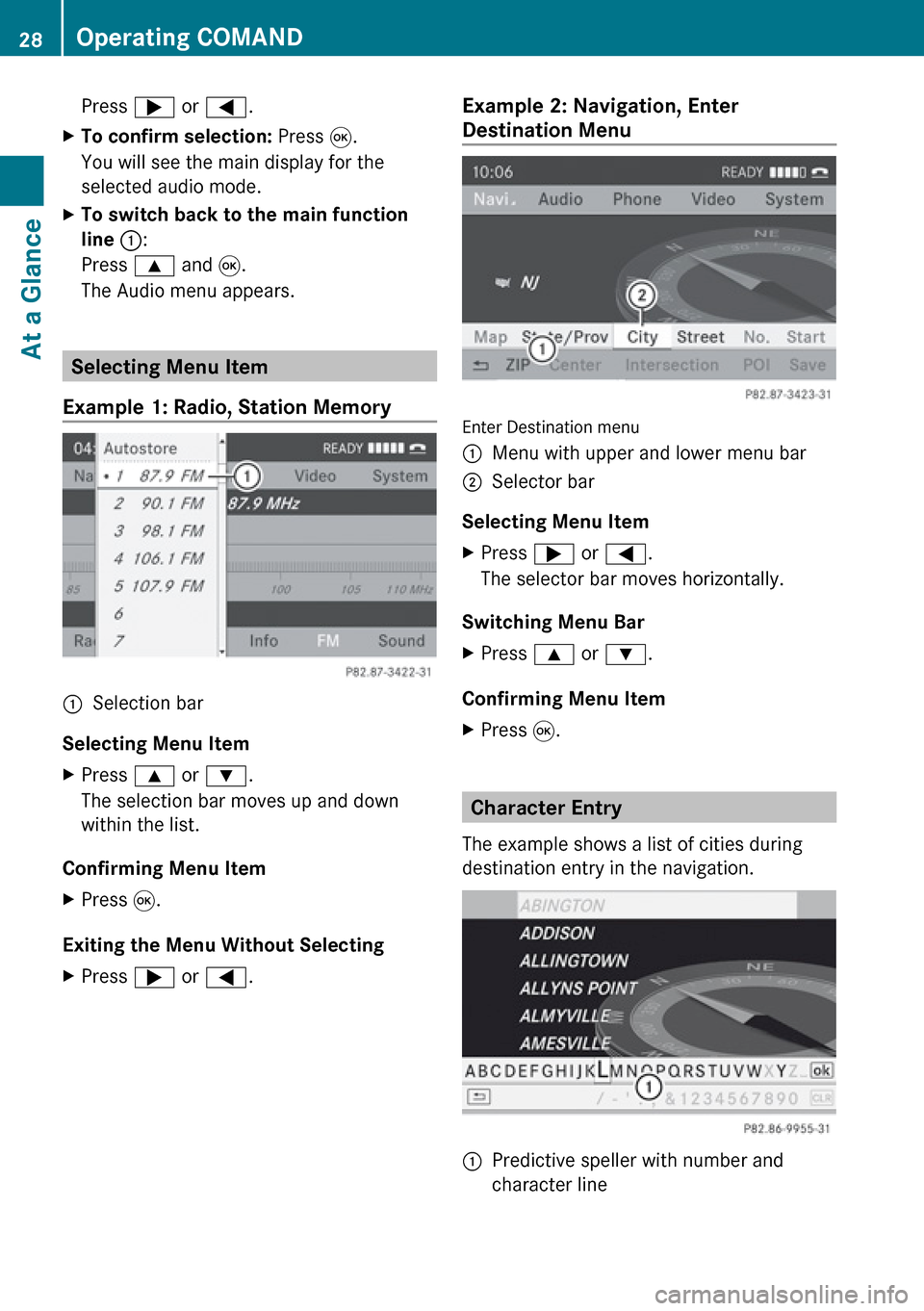
Example 1: Radio, Station Memory
1Selection bar
Selecting Menu Item
XPress 9 or : .
The selection bar moves up and down
within the list.
Confirming Menu Item
XPress 9.
Exiting the Menu Without Selecting
XPress ; or = .Example 2: Navigation, Enter
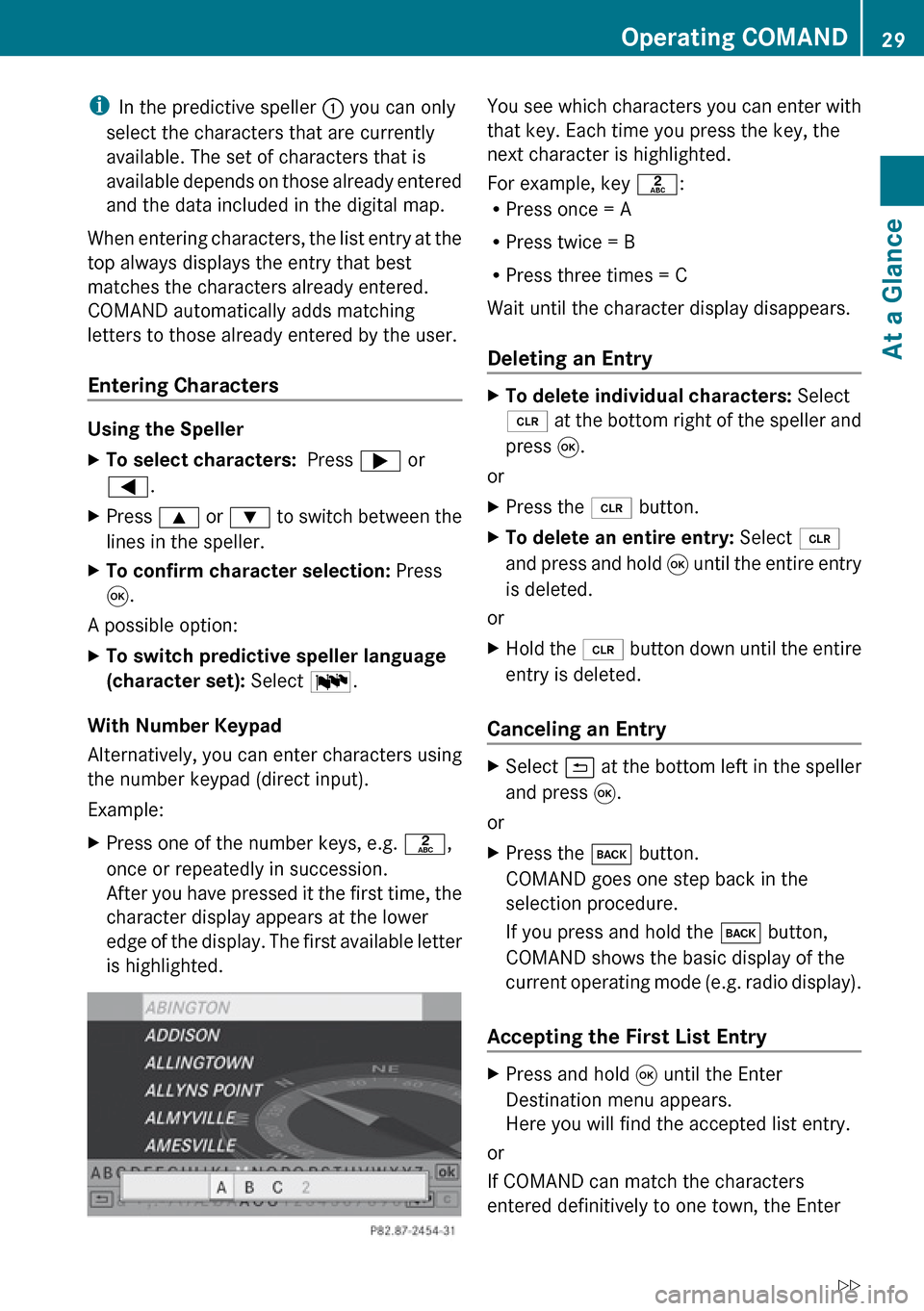
Destination Menu
Enter Destination menu
1Menu with upper and lower menu bar2Selector bar
Selecting Menu Item
XPress ; or = .
The selector bar moves horizontally.
Switching Menu Bar
XPress 9 or : .
Confirming Menu Item
XPress 9.
Character Entry
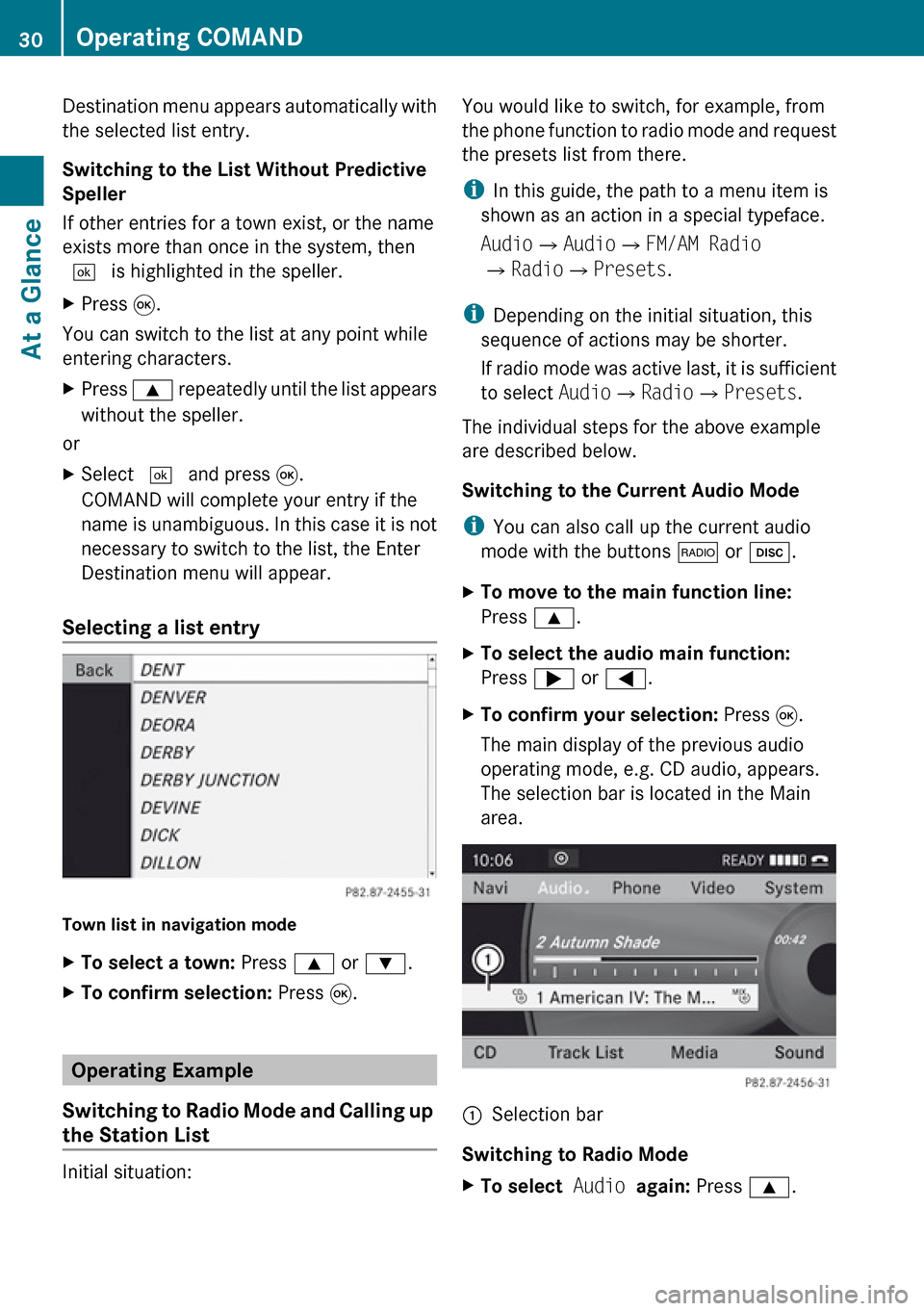
The example shows a list of cities during
destination entry in the navigation.
1Predictive speller with number and
character line28Operating COMANDAt a Glance
Page 31 of 224
iIn the predictive speller 1 you can only
select the characters that are currently
available. The set of characters that is
available depends on those already entered
and the data included in the digital map.
When entering characters, the list entry at the
top always displays the entry that best
matches the characters already entered.
COMAND automatically adds matching
letters to those already entered by the user.
Entering Characters
Using the Speller
XTo select characters: Press ; or
= .XPress 9 or : to switch between the
lines in the speller.XTo confirm character selection: Press
9 .
A possible option:
XTo switch predictive speller language
(character set): Select !.
With Number Keypad
Alternatively, you can enter characters using
the number keypad (direct input).
Example:
XPress one of the number keys, e.g. l,
once or repeatedly in succession.
After you have pressed it the first time, the
character display appears at the lower
edge of the display. The first available letter
is highlighted.You see which characters you can enter with
that key. Each time you press the key, the
next character is highlighted.
For example, key l:
R Press once = A
R Press twice = B
R Press three times = C
Wait until the character display disappears.
Deleting an EntryXTo delete individual characters: Select
õ at the bottom right of the speller and
press 9.
or
XPress the 2 button.XTo delete an entire entry: Select õ
and press and hold 9 until the entire entry
is deleted.
or
XHold the 2 button down until the entire
entry is deleted.
Canceling an Entry
XSelect á at the bottom left in the speller
and press 9.
or
XPress the k button.
COMAND goes one step back in the
selection procedure.
If you press and hold the k button,
COMAND shows the basic display of the
current operating mode (e.g. radio display).
Accepting the First List Entry
XPress and hold 9 until the Enter
Destination menu appears.
Here you will find the accepted list entry.
or
If COMAND can match the characters
entered definitively to one town, the Enter
Operating COMAND29At a GlanceZ
Page 32 of 224
Destination menu appears automatically with
the selected list entry.
Switching to the List Without Predictive
Speller
If other entries for a town exist, or the name
exists more than once in the system, then
d is highlighted in the speller.XPress 9.
You can switch to the list at any point while
entering characters.
XPress 9 repeatedly until the list appears
without the speller.
or
XSelect d and press 9.
COMAND will complete your entry if the
name is unambiguous. In this case it is not
necessary to switch to the list, the Enter
Destination menu will appear.
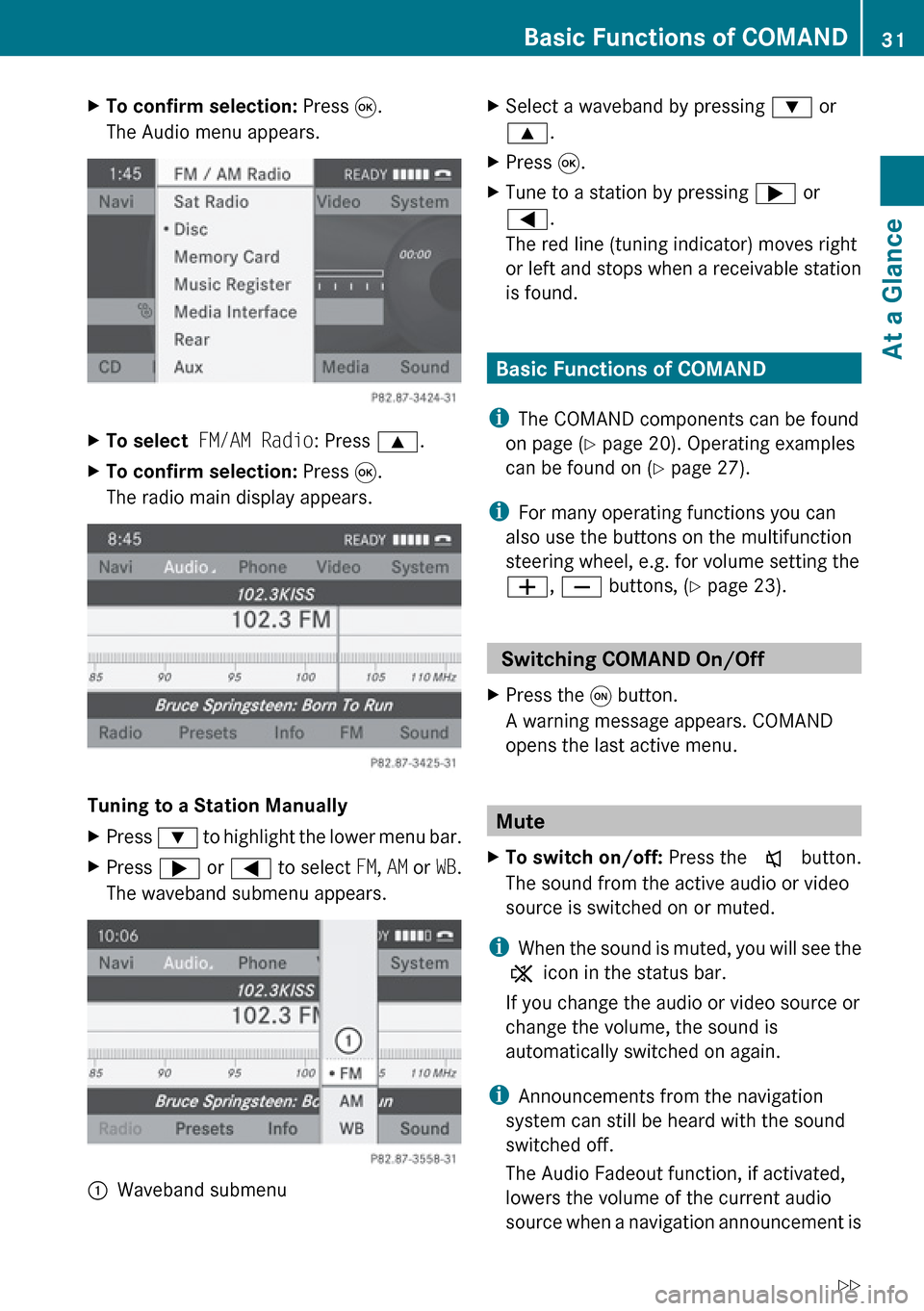
Selecting a list entry
Town list in navigation mode
XTo select a town: Press 9 or : .XTo confirm selection: Press 9.
Operating Example
Switching to Radio Mode and Calling up
the Station List
Initial situation:
You would like to switch, for example, from
the phone function to radio mode and request
the presets list from there.
i In this guide, the path to a menu item is
shown as an action in a special typeface.
Audio £Audio £FM/AM Radio
£ Radio £Presets .
i Depending on the initial situation, this
sequence of actions may be shorter.
If radio mode was active last, it is sufficient
to select Audio£Radio £Presets .
The individual steps for the above example
are described below.
Switching to the Current Audio Mode
i You can also call up the current audio
mode with the buttons $ or h .XTo move to the main function line:
Press 9.XTo select the audio main function:
Press ; or = .XTo confirm your selection: Press 9.
The main display of the previous audio
operating mode, e.g. CD audio, appears.
The selection bar is located in the Main
area.1Selection bar
Switching to Radio Mode
XTo select Audio again: Press 9.30Operating COMANDAt a Glance
Page 33 of 224
XTo confirm selection: Press 9.
The Audio menu appears.XTo select FM/AM Radio : Press 9.XTo confirm selection: Press 9.
The radio main display appears.
Tuning to a Station Manually
XPress : to highlight the lower menu bar.XPress ; or = to select FM, AM or WB.
The waveband submenu appears.:Waveband submenuXSelect a waveband by pressing : or
9 .XPress 9.XTune to a station by pressing ; or
= .
The red line (tuning indicator) moves right
or left and stops when a receivable station
is found.
Basic Functions of COMAND
i The COMAND components can be found
on page ( Y page 20). Operating examples
can be found on ( Y page 27).
i For many operating functions you can
also use the buttons on the multifunction
steering wheel, e.g. for volume setting the
W , X buttons, ( Y page 23).
Switching COMAND On/Off
XPress the q button.
A warning message appears. COMAND
opens the last active menu.
Mute
XTo switch on/off: Press the x button.
The sound from the active audio or video
source is switched on or muted.
i When the sound is muted, you will see the
X icon in the status bar.
If you change the audio or video source or
change the volume, the sound is
automatically switched on again.
i Announcements from the navigation
system can still be heard with the sound
switched off.
The Audio Fadeout function, if activated,
lowers the volume of the current audio
source when a navigation announcement is
Basic Functions of COMAND31At a GlanceZ
Page 34 of 224
issued. As soon as the navigation
announcement has ended, the audio
source will be played with the previous
volume ( Y page 61).
Switching Navigation Announcements
On/Off XPress x during the announcement.
The navigation announcements are switched
on again if you start a new route guidance or
if COMAND is switched off and on with the
q button.
i The navigation announcements can also
be switched back on by selecting the
softkey + in the navigation menu.
Setting the Volume
XTo set: Turn the q rotary/push button.
or
XPress the W or X button on the multi-
function steering wheel.
The volume of the selected audio or video
source changes.
Volume of Navigation Announcements
You can set the volume for navigation
announcements independently of the volume
for the active audio or video source.
During a navigation announcement:
XTurn the q rotary/push button.
or
XPress the W or X button on the multi-
function steering wheel.
Audio Fadeout
The Audio Fadeout function, if activated,
lowers the volume of the current audio source
when a navigation announcement is issued.
As soon as the navigation announcement has
ended, the audio source will be played with
the previous volume ( Y page 61).
Setting Volume for Phone Calls
You can adjust the volume for hands-free
mode during a telephone call.
During a telephone call:
XTurn the q rotary/push button.
or
XPress the W or X button on the multi-
function steering wheel.
Sound Settings
You can select different sound settings for
each audio and video source. The sound
menu can be opened from the submenu of the
desired operating mode.
Examples:
R Audio £FM/AM Radio £Sound
R Audio £Disc £Sound
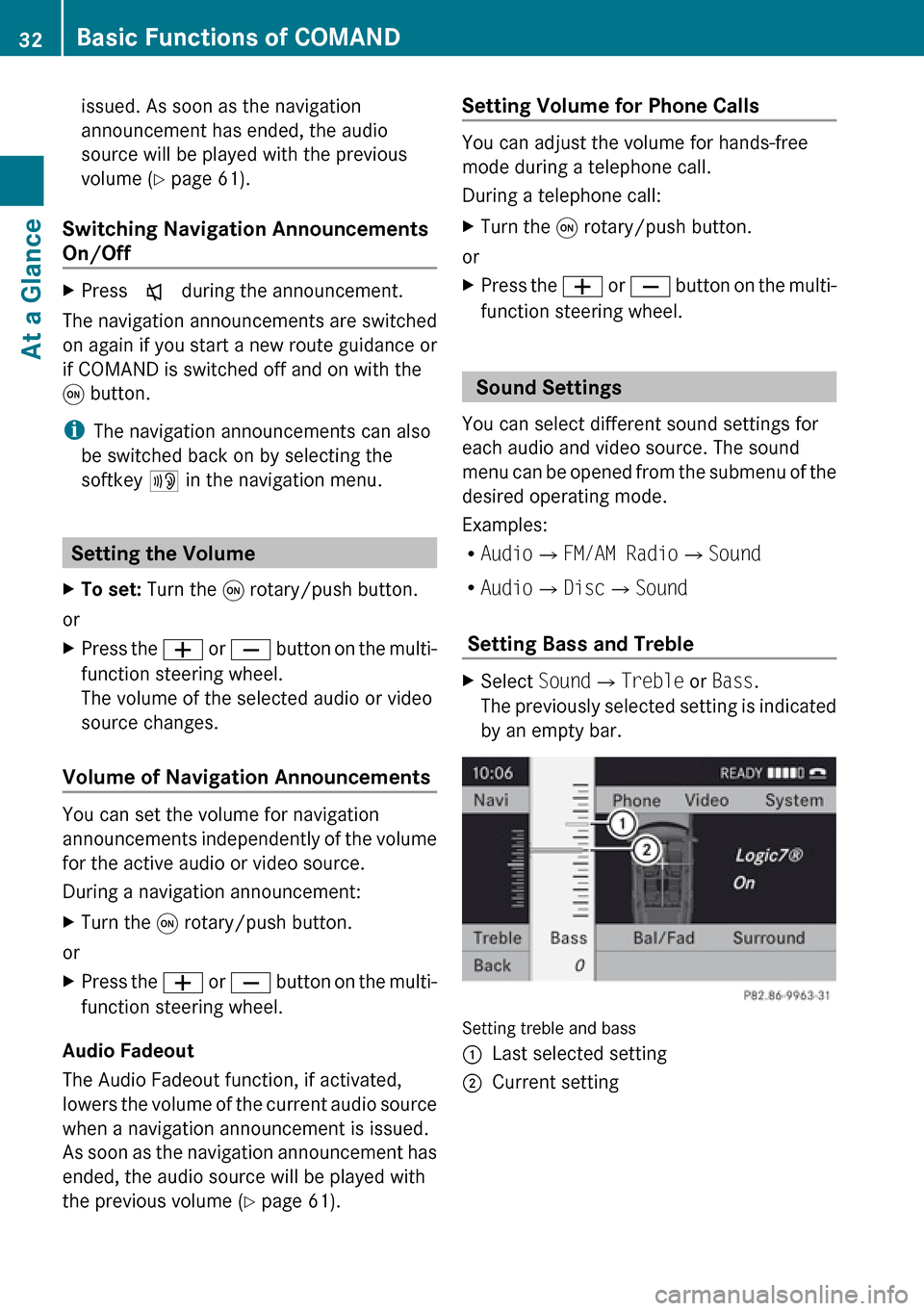
Setting Bass and Treble
XSelect Sound£Treble or Bass .
The previously selected setting is indicated
by an empty bar.
Setting treble and bass
1Last selected setting2Current setting32Basic Functions of COMANDAt a Glance
Page 35 of 224
XTo change the setting: Press 9
or : until the desired treble and bass
levels are set.XTo save setting: Press 9.
The setting is stored and the menu is
exited.XTo exit the menu without changes: Press
the k ; or = button.
Setting Balance and Fader
The balance determines whether the sound
intensity is higher on the driver’s side or on
the front passenger’s side.
The fader determines whether the sound
intensity is higher in the front or in the rear of
the vehicle.
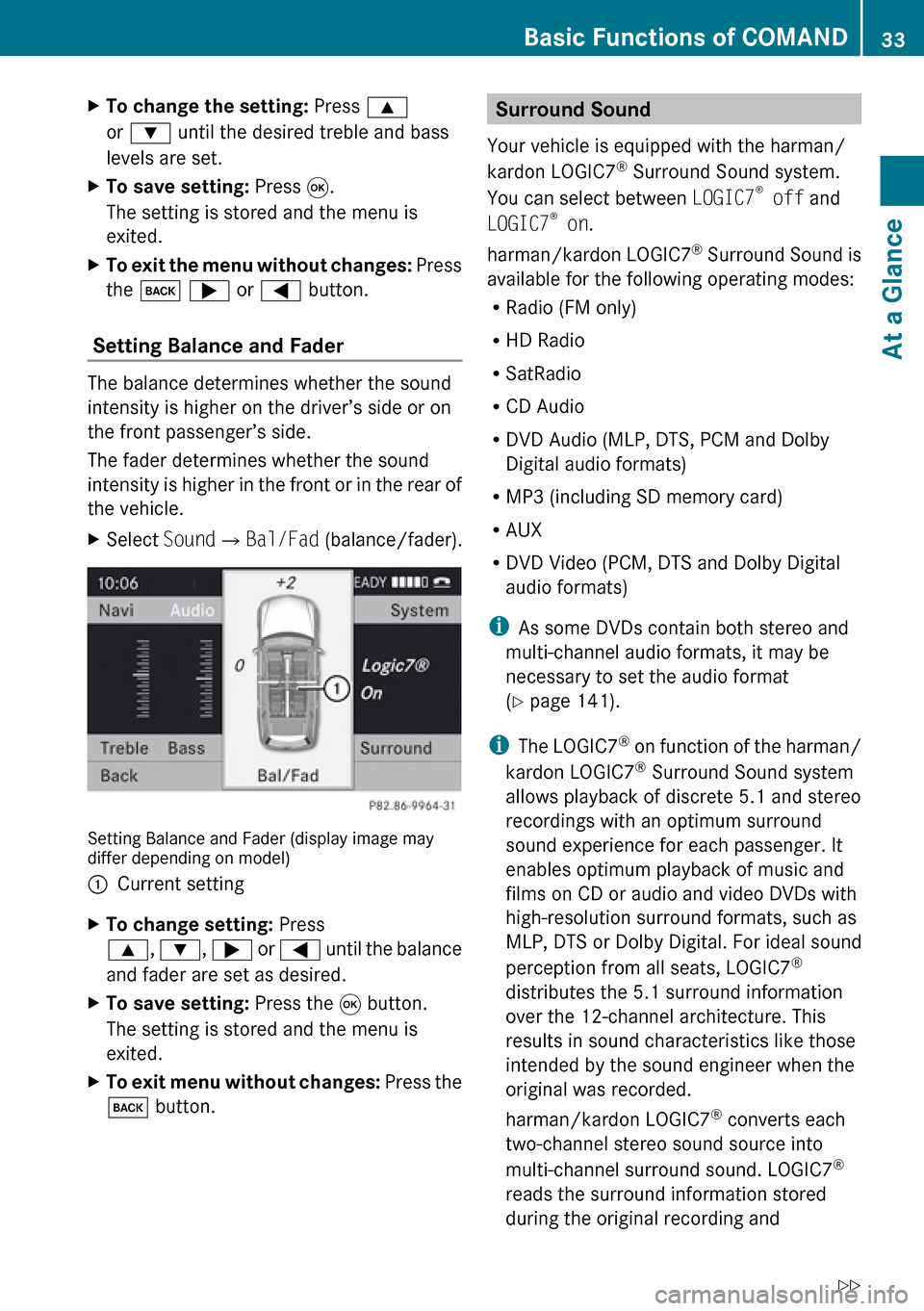
XSelect Sound£Bal/Fad (balance/fader).
Setting Balance and Fader (display image may
differ depending on model)
1Current settingXTo change setting: Press
9 , : , ; or = until the balance
and fader are set as desired.XTo save setting: Press the 9 button.
The setting is stored and the menu is
exited.XTo exit menu without changes: Press the
k button.Surround Sound
Your vehicle is equipped with the harman/
kardon LOGIC7 ®
Surround Sound system.
You can select between LOGIC7®
off and
LOGIC7 ®
on .
harman/kardon LOGIC7 ®
Surround Sound is
available for the following operating modes:
R Radio (FM only)
R HD Radio
R SatRadio
R CD Audio
R DVD Audio (MLP, DTS, PCM and Dolby
Digital audio formats)
R MP3 (including SD memory card)
R AUX
R DVD Video (PCM, DTS and Dolby Digital
audio formats)
i As some DVDs contain both stereo and
multi-channel audio formats, it may be
necessary to set the audio format
( Y page 141).
i The LOGIC7 ®
on function of the harman/
kardon LOGIC7 ®
Surround Sound system
allows playback of discrete 5.1 and stereo
recordings with an optimum surround
sound experience for each passenger. It
enables optimum playback of music and
films on CD or audio and video DVDs with
high-resolution surround formats, such as
MLP, DTS or Dolby Digital. For ideal sound
perception from all seats, LOGIC7 ®
distributes the 5.1 surround information
over the 12-channel architecture. This
results in sound characteristics like those
intended by the sound engineer when the
original was recorded.
harman/kardon LOGIC7 ®
converts each
two-channel stereo sound source into
multi-channel surround sound. LOGIC7 ®
reads the surround information stored
during the original recording andBasic Functions of COMAND33At a GlanceZ