Display MERCEDES-BENZ M-Class 2012 W166 Owner's Manual
[x] Cancel search | Manufacturer: MERCEDES-BENZ, Model Year: 2012, Model line: M-Class, Model: MERCEDES-BENZ M-Class 2012 W166Pages: 396, PDF Size: 14.48 MB
Page 283 of 396
the
vehicleis sta rted aslong asthe malfunctio nexists. Whe nthe malfunction indicatoris
illu minated, thesystem maynotbeable todetect orsignal lowtirepressure asintended.
TPMS malfunctions mayoccur foravariety ofreasons, including theinstallation ofincompatible
replacement oralternate tiresorwheels onthe vehicle thatprevent theTPMS fromfunctioning
properly. AlwayschecktheTPMS malfunction telltaleafterreplacing oneormore tiresorwheels
on your vehicle toensure thatthereplacement oralternate tiresandwheels allowtheTPMS to
cont inue tofunct ionproperly. War
ning andindicator lampsin the instrum entcluster
281On-board computer and displays Z
Page 302 of 396
G
WARNING Am
alfun ction inthesyst emhas been
det ectedifon eof thefoll owin gcon dition s
occ urs:
R theind icat orlamp intheSO Sbutt ondoes
no tlight updurin gthe syst emself-
diagno sis.
R the indic atorlamp inthe F Roadside
Ass istan cebutt ondoes notlight updurin g
the syst emself- diagno sis.
R The indic atorlamp inthe ï informat ion
butt ondoes notlight updurin gself-
diagno sisofthe syst em.
R the indic atorlamp inthe SOS button,
F Roadside Assistan cebutt onorï
inf ormat ionbutt oncon tinues tobe litred
aft erthe syst emself- diagno sis.
R The Tele Aid Inop
erative or Tele Aid
Not
Activated mess
ageappears inthe
multif unction display afterthe syst emself-
tes t.
If amalfun ction isindic ated asoutlin edabove,
the syst emmay notoperat eas expec ted.In
the even tofane mergency, assistance must
be summoned byother means.
Have thesystem checked atthe nearest
au thorized Mercede s-BenzCenter orcontact
the follo wing service hotlines:
R USA: Mercede s-BenzCustomer Assistance
Center under
1-800-FOR-MERCed es(1-800-367-6372)
or 1-888-990- 9007
R Canada: Customer Service at
1-888-923- 8367
Emerge ncycall Important
safetynotes
! Alicen seagreem entmust existino rder
to activate thembrace service. Ensurethat
you rsyst em isact ivat edand readyforu se,
and press theï MBInfo callbutton to
register. Ifany ofthe steps mentioned is
not carried out,thesystem maynotbe
activated. If
you have questions aboutthe activation,
cont actone ofthe following telephone
assistance services:
R USA: Mercedes-Ben zCustome r
As sist anc eCen teru nde r
1-800-FO R-MERC edes
(1-8 00-367 -6372)or1-888-9 90-9007
R Can ada: Custom erServ iceat
1-888-9 23-8367
An eme rgency callis dialed automa tically if
an airb ag orEm erg ency Ten sion ingDevic eis
tr igger ed. i
An
mbr ace eme rgencycall that has been
ini tiat edauto maticall ycan notb e
term inated bythe custo mer .
An eme rgency callcan also be initia ted
ma nua lly.
As soon asthe eme rgency callha sbe en
ini tia ted ,the indicator lamp inthe SOS button
fl as he s.Th e Con
nectingCal l mes
sage
ap pe arson the multifu nctio ndisplay.
The audio output ismut ed.
Onc eacon nection hasbeen established, the Call
Connected mess
ageappears inthe
mult ifunc tiondisplay.
All impor tantinf orm ation onthe emer gency
is transm itted, forexam ple:
R curr entlocat ionofthe vehic le(as
dete rmin edbythe GPS system)
R vehic leident ification numb er
R inf orm ation onthe type ofemer gency
Sho rtly aft erthe emer gencycall has been
init iated, avoic econ nection isautom atically
est ablished betweenthe Merc edes- Benz
Custom erAss istanc eCent erand thevehic le
occ upant s.Ifthe vehic leocc upant srespo nd,
the Merc edes- BenzCustome rAssistance
Center attempts toget more information on
the emergency. i
If
no vehicle occupant answers,an
ambul anceisimmediately senttothe
vehicle. 300
FeaturesStowing and features
Page 303 of 396
G
WARNING If
the indica torlamp inthe SOS button is
flas hing continuou slyand novoice
connection tothe Mercede s-BenzCustomer
Assistance Centerwasestab lished, then the
mbrace systemcouldnot initia tean
emerge ncycall(e.g. therelevant cellular
phone network isnot available ).
The messa ge Call
Failed app
ears inthe
multi function displayforapp roximatel y
10 seconds.
Shoul dthis occur, assistance mustbe
summone dby other means.
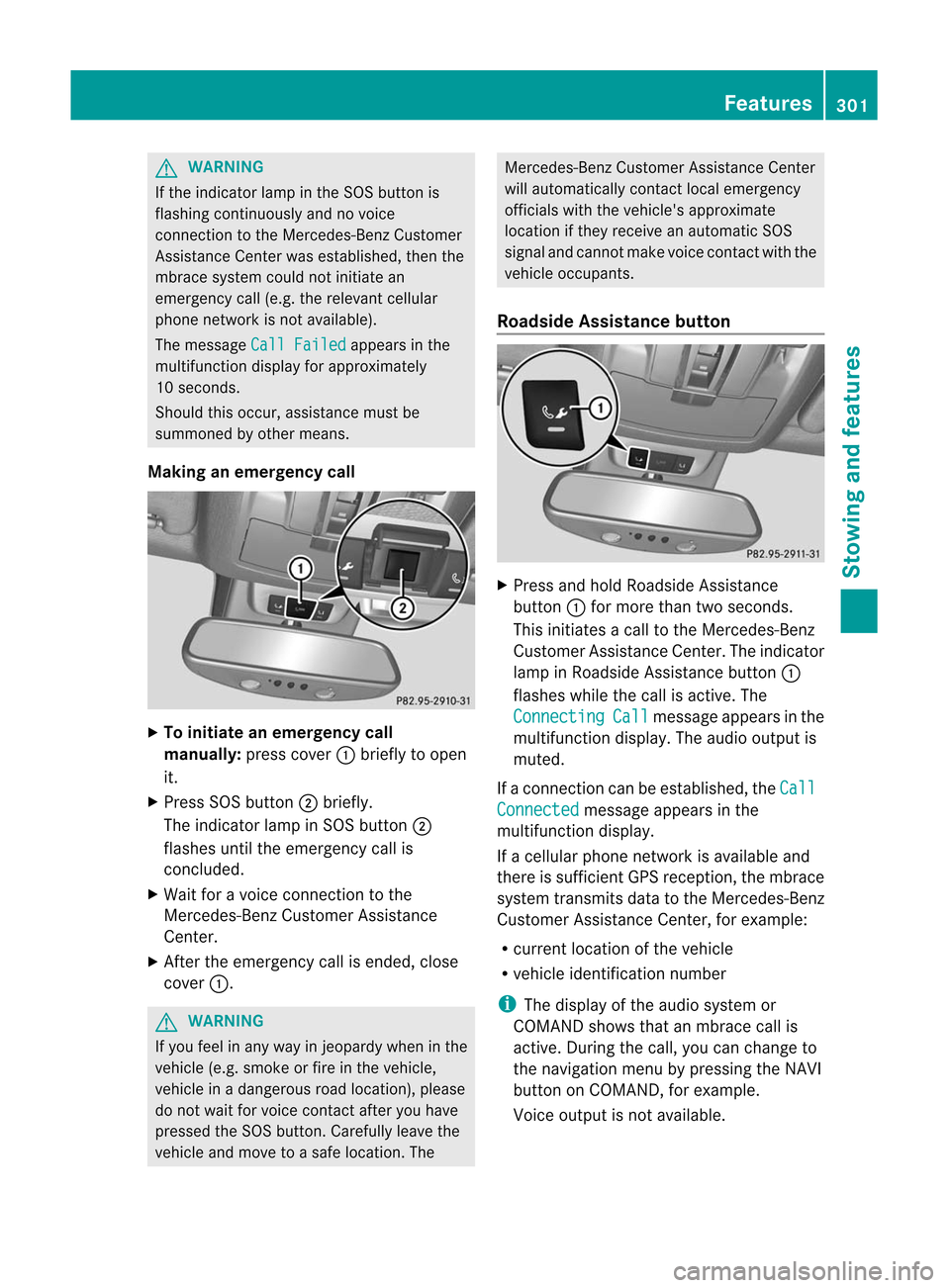
Making anemerge ncycall X
To initiate anemerge ncycall
manually: presscover :brie flytoopen
it.
X Press SOSbutton ;brie fly.
The indica torlamp inSOS button ;
flas hes until theemerge ncycallis
conclude d.
X Wai tfor avoice connection tothe
Mercede s-BenzCustomer Assistance
Center.
X After theemerge ncycallisended, close
cover :. G
WARNING If
you feel inany way injeopa rdywhen inthe
vehicl e(e.g. smoke orfire inthe vehicl e,
vehicl ein adange rousroad location), please
do not waitfor voice contact afteryouhave
presse dthe SOS button. Careful lylea vethe
vehicl eand move toasafe location. The Mercede
s-BenzCustomer Assistance Center
wil lau tomatical lycontact localemerge ncy
officia lswith thevehicl e'sapp roximate
loca tion ifthey receive anautomatic SOS
signa land cannot makevoicecontact withthe
vehicl eoccupa nts.
Roadside Assistanc ebutton X
Press andhold Roadsid eAssistance
button :for more thantwoseconds.
This initia tesacall tothe Mercede s-Benz
Cu stomer Assistance Center.Theindica tor
lamp inRoa dsid eAssistance button:
flas hes whilethe call isactive. The Connect
ing Call messa
geapp ears inthe
mul tifunction display.The audi ooutput is
muted.
If aconn ection canbeestablished, the Call
Connected message
appearsinthe
multifunction display.
If acellula rphone network isavaila bleand
there issufficient GPSreception, thembrace
system transmit sdata tothe Mercedes-Ben z
Customer AssistanceCenter, forexample:
R current location ofthe vehicle
R vehicle identification number i
The
displa yof the audi osystem or
COMAND showsthatanmbrace callis
active. During thecall, youcan change to
the navigation menubypressing theNAVI
button onCOMAND, forexample.
Voice output isnot availa ble. Features
301Stowing and features Z
Page 304 of 396
Av
oice conn ection isestablished between
the Mercedes-B enzCustomer Assistance
Center andthevehicle occupant s.
X Descr ibethe type ofassistance needed.
The Mercedes-B enzCustomer Assistance
Center eithersends aquali fiedMercedes-
Benz techn icianororganizes foryour vehicle
to be trans ported tothe nearest authorized
Mercedes-B enzCenter. Youmay becharged
for services suchasrepair workand/or
towing. Further detailsareavaila bleinyour
mbrace manual. i The
mbrace systemfailedtoinitiate a
Roadside Assistancecallif:
R the indicator lampinRoadside
Assist ancebutton :isflashing
cont inuously.
R no voice connection tothe Mercedes-
Benz Customer AssistanceCenter was
established.
This may bebecause thecorrespon ding
mobile phonenetwork isnot availa ble.
The Call
Failed message
appearsinthe
multifunct iondisplay .
X To end acall: press the~ button onthe
mul tifunctio nstee ring wheel.
or
X Pre ssthe corr espo ndi ng button forend ing
a ph one callon the audio sy ste mo ron
COMA ND.
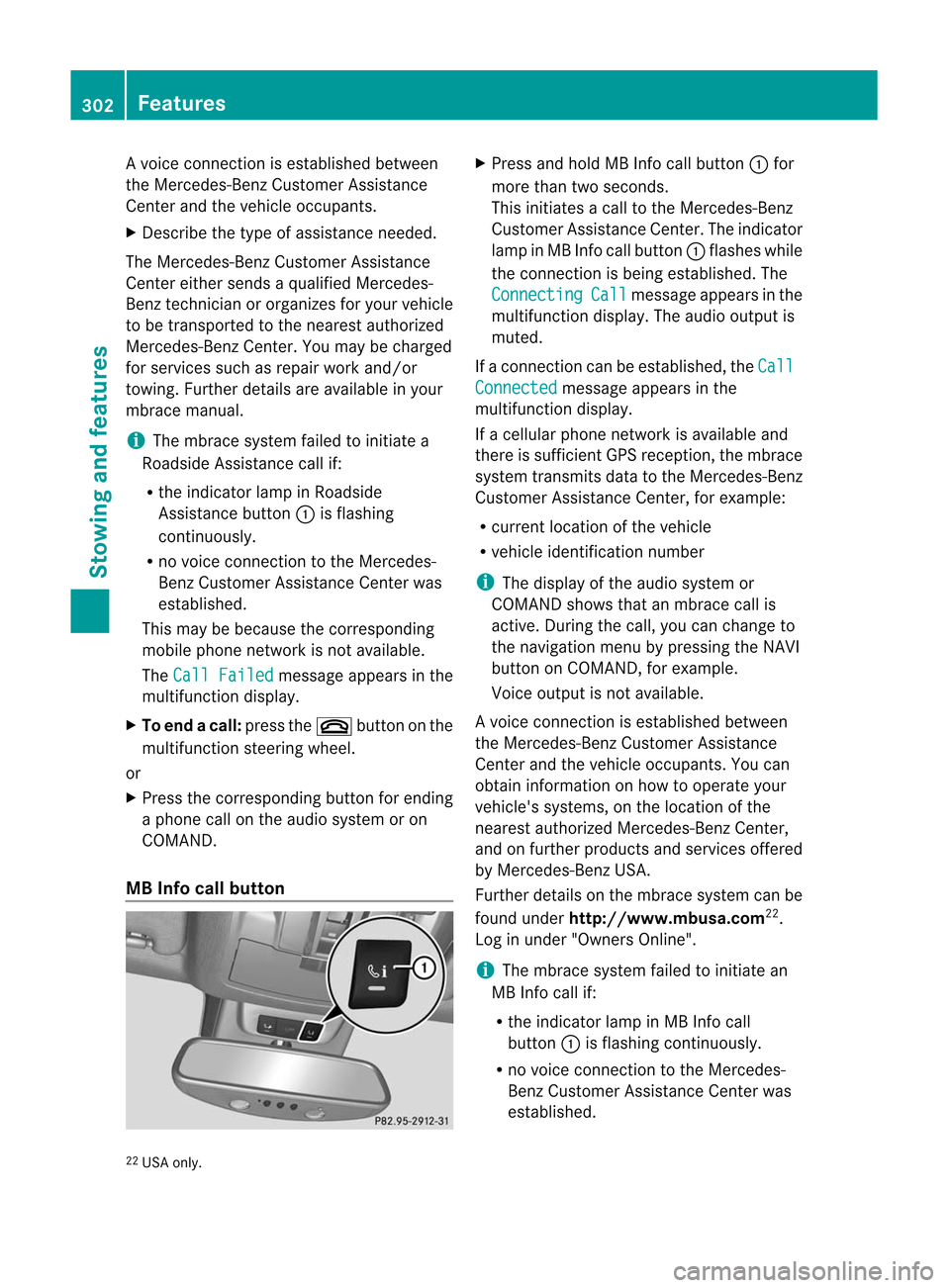
MB Info callbutton X
Pre ssand hold MBInfo call button: for
mor eth an two seconds.
This initiate sa call totheMer cedes-Ben z
Cust omerAssistance Center.Theindicator
lamp inMB Info callbutton :flashes while
the conn ection isbeing established .The Connecting Call message
appearsinthe
multifunction display.The audi ooutput is
muted.
If aconn ection canbeestablished, the Call
Connected message
appearsinthe
multifunction display.
If acellula rphone network isavaila bleand
there issufficient GPSreception, thembrace
system transmit sdata tothe Mercedes-Ben z
Customer AssistanceCenter, forexample:
R current location ofthe vehicle
R vehicle identification number i
The
displa yof the audi osystem or
COMAND showsthatanmbrace callis
active. During thecall, youcan change to
the navigation menubypressing theNAVI
button onCOMAND, forexample.
Voice output isnot availa ble.
Av oice conn ection isestablished between
the Mercedes-B enzCustomer Assistance
Center andthevehicle occupant s.You can
obtain informat iononhow tooperate your
vehicle's systems, onthe location ofthe
nearest authorized Mercedes-B enzCenter,
and onfurther products andservices offered
by Mercedes-B enzUSA .
Further detailsonthe mbrace systemcanbe
found under http://www.mbusa. com22
.
Log inunder "Owners Online". i The
mbrace systemfailedtoinitiate an
MB Info callif:
R the indicator lampinMB Info call
button :isflashing continuously.
R no voice connection tothe Mercedes-
Benz Customer AssistanceCenter was
established.
22 USA only. 302
Featur
esStowing and features
Page 305 of 396
This
may bebecause thecorrespon ding
mobile phonenetwork isnot availab le.
The Call
Failed message
appearsinthe
multifunct iondisplay .
X To end acall: press the~ button onthe
mul tifunctio nstee ring wheel.
or
X Pre ssthe corr espo ndi ng button forend ing
a ph one callon the audio sy ste mo ron
COMA ND.
Call prior ity When
servicecall sare active, e.g. Roadsi de
As sist anc eor MB Info call s,an eme rgency
call can still be initia ted. Inthis cas e,an
eme rgencycall willtakeprio rityand override
all other active calls.
The indicat orlamp oftheres pec tive but ton
flas hes untilth ecall isen ded. Aneme rgency
call can onlybe term inat edbytheMer cedes-
Ben zCust omerAs sist anc eCen ter. All other
call scan beended bypre ssin gth e~
but tono nthe multifunction steeringwheelor
the corresponding buttonforending a
telephone callonthe audi osystem oron
COMAND. i
If
an mbrace callisinitiated, audiooutput
is muted. Themobile phoneisno longer
conn ected toCOMAND. However,ifyou
want touse your mobile phone, we
recommen dthat youdothis only when the
vehicle isstationary andinasafe location.
Dow nloading destinations i
Inform
ationonthe componen tsand
operating principles ofCOMAND canbe
found inthe separate COMAND operating
instruct ions. i
You
canonly usetheDestin ation
Download functionifthe vehicle is
equipp edwith anavigation system.
Destin ationDownload givesyouaccess toa
database withover 15million pointsof
interest (POIs)/important destinationsthatcan
bedownloaded ontothenavigation
system ofyour vehicle. Ifyou know the
destination, youcan download theaddress or
obtain thelocation ofpoints ofinterest
(POIs)/important destinationsinthe
surrounding area.
You areprompted toconfirm routeguidance
to the address entered.
The system calculates theroute and
subsequ entlystarts theroute guidancewith
the address entered. i
If
you select No ,
the address canbestored
in the address book. i
The
Destin ationDownload functionis
availa bleifthe corresponding mobile
phone network isavaila bleand data
transf erispossible.
Route Assistance
This service ispart ofthe mbrace PLUS
Package andcannot bepurchased
separately. i
You
canalso usetheRoute Assistanc e
funct ionifyour vehicle isnot equipp edwith
a navigation system.
Within theframework ofthis service, you
receive aprofessional andreliabl eform of
navigation supportwithouthavingtoleave
your vehicle.
The customer servicerepresentat ive
determines asuitable drivingroutebased on
your current vehicleposition andthedesired
destination andguides youlivethrough the
current sections ofthe route.
Search &Send "Sear
ch&Sen d"isadest inationentry
ser vice.You canfindfurt her inform ationon
"Sear ch&S end" inthe separate COMAND
operatin ginst ruct ions. Featur
es
303Stowing and features Z
Page 306 of 396
Vehi
cle remo teope ning If
yo uha ve uni ntentio nallylocked your
veh icle(e .g. the Sma rtKey isstil lin the
veh icle) and arep laceme ntSma rtKey isnot
ava ilab le,the vehiclecan beopene dby a
Mer cedes-Be nzCu stom erAssi stance Center.
The vehiclecan beopene drem otelyup tofou r
da ys afte rthe ignition waslastswitched off.
X Contact thefollowing servicehotlines:
R USA: Mercedes-Ben zCustome r
As sist anc eCen terund er1-80 0-FO R-
ME RCedes (1-800-36 7-63 72)or
1-8 88- 990- 9007
R Canada: Customer Serviceat
1-8 88- 923- 8367
You willbeasked foryour password.
X Return toyour vehicle atthe time agreed
upon withtheMercedes-B enzCustomer
Assist anceCenter.
X Pull thetailgate handleforatleast 20
seconds untiltheindicator lampinthe SOS
button (Ypage 300)flashes.
The Connecting
Call message
appears
on the multifunct iondisplay .
Alter natively, thevehicle canalso beopened
via the Internet oran iPhone inthe "Owners
Online" sectionusingyourIDnumber and
password 23
. i
Vehicle
remoteunlockin gis only possible
if the correspon dingmobile phonenetwork
is accessible.
The SOS button flashes andthe Call
Connected message
appearsinthe
multifunct iondisplay toconf irmthat the
comman dfor vehicle remote unlockin ghas
been received.
If you pull thetailgate handleformore than
20 seconds beforereceiving authorization
for remote unlockin gfrom theMercedes-
Benz Customer AssistanceCenter, you
must wait15minutes beforeyoucan pull
the tailgate handleagain. Vehicle
remoteclosin g If
you forget tolock your vehicle butareno
longer inthe vicinit yof the vehicle, itcan be
locked foryou bythe Mercedes-B enz
Customer AssistanceCenter.
The vehicle canbelocked remotely uptofour
days after theignition waslastswitched off.
X Contact thefollowing servicehotlines:
R USA: Mercedes-B enzCustomer
Assist anceCenter under1-800-FOR-
MERCedes(1- 800-367-6372 )or
1-8 88-990- 9007
R Canada: Customer Serviceat
1-8 88-923- 8367
You willbeasked foryour PIN.
The next time youareinyour vehicle and
switch onthe ignition, the Tele Aid: Doors
Locked
byRemote message
appearsinthe
multifunct iondisplay .
Alter natively, thevehicle canalso belocked
via the Internet oran iPhone inthe "Owners
Online" sectionusingyourIDnumber and
password. i
The
vehicle valetlockin gfeature is
availa blewhen therelevant mobilephone
network isavaila bleand data conn ection is
possible.
Service forrecovering astolen vehic le If
yo ur veh icleha sbe en stol en:
X Noti fythe police.
The police willissu eanum bered incident
rep ort.
X Thi snum berw illbe forwarded tothe
Merc edes- BenzCustome rAssistance
Center together withyour PIN.
The Mercedes-Benz CustomerAssistance
Center thenattempts tolocate thembrace
system. TheMercedes-Benz Customer
Assistance Centercontacts youand the
local lawenforcemen tagency ifthe vehicle
is located. However, onlythelaw
23 USA only. 304
Featur
esStowing and features
Page 317 of 396
Furth
erinfor mationonengi neoil
(Y page 388). Che
cking and adding otherserv ice
pr odu cts
Checkin gth ecoolant level On
lyche ckthecoo lant level when theveh icle
is on alevel surface and theeng inehas cooled
down .
X Turn theSm artKey toposit ion
2 (Y page 139)intheign itio nlock .
On veh icleswith KEYLE SS-GO ,pres sth e
St art /S topbutt ontwic e(Ypage 139).
X Check thecoolant temperaturegauge in
the multifun ction display.
The coolant temperaturemustbebelow
158 ‡(70 †). G
WARN
ING In
order toavoid anypoten tiallyserious burns:
R use extreme caution whenopenin gthe
hood ifther eare any signs ofsteam or
coolant leakingfromthecoolin gsystem ,or
if the coolant temperaturedisplay indicates
that thecoolant isoverheat ed.
R do not remov ethe pressure caponthe
coolant reservoirifthe coolant temperature
is above 158‡(70 †). Allow theengine to
cool downbefore removin gthe cap. The
coolant reservoircon tains hotfluid andis
under pressure.
R using arag, slowly turnthecap
approximat ely1
/ 2 turn
torelieve excess
pressure. Ifopened immediately, scalding
hot fluid andsteam willbeblown outunder
pressure.
R do not spill antifreeze onhot engine parts.
An tifr eeze contains ethylene glycolwhich
may burn ifit comes intocontact with hot
engine parts. X
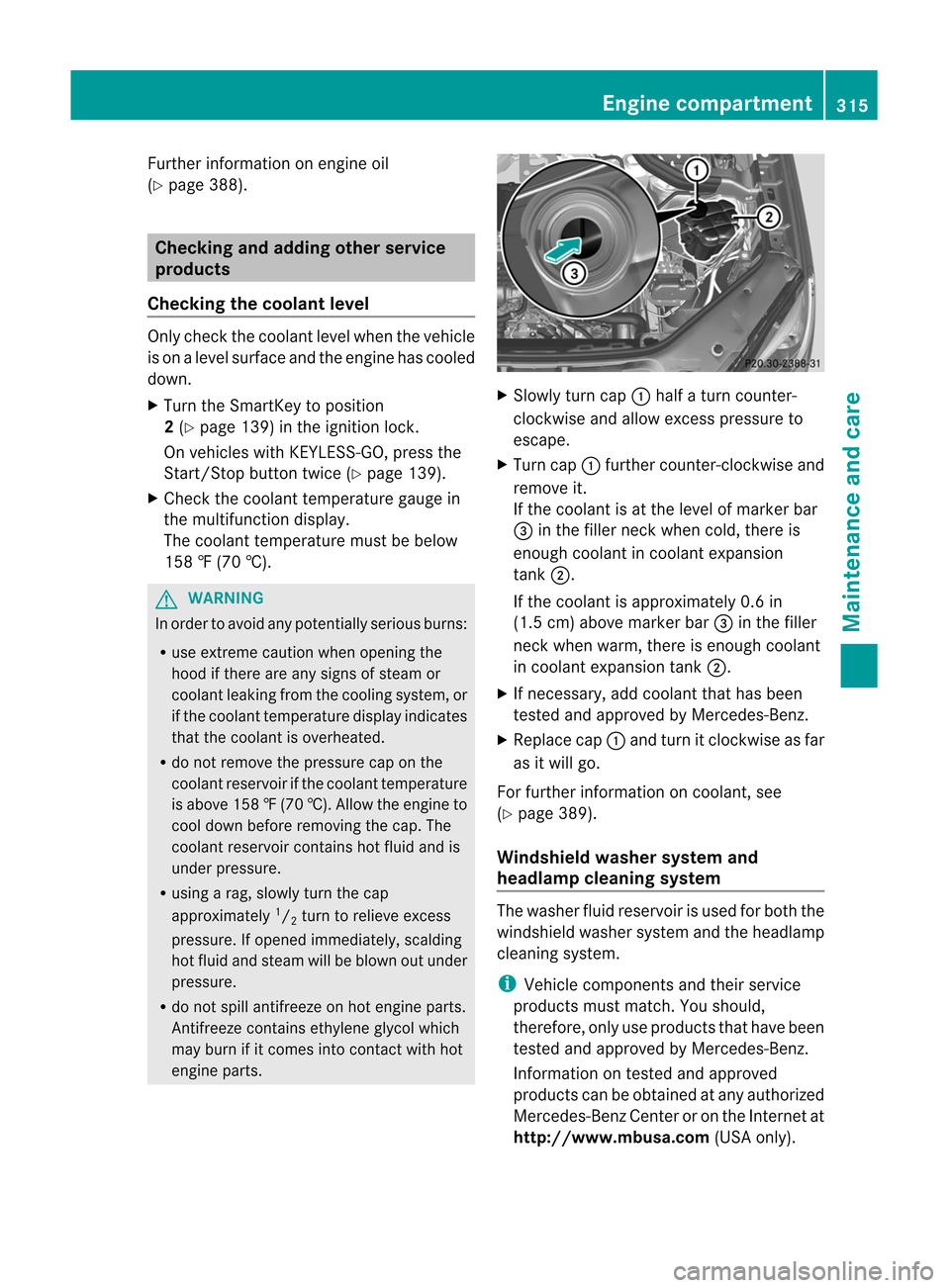
Slowly turncap:half aturn count er-
clock wiseandallow excesspressure to
escape.
X Turn cap:furth ercount er-clockwise and
remove it.
If the coolant isat the level ofmarker bar
= inthe filler neck when cold,there is
enough coolant incoolant expansion
tank ;.
If the coolant isapproximat ely0.6 in
(1.5 cm)above marker bar=inthe filler
neck when warm, thereisenough coolant
in coolant expansion tank;.
X Ifneces sary,addcoolant thathasbeen
test edand approved byMercedes- Benz.
X Replace cap:and turn itclock wiseasfar
as itwill go.
For furth erinfor mation oncoolant ,see
(Y page 389).
Windshield washersystemand
headla mpcleaning system The
washer fluidreservo iris used forboth the
windshield washersystemandtheheadlamp
cleanin gsystem. i
Vehicle
compon entsand their servic e
product smust match.You should,
theref ore,only useproduct sthat have been
test edand approved byMercedes- Benz.
Inf ormation ontest edand approved
product scan beobtained atany authorized
Mercedes- BenzCenter oron the Internet at
htt p://ww w.mbu sa.com (USAonly). Engine
compartment
315Maintenance and care Z
Page 319 of 396
X
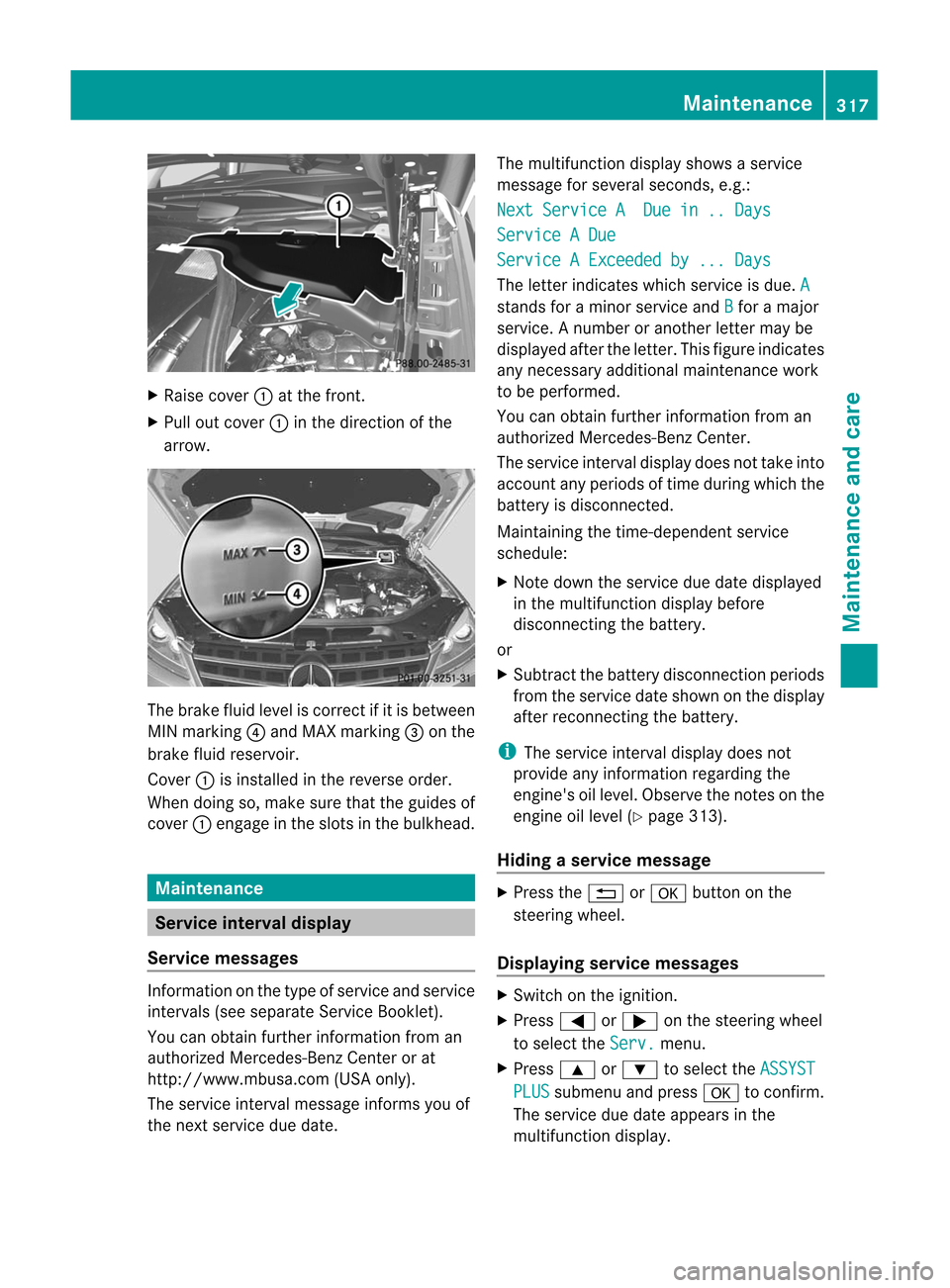
Raise cover :atthefron t.
X Pull outcover :inthedir ection ofthe
arr ow. The
brak efluid levelisco rrec tifiti sbetween
MIN marking ?and MAX marking =onthe
brake fluidreservoir.
Cover :isinstalled inthe reverse order.
When doingso,make surethattheguide sof
cover :engage inthe slots inthe bulkhead . Maintenance
Service
interval display
Service messages Information
onthe type ofservice andservice
intervals (seeseparate ServiceBooklet).
You canobtain further information froman
authorized Mercedes-Benz Centerorat
http: //www.mbusa.com (USAonly).
The service interval message informsyouof
the next service duedate. The
multifunction displayshows aservice
message forseveral seconds, e.g.: Next
Service ADue in..Days Service
ADue Service
AExceeded by... Days The
letter indicates whichservice isdue. A
stands
foraminor service and B for
amajor
service. Anumber oranother lettermaybe
displa yedafter theletter. Thisfigure indicates
any necessary additionalmaintenance work
to be performed.
You canobtain further information froman
authorized Mercedes-Benz Center.
The service interval displaydoes nottake into
account anyperiods oftime during whichthe
battery isdisconn ected.
Maintaining thetime-depen dentservice
schedule:
X Note down theservice duedate display ed
in the multifunct iondisplay before
disconn ectingthe battery.
or
X Subtract thebattery disconn ectionperiods
from theservice dateshown onthe display
after recon nectingthe battery. i
The
service intervaldisplay doesnot
provide anyinformat ionregarding the
engine's oillevel. Observe thenoteson the
engine oillevel (Ypage 313).
Hiding aserv ice mes sage X
Pres sth e% ora buttononthe
st eerin gwheel.
Displa yingservice messages X
Swit chon theign itio n.
X Pres s= or; onthest eerin gwheel
to selec tthe Serv. menu.
X Press 9or: toselect the ASSYST
PLUS submenu
andpress atoconfirm .
The service duedate appea rsinthe
multifunction display. Maintenance
317Maintenance and care Z
Page 320 of 396
Please
bearthefollow inginmind Resetting
theservice interval display
Aq ualifi edspec ialist workshop,e.g. an
auth orizedMer cedes- BenzCent er,will reset
the servic eint erval display afterthe
nec essary servicework hasbeen carried out.
Furt herinfor mation ,on maint enanc efor
example, canbeobtained atan authoriz ed
Mercedes- BenzCenter ordirect lyfrom
Mercedes- Benz.
! Ifthe servic eint erval display hasbeen
reset unintentionally, havethesetting
corr ectedataMercedes- BenzCenter .
Have servic ework carried outasdescribed
in the Serv iceBook let.This may other wise
lead toincr eased wearanddamage tothe
major assemblies orthe vehicle.
Driving abroad
An ext ensive Mercedes- BenzServ icenetwork
is also available inother countries.Youcan
obtain furtherinfor mation fromany
authoriz edMercedes- BenzCenter . Care
Notes
oncare
Regular careofyour vehicle isacon dition for
retain ingthe quality inthe long term.
Use care product sand cleanin gagents
recom mended andapproved byMercedes-
Ben z. G
WARN
ING Many
cleanin gproduct scan behazardous.
Some arepoisonous, othersare flammable.
Always followtheinstruct ions onthe
particular container .Always openyour
vehic le'sdoors orwindows whencleaningthe
inside .
Never usefluids orsolven tsthat arenot
design edfor clean ingyour vehic le.
Always lockaway cleaningproduc tsand keep
the mout ofreach ofchildr en. !
For clean ingyour vehic le,do not use any
of the followin g:
R dry, rough orhard cloths
R abrasive cleaningagent s
R solven ts
R clean ingagent scon tain ingsolven ts
Do not scrub.
Do not touc hthe surfac esorprot ective
films withhard objects, e.g. arin gor ice
scr aper. Youcould otherwise scratc hor
damage thesurfac esand protective film. H
Envir
onment alnote Disp
oseofempt ypack aging andclean ing
clot hsinan env iron men tally respo nsible
mann er.
! Donot park thevehic lefor anext ended
period straight afterclean ingit,part icularly
aft erhavin gclean edthe wheels withwheel
clean er.Wheel cleanerscould cause
inc reased corrosio nofthe brake discsand
brake pads/linings. Forthis reason, you
should driveforafew minutes after
cleaning. Brakingheatsthebrake discsand
the brake pads/linings, thusdrying them.
The vehicle canthen beparked. Exterior
care
Automat iccar wash G
WARNING Braking
efficiency isreduced afterwashing
the vehicle. Thiscould cause anaccident. For
this reason, youmust driveparticularly
carefully afterwashing thevehicle untilthe
brakes havedried.
You canwash thevehicle inan automatic car
wash fromthevery start.
! Never cleanyourvehicle inaTouchless
Automatic CarWash asthese usespecial
cleaning agents.Thesecleaning agentscan
damage thepaintwork orplastic parts. 318
CareMaintenance and care
Page 325 of 396
Int
erior car e
Clean ingthedis pla y X
Be for ecle anin gth edisp lay,mak esure that
it is swit ched off and hascooled down .
X Clean thedisp laysurf ace usinga
co mm ercially- availab lemic rofiber cloth
and TFT/ LCD displaycleane r.
X Dr yth edisp laysurf ace usingadry
mic rofiber cloth.
! Forc leanin g,do not use anyofthe
followin g:
R alcoho l-basedthin ner orgasolin e
R abrasiv eclean ingagent s
R com merc ially-available household
clean ingagent s
These maydamage thedisplay surface. Do
not putpress ureonthe display surface
when cleaning.This could leadto
irrep arable damage tothe display.
Cleaning NightView Assist Plus !
Never cleanthecamer alens. When
clean ingthe field ofvision ofthe drivin g
syste ms,make surethatyoudonot spray
glass cleaneron the camer alens. Ifthe
camer alens isdirt y,visit aqualified
spec ialist workshop. G
WARN
ING Please
donot forg etthat your primar y
respo nsibilit yis to drive thevehic le.Ad river's
attention tothe road must alwaysbe his/he r
prima ryfocus whendriving.For yoursafety
and thesafety ofothers, stopbefore tryingto
remove windowfoggi ngorclea ning the
windo win front ofthe Night ViewAssist Plus
camera .
Bear inmind thatataspee dof just 30mph
(ap proxima tely50km/h), yourvehicle is
cover ingadistanc eof 44 feet (approximately
14 m)every second. X
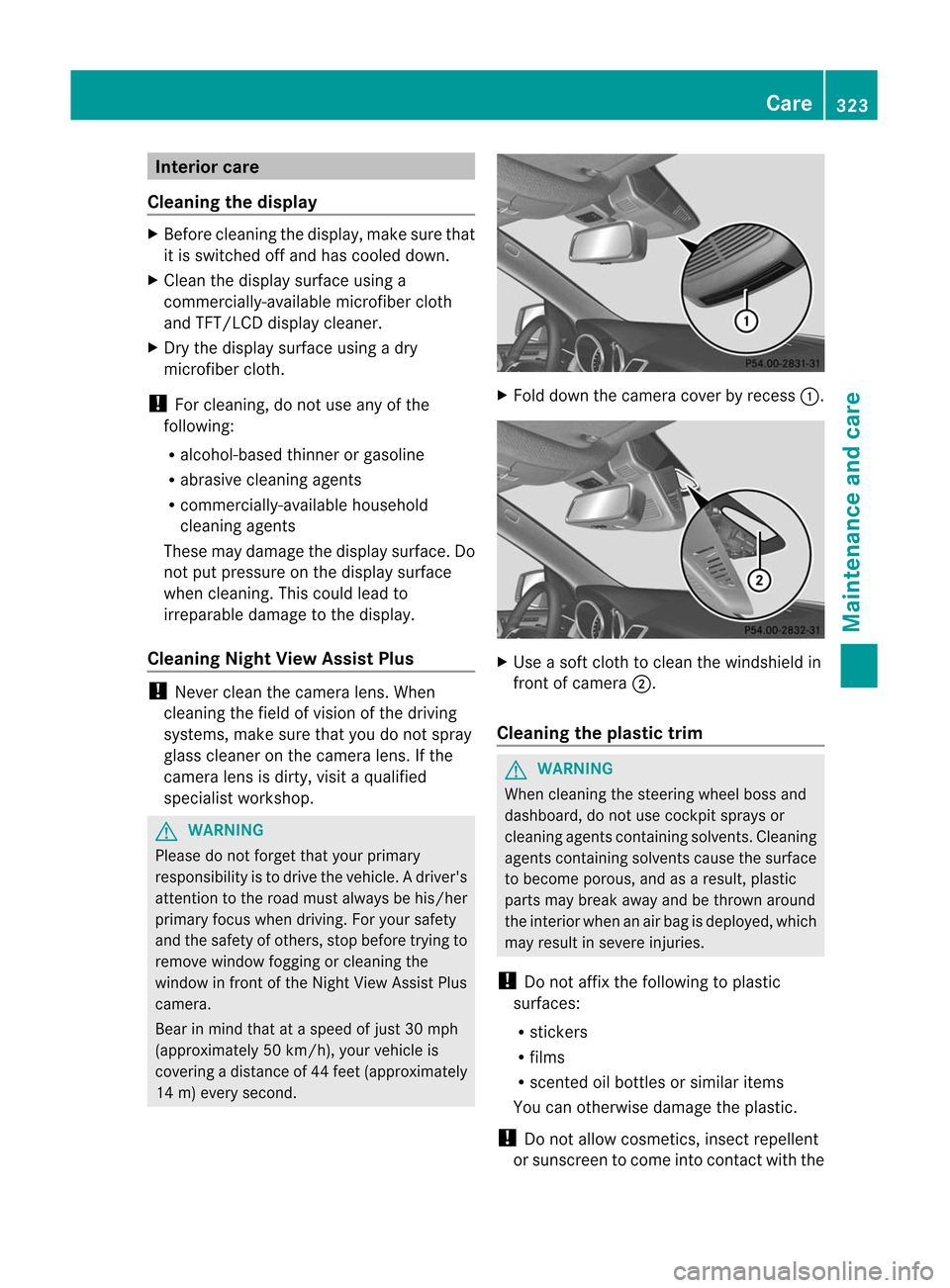
Fold down thecamera coverbyrecess :. X
Use asoft cloth toclean thewindshield in
fron tof camera ;.
Cleaning theplast ictrim G
WARN
ING When
cleanin gthe steerin gwheel bossand
dashboard, donot use cock pitsprays or
cleanin gagents containin gsolvent s.Cleaning
agents containin gsolvent scause thesurface
to become porous,andasaresult, plastic
parts maybreak awayandbethro wnaround
the inter iorwhen anair bag isdeployed, which
may result insevere injuries.
! Donot affix thefollowing toplastic
surfaces:
R stic kers
R films
R scen tedoilbott lesorsimilar items
You canother wisedamage theplastic.
! Donot allow cosmet ics,insect repellent
or sunscr eentocome intocontact with the Care
323Maintenance and care Z