brake sensor MERCEDES-BENZ M-Class 2012 W166 User Guide
[x] Cancel search | Manufacturer: MERCEDES-BENZ, Model Year: 2012, Model line: M-Class, Model: MERCEDES-BENZ M-Class 2012 W166Pages: 396, PDF Size: 14.48 MB
Page 185 of 396
If
indicator lamp;islit:
X Press button :.
Indicator lamp;flash es.The vehicle is
adjus tingtohighw ay/high-spee dlevel .
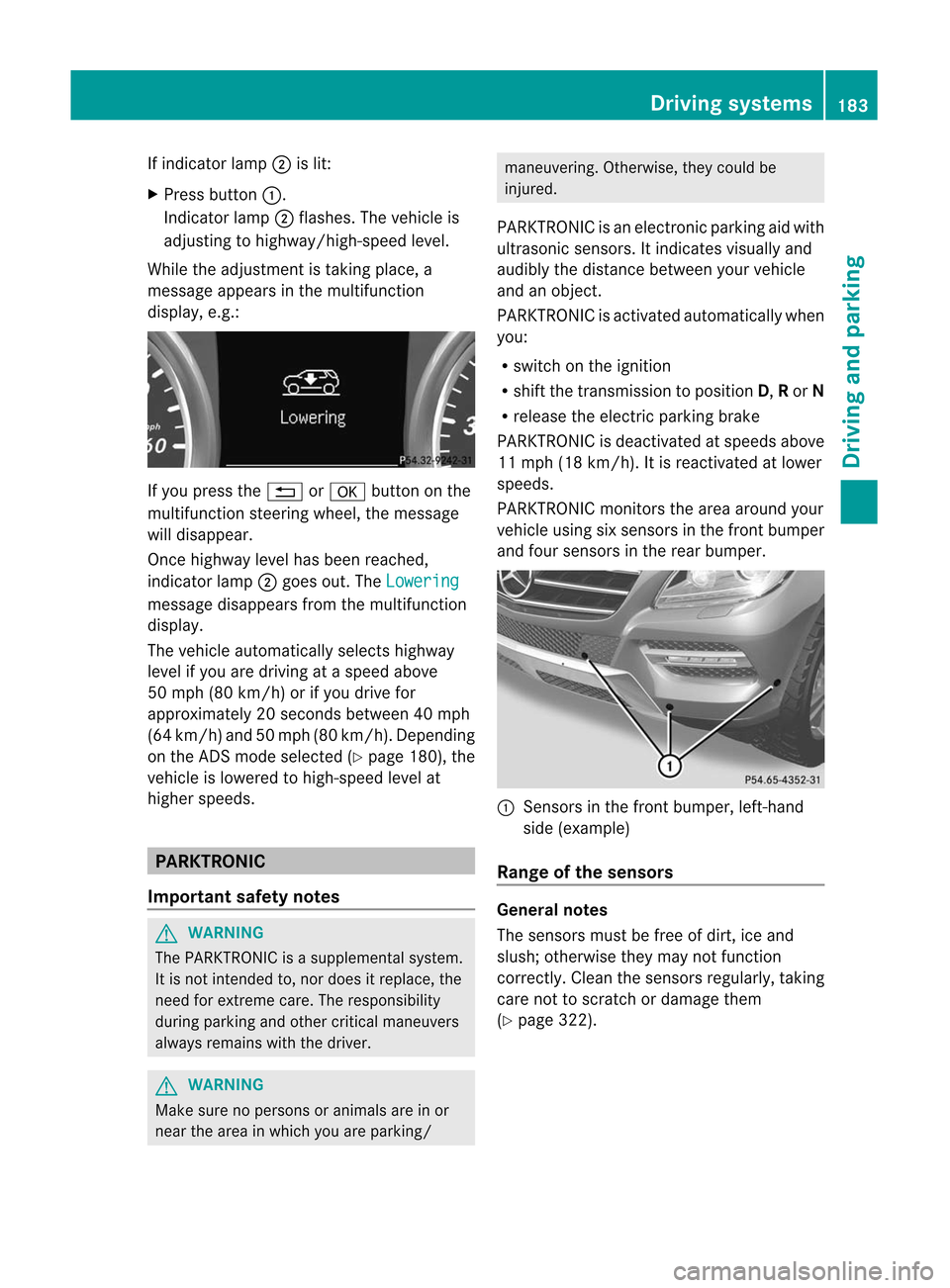
Whil ethe adjus tment istaking place, a
messag eapp ears inthe multifu nction
disp lay,e.g.: If
you press the% ora button onthe
multifu nctionsteering wheel,the messag e
wil ldisa ppea r.
Once highw aylevel hasbeen reached ,
indicator lamp;goes out.The Lowering
messag
edisa ppea rsfrom themultifu nction
disp lay.
The vehicle automaticallyselects highway
level ifyou aredriving ataspeed above
50 mph (80km/h) orifyou drive for
app roximately 20seconds between40m ph
(64 km/ h)and 50mph (80km/ h).Depen ding
on the ADSm ode selected (Ypage 180), the
vehicle islowered tohigh-speed levelat
higher speeds. PARKTRON
IC
Import antsafety notes G
WARNIN
G The
PARKTRONIC isasupplemental system.
It is not inten dedto,nor does itreplace, the
need forextr eme care. Theresponsibility
during parking andother criticalmaneuvers
alway sremains withthedriver. G
WARNIN
G Make
surenopersons oranimals areinor
near thearea inwhich youareparking/ maneuvering.
Otherwise,theycould be
injured.
PARKTRONIC isan electron icparking aidwith
ultrasonic sensors.Itindicates visuallyand
audib lythe distance between yourvehicle
and anobject .
PARKTRONIC isactivated automatically when
you:
R switch onthe ignition
R shift thetrans mission toposition D,Ror N
R release theelectric parking brake
PARKTRONIC isdeactivated atspeeds above
11 mph (18km/ h).It is reactivat edatlower
speeds.
PARKTRONIC monitorsthe area around your
vehicle usingsixsensors inthe front bumper
and four sensors inthe rear bumper. :
Sensor sin the front bumper, left-hand
side (example)
Range ofthe sensors General
notes
The sensors mustbefree ofdirt, iceand
slush; otherwise theymaynotfunct ion
correc tly.Clean thesensors regularly ,takin g
care nottoscratc hor damage them
(Y page 322). Driving
systems
183Driving and parking Z
Page 186 of 396
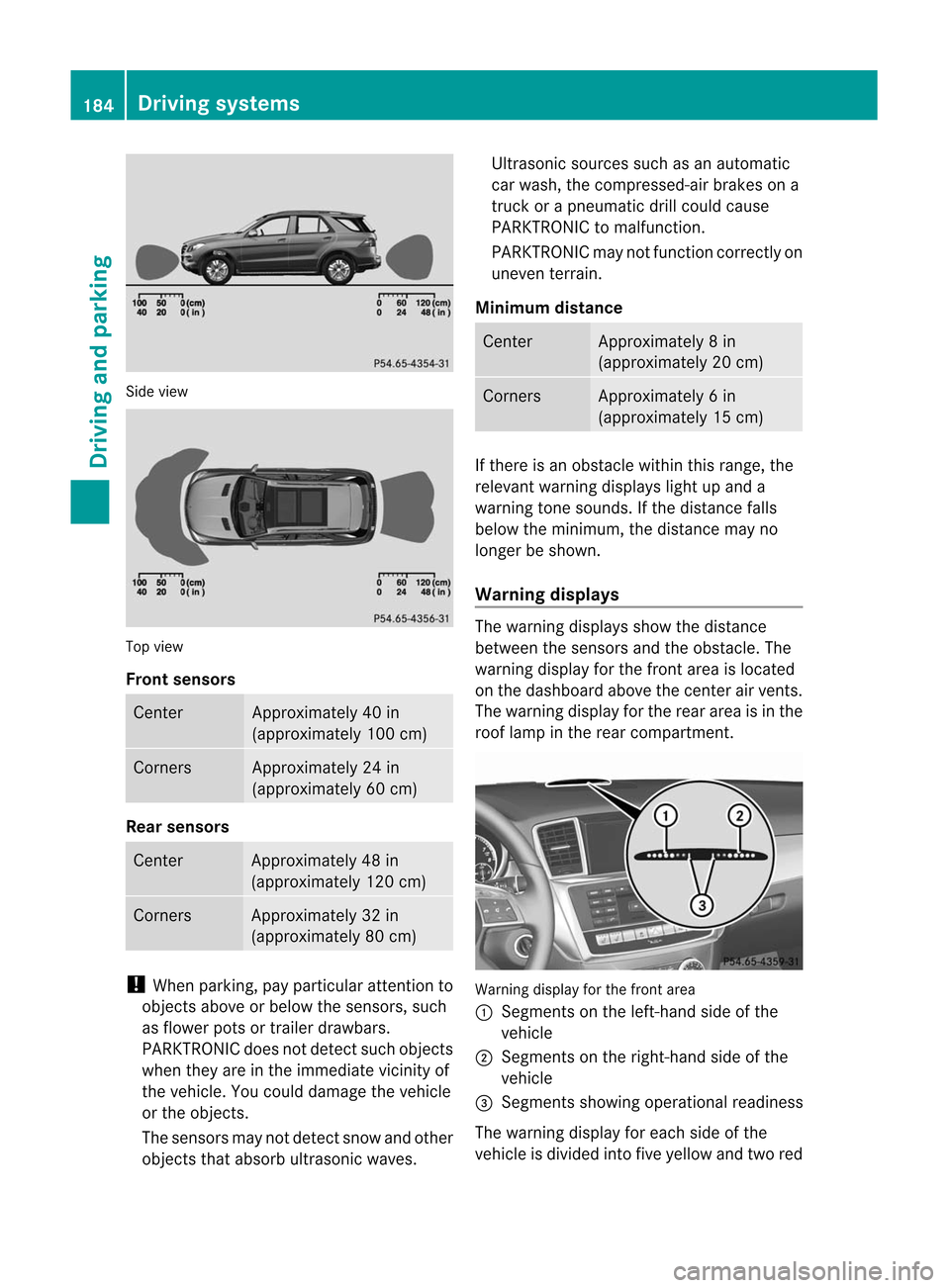
Sid
evie w Top
view
Fro ntsenso rs Ce
nter Appr
oxim ately40 in
(a ppr oxim ately100 cm) Co
rners Appr
oxim ately24 in
(a ppr oxim ately60 cm) Rear
senso rs Ce
nter Appr
oxim ately48 in
(a ppr oxim ately120 cm) Co
rners Appr
oxim ately32 in
(a ppr oxim ately80 cm) !
Whe npark ing,pay particular attentio nt o
object sabove orbelow thesensors, such
as flower potsortrailer drawbars.
PARKTRONIC doesnotdetect suchobject s
when theyareinthe immediate vicinityof
the vehicle. Youcould damage thevehicle
or the object s.
The sensors maynotdetect snowandother
object sthat absorb ultrasonic waves. Ultrasonic
sourcessuchasan automatic
car wash, thecompressed- airbrakes ona
truck orapneumatic drillcould cause
PARKTRONIC tomalfunct ion.
PARKTRONIC maynotfunct ioncorrec tlyon
uneven terrain.
Minimum distance Center Approx
imately 8in
(approx imately 20cm) Corne
rs Appr
oxim ately 6in
(approx imately 15cm) If
ther eis an obst acle within thisrange ,the
relevan twarn ing displ ayslight upand a
warn ingtone soun ds.Ifth edist ancefalls
below themin imum ,th edist ancemay no
lon ger besho wn.
Wa rning displa ys The
warn ingdispl aysshowthedist ance
bet ween thesen sorsand theo bstac le.The
warning displayforthe fron tarea isloca ted
on the dashboa rdabo vethe center airvents.
The warning displayforthe rear area isin the
roof lamp inthe rear compartment. Warning
displayforthe front area
: Segments onthe left-hand sideofthe
vehicl e
; Segments onthe right-hand sideofthe
vehicl e
= Segments showingopera tional readiness
The warning displayforeach sideofthe
vehicl eis divi ded into fiveyellow and twored 184
Drivi
ngsystemsDriving and parking
Page 204 of 396
R
you swit chon thetur nsignals .Int his event,
the warnings aresuppressed foracertain
period oftime.
R adriving safetysystem interven es,such as
ABS ,BAS orESP ®
.
Adapt ive
If Adaptive is
selected, nowarning vibration
occurs if:
R you switch onthe turn signals. Inthis event,
the warnings aresuppressed foracertain
period oftime.
R adriving safetysystem interven es,e.g.
ABS ,BAS orESP ®
.
R you accelerate hard,e.g.kickdown.
R you brake hard.
R you steer actively, e.g.swerve toavoid an
obstacle orchange lanequickly.
R you cutthe corner onasharp bend.
In order thatyouarewarned onlywhen
necessary andingood timeifyou cross the
lane marking, thesystem recogniz escertain
condition sand warns youaccordingly.
The warning vibration occursearlierif:
R you approach theouter lanemarking ona
bend.
R the road hasvery wide lanes, e.g.a
freeway.
R the system recogniz essolid lanemarkings.
The warning vibration occurslaterif:
R the road hasnarrow lanes.
R you cutthe corner onabend. Active
Driving Assistance package
General notes The
Active Driving Assistanc epackage
consist sof DIS TRONIC PLUS(Ypage 169),
Act ive Blind SpotAssist (Ypage 202)and
Act ive Lane Keeping Assist(Ypage 205). Active
BlindSpotAssist Import
antsafety notes
Act ive Blind SpotAssist usesaradar sensor
system tomonitor theside areas ofyour
vehicle whichareinback ofthe driver. A
warning displayin the exterior mirrorsdraws
your attent iontovehicles detectedinthe
monitored area.Ifyou then switch onthe
corresponding turnsignal tochange lane,you
will also receive anoptical andaudible
collision warning. Ifarisk oflateral collision
is detect ed,correct ivebraking mayhelp you
avoid acollision. Tosupport thecourse-
correct ingbrake application, Active Blind
Spot Assist alsouses theforward-facing radar
sensor system. Active Blind SpotAssist
supports youfrom speeds ofapproximately
20 mph (30km/h). G
WARNING Act
ive Blind SpotAssist isonly anaid, and
may detect vehicles/obstacles incorrectlyor
not atall.
The system maybeimpaired ormay not
funct ionif:
R there ispoor visibili ty,e.g. due tosnow,
rain, fogorspray.
R the rear and/or frontsensors aredirty.
Act ive Blind SpotAssist maynotdetect
narrow vehicles, suchasmotorc yclesor
bicycles, ormay onlydetect themtoolate. It
cannot detectvehicles thatareovertaken at
a small distance andthen enter theblind spot
area.
Act ive Blind SpotAssist cannot detectroad
and traffic condition s.Itis not asubstitute for
attent ivedriving. Youareresponsible forthe
vehicle's speed,braking ingood time, and
steering correctly.Always adaptyourdriving
style tosuit theprevailing roadandweather
condition s.Always payattent iontotraffic
condition sand your surroundings. Otherwise,
you may failtorecogniz edangers intime,
cause anaccident andinjure yourself and
others. 202
Driving
systemsDriving and parking
Page 205 of 396
i
USA
only:
This device hasbeen approved bythe FCC
as a“Vehicula rRadar System”. The radar
sen sor isint ended foruse inan auto motive
radar systemonly. Remo val,tampering,or
alte ringof thedevi cewill void any
warr anties, and isno tp ermit tedbythe
FCC. Donot tamper with,alter, oruse in
any non-approved way.
An yunauthoriz edmodificat iontothis
device couldvoidtheuser’s authorit yto
operate theequipment.
For Active Blind SpotAssist toassist you
when driving, theradar sensor system must
be activat ed(Ypage 236)and operation al.
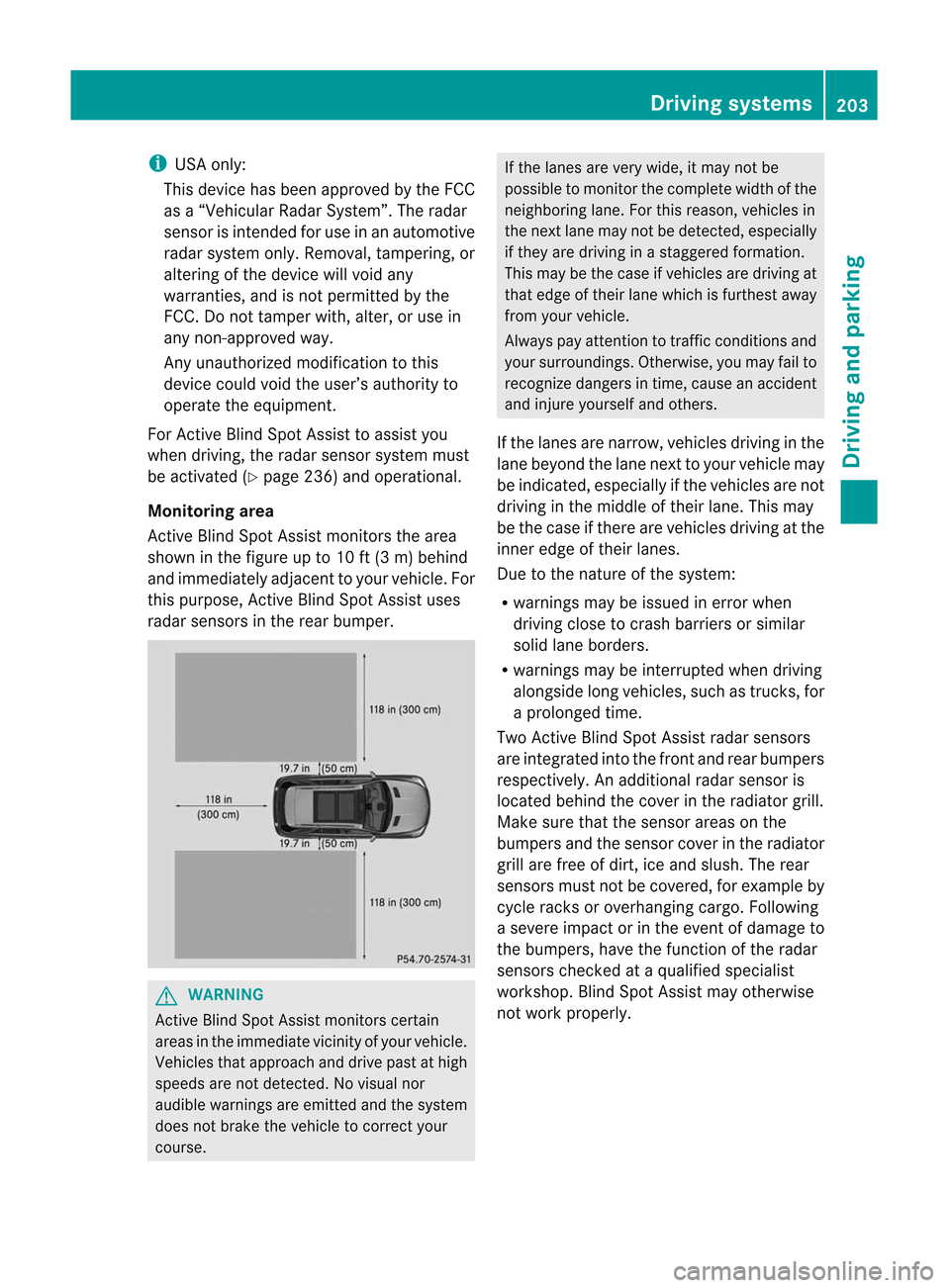
Monitoring area
Ac tive Blind SpotAssist monitorsthe area
shown inthe figure upto10 ft(3 m) behind
and immediately adjacenttoyour vehicle. For
this purpose, Active Blind SpotAssist uses
radar sensors inthe rear bumper. G
WARNIN
G Act
ive Blind SpotAssist monitorscert ain
areas inthe immediate vicinityof your vehicle.
Vehicles thatapproach anddrive pastathigh
speeds arenot detect ed.Novisual nor
audibl ewarnings areemitt edand thesystem
does notbrake thevehicle tocorrec tyour
course. If
the lanes arevery wide, itmay notbe
possible tomonit orthe complete widthofthe
neighboring lane.Forthis reason, vehicles in
the next lanemaynotbedetect ed,especially
if they aredriving inastaggered formation.
This may bethe case ifvehicles aredriving at
that edge oftheir lanewhich isfurthest away
from yourvehicle.
Always payatten tiontotraffic conditionsand
your surroundings. Otherwise,youmay failto
recogn izedangers intime, cause anaccident
and injure yourself andothers.
If the lanes arenarrow, vehicles drivinginthe
lane beyond thelane next toyour vehicle may
be indicated, especially ifthe vehicles arenot
driving inthe middle oftheir lane. Thismay
be the case ifthere arevehicles drivingatthe
inner edgeoftheir lanes.
Due tothe nature ofthe system:
R warnings maybeissued inerror when
driving closetocrash barriers orsimilar
solid laneborders.
R warnings maybeinterr upted whendriving
alongside longvehicles, suchastruck s,for
a prolonged time.
Two Active Blind SpotAssist radarsensors
are integrat edinto thefront andrear bumpers
respect ively.Anadditional radarsensor is
located behindthecover inthe radiator grill.
Make surethatthesensor areasonthe
bumpers andthesensor coverinthe radiator
grill arefree ofdirt, iceand slush. Therear
sensors mustnotbecovered, forexample by
cycle racks oroverhanging cargo.Following
a severe impact orinthe event ofdamage to
the bumpers, havethefunct ionofthe radar
sensors checkedataquali fiedspecialist
workshop. BlindSpotAssist mayotherwise
not work properly. Driving
systems
203Driving and parking Z
Page 207 of 396
user
s.Alwa ysmak esure that there is
suff icientdist anceon theside forother traff ic
or obst acles.An inap propriat ebrak e
applic ationm aybe interr upte dat any timeif
you steer sligh tlyintheoppos itedire ction or
acc eler ate.
You arerespon sible fordriv ingatappro priate
spee ds,brak ingingood time,and steeri ng
cor rectly. Always adaptyourdrivingstyle to
suit theprev ailingroad andweat her
con dition s.Always payattent ion totraff ic
con dition sand your surroundings. Other wise,
you may failtorec ogn izedang ersintim e,
caus ean acc iden tand inju reyoursel fand
othe rs.
The rewillbe either nooronl ya we ak cou rse-
corr ectingbra keapplica tionif:
R there arevehi cles orobsta cles,e.g.crash
barri ers,locatedonboth sidesof you r
vehi cle.
R avehi cleapp roache syou tooclose lyat the
side .
R you have adopted asporty drivingstyle with
high cornering speeds.
R you clearlybrake oraccel erate.
R adrivi ngsafe tysys tem intervenes, e.g.
ESP ®
or PRE-SAFE ®
Brake.
R ESP ®
is swi tched off.
R the off-road programisswitched on.
R aloss oftire pressure oradefective tireis
detected.
Switching onActive BlindSpotAssist
X Make surethattheradar sensor system
(Y page 236)andActive Blind SpotAssist
(Y page 232)areactivated inthe on-board
computer.
X Turn theSmartKey toposition 2in the
ignition lock.
Warning lamps:light upred inthe
exterior mirrorsforapproximately 1.5
seconds andthen turnyellow. Tra
iler towing
When youattach atrailer, makesureyouhave
correct lyestablished theelectrical
conn ection. Thiscanbeaccomplished by
checkin gthe trailer lighting. ActiveBlind Spot
Assist isthen deactivated. Theindicator lamp
lights upyell owinthe exterior mirrorsandthe Active
BlindSpotAssist Currently Unavailable
SeeOperator's Manual message
appearsinthe multifunction
displa y.
Active LaneKeeping Assis t Importa
ntsafety notes
Act iveLane Keeping Assistmonitors thearea
in front ofyour vehicle bymeans ofacamera
at the top ofthe windshiel d.Act ive Lane
Keeping Assistdetects lanemarkings onthe
road andwarns youbefore youleave your
lane unintent ionally.Ify ou do not react tothe
warning, alane-cor rectingapplication ofthe
brakes canbring thevehicle backintothe
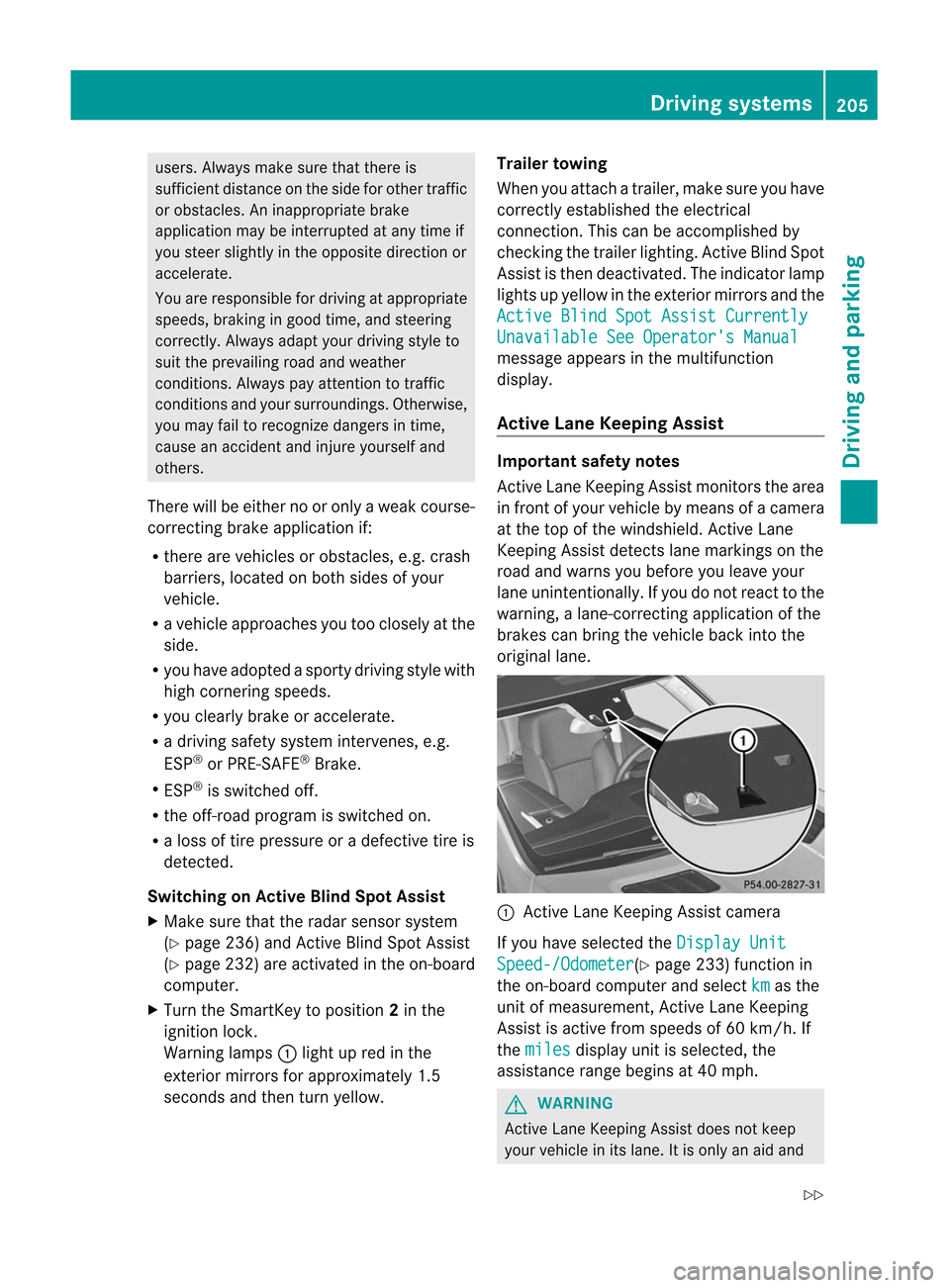
original lane. :
Active Lane Keeping Assistcamera
If you have selected the Display
Unit Speed-/Odome
ter (Y
page 233)functionin
the on-board computer andselect km as
the
unit ofmeasurement, Active Lane Keeping
Assist isactive fromspeeds of60 km/ h.If
the miles display
unitisselected, the
assistance rangebegins at40 mph. G
WARNIN
G Act
ive Lane Keeping Assistdoesnotkeep
your vehicle inits lane. Itis only anaid and Driving
systems
205Driving and parking
Z
Page 238 of 396
i
For
furth erinfor mationonthe automa tic
locki ngfea ture ,see (Ypage 79).
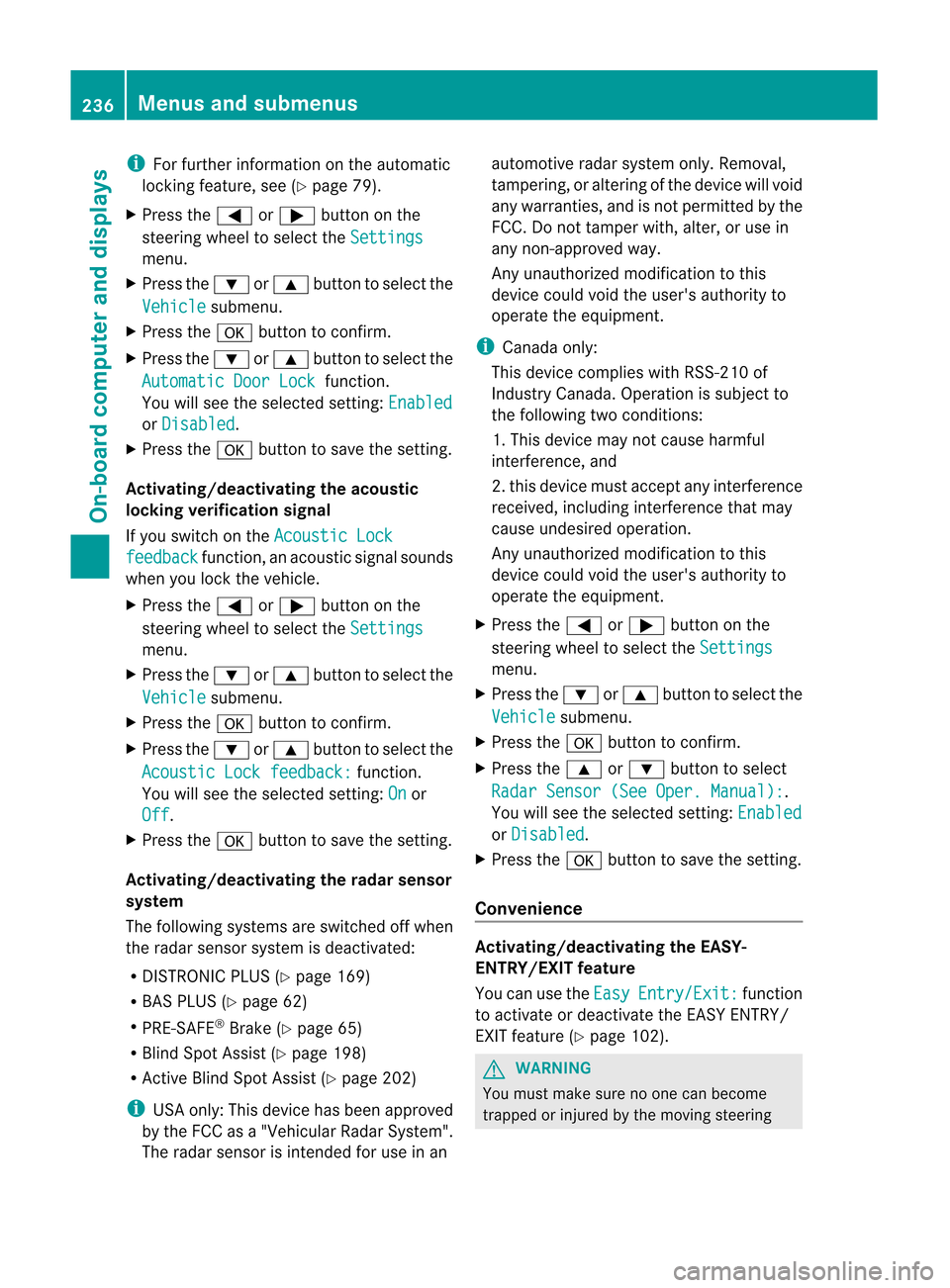
X Pres sthe = or; button onthe
stee ring wheelto sel ect the Sett
ings menu
.
X Pres sthe : or9 button tosel ect the Vehi
cle su
bme nu.
X Pres sthe a button toconfir m.
X Pres sthe : or9 button tosel ect the Auto
maticDoor Lock functi
on.
You willsee theselected setting : Enab
led or Disa
bled .
X Pres sthe a button tosav ethe setting .
Ac tivati ng/deac tivati ngthe acoustic
lo cki ng veri ficatio nsig nal
If yo uswi tch onthe Acou
stic Lock feed
back functi
on,anaco ustic signal sou nds
whe nyou lock thevehicle.
X Press the= or; button onthe
steerin gwheel toselect the Settings
menu.
X Press the: or9 button toselect the Vehicle submenu.
X Press thea button toconf irm.
X Press the: or9 button toselect the Acoustic
Lockfeedback: funct
ion.
You willsee theselected setting: On or
Off .
X Press thea button tosave thesetting.
Activating/deactivat ingthe radarsensor
system
The following systemsareswitched offwhen
the radar sensor system isdeactivated:
R DIS TRONIC PLUS(Ypage 169)
R BAS PLUS (Ypage 62)
R PRE-S AFE®
Brake (Ypage 65)
R Blind SpotAssist (Ypage 198)
R Act ive Blind SpotAssist (Ypage 202) i
USA
only: Thisdevice hasbeen approved
by the FCC asa"Vehicular RadarSyst em".
The rada rsensor isint ended foruse inan automot
iveradar system only.Removal,
tamperin g,or altering ofthe device willvoid
any warrant ies,and isnot permit tedbythe
FCC. Donot tamper with,alter, oruse in
any non-approved way.
An yunauthoriz edmodificat iontothis
device couldvoidtheuser's authorit yto
operate theequipment. i
Canada
only:
This device complies withRSS-210of
Indust ryCanada. Operation issubject to
the following twoconditions :
1. This device maynotcause harmful
int erferen ce,and
2. this device mustaccept anyinterferen ce
received, includinginterferen cethat may
cause undesired operation.
An yunauthoriz edmodificat iontothis
device couldvoidtheuser's authorit yto
operate theequipment.
X Press the= or; button onthe
steer ingwheel toselect the Setting
s menu.
X Press the: or9 button toselect the Vehicle submenu.
X Press thea button tocon firm.
X Press the9 or: button toselect Radar
Sensor (SeeOper. Manual) : .
You willsee theselect edsett ing: Enabled
or Disable
d .
X Press thea button tosave thesetting.
Convenienc e Activating/d
eactivatingthe EASY-
ENTR Y/EXIT feature
You canusethe Easy Entry/E
xit: func
tion
to activat eor deactivat ethe EASY ENTRY/
EXIT feature (Ypage 102). G
WARN
ING You
must make surenoone canbecome
trapped orinjur edbythe movin gsteer ing 236
Menus
andsubm enusOn-board computer and displays
Page 261 of 396
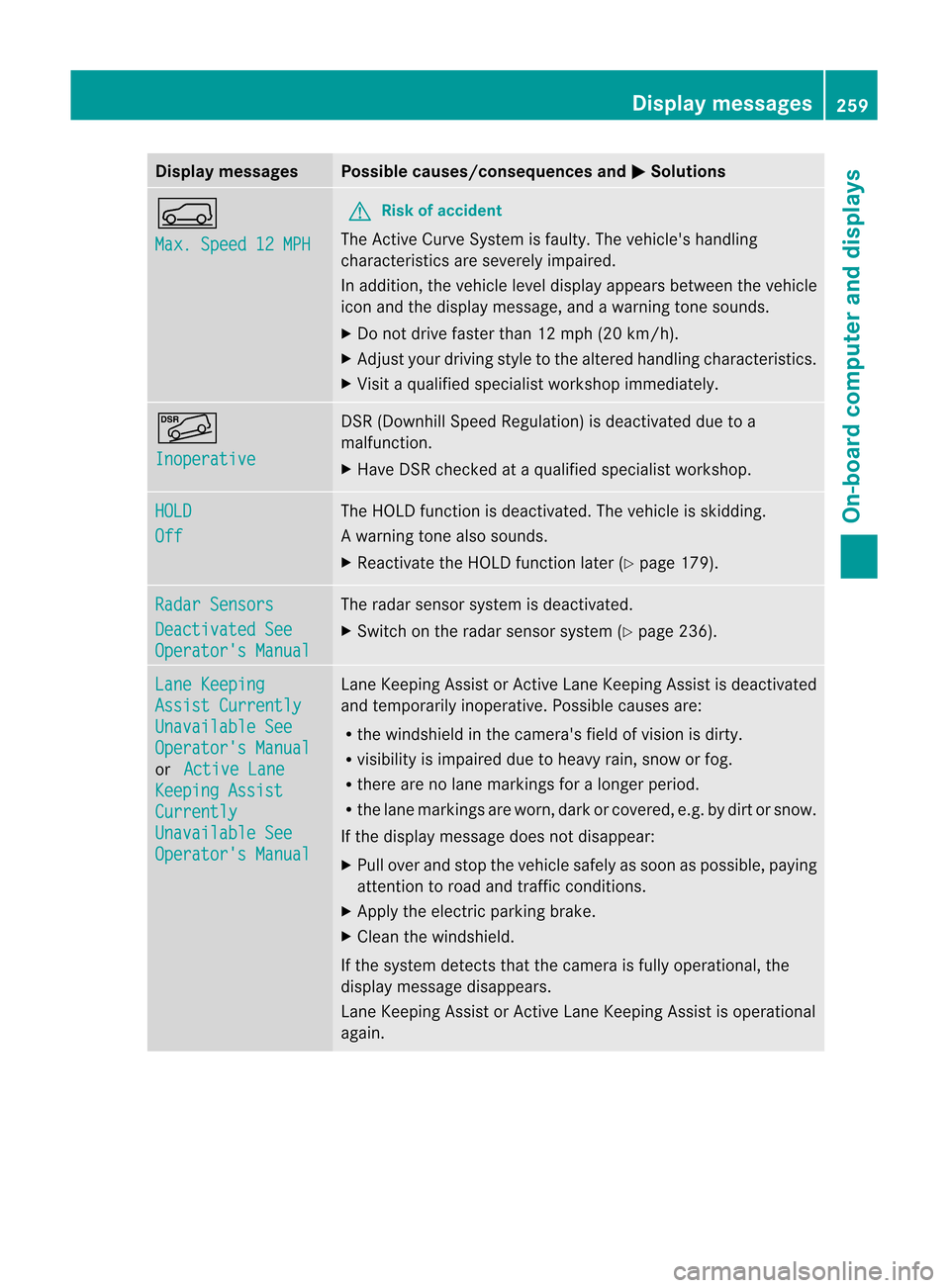
Disp
laymessa ges Poss
iblecauses/c onseq uences and M Solu
tions h
Max
.Spe ed 12MPH G
Ri
sk ofacci dent The
Active Curv eSys temi sfaulty. Thevehicle's handling
characteristics areseverely impaired.
In addition, thevehicle leveldispla yappea rsbetween thevehicle
icon andthedispla ymessage, andawarning tonesounds.
X Do not drive faster than12mph (20km/h).
X Adjust yourdriving styletothe altered handling characteristics.
X Visit aqual ified speciali stworkshop immediately . Ã
Inoperative DSR
(Downhill SpeedRegulation) isdeactivated duetoa
malfunction.
X Have DSRchecked ataqual ified speciali stworkshop. HOLD
Off The
HOLD function isdeactivated. Thevehicle isskidding.
Aw arning tone also soun ds.
X React ivateth eHO LD function late r(Y page 179). Rad
arSensors Dea
ctivatedSee Ope
rator'sMan ual The
radar sensor syst emisdeac tivate d.
X Swit chon theradar sensor syst em(Ypage 236). Lan
eKee ping Ass
ist Currently Una
vailableSee Ope
rator'sMan ual or Act
ive Lane Kee
pingAss ist Cur
rently Una
vailableSee Ope
rator'sMan ual Lan
eKeep ingAssist orActiveLan eKeep ingAssist isdeac tivate d
and tempo rarilyino perat ive.Poss iblecaus esare:
R thewind shieldinthecam era'sfiel dof vis ion isdirt y.
R vis ibilit yis impair eddue toheav yrain ,sn ow orfog .
R there arenolane markingsfor alon ger period.
R thelane markingsare worn ,dark orcover ed, e.g.bydir torsnow .
If the displ aymes sage does not disa pp ear:
X Pu llove rand stop thevehiclesa fel yas soo naspossible ,pay ing
attent iontoroad andtraffic conditions.
X Apply theelectric parking brake.
X Clea nthe windshield.
If the system detectsthat thecamera isfully operational, the
displa ymessage disappears.
Lane Keeping AssistorAct ive Lane Keeping Assistisoperational
again. Display
messages
259On-board computer and displays Z
Page 262 of 396
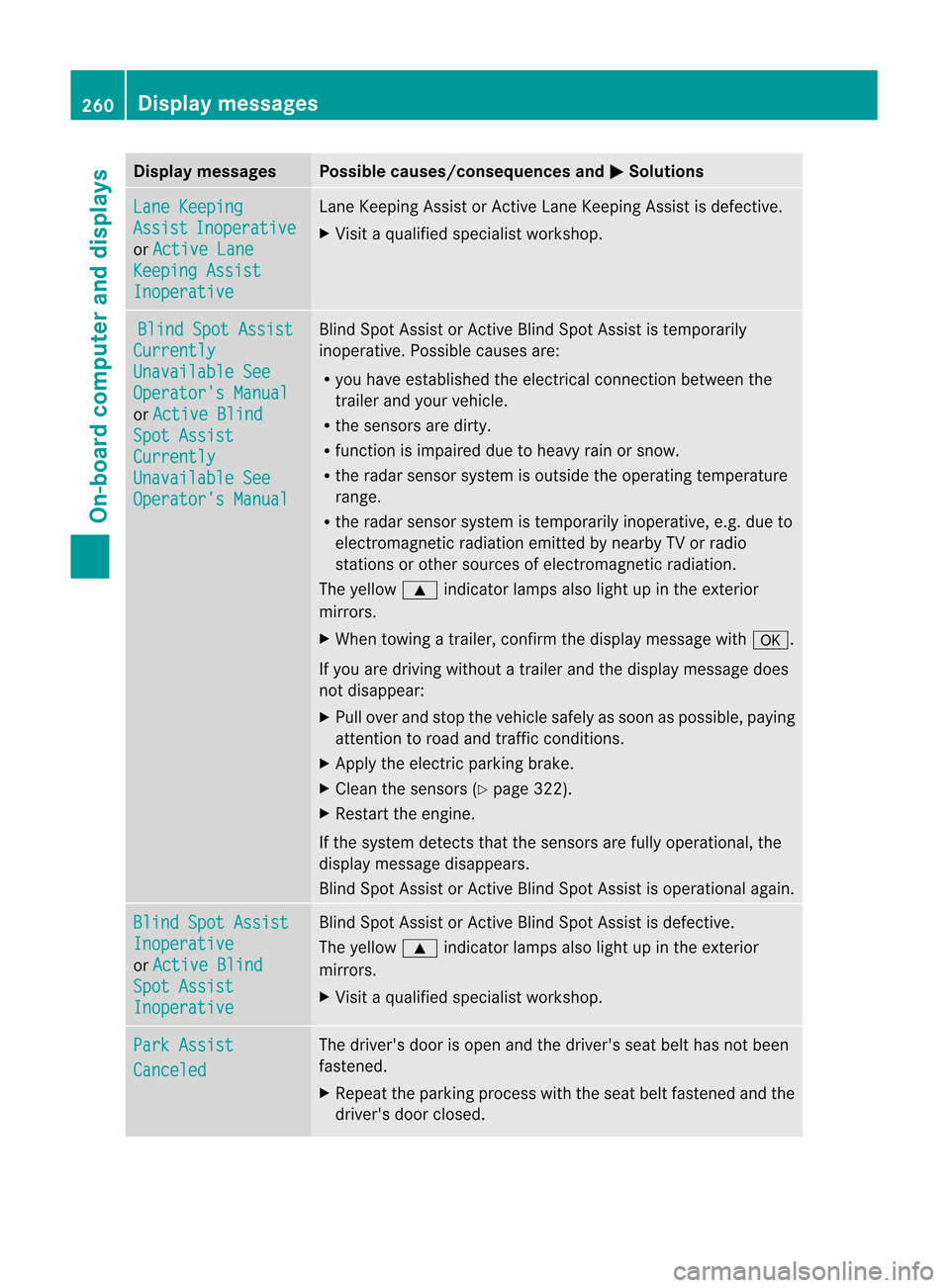
Disp
laymessa ges Poss
iblecauses/c onseq uences and M Solu
tions Lan
eKee ping Ass
ist Ino
perative or Act
ive Lane Kee
pingAss ist Ino
perative Lan
eKee pingAs sis torA ctive Lane Keeping Assi stisdef ectiv e.
X Vis itaqu alifi ed spe cialist wo rksho p. Blin
dSpot Assist Curr
ently Unav
ailableSee Oper
ator'sManu al or Acti
veBlin d Spot
Assist Curr
ently Unav
ailableSee Oper
ator'sManu al Bli
nd Spot Assistor Active Blind Spot Assististemp orarily
inop erative .Possible causesare:
R you have established theelectric alconn ection between the
trailer andyour vehicle.
R the sensors aredirty.
R funct ionisimpaired duetoheavy rainorsnow.
R the radar sensor system isoutside theoperating temperature
range.
R the radar sensor system istemporarily inoperative, e.g.due to
electrom agneticradiation emittedbynearby TVorradio
station sor other sources ofelectrom agneticradiation.
The yellow 9indicator lampsalsolight upinthe exter ior
mirrors.
X When towing atrailer, confirmthedisplay message witha.
If you aredriving without atrailer andthedisplay message does
not disappea r:
X Pull over andstop thevehicle safelyassoon aspossible, paying
atten tiontoroad andtraffic conditions.
X Apply theelectric parking brake.
X Clean thesensors (Ypage 322).
X Restart theengine.
If the system detectsthat thesensors arefully operational, the
display message disappears.
Blind SpotAssist orAct ive Blind SpotAssist isoperational again. Blind
SpotAssist Inoperative
or Active
Blind Spot
Assist Inoperative Blind
SpotAssist orAct ive Blind SpotAssist isdefectiv e.
The yellow 9indicator lampsalsolight upinthe exter ior
mirrors.
X Visit aquali fiedspecialist workshop. Park
Assist Canceled The
driver's doorisopen andthedriver's seatbelthasnotbeen
fasten ed.
X Repeat theparking process withtheseat beltfastened andthe
driver's doorclosed. 260
Display
messagesOn-board computer and displays
Page 264 of 396
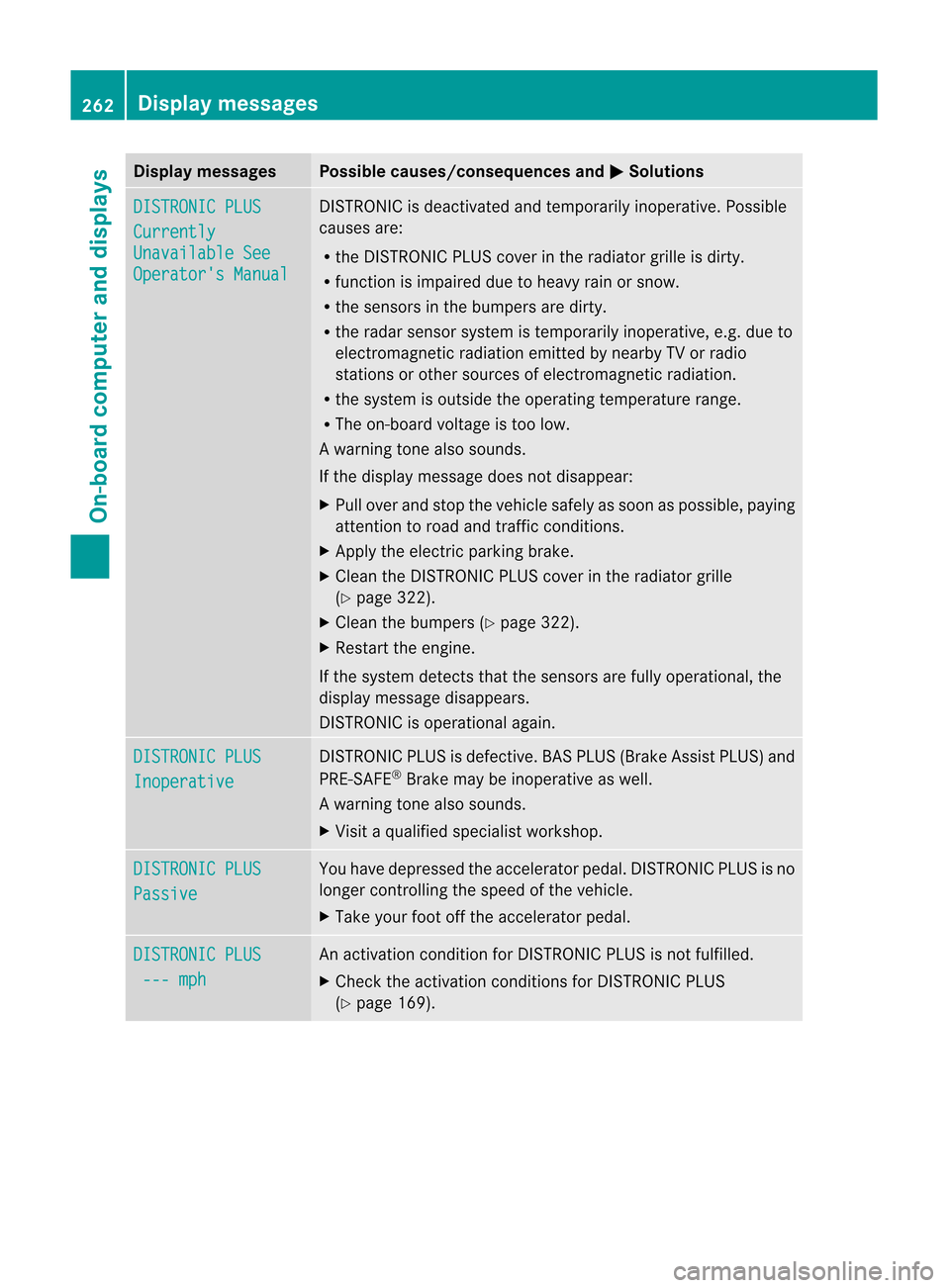
Disp
laymessa ges Poss
iblecauses/c onseq uences and M Solu
tions DIS
TRONIC PLUS Cur
rently Una
vailableSee Ope
rator'sMan ual DI
ST RON ICisdeac tivat ed and tempo rarily inoper ative. Pos sible
caus esare:
R theDI ST RON ICPLU Sco ver intheradi atorgri lle isdir ty.
R fun ction isimp aire ddue toheav yrain orsnow.
R thesen sorsin thebump ersare dirty.
R therada rsensor system istempor arilyinoperat ive,e.g. due to
electr omagnet icradiation emittedbynearby TVorradio
stat ions orother sources ofelectr omagnet icradiation.
R the system isoutside theoperatin gtemper aturerange.
R The on-board voltage istoo low.
Aw arning tone also soun ds.
If th edispl aymes sage does notd isappear:
X Pull over andstop the vehic lesafely assoon aspossible ,paying
att ent ion toroad andtraffic conditio ns.
X Apply theelect ricpark ingbrak e.
X Clean theDISTRON ICPLUS coverinthe radiat orgrille
(Y page 322).
X Clean thebumper s(Y page 322).
X Restar tthe engine.
If the system detectsthat thesensors arefully operational, the
displa ymessage disappears.
DIS TRONIC isoperational again. DISTRONIC
PLUS Inoperative DIS
TRONIC PLUSisdefective. BASPLUS (Brake AssistPLUS) and
PRE-SA FE®
Brake maybeinoperative aswell.
Aw arning tone also soun ds.
X Visi taqu alified specialist workshop. DISTRO
NICPLUS Passiv
e You
have depressed theacceler atorpedal. DISTRONIC PLUSisno
longer controlling thespeed ofthe vehicle.
X Take yourfootoffthe acceler atorpedal. DISTRO
NICPLUS ---
mph An
activ ation condition forDIS TRONIC PLUSisnot fulfilled.
X Check theactiv ation condition sfor DIS TRONIC PLUS
(Y page 169). 262
Display
messagesOn-board computer and displays
Page 265 of 396
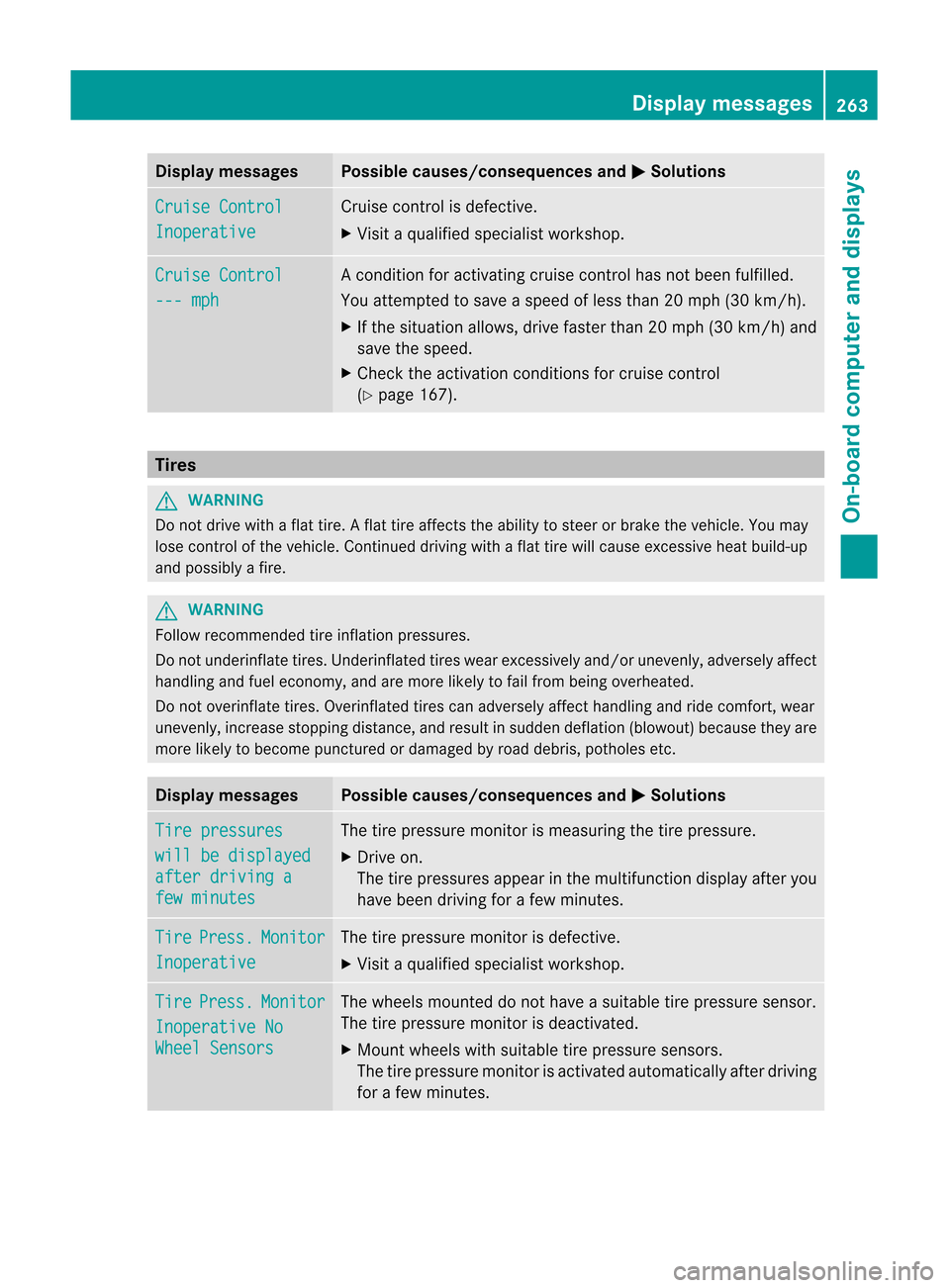
Disp
laymessa ges Poss
iblecauses/c onseq uences and M Solu
tions Cru
ise Control Ino
perative Cruis
eco ntrol isdef ective.
X Vis itaqualif iedspecialist wor kshop . Cru
ise Control ---
mph Ac
ondition foractivatin gcruise controlhas notbeen fulfilled.
You attempt edtosave aspeed ofless than 20mph (30km/ h).
X Ifthe situation allows,drivefaster than20mph (30k m/h )and
save thespee d.
X Check theactivati onconditions forcruise control
(Y pag e167). Tires
G
WARNING Do
not drive withaflat tire. Aflat tire affects theability tosteer orbrake thevehicl e.You may
lose control ofthe vehicl e.Continue ddrivi ngwith aflat tire willcause excessive heatbuild-up
and possi blyafire. G
WARNING Follo
wrecommended tireinfla tion pressu res.
Do not underi nflatetires.Underinfla tedtires wearexcess ivelyand /or unevenl y,ad vers elyaff ect
ha ndl ing and fueleco nomy ,and aremore likel yto failfrom being overheated.
Do not overinflate tire s.Ove rinflated tirescan advers elyaff ect handl ing and ridecomfo rt,we ar
une venl y,incre asestop ping dista nce, andresulti ns udden deflation (blowo ut)bec ause they are
mor elik ely tobec ome punctured ordamag edbyroad debris,pot hole set c. Disp
laymes sages Possi
blecauses/cons equences andM Solu
tions Tir
epre ssu res wil
lbe dis played aft
erdrivin ga few
minute s The
tirepres sure monitorismeasuring thetire pressure.
X Drive on.
The tirepressures appearint he multifunction displayafter you
have been drivingfor afew minutes . Tire Press. Monito
r Inoper
ative The
tirepress uremonitor isdefecti ve.
X Visi taqu alified specialist workshop. Tire Press. Monito
r Inoper
ative No Wheel
Sensor s The
wheels mounteddo not have asuitable tirepressure sensor.
The tirepressure monitorisdeactiv ated.
X Mount wheels withsuitable tirepressure sensors.
The tirepressure monitorisactiv ated automatic allyafter drivin g
for afew minut es. Display
messages
263On-board computer and displays Z