fron panel MERCEDES-BENZ M-Class 2012 W166 User Guide
[x] Cancel search | Manufacturer: MERCEDES-BENZ, Model Year: 2012, Model line: M-Class, Model: MERCEDES-BENZ M-Class 2012 W166Pages: 396, PDF Size: 14.48 MB
Page 115 of 396
The
system cannotrecogn izethe following
road users:
R Road users without alighting systemof
their own, e.g.pedestrians
R Road users withdimlighting oftheir own,
e.g. cyclists
R Road users whose lighting isobstruct ed,
e.g. road users behind aguardrail
R Insome seldom cases,evenroadusers with
a lighting systemoftheir ownmay be
recogn izedtoolate ornot atall.
The automatic high-beam headlamps willthen
not bedeactivated oritwill beactivated in
spite ofpreceding oroncom ingroad users.
This could endanger youand/or othersand
cause anaccident .Always payclos eatt ent ion
to the traffic situat ionand switc hoff the high
beam manually ifnec essary. Head
lampsfogged upontheinside
The headlamps mayfogupon the inside if
the reishigh atmo spher ichumidit y.
X Dr ive with theheadlamps switchedon.
The level ofmoist uredimin ishes,
depen dingonthe lengt hof the jour ney and
the weather condition s(humidit yand
tem perat ure).
If the level ofmoist uredoes notdimin ish:
X Have theheadlamps checkedataqualified
spec ialist workshop. Inter
iorlight ing Over
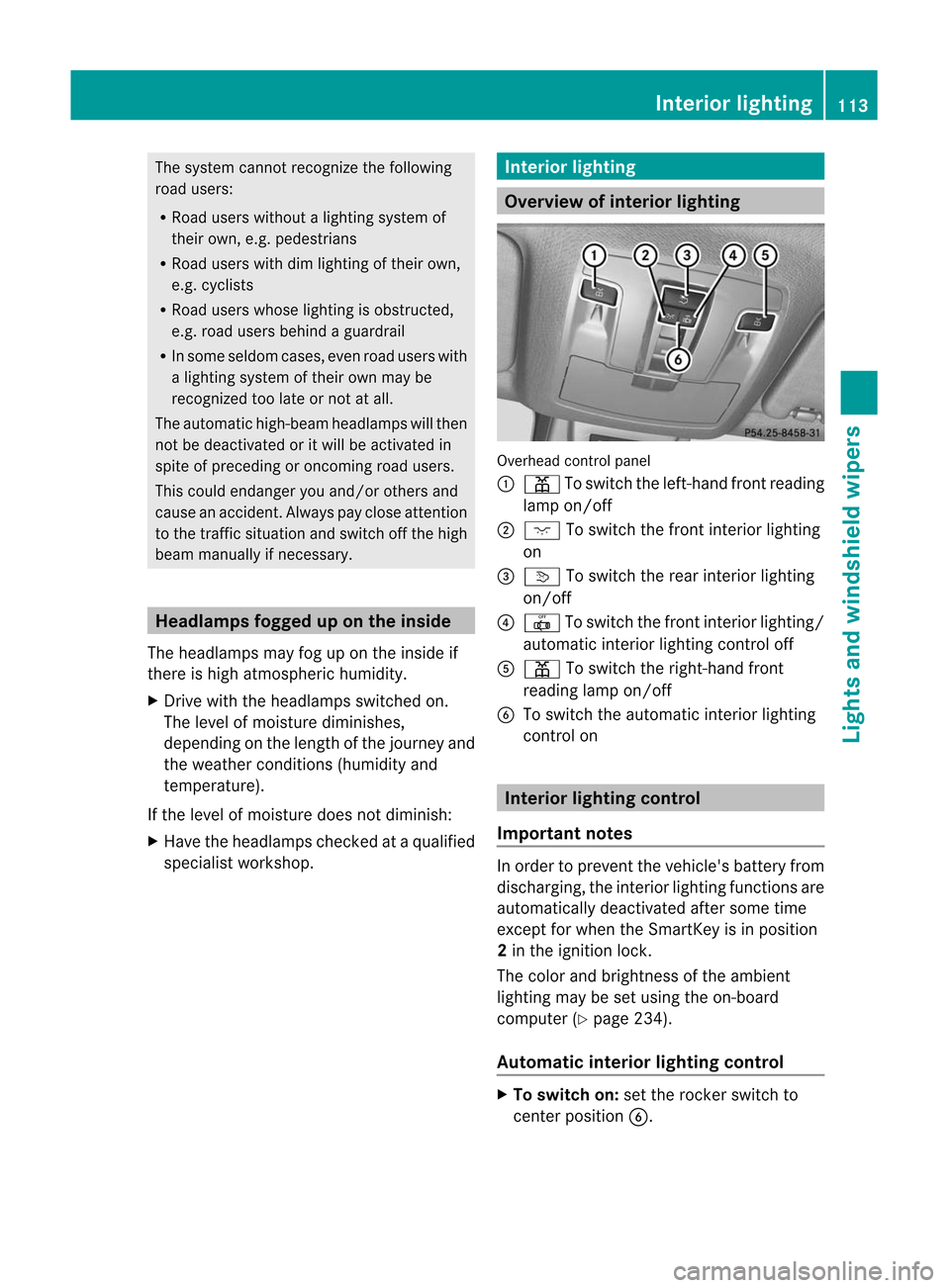
view ofinter iorlight ing Over
head control panel
: p Toswitc hthe left-han dfro ntreadin g
lamp on/off
; c Toswitc hthe frontinterior lighting
on
= v Toswitc hthe rear interior lighting
on/ off
? | Toswitc hthe frontint erior lighting/
autom aticinterior lightingcon trol off
A p Toswitc hthe right -handfront
read inglamp on/off
B Toswi tch the automatic interiorlighting
control on Inte
rior lighting control
Important notes In
order toprevent thevehicl e'sbattery from
discha rging,theinterior lighting functions are
au tomatical lydea ctivated aftersome time
except forwhen theSmartKey isin posi tion
2 in the ignitio nlock.
The color andbrigh tness ofthe ambi ent
lig hting maybeset using the on-board
computer (Ypag e234).
Automatic interiorlight ingcontr ol X
To switch on:setthe rocker switc hto
cen terposit ionB. Inter
iorlight ing
113Lights and windshield wipers Z
Page 132 of 396
X
Turn theSmart Keytoposition 2in the
ignition lock.
X Press theà button .
X Press theñ button repeatedly untilthe
desired climatemodeappears inthe
display . Setting
thetemp erature
Climate control Differ
enttemperat urescanbeset forthe
driver's andfront-passenger sides.
X Turn theSmart Keytoposition 2in the
ignition lock.
X To increase/reduce: turncontrols:and
B clock wiseorcount erclock wise
(Y page 123).
Only change thetemperat uresettingin
small increm ents.Start at72 ‡(22 †).
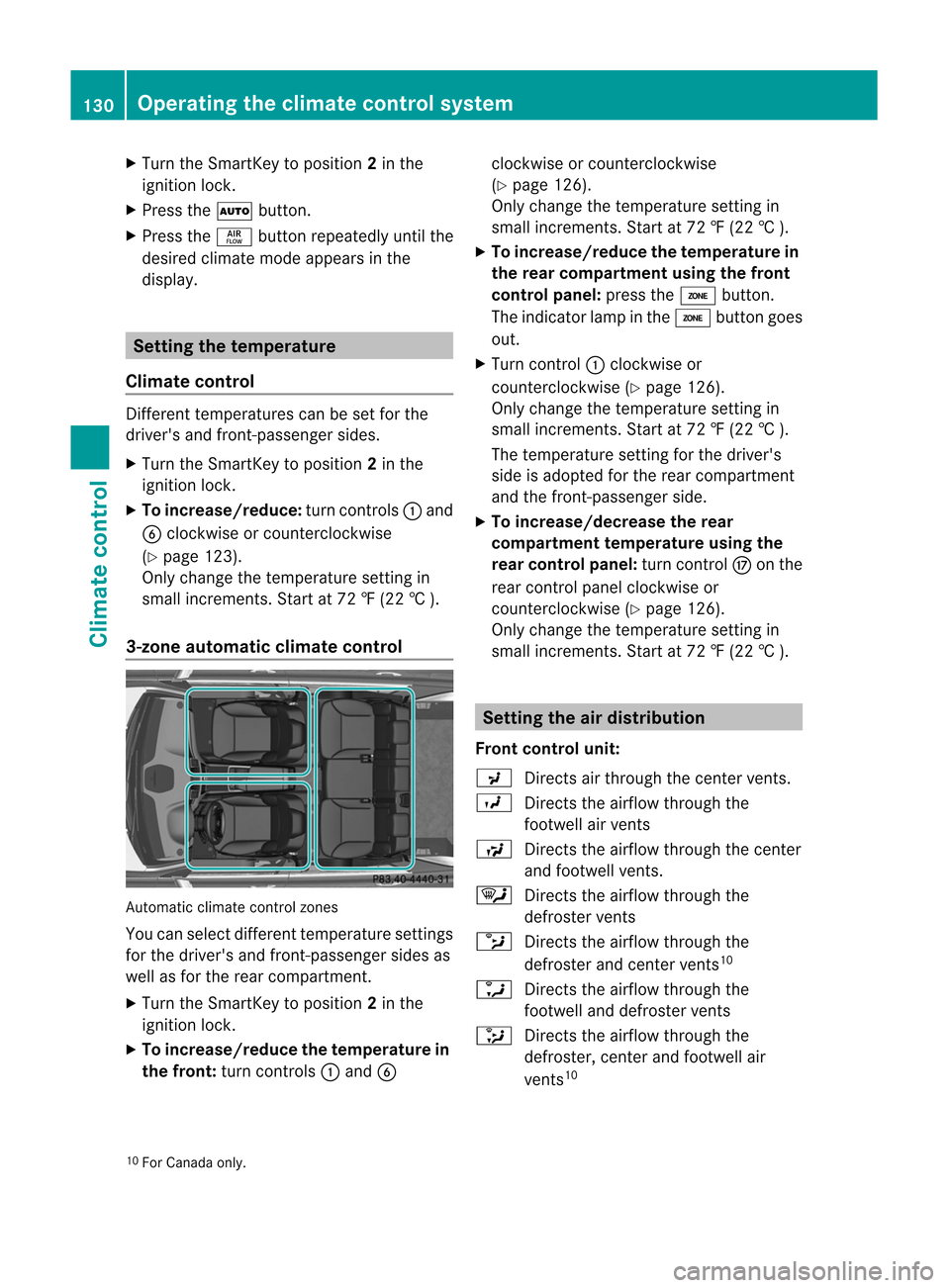
3-zone automat icclimate control Automat
icclimate controlzones
You canselect different temperat uresett ings
for the driver's andfront-passenger sidesas
well asfor the rear compart ment.
X Turn theSmart Keytoposition 2in the
ignition lock.
X To increase/reduce thetemp eraturein
the front :turn controls:and B clock
wiseorcount erclock wise
(Y page 126).
Only change thetemperat uresettingin
small increm ents.Start at72 ‡(22 †).
X To increase/reduce thetemp eraturein
the rear compar tment using thefront
control panel:presstheá button .
The indicator lampinthe á button goes
out.
X Turn control: clock wiseor
count erclock wise(Ypage 126).
Only change thetemperat uresettingin
small increm ents.Start at72 ‡(22 †).
The temperat uresettingforthe driver's
side isadopted forthe rear compart ment
and thefron t-passenger side.
X To increase/decrease therear
compar tment temp eratureusing the
rear control panel:turncontrolM onthe
rear controlpanel clockwiseor
count erclock wise(Ypage 126).
Only change thetemperat uresettingin
small increm ents.Start at72 ‡(22 †). Setting
theairdistr ibution
Front control unit:
P Directsair through thecent ervent s.
O Directsthe airflow through the
footwell airvent s
S Directsthe airflow through thecent er
and footwell vents.
¯ Directsthe airflow through the
defrost ervent s
b Directsthe airflow through the
defrost erand cent ervent s10
a Directsthe airflow through the
footwell anddefrost ervent s
_ Directsthe airflow through the
defrost er,cent erand footwell air
vent s10
10 For Canada only. 130
Opera
tingtheclimate controlsystemClimate control
Page 133 of 396
Rear
control panel:
M Directsthe airflo wthrou ghthe rear
center andrearsid eairvents.
O Directsthe airflo wthrou ghthe
footw ellai rv ent s i
Using
therear control panel, youcan also
activat eboth airdistribut ionposition s
simultaneously. Inorder todo this, press
both airdistribut ionbutton s.The airisthen
routed through allrear airvent s. i
Regardless
ofthe airdistribut ionsett ing,
airflow isalway sdirect edthrough theside
air vent s.The side airvent scan only be
closed whenthecontrols onthe side air
vent sare turn eddownwards.
X Turn theSmart Keytoposition 2in the
ignition lock.
X Front control panel:pressthe_
button repeatedly untilthedesired symbol
appears inthe display.
X Rear control panel:presstheM and/
or O button . Sett
ingthe airflow
X Turn theSmart Keytoposition 2in the
ignition lock.
X To increase: presstheK button .
X To redu ce:press theI button . i
You
canuseautomatic climatecontrol to
set the airflow inthe rear compart ment
separately. Switching
theZONE function on/off
X To switch on:press theá button .
The indicat orlamp inthe á button lights
up.
Dual-z oneautomatic climatecontrol: the
temper aturesettingforthe driver's sideis not
adopted forthe fron t-passenger side.
The temper atureofthe fron t-passenger
side isadopted forthe rear compart ment.
Autom aticclimate control: the
temper aturesettingforthe driver's sideis
not adopted forthe fron t-passenger side
and therear compart ment.
When thebutton sor con trols for
temper ature,airflow orair distribut ionare
activat ed,the temper aturesettingforthe
driver's sideisnot adopted forthe other
climate control zones.
X To switch off:press theá button .
The indicat orlamp inthe á button goes
out.
The temper aturesettingforthe driver's
side isadopted forthe fron t-passenger side
and therear compart ment. Defrosting
thewindshield
You canusethis func tion todefrost the
windshield ortodefrost theinside ofthe
windshield andtheside windows. i
You
should onlyselect thedefrost ing
func tion until thewindshield isclear again.
X Turn theSmart Keytoposition 2in the
ignition lock.
X To activa te:press the¬ button .
The indicat orlamp inthe ¬ button lights
up.
The climate control system switchestothe
following functions:
R cooling withairdehumidification on11
R high airflow 12
R high temper ature12
R air distribut iontothe windshield and
fron tside windows
R air-r ecirculat ionmode off
11 Only withenginerunn ing.
12 Depe ndingon the outs idetem perat ure. Oper
ating theclima tecontr olsyst em
131Climate control Z
Page 225 of 396
!
Ifthe coolant temperature istoo high a
displa ymessage isshown.
If the coolant temperature risesabove
248 ‡(120 †),donot drive anyfurther as
this could damage theengine. Tachometer
The redband inthe tachometer indicatesthe
engine's overrevving range.
! Donot drive inthe overrevving range,as
this could damage theengine.
The fuel suppl yis interrupted toprotect the
engine whenthered band isreached. Outside
tempera turedisplay
The outside temperature displayis in the
multifunction display(Y page 224). G
WARNING The
outside temperature indicatorisnot
designed toserve asan ice-warning device
and istherefore unsuitablefor that purpose.
Indicated temperatures justabove the
freezing pointdonot guara nteethattheroad
surface isfree ofice. The road maystillbeicy,
especial lyin wooded areasoron bridges.
Changes inthe outside temperature are
displa yedafter ashort delay. Speedometer
withsegments
The segments inthe speedometer indicate
which speed rangeisavail able.
Cruise control(Ypage 167)activated:
The segments lightupfrom thestored speed
to the maximum speed.
DISTRONIC PLUS(Ypage 169)activated:
One ortwo segments inthe setspeed range
light up.
DISTRONIC PLUSdetects avehicle infront :The
segments betweenthespeed ofthe
vehicle infront andthestored speedlightup. Operating
theon-board computer
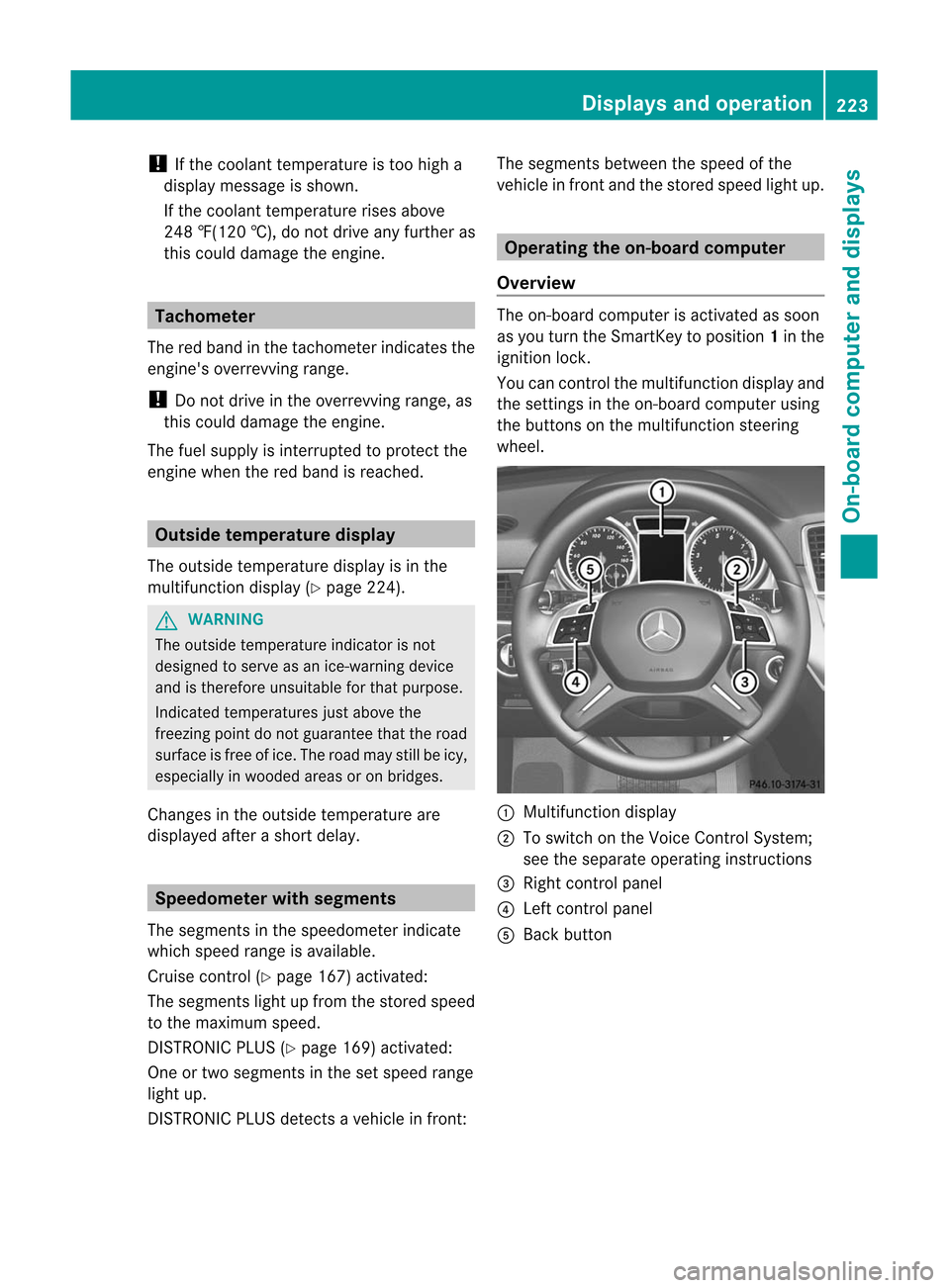
Overview The
on-board computer isactivated assoon
as you turn theSmartKey toposition 1in the
ignition lock.
You cancont rolthe multifunction displayand
the settings inthe on-board computer using
the buttons onthe multifunction steering
wheel. :
Multifunction display
; Toswitch onthe Voice Control System;
see theseparate operating instructions
= Right controlpanel
? Left controlpanel
A Back button Dis
plays andoperation
223On-board computer and displays Z
Page 310 of 396

out).
Press theremote controlbutton again
before itstops transmitting.
R align theanten nacable ofthe garage door
opener unit.Thiscanimprove signal
reception /transmission.
Opening/cl osingthegara gedoor Once
programmed, theintegr atedgarage
door opener willassume thefunct ionofthe
garage doorsystem's remotecontrol.Please
also read theoperating instructions forthe
garage doorsystem.
X Turn theSmart Keytoposition 2in the
ignition lock.
X Press transmitterbutton ;,=or? inthe
overhead controlpanel thatyouhave
programmed tooperate thegarage door.
Garage doorsystem withafixed code:
indicator lamp:lights upgreen.
Garage doorsystem witharolling code:
indicator lamp:flashes green. i
The
trans mitterwill trans mitasignal for
as long asthe trans mitterbutton isbeing
pressed. Afteramaximum often seconds,
trans mission istermin atedandindicator
lamp :flashes yellow.Press the
transmitter buttonagain,ifnecessary .
Cle aring thememory ofthe integ rated
garage dooropeneron the rear-view
mirror X
Turn theSmartKey toposi tion 2in the
ignitio nlock.
X Press transmitterbutton s; and ?.
The indicator lamplights upyellow .
X Press andhold trans mitterbutton s;
and ?until theindicator lampturns green. i
Make
surethatyouclear thememory of
the integr atedgarage dooropener before
selling thevehicle. Compass
Calling upthe compass Infor
mation onoperating thecompass canbe
found inthe separate COMAND operating
instr uctions. Floo
rmats G
WARNIN
G Whenever
youareusing afloormat, makesure
there isenough clearance andthat the
floormat issecurely fastened.
The floormat shouldalwaysbe securely
fastened usingthefastenin gequipment .
Befor edriving off,chec kthat thefloormat is
securely inplace andadjust itifnec essary. A
loose floormat couldslipand hinder proper
func tioningofthe pedals.
Do not place several floormat son top ofeach
other asthis may impair pedalmoveme nt. Floorm
aton the driver' sside (example)
X Driver's seat/front-passenger seat:
slide therespect iveseat back.
X Rear seats: slidetherespect iveseat
forwards.
X To install: placethefloormat inthe
foot well.
X Press studs:ontoretain ers;.
X To rem ove: pullthefloormat off
retain ers;.
X Remove thefloormat . 308
Featur
esStowing and features
Page 346 of 396
X
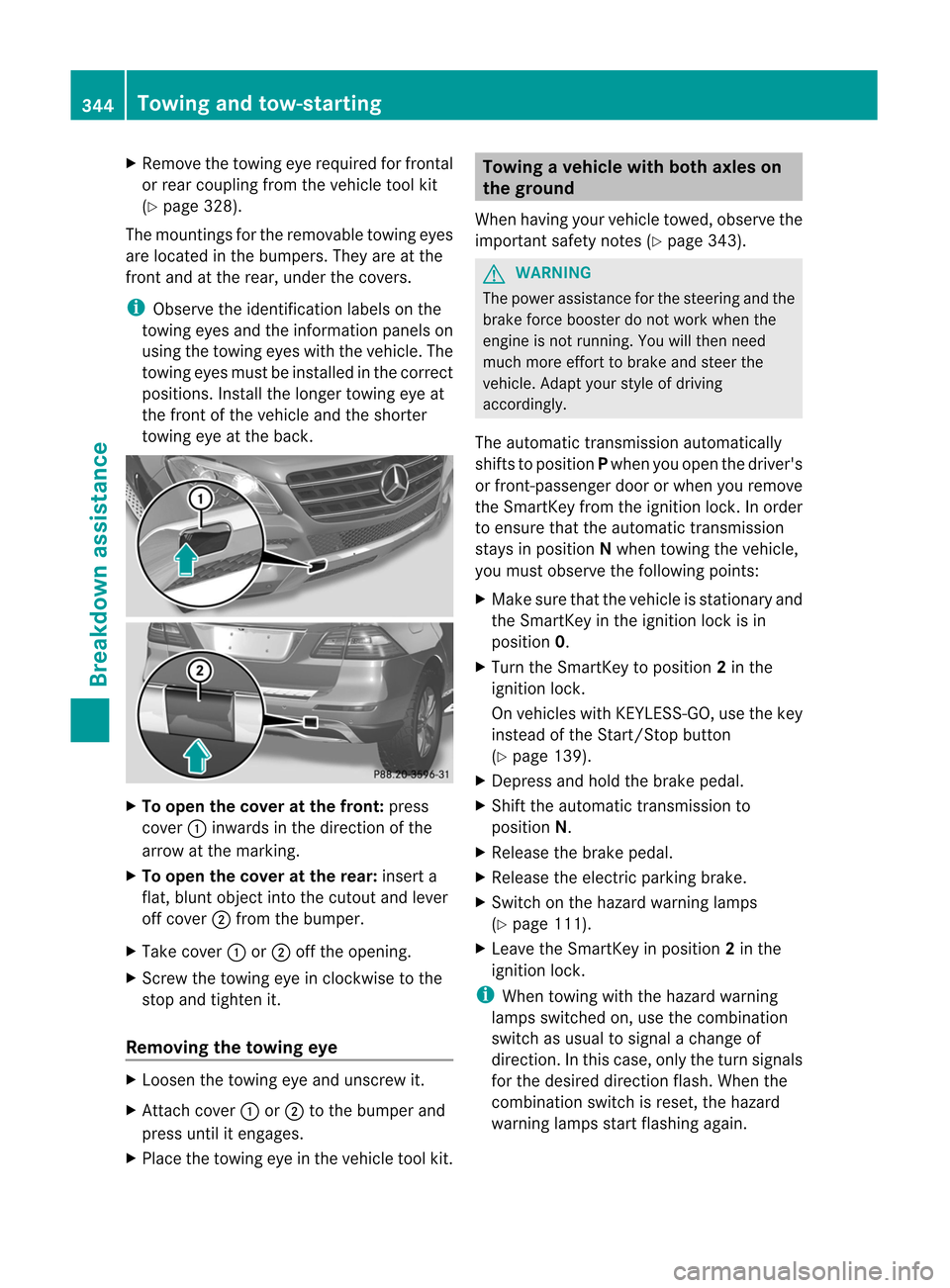
Remo vetheto win geye require dfor fron tal
or rear couplin gfrom theveh icleto ol kit
(Y page 328).
The moun ting sfor therem ovabletowin geyes
are locate din thebump ers.They areatthe
front andatthe rear, under thecovers. i
Observe
theidentification labelson the
towing eyesandtheinformation panelson
using thetowing eyeswiththevehicle. The
towing eyesmust beinstalled inthe correct
positions. Installthe longer towing eyeat
the front ofthe vehicle andtheshorter
towing eyeatthe back. X
To open thecover atthe front: press
cover :inwards inthe direction ofthe
arrow atthe marking.
X To open thecover atthe rear: insert a
flat, blunt object intothecutout andlever
off cover ;from thebumper.
X Take cover :or; offthe opening.
X Screw thetowing eyeinclockwise tothe
stop andtighten it.
Removing thetowing eye X
Loosen thetowing eyeand unscrew it.
X Att ach cover :or; tothe bumper and
press untilitengages.
X Place thetowing eyeinthe vehicle toolkit. Towing
avehicle withboth axles on
th egrou nd
When havingyour vehicletowed, obser vethe
impor tantsafe tyno tes(Y page 343). G
WAR
NING The
power assistancefor thest eerin gand the
brak efor ce boos terdonot work when the
eng ineisnot running.You willthen nee d
muc hmor eeff ort tobrak eand steer the
veh icle.Adapt yourstyle ofdriving
accor dingly.
The automatic transmission automatic ally
shift sto position Pwhen youopen thedriver's
or fron t-passenger doororwhen youremov e
the Smart Keyfrom theignit ionlock .In order
to ensure thattheautomatic transmission
stays inposition Nwhen towing thevehicle,
you must observe thefollowing points:
X Make surethatthevehicle isstat ionary and
the Smart Keyinthe ignit ionlock isin
position 0.
X Turn theSmart Keytoposition 2in the
ignit ionlock .
On vehicles withKEYL ESS-GO, usethekey
inst ead ofthe Start/ Stop butto n
(Y page 139).
X Depres sand hold thebrake pedal.
X Shift theautomatic transmission to
position N.
X Release thebrake pedal.
X Release theelect ricparkin gbrake.
X Switc hon the hazard warning lamps
(Y page 111).
X Leave theSmart Keyinposition 2in the
ignit ionlock . i
When
towing withthehazard warning
lamps switchedon, use thecombin ation
switch asusual tosignal achang eof
direct ion.Inthis case, onlytheturn signals
for the desired directionflash. When the
combin ationswitch isreset ,the hazard
warning lampsstartflashing again. 344
Towing
andtow-st artingBreakdown assistance