sensor MERCEDES-BENZ M-Class 2012 W166 Owner's Guide
[x] Cancel search | Manufacturer: MERCEDES-BENZ, Model Year: 2012, Model line: M-Class, Model: MERCEDES-BENZ M-Class 2012 W166Pages: 396, PDF Size: 14.48 MB
Page 173 of 396
G
WARNING An
intermittent warningsound sand the
dista ncewarning lamp · inthe instrument
cluster isillumina tedifthe DISTRONIC PLUS
system calculates thatthedista ncetothe
vehicl eahe adand yourvehicle's current
speed indicat ethat theDISTRONIC PLUSwill
not becapable ofslowing thevehicle
sufficien tlytomaint ainthe preset following
distanc e,which createsadanger ofa
collision.
Immediately brakethevehicle toincr ease
your distanc eto the precedin gvehicle. The
warning soundisinten dedasafinal caution
in which youshould intercede withyour own
braking inputstoavoid apoten tially
dangerous situation.Donot wait forthe
operation ofthe warning signaltointerc ede
with your ownbraking. Thiswillresult in
potent iallydangerous emergencybraking
which willnotalway sresult inan impact being
avoided.
Tailgating increasestherisk ofan accident . G
WARNING DIS
TRONIC PLUSbrakes yourvehicle witha
maximum deceleration of13 ft/s2
(4 m/s 2
).
This isequivalent toapproximately 40%of
your vehicle's maximum possible
deceleration.
You need tobrake yourself toprevent a
collision. DISTRONIC PLUSbrakes thevehicle
to restore thesetdistance fromthevehicle
ahead orthe setspeed. G
WARNING If
you donot receive visualoracoustic
warning signalsduringacritic altraffic
situation, DISTRONIC PLUShaseither not
recogn izedthecollision risk,hasbeen
deactivated orismalfunct ioning.
Remember, whetherornot DISTRONIC PLUS
is operating, itis ultimately alwaysthe drivers
responsibility toapply thebrakes inorder to
cont rolthe vehicle andavoid acollision. G
WARNING The
vehicle canbebraked whenDISTRONIC
PLUS isactivated. Forthis reason, deactivate
DIS TRONIC PLUSifthe vehicle isto be set in
motion byother means (e.g.inacar wash or
by towing).
If you want DISTRONIC PLUStoassist you,
the radar sensor system mustbeactivated
(Y page 236)andoperational.
General notes DIS
TRONIC PLUSregulates thespeed and
automatically helpsyoumaintain the
distance tothe vehicle detectedinfront .It
brakes automatically inorder toavoid
exceeding thesetspeed.
On long andsteep downhill gradients,
especially ifthe vehicle isladen ortowing a
trailer, youmust select shiftrange 1,2or 3
in good time. Bydoing so,you willmake use
of the braking effectofthe engine, which
relieves theload onthe brake system and
prevent sthe brakes fromoverheating and
wearing tooquickly.
If aslower-moving vehicleisdetect edinfront ,
DIS TRONIC PLUScauses yourvehicle to
brake andmaintain thepreset distance tothe
vehicle infront .
If there isno vehicle drivinginfront ofyou,
DIS TRONIC PLUSfunctionslikecruise
cont rolataspeed rangebetween 20mph
(Canada :30 km/ h)and 120 mph
(Canada :200 km/h).If avehicle isdriving in
front ofyou, itfunct ionsataspeed range
between 0mph (0km/ h)and 120 mph
(Canada :200 km/h).
Do not use DISTRONIC PLUSwhiledriving on
roads withsteep gradients.
As DIS TRONIC PLUStransmitsradar waves,
it can resemble theradar detect orsofthe
responsible authorities.Youcanrefer tothe
applicabl esection inthe Operator's Manualif
there areany questions concerning this. i
USA
only: Driving
systems
171Driving and parking Z
Page 174 of 396
This
device hasbeen approved bythe FCC
as a“Vehicular RadarSyst em” .The radar
sensor isinten dedforuse inan automotive
radar system only.Removal, tampering, or
altering ofthe device willvoid any
warranties, andisnot permitted bythe
FCC. Donot tamper with,alter, oruse in
any non- approved way.
Any unauthorized modificationtothis
device couldvoidtheuser’s authority to
operate theequipment. i
Canada
only:Thisdevice complies with
RSS-2 10ofIndustry Canada.Operation is
subject tothe following twocondition s:
1. This device maynotcause interfer ence,
and
2. this device mustaccept anyinterfer ence
received, includinginterferencethatmay
cause undesired operationofthe device.
Removal, tampering, oraltering ofthe
device willvoid anywarranties, andisnot
permitted. Donot tamper with,alter, oruse
in any non- approved way.
Any unauthorized modificationtothis
device couldvoidtheuser’s authority to
operate theequipment.
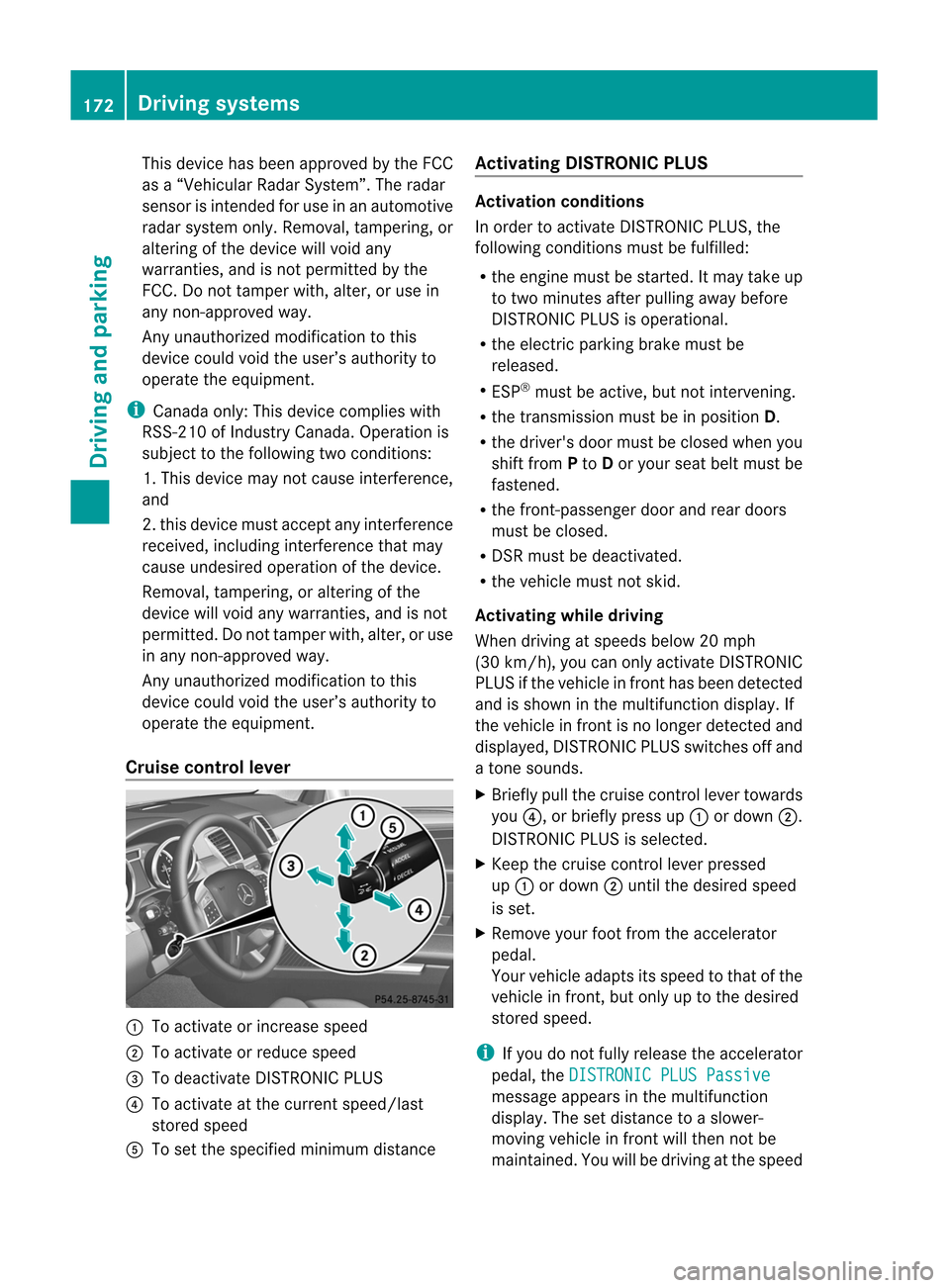
Cruise control lever :
Toactivate orincrease speed
; Toactivate orreduce speed
= Todeactivate DISTRONIC PLUS
? Toactivate atthe current speed/last
stored speed
A Toset the specified minimum distance Activating
DISTRONIC PLUS Activation
conditions
In order toactivate DISTRONIC PLUS,the
following conditionsmust befulfilled :
R the engine mustbestarted. Itmay take up
to two minutes afterpullingaway before
DIS TRONIC PLUSisoperational.
R the electric parking brakemustbe
released.
R ESP ®
must beactive, butnot interven ing.
R the transmission mustbeinposition D.
R the driver's doormust beclosed whenyou
shift from Pto Dor your seatbeltmust be
fastened.
R the front -passenger doorandrear doors
must beclosed.
R DSR must bedeactivated.
R the vehicle mustnotskid.
Activating whiledriving
When driving atspeeds below20mph
(30 km/h) ,you can only activate DISTRONIC
PLUS ifthe vehicle infront hasbeen detect ed
and isshown inthe multifunct iondisplay .If
the vehiclein fro ntisno longe rdetec tedand
displayed, DISTRONIC PLUSswitch esoff and
a ton esounds.
X Briefly pullthecruise control lever towards
you ?,orbriefly pressup: ordown ;.
DIS TRONIC PLUSisselect ed.
X Keep thecruise control lever pressed
up : ordown ;until thedesired speed
is set.
X Remove yourfootfrom theaccelerat or
pedal.
Your vehicle adaptsitsspeed tothat ofthe
vehicle infron t,but only uptothe desired
stor edspeed. i
If
you donot fully release theaccelerat or
pedal, the DISTRON
ICPLUS Passive message
appearsinthe multifunc tion
display. Thesetdistanc eto aslower-
movin gvehicle infron twill then notbe
maint ained. Youwillbedriving atthe speed 172
Driving
systemsDriving and parking
Page 179 of 396
There
areseveral waystodeactivate
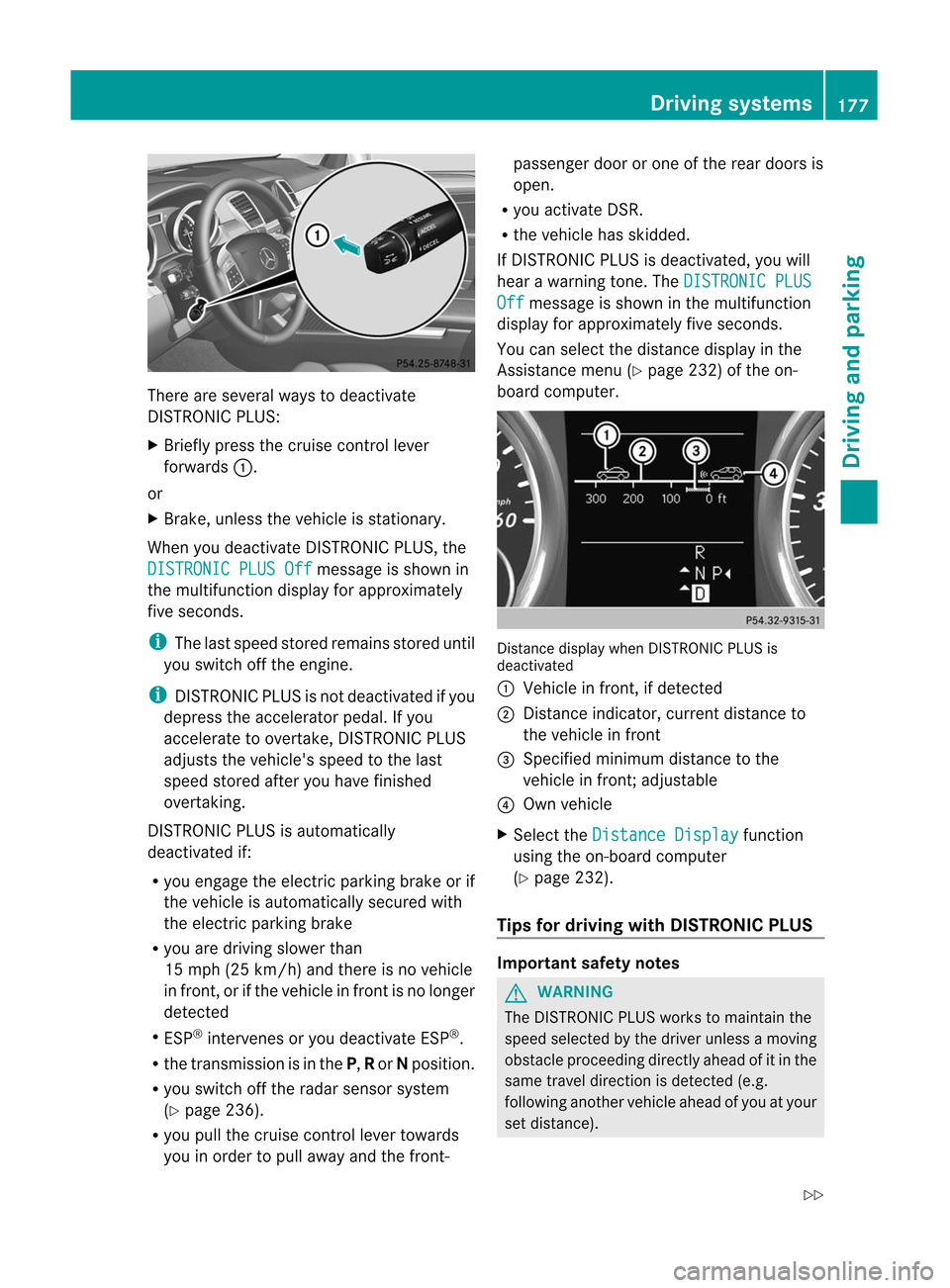
DIS TRONIC PLUS:
X Briefly pressthecruise controllever
forwards :.
or
X Brake, unless thevehicle isstation ary.
When youdeactivate DISTRONIC PLUS,the DISTRONIC
PLUSOff message
isshown in
the multifunct iondisplay forapproximately
five seconds. i
The
lastspeed stored remains storeduntil
you switch offthe engine. i
DIS
TRONIC PLUSisnot deactivated ifyou
depress theaccelerator pedal.Ifyou
accelerate toovert ake,DISTRONIC PLUS
adjusts thevehicle's speedtothe last
speed stored afteryouhave finished
overt aking.
DIS TRONIC PLUSisautomatically
deactivated if:
R you engage theelectric parking brakeorif
the vehicle isautomatically securedwith
the electric parking brake
R you aredriving slowerthan
15 mph (25km/ h)and there isno vehicle
in fron t,or ifthe vehicle infron tisno longer
detected
R ESP ®
interven esoryou deactivate ESP®
.
R the transmission isin the P,Ror Nposition.
R you switch offthe radar sensor system
(Y page 236).
R you pull thecruise controllever towards
you inorder topull awayand the front- pa
sse nge rdoor orone ofthe rear doors is
open.
R you activate DSR.
R the vehicle hasskidded.
If DIS TRONIC PLUSisdeactivated, youwill
hear awarning tone.The DISTRONIC
PLUS Off message
isshown inthe multifunct ion
display forapproximately fiveseconds.
You canselect thedistance displayinthe
Assist ancemenu (Ypage 232)ofthe on-
board computer. Distan
cedisplay whenDISTRONIC PLUSis
deactivated
: Vehicle infront ,if detect ed
; Distan ceindicator, currentdistance to
the vehicle infront
= Specified minimum distancetothe
vehicle infront ;adjustable
? Own vehicle
X Select the Distance
Display funct
ion
using theon-board computer
(Y page 232).
Tips fordriving withDISTRONIC PLUS Import
antsafety notes G
WARNIN
G The
DISTRONIC PLUSworks tomaintain the
speed selected bythe driver unless amoving
obstacle proceeding directlyaheadofitin the
same travel direction isdetect ed(e.g.
following anothervehicleaheadofyou atyour
set distance). Driving
systems
177Driving and parking
Z
Page 185 of 396
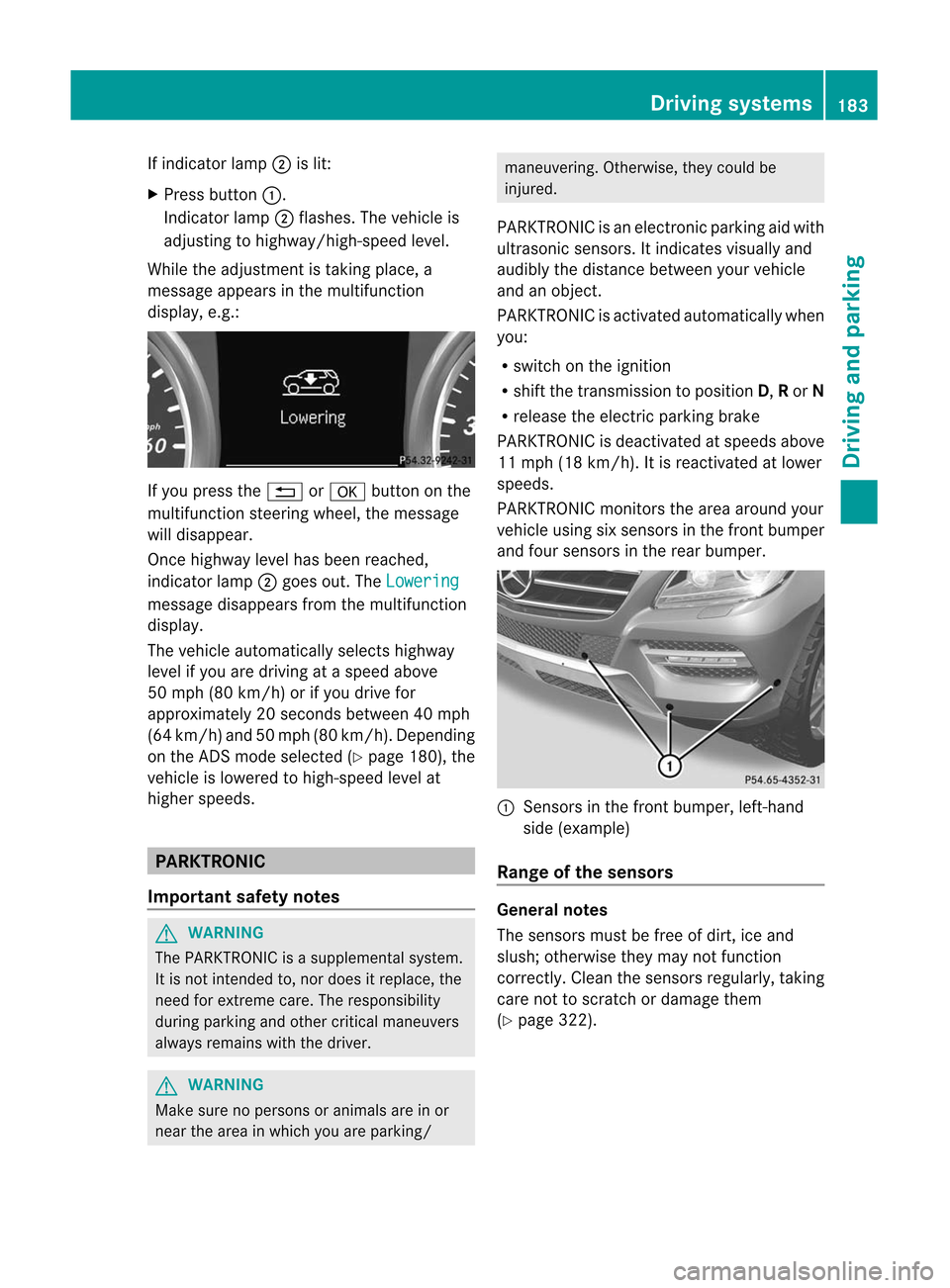
If
indicator lamp;islit:
X Press button :.
Indicator lamp;flash es.The vehicle is
adjus tingtohighw ay/high-spee dlevel .
Whil ethe adjus tment istaking place, a
messag eapp ears inthe multifu nction
disp lay,e.g.: If
you press the% ora button onthe
multifu nctionsteering wheel,the messag e
wil ldisa ppea r.
Once highw aylevel hasbeen reached ,
indicator lamp;goes out.The Lowering
messag
edisa ppea rsfrom themultifu nction
disp lay.
The vehicle automaticallyselects highway
level ifyou aredriving ataspeed above
50 mph (80km/h) orifyou drive for
app roximately 20seconds between40m ph
(64 km/ h)and 50mph (80km/ h).Depen ding
on the ADSm ode selected (Ypage 180), the
vehicle islowered tohigh-speed levelat
higher speeds. PARKTRON
IC
Import antsafety notes G
WARNIN
G The
PARKTRONIC isasupplemental system.
It is not inten dedto,nor does itreplace, the
need forextr eme care. Theresponsibility
during parking andother criticalmaneuvers
alway sremains withthedriver. G
WARNIN
G Make
surenopersons oranimals areinor
near thearea inwhich youareparking/ maneuvering.
Otherwise,theycould be
injured.
PARKTRONIC isan electron icparking aidwith
ultrasonic sensors.Itindicates visuallyand
audib lythe distance between yourvehicle
and anobject .
PARKTRONIC isactivated automatically when
you:
R switch onthe ignition
R shift thetrans mission toposition D,Ror N
R release theelectric parking brake
PARKTRONIC isdeactivated atspeeds above
11 mph (18km/ h).It is reactivat edatlower
speeds.
PARKTRONIC monitorsthe area around your
vehicle usingsixsensors inthe front bumper
and four sensors inthe rear bumper. :
Sensor sin the front bumper, left-hand
side (example)
Range ofthe sensors General
notes
The sensors mustbefree ofdirt, iceand
slush; otherwise theymaynotfunct ion
correc tly.Clean thesensors regularly ,takin g
care nottoscratc hor damage them
(Y page 322). Driving
systems
183Driving and parking Z
Page 186 of 396
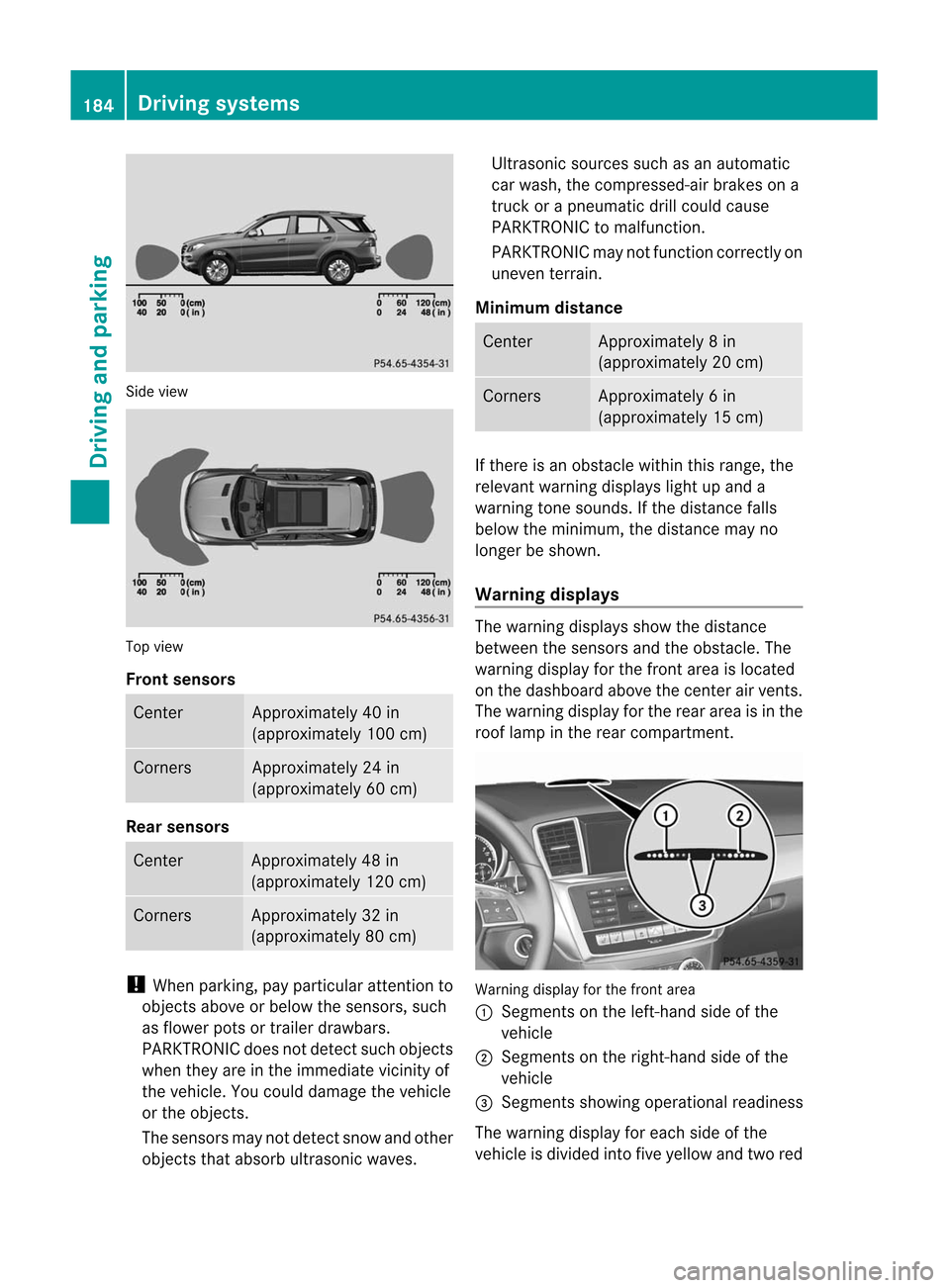
Sid
evie w Top
view
Fro ntsenso rs Ce
nter Appr
oxim ately40 in
(a ppr oxim ately100 cm) Co
rners Appr
oxim ately24 in
(a ppr oxim ately60 cm) Rear
senso rs Ce
nter Appr
oxim ately48 in
(a ppr oxim ately120 cm) Co
rners Appr
oxim ately32 in
(a ppr oxim ately80 cm) !
Whe npark ing,pay particular attentio nt o
object sabove orbelow thesensors, such
as flower potsortrailer drawbars.
PARKTRONIC doesnotdetect suchobject s
when theyareinthe immediate vicinityof
the vehicle. Youcould damage thevehicle
or the object s.
The sensors maynotdetect snowandother
object sthat absorb ultrasonic waves. Ultrasonic
sourcessuchasan automatic
car wash, thecompressed- airbrakes ona
truck orapneumatic drillcould cause
PARKTRONIC tomalfunct ion.
PARKTRONIC maynotfunct ioncorrec tlyon
uneven terrain.
Minimum distance Center Approx
imately 8in
(approx imately 20cm) Corne
rs Appr
oxim ately 6in
(approx imately 15cm) If
ther eis an obst acle within thisrange ,the
relevan twarn ing displ ayslight upand a
warn ingtone soun ds.Ifth edist ancefalls
below themin imum ,th edist ancemay no
lon ger besho wn.
Wa rning displa ys The
warn ingdispl aysshowthedist ance
bet ween thesen sorsand theo bstac le.The
warning displayforthe fron tarea isloca ted
on the dashboa rdabo vethe center airvents.
The warning displayforthe rear area isin the
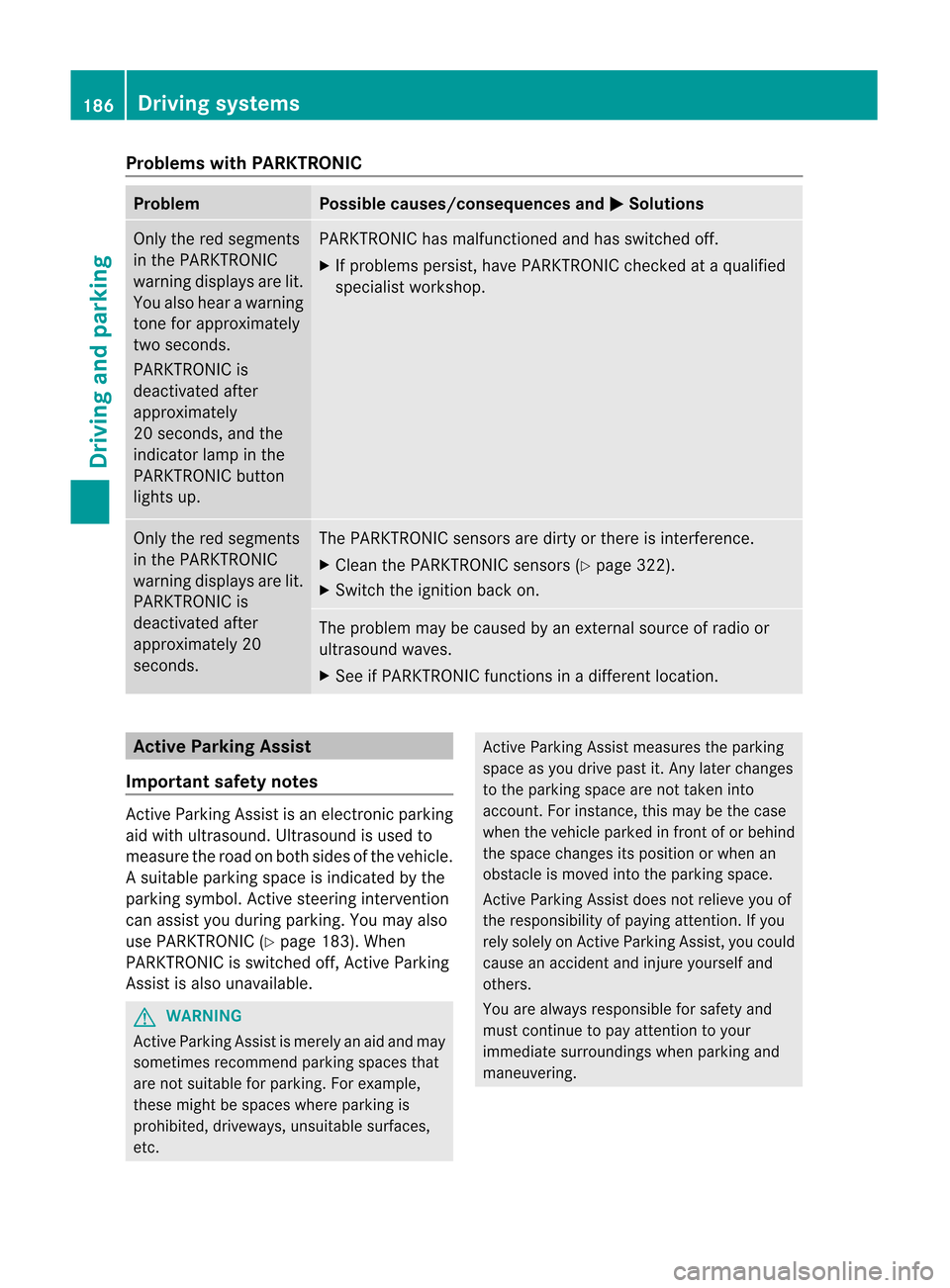
roof lamp inthe rear compartment. Warning
displayforthe front area
: Segments onthe left-hand sideofthe
vehicl e
; Segments onthe right-hand sideofthe
vehicl e
= Segments showingopera tional readiness
The warning displayforeach sideofthe
vehicl eis divi ded into fiveyellow and twored 184
Drivi
ngsystemsDriving and parking
Page 188 of 396
Problems
withPARKTRONIC Problem Possible
causes/co nsequences andM Solutions
Only
thered segments
in the PARKTRONIC
warning displaysare lit.
You also hear awarning
tone forapproximately
two seconds.
PARKTRONIC is
deactivated after
approximately
20 seconds, andthe
indicator lampinthe
PARKTRONIC button
lights up. PARKTRONIC
hasmalfunction edand hasswitched off.
X Ifproblems persist,havePARKTRONIC checkedataqual ified
specialist workshop. Only
thered segments
in the PARKTRONIC
warning displaysare lit.
PARKTRONIC is
deactivated after
approximately 20
seconds. The
PARKTRONIC sensorsaredirty orthere isinterf erence.
X Clea nthe PARKTRONIC sensors(Ypage 322).
X Switch theignition backon. The
problem maybecaused byan extern alsource ofradio or
ultrasound waves.
X See ifPARKTRONIC functionsinadifferent location. Active
Parking Assist
Import antsafety notes Act
ive Parking Assistisan electronic parking
aid with ultrasound. Ultrasoundisused to
measure theroad onboth sides ofthe vehicle.
As uitable parkingspac eis ind icat edbythe
park ingsymb ol.Active steer ing interv ention
can assis tyou during parking. Youmay also
use PARKTRONIC (Ypage 183). When
PARKTRONIC isswitched off,Active Parking
Assist isalso unavailab le. G
WARNIN
G Act
iveParking Assistismerely anaid and may
sometimes recommendparking spacesthat
are not suitable forparking. Forexample,
these might bespaces whereparking is
prohibited, driveways,unsuitablesurfaces,
etc. Act
ive Parking Assistmeasures theparking
space asyou drive pastit.Any later changes
to the parking spacearenot taken into
account .For instan ce,this may bethe case
when thevehicle parkedinfront ofor behind
the space changes itsposition orwhen an
obstacle ismoved intotheparking space.
Act ive Parking Assistdoesnotrelieve youof
the responsibility ofpaying attention.Ifyou
rely solely onAct ive Parking Assist,you could
cause anaccident andinjure yourself and
others.
You arealway sresponsible forsafety and
must continue topay atten tiontoyour
immediate surroundings whenparking and
maneuvering. 186
Driving
systemsDriving and parking
Page 200 of 396
Problems
withNight ViewAssist Plus Problem Possible
causes/co nsequences andM Solutions
The
picture qualityof
Night ViewAssist Plus
has deteriorated. The
windshield wipersaresmearing thewindshield.
X Repla cethe wiper blades (Ypage 119). The
windshield issmeared afterthevehicle hasbeen cleaned ina
car wash.
X Clea nthe windshield (Ypage 321). There
iswindshield chipdamage inthe camera's fieldofvision.
X Repla cethe windshield. The
windshield isfogged upon the inside.
X Defrost thewindshield (Ypage 132). The
windshield isiced up.
X De-ice thewindshield (Ypage 131). There
isdirt onthe inside ofthe windshield.
X Clea nthe inside ofthe windshield (Ypage 321). Lane
Tracking package
General notes The
Lane Tracking packageconsistsof Blind
Spot Assist (Ypage 198)andLane Keeping
Assist (Ypage 200).
Blind SpotAssist Import
antsafety notes
Blind SpotAssist usesaradar sensor system
to monitor theareas onboth sides ofyour
vehicle. Itsupports youfrom speeds of
approximately 20mph (30km/h) .A warning
displa yin the exterior mirrorsdrawsyour
attent iontovehicles detectedinthe
monitored area.Ifyou then switch onthe
corresponding turnsignal tochange lane,you
will also receive anoptical andaudible
collision warning. BlindSpotAssist uses
sensors inthe rear bumper formonitorin g
purposes. G
WARNING Blind
SpotAssist isonly anaid designed to
assist driving. Itmay failtodetect some
vehicles andisno substitute forattent ive
driving.
Blind SpotAssist cannot detectroadand
traffic condition s.Itmay failtodetect narrow
vehicles, suchasmotorc yclesorbicycles, or
may onlydetect themtoolate.
Monitoring maybeaffected bydirty sensors,
stron gspray orpoor visibili tycaused bysnow,
rain ormist, forexample. Inthis case, vehicles
are detected lateornot atall.
Always payattent iontotraffic condition sand
your surroundings. Otherwise,youmay failto
recogniz edangers intime, cause anaccident
and injure yourself andothers. i
USA
only:
This device hasbeen approved bythe FCC
as a“Vehicular RadarSyst em” .The radar
sensor isinten dedforuse inan automotive
radar system only.Removal, tampering, or198
Driving
systemsDriving and parking
Page 201 of 396
alte
ringof thedevi cewill void any
warr anties, and isno tp ermit tedbythe
FCC. Donot tamper with,alter, oruse in
any non-approved way.
An yunauthoriz edmodificat iontothis
device couldvoidtheuser’s authorit yto
operate theequipment.
For Blind SpotAssist toassist youwhen
driving, theradar sensor system mustbe
activat ed(Ypage 236)and operation al.
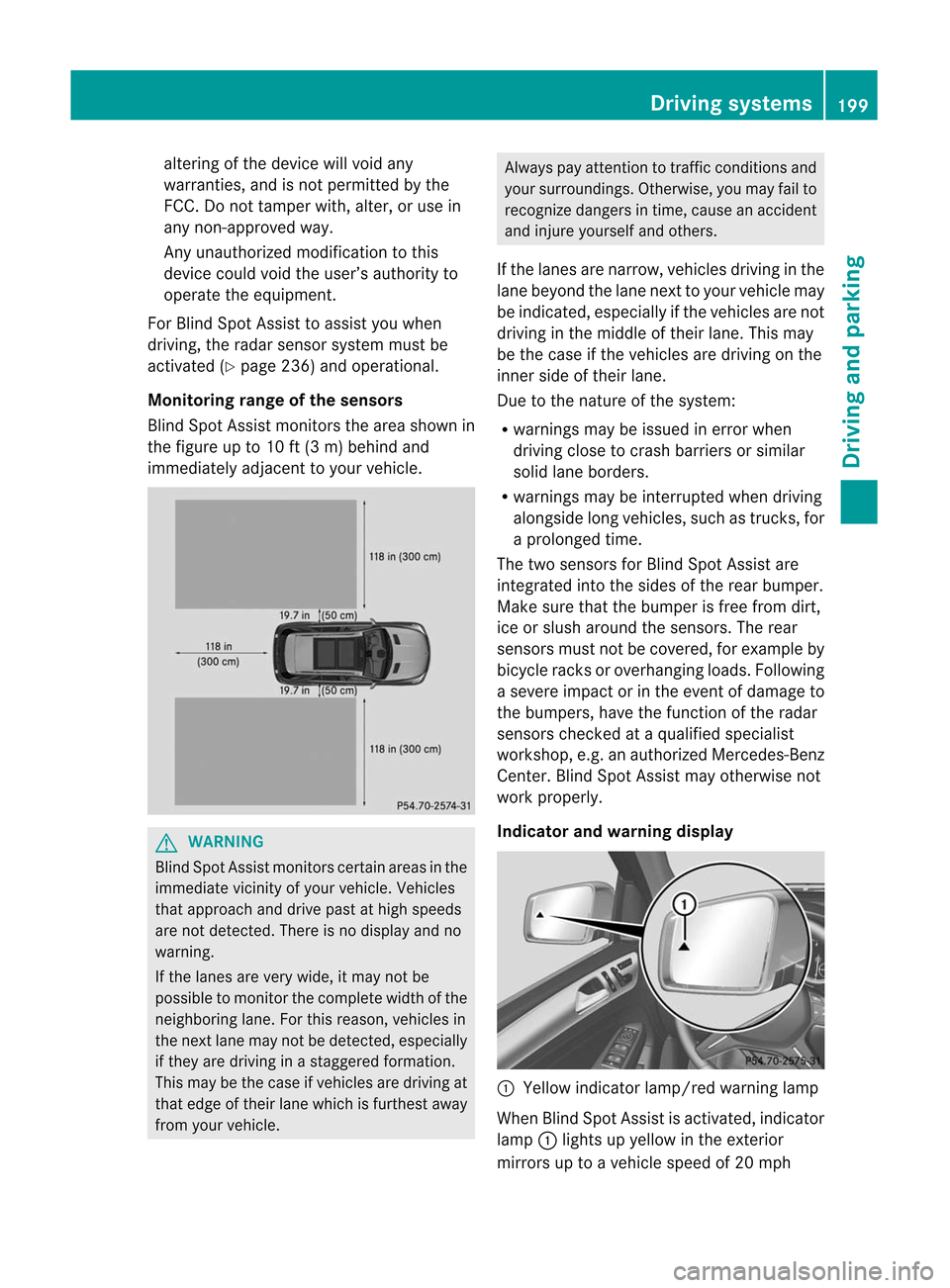
Monitoring rangeofthe sensors
Blind SpotAssist monitorsthe area shown in
the figure upto10 ft(3 m) behind and
immediately adjacenttoyour vehicle. G
WARNIN
G Blind
SpotAssist monitorscert ainareas inthe
immediate vicinityof your vehicle. Vehicles
that approach anddrive pastathigh speeds
are not detect ed.There isno display andno
warning.
If the lanes arevery wide, itmay notbe
possible tomonit orthe complete widthofthe
neighboring lane.Forthis reason, vehicles in
the next lanemaynotbedetect ed,especially
if they aredriving inastaggered formation.
This may bethe case ifvehicles aredriving at
that edge oftheir lanewhich isfurthest away
from yourvehicle. Always
payatten tiontotraffic conditionsand
your surroundings. Otherwise,youmay failto
recogn izedangers intime, cause anaccident
and injure yourself andothers.
If the lanes arenarrow, vehicles drivinginthe
lane beyond thelane next toyour vehicle may
be indicated, especially ifthe vehicles arenot
driving inthe middle oftheir lane. Thismay
be the case ifthe vehicles aredriving onthe
inner sideoftheir lane.
Due tothe nature ofthe system:
R warnings maybeissued inerror when
driving closetocrash barriers orsimilar
solid laneborders.
R warnings maybeinterr upted whendriving
alongside longvehicles, suchastruck s,for
a prolonged time.
The two sensors forBlind SpotAssist are
integr atedintothesides ofthe rear bumper.
Make surethatthebumper isfree from dirt,
ice orslush around thesensors. Therear
sensors mustnotbecovered, forexample by
bicycle racksoroverhanging loads.Following
a severe impact orinthe event ofdamage to
the bumpers, havethefunct ionofthe radar
sensors checkedataquali fiedspecialist
workshop, e.g.anauthorized Mercedes-B enz
Center. BlindSpotAssist mayotherwise not
work properly.
Indicator andwarning display :
Yellow indicator lamp/red warninglamp
When BlindSpotAssist isactivated, indicator
lamp :lights upyellow inthe exter ior
mirrors uptoavehicle speedof20 mph Driving
systems
199Driving and parking Z
Page 202 of 396
(30
km/h). When thevehic lespeed exceeds
20 mph (30km/h), theindic atorlamp goes
out and BlindSpot Assistisready foruse.
When yourspeed exceeds approx imately
20 mph (30km/h), warnin glamp :light sup
red ontheco rrespo nding side when evera
vehicl eis detected inthe blind spot
monitoring range.Thiswarning isalw ays
given when avehicl eenters theblind spot
monitoring rangefrombehindorfrom the
side .When youarepassing another vehicle,
the warning isemitted onlyifthe difference
in speed isless than 7mph (12km/h).
The yellow indicator lampgoesoutifreverse
gear isengaged. Inthis event, BlindSpot
Assist isno longer active.
The brightness ofthe indicator/warnin g
lamps isadjusted automatically accordingto
the ambient light. G
WARNING Blind
SpotAssist isnot active atspeeds under
approximately 20mph (30km/h). The
indicator lampsinthe exterior mirrorsare
yellow .Vehicles inthe monit oringrange are
then notindicat ed.
Always payatten tiontotraff iccon ditions and
your surroundin gs.Other wise,youmay failto
recogn izedangers intime, cause anacciden t
and injure yourself andother s.
Collisio nwarning
If avehicle isdetec tedinthe monit oringrange
of Blind SpotAssist andyouswitch onthe turn
signal, adouble warning tonesounds. Red
warning lamp:flashes. Ifthe turn signal
remains on,detect edvehicles areindicated
by the flashing ofred warning lamp:.There
are nofurther warning tones.
Switching onBlind SpotAssist
X Make surethattheradar sensor system
(Y page 236)andBlind SpotAssist (Y
page 232)areactivated inthe on-board
computer.
X Turn theSmartK eytoposition 2in the
ignition lock.
Warning lamps:light upred inthe
exterior mirrorsforapproximately 1.5
seconds andthen turnyellow.
Tra iler towing
When youattach atrailer, makesureyouhave
correct lyestablished theelectrical
conn ection. Thiscanbeaccomplished by
check ingthe trailer lighting. Inthis event,
Blind SpotAssist isdeactivated. Theindicator
lamp inthe exterior mirrorslightsupyell ow,
and the Blind
SpotAssist Currently Unavailable
SeeOperator's Manual message
appearsinthe multifunction
displa y. i
You
candeactivate theindicator lampsin
the exterior mirrors.
To do so, switch offBlind SpotAssist when:
R the SmartK eyisin position 2in the
ignition lock.
R the engine isnot running.
R the electrical connection tothe trailer
has been established.
Lane Keeping Assist Import
antsafety notes
Lane Keeping Assistmonitors thearea in
front ofyour vehicle bymeans ofacamera at
the top ofthe windshield. LaneKeeping Assist
detect slane markings onthe road andwarns
you before youleave yourlane
uninten tionally. 200
Driving
systemsDriving and parking
Page 204 of 396
R
you swit chon thetur nsignals .Int his event,
the warnings aresuppressed foracertain
period oftime.
R adriving safetysystem interven es,such as
ABS ,BAS orESP ®
.
Adapt ive
If Adaptive is
selected, nowarning vibration
occurs if:
R you switch onthe turn signals. Inthis event,
the warnings aresuppressed foracertain
period oftime.
R adriving safetysystem interven es,e.g.
ABS ,BAS orESP ®
.
R you accelerate hard,e.g.kickdown.
R you brake hard.
R you steer actively, e.g.swerve toavoid an
obstacle orchange lanequickly.
R you cutthe corner onasharp bend.
In order thatyouarewarned onlywhen
necessary andingood timeifyou cross the
lane marking, thesystem recogniz escertain
condition sand warns youaccordingly.
The warning vibration occursearlierif:
R you approach theouter lanemarking ona
bend.
R the road hasvery wide lanes, e.g.a
freeway.
R the system recogniz essolid lanemarkings.
The warning vibration occurslaterif:
R the road hasnarrow lanes.
R you cutthe corner onabend. Active
Driving Assistance package
General notes The
Active Driving Assistanc epackage
consist sof DIS TRONIC PLUS(Ypage 169),
Act ive Blind SpotAssist (Ypage 202)and
Act ive Lane Keeping Assist(Ypage 205). Active
BlindSpotAssist Import
antsafety notes
Act ive Blind SpotAssist usesaradar sensor
system tomonitor theside areas ofyour
vehicle whichareinback ofthe driver. A
warning displayin the exterior mirrorsdraws
your attent iontovehicles detectedinthe
monitored area.Ifyou then switch onthe
corresponding turnsignal tochange lane,you
will also receive anoptical andaudible
collision warning. Ifarisk oflateral collision
is detect ed,correct ivebraking mayhelp you
avoid acollision. Tosupport thecourse-
correct ingbrake application, Active Blind
Spot Assist alsouses theforward-facing radar
sensor system. Active Blind SpotAssist
supports youfrom speeds ofapproximately
20 mph (30km/h). G
WARNING Act
ive Blind SpotAssist isonly anaid, and
may detect vehicles/obstacles incorrectlyor
not atall.
The system maybeimpaired ormay not
funct ionif:
R there ispoor visibili ty,e.g. due tosnow,
rain, fogorspray.
R the rear and/or frontsensors aredirty.
Act ive Blind SpotAssist maynotdetect
narrow vehicles, suchasmotorc yclesor
bicycles, ormay onlydetect themtoolate. It
cannot detectvehicles thatareovertaken at
a small distance andthen enter theblind spot
area.
Act ive Blind SpotAssist cannot detectroad
and traffic condition s.Itis not asubstitute for
attent ivedriving. Youareresponsible forthe
vehicle's speed,braking ingood time, and
steering correctly.Always adaptyourdriving
style tosuit theprevailing roadandweather
condition s.Always payattent iontotraffic
condition sand your surroundings. Otherwise,
you may failtorecogniz edangers intime,
cause anaccident andinjure yourself and
others. 202
Driving
systemsDriving and parking