ignition MERCEDES-BENZ M-Class 2012 W166 Repair Manual
[x] Cancel search | Manufacturer: MERCEDES-BENZ, Model Year: 2012, Model line: M-Class, Model: MERCEDES-BENZ M-Class 2012 W166Pages: 396, PDF Size: 14.48 MB
Page 234 of 396
Assis
tance men u
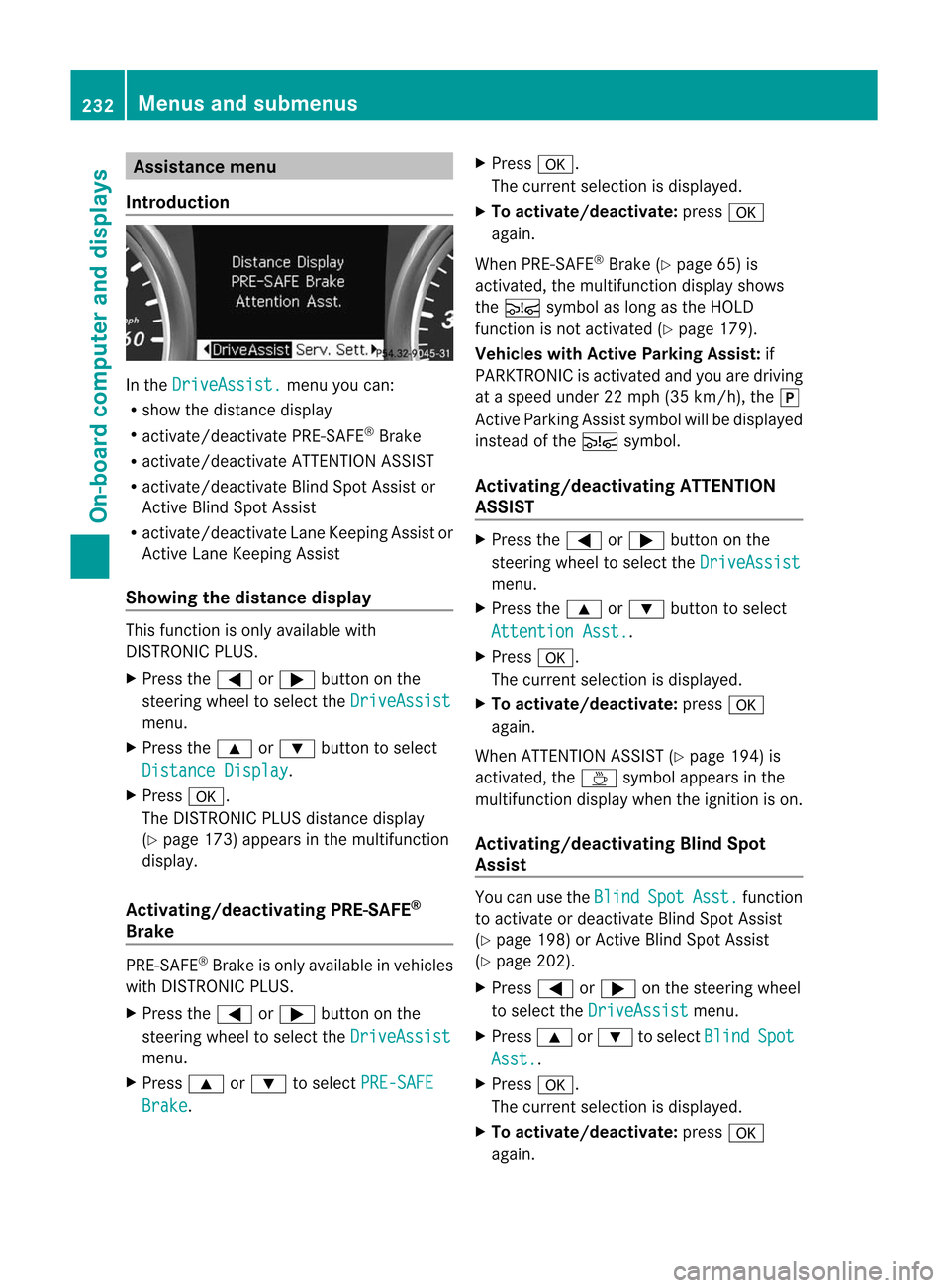
Int rod uction In
the Dri
veAssist. men
uyou can:
R sho wthedist ancedisp lay
R act ivat e/deac tivat ePRE -SAF E®
Br ake
R act ivat e/deac tivat eAT TENTI ON ASSIST
R act ivat e/deac tivat eBli nd Spot Assis tor
Activ eBli nd Spo tAssi st
R acti vate/d eactiv ate Lane Kee ping Assi stor
Activ eLa ne Kee ping Assi st
Sho wing the distanc edis play Thi
sfu nctio nisonly available with
DISTRONIC PLUS.
X Press the= or; button onthe
steering wheeltoselect the DriveAssist
menu.
X Press the9 or: button toselect Distance
Display .
X Press a.
The DISTRONIC PLUSdistance display
(Y page 173)appea rsinthe multifunction
displa y.
Activating/deac tivatingPRE-SAFE ®
Bra ke PRE-SA
FE®
Brake isonly available invehicles
with DISTRONIC PLUS.
X Press the= or; button onthe
steering wheeltoselect the DriveAssist
menu.
X Press 9or: toselect PRE-SAFE
Brake . X
Press a.
The current selection isdispla yed.
X To activate/deactivate: pressa
agai n.
When PRE-SA FE®
Brake (Ypage 65)is
activated, themultifunction displayshows
the Ä symbol aslong asthe HOLD
function isnot activated (Ypage 179).
Vehicles withActive Parking Assist:if
PARKTRONIC isactivated andyouaredriving
at aspeed under22mph (35km/h), thej
Act iveParking Assistsymbol willbedispla yed
instead ofthe Ä symbol.
Activating/deac tivatingATTENTION
ASSIST X
Press the= or; button onthe
steering wheeltoselect the DriveAssist
menu.
X Press the9 or: button toselect Attention
Asst. .
X Press a.
The current selection isdispla yed.
X To activate/deactivate: pressa
agai n.
When ATTENTION ASSIST(Ypage 194)is
activated, theÀ symbol appearsinthe
multifunction displaywhen theignition ison.
Activating/deac tivatingBlindSpot
Assis t You
canusethe Blind Spot Asst. function
to activate ordeactivate BlindSpotAssist
(Y page 198)orAct ive Blind SpotAssist
(Y page 202).
X Press =or; onthe steering wheel
to select the DriveAssist menu.
X Press 9or: toselect Blind Spot
Asst. .
X Press a.
The current selection isdispla yed.
X To activate/deactivate: pressa
agai n. 232
Menus
andsubmenusOn-board computer and displays
Page 235 of 396
Acti
vating/d eactivating Lan eKeepi ng
Assis t You
canusethe Lan
e Kee
p. Ass
t. fun
ction
to act ivat e/deac tivat eLan eKee pingAs sis t
(Y page 200)or Active Lan eKee pingAs sis t
(Y page 205).
X Pre ssthe= or; buttonon the
st eer ing whee lto sele ctthe Dri
veAssist men
u.
X Pre ssthe9 or: buttont oselect Lane
Keep. Asst. .
X Press a.
The current selection isdisplay ed.
X Press thea button toconf irm.
X Press the: or9 button toset Off ,
Standard or Adaptive .
X Press thea button tosave thesetting.
If Lane Keeping AssistorAct iveLane keeping
Assist isactivated, themultifunct iondisplay
shows theà symbol whentheignition is
switched on. Service
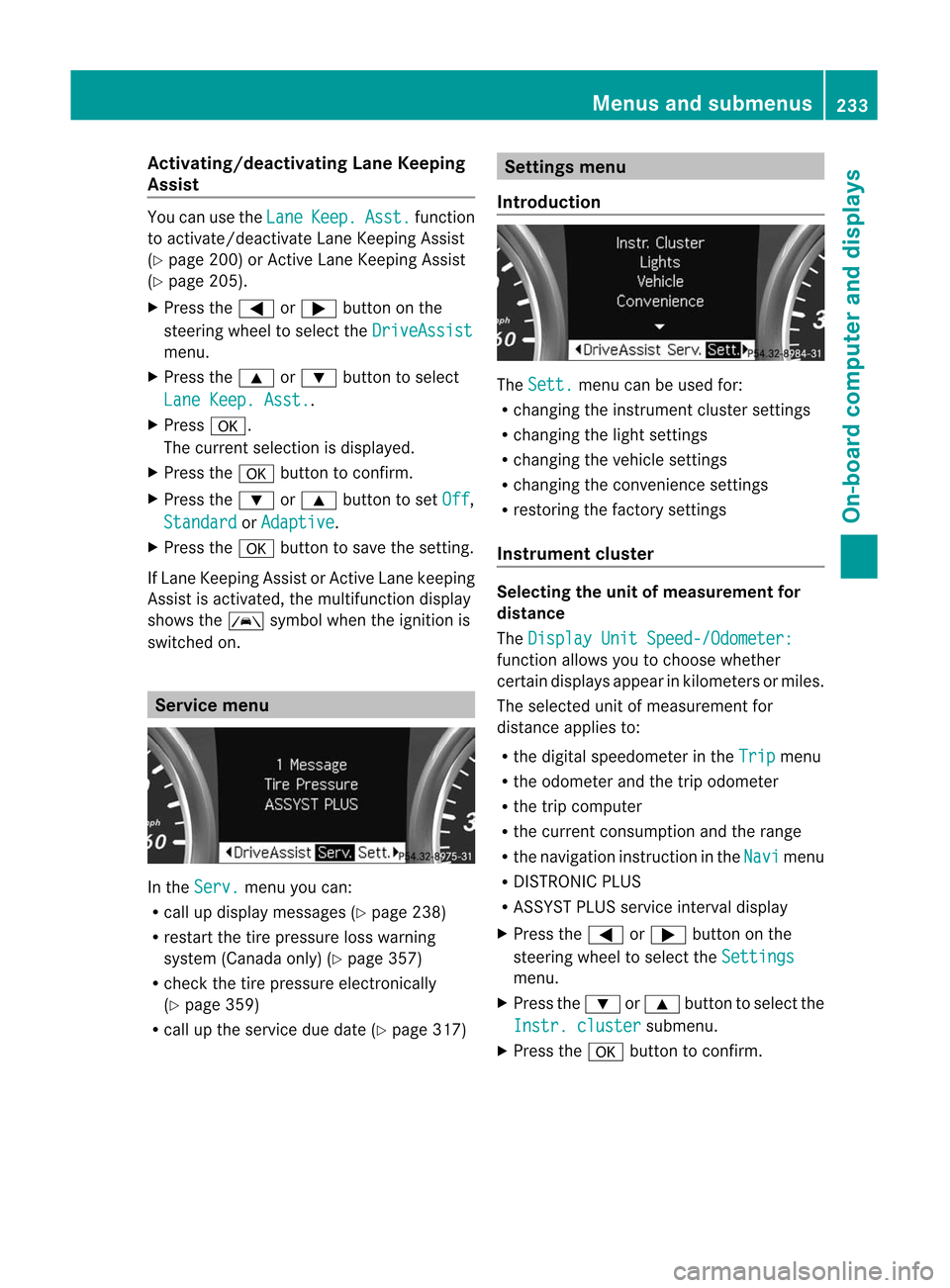
menu In
the Serv. menu
youcan:
R call updisplay messages (Ypage 238)
R restart thetire pressure losswarning
system (Canada only)(Ypage 357)
R check thetire pressure electronically
(Y page 359)
R call upthe service duedate (Ypage 317) Settings
menu
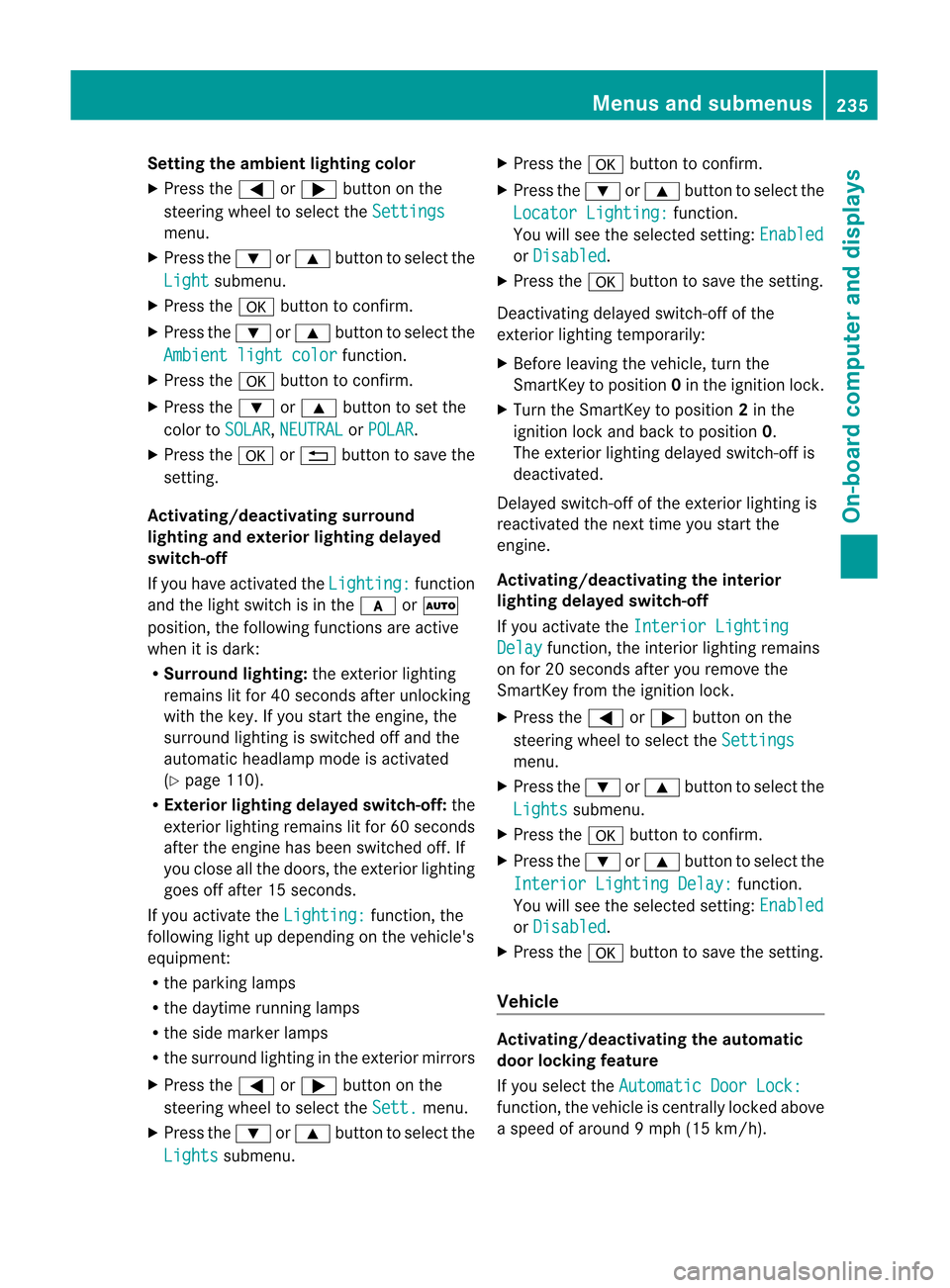
Introdu ction The Sett. menu
canbeused for:
R changing theinstr ument cluster settings
R changing thelight settings
R changing thevehicle settings
R changing theconv enienc esett ings
R restor ingthe factor ysett ings
Instrum entcluster Selecting
theunit ofmeasur ementfor
distance
The Display
UnitSpeed-/Odome ter: funct
ionallows youtochoose whether
cert aindisplay sappear inkilometers ormiles.
The selected unitofmeasurement for
distance appliesto:
R the digital speedometer inthe Trip menu
R the odometer andthetrip odometer
R the trip computer
R the current consumpt ionand therange
R the navigation instruction inthe Navi menu
R DIS TRONIC PLUS
R ASS YST PLUS service intervaldisplay
X Press the= or; button onthe
steerin gwheel toselect the Settings
menu.
X Press the: or9 button toselect the Instr.
cluster submenu.
X Press thea button toconf irm. Menus
andsubmenus
233On-board computer and displays Z
Page 237 of 396
Setting
theambient lightingcolor
X Press the= or; button onthe
steering wheeltoselect the Settings
menu.
X Press the: or9 button toselect the Light submenu.
X Press thea button toconf irm.
X Press the: or9 button toselect the Ambient
lightcolor funct
ion.
X Press thea button toconf irm.
X Press the: or9 button toset the
color to SOLAR , NEUTRAL or POLAR .
X Press thea or% button tosave the
settin g.
Activating/deactivating surround
lighting andexterior lightingdelayed
switch-off
If you have activated the Lighting: funct
ion
and thelight switch isin the c orÃ
position, thefollowing functionsareactive
when itis dark:
R Surr ound lighting: theexterior lighting
remains litfor 40seconds afterunlocking
with thekey. Ifyou start theengine, the
surround lightingisswitched offand the
automatic headlampmode isactivated
(Y page 110).
R Exterior lightingdelayed switch-off: the
exterior lightingremains litfor 60seconds
after theengine hasbeen switched off.If
you close allthe doors, theexterior lighting
goes offafter 15seconds.
If you activate the Lighting: funct
ion,the
following lightupdepending onthe vehicle's
equipment:
R the parking lamps
R the daytime runninglamps
R the side marker lamps
R the surround lightinginthe exterior mirrors
X Press the= or; button onthe
steering wheeltoselect the Sett. menu.
X Press the: or9 button toselect the Lights submenu. X
Press thea button toconf irm.
X Press the: or9 button toselect the Locator
Lighting: funct
ion.
You willsee theselected setting: Enabled
or Disabled .
X Press thea button tosave thesettin g.
Deactivat ingdelay edswitch-of fofthe
exterior lightingtemporarily:
X Before leaving thevehicle, turnthe
SmartK eytoposition 0in the ignition lock.
X Turn theSmartK eytoposition 2in the
ignition lockandback toposition 0.
The exterior lightingdelayedswitch-off is
deactivated.
Delayed switch-off ofthe exterior lightingis
reactivated thenext time youstart the
engine.
Activating/deactivating theinterior
lighting delayed switch-off
If you activate the Interior
Lighting Delay funct
ion,theinterior lighting remains
on for 20seconds afteryouremove the
SmartK eyfrom theignition lock.
X Press the= or; button onthe
steering wheeltoselect the Settings
menu.
X Press the: or9 button toselect the Lights submenu.
X Press thea button toconfirm .
X Press the: or9 button toselect the Interior
LightingDelay: funct
ion.
You willsee theselected setting: Enabled
or Disabled .
X Press thea button tosave thesettin g.
Vehicle Activating/deactivating
theautom atic
door locking feature
If you select the Automatic
DoorLock: funct
ion,thevehicle iscent rally locked above
a speed ofaround 9mph(15 km/ h). Menus
andsubm enus
235On-board computer and displays Z
Page 240 of 396
Disp
laymessa ges Gen
eral not es G
WAR
NING Al
lcat ego riesof mes sagescontain imp ortant info rm ation whic hsho uld betake nn ote ofand,
where amalfunct ionisindicated, addressed assoon aspossible atan authorized Mercedes-B enz
Center.
Failure torepair thecondit ionnoted maycause damage notcovered bythe Mercedes-B enz
Limited Warranty, orresult inproperty damageorpersonal injury.
Display messages appearinthe multifunct iondisplay .
Display messages withgraphic displaysmay beshown insimplified forminthe Operator's
Manual andmay differ fromthemessages showninthe multifunct iondisplay .
Please respond inaccordanc ewith thedisplay messages andfollow theadditional notesin
this Operator's Manual.
Certain displaymessages areaccompanied byan audib lewarning toneor acont inuous tone.
When youstop andpark thevehicle, pleaseobserve thenoteson the HOLD function
(Y page 179)andparking (Ypage 155). Hiding
display messages
You canhide some display messages withalow priority.
X Press thea or% button onthe steering wheeltohide thedisplay message.
The display message iscleared.
Display messages withahigh priority areshown inred.
You cann othide display messages ofthe highest priority. Themultifunct iondisplay shows
these messages continuously untilthecauses forthe messages havebeen remedied. Message
memory
The on-board computer savescertaindisplay messages. Youcancallupthe display messages
in the message memory.
X Press the= or; button onthe steering wheeltoselect the Serv. menu.
If there aredisplay messages, themultifunct iondisplay shows,forexample, 2
Messages .
X Press the9 or: button toselect theentr y,e.g. 2
Messages .
X Confirm witha.
X Press the9 or: button toscroll through thedisplay messages.
When theignition isswitched off,alldisplay messages aredeleted apartfromsome high-
priority displaymessages. Oncethecauses ofthe high-priority displaymessages havebeen
rect ified, thecorrespon dingdisplay messages arealso deleted. 238
Display
messagesOn-board computer and displays
Page 245 of 396
Disp
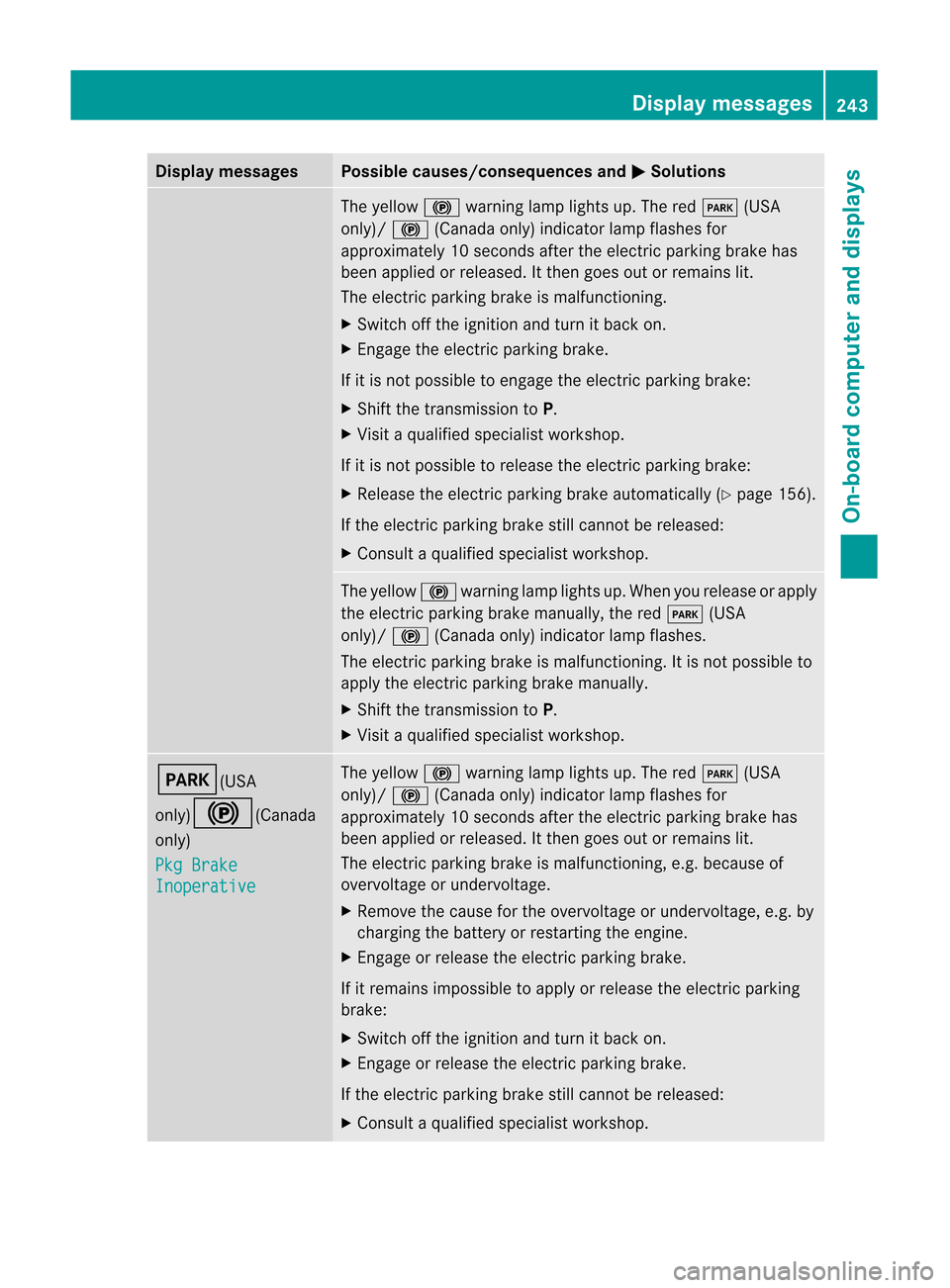
laymessa ges Poss
iblecauses/c onseq uences and M Solu
tions The
yello w! warning lamp lightsup. The redF (USA
on ly)/ ! (Canadaonly) indic ato rlamp flashes for
appro ximately10 sec onds aftertheelec tric park ingbrak ehas
been applied orrele ased. Itth en goes outorrem ains lit.
The electric park ingbrak eis malf unctionin g.
X Swit choff theign ition and turnit back on.
X En gage theelec tric park ingbrak e.
If it is no tp ossible toengage theelectric parking brake:
X Shift thetrans mission toP.
X Visit aquali fiedspecialist workshop.
If it is not possible torelease theelectric parking brake:
X Release theelectric parking brakeautomatically (Ypage 156).
If the electric parking brakestillcann otbe released:
X Consult aquali fiedspecialist workshop. The
yellow !warning lamplights up.When yourelease orapply
the electric parking brakemanually ,the red F (USA
only)/ !(Canada only)indicator lampflashes.
The electric parking brakeismalfunct ioning.Itis not possible to
apply theelectric parking brakemanually .
X Shift thetrans mission toP.
X Visit aquali fiedspecialist workshop. F(USA
only)!(Canada
only) Pkg
Brake Inoperative The
yellow !warning lamplights up.The redF (USA
only)/ !(Canada only)indicator lampflashes for
approximately 10seconds aftertheelectric parking brakehas
been applied orreleased. Itthen goes outorremains lit.
The electric parking brakeismalfunct ioning,e.g.because of
overvoltage orundervoltage.
X Remove thecause forthe overvoltage orundervoltage, e.g.by
charging thebattery orrestart ingthe engine.
X En gage orrelease theelectric parking brake.
If it remains impossible toapply orrelease theelectric parking
brake:
X Switch offthe ignition andturn itback on.
X En gage orrelease theelectric parking brake.
If the electric parking brakestillcann otbe released:
X Consult aquali fiedspecialist workshop. Display
messages
243On-board computer and displays Z
Page 246 of 396
Disp
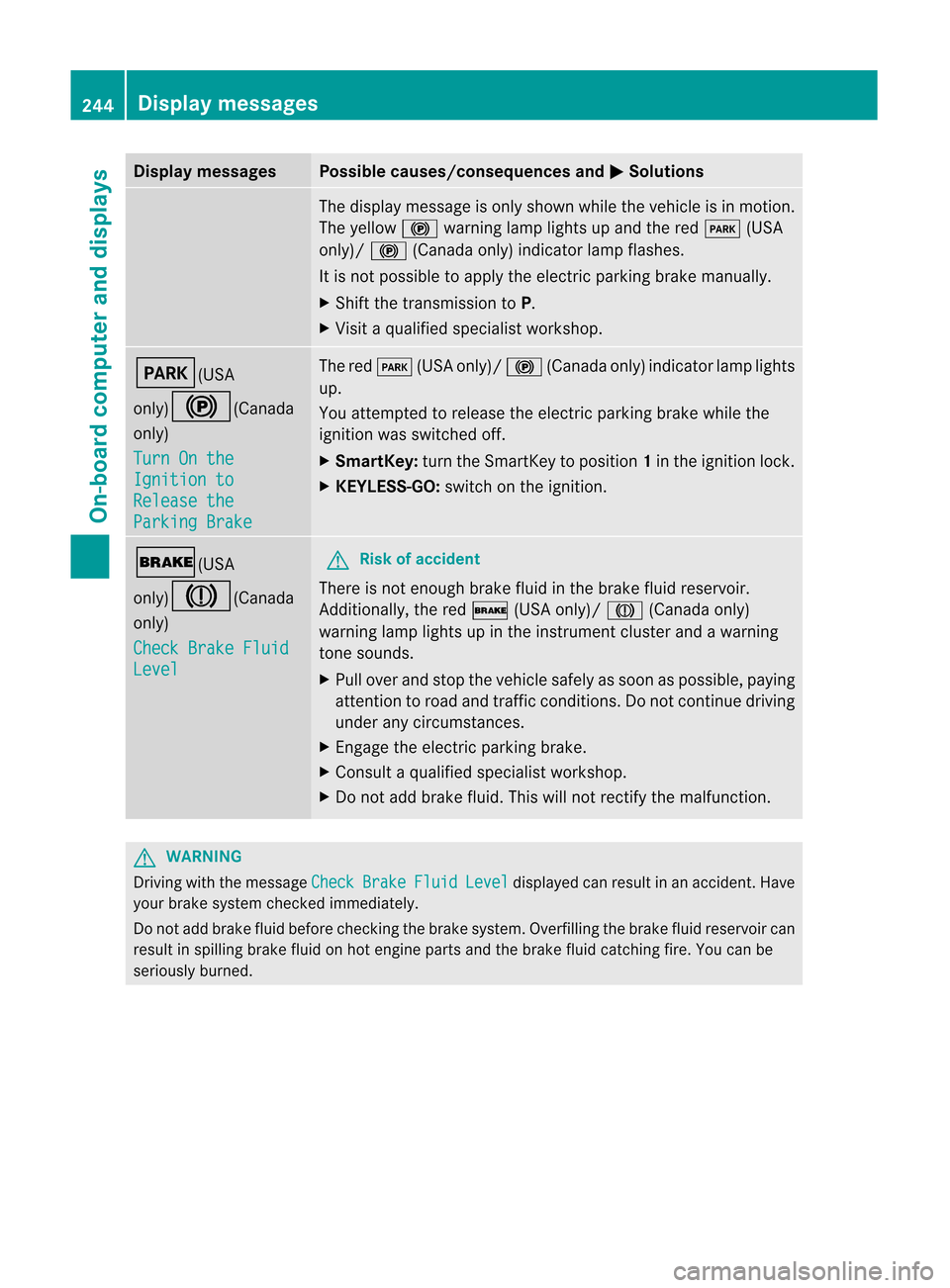
laymessa ges Poss
iblecauses/c onseq uences and M Solu
tions The
displaymes sage ison lysho wnwhile theveh icleis in mot ion.
The yello w! warning lamp lightsup and thered F (USA
on ly)/ ! (Canadaonly) indic ato rlamp flashes.
It is no tp ossible toapply theelectric parking brakemanually .
X Shift thetrans mission toP.
X Visit aquali fiedspecialist workshop. F(USA
only)!(Canada
only)
Turn
Onthe Ignition
to Release
the Parking
Brake The
redF (USAonly)/ !(Canada only)indicator lamplights
up.
You attempt edtorelease theelectric parking brakewhilethe
ignition wasswitched off.
X Smar tKey: turntheSmart Keytoposition 1in the ignition lock.
X KEYL ESS-GO: switchonthe ignition. $(USA
only)J(Canada
only)
Check
BrakeFluid Level G
Risk
ofaccident There
isnot enough brakefluidinthe brake fluidreservoir.
Additionally, thered $ (USAonly)/ J(Canada only)
warning lamplights upinthe instr ument cluster andawarning
ton esounds.
X Pull over andstop thevehicle safelyassoon aspossible, paying
atten tiontoroad andtraffic conditions.Donot cont inue driving
under anycircumst ances.
X En gage theelectric parking brake.
X Consult aquali fiedspecialist workshop.
X Do not add brake fluid.Thiswillnotrect ifythe malfunct ion. G
WARNIN
G Drivin
gwith themessage Check Brake Fluid Level display
edcan result inan accident .Have
your brakesyst emcheck edimm ediat ely.
Do notadd brake fluidbefore checkingthe brake system. Overfillingthebrake fluidreserv oircan
result inspilling brakefluidonhot engin eparts andthebrake fluidcatching fire.Youcanbe
seriously burned. 244
Display
messagesOn-board computer and displays
Page 250 of 396
Disp
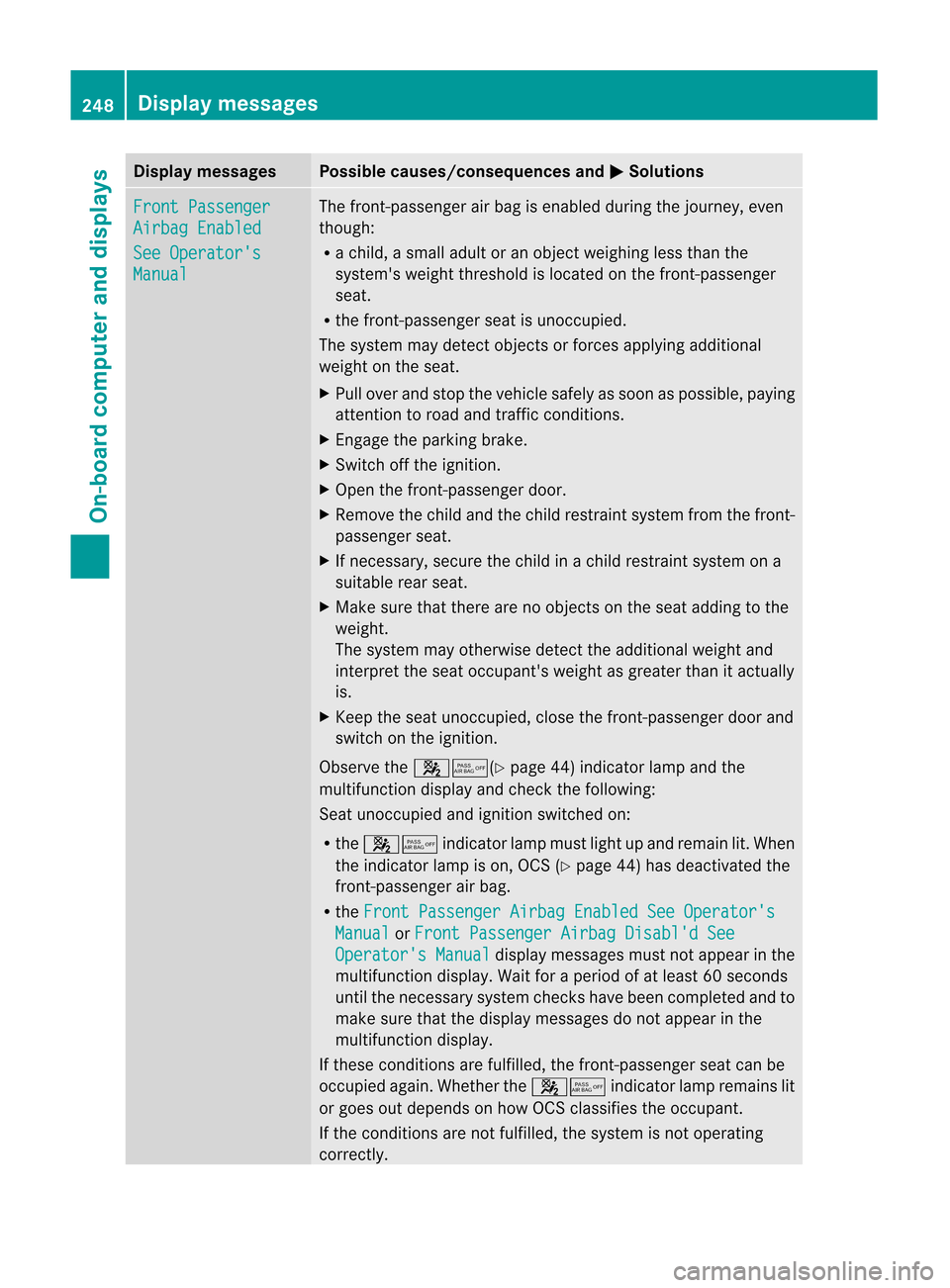
laymessa ges Poss
iblecauses/c onseq uences and M Solu
tions Fro
ntPassenger Air
bag Enabled See
Operator's Man
ual The
fron t-pass enger airbag isen abled duringthejo urn ey, even
th ough :
R ach ild, asm alladult oran obj ectw eighing lessthan the
system' sweight threshold islocated onthe fron t-passenger
seat.
R the fron t-passenger seatisunocc upied.
The system maydetec tobjec tsor forc esapplying additional
weight onthe seat.
X Pull over andstop thevehicle safelyassoon aspossible, paying
att ent ion toroad andtrafficcon dition s.
X En gage theparkin gbrake.
X Switc hoff the ignit ion.
X Open thefron t-passenger door.
X Remove thechild andthechild restraint system fromthefron t-
passenger seat.
X Ifnec essary, securethechild inachild restraint system ona
suitable rearseat.
X Make surethatthereare noobjec tson the seat adding tothe
weight.
The system mayother wisedetec tthe additional weightand
interpret theseat occupant's weightasgreater thanitactually
is.
X Keep theseat unoccupied, closethefront -passenger doorand
switch onthe ignition.
Observe the45(Y page44)indicator lampandthe
multifunction displayand check thefollowing:
Seat unoccupied andignition switched on:
R the 45 indicatorlampmust lightupand remain lit.When
the indicator lampison, OCS (Ypage 44)has deactivated the
front -passenger airbag.
R the Front
Passenger AirbagEnabled SeeOperator's Manual or Front
Passenger AirbagDisabl'd See Operator's
Manual displa
ymessages mustnotappea rint he
multifunction display.Wait foraperiod ofat least 60seconds
until thenecessary systemcheckshave been completed andto
make surethatthedispla ymessages donot appea rint he
multifunction display.
If these condition sare fulfilled ,the front -passenger seatcanbe
occupied again.Whether the45 indicatorlampremains lit
or goes outdepends onhow OCS classifies theoccupant.
If the condition sare not fulfilled ,the system isnot operating
correct ly. 248
Display
messagesOn-board computer and displays
Page 251 of 396
Disp
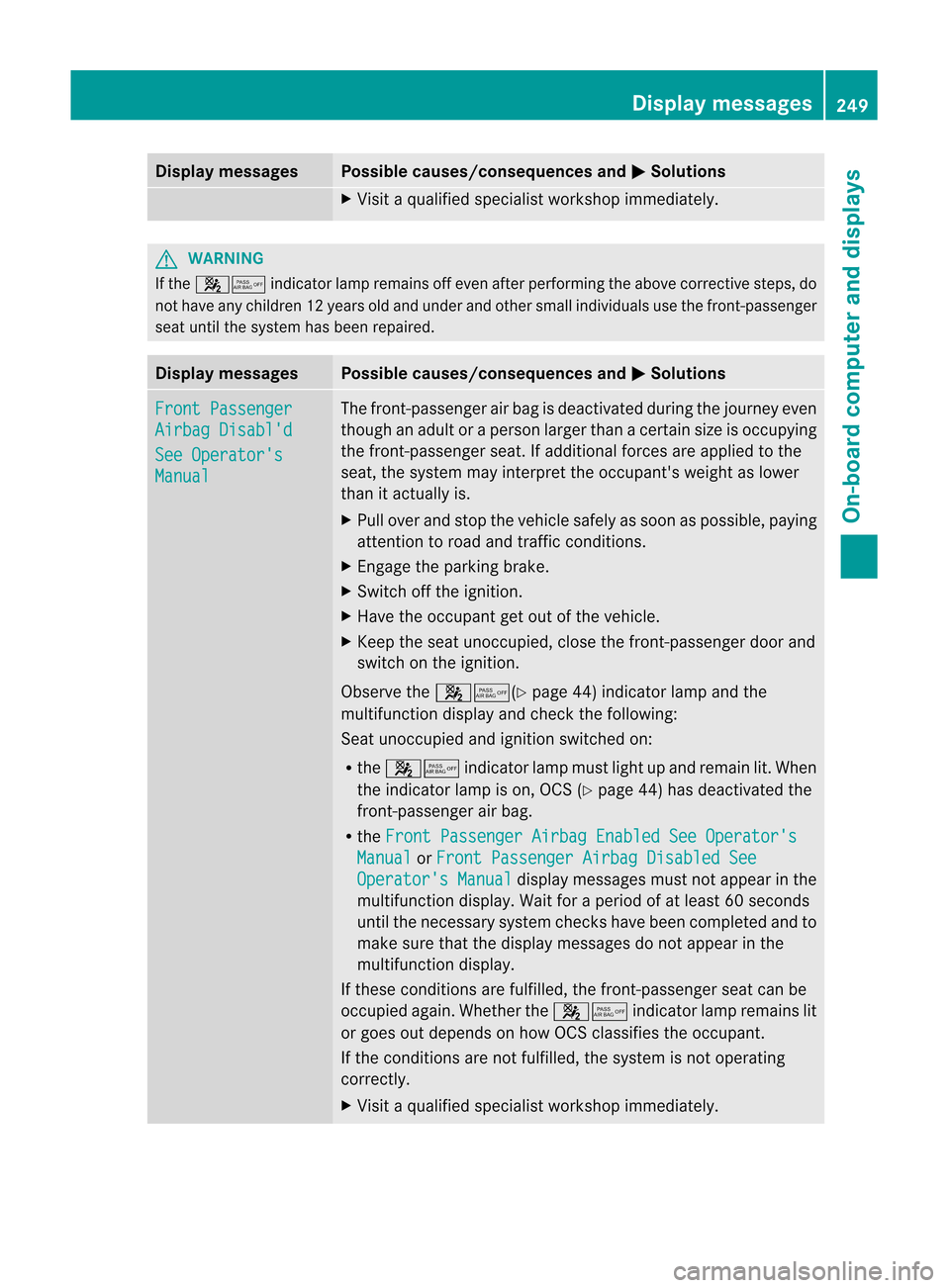
laymessa ges Poss
iblecauses/c onseq uences and M Solu
tions X
Vis itaqualif iedspecialist wor kshop immediat ely. G
WAR
NING If
th e45 indic ato rlamp remains offeven afterperf ormingtheabove correctivest eps, do
no th ave any childre n12years oldand under andother smallindividuals usethefron t-passenger
seat until thesystem hasbeen repaired. Display
messages Possible
causes/consequences andM Solutions
Front
Passeng er Airbag
Disabl' d See
Operato r's Manual The
front-passenger airbag isdeactivat edduring thejourn eyeven
though anadult oraperson largerthanacert ainsize isoccupying
the fron t-passenger seat.Ifadditional forcesare applied tothe
seat, thesystem mayinterpret theoccupant 'sweight aslower
than itactually is.
X Pull over andstop thevehicle safelyassoon aspossible, paying
atten tiontoroad andtrafficcon ditions .
X En gage theparking brake.
X Switc hoff the ignition .
X Have theoccupant getout ofthe vehicle.
X Keep theseat unocc upied, closethefron t-passenger doorand
switch onthe ignition .
Observe the45(Y page44)indicat orlamp andthe
multifunc tiondisplay andchec kthe following:
Seat unoccupied andignition switched on:
R the 45 indicatorlampmust lightupand remain lit.When
the indicator lampison, OCS (Ypage 44)has deactivated the
front -passenger airbag.
R the Front
Passenger AirbagEnabled SeeOperator's Manual or Front
Passenger AirbagDisabled See Operator's
Manual displa
ymessages mustnotappea rint he
multifunction display.Wait foraperiod ofat least 60seconds
until thenecessary systemcheckshave been completed andto
make surethatthedispla ymessages donot appea rint he
multifunction display.
If these condition sare fulfilled ,the front -passenger seatcanbe
occupied again.Whether the45 indicatorlampremains lit
or goes outdepends onhow OCS classifies theoccupant.
If the condition sare not fulfilled ,the system isnot operating
correct ly.
X Visit aqual ified specialist workshop immediately. Display
messages
249On-board computer and displays Z
Page 269 of 396
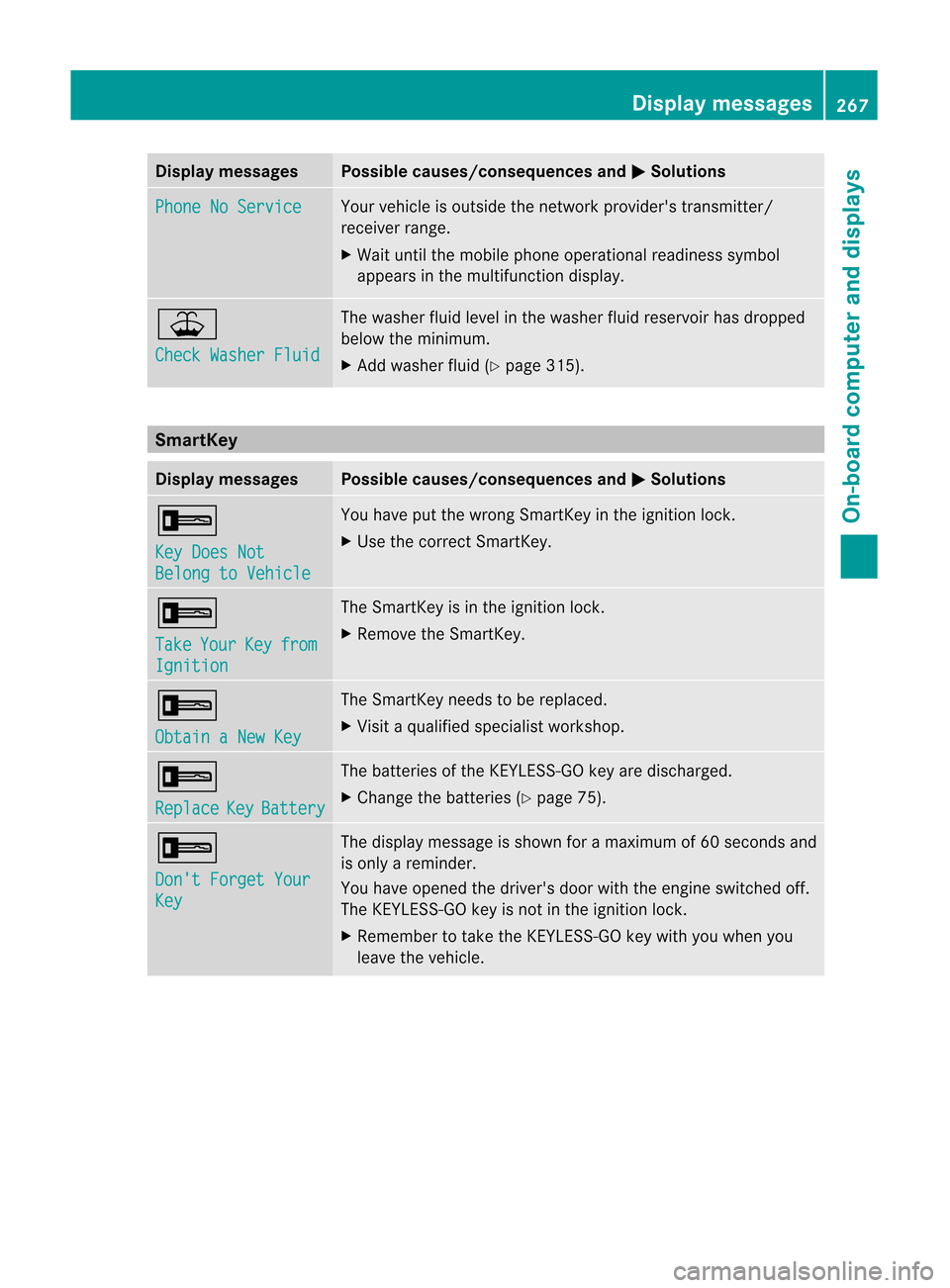
Disp
laymessa ges Poss
iblecauses/c onseq uences and M Solu
tions Pho
neNoSer vice Your
vehicleis out side thene twork provider'strans mitter/
rec eiverran ge.
X Wait untilth emob ilepho neoper ationalread iness sym bol
appea rsinthemult ifunction disp lay. ¥
Che
ckWasher Fluid The
wash erflui dlev elin thew asher fluidreservoir has dropped
below themin imum .
X Ad dwashe rfluid (Y page 315). Sma
rtKey Displa
ymessag es Possibl
ecaus es/conseq uencesandM Solut
ions +
Key
DoesNot Bel
ong toVehicle You
have putthewron gSm artKey intheign itio nlock.
X Use thecorrec tSmart Key. +
Take Your Key from
Ignition The
Smart Keyisin the ignition lock.
X Remove theSmart Key. +
Obtain
aNew Key The
Smart Keyneeds tobe replaced.
X Visit aquali fiedspecialist workshop. +
Replace Key Battery The
batteries ofthe KEYLE SS-GO key aredischarged.
X Change thebatteries (Ypage 75). +
Don't
Forget Your Key The
display message isshown foramaximum of60 seconds and
is only areminder.
You have opened thedriver's doorwiththeengine switched off.
The KEYLE SS-GO key isnot inthe ignition lock.
X Remember totake theKEYLE SS-GO key with youwhen you
leave thevehicle. Display
messages
267On-board computer and displays Z
Page 270 of 396
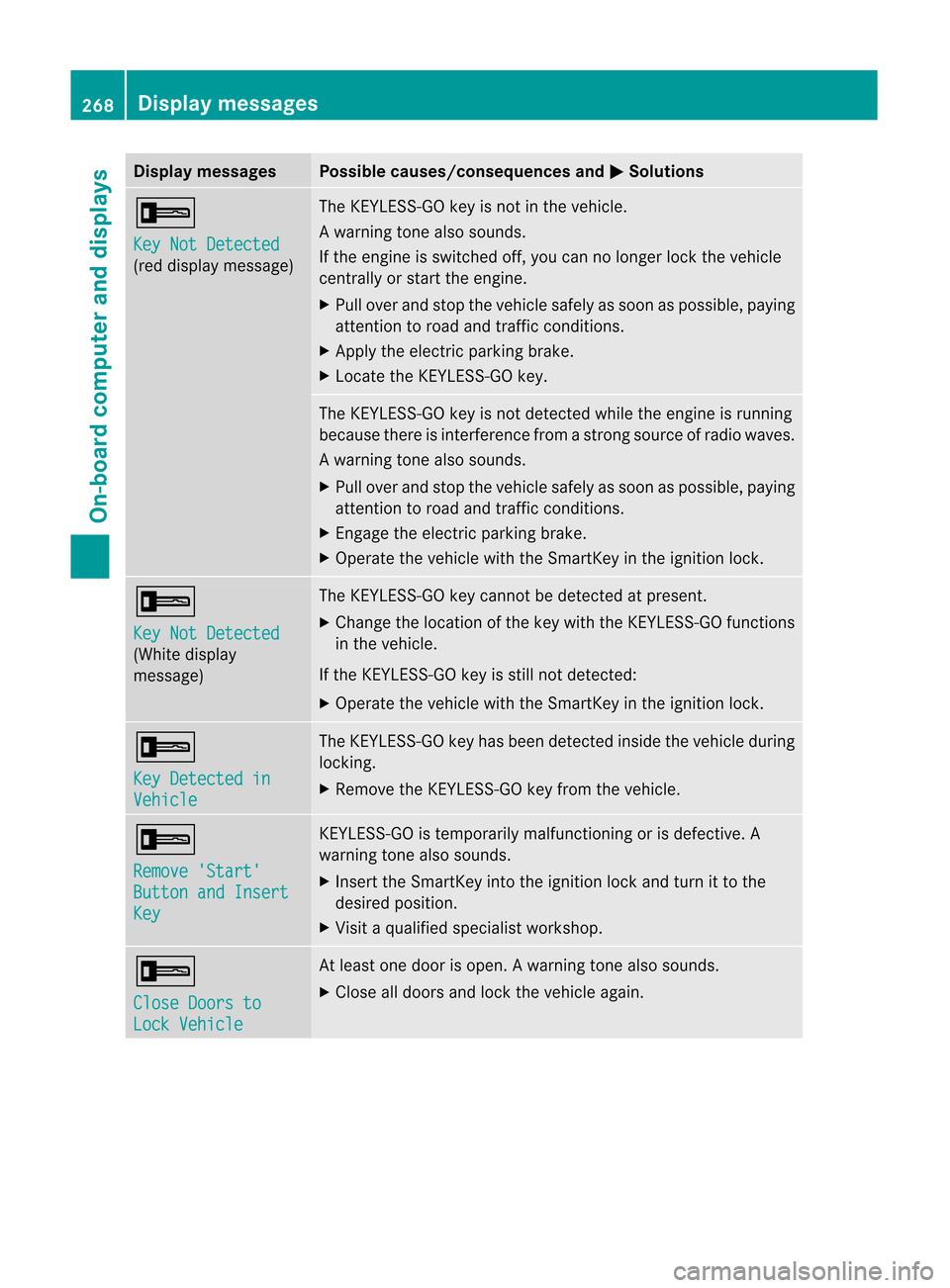
Disp
laymessa ges Poss
iblecauses/c onseq uences and M Solu
tions +
Key
NotDetected (re
ddisp laymes sage ) The
KEYLE SS-GO keyis no tin theveh icle.
Aw arning tone also soun ds.
If th een gin eis swit ched off,you can nolonger lockthe vehicle
cent rally orstart theengine.
X Pull over andstop thevehicle safelyassoon aspossible, paying
attent iontoroad andtraffic condition s.
X Apply theelectric parking brake.
X Locate theKEYLE SS-GO key. The
KEYLE SS-GO key isnot detect edwhile theengine isrunning
because thereisinterfer encefromastron gsource ofradio waves.
Aw arning tone also soun ds.
X Pull overand stop thevehiclesa fel yas soo naspossible ,pay ing
attent iontoroad andtraffic conditions.
X Engage theelectric parking brake.
X Operate thevehicle withtheSmartKey inthe ignition lock. +
Key
NotDetected (White
display
message) The
KEYLES S-GOkeycannot bedetected atpresent.
X Change thelocation ofthe key with theKEYLES S-GOfunction s
in the vehicle.
If the KEYLES S-GOkeyisstill notdetected:
X Operate thevehicle withtheSmartKey inthe ignition lock. +
Key
Detected in Vehicle The
KEYLES S-GOkeyhas been detected insidethevehicle during
locking.
X Remove theKEYLES S-GOkeyfrom thevehicle. +
Remove
'Start' Button
andInsert Key KEYLES
S-GOistemporarily malfunctioning orisdefective. A
warning tonealsosounds.
X Insert theSmartKey intotheignition lockandturn itto the
desired position.
X Visit aqual ified speciali stworkshop. +
Close
Doorsto Lock
Vehicle At
least onedoor isopen. Awarning tone also soun ds.
X Close alldoor sand lockthe vehicle again. 268
Display
messagesOn-board computer and displays