check engine MERCEDES-BENZ M-Class 2013 W166 User Guide
[x] Cancel search | Manufacturer: MERCEDES-BENZ, Model Year: 2013, Model line: M-Class, Model: MERCEDES-BENZ M-Class 2013 W166Pages: 458, PDF Size: 6.24 MB
Page 73 of 458
In appropriate driving situations, activate the
off-road program:
X Vehicles withou tthe ON&OFFROAD
package (Y page 248)
X Vehicles with the ON&OFFROAD package
(Y page 248)
Off-road 4ETS (Electronic Traction
System) A4
ETS syste mspecifically suited to off-road
terrain is activated automatically once the off-
road program is activated on:
R vehicles without the ON&OFFROAD
package (Y page 248)
R vehicles with the ON&OFFROA Dpackage
(Y page 248)
Important safety notes G
WARNING
If ESP ®
is malfunctioning, ESP ®
is unable to
stabilize the vehicle .Additionally, further
driving safety systems are deactivated. This
increases the risk of skidding and an accident.
Drive on carefully. Have ESP ®
checked at a
qualified specialist workshop.
! Vehicles with 4MATIC: only operate the
vehicle for a maximum of ten seconds on a
brake test dynamometer. Switch off the
ignition.
Application of the brakes by ESP ®
may
otherwise destroy the brake system.
! Vehicles with 4MATIC: function or
performance tests may only be carried out
on a 2-axle dynamometer. Before you
operate the vehicle on such a
dynamometer, please consult a qualified
workshop. You could otherwise damage
the drive train or the brake system.
ESP ®
is deactivated if the 0017warning lamp
in the instrument cluster lights up
continuously when the engin eis running. If the
000F warning lamp and the 0017
warning lamp are lit continuously, ESP ®
is not
available due to a malfunction.
Observe the information on warning lamps
(Y page 321) and displaym essages which
may be shown in the instrument cluster
(Y page 283).
i Only use wheels with the recommended
tire sizes. Only then will ESP ®
function
properly.
Characteristics of ESP ® General information
ESP
®
is activated automatically when the
engine is started.
If ESP ®
intervenes, the 000FESP®
warning
lamp flashes in the instrument cluster.
If ESP ®
intervenes:
X Do not deactivate ESP ®
under any
circumstances.
X Only depress the accelerator pedal as far
as necessary when pulling away.
X Adapt your driving style to suit the
prevailing road and weather conditions.
ECO start/stop function
The ECO start/stop function switches the
engine off automatically when the vehicle
stops moving. The engine starts
automatically when the driver wants to pull
away again. ESP ®
remains in its previously
selected status. Example:if ESP®
was
deactivated before the engin ewas switched
off, ESP ®
remains deactivated when the
engine is switched on again.
Deactivating/activating ESP ® Important safety notes
You can selec
tbetween the following states
of ESP ®
:
R ESP ®
is activated.
R ESP ®
is deactivated. Driving safet
ysystems
71Safety Z
Page 77 of 458
deactivated (Y
page 207). On vehicles with
Active Parking Assist, the 0003symbol is
displayed when Pis engaged or you are
driving faster than 22 mph (35 km/h).
Following damage to the fron tend of the
vehicle, have the configuratio nand operation
of the rada rsensors checked at a qualified
specialist workshop. This also applies to
collisions at low speeds where there is no
visible damage to the fron tofthe vehicle. STEER CONTROL
i Observe the "Important safety notes"
section (Y page 66).
STEER CONTROL helps you by transmitting a
noticeable steering force to the steering
wheel in the direction required for vehicle
stabilization.
This steering assistance is provided in
particular if:
R both right wheels or both left wheels are on
a wet or slippery road surface when you
brake
R the vehicle starts to skid
If ESP ®
is malfunctioning, you will not receive
steering support from STEER CONTROL.
Power steering will, however, continue to
function. Theft deterrent locking system
Immobilizer
X To activate with the SmartKey: remove
the SmartKey from the ignition lock.
X To activate with KEYLESS-GO: switch the
ignition off and open the driver's door.
X To deactivate: switch on the ignition.
The immobilizer prevents your vehicle from
being started without the correct SmartKey.
When leaving the vehicle, always take the
SmartKey with you and lock the vehicle. Anyone can start the engine if a valid
SmartKey has been left inside the vehicle.
i
The immobilizer is always deactivated
when you start the engine.
In the event that the engine cannot be
started when the starter battery is fully
charged, the immobilizer may be faulty.
Contact an authorized Mercedes-Benz
Center or call 1-800-FOR-MERCedes (in the
USA) or 1-800-387-0100 (in Canada). ATA (anti-theft alarm system)
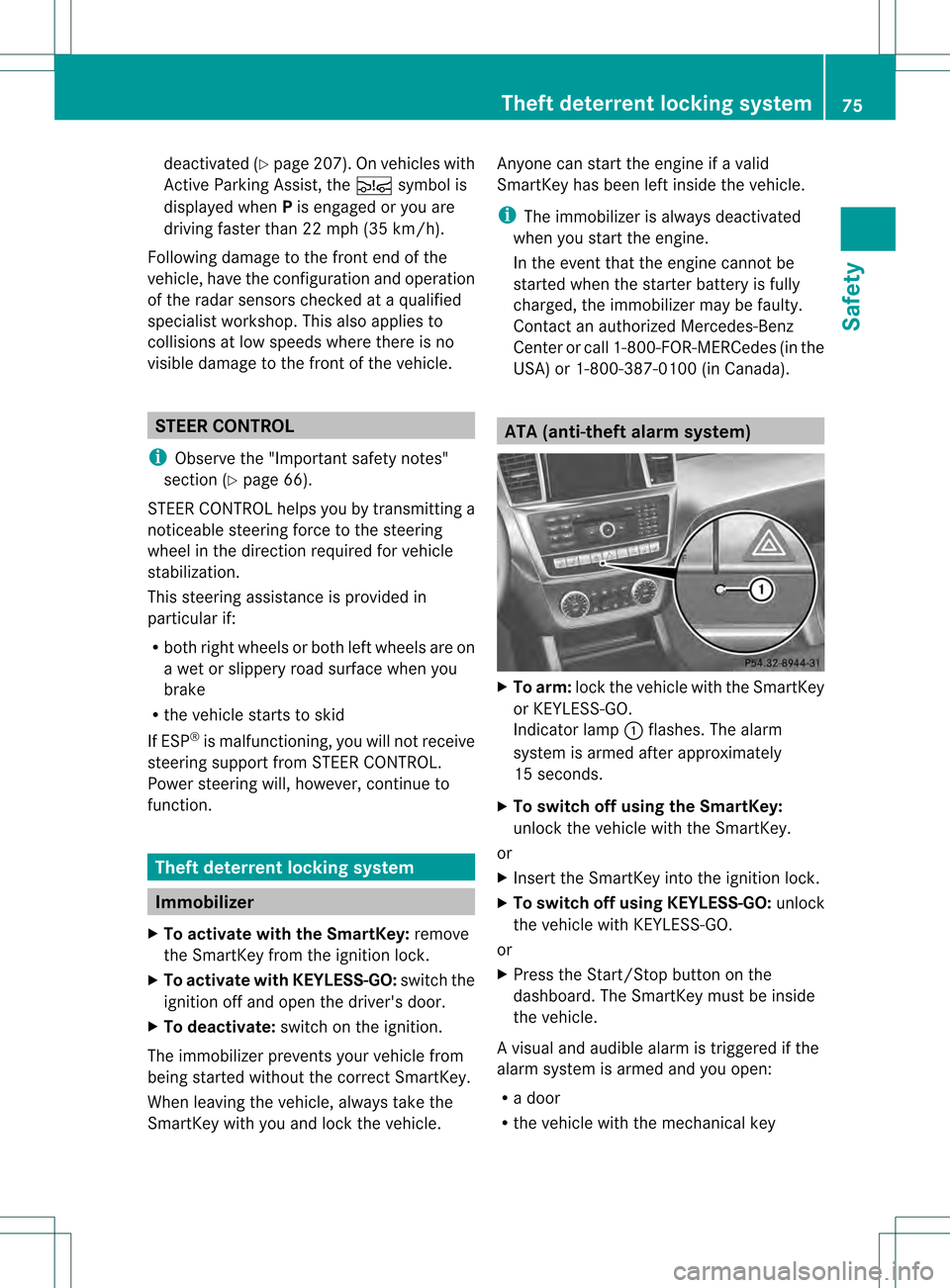
X
To arm: lock the vehicle with the SmartKey
or KEYLESS-GO.
Indicator lamp 0002flashes. The alarm
system is armed after approximately
15 seconds.
X To switch off using the SmartKey:
unlock the vehicle with the SmartKey.
or
X Insert the SmartKey into the ignition lock.
X To switch off using KEYLESS-GO: unlock
the vehicle with KEYLESS-GO.
or
X Press the Start/Stop button on the
dashboard. The SmartKey must be inside
the vehicle.
Av isual and audible alarm is triggered if the
alarm system is armed and you open:
R a door
R the vehicle with the mechanical key Theft deterrent locking system
75Safety Z
Page 81 of 458
Strong magnetic fields can occur in the
vicinity of powerful electrical installations.
R Do not keep the SmartKey:
- with electronic devices, e.g. a mobile
phone or another SmartKey
- with metallic objects, e.g. coins or metal
foil
- inside metallic objects, e.g. a metal case
This can affect the functionality of the
SmartKey.
Do not keep the KEYLESS-GO key in the
temperature-controlled cup holder.
Otherwise, the KEYLESS-GO key will not be
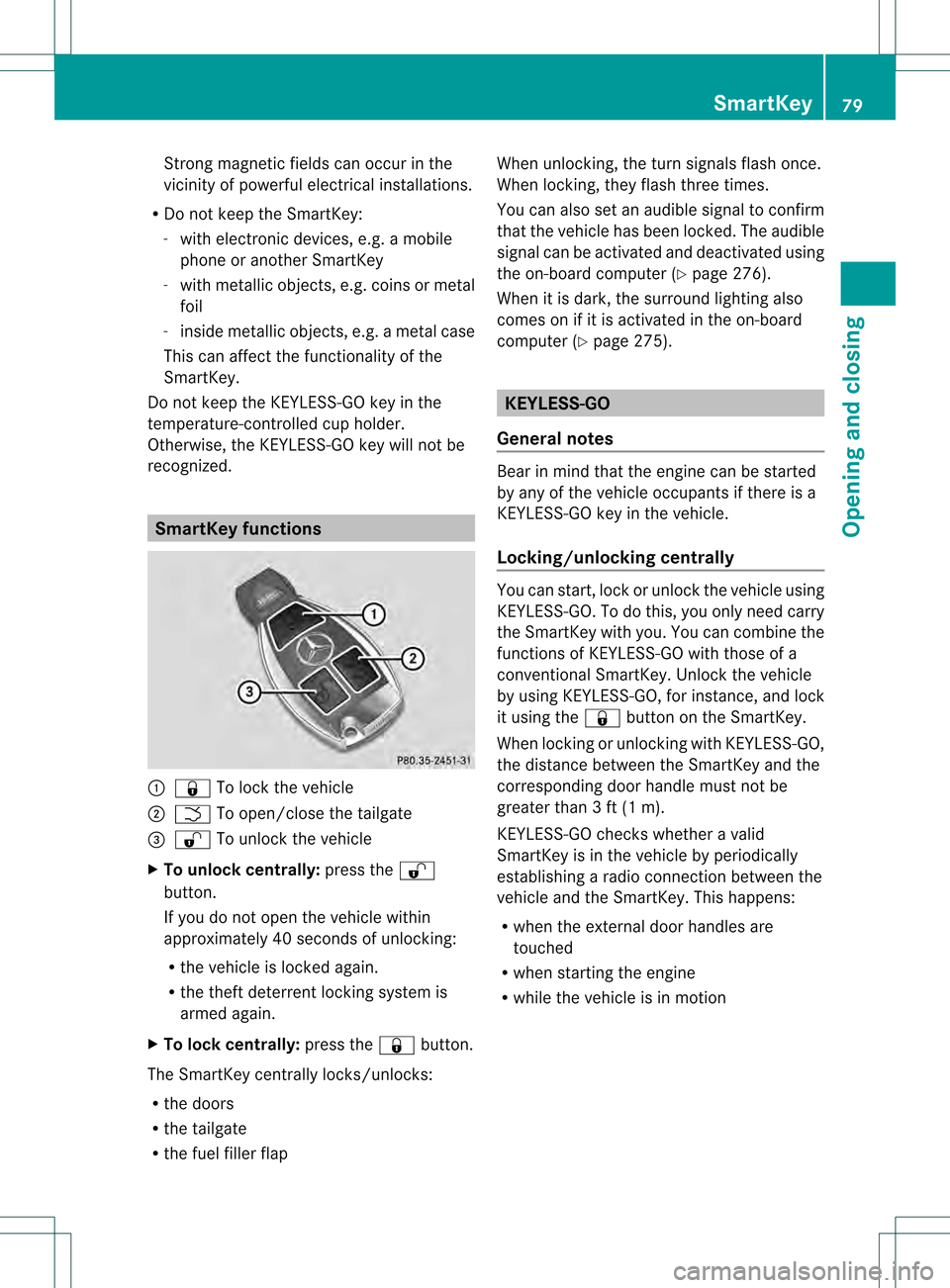
recognized. SmartKey functions
0002
000B To lock the vehicle
0003 0004 To open/close the tailgate
001F 000C To unlock the vehicle
X To unloc kcentrally: press the 000C
button.
If you do not open th evehicle within
approximately 40 seconds of unlocking:
R the vehicle is locked again.
R the theft deterrent locking system is
armed again.
X To lock centrally: press the000Bbutton.
The SmartKey centrally locks/unlocks:
R the doors
R the tailgate
R the fuel filler flap When unlocking, the turn signals flash once.
When locking, they flash three times.
You can also set an audible signal to confirm
that the vehicle has been locked. The audible
signal can be activated and deactivated using
the on-board computer (Y
page 276).
When it is dark, the surround lighting also
comes on if it is activated in the on-board
computer (Y page 275). KEYLESS-GO
General notes Bear in mind that the engine can be started
by any of the vehicle occupants if there is a
KEYLESS-GO key in the vehicle.
Locking/unlocking centrally
You can start, lock or unlock the vehicle using
KEYLESS-GO. To do this, you only need carry
the SmartKey with you. You can combine the
functions of KEYLESS-GO with those of a
conventional SmartKey. Unlock the vehicle
by using KEYLESS-GO, for instance, and lock
it using the
000Bbutton on the SmartKey.
When locking or unlocking with KEYLESS-GO,
the distance between the SmartKey and the
corresponding door handle must not be
greater than 3 ft (1 m).
KEYLESS-GO checks whether a valid
SmartKey is in the vehicle by periodically
establishing a radio connection between the
vehicle and the SmartKey. This happens:
R when the external door handles are
touched
R when starting the engine
R while the vehicle is in motion SmartKey
79Opening and closing Z
Page 86 of 458
Problem Possible causes/consequences and
0001 Solutions
The engine cannot be
started using the
SmartKey. The on-board voltage is too low.
X
Switch off non-essential consumers, e.g. seat heating or interior
lighting, and try to start the engine again.
If this does not work:
X Check the starter battery and charge it if necessary
(Y page 387).
or
X Jump-start the vehicle (Y page 389).
or
X Consult a qualified specialist workshop. The engine cannot be
started using KEYLESS-
GO. The SmartKey is in
the vehicle. Ad
oor is open. Therefore, the SmartKey cannot be detected as
easily.
X Close the door and try to start the vehicle again. There is interference from a powerful source of radio waves.
X
Start your vehicle with the SmartKey in the ignition lock. Doors
Important safety notes
G
WARNING
If children are left unsupervised in the vehicle,
they could:
R open the doors, thus endangering other
people or road users.
R get out and disrupt traffic.
R operate the vehicle's equipment.
Additionally, children could set the vehicle in
motion if, for example, they:
R release the parking brake.
R shift the automatic transmission out of
parking position P.
R starting the engine.
There is a risk of an accident and injury.
When leaving the vehicle, always take the
SmartKey with you and lock the vehicle. Never
leave children or animals unattended in the
vehicle. Always keep the SmartKey out of
reach of children. G
WARNING
When leaving the vehicle, always remove the
SmartKey from the ignition lock. Always take
the SmartKey with you and lock the vehicle.
Do not leave children unsupervised in the
vehicle, even if they are secured in a child
restraint system, and do not give them access
to an unlocked vehicle. Achild's unsupervised
access to a vehicle could result in an accident
and/or serious personal injury. They could:
R injure themselves on vehicle parts
R be seriously or fatally injured by extreme
heat or cold
R injure themselves or have an accident with
vehicle equipment that may still be in
operation even after the SmartKey has
been removed from the ignition, such as the
seat adjustment, steering wheel
adjustment or memory function.
If children open a door, they could cause
severe or even fatal injury to other persons; if
they get out of the vehicle, they could injure 84
DoorsOpening and closing
Page 104 of 458
Useful information
i This Operator's Manual describes all
models and all standard and optional
equipment of your vehicle available at the
time of publication of the Operator's
Manual. Country-specific differences are
possible. Please note that your vehicle may
not be equipped with all features
described. This also applies to safety-
related systems and functions.
i Read the information on qualified
specialist workshops: (Y page 27).Correct driver's seat position
G
WARNING
You could lose control of your vehicle if you
do the following while driving:
R adjust the driver's seat, head restraint,
steering wheel or mirrors
R faste nthe seat belt
There is a risk of an accident.
Adjust the driver's seat, head restraint,
steering wheel and mirror and fasten your
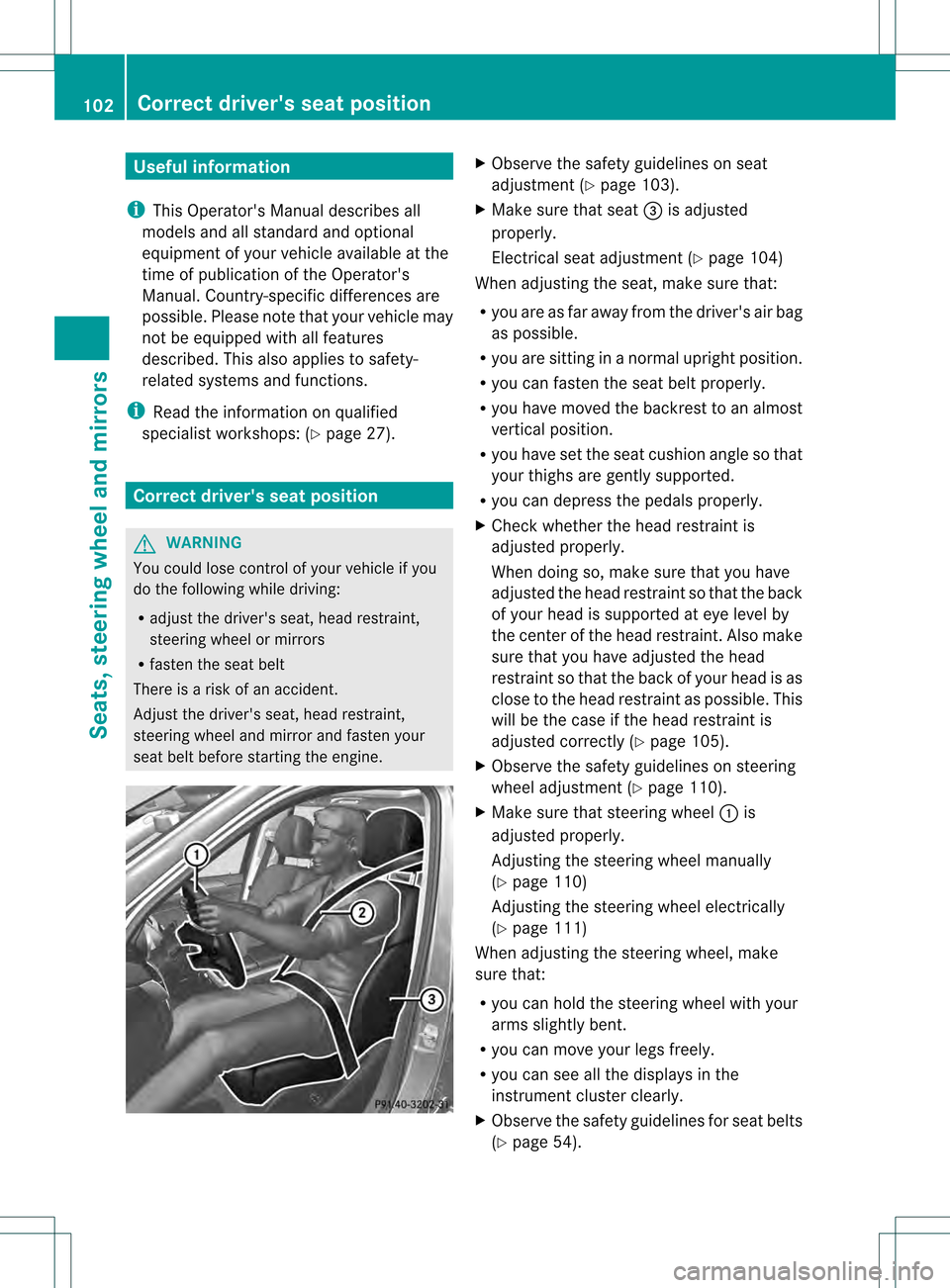
seat belt before starting the engine. X
Observe the safety guidelines on seat
adjustment (Y page 103).
X Make sure that seat 001Fis adjusted
properly.
Electrical seat adjustment (Y page 104)
When adjusting the seat, make sure that:
R you are as far away from the driver's air bag
as possible.
R you are sitting in a normal upright position.
R you can fasten the seat belt properly.
R you have moved the backrest to an almost
vertical position.
R you have set the seat cushion angle so that
your thighs are gently supported.
R you can depress the pedals properly.
X Check whether the head restraint is
adjusted properly.
When doing so, make sure that you have
adjusted the head restraint so that the back
of your head is supported at eye level by
the center of the head restraint.A lso make
sure that you have adjusted the head
restraint so that the back of your head is as
close to the head restraint as possible .This
will be the case if the head restraint is
adjusted correctly (Y page 105).
X Observe the safety guidelines on steering
wheel adjustment (Y page 110).
X Make sure that steering wheel 0002is
adjusted properly.
Adjusting the steering wheel manually
(Y page 110)
Adjusting the steering wheel electrically
(Y page 111)
When adjusting the steering wheel, make
sure that:
R you can hold the steering wheel with your
arms slightly bent.
R you can move your legs freely.
R you can see all the displays in the
instrumentc luster clearly.
X Observe the safety guidelines for seat belts
(Y page 54). 102
Correct driver's seat positionSeats, steering wheel and mirrors
Page 112 of 458

Problems with the seat ventilation
Problem Possible causes/consequences and
0001 Solutions
The seat ventilation has
switched off
prematurely or cannot
be switched on. The on-board voltage is too low because too many electrical
consumers are switched on.
X
Switch off electrical consumers that you do not need, such as
the rear window defroster or interior lighting.
Once the battery is sufficiently charged, the seat ventilation will
switch back on automatically. Steering wheel
Important safety notes
G
WARNING
You could lose control of your vehicle if you
do the following while driving:
R adjust the driver's seat, head restraint,
steering wheel or mirrors
R fasten the seat belt
There is a risk of an accident.
Adjust the driver's seat, head restraint,
steering wheel and mirror and fasten your
seat belt before starting the engine. G
WARNING
Children could injure themselves if they
adjust the steering wheel. There is a risk of
injury.
When leaving the vehicle, always take the
SmartKey with you and lock the vehicle. Never
leave children unsupervised in the vehicle. Adjusting the steering wheel
manually
G
WARNING
If the steering wheel is unlocked while the
vehicle is in motion, it could change position
unexpectedly. This could cause you to lose
control of the vehicle. There is a risk of an
accident. Before starting off, make sure the steering
wheel is locked. Never unlock the steering
wheel while the vehicle is in motion.
0002
Release lever
0003 To adjust the steering wheel height
001F To adjust the steering wheel position
(fore-and-aft adjustment)
X Push release lever 0002down completely.
The steering column is unlocked.
X Adjust the steering wheel to the desired
position.
X Push release lever 0002up completely.
The steering column is locked.
X Check if the steering column is locked.
When doing so, try to push the steering
wheel up or down or try to move it in the
fore-and-aft direction. 110
Steering wheelSeats, steering wheel and mirrors
Page 138 of 458
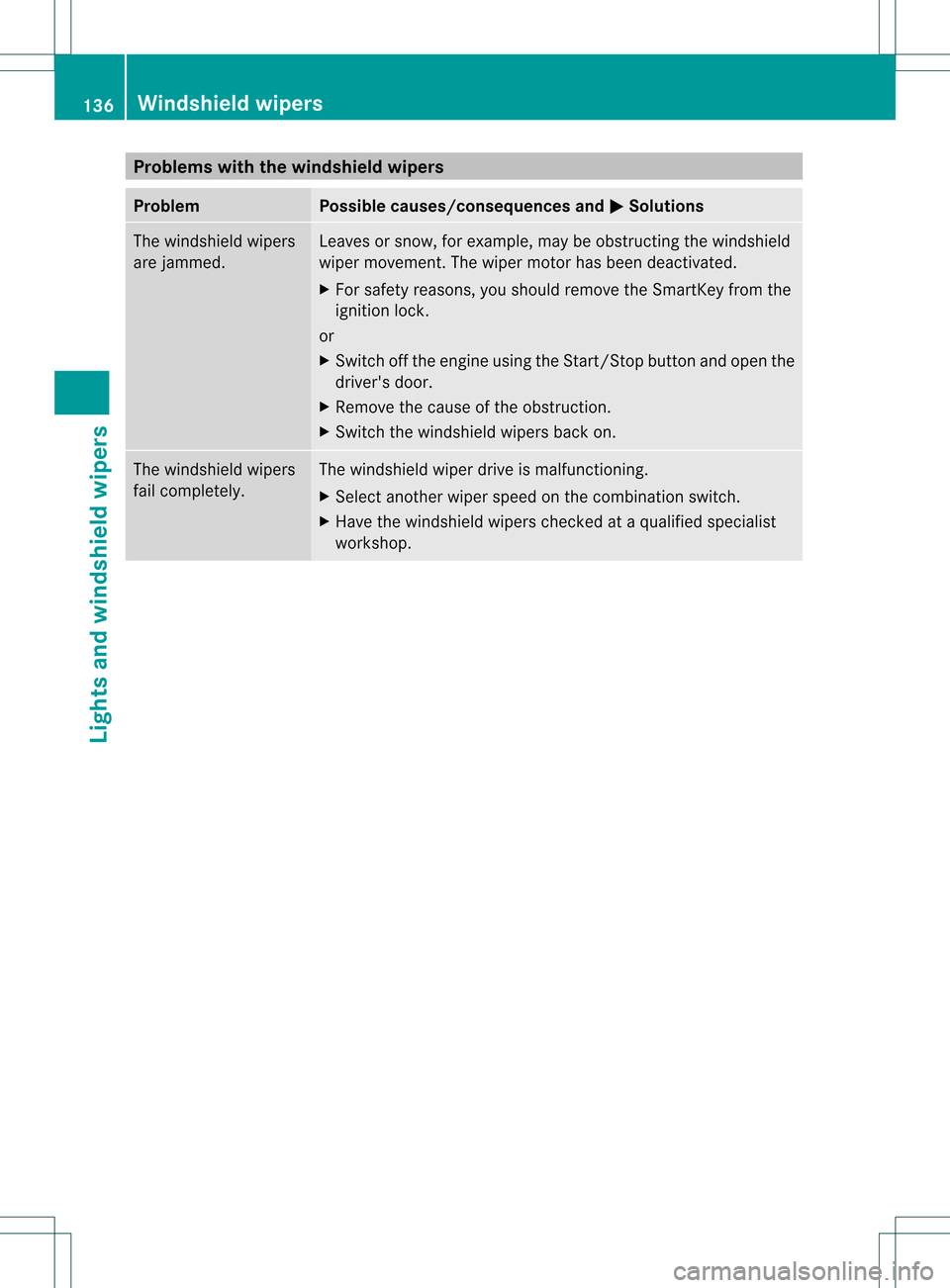
Problems with the windshield wipers
Problem Possible causes/consequences and
0001 Solutions
The windshield wipers
are jammed. Leaves or snow, for example, may be obstructing the windshield
wiper movement.T
he wiper motor has been deactivated.
X For safety reasons, you should remove the SmartKey from the
ignition lock.
or
X Switch off the engine using the Start/Stop button and open the
driver's door.
X Remove the cause of the obstruction.
X Switch the windshield wipers back on. The windshield wipers
fail completely. The windshield wiper drive is malfunctioning.
X
Select another wiper speed on the combination switch.
X Have the windshield wipers checked at a qualified specialist
workshop. 136
Windshield wipersLights and windshield wipers
Page 159 of 458

Wear suitable footwear to ensure correct
usage of the pedals.
G
WARNING
If you switch off the ignition while driving,
safety-relevant functions are only available
with limitations, or not at all. This could affect,
for example, the power steering and the brake
boosting effect .You will require considerably
more effort to steer and brake. There is a risk
of an accident.
Do not switch off the ignition while driving. G
WARNING
If the parking brake has not been fully
released when driving, the parking brake can:
R overheat and cause a fire
R lose its hold function.
There is a risk of fire and an accident .Release
the parking brake fully before driving off.
! Warm up the engine quickly. Do not use
the engine's full performance until it has
reached operating temperature.
Only shift the automatic transmission to
the desired drive position when the vehicle
is stationary.
Where possible, avoid spinning the drive
wheels when pulling away on slippery
roads. You could otherwise damage the
drive train.
! AMG vehicles: at low engine oil
temperatures below 68 ‡(+20 †), the
maximu mengine speed is restricted in
order to protect the engine .To protec tthe
engine and maintain smooth engine
operation, avoid driving at full throttle when
the engine is cold. Key positions
SmartKey 000E
To remove the SmartKey
0005 Power supply for some consumers, such
as the windshield wipers
0006 Ignition (power supply for all consumers)
and drive position
0007 To start the engine
As soon as the ignition is switched on, all the
indicator lamps in the instrumentc luster light
up. If an indicator lamp does not go out after
starting the engine or lights up while driving,
see (Y page 318).
If the SmartKey is in position 0in the ignition
lock for an extended period of time, it can no
longer be turned in the ignition lock .The
steering is then locked. To unlock, remove the
SmartKey and reinsert it into the ignition lock.
The steering is locked when you remove the
SmartKey from the ignition lock.
X Remove the SmartKey when the engine is
switched off.
The starter battery could otherwise be
discharged.
If you cannot turn the SmartKey in the ignition
lock, the starter battery may not be charged
sufficiently.
X Check the starter battery and recharge if
necessary (Y page 387).
or
X Jump-start the vehicle (Y page 389). Driving
157Driving and parking Z
Page 166 of 458
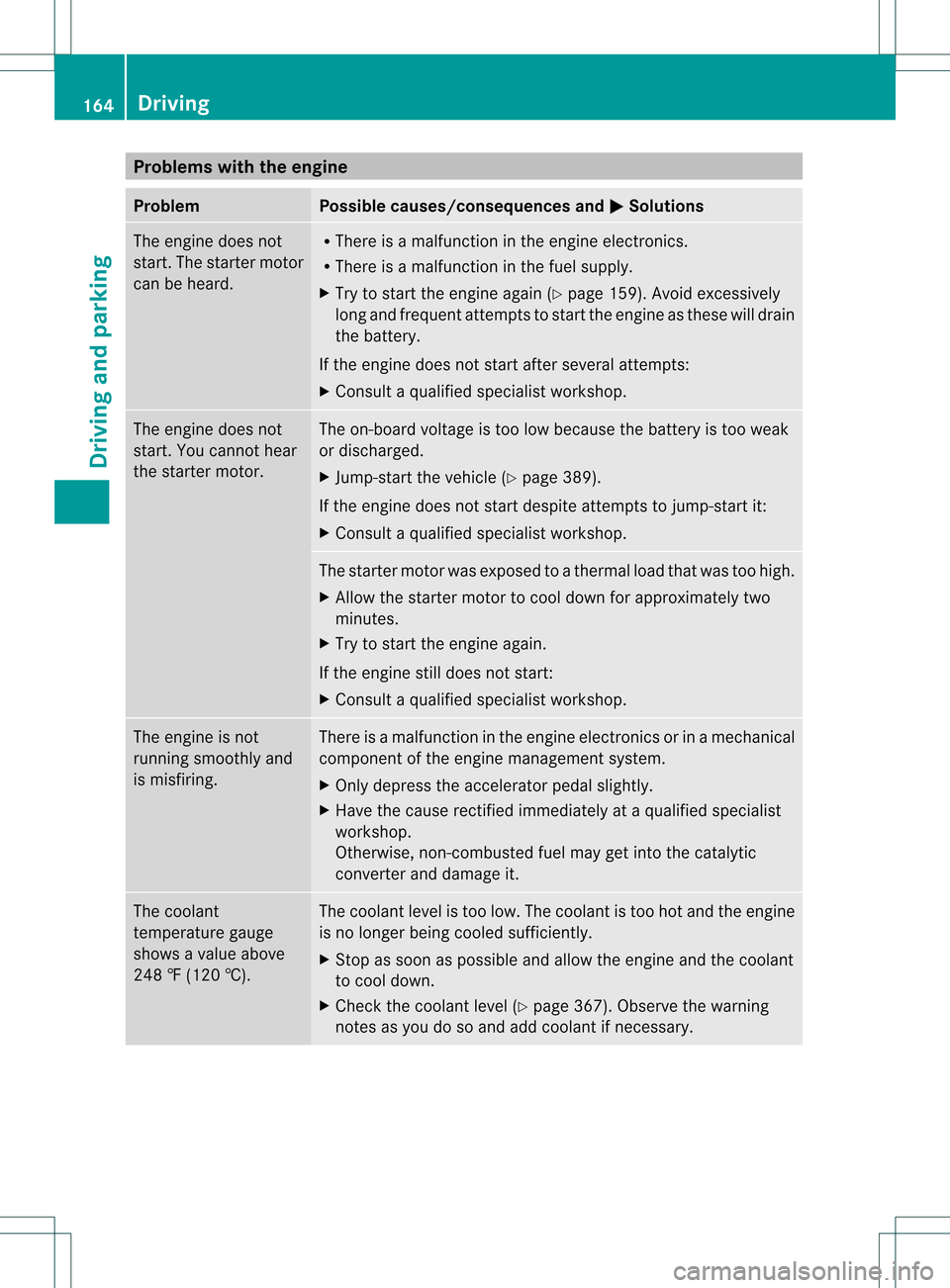
Problems with the engine
Problem Possible causes/consequences and
0001 Solutions
The engine does not
start. The starter motor
can be heard. R
There is a malfunction in the engine electronics.
R There is a malfunction in the fuel supply.
X Try to start the engine again (Y page 159). Avoid excessively
long and frequent attempts to start the engine as these will drain
the battery.
If the engine does not start after several attempts:
X Consult a qualified specialist workshop. The engine does not
start. You cannot hear
the starter motor. The on-board voltage is too low because the battery is too weak
or discharged.
X
Jump-start the vehicle (Y page 389).
If the engine does not start despite attempts to jump-start it:
X Consult a qualified specialist workshop. The starter motor was exposed to a thermal load that was too high.
X
Allow the starter motor to cool down for approximately two
minutes.
X Try to start the engine again.
If the engine still does not start:
X Consult a qualified specialist workshop. The engine is not
running smoothly and
is misfiring. There is a malfunction in the engine electronics or in a mechanical
component of the engine management system.
X
Only depress the accelerator pedal slightly.
X Have the cause rectified immediately at a qualified specialist
workshop.
Otherwise, non-combusted fuel may get into the catalytic
converter and damage it. The coolant
temperature gauge
shows a value above
248 ‡ (120 †). The coolant level is too low. The coolant is too hot and the engine
is no longer being cooled sufficiently.
X
Stop as soon as possible and allow the engine and the coolant
to cool down.
X Check the coolant level (Y page 367). Observe the warning
notes as you do so and add coolant if necessary. 164
DrivingDriving and parking
Page 167 of 458

Automatic transmission
Important safety notes
G
WARNING
If the engine speed is above the idling speed
and you engage transmission position Dor
R, the vehicle could pull away suddenly. There
is a risk of an accident.
When engaging transmission position Dor R,
always firmly depress the brake pedal and do
no tsimultaneously accelerate. G
WARNING
The automatic transmission switches to
neutral position Nwhen you switch off the
engine. The vehicle may roll away. There is a
risk of an accident.
After switching off the engine, always switch
to parking position P. Prevent the parked
vehicle fro mrolling away by applying the
parking brake. DIRECT SELECTl
ever
Overview of transmission positions P
Park position with parking lock
R Reverse gear
N Neutral
D Drive
The DIRECT SELECT lever is on the righ tofthe
steering column.
i The DIRECT SELECT lever always returns
to its original position. The current transmission position
P,R, Nor Dappears
in the transmission position display
(Y page 165) in the multifunction display.
Transmission position and drive
program display !
If the transmission position display in the
multifunction display is not working, you
should pull away carefully to check whether
the desired transmission position is
engaged. Ideally, you should select
transmission position Dand drive program
C or S. Do not restrict the shift range. Transmission position and drive program display
0002
Transmission position display
0003 Drive program display
The current transmission position and drive
program appearint he multifunction display.
i The arrows in the transmission position
display show how and into which
transmission positions you can change
using the DIRECT SELECT lever.
Engaging parkp osition P !
If the engine speed is to ohigh or the
vehicle is moving, do not shift the
automatic transmission directly from Dto
R, from Rto Dor directly to P.The
automatic transmission could otherwise be
damaged. Automatic transmission
165Driving and parking Z