ESP MERCEDES-BENZ M-Class 2013 W166 Workshop Manual
[x] Cancel search | Manufacturer: MERCEDES-BENZ, Model Year: 2013, Model line: M-Class, Model: MERCEDES-BENZ M-Class 2013 W166Pages: 458, PDF Size: 6.24 MB
Page 194 of 458

i
The special off-road ABS setting enables
a precise, brief and repeated locking of the
frontw heels. This causes them to dig into
loose earth. Be aware that the front wheels
easily skid across the ground surface if
completely braked and therefore lose their
ability to steer. Driving systems
Cruise control
Important safety notes If you fail to adapt your driving style, cruise
control can neither reduce the risk of an
accident nor override the laws of physics.
Cruise control cannot take into account the
road, traffic and weather conditions. Cruise
control is only an aid. You are responsible for
the distance to the vehicle in front, for vehicle
speed, for braking in good time and for
staying in your lane.
Do not use cruise control:
R
in road and traffic conditions which do not
allow you to maintain a constant speed e.g.
in heavy traffic or on winding roads
R on slippery road surfaces. Braking or
accelerating could cause the drive wheels
to lose traction and the vehicle could then
skid
R when there is poor visibility, e.g. due to fog,
heavy rain or snow
If there is a change of drivers, advise the new
driver of the speed stored.
General notes Cruise control maintains a constant road
speed for you. It brakes automatically in order
to avoid exceeding the set speed. On long and
steep downhill gradients, especially if the
vehicle is laden or towing a trailer, you must
select shift range 1,2or 3in good time. By
doing so, you will make use of the braking
effect of the engine, which relieves the load on the brake system and prevents the brakes
from overheating and wearing too quickly.
Use cruise control only if road and traffic
conditions make it appropriate to maintain a
steady speed for a prolonged period. You can
store any road speed above 20 mph
(30 km/h).
i
Cruise control should not be activated
during off-road driving.
Cruise control lever 0002
To activate or increase speed
0003 To activate or reduce speed
001F To deactivate cruise control
001E To activate at the current speed/last
stored speed
When you activate cruise control, the stored
speed is shown in the multifunction display
for five seconds. In the multifunction display,
the segments between the stored speed and
the maximum speed light up.
Activation conditions To activate cruise control, all of the following
activation conditions must be fulfilled:
R
the electric parking brake must be
released.
R you are driving faster than 20mph
(30 km/h).
R ESP ®
must be active, but not intervening.
R the transmission must be in position D.192
Driving systemsDriving and parking
Page 196 of 458

press the cruise control lever up
0002or
down 0003to the pressure point.
Every time the cruise control lever is
pressed up 0002or down 0003the last speed
stored is increased or reduced.
X To adjust the set speed in 5 mph
increments (10 km/h increments):
briefly press the cruise control lever
up 0002 or down 0003to the pressure point.
Every time the cruise control lever is
pressed up 0002or down 0003the last speed
stored is increased or reduced.
i Cruise control is not deactivated if you
depress the accelerator pedal. For
example, if you accelerate briefly to
overtake, cruise control adjusts the
vehicle's speed to the last speed stored
after you have finished overtaking.
Deactivating cruise control There are several ways to deactivate cruise
control:
X Briefly press the cruise control lever
forwards 0002.
or
X Brake.
Cruise control is automatically deactivated if:
R you engage the electric parking brake.
R you are driving at less than 20 mph
(30 km/h).
R ESP ®
intervenes or you deactivate ESP ®
. R
you activate DSR.
R you shift the transmission to position N
while driving.
If cruise control is deactivated, you will hear
a warning tone. You will see the Cruise Control Off message in the multifunction
display for approximately five seconds.
i When you switch off the engine, the last
speed stored is cleared. DISTRONIC PLUS
Important safety notes G
WARNING
DISTRONIC PLUS does not react to:
R people or animals
R stationary obstacles on the road, e.g.
stopped or parked vehicles
R oncoming and crossing traffic
As a result, DISTRONIC PLUS may neither give
warnings nor intervene in such situations.
There is a risk of an accident.
Always pay careful attention to the traffic
situation and be ready to brake. G
WARNING
DISTRONIC PLUS cannot always clearly
identify other road users and complex traffic
situations.
In such cases, DISTRONIC PLUS may:
R give an unnecessary warning and then
brake the vehicle
R neither give a warning nor intervene
R accelerate unexpectedly
There is a risk of an accident.
Continue to drive carefully and be ready to
brake, in particular when warned to do so by
DISTRONIC PLUS. G
WARNING
DISTRONIC PLUS brakes your vehicle with up
to 40% of the maximum braking force. If this 194
Driving systemsDriving and parking
Page 197 of 458
braking force is insufficient, DISTRONIC PLUS
warns you visually and audibly. There is a risk
of an accident.
In such cases, apply the brakes yourself and
try to take evasive action.
! If DISTRONIC PLUS or the HOLD function
is activated, the vehicle brakes
automatically in certain situations. To
preven tdamage to the vehicle, deactivate
DISTRONI CPLUS and the HOLD function in
the following or other similar situations:
R when towing the vehicle
R in the car wash
If you fail to adapt yourd riving style,
DISTRONIC PLUS can neither reduce the risk
of accident nor overrid ethe laws of physics.
DISTRONIC PLUS cannot take into account
the road, traffic and weather conditions.
DISTRONIC PLUS is only an aid. You are
responsible for the distance to the vehicle in
front, for vehicle speed, for braking in good
time and for staying in your lane.
Do not use DISTRONIC PLUS:
R in road and traffic conditions which do not
allow you to maintain a constant speed e.g.
in heavy traffic or on winding roads
R on slippery road surfaces. Braking or
accelerating could cause the drive wheels
to lose traction and the vehicle could then
skid
R when there is poor visibility, e.g. due to fog,
heavy rain or snow
DISTRONIC PLUS may not detect narrow
vehicles driving in front, e.g. motorcycles, or
vehicles driving on a different line.
In particular, the detection of obstacles can
be impaired if:
R dirt on the sensors or anything else
covering the sensors
R snow or heavy rain
R interference by other radar sources
R strong radar reflections, for example, in
parking garages If DISTRONIC PLUS no longer detects a
vehicle in front, DISTRONIC PLUS may
unexpectedly accelerate the vehicle to the
stored speed.
This speed may:
R
be too high if you are driving in a filter lane
or an exit lane
R be so high when driving in the right-hand
lane that you overtake vehicles in the left-
hand lane
R be so high when driving in the left-hand lane
that you overtake vehicles in the right-hand
lane
If there is a change of drivers, advise the new
driver of the speed stored.
General notes DISTRONIC PLUS regulates the speed and
automatically helps you maintain the
distance to the vehicle detected in front.
DISTRONIC PLUS brakes automatically so
that the set speed is not exceeded.
On long and steep downhill gradients,
especially if the vehicle is laden or towing a
trailer, you must select shift range
1,2or 3
in good time. By doing so, you will make use
of the braking effect of the engine, This
relieves the load on the brake system and
prevents the brakes from overheating and
wearing too quickly.
If DISTRONIC PLUS detects a slower-moving
vehicle in front, your vehicle is braked in order
to maintain the preset distance to the vehicle
in front.
If DISTRONIC PLUS detects that there is a risk
of a collision, you will be warned visually and
acoustically. DISTRONIC PLUS cannot
prevent a collision without your intervention.
An intermittent warning tone will then sound
and the distance warning lamp will light up in
the instrument cluster. Brake immediately in
order to increase the distance to the vehicle
in front or take evasive action provided it is
safe to do so. Driving systems
195Driving and parking Z
Page 198 of 458

For DISTRONIC PLUS to assist you when
driving, the radar senso
rsystem mus tbe:
R activated (Y page 277)
R operational
If there is no vehicle in front, DISTRONIC
PLUS operates in the same way as cruise
control in the speed range between 20 mph
(Canada: 30 km/h) and120 mph (Canada:
200 km/h). If a vehicle is driving in front of
you, it operates in the speed range between
0 mph (0 km/h) and 120 mph (Canada:
200 km/h).
Do not use DISTRONIC PLUS while driving on
roads with steep gradients.
As DISTRONIC PLUS transmits radar waves,
it can resemble the radar detectors of the
responsible authorities. You can refer to the
relevant chapter in the Operator's Manual if
questions are asked about this.
i USA only:
This device has been approved by the FCC
as a "Vehicular Radar System". The radar
sensor is intended for use in an automotive
radar system only. Removing, tampering
with, or altering the device will void any
warranties, and is not permitted by the
FCC. Do not tamper with, alter, or use in
any non-approved way.
Any unauthorized modification to this
device could void the user’s authority to
operate the equipment.
i Canada only: This device complies with
RSS-210 of Industry Canada. Operation is
subject to the following two conditions:
1. This device may not cause harmful
interference, and
2. this device must accept any interference
received, including interference that may
cause undesired operation of the device.
Removal, tampering, or altering of the
device will void any warranties, and is not
permitted. Do not tamper with, alter, or use
in any non-approved way. Any unauthorized modification to this
device could void the user's authority to
operate the equipment.
Cruise control lever 0002
To activate or increase speed
0003 To activate or reduce speed
001F To deactivate DISTRONIC PLUS
001E To activate at the curren tspeed/last
stored speed
001C To set the specified minimum distance
Activating DISTRONIC PLUS Activation conditions
In order to activate DISTRONIC PLUS, the
following conditions must be fulfilled:
R the engine must be started. It may take up
to two minutes after pulling away before
DISTRONIC PLUS is operational.
R the electric parking brake must be
released.
R ESP ®
must be active, but not intervening.
R the transmission must be in position D.
R the driver's door must be closed when you
shift from Pto Dor your seat belt must be
fastened.
R the front-passenger door and rear doors
must be closed.
R off-road program 2 must be deactivated
(vehicles with the ON&OFFROA Dpackage).
R DSR must be deactivated.
R the vehicle must no tskid. 196
Driving systemsDriving an
d parking
Page 203 of 458

Deactivating DISTRONIC PLUS
There are several ways to deactivate
DISTRONIC PLUS:
X Briefly press the cruise control lever
forwards 0002.
or
X Brake, unless the vehicle is stationary.
Whe nyou deactivate DISTRONIC PLUS, you
will see the DISTRONIC PLUS Off message
in the multifunction display for approximately
five seconds.
i The last speed stored remains stored until
you switch off the engine.
i DISTRONIC PLUS is not deactivated if you
depress the accelerator pedal. If you
accelerate to overtake, DISTRONIC PLUS
adjusts the vehicle's speed to the last
speed stored after you have finished
overtaking.
DISTRONIC PLUS is automatically
deactivated if:
R you engage the electric parking brake or if
the vehicle is automatically secured with
the electric parking brake
R you are driving slower than 15 mph
(25 km/h) and there is no vehicle in front,
or if the vehicle in front is no longer
detected
R ESP ®
intervenes or you deactivate ESP ®
R the transmission is in the P,Ror Nposition
R you switch off the radar sensor system
(Y page 277) R
you pull the cruise control lever towards
you in order to pull away and the front-
passenger door or one of the rear doors is
open
R you activate DSR
R you activate off-road program 2onvehicles
with the ON&OFFROAD package
R the vehicle has skidded
If DISTRONIC PLUS is deactivated, you will
hear a warning tone. You will see the
DISTRONIC PLUS Off message in the
multifunction display for approximately five
seconds.
Displays in the instrument cluster Displays in the speedometer
Example: DISTRONIC PLUS displays in the
speedometer
When DISTRONIC PLUS is activated, one or
two segments
0003in the set speed range light
up.
If DISTRONIC PLUS detects avehicle in front,
segments 0003between speed of the vehicle in
front 0002and stored speed 001Flight up.
i For design reasons, the speed displayed
in the speedometer may differ slightly from
the speed set for DISTRONIC PLUS. Driving systems
201Driving and parking Z
Page 208 of 458
will disappear
.Once highway level has been
reached, all indicator lamps 001Fgo out.
The vehicle automatically selects highway
level if you are driving at a speed above
70 mph (11 5km/h) or if you drive at a speed
between 62 mph (100 km/h) and 70 mph
(115 km/h) for approximatel y20 seconds.
The vehicle is lowered to high-speed level if
you are traveling at higher speeds.
Off-road levels General notes
R
Only select off-road level 3 for driving off-
road in particularly rough terrain.
R Adjust you rdriving style to the altered
handling characteristics.
R Do not drive faster than 12 mph
(20 km/h). Only select an off-road level when this is
appropriate for road conditions. Otherwise,
fuel consumptio nincreases and handling may
be affected.
X Start the engine.
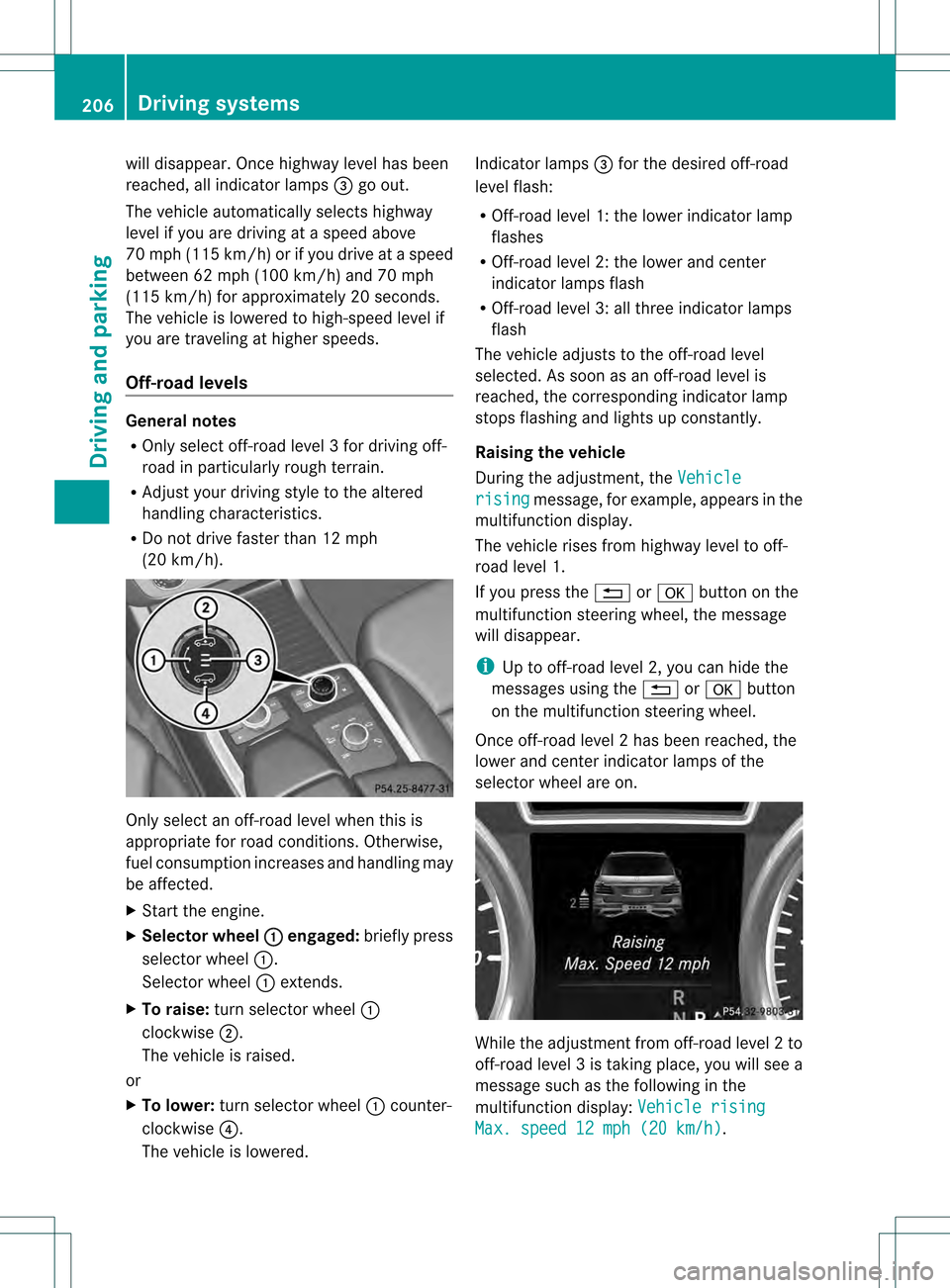
X Selecto rwheel 0002 engaged:
briefly press
selector wheel 0002.
Selector wheel 0002extends.
X To raise: turn selector wheel 0002
clockwise 0003.
The vehicle is raised.
or
X To lower: turn selector wheel 0002counter-
clockwise 001E.
The vehicle is lowered. Indicator lamps
001Ffor the desired off-road
level flash:
R Off-road level 1: the lower indicator lamp
flashes
R Off-road level 2: the lower and center
indicator lamps flash
R Off-road level 3: all three indicator lamps
flash
The vehicle adjusts to the off-road level
selected. As soon as an off-road level is
reached, the corresponding indicator lamp
stops flashing and lights up constantly.
Raising the vehicle
During the adjustment, the Vehicle rising message, for example, appears in the
multifunction display.
The vehicle rises from highwayl evel to off-
road level 1.
If you press the 0007or000B button on the
multifunction steering wheel, the message
will disappear.
i Up to off-road level 2, you can hide the
messages using the 0007or000B button
on the multifunction steering wheel.
Once off-road level 2has been reached, the
lower and cente rindicato rlamps of the
selecto rwheel are on. While the adjustment from off-road level
2to
off-road level 3is taking place, you will see a
message such as the following in the
multifunction display: Vehicle rising Max. speed 12 mph (20 km/h) .206
Driving systemsDriving and parking
Page 209 of 458
The
Max. Speed 12 mph (20 km/h) message draws your attention to the
maximum speed permitted for off-road
level 3.
Once off-road level 3has been reached, you
will see a message shown in white in the
multifunction display, for example: Max.Speed 12 mph (20 km/h) .
If you drive abov e20 km/h at off-road level
3, you will see the following message in red
in the multifunctio ndisplay: Vehicle Lowering Max. Speed 12 mph (20 km/h ).
i
You cannot clear these messages.
You also hear a warning. The vehicle is
lowered and off-road level 3is canceled.
If you continue to increase your speed, the
red message continues to be shown in the
multifunction display. The newly set level is
not displayed until the vehicle has been set
to a level suitable for the current speed.
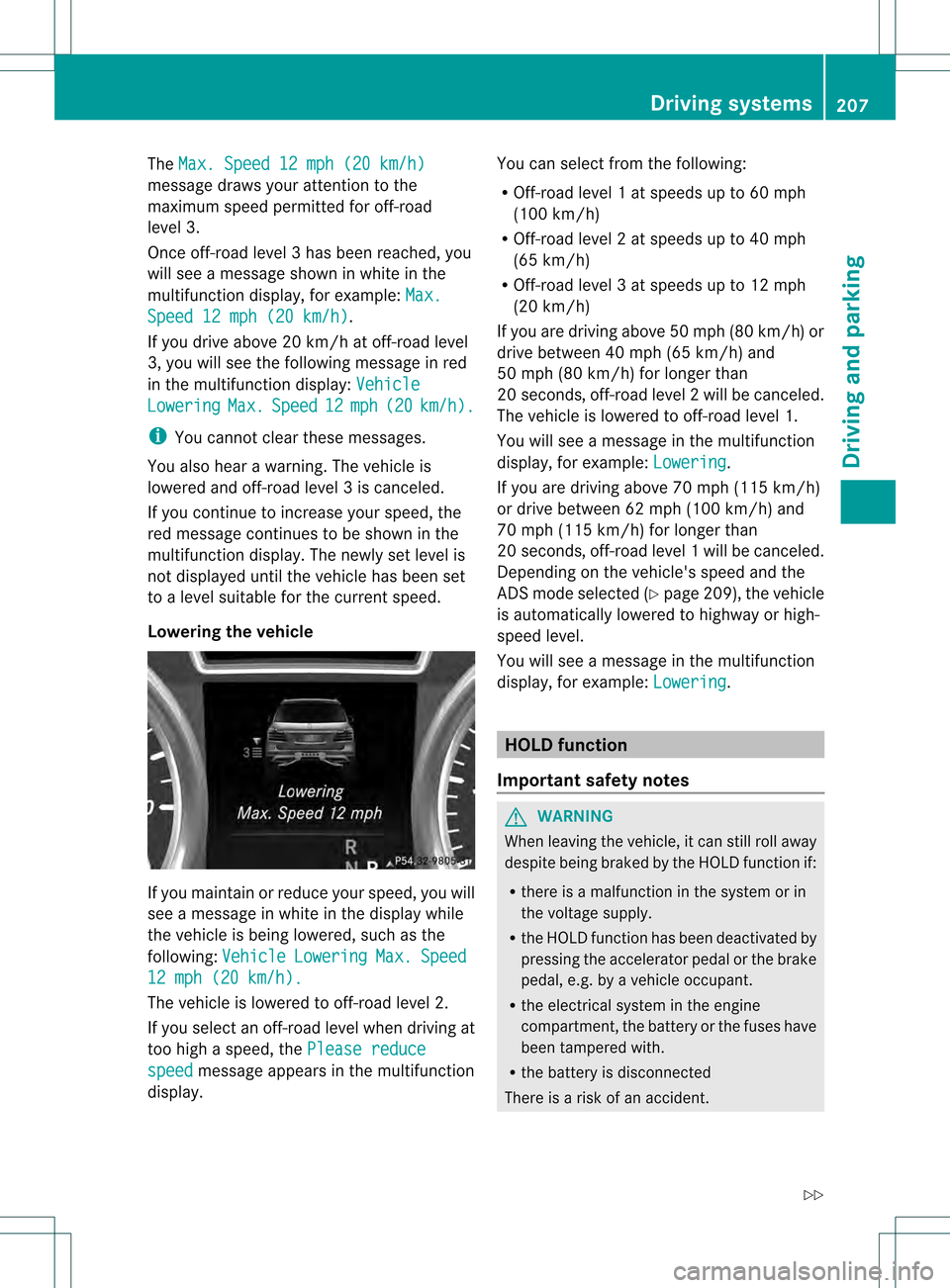
Lowering the vehicle If you maintain or reduce your speed, you will
see a message in white in the display while
the vehicle is being lowered, such as the
following: Vehicle Lowering Max. Speed
12 mph (20 km/h).
The vehicle is lowered to off-road level 2.
If you select an off-road level when driving at
too high a speed, the Please reducespeed message appears in the multifunction
display. You can select from the following:
R
Off-road level 1atspeeds up to 60 mph
(100 km/h)
R Off-road level 2atspeeds up to 40 mph
(65 km/h)
R Off-road level 3atspeeds up to 12 mph
(20 km/h)
If you are driving above 50 mph (80 km/ h)or
drive between 40 mph (65 km/h) and
50 mph (80 km/h) for longer than
20 seconds, off-road level 2will be canceled.
The vehicle is lowered to off-road level 1.
You will see a message in the multifunction
display, for example: Lowering .
If you are driving above 70 mph (115 km/h)
or drive between 62 mph (100 km/h) and
70 mph (115 km/h) for longer than
20 seconds, off-road level 1will be canceled.
Depending on the vehicle's speed and the
AD Sm ode selected (Y page 209), the vehicle
is automatically lowered to highway or high-
speed level.
You will see a message in the multifunction
display, for example: Lowering .
HOLD function
Important safety notes G
WARNING
When leaving the vehicle, it can still roll away
despite being braked by the HOLD function if:
R there is a malfunction in the system or in
the voltage supply.
R the HOLD function has been deactivated by
pressing the accelerator pedal or the brake
pedal, e.g. by a vehicle occupant.
R the electrical system in the engine
compartment, the battery or the fuses have
been tampered with.
R the battery is disconnected
There is a risk of an accident. Driving systems
207Driving and parking
Z
Page 210 of 458
If you wish to exit the vehicle, always turn off
the HOLD function and secure the vehicle
against rolling away.
! If DISTRONIC PLUS or the HOLD function
is activated, the vehicle brakes
automatically in certain situations. To
prevent damage to the vehicle, deactivate
DISTRONIC PLUS and the HOLD function in
the following or other similar situations:
R when towing the vehicle
R in the car wash
Deactivate the HOLD function (Y page 208).
General notes The HOLD function can assist the driver in the
following situations:
R
when pulling away, especially on steep
slopes
R when maneuvering on steep slopes
R when waiting in traffic
The vehicle is kept stationary withou tthe
driver having to depress the brake pedal.
The braking effect is canceled and the HOLD
function deactivated when you depress the
accelerator pedal to pull away.
i Do not use the HOLD function when
driving off-road, on steep uphill or downhill
gradients or on slippery or loose surfaces.
The HOLD function cannot hold the vehicle
on such surfaces.
Activation conditions You can activate the HOLD function if:
R
the vehicle is stationary
R the engine is running
R the driver's door is closed or your seat belt
is fastened
R the electric parking brake is released
R the transmission is in position D,Ror N
R DISTRONIC PLUS is deactivated Activating the HOLD function X
Make sure that the activation conditions
are met.
X Depress the brake pedal.
X Quickly depress the brake pedal further
until 0001 appears in the multifunction
display.
The HOLD function is activated. You can
release the brake pedal.
i If depressing the brake pedal the first
time does not activate the HOLD function,
wait briefly and then try again.
Deactivating the HOLD function The HOLD function is deactivated
automatically if:
R
you accelerate and the transmission is in
position Dor R
R you shift the transmission to position P
R you depress the brake pedal again with a
certain amount of pressure until 0001
disappears from the multifunction display
R you secure the vehicle using the electric
parking brake
R you activate DISTRONIC PLUS
i After a time, the electric parking brake
secures the vehicle and relieves the service
brake.
The electric parking brake automatically
secures the vehicle if the HOLD function is
activated and:
R the driver's door is open and the driver's
seat belt is unfastened.
R the engine is switched off.
R a system malfunction occurs.
R the power supply is not sufficient.
On steep uphill or downhill inclines or if there
is a malfunction, the transmission may also
be automatically shifted into position P.208
Driving systemsDriving and parking
Page 215 of 458
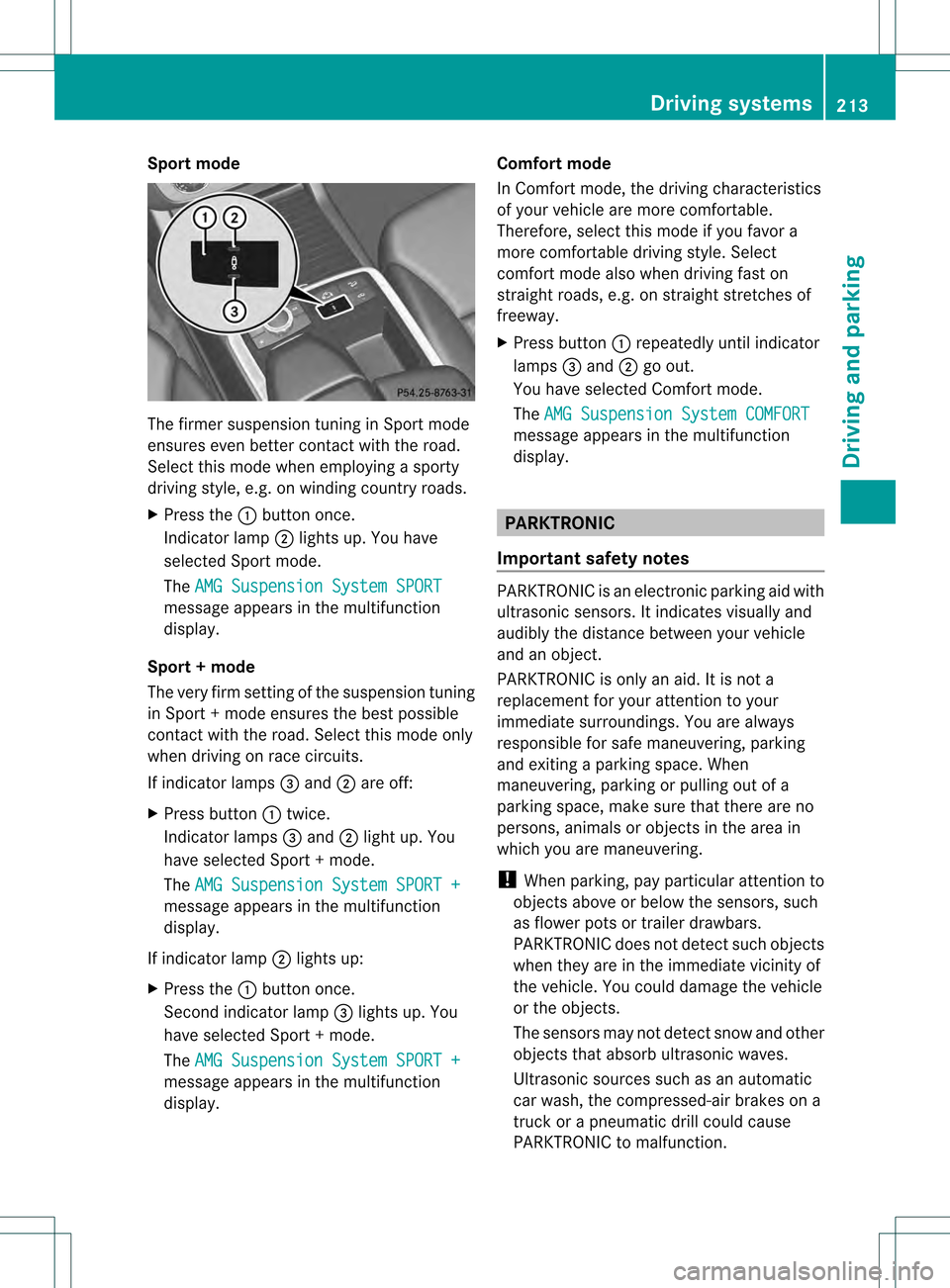
Sport mode
The firmer suspension tuning in Sport mode
ensures even better contact with the road.
Select this mode when employing a sporty
driving style, e.g. on winding country roads.
X Press the 0002button once.
Indicator lamp 0003lights up. You have
selected Sport mode.
The AMG Suspension System SPORT message appears in the multifunction
display.
Sport + mode
The very firm setting of the suspension tuning
in Sport +mode ensures the best possible
contact with the road. Select this mode only
when driving on race circuits.
If indicator lamps 001Fand 0003are off:
X Press button 0002twice.
Indicator lamps 001Fand 0003light up. You
have selected Sport +mode.
The AMG Suspension System SPORT + message appears in the multifunction
display.
If indicator lamp 0003lights up:
X Press the 0002button once.
Second indicator lamp 001Flights up. You
have selected Sport +mode.
The AMG Suspension System SPORT + message appears in the multifunction
display. Comfort mode
In Comfort mode, the driving characteristics
of your vehicle are more comfortable.
Therefore, select this mode if you favor a
more comfortable driving style. Select
comfor
tmode also when driving fast on
straight roads, e.g. on straight stretches of
freeway.
X Press button 0002repeatedly until indicator
lamps 001Fand 0003go out.
You have selected Comfort mode.
The AMG Suspension System COMFORT message appears in the multifunction
display. PARKTRONIC
Important safety notes PARKTRONIC is an electronic parking aid with
ultrasonic sensors. It indicates visually and
audibly the distance between your vehicle
and an object.
PARKTRONIC is only an aid. It is not a
replacement for your attention to your
immediate surroundings. You are always
responsible for safe maneuvering, parking
and exiting a parking space. When
maneuvering, parking or pulling out of a
parking space, make sure that there are no
persons, animals or object
sinthe area in
which you are maneuvering.
! When parking, pay particular attention to
objects above or below the sensors, such
as flower pots or trailer drawbars.
PARKTRONIC does not detect such objects
when they are in the immediate vicinity of
the vehicle. You could damage the vehicle
or the objects.
The sensors may not detect snow and other
objects that absorb ultrasonic waves.
Ultrasonic sources such as an automatic
car wash, the compressed-air brakes on a
truck or a pneumatic drill could cause
PARKTRONIC to malfunction. Driving systems
213Driving and parking Z
Page 219 of 458
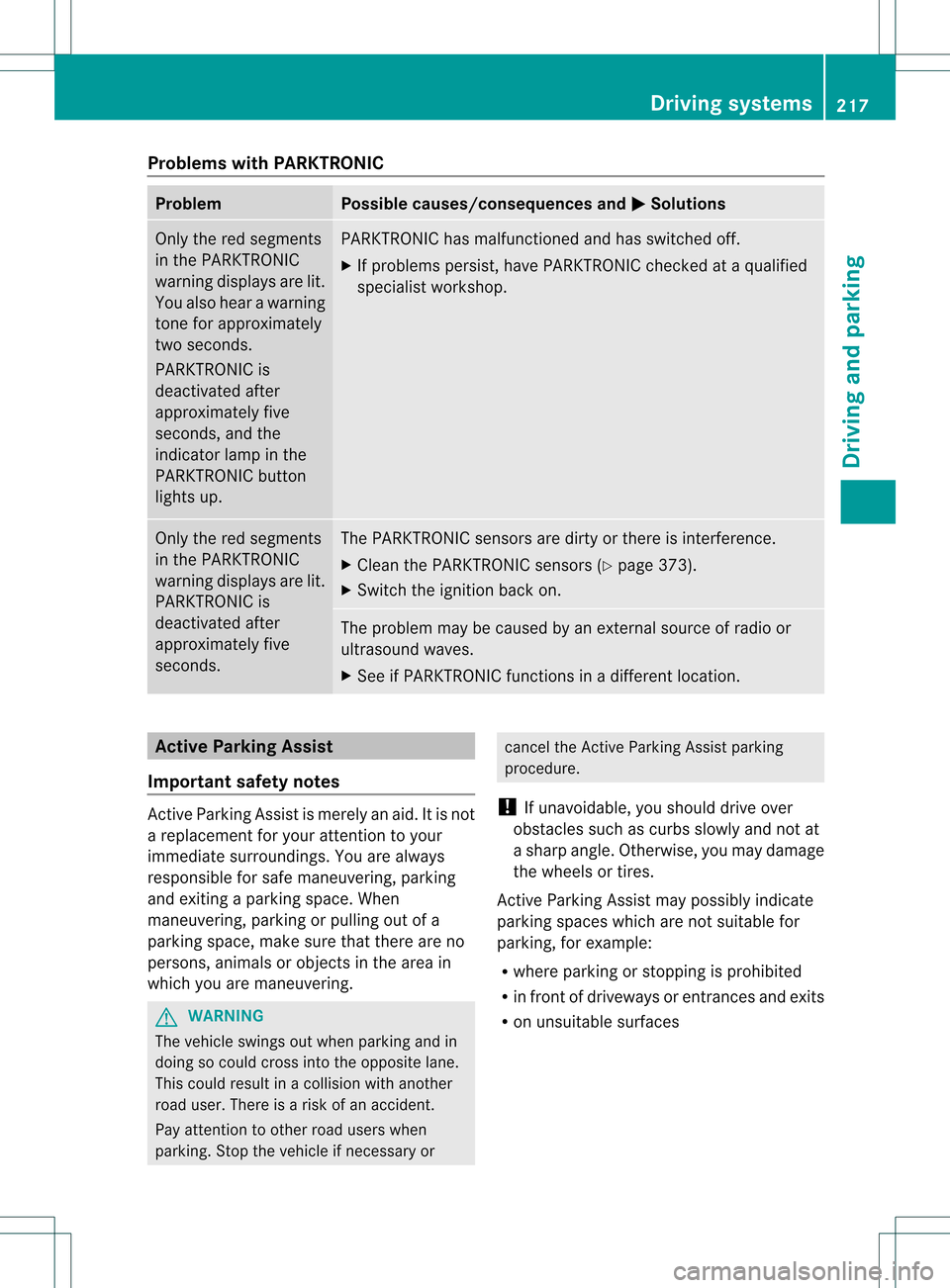
Problems with PARKTRONIC
Problem Possible causes/consequences and
0001 Solutions
Only the red segments
in the PARKTRONIC
warning displays are lit.
You also hear a warning
tone for approximately
two seconds.
PARKTRONIC is
deactivated after
approximately five
seconds, and the
indicator lamp in the
PARKTRONIC button
lights up. PARKTRONIC has malfunctioned and has switched off.
X
If problems persist, have PARKTRONIC checked at a qualified
specialist workshop. Only the red segments
in the PARKTRONIC
warning displays are lit.
PARKTRONIC is
deactivated after
approximately five
seconds. The PARKTRONIC sensors are dirty or there is interference.
X
Cleant he PARKTRONIC sensors (Y page 373).
X Switch the ignition back on. The problem may be caused by an external source of radio or
ultrasound waves.
X See if PARKTRONIC functions in a different location. Active Parking Assist
Important safety notes Active Parking Assist is merely an aid. It is not
a replacement for your attention to your
immediate surroundings. You are always
responsible for safe maneuvering, parking
and exiting a parking space. When
maneuvering, parking or pulling out of a
parking space, make sure that there are no
persons, animals or objectsint he area in
which you are maneuvering. G
WARNING
The vehicle swings out when parking and in
doing so could cross into the opposite lane.
This could result in a collision with another
road user. There is a risk of an accident.
Pay attention to other road users when
parking. Stop the vehicle if necessary or cancel the Active Parking Assist parking
procedure.
! If unavoidable, you should drive over
obstacles such as curbs slowly and not at
a sharp angle. Otherwise, you may damage
the wheels or tires.
Active Parking Assist may possibly indicate
parking spaces which are not suitable for
parking, for example:
R where parking or stopping is prohibited
R in front of driveways or entrances and exits
R on unsuitable surfaces Driving systems
217Driving and parking Z