display MERCEDES-BENZ M-Class 2013 W166 Repair Manual
[x] Cancel search | Manufacturer: MERCEDES-BENZ, Model Year: 2013, Model line: M-Class, Model: MERCEDES-BENZ M-Class 2013 W166Pages: 458, PDF Size: 6.24 MB
Page 202 of 458

The electric parking brake automatically
secures the vehicle if DISTRONIC PLUS is
activated and:
R
the driver's door is open and the driver's
seat belt is unfastened.
R the engine is switched off, unless it is
automatically switched off by the ECO
start/stop function.
R a system malfunction occurs.
R the power supply is not sufficient.
On steep uphill or downhill inclines or if there
is a malfunction, the transmission may also
automatically be shifted into position P.
Setting aspeed Keep in mind tha
titmay take a brie fmoment
until the vehicle has accelerated or braked to
the speed set.
X Press the cruise control lever up 0002for a
higher speed or down 0003for a lower speed.
X To adjust the set speed in 1 mph
increments (1 km/h increments): briefly
press the cruise control lever up 0002or
down 0003to the pressure point.
Every time the cruise control lever is
pressed up 0002or down 0003the last speed
stored is increased or reduced.
X To adjust the set speed in 5 mph
increments (10 km/h increments):
briefly press the cruise control lever
up 0002 or down 0003to the pressure point.
Every time the cruise control lever is
pressed up 0002or down 0003, the last speed
stored is increased or reduced. i
DISTRONIC PLUS is not deactivated if you
depress the accelerator pedal. If you
accelerate to overtake, DISTRONIC PLUS
adjusts the vehicle's speed to the last
speed stored after you have finished
overtaking.
Setting the specified minimum distance You can set the specified minimum distance
for DISTRONIC PLUS by varying the time span
between one and two seconds. With this
function, you can set the minimum distance
that DISTRONIC PLUS keeps to the vehicle in
front, dependent on vehicle speed. You can
see this distance in the multifunction display
(Y
page 202).
X To increase: turn control0003in direction
001F.
DISTRONIC PLUS then maintains a greater
distance between your vehicle and the
vehicle in front.
X To decrease: turn control0003in
direction 0002.
DISTRONIC PLUS then maintains a shorter
distance between your vehicle and the
vehicle in front.
i Make sure that you maintain a sufficiently
safe distance from the vehicle in front.
Adjust the distance to the vehicle in front if
necessary. 200
Driving systemsDriving and parking
Page 203 of 458

Deactivating DISTRONIC PLUS
There are several ways to deactivate
DISTRONIC PLUS:
X Briefly press the cruise control lever
forwards 0002.
or
X Brake, unless the vehicle is stationary.
Whe nyou deactivate DISTRONIC PLUS, you
will see the DISTRONIC PLUS Off message
in the multifunction display for approximately
five seconds.
i The last speed stored remains stored until
you switch off the engine.
i DISTRONIC PLUS is not deactivated if you
depress the accelerator pedal. If you
accelerate to overtake, DISTRONIC PLUS
adjusts the vehicle's speed to the last
speed stored after you have finished
overtaking.
DISTRONIC PLUS is automatically
deactivated if:
R you engage the electric parking brake or if
the vehicle is automatically secured with
the electric parking brake
R you are driving slower than 15 mph
(25 km/h) and there is no vehicle in front,
or if the vehicle in front is no longer
detected
R ESP ®
intervenes or you deactivate ESP ®
R the transmission is in the P,Ror Nposition
R you switch off the radar sensor system
(Y page 277) R
you pull the cruise control lever towards
you in order to pull away and the front-
passenger door or one of the rear doors is
open
R you activate DSR
R you activate off-road program 2onvehicles
with the ON&OFFROAD package
R the vehicle has skidded
If DISTRONIC PLUS is deactivated, you will
hear a warning tone. You will see the
DISTRONIC PLUS Off message in the
multifunction display for approximately five
seconds.
Displays in the instrument cluster Displays in the speedometer
Example: DISTRONIC PLUS displays in the
speedometer
When DISTRONIC PLUS is activated, one or
two segments
0003in the set speed range light
up.
If DISTRONIC PLUS detects avehicle in front,
segments 0003between speed of the vehicle in
front 0002and stored speed 001Flight up.
i For design reasons, the speed displayed
in the speedometer may differ slightly from
the speed set for DISTRONIC PLUS. Driving systems
201Driving and parking Z
Page 204 of 458
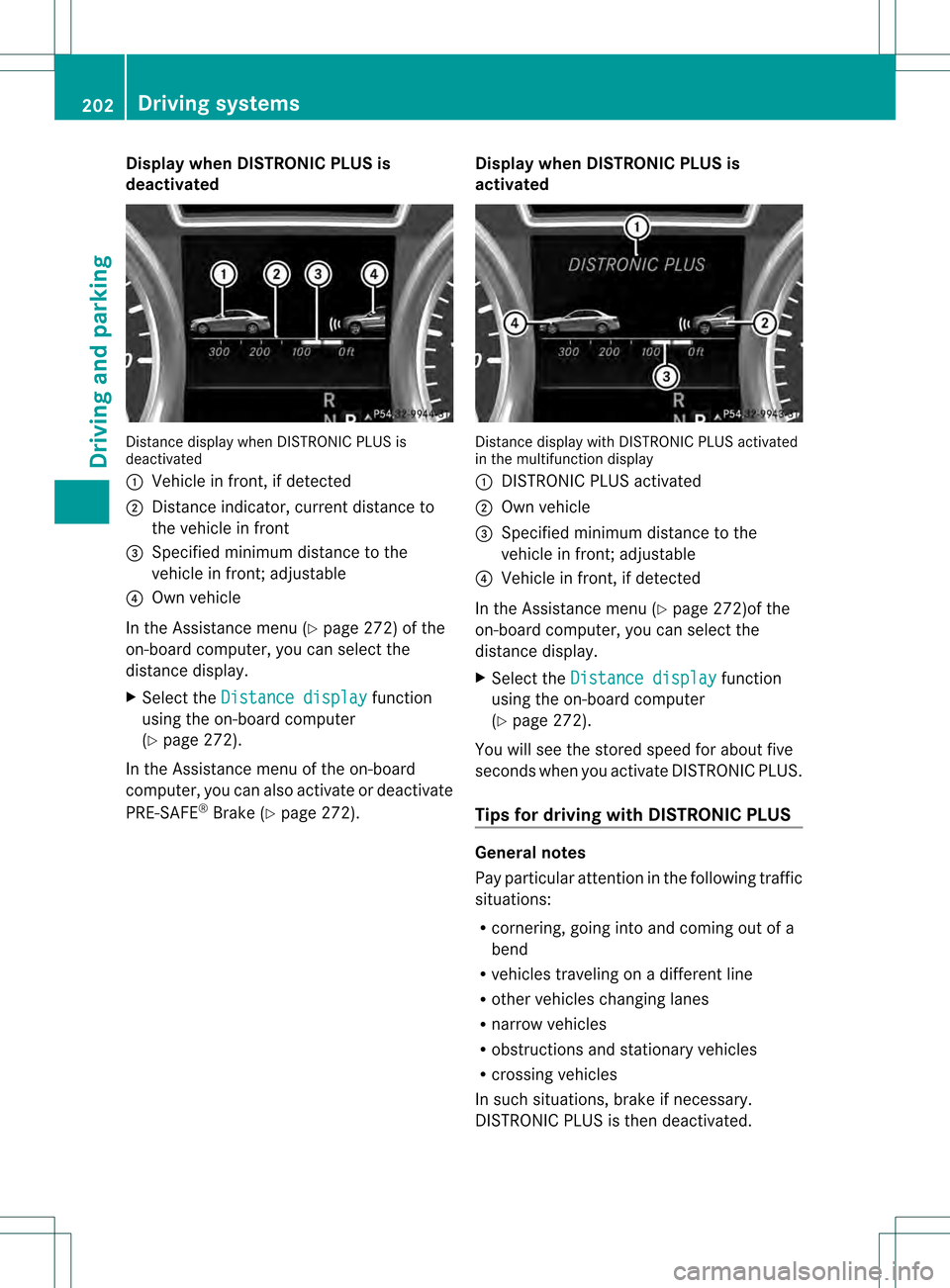
Display when DISTRONIC PLUS is
deactivated
Distance display when DISTRONIC PLU
Sis
deactivated
0002 Vehicle in front, if detected
0003 Distance indicator, current distance to
the vehicle in front
001F Specified minimum distance to the
vehicle in front; adjustable
001E Own vehicle
In the Assistance menu (Y page 272) of the
on-board computer, you can select the
distance display.
X Select the Distance display function
using the on-board computer
(Y page 272).
In the Assistance menu of the on-board
computer, you can also activate or deactivate
PRE-SAFE ®
Brake (Y page 272). Display when DISTRONIC PLUS is
activated Distance display with DISTRONIC PLUS activated
in the multifunction display
0002
DISTRONIC PLUS activated
0003 Own vehicle
001F Specified minimum distance to the
vehicle in front; adjustable
001E Vehicle in front, if detected
In the Assistance menu (Y page 272)of the
on-board computer, you can select the
distance display.
X Select the Distance display function
using the on-board computer
(Y page 272).
You will see the stored speed for about five
seconds when you activate DISTRONIC PLUS.
Tips for driving with DISTRONIC PLUS General notes
Pay particular attention in the following traffic
situations:
R
cornering, going into and coming out of a
bend
R vehicles traveling on a differen tline
R other vehicles changing lanes
R narrow vehicles
R obstructions and stationary vehicles
R crossing vehicles
In such situations, brake if necessary.
DISTRONIC PLUS is then deactivated. 202
Driving systemsDriving and parking
Page 207 of 458
If you unlock the vehicle or open a door, the
vehicle begins to compensate for load
discrepancies while still parked. However, for
significant level changes, such as after the
vehicle has been stationary for a long period,
the engine must be on. For safety reasons,
the vehicle is only lowered when the doors are
closed. Lowering is interrupted if a door is
opened, and it continues once the door has
been closed.
For information aboutd riving off-road, see
(Y page 187).
Basic settings The extent to which the vehicle is raised or
lowered depends on the basic setting
selected.
Select:
R highway/high-speed level for driving on
normal roads
R off-road level 1for driving on easily
negotiable off-road terrain
R off-road level 2 for driving on normal off-
road terrain
R off-road level 3for freeing the vehicle in
particularly rough terrain at low speeds
only
The individual vehicle levels differ from
highway level as follows:
R highway level: +/–0 in (+/–0 mm)
R high-speed level: –0.6 in (–15 mm)
R off-road level 1: + 1.2 in (+30 mm)
R off-road level 2: + 2.3 in (+60 mm)
R off-road level 3: + 3.6 in (+ 90 mm)
Highway/high-speed level !
Make sure that there is enough ground
clearance when the vehicle is being
lowered. It could otherwise hit the ground,
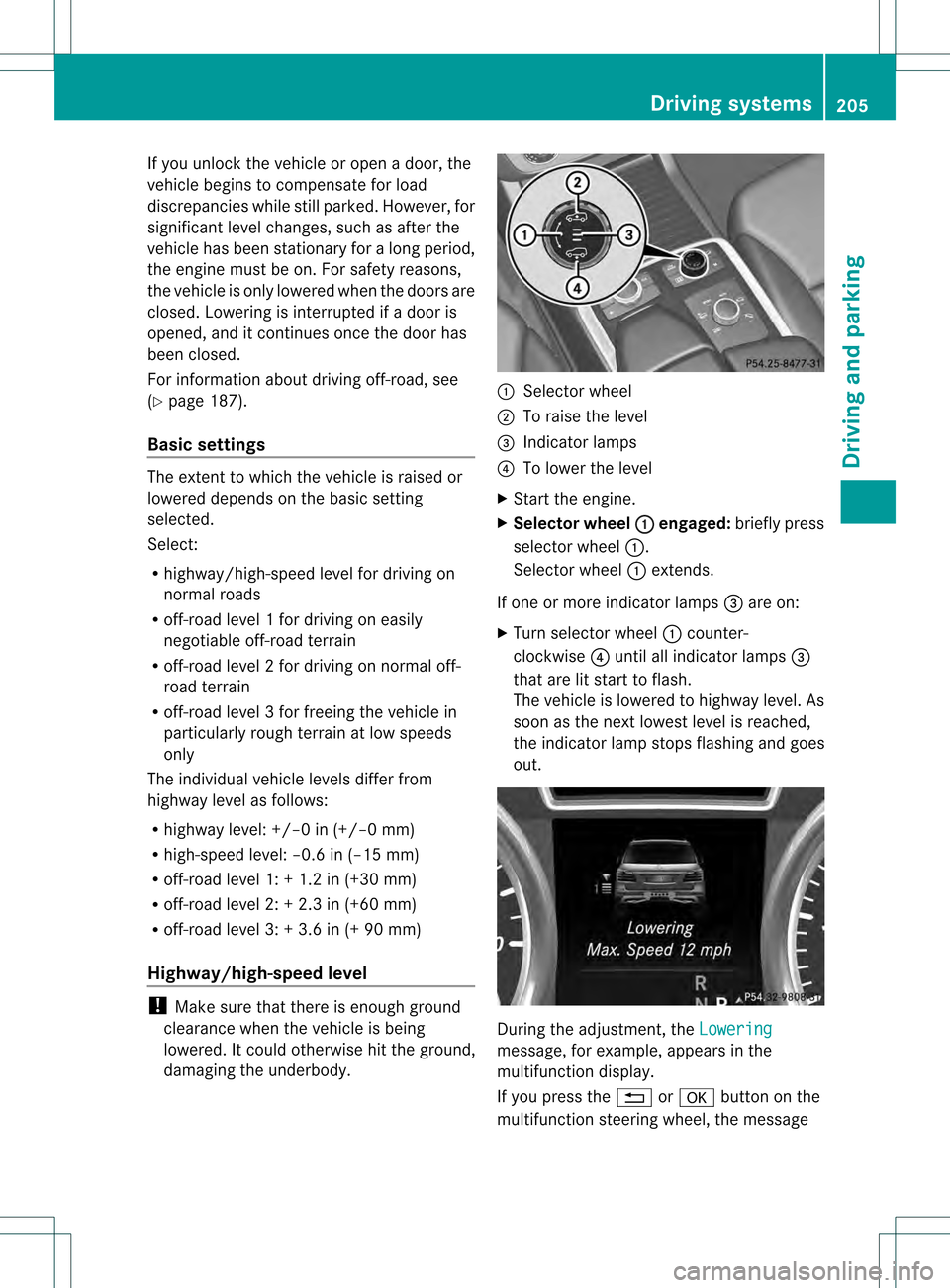
damaging the underbody. 0002
Selector wheel
0003 To raise the level
001F Indicator lamps
001E To lower the level
X Start the engine.
X Selector wheel 0002 engaged:
briefly press
selector wheel 0002.
Selector wheel 0002extends.
If one or more indicator lamps 001Fare on:
X Turn selector wheel 0002counter-
clockwise 001Euntil all indicator lamps 001F
that are lit start to flash.
The vehicle is lowered to highway level. As
soon as the next lowest level is reached,
the indicator lamp stops flashing and goes
out. During the adjustment, the
Lowering message, for example, appears in the
multifunction display.
If you press the
0007or000B button on the
multifunction steering wheel, the message Driving systems
205Driving and parking Z
Page 208 of 458
will disappear
.Once highway level has been
reached, all indicator lamps 001Fgo out.
The vehicle automatically selects highway
level if you are driving at a speed above
70 mph (11 5km/h) or if you drive at a speed
between 62 mph (100 km/h) and 70 mph
(115 km/h) for approximatel y20 seconds.
The vehicle is lowered to high-speed level if
you are traveling at higher speeds.
Off-road levels General notes
R
Only select off-road level 3 for driving off-
road in particularly rough terrain.
R Adjust you rdriving style to the altered
handling characteristics.
R Do not drive faster than 12 mph
(20 km/h). Only select an off-road level when this is
appropriate for road conditions. Otherwise,
fuel consumptio nincreases and handling may
be affected.
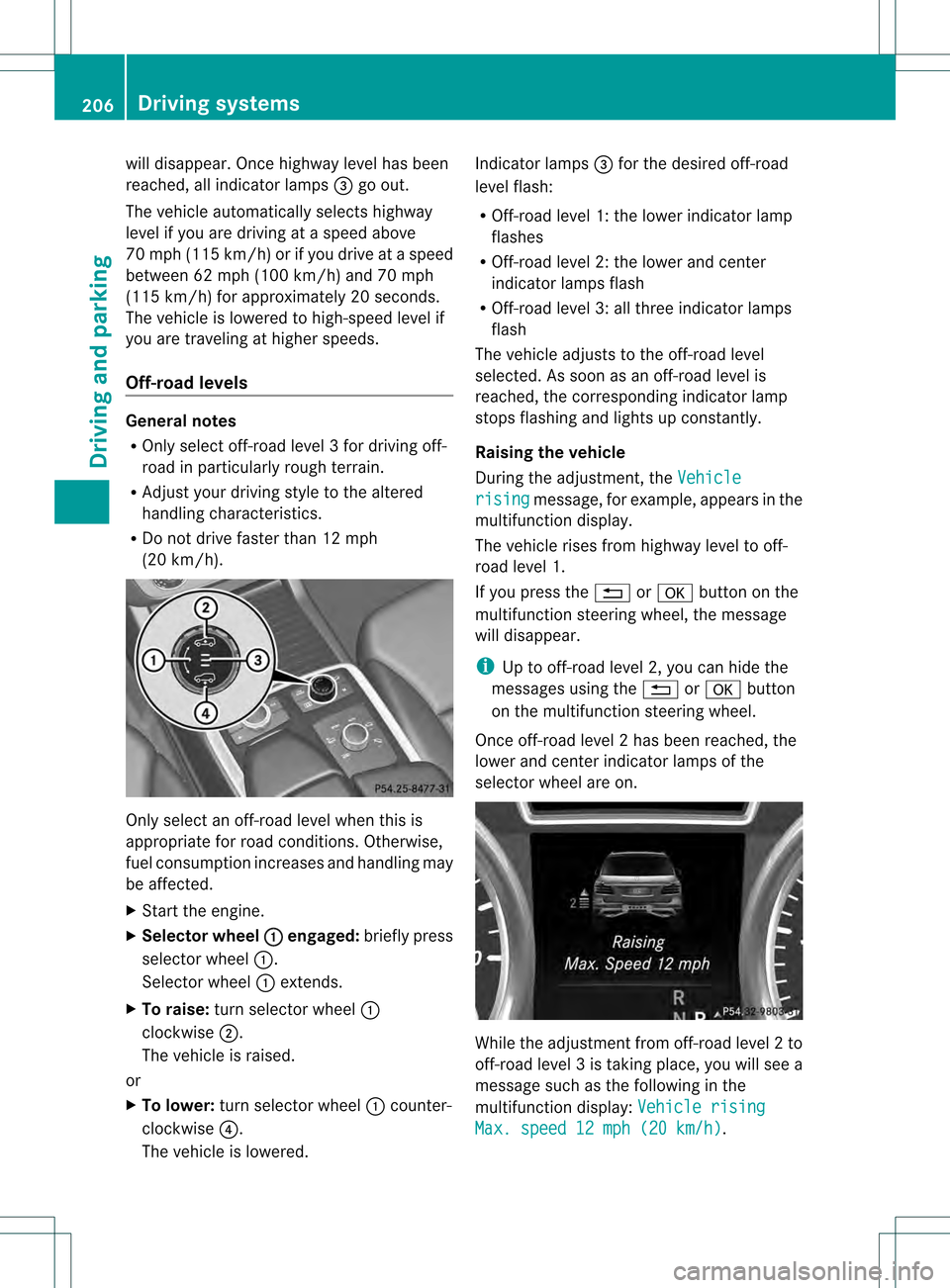
X Start the engine.
X Selecto rwheel 0002 engaged:
briefly press
selector wheel 0002.
Selector wheel 0002extends.
X To raise: turn selector wheel 0002
clockwise 0003.
The vehicle is raised.
or
X To lower: turn selector wheel 0002counter-
clockwise 001E.
The vehicle is lowered. Indicator lamps
001Ffor the desired off-road
level flash:
R Off-road level 1: the lower indicator lamp
flashes
R Off-road level 2: the lower and center
indicator lamps flash
R Off-road level 3: all three indicator lamps
flash
The vehicle adjusts to the off-road level
selected. As soon as an off-road level is
reached, the corresponding indicator lamp
stops flashing and lights up constantly.
Raising the vehicle
During the adjustment, the Vehicle rising message, for example, appears in the
multifunction display.
The vehicle rises from highwayl evel to off-
road level 1.
If you press the 0007or000B button on the
multifunction steering wheel, the message
will disappear.
i Up to off-road level 2, you can hide the
messages using the 0007or000B button
on the multifunction steering wheel.
Once off-road level 2has been reached, the
lower and cente rindicato rlamps of the
selecto rwheel are on. While the adjustment from off-road level
2to
off-road level 3is taking place, you will see a
message such as the following in the
multifunction display: Vehicle rising Max. speed 12 mph (20 km/h) .206
Driving systemsDriving and parking
Page 209 of 458
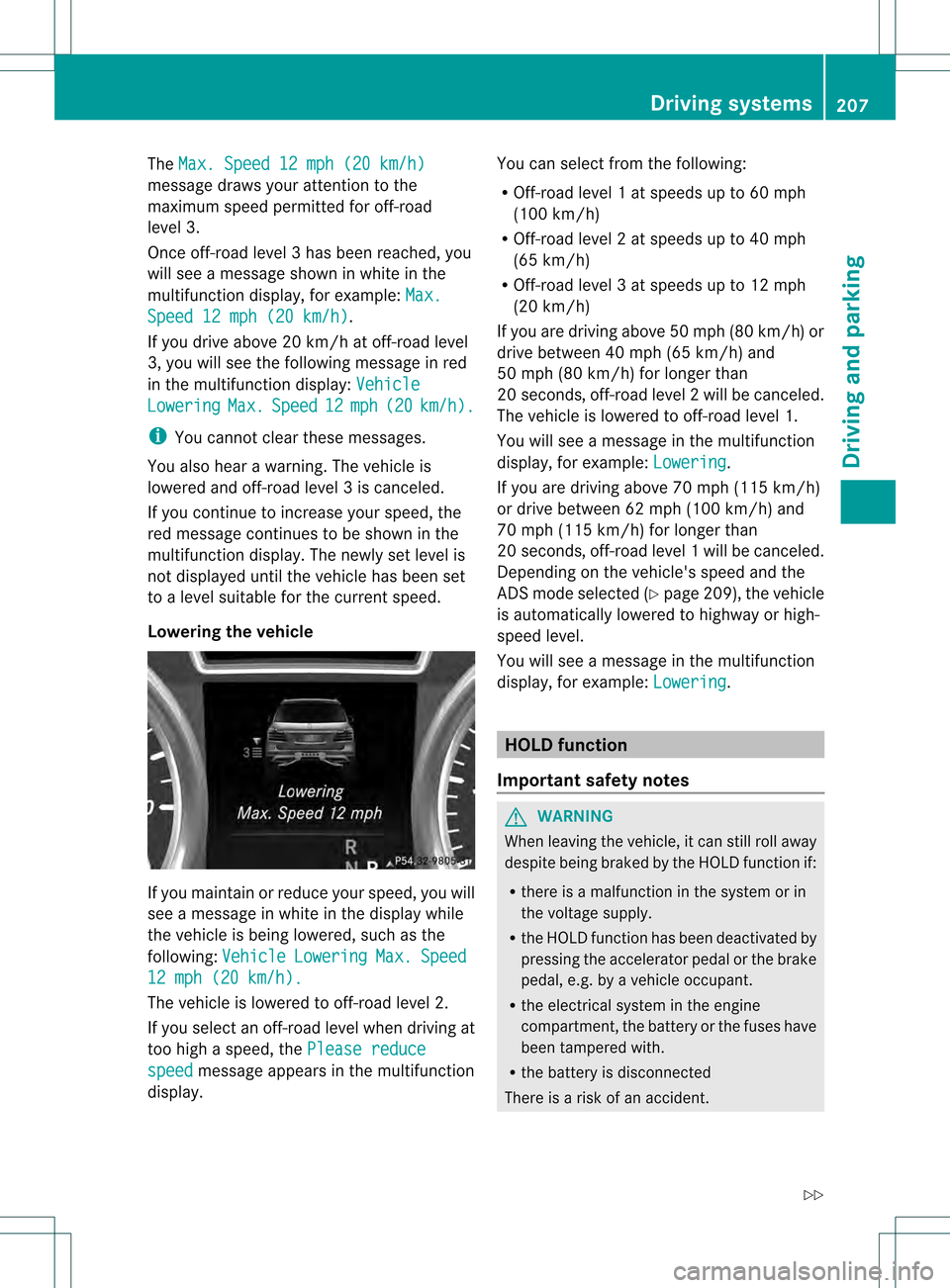
The
Max. Speed 12 mph (20 km/h) message draws your attention to the
maximum speed permitted for off-road
level 3.
Once off-road level 3has been reached, you
will see a message shown in white in the
multifunction display, for example: Max.Speed 12 mph (20 km/h) .
If you drive abov e20 km/h at off-road level
3, you will see the following message in red
in the multifunctio ndisplay: Vehicle Lowering Max. Speed 12 mph (20 km/h ).
i
You cannot clear these messages.
You also hear a warning. The vehicle is
lowered and off-road level 3is canceled.
If you continue to increase your speed, the
red message continues to be shown in the
multifunction display. The newly set level is
not displayed until the vehicle has been set
to a level suitable for the current speed.
Lowering the vehicle If you maintain or reduce your speed, you will
see a message in white in the display while
the vehicle is being lowered, such as the
following: Vehicle Lowering Max. Speed
12 mph (20 km/h).
The vehicle is lowered to off-road level 2.
If you select an off-road level when driving at
too high a speed, the Please reducespeed message appears in the multifunction
display. You can select from the following:
R
Off-road level 1atspeeds up to 60 mph
(100 km/h)
R Off-road level 2atspeeds up to 40 mph
(65 km/h)
R Off-road level 3atspeeds up to 12 mph
(20 km/h)
If you are driving above 50 mph (80 km/ h)or
drive between 40 mph (65 km/h) and
50 mph (80 km/h) for longer than
20 seconds, off-road level 2will be canceled.
The vehicle is lowered to off-road level 1.
You will see a message in the multifunction
display, for example: Lowering .
If you are driving above 70 mph (115 km/h)
or drive between 62 mph (100 km/h) and
70 mph (115 km/h) for longer than
20 seconds, off-road level 1will be canceled.
Depending on the vehicle's speed and the
AD Sm ode selected (Y page 209), the vehicle
is automatically lowered to highway or high-
speed level.
You will see a message in the multifunction
display, for example: Lowering .
HOLD function
Important safety notes G
WARNING
When leaving the vehicle, it can still roll away
despite being braked by the HOLD function if:
R there is a malfunction in the system or in
the voltage supply.
R the HOLD function has been deactivated by
pressing the accelerator pedal or the brake
pedal, e.g. by a vehicle occupant.
R the electrical system in the engine
compartment, the battery or the fuses have
been tampered with.
R the battery is disconnected
There is a risk of an accident. Driving systems
207Driving and parking
Z
Page 210 of 458
If you wish to exit the vehicle, always turn off
the HOLD function and secure the vehicle
against rolling away.
! If DISTRONIC PLUS or the HOLD function
is activated, the vehicle brakes
automatically in certain situations. To
prevent damage to the vehicle, deactivate
DISTRONIC PLUS and the HOLD function in
the following or other similar situations:
R when towing the vehicle
R in the car wash
Deactivate the HOLD function (Y page 208).
General notes The HOLD function can assist the driver in the
following situations:
R
when pulling away, especially on steep
slopes
R when maneuvering on steep slopes
R when waiting in traffic
The vehicle is kept stationary withou tthe
driver having to depress the brake pedal.
The braking effect is canceled and the HOLD
function deactivated when you depress the
accelerator pedal to pull away.
i Do not use the HOLD function when
driving off-road, on steep uphill or downhill
gradients or on slippery or loose surfaces.
The HOLD function cannot hold the vehicle
on such surfaces.
Activation conditions You can activate the HOLD function if:
R
the vehicle is stationary
R the engine is running
R the driver's door is closed or your seat belt
is fastened
R the electric parking brake is released
R the transmission is in position D,Ror N
R DISTRONIC PLUS is deactivated Activating the HOLD function X
Make sure that the activation conditions
are met.
X Depress the brake pedal.
X Quickly depress the brake pedal further
until 0001 appears in the multifunction
display.
The HOLD function is activated. You can
release the brake pedal.
i If depressing the brake pedal the first
time does not activate the HOLD function,
wait briefly and then try again.
Deactivating the HOLD function The HOLD function is deactivated
automatically if:
R
you accelerate and the transmission is in
position Dor R
R you shift the transmission to position P
R you depress the brake pedal again with a
certain amount of pressure until 0001
disappears from the multifunction display
R you secure the vehicle using the electric
parking brake
R you activate DISTRONIC PLUS
i After a time, the electric parking brake
secures the vehicle and relieves the service
brake.
The electric parking brake automatically
secures the vehicle if the HOLD function is
activated and:
R the driver's door is open and the driver's
seat belt is unfastened.
R the engine is switched off.
R a system malfunction occurs.
R the power supply is not sufficient.
On steep uphill or downhill inclines or if there
is a malfunction, the transmission may also
be automatically shifted into position P.208
Driving systemsDriving and parking
Page 213 of 458
The vehicle level may change visibly if you
park the vehicle and the outside temperature
changes. If the temperature drops, the
vehicle level is lower; with an increase in
temperature, the vehicle level rises.
If you unlock the vehicle or open a door, the
vehicle begins to compensate for load
discrepancies while still parked. However, for
significant level changes, such as after the
vehicle has been stationary for a long period,
the engine must be on. For safety reasons,
the vehicle is only lowered when the doors are
closed. Lowering is interrupted if a door is
opened, and it continues once the door has
been closed.
Basic settings
The exten tto which the vehicle is raised or
lowered depends on the basic setting
selected. Select raised level for off-road
driving or highway/high-speed level for
normal roads.
The individual vehicle levels differ from
highway level as follows:
R highway level: +/–0 in (+/–0 mm)
R high-speed level: –0.6 in (–15 mm)
R raised level: +2.3 in (+60 mm)
Raised level Only select raised level if this is appropriate
for the road conditions. Otherwise, fuel
consumption may increase and handling may
be affected.
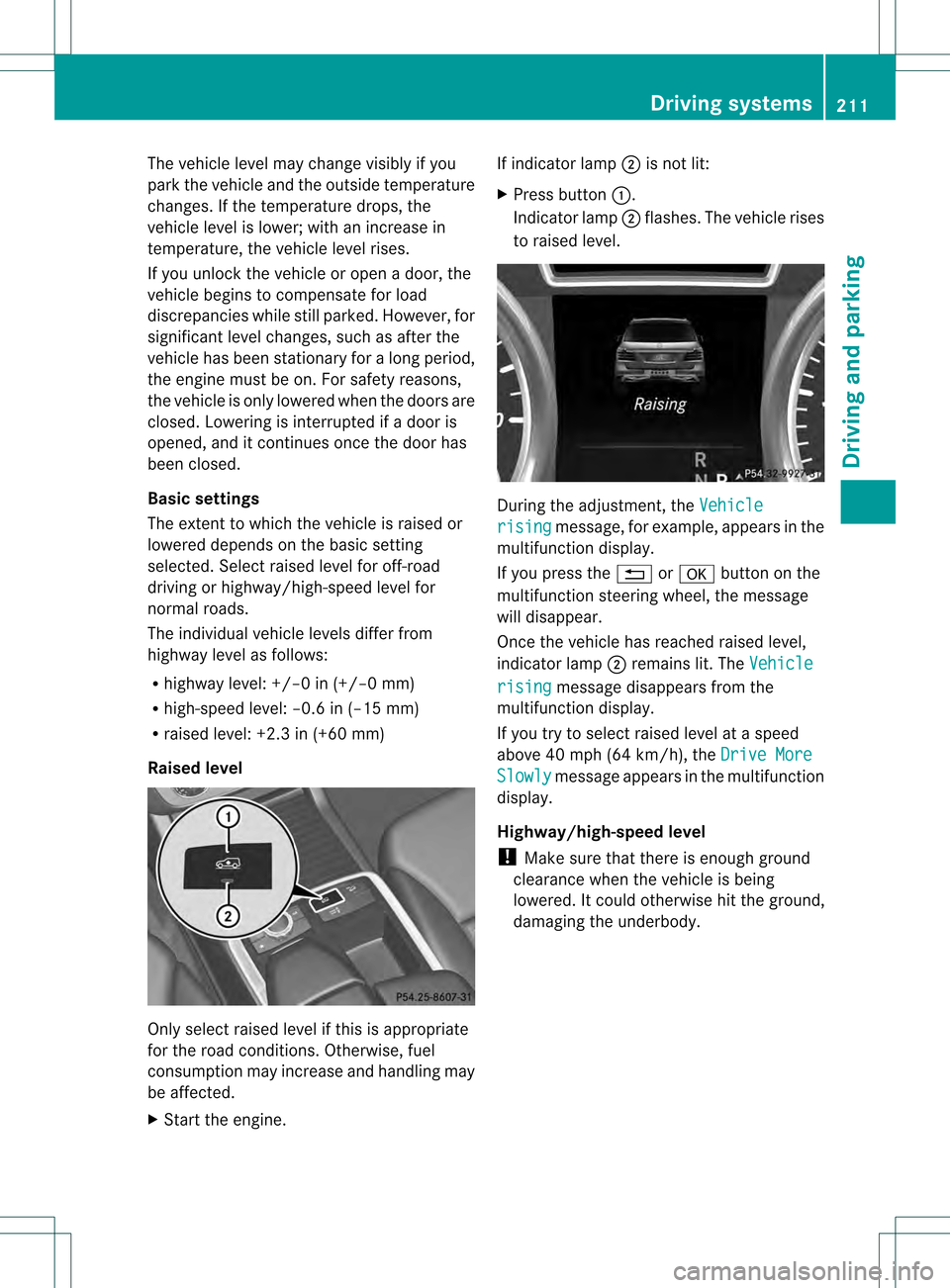
X Start the engine. If indicator lamp
0003is not lit:
X Press button 0002.
Indicator lamp 0003flashes. The vehicle rises
to raised level. During the adjustment, the
Vehicle rising message, for example, appears in the
multifunction display.
If you press the 0007or000B button on the
multifunction steering wheel, the message
will disappear.
Once the vehicle has reached raised level,
indicator lamp 0003remains lit. The Vehicle rising message disappears from the
multifunction display.
If you try to select raised level at a speed
above 40 mph (64 km/h), the Drive More Slowly message appears in the multifunction
display.
Highway/high-speed level
! Make sure that there is enough ground
clearance when the vehicle is being
lowered. It could otherwise hit the ground,
damaging the underbody. Driving systems
211Driving and parking Z
Page 214 of 458
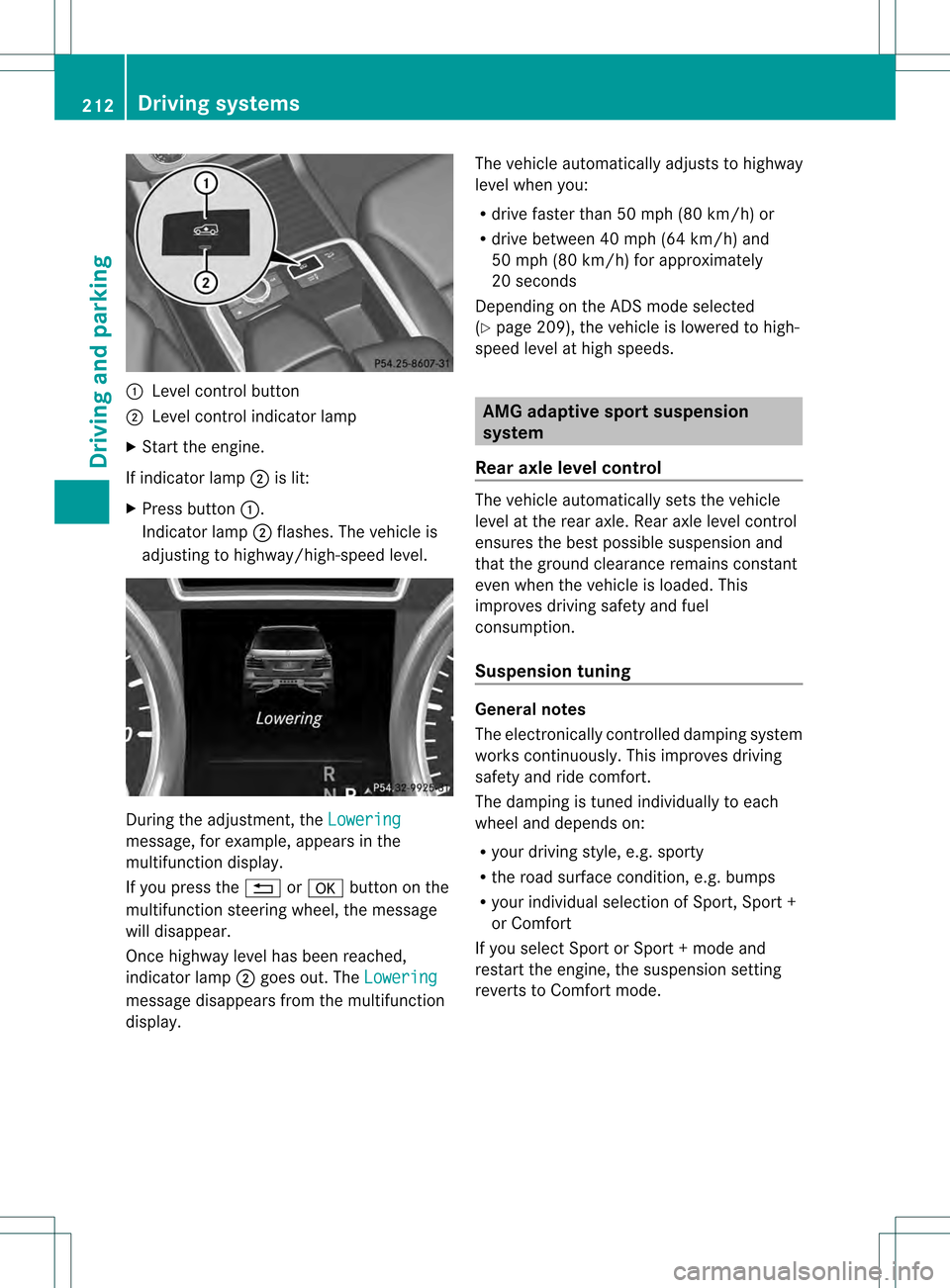
0002
Level control button
0003 Level control indicator lamp
X Start the engine.
If indicator lamp 0003is lit:
X Press button 0002.
Indicator lamp 0003flashes. The vehicle is
adjusting to highway/high-speed level. During the adjustment, the
Loweringmessage, for example, appears in the
multifunction display.
If you press the
0007or000B button on the
multifunction steering wheel, the message
will disappear.
Once highway level has been reached,
indicator lamp 0003goes out. The Lowering message disappears from the multifunction
display. The vehicle automatically adjusts to highway
level when you:
R
drive faster than 50 mph (80 km/h) or
R drive between 40 mph (64 km/h) and
50 mph (80 km/h) for approximately
20 seconds
Depending on the ADS mode selected
(Y page 209), the vehicle is lowered to high-
speed level at high speeds. AMG adaptive sport suspension
system
Rear axle level control The vehicle automatically sets the vehicle
level at the rear axle. Reara
xle level control
ensures the best possible suspension and
that the ground clearance remains constant
eve nw hen the vehicle is loaded. This
improves driving safety and fuel
consumption.
Suspension tuning General notes
The electronically controlled damping system
works continuously.T
his improves driving
safety and ride comfort.
The damping is tuned individually to each
wheel and depends on:
R your driving style, e.g. sporty
R the road surface condition,e .g. bumps
R your individual selection of Sport, Spor t+
or Comfort
If you select Sport or Sport + mode and
restart the engine, the suspension setting
reverts to Comfort mode. 212
Driving systemsDriving and parking
Page 215 of 458
Sport mode
The firmer suspension tuning in Sport mode
ensures even better contact with the road.
Select this mode when employing a sporty
driving style, e.g. on winding country roads.
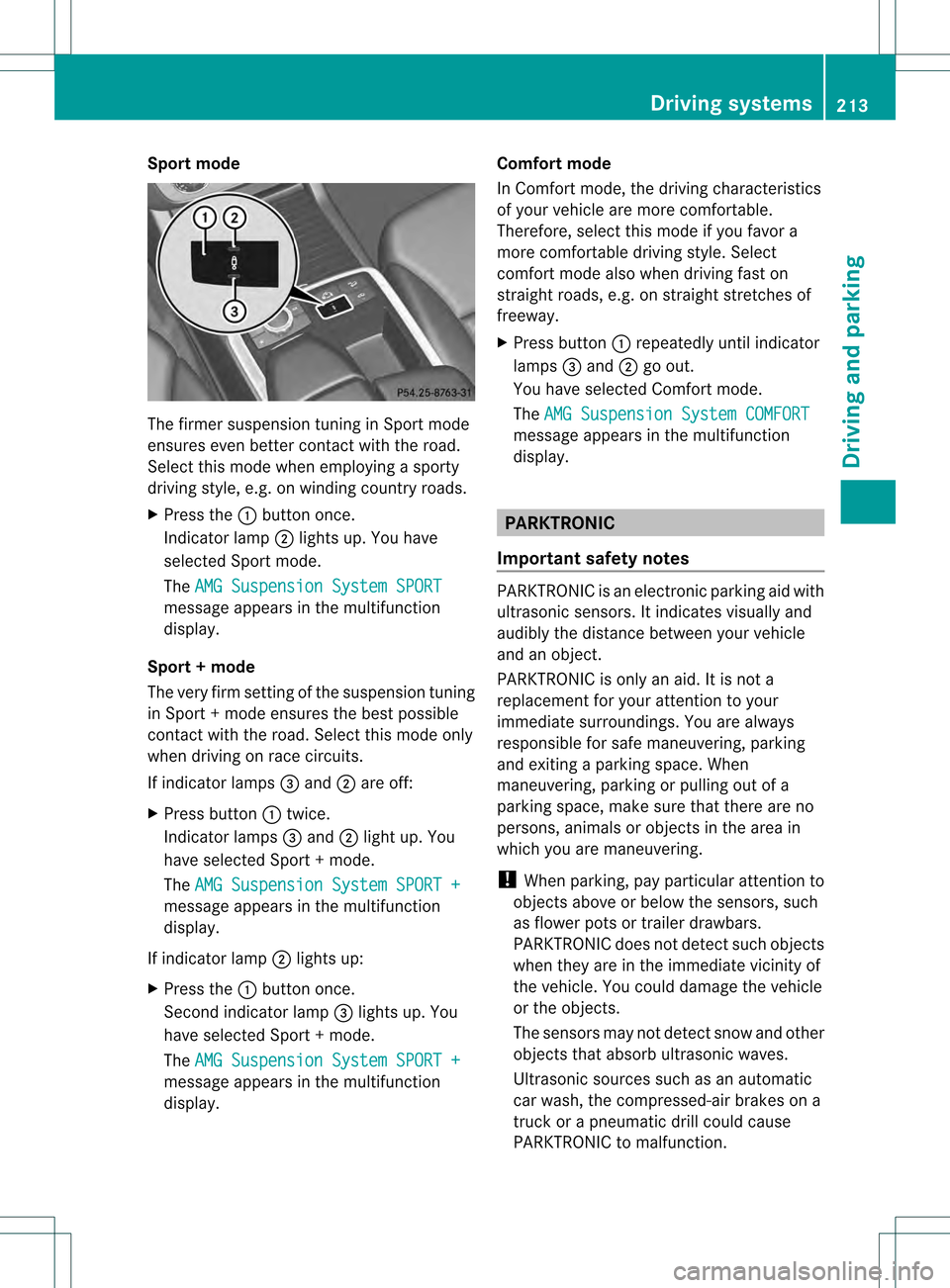
X Press the 0002button once.
Indicator lamp 0003lights up. You have
selected Sport mode.
The AMG Suspension System SPORT message appears in the multifunction
display.
Sport + mode
The very firm setting of the suspension tuning
in Sport +mode ensures the best possible
contact with the road. Select this mode only
when driving on race circuits.
If indicator lamps 001Fand 0003are off:
X Press button 0002twice.
Indicator lamps 001Fand 0003light up. You
have selected Sport +mode.
The AMG Suspension System SPORT + message appears in the multifunction
display.
If indicator lamp 0003lights up:
X Press the 0002button once.
Second indicator lamp 001Flights up. You
have selected Sport +mode.
The AMG Suspension System SPORT + message appears in the multifunction
display. Comfort mode
In Comfort mode, the driving characteristics
of your vehicle are more comfortable.
Therefore, select this mode if you favor a
more comfortable driving style. Select
comfor
tmode also when driving fast on
straight roads, e.g. on straight stretches of
freeway.
X Press button 0002repeatedly until indicator
lamps 001Fand 0003go out.
You have selected Comfort mode.
The AMG Suspension System COMFORT message appears in the multifunction
display. PARKTRONIC
Important safety notes PARKTRONIC is an electronic parking aid with
ultrasonic sensors. It indicates visually and
audibly the distance between your vehicle
and an object.
PARKTRONIC is only an aid. It is not a
replacement for your attention to your
immediate surroundings. You are always
responsible for safe maneuvering, parking
and exiting a parking space. When
maneuvering, parking or pulling out of a
parking space, make sure that there are no
persons, animals or object
sinthe area in
which you are maneuvering.
! When parking, pay particular attention to
objects above or below the sensors, such
as flower pots or trailer drawbars.
PARKTRONIC does not detect such objects
when they are in the immediate vicinity of
the vehicle. You could damage the vehicle
or the objects.
The sensors may not detect snow and other
objects that absorb ultrasonic waves.
Ultrasonic sources such as an automatic
car wash, the compressed-air brakes on a
truck or a pneumatic drill could cause
PARKTRONIC to malfunction. Driving systems
213Driving and parking Z