lights MERCEDES-BENZ M-Class 2014 W166 Owner's Guide
[x] Cancel search | Manufacturer: MERCEDES-BENZ, Model Year: 2014, Model line: M-Class, Model: MERCEDES-BENZ M-Class 2014 W166Pages: 462, PDF Size: 6.23 MB
Page 132 of 462

Halogen headlamps
0002
Low-beam headlamp: H7 55 W
0003 High-bea mheadlamp: H7 55 W
0023 Parking lamp/standing lamp: W 5 W BV
0022 Side marker lamp: WY 5 W Tail lamp
0002
Brake lamp: P 21 W-L Changing the front bulbs
Removing and installing the cover in the
front wheel housing You must remove the cover from the front
wheel housing before you can change the
fron
tbulbs. X
To remove: switch off the lights.
X Turn the fron twheels inwards.
X Remove securing pin 0003using a suitable
tool.
X Slide cover 0002up and remove it.
X To install: insert cover 0002again and slide
it down until it engages.
X Insert securing pin 0003.
Low-beam headlamps (halogen
headlamps) X
Remove the cover in the front wheel
housing (Y page 130).
X Turn housing cover 0002counter-clockwise
and pull it out.
X Turn bulb holder 0003counter-clockwise and
pull it out.
X Take the bulb out of bulb holder 0003.
X Insert the new bulb into bulb holder 0003.
X Insert bulb holder 0003into the lamp and turn
it clockwise. 130
Replacing bulbsLights and windshield wipers
Page 133 of 462

X
Align housing cover 0002and turn it
clockwise until it engages.
X Replace the cove rinthe front wheel
housing (Y page 130).
High-beam headlamps (halogen
headlamps) X
Switch off the lights.
X Open the hood.
X Turn housing cover 0002counter-clockwise
and pull it out.
X Pull lever 0023upwards and remove bulb
holder 0003.
X Take the bulb out of bulb holder 0003.
X Insert the new bulb into bulb holder 0003.
X Simultaneously press bulb holder 0003and
pull lever 0023downwards.
X Align housing cover 0002and turn it
clockwise until it engages.
Parking lamps/standing lamps
(halogen headlamps) X
Switch off the lights.
X Open the hood.
X Turn housing cover 0002counter-clockwise
and pull it out.
X Pull out bulb holder 0003.
X Take the bulb out of bulb holder 0003.
X Insert the new bulb into bulb holder 0003.
X Insert bulb holder 0003.
X Align housing cover 0002and turn it
clockwise until it engages.
Side marker lamps X
Remove the cover in the front wheel
housing (Y page 130).
X Turn cap 0003counter-clockwise and remove
it.
X Pull out bulb holder 0002.
X Take the bulb out of bulb holder 0002.
X Insert the new bulb into bulb holder 0002.
X Insert bulb holder 0002.
X Align cap 0003and turn it clockwise until it
engages.
X Replace the cover in the front wheel
housing (Y page 130). Replacing bulbs
131Lights and windshield wipers Z
Page 134 of 462

Changing the rea
rbulbs
Opening and closing the service flap Left-hand service flap
Right-hand service flap
You must open the service flap in the cargo
compartment before you can change the
bulbs in the brake lamp.
X
To open: release service flap 0002at the top,
e.g. with a screwdriver, and swing it
downward in the direction of the arrow.
X Right side: remove the first-aid kit
beforehand and pull the parce lnet down.
X To close: reinsertservice flap 0002. Brake lamp X
Switch off the lights.
X Open the cargo compartment.
X Open the service flap (Y page 132).
X Turn bulb holder 0002counter-clockwise and
remove it.
X Take bulb out of bulb holder 0002.
X Inser tthe new bulb into bulb holder 0002.
X Insert bulb holder 0002into the lamp and turn
it clockwise.
X Close the service flap (Y page 132). Windshield wipers
Switching the windshield wipers on/
off
! Do not operate the windshield wipers
when the windshield is dry, as this could
damage the wiper blades. Moreover, dust
that has collected on the windshield can
scratch the glass if wiping takes place when
the windshield is dry.
If it is necessary to switch on the windshield
wipers in dry weather conditions, always
use washer fluid when operating the
windshield wipers.
! If the windshield wipers leave smears on
the windshield after the vehicle has been
washed in an automatic car wash, wax or
other residues may be the reason for this.
Cleant he windshield using washer fluid
after washing the vehicle in an automatic
car wash. 132
Windshield wipersLights and windshield wipers
Page 135 of 462

!
Intermittent wiping with rain sensor: due
to optical influences and the windshield
becoming dirty in dry weather conditions,
the windshield wipers may be activated
inadvertently. This could then damage the
windshield wiper blades or scratch the
windshield.
For this reason, you should always switch
off the windshield wipers in dry weather. Combination switch
0005
0008 Windshield wiper off
0006 0001 Intermittent wipe, low (rain sensor
set to low sensitivity)
0007 0002 Intermittent wipe, high (rain sensor
set to high sensitivity)
000C 0018 Continuous wipe, slow
000D 0012 Continuous wipe, fast
0021 0007 Single wipe
0014 0008 To wipe with washer fluid
X Switch on the ignition.
X Turn the combination switch to the
corresponding position.
In the 0001or0002 position, the appropriate
wiping frequency is set automatically
according to the intensity of the rain. In
the 0002 position, the rain sensor is more
sensitive than in the 0001position, causing
the windshield wipers to wipe more
frequently.
If the wiper blades are worn, the windshield
will no longer be wiped properly.T his could
prevent you from observing the traffic
conditions. Replace the wiper blades twice a
year, ideally in spring and fall. Switching the rear window wiper on/
off
Combination switch
0002
0001 Rear window wiper switch
0006 0005 To wipe with washer fluid
0007 ITo switch on intermittent wiping
000C 0To switch off intermittent wiping
000D 000E To wipe with washer fluid
X Turn the SmartKey to position 1or 2in the
ignition lock (Y page 157).
X Turn switch 0002on the combination switch
to the corresponding position.
When the rear window wiper is switched on,
the icon appears in the instrumentc luster. Replacing the wiper blades
Important safety notes G
WARNING
If the windshield wipers begin to move while
you are changing the wiper blades, you could
be trapped by the wiper arm. There is a risk
of injury.
Always switch off the windshield wipers and
ignition before changing the wiper blades.
! Neve ropen the hood/tailgate if a wiper
arm has been folded away from the
windshield/rear window.
Never fold a windshield wiper arm without
a wiper blade back onto the windshield/
rear window. Windshield wipers
133Lights and windshield wipers Z
Page 136 of 462

Hold the windshield wiper arm firmly when
you change the wiper blade. If you release
the wiper arm withou
tawiper blade and it
falls onto the windshield/rear window, the
windshield/rear window may be damaged
by the force of the impact.
Mercedes-Ben zrecommends that you have
the wiper blades changed at aqualified
specialist workshop.
! To avoid damaging the wiper blades,
make sure that you touch only the wiper
arm of the wiper.
Changing the windshield wiper blades Removing the wiper blades
X
Remove the SmartKey from the ignition
lock.
X Fold the wiper arm away from the
windshield. X
Firmly press release knob 0002and pull wiper
blade 0003upwards from the wiper arm in the
direction of the arrow. Installing the wiper blades X
Position new wiper blade 0002in the retainer
on the wiper arm and slide it into place in
the direction of the arrow.
The wiper blade audibly engages.
X Make sure that the wiper blade is seated
correctly.
X Fold the wiper arm back onto the
windshield.
Replacing the rea rwindow wiper blade Removing
awiper blade X
Remove the SmartKey from the ignition
lock.
X Fold wiper arm 0002away from the rear
window until it engages.
X Position wiper blade 0003at a right angle to
wiper arm 0002.
X Hold wiper arm 0002and press wiper
blade 0003in the direction of the arrow until
it releases.
X Remove wiper blade 0003.134
Windshield wipersLights and windshield wipers
Page 137 of 462
Installing
awiper blade
X Place new wiper blade 0003onto wiper
arm 0002.
X Hold wiper arm 0002and press wiper
blade 0003in the opposite direction to the
arrow until it engages.
X Make sure that wiper blade 0003is seated
correctly.
X Position wiper blade 0003parallel to wiper
arm 0002.
X Fold wiper arm 0002back onto the rear
window. Windshield wipers
135Lights and windshield wipers Z
Page 138 of 462
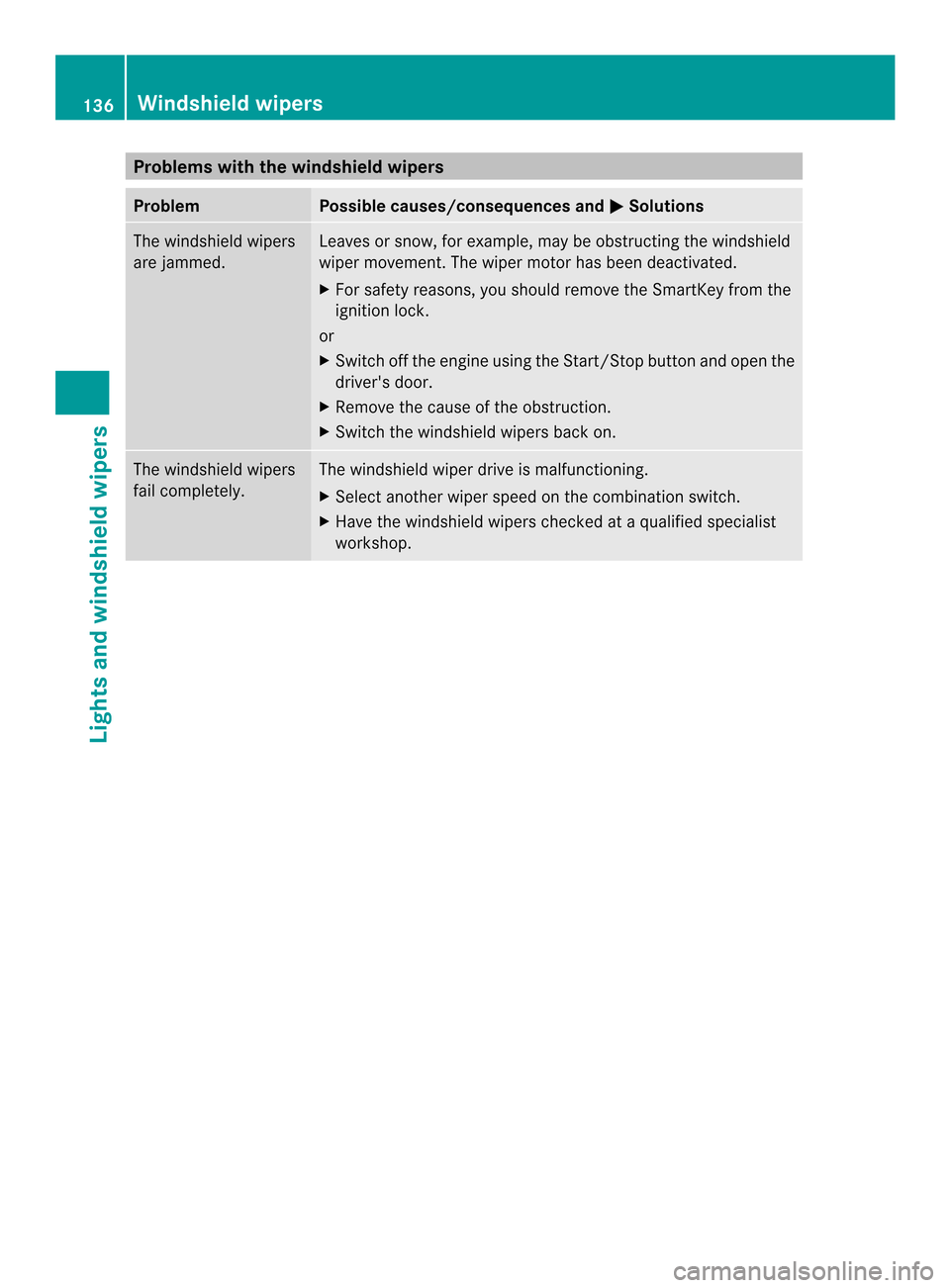
Problems with the windshield wipers
Problem Possible causes/consequences and
0001 Solutions
The windshield wipers
are jammed. Leaves or snow, for example, may be obstructing the windshield
wiper movement.T
he wiper motor has been deactivated.
X For safety reasons, you should remove the SmartKey from the
ignition lock.
or
X Switch off the engine using the Start/Stop button and open the
driver's door.
X Remove the cause of the obstruction.
X Switch the windshield wipers back on. The windshield wipers
fail completely. The windshield wiper drive is malfunctioning.
X
Select another wiper speed on the combination switch.
X Have the windshield wipers checked at a qualified specialist
workshop. 136
Windshield wipersLights and windshield wipers
Page 146 of 462
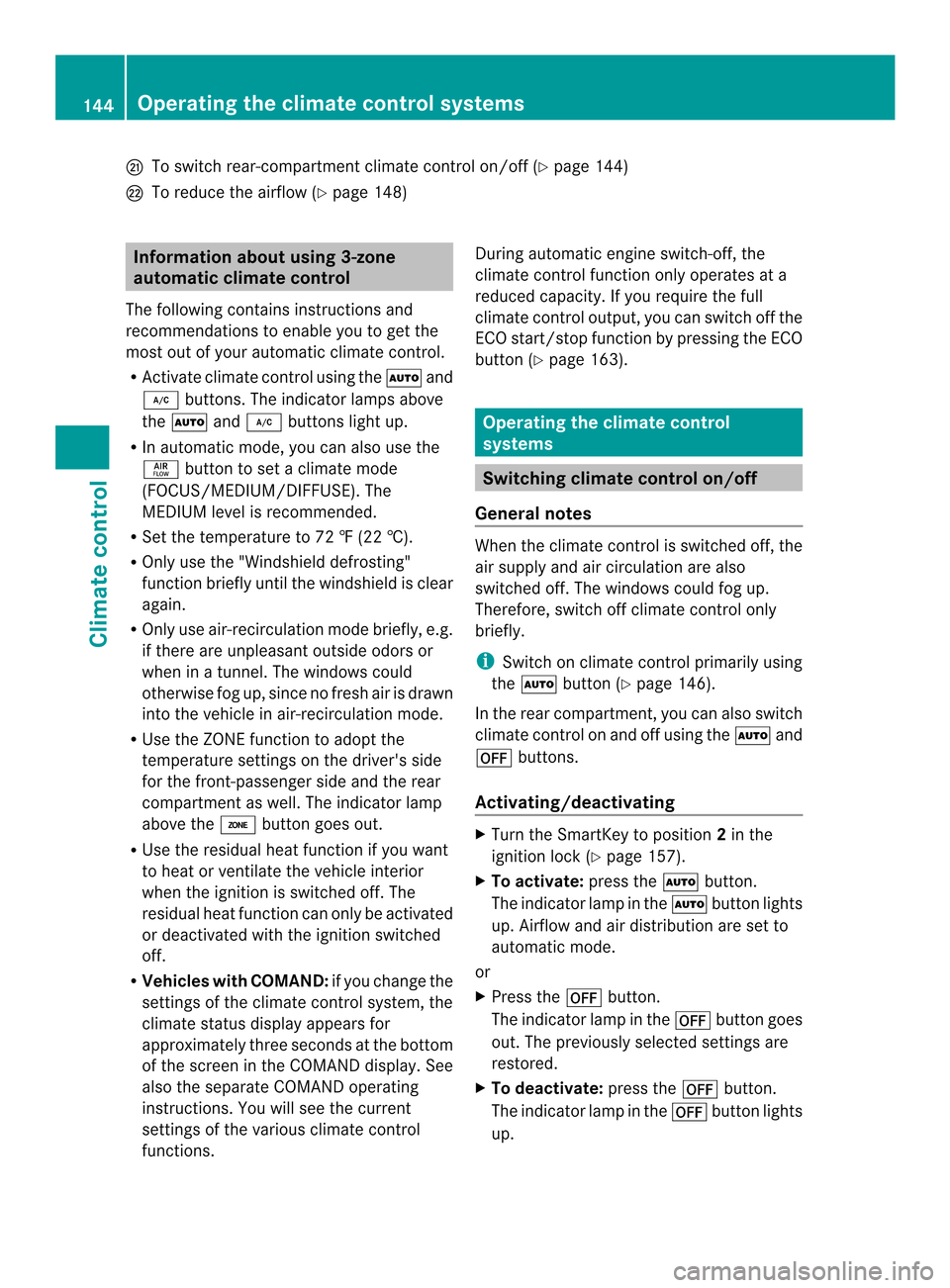
0027
To switch rear-compartment climate control on/off (Y page 144)
0028 To reduce the airflow (Y page 148)Information about using 3-zone
automatic climate control
The following contains instructions and
recommendations to enable you to get the
most out of your automatic climate control.
R Activate climate control using the 0006and
0007 buttons. The indicator lamps above
the 0006 and0007 buttons light up.
R In automatic mode, you can also use the
000C button to set a climate mode
(FOCUS/MEDIUM/DIFFUSE). The
MEDIUM level is recommended.
R Set the temperature to 72 ‡ (22 †).
R Only use the "Windshield defrosting"
function briefly until the windshield is clear
again.
R Only use air-recirculation mode briefly, e.g.
if there are unpleasant outside odors or
when in a tunnel. The windows could
otherwise fog up, since no fresh air is drawn
into the vehicle in air-recirculation mode.
R Use the ZONE function to adopt the
temperature settings on the driver's side
for the front-passenger side and the rear
compartment as well. The indicator lamp
above the 0004button goes out.
R Use the residual heat function if you want
to heat or ventilate the vehicle interior
when the ignition is switched off. The
residual heat function can only be activated
or deactivated with the ignition switched
off.
R Vehicles with COMAND: if you change the
settings of the climate control system, the
climate status display appears for
approximately three seconds at the bottom
of the screen in the COMAND display .See
also the separate COMAND operating
instructions. You will see the current
settings of the various climate control
functions. During automatic engine switch-off, the
climate control function only operates at a
reduced capacity. If you require the full
climate control output, you can switch off the
ECO start/stop function by pressing the ECO
button (Y
page 163). Operating the climate control
systems
Switching climate control on/off
General notes When the climate control is switched off, the
air supply and air circulation are also
switched off. The windows could fog up.
Therefore, switch off climate control only
briefly.
i
Switch on climate control primarily using
the 0006 button (Y page 146).
In the rear compartment, you can also switch
climate control on and off using the 0006and
000C buttons.
Activating/deactivating X
Turn the SmartKey to position 2in the
ignition lock (Y page 157).
X To activate: press the0006button.
The indicator lamp in the 0006button lights
up. Airflow and air distribution are set to
automatic mode.
or
X Press the 000Cbutton.
The indicator lamp in the 000Cbutton goes
out. The previously selected settings are
restored.
X To deactivate: press the000Cbutton.
The indicator lamp in the 000Cbutton lights
up. 144
Operating the climate control systemsClimate control
Page 147 of 462

Activating/deactivating cooling with
air dehumidification
General notes If you deactivate the "Cooling with air-
dehumidification" function, the air inside the
vehicle will no tbe cooled. The air inside the
vehicle will also not be dehumidified. The
windows can fog up more quickly. Therefore,
only deactivate the "Cooling with air-
dehumidification" function briefly.
The "Cooling with air dehumidification"
function is only available when the engine is
running. The air inside the vehicle is cooled
and dehumidified according to the
temperature selected.
Condensation may drip from the underside of
the vehicle when it is in cooling mode. This is
normal and not a sign that there is a
malfunction.
Activating/deactivating Example:
0007button
X To activate: press the0007/0005 button.
The indicator lamp in the 0007/0005
button lights up.
X To deactivate: press the0007/0005
button.
The indicator lamp in the 0007/0005
button goes out. The "Cooling with air
dehumidification" function has a delayed
switch-off feature. Operating the climate control systems
145Climate control
Page 148 of 462
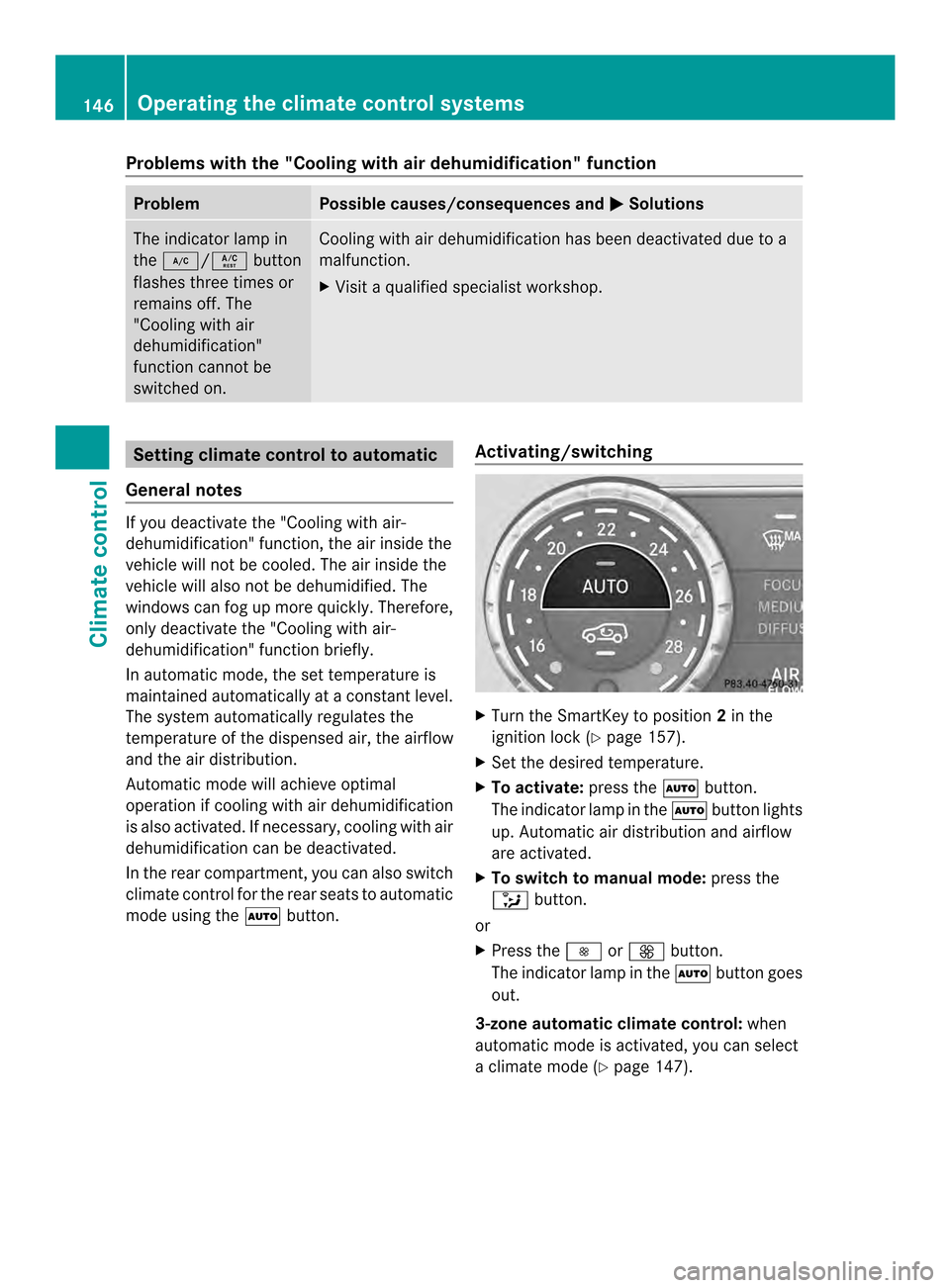
Problems with the "Cooling with air dehumidification" function
Problem Possible causes/consequences and
0001 Solutions
The indicator lamp in
the
0007/0005 button
flashes three times or
remains off. The
"Cooling with air
dehumidification"
function cannot be
switched on. Cooling with air dehumidification has been deactivated due to a
malfunction.
X
Visit a qualified specialist workshop. Setting climate control to automatic
General notes If you deactivate the "Cooling with air-
dehumidification" function, the air inside the
vehicle will not be cooled. The air inside the
vehicle will also not be dehumidified. The
windows can fog up more quickly. Therefore,
only deactivate the "Cooling with air-
dehumidification" function briefly.
In automatic mode, the set temperature is
maintained automatically at a constant level.
The system automatically regulates the
temperature of the dispensed air, the airflow
and the air distribution.
Automatic mode will achieve optimal
operation if cooling with air dehumidification
is also activated. If necessary, cooling with air
dehumidification can be deactivated.
In the rear compartment, you can also switch
climate control for the rear seats to automatic
mode using the
0006button. Activating/switching X
Turn the SmartKey to position 2in the
ignition lock (Y page 157).
X Set the desired temperature.
X To activate: press the0006button.
The indicator lamp in the 0006button lights
up. Automatic air distribution and airflow
are activated.
X To switch to manual mode: press the
0017 button.
or
X Press the 0018or0019 button.
The indicator lamp in the 0006button goes
out.
3-zone automatic climate control: when
automatic mode is activated, you can select
a climate mode (Y page 147).146
Operating the climate control systemsClimate control