COMAND MERCEDES-BENZ M-Class 2015 W166 Comand Manual
[x] Cancel search | Manufacturer: MERCEDES-BENZ, Model Year: 2015, Model line: M-Class, Model: MERCEDES-BENZ M-Class 2015 W166Pages: 270, PDF Size: 5.82 MB
Page 164 of 270
X
To edit the access data: proceed as
described for manually entering the access data (Y page 162).
When you confirm the edited access data,
the list of mobile phone network providers
appears and displays the selected provider.
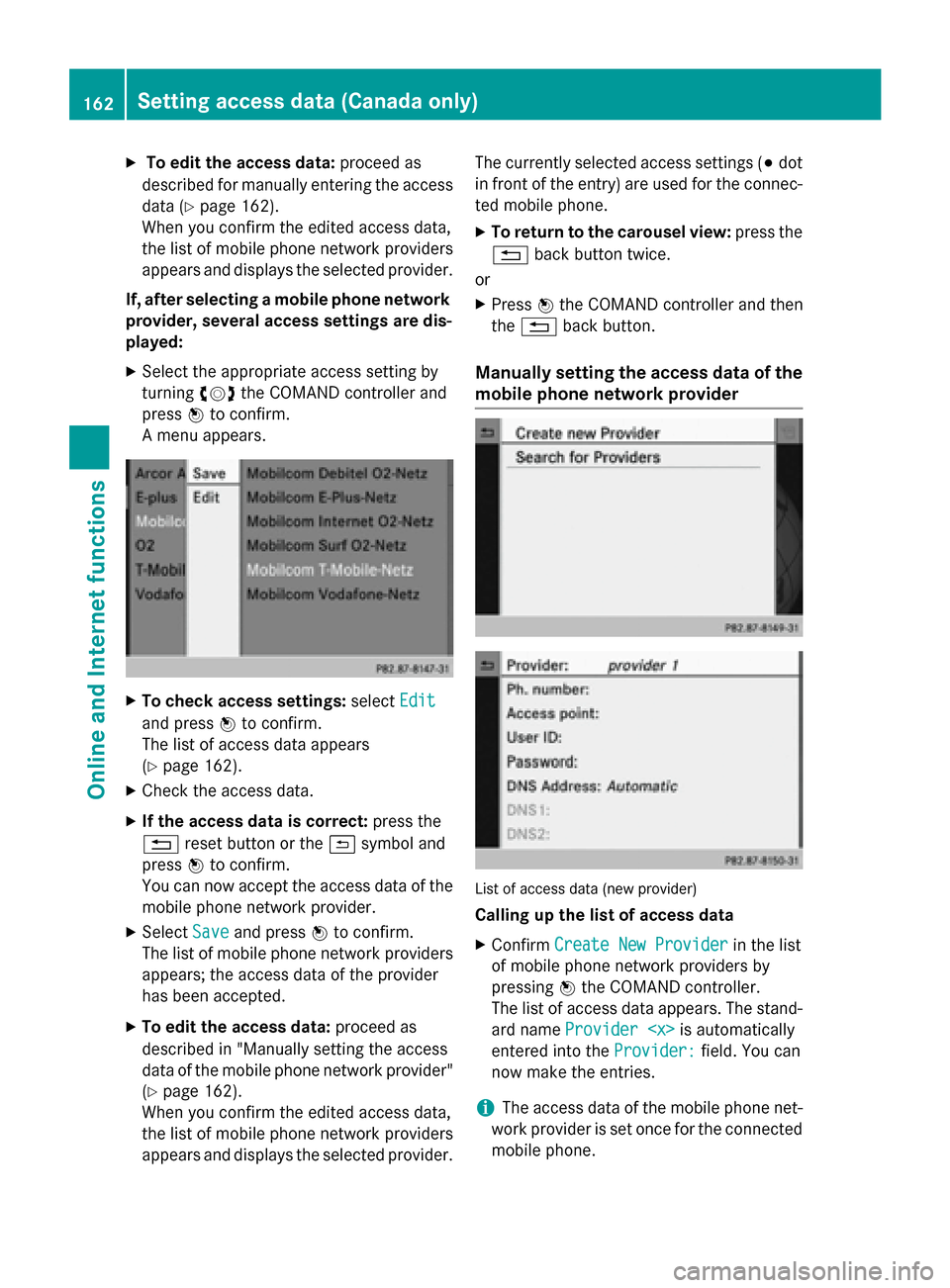
If, after selecting a mobile phone network provider, several access settings are dis-
played:
X Select the appropriate access setting by
turning 00790052007Athe COMAND controller and
press 0098to confirm.
A menu appears. X
To check access settings: selectEdit Edit
and press 0098to confirm.
The list of access data appears
(Y page 162).
X Check the access data.
X If the access data is correct: press the
0038 reset button or the 0039symbol and
press 0098to confirm.
You can now accept the access data of the
mobile phone network provider.
X Select Save
Save and press 0098to confirm.
The list of mobile phone network providers
appears; the access data of the provider
has been accepted.
X To edit the access data: proceed as
described in "Manually setting the access
data of the mobile phone network provider" (Y page 162).
When you confirm the edited access data,
the list of mobile phone network providers
appears and displays the selected provider. The currently selected access settings (003B
dot
in front of the entry) are used for the connec- ted mobile phone.
X To return to the carousel view: press the
0038 back button twice.
or
X Press 0098the COMAND controller and then
the 0038 back button.
Manually setting the access data of the
mobile phone network provider List of access data (new provider)
Calling up the list of access data
X Confirm Create New Provider Create New Provider in the list
of mobile phone network providers by
pressing 0098the COMAND controller.
The list of access data appears. The stand-
ard name Provider
entered into the Provider:
Provider:field. You can
now make the entries.
i The access data of the mobile phone net-
work provider is set once for the connected
mobile phone. 162
Setting access data (Canada only)Online and Internet functions
Page 166 of 270

the COMAND controller and press
0098to
confirm.
The input menu for the phone number
appears. X
Enter the telephone number.
X To enter the access data: in the list of
access data, select the Access Point: Access Point:
input field and confirm by pressing 0098.
X Enter the access data.
X To enter the user ID: in the list of access
data, select the User ID:
User ID: input field and
confirm by pressing 0098.
X Enter the user ID.
X To enter the password: in the list of
access data, select the Password:
Password: input
field and confirm by pressing 0098.
X Enter the password. X
To set the DNS address: selectAuto‐
Auto‐
matic
matic orManual
Manual with the COMAND con-
troller and press 0098to confirm.
Automatic
Automatic : the DNS address is set auto-
matically. Manual
Manual : uses the entries in DNS 1 and DNS
2. Entering the DNS1
Entering the example DNS
X After selecting Manual
Manual, select the DNS1
DNS1
input field with the COMAND controller and
press 0098to confirm.
X Enter 172.28.4.81
172.28.4.81, for example. Internet access data for other mobile
phones
If the access data is already available in the
list of mobile phone network providers, you
can use it for additional mobile phones.
The following prerequisites are required for
this:
R the additional mobile phone must be con-
nected.
R the access data must apply to the mobile
phone contract of the currently connected
mobile phone.
X Select a provider from the list of mobile
phone network providers by turning 00790052007A
the COMAND controller and press 0098to
confirm (Y page 161).
After you select the provider, the list of
mobile phone network providers is closed.
The selected provider is entered. 164
Setting access data (Canada only)Online and
Internet functions
Page 167 of 270

Managing access data of the mobile
phone network provider
Overview The access data of the mobile phone network
provider can be:
R edited
R copied, then edited and accepted for a new
provider name
R deleted
i Changes that you make to the access
data of a mobile phone network provider
apply to all mobile phones that use this
access data.
i When the Internet connection is active,
you cannot edit or delete the access data of
the currently set mobile phone network
provider.
Editing the access data X
Select a provider from the list of mobile
phone network providers by turning 00790052007A
the COMAND controller (Y page 161).
X Select the symbol to the right of the entry
by sliding 00520096the COMAND controller and
press 0098to confirm. X
Confirm Edit Editby pressing 0098.
The access data is displayed.
X Edit the access data. A description of the
entry can be found under "Manually setting the access data of the mobile phone net-
work provider" (Y page 162). Saving access data under a new pro-
vider name X
Select a provider from the list of mobile
phone network providers by turning 00790052007A
the COMAND controller (Y page 161).
X Select the symbol to the right of the entry
by sliding 00520096the COMAND controller and
press 0098to confirm.
X Confirm Copy Provider Entry Copy Provider Entry by press-
ing 0098.
The access data is displayed.
X Edit the access data. A description of the
entry can be found under "Making entries"
in the "Manually setting the access data of
the mobile phone network provider" sec-
tion (Y page 162).
Deleting the access data of the mobile
phone network provider X
Select a provider from the list of mobile
phone network providers by turning 00790052007A
the COMAND controller (Y page 161).
X Select the symbol to the right of the entry
by sliding 00520096the COMAND controller and
press 0098to confirm.
X Confirm Delete Deleteby pressing 0098.
A prompt appears asking whether you wish to delete the access data.
X Select Yes
YesorNo
No and press 0098to confirm. Selecting the length of time for auto-
matic disconnection from the InternetSetting access data (Canada only)
165Online and Internet functions Z
Page 168 of 270
If a preset time has elapsed during which nei-
ther the online functions nor the Internet have
been used, COMAND automatically discon-
nects from the Internet.
X Select Settings Settings in the carousel view by
sliding 00640052and turning 00790052007Athe COMAND
controller and press 0098to confirm.
X Select Disconnect Automatically
Disconnect Automatically
After:
After: and press 0098to confirm.
The 003Bdot indicates the current setting.
X Select 5 min
5 min ,15 min
15 min orOff
Off and press 0098
to confirm.
Off
Off switches the function off.
An active Internet connection is identified by the double arrows on the top right of the dis-
play. Establishing/ending the connection
Establishing the connection
Preconditions for establishing a connection
can be found under "General notes"
(Y page 158).
X Option 1: select the00A7icon in the main
function bar by turning 00790052007Athe COMAND
controller and press 0098to confirm.
The carousel view appears.
X Turn 00790052007A or slide 009500520096the COMAND con-
troller until the Mercedes-Benz Apps Mercedes-Benz Apps
panel or a favorite is brought to the front, if
these have been previously created
(Y page 181).
X Option 2: enter a web address
(Y page 176). X
For both options, press 0098the COMAND
controller.
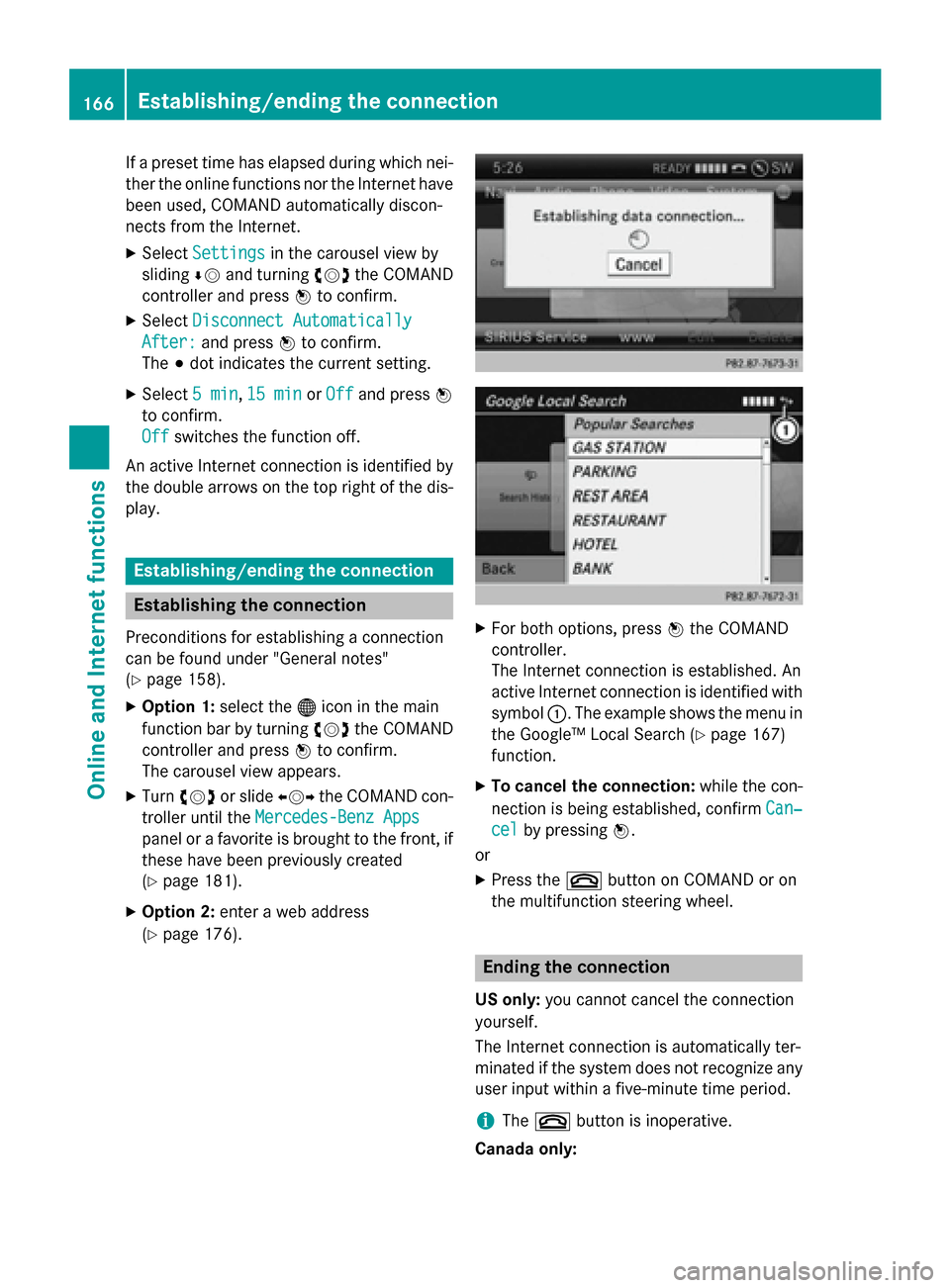
The Internet connection is established. An
active Internet connection is identified with symbol 0043. The example shows the menu in
the Google™ Local Search (Y page 167)
function.
X To cancel the connection: while the con-
nection is being established, confirm Can‐
Can‐
cel cel by pressing 0098.
or
X Press the 0076button on COMAND or on
the multifunction steering wheel. Ending the connection
US only: you cannot cancel the connection
yourself.
The Internet connection is automatically ter-
minated if the system does not recognize any user input within a five-minute time period.
i The
0076 button is inoperative.
Canada only: 166
Establishing/ending the connectionOnline and Internet functions
Page 169 of 270

X
Press the 0076button on COMAND or on
the multifunction steering wheel.
or X Select the scissors symbol on the bottom
right of the carousel view and press 0098to
confirm.
i If the mobile phone Internet connection is
canceled, COMAND tries to reconnect. You
should therefore always close the connec-
tion on COMAND or via the multifunction
steering wheel. Google™ local search
Calling up the Local Search menu
X
Select the 00A7icon in the main function bar
by turning 00790052007Athe COMAND controller
and press 0098to confirm.
A list with active Mercedes-Benz Apps
appears.
X Bring the Mercedes-Benz Apps
Mercedes-Benz Apps panel to
the front by turning 00790052007Athe COMAND
controller and pressing 0098to confirm.
The Mercedes-Benz Apps menu is dis-
played.
X Confirm the Google Local Search Google Local Search entry
by pressing 0098.
The Google Local Search menu appears.
X To exit the menu: selectBack
Back by sliding
00520064 and turning 00790052007Athe COMAND con-
troller and press 0098to confirm. Search
Entry restriction It is only possible to enter a search term in the
input menu when the vehicle is stationary.
Entering a search term Input menu
X Confirm Search
Searchin the Google Local Search
menu by pressing 0098.
The input menu appears.
X To enter using the character bar: enter
the search term.
X To enter characters using the number
pad: press the number keys in rapid suc-
cession.
The character appears when the key is
pressed. The first available character is
highlighted. Google™ local search
167Online andInternet functions Z
Page 170 of 270

X
After entering the search term, select 0054
by turning 00790052007Athe COMAND controller
and press 0098to confirm.
A menu appears. Here, you can select
where the destination search should begin.
Selecting the search position X
After a search term has been entered and
confirmed, a menu appears.
COMAND searches for available POIs for
the search term entered:
R near the current vehicle position
R along the calculated route
If a destination has previously been
entered, the function is available.
R near the destination
If a destination has previously been
entered, the function is available.
R near an address
X After selecting Near Destination
Near Destination, enter
an address and confirm.
The search results are displayed. Example: search results Using search results
X
Select an entry in the list of search results
by turning 00790052007Athe COMAND controller
and press 0098to confirm.
A menu appears.
X To show the detailed view: confirm
Details Details by pressing 0098the COMAND con-
troller.
The address of the selected entry is dis-
played.
X To use a search result as the destina-
tion: select Navigate to Navigate to by turning00790052007A
the COMAND controller and press 0098to
confirm.
You then switch to navigation mode and
can start route calculation (Y page 69).
You then switch to navigation mode and
can start route calculation.
i The search result is stored in the
"Last destinations" memory at the same
time (Y page 107). You can take the desti-
nation from this memory and save it per-
manently in the destination memory
(Y page 104).
X To call up a destination: selectCall Callwith
the COMAND controller and press 0098to
confirm.
You then switch to the telephone function
and make the call (Y page 132).
You then switch to the telephone function
and make the call.
i If there is no phone number available, the
menu item cannot be selected. 168
Google™ local searchOnline and Internet functions
Page 171 of 270

X
To import a destination: selectImport
Import
with the COMAND controller and press 0098
to confirm.
You can choose whether you want to save
the POI as a personal POI on the SD mem-
ory card or in the address book.
i If there is no SD memory card in the slot,
the Save As Personal POI
Save As Personal POI menu item
cannot be selected.
X Insert the SD memory card (Y page 196).
X To save as a personal POI: confirmSave Save
As Personal POI
As Personal POI by pressing0098the
COMAND controller.
The entry is saved as a personal POI on the
SD memory card.
i You can use a personal POI in navigation
mode for route calculation (Y page 85).
If the personal POI is saved on the SD mem-
ory, you can also use it for route calculation
in another vehicle.
X To save to the address book: select
Save to Address Book
Save to Address Book by turning00790052007A
the COMAND controller and press 0098to
confirm.
The entry is stored in the address book. Popular searches
This function allows you to search using pre-
defined search criteria.
X Bring Popular Searches
Popular Searches in the Local
Search menu to the front by turning 00790052007A(the COMAND controller and press
0098to
confirm.
A menu displays the available search crite-
ria. Example: popular searches
X Select the search criteria and press 0098to
confirm.
X Proceed as described in the "Selecting the
search position" section (Y page 168). If
the vehicle is stationary, the search results
can be supplemented manually, e.g. "Hotel
Adler". Search History
This function offers you the previous search
queries.
X Bring Search History
Search History in the Local search
menu to the front by turning 00790052007Athe
COMAND controller and press 0098to con-
firm.
The previous search queries are shown
with the most recent at the top. Google™ local search
169Online and Internet functions Z
Page 172 of 270

X
Select the search criteria and press 0098to
confirm.
X Proceed as described in the "Selecting the
search position" section (Y page 168). If
the vehicle is stationary, the search results
can be supplemented manually, e.g. "Hotel
Adler". Destination/route download
Introduction
You can send destinations and routes from
Google™ maps to the server and download
these via this function. You can use the des-
tinations and routes for route guidance and
save them for further use.
In order to use the download destination/
route function, the mbrace system must be:
R activated
R set up
R and activated for COMAND and Internet
access services.
For information on the mbrace system, see
the separate vehicle Operator's Manual. Sending destinations to the server
X Call up the website for Google™ Maps on
the Internet.
X Enter a destination.
X Click "More" at the destination.
X Click "Send".
X Click "Send to vehicle". X
Select Mercedes-Benz as the vehicle
brand.
X Enter the mbrace e-mail address or the
vehicle identification number.
X Enter the vehicle identification number.
X Click "Send".
The destination is sent to the server.
i The availability of the destination/route
download function is country-dependent. Downloading destinations from the
server
Proceed as follows to use destinations/
routes that have been sent to the server: X Select the 00A7symbol in the main function
bar by turning 00790052007Athe COMAND control-
ler and press 0098to confirm.
The carousel view appears.
X Bring the Mercedes-Benz Apps Mercedes-Benz Apps panel to
the front by turning 00790052007Athe COMAND
controller and press 0098to confirm.
The Mercedes-Benz Apps menu is dis-
played. X
Bring the Dest./Route Dest./Route Download
Downloadpanel to
the front and press 0098to confirm.
i With
Exit Exit, you quit the destination/route
download.
With Options Options, you set the options for the
destination/route download (Y page 173).170
Destination/route downloadOnline and Internet functions
Page 173 of 270

X
Confirm the Dest./Route Download
Dest./Route Download
panel by pressing 0098.
Available routes and destinations are
shown in the list.
You can save up to 20 routes and 50 desti-
nations for your vehicle on the server and dis- play these in the list. If you send further routesor destinations to the server, the existing
entries are deleted from the list.
i The routes/destinations sent from Goo-
gle™ maps to the server are automatically
deleted from there after seven days. Using destinations
Calling up the menu X
Select an entry in the list by turning 00790052007A
the COMAND controller and press 0098to
confirm.
A menu appears.
Displaying details X
Confirm Details Details in the menu by pressing
0098 the COMAND controller.
The route or destination is displayed.
X To call up a POI: confirm the entry by
pressing 0098.
i You can use the function if:
R a mobile phone is connected
(Y page 126)
R the destination address contains a tele-
phone number
Using as the destination X
Select Navigate
Navigate to toin the menu by turning
00790052007A the COMAND controller and press 0098
to confirm.
You then switch to navigation mode and
can start route calculation (Y page 69).
i A route can only be stored as a personal
POI on an SD memory card or taken directly
for route calculation (Y page 171).Calling up the destination X
Select Call Callin the menu by turning 00790052007A
the COMAND controller and press 0098to
confirm.
You then switch to the telephone function
and make the call (Y page 132).
Importing a destination/route When importing, you can choose whether you
want to save the destination as a personal POI
on an SD memory card or in the address book. You can only save routes as personal POIs toan SD memory card, but not in the address
book.
X Select Import Import in the menu with the
COMAND controller and press 0098to con-
firm.
i If there is no SD memory card in the slot,
the As AsPersonal
Personal POI
POImenu item is grayed
out.
X Insert the SD memory card (Y page 196).
X To save as a personal POI: confirmAs
As
Personal POI
Personal POI by pressing0098the
COMAND controller.
The entry is saved as a personal POI on the SD memory card.
i You can use a personal POI in navigation
mode for route calculation (Y page 85).
You can also use a personal POI in another
vehicle for route calculation.
X To save to the address book: selectTo To
Address Book
Address Book by turning00790052007Athe
COMAND controller and press 0098to con-
firm.
The entry is stored in the address book. Destination/route download
171Online and Internet functions Z
Page 174 of 270
Deleting a destination/route from the
server X
Select an entry in the list by turning 00790052007A
the COMAND controller and press 0098to
confirm.
X Select Delete
Delete and press 0098to confirm.
A query appears asking whether the desti-
nation or the route should be deleted.
X Select Yes
Yes orNo No and press 0098to confirm. Options
Introduction
You can select options for the following
Mercedes-Benz Apps on COMAND:
R Local Search (Y page 172)
R Destination download (Y page 173)
You can reset the selected options to the
default settings (Y page 174).Calling up the options menu
X Select the 00A7symbol in the main function
bar by turning 00790052007Athe COMAND con-
troller and press 0098to confirm.
The carousel view appears.
X Bring the Mercedes-Benz Apps
Mercedes-Benz Apps panel to
the front by turning 00790052007Athe COMAND
controller and press 0098to confirm.
X Select Options
Options by sliding 00520064and turning
00790052007A the COMAND controller and press 0098
to confirm. Selecting options for the local search
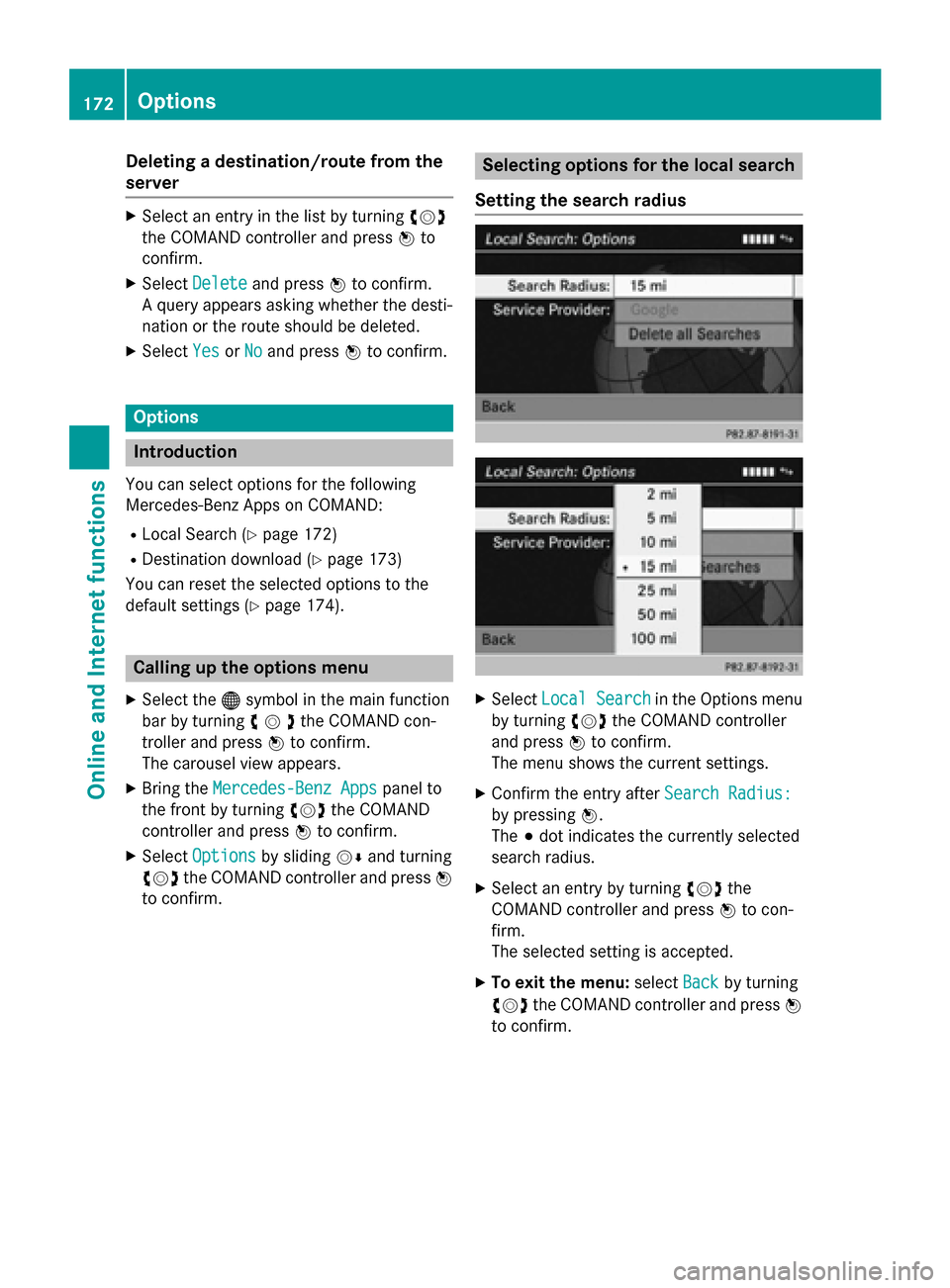
Setting the search radius X
Select Local Search
Local Search in the Options menu
by turning 00790052007Athe COMAND controller
and press 0098to confirm.
The menu shows the current settings.
X Confirm the entry after Search Radius:
Search Radius:
by pressing 0098.
The 003Bdot indicates the currently selected
search radius.
X Select an entry by turning 00790052007Athe
COMAND controller and press 0098to con-
firm.
The selected setting is accepted.
X To exit the menu: selectBack Backby turning
00790052007A the COMAND controller and press 0098
to confirm. 172
OptionsOnline and
Internet functions