engine MERCEDES-BENZ M-Class 2015 W166 Owner's Manual
[x] Cancel search | Manufacturer: MERCEDES-BENZ, Model Year: 2015, Model line: M-Class, Model: MERCEDES-BENZ M-Class 2015 W166Pages: 466, PDF Size: 8.92 MB
Page 216 of 466
the vehicle is only lowered when the doors are
closed. Lowering is interrupted if a door is
opened, and it continues once the door has
been closed.
Basic settings (excluding AMG vehicles)
The extent to which the vehicle is raised or
lowered depends on the basic setting selec-
ted. Select raised level for off-road driving or
highway/high-speed level for normal roads.
The individual vehicle levels differ from high-
way level as follows:
R highway level: +/–0 in (+/–0 mm)
R high-speed level: –0.6 in (–15 mm)
R raised level: +2.3 in (+60 mm)
Basic settings for AMG vehicles
The extent to which the vehicle is raised or
lowered depends on the AMG adaptive sport
suspension setting selected. Select the
raised level for off-road driving or highway/
high-speed level for normal roads.
The raised level corresponds to a vehicle level
raised by 50 mm when compared with high-
way level in comfort mode.
Raised level Only select raised level if this is appropriate
for the road conditions. Otherwise, fuel con-
sumption may increase and handling may be
affected.
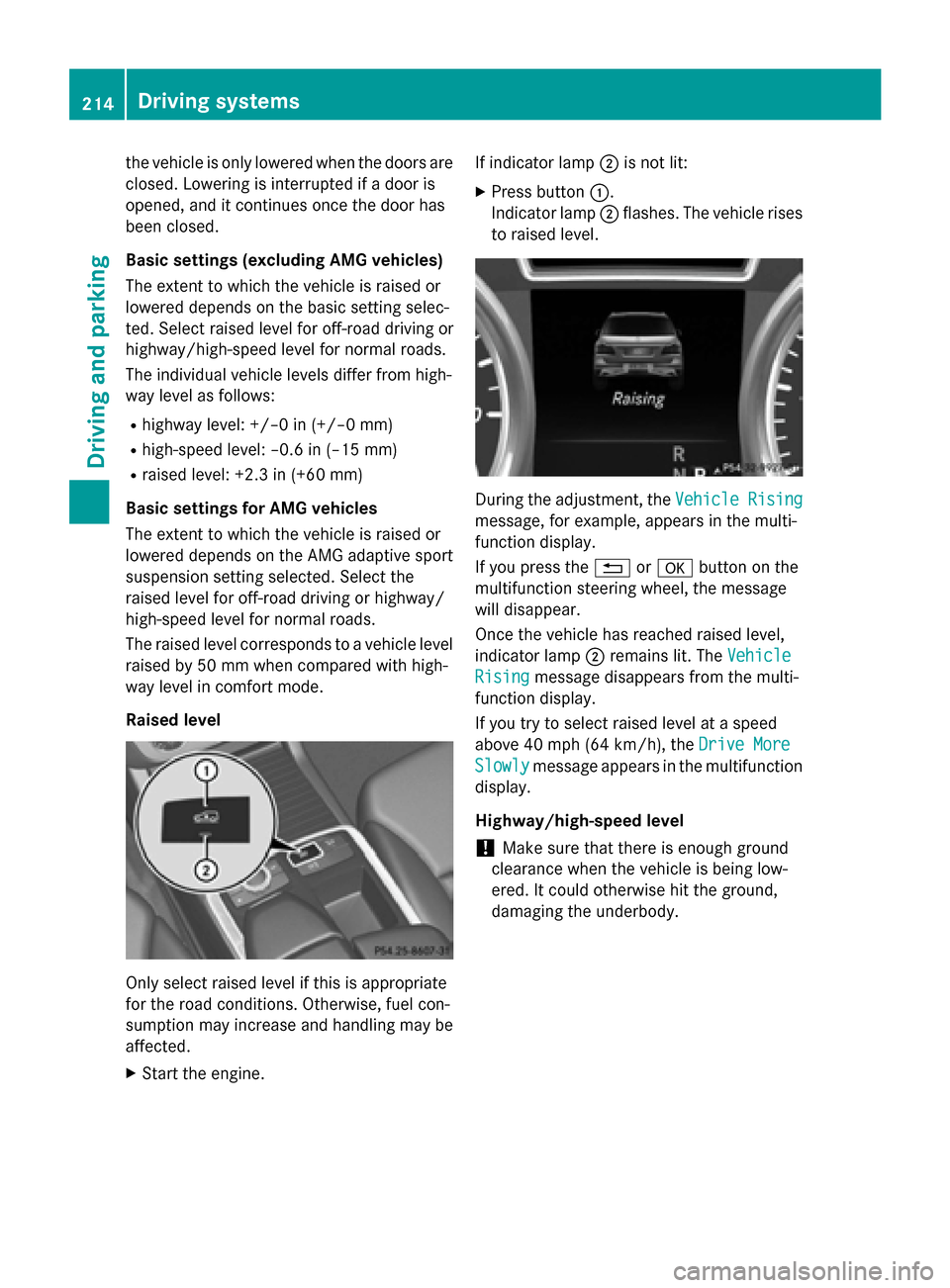
X Start the engine. If indicator lamp
0044is not lit:
X Press button 0043.
Indicator lamp 0044flashes. The vehicle rises
to raised level. During the adjustment, the
Vehicle Rising Vehicle Rising
message, for example, appears in the multi-
function display.
If you press the 0038or0076 button on the
multifunction steering wheel, the message
will disappear.
Once the vehicle has reached raised level,
indicator lamp 0044remains lit. The Vehicle
Vehicle
Rising Rising message disappears from the multi-
function display.
If you try to select raised level at a speed
above 40 mph (64 km/h), the Drive More Drive More
Slowly Slowly message appears in the multifunction
display.
Highway/high-speed level
! Make sure that there is enough ground
clearance when the vehicle is being low-
ered. It could otherwise hit the ground,
damaging the underbody. 214
Driving systemsDriving an
d parking
Page 217 of 466
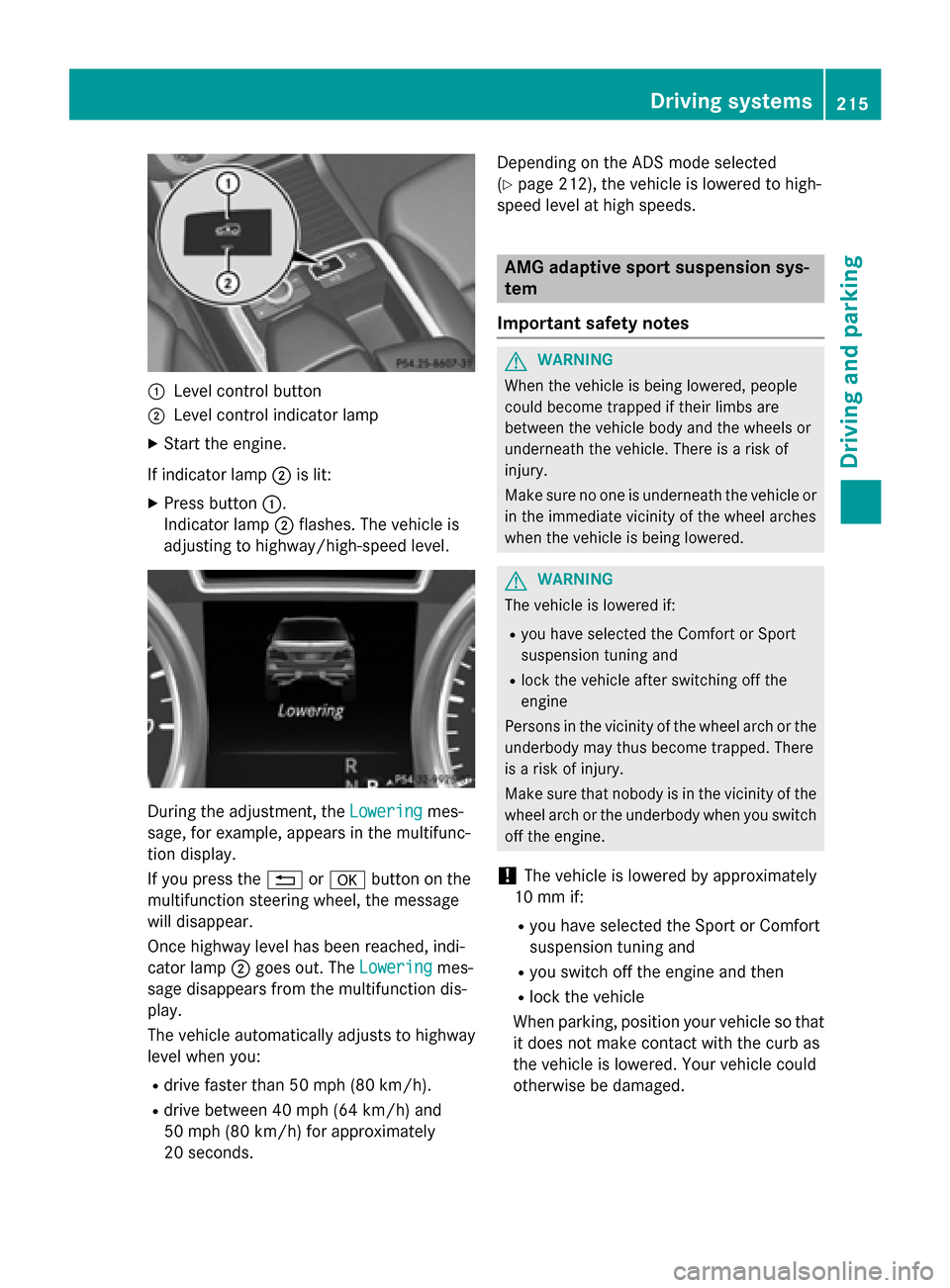
0043
Level control button
0044 Level control indicator lamp
X Start the engine.
If indicator lamp 0044is lit:
X Press button 0043.
Indicator lamp 0044flashes. The vehicle is
adjusting to highway/high-speed level. During the adjustment, the
Lowering
Loweringmes-
sage, for example, appears in the multifunc-
tion display.
If you press the 0038or0076 button on the
multifunction steering wheel, the message
will disappear.
Once highway level has been reached, indi-
cator lamp 0044goes out. The Lowering
Lowering mes-
sage disappears from the multifunction dis-
play.
The vehicle automatically adjusts to highway
level when you:
R drive faster than 50 mph (80 km/h).
R drive between 40 mph (64 km/h) and
50 mph (80 km/h) for approximately
20 seconds. Depending on the ADS mode selected
(Y
page 212), the vehicle is lowered to high-
speed level at high speeds. AMG adaptive sport suspension sys-
tem
Important safety notes G
WARNING
When the vehicle is being lowered, people
could become trapped if their limbs are
between the vehicle body and the wheels or
underneath the vehicle. There is a risk of
injury.
Make sure no one is underneath the vehicle or in the immediate vicinity of the wheel arches
when the vehicle is being lowered. G
WARNING
The vehicle is lowered if:
R you have selected the Comfort or Sport
suspension tuning and
R lock the vehicle after switching off the
engine
Persons in the vicinity of the wheel arch or the
underbody may thus become trapped. There
is a risk of injury.
Make sure that nobody is in the vicinity of the wheel arch or the underbody when you switch
off the engine.
! The vehicle is lowered by approximately
10 mm if:
R you have selected the Sport or Comfort
suspension tuning and
R you switch off the engine and then
R lock the vehicle
When parking, position your vehicle so that it does not make contact with the curb as
the vehicle is lowered. Your vehicle could
otherwise be damaged. Driving systems
215Driving and parking Z
Page 218 of 466
Vehicle level
Level control adapts the vehicle level auto-
matically to the current operating and driving
situation. Level control ensures the best pos-
sible suspension and constant ground clear-
ance, even with a laden vehicle. This improves
driving safety and fuel consumption.
The AIRMATIC package and ACTIVE CURVE
SYSTEM are always components of AMG
adaptive suspension system (Y page 211).
Due to the sportier suspension settings com- pared to standard vehicles, the levels and
speed thresholds for sinking and raising the
vehicle are different.
In Comfort and Sport driving modes, after
locking the vehicle it lowers to the Sport+
level. When locking the vehicle at the raised
level, the vehicle does not lower.
The settings will remain stored after you
switch off the engine. When starting the
engine, the selected setting, e.g. AMG adap-
tive suspension system Comfort, is restored.
i The vehicle level may change visibly if you
park the vehicle and the outside tempera-
ture changes. If the temperature drops, the vehicle level lowers; with an increase in
temperature, the vehicle level rises.
Suspension tuning General notes
The electronically controlled damping system
works continuously. This improves driving
safety and ride comfort.
The damping is tuned individually to each
wheel and depends on:
R your driving style
R the road surface conditions
R your individual selection of Sport, Sport +
or Comfort
Your selection remains stored even if you
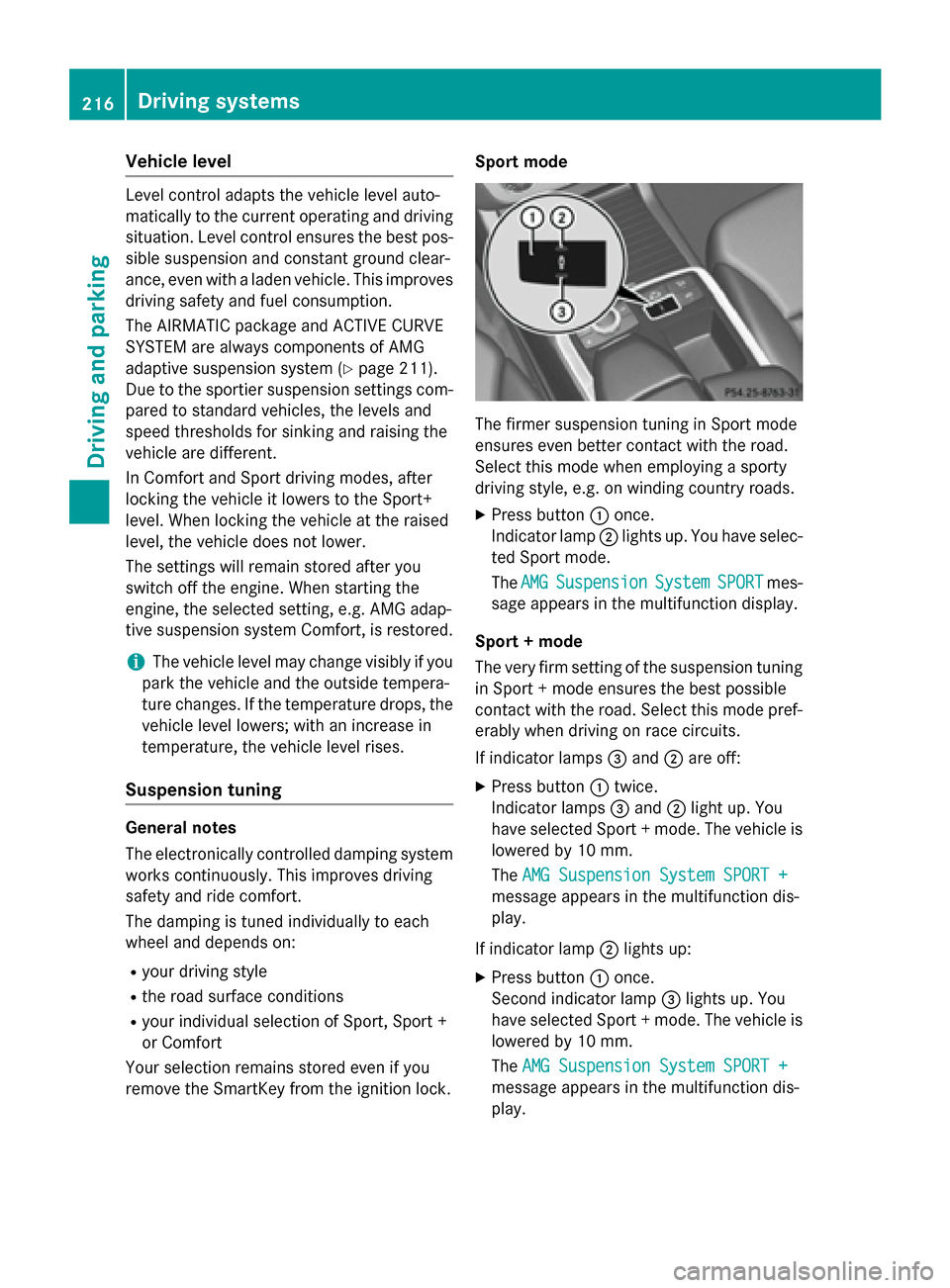
remove the SmartKey from the ignition lock. Sport mode
The firmer suspension tuning in Sport mode
ensures even better contact with the road.
Select this mode when employing a sporty
driving style, e.g. on winding country roads.
X Press button 0043once.
Indicator lamp 0044lights up. You have selec-
ted Sport mode.
The AMG
AMG Suspension Suspension System
SystemSPORT
SPORTmes-
sage appears in the multifunction display.
Sport + mode
The very firm setting of the suspension tuning in Sport + mode ensures the best possible
contact with the road. Select this mode pref-
erably when driving on race circuits.
If indicator lamps 0087and 0044are off:
X Press button 0043twice.
Indicator lamps 0087and 0044light up. You
have selected Sport + mode. The vehicle is
lowered by 10 mm.
The AMG Suspension System SPORT + AMG Suspension System SPORT +
message appears in the multifunction dis-
play.
If indicator lamp 0044lights up:
X Press button 0043once.
Second indicator lamp 0087lights up. You
have selected Sport + mode. The vehicle is
lowered by 10 mm.
The AMG Suspension System SPORT + AMG Suspension System SPORT +
message appears in the multifunction dis-
play. 216
Driving systemsDriving an
d parking
Page 220 of 466
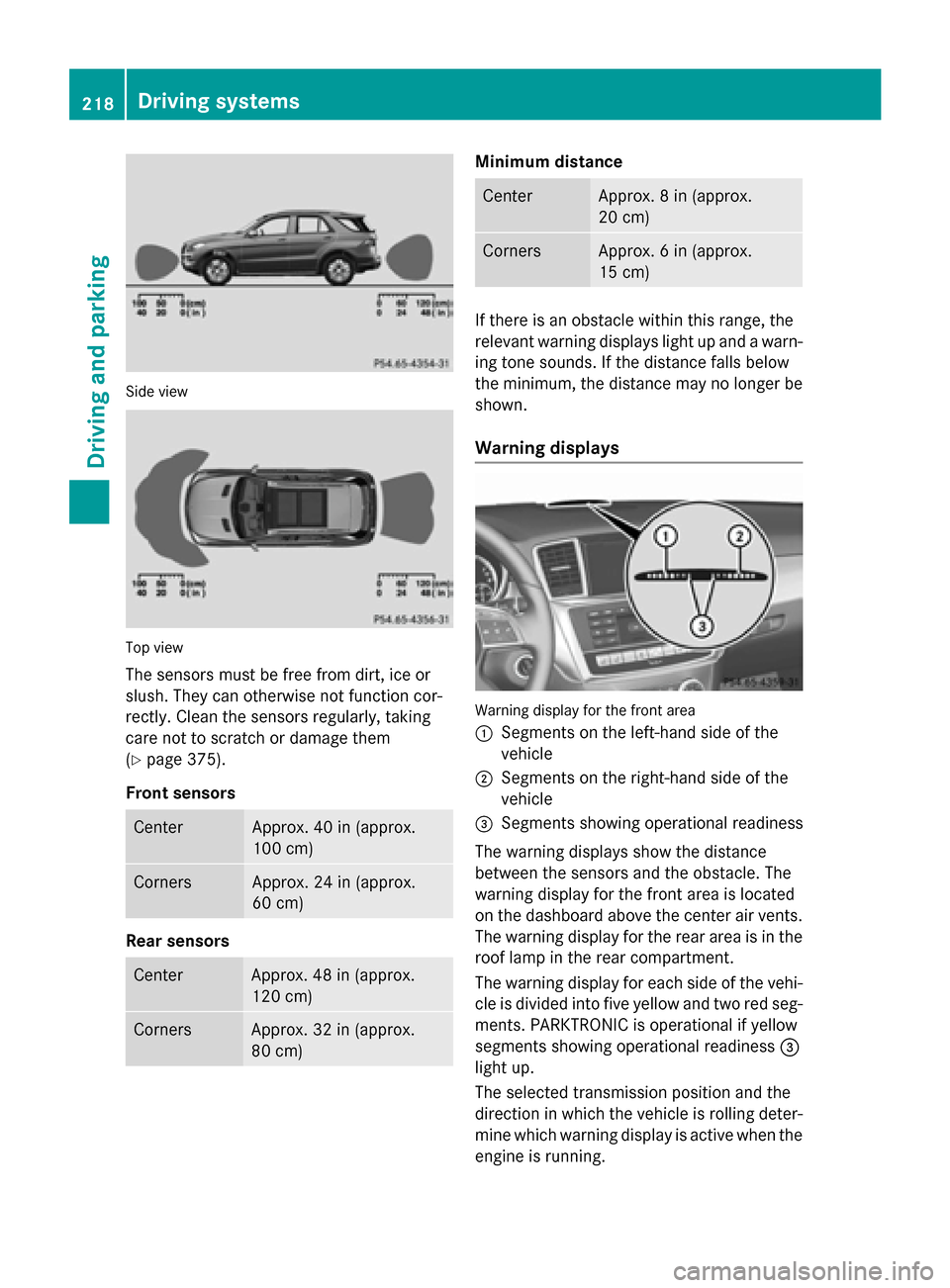
Side view
Top view
The sensors must be free from dirt, ice or
slush. They can otherwise not function cor-
rectly. Clean the sensors regularly, taking
care not to scratch or damage them
(Y page 375).
Front sensors Center Approx. 40 in (approx.
100 cm)
Corners Approx. 24 in (approx.
60 cm)
Rear sensors
Center Approx. 48 in (approx.
120 cm)
Corners Approx. 32 in (approx.
80 cm) Minimum distance
Center Approx. 8 in (approx.
20 cm)
Corners Approx. 6 in (approx.
15 cm)
If there is an obstacle within this range, the
relevant warning displays light up and a warn- ing tone sounds. If the distance falls below
the minimum, the distance may no longer be
shown.
Warning displays Warning display for the front area
0043
Segments on the left-hand side of the
vehicle
0044 Segments on the right-hand side of the
vehicle
0087 Segments showing operational readiness
The warning displays show the distance
between the sensors and the obstacle. The
warning display for the front area is located
on the dashboard above the center air vents.
The warning display for the rear area is in the
roof lamp in the rear compartment.
The warning display for each side of the vehi- cle is divided into five yellow and two red seg-ments. PARKTRONIC is operational if yellow
segments showing operational readiness 0087
light up.
The selected transmission position and the
direction in which the vehicle is rolling deter-
mine which warning display is active when the engine is running. 218
Driving systemsDriving and parking
Page 225 of 466
As soon as the parking procedure is com-
plete, the Park
ParkAssist
Assist switched
switched off
offmes-
sage appears and a warning tone sounds.
Active Parking Assist no longer supports you
with steering interventions. When Active
Parking Assist is finished, you must steer
again yourself. PARKTRONIC is still available.
Parking tips:
R The way your vehicle is positioned in the
parking space after parking is dependent
on various factors. These include the posi-
tion and shape of the vehicles parked in
front and behind it and the conditions of the
location. It may be the case that Active
Parking Assist guides you too far into a
parking space, or not far enough into it. In
some cases, it may also lead you across or
onto the curb. If necessary, you should can- cel the parking procedure with Active Park-ing Assist.
R You can also select preselect transmission
position D. The vehicle redirects and does
not drive as far into the parking space.
Should the gear change occur too soon to
achieve a sensible parking position, the
parking procedure will be aborted.
Exiting a parking space In order that Active Parking Assist can sup-
port you when you exit the parking space:
R you need to have parked using Active Park-
ing Assist.
R the border of the parking space must be
high enough at the front and the rear. A
curb stone is too small, for example.
R the border of the parking space must not be
too wide, as the position of the vehicle must
not exceed an angle of 45° to the starting
position as it is maneuvered into the park-
ing space.
R a maneuvering distance of at least 3.3 ft
(1.0 m) must be available.
X Start the engine.
X Release the electric parking brake. X
Switch on the turn signal in the direction
you are pulling away.
X Shift the transmission to position Dor R.
The Start Park Assist? Yes: OK No: Start Park Assist? Yes: OK No:
0038 message appears in the multifunction
display.
X To cancel the procedure: press the0038
button on the multifunction steering wheel or pull away.
or
X To exit a parking space using Active
Parking Assist: press the0076button on
the multifunction steering wheel.
The Park Assist Active Accelerate Park Assist Active Accelerate
and
and Brake
Brake Observe
Observe Surroundings
Surroundings mes-
sage appears in the multifunction display.
X Let go of the multifunction steering wheel.
X Reverse the vehicle or drive forwards, being
ready to brake at all times. Do not exceed a
maximum speed of approximately 6 mph
(10 km/h) when exiting a parking space.
Otherwise Active Parking Assist will be can- celed.
X Stop as soon as PARKTRONIC sounds the
continuous warning tone, if not before.
X Shift the transmission to position Dor Ras
required while the vehicle is stationary.
Active Parking Assist immediately steers in the other direction.
i You will achieve the best results by wait-
ing for the steering procedure to complete before pulling away.
If you back up after activation, the steeringwheel is moved to the straight-ahead posi-
tion.
X Drive forwards or back up the vehicle, being
ready to brake at all times.
X Stop as soon as PARKTRONIC sounds the
continuous warning tone, if not before.
X Drive forwards and back up as prompted by
the PARKTRONIC warning displays, several
times if necessary.
Once you have exited the parking space com- pletely, the steering wheel is moved to the
straight-ahead position. You hear a tone and Driving systems
223Driving and parking Z
Page 235 of 466
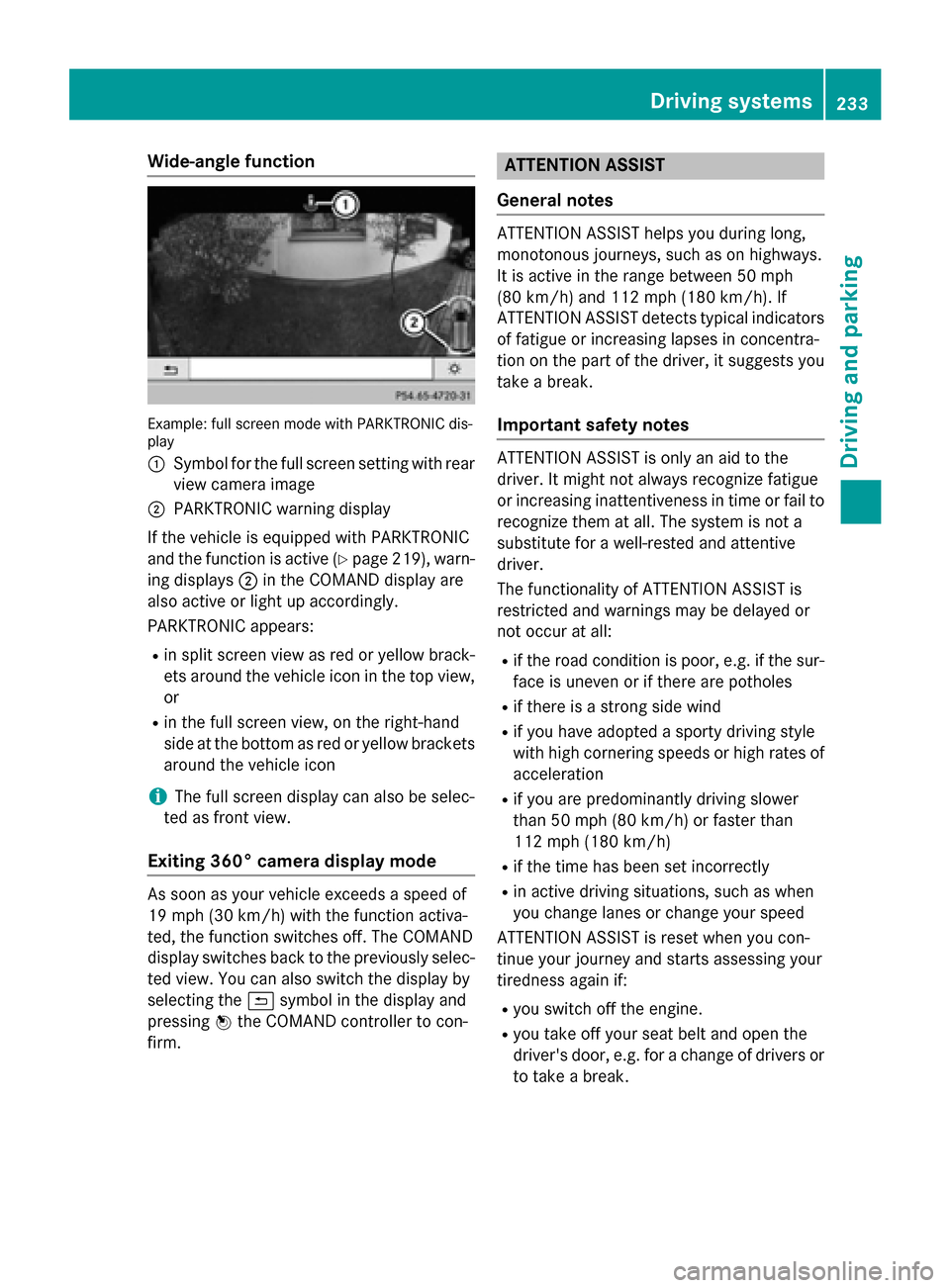
Wide-angle function
Example: full screen mode with PARKTRONIC dis-
play
0043 Symbol for the full screen setting with rear
view camera image
0044 PARKTRONIC warning display
If the vehicle is equipped with PARKTRONIC
and the function is active (Y page 219), warn-
ing displays 0044in the COMAND display are
also active or light up accordingly.
PARKTRONIC appears:
R in split screen view as red or yellow brack-
ets around the vehicle icon in the top view, or
R in the full screen view, on the right-hand
side at the bottom as red or yellow brackets
around the vehicle icon
i The full screen display can also be selec-
ted as front view.
Exiting 360° camera display mode As soon as your vehicle exceeds a speed of
19 mph (30 km/h) with the function activa-
ted, the function switches off. The COMAND
display switches back to the previously selec-
ted view. You can also switch the display by
selecting the 0039symbol in the display and
pressing 0098the COMAND controller to con-
firm. ATTENTION ASSIST
General notes ATTENTION ASSIST helps you during long,
monotonous journeys, such as on highways.
It is active in the range between 50 mph
(80 km/h) and 112 mph (180 km/h). If
ATTENTION ASSIST detects typical indicators
of fatigue or increasing lapses in concentra-
tion on the part of the driver, it suggests you
take a break.
Important safety notes ATTENTION ASSIST is only an aid to the
driver. It might not always recognize fatigue
or increasing inattentiveness in time or fail to
recognize them at all. The system is not a
substitute for a well-rested and attentive
driver.
The functionality of ATTENTION ASSIST is
restricted and warnings may be delayed or
not occur at all:
R if the road condition is poor, e.g. if the sur-
face is uneven or if there are potholes
R if there is a strong side wind
R if you have adopted a sporty driving style
with high cornering speeds or high rates of
acceleration
R if you are predominantly driving slower
than 50 mph (80 km/h) or faster than
112 mph (180 km/h)
R if the time has been set incorrectly
R in active driving situations, such as when
you change lanes or change your speed
ATTENTION ASSIST is reset when you con-
tinue your journey and starts assessing your
tiredness again if:
R you switch off the engine.
R you take off your seat belt and open the
driver's door, e.g. for a change of drivers or
to take a break. Driving systems
233Driving and parking Z
Page 236 of 466
Activating ATTENTION ASSIST
X
Activate ATTENTION ASSIST using the on-
board computer (Y page 276).
When ATTENTION ASSIST is deactivated, the 00D7 symbol appears in the multifunction
display in the assistance graphic display.
ATTENTION ASSIST is activated automatically
after the engine is started up.
Warning and display messages in the
multifunction display If fatigue or increasing lapses in concentra-
tion are detected, a warning appears in the
multifunction display: Attention Assist: Attention Assist:
Take a Break!
Take a Break!
In addition to the message shown in the mul-
tifunction display, you will then hear a warn-
ing tone.
X If necessary, take a break.
X Confirm the message by pressing the 0076
button on the steering wheel.
On long journeys, take regular breaks in good
time to allow yourself to rest properly. If you
do not take a break, you will be warned again
after 15 minutes at the earliest. The precon-
dition for this is that ATTENTION ASSIST still
detects typical indicators of fatigue or
increasing lapses in concentration. Night View Assist Plus
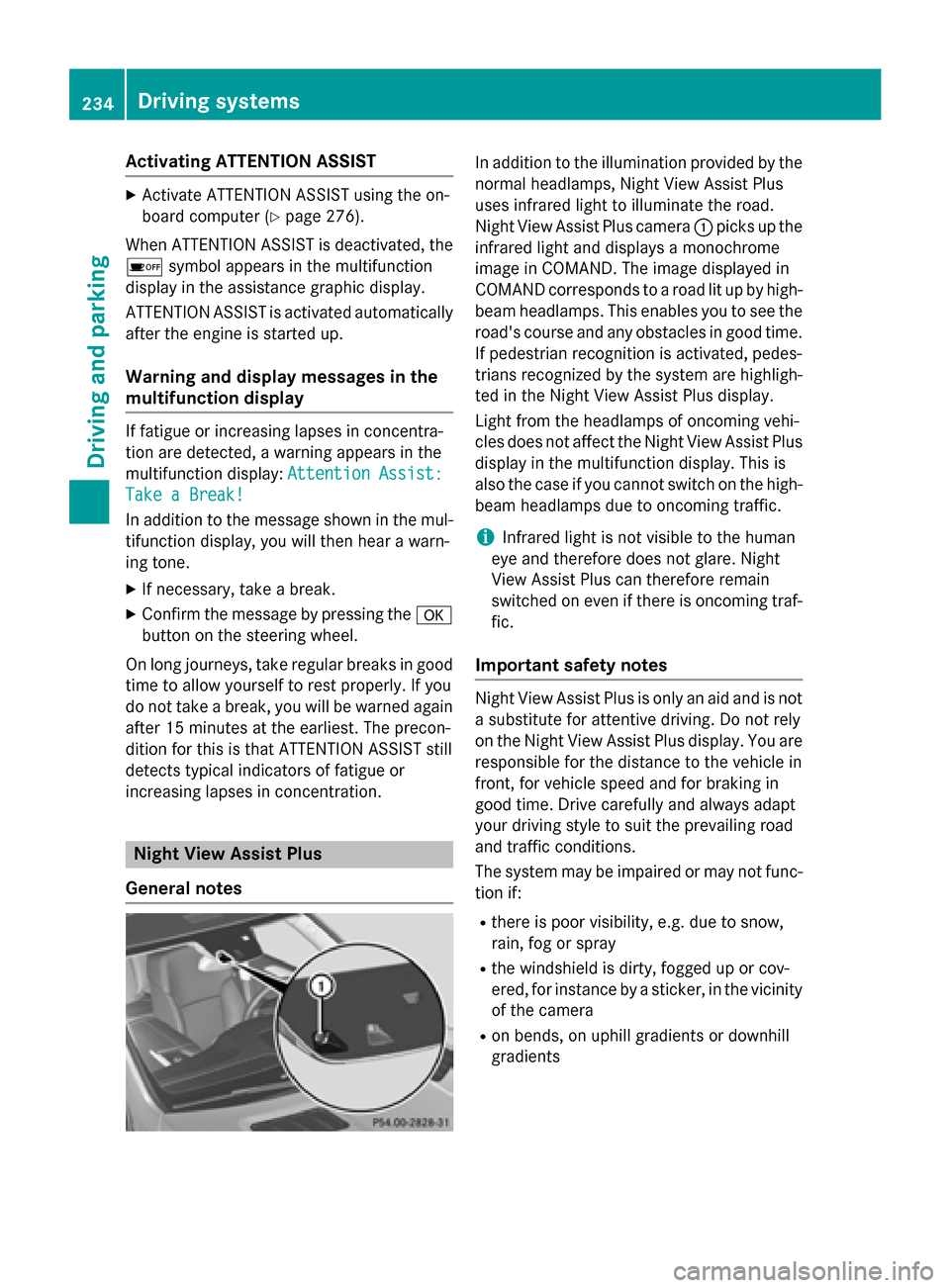
General notes In addition to the illumination provided by the
normal headlamps, Night View Assist Plus
uses infrared light to illuminate the road.
Night View Assist Plus camera 0043picks up the
infrared light and displays a monochrome
image in COMAND. The image displayed in
COMAND corresponds to a road lit up by high- beam headlamps. This enables you to see the
road's course and any obstacles in good time. If pedestrian recognition is activated, pedes-
trians recognized by the system are highligh-
ted in the Night View Assist Plus display.
Light from the headlamps of oncoming vehi-
cles does not affect the Night View Assist Plus
display in the multifunction display. This is
also the case if you cannot switch on the high-
beam headlamps due to oncoming traffic.
i Infrared light is not visible to the human
eye and therefore does not glare. Night
View Assist Plus can therefore remain
switched on even if there is oncoming traf- fic.
Important safety notes Night View Assist Plus is only an aid and is not
a substitute for attentive driving. Do not rely
on the Night View Assist Plus display. You are responsible for the distance to the vehicle in
front, for vehicle speed and for braking in
good time. Drive carefully and always adapt
your driving style to suit the prevailing road
and traffic conditions.
The system may be impaired or may not func-
tion if:
R there is poor visibility, e.g. due to snow,
rain, fog or spray
R the windshield is dirty, fogged up or cov-
ered, for instance by a sticker, in the vicinity
of the camera
R on bends, on uphill gradients or downhill
gradients 234
Driving systemsDriving and pa
rking
Page 241 of 466
sponding side lights up red. This warning is
always emitted when a vehicle enters the
blind spot monitoring range from behind or
from the side. When you overtake a vehicle,
the warning only occurs if the difference in
speed is less than 7 mph (12 km/h).
The yellow indicator lamp goes out if reverse gear is engaged. In this event, Blind Spot
Assist is no longer active.
The brightness of the indicator/warning
lamps is adjusted automatically according to
the ambient light.
Collision warning
If a vehicle is detected in the monitoring range
of Blind Spot Assist and you switch on the
corresponding turn signal, a double warning
tone sounds. Red warning lamp 0043flashes. If
the turn signal remains on, detected vehicles
are indicated by the flashing of red warning
lamp 0043. There are no further warning tones.
Switching on Blind Spot Assist
X Make sure that the radar sensor system
(Y page 279) and Blind Spot Assist
(Y page 276) are activated in the on-board
computer.
X Turn the SmartKey to position 2in the igni-
tion lock.
Warning lamps 0043in the exterior mirrors
light up red for approximately 1.5 seconds
and then turn yellow.
Towing a trailer
When you attach a trailer, make sure you have correctly established the electrical connec-
tion. This can be accomplished by checking
the trailer lighting. In this event, Blind Spot
Assist is deactivated. The indicator lamp in
the exterior mirrors lights up yellow, and the
Blind
Blind Spot SpotAssist
Assist Currently
Currently Unavail‐
Unavail‐
able See Operator's Manual
able See Operator's Manual message
appears in the multifunction display.
i You can deactivate the indicator lamps in
the exterior mirrors. To do so, switch off Blind Spot Assist when:
R the SmartKey is in position 2in the igni-
tion lock
R the engine is not running
R the electrical connection to the trailer
has been established
Lane Keeping Assist General notes
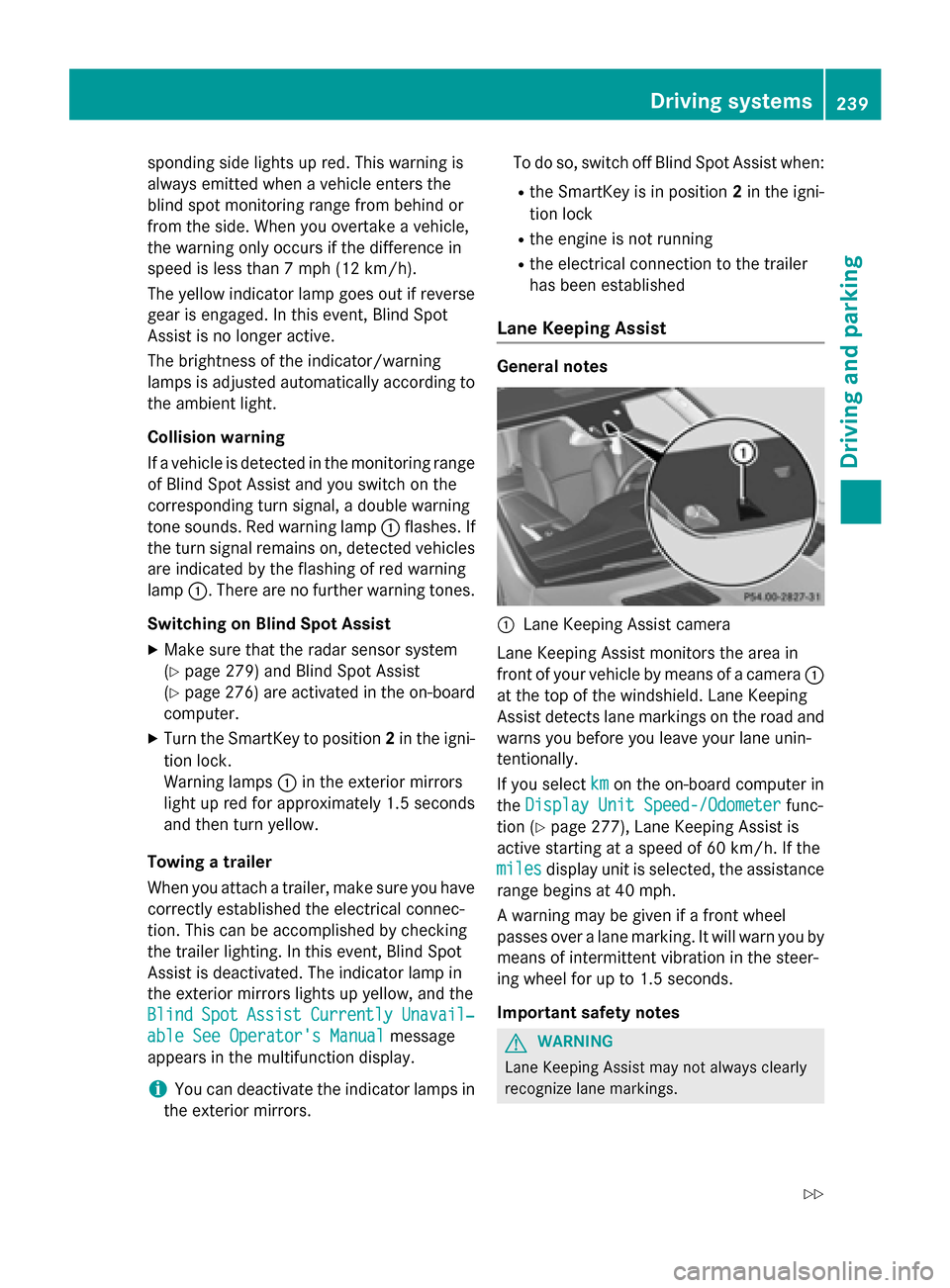
0043
Lane Keeping Assist camera
Lane Keeping Assist monitors the area in
front of your vehicle by means of a camera 0043
at the top of the windshield. Lane Keeping
Assist detects lane markings on the road and
warns you before you leave your lane unin-
tentionally.
If you select km kmon the on-board computer in
the Display Unit Speed-/Odometer
Display Unit Speed-/Odometer func-
tion (Y page 277), Lane Keeping Assist is
active starting at a speed of 60 km/h. If the
miles miles display unit is selected, the assistance
range begins at 40 mph.
A warning may be given if a front wheel
passes over a lane marking. It will warn you by means of intermittent vibration in the steer-
ing wheel for up to 1.5 seconds.
Important safety notes G
WARNING
Lane Keeping Assist may not always clearly
recognize lane markings. Driving systems
239Driving and parking
Z
Page 253 of 466
If the current vehicle speed is too high, the
00C6 DSR symbol appears in the multifunc-
tion display with the Max. speed 25 mph
Max. speed 25 mph
message (Canada: 40 km/h
40 km/h).
i You cannot activate DSR if the SPORT on-
road program is activated. The 00C6DSR
symbol and the Not in Drive Program
Not in Drive Program
SPORT
SPORT message then appears in the multi-
function display.
Deactivating DSR
X Press button 0043.
Indicator lamp 0044goes out.
The 00C6 DSR symbol appears in the mul-
tifunction display with the Off
Off message.
DSR switches off automatically if you drive
faster than 28 mph (Canada: 45 km/h). The
00C6 DSR symbol appears in the multifunc-
tion display with the Off
Off message. The status
indicator in the multifunction display goes
out. You also hear a warning. On vehicles with the ON&OFFROAD package, if you select a
different on-road/off-road program, DSR is
also deactivated.
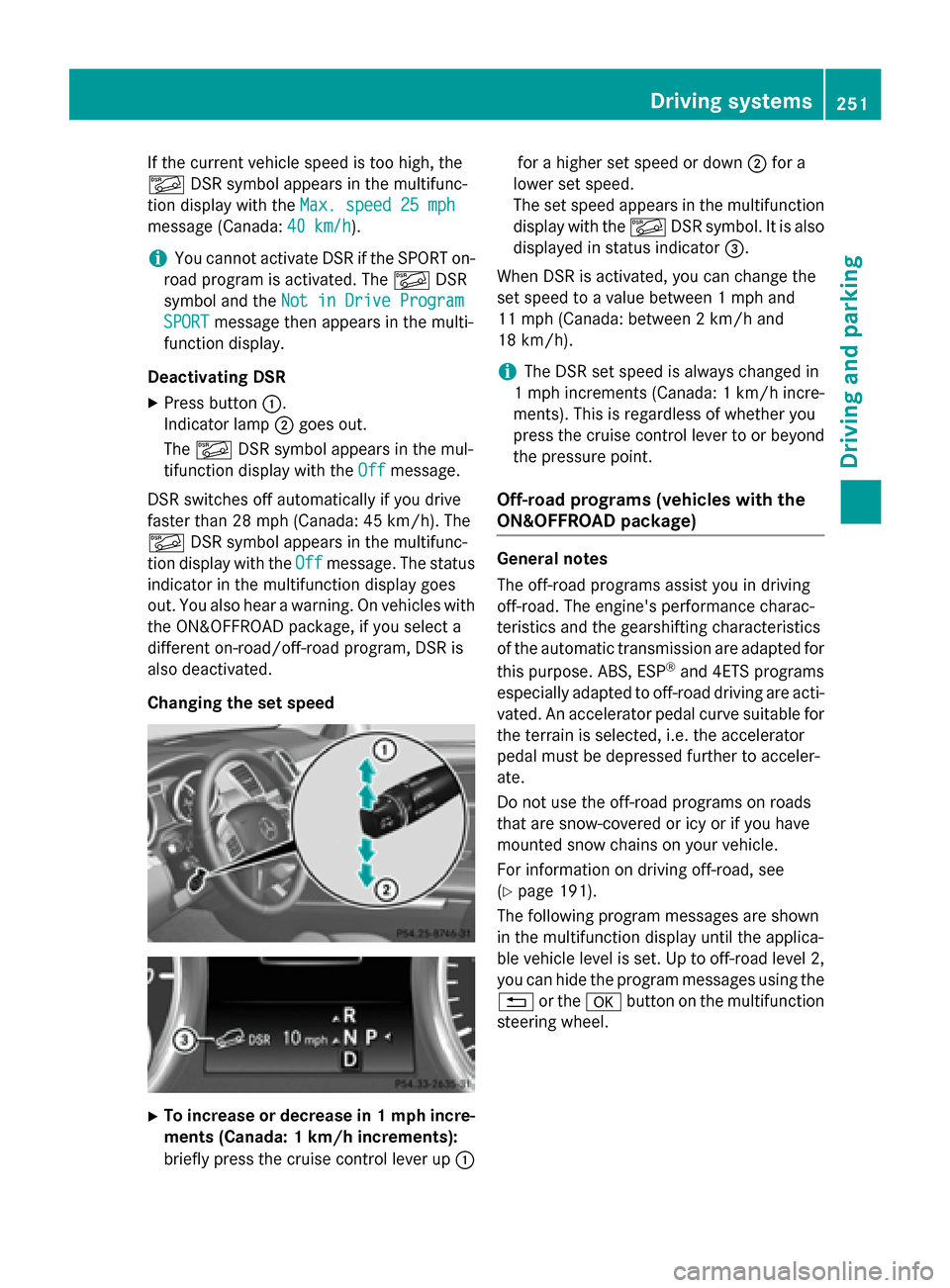
Changing the set speed X
To increase or decrease in 1 mph incre-
ments (Canada: 1 km/h increments):
briefly press the cruise control lever up 0043for a higher set speed or down
0044for a
lower set speed.
The set speed appears in the multifunction display with the 00C6DSR symbol. It is also
displayed in status indicator 0087.
When DSR is activated, you can change the
set speed to a value between 1 mph and
11 mph (Canada: between 2 km/h and
18 km/h).
i The DSR set speed is always changed in
1 mph increments (Canada: 1 km/h incre-
ments). This is regardless of whether you
press the cruise control lever to or beyond
the pressure point.
Off-road programs (vehicles with the
ON&OFFROAD package) General notes
The off-road programs assist you in driving
off-road. The engine's performance charac-
teristics and the gearshifting characteristics
of the automatic transmission are adapted for
this purpose. ABS, ESP ®
and 4ETS programs
especially adapted to off-road driving are acti-
vated. An accelerator pedal curve suitable for the terrain is selected, i.e. the accelerator
pedal must be depressed further to acceler-
ate.
Do not use the off-road programs on roads
that are snow-covered or icy or if you have
mounted snow chains on your vehicle.
For information on driving off-road, see
(Y page 191).
The following program messages are shown
in the multifunction display until the applica-
ble vehicle level is set. Up to off-road level 2,
you can hide the program messages using the 0038 or the 0076button on the multifunction
steering wheel. Driving systems
251Driving and parking Z
Page 254 of 466
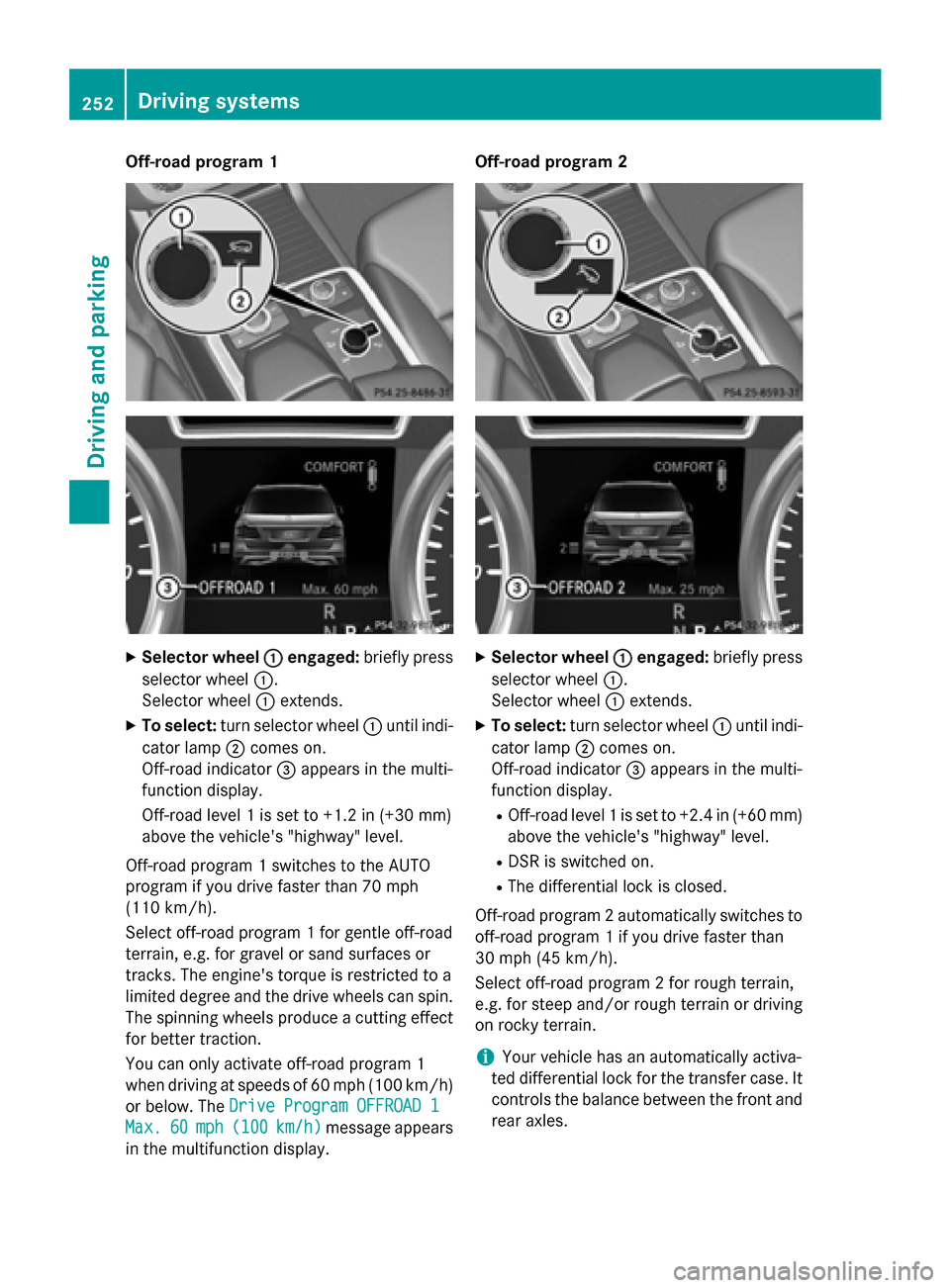
Off-road program 1
X
Selector wheel 0043
0043engaged: briefly press
selector wheel 0043.
Selector wheel 0043extends.
X To select: turn selector wheel 0043until indi-
cator lamp 0044comes on.
Off-road indicator 0087appears in the multi-
function display.
Off-road level 1 is set to +1.2 in (+30 mm)
above the vehicle's "highway" level.
Off-road program 1 switches to the AUTO
program if you drive faster than 70 mph
(110 km/h).
Select off-road program 1 for gentle off-road
terrain, e.g. for gravel or sand surfaces or
tracks. The engine's torque is restricted to a
limited degree and the drive wheels can spin.
The spinning wheels produce a cutting effect
for better traction.
You can only activate off-road program 1
when driving at speeds of 60 mph (100 km/h)
or below. The Drive Program OFFROAD 1
Drive Program OFFROAD 1
Max. Max. 60
60mph (
mph (100 100km/h)
km/h) message appears
in the multifunction display. Off-road program 2
X
Selector wheel 0043
0043engaged: briefly press
selector wheel 0043.
Selector wheel 0043extends.
X To select: turn selector wheel 0043until indi-
cator lamp 0044comes on.
Off-road indicator 0087appears in the multi-
function display.
R Off-road level 1 is set to +2.4 in (+60 mm)
above the vehicle's "highway" level.
R DSR is switched on.
R The differential lock is closed.
Off-road program 2 automatically switches to off-road program 1 if you drive faster than
30 mph (45 km/h).
Select off-road program 2 for rough terrain,
e.g. for steep and/or rough terrain or drivingon rocky terrain.
i Your vehicle has an automatically activa-
ted differential lock for the transfer case. It controls the balance between the front and
rear axles. 252
Driving systemsDriving and parking