light MERCEDES-BENZ M-CLASS SUV 2011 Owners Manual
[x] Cancel search | Manufacturer: MERCEDES-BENZ, Model Year: 2011, Model line: M-CLASS SUV, Model: MERCEDES-BENZ M-CLASS SUV 2011Pages: 389, PDF Size: 9.22 MB
Page 224 of 389
G
WARNING
If you depress the accelerato rpeda lwith DSR
activated, then the set spee dcan be excee-
ded. Drive downhill with special care and
alway skeep in min dthat DSR brakes the vehi-
cle as soon as you remove your foot from the
accelerator pedal. The vehicle may brake sud-
denly due to DSR intervening, depending on
the downhill gradient and the difference
between the current speed and the set speed.
You could lose control of the vehicle and
cause an accident.
For information about driving off-road, see
(Y page 166).
Activating/deactivating DSR Activating
You can only activate DSR when driving at
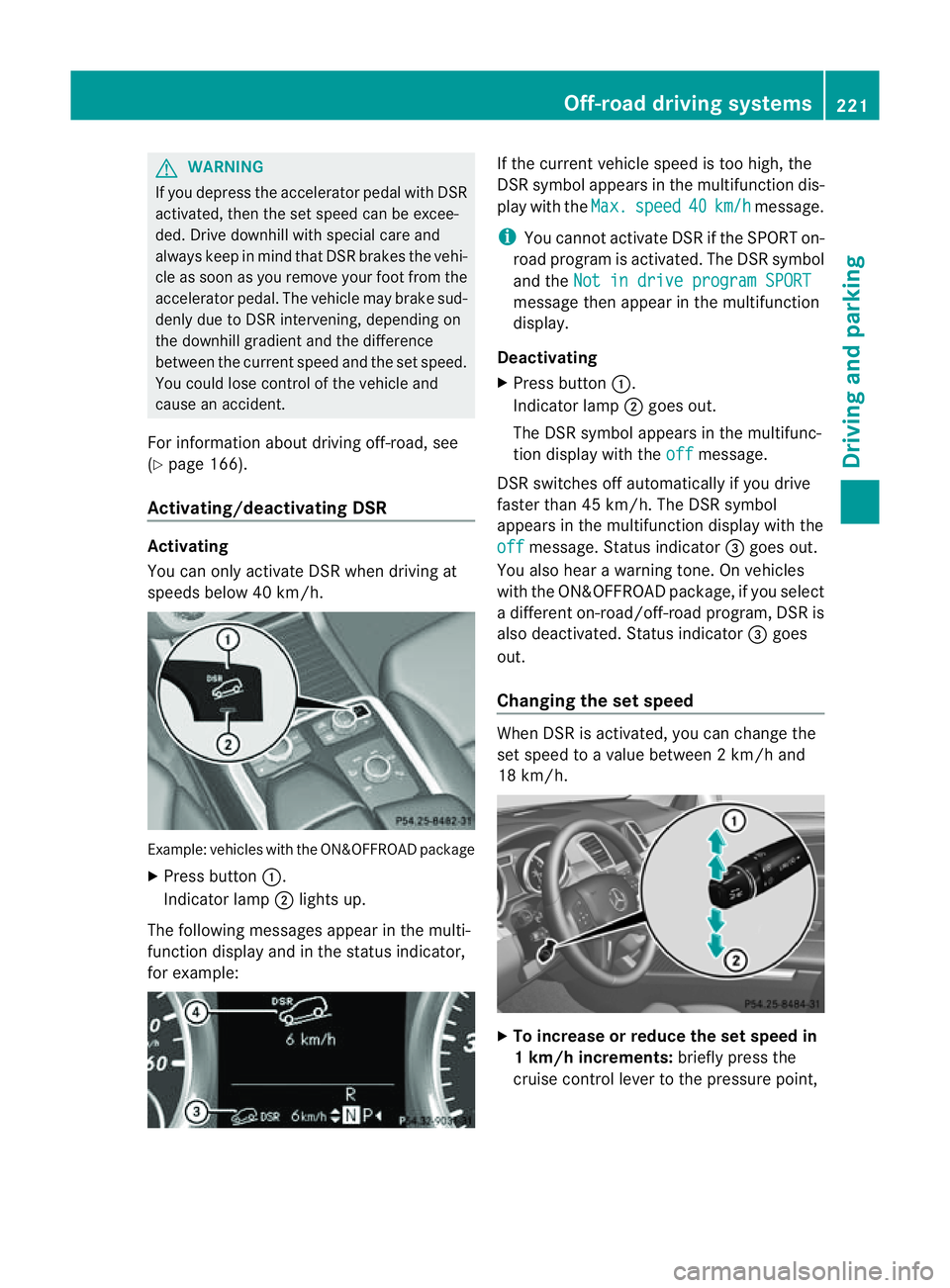
speeds below 40 km/h. Example: vehicles with the ON&OFFROAD package
X Press button :.
Indicator lamp ;lights up.
The following messages appear in the multi-
func tion display and in the status indicator,
for example: If the curren
tvehicle speed is too high, the
DSR symbol appear sint he multifunc tion dis-
play with the Max. speed 40 km/h message.
i You can notactivate DSR if the SPORT on-
road program is activated. Th eDSR symbol
and the Not in drive progra mSPORT message then appear in th
emultifunction
display.
Deactivating
X Press button :.
Indicator lamp ;goes out.
The DSR symbol appears in the multifunc-
tion display with the off message.
DSR switches off automatically if you drive
faster than 45 km/h. The DSR symbol
appears in the multifunction display with the
off message. Status indicator
=goes out.
You also hear awarning tone. On vehicles
with the ON&OFFROAD package, if you select
ad ifferent on-road/off- road program, DSR is
also deactivated. Status indicator =goes
out.
Changing the set speed When DSR is activated, you can change the
set spee dtoavalue between 2km/h and
18 km/h. X
To in crease or reduce the set speed in
1k m/h increments: briefly press the
cruise control lever to the pressure point, Off-road drivin
gsystems
221Drivingand park ing Z
Page 225 of 389
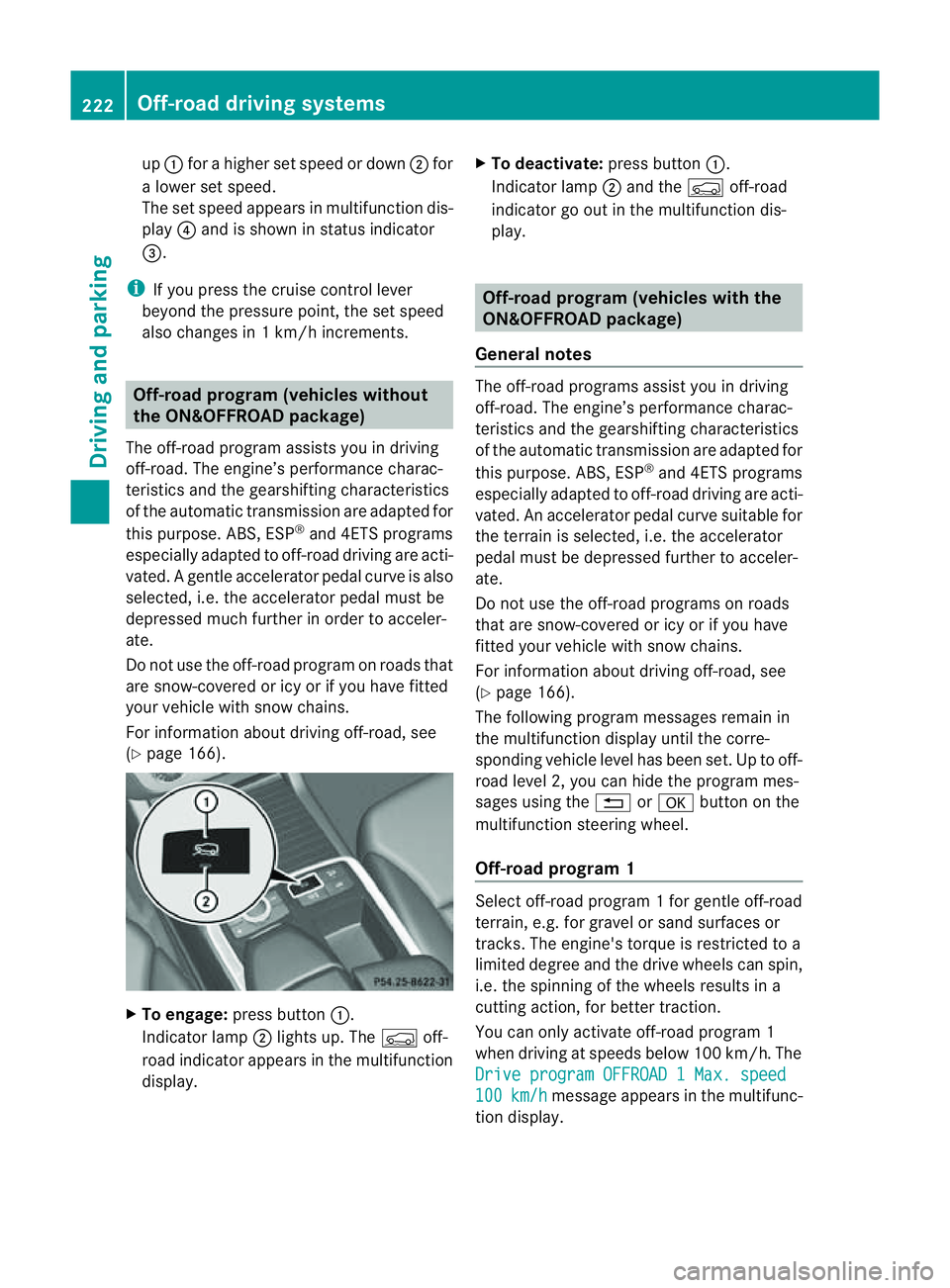
up
: for ahigher set speed or down ;for
al ower set speed.
The set spee dappear sinm ultifunction dis-
play ?and is shown in status indicator
=.
i If you press the cruise con trol lever
beyon dthe pressur epoint, th eset speed
also changes in 1km/ hincrements. Off-road program (ve
hicles without
th eO N&O FFROAD package)
The off-road program assists you in driving
off-road. The engine’s performance charac-
teristics and th egearshifting chara cteristics
of th eautomatic transmission are adapted for
this purpose. ABS, ESP ®
and 4ETS programs
especially adapted to off-road driving are acti-
vated. Agentle accelera torp edal curve is also
selected, i.e. the accelera torp edal must be
depressed muc hfurther in order to acceler-
ate.
Do not use the off-road program on roads that
are snow-covered or icy or if you have fitted
your vehicle with snow chains.
For information about driving off-road, see
(Y page 166). X
To engage: press button :.
Indicator lamp ;lights up. The Çoff-
road indicator appears in the multifunction
display. X
To deactivate: press button:.
Indicator lamp ;and the Çoff-road
indicator go out in the multifunction dis-
play. Off-road program (vehicles with the
ON&OFFROAD package)
General notes The off-road programs assis
tyou in driving
off -road. The engine’s performanc echarac-
teristics and the gearshifting characteristics
of the automatic transmission ar eadapted for
this purpose. ABS, ESP ®
and 4ETS programs
especially adapted to off -road drivin gare acti-
vated. An accelerator peda lcurve suitable for
the terrain is selected, i.e. the accelerator
pedal must be depressed further to acceler-
ate.
Do not use the off-road programs on roads
that are snow-covered or icy or if you have
fitted your vehicle with snow chains.
For information about driving off-road, see
(Y page 166).
The following program messages remain in
the multifunction display until the corre-
spondin gvehicle level has been set. Up to off-
road level 2, you can hide the program mes-
sages using the %ora button on the
multifunction steering wheel.
Off-road progra m1 Select off-road program
1for gentle off -road
ter rain, e.g. for gravel or sand surfaces or
tracks. The engine's torque is restricted to a
limited degree and the drive wheels can spin,
i.e. the spinning of the wheels results in a
cutting action ,for better traction.
You can only activate off -road program 1
when driving at speeds below 100 km/ h.The
Driv eprogram OFFROAD 1Max. speed 100 km/h message appears in th
emultifunc-
tion display. 222
Off-road driving systemsDrivin
gand parking
Page 226 of 389
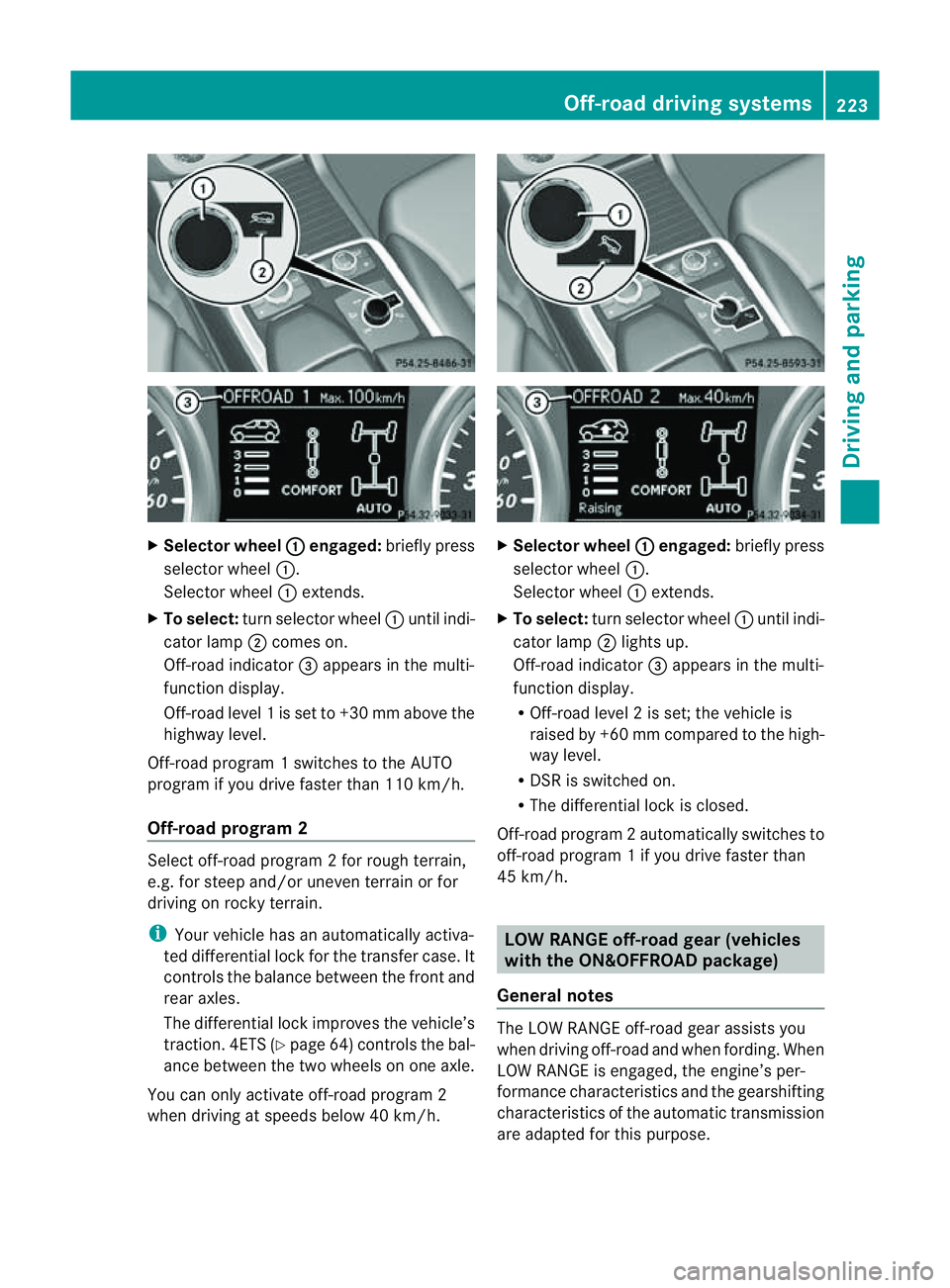
X
Selector wheel : engaged:
brieflypress
selecto rwheel :.
Selector wheel :extends.
X To select: turnselector wheel :until indi-
cator lamp ;comes on.
Off-road indicator =appears in the multi-
function display.
Off-road level 1isset to +3 0mmabove the
highwa ylevel.
Off-road program 1switches to the AUTO
program if you drive faster than 110 km/h.
Off-road program 2 Select off-road program
2for rough terrain,
e.g. for steep and/or uneven terrain or for
drivin gonr ocky terrain.
i Your vehicle has an automatically activa-
ted differential lock for the transfer case. It
con trols the balance between the front and
rear axles.
The differential lock improves the vehicle’s
trac tion. 4ETS (Y page 64)controls the bal-
anc ebetween the two wheels on one axle.
You can only activate off-road program 2
when driving at speeds below 40 km/h. X
Selector wheel : engaged:
briefly press
selector wheel :.
Selector wheel :extends.
X To select: turnselector wheel :until indi-
cator lamp ;lights up.
Off-road indicator =appears in the multi-
function display.
R Off-road level 2isset; the vehicle is
raised by +6 0mmcompared to the high-
way level.
R DSR is switched on.
R The differential lock is closed.
Off-road program 2automatically switches to
off-road program 1ifyou dri vefaster than
45 km/h. LO
WR ANGE off-road gear (vehicles
with th eON&O FFROAD package)
General notes The LOW RANGE off-road gear assists you
when driving off-road and when fording. When
LOW RANGE is engaged, th
eengin e’sp er-
formance characterist icsa nd the gearshifting
characteristics of the automatic transmiss ion
are adapted for thi spurpose. Off-roa
ddriving systems
223Drivingandparki ng Z
Page 227 of 389
For information abou
tdriving off-road, see
(Y page 166). Yo uwillf ind information about
driving safety systems in conjunction with
LOW RANGE in the "Saf ety" section
(Y pag e60).
Shift ranges HIGH RANGE
Roa
dposition for all nor-
ma ldriving situations LO
WR ANGE Off-road position for driv-
ing off-road and fording
The transmission ratio
between the engine and
wheels is only approx-
imatel yone third of that in
the HIGH RANGE road
pos ition. The drive torque
is correspondingly higher
as aresult.
Do not use LOW RANGE:
R on slippery road surfa-
ces, e.g. in the case of
slush
R on snow or ice-covered
roads
R if you have snow chains
on your vehicle G
WARNING
Always wait for the gear change process from
HIGH RANGE to LOW RANGE –and from LOW
RANGE to HIGH RANGE –tocomple te.Don ot
tur no ff the engine while changi nggear and
do not switc hthe automatic transmission to
anot hergear.
If you do not wait for the gear change process
to complete, it may not be cor rectly imple-
mented. Th etransfer cas emay then be in
neutral and the connection between the
engine and the drive axles may be disen-
gaged .The vehicle coul dthen mov efreely,
eve nifa gear is engaged, and coul dinadver-
tently start moving, particularly if it is on a
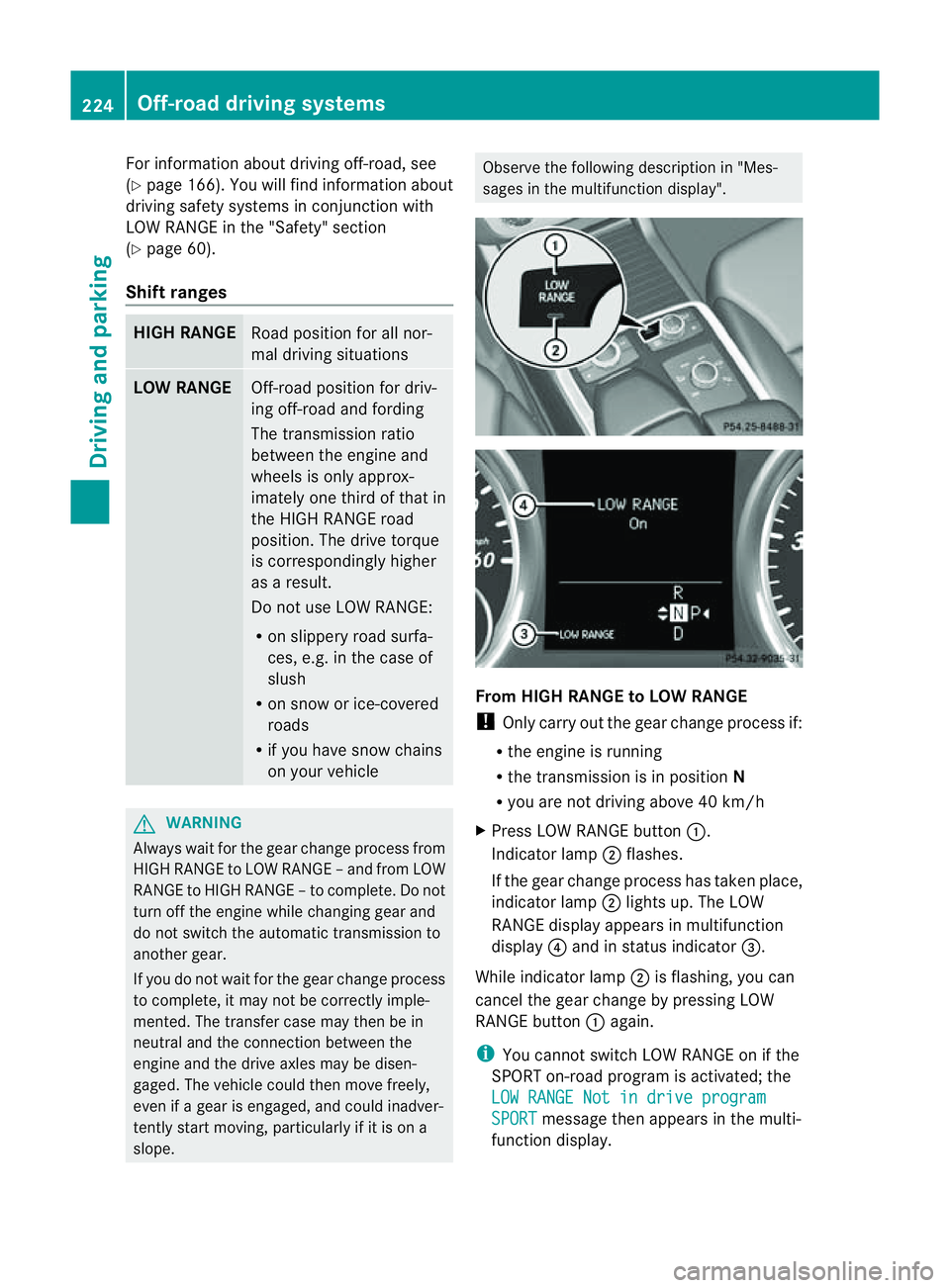
slope. Observe the following description in "Mes-
sages in the multifunction display". From HIGH RANG
EtoLOW RAN GE
! Only carr yout the gear change process if:
R the engine is running
R the transmission is in position N
R you are not driving above 40 km/h
X Press LOW RANGE button :.
Indicator lamp ;flashes.
If the gear change process has taken place,
indicator lamp ;lights up. The LOW
RANGE display appears in multifunction
display ?and in status indicator =.
While indicator lamp ;is flashing, you can
cancel the gear change by pressing LOW
RANGE button :again.
i You cannot switch LOW RANGE on if the
SPORT on-road program is activated; the
LO WR ANGE Not in drive program SPORT message then appears in th
emulti-
function display. 224
Off-road driving systemsDrivin
gand parking
Page 229 of 389
R
cond ition of the LOW RAN GEoff-r oad
gear
R the on-roa dtraile rprogram is selected Tow
inga trailer Note
sont owingatrailer
Important safety notes G
WARNING
When reversing the vehicl etowards the
trailer, make sure there is nobod ybetween
the trailer and the vehicle.
Couple and uncoupl ethe trailer carefully .If
you do not couple the trailer to the towing
vehicle correctly, the trailer coul dbecome
detached.
Make sure that the following values are not
exceeded:
R the permissible trailer drawbar noseweight
R the permissible trailer load
R the permissible rear axle load of the towing
vehicle
R the maximu mpermissible gross vehicle
weight of both the towing vehicle and the
trailer
You will fin dthe applicable permissible val-
ues, whic hmust not be exceeded ,inthe vehi-
cle documen ts.
You will find the values approved by the man-
ufacturer on the vehicle identification plates
and those for the towing vehicle in the "Tech-
nical data" section. G
WARNING
If the Checktrailer hitch locking mechanism message appears in th
emulti-
function display while the vehicle is in motion,
pull over immediately and check whethe rthe
ball coupling is correctly engaged. G
WARNING
When towin gatrailer, you rvehicle' shandling
characteristics will be different in comparison
to when driving without atrailer.
Th ev ehicle/ trailer combination:
R is heavier
R is restricted in its acceleration and gradi-
ent-climbin gcapability
R has an increased braking distance
R is affected more by stron gcrosswinds
R demand smore sensitive steering
R has alarger turnin gcircle
As aresult, the handlin gcharacteristic smay
be impaired and you may lose control of the
vehicle. This could lead to an accident with
serious or even fatal injuries.
When towing atrailer, alway sadjust your
speed to the current road and weather con-
ditions. Do not exceed the maximum permis-
sible speed for your vehicle/trailer combina-
tion. G
WARNING
Never depress the brak epedal continuously
while the vehicle is in motion ,e.g. never cause
the brakes to rub by applying cons tant slight
pedal pressure. Thi scauses the brake system
to overheat, increases the braking distance
and can lead to the brakes failing completely. G
WARNING
On no account shoul dyou attempt to dra wthe
vehicle/ trailer combination out by increasing
speed. G
WARNING
If you exceed the maximum noseweight when
using acarrier system on the ball coupling:
R the carrier system may be thrown around.
R the ball coupling and the carrier system
may become detached from the vehicle.
As aresult, you may injure others or cause an
accident. 226
Towing
atrailerDriving and parking
Page 232 of 389
pling
atrailer. Th evehicle level could change
and you could endanger yourself or others.
Never press the ADS button or operate the
leve lcontrol while you are coupling up or
decoupling atrailer.
Steel-spring vehicles X
Make sure that th etransmission is in posi-
tion P.
X Engag ethe electric parkin gbrake.
X Positio nthe trailer level behind the vehicle.
X Coupl eupthe trailer.
X Establish the electrical con nection
betwee nthe vehicle and the trailer.
X Chec kthat the trailer lighting system is
working.
Vehicles wit hthe AIRMATIC package X
Make sure that th etransmission is in posi-
tion P.
X Engag ethe electric parkin gbrake.
X Start th eengine.
X Set the vehicl etohighway level
(Y page 189).
X Set the Adaptive Dampin gSystem (ADS )to
AUTO orCOMF(Y page 188).
X Switch off the engine.
X Close the doors and tailgate.
X Position the trailer level behind the vehicle.
X Couple up the trailer.
X Establish the electrical connection
betwee nthe vehicle and the trailer.
X Chec kthat the trailer lighting system is
working.
i If you hav ecoupled atrailer, th evehicle
will remain at highway level.
The vehicle automatically lowers to high-
way level if you driv efaster than 30 km/h
with atrailer. Th evehicle is not lowered to
high-speed level even if you are travelling
at higher speeds. This also applies when using accessories
that are plugged into the socket of the
trailer tow hitch (e.g. abicycle rack). Decoupling
atrailer
Important safety notes G
WARNING
Do not disconnect atrailer with an engaged
overru nbrake .Otherwise, you rhand could
becom etrapped between th ebumpe rand
drawbar. G
WARNING
As soo nasyou raise the trailer drawbar, the
unladen vehicle rises slightly .The vehicle then
lower stod riving level.
Make sure that nobod yisinthe vicinit yofthe
wheel arch or the underbody. You coul doth-
erwise trap yoursel forothers. G
WARNING
Th ev ehicle is lowered as soo nasyou discon-
nec tthe trailer cable. Make sur ethat nobody
is in the vicinit yofthe wheel arch or the
underbody. You coul dotherwis etrap yourse lf
or othe rs.
As soon as you decoupl ethe trailer ,the unla-
den vehicle rise sslightly. Make sure that you
or others are not injured in the process.
! Do not disconnect atrailer wit han
engaged overrun brake. Otherwise, your
vehicle could be damage dbythe rebound-
ing of the overru nbrake.
Steel-spring vehic les X
Ma ke sure that the transmission is in posi-
tion P.
X Engag ethe electric parkin gbrake.
X Secure th etrailer agains trollin gaway.
X Remove the trailer cable and decouple the
trailer. Towing
atrailer
229Driving andparki ng Z
Page 234 of 389
X
To switc hthe conn ected powe rsupply
on or off: turn thekey in the ignition lock
to position 2or 0respectivel y. Bulb failure indi
cator for LE Dlamps
i If LED lamps are fitte dinthe trailer, an
error message ma yappear in the multi-
function display even if there is no fault. The
reason for the error message may be that
the current has fallen below the minimum
of 50 milliamper es(mA).
To ensure reliabl eoperation of the bul bfailure
indicator, each LED chai ninthe trailer lighting
must be guaranteed aminimum current of
50 mA. Trailer with 7-pin connector
Genera linforma tion If your trailer has
a7-pin connector, you can
connect it to the 13-pin socket on the ball
coupling using an adapter or, if necessary, an
adapter cable .Both of these can be obtained
at aq ualified specialist workshop, e.g. at a
Mercedes-Ben zService Centre.
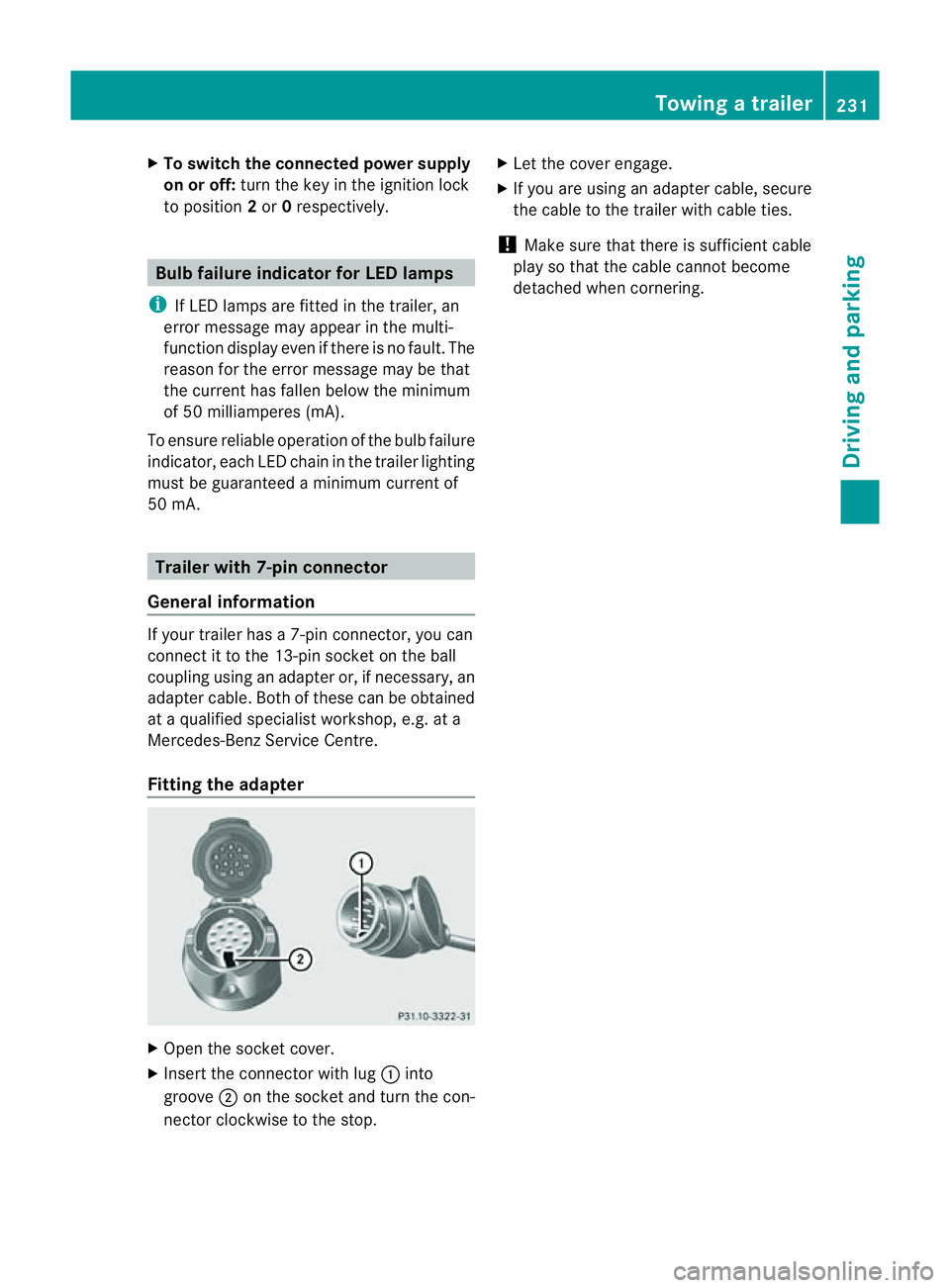
Fitting the adapter X
Open the socket cover.
X Insert the connector with lug :into
groove ;on the socket and tur nthe con-
nec torc lockwise to the stop. X
Let the cover engage.
X If you are using an adapter cable, secure
the cable to the trailer with cable ties.
! Make sure that there is sufficient cable
play so that the cable cannot become
detached when cornering. Towing
atrailer
231Driving andparki ng Z
Page 238 of 389
or on bridges. If you do not adapt your driving
style to the conditions, the vehicle coul dskid.
For this reason, adapt your driving style and
speed to the weather conditions.
Changes in the outside temperature are dis-
playe dafter ashort delay. Speedometer wit
hsegments
The segment sinthe speedometer indicate
whic hspeed range is available.
Cruise control (Y page 170) activated:
The segment slight up from the stored speed
to the maximum speed.
Variable SPEEDTRONI C(Ypage 172) activa-
ted:
The segment slight up from the start of the
scale to the selected limit speed.
DISTRONIC PLU S(Ypage 174) activated:
One or two segment sinthe set speed range
light up.
DI ST RONIC PLUS detects avehicle in front:
The segment sbetween the speed of the vehi-
cle in front and the stored speed light up. Opera
ting th eon-board computer
Overview The on-board computer is activated as soon
as you tur nthe key to position 1in the ignition
lock.
You can con trol the multifunc tion display and
the settings in the on-boar dcomputer using
the button sonthe multifunc tion steering
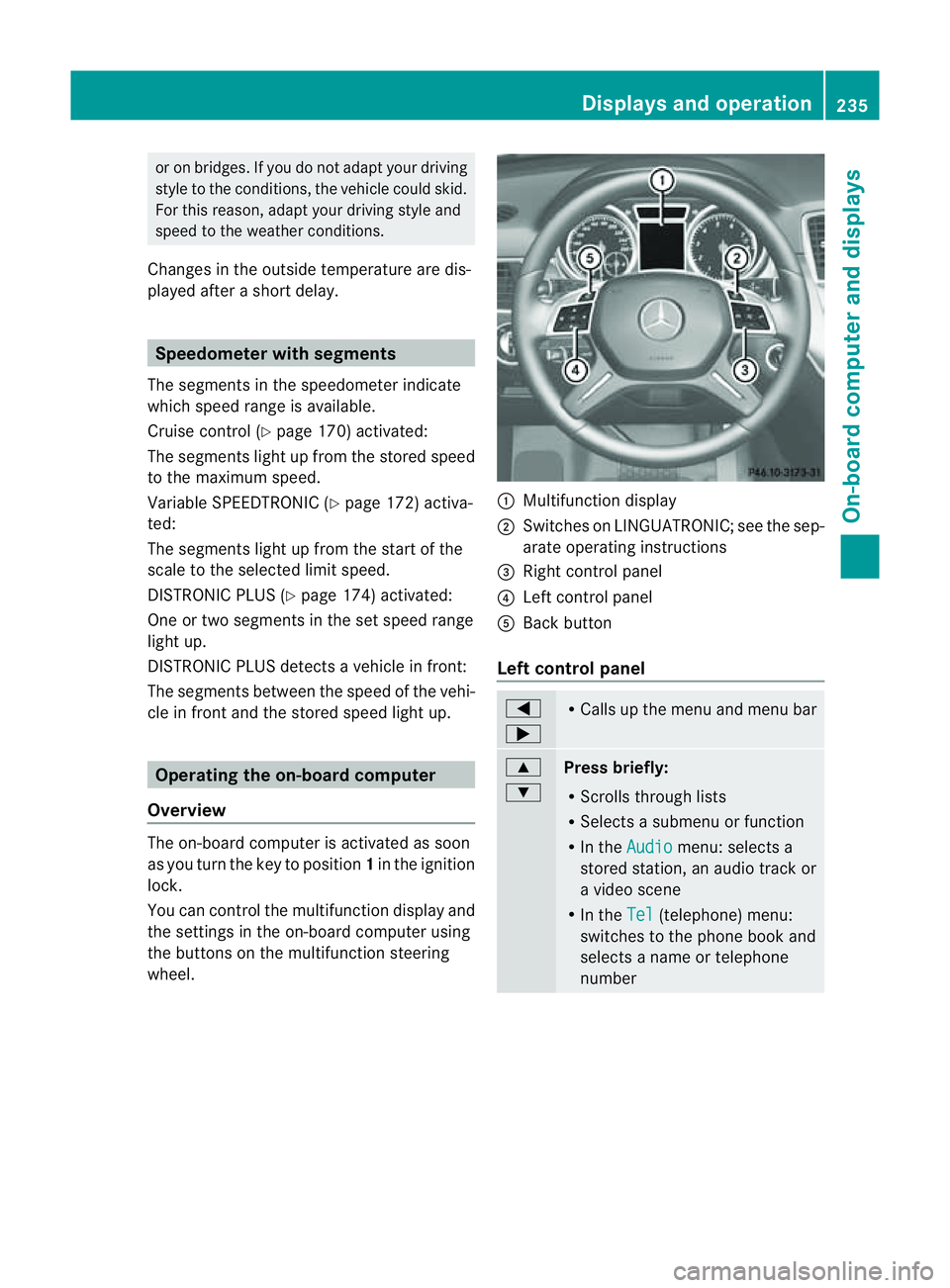
wheel. :
Multifunc tion display
; Switches on LINGUATRONIC ;see the sep-
arate operating instructions
= Right control panel
? Leftcontrol panel
A Bac kbutton
Left control panel =
; R
Call supt he men uand menu bar 9
:
Pres
sbriefly:
R Scrolls throug hlists
R Select sasubmenu or function
R In the Audio menu: selects a
stored station, an audio track or
av ideo scene
R In the Tel (telephone) menu:
switches to the phone book and
selects aname or telephone
number Displays and operation
235On-boardcomputer and displays Z
Page 242 of 389
The
Audio ,
Navi and
Tel menus differ slightly in vehicles with an audio system and vehicles
with COMAN DOnline. The example sgiven in this Owner' sManual apply to vehicles equipped
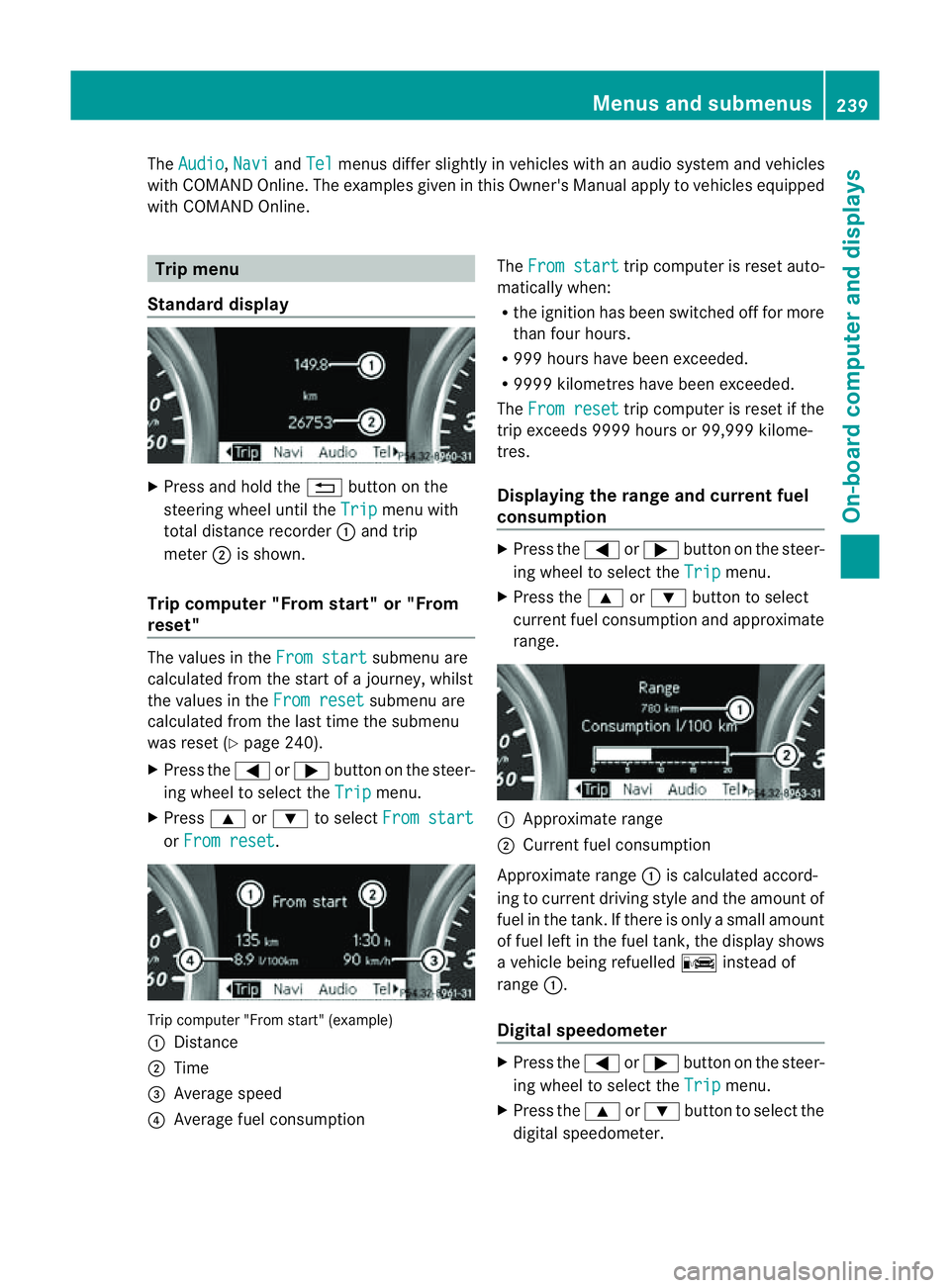
with COMAND Online. Trip menu
Standard display X
Press and hold the %button on the
steering wheel until the Trip menu with
total distance recorder :and trip
meter ;is shown.
Trip computer "From start" or "From
reset" The values in the
From start submenu are
calculated from the start of ajourney, whilst
the values in the From reset submenu are
calculated from the last tim ethe submenu
was reset (Y page 240).
X Press the =or; button on the steer-
ing wheel to selec tthe Trip menu.
X Press 9or: to select From start or
From reset .
Tri
pc omputer "From star t"(example)
: Distance
; Time
= Average speed
? Average fuel consumption The
From start trip computer is reset auto-
matically when:
R the ignition has been switched off for more
than four hours.
R 999 hours have been exceeded.
R 999 9kilometres have been exceeded.
The From reset trip computer is reset if the
trip exceeds 999 9hour sor9 9,999 kilome-
tres.
Displaying the rang eand cur rent fuel
consumption X
Press the =or; button on the steer-
ing wheel to select the Trip menu.
X Press the 9or: button to select
curren tfuel consumption and approximate
range. :
Approximate range
; Current fuel consumption
Approximate range :is calculated accord-
ing to curren tdriving style and th eamount of
fue lint he tank. If ther eisonlyasmal lamount
of fue lleft in the fuel tank ,the display shows
av ehicle being refuelled Cinstead of
range :.
Digital speedometer X
Press the =or; button on the steer-
ing whee ltoselect the Trip menu.
X Press the 9or: button to select the
digital speedometer. Menus and submenus
239On-boardcomputer and displays Z
Page 250 of 389
![MERCEDES-BENZ M-CLASS SUV 2011 Owners Manual X
Press :or9 to select the Perma‐ nent display function.
You will see the selected setting: outsidetemperat
ure or
Dig. speedo m[mph] .
X Press the abuttontos ave the setting.
Lights Switching the d](/img/4/55578/w960_55578-249.png "MERCEDES-BENZ M-CLASS SUV 2011 Owners Manual X
Press :or9 to select the Perma‐ nent display function.
You will see the selected setting: outsidetemperat
ure or
Dig. speedo m[mph] .
X Press the abuttontos ave the setting.
Lights Switching the d")
X
Press :or9 to select the Perma‐ nent display function.
You will see the selected setting: outsidetemperat
ure or
Dig. speedo m[mph] .
X Press the abuttontos ave the setting.
Lights Switching the day
time drivin glights on/
off
If you have activated the Daytime driving
lights function and the light switch is set to
Ã,t he daytim edriving lights are automat-
icall yswitched on during daylight hours when
the engine is running. When it is dark, the side
lamps and the dipped-beam headlamps are
also switched on automatically.
X Switc hoff th eengine.
X Pres sthe = or; button on the steer-
ing wheel to selec tthe Settings menu.
X Press the :or9 button to selec tthe
Light submenu.
X Press the abutton to con firm.
X Press the :or9 buttontos elect the
Daytim edriving lights function.
Yo uw ill see the selected setting: on or
off .
X Press the abutton to save the setting.
Switching the Intelligent Light System
on/off
If you activat ethe Intell .Light Sys‐ tem: function
,you activa te thefollowing
func tions:
R motorwa ymode
R active light func tion
R cornering light func tion
R exte nded range foglamps
X Press the =or; button on the steer-
ing wheel to select the Settings menu.
X Press the :or9 button to select the
Light submenu.
X Press the abutton to confirm. X
Press :or9 to select the Intell. Ligh
tSys. function.
Yo uw ill see the selected setting: on or
off .
X Press the abutton to save the setting.
If you set the dipped-bea mheadlamps for
driving on the right/left (Y page 247),the
multifunction displa yshows the Intell. Ligh
tSystem: System inoperative Inactiv
efor left-side traffic or
Intell. Light System: System inoper‐
ative Inactiv
efor right-side traf‐ fic displa
ymessage instead of the Intell. Ligh
tSystem: functio
nintheLight sub-
menu.
Setting th edipped-bea mheadlamp sfor
driving on the left/right
This function is only available on vehicles with
the Intelligent Light System.
You can use this function to switch between
symmetrical beam and asymmetrical dipped
beam (Y page 106).
If you set the dipped-beam headlamps for
driving on the right/left, then motorway
mode and the extended range foglamps are
not available.
X Press the =or; button on the steer-
ing wheel to select the Settings menu.
X Press the :or9 buttontos elect the
Light submenu.
X Press the abutton to confirm.
X Press :or9 to select the Dipped beam
sSetting for function.
Yo uw ill see the selected setting: Right- side traffic or
Left-s idet raffic .
X Press the abuttontos ave the setting.
When you change the setting, conversion
does not take place until the nex ttime the
vehicle is stationary.
You can also have the dipped-beam head-
lamps set for drivin gonthe right or lef tata
qualified specialist workshop. Menus and submenus
247On-board comp uter and displays Z