phone MERCEDES-BENZ M-CLASS SUV 2011 User Guide
[x] Cancel search | Manufacturer: MERCEDES-BENZ, Model Year: 2011, Model line: M-CLASS SUV, Model: MERCEDES-BENZ M-CLASS SUV 2011Pages: 389, PDF Size: 9.22 MB
Page 246 of 389
You can place your mobile phone in the
mobile phone bracket (Y
page 310), or set
up aB luetooth ®
connection to the audio sys-
tem or COMAN DOnline(see the separate
operating instructions).
i You ca nobtain fur ther information about
suitabl emobile phones and connecting
mobile phones via Bluetooth ®
:
R in any Mercedes Ben zServic eCentre
R on the Internet at http://
www.mercedes-benz.com/connect G
WAR
NING
Observe the lega lrequir ements of the country
in which you are cur rently drivin gregarding
the use of mobile phones in the vehicle.
If it is permitted to use mobile phones while
the vehicle is in motion, you should only use
the mw hen the roa dand traffic conditio ns
allow. Otherwise, you may be distrac tedf rom
th et raffic conditions, caus eanaccident and
injure yourself and others.
X Switch on the mobile phone and audi osys-
tem or COMAND Online (see the separate
operating instructions).
X Press the =or; button on the steer-
ing whee ltoselect the Tel men
u.
Yo uw ills ee one of the following display mes-
sage sint he multifunction display:
R Please enter PIN :t
he mobile phone has
been placed in the mobile phone bracket
and the PIN has not been entered.
X Enter the PIN usin gthe mobile phone, LIN-
GUATRONIC ,the audio system or
COMAN DOnline.
The mobil ephone will search for anetwor k.
R Telephon eready or th
ename of the net-
work provider: the mobile phone has found
an etwor kand is ready to receive.
R Telephone No Service :non
etwor kis
available, or the mobile phone is searching
for anetwor k. Accepting
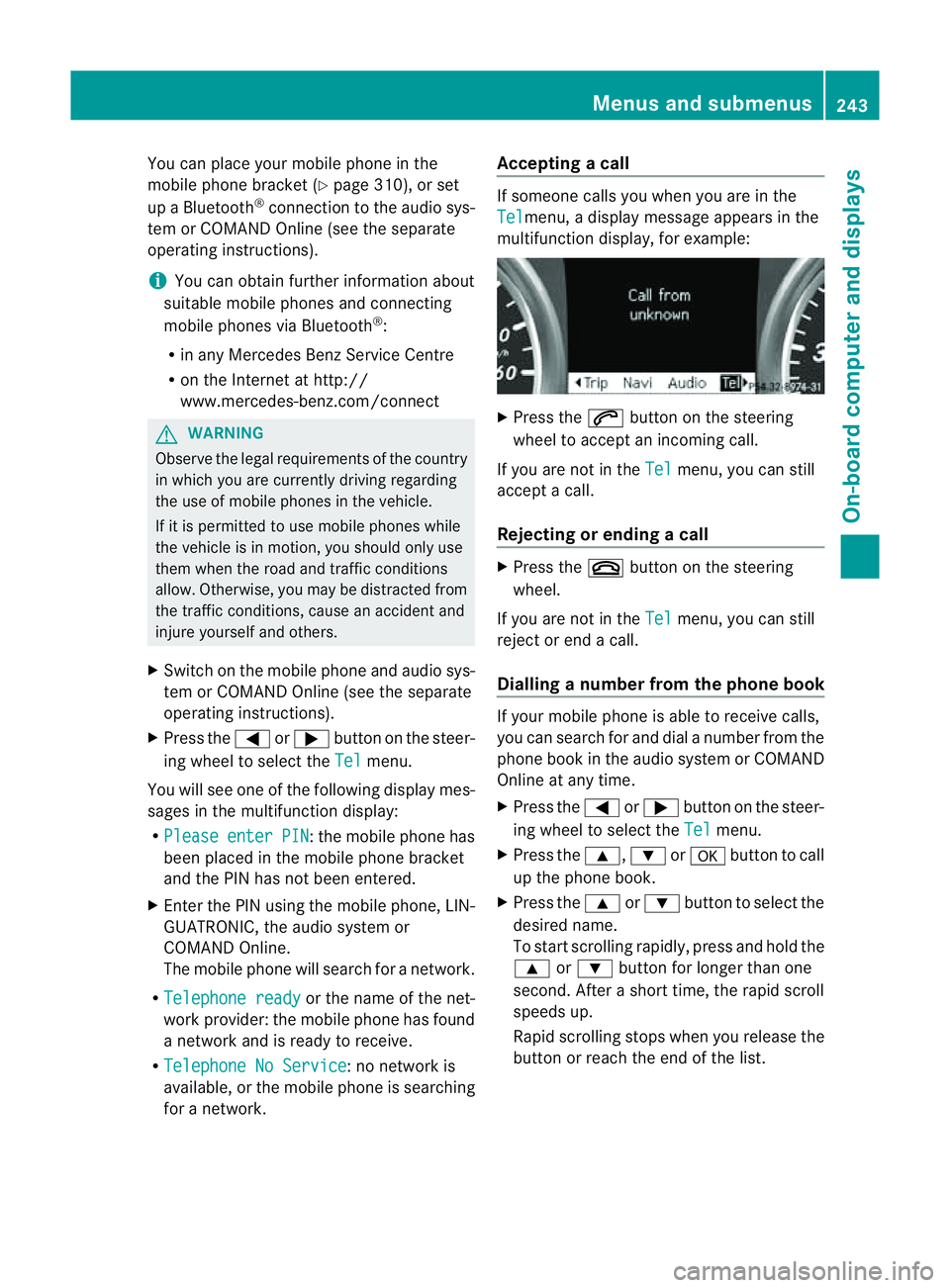
acall If someone call
syou when you are in the
Tel menu,
adisplay message appears in the
multifunction display ,for example: X
Press the 6button on the steering
wheel to accept an incomin gcall.
If you are not in the Tel menu, you can still
accept acall.
Rejecting or ending acall X
Press the ~buttonont he steer ing
wheel.
If you are not in the Tel menu, you can still
reject or end acall.
Dialling anumbe rfrom the phone book If you
rmobile phone is able to receive calls,
you can search for and dial anumber from the
phone book in the audio system or COMAND
Online at any time.
X Press the =or; button on the steer-
ing wheel to select the Tel menu.
X Press the 9,:ora button to call
up the phone book.
X Press the 9or: button to select the
desired name.
To start scrolling rapidly ,pres sand hol dthe
9 or: button for longer than one
second. After ashort time, the rapid scroll
speeds up.
Rapid scrolling stops when you release the
button or reach the end of the list. Menu
sand submenus
243On-boardcomput er anddisplays Z
Page 285 of 389
Displa
ymessages Possible causes/consequences and
M Solutions
&
in
operative See Owner'
sMan. Th
ea uxiliar yheatin ghasatemporary ma lfunction or is faulty.
X When the vehicl eisonalevel surface and the engin ehas cooled
down, make up to four attempts to switch on the auxiliary heat-
ing, waiting several minutes between each attempt
(Y page 130).
X If the auxiliary heating does not switch on, consult aqualified
specialist workshop. Teleph
oneNo Service Your vehicl
eisoutside the network provider's transmitter/
receiver range.
X Wait until the mobile phone operational readiness symbol
appears in the multifunction display. ¥
Top
up washer fluid The washe
rfluid level in the washer fluid reservoir has dropped
below the minimum.
X Top up the washer fluid (Y page 321).Key
Display messages Possible causes/consequences and
M Solutions
+
Ke
yd oes not belong to vehicle Yo
uh ave put the wrong key in the ignition lock.
X Use the correct key. +
Replac
ekey Th
ek ey needs to be replaced.
X Visit aqualified specialist workshop. +
Change ke
ybatter‐ ies Th
eb atteries of the KEYLESS-GO key are discharged.
X Change the batteries (Y page 74).+
Ke
yn ot detec‐ ted (re
dd isplay mes-
sage) The KEYL
ESS-GO key is not in the vehicle.
Aw arning ton ealso sounds.
If th eengineiss witched off ,you can no longer loc kthe vehicle
cen trally or start the engine.
X Pull over and stop the vehicle safely as soon as possible ,paying
attention to road and traffic conditions.
X Apply the electric parking brake.
X Locate the KEYLESS-GO key. 282
Display messagesOn-board computer and displays
Page 301 of 389
Stowage compa
rtment/telephone com-
partment under the armrest
i Depending on the vehicle's equipment, a
USB port and an AUX-I Njack or aMedia
In terf ace are installed in the stowage com-
partment .AMedia In terface is auniversal
interface for portable audi oequipment, e.g.
for an iPod ®
or MP3 player (see the sepa-
rat eA udio or COMAND operating instruc-
tions).
i There is aremovable stowage tray in the
storage compartment, in which objects
such as an iPod ®
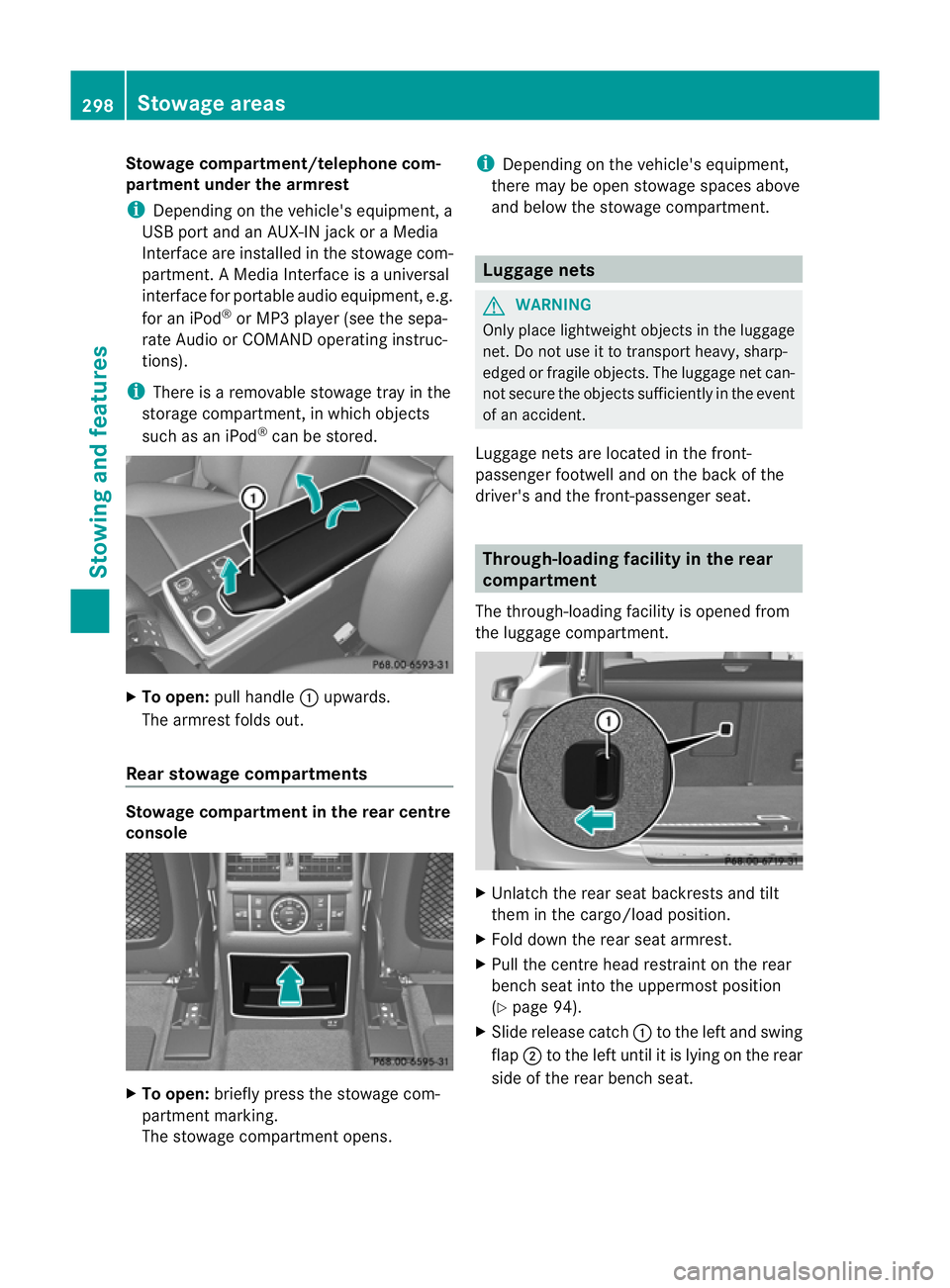
can be stored. X
To open: pull handle :upwards.
The armrest folds out.
Rea rstowage compartments Stowage compartment in the rear centre
cons ole X
To open: briefly pres sthe stowage com-
partment marking.
The stowage compartmen topens. i
Depending on the vehicle's equipmen t,
there may be ope nstowag espaces above
and below the stowage compartment. Luggage nets
G
WAR
NING
Only place lightweight obje ctsint he luggage
net .Don ot use it to transport heavy ,sharp-
edged or fragile objects. The luggag enet can-
not secur ethe objects sufficiently in the event
of an accident.
Luggage net sare locate dinthe front-
passenger footwell and on the bac kofthe
driver 'sand the front-passenger seat. Through-loading facility in the rear
compartment
The through-loading facility is opened from
the luggag ecompartmen t. X
Unlatch th erear seat back rests and tilt
them in the cargo/load position.
X Fold down the rea rseat armrest.
X Pull the centr ehead restraint on the rear
benc hseat int othe uppermost position
(Y page 94).
X Slide release cat ch: to the left and swing
flap ;to the left until it is lying on the rear
sid eoft he rea rbenc hseat. 298
Stowage areasStowing and fea
tures
Page 312 of 389
X
To remove the insert: push insert=to
the left ?.
Ashtray insert =slides ou tslightly to the
right.
X Lif tinsert =up; and out.
X To refit th einsert: place insert =intothe
holder and press it down on the right until
it engages.
Ash tray in therear-compartme nt centre
console !
Close th eashtra ywhen it is no tinuse and
before you fol dthe rea rseats forward. You
can otherwise damage the ashtray.
Vehicles without aRear Seat Entertainment
System have an ashtra yinthe cen tre console
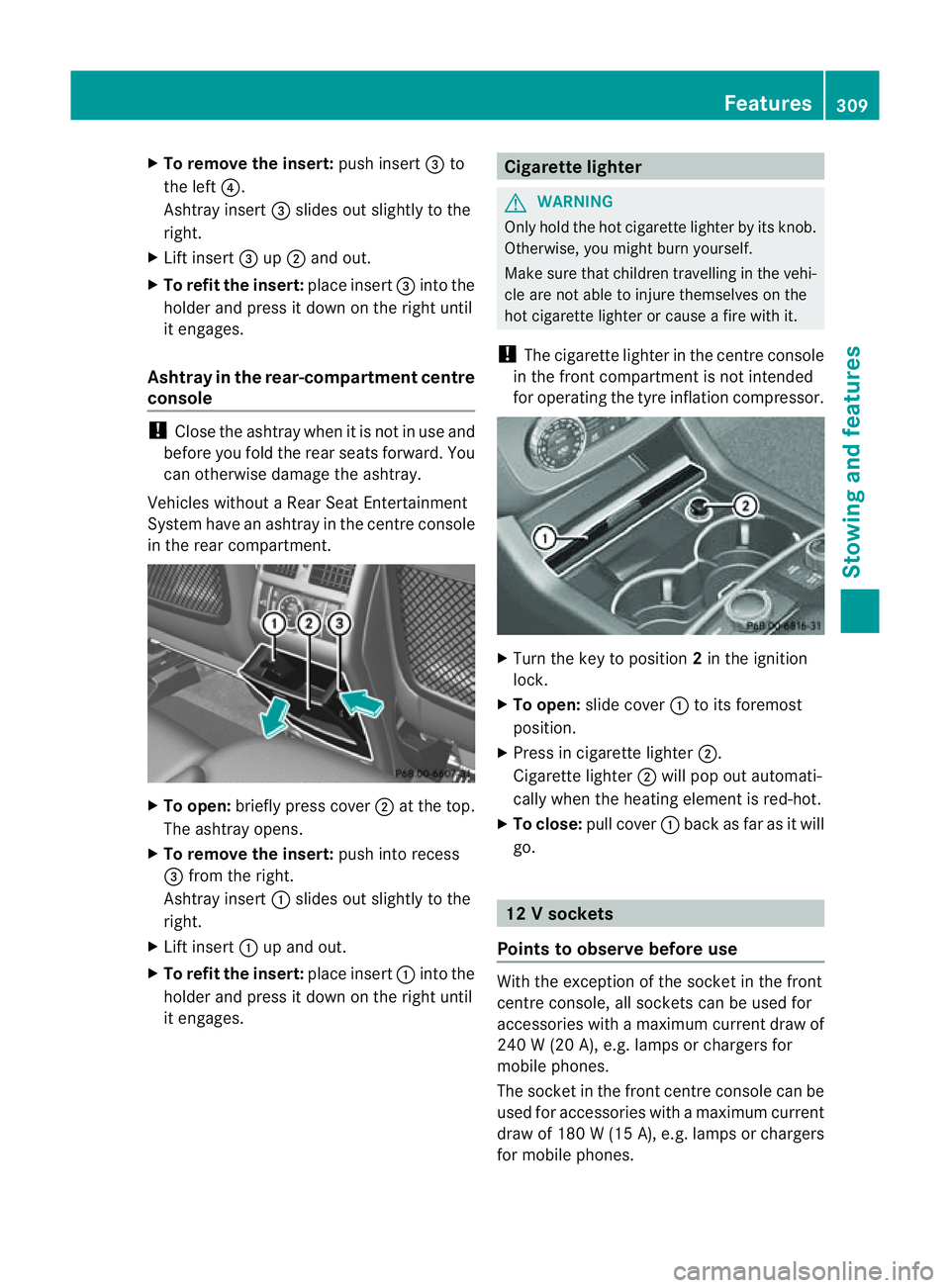
in the rear compartment. X
To open: briefly pres scover ;at the top.
The ashtray opens.
X To remove th einsert: push into recess
= from the right.
Ashtray insert :slides out slightly to the
right.
X Lif tinsert :up and out.
X To refit the insert: place insert:into the
holder and pres sitdown on the right until
it engages. Cigarette lighter
G
WARNING
Only hold the hot cigarette lighte rbyits knob.
Otherwise, you might burn yourself.
Make sure that children travelling in the vehi-
cle are not able to injure themselves on the
hot cigarette lighter or cause afire with it.
! The cigarette lighter in the centre console
in the front compartment is not intended
for operating the tyre inflation compressor. X
Turn the key to position 2in the ignition
lock.
X To open: slide cover :to its foremost
position.
X Press in cigarette lighter ;.
Cigarette lighter ;will pop out automati-
cally when the heating element is red-hot.
X To close: pull cover :back as far as it will
go. 12
Vsockets
Point stoo bserve befo reuse With the exception of the so
cket in th efront
centr econsole, all socket scan be used for
accessories with amaximum curren tdraw of
240 W(20 A) ,e.g. lamp sorchargers for
mobi lephones.
The socket in the front centre console can be
used for accessories with amaximum current
draw of 18 0W(15A ), e.g .lam ps or chargers
for mobil ephones. Features
309Stowing and features Z
Page 313 of 389
If yo
uuse the sockets for long periods when
the engine is switched off ,the battery may
discharge.
X Tur nthe key to positi on1in the ignition
lock.
i An emergenc ycut-off ensures that the on-
board voltage does not drop too low. If the
on-board voltage is too low, the powe rto
the sockets is automaticall ycut. This
ensure sthat there is sufficien tpower to
star tthe engine.
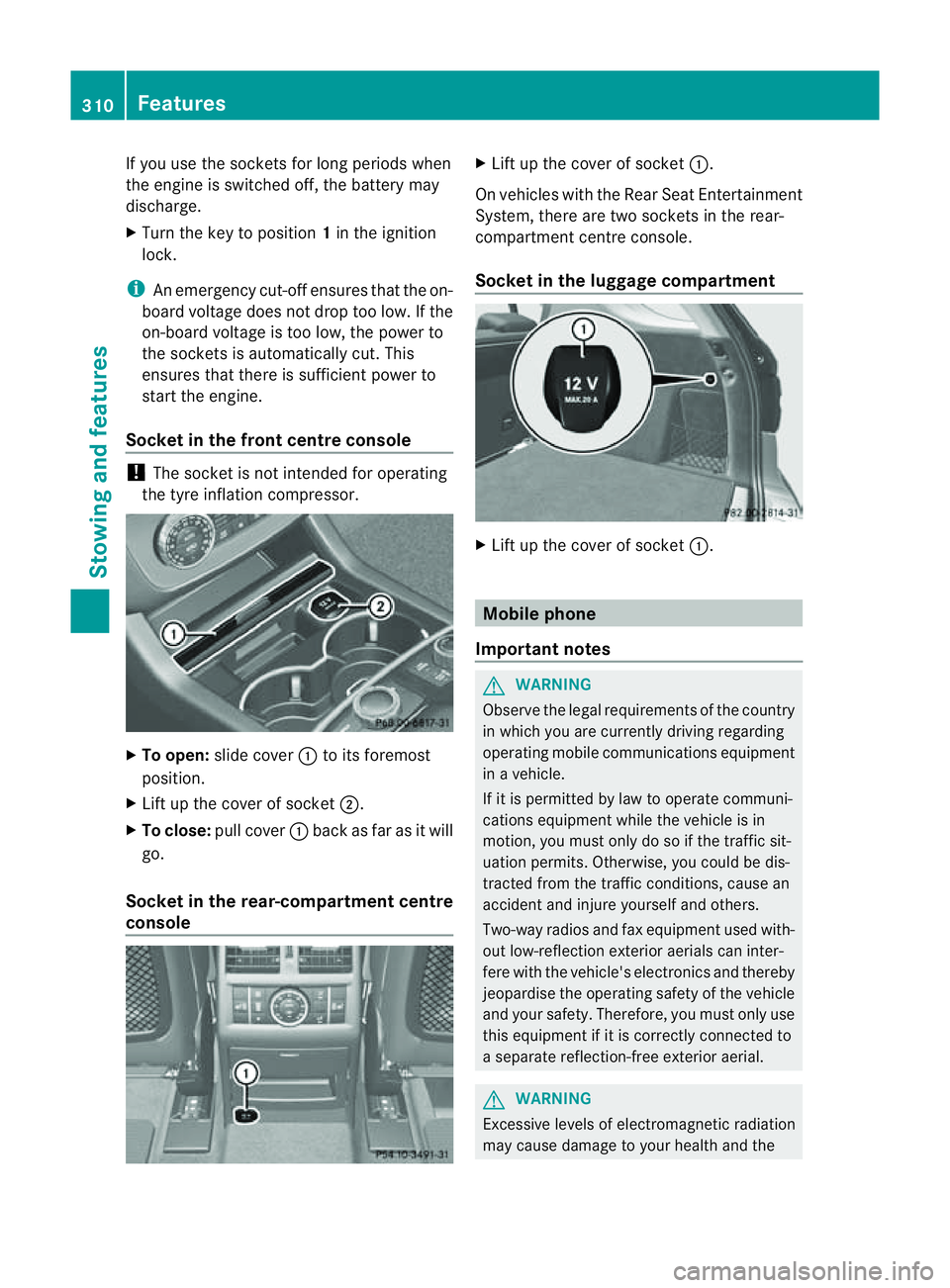
Socket in th efront centre console !
The socke tisn ot intended for operating
the tyr einflation compresso r.X
To open: slide cover :to its foremost
position.
X Lift up the cover of socket ;.
X To clos e:pull cover :back as far as it will
go.
Socket in the rear-compartment centre
console X
Lift up the cover of socket :.
On vehicles with the Rear Seat Entertainment
System, there are two sockets in the rear-
compartment centre console.
Socket in the luggage compartment X
Lift up the cover of socket :. Mobile phone
Important notes G
WARNING
Observe the legal requirements of the country
in which you are currently driving regarding
operating mobile communications equipment
in av ehicle.
If it is permitted by law to operat ecommuni-
cations equipment while the vehicle is in
motion ,you must only do so if the traffic sit-
uation permits. Otherwise, you coul dbedis-
trac tedf rom th etraffic conditions ,cause an
accident and injure yourself and others.
Two-way radios and fax equipment used with-
out low-reflection exterior aerials can inter-
fere with the vehicle's electronics and thereby
jeopardise the operating safety of the vehicle
and your safety. Therefore, you must only use
this equipment if it is correctly connected to
as eparate reflection-f reee xterior aerial. G
WARNING
Excessive level sofelectromagnetic radiation
may cause damage to your health and the 310
FeaturesStowing and features
Page 314 of 389
healt
hofothers. Using an exterior aerial takes
into account current scientific discussions
relating to the possibl ehealth risk posed by
electromagnetic fields.
Mercedes-Ben zrecom mends the use of an
approved exterior aerial .This ensures:
R optimal mobile phone reception quality in
the vehicle
R mutua linfluences between the vehicle
electronics and mobil ephones ar emini-
mised
An exterior aerial has the following advan-
tages:
R it conducts the electromagnetic fields gen-
erated by awireless device to the exterior.
R the field strengt hinthe vehicle interior is
lower than in avehicle that does not have
an exterior aerial.
i There are various mobile phone brac kets
that may be fitted to your vehicle ;insome
cases, these ar ecountry-specific.
i Even if your vehicle is equipped with con-
venience telephony, you can connec ta
Blueto oth®
capable mobil ephone to Audio
20 or COMAND Online via the Bluetooth ®
interfac e.
More information on suitabl emobilephones,
mobile phone brackets and on connecting
Bluetooth ®
capable mobile phones to Audio
20 or COMAND Online can be obtained:
R at your Merc edes-Ben zServ iceC entre
R on the Internet at http://www.mercedes-
benz.com/connect
i The functions and service savailab lewhen
you use the phone depend on you rmobile
phone model and service provider. Inserting th
emobile phone X
Open the telephone compartment
(Y page 298).
X If required by the design of the mobile
phone bracket ,instal lthe slidin gadapter
(Y page 312).
X Insert the mobile phone into the mobile
phone bracket (see the separat emobile
phone bracke tinstallatio ninstructions).
If the mobil ephone is inser tedint he mobile
phone bracket ,you can speak to the person
you ar ecalling using the hands-free system.
i On some mobile phone brackets, you first
have to connect the mobile phone via Blue-
tooth ®
to am obile phone bracke t(see the
separate operating inst ructions for the
mobile phone bracke t).
On these mobile phone brackets, the
mobile phone does not hav etobeinserted
into the bracket for you to be able to use
the telephone functions .Inthis case ,the
charging func tion and aerial func tion are
not available.
Operating th emobile phone You can operate the telephone using the
6 and~ button sonthe multifunc tion
steering wheel. You can operate other mobile
phone func tions via the on-boar dcomputer
(Y page 242).
If you tak ethe key out of the ignition lock ,the
mobile phone stay sonb ut you can no longer
use the hands-free system.
If you are making acall and you would like to
take the key out of the ignition lock, first
remove the mobile phone from the bracket.
Otherwise, the call will be ended.
i When amobile phone bracke tisu sed that
is con nected to the mobile phone via Blue-
tooth ®
:ify ou wan ttocontinue acall in
"Private mode", you have to perform the
necessary steps on the mobile phone (see Features
311Stowingandfeatures Z
Page 315 of 389
the separate mobil
ephone operating
instructions).
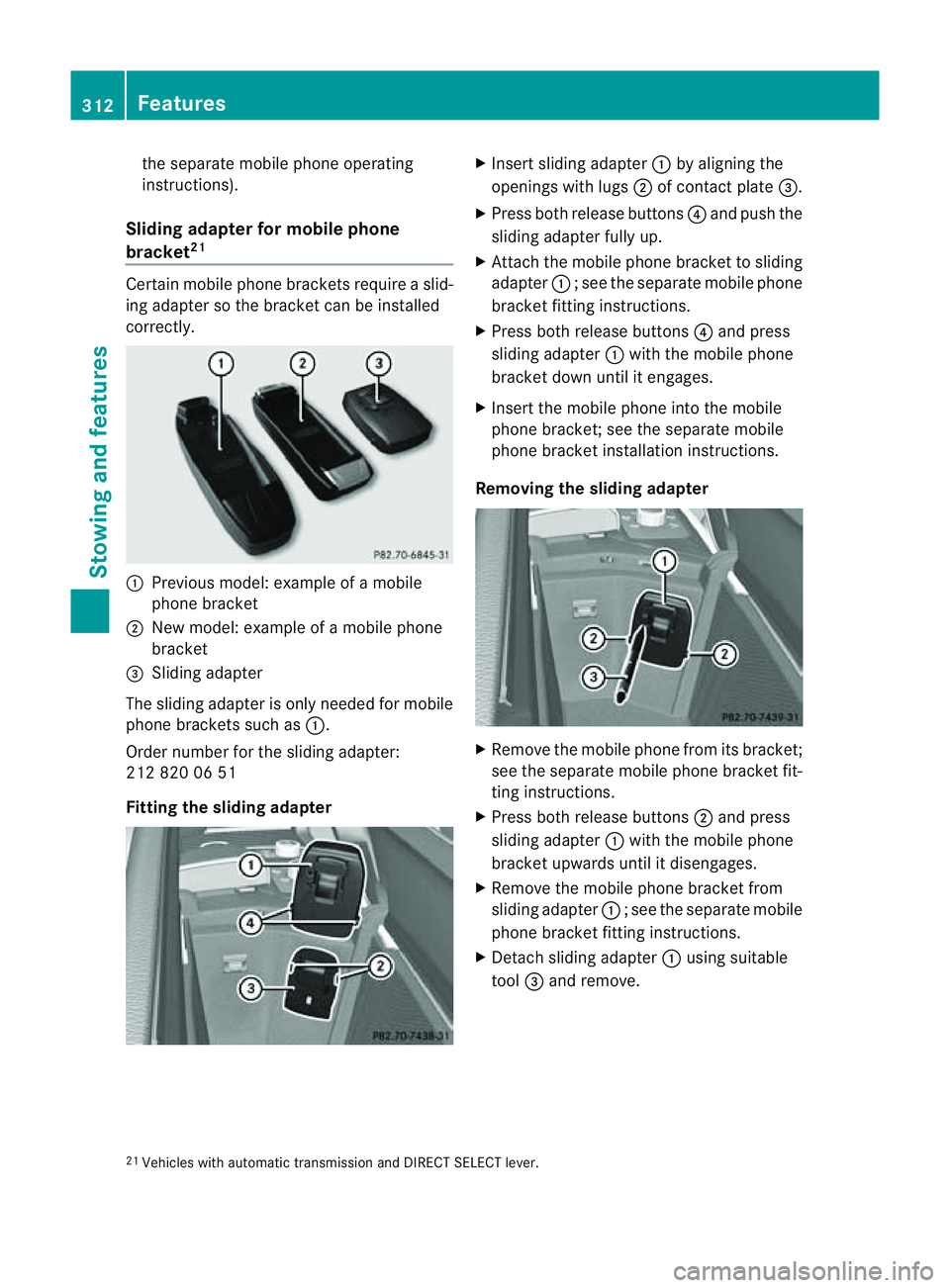
Sliding adapte rfor mobil ephone
bracket 21 Certain mobil
ephone brackets require aslid-
ing adapter so the bracket can be installed
correctly. :
Previou smodel :examp leof am obile
phone bracket
; New model :examp leof am obile phone
bracket
= Sliding adapter
The sliding adapter is only neede dfor mobile
phone brackets such as :.
Order number for the sliding adapter:
212 820 06 51
Fittin gthe sliding adapter X
Insert sliding adapter :by aligning the
openings wit hlugs ;of contact plate =.
X Press both release buttons ?and push the
sliding adapter fully up.
X Attach the mobile phone bracket to sliding
adapter :;see the separate mobile phone
bracket fit ting instructions.
X Pres sboth release buttons ?and press
slidin gadapter :with the mobile phone
bracket down unti litengages.
X Insert the mobil ephone int othe mobile
phone bracket ;see the separate mobile
phone bracket installation instructions.
Removing th esliding ada pter X
Remove the mobile phone from its bracket;
see the separate mobile phone bracket fit-
ting instructions.
X Press both release buttons ;and press
sliding adapter :with the mobile phone
bracket upwards until it disengages.
X Remove the mobile phone bracket from
sliding adapter :;see the separate mobile
phone bracket fit ting instructions.
X Detach sliding adapter :using suitable
tool =and remove.
21 Vehicles with automatic transmission and DIRECT SELECT lever. 312
FeaturesStowin
gand features
Page 319 of 389
Frequencies for th
egarage doo ropener Th
er adio typ eapproval number and th efrequency range for th egarag edoor opener can be
fou ndonthe Interne tat: http://www.mercedes-benz.de/betriebsanleitung. Floormats
G
WARNING
Make sure that there is sufficient clearance
around the pedals when floormats are used,
and that the floormats are properly secured.
The floormats must be correctly secured at all
times using retainer sand press-studs.
Before you drive off ,chec kthe floormats and
secur eifnecessary. Afloormat which is not
properly secured can slip and, thereby, inter-
fere with the movemen tofthe pedals.
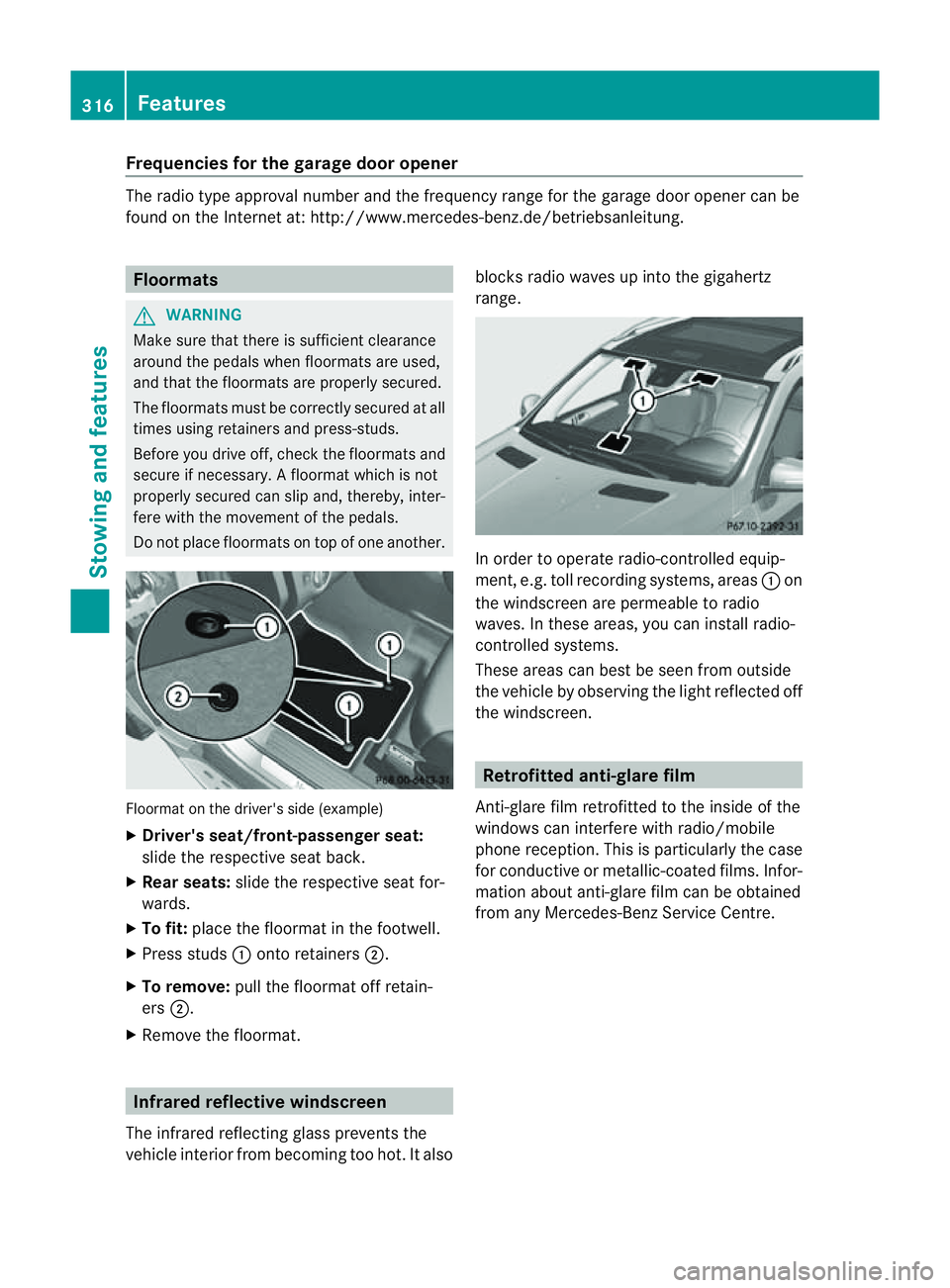
Do not plac efloormats on top of one another. Floormat on the driver's side (example)
X
Driver's seat/front-passenger seat:
slide the respective seat back.
X Rear seats: slide the respective seat for-
wards.
X To fit: place the floorma tinthe footwell.
X Press studs :ontoretainers ;.
X To remove: pull the floormat off retain-
ers ;.
X Remov ethe floormat. Infrared reflective windscreen
The infrared reflecting glass prevents the
vehicle interior from becoming too hot. It also blocks radio waves up int
othe gigahertz
range. In orde
rtooperateradio-controlled equip-
ment, e.g. toll recording systems, areas :on
the windscreen are permeable to radio
waves. In these areas, you can install radio-
controlled systems.
Thes earea scan best be seen from outside
the vehicle by observing the light reflected off
the windscreen. Retrofitted anti-glar
efilm
Anti-glar efilm retrofitted to the inside of the
windows can interfer ewith radio/mobile
phone reception. This is particularly the case
for conductive or metallic-coated films. Infor-
mation about anti-glar efilm can be obtained
from any Mercedes-Ben zService Centre. 316
FeaturesStowing and features
Page 323 of 389
X
Lower th ebonnet and let it fal lfrom a
heig ht of approx imately 20 cm.
X Check that the bonnet has engaged prop-
erly.
If the bonnet can be raised slightly, it is not
properly engaged. Open it again and close
it with alittle more force. Radiator
i Vehicles with diesel engine: do not
cover the radiator .Don ot use thermal
mats, insec tprotectio ncover sora nything
similar. Doing so can cause the Onboard
Diagnosti csSystem to display inaccurate
values .Some of these values ar elegally
required and must be cor rect. Engine oil
Notes on the oil level Depending on driving style, the vehicle con-
sume samaximum of 0.8 loil per 100 0km.
Th eo il consumption may be higher than this
when the vehicle is new or if you frequently
drive at high engin espeeds.
Checking the oil level using the oil dip-
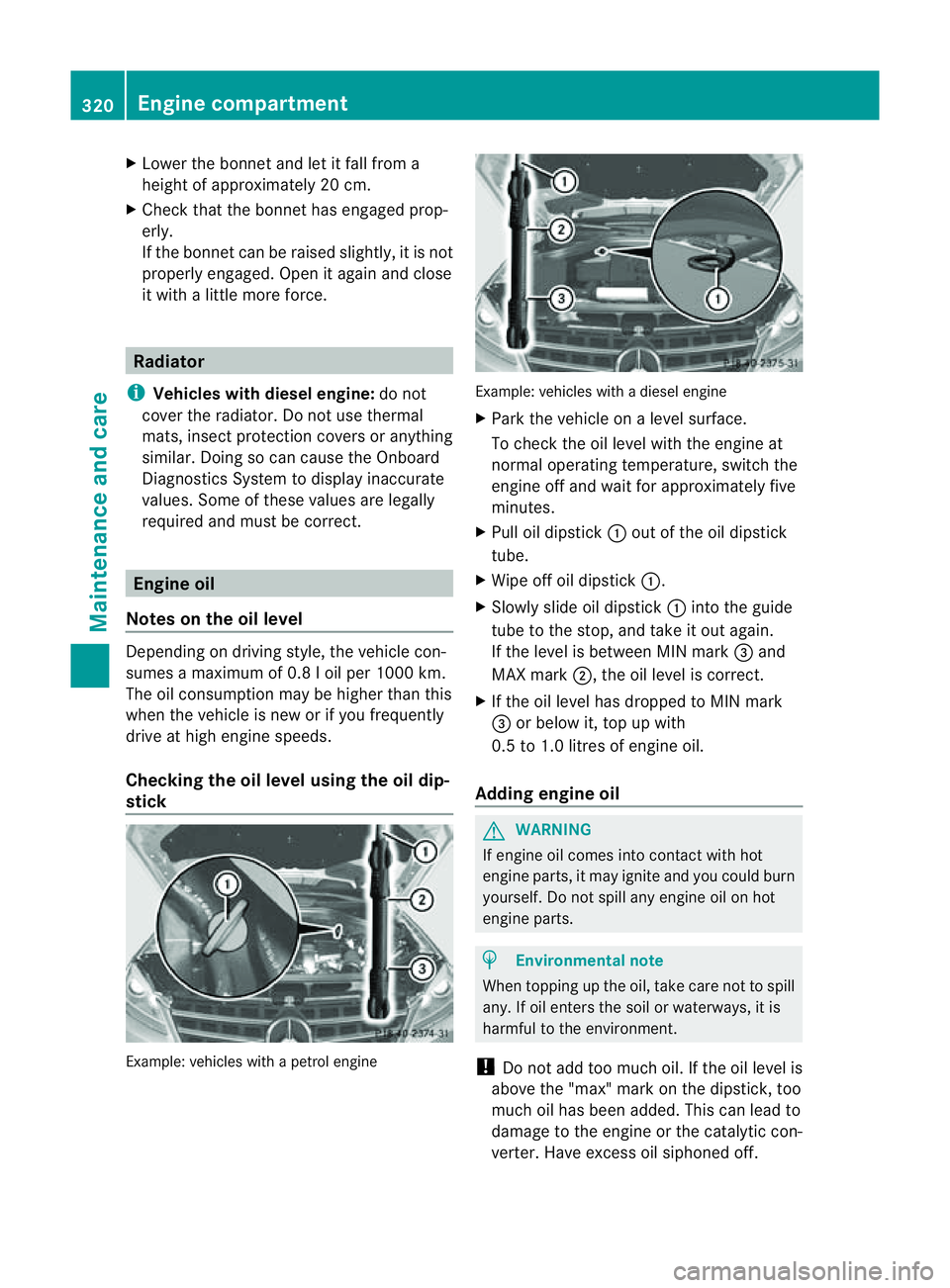
stick Example: vehicles with
apetro lengine Example: vehicle
swithadiesel engine
X Park the vehicle on alevel surface.
To chec kthe oil level with the engin eat
normal operating temperature, switch the
engine off and wait for approximately five
minutes.
X Pull oil dipstick :out of the oil dipstick
tube.
X Wip eoff oi ldipstick :.
X Slowly slide oil dipstick :into the guide
tube to the stop, and take it out again.
If the level is between MIN mark =and
MAX mark ;,the oil level is correc t.
X If th eoil level has dropped to MIN mark
= or below it, top up with
0.5 to 1.0 litres of engine oil.
Adding engine oil G
WARNING
If engine oil comes into contact with hot
engine parts, it may ignite and you could burn
yourself .Donot spill any engin eoil on hot
engine parts. H
Environmental note
When topping up the oil, take care not to spill
any. If oil enters the soil or waterways, it is
harmful to the environment.
! Do not add too much oil. If the oil level is
above the "max" mar konthe dipstick ,too
much oil has been added. This can lead to
damage to the engin eorthe catalytic con-
verter .Have excess oil siphoned off. 320
Eng
inecompartmentMaintenance and care
Page 326 of 389
Maintainin
gthe time-dependen tservice
schedule:
X Not edown the service due date displayed
in the multifunc tion display befor ediscon-
necting the battery.
or
X Subtract the battery disconnection periods
from the servic edate shown on the displ ay
after reconnecting the battery.
i The ASSYST PLUS service interval displ ay
does not show any information on the
engine oil level .Observ ethe notes on the
engin eoil level (Y page 320).
Hiding aservice message X
Pres sthe % ora button on th esteer-
ing wheel.
Displaying service messages X
Switch th eignitio non.
X Press =or; on the steering wheel
to select the Serv. menu.
X Press 9or: to select the ASSYST PLUS submenu and press
ato confirm.
The service du edatea ppears in the multi-
function display.
Points to remember Resettin
gthe ASSYS TPLUS service inter-
val display
Aq ualified specialist workshop, e.g. a
Mercedes -Ben zS ervice Cent re,w ill reset the
ASSYST PLU Sservic einterval display after
the service work has bee ncarried out.
You can obtain further information ,e.g.
regarding servic ework,from aMercedes-
Benz Ser vice Centre or directly from
Mercedes-Benz.
! If the ASSYST PLUS servic einterval dis-
play has bee ninadvertently reset, this set-
ting can be corrected at aMercedes-Benz
Ser vice Centre. Have servic
ework carried out as described
in the Ser vice Boo klet. This may otherwise
lead to inc reased wear and damage to the
major assemblies or the vehicle.
Driving abroad
An extensive Mercedes -Ben zS ervice network
is also available in other coun tries. The
Service Hotline's curren ttelephone numbers
for use when you are abroa dare to be found
in th e"Mercedes-Ben zService24h" section
of the Ser vice Boo klet. AdBlue
®
service indicator
i For BlueTE Cvehicles only.
The BlueTE Cexhaus tgas aftertreatment
must be operated with the reducing agent
AdBlue ®
in order for it to function correctly.
Under normal operating conditions, afull tank
of AdBlue ®
should last until the nex tservice
due date.
Depending on how and where the vehicle is
used, there may be an inc rease in the
AdBlue ®
consumption, resulting in the next
servic edue date being brought forward.
Certain display messages sho wthat
AdBlue ®
must be topped up, e.g.
Refill AdBlue at worksh opSee Owner’s Manual
Refill AdBlue at worksho
pNostart in .. km
Aw
arning signal also sounds.
You can no longer star tthe engin ewhen the
AdBlue ®
supply has been used up
(Y page 268).
Top up AdBlue ®
(Y page 157).
Before taking atripw ithy our vehicle outside
Europe, have th eAdBlue ®
suppl ychec kedat
aq ualified specialist workshop. If necessary,
have the AdBlue ®
topped up. Before using
your vehicle for an extended period in coun-
tries outside Europe, con tact aq ualified spe-
cialist workshop.
Obser vethe note sonAdBlue®
(Y page 374). Maintenance
323Maintenanceand care Z