change wheel MERCEDES-BENZ M-CLASS SUV 2011 Owner's Manual
[x] Cancel search | Manufacturer: MERCEDES-BENZ, Model Year: 2011, Model line: M-CLASS SUV, Model: MERCEDES-BENZ M-CLASS SUV 2011Pages: 389, PDF Size: 9.22 MB
Page 244 of 389
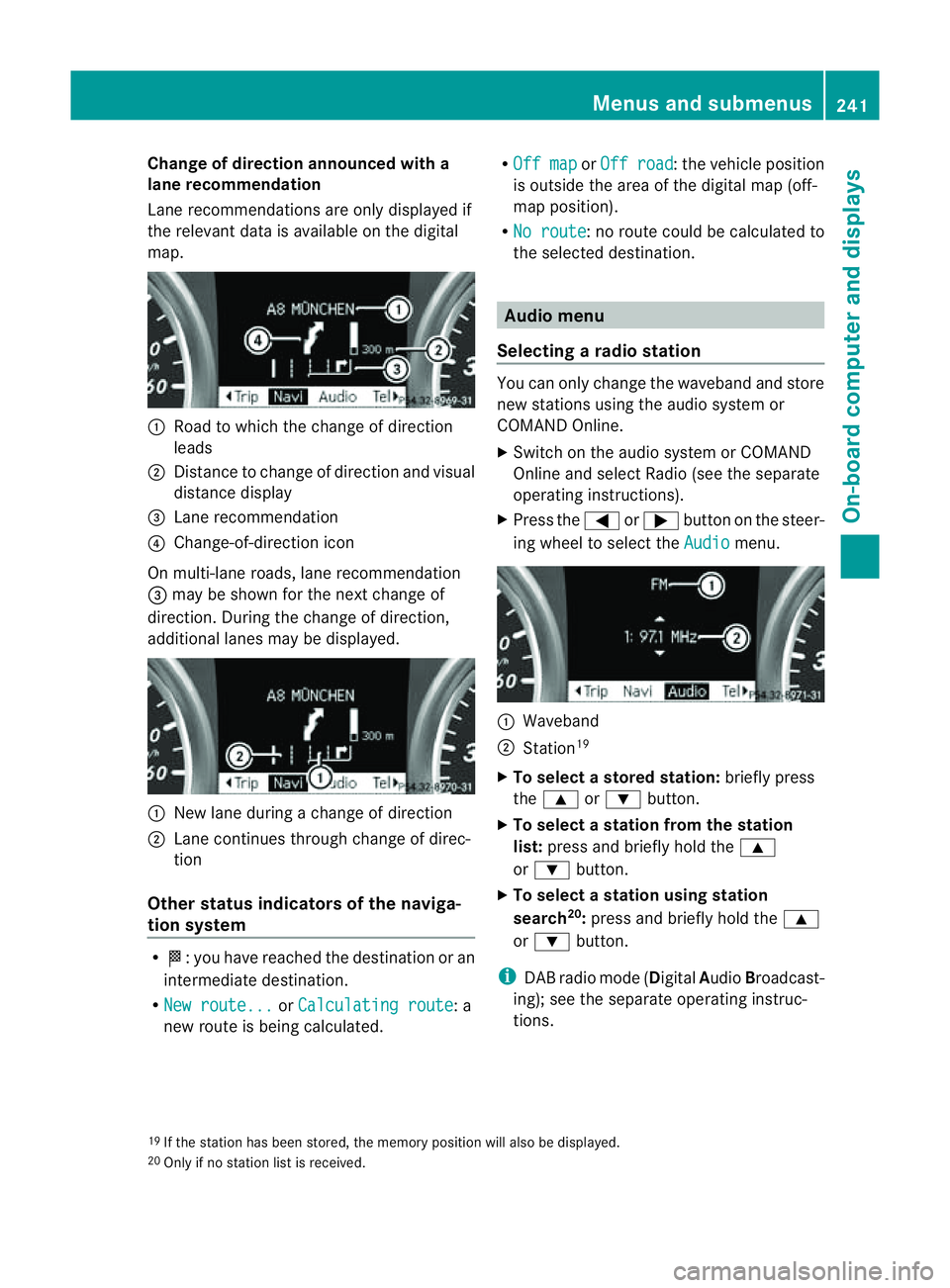
Change of direction announced with a
lane recommend
ation
Lan erecommendations are only displaye dif
the relevan tdata is available on thed igital
map. :
Road to which the change of direction
leads
; Distanc etochange of direction and visual
distanc edisplay
= Lane recommendation
? Change-of-direction icon
On multi-lane roads, lane recommendation
= may be shown for the next change of
direction. Durin gthe change of direction,
additiona llanes may be displ ayed. :
New lane durin gachange of direction
; Lane con tinues throug hchange of direc-
tion
Other sta tusindicators of the naviga-
tion system R
O:y ou have reached the destination or an
intermediate destination.
R Ne wr oute... or
Calculating route :a
new route is being calculated. R
Off map or
Off road :t
he vehicle position
is outside the area of the digital ma p(off-
ma pp osition).
R No route :nor
oute coul dbecalculated to
the selected destination. Audio menu
Selectin garadio station Yo
uc an only change the waveband and store
new stations using the audio system or
COMAND Online.
X Switch on the audio system or COMAND
Online and select Radio (se ethe separate
operating instructions).
X Press the =or; button on the steer-
ing wheel to select the Audio menu.
:
Wav eband
; Station 19
X To selec tastoredstation: brieflypress
the 9 or: button.
X To select astation from the station
list: press and briefl yholdt he 9
or : button.
X To select astatio nusing station
search 20
:press and briefl yholdt he 9
or : button.
i DAB radio mode ( DigitalAudioBroadc ast-
ing); see the separate operating instruc-
tions.
19 If the statio nhas been stored ,the memory po sition will also be displayed.
20 Onl yifnos tation list is received. Menus and submenus
241On-boardcomputer and displays Z
Page 245 of 389
Audio player or audio media operation
Audio dat
afromv arious audio device sor
media can be played, depending on the equip-
ment fitted in the vehicle.
X Switch on the audio system or COMAND
Online and select the audio de vice or
medium (see the separat eoperating
instructions).
X Press the =or; buttononthe steer-
ing wheel to selec tthe Audio menu.
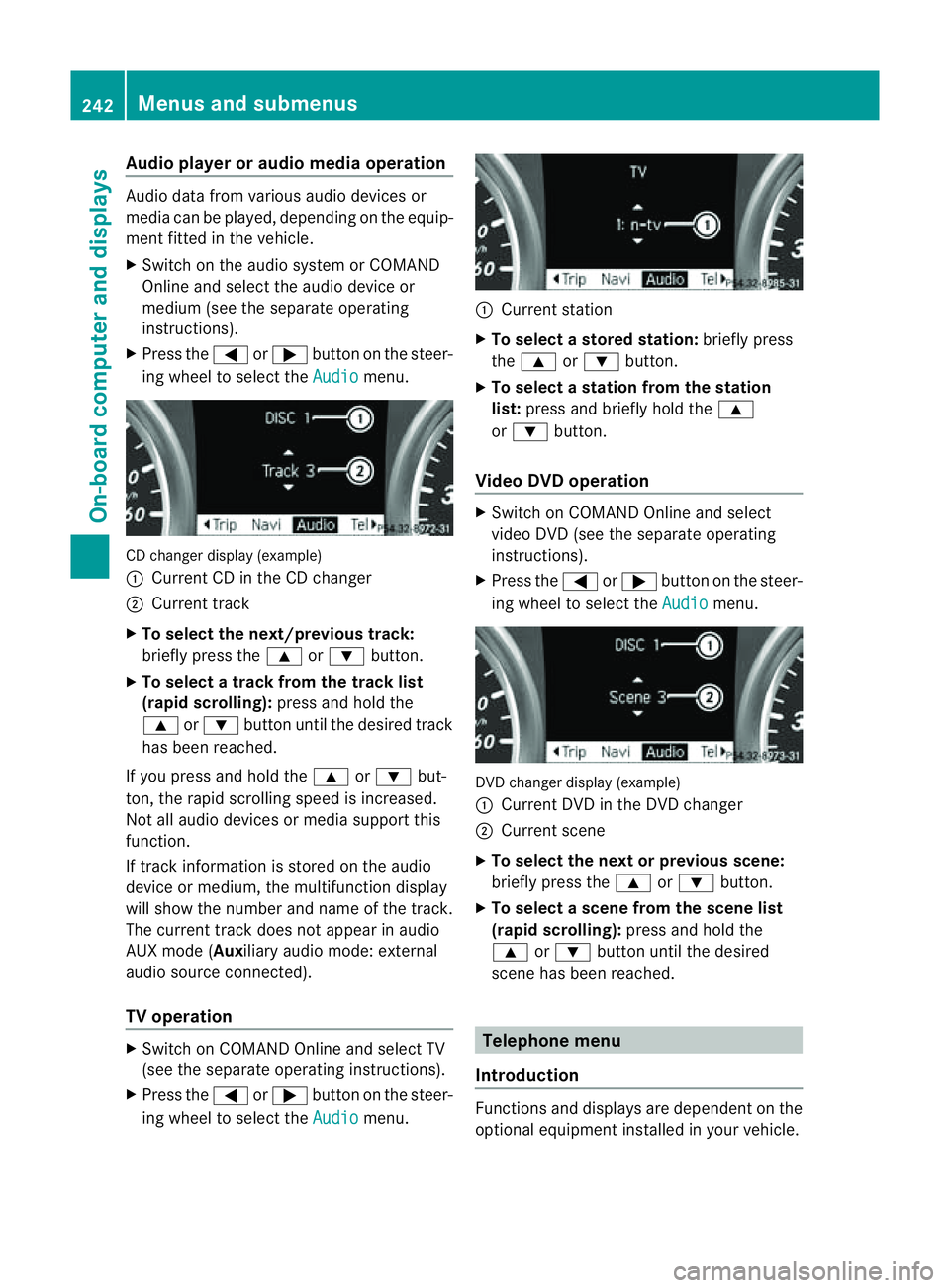
CD changer display (example)
:
Curren tCDint he CD changer
; Curren ttrack
X To sele ctthe next/previous track:
bri efly press the 9or: button.
X To select atrack from the track list
(rapid scrolling): press and holdthe
9 or: button until the desired track
has been reached.
If you press and hold the 9or: but-
ton ,the rapi dscrolling spee disincreased.
Not al laudi od evices or media support this
function.
If track information is stored on the audio
device or medium, the multifunction display
will show the numbe rand name of the track.
The current track does no tappear in audio
AU Xm ode (Auxiliar yaudio mode: external
audio source connected).
TV operation X
Switch on COMAND Online and select TV
(see the separate operating instructions).
X Press the =or; button on the steer-
ing wheel to select the Audio menu. :
Current station
X To select astore dstation: brieflypress
the 9 or: button.
X To select astation from the station
list: press and briefl yholdt he 9
or : button.
Vid eoDVD operation X
Switch on COMAND Online and select
video DVD (see the separate operating
instructions).
X Press the =or; button on the steer-
ing whee ltoselect the Audio men
u. DVD change
rdisplay (example)
: Curren tDVD in th eDVD changer
; Current scene
X To select the next or previous scene:
briefl ypres sthe 9 or: button.
X To selec tascene from th escene list
(rapid scrolling): press and hold the
9 or: button until th edesired
scene ha sbeenr eached. Telephon
emenu
Introdu ction Functions and display
sare dependen tonthe
optional equipmen tinstalled in your vehicle. 242
Menus and submenusOn-board computer and displays
Page 250 of 389
![MERCEDES-BENZ M-CLASS SUV 2011 Owners Manual X
Press :or9 to select the Perma‐ nent display function.
You will see the selected setting: outsidetemperat
ure or
Dig. speedo m[mph] .
X Press the abuttontos ave the setting.
Lights Switching the d](/img/4/55578/w960_55578-249.png "MERCEDES-BENZ M-CLASS SUV 2011 Owners Manual X
Press :or9 to select the Perma‐ nent display function.
You will see the selected setting: outsidetemperat
ure or
Dig. speedo m[mph] .
X Press the abuttontos ave the setting.
Lights Switching the d")
X
Press :or9 to select the Perma‐ nent display function.
You will see the selected setting: outsidetemperat
ure or
Dig. speedo m[mph] .
X Press the abuttontos ave the setting.
Lights Switching the day
time drivin glights on/
off
If you have activated the Daytime driving
lights function and the light switch is set to
Ã,t he daytim edriving lights are automat-
icall yswitched on during daylight hours when
the engine is running. When it is dark, the side
lamps and the dipped-beam headlamps are
also switched on automatically.
X Switc hoff th eengine.
X Pres sthe = or; button on the steer-
ing wheel to selec tthe Settings menu.
X Press the :or9 button to selec tthe
Light submenu.
X Press the abutton to con firm.
X Press the :or9 buttontos elect the
Daytim edriving lights function.
Yo uw ill see the selected setting: on or
off .
X Press the abutton to save the setting.
Switching the Intelligent Light System
on/off
If you activat ethe Intell .Light Sys‐ tem: function
,you activa te thefollowing
func tions:
R motorwa ymode
R active light func tion
R cornering light func tion
R exte nded range foglamps
X Press the =or; button on the steer-
ing wheel to select the Settings menu.
X Press the :or9 button to select the
Light submenu.
X Press the abutton to confirm. X
Press :or9 to select the Intell. Ligh
tSys. function.
Yo uw ill see the selected setting: on or
off .
X Press the abutton to save the setting.
If you set the dipped-bea mheadlamps for
driving on the right/left (Y page 247),the
multifunction displa yshows the Intell. Ligh
tSystem: System inoperative Inactiv
efor left-side traffic or
Intell. Light System: System inoper‐
ative Inactiv
efor right-side traf‐ fic displa
ymessage instead of the Intell. Ligh
tSystem: functio
nintheLight sub-
menu.
Setting th edipped-bea mheadlamp sfor
driving on the left/right
This function is only available on vehicles with
the Intelligent Light System.
You can use this function to switch between
symmetrical beam and asymmetrical dipped
beam (Y page 106).
If you set the dipped-beam headlamps for
driving on the right/left, then motorway
mode and the extended range foglamps are
not available.
X Press the =or; button on the steer-
ing wheel to select the Settings menu.
X Press the :or9 buttontos elect the
Light submenu.
X Press the abutton to confirm.
X Press :or9 to select the Dipped beam
sSetting for function.
Yo uw ill see the selected setting: Right- side traffic or
Left-s idet raffic .
X Press the abuttontos ave the setting.
When you change the setting, conversion
does not take place until the nex ttime the
vehicle is stationary.
You can also have the dipped-beam head-
lamps set for drivin gonthe right or lef tata
qualified specialist workshop. Menus and submenus
247On-board comp uter and displays Z
Page 253 of 389
The following system
sare switche doff when
th er adar senso rsystem is deactivated:
R DISTRONIC PLUS (Y page 174)
R BAS PLUS (Y page 62)
R PRE-SAFE ®
Brake (Y page 66)
R Blind Spot Assist (Y page 208)
R Active Blind Spot Assist (Y page 212)
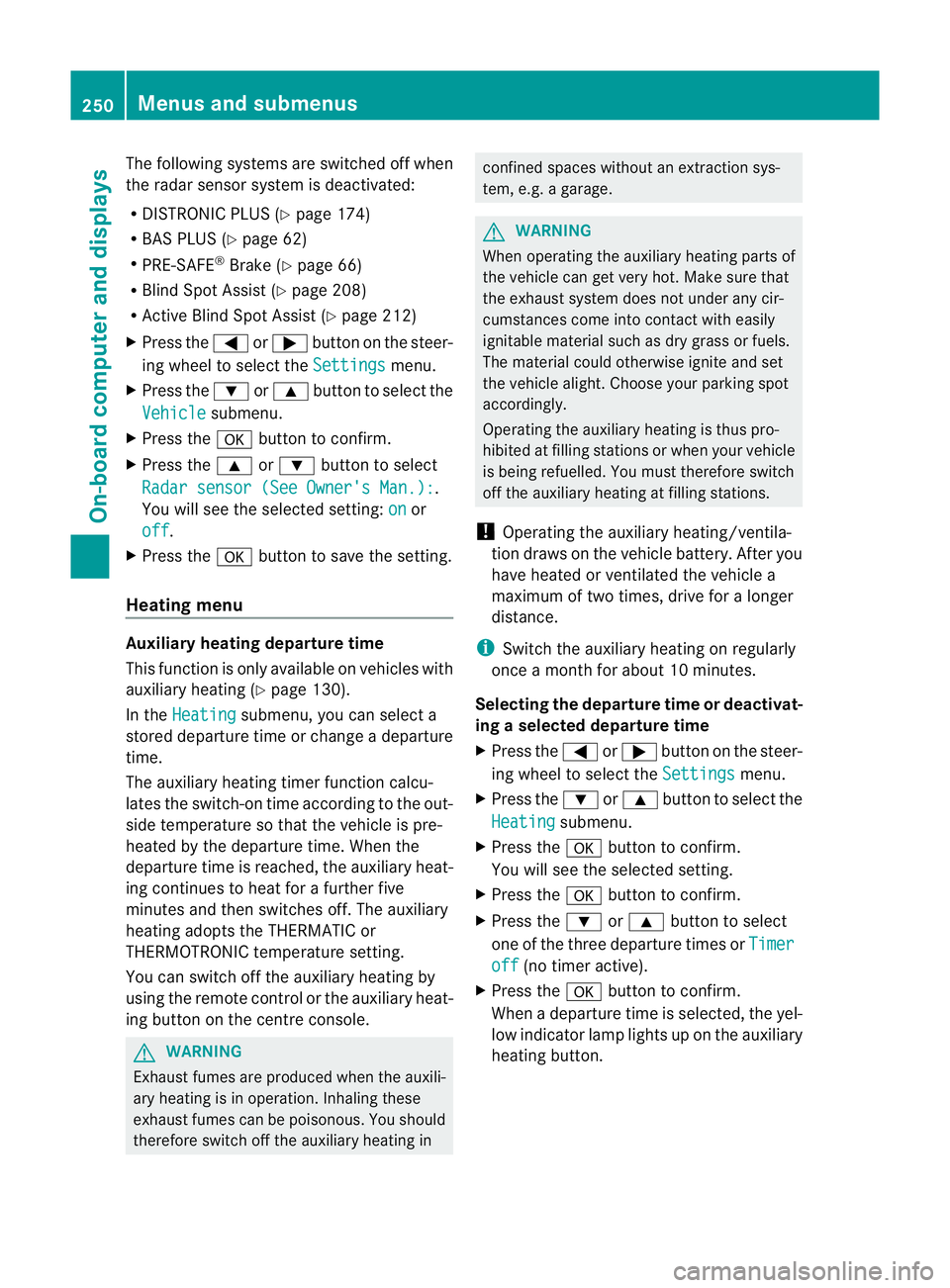
X Press the =or; button on the steer-
ing whee ltoselect the Settings menu.
X Press the :or9 button to select the
Vehicle submenu.
X Press the abutton to confirm.
X Press the 9or: button to select
Rada rsensor (See Owner's Man.): .
Yo uw ill see the selected setting: on or
off .
X Press the abutton to save the setting.
Heating menu Auxiliary heating depa
rtur et ime
This function is only availa bleo nvehicles with
auxiliar yheatin g(Ypage 130).
In the Heating submenu, you can select a
stored departure tim eorchange adeparture
time.
The auxiliar yheatin gtimer func tion calcu-
lates the switch-on tim eaccording to the out-
sid etemperature so that the vehicle is pre-
heated by the departure time. When the
departure tim eisreached, the auxiliar yheat-
ing continues to heat for afurther five
minutes and then switches off. The auxiliary
heating adopts the THERMATI Cor
THERMOTRONI Ctemperature setting.
You can switc hoff th eauxiliary heating by
using the remote control or the auxiliary heat-
ing button on the centre console. G
WARNING
Exhaust fumes are produced when the auxili-
ary heating is in operation. Inhaling these
exhaust fumes can be poisonous. You should
therefore switch off the auxiliary heating in confined spaces without an extraction sys-
tem, e.g.
agarage. G
WARNING
When operating the auxiliary heating parts of
the vehicle can get very hot. Make sure that
the exhaust system does not under any cir-
cumstances come into contact with easily
ignitable material such as dry grass or fuels.
The material could otherwise ignite and set
the vehicle alight. Choos eyour parkin gspot
accordingly.
Operating the auxiliary heating is thus pro-
hibited at fillin gstations or when your vehicle
is being refuelled .You must therefore switch
off the auxiliar yheatin gatf illing stations.
! Operating the auxiliary heating/ventila-
tion draws on the vehicle battery. After you
have heated or ventilated the vehicle a
maximum of two times, drive for alonger
distan ce.
i Switch the auxiliary heating on regularly
once amonthfor about 10 minutes.
Selecting th edepartur etime or deactivat-
ing aselected depa rtur et ime
X Press the =or; button on the steer-
ing wheel to select the Settings menu.
X Press the :or9 button to select the
Heating submenu.
X Press the abutton to confirm.
You will see the selected setting.
X Press the abutton to confirm.
X Press the :or9 button to select
one of the three departur etimes or Timer off (no timer active).
X Press the abutton to confirm.
When adeparture tim eisselected, the yel-
low indicator lam plights up on the auxiliary
heating button. 250
Menus and submenusOn-board computer and displays
Page 254 of 389
Changing th
edeparture time
X Pres sthe = or; button on th esteer-
ing wheel to selec tthe Settings menu.
X Press the :or9 button to selec tthe
Heating submenu.
X Press the abutton to confir m.
You will see the selected setting.
X Press the abutton to confirm.
X Press the :or9 button to select
Change A ,
B or
C .
X Press the abutton to confirm.
You can now change the departur etime.
X Press the =or; button to select the
displa ytobec hanged: hours, minutes.
X Press the :or9 button to set the
selected display.
X Press the abutton to stor ethe ent ry.
The yellow indicator lam ponthe auxiliary
heating button lights up.
Convenience Activating/deactivating th
eEASY-
ENTRY/EXIT featu re
You can use the Easy Entry/Exit: func
tion
to activate or deactivate the EAS YENTRY/
EXIT feature (Y page 99). G
WARNING
Th es teering whee lmoves when the EASY-
ENTRY/EXI Tfeatur eisa ctive. There is arisk
of occupant sbecoming trapped. Before acti-
vating the EASY-ENTRY/EXI Tfeature, make
sure that nobody can becom etrapped.
Do not leave children unsupervised in the
vehicle, eve nifthey ar esecured in achild
restraint system .The children coul dopen the
driver' sdoor and thereby unintentionally acti-
vat ethe EASY-ENTRY/EXI Tfeatur eand
become trapped.
X Pres sthe = or; button on the steer-
ing wheel to selec tthe Settings menu.
X Press the :or9 button to selec tthe
Convenience submenu.X
Press the abutton to confir m.
X Press the :or9 button to select the
Easy Entry/Exit: function.
You will see the selected setting: on or
off .
X Press the abutton to save the setting.
Switching th ebelt adjustment on/off
For further information on belt adjustment,
see (Y page 48).
X Press the =or; button on the steer-
ing wheel to select the Settings menu.
X Press the :or9 button to select the
Convenience submenu.
X Press the abutton to confir m.
X Press the :or9 button to select the
Belt adjustment function.
You will see the selected setting: on or
off .
X Press the abutton to save the setting.
Switching th efold in mirrors when lock-
ing function on/off
If you switch on the Fold mirrors in when
locking func
tion, the exterior mirror sfold in
when you lock the vehicle. When you unlock
the vehicle and then open the driver's or
front-passenger door, the exterior mirrors
fold out again.
If you have switched the func tion on and you
fold the exterior mirror sinusing the button
on the door (Y page 101), they will not fold
out automatically. The exterior mirrors can
then only be folded out usin gthe button on
the door.
X Press the =or; button on the steer-
ing wheel to selec tthe Settings menu.
X Press the :or9 button to selec tthe
Convenience submenu.
X Press the abutton to confir m. Menus and submenus
251On-boardcomputer and display s Z
Page 274 of 389
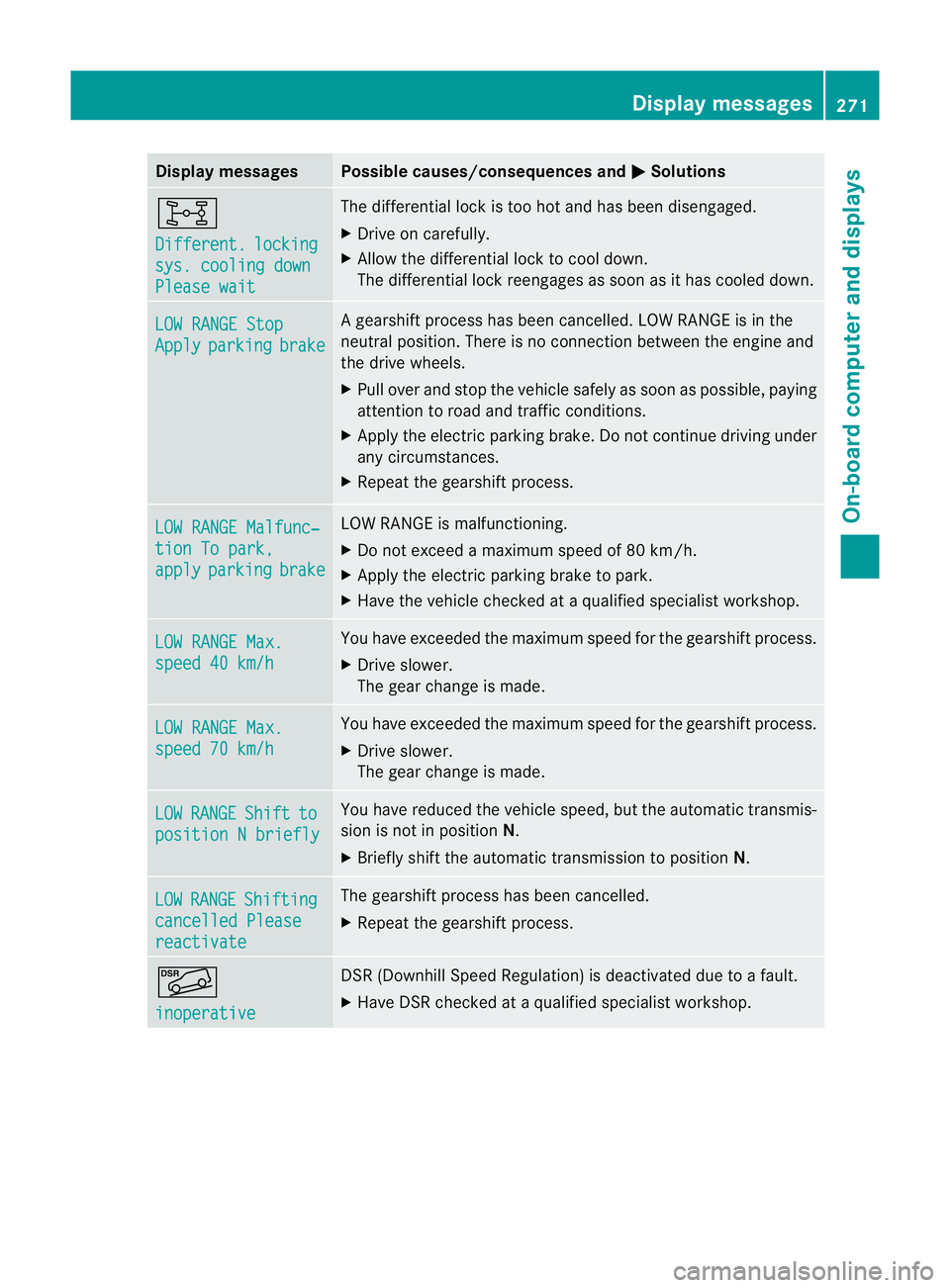
Displa
ymessages Possible causes/consequences and
M Solutions
8
Di
fferent. locking
sys
.c oolin gdown Please wait Th
ed ifferential loc kistoo hot and has been disengaged.
X Drive on carefully.
X Allow the differential lock to cool down.
The differential lock reengages as soon as it has cooled down. LO
WR ANGE Stop Apply parking brake Ag
earshif tprocess ha sbeen can celled. LOW RANGE is in the
neutral position. There is no connection between the engine and
the driv ewheels.
X Pull over and stop the vehicle safely as soon as possible, paying
attention to roa dand traffic conditions.
X Appl ythe electric parkin gbrake .Don ot con tinue driving under
any circumstances.
X Repe atthe gearshift process. LOW RANGE Malfunc‐
tion To park,
apply parking brake LO
WR ANGE is malfunctioning.
X Do not excee damaximum spee dof80k m/h.
X Apply th eelectric parkin gbrake to park.
X Have th evehicle checked at aqualified specialist workshop. LO
WR ANGE Max. speed 40 km/h Yo
uh ave exceeded the maximum spee dfor the gearshift process.
X Drive slower.
The gear change is made. LO
WR ANGE Max. speed 70 km/h Yo
uh ave exceeded the maximum spee dfor the gearshift process.
X Drive slower.
The gear change is made. LOW RANGE Shift to
position
Nbriefly Yo
uh ave reduced the vehicle speed, but the automatic transmis-
sion is not in position N.
X Briefly shift the automatic transmission to position N.LOW RANGE Shifting
cancelle
dPlease reactivate Th
eg earshif tprocess ha sbeen cancelled.
X Repeat the gearshif tprocess. Ã
inoperative DSR (Downhil
lSpeed Regulation) is deactivated due to afault.
X Hav eDSRchecked at aqualified specialist workshop. Display messages
271On-boar dcomp uter and displa ys Z
Page 280 of 389
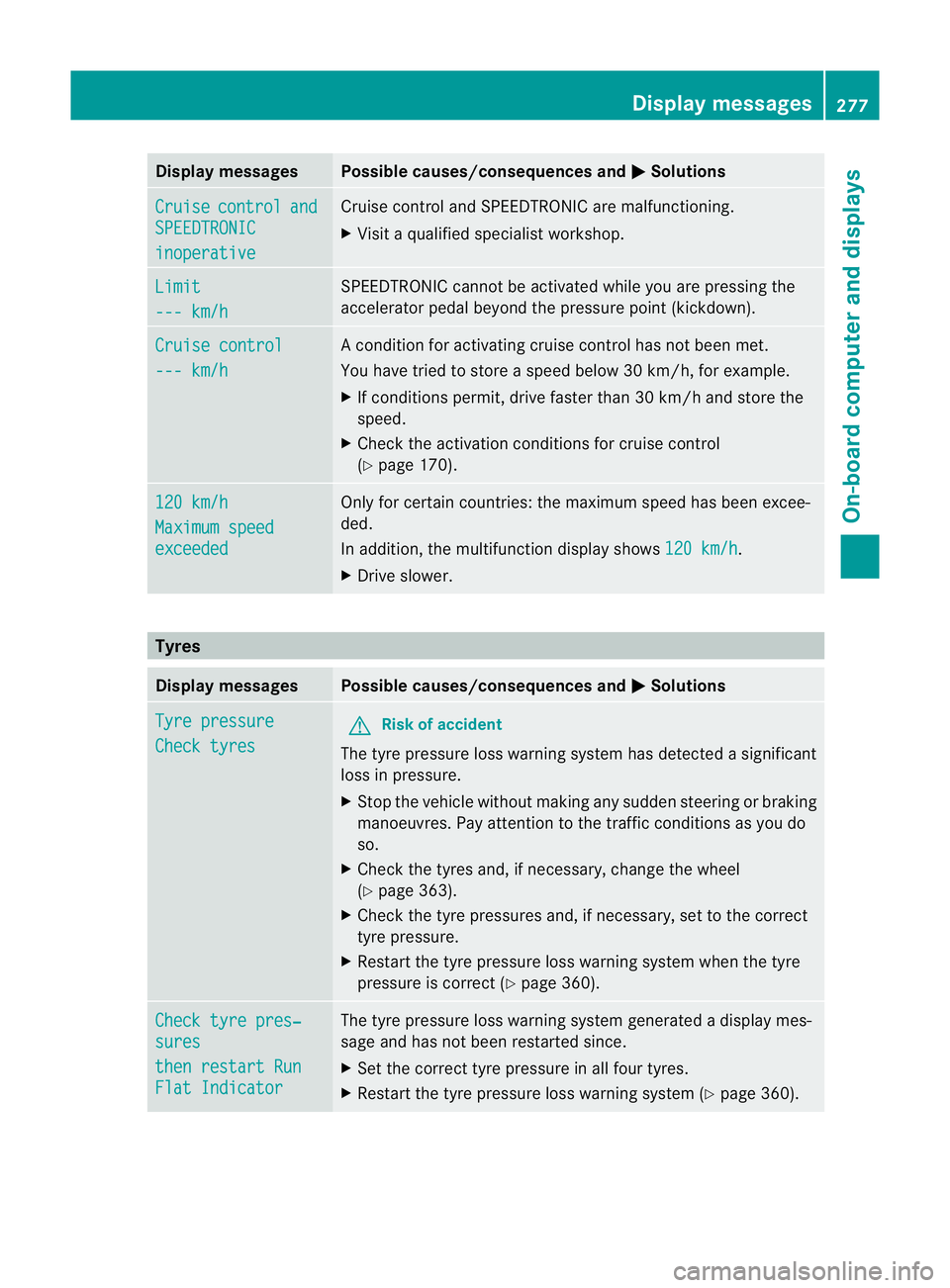
Displa
ymessages Possible causes/consequences and
M Solutions
Cr
uise control and
SPEEDTRONIC
inoperative Cruise contr
ol andSPEEDTR ONIC ar emalfunctioning.
X Visit aqualified specialist workshop. Li
mit --- km/h SPEEDTRONIC cannot be activated while you are pressin
gthe
accelerator pedal beyon dthe pressur epoint (kic kdown). Cruise control
--
-k m/h Ac
ondition for activa ting cruise control has not bee nmet.
You have tried to stor easpeed below 30 km/h, for example.
X If condition spermit ,drive faster than 30 km/h and store the
speed.
X Check th eactivation conditio ns forcruis econtr ol
(Y page 17 0). 12
0k m/h Maximu
mspeed exceeded Only fo
rcertain coun tries: the maximum speed has been excee-
ded.
In addition, the multifunction display shows 120k m/h .
X Dri veslower. Ty
res Display messages Possible causes/consequences and
M Solutions
Tyr
epressure Check tyres G
Ris
kofa ccident
The tyre pressure loss warning system has detected asignificant
loss in pressure.
X Stop the vehicle without makin gany sudden stee ring or braking
manoeuvres. Pay attention to the traffic conditions as you do
so.
X Check the tyres and, if necessary, change the wheel
(Y pag e363).
X Check the tyre pressures and ,ifnecessary, set to the cor rect
tyre pressure.
X Restart the tyre pressure los swarning system when the tyre
pressure is correct (Y page 360).Chec
ktyre pres‐ sures
then restar
tRun Flat Indicator Th
et yre pressure los swarning system generated adisplay mes-
sage and has not been restarted since.
X Set the correct tyre pressure in all four tyres.
X Restart the tyre pressure loss warnin gsystem (Y page 360). Display messages
277On-boardcomputer anddisplays Z
Page 281 of 389
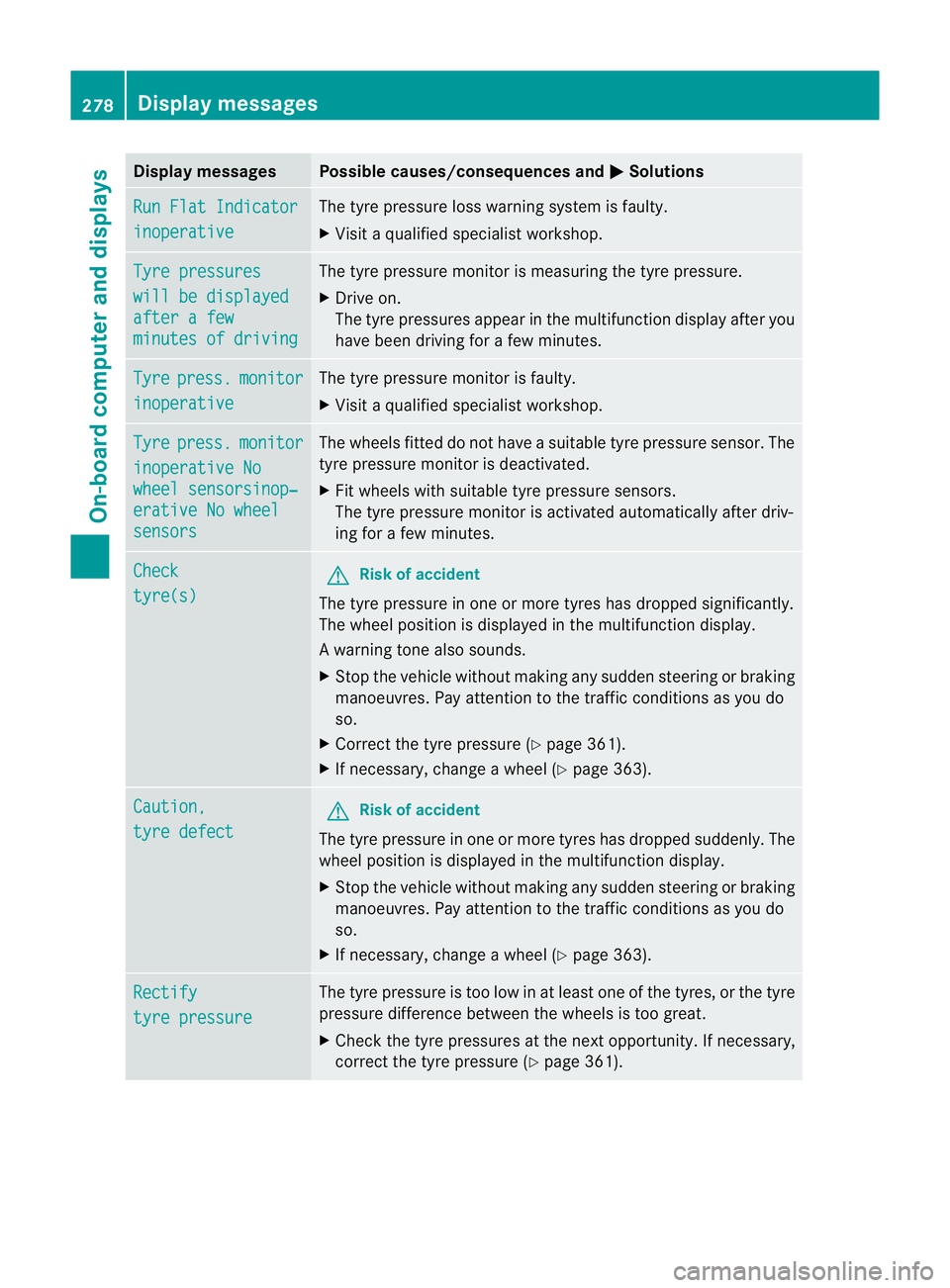
Displa
ymessages Possible causes/consequences and
M Solutions
Ru
nF latI ndicator inoperative Th
et yrep ressur eloss war ningsystem is faulty.
X Visit aq ualified specialist workshop. Ty
re pressures wil
lbed isplayed after
afew minute
sofd riving Th
et yrep ressur emonitor is mea suring thetyrep ressure.
X Drive on.
Th et yrep ressures appear in the multifunction displa yafter you
have been driving for afew minutes. Tyre press. monitor
inoperative The tyr
epres sure monito risfaulty.
X Visi taq ualifieds pecialist workshop. Tyre press. monitor
inoperativ
eNo wheel sensorsinop‐
erativ
eNow heel sensors Th
ew heels fit teddon ot have asuitable tyre pressure sensor. The
tyre pressure monitor is deactivated.
X Fit wheel swith suitable tyre pressure sensors.
The tyre pressure monitor is activated automatically after driv-
ing for afew minutes. Check
tyre(s) G
Risk of accident
The tyr epressure in one or more tyre shas dropped significantly.
The wheel position is displayed in the multifunction display.
Aw arning ton ealso sounds.
X Stop th evehicle without making any sudde nsteering or braking
mano euvres.P ay attention to the traffic conditions as you do
so.
X Correc tthe tyr epressure (Y page 361).
X If necessary, change awheel (Y page 363). Caution,
tyre defect G
Risk of accident
The tyr epressure in one or more tyre shas dropped suddenly. The
wheel position is displayed in the multifunc tion display.
X Stop the vehicle withou tmaking any sudde nsteering or braking
manoeuvres. Pay attention to the traffic conditions as you do
so.
X If necessary, change awheel (Y page 363). Rectify
tyre pressure The tyr
epressure is to olow in at least one of the tyres, or the tyre
pressure differen cebetween the wheels is too great.
X Check the tyr epressures at th enext opportunity. If necessary,
correc tthe tyr epressure (Y page 361). 278
Display messagesOn-boar
dcompu tera nd displays
Page 282 of 389
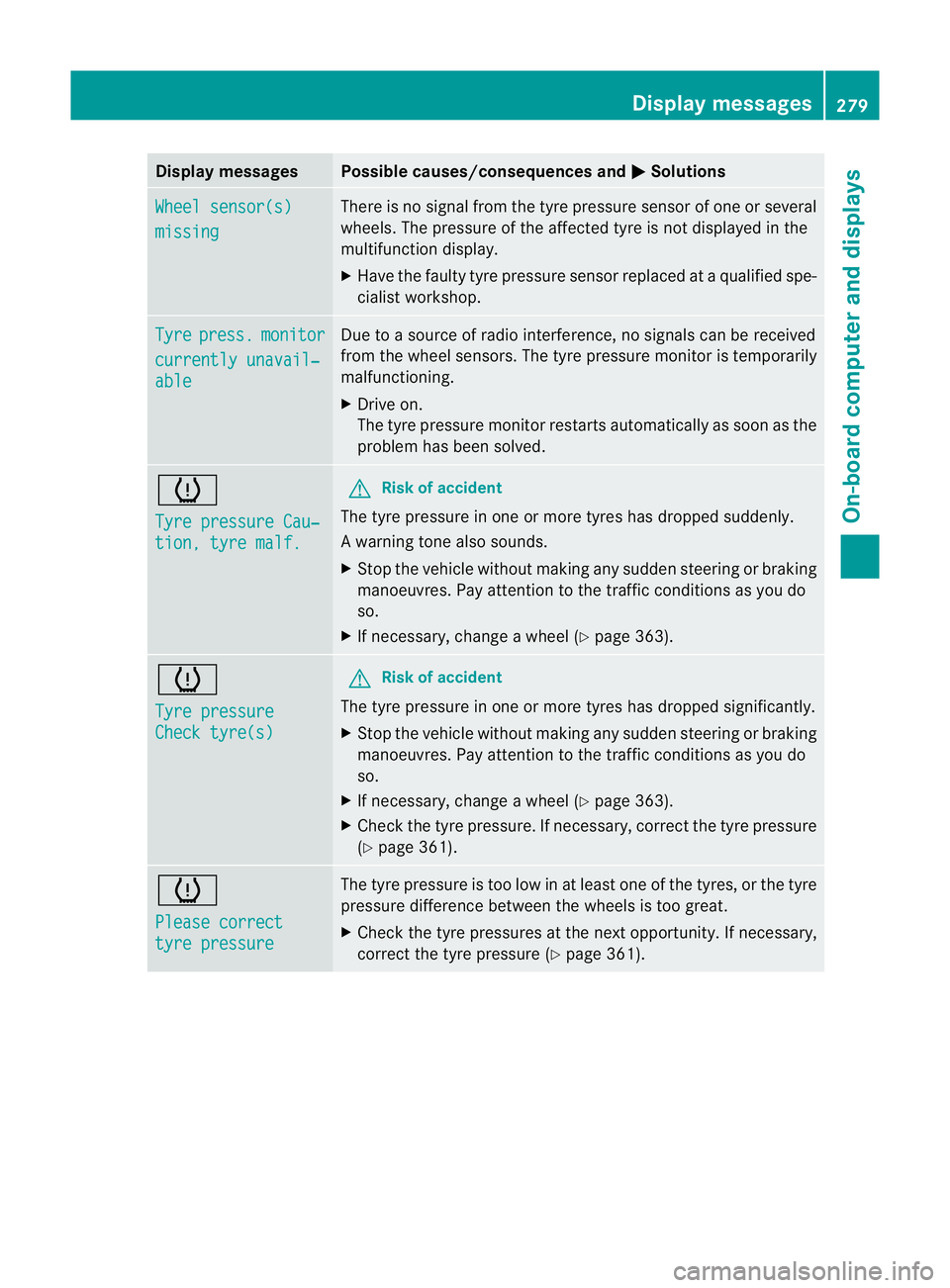
Displa
ymessages Possible causes/consequences and
M Solutions
Wh
eels ensor(s) missing There is no signal from the tyre pressu
resensor of on eorseveral
wheels. The pressur eofthe affected tyre is notdispla yed in the
multifunction display.
X Have the faulty tyre pressure sensor replaced at aqualified spe-
cialist workshop. Tyre press. monitor
currentl
yunavail‐ able Due to
asour ceofrad io interference, no signals can be received
from the wheel sensors. The tyr epressure monito rist emporarily
malfunctioning.
X Drive on.
The tyr epressure monito rrestarts automatically as soon as the
problem has been solved. h
Tyre pressure Cau‐
tion
,tyre malf. G
Ris
kofa ccident
The tyre pressure in one or more tyres has dropped suddenly.
Aw arning ton ealso sounds.
X Stop th evehicle without making any sudde nsteering or braking
mano euvres.P ay attention to the traffic conditions as you do
so.
X If necessary ,change awheel (Y page 363). h
Tyre pressure
Chec
ktyre(s) G
Ris
kofa ccident
The tyre pressure in one or more tyres has dropped significantly.
X Stop the vehicle without making any sudde nsteering or braking
manoeuvres. Pay attention to the traffic conditions as you do
so.
X If necessary, change awheel (Y page 363).
X Chec kthe tyr epressure. If necessary, corre ct thetyre pressure
(Y page 361). h
Please correct
tyr
epressure Th
et yre pressure is too low in at leas tone of the tyres, or the tyre
pressure difference between the wheels is too great.
X Check the tyre pressures at the next opportunity. If necessary,
correct the tyre pressure (Y page361). Display messages
279On-boardcomputer anddisplays Z
Page 296 of 389
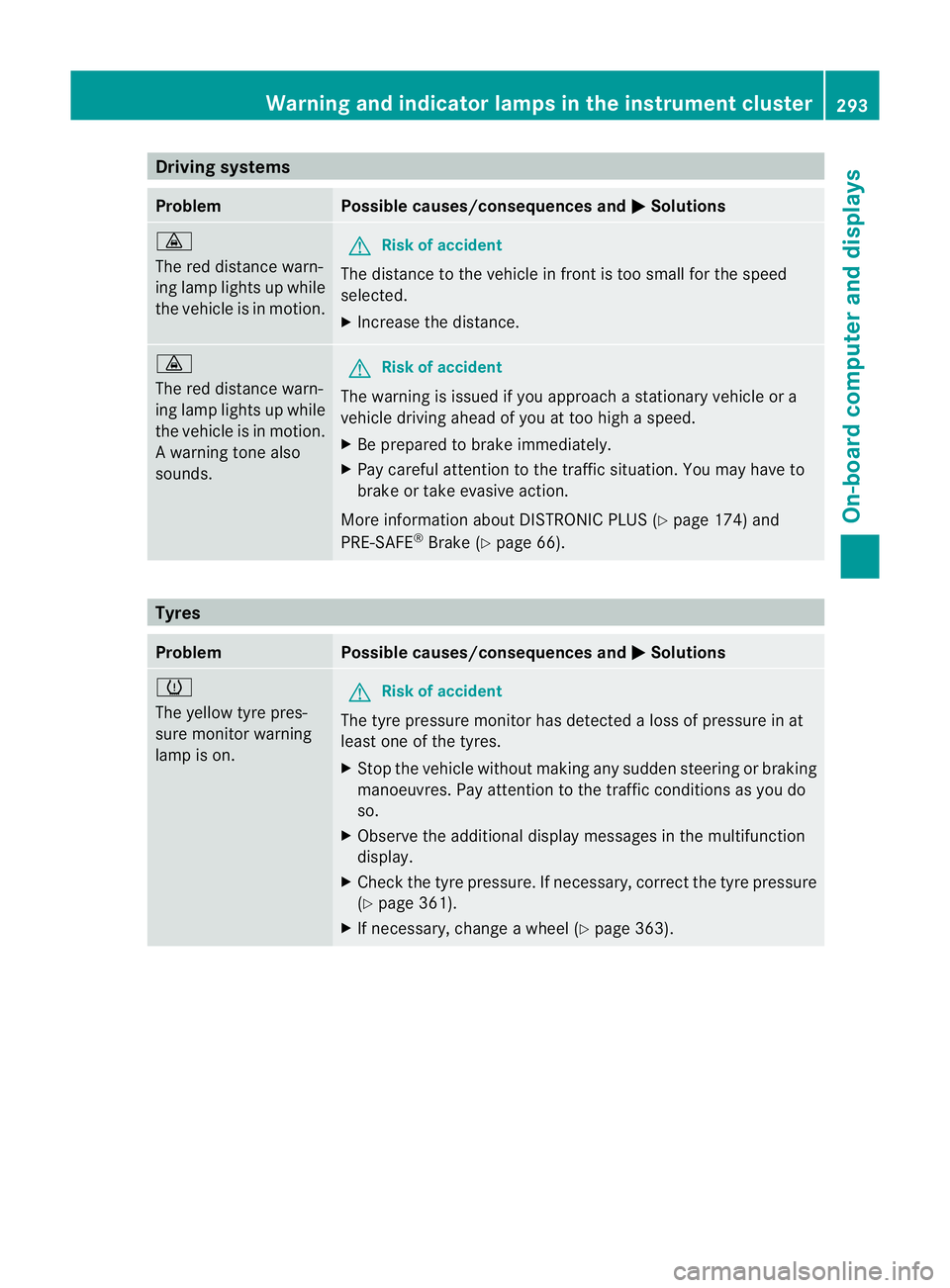
Driving systems
Problem Possible causes/consequences and
M Solutions
·
The red distanc
ewarn-
in gl amp lights up while
th ev ehicle is in motion. G
Risk of acc
ident
The distanc etothe vehicle in frontistoo smal lfor the speed
selected.
X Increase the distance. ·
The red distance warn-
ing lam
plights up while
the vehicle is in motion.
Aw arning ton ealso
sounds. G
Ris
kofa ccident
The warning is issued if you approach astationar yvehicle or a
vehicle driving ahead of you at to ohigh aspeed.
X Be prepared to brak eimmediately.
X Pa yc areful attention to the traffic situation. You may have to
brak eort akee vasive action.
Mo reinformatio nabout DISTRONI CPLUS(Ypage 174) and
PRE-SAFE ®
Brake (Y page 66). Tyres
Problem Possible causes/consequences and
M Solutions
h
The yellow tyr
epres-
sure monitor warning
lamp is on. G
Risk of accident
Th et yrep ressure monitor has detected aloss of pressure in at
least on eofthe tyres.
X Stop the vehicl ewithout making any sudden steering or braki ng
manoeuvres .Pay attention to the traffic conditions as you do
so.
X Observ ethe additiona ldisplay messages in the multifunction
display.
X Check the tyre pressure. If necessary, correc tthe tyr epressure
(Y page 361).
X If necessary, change awheel (Y page 363). Wa
rning and indicator lamp sinthe instrument cluster
293On-boardcomputerand disp lays Z