tow MERCEDES-BENZ M-CLASS SUV 2011 Owner's Manual
[x] Cancel search | Manufacturer: MERCEDES-BENZ, Model Year: 2011, Model line: M-CLASS SUV, Model: MERCEDES-BENZ M-CLASS SUV 2011Pages: 389, PDF Size: 9.22 MB
Page 170 of 389
safety reasons, get out of the vehicle first
and survey the off-road route.
R chec kthe depth of water before fording
river sand streams.
R loo kout for obstacle ssuch as rocks, holes,
tree stumps and furrows.
R take care when turning on an uphil lor
downhill slope and when turning at sharp
angles. The vehicle could otherwise tip
over.
R always keep the side windows and the pan-
oram asliding sunroof closed during the
journey.
R do not stray from marked routes or paths.
i Information abou tretrofitting special all-
ter rain tyres is available from any
Mercedes-Benz Service Centre. H
Environmental note
Protection of the environmen tisofprimary
importance .Trea tnature with respect.
Observe all prohibiting signs.
Checklist before drivin goff-road X
Engine oi llevel: checkthe engin eoil and
top it up if necessary.
When drivin gonsteep gradients, the oil
level must be sufficiently hig htoensure a
correct oil supply in the vehicle.
X AdBlue ®
tank (BlueTEC vehicl es):check
the fluid leve land, if necessary, refill to the
maximum (13 l) (Y page157).
X Tyre-chang etool kit: check that the jack
is working and make sure you have the
wheelbrace, arobust tow cabl eand afold-
ing spade in the vehicle.
X Wheels and tyres: checkthe tyr etread
depth and tyre pressure.
X Check for damag eand remove any foreign
objects, e.g. small stones, from the
wheels/tyres.
X Repl acea ny missing valve caps. X
Repl aced ented or damaged wheels.
X Wheels: dented or bent wheels can lead to
al oss of tyr epressure and damag etot he
tyr eb ead. Before driving off-road, check
the wheels and replace them if necessary.
Checklist after driving off-road !
If you detect damage to the vehicle after
driving off-road, have the vehicle checked
immediately at aqualified specialist work-
shop.
Driving over rough terrain places greater
demands on your vehicle than driving on nor-
mal roads. After driving off-road, check the
vehicle. This allow syou to detec tdamage
promptly and reduce the risk of an accident
to yourself and other road users.
X Vehicles with the ON&OFFROAD pack-
age: activate the on-road program
(Y page 222).
X Vehicles without the ON&OFFROAD
package: deactivate the on-road program
(Y page 222).
X Deactivate the LOW RANGE off-road gear
(Y page 223).
X Deactivate DSR (Y page 220).
X Lower the vehicle level again to alevel suit-
able to the road conditions, e.g. to the high-
way/high-speed level.
X Clean the headlamps and rear lights and
check for damage.
X Clean the front and rear licence plates.
X Clean the wheels/tyres with awater jet and
remove any foreign objects.
X Clea nthe wheels, wheel arches and the
vehicle underside with awater jet; check
for any foreign objects and damage.
X Check whethe rtwigs or other parts of
plants have become trapped. These
increase the risk of fire and can damage
fuel pipes, brake hose sorthe rubber bel-
lows of the axl ejoint sand propeller shafts.
X After the trip, examine without fail the
entire undercarriage, wheels ,tyres, brakes, Driving tips
167Drivingand park ing Z
Page 173 of 389
erwise, the vehicle could slip sideways, tip
and over turn.
R Before tackling steep downhill gradients,
select shift range 1.
R Activat eDSR. If this is not suffici ent, brake
gently. Whe ndoing so, make sure that the
vehicle is facing in the direction of the line
of fall.
R Check that the brakes ar eworking normally
after along downhil lstretch.
i Off-road ABS is activated when the off-
road program or LOW RANGE off-road gear
is selected.
At speeds belo w30km/h, th efront wheels
lock cyclicall yduring braking. The digging-
in effect achieved in the process reduces
the stopping distance when driving off-
road. The steerability of the vehicle is con-
siderably reduced if the wheel slock. Driving systems
Cruise control
Important safety notes G
WARNING
Do not change down for additiona lengine
braking on aslippery road surface. This could
cause the drive wheels to lose their grip and
the vehicle could skid. G
WARNING
Cruise control cannot take account of road
and traffic conditions.
Always pay attention to traffic conditions
even when cruise control is activated.
Cruise control is only an aid designed to assist
driving. You are responsible for the vehicle's
speed and for braking in good time. G
WARNING
Do not use cruise control
R in traffic conditions that do not allow you to
drive at aconstant speed (e.g. heavy traffic or winding roads). You may otherwise
cause an accident.
R on slipper yroads. The driv ewheels may
lose their grip when brakin goraccelerating
and the vehicle may skid.
R whe nthere is low visibility, e.g. due to fog,
heav yrain or snow.
General notes Cruise control maintains
aconstant road
speed for you. It brakes automatically in order
to avoid exceeding the set speed. On long and
steep downhil lgradients ,especially if the
vehicle is laden or towing atrailer, yo umust
select shift range 1,2or 3in good time. By
doing so, you will make use of the braking
effect of the engine. This relieves the load on
the brake system and prevent sthe brakes
from overheating and wearing too quickly.
Use cruise con trol only if roa dand traffic con-
ditions make it appropriate to maintain a
steady speed for aprolonged period. Yo ucan
store any road spee dabove 30 km/h.
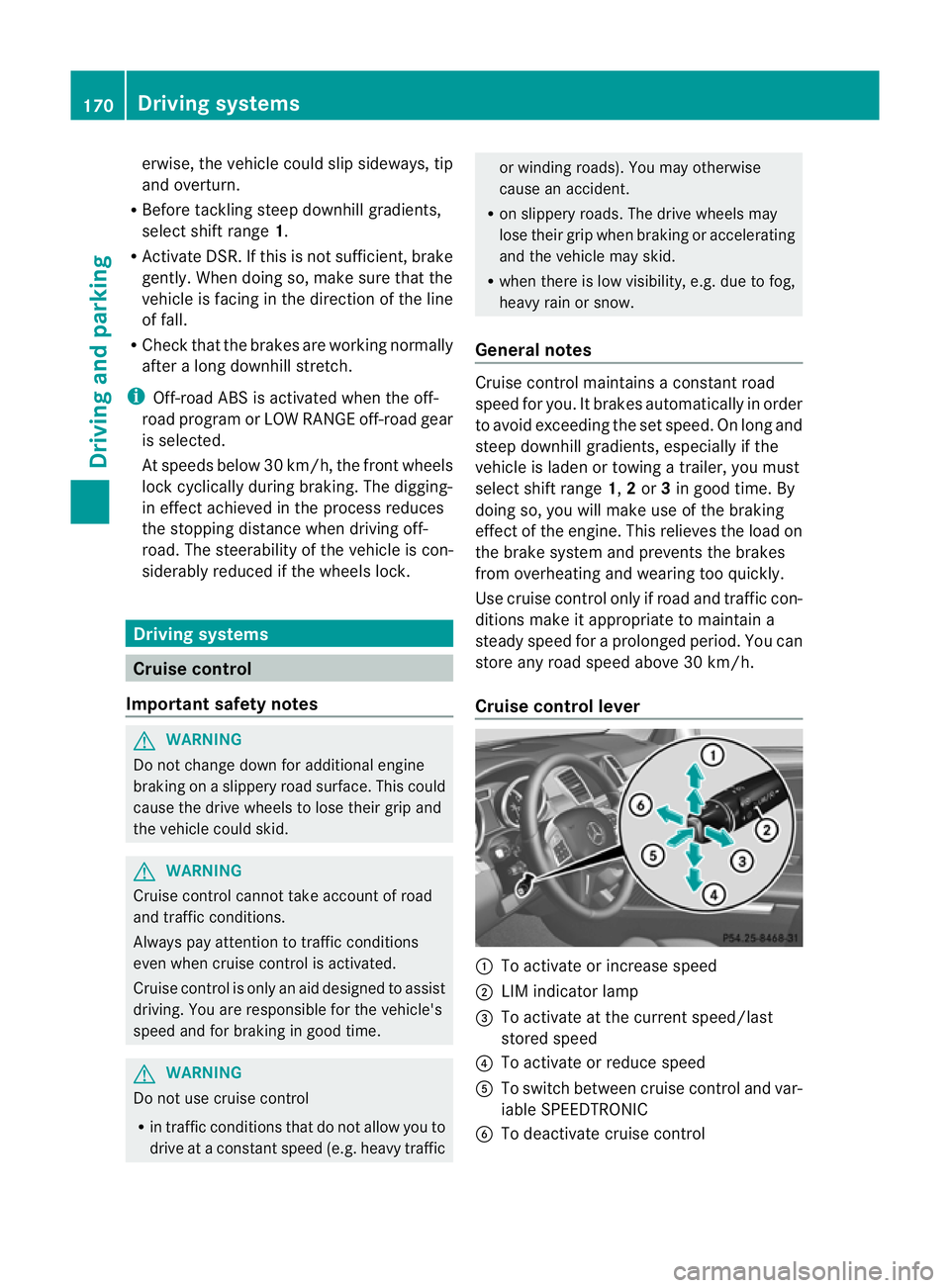
Cruise contro llever :
To activate or increase speed
; LIMi ndicato rlamp
= To activate at the current speed/last
stored speed
? To activate or reduce speed
A To switch between cruise control and var-
iable SPEEDTRONIC
B To deactivate cruise control 170
Driving systemsDriving and parking
Page 174 of 389
You can operat
ecruise control and variable
SPEEDTRONIC with th ecruise control lever.
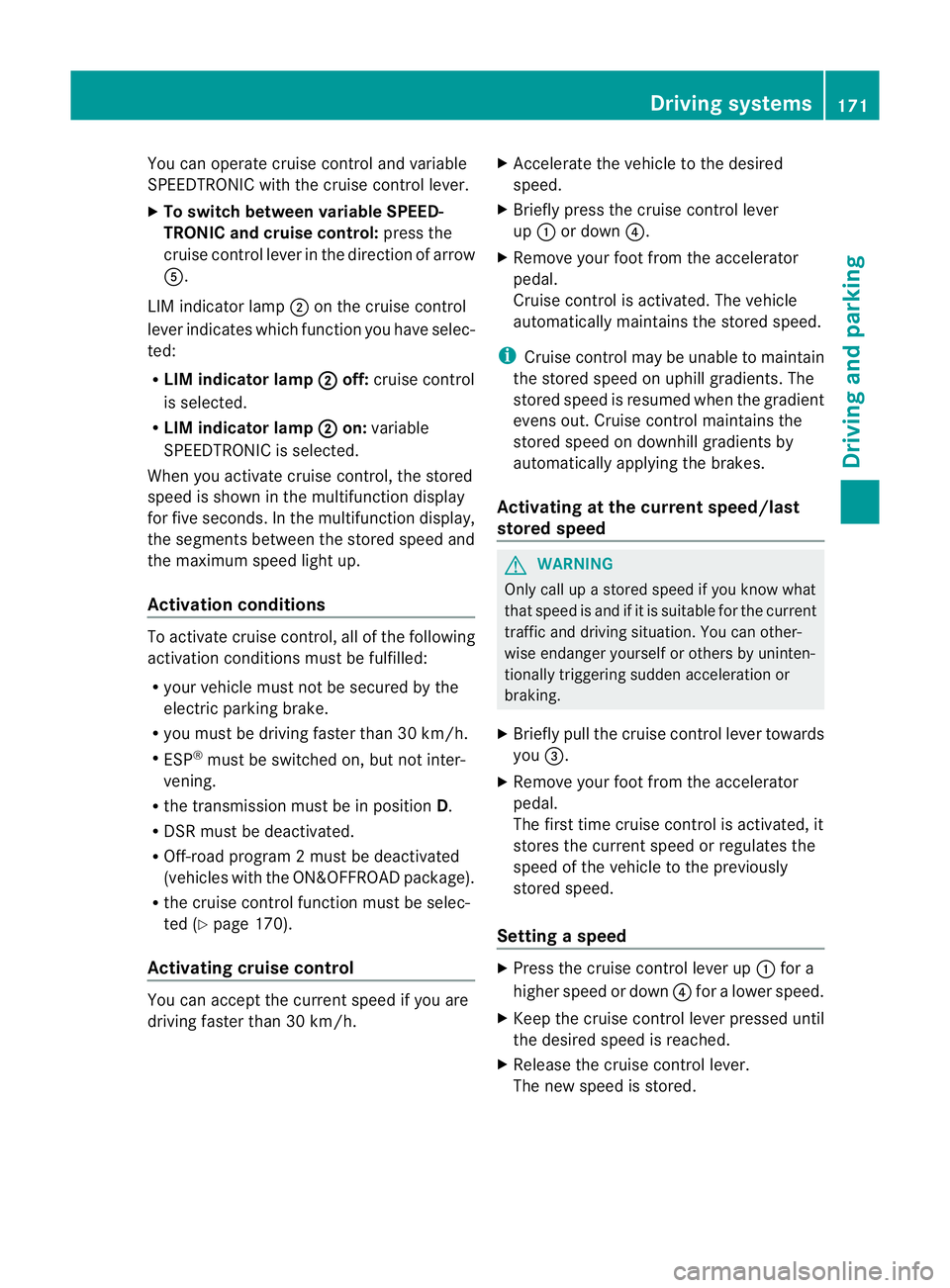
X To switc hbetween variable SPEED-
TRONIC and cruise control: press the
cruis econtrol leve rinthe direction of arrow
A.
LI Mi ndicator lamp ;on the cruise control
lever indicates which function you have selec-
ted:
R LIM indic ator lamp ; off:
cruis econtrol
is selected.
R LIM indic ator lamp ; on:
variable
SPEEDTRONIC is selected.
When you activate cruis econtrol, the stored
speed is shown in the multifunction display
for fiv eseconds .Inthe multifunction display,
the segments between the stored speed and
the maximum speed light up.
Activation conditions To activate cruise con
trol, all of the following
activation condition smust be fulfilled:
R your vehicle must not be secured by the
electric parking brake.
R you must be driving faster than 30 km/h.
R ESP ®
must be switched on, but not inter-
vening.
R the transmission must be in position D.
R DSR must be deactivated.
R Off-road program 2must be deactivated
(vehicles with the ON&OFFROAD package).
R the cruise control function must be selec-
ted (Y page 170).
Activating cruise control You can accept the current spee
difyou are
drivin gfaster than 30 km/h. X
Accelerate the vehicle to the desired
speed.
X Briefly press the cruise control lever
up : or down ?.
X Remove your foot from the accelerator
pedal.
Cruise control is activated. The vehicle
automatically maintains the stored speed.
i Cruise control may be unable to maintain
the stored spee donuphill gradients. The
stored speed is resumed when the gradient
evens out. Cruise control maintain sthe
stored speed on downhill gradient sby
automatically applying the brakes.
Activating at the current speed/last
stored speed G
WARNING
Only call up astored speed if you know what
that speed is and if it is suitable for the current
traffic and driving situation. You can other-
wise endanger yoursel forothers by uninten-
tionall ytriggering sudden acceleration or
braking.
X Briefly pull th ecruis econtrol leve rtowards
you =.
X Remove your foot from the accelerator
pedal.
The first tim ecruis econtrol is activated, it
stores the curren tspeed or regulates the
speed of the vehicle to the previously
stored speed.
Setting aspeed X
Press the cruise control lever up :for a
high er spee dordown?for alower speed.
X Keep the cruise contr ol leverpresse duntil
the desired speed is reached.
X Release the cruise contro llever.
The new speed is stored. Driving systems
171Drivingand parking Z
Page 176 of 389
vehicl
eisladen or towing atrailer, yo umust
select shift range 1,2or 3in good time. By
doing so, you wil lmake use of the braking
effect of the engine. This relieves the loa don
the brake syste mand prevents the brakes
from overheating and wearing too quickly. If
you need additiona lbraking, depress the
brake peda lrepeatedly rather than continu-
ously.
You can set avariable or permanent limit
speed:
R variable for speedlimits, e.g. in built-up
areas
R permanent for long-term spee drestric-
tions, e.g. when driv ingw ith winter tyres
fitted (Y page174)
i Thes pee dindicated in the spe edometer
ma ydiffer slightly from the limit speed
sto red.
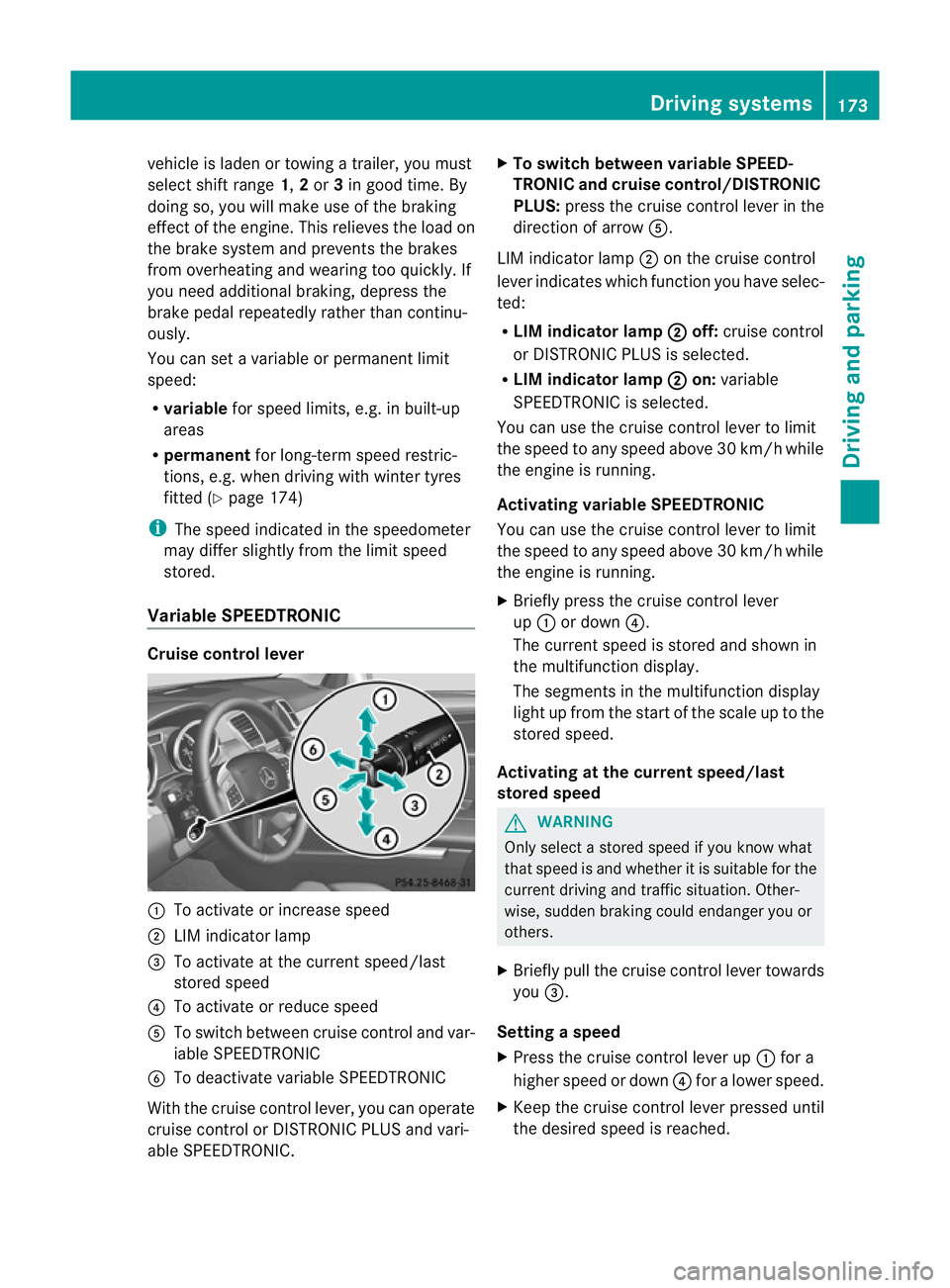
Variable SPEEDTRONIC Cruise control lever
:
To acti vate or increase speed
; LIM indicator lamp
= To activate at the curren tspeed/last
stored speed
? To acti vate or reduce speed
A To switch between cruise control and var-
iable SPEEDTRONIC
B To deactivate variable SPEEDTRONIC
With the cruise control lever, you can operate
cruise control or DISTRONIC PLUS and vari-
able SPEEDTRONIC. X
To switch between variable SPEED-
TRONIC and cruise control/DISTRONIC
PLUS: press the cruise control lever in the
direction of arrow A.
LIM indicator lamp ;on the cruise control
lever indicates which function you have selec-
ted:
R LIM indicator lamp ; off:
cruise control
or DISTRONIC PLUS is selected.
R LIM indicator lamp ; on:
variable
SPEEDTRONIC is selected.
You can use the cruise control lever to limit
the speed to any speed above 30 km/ hwhile
the engin eisrunning.
Activating variable SPEEDTRONIC
You can use the cruise control lever to limit
the spee dtoany speed above 30 km/h while
the engine is running.
X Briefly pres sthe cruise con trollever
up : or down ?.
The curren tspeed is stored and shown in
the multifunction display.
The segment sinthe multifunction display
light up from the star tofthe scal euptot he
stored speed.
Activating at th ecurren tspeed/last
store dspeed G
WARNING
Only select astored speed if you know what
that speed is and whether it is suitable for the
current driving and traffic situation. Other-
wise ,sudden braking could endanger you or
others.
X Briefly pull the cruise control lever towards
you =.
Setting aspeed
X Press the cruise contro llev er up :for a
higher speed or down ?for alower speed.
X Keep th ecruis econtr ol leve rpresse duntil
the desired speed is reached. Drivin
gsystems
173Drivingand park ing Z
Page 178 of 389
G
WARNING
DISTRONIC PLUS canno ttake account of road
and traffic conditions. If DISTRONI Cdoes not
recognise or no longer recognises the vehicle
in front, do not activate DISTRONIC or, if it is
alr eady active, deactivate it. This is especially
the case:
R befor ecorners
R on filter lanes
R when changing to alane with faster moving
traffic
R in comple xdriving situations or where lanes
are diverte d,e.g. at roadworks on amotor-
way
DISTRONIC PLU Sotherwise maintains the
current spe ed setbyyou or accelerates up to
the set speed.
DISTRONIC PLU Scannot take account of
weather conditions. Deactivate, or do not
activate, DISTRONI CPLUS:
R if th eroads are slippery, snow-covered or
icy .The wheels coul dlose their grip when
brakin goraccelerating .The vehicle could
star ttos kid.
R if the sensors are dirty or there is poo rvis-
ibility, e.g. due to snow, rain or fog. Dis-
tance control may be impaired.
Always pay attention to traffic conditions
even when DISTRONIC PLU Sisactivate d.
Otherwise, you ma yfail to recognise dangers
in time, caus eanaccident and injure yourself
and others. G
WARNING
DISTRONIC PLUS brake syourvehicle up to a
maximu mof4m /s2
depending on its speed.
This corresponds to approximately 40% of
your vehicle's maximum braking power. You
must als oapply the brakes yourself if this
braking power is not sufficient.
If DISTRONI CPLUS detects arisk of collision
with avehicle in front, an intermit tent warning
tone sounds. In addition, the ·distance
warning lamp in the instrument cluste rlights
up. Brak etoavoidac ollision. G
WAR
NING
The vehicle can be braked when DISTRONIC
PLUS is activated. For this reason, deactivate
DISTRONIC PLUS if the vehicle is to be set in
motion by othe rmeans (e.g. in acar wash or
by towing).
The radar senso rsystem is automatically
deactivated near radio teles cope facilities
(Y page 38 0).
If you want DISTRONIC PLUS to assist you,
the radar sensor syste mmust be activated
(Y page 249 )and operational.
General notes DISTRONIC PLUS regulates the speed and
automati cally helps you maintain the dis-
tanc etot he vehicle detected in front. It
brakes automatically in orde rtoavoid
exceedi ngthe set speed.
On long and stee pdownhil lgradients, espe-
ciall yifthe vehicle is laden or towing atrailer,
yo um ust select shift range 1,2or 3in good
time. By doing so, you will make use of the
braking effec tofthe engine. This relieves the
load on the brake system and prevents the
brakes from overheating and wearing too
quickly.
If DI STRONIC PLUS detects aslower-moving
vehicle in front ,your vehicle is braked in order
to maintain the preset distance to the vehicle
in front.
If ther eisnov ehicle in front ,DISTRONIC
PLUS operate sinthe sam eway as cruise
control in the spee drange between
30 km/h and 200 km/h. If avehicle is driving
in fron tofyou, DI STRONIC operates in the
speed range betwee n0km/h and
200 km/h.
Do not us eDISTRONIC PLUS on roa dswith
steep gradients. Driving systems
175Drivingand parking Z
Page 179 of 389
Cruise control lever
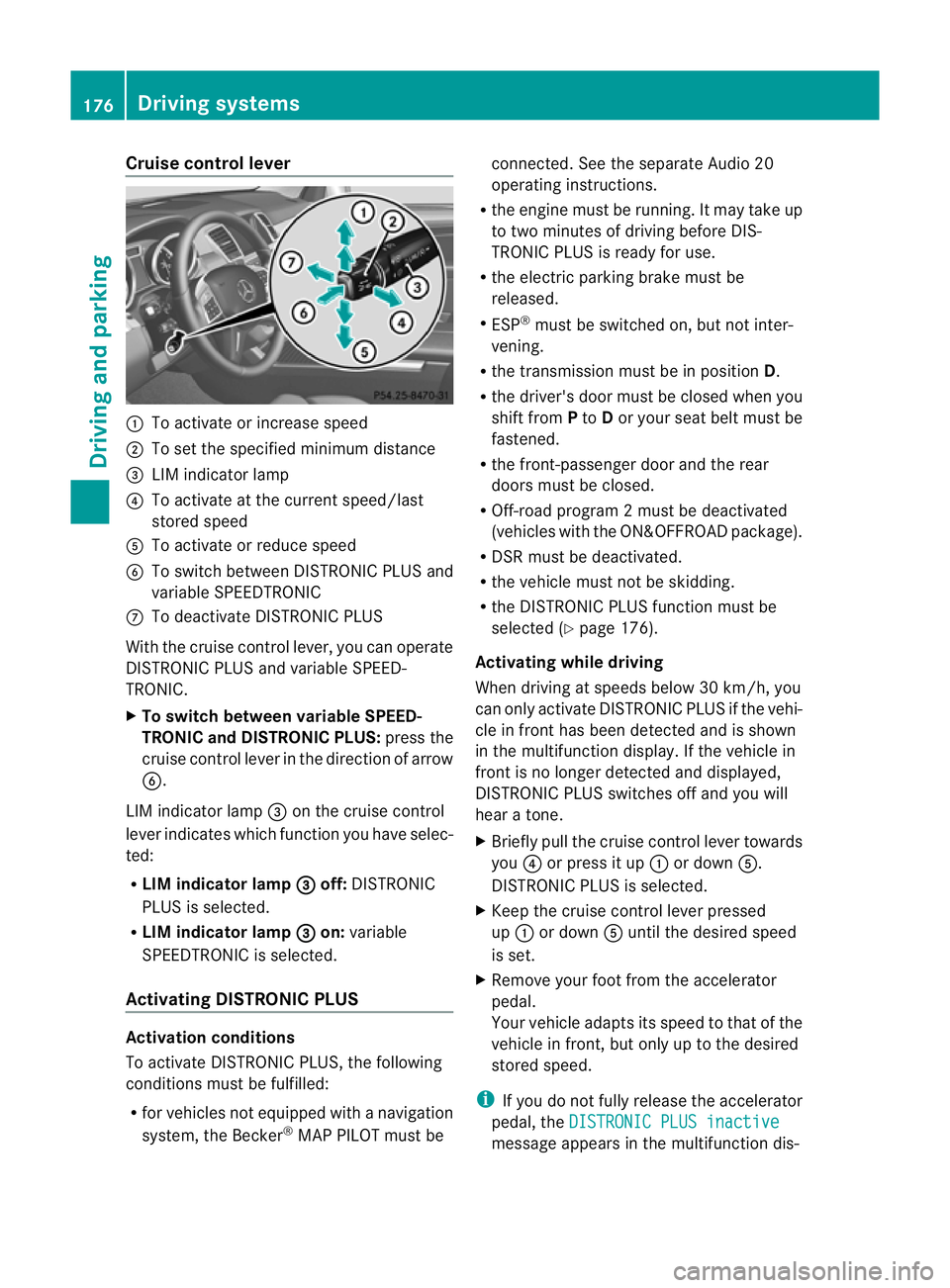
:
To activat eorincrease speed
; To set the spe cified minimum distance
= LIM indica torlamp
? To activat eatthe current speed/la st
stored speed
A To activate or reduc espeed
B To switc hbetween DI STRONIC PLUS and
variable SPEEDTRONIC
C To deactivate DISTRONIC PLUS
With the cruise contro llever ,you can operate
DI ST RONIC PLUS and variable SPEED-
TRONIC.
X To switch between variable SPEED-
TRONIC and DISTRONIC PLUS: press the
cruise contro llever in the direc tion of arrow
B.
LI Mi ndicator lamp =on the cruise control
lever indicates which function you have selec-
ted:
R LIM indicator lamp = off:
DISTRONIC
PLUS is selected.
R LIM indicator lamp = on:
variable
SPEEDTRONIC is selected.
Activating DISTRO NICP LUS Activation conditions
To activate DISTRONIC PLU S,the following
conditions must be fulfilled:
R for vehicle snot equipped with anavigation
system, the Becker ®
MAP PILOT must be connected. See the separate Audio 20
operatin
ginstructions.
R the engi ne must be running. It ma ytakeup
to two minutes of driving before DIS-
TRONIC PLUS is ready for use.
R the electric parking brake must be
released.
R ESP ®
must be switched on, but not inter-
vening.
R the transmission must be in position D.
R the driver' sdoor must be closed when you
shift from Pto Dor your seat belt must be
fastened.
R the front-passenger door and the rear
doors must be closed.
R Off -road program 2must be deactivated
(vehicles with the ON&OFFROA Dpackage).
R DS Rm ust be deactivated.
R the vehicle must not be skidding.
R the DI STRONIC PLUS function must be
selected (Y page 176).
Activating while driving
Whe ndriving at speeds belo w30km/h, you
can onl yactivate DISTRONIC PLUS if the vehi-
cle in front has been detected and is shown
in the mul tifunctio ndisplay. If th evehicle in
fron tisnol onger detected and displayed,
DISTRONIC PLU Sswitches off and you will
hear atone.
X Briefl ypull the cruise control lever towards
you ?or press it up :or down A.
DISTRONIC PLUS is selected.
X Keep the cruise control lever pressed
up : or down Auntil the desired speed
is set.
X Remove your foot from the accelerator
pedal.
Your vehicle adapts its spee dtothat of the
vehicle in front ,but only up to the desired
stored speed.
i If you do not fully release the accelerator
pedal ,the DISTRONI CPLUS inactive message appe
arsint he multifunction dis- 176
Driving systemsDriving and parking
Page 180 of 389
play. The set distance to
aslower-moving
vehicle in fron twill then not be maintained.
You will be drivin gatthe speed you deter-
mine by the position of the accelerator
pedal.
Activating when driving towar dsasta-
tionary vehicle
If the vehicl einfront of yo uisstationary, you
can onl yactivate DISTRONI CPLUSo nce your
vehicl eisstationary as well.
X Briefl ypullt he cruis econtr ollever towards
you ?or press it up :or down A.
DISTRONIC PLUS is selected.
i DISTRO NIC PLUS can only be activate dat
under 30 km/h if avehicle in front has been
detected. Therefore, the DISTRONIC PLUS
distance display in the instrumen tcluster
should be activated (Y page 245).
X Keep the cruise control lever pressed
up : or down Auntil the desired speed
is set.
i You can use the cruise control lever to set
the stored speed and the control on the
cruise control lever to set the specified
minimum distance (Y page 180).
Activating at the current speed/last
stored speed G
WARNING
Only call up astored speed if you know what
that speed is and if it is suitable for the current
traffic and driving situation. You can other-
wise endanger yoursel forothers by uninten-
tionally triggering sudden acce leratio nor
braking.
X Briefly pull the cruise contro llever towards
you ?.
X Remov eyour foot from the accelerator
pedal.
DI ST RONIC PLUS is activated. The first
time it is activated, the curren tspeed is
stored. Otherwise, it sets the vehicle cruise
speed to the previously stored value. Displa
ywhen DISTRO NICP LUS is activa-
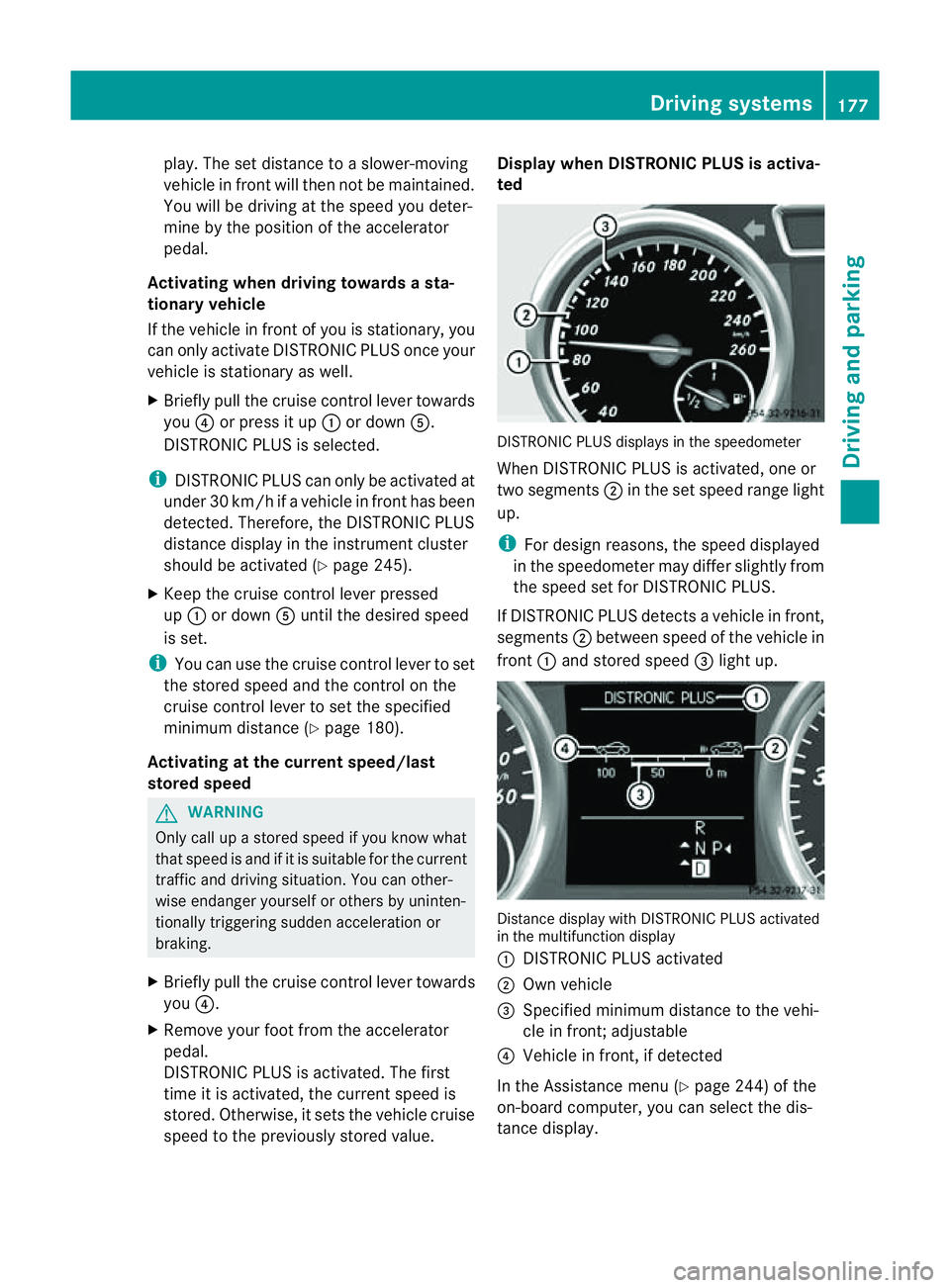
ted DISTRONIC PLU
Sdisplays in the speedometer
When DISTRONIC PLUS is activated, one or
two segments ;in the set speed range light
up.
i For desig nreasons ,the speed displayed
in the speedometer ma ydiffer slightly from
the speed set for DISTRONIC PLU S.
If DISTRONIC PLUS dete ctsav ehicle in front,
segments ;between speed of the vehicle in
front :and stored speed =light up. Distanc
edisplay with DISTRONIC PLUS activated
in the multifunction display
: DISTRONIC PLUS activated
; Own vehicle
= Specified minimu mdistanc etothe vehi-
cle in front; adjustable
? Vehicle in front, if detected
In the Assistanc emenu (Y page 24 4)of the
on-boar dcompu ter,you can select the dis-
tanc edisplay. Drivin
gsystems
177Drivingand park ing Z
Page 181 of 389
X
Select the Distance display function
using the on-b oard computer
(Y page 245).
i Youw ills ee the stored speed for about
five seconds when you act ivate DISTRONIC
PLUS.
Drivin gwithD ISTRONI CPLUS Pullin
gaway
X If the vehicle in fron tpullsa way: remove
you rfoot from the brake pedal.
X Briefl ypull the cruise control lever
(Y page 176 )towards you.
or
X Accelerate briefly.
Your vehicle pulls away and adapt sits
speed to that of the vehicle in front.
Driving G
WARNING
If you depres sthe brake, DI STRONIC PLUS is
deactivated unless your vehicle is stationary.
DISTRONIC PLUS then no longe rbrake syour
vehicle. In such cases, control the distance
from vehicles travelling in front with the brake
alone. You coul dotherwis ecause an accident
and thereby injure yourself and others. The
driver remains fully responsible for the vehi-
cle's distance from other vehicles, the speed
being driven and for braking in good time.
If there is no vehicle in front ,DISTRONIC
PLUS operate sinthe sam eway as cruise
control.
If DISTRONIC PLUS detect sthat the vehicle
in front has slowed down, it brakes your vehi-
cle. In this way ,the distanc eyou have selec-
ted is maintained.
If DI STRONIC PLUS detects afaster-moving
vehicle in front ,itaccelerates your vehicle,
but only up to the speed you have stored. Changing lanes
If you wis
htochange to the passin glane (in
countries where traffic drives on the right, the
passing lane is the left-hand lane), DIS-
TRONIC PLUS supports you if:
R you are driving faster than 60 km/h.
R DISTRONIC PLUS is maintainin gthe dis-
tan cetoav ehicle in front.
R you switc honthe appropriate tur nsignals.
R DISTRONIC PLU Sdoes not detec tadanger
of collision.
If these conditions are met, your vehicle is
accelerated. Acceleration will be interrupted
if changin glanes takes too long or if the dis-
tanc ebetween your vehicle and the vehicle in
front becomes too small. G
WARNING
DI ST RONIC PLUS and Active Blind Spot Assist
are only an aid designed to assist driving.
The ydon ot relieve you of the responsibility
of payin gattention. The driver remains fully
responsibl efor the vehicle' sdistance from
other vehicles, the vehicle's speed and for
braking in good time. Always pay attention to
traffic conditions and your surroundings. Oth-
erwise, you may fail to recognise dangers in
time, cause an accident and injur eyourself
and others.
Vehicles with COMAND Online
i The following function is not operational
in all coun tries.
DI ST RONIC PLUS uses additional information
from your navigation syste msothat it can
adapt to cer tain traffic situations. This is the
case if, while following avehicle, DI STRONIC
PLUS is active and you:
R approach or drive around aroundabout
R approach aTjunction
R turn off at amotorway exit
Even if the vehicle in front leaves the detec-
tion range, DI STRONIC PLUS temporarily
maintains the current driving speed and does 178
Driving systemsDrivin
gand parking
Page 184 of 389
or
X
Briefl ypres sthe cruise con trol leve rinthe
direction of arrow =.
Variable SPE EDTRONIC is selected. LIM
indicator lamp ;in the cruise control lever
lights up.
When you deactivate DI STRONIC PLUS, the
DISTRONIC PLU Soff message is show
nin
the multifunction display for approximately
five seconds.
i The last speed stored remains stored until
you switch off the engine.
i DISTRONIC PLUS is not deactivated if you
depress the accelerator pedal. If you accel-
erate to overtake, DISTRONIC PLUS
adjusts the vehicle's speed to the last
speed stored after you have finished over-
taking.
DISTRONIC PLUS is automatically deactiva-
ted if:
R you engag ethe electric parkin gbrake or if
th ev ehicle is automatically secured with
the electric parking brake.
R you are driving slower than 25 km /hand
there is no vehicle in front ,orifthe vehicle
in front is no longer detec ted.
R ESP ®
intervenes or if you deactivat eESP®
.
R the transmission is in the P,Ror Nposition.
R the vehicle is near aradio telescop efacility
(Y page 380).
R you switch off the radar senso rsystem
(Y page 249).
R you pull the cruise control lever towards
you in order to pull away and the front-
passenger doo rorone of the rear doors is
open.
R you activate DSR.
R you activate off-road program 2onvehicles
with the ON&OFFROA Dpackage.
R the vehicle has skidded.
If DISTRONIC PLUS is deactivated, you will
hear awarning tone. The DISTRONICP LUS off message is show
ninthe multifunction
displa yfor approximately fiv eseconds.
In the Assistanc emenu (Y page 24 4)of the
on-boar dcompu ter,you can select the dis-
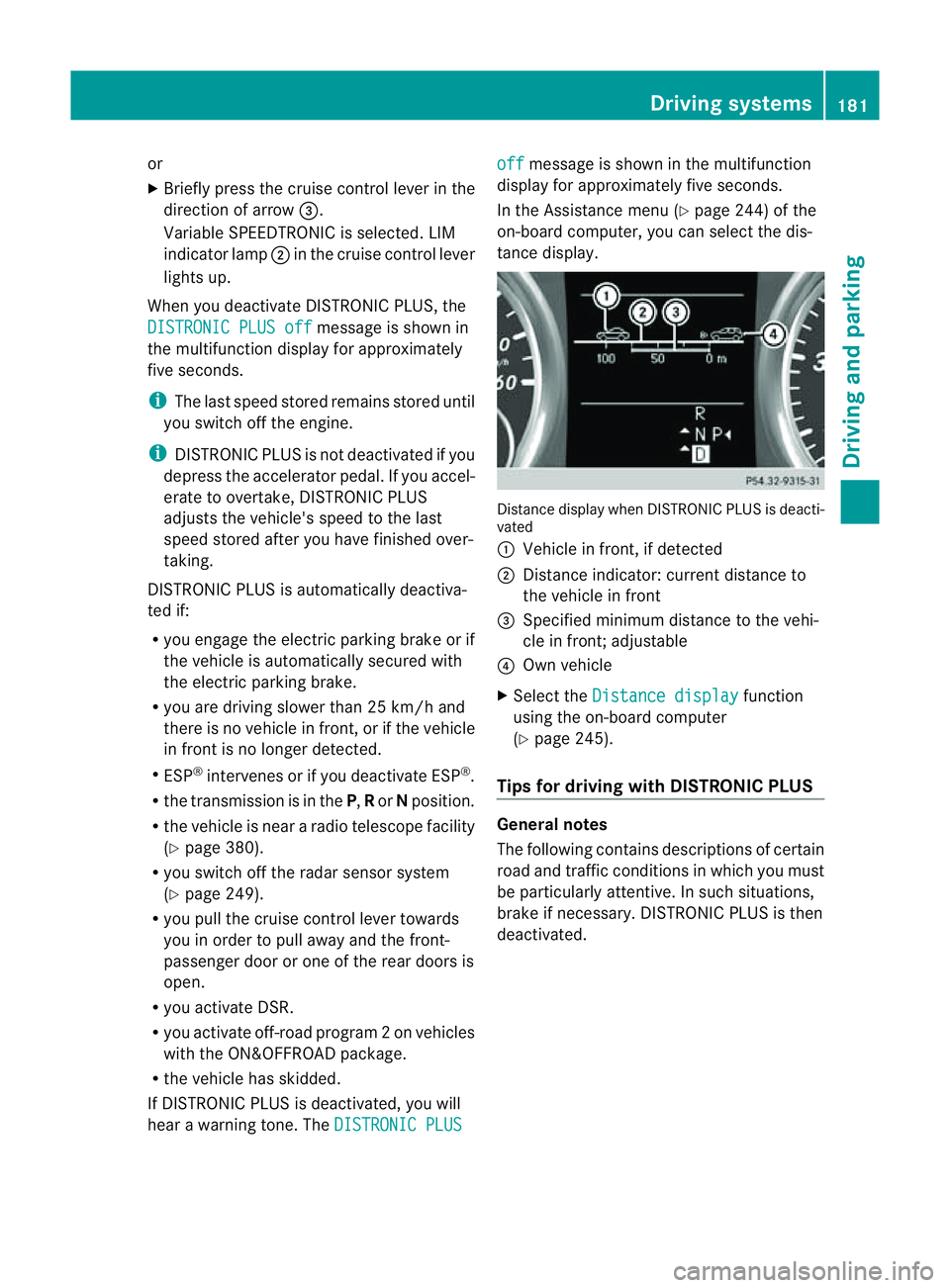
tanc edisplay. Distance display when DISTRONI
CPLUS is deacti-
vated
: Vehicl einfront, if detected
; Distance indicator: curre ntdistanc eto
the vehicle in front
= Specified minimum distanc etothe vehi-
cle in front; adjustable
? Own vehicle
X Select the Distancedisplay function
usin gthe on-boar dcompu ter
( Y page 24 5).
Tips for driving with DISTRO NICP LUS Genera
lnotes
The following contains descriptions of certain
road and traf ficc ondition sinwhich you must
be particularly attentive. In such situations,
brake if necessary. DI STRONIC PLUS is then
deactivated. Driving systems
181Drivingand park ing Z
Page 186 of 389
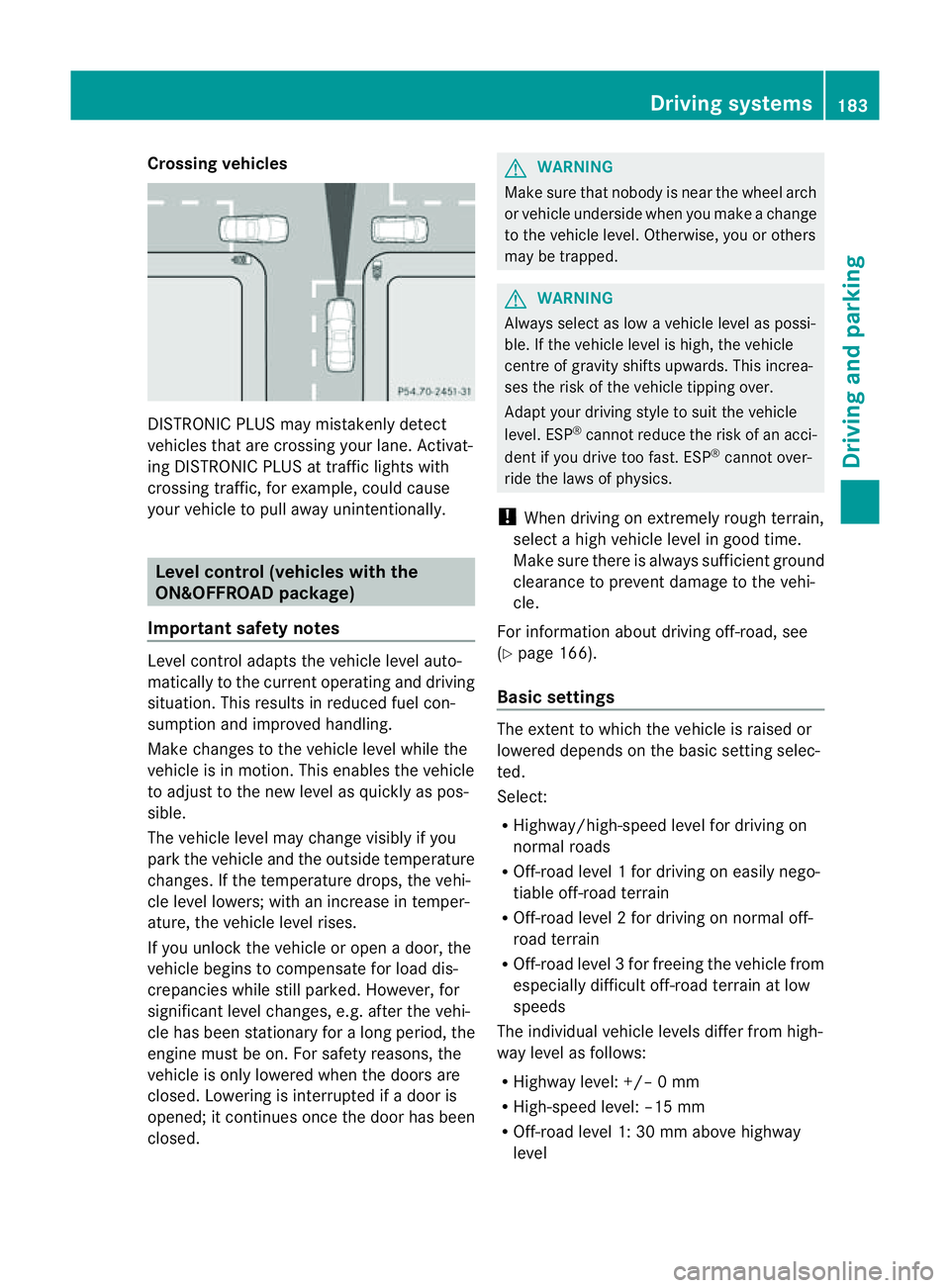
Crossing vehicles
DISTRONIC PLU
Smay mistakenly detect
vehicles that are crossin gyour lane .Activat-
ing DISTRONIC PLUS at traffi cligh ts with
crossing traffic, for example, could cause
your vehicle to pull away unintentionally. Leve
lcon trol (vehicle switht he
ON&OFFROA Dpackage)
Importan tsafety notes Leve
lcontrol adapts the vehicle level auto-
matically to the current operating and driving
situation. Thi sresults in reduced fuel con-
sumption and improved handling.
Make changes to the vehicle level whil ethe
vehicle is in motion. Thi senable sthe vehicle
to adjus ttothe new level as quickly as pos-
sible.
The vehicle level ma ychange visibly if you
par kthe vehicle and the outside temperature
changes. If the temperatur edrops, th evehi-
cle level lowers; with an increase in temper-
ature, the vehicle level rises.
If you unloc kthe vehicle or open adoor, the
vehicle begins to compensate for load dis-
crepancies while still parked. However, for
significant leve lchanges, e.g. after the vehi-
cle has been stationar yfor along period, the
engin emust be on. For safety reasons, the
vehicle is only lowered when the doors are
closed .Lowering is interrupted if adoor is
opened; it con tinues once the doo rhas been
closed. G
WARNING
Make sure that nobody is near the wheel arch
or vehicle underside when you make achange
to the vehicle level. Otherwise, you or others
ma ybet rapped. G
WARNING
Always select as lo wavehicle level as possi-
ble. If the vehicle level is high, the vehicle
centre of gravity shifts upwards. This increa-
ses the risk of the vehicle tipping over.
Adapt your driving style to suit the vehicle
level. ESP ®
can notreduce the risk of an acci-
dent if you driv etoo fast .ESP ®
cannot over-
ride the laws of physics.
! When driving on extremely roug hterrain,
select ahigh vehicle level in good time.
Make sure there is always sufficient ground
clearance to prevent damage to the vehi-
cle.
For information about drivin goff-road, see
(Y pag e166).
Basi csettings The exten
ttowhich the vehicle is raised or
lowered depend sonthe basic setting selec-
ted.
Select:
R Highway/high-spee dlevel for driving on
normal roads
R Off -road level 1for drivin goneasily nego-
tiable off-road terrain
R Off-road level 2for drivin gonnormal off-
roa dterrain
R Off -road level 3for freeing the vehicle from
especially difficult off -road terrain at low
speeds
The individual vehicle levels differ from high-
way level as follows:
R Highway level: +/– 0mm
R High-speed level: –15 mm
R Off-road leve l1:30mma bove highway
level Driving systems
183Drivingand parking Z