brake light MERCEDES-BENZ M-CLASS SUV 2011 Owners Manual
[x] Cancel search | Manufacturer: MERCEDES-BENZ, Model Year: 2011, Model line: M-CLASS SUV, Model: MERCEDES-BENZ M-CLASS SUV 2011Pages: 389, PDF Size: 9.22 MB
Page 7 of 389
1, 2,
3...
12 Vsocket
see Sockets
4ETS (Electronic Traction System) ....64
4MATIC (permanent four-wheel
drive) .................................................. 220A
ABS (Anti-lock Brakin gSystem)
Disp laym essage ............................ 254
Function/notes ................................ 61
Important safety notes ....................61
Warn ingl am p................................. 286
Activating/deactivating air-recir-
culation mode .................................... 128
Activating/d eactivating cooling
with air dehumidification .................124
Activ eBlindS pot Assist
Activating/deactivating (on-
board computer) ............................ 245
Display message ............................ 274
Function/notes ............................. 212
To wing atrailer .............................. 215
Activ eCurv eSyst em
Disp laym essage ............................ 269
Function/notes ............................. 188
Activ eDriving Assistanc epackage .212
Activ eLane Keepi ngAssist
Activating/deactivating (on-
board computer) ............................ 245
Display message ............................ 273
Function/informatio n.................... 215
To wing atrailer .............................. 217
Activ elight function ......................... 109
Activ ePark Assist
Display message ............................ 274
Activ eParkin gAssist
Important safety notes ..................194
To wing atrailer .............................. 197
Activ eService System PLUS
se eA SSYSTP LUS service interval
display
ADAPTIV EBRAKE ................................ .66
Adaptive bra kelamps ......................... 63
Adaptive Highbeam Assist Function/notes ............................. 110Adaptive Main-Beam Assist
Display message ............................ 265
Switch ingo n/off (on-board com-
puter) ............................................. 248
AdBlue ®
Display message ............................ 268
Service ind icator ............................ 323
topping up ..................................... 157
AdBlue ®
service indicator ................323
Additive s(engine oil)........................ 376
Adjustin gthe headlamp range .........108
AD S(Ad aptiv eDampin gSystem)
Function/note s............................. 188
Airbags
Activati on......................................... 41
Front airba g(driver, front
passenger) ....................................... 44
Important safety gu idelines ............. 42
Kneeba g.......................................... .44
Sidebag ............................................ 44
Windowba g...................................... 45
Ai rc onditioning
Settin gthe te mperature (rear
compartment) ................................ 126
Air-co nditionin gsyst em
se eC limate control
Ai rf ilter (whit edisplay message) ....267
AI RF LOW ........................................... 125
AIRMATIC package ADS (Ad aptive Damping System) ...188
Function/notes ............................. 188
Leve lcontrol .................................. 189
Ai rp ressure
see Tyr epres sure
Ai rv ents
Glove compartmen t....................... 135
Important safety notes ..................135
Rea r............................................... 136
Setting ........................................... 135
Setting the centre ai rvents ........... 135
Setting the si deairv ents ............... 135
Alarm system
seeA TA (Anti-Theft Alar msystem) 4
Index
Page 8 of 389
Ambient lighting
Setting the brightness (on-board
computer) ...................................... 248
Setting the colou r(on-boar dcom-
puter )............................................. 248
Ant i-glare film .................................... 316
Ant i-loc kB rakin gSystem
se eA BS (Anti-lock Braking System)
Anti-Thef tAlarm system
se eA TA (Anti-Theft Alarm system)
Anti-theft system
Immobilise r...................................... 68
Approach/departure ang le.............. 168
Aquaplaning ....................................... 164
Ashtray ............................................... 308
Assistanc emenu (on-board com-
puter) ................................................. .244
AS SYST PLUS
see ASSYS TPLUS service interval
di sp lay
ASSYST PLU Sservice interval dis-
play Displaying service messages .........323
Hid ings erv icem essages ............... 323
Note s............................................. 323
Service message s.......................... 322
ATA (Anti-Theft Alarm system)
Activating/deactivating ...................68
Functio n.......................................... .68
Interio rmotion sensor ..................... 69
Switch ingo ff th ealarm .................... 68
To w-awa yprotectio n........................ 69
ATTENTIO NASSIST
Ac tivating/deactivating .................245
Display message ............................ 269
Function/notes ............................. 202
Audio men u(on-boa rd computer) ....241
AUT Olights
Display message ............................ 265
se eL ights
Automatic engine start (ECO start/
stop function) .................................... 143
Automatic en gine switch-off (ECO
start/stop function) ..........................142
Automatic headlamp mode ..............107Automatic transmission
Accelerator pe dalposition ............. 148
Automatic drive program ...............149
Ch anging gear ............................... 148
DIREC TSELECT leve r..................... 145
Display message ............................ 280
Driving tip s.................................... 148
Emergency running mod e.............. 152
Kickdow n....................................... 148
Manual drive program ....................150
Pro blem (fault) ............................... 152
Progra mselector button ................148
Pullin gaway................................... 141
Shift rang es................................... 150
Starting the engine ........................140
Steering wh eelgearshift paddles ...149
Traile rtowing ................................. 148
Transmissio nposition dis-
play .. ..................................... .146, 147
Transmissio nposition s.................. 147
Automatic transmiss ione mer-
gency runnin gmode ......................... 152
Aux iliary heating
Activating/deactivating .................130
Activating/deactivating (o nthe
centr econsole) .............................. 131
Display message ............................ 281
Important safety notes ..................130
Pro blem (display message) ............134
Remote control .............................. 131
Setting ........................................... 250
Setting the de parture time ............. 132
Aux iliary ventilation
Activating/deactivating .................130
Activating/deactivating (o nthe
centr econsole) .............................. 131
Pro blem (display message) ............134
Remote control .............................. 131 B
Bag hook ............................................ 300
Ball coupli ng
Folding in ....................................... 230
Fol ding out ..................................... 228
BAS (Brake Assist System) .................62
Basi csettings
see Settings Index
5
Page 9 of 389
BAS PLUS (Brake Assist System
PLUS) .................................................... 62
Battery (key) Checking .......................................... 74
Important safety notes ....................74
Replacing ......................................... 75
Battery (v ehicle)
Charging ........................................ 347
Connectin g.................................... 346
Disconnecting ................................ 346
Display message ............................ 267
Important safety notes ..................343
Jump starting ................................. 348
Location ......................................... 344
Removing/fittin g........................... 346
Belt
seeS eat belt
Belt force limiters (activation) ...........41
Bel ttensioner
Activation ......................................... 41
Function .......................................... .49
Blind Spo tAssist
Activating/deactiva ting ................. 245
Display message ............................ 274
Notes/function .............................. 208
Traile rtowing ................................. 210
se eA ctive Blind Spo tAssist
BlueTEC
Topping up AdBlue ®
...... ................. 157
BlueTE C(AdBlue ®
) ............................. 374
Bon net
Active bonne t(pedestrian protec-
tion) ............................................... 318
Closing ........................................... 319
Display message ............................ 281
Opening ......................................... 318
Boot
seeT ailgate
Brak eAssist System
see BAS (Brake Assist System)
Brake fluid
Display message ............................ 259
Note s............................................. 376
Brake lamps
Ada ptive .......................................... .63
Changin gbulbs .............................. 116
Display message ............................ 263Brakes
ABS .................................................. 61
BAS .................................................. 62
BAS PLUS ........................................ 62
Brake fluid (notes )......................... 376
Display message ............................ 254
Driving tip s.................................... 162
Important safety notes ..................162
Warn ingl am p................................. 285
Breakdown
seeF lat tyre
see Towing away
Bulbs
see Changing bulbs C
Callin gupaf ault
se eD isplay messages
Capacities
see Technical data
Car
see Vehicle
Care
Automatic car was h....................... 324
Carpets .......................................... 330
Display ........................................... 328
Exterio rlighting ............................. 327
Gea rors electo rlever .................... 329
High-pressure cle aner ...... .............. 325
Matt paintwork .............................. 326
Nig htVie wA ssist Plus ................... 328
Note s............................................. 324
Pa int. ............................................. 326
Pl ast ic trim .................................... 329
Revers ingc amera .......................... 327
Roo flining ...................................... 330
Seat bel t........................................ 330
Sea tcover ..................................... 329
Sensors ......................................... 327
Steering wh eel............................... 329
Tri mp ieces .................................... 329
Washing by hand ........................... 325
Wheels ........................................... 325
Windows ........................................ 326
Wi perb lades .................................. 327
Wooden trim .................................. 3296
Index
Page 10 of 389
Car key
see Key
Car wash (care) ................................. 324
CD player /CDc hanger( on-board
computer) .......................................... 242
Cell phone seeM obile phone
Centra llocking
Automatic locking (on-board com-
puter) ............................................ .249
Locking/unlockin g(key ).................. 72
Centr econsole
Low er se ction .................................. 35
Uppe rsection .................................. 34
Changin gbulbs
Brake lamps ................................... 116
Dipped-bea mheadlamps ............... 114
Important safety notes ..................113
Ma in-beam headlamps ................... 115
Overview of bul btypes .................. 113
Parking lamps (front) .....................115
Removing/repl acing the cover
(fron twheel arch) .......................... 114
Standing lamps .............................. 115
Child-proof locks
Important safety notes ....................60
Rea rdoors ....................................... 60
Children
In the veh icle ................................... 50
Restraint sy stems ............................ 50
Child seat
Automatic recognitio n..................... 52
Display message ............................ 261
ISOFIX .............................................. 53
On the front-passenger se at............ 51
Pro blem (malfunction) ..................... 56
Rec ommend ations ........................... 58
Suit able positions ............................ 56
Cig arett elighter ................................ 309
Cle aning
Trailer to whitch ............................. 328
Climate control
Activating/deactivating rear win-
dowh eating ................................... 128
Auxi liaryheating/ventilation ...... .... 130
Contro lling automatically ...............125
Convenience op ening/closing (air
recirculation) ................................. 129Co
oling with air dehumidificatio n..1 24
Demist ingt he windows ...... ............ 128
Demisting the windscree n............. 127
Important safety notes ..................120
Indicator lamp ................................ 125
Note sonu sing THERMATIC auto-
matic climate control .....................122
Note sonu sing THERMOTRONIC
automatic climate control ..............124
Overview of sy stems ...................... 120
Pro blem swithc ooling with air
dehumid ification ............................ 125
Pro blem with the rear window
heating .......................................... 128
Rea rcontrol panel ......................... 123
Setting the ai rdistribution .............126
Setting the airflo w......................... 127
Setting the ai rvent s...................... 135
Setting the climate mod e(AIR
FLOW) ............................................ 125
Setting the temperature ................126
Switch inga ir-recirculation mode
on/off ............................................ 128
Switch ingo n/off ........................... 124
Switch ingr esidua lheat on/off ......129
Switch ingt he ZON Efunction on/
off .................................................. 127
THERMATIC automatic climate
control (2-zone) ............................. 121
THERMOTRONIC automatic cli-
mate control (3-zone) ....................123
Coat hooks ......................................... 303
Cockpit Overview .......................................... 28
se eI nstrument cluster
COMAND Online
ON&OFFROAD menu .....................225
se es eparat eoperating instructions
Combination switch ..........................108
Combine dluggag ecove rand net ....302
Constant headlamp mode seeD aytime driving lamps
Consumption statistic s(on-boa rd
computer) .......................................... 239
Conv enienc eclosin gfeature .............. 84
Conv enienc eopening/closing (air-
recirculation mode) ........................... 129
Conv enienc eopening feature ............84 Index
7
Page 13 of 389
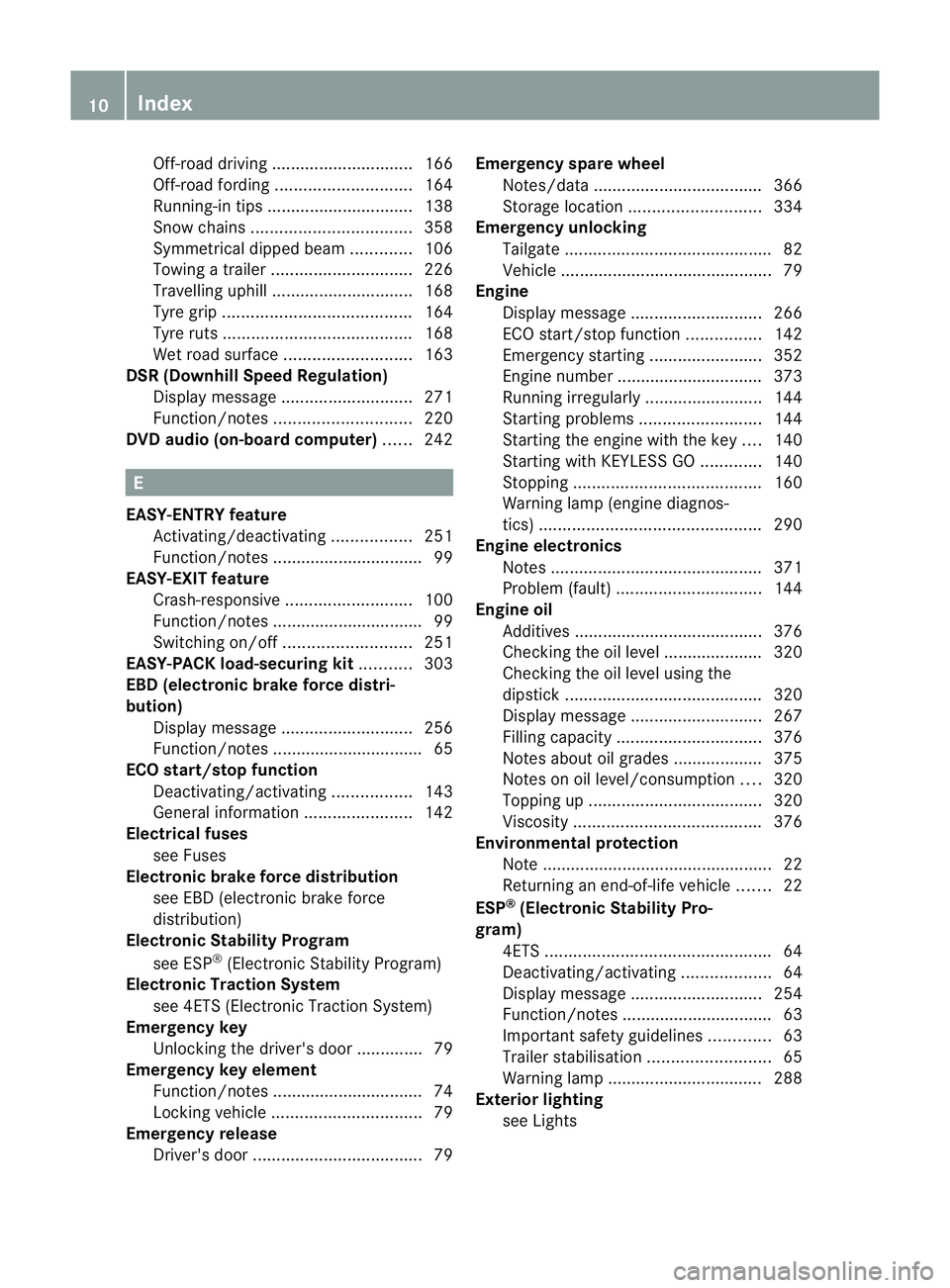
Off-road driving .............................. 166
Off- roadfording ............................. 164
Running-i ntips ............................... 138
Sno wchains .................................. 358
Symmetrical di pped bea m............. 106
To wing atrailer .............................. 226
Travelling uphill .............................. 168
Tyr egrip ........................................ 164
Tyr eruts ........................................ 168
We troad surf ace. .......................... 163
DSR (Downhi llSpeed Regulation)
Display message ............................ 271
Function/notes ............................. 220
DVD audio (on-b oard computer) ......242 E
EASY- ENTRY feature
Activating/deactivating .................251
Function/notes ................................ 99
EASY- EXIT feature
Crash-responsive ........................... 100
Function/notes ................................ 99
Switch ingo n/off ........................... 251
EASY- PACK load-securing kit ........... 303
EBD (electronic brake force distri-
buti on)
Disp laym essage ............................ 256
Function/notes ................................ 65
EC Os tart/stop function
Deactivating/activating .................143
Gen eral information ....................... 142
Electri calfuses
se eF uses
Electroni cbrake force distribution
see EBD (electronic brake force
distribution)
Electroni cStability Program
see ESP ®
(Electroni cStability Program)
Electronic Tracti onSystem
se e4 ETS (Electroni cTracti onSystem)
Emergenc ykey
Unlocking the driver's door ..............79
Emergency key element
Function/notes ................................ 74
Locking veh icle ................................ 79
Emergency rel ease
Driver's door .................................... 79Emergency spar
ewheel
Notes/d ata. ................................... 366
Storage locatio n............................ 334
Emergency unl ocking
Ta ilgate ............................................ 82
Veh icle ............................................ .79
Engine
Display message ............................ 266
ECO start/stop function ................142
Emergency starting ........................352
Engine numb er............................... 373
Running irregularl y......................... 144
Starting pro blems .......................... 144
Starting the engine wit hthe key ....140
Starting with KEYLESS GO .............140
Stopp ing. ....................................... 160
Warn ingl am p(engine diagnos-
tics) ............................................... 290
En gine electronics
Notes ............................................. 371
Problem (fault) ............................... 144
En gine oil
Additives ........................................ 376
Checking the oil level ...... ............... 320
Checking the oil leve lusing the
dipstick .......................................... 320
Display message ............................ 267
Fil ling capacity ............................... 376
Note sabout oil grades ...... ............. 375
Notes on oil level/cons umption.... 320
Topping up ..................................... 320
Viscosity ........................................ 376
En vironmental protection
Note ................................................ .22
Retur ningan end-of-life vehicl e....... 22
ESP ®
(Electronic Stability Pro-
gram) 4ETS ................................................ 64
Deactivating/activating ...................64
Display message ............................ 254
Function/notes ................................ 63
Important safety gu idelines ............. 63
Traile rstabilisatio n.......................... 65
Warn ingl am p................................. 288
Exterior lighting
seeL ights 10
Index
Page 31 of 389
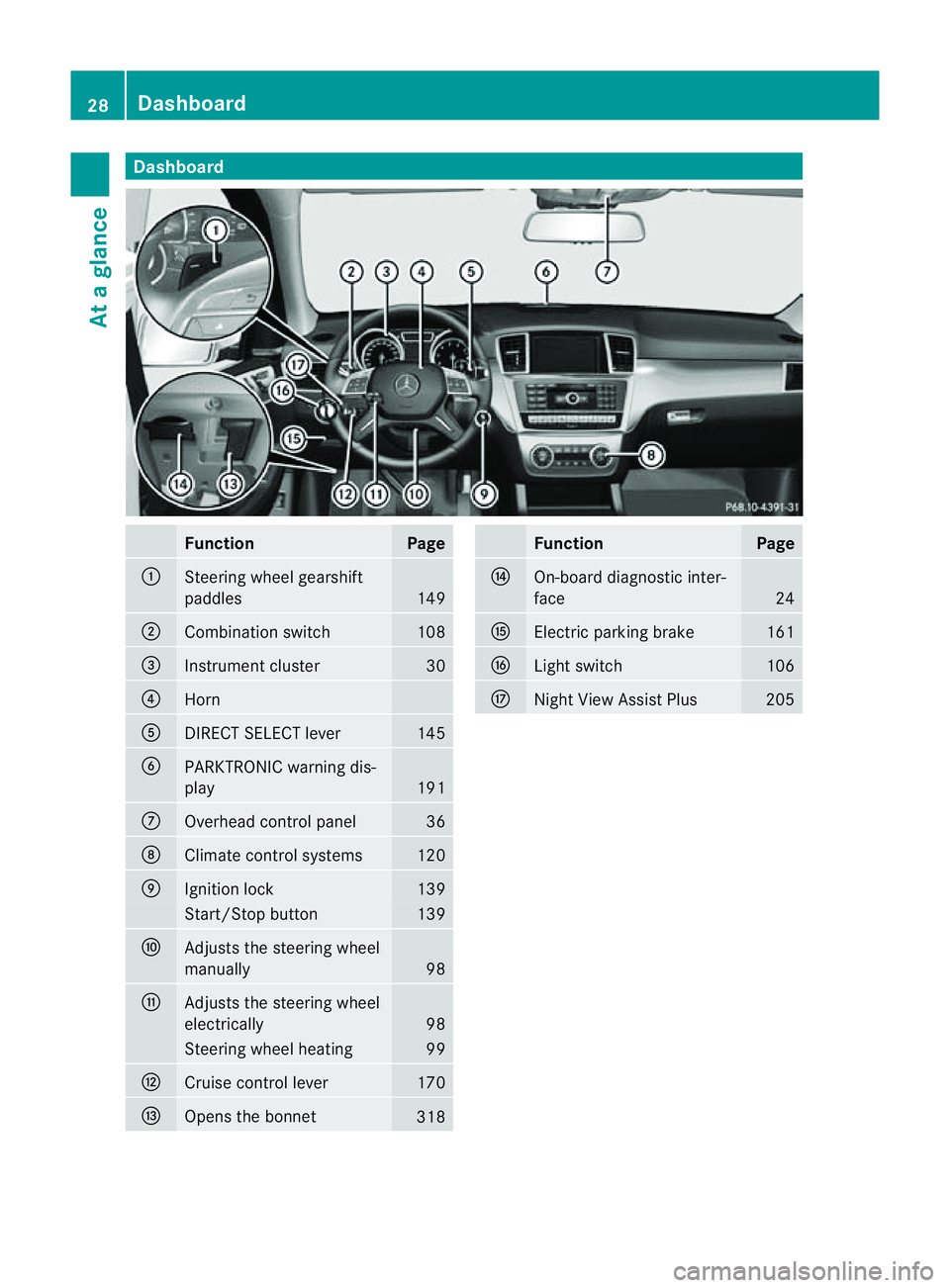
Dashboard
Function Page
:
Steerin
gwhee lgearshift
paddles 149
;
Combination switch 108
=
Instrumen
tcluster 30
?
Horn
A
DIRECT SELECT
lever 145
B
PARKTRONIC warnin
gdis-
play 191
C
Overhead contro
lpanel 36
D
Climat
econtrol systems 120
E
Ignition lock 139
Star
t/Stop button 139
F
Adjust
sthe steerin gwheel
ma nually 98
G
Adjust
sthe steerin gwheel
electrically 98
Steerin
gwhee lheating 99
H
Cruis
econtrol lever 170
I
Opens th
ebonnet 318 Fu
nction Page
J
On-boar
ddiagn ostic inter-
face 24
K
Electric parking brake 161
L
Light switch 106
M
Night Vie
wAssist Plus 20528
DashboardAt
ag lance
Page 32 of 389
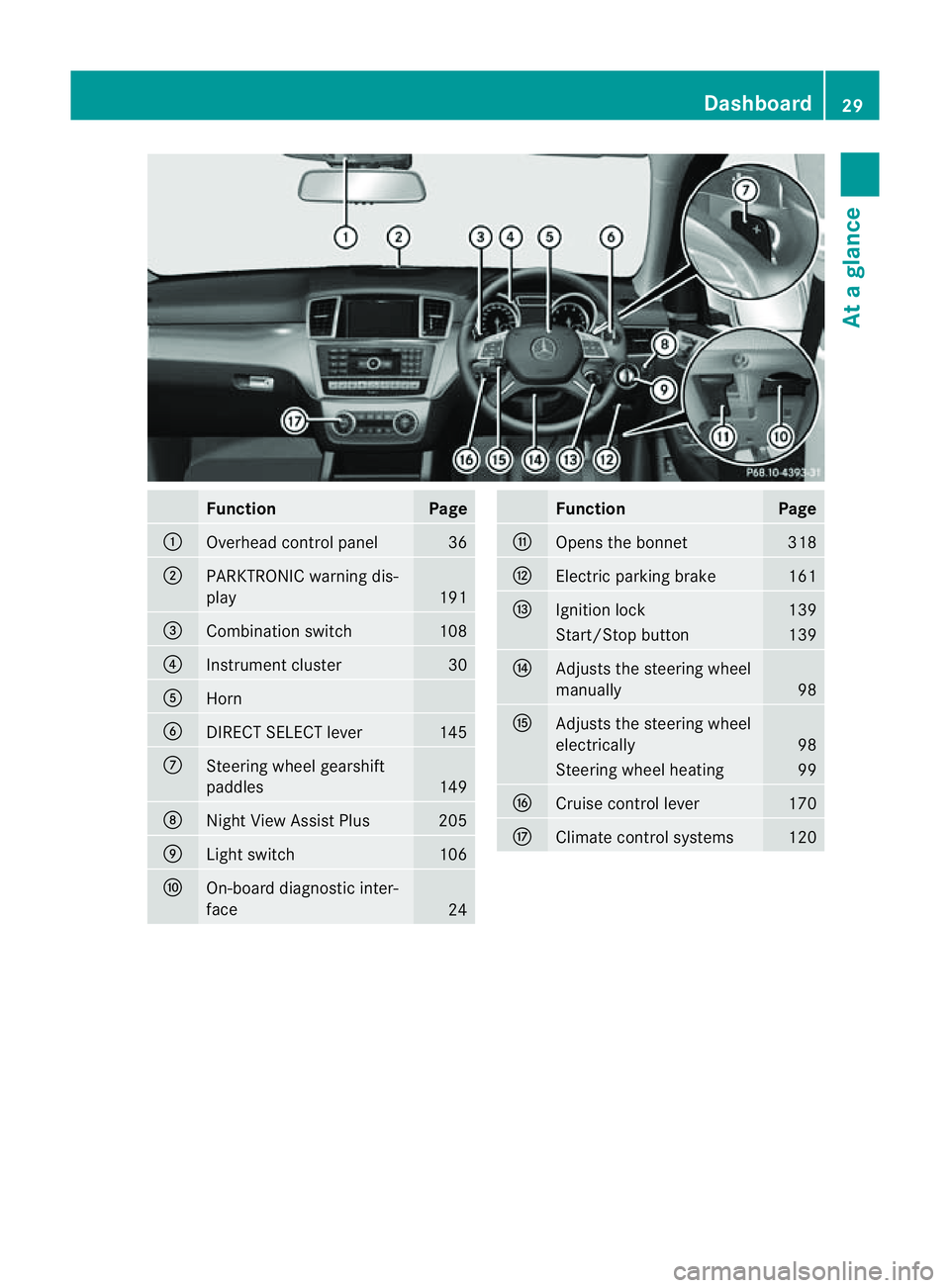
Function Page
:
Overhead con
trol panel 36
;
PARKTRONI
Cwarning dis-
play 191
=
Combination switch 108
?
Instrument cluster 30
A
Horn
B
DIRECT SELECT lever 145
C
Steerin
gwheel gearshift
paddles 149
D
Nigh
tView Assist Plus 205
E
Light switch 106
F
On-board diagnostic inter-
face 24 Function Page
G
Opens the bonnet 318
H
Electric parking brake 161
I
Ignition lock 139
Start/Stop button 139
J
Adjusts the steerin
gwheel
manually 98
K
Adjusts the steeri
ngwheel
electrically 98
Steerin
gwheel heati ng 99
L
Cruise control lever 170
M
Climate control systems 120Dashbo
ard
29Atag lance
Page 66 of 389
The radar sensor system must be switched off
using the on-boar
dcomputer in the vicinit yof
radio telescop efacilities in the following vehi-
cles:
R vehicles without COMAND Online and nav-
igation
R vehicles without Audio 20 and Becker ®
MAP PILOT
R vehicles for Australia
Information about switching off the rad ar sen-
so rs ystem using the on-board computer can
be found in the "On-board computer and dis-
plays “section (Y page 249).
For BAS PLUS to assist you when driving, the
rada rsensor system must be switched on and
operational; see "Radar sensor system "inthe
index. G
WARNING
BA SP LUS cannot alway sclearly identify
objects and complex traf fics ituations. BAS
PLU Scannot interven einthese cases.
There is arisk of an accident. Always pay
careful attention to the traf fics ituation and be
ready to brake.
In particular, the detection of obstacles can
be impaired if ther eis:
R dir tont he sensor soranything els ecover-
ing the sensors
R snow or heav yrain
R interference by other radar sources
R the possibility of strong radar reflections,
for example in multi-storey car parks
R an arrow vehicle travellin ginfront, e.g .a
motorbike
R av ehicle travellin ginfront on adifferent
line G
WAR
NING
BAS PLUS doe snot react:
R to people or animals
R to oncomin gvehicles
R to crossin gtraffic
R when cornering As
aresult, BAS PLU Smay not interven ein
critical situatio ns.T here is arisk of an acci-
dent .Always pay careful attention to the traf-
fic situation and be ready to brake.
Followin gdamage to the front end of the vehi-
cle, have the configuration and operation of
the radar sensors checked at aqualified spe-
cialist workshop. This also applie stocolli-
sion sats low speeds where ther eisnovisible
damage to the fron tofthe vehi cle.
If BA SPLUS is no tavailable du etoam alfunc-
tion in the rada rsensor system ,the brake
system remain savailable wit hfull brake
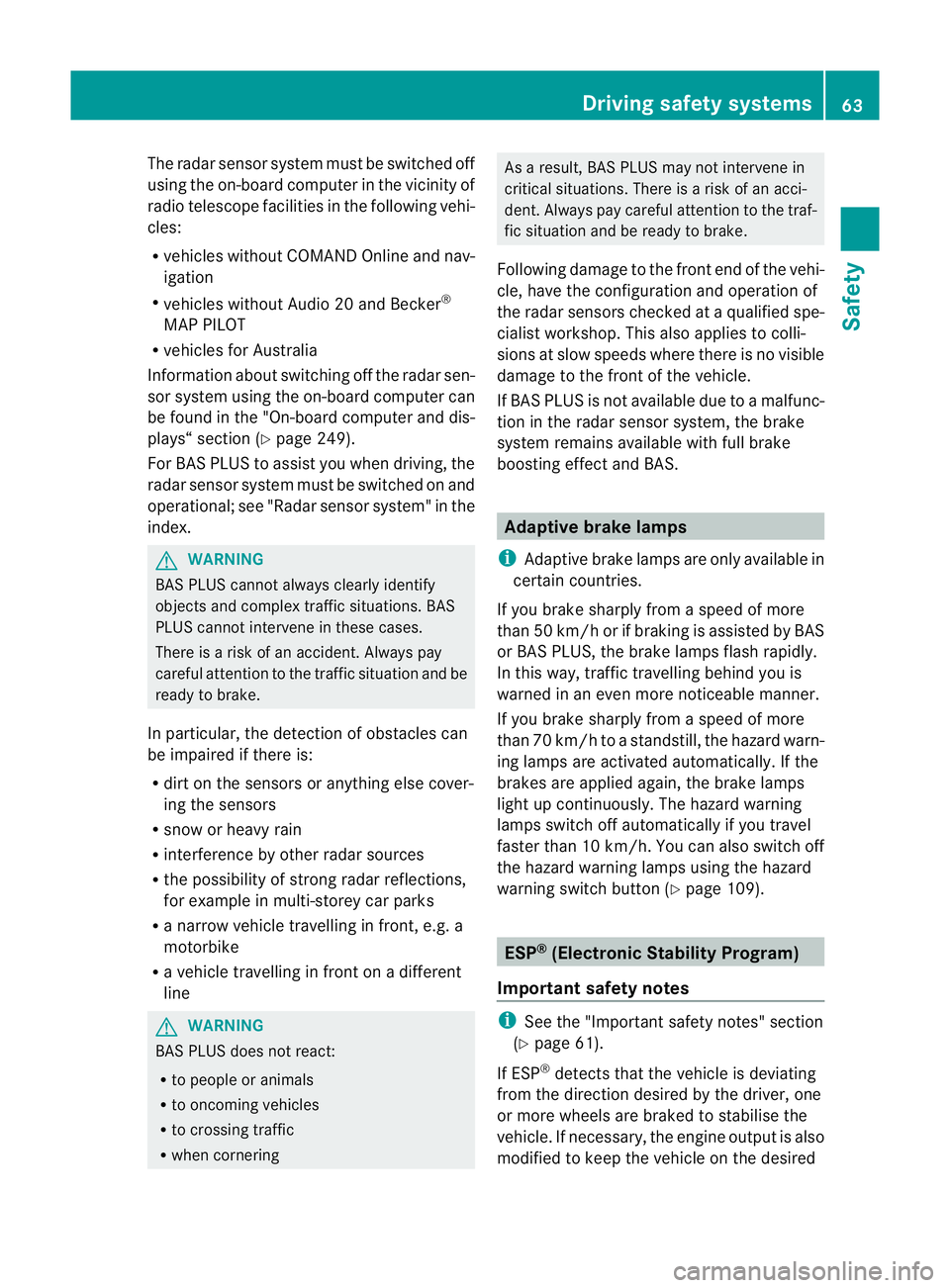
boostin geffect and BAS. Adaptiv
ebrak elamps
i Adapti vebrak elamps are only available in
certain countries.
If you brake sharply from aspeed of more
than 50 km/ horifb raking is assisted by BAS
or BAS PLUS, th ebrake lamp sflas hrapidly.
In this way, traffic travelling behind you is
warned in an even more noticeable manner.
If you brake sharply from aspee dofm ore
than 70 km/h to astandsti ll,t he hazard warn-
ing lam psare activated automatically .Ifthe
brakes ar eapplied again, the brak elamps
light up continuously .The hazard warning
lamps switc hoff automatically if you travel
faster than 10 km/h .You can also switc hoff
th eh azard warning lamps using the hazard
warning switch button (Y page 109). ESP
®
(Electronic Stability Program)
Important safety notes i
See the "Importan tsafety notes" section
(Y page 61).
If ESP ®
detect sthat the vehicle is deviating
from the direction desired by the driver ,one
or more wheels are braked to stabilis ethe
vehicle. If necessary, the engin eoutput is also
modified to keep the vehicle on the desired Driving safety systems
63Safety Z
Page 68 of 389
if the vehicle starts to skid or
awheel starts
to spin.
When you deactivate ESP ®
:
R ESP ®
no longer improves drivin gstabili ty.
R the engine's torque is no longer limited and
the drive wheels can spin. The spinning of
the wheels results in acuttin gaction, which
provides bet terg rip.
R tractio ncontrol is still activated.
R ESP ®
still provides suppor twhen you
bra ke.
If ESP ®
is deactivate dand one or more wheels
start to spin, the ÷ESP®
warning lamp in
the instrument cluster flashes. In such situa-
tions, ESP ®
will not stabilis ethe vehicle. X
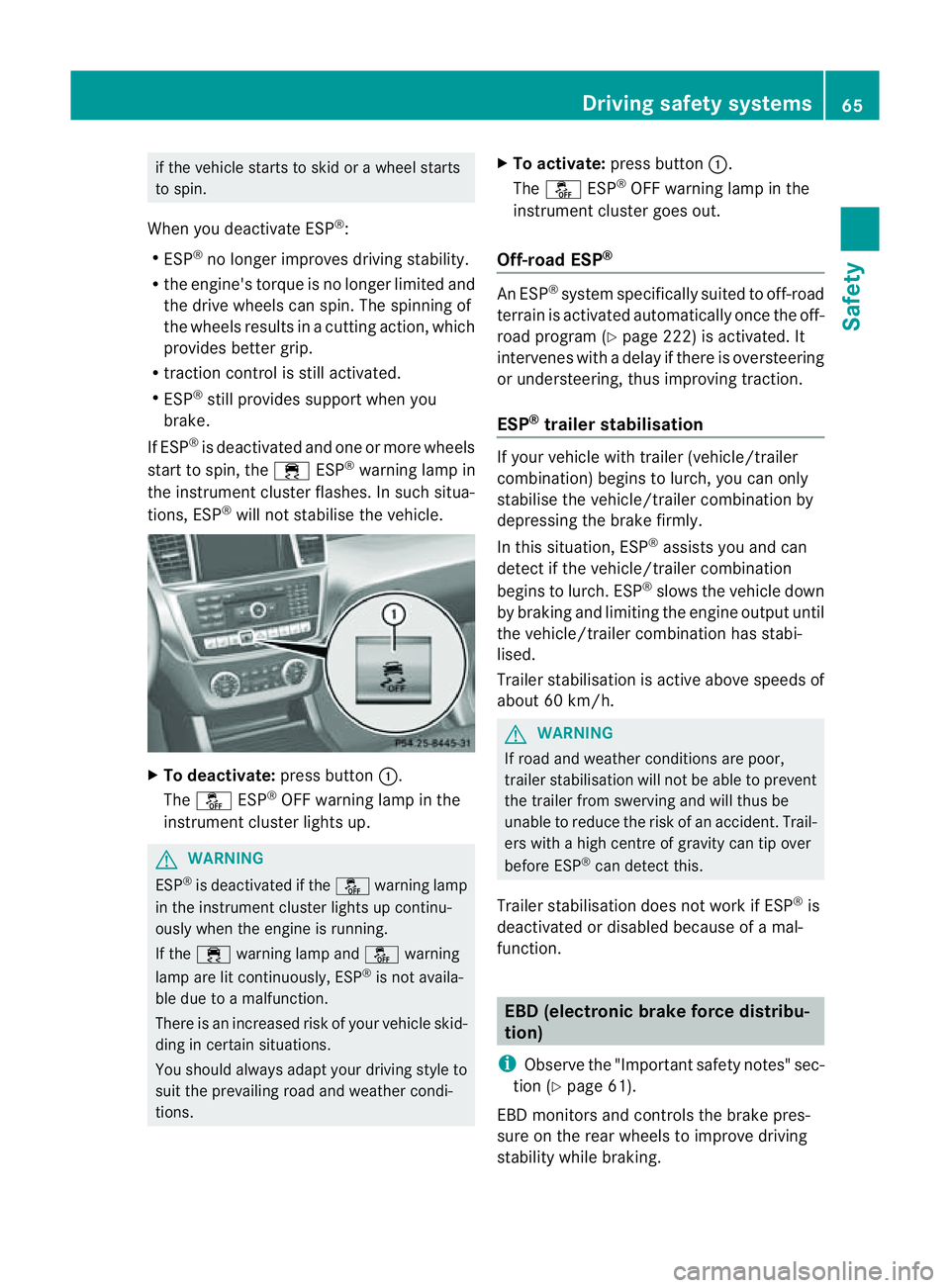
To deactivate: press button:.
The å ESP®
OFF warnin glamp in the
instrument cluster lights up. G
WARNING
ESP ®
is deactivated if the åwarning lamp
in the instrument cluster lights up continu-
ously when the engine is running.
If the ÷ warning lamp and åwarning
lamp are lit continuously, ESP ®
is not availa-
ble due to amalfunction.
There is an increased risk of your vehicle skid-
ding in certain situations.
You shoul dalway sadapt your driving style to
suit the prevailing road and weather condi-
tions. X
To activate: press button :.
The å ESP®
OFF warning lamp in the
instrumen tcluster goes out.
Off- road ESP® An ESP
®
system specifically suited to off-road
terrain is activated automatically once the off-
road program (Y page 222)isa ctivated. It
intervene swithadelay if there is oversteering
or understeering, thus improvin gtraction.
ESP ®
traile rstabilisation If your vehicle with trailer (vehicle/trailer
combination) begins to lurch, you can only
stabilis ethe vehicle/ trailer combination by
depressing the brake firmly.
In this situation, ESP ®
assists you and can
detect if the vehicle/trailer combination
begins to lurch. ESP ®
slows the vehicle down
by brakin gand limiting the engine output until
the vehicle/traile rcombination has stabi-
lised.
Trailer stabilisation is active abov espeeds of
about 60 km/h. G
WARNING
If road and weather condi tions are poor,
trailer stabilisation will not be able to prevent
the trailer from swerving and will thus be
unable to reduce the risk of an accident .Trail-
ers wit hahigh centr eofgravity can tip over
before ESP ®
can detec tthis.
Trailer stabilisation does not work if ESP ®
is
deactivated or disable dbecause of amal-
function. EBD (electronic brake force distribu-
tion)
i Observe the "Important safety notes" sec-
tion (Y page61).
EBD monitors and control sthe brake pres-
sur eonthe rea rwheels to improv edriving
stab ility while braking. Driving safety systems
65Safety Z
Page 69 of 389
G
WARNING
If EBD ha smalfunctioned, the braking system
remains available with full brake boosting
effect. However, the rear wheels can still lock,
e.g. under full braking. This coul dcaus eyou
to lose control of your vehicle and cause an
accident. You shoul dtherefore adapt your
drivin gstyle to the different handling charac-
teristics.
X Observe the notes on warning and indica tor
lamps (Y page 286) as well as display mes-
sages (Y page 256). ADAPTIV
EBRAKE
ADAPTI VEBRAKE enhances braking safety
and offers increased braking comfort. In addi-
tion to the braking function, ADAPTIV EBRAKE
als oh as the HOLD function (Y page187) and
hi ll st art assist (Y page141). For further
information, se eDriving tip s(Ypage 162). PRE-SAFE
®
Brake
PRE-SAFE ®
Brake is only available in vehic les
with DISTRONIC PLUS.
i Observe the "Important safety notes" sec-
tion (Y page61).
PRE-SAFE ®
Brake can help you to minimise
the ris kofaf rontal collision wit havehicle
ahead or reduce the effects of such acolli-
sion. If PRE-SAFE ®
Brake has detected arisk
of collision, you wil lbewarned visuall yand
acoustically as wel lasbyautomatic braking.
PRE-SAFE ®
Brake cannot prevent acollision
withou tyou rintervention.
Thi sfun ctio nwill issue awarnin gats peeds of
arou nd 30 km/h or moreif:
R for aperiod of several seconds ,the dis-
tance to the vehi cleinf ront is to oshor tfor
the speed at which you ar etravelling .The ·
distanc ewarning lamp then lights up
in the instrument cluster.
R you are rapidly approaching the vehicle in
front .Ani ntermittent warning tone will
then sound and the ·distance warning
lamp will light up in the instrument cluster.
X Brake immediately in order to increas ethe
distanc efrom th evehicle in front.
or
X Take evasiv eactio nprovide ditiss afe to do
so.
If the driver and passengers have fastened
their seat belts, PRE-SAFE ®
Brake can also
can also perform the following at speeds of
above approximately 30 km/h:
R brake the vehicle automatically from a
spee dofuptoa pproximately 20 0km/h
R trigge rpreventative passenger protection
measures (PRE-S AFE®
)( Ypage 45)
Due to the nature of the system, particularly
complicated driving conditions may cause
unnecessar ywarnings or the unnecessary
intervention of PRE-SAFE ®
Brake. To end this,
you can either depress the accelerator pedal
further, activate kickdown or release the
brake pedal.
The braking action of PRE-SAFE ®
Brake is
ended automatically if:
R you drive slowe rthan approximately
15 km /h.
R you manoeuvre to avoid the obstacle.
R there is no longe rany danger of arear-end
collision.
R there is no longer an obstacl edetected in
front of your vehicle.
If you have activated DSR (Y page 220), PRE-
SAFE ®
brak eisd eactivated.
With the help of the rada rsensor system,
PRE- SAFE ®
Brake can detect obstacles that
are in front of your vehicle for an exte nded
period of time.
At speeds up to approximately 70 km /h,
PRE- SAFE ®
Brake may als odetect stationary 66
Driving safet
ysystemsSafety