service interval MERCEDES-BENZ M-CLASS SUV 2011 Owners Manual
[x] Cancel search | Manufacturer: MERCEDES-BENZ, Model Year: 2011, Model line: M-CLASS SUV, Model: MERCEDES-BENZ M-CLASS SUV 2011Pages: 389, PDF Size: 9.22 MB
Page 7 of 389
1, 2,
3...
12 Vsocket
see Sockets
4ETS (Electronic Traction System) ....64
4MATIC (permanent four-wheel
drive) .................................................. 220A
ABS (Anti-lock Brakin gSystem)
Disp laym essage ............................ 254
Function/notes ................................ 61
Important safety notes ....................61
Warn ingl am p................................. 286
Activating/deactivating air-recir-
culation mode .................................... 128
Activating/d eactivating cooling
with air dehumidification .................124
Activ eBlindS pot Assist
Activating/deactivating (on-
board computer) ............................ 245
Display message ............................ 274
Function/notes ............................. 212
To wing atrailer .............................. 215
Activ eCurv eSyst em
Disp laym essage ............................ 269
Function/notes ............................. 188
Activ eDriving Assistanc epackage .212
Activ eLane Keepi ngAssist
Activating/deactivating (on-
board computer) ............................ 245
Display message ............................ 273
Function/informatio n.................... 215
To wing atrailer .............................. 217
Activ elight function ......................... 109
Activ ePark Assist
Display message ............................ 274
Activ eParkin gAssist
Important safety notes ..................194
To wing atrailer .............................. 197
Activ eService System PLUS
se eA SSYSTP LUS service interval
display
ADAPTIV EBRAKE ................................ .66
Adaptive bra kelamps ......................... 63
Adaptive Highbeam Assist Function/notes ............................. 110Adaptive Main-Beam Assist
Display message ............................ 265
Switch ingo n/off (on-board com-
puter) ............................................. 248
AdBlue ®
Display message ............................ 268
Service ind icator ............................ 323
topping up ..................................... 157
AdBlue ®
service indicator ................323
Additive s(engine oil)........................ 376
Adjustin gthe headlamp range .........108
AD S(Ad aptiv eDampin gSystem)
Function/note s............................. 188
Airbags
Activati on......................................... 41
Front airba g(driver, front
passenger) ....................................... 44
Important safety gu idelines ............. 42
Kneeba g.......................................... .44
Sidebag ............................................ 44
Windowba g...................................... 45
Ai rc onditioning
Settin gthe te mperature (rear
compartment) ................................ 126
Air-co nditionin gsyst em
se eC limate control
Ai rf ilter (whit edisplay message) ....267
AI RF LOW ........................................... 125
AIRMATIC package ADS (Ad aptive Damping System) ...188
Function/notes ............................. 188
Leve lcontrol .................................. 189
Ai rp ressure
see Tyr epres sure
Ai rv ents
Glove compartmen t....................... 135
Important safety notes ..................135
Rea r............................................... 136
Setting ........................................... 135
Setting the centre ai rvents ........... 135
Setting the si deairv ents ............... 135
Alarm system
seeA TA (Anti-Theft Alar msystem) 4
Index
Page 8 of 389
Ambient lighting
Setting the brightness (on-board
computer) ...................................... 248
Setting the colou r(on-boar dcom-
puter )............................................. 248
Ant i-glare film .................................... 316
Ant i-loc kB rakin gSystem
se eA BS (Anti-lock Braking System)
Anti-Thef tAlarm system
se eA TA (Anti-Theft Alarm system)
Anti-theft system
Immobilise r...................................... 68
Approach/departure ang le.............. 168
Aquaplaning ....................................... 164
Ashtray ............................................... 308
Assistanc emenu (on-board com-
puter) ................................................. .244
AS SYST PLUS
see ASSYS TPLUS service interval
di sp lay
ASSYST PLU Sservice interval dis-
play Displaying service messages .........323
Hid ings erv icem essages ............... 323
Note s............................................. 323
Service message s.......................... 322
ATA (Anti-Theft Alarm system)
Activating/deactivating ...................68
Functio n.......................................... .68
Interio rmotion sensor ..................... 69
Switch ingo ff th ealarm .................... 68
To w-awa yprotectio n........................ 69
ATTENTIO NASSIST
Ac tivating/deactivating .................245
Display message ............................ 269
Function/notes ............................. 202
Audio men u(on-boa rd computer) ....241
AUT Olights
Display message ............................ 265
se eL ights
Automatic engine start (ECO start/
stop function) .................................... 143
Automatic en gine switch-off (ECO
start/stop function) ..........................142
Automatic headlamp mode ..............107Automatic transmission
Accelerator pe dalposition ............. 148
Automatic drive program ...............149
Ch anging gear ............................... 148
DIREC TSELECT leve r..................... 145
Display message ............................ 280
Driving tip s.................................... 148
Emergency running mod e.............. 152
Kickdow n....................................... 148
Manual drive program ....................150
Pro blem (fault) ............................... 152
Progra mselector button ................148
Pullin gaway................................... 141
Shift rang es................................... 150
Starting the engine ........................140
Steering wh eelgearshift paddles ...149
Traile rtowing ................................. 148
Transmissio nposition dis-
play .. ..................................... .146, 147
Transmissio nposition s.................. 147
Automatic transmiss ione mer-
gency runnin gmode ......................... 152
Aux iliary heating
Activating/deactivating .................130
Activating/deactivating (o nthe
centr econsole) .............................. 131
Display message ............................ 281
Important safety notes ..................130
Pro blem (display message) ............134
Remote control .............................. 131
Setting ........................................... 250
Setting the de parture time ............. 132
Aux iliary ventilation
Activating/deactivating .................130
Activating/deactivating (o nthe
centr econsole) .............................. 131
Pro blem (display message) ............134
Remote control .............................. 131 B
Bag hook ............................................ 300
Ball coupli ng
Folding in ....................................... 230
Fol ding out ..................................... 228
BAS (Brake Assist System) .................62
Basi csettings
see Settings Index
5
Page 17 of 389
Luggage holder (EASY-PACK load-
securing kit) ...................................... .304
Luggage net ....................................... 298
Lumbar support ................................... 96M
M+S tyres ........................................... 358
Main-beam headlamps Changing bulbs .............................. 115
Display message ............................ 263
Switch ingA daptive Highbeam
Assist on/of f................................. 110
Switch ingo n/off ........................... 108
Maintenan ce
se eA SSYST PLUS service interval
display
Matt finish (cleaning instructions) ..326
Memory card (audi o)......................... 242
Memory function ............................... 103
Mercedes-Benz Service Centre seeQ ualified specialist workshop
Message memory (on-board com-
puter) ................................................. .253
Mes sages
see Display messages
Mirrors
see Exterior mirrors
see Rear-view mirror
see Vanity mirror
Mobile phone
Frequencies ................................... 371
Installati on .................................... .371
Menu (on-bo ardc omputer )............ 242
Notes/p lacing in the bracket ......... 310
Sliding adapte r............................... 312
Transmiss iono utput (maximum ).... 371
Modifying the programming (key) .....73
MOExtende drun-flat system ...........342
Motor waym ode ................................ 110
MP3 Operating ...................................... .242
se eS eparate operating instructions
Multifunction display
Function/notes ............................. 236
Permanen tdispla y......................... 246Multifuncti
onsteering wheel
Operating the on-board computer .235
Overview .......................................... 33 N
Navigation Menu (on-bo ardc omputer )............ 240
On-bo ardc omputer ....................... 240
se es eparat eoperating instructions
Nigh tView Assist Plus
Activating/deactivating .................205
Clean ing. ........................................ 328
Function/note s............................. 205
Pro blem (fault) ............................... 208
Note sonr unnin ginan ew vehicle ..138 O
Occupant safety Children in the vehicle .....................50
Important safety notes ....................40
Odometer ........................................... 239
se eT otal distance recorder
see Trip meter
Off-road driving
Checklist after driving off-road ......167
Ch ecklis tbefore driv ingo ff-roa d.... 167
General information .......................166
Important safety notes ..................166
Travelling uphill .............................. 168
Off-road program (v ehicle without
the ON&OFFROA Dpackage)
Function/notes ............................. 222
Off-road program (v ehicle with the
ON&OFFROA Dpackage)
Off-road program 1........................ 222
Off-road program 2........................ 223
Off-road programme s(vehicles
with th eON&OFFROA Dpackage)
Display sinthe COMAND displa y... 225
Off-road programs (v ehicles with
the ON&OFFROA Dpackage)
Function/notes ............................. 222
Off-road system
4MATIC .......................................... 220
DSR ............................................... 220
LOW RANG Eoff-roa dgear ............. 223 14
Index
Page 20 of 389
Rolle
rsunb lind
Pa norama sliding sunroo f................ 88
Roof carri er........................................ 306
Roof li ning and carpet s(cle aning
in st ructions) ...................................... 330
Roof load (maximum) ........................377
Route seeR oute guidance (nav igation)
Route guidance (navigation) ............240 S
Safety Children in the vehicle .....................50
Ch ildr estra ints ystems .................... 50
Safety net
Attaching ....................................... 303
Important safety informatio n......... 303
Safety systems
seeD riving safety sy stems
Seat belt
Adjusting the driv er's and front-
pa ssenger sea tbelt ......................... 48
Adjusting the he ight......................... 48
Belt force limiter .............................. 49
Bel ttensioner .................................. 49
Clean ing. ........................................ 330
Disp laym essage ............................ 260
Fasten ing. ........................................ 47
Important safety gu idelines ............. 46
Rea rseat belt status indicator .........49
Releasing ......................................... 48
Switch ingb elta djustment on/off
(on-board computer) ......................251
Warn ingl am p(function) ................... 48
Seat be lts
Warn ingl am p................................. 284
Seats
Adjusting (electrically )..................... 94
Adjusting the 4-way lumba rsup-
port .................................................. 96
Adjusting the head restraint............ 94
Clean ingt he cover ......................... 329
Correct driver's se at position ........... 92
Folding the rear bench sea tfor-
wards/bac k................................... 299
Important safety notes ....................93
Sea theating problem ...................... 97Sea
tventil ation proble m.................. 98
Storing settings (memory func-
tion) ............................................... 103
Switch ings eat heating on/off .........96
Switch ingt he seat ventilation on/
off .................................................... 97
Se curing hooks .................................. 301
Sensors (cleaning instructions) .......327
Service seeA SSYST PLUS service interval
display
Serv icem enu (on-board computer) .246
Service products
AdBl ue®
special additive s.............. 374
Brake fluid ..................................... 376
Co olan t(engine) ............................ 377
Engine oi l....................................... 375
Fue l................................................ 374
Important safety note s.................. 373
Settings
Factory (on-bo ardc omputer )......... 252
On-bo ardc omputer ....................... 246
Settin gthe air distribution ...............126
Settin gthe airfl ow............................ 127
Sidebag ................................................ 44
Side marker lamp Display mes-
sage .................................................... 264
Side windo ws
Convenience closing ........................84
Convenience op ening ...................... 84
Important safety notes ....................83
Opening/closing .............................. 83
Pro blem (malfunction) ..................... 85
resetting .......................................... 85
Sl iding sunroof
Important safety information ...........86
Opening/closing .............................. 86
Pro blem (malfunction) ..................... 89
Rain closing feat ure. ........................ 87
Resetting ......................................... 87
se eP anorama sliding sunroof
Sno wchains
Information .................................... 358
Sno wdrive program ....................... 219
So cket
Centre console .............................. 310
Luggag ecompartmen t................... 310 Index
17
Page 156 of 389
R
M85 (petrol with 85 %methanol)
R M10 0(100% methanol)
R Petrol wit hmetallic additives
R Diesel
Do not mix fuel ssuch as this with petrol
and do not use any additives. Doing so may
cause engine damage. This does not
include additives for the removal and pre-
vention of residue build-up. Petrol must
only be mixed with additives recommended
by Mercedes-Benz. More information about
recommended additives can be obtained
from any Mercedes-Ben zService Centre.
! Use afilter when adding fuel from afuel
can. The fuel lines and/or the diesel injec-
tion system could otherwis ebeblocked by
particles from the fuel can.
i E10 fuel contains up to 10% bioethanol.
Your vehicle is E10 compatible. You can
refuel your vehicle using E10 premium-
grade petrol.
i If the recommended fuel is not available,
but only as atemporary measure, you may
also use regula runleaded petrol,
91 RON/82.5 MON. Thi smay reduce
engine performance and increase fuel con-
sumption. Avoid driving at full throttle.
In some countries, the fuel grade available
may not be adequate and could cause
deposits to build up. In consultation with a
Mercedes-Ben zService Cent re,this petrol
ma ybem ixed with the additive recommen-
ded by Mercedes-Ben z(part no.
A0009 89254510). Yo umust observe the
notes and mixin gratios specified on the
container.
For further information on "Fuel", see
(Y page 374). !
Only refuel using unleaded, sulphur-free
premium-grade petrol with at least
95 RON/85 MON, which conform stoEuro- pean standar
dEN2 28or an equivalent
specifi cation.
You can otherwise impair engine output or
damage the emission contro lsystem.
i In some countries, the available petrol
may not be sufficiently low in sulphur. This
fuel can temporarily produce unpleasant
odours, especially on short journeys. As
soo nassulphur-free fuel (sulphur content
<10p pm) is used for refuelling, the odours
are reduced. Diesel (EN 590)
Fuel grade !
When refuelling, only use diesel fuel that
confor ms to th eEuropean standard EN 590
or is of equivalent quality. You can other-
wise impair engine output or damage the
engine.
! Vehicles with diesel particle filters: in
countries outsid ethe EU ,only use low sul-
phu rEuro diesel with asulphu rcontent of
under 50 ppm. Otherwise, the emission
con trol system coul dbedamaged.
! Vehicles without adiesel particle fil-
ter: in countries where only diesel fuels
with ahigher sulphur conten tare avail able,
the vehicle's oil change intervals are
shorter. More information about intervals
for changing the oil can be obtained from
any Mercedes-Benz Service Centre.
! Only use fuel that complies with the EN
590 European standard. Fuel that does not
compl ywithEN5 90can lea dtoincreased
wear, engin edamag eand damage to the
exhaust system.
Do not use the following:
R marine diesel
R heating oil
R bio-diesel
R vegetable oil
R petrol Refuelling
153Drivingand park ing Z
ML 350 4MATIC
Page 241 of 389
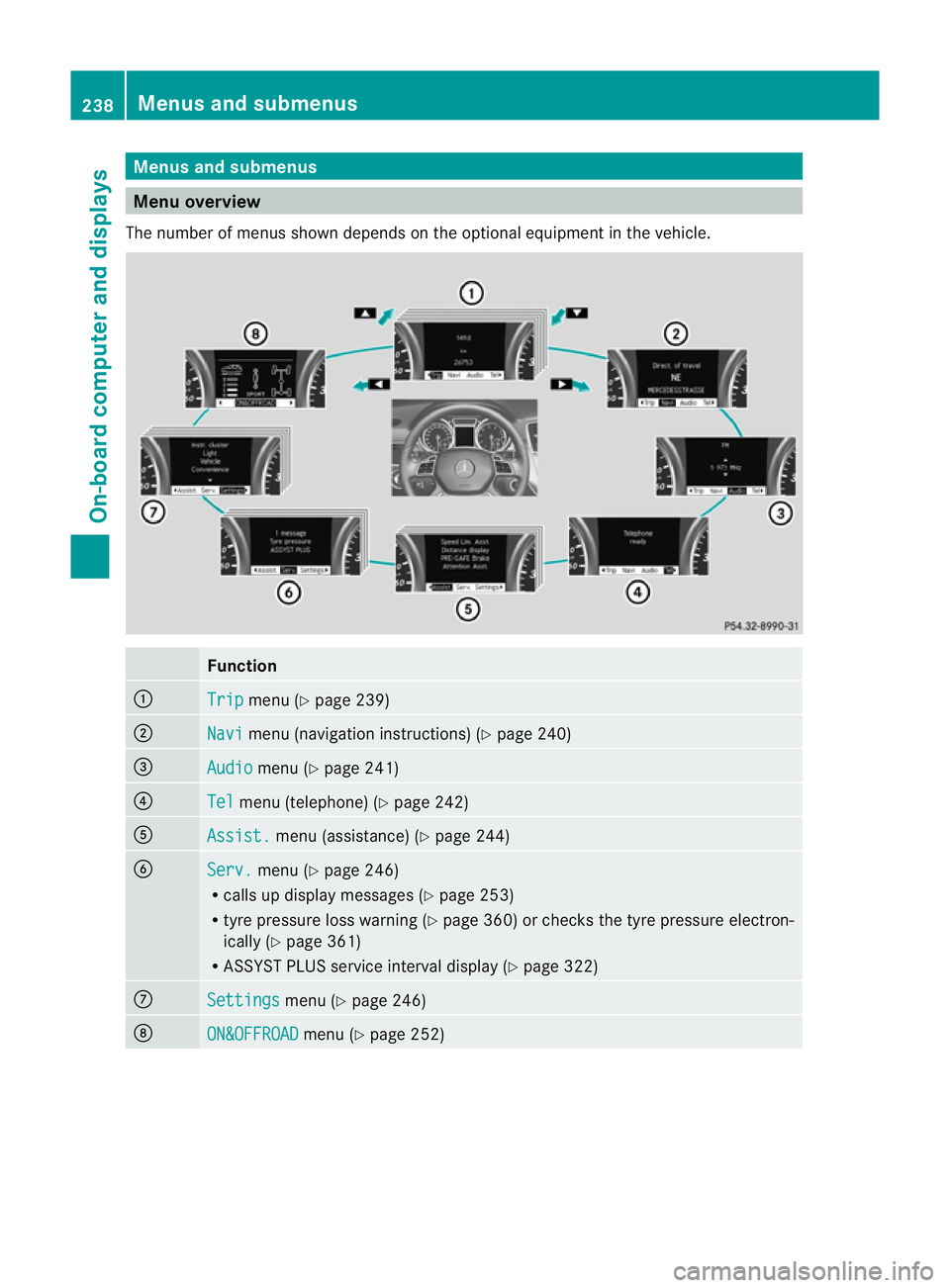
Menus and submenus
Men
uoverview
The number of menu sshown depends on the optional equipment in the vehicle. Function
:
Trip menu (Y
page 239) ;
Navi menu (navigation instructions) (Y
page 240)=
Audio menu (Y
page 241) ?
Tel menu (telepho
ne)(Y page 24 2) A
Assist. me
nu (assistance) (Y page244) B
Serv. menu (Y
page246)
R call supd isplay messages (Y page 253)
R tyre pressure loss warnin g(Ypage 36 0)or checks the tyr epressure elect ron-
ically (Y page361)
R ASSYST PLUS service interval display (Y page322) C
Settin
gs menu (Y
page 246) D
ON&OFFROAD menu (Y
page 252) 238
Menus an
dsubmenusOn-board computer and displays
Page 249 of 389
X
Press :or9 to set Off ,
Standard or
Adaptive .
X Press the abutton to save the setting.
When Lane Keeping Assist or Active Lane
Keeping Assist is activa ted, the Ãsymbol
appear sint he multifunction displa ywhen the
ignition is on. Servic
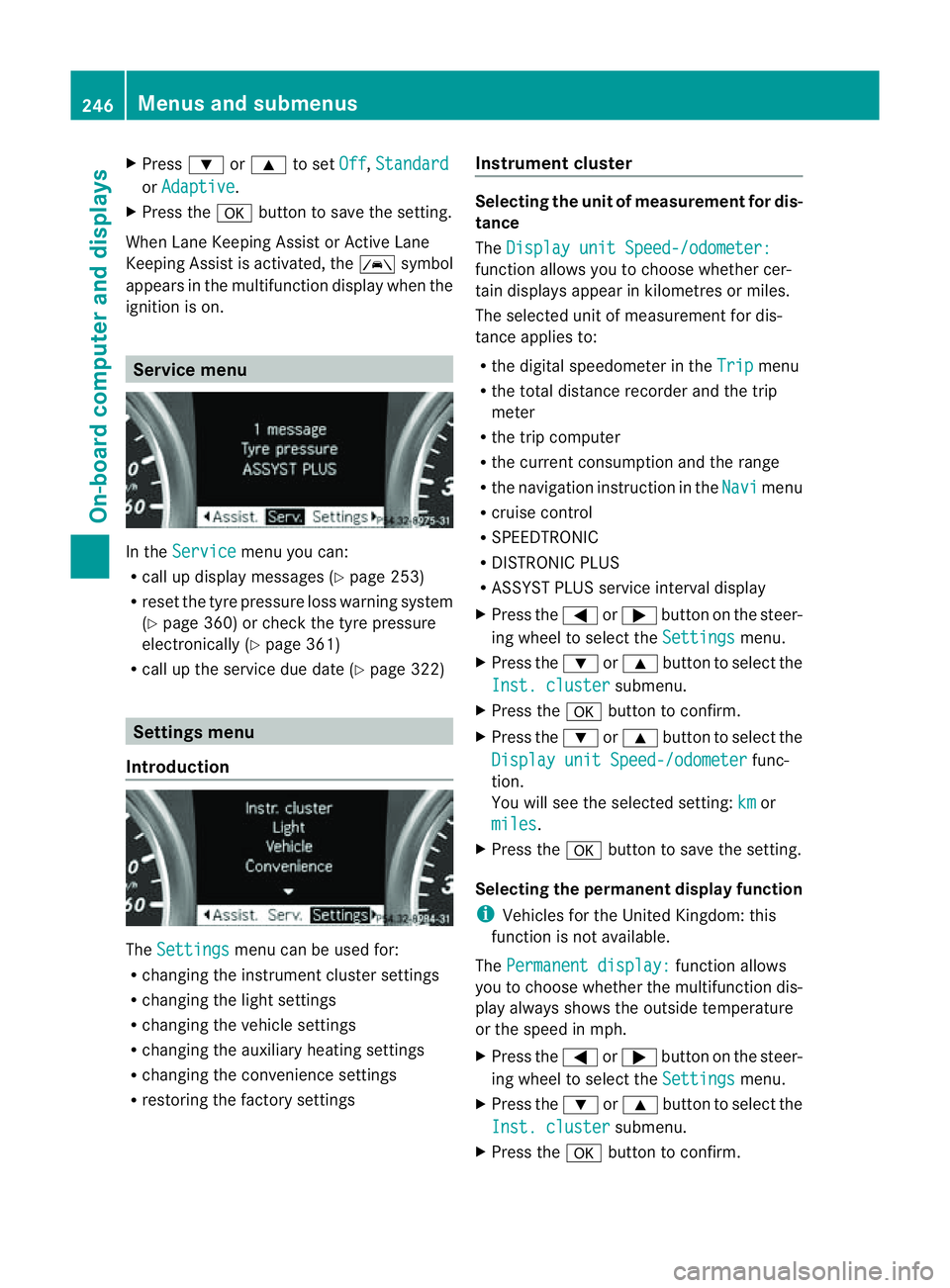
emenu In the
Service menu you can:
R call up display messages (Y page 253)
R reset the tyre pressure loss warnin gsystem
(Y page 360) or check the tyre pressure
electronically (Y page 361)
R call up the service due date (Y page 322)Settings menu
Introduction The
Settings menu can be used for:
R changing the instrument cluster settings
R changing the ligh tsettings
R changin gthe vehicle settings
R changin gthe auxiliary heating settings
R changin gthe con venience set tings
R resto ring the factory settings Instrument cluster Selectin
gthe uni tofmeasurement for dis-
tance
The Displa yunit Speed-/odometer: function allows yo
utochoose whether cer-
tai nd isplays appear in kilometres or miles.
The selected unit of measurement for dis-
tanc eapplies to:
R the digital speedometer in the Trip menu
R the total distanc erecorder and the trip
meter
R the trip computer
R the curren tconsumption and the range
R the navigation instruction in the Navi menu
R cruise con trol
R SPEEDTRONIC
R DIST RONIC PLUS
R ASSYST PLUS service interval display
X Press the =or; button on the steer-
ing whee ltoselect the Settings menu.
X Press the :or9 button to select the
Inst .cluster submenu.
X Press the abuttontoc onfirm.
X Press the :or9 button to select the
Displa yunit Speed-/odometer func-
tion.
Yo uw ill see the selected setting: km or
miles .
X Press the abutton to save the setting.
Selecting the permanent display function
i Vehicles for the United Kingdom: this
func tion is not available.
The Permanen tdisplay: function allows
yo utoc hoose whether the multifunction dis-
play always shows the outside temperature
or the speed in mph.
X Press the =or; button on the steer-
ing wheel to selec tthe Settings menu.
X Press the :or9 button to selec tthe
Inst .cluster submenu.
X Press the abuttontoc onfirm. 246
Menu
sand submenusOn-board computer and displays
Page 325 of 389
You can identify service products approved
by Mercedes-Ben
zbythe followin ginscrip-
tions on the container:
R MB-Freigabe (e.g .MB-Freigabe 371.0)
R MB-Approval (e.g .MB-Approval 371.0)
Other labels and recommendation sthat
make reference to quality level or aspeci-
fication accordin gtoanMBSheet no. (e.g.
MB 371.0) ar enot necessarily approved by
Mercedes-Benz.
You can obtain further information from
any Mercedes-Benz Servic eCentre. G
WARNING
Windscreen washer fluid is highly flammable.
Fire, naked flames and smoki ngare prohibi-
ted when handling washer fluid concentrate.
! Only use washe rfluid concentrate which
is suitable for plastic lamp lenses. Unsuit-
able washer fluid concentrate could dam-
age the plastic lamp lenses of the head-
lamps.
! Do not use distilled or de-ionised water in
the washer fluid reservoir. Otherwise, the
level sensor may be damaged.
i Add windscreen washer concentrate, e.g.
MB SummerFit, to the washer fluid all year
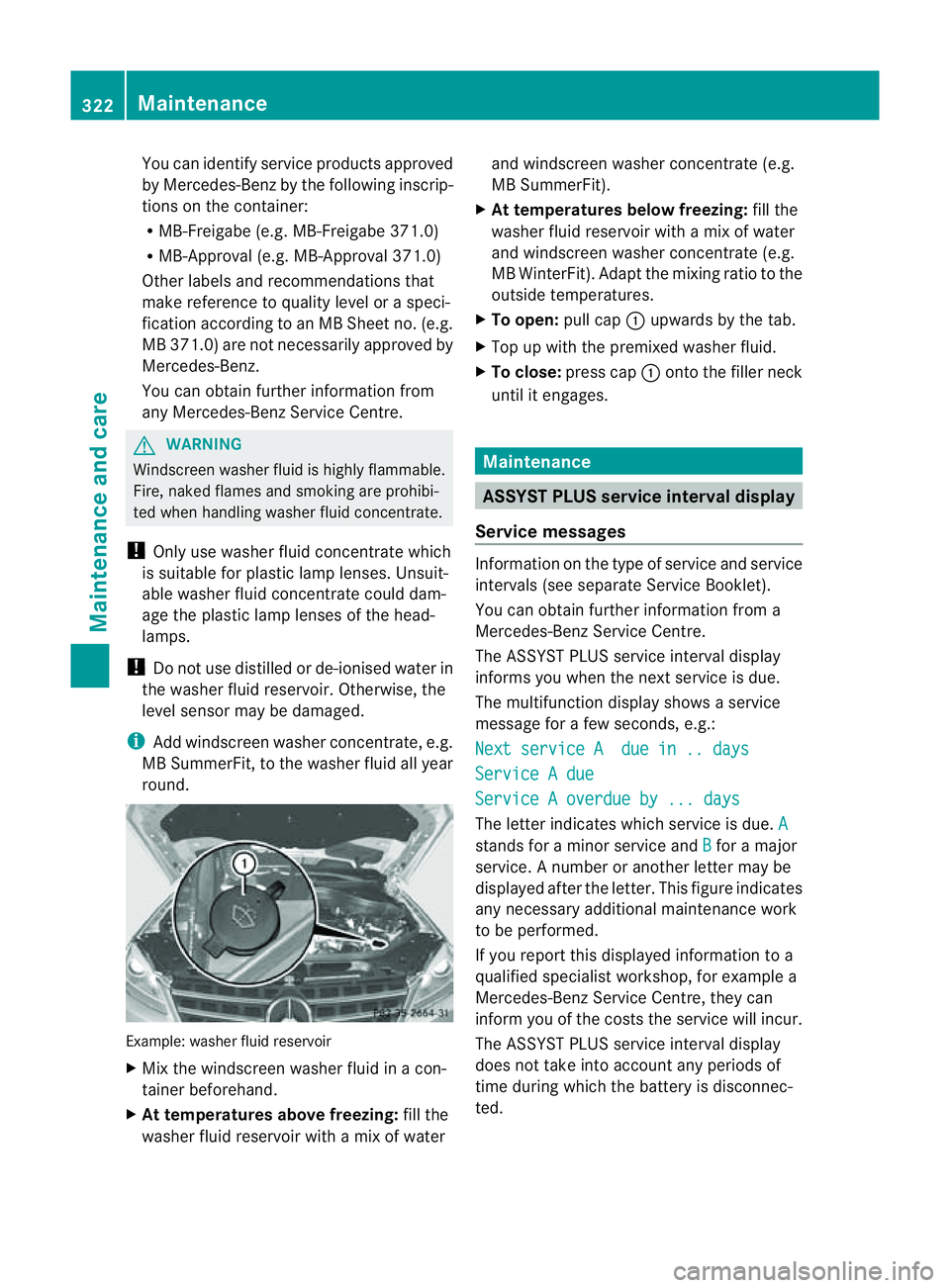
round. Example: washer fluid reservoir
X Mix the windscreen washer fluid in acon-
tainer beforehand.
X At tem peratures above freezing: fill the
washer fluid reservoir with amix of water and windscreen washer concentrate (e.g.
MB SummerFit).
X At temperatures below freezing: fill the
washer fluid reservoir with amix of water
and windsc reen washer concentrate (e.g.
MB WinterFit). Adapt the mixing ratio to the
outside temperatures.
X To open: pull cap:upwards by the tab.
X Top up with the premixed washer fluid.
X To close: press cap :ontothe filler neck
until it engages. Maintenance
ASSYST PLUS service interval display
Service messages Informa
tion on the type of service and service
intervals (see separat eServic eBooklet).
You can obtain further information fr om a
Mercedes-Ben zServic eCentre.
The ASSYS TPLUS service interva ldisplay
inform syou when the nex tservice is due.
The multifunction display shows aservice
message for afew seconds, e.g.:
Next servic eAdue in .. days Service
Adue Service
Aoverdue by ... days Th
eletter indicates which servic eisdue.A stands for
aminor servic eand B for
am ajor
service. Anumber or another letter may be
displayed after the letter. This figure indicates
any necessary additional maintenanc ework
to be performed.
If you repor tthis displayed information to a
qualified specialist workshop, for example a
Mercedes-Ben zService Cent re,they can
infor myou of the cost sthe service will incur.
The AS SYST PLUS service interval display
doe snot tak einto account any periods of
time during which the battery is disconnec-
ted. 322
MaintenanceMaintenance and care
Page 326 of 389
Maintainin
gthe time-dependen tservice
schedule:
X Not edown the service due date displayed
in the multifunc tion display befor ediscon-
necting the battery.
or
X Subtract the battery disconnection periods
from the servic edate shown on the displ ay
after reconnecting the battery.
i The ASSYST PLUS service interval displ ay
does not show any information on the
engine oil level .Observ ethe notes on the
engin eoil level (Y page 320).
Hiding aservice message X
Pres sthe % ora button on th esteer-
ing wheel.
Displaying service messages X
Switch th eignitio non.
X Press =or; on the steering wheel
to select the Serv. menu.
X Press 9or: to select the ASSYST PLUS submenu and press
ato confirm.
The service du edatea ppears in the multi-
function display.
Points to remember Resettin
gthe ASSYS TPLUS service inter-
val display
Aq ualified specialist workshop, e.g. a
Mercedes -Ben zS ervice Cent re,w ill reset the
ASSYST PLU Sservic einterval display after
the service work has bee ncarried out.
You can obtain further information ,e.g.
regarding servic ework,from aMercedes-
Benz Ser vice Centre or directly from
Mercedes-Benz.
! If the ASSYST PLUS servic einterval dis-
play has bee ninadvertently reset, this set-
ting can be corrected at aMercedes-Benz
Ser vice Centre. Have servic
ework carried out as described
in the Ser vice Boo klet. This may otherwise
lead to inc reased wear and damage to the
major assemblies or the vehicle.
Driving abroad
An extensive Mercedes -Ben zS ervice network
is also available in other coun tries. The
Service Hotline's curren ttelephone numbers
for use when you are abroa dare to be found
in th e"Mercedes-Ben zService24h" section
of the Ser vice Boo klet. AdBlue
®
service indicator
i For BlueTE Cvehicles only.
The BlueTE Cexhaus tgas aftertreatment
must be operated with the reducing agent
AdBlue ®
in order for it to function correctly.
Under normal operating conditions, afull tank
of AdBlue ®
should last until the nex tservice
due date.
Depending on how and where the vehicle is
used, there may be an inc rease in the
AdBlue ®
consumption, resulting in the next
servic edue date being brought forward.
Certain display messages sho wthat
AdBlue ®
must be topped up, e.g.
Refill AdBlue at worksh opSee Owner’s Manual
Refill AdBlue at worksho
pNostart in .. km
Aw
arning signal also sounds.
You can no longer star tthe engin ewhen the
AdBlue ®
supply has been used up
(Y page 268).
Top up AdBlue ®
(Y page 157).
Before taking atripw ithy our vehicle outside
Europe, have th eAdBlue ®
suppl ychec kedat
aq ualified specialist workshop. If necessary,
have the AdBlue ®
topped up. Before using
your vehicle for an extended period in coun-
tries outside Europe, con tact aq ualified spe-
cialist workshop.
Obser vethe note sonAdBlue®
(Y page 374). Maintenance
323Maintenanceand care Z
Page 379 of 389
Diesel engines MB Approval
228.51,
229.31 ,229.51 engine oils on the Interne
tat
http:/ /bevo. mercedes -benz.com by enter-
ing the designation, e.g. 22 9.5.
i If the engine oils listed in the table are not
available ,you ma yadd the followin gengine
oil su ntil the next oil change:
R vehi cles with apetrol engine: MB
Approval 22 9.1orA CEAA3
R vehicles wit hadiesel engine: MB
Approval 229.1 or ACE AC3
Engine oil may only be adde donce, and no
mor ethan 1. 0lmay be added.
Capacities The following values refer to an oil change
including the oil filter. Model Capacity
7.0 l
7.8 l
8.0 l
Additives
!
Do not use additive sinengine oil .This
could damage the engine.
Engine oil viscosity Viscosit
ydescribes the flow characteristi cs
of afluid. If an engin eoil has ahigh viscosity
rating, it flows slowly; the lower the viscosity,
the faster it flows.
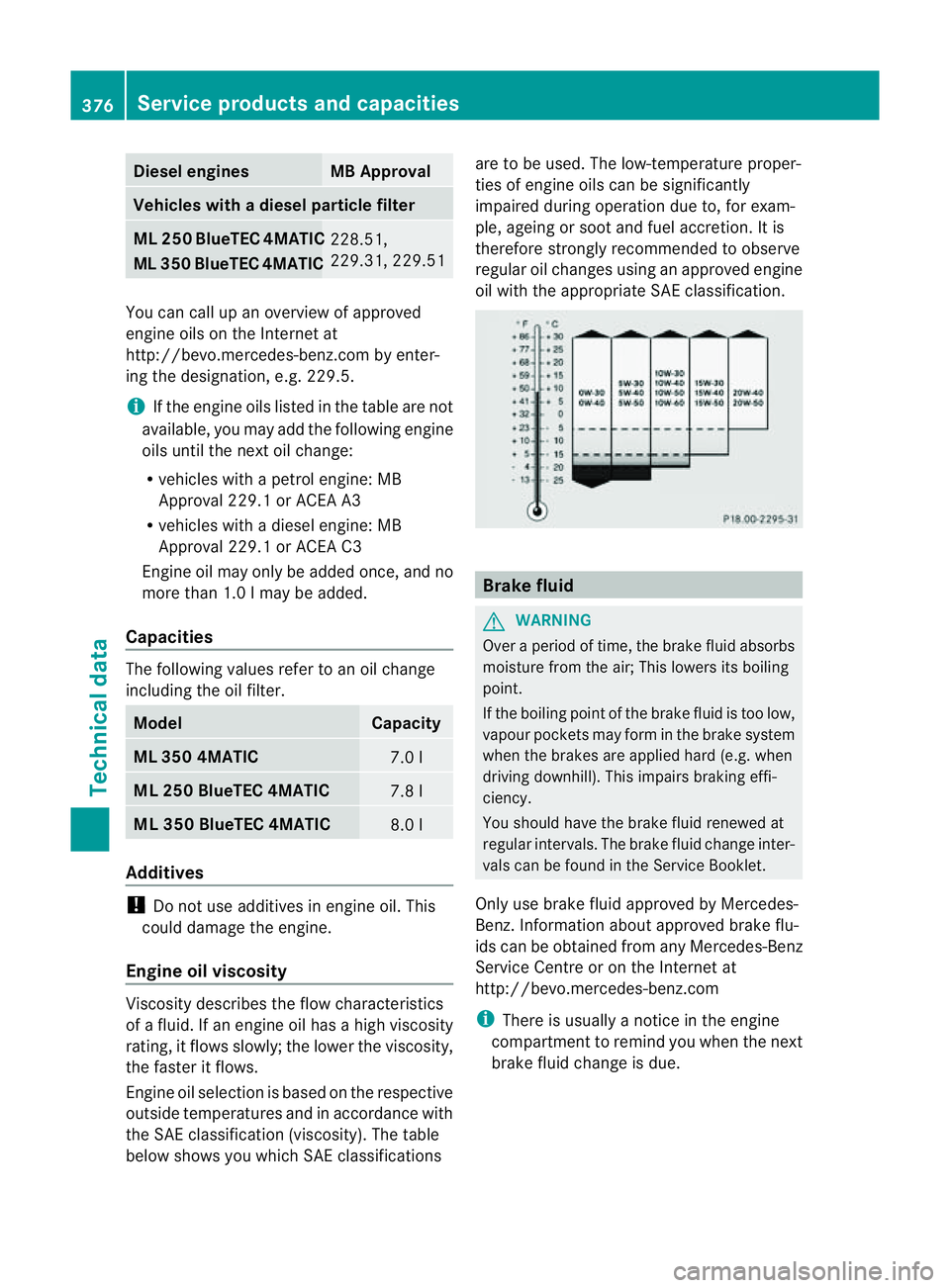
Engine oil selection is based on the respective
outside temperatures and in accordance with
the SA Eclassification (viscosity). The table
below shows you which SA Eclassifications are to be used. The low-temperature proper-
ties of engin eoils can be significantly
impaired durin goperation due to, for exam-
ple, ageing or soot and fuel accretion. It is
therefore strongly recommende dtoobserve
regula roil changes using an approved engine
oil with the appropriate SA Eclassification. Brake fluid
G
WAR
NING
Over aperiod of time, the brak efluid absorbs
moisture fro mthe air ;This lower sits boiling
point.
If the boiling point of the brake fluid is too low,
vapour pockets may form in the brake system
when the brakes are applied hard (e.g. when
driving downhill). Thi simpairs brakin geffi-
ciency.
Yo us hould hav ethe brake fluid renewed at
regular intervals. The brake fluid change inter-
vals can be found in the Servic eBooklet.
Only use brak efluid approved by Mercedes-
Benz .Information abou tapproved brak eflu-
ids can be obtained from any Mercedes-Benz
Service Centr eoronthe Internet at
http://bevo. mercedes-benz.com
i There is usuall yanoticeint he engine
compartmen ttoremin dyou when the next
brake fluid change is due. 376
Service products and capacitiesTechnical data
You can cal
lupanoverview of ap proved
ML
350 BlueTEC 4MATIC
Vehicles wit
hadiesel particle filter
ML 250 BlueTEC 4MATIC
ML 350 4MATIC
ML 350 BlueTEC 4MATIC
ML
250 BlueTEC 4MATIC