bulb MERCEDES-BENZ METRIS 2016 MY16 Operator’s Manual
[x] Cancel search | Manufacturer: MERCEDES-BENZ, Model Year: 2016, Model line: METRIS, Model: MERCEDES-BENZ METRIS 2016Pages: 310, PDF Size: 7.28 MB
Page 19 of 310
Opening dimensions ......................303
Opening/closing from insid e........... 79
Opening/closing from the out-
sid e..................................................7 8
Rear doors ............................................ 78
Rear fog lamp
Displa ymessages (vehicl ewith
steering wheel buttons) ................. 210
Displa ymessages (vehicl ewith-
outs teering wheel buttons) ........... 196
Replacing bulb s............................. 101
Switching on/of f.............................. 93
Rear rack
Note s............................................. 238
Rear racks
Maximu mpayload .......................... 304
Rear vie wcamera
Cleaning instructions ..................... 257
Coupling up atraile rfunction ........ 162
Function/note s............................. 158
Genera lnotes ................................ 158
Important safety notes .................. 158
Messages in the display ................. 160
Revers eparking ............................. 160
Switching on/of f........................... 159
Rear windowd efroster
Problem (malfunction) ................... 115
Switching on/of f........................... 115
Rear windoww iper
Replacing the wipe rblade .............. 104
Switching on/of f........................... 102
Rear-compartment air-condition-
in gs ystem
see Climate control
Rear-compartment heating
see Climate control
Rear-vie wmirror
Anti-glare (manual) .......................... 91
Recycling
see Protectio nofthe environment
Refrigerant (air-conditioning sys-
tem)
Important safety notes .................. 301
Refueling
Fuelfille rflap. ................................ 132
Fue lgauge (vehicle with steering
wheelb uttons) ................................. 37 Fue
lgauge (vehicle withou tsteer-
ing wheelb uttons) ......................... 170
Refueling procedure (fuel). ............ 132
see Fuel
Remote control
see Key
Replacing bulbs
Important safety notes .................... 98
Reporting safety defects .................... 30
Rescue card
......................................... 32
Re s
erve (fuel tank)
see Fuel
Reserve fuel
Displa ymessages (vehicle with
steering wheelb uttons) ................. 212
Displa ymessages (vehicle with-
outs teering wheelb uttons) ........... 198
Warning lamp ................................. 223
Residual hea t(clim ate control) ........ 116
Restrain tsystem
Displa ymessage (vehicle with
steering wheelb uttons) ................. 208
Displa ymessage (vehicle without
steering wheelb uttons) ................. 194
Introduction ..................................... 43
Warning lamp ................................. 222
Warning lamp (function) ................... 43
Revers ewarnin gfeature .................. 122
Reversin gfeature
Electric sliding doo r......................... 74
Sid ew indow s................................... 80
Roadside Assistance (breakdown) .... 26
Roo fcarrier
Maximu mpayload .......................... 304
Note s............................................. 238
Roo flinin gand carpets (cleaning
guidelines) ......................................... 259
Roo floa d( roof carrier) ..................... 304
S
Safety
Childre ninthe vehicl e..................... 56
Operating safety .............................. 28
Safety system
see Driving safety systems
Seat belts
Adjusting the height ......................... 46
Index17
Page 20 of 310
Cleaning .........................................259
Correct usage .................................. 45
Fastening ......................................... 46
Important safety guidelines ............. 45
Introduction ..................................... 44
Releasing ......................................... 47
Warning lamp ................................. 219
Warning lamp (function) ................... 47
Seats
Adjusting (manually). ....................... 84
Adjusting lumba rsuppo rt ................ 84
Adjusting the hea drestraint ............ 88
Armrest ............................................ 89
Cleaning the cove r......................... 259
Correct driver' sseatp osition ........... 83
Important safety notes .................... 83
Seath eating .................................... 89
Selecting gear
see Automati ctransmission
Selecto rlever
Cleaning ......................................... 259
see Automati ctransmission
Sensors (cleaning instructions) ....... 257
Servic ecenter
see Qualifie dspecialist workshop
Servic einterva ldisplay
Calling up the service du edate. ..... 248
Hiding service messages ............... 248
Note s............................................. 247
Servic emenu( on-board com-
puter) .................................................. 184
Servic ephon enumber ...................... 262
Servic eproducts
Brake fluid ..................................... 300
Coolant (engine) ............................ 300
Engine oil. ...................................... 298
Fue l................................................ 296
Important safety notes .................. 295
Power steering fluid ....................... 300
Refrigerant (air-conditioning sys-
tem) ............................................... 301
Transmission oil. .................... 299 ,300
Washe rfluid ................................... 302
Setting the air distribution ............... 113
Setting the airflow ............................ 113 Settings
Factory (vehicle with steering
wheelb uttons) ............................... 187
Factory (vehicle withou tsteering
wh eelb
uttons) ............................... 173
On-b
oard compute r(vehicle with
steering wheelb uttons) ................. 185
On-board compute r(vehicle with-
outs teering wheelb uttons) ........... 173
Side impac tair bag ............................. 49
Side windows
Cleaning ......................................... 256
Convenience closing feature ............ 81
Convenience opening feature .......... 81
Hinged sid ewindow s....................... 80
Important safety information ........... 80
Opening/closing .............................. 81
Overview .......................................... 80
Problem (malfunction) ..................... 82
Resetting ......................................... 81
Signal and ambien tlight
Changing abulb. .............................. 98
Sliding door
Child-proo floc ks .............................. 61
Cleaning ......................................... 258
Important safety notes .................... 73
Indicato rlam p................................ 227
Opening/closing from the inside ..... 74
Opening/closing from the out-
side .................................................. 73
see Electric sliding door
SmartKey
Changing the battery ....................... 69
Changing the programming ............. 68
Checking the battery ....................... 69
Convenience closing fea-
ture .......................................... 81 ,116
Convenience opening feature .......... 81
Door centra lloc king/unlocking ....... 67
Important safety notes .................... 67
Loss. ................................................ 71
Mechanical key ................................ 68
Problem (malfunction) ..................... 71
SmartKey position s(igni tion lock) .. 120
Sno wchains ...................................... 270
Sockets .............................................. 231
Spare wheel
Genera lnotes ................................ 291
18Index
Page 21 of 310
Important safety notes .................. 291
Removing/mounting ...................... 292
Special seat beltr etractor.................. 57
Specialist workshop ............................ 29
Speed, controlling
see Cruise control
Speedometer
Activating/deactivating the addi-
tional speedometer (vehicle with
steering whee lbuttons) .................1 85
Activating/deactivating the addi-
tional speedometer (vehicle with-
out steering wheel buttons) ........... 174
Digita l(vehicle with steering
wheel buttons) ............................... 178
Digita l(vehicle without steering
wheel buttons) ............................... 172
General notes ................................ 169
In the instrument cluster (vehicle
with steering wheel buttons) ............ 37
In the instrument cluster (vehicle
without steering wheel buttons) ...... 35
Setting the displa yunit (vehicle
with steering wheel buttons) ......... 185
Setting the displa yunit (vehicle
without steering wheel buttons) .... 174
Standin glamp
Display messages (vehicle with
steering wheel buttons) ................. 210
Standin glamps
Display messages (vehicle with-
out steering wheel buttons) ........... 196
Replacing bulbs (front) ................... 100
Replacing bulbs (rear) .................... 101
Switching on/off .............................. 92
Start/stop function
see ECO start/stop function
Starting
see Starting (engine)
Starting (engine) ................................ 121
Status overview (on-board com-
puter) ..................................................1 83
Steering
Display messages (vehicle with
steering wheel buttons) ................. 218
Display messages (vehicle with-
out steering wheel buttons) ........... 201
Warning lamps ............................... 227 Steering wheel
Adjusting ......................................... 90
Button overview ............................... 39
Buttons (on-board computer) ......... 175
Cleaning ................................... ...... 259
Pa d
dle shifters ............................... 130
Steering wheel paddle shifters ........130
Stickers
General safety notes ........................ 27
Stowage net ....................................... 229
Stowage spaces
see Stowag espaces and stowage
compartments
Stowage space sand stowage com-
partments
Eyeglasses compartment ...............2 28
Glove box ....................................... 228
Important safety notes .................. 228
Stowag enet ................................... 229
Summer opening
see Convenience opening feature
Summer tires ..................................... 269
Sun visor
Changing abulb( mirror lamp) ......... 97
Overview ........................................ 229
Surround lighting (on-board com-
puter) ..................................................1 86
Switchin gair-recirculation mode
on/off ................................................. 115
Switchin goff the alarm (ATA) ............ 66
T
Tachometer........................................ 169
Tail lamps
Display messages (vehicle with-
out steering wheel buttons) ........... 195
Replacing bulbs .............................1 01
Trailer displa ymessages (vehicle
with steering wheel but-
tons) .............................................. 209
Trailer displa ymessages (vehicle
without steering wheel buttons) .... 195
Tailgate
Changing bulbs (ambient lamp) ....... 97
Changing bulbs (signal and ambi-
ent light) .......................................... 98
Index19
Page 24 of 310
Permissible trailer loads and
drawbar noseweights ..................... 166
Transmission
see Automatic transmission
Transmission oil ........................ 299, 300
Transmission positions
Automatic transmission ................. 127
Display (DIRECT SELECT lever) ...... 127
Transmission programs
Automatic transmission ................. 128
Display (DIRECT SELECT lever) ...... 127
Transport
Lashing straps ...............................2 35
Loading guidelines ......................... 232
Stickers ......................................... 235
Vehicle ...........................................2 66
Transport by rail ................................ 136
Transportation
Rail ................................................ 136
Transportation aids
Load protectio nnet ....................... 237
Transporting
Cargo compartment variations ...... 234
Load distribution ............................ 233
Securing aloa d. ............................. 234
Trim pieces (cleaning instruc-
tions) ..................................................2 59
Trip computer
Displaying (vehicle with steering
wheel buttons) ............................... 178
Displaying (vehicle without steer-
ing wheel buttons) ......................... 171
Resetting (vehicle with steering
wheel buttons) ............................... 178
Resetting (vehicle without steer-
ing wheel buttons) ......................... 171
Selecting the displa yunits (vehi-
cle with steering wheel buttons) .... 185
Selecting the displa yunits (vehi-
cle without steering wheel but-
tons) .............................................. 174
Trip odometer
Displaying (vehicle with steering
wheel buttons) ............................... 177
Displaying (vehicle without steer-
ing wheel buttons) ......................... 171
Resetting (vehicle with steering
wheel buttons) ............................... 178 Resetting (vehicle without steer-
ing wheel buttons) ......................... 171
Setting the displa
yunit (vehicle
wi th steering w
he
el buttons) ......... 185
Setting the displa yunit (vehicle
without steering wheel buttons) .... 174
Turn signal
Changing bulbs (additional turn
signals) .......................................... 100
Turn signals
Display messages (vehicle with
steering wheel buttons) ................. 209
Display messages (vehicle with-
out steering wheel buttons) ........... 195
Replacing bulbs (front) ................... 100
Replacing bulbs (rear) .................... 101
Switching on/off .............................. 94
Trailer displa ymessages (vehicle
with steering wheel buttons) ......... 208
Trailer displa ymessages (vehicle
without steering wheel buttons) .... 194
Two-way radios
Typeapproval/frequency .............. 294
TWR (Tongue Weight Rating) (defi-
nition) ................................................. 286
Type identification plate
see Vehicle identification plate
U
UnlockingEmergency unlocking ....................... 69
From insid ethe vehicle (central
unlocking button) .............................7 2
With emergency key element ........... 68
USB (audio)
Playing ...........................................1 81
V
Vanity mirror
Changing abulb( mirror lamp) ......... 97
Sun viso r........................................ 229
Vehicle
Data acquisition ............................... 32
Display messages (vehicle with
steering wheel buttons) ................. 217
Display messages (vehicle with-
out steering wheel buttons) ........... 200
22Index
Page 98 of 310
XTo switchonoro ff:press the |button.
Whe nthe automatic interio rlighting contro lis
activated, the button is flush with the over-
hea dcontro lpan el.
The interio rlighting switches on automaticall yif
you:
Runlock the vehicle
Ropen adoor
Rremove the key from the ignition lock
The cargo compartment lamp switches on auto-
maticall yifyou:
Runlock the vehicle
Ropen the tailgate or rea rdoor
Ropen aslidin gdoor
The trunk lamp always switches on automati-
cally when the tailgate is opened.
Manual interior lighting control
XTo switc hthe fron tint erior lighting on/
off: press the cbutton.
XTo switc hthe rear or carg ocom partment
lighting on/off: press thewbutton.
XTo switc hthe fron treading lamps on/off:
press the pbutton.
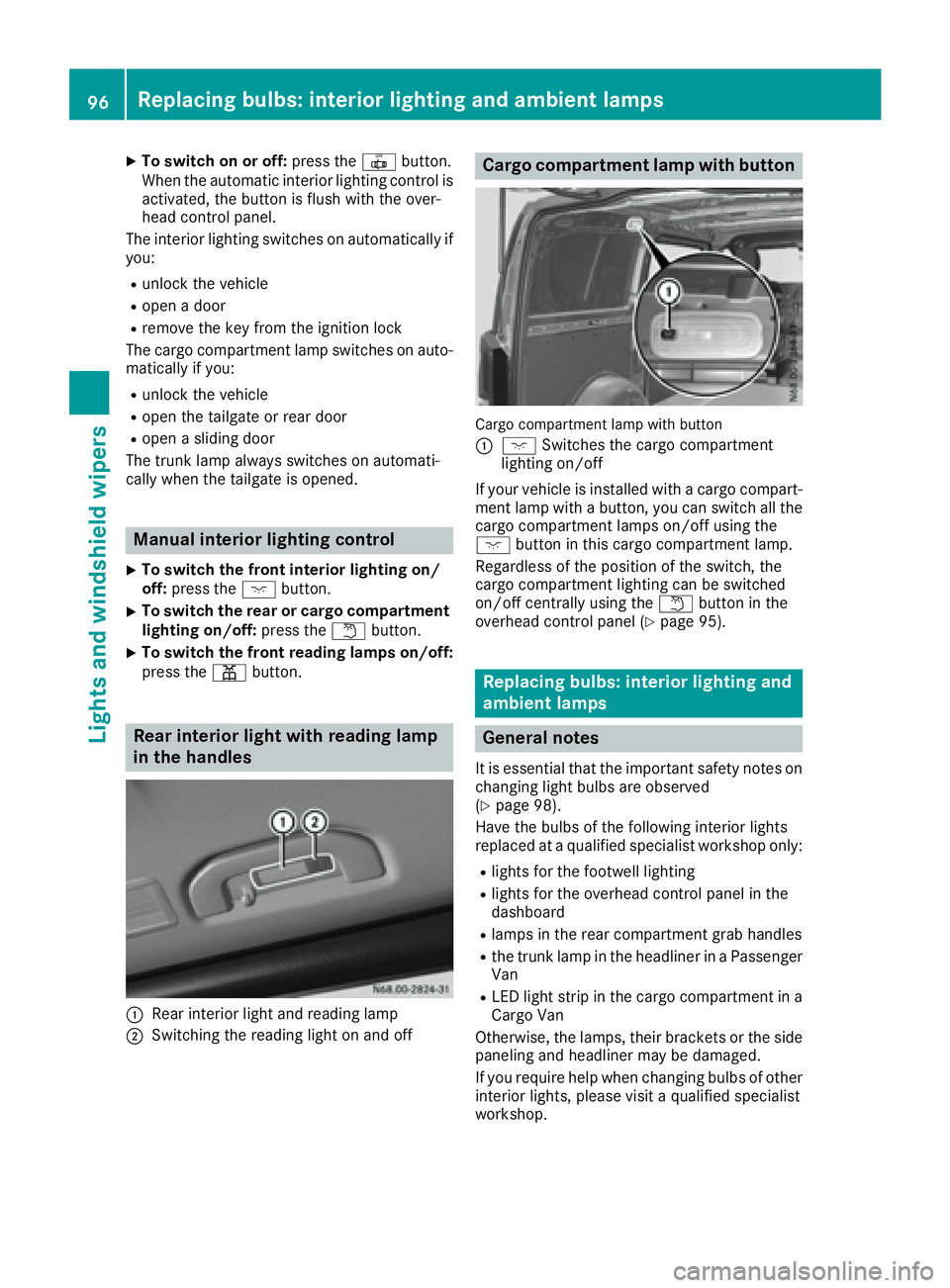
Rear interior light with reading lamp
in the handles
:Rear interio rlight and reading lamp
;Switching the reading light on and off
Carg ocom partmen tlamp with button
Cargo compartment lamp with button
:
c Switches the cargo compartment
lighting on/off
If your vehicl eisinstalle dwithac argo compart-
ment lamp with abutton, yo ucan switch al lthe
cargo compartment lamps on/off using the
c button in thisc argo compartment lamp.
Regardless of the positio nofthe switch ,the
cargo compartment lighting can be switched
on/off centrall yusing the wbutton in the
overhead contro lpan el (
Ypage 95).
Replacing bulbs :int erior lighting and
ambien tlamps
General notes
It is essential thatt he important safety notes on
changing light bulb sare observed
(
Ypage 98).
Hav ethe bulb softhe following interio rlights
replaced at aquali fied specialist workshop only:
Rlights for the footwell lighting
Rlights for the overhead contro lpan el in the
dashboard
Rlamps in the rea rcompartment gra bhandles
Rthe trunk lamp in the headline rinaPassenger
Van
RLED light stripint he cargo compartment in a
Cargo Van
Otherwise, the lamps ,thei rbrackets or the side
paneling and headline rmaybe damaged.
If yo urequire hel pwhenc hanging bulb sofother
interio rlights ,pleas evisit aquali fied specialist
workshop.
96Replacin gbulbs:i nterior lighting and ambien tlamps
Lights and windshield wiper s
Page 99 of 310
Rear compartment and cargocom -
partment lamps
Yo uc anno tchange the following bulb syourself:
RinaP assenger Van, the bulb sinthe trunk
lamp and thos eofthe rea rinterio rlights in the
gra bhandles
RinaC argo Vanw ithanL ED light stripint he
carg ocompartment, the LED light strip
Have thes ebulbs or the LED light stripc hanged
in aq uali fied specialist workshopo nly.
Information on changing the trunk lamp bulb in
the sid etrim panel of vehicles with carg ocom-
partment partitioning can be found under "Addi-
tiona linterio rand ambient lighting"
(
Ypage 97).
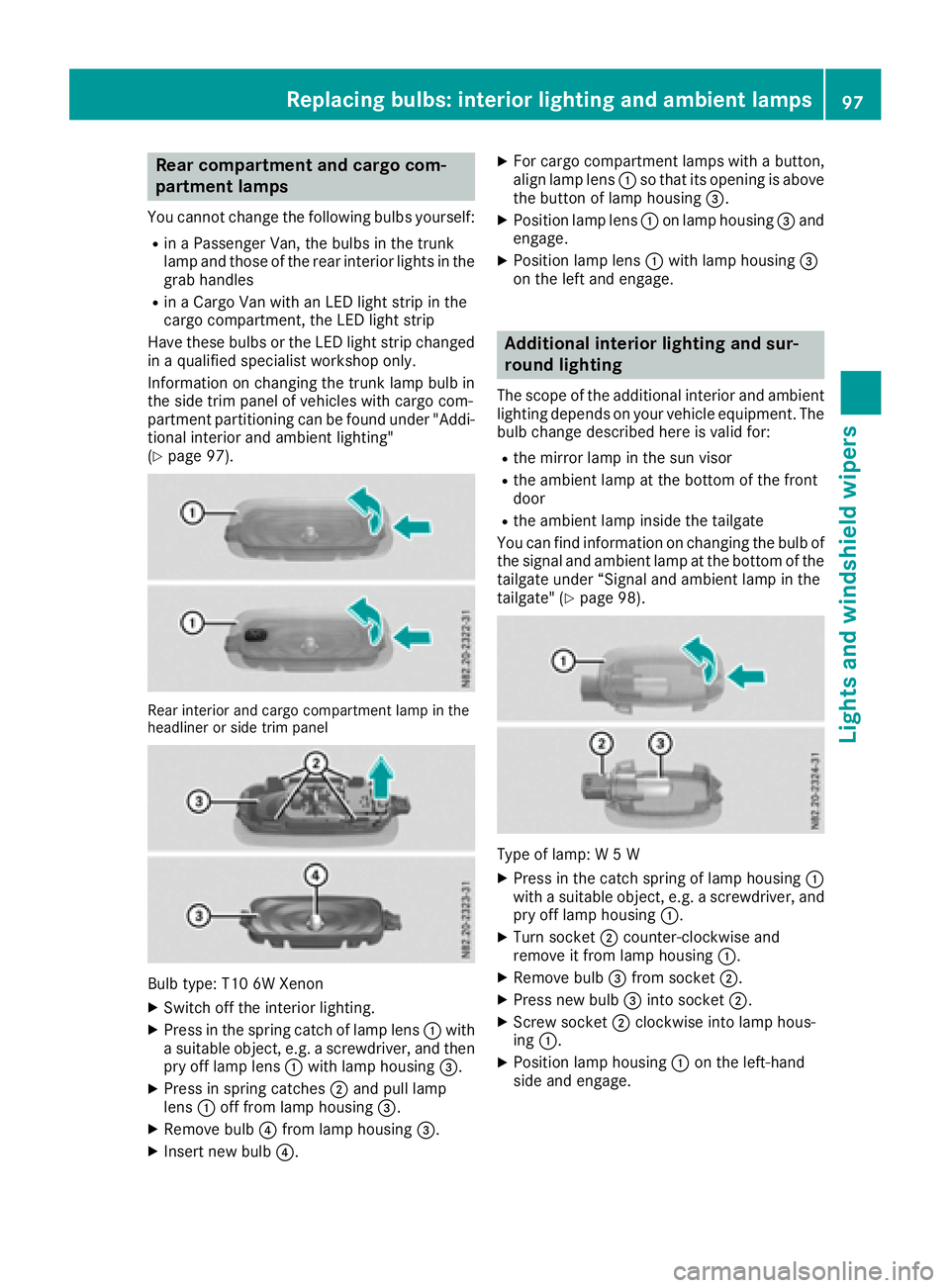
Rear interior and carg ocompartment lamp in the
headline rorsidet rim panel
Bul btype: T10 6W Xenon
XSwitch off the interio rlighting.
XPress in the spring catch of lamp lens :with
as uitabl eobject, e.g. ascrewdriver, and then
pry off lamp lens :with lamp housing =.
XPress in spring catches ;and pull lamp
lens :off from lamp housing =.
XRemove bulb?from lamp housing =.
XInsert new bulb?.
XFor cargocompartment lamps with abutton,
alig nlam plen s: so that its opening is above
the button of lamp housing =.
XPosition lamp lens:on lamp housing =and
engage.
XPosition lamp lens :with lamp housing =
on the left and engage.
Additional interior lighting and sur-
roun dlighting
The scop eofthe additiona linterio rand ambient
lighting depends on your vehicl eequipment. The
bulb change described her eisvalid for:
Rthe mirror lamp in the sunv isor
Rthe ambient lamp at the botto mofthe front
door
Rthe ambient lamp inside the tailgate
Yo uc an find information on changing the bulb of
the signal and ambient lamp at the botto mofthe
tailgate under “Signala nd ambient lamp in the
tailgate "(
Ypage 98).
Type of lamp: W5W
XPress in the catch spring of lamp housing :
with asuitabl eobject, e.g. ascrewdriver, and
pry off lamp housing :.
XTurn socket;counter-clockwise and
remove it from lamp housing :.
XRemove bulb=from socket ;.
XPress new bulb =into socket ;.
XScrew socket ;clockwise into lamp hous-
ing :.
XPosition lamp housing :on the left-hand
sid ea nd engage.
Replacing bulbs:i nteriorlighting and ambien tlamps97
Lights and windshield wipers
Z
Page 100 of 310
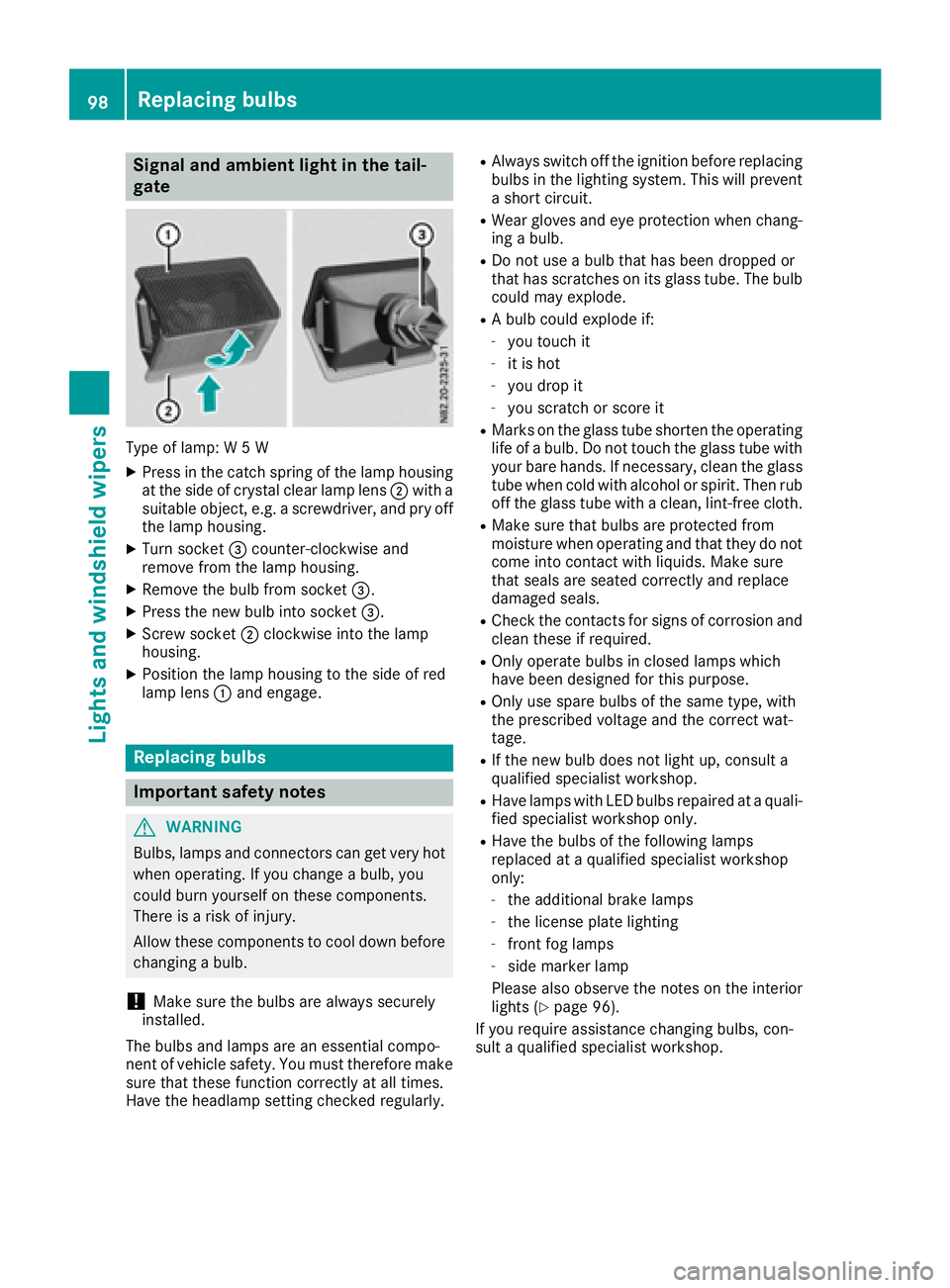
Signal and ambient light in the tail-
gate
Type of lamp:W5W
XPress in the catch spring of the lamp housing
at the side of crystal clear lamp lens ;with a
suitable object ,e.g. ascrewdriver, and pry off
the lamp housing.
XTurn socket =counter-clockwise and
remove from the lamp housing.
XRemove the bulb from socket =.
XPress the new bulb into socket =.
XScrew socket;clockwise into the lamp
housing.
XPosition the lamp housing to the side of red
lamp lens :and engage.
Replacing bulbs
Important safety notes
GWARNING
Bulbs, lamps and connectors can get very hot
when operating. If you change abulb, you
could burn yourself on these components.
There is arisk of injury.
Allow these components to cool down before
changing abulb.
!Make sure the bulbs are always securely
installed.
The bulbs and lamps are an essential compo-
nent of vehicle safety. You must therefore make
sure that these function correctly at all times.
Have the headlamp settingc hecked regularly.
RAlways switch off the ignition before replacing
bulbs in the lighting system. This will prevent
as hort circuit.
RWear gloves and eye protection when chang-
ing abulb.
RDo not use abulb that has been dropped or
that has scratches on its glass tube. The bulb
could may explode.
RAb ulb could explode if:
-you touch it
-it is hot
-you drop it
-you scratchors core it
RMarks on the glass tube shorten the operating
life ofabulb. Do not touch the glass tube with
your bare hands. If necessary, clean the glass
tube when cold with alcohol or spirit. Then rub
off the glass tube with aclean, lint-free cloth.
RMake sure that bulbs are protected from
moisture when operating and that they do not
come into contact with liquids. Make sure
that seals are seated correctly and replace
damaged seals.
RCheck the contacts for signs of corrosion and
clean these if required.
ROnly operate bulbs in closed lamps which
have been designed for this purpose.
ROnly use spare bulbs of the same type, with
the prescribed voltage and the correct wat-
tage.
RIf the new bulb does not light up, consult a
qualified specialist workshop.
RHave lamps with LED bulbs repaired at aquali-
fied specialist workshop only.
RHave the bulbs of the following lamps
replaced at aqualified specialist workshop
only:
-the additional brake lamps
-the license plate lighting
-front fog lamps
-side marker lamp
Please also observe the notes on the interior
lights (
Ypage 96).
If you require assistance changing bulbs, con-
sult aqualified specialist workshop.
98Replacing bulbs
Lights and windshieldw ipers
Page 101 of 310
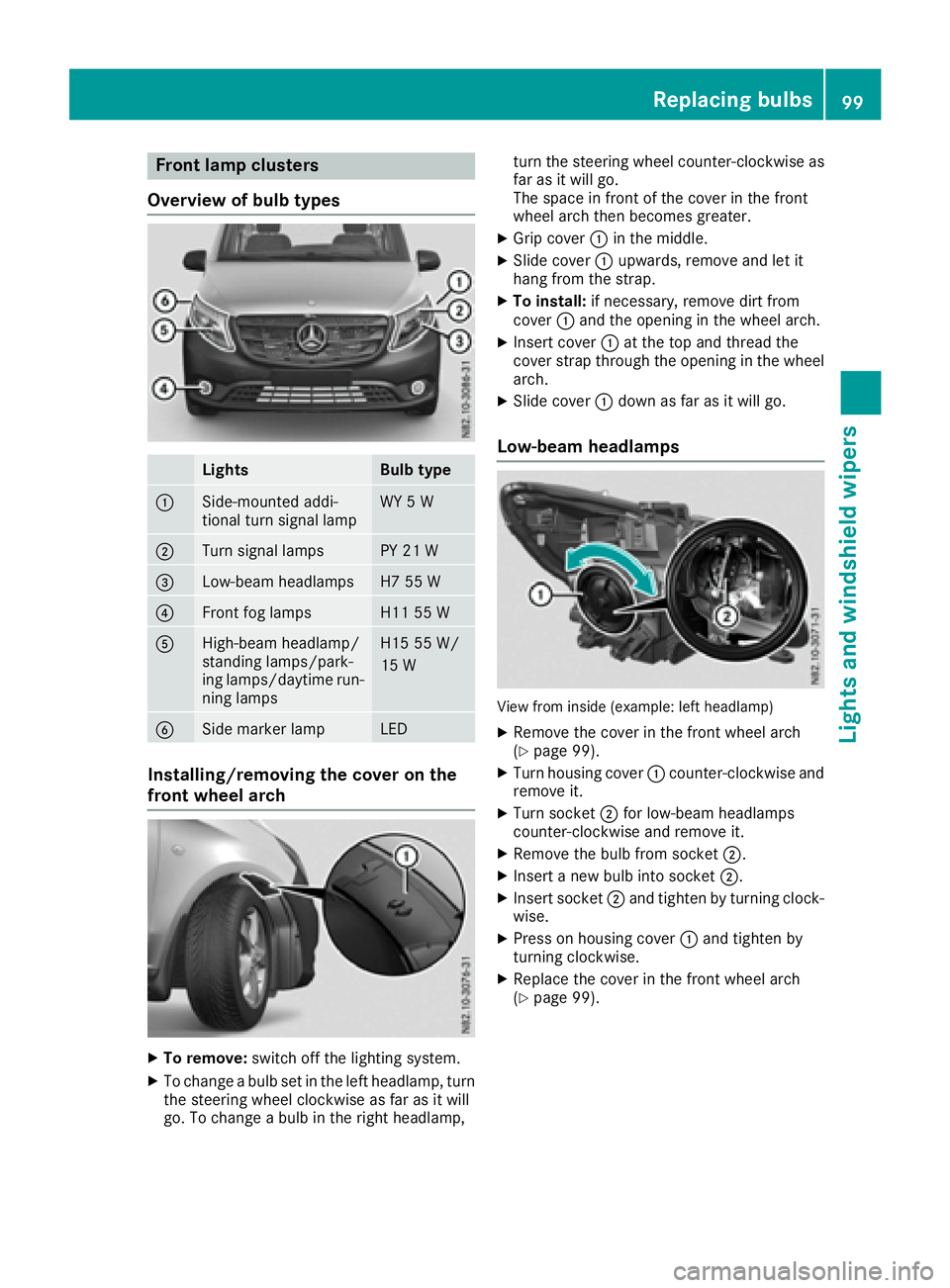
Frontlam pclusters
Overview of bul btypes
LightsBulb type
:Side-mounte daddi-
tional tur nsignal lampWY 5W
;Turn signal lamp sPY 21W
=Low-beam headlampsH7 55 W
?Frontfog lamp sH1155W
AHigh-beam headlamp/
standing lamps/park -
ing lamps/daytime run -
nin glamp sH1555W /
15 W
BSidem arke rlampLE D
Installing/removing th ecover on the
front wheel arch
XTo remove: switch off thelighting system.
XTo chang eabulb set in th elefth eadlamp, tur n
th es teering whee lclockwise as far as it will
go. To chang eabulb in th eright headlamp, tur
nthe steering whee lcou nter-clockwise as
far as it will go.
The spac einfrontof thecover in th efront
whee larcht henb ecome sgreater.
XGrip cover :in th emiddle.
XSlide cover :upwards, remove and let it
han gfromt hestrap.
XTo install: if necessary, remove dirt from
cover :and th eopening in th ewhee larch.
XInser tcover : at th etop and thread th e
cover strap throug hthe opening in th ewhee l
arch.
XSlide cover :down as far as it will go.
Low-beam headlamps
View from inside (example: lef theadlamp )
XRemove th ecover in th efront whee larch
(Ypage 99).
XTurn housing cover :counter-clockwise and
remove it .
XTurn socke t; for low-beam headlamps
counter-clockwise and remove it .
XRemove thebulb from socke t;.
XInser tanewbulb int osocke t;.
XInser tsocke t; and tighten by turnin gclock -
wise.
XPress on housing cover :and tighten by
turnin gclockwise.
XReplac ethe cover in th efront whee larch
(Ypage 99).
Replacingb ulbs99
Lightsand windshield wipers
Z
Page 102 of 310
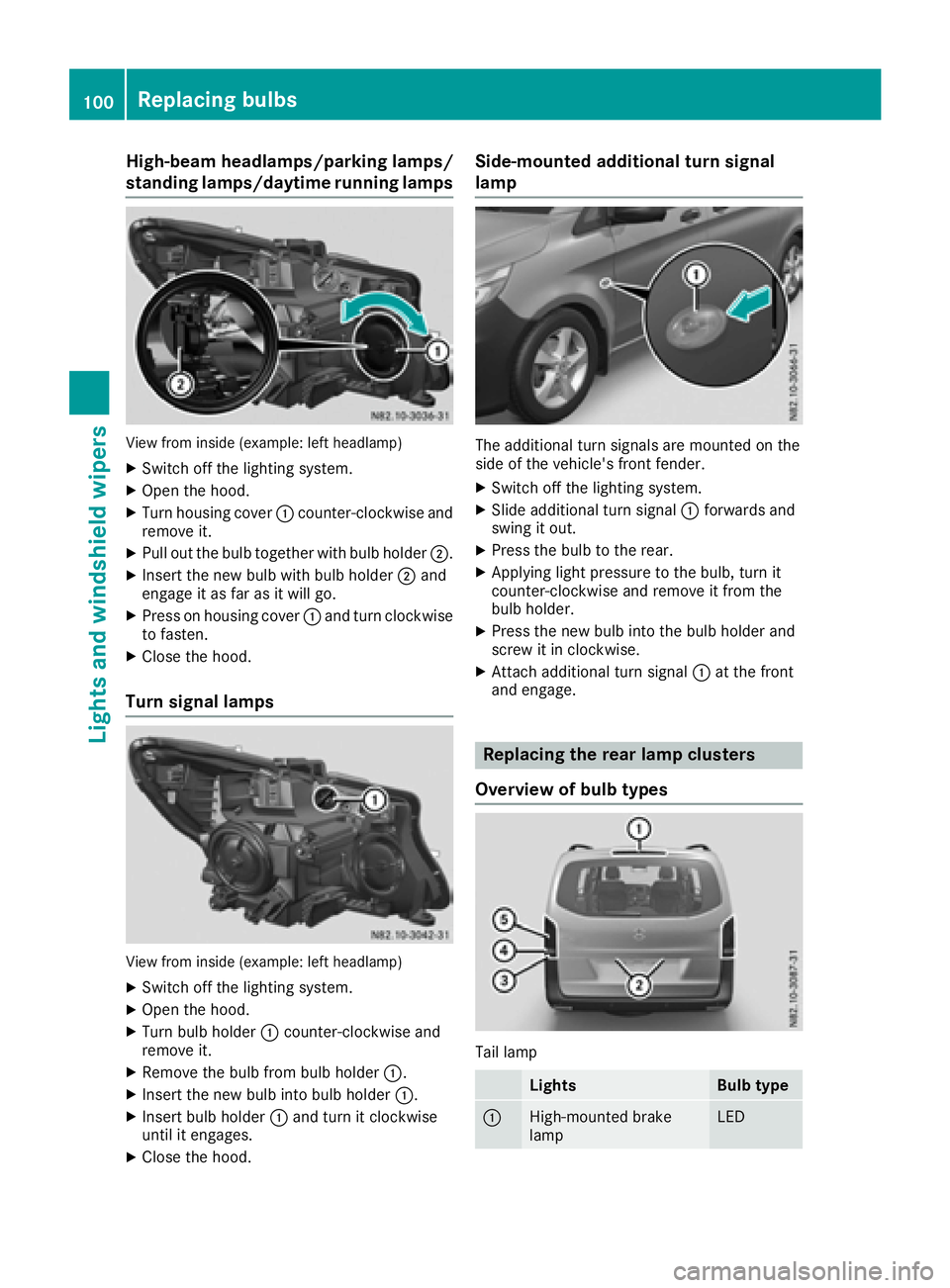
High-beam headlamps/parkinglamps/
standing lamps/daytime running lamps
View from insid e(example: left headlamp)
XSwitch off the lighting system.
XOpen the hood.
XTurn housing cover :counter-clockwise and
remove it.
XPul lout the bul btogether with bul bholder ;.
XInsert the new bul bwith bul bholder ;and
engag eitasf ar as it wil lgo.
XPress on housing cover :and turn clockwise
to fasten.
XClose the hood.
Turn signal lamps
View from insid e(example: left headlamp)
XSwitch off the lighting system.
XOpen the hood.
XTurn bul bholder :counter-clockwise and
remove it.
XRemove the bul bfrom bul bholder :.
XInsert the new bul binto bul bholder :.
XInsert bul bholder :and turn it clockwise
until it engages.
XClose the hood.
Side-mounted additional turn signal
lamp
The additiona lturn signals are mounted on the
side of the vehicle's front fender.
XSwitch off the lighting system.
XSlide additiona lturn signal :forwards and
swing it out.
XPress the bul btothe rear.
XApplying light pressure to the bulb, turn it
counter-clockwise and remove it from the
bulbh older.
XPress the new bul binto the bul bholder and
screw it in clockwise.
XAttach additiona lturn signal :at the front
and engage.
Replacing the rear lamp clusters
Overview of bulb types
Tai llamp
LightsBulb type
:High-mounted brake
lampLED
100Replacing bulbs
Lights and windshield wipers
Page 103 of 310
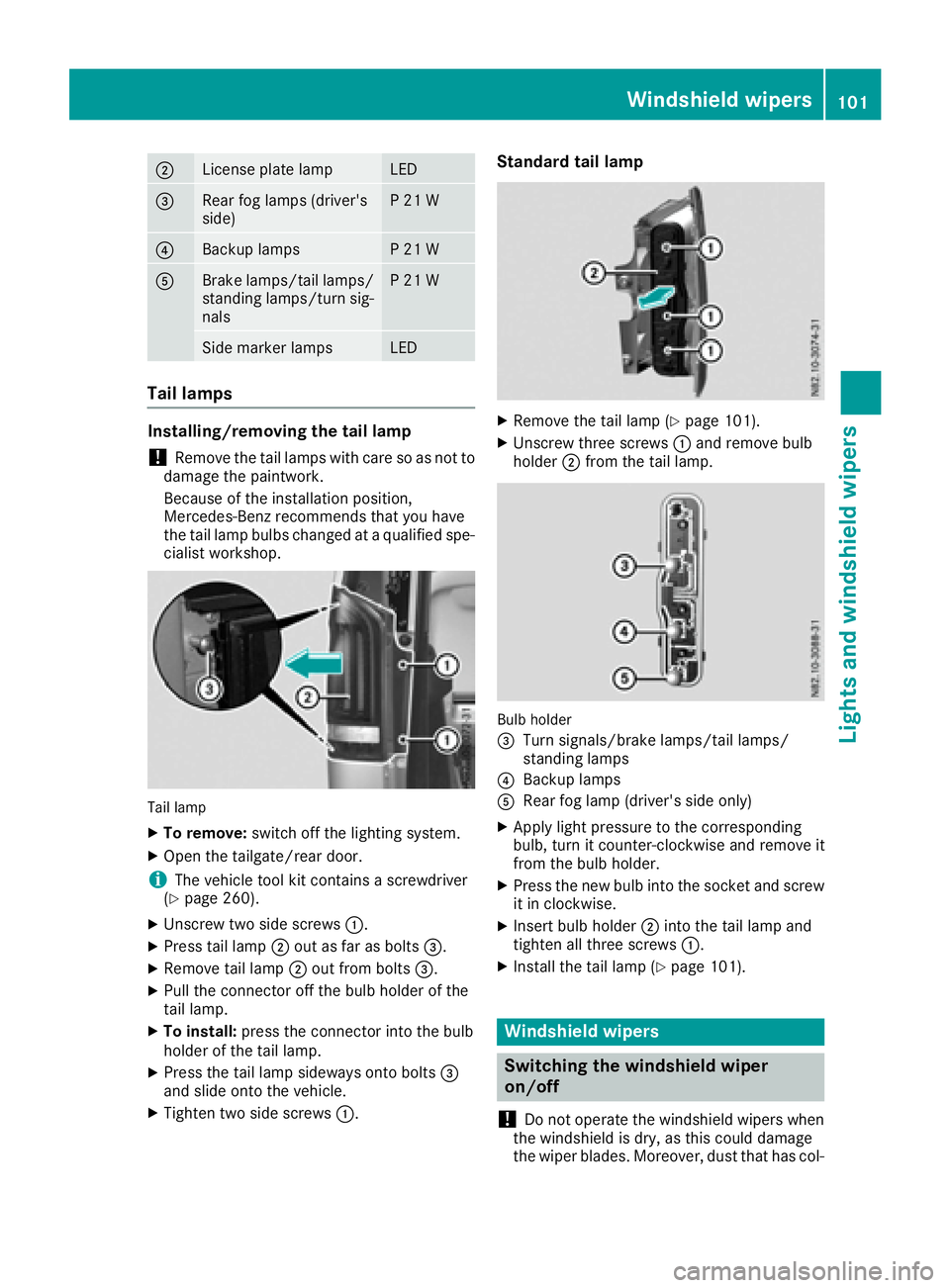
;License plate lampLED
=Rearfog lamp s(driver's
side)P21W
?Backup lampsP21W
ABrake lamps/tail lamps/
standing lamps/turn sig-
nalsP21W
Side marker lampsLED
Tail lamps
Installing/removing the tail lamp
!Remove the tail lamp swith care so as not to
damage the paintwork.
Because of the installation position,
Mercedes-Benz recommends that you have
the tail lamp bulbs changed at aqualifieds pe-
cialist workshop.
Tail lamp
XTo remove: switch off the lighting system.
XOpen the tailgate/rear door.
iThe vehicle tool kit contains ascrewdriver
(Ypage 260).
XUnscrew two side screws :.
XPress tail lamp;out as far as bolts =.
XRemove tail lamp;out from bolts =.
XPullthe connector off the bul bholderoft he
tail lamp.
XTo install: press the connector into the bulb
holderoft he tail lamp.
XPress the tail lamp sideways onto bolts =
and slideo nto the vehicle.
XTighten two side screws :.
Standard tail lamp
XRemove the tail lamp (Ypage 101).
XUnscrew three screws:and remove bulb
holder ;from the tail lamp.
Bulb holder
=
Turn signals/brake lamps/tail lamps/
standing lamps
?Backup lamps
ARea rfog lamp (driver's side only)
XApply lightp ressure to the corresponding
bulb, turn it counter-clockwise and remove it
from the bul bholder.
XPress the new bul binto the socket and screw
it in clockwise.
XInsert bul bholder ;into the tail lamp and
tighten all three screws :.
XInstall the tail lamp (Ypage 101).
Windshield wipers
Switching the windshieldw iper
on/off
!
Do not operate the windshield wipers when
the windshield is dry, as this could damage
the wiper blades. Moreover, dust that has col-
Windshield wipers101
Lights and windshield wipers
Z