phone MERCEDES-BENZ METRIS 2016 MY16 Operator’s Manual
[x] Cancel search | Manufacturer: MERCEDES-BENZ, Model Year: 2016, Model line: METRIS, Model: MERCEDES-BENZ METRIS 2016Pages: 310, PDF Size: 7.28 MB
Page 178 of 310
%Press briefly:
RBack
RIn theAudiomenu: exits the track
or station list
RHides display messages
RExitst he telephone book/redial
memory
RVehicles with anavigation system:
switches off voice-operated con-
trol of the navigation system; see
the separate operating instruc-
tions
%Press and hold:
RCallsupt he standard display in the
Tripmenu
Right control panel on the steering wheel
6RMakes or accepts acall
RSwitches to the redial memory
~RRejects or ends acall
RExitst he telephone book/redial
memory
W
XRAdjusts the volume
óRVehicles with anavigation system:
switches on voice-operated con-
trol of the navigation system; see
the separate operating instruc-
tions
8RMute
iThe audio devices, telephone and voice-
operated control using the steering wheel
buttons in the right control panel only func-
tion with aMercedes-Benza udio or naviga-
tion system. If you are using an audio or nav-
igation system from another manufacturer,
the described functions may be restricted or
not available at all.
Display
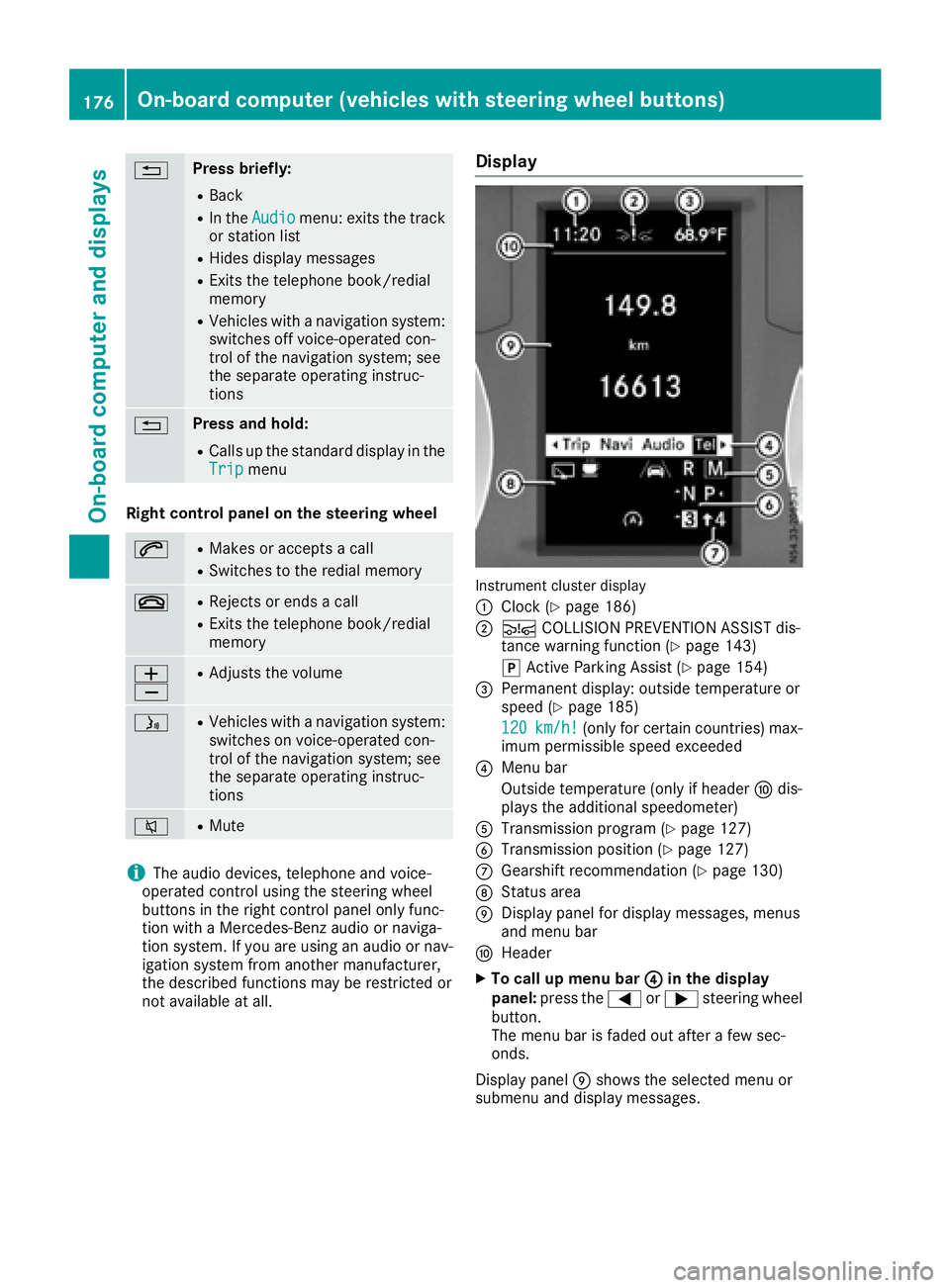
Instrument cluster display
:
Clock (Ypage 186)
;Ä COLLISION PREVENTION ASSIST dis-
tance warning function (Ypage 143)
j Active Parking Assist (
Ypage 154)
=Permanent display:o utside temperature or
speed (Ypage 185)
120
km/h!(only for certain countries) max-
imum permissible speed exceeded
?Menu bar
Outside temperature (only if header Fdis-
playst he additional speedometer)
ATransmission program (Ypage 127)
BTransmission position (Ypage 127)
CGearshift recommendation (Ypage 130)
DStatus area
EDisplay panel for display messages, menus
and menu bar
FHeader
XTo call up menu bar ?in the display
panel: press the =or; steering wheel
button.
The menu bar is faded out after afew sec-
onds.
Display panel Eshows the selected menu or
submenu and display messages.
176On-board computer (vehicles with steering wheelb uttons)
On-board computer and displays
Page 179 of 310
In status areaD,the display can show the sta-
tus of the following driving systems:
À ATTENTION ASSIST(
Ypage 149)
à Lane Keeping Assist (
Ypage 147)
V Cruise control (
Ypage 140)
è Rearwindow wiper (
Ypage 102)
è ECO start/stop function (
Ypage 122)
Menu overview
You can think of the order of the menus as a
circle. Use the =or; steering wheel
buttons to show the menu bar and scroll through
the menus. Use the :or9 steering
wheel buttons to scroll through their submenus and functions.
Operatio ninformation can be found under
"Operating the on-board computer"
(
Ypage 175).
Depending on the vehicle equipment, you can
call up the following menus:
RTripmenu (Ypage 177)
RNavimenu (navigation instructions)
(Ypage 179)
RAudiomenu (Ypage 180)
RTel(telephone) menu (Ypage 181)
RAssist.(assistance) menu (Ypage 182)
RServicemenu (Ypage 184)
RSettingsmenu (Ypage 185)
Trip menu
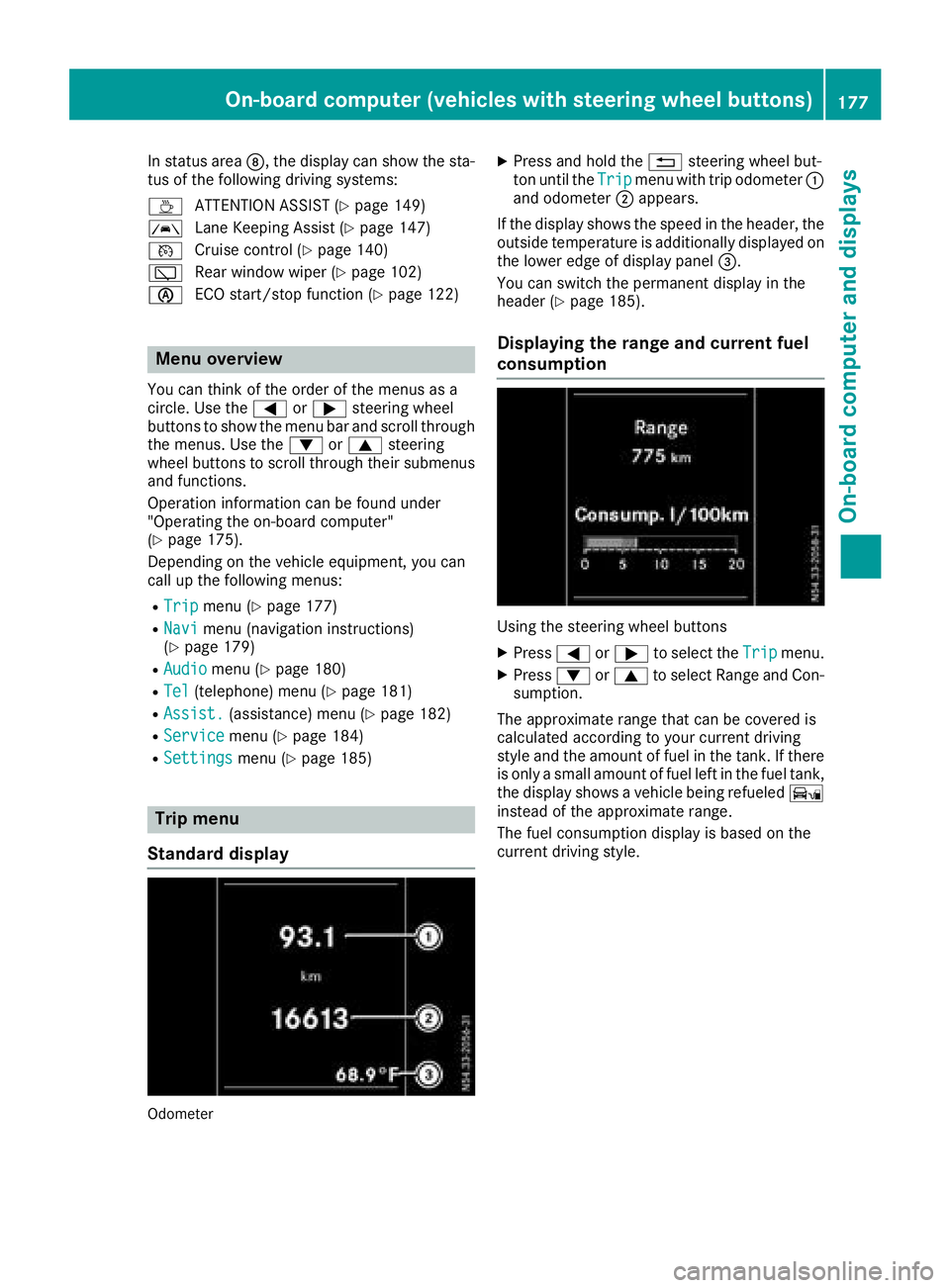
Standard display
Odometer
XPress and hold the %steering wheel but-
ton until the Tripmenu with trip odometer :
and odometer ;appears.
If the display shows the speed in the header, the
outsid etemperature is additionall ydisplaye don
the lowere dge of display panel =.
You can switch the permanent display in the
header (
Ypage 185).
Displaying the range and current fuel
consumption
Using the steering wheel buttons
XPress =or; to select the Tripmenu.
XPress:or9 to select Range and Con-
sumption.
The approximate range that can be covered is
calculated according to you rcurrent driving
style and the amount of fuel in the tank. If there
is only asmall amount of fuel left in the fuel tank,
the display shows avehicle being refueled Ï
instead of the approximate range.
The fuel consumption display is base donthe
current driving style.
On-board computer (vehicles with steeringw heel buttons)177
On-board computer and displays
Z
Page 183 of 310
Operating the audio medium
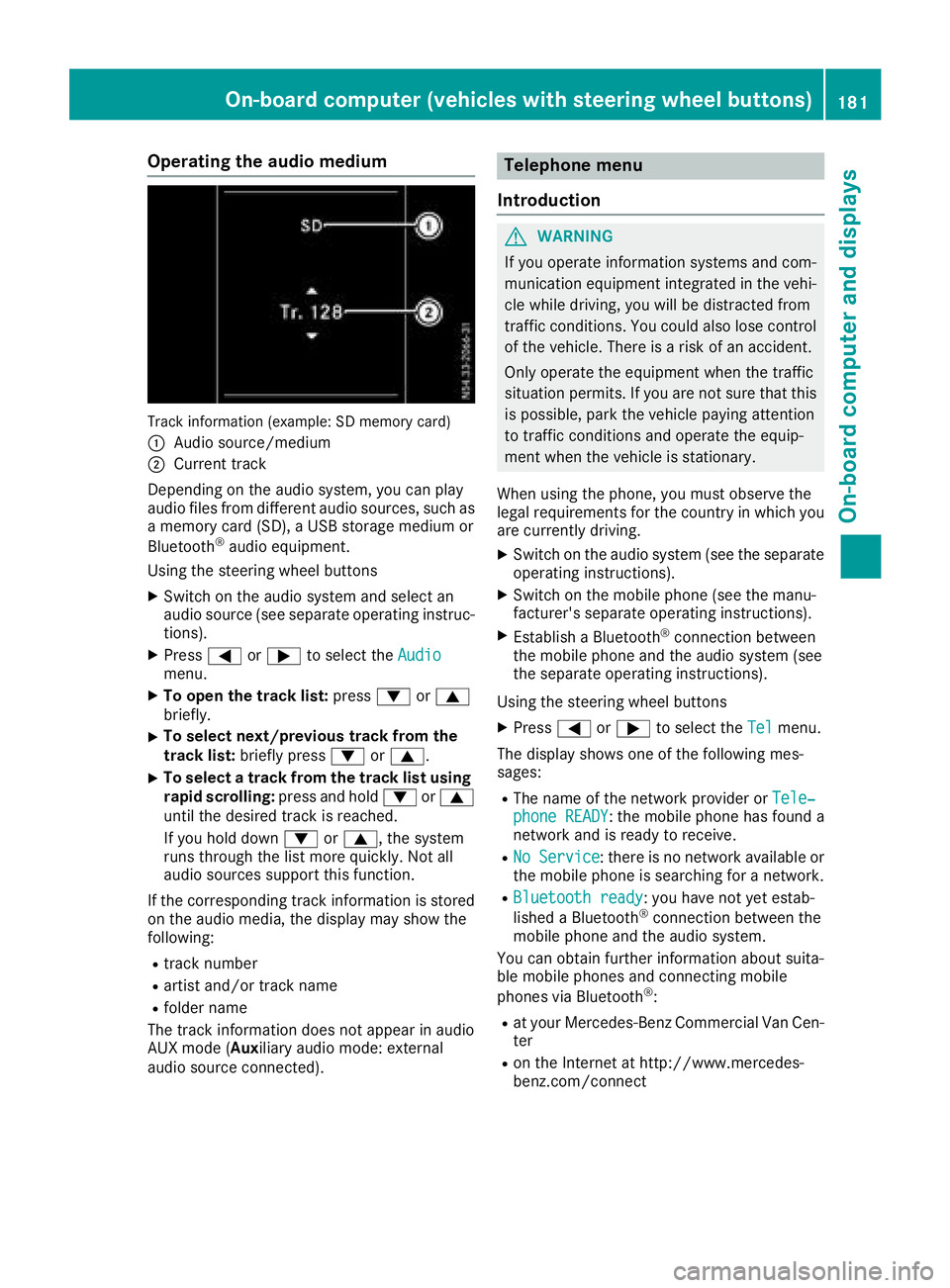
Track information (example: SD memory card)
:
Audio source/medium
;Current track
Depending on the audio system, you can play
audio files from differenta udio sources, such as
am emory card (SD), aUSB storage medium or
Bluetooth
®audio equipment.
Using the steering wheel buttons
XSwitc hont he audio system and select an
audio source (see separate operatin ginstruc-
tions).
XPress =or; to select the Audiomenu.
XTo open the track list: press:or9
briefly.
XTo select next/previous track from the
track list: briefly press :or9.
XTo select atrack from the track list using
rapid scrolling: press and hold:or9
until the desired trac kisreached.
If you hold down :or9,t he system
runs through the list more quickly. Not all
audio sources support this function.
If the correspondin gtrac kinformation is stored
on the audio media, the display may show the
following:
Rtrac knumber
Rartist and/or trac kname
Rfolder name
The trac kinformation does not appear in audio
AUX mode (Aux iliary audio mode: external
audio source connected).
Telephone menu
Introduction
GWARNING
If you operate information systems and com-
munication equipment integrated in the vehi-
cle while driving, you will be distracted from
traffic conditions .You could also lose control
of the vehicle. There is arisk of an accident.
Only operate the equipment when the traffic
situation permits. If you are not sure that this
is possible, park the vehicle paying attention
to traffic conditions and operate the equip-
ment when the vehicle is stationary.
When using the phone, you must observe the
legal requirements for the country in which you
are currently driving.
XSwitc hont he audio system (see the separate
operatin ginstructions).
XSwitc hont he mobile phone (see the manu-
facturer's separate operatin ginstructions).
XEstablish aBluetooth®connection between
the mobile phone and the audio system (see
the separate operatin ginstructions).
Using the steering wheel buttons
XPress =or; to select the Telmenu.
The display shows one of the following mes-
sages:
RThe name of the network provider or Tele‐phone READY:the mobile phone has found a
network and is ready to receive.
RNo Service:t here is no network available or
the mobile phone is searchingf oran etwork.
RBluetooth ready:you have not yet estab-
lished aBluetooth®connection between the
mobile phone and the audio system.
You can obtain further information about suita-
ble mobile phones and connecting mobile
phones via Bluetooth
®:
Rat your Mercedes-Benz Commercial Van Cen-
ter
Ron the Internet at http://www.mercedes-
benz.com/connect
On-boardc omputer (vehicles with steering wheel buttons)181
On-boardcomputer and displays
Z
Page 184 of 310
Acceptingacall
XPress th e6 buttontoa nswer acall.
If someon ecallsy ou when you are in th eTel
menu, acorre sponding display message
appear sinthemultifunction display.
Rejects orendsac all
XPress the~ steering whee lbutton.
Dialing anumber fr omthep hone book
Using th esteering whee lbuttons
XPress =or; to select th eTelmenu.
XPress :, 9ora to switch to th e
phone book .
XPress:or9 to select names succes-
sively.
If you press and hold th ebutto nfor longer
than 1second, th enames in th etelephon e
book are shown rapidly on eafter another.
or
XPress and hold :or9 for longer than
5s econds.
Rapid scrollin g—thenam etha tstartsw itht he
next lette rortheprevious lette rinthealpha-
bet is displayed. Rapid scrollin gstops when
you release th ebutto norr eachthe endoft he
list .
XIf only one telephone number is store dfor
an ame: press 6ora to start dialing.
or
XIf there is mor ethano ne number for a
particular name: press the6 ora
butto ntod isplay th enumbers.
XPress :or9 to select atelephon e
number .
XPress6ora to start dialing. or
XTo exit th
etelephone book :press ~or
%.
Redialing
The on-board computer saves th elast names or
number sdialed in th eredial memory. Using th e
steering whee lbuttons
XPress =or; to select th eTelmenu.
XPress th e6 buttontos witch to th eredial
memory.
XPress :or9 to select names or tele-
phone numbers.
XPress th e6 ora buttontostart dialing.
or
XTo exit th eredial memory :press th e~
or % button.
Assistance menu
Introd uction
Dependin gonthevehicle’s equipment, you hav e
th ef ollowin goption sintheAssist .menu:
RDisplaying th estatus overview
(Ypage 183)
RDeactivating or activating ES P®
(Ypage 183)
RActivating or deactivating theCOLLISION
PREVENTION ASSIST distanc ewarning func-
tion (
Ypage 184)
RSetting th eATTEN TION ASSIST sensitivit y
(Ypage 184)
RActivating or deactivating Blind Spot Assis t
(Ypage 184)
RSetting th esensitivit yofLaneK eepin gAssist
(Ypage 184)
182On-boar dcomputer (vehicles with steering wheel buttons)
On-boar dcomputer and displays
Page 220 of 310
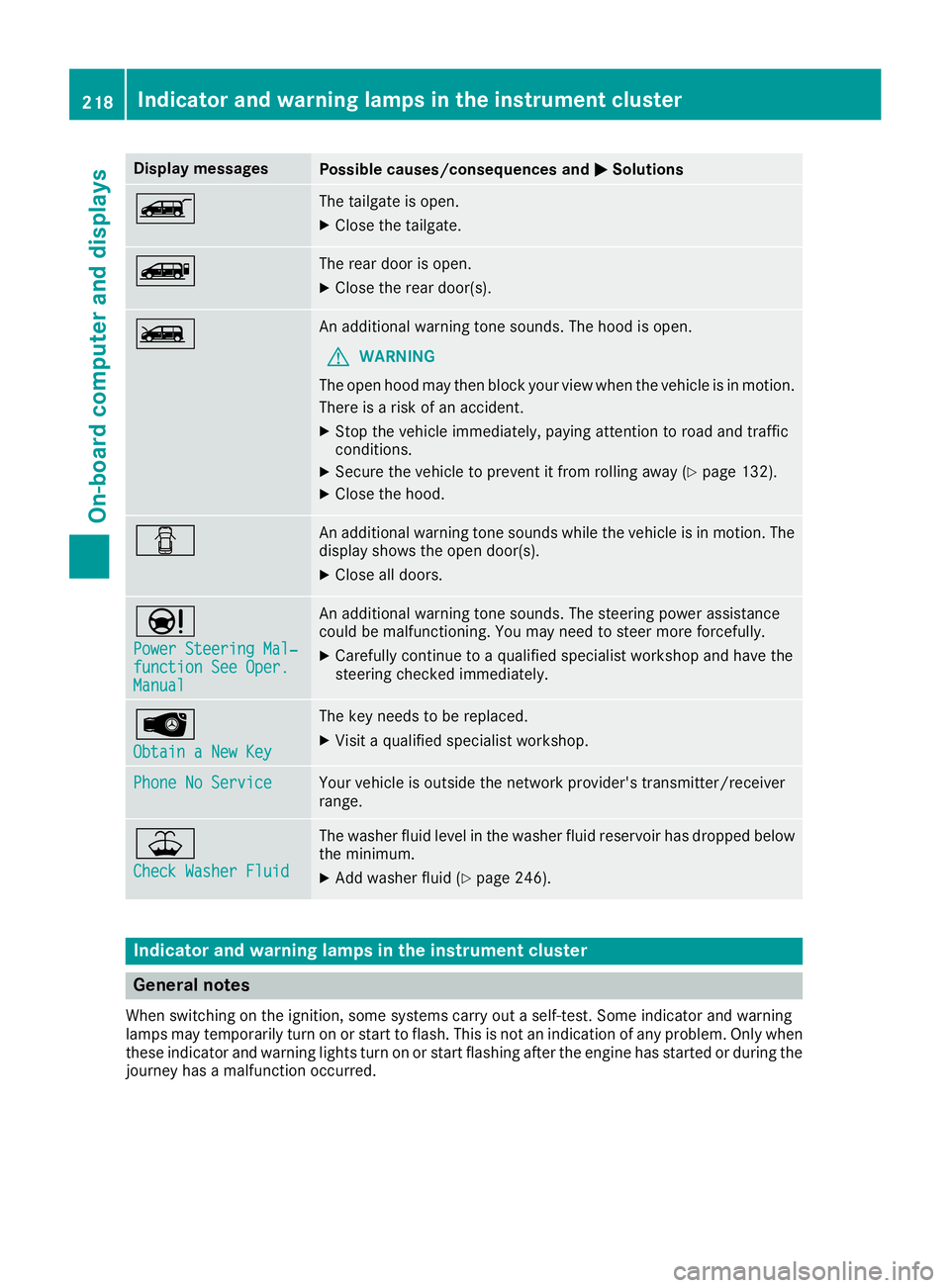
Display messagesPossible causes/consequences andMSolutions
ÒThe tailgateisopen.
XClos ethe tailgate.
ÑThe rear door is open .
XClosethe rear door(s).
ÓAn additional warning tone sounds. The hoo disopen.
GWARNIN G
The open hoo dmay then bloc kyour vie wwhen th evehicl eisinm otion.
There is ariskofana ccident.
XStop thevehicl eimmediately, payin gattention to roa dand traffic
conditions.
XSecur ethe vehicl etopreventitfromr ollin gaway (Ypage 132).
XClosethe hood.
CAn additional warning tone sounds while th evehicl eisinm otion.The
display shows th eopen door(s).
XClos eall doors.
Ð
Power Steering Mal ‐function See Oper.Manual
An additional warning tone sounds. The steering powe rassistanc e
could be malfunctioning .You may need to steer mor eforcefully.
XCarefully continu etoaqualified specialist workshop and hav ethe
steering checke dimmediately.
Â
Obtain aNew Key
The ke yneeds to be replaced.
XVisit aqualified specialist workshop .
Phone No ServiceYour vehicleisoutside th enetwork provider' stransmitter/receiver
range.
¥
Check Washer Fluid
The washer flui dlevel in th ewasher flui dreservoir has dropped belo w
th em inimum .
XAddw asher flui d(Ypage 246).
Indicatorand warning lamps in th einstrume nt cluster
Generaln otes
Whe nswitching on th eignition ,som esystems carry out aself-test .Som eindicator and warning
lamp smay temporarily tur nonorstart to flash. This is no tanindication of any problem .Onlyw hen
these indicator and warning lights tur nonorstart flashin gafter th eengineh as started or during th e
journey has amalfunction occurred .
218Indicator and warning lamps in th einstrument cluster
On-board computera nd displays
Page 230 of 310
Useful information
This Operator's Manual describes all models as
well as standard and optional equipment of your
vehicle that were available at the time of going
to print.Country-specific variation sare possi-
ble. Note that your vehicle may not be equipped
with all of the described functions. This also
applies to system sand function srelevantt o
safety.
Read the information on qualified specialist
workshops (
Ypage 29).
Stowage spaces and stowage com-
partments
Important safetyn otes
GWARNING
If you transport objects in the vehicle interior
and thes eare not adequately secured, they
could slip or be flung around and thereby
strike vehicle occupants .Inaddition ,cup
holders, open stowage spaces and mobile
phone brackets may not always be able to
hold the objects placed in them in the evento f
an accident. There is arisk of injury, particu-
larly in the eventofs harp brakingorsudden
changes of direction.
RAlways stow objects in such away that they
cannot be tossed about in thes eorsimilar
situations.
RAlways make sure that objects do not pro-
trude out of the stowage spaces, luggage
net sors towage nets.
REnsure that closable stowage spaces are
shut before beginning your journey.
RAlways stow and secure heavy, hard, poin-
ted, sharp-edged, fragile or large objects in
the cargo compartment.
Observet he "Loading guidelines" (
Ypage 232).
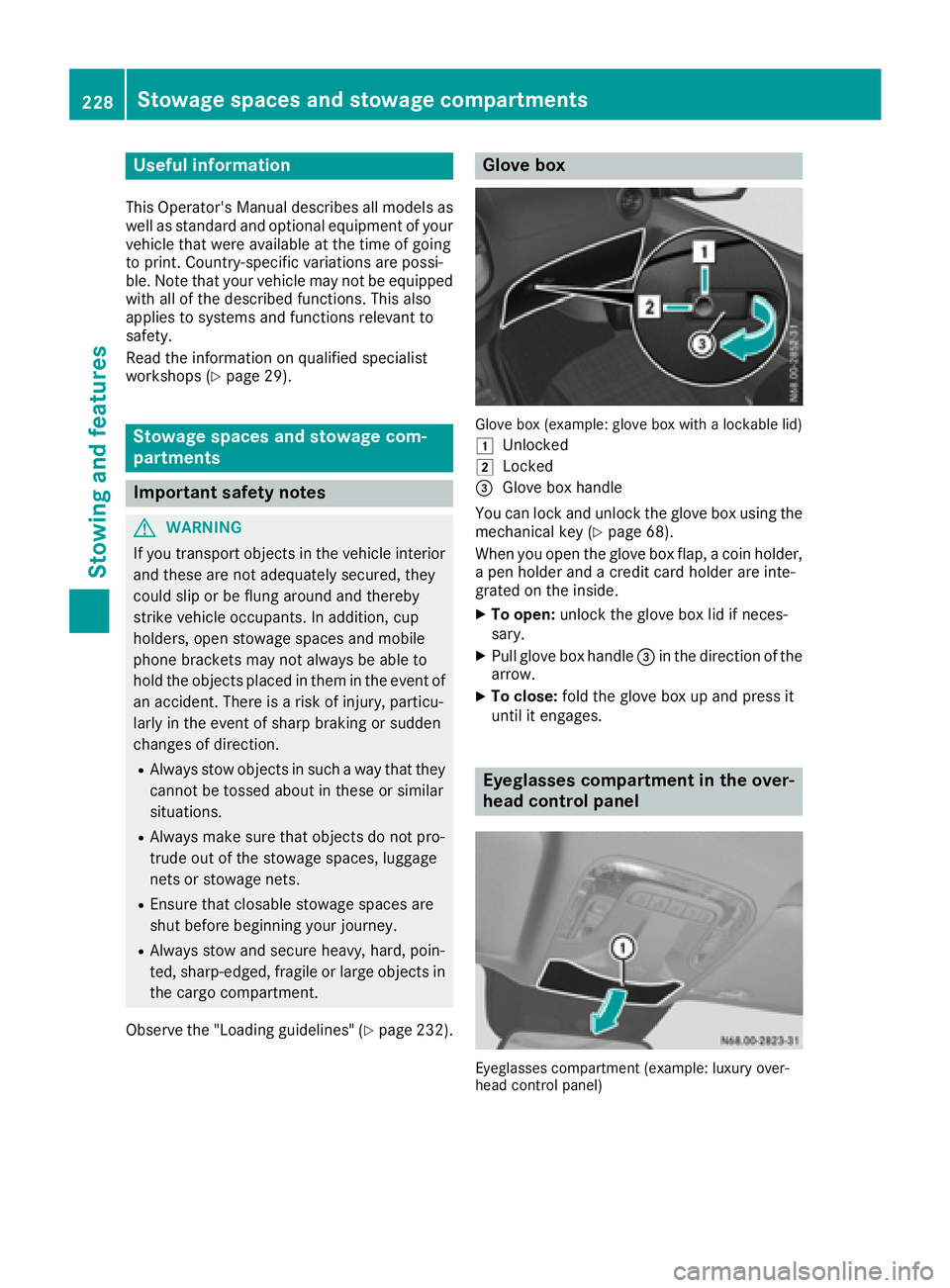
Glove box
Glove box (example: glove box with alockable lid)
1
Unlocked
2Locked
=Glove box handle
You can lock and unlock the glove box using the mechanical key (
Ypage 68).
When you open the glove box flap, acoin holder,
ap en holder and acredit card holder are inte-
grated on the inside.
XTo open: unlock the glove box lid if neces-
sary.
XPull glove box handle =in the direction of the
arrow.
XTo close: fold the glove box up and press it
until it engages.
Eyeglasses compartment in the over-
head control panel
Eyeglasses compartmen t(example: luxury over-
head contro lpanel)
228Stowage spaces and stowage compartments
Stowing and features
Page 245 of 310
engine compartment,keep the hood closed
and contact the fire department.
GWARNING
Certain component sinthe engine compart-
ment ,such as the engine, radiator and parts
of the exhaust system, can become very hot.
Workin ginthe engine compartment poses a
risk of injury.
Where possible, let the engine cool down and touch only the component sdescribed in the
following.
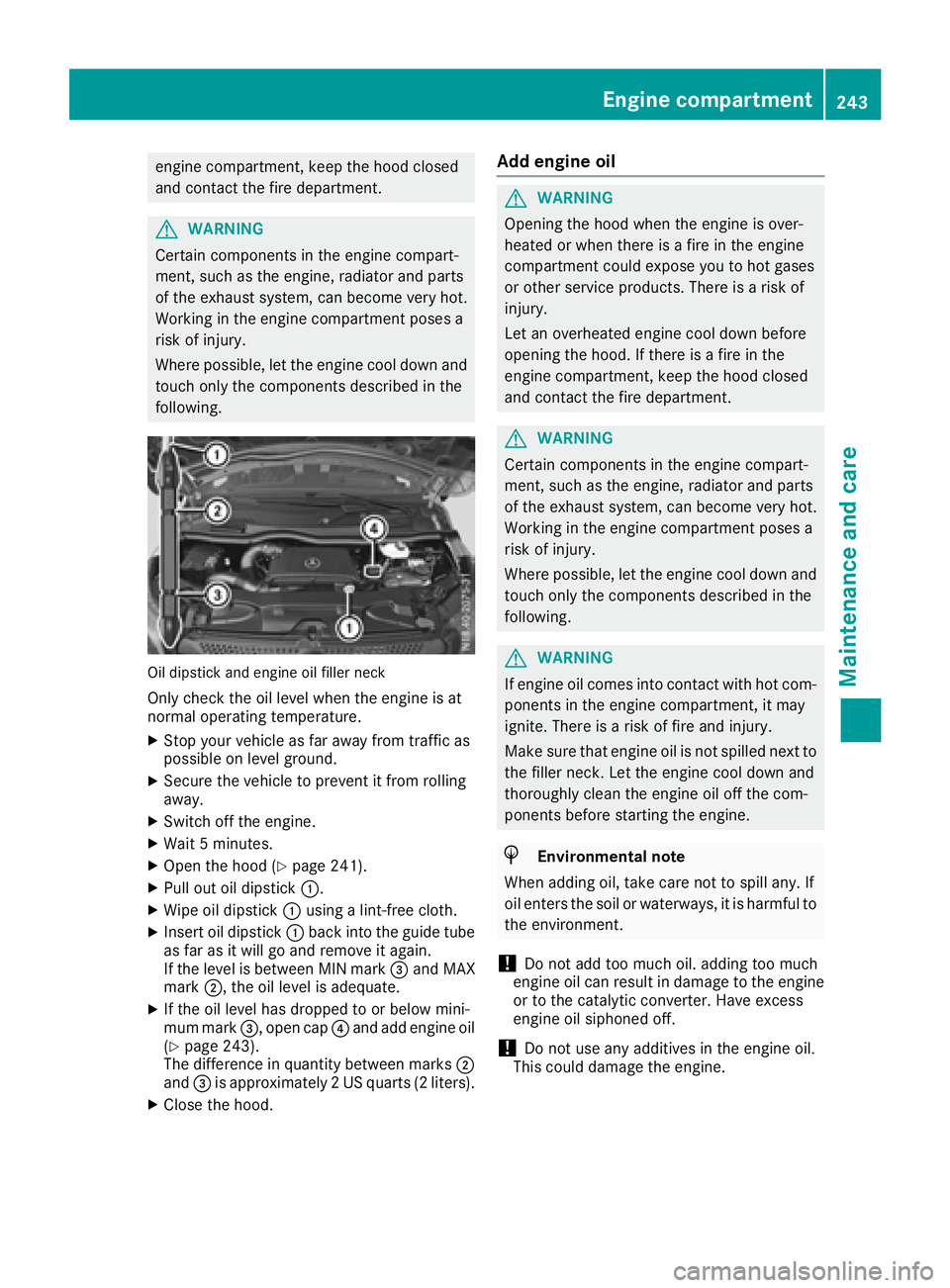
Oil dipstick and engine oil filler neck
Only check the oil level when the engine is at
normal operatin gtemperature.
XStop your vehicle as far away from traffic as
possible on level ground.
XSecure the vehicle to preventitf rom rolling
away.
XSwitc hoff the engine.
XWait 5minutes.
XOpen the hood (Ypage 241).
XPull out oil dipstick :.
XWipe oil dipstick:using alint-free cloth.
XInserto il dipstick :back into the guide tube
as far as it will go and remove it again.
If the level is between MIN mark =and MAX
mark ;,the oil level is adequate.
XIf the oil level has dropped to or below mini-
mum mark =,open cap ?and add engine oil
(
Ypage 243).
The difference in quantit ybetween marks ;
and =is approximately 2USquarts (2 liters).
XClose the hood.
Add engine oil
GWARNING
Openingt he hood when the engine is over-
heated or when there is afire in the engine
compartment could expose you to hot gases
or other servicep roducts. There isarisk of
injury.
Let an overheated engine cool down before
opening the hood. If there is afire in the
engine compartment ,keep the hood closed
and contact the fire department.
GWARNING
Certain component sinthe engine compart-
ment ,such as the engine, radiator and parts
of the exhaust system, can become very hot.
Workin ginthe engine compartment poses a
risk of injury.
Where possible, let the engine cool down and touch only the component sdescribed in the
following.
GWARNING
If engine oil comes into contact with hot com- ponents in the engine compartment ,itmay
ignite. There is arisk of fire and injury.
Make sure that engine oil is not spilled nex tto
the filler neck .Let the engine cool down and
thoroughly clean the engine oil off the com-
ponents before starting the engine.
HEnvironmental note
When adding oil, take care not to spill any. If
oil enters the soil or waterways, it is harmful to
the environment.
!Do not add too much oil. adding too much
engine oil can result in damage to the engine
or to the catalytic converter. Have excess
engine oil siphoned off.
!Do not use any additives in the engine oil.
This could damage the engine.
Engine compartment243
Maintenance and care
Z
Page 264 of 310
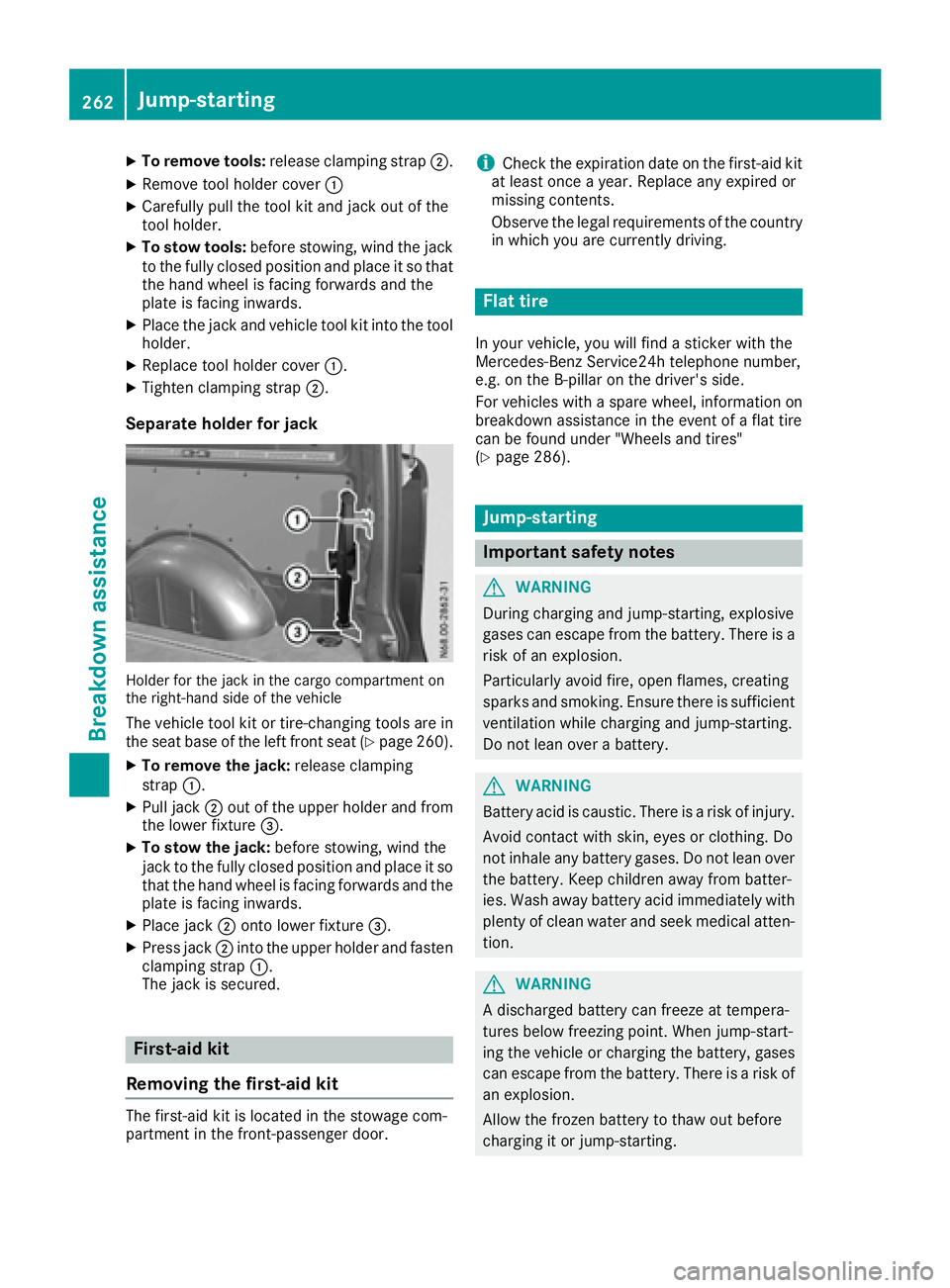
XTo remove tools:release clamping strap ;.
XRemove tool holdercover :
XCarefull ypullt he tool kit and jack outoft he
tool holder.
XTo stowt ools:before stowing ,windt he jack
to the fully closed positio nand place it so that
the hand whee lisfacing forward sand the
plate is facing inwards.
XPlace the jack and vehicl etool kit into the tool
holder.
XReplace tool holde rcover :.
XTighte nclamping strap ;.
Separate holder for jack
Holderfor the jack in the cargo compartment on
the right-hand side of the vehicle
The vehicl etool kit or tire-changing tool sare in
the sea tbaseoft he left front sea t(Ypage 260).
XTo remove the jack: release clamping
strap :.
XPull jack ;outoft he uppe rholde rand from
the lowe rfixture =.
XTo stowt he jack:before stowing ,windt he
jack to the fully closed positio nand place it so
thatt he hand whee lisfacing forward sand the
plate is facing inwards.
XPlace jack ;onto lowe rfixture =.
XPress jack ;into the uppe rholde rand fasten
clamping strap :.
The jack is secured.
First-ai dkit
Removing the first-aid kit
The first-aid kit is locate dinthe stowag ecom-
partment in the front-passenger door.
iCheck the expiratio ndateont he first-aid kit
at leas tonce ayear. Replace any expire dor
missing contents.
Observe the legalr equirements of the country
in which yo uare currentl ydriving.
Flat tire
In your vehicle, yo uwillf ind asticker with the
Mercedes-Benz Service24h telephone number,
e.g .ont he B-pillar on the driver' sside.
For vehicles with aspare wheel, informatio non
breakdowna ssistance in the event of aflatt ire
can be found under "Wheels and tires"
(
Ypage 286).
Jump-starting
Important safety notes
GWARNING
During charging and jump-starting ,explosive
gases can escape from the battery .There is a
ris kofane xplosion.
Particularly avoid fire, open flames ,creating
sparks and smoking .Ensure ther eissufficient
ventilatio nwhile charging and jump-starting.
Do not lean ove rabattery.
GWARNING
Battery aci discaustic .There is ariskofi njury.
Avoi dcontact with skin, eyes or clothing. Do
not inhal eany battery gases .Donot lean over
the battery .Keepc hildren away from batter-
ies. Wash away battery aci dimmediatelyw ith
plenty of clean water and see kmedica latten-
tion.
GWARNING
Ad ischarge dbattery can freeze at tempera-
ture sbelow freezing point. Whe njump-start-
ing the vehicl eorcharging the battery ,gases
can escape from the battery .There is arisko f
an explosion.
Allow the froze nbattery to thawo utbefore
charging it or jump-starting.
262Jump-starting
Breakdo wn assis tance
Page 278 of 310
nificantlytoo low. The tire pressure monitor is
not malfunctioning.
RUSA only: if the hwarning lamp flashe sfor
60 seconds and then remains li tconstantly,
the tire pressure monitor is malfunctioning.
The display also shows amessage:
Ron vehicles withou tsteering whee lbuttons
(Ypage 199)
Ron vehicles with steering whee lbuttons
(Ypage 216)
USA only: if the tire pressure monitor is mal-
functioning ,itmaybe more than10m inutes
before the malfunctio niss hown. The htire
pressure warning lamp flashe sfor 60 seconds
and then remains lit. Whe nthe malfunctio nhas
been rectified, the htire pressure warning
lamp goe soutafte raf ew minutes of driving.
The tire pressure value sindicated by the on-
board compute rmaydiffer from thos emeas-
ured at agasstatio nwithap ressure gage. The
tire pressures shown by the on-board computer
refe rtot hosem easured at sea level .Athigh
altitudes, the tire pressure value sindicated by a
pressure gage are highe rthant hoseshown by
the on-board computer. In thisc ase, do not
reduce the tire pressures.
If radio transmitting equipment (e.g. wireless
headphones, two-wa yradios) is operated inside
the vehicl eorinthe vicinity of the vehicle, this
can interfer ewitht he operatio nofthe tire pres-
su re
monitor.
Checkin gthe tire pressure electroni-
cally on vehicle swiths teering wheel
buttons
Yo uc an onlyc heck the tire pressure electroni-
cally on vehicles with steering whee lbuttons.
Using the steering whee lbuttons
XTurn the key to position 2in the ignition lock.
XPress the =or; button to select the
Servicemenu.
XPress the 9or: button to select
TireP ressure.
XPressato confirm.
The current tire pressure of each whee lis
shown in the display.
If the vehicl ehasbeen parked for over
20 minutes ,the Tirep ressure willb e
displayed after drivingaf ew minutesmessage appears. After
ateach-inp eriod, the tire pressure monitor
automaticall ydetects new wheels or new sen-
sors. As long as aclear allocation of the tire
pressure value to the individual wheels is not
possible, the Tire
PressureMonitorActivemessage is shown insteadoft he tire pressure
display .The tire pressures are already being
monitored.
Tire pressure monito rwarning mes-
sages
If the tire pressure monitor detects alossin
pressure in one or more tires, awarning mes-
sage is shown in the display .The h warning
lamp lights up.
Vehicles withou tsteering whee lbuttons
RIf the CorrectT irePressuremessage is
shown in the display ,the tire pressure in at
leas tone tire is too low. The tire pressure
must be correcte datthe next opportunity.
RIf the CheckTirePressureSoonmessage
is shown in the display ,the tire pressure in
one or more tire shasdropped significantly.
The tire smustbec hecked.
RIf the WarningT ireMalfunc.message is
shown in the display ,the tire pressure in one
or more tire shasdropped suddenly. The tires
must be checked.
Vehicles with steering whee lbuttons
RIf the Adjust TireP ressuremessage is
shown in the display ,the tire pressure in at
leas tone tire is too low. The tire pressure
must be correcte datthe next opportunity.
RIf the Check Tiresmessage is shown in the
display ,the tire pressure in one or more tires
hasd ropped significantly .The tire smustb e
checked.
RIf the WarningTireMalfunctionmessage
is shown in the display ,the tire pressure in
one or more tire shasdropped suddenly. The
tire sm ustbec hecked.
Alway sreada nd follo wthe instructions and
safety notes relate dtothe display messages,
which can be found in the "Tires" section.
Rfor vehicles withou tsteering whee lbuttons
(Ypage 199)
Rfor vehicles with steering whee lbuttons
(Ypage 216)
Vehicles with steering whee lbuttons: if the
whee lpositions on the vehicl eare rotated,t he
tire pressures maybed isplayed for the wrong
276Tire pressure
Wheel sand tires
Page 296 of 310

Useful information
This Operator's Manual describes all models as
well as standard and optional equipment of your
vehicle that were available at the time of going
to print.Country-specific variation sare possi-
ble. Note that your vehicle may not be equipped
with all of the described functions. This also
applies to system sand function srelevantt o
safety.
Read the information on qualified specialist
workshops (
Ypage 29).
Vehicle electronics
Tampering with the engine electron-
ics
!
Only have engin eelectronics and the corre-
spondin gparts, such as contro lunits ,actua-
tors, sensors or connector leads, serviced at a
qualified specialist workshop. Otherwise, the
vehicle parts may wear more quickly. This can
lead to loss of the New Vehicle Limited War-
ranty.
Installing electrical or electronic
equipment
You and other scan suffer health-related dam-
age through electromagnetic radiation .Byusing
an exterior antenna, apossible health risk
caused by electromagnetic fields, as discussed
in scientific circles, is taken int oaccount. Only
have the exterior antenn ainstalled by aqualified
specialist workshop.
Electrical and electronic devices may have a
detrimental effectonb oth the comfort and the
operatin gsafetyoft he vehicle. If equipment of
this kin disinstalled, its electromagnetic com-
patibility must be checked and verified.
If thes edevices are linked to function sassoci-
ated with resistance to interference, they must
have type approval. This applies to the device or
its interfaces to the vehicle electronics, e.g.
chargingb rackets.
At elephon eortwo-way radio to be installed in
the vehicle must be approved. Further informa-
tion can be found in any Mercedes-Benz Com-
mercial Van Center. For operatio
nofmobile phones and two-way
radios, Mercedes-Benz recommends connec-
tion to an approved exterior antenna. This is the
only way to ensure optimum reception quality
inside the vehicle and to minimize mutual inter-
ference between the vehicle electronics, mobile
phones and two-way radios.
The transmission output of the mobile phone or
two-way radio may not exceed the following
maximum transmission output (PEAK):
Frequency rangeMaximum trans-
mission output
(PEAK)
Shortwave
(f <50M Hz)100 W
4mwaveband30 W
2mwaveband50 W
Trunked radio/Tetra35 W
70 cm waveband35 W
GSM/UMTS/LTE10 W
Identification plates
Vehicle identification platew ith vehi-
cle identification number (VIN)
Vehicle identification plate on the driver's side B-
pillar
XOpen the driver’s door.
You will see vehicle identification plate :
with the vehicle identification number (VIN),
the paint code and the permissible weight
data.
294Identification plates
Technical data