set clock MERCEDES-BENZ METRIS 2016 MY16 Operator’s Manual
[x] Cancel search | Manufacturer: MERCEDES-BENZ, Model Year: 2016, Model line: METRIS, Model: MERCEDES-BENZ METRIS 2016Pages: 310, PDF Size: 7.28 MB
Page 188 of 310
Using the steering wheel buttons
XPress=or; to select the Settingsmenu.
XPress:or9 to select Inst. Clus‐ter.
XPressato confirm.
XPress :or9 to select PermanentDisplay:.
XPressato confirm.
The displays hows the current selection of
Outside Temp.
or Speedom..
XPress ato change the setting.
Clock/Date submenu
Setting the time
Using the steering wheel buttons
XPress =or; to select the Settingsmenu.
XPress:or9 to select Time/Date.
XPressato confirm.
XPress :or9 to select the Time:func-
tion.
The displays hows the current time.
XTo set the time: pressaagain.
XPress =or; to switch between hours
and minutes.
XPress :or9 to set the hours or
minutes.
XThen press ato confirm.
The displays hows the updated time.
Setting the date
Using the steering wheel buttons
XPress=or; to select the Settingsmenu.
XPress:or9 to select Time/Date.
XPressato confirm.
XPress :or9 to select the Date:func-
tion.
The displays hows the current date.
XTo set the date: pressaagain.
XPress =or; to switch between day,
month and year.
XPress :or9 to set the day, month or
year.
XThen press ato confirm.
The displays hows the updated date.
Lights submenu
Activating/deactivating the surround
lighting and exterior lighting delayed
switch-off
If you activate the Locator Lightingfunction
and the light switch is turned to the Ãposi-
tion, the following functions are activated when
it is dark:
RSurround lighting: the exterior lighting
remains on for 40 seconds after the doors are
unlocked. When you start the engine, the sur-
round lighting is deactivated and the auto-
matic headlamp feature is activated
(
Ypage 93).
RExterior lighting delayed switch-off: the
exterior lighting remains on for 60 seconds
after the engine is switched off. If you close all
the doors and the tailgate/rear doors, the
exterior lighting switches off after
15 seconds.
Using the steering wheel buttons
XPress =or; to select the Settingsmenu.
XPress:or9 to select Lights.
XPressato confirm.
XPress :or9 to select the LocatorLightingfunction.
The current status is shown.
XTo activate/deactivate: pressaagain.
If you change the setting, conversion does not
take place until the next time the vehicle is
stationary.
Temporarilyd eactivating the exterior lighting
delayed switch-off:
XBefore leaving the vehicle, turn the key to
position 0in the ignition lock.
XTurn the key to position 2in the ignition lock.
The exterior lighting delayed switch-off is
deactivated until the next time the engine is
started.
With surround lighting and exterior lighting
delayed switch-off, the following light up
depending on the vehicle's equipment:
RParking lamps
RFog lamps
RLow-beam headlamps
RDaytime running lamps
186On-board computer (vehicles with steering wheelb uttons)
On-board computer and displays
Page 189 of 310
Activating/deactivatinginteri orlighting
delayed switch-off
If you activat ethe Interior Lighting Delayfunction ,the interio rlightin gremains lit for a
further 20 seconds after th ekeyis removed.
Usin gthe steering whee lbuttons
XPress =or; to select th eSettingsmenu.
XPress :or9 to select Lights.
XPressato confirm .
XPress:or9 to select th eInteriorLighting Delayfunction .
The curren tstatus is shown.
XTo act ivate/deact ivate:pressaagain.
Vehicle submenu
Settin gthe sensitivity of therains ensor
Usin gthe steering whee lbuttons
XPress =or; to select th eSettingsmenu.
XPress :or9 to select Vehicle.
XPressato confirm .
XPress:or9 to select th eRai nSen‐sor Sensitivityfunction .
The display shows th ecurren tsetting.
XPress ato chang ethe setting.
XPress :or9 to select th eHig h,
Standardor Lowsetting. This settin gcontrols
th er ain sensor's sensitivit ytop recipitation.
The windshield wiper then wipes mor eorless
frequently at th esame precipitatio nintensity.
XPress th ea buttontos tore th eentry.
You can fin dfurther information under "Wind-
shield wiper "(
Ypage 101).
Switchingthe autom atic lockin gfeature
on/off
Usin gthe steering whee lbuttons
XPress =or; to select th eSettingsmenu.
XPress :or9 to select Vehicle.
XPressato confirm .
XPress:or9 to select th eAutomaticDoo rLockfunction .
The curren tstatus is shown.
XTo act ivate/deact ivate:pressaagain.If you activat
ethe Automatic
Doo rLockfunc-
tion, your vehicl ewill loc kautomatically from a
spee dofa pproximately 15 km/h.
You can fin dfurther information under "Auto-
matic door lock" (
Ypage 72).
Activating/deactivatin gthe acoustic
lockin gconfirm ation
Usingthe steering whee lbuttons
XPress =or; to select th eSettingsmenu.
XPress :or9 to select Vehicle.
XPressato confirm .
XPress:or9 to select AcousticLockFeedback.
The curren tstatus is shown.
XTo act ivate/deact ivate:pressaagain.
If you activat ethe Acoustic Loc kFeedback
function ,anacoustic tone sounds when th e
vehicl eislocked.
Restoring th efactor ysettings
Usin gthe steering whee lbuttons
XPress =or; to select th eSettingsmenu.
XPress :or9 to select FactorySet‐tin g.
XPress ato confirm .
The Reset All Settings?function is dis-
played.
XPress :or9 to select NoorYes.
XPress ato confirm th echoice.
If you select Yes,the display shows aconfir -
mation message .
On-boardcomputer (vehicles with steering wheel buttons)187
On-boardcomputer and displays
Z
Page 247 of 310
!Take care not to spill any coolant on painted
surfaces. You could otherwise damage the
paintwork.
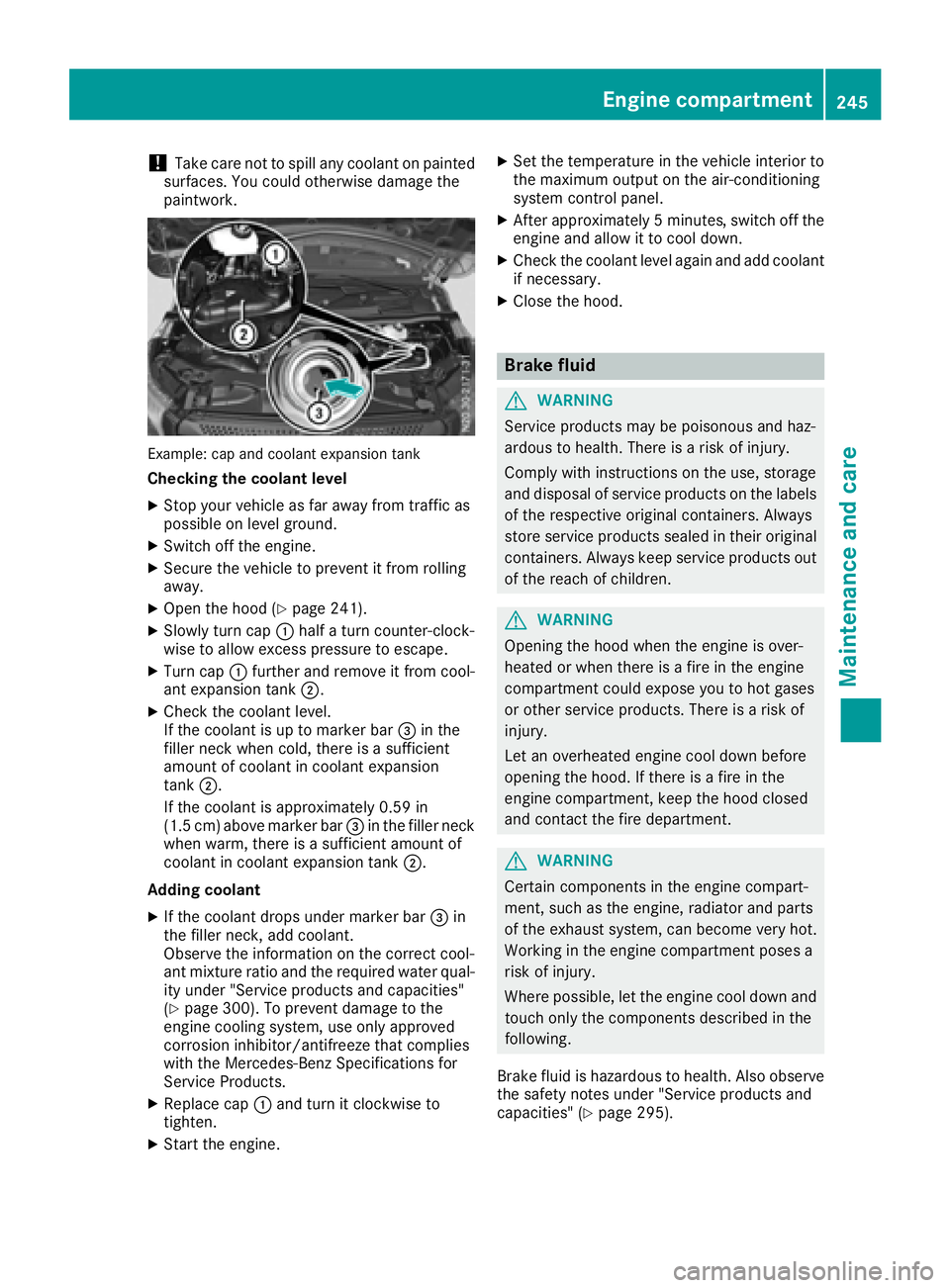
Example: cap and coolant expansion tank
Checkingt he coolant level
XStop your vehicle as far awayf rom traffic as
possible on level ground.
XSwitch off the engine.
XSecure the vehicle to prevent it from rolling
away.
XOpen the hood (Ypage 241).
XSlowly turn cap :half aturn counter-clock-
wise to allow excess pressure to escape.
XTurn cap :further and remove it from cool-
ant expansion tank ;.
XCheck the coolant level.
If the coolant is up to marker bar =in the
filler neck when cold, there is asufficient
amount of coolant in coolant expansion
tank ;.
If the coolant is approximately 0.59 in
(1.5 cm) above marker bar =in the filler neck
when warm, there is asufficient amount of
coolant in coolant expansion tank ;.
Adding coolant
XIf the coolant drops under marker bar =in
the filler neck, add coolant.
Observe the information on the correct cool-
ant mixture ratio and the required water qual-
ity under "Service products and capacities"
(
Ypage 300). To prevent damage to the
engine cooling system, use only approved
corrosion inhibitor/antifreeze that complies
with the Mercedes-Benz Specifications for
Service Products.
XReplace cap :and turn it clockwise to
tighten.
XStart the engine.
XSet the temperature in the vehicle interior to
the maximum output on the air-conditioning
system control panel.
XAfter approximately 5minutes ,switch off the
engine and allow it to cool down.
XCheck the coolant level againa nd add coolant
if necessary.
XClose the hood.
Brake fluid
GWARNING
Service products may be poisonous and haz-
ardous to health. There is arisk of injury.
Comply with instructionsont he use, storage
and disposalofs ervice products on the labels
of the respective original containers. Always
store service products sealed in their original
containers. Alwaysk eep service products out
of the reach of children.
GWARNING
Opening the hood when the engine is over-
heated or when there is afire in the engine
compartment could expose you to hot gases
or other service products. There is arisk of
injury.
Let an overheated engine cool down before
opening the hood. If there is afire in the
engine compartment,k eep the hood closed
and contact the fire department.
GWARNING
Certain componentsint he engine compart-
ment, such as the engine, radiator and parts
of the exhaust system, can become very hot.
Working in the engine compartment poses a
risk of injury.
Where possible,l et the engine cool down and
touch only the componentsd escribed in the
following.
Brake fluid is hazardous to health. Also observe the safety notes under "Service products and
capacities" (
Ypage 295).
Engine compartment245
Maintenance and care
Z