door lock MERCEDES-BENZ METRIS 2016 MY16 Operator’s Manual
[x] Cancel search | Manufacturer: MERCEDES-BENZ, Model Year: 2016, Model line: METRIS, Model: MERCEDES-BENZ METRIS 2016Pages: 310, PDF Size: 7.28 MB
Page 77 of 310
Rpress the correspondingsliding door but-
ton in the center console, or
Rpress the butto nonthe door frame, or
Rpull the rocker switch on door handle
Opening/closing from the outside
The sliding door is equipped with an active
retainer, which engages the door at the end stop
when opened.
If the vehicle is equipped with two electric slid-
ing doors; the 5buttonont he key can only
be used to open or close one of the two sliding
doors (
Ypage 76).
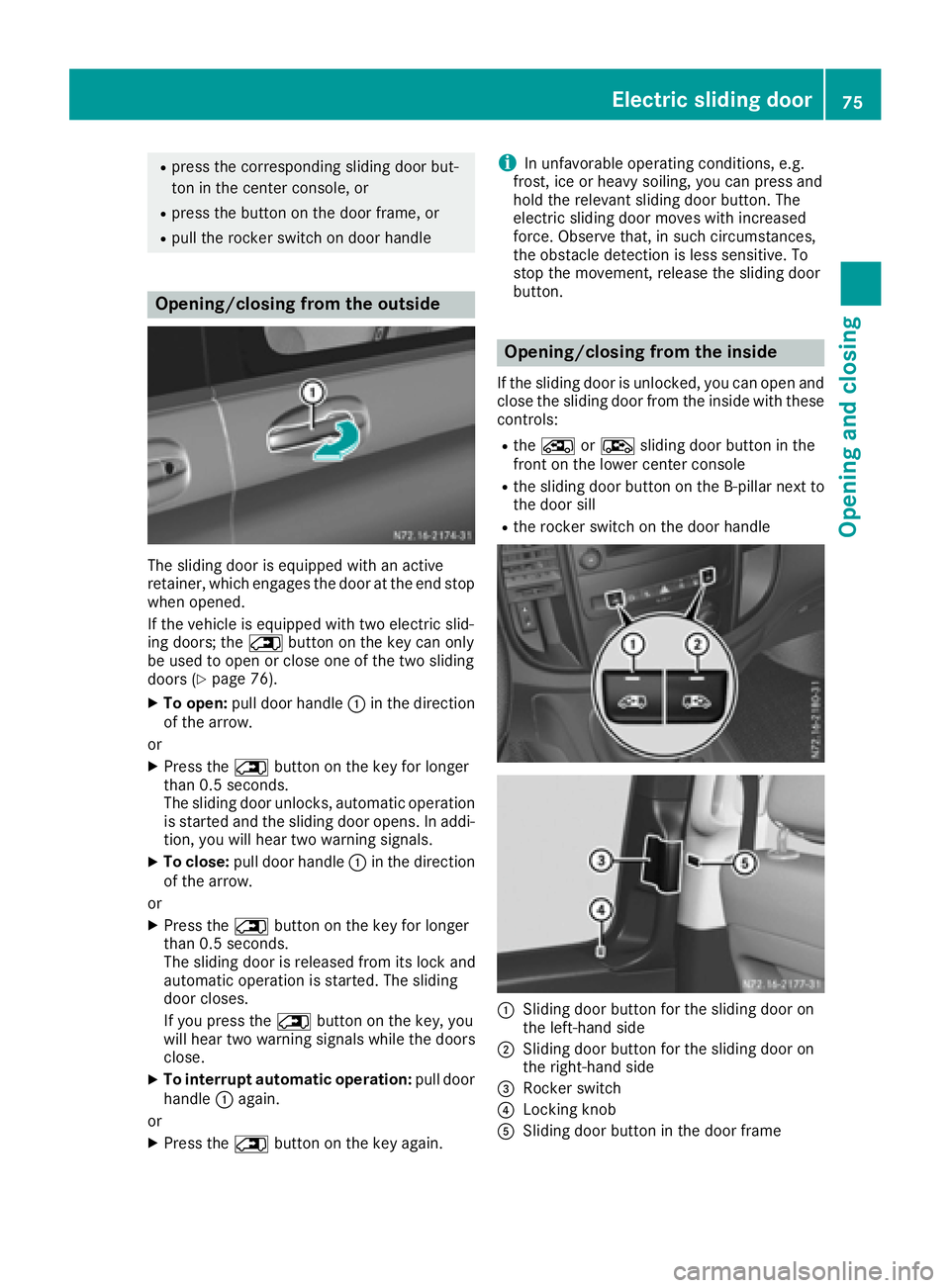
XTo open: pull door handle :in the direction
of the arrow.
or
XPress the 5buttonont he key for longer
than 0.5 seconds.
The sliding door unlocks, automatic operation
is started and the sliding door opens. In addi-
tion ,you will hear two warning signals.
XTo close: pull door handle :in the direction
of the arrow.
or
XPress the 5buttonont he key for longer
than 0.5 seconds.
The sliding door is released from its lock and
automatic operation is started. The sliding
door closes.
If you press the 5buttonont he key, you
will hear two warning signals while the doors
close.
XTo interrupt automatic operation: pull door
handle :again.
or
XPress the 5buttonont he key again.
iIn unfavorable operatin gconditions, e.g.
frost,i ce or heavy soiling, you can press and
hold the relevant sliding door button. The
electric sliding door moves with increased
force. Observe that ,insuch circumstances,
the obstacle detection is less sensitive. To
stop the movement ,release the sliding door
button.
Opening/closing from the inside
If the sliding door is unlocked, you can open and close the sliding door from the inside with these
controls:
Rthe Å orÆ sliding door butto ninthe
frontont he lower center console
Rthe sliding door butto nonthe B-pillar nex tto
the door sill
Rthe rocker switch on the door handle
:Sliding door butto nfor the sliding door on
the left-hand side
;Sliding door butto nfor the sliding door on
the right-han dside
=Rocker switch
?Locking knob
ASliding door butto ninthe door frame
Electric sliding door75
Opening and closing
Z
Page 78 of 310
You can only openasliding door from the inside
if the child-proof lock shave not been activated.
If the sliding door is locked, the sliding door
must firstbeu nlocked.
The sliding door is equipped with an active
retainer, which engage sthe door at the end stop
when opened.
XTo open: briefly press the respective Åor
Æ sliding door button in the center con-
sole.
or
XBriefly press sliding door button in the door
frame A.
or
XBriefly pull back rocker switch =.
If the sliding door is unlocked, automatic
operation is started and the sliding door
opens.
If you use the ÅorÆ sliding door but-
ton in the center console you will hear two
warnin gsignals during the openin gproce-
dure.
The indicator lamp in the ÅorÆ sliding
door button in the center console flashes for
the duratio nofautomatic operation.
The indicator lamp in the ÅorÆ sliding
door button in the center console is lit when-
ever the respectiv esliding door is open.
Depending on the vehicle equipment, the dis-
play can also show the Sliding door open
message.
XTo close:briefly press the respective Åor
Æ sliding door button in the center con-
sole.
or
XBriefly press sliding door button in the door
frame A.
or
XBriefly press rocker switch =forwards.
The sliding door is released from its lock and
automatic operation is started. The sliding
door closes.
If you use the ÅorÆ sliding door but-
ton in the center console you will hear two
warnin gsignals during the openin gproce-
dure.
The indicator lamp in the respective Åor
Æ sliding door button in the center console
goes out whenever the sliding door is closed.
XTo interrupt automatic operation: press
the respective ÅorÆ sliding door but-
ton in the center console again.
or
XPress sliding door button in the door frame
A.
or
XBriefly pull back rocker switch =.
iIn unfavorable operating conditions, e.g.
frost, ice or heavy soiling ,you can press and
hold the relevants liding door button. The
electric sliding door movesw ith increased
force. Observe that ,insuch circumstances,
the obstacle detection is less sensitive. To
sto pthe movement, release the sliding door
button.
Programming th ekey button for the
sliding door
If the vehicle is fitted with two electric sliding
doors,t he5 sliding door button on the key
can only be programmed for one of the two slid-
ing doors.Y ou can thenopen or close the selec-
ted sliding door with the 5button on the key.
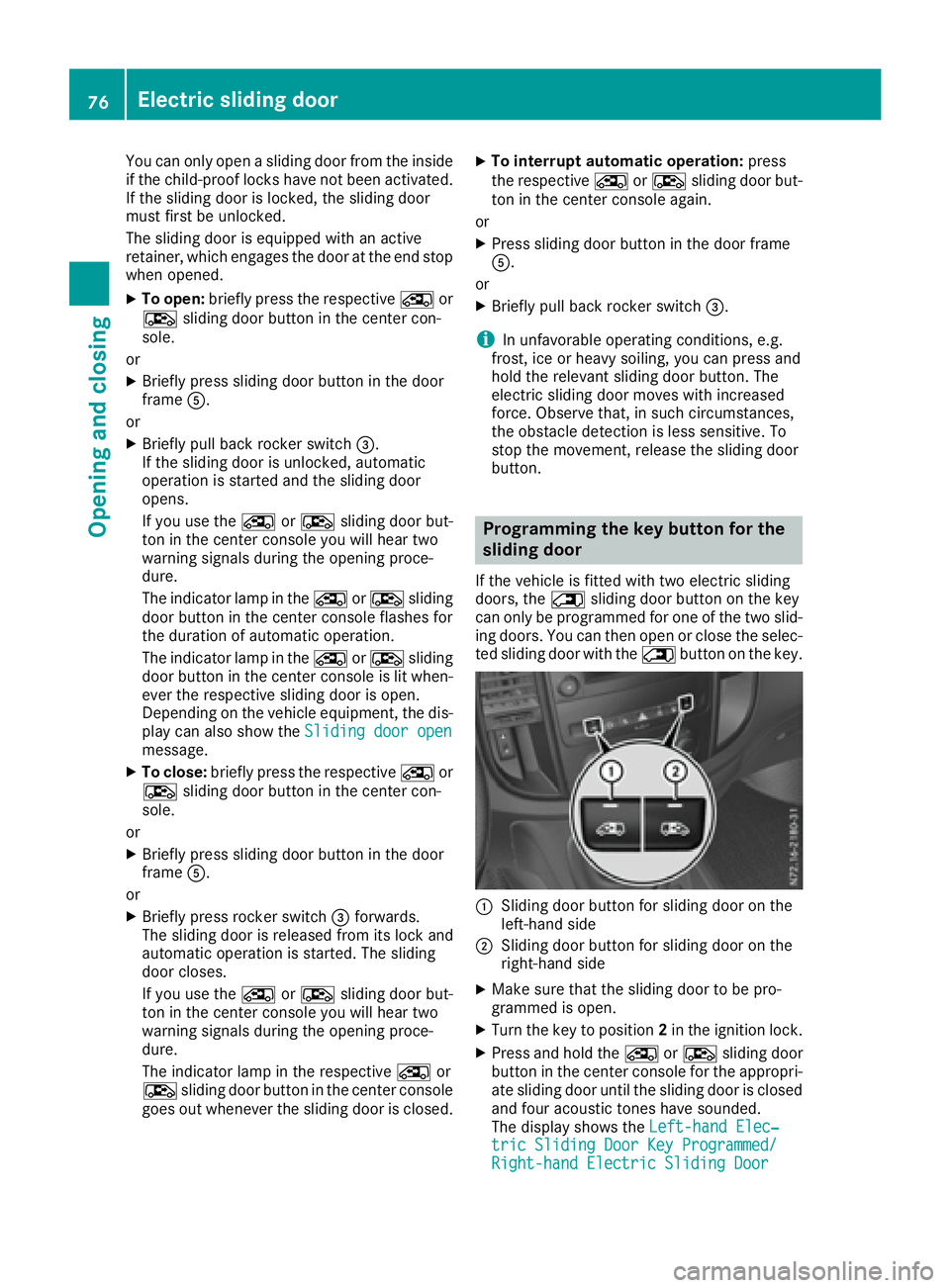
:Slidingdoor button for sliding door on the
left-han dside
;Slidin gdoor button for sliding door on the
right-han dside
XMake sure that the sliding door to be pro-
grammed is open.
XTurn the key to position 2in the ignition lock.
XPress and hold the ÅorÆ sliding door
button in the center console for the appropri-
ate sliding door until the sliding door is closed
and four acoustic tones have sounded.
The display shows the Left-handElec‐
tric Sliding Door Key Programmed/Right-hand Electric Sliding Door
76Electric sliding door
Opening and closing
Page 79 of 310
Key ProgrammedorLt. Slid. Door Pro‐grammed/Rt. Slid. Door Programmedmessage.
Resetting the sliding door
You must reset the sliding door if there has been
am alfunction or an interruption in the voltage
supply.
XIf the sliding door is open: close it by hand.
XUsing the ÅorÆ sliding door button on
the center console, open the sliding door at
least 15.8 in (40 cm )and then close the slid-
ing door completely.
XWhen the sliding door is closed, open the slid-
ing door fully using the ÅorÆ sliding
door button on the center console.
The sliding door is reset and operational.
XClose the sliding door if required.
Problems with the sliding door
The electric sliding door is locked in place.
Unfavorable operating conditions, e.g. frost, ice
or heavy soiling, may obstruct the sliding door.
XPress and hold the sliding door button until
the sliding door has opened or closed.
The sliding door moves with increased force.
Observe that, in such circumstances, the
obstacle detection is less sensitive. To stop
the movement, release the sliding door but-
ton.
XRemove the cause of the blockage at the ear-
liest opportunity.
Tailgate
Important safety notes
GWARNING
Combustion engines emit poisonous exhaust
gases such as carbon monoxide. If the tailgate
is open when the engine is running, particu-
larly if the vehicle is moving, exhaust fumes
could enter the passenger compartment.
There is arisk of poisoning.
Turn off the engine before opening the tail-
gate. Never drive with the tailgate open.
!The tailgate swings upwards and to the rear
when opened. Therefore, make sure that
there is sufficient clearance above and behind
the tailgate.
You will find details of the tailgate opening
dimensions under "Technical data"
(
Ypage 303).
Opening/closing
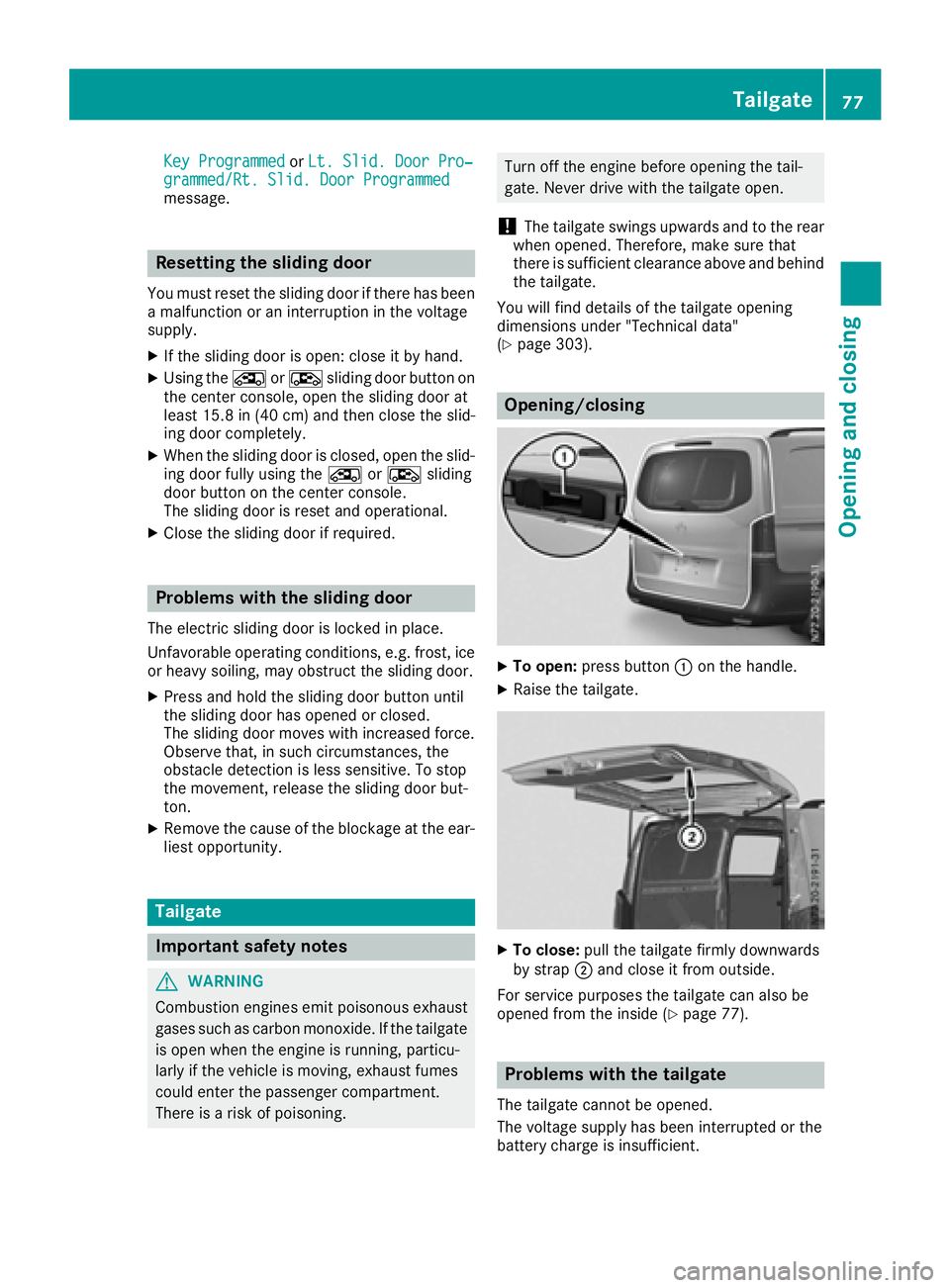
XTo open: press button :on the handle.
XRaise the tailgate.
XTo close: pull the tailgate firmly downwards
by strap ;and close it from outside.
For service purposes the tailgate can also be
opened from the inside (
Ypage 77).
Problems with the tailgate
The tailgate cannot be opened.
The voltage supplyh as been interrupted or the
battery charge is insufficient.
Tailgate77
Opening and closing
Z
Page 80 of 310
Consultaqualified specialist workshopwhich
has th enecessary specialist knowledg eand
tools to carry out th ework required.
In an emergency, you can open th etailgate
usingt herelease catch for servic epurposes.
XPry off th ecover on th elower part of th etail-
gatew ithas uitable tool, e.g .the screwdriver
from th evehicle tool kit.
XInsertt hescrewdriver int othe opening and
mov ethe release leve runtilth et ailgate
unlock sand opens.
XSwin gthe tailgateu pwards.
Reardoors
Important safety notes
GWAR NING
Combustion engines emit poisonous exhaust
gases suchasc arbon monoxide. If ther ear
door isopen when th eengineisr unning, par-
ticularly ifth ev ehicle is moving ,exhaust
fumes could ente rthe passenger compart-
ment. Thereisar iskofp oisoning.
Turn off th eengineb efore opening th erear
door.N everdrivewitht he rear door open.
GWAR NING
If you open arear door,y ou could:
Rendanger other people or road users
Rbecaught byoncomin gtraffic
This isparticular lythec aseify ou open the
rear door mor ethan9 0°.Thereisar iskofa n
acc iden tand injury.
Only open th erear doorsw hen trafficcondi-
tions permit .Alwa ys mak esure that th erear
doorsa re properly locked.
GWARNING
If you open th erear doors9 0°,the rear lights
are no longer vis ible.The veh icle will thenbe
diff icult for other road userstos ee orwillnot
be seen bythem at all,particular ly if it isdark
or vis ibilityisp oor.T hereisar iskofana cci-
dent.
You should therefor eensure inthis and simi-
lar situations that th evehicle isvis ible from
th er ear inaccordanc ewitht he relevant
national regulations, by usingt hewarning tri-
angle, for instance.
!Makes ure that there issufficient clearance
when opening th erear doors. You could oth-
erwis edamag ethe vehicle and object sin
close range of th erear doors.
You can lockt herear doorsatana ngle of
appr ox.9 0°and ,ifn ecessary, 180° or 270°.
Alwa ys mak esure that th eopen rear door is
correct lyengaged in th edetent.
Opening/closing from th eoutside
Opening th eright-hand rea rdoor
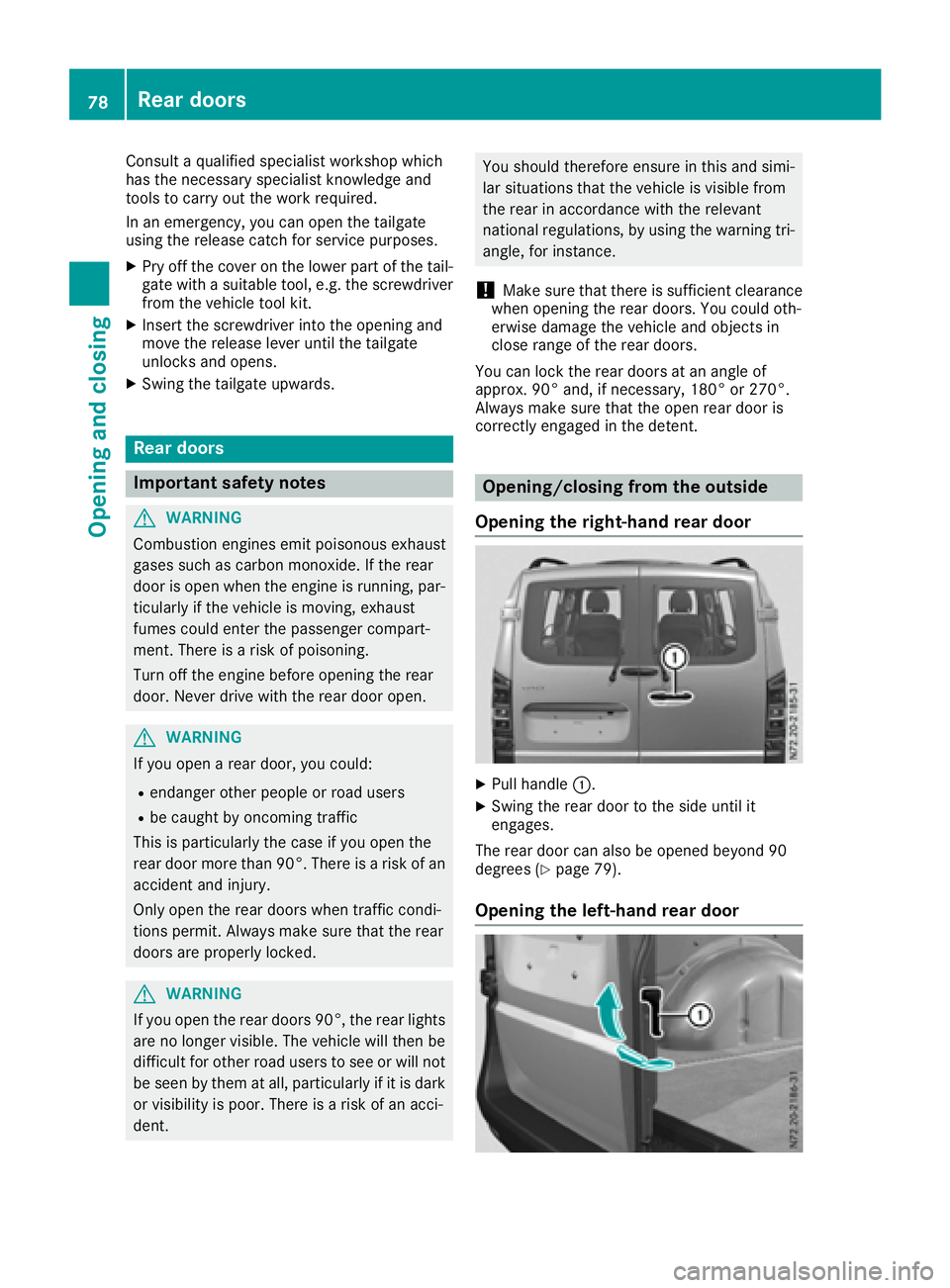
XPull handle :.
XSwingthe rear door to th eside until it
engages.
The rear door can also be opened beyond9 0
degrees (
Ypage 79).
Opening th eleft-hand rea rdoor
78Rea rdoors
Opening and closing
Page 81 of 310
XMake sure that the right-hand rear door is
open and engaged.
XPull release handle:in the direction of the
arrow.
XSwing the rear door to the side until it
engages.
The rear door can also be opened beyond 90
degrees (
Ypage 79).
Closing the rear doors from the outside
XIf necessary, pull the rear door away from the
magnetic door retainer (Ypage 79).
XClose the left-hand rear door firmly from the
outside.
XClose the right-hand rear door firmly from the outside.
Opening/closing from the inside
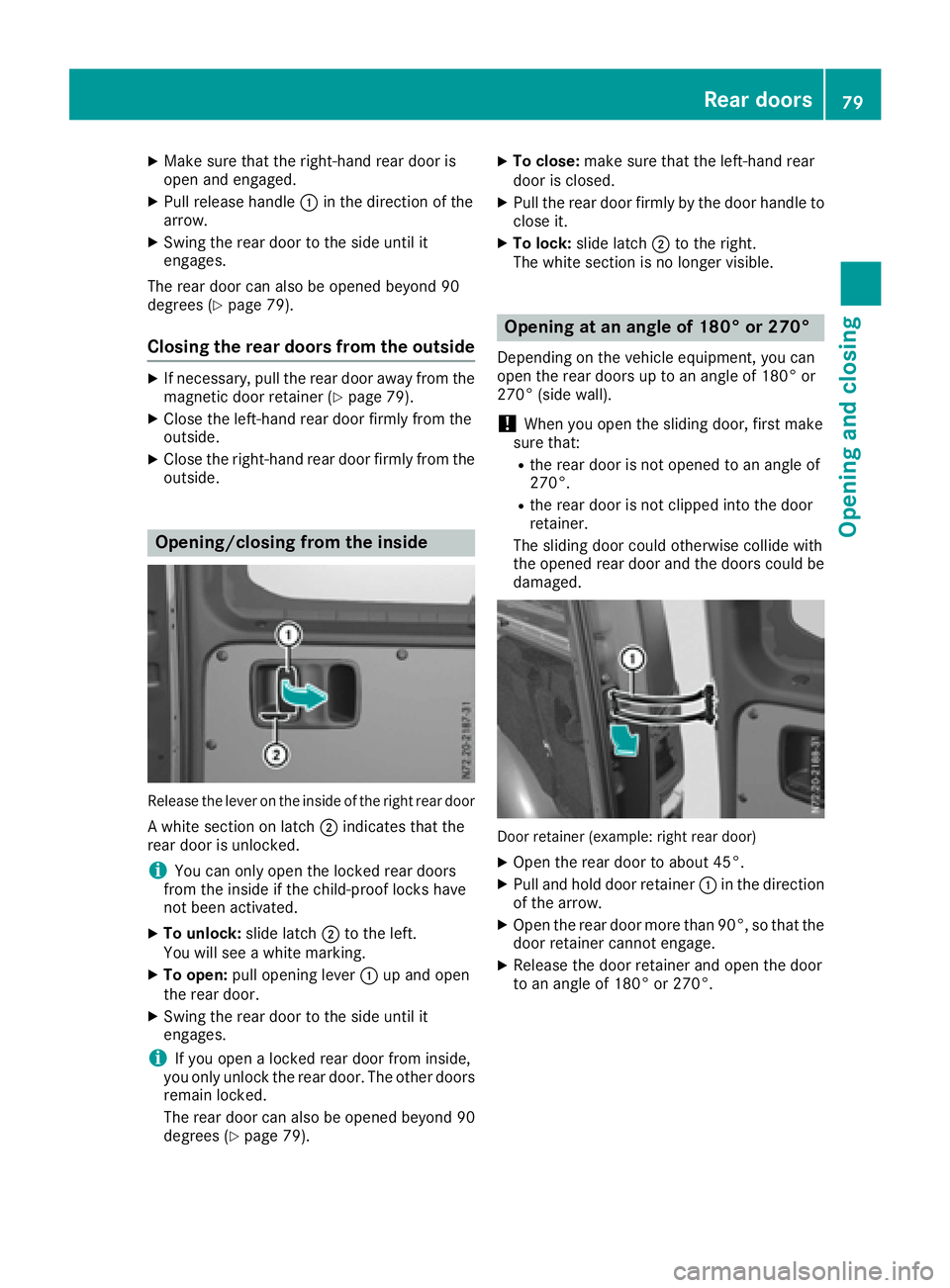
Release the lever on the inside of the right rear door
Aw hite section on latch ;indicates that the
rear door is unlocked.
iYou can only open the locked rear doors
from the inside if the child-proof locks have
not been activated.
XTo unlock: slide latch;to the left.
You will see awhite marking.
XTo open: pull opening lever :up and open
the rear door.
XSwing the rear door to the side until it
engages.
iIf you open alocked rear door from inside,
you only unlock the rear door. The other doors
remain locked.
The rear door can also be opened beyond 90
degrees (
Ypage 79).
XTo close: make sure that the left-hand rear
door is closed.
XPull the rear door firmly by the door handle to
close it.
XTo lock: slide latch ;to the right.
The white section is no longer visible.
Opening at an angle of 180° or 270°
Depending on the vehicle equipment, you can
open the rear doors up to an angle of 180° or
270° (side wall).
!When you open the sliding door, first make
sure that:
Rthe rear door is not opened to an angle of
270°.
Rthe rear door is not clipped into the door
retainer.
The sliding door could otherwise collide with
the opened rear door and the doors could be
damaged.
Door retainer (example: right rear door)
XOpen the rear door to about 45°.
XPull and hold door retainer :in the direction
of the arrow.
XOpen the rear door more than 90°, so that the
door retainer cannot engage.
XRelease the door retainer and open the door
to an angle of 180° or 270°.
Rear doors79
Opening and closing
Z
Page 82 of 310
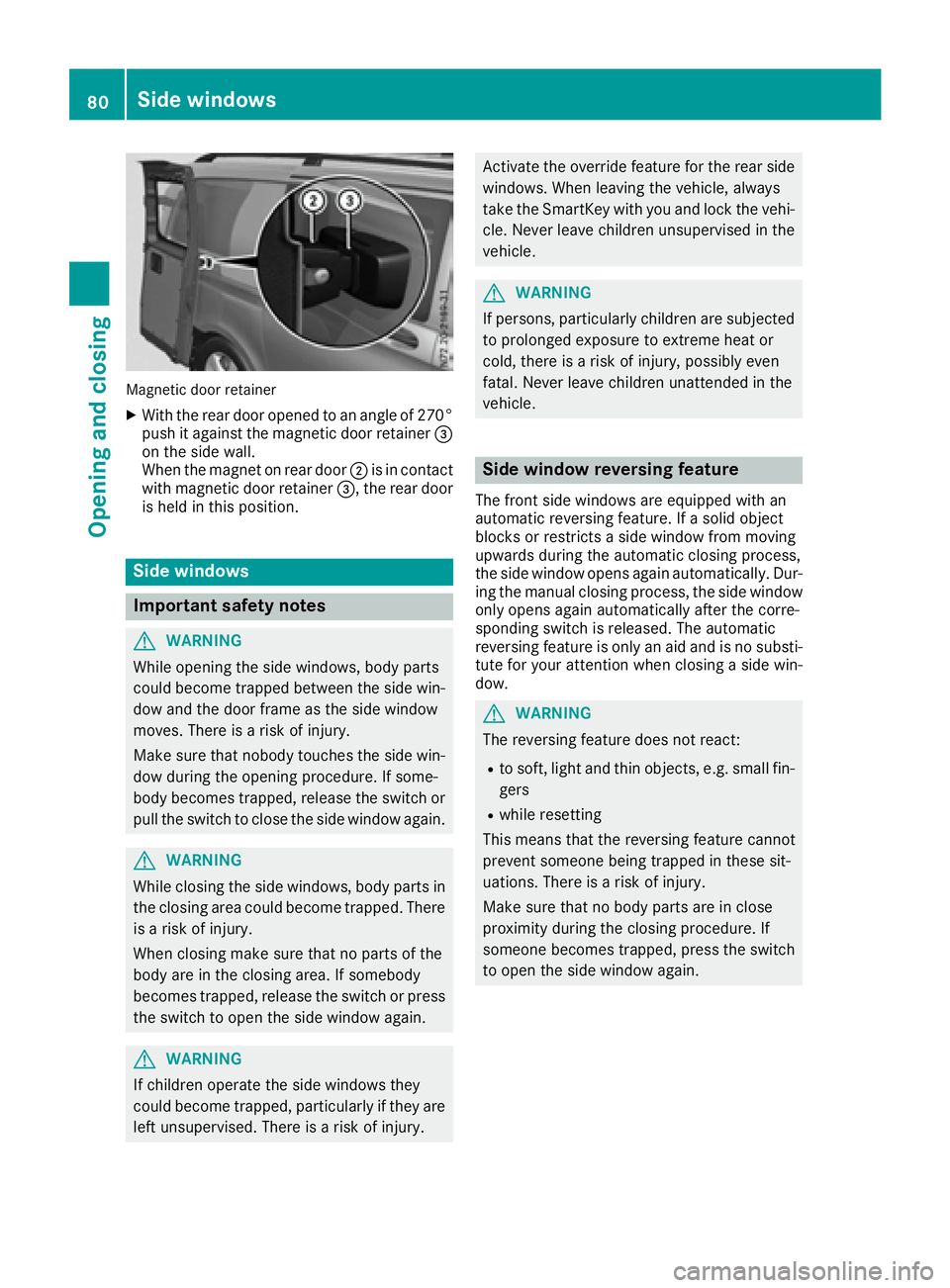
Magnetic door retainer
XWith the rear door opened to an angle of 270°push it against the magnetic door retainer =
on the side wall.
When the magnet on rear door ;is in contact
with magnetic door retainer =,the rear door
is held in this position.
Side windows
Important safety notes
GWARNING
While opening the side windows, body parts
could become trapped between the side win-
dow and the door frame as the side window
moves. There is arisk of injury.
Make sure that nobody touches the side win-
dow during the opening procedure. If some-
body becomes trapped, release the switch or
pull the switch to close the side window again.
GWARNING
While closing the side windows, body parts in
the closing area could become trapped. There is ar isk of injury.
When closing make sure that no parts of the
body are in the closing area. If somebody
becomes trapped, release the switch or press
the switch to open the side window again.
GWARNING
If children operate the side windows they
could become trapped, particularly if they are left unsupervised. There is arisk of injury.
Activate the override feature for the rear side
windows. When leaving the vehicle, always
take the SmartKey with you and lock the vehi-
cle. Never leave children unsupervised in the
vehicle.
GWARNING
If persons, particularly children are subjected to prolonged exposure to extrem eheat or
cold, there is arisk of injury, possibly even
fatal. Never leave children unattended in the
vehicle.
Side window reversing feature
The front side windows are equipped with an
automatic reversing feature. If asolid object
blocks or restrictsas ide window from moving
upwards during the automatic closing process,
the side window opens again automatically .Dur-
ing the manual closing process, the side window
only opens again automatically after the corre-
sponding switch is released. The automatic
reversing feature is only an aid and is no substi-
tute for your attention when closing aside win-
dow.
GWARNING
The reversing feature does not react:
Rto soft, light and thin objects, e.g. small fin-
gers
Rwhile resetting
This means that the reversing feature cannot
prevent someone being trapped in these sit-
uations. There is arisk of injury.
Make sure that no body parts are in close
proximity during the closing procedure. If
someone becomes trapped, press the switch
to open the side window again.
80Side windows
Opening and closing
Page 83 of 310
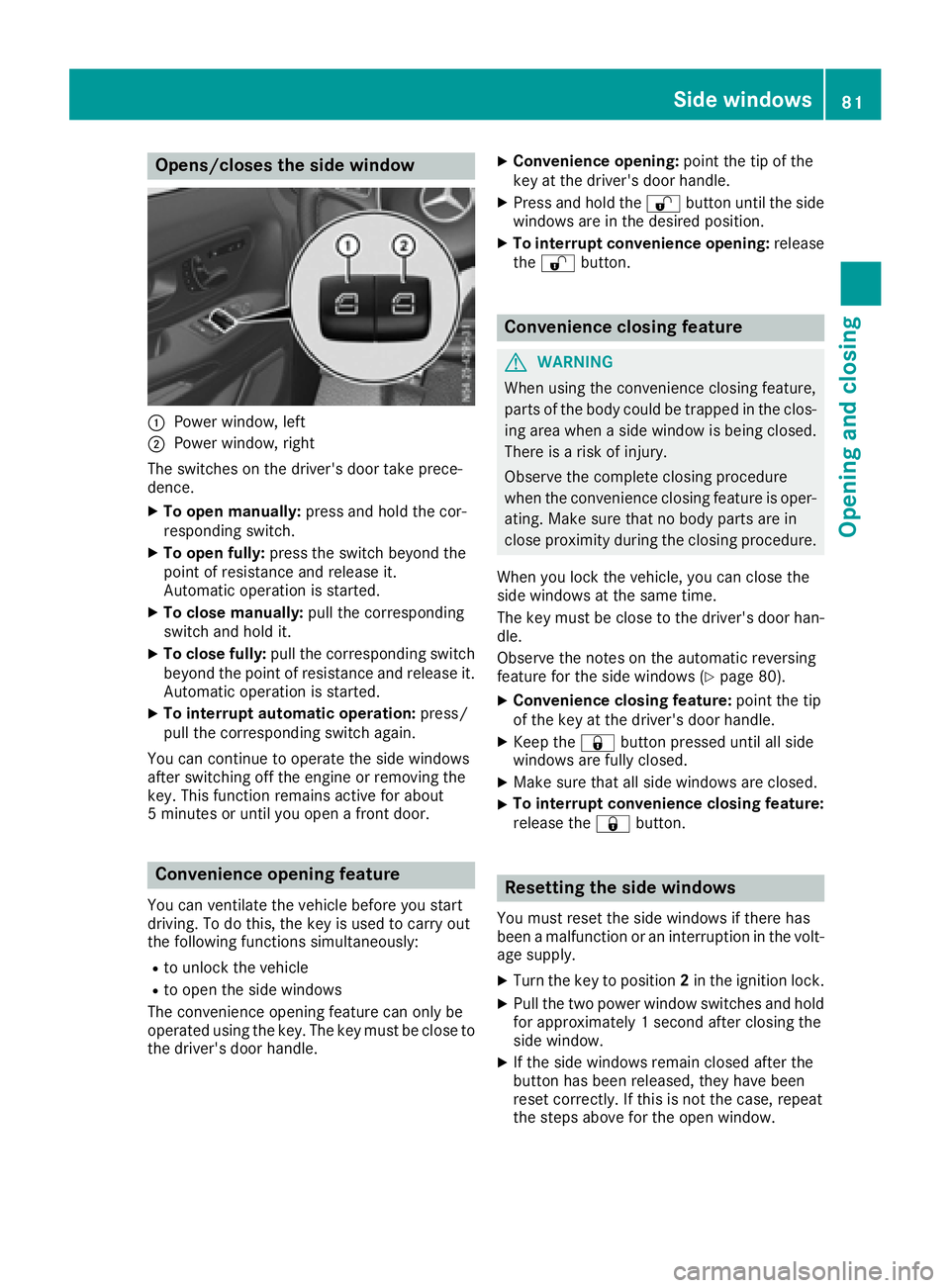
Opens/closes the side window
:Power window, left
;Power window, right
The switches on the driver's door take prece-
dence.
XTo open manually: press and hold the cor-
respondin gswitch.
XTo open fully: press the switch beyond the
point of resistance and release it.
Automatic operation is started.
XTo close manually: pull the corresponding
switch and hold it.
XTo close fully: pull the correspondin gswitch
beyond the point of resistance and release it.
Automatic operation is started.
XTo interrupt automatic operation: press/
pull the correspondin gswitch again.
You can continue to operate the side windows
after switchin goff the engine or removingt he
key. This function remains active for about
5m inutes or until you open afrontd oor.
Convenienceo pening feature
You can ventilate the vehicle before you start
driving. To do this, the key is used to carry out
the following function ssimultaneously:
Rto unlock the vehicle
Rto open the side windows
The convenience opening feature can only be
operated using the key. The key must be close to
the driver's door handle.
XConvenience opening: point the tip of the
key at the driver's door handle.
XPress and hold the %button until the side
windows are in the desired position.
XTo interrupt convenience opening: release
the % button.
Conveniencec losing feature
GWARNING
When using the convenience closing feature,
parts of the body could be trapped in the clos-
ing area when aside window is being closed.
There is arisk of injury.
Observe the completec losing procedure
when the convenience closing feature is oper-
ating. Make sure that no body parts are in
close proximity during the closing procedure.
When you lock the vehicle, you can close the
side windows at the same time.
The key must be close to the driver's door han-
dle.
Observe the notes on the automatic reversing
feature for the side windows (
Ypage 80).
XConvenience closing feature: point the tip
of the key at the driver's door handle.
XKeep the &button pressed until all side
windows are fully closed.
XMake sure that all side windows are closed.
XTo interrupt convenience closing feature:
release the &button.
Resetting the side windows
You must reset the side windows if there has
beenamalfunction or an interruption in the volt-
age supply.
XTurn the key to position 2in the ignition lock.
XPull the two power window switches and hold
for approximately 1seconda fter closing the
side window.
XIf the side windows remain closed after the
button has been released, they have been
reset correctly. If this is not the case, repeat
the steps above for the open window.
Side windows81
Opening and closing
Z
Page 96 of 310
Switching on the standing lamps:
XTurn the key to position0(Ypage 120) in the
ignition lock or remove the key.
XRight-hand standing lamp: turn the light
switch to position X.
XLeft-hand standing lamp: turn the light
switch to position W.
Combination switch
Turns ignal lamps
:To indicate aright turn
;To indicate aleft turn
XTo indicate: press the combination switch in
desired direction :or; until it engages.
The combination switch automatically returns
to its original position after large steering
movements.
XTo indicate briefly: press the combination
switch briefly in desired direction :or;.
The correspondingt urn signal flashes three
times.
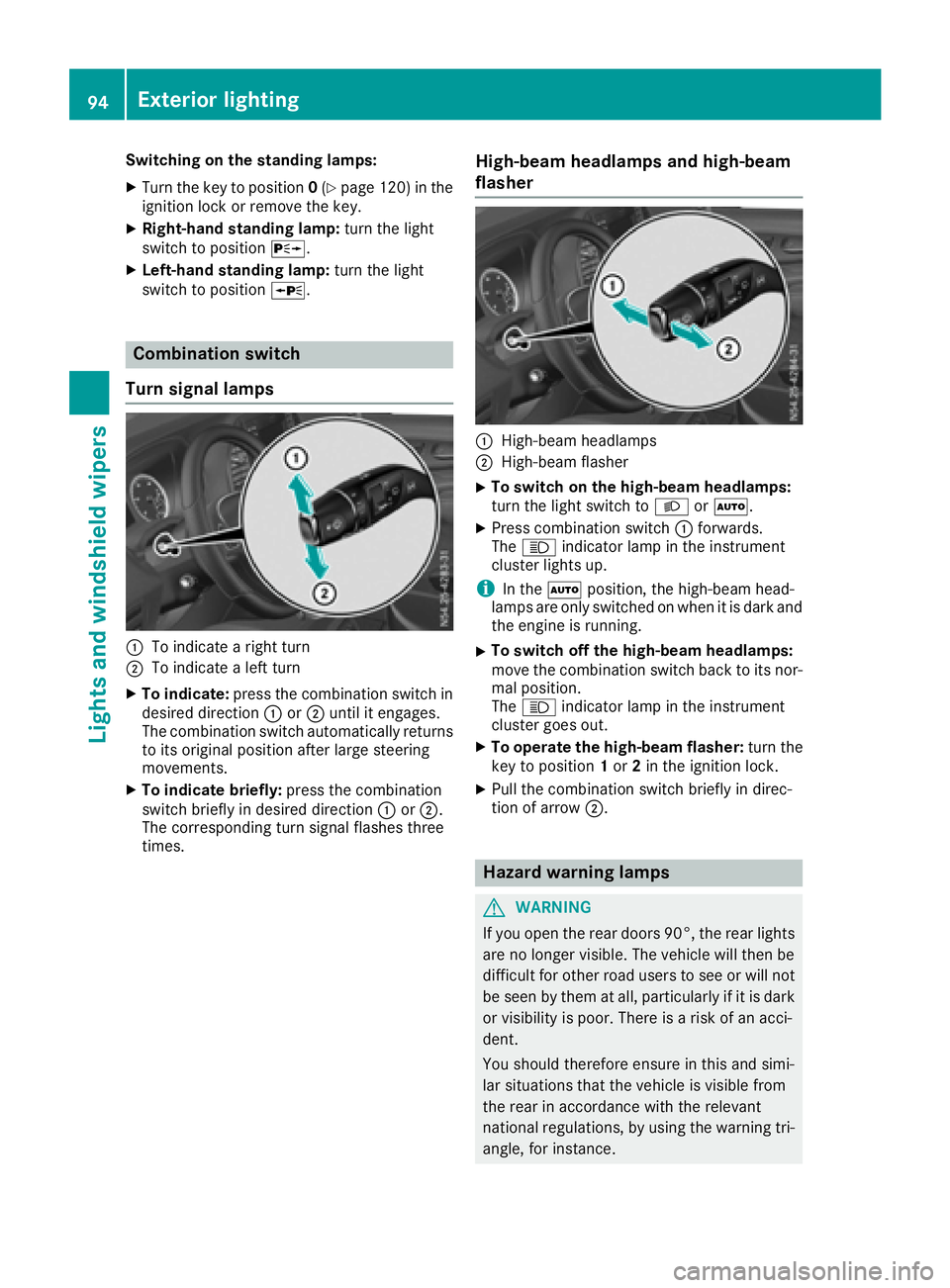
High-beam headlamps and high-beam
flasher
:High-beam headlamps
;High-beam flasher
XTo switch on the high-beam headlamps:
turn the light switch to LorÃ.
XPress combination switch :forwards.
The K indicator lamp in the instrument
cluster lights up.
iIn the Ãposition, the high-beam head-
lamps are only switched on when it is dark and
the engine is running.
XTo switch off the high-beam headlamps:
move the combination switch back to its nor-
mal position.
The K indicator lamp in the instrument
cluster goes out.
XTo operate the high-beam flasher: turn the
key to position 1or 2in the ignition lock.
XPull the combination switch briefly in direc-
tion of arrow ;.
Hazard warning lamps
GWARNING
If you open the rear doors 90°, the rear lights are no longer visible. The vehicle will then be
difficult for other road users to see or will not
be seen by them at all, particularly if it is dark
or visibility is poor. There is arisk of an acci-
dent.
You should therefore ensure in this and simi-
lar situations that the vehicle is visible from
the rear in accordance with the relevant
national regulations, by using the warning tri-
angle, for instance.
94Exterior lighting
Lights and windshield wipers
Page 98 of 310
XTo switchonoro ff:press the |button.
Whe nthe automatic interio rlighting contro lis
activated, the button is flush with the over-
hea dcontro lpan el.
The interio rlighting switches on automaticall yif
you:
Runlock the vehicle
Ropen adoor
Rremove the key from the ignition lock
The cargo compartment lamp switches on auto-
maticall yifyou:
Runlock the vehicle
Ropen the tailgate or rea rdoor
Ropen aslidin gdoor
The trunk lamp always switches on automati-
cally when the tailgate is opened.
Manual interior lighting control
XTo switc hthe fron tint erior lighting on/
off: press the cbutton.
XTo switc hthe rear or carg ocom partment
lighting on/off: press thewbutton.
XTo switc hthe fron treading lamps on/off:
press the pbutton.
Rear interior light with reading lamp
in the handles
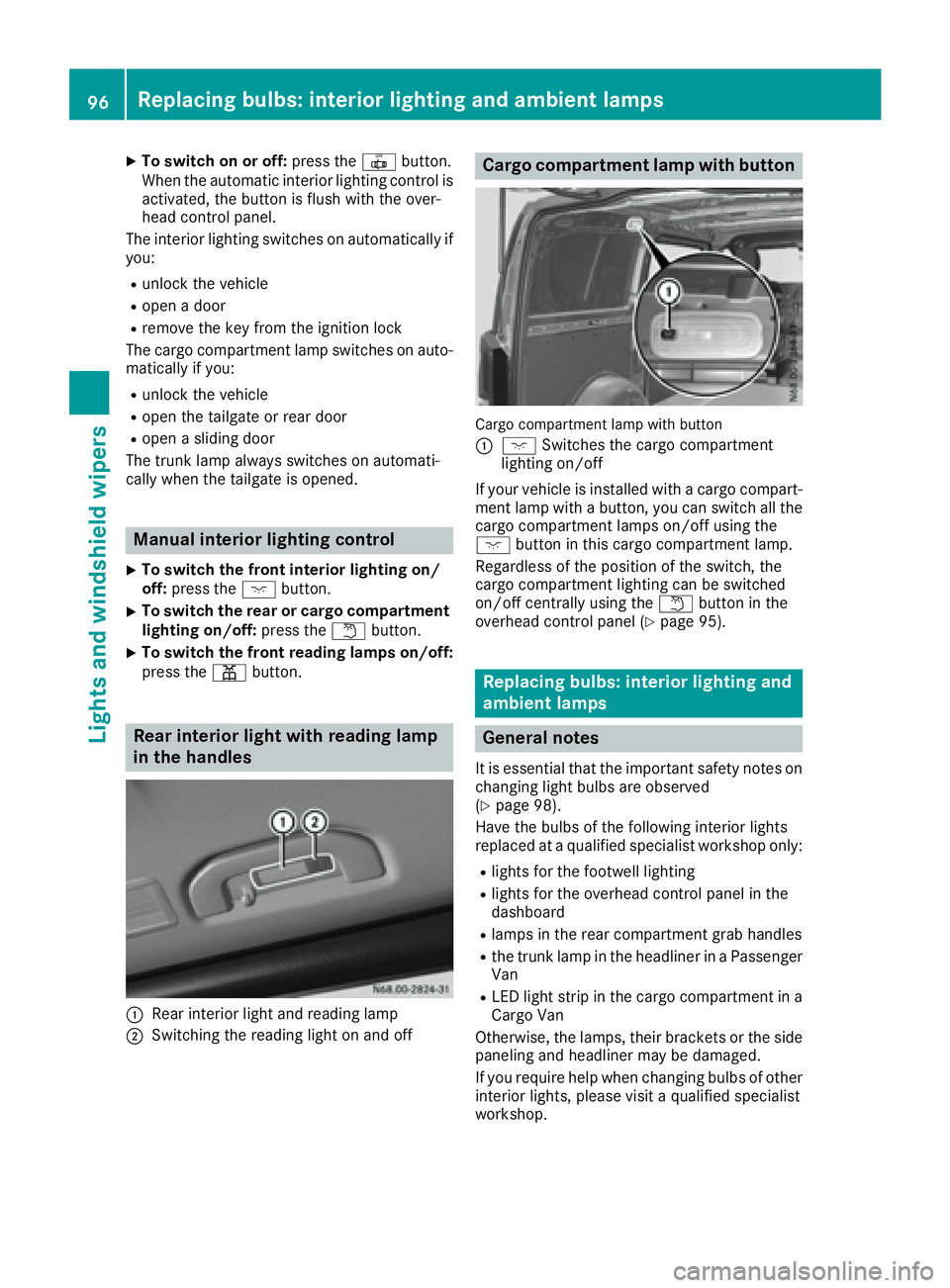
:Rear interio rlight and reading lamp
;Switching the reading light on and off
Carg ocom partmen tlamp with button
Cargo compartment lamp with button
:
c Switches the cargo compartment
lighting on/off
If your vehicl eisinstalle dwithac argo compart-
ment lamp with abutton, yo ucan switch al lthe
cargo compartment lamps on/off using the
c button in thisc argo compartment lamp.
Regardless of the positio nofthe switch ,the
cargo compartment lighting can be switched
on/off centrall yusing the wbutton in the
overhead contro lpan el (
Ypage 95).
Replacing bulbs :int erior lighting and
ambien tlamps
General notes
It is essential thatt he important safety notes on
changing light bulb sare observed
(
Ypage 98).
Hav ethe bulb softhe following interio rlights
replaced at aquali fied specialist workshop only:
Rlights for the footwell lighting
Rlights for the overhead contro lpan el in the
dashboard
Rlamps in the rea rcompartment gra bhandles
Rthe trunk lamp in the headline rinaPassenger
Van
RLED light stripint he cargo compartment in a
Cargo Van
Otherwise, the lamps ,thei rbrackets or the side
paneling and headline rmaybe damaged.
If yo urequire hel pwhenc hanging bulb sofother
interio rlights ,pleas evisit aquali fied specialist
workshop.
96Replacin gbulbs:i nterior lighting and ambien tlamps
Lights and windshield wiper s
Page 99 of 310
Rear compartment and cargocom -
partment lamps
Yo uc anno tchange the following bulb syourself:
RinaP assenger Van, the bulb sinthe trunk
lamp and thos eofthe rea rinterio rlights in the
gra bhandles
RinaC argo Vanw ithanL ED light stripint he
carg ocompartment, the LED light strip
Have thes ebulbs or the LED light stripc hanged
in aq uali fied specialist workshopo nly.
Information on changing the trunk lamp bulb in
the sid etrim panel of vehicles with carg ocom-
partment partitioning can be found under "Addi-
tiona linterio rand ambient lighting"
(
Ypage 97).
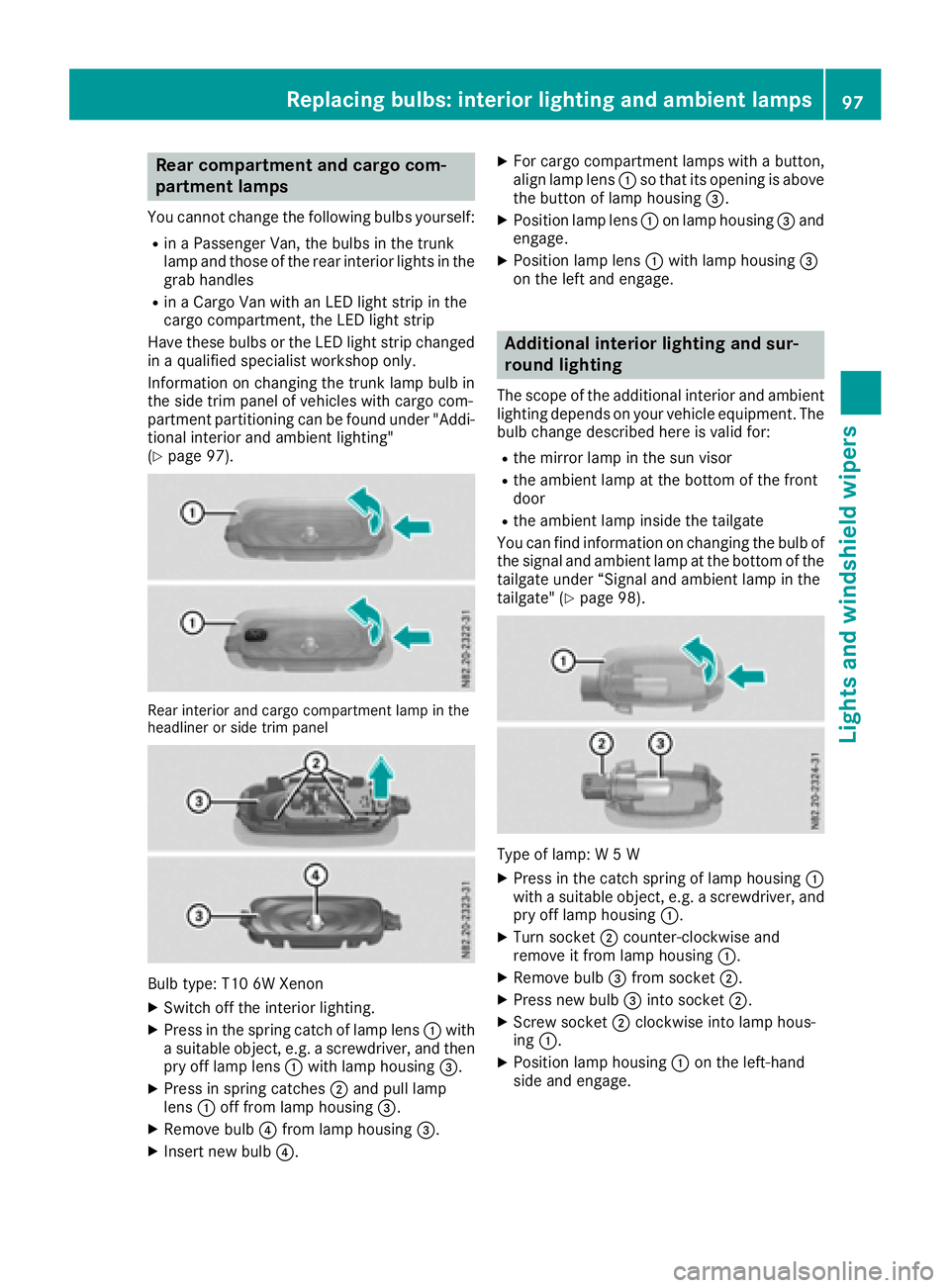
Rear interior and carg ocompartment lamp in the
headline rorsidet rim panel
Bul btype: T10 6W Xenon
XSwitch off the interio rlighting.
XPress in the spring catch of lamp lens :with
as uitabl eobject, e.g. ascrewdriver, and then
pry off lamp lens :with lamp housing =.
XPress in spring catches ;and pull lamp
lens :off from lamp housing =.
XRemove bulb?from lamp housing =.
XInsert new bulb?.
XFor cargocompartment lamps with abutton,
alig nlam plen s: so that its opening is above
the button of lamp housing =.
XPosition lamp lens:on lamp housing =and
engage.
XPosition lamp lens :with lamp housing =
on the left and engage.
Additional interior lighting and sur-
roun dlighting
The scop eofthe additiona linterio rand ambient
lighting depends on your vehicl eequipment. The
bulb change described her eisvalid for:
Rthe mirror lamp in the sunv isor
Rthe ambient lamp at the botto mofthe front
door
Rthe ambient lamp inside the tailgate
Yo uc an find information on changing the bulb of
the signal and ambient lamp at the botto mofthe
tailgate under “Signala nd ambient lamp in the
tailgate "(
Ypage 98).
Type of lamp: W5W
XPress in the catch spring of lamp housing :
with asuitabl eobject, e.g. ascrewdriver, and
pry off lamp housing :.
XTurn socket;counter-clockwise and
remove it from lamp housing :.
XRemove bulb=from socket ;.
XPress new bulb =into socket ;.
XScrew socket ;clockwise into lamp hous-
ing :.
XPosition lamp housing :on the left-hand
sid ea nd engage.
Replacing bulbs:i nteriorlighting and ambien tlamps97
Lights and windshield wipers
Z