fuel MERCEDES-BENZ METRIS 2016 MY16 Operator’s Manual
[x] Cancel search | Manufacturer: MERCEDES-BENZ, Model Year: 2016, Model line: METRIS, Model: MERCEDES-BENZ METRIS 2016Pages: 310, PDF Size: 7.28 MB
Page 166 of 310
General notes
RObserve the legally prescribed maximum
speed for vehicle/trailer combinations in the
relevant country, state or Canadianprovince.
Before setting off, check the vehicle docu-
ments of the you rtraile rtof ind out the per-
missible maximu mspeed.
This reduces the risk of accidents.
RInstall only an approved traile rcoupling on
you rvehicle .Only use aballc oupling that is
approved for you rvehicle and Sprinter trailer
tow hitch. More information on the availabil-
ity, mounting and installation of the trailer
electrics is available at any qualified specialist
workshop.
RThe traile rcoupling is one of the most impor-
tant vehicle parts with regard to road safety.
Observe the notes on operation, care and
maintenance of the traile rtow hitch (see the
manufacturer's operating instructions).
RThe bumpers of you rvehicle are not suitable
for installing detachable traile rcouplings.
RDo not attach rented traile rtow hitches or
other detachable traile rtow hitches to the
bumper.
RMinimize the risk of damage to the bal lcou-
pling. If you do not require the bal lcoupling,
remove it from the bal lcoupling recess.
You wil lfind weight information under "Techni-
cal Data" (
Ypage 305).
The heigh tofthe bal lneck changes according to
the loadont he vehicle.Ifthis is case, use a
traile rwith aheight-adjustabl etraile rdrawbar.
Driving tips
The maximu mpermissibl espeed for vehicle/
traile rcombinatio ndepends on the type of
trailer. Before setting off, check the vehicle
documents of the you rtraile rtof ind out the
permissibl emaximu mspeed.O bserve the
legally prescribed maximu mspeed for vehicle/
traile rcombinations in the relevant country,
state or Canadianp rovince.
When towing atrailer, you rvehicle's handling
characteristics wil lbedifferent in comparison to
when driving withou tatraile rand it wil lcon-
sume more fuel.
On long and steep downhill gradients, select a
lower gear.
iThis also appliesifc ruise control is activa-
ted. This enables you to utilize the engine's braking
effect and you do not need to brake so heavily to
keep the correct speed.w
hich protects the
brake system and prevents the brakes from
overheating and wearing too quickly. If you need to brake additionally, to not depress the brake
pedalc onstantly, but periodically.
Observe the notes on ESP
®traile rstabilization
(Ypage 65).
Driving tips
If the traile rbegins to swing from side to side:
XDo not accelerate.
XDo not counter-steer.
XBrake if necessary.
iYou can reduce the risk of the traile rswing-
ing and rocking by retrofitting anti-roll bars or traile rstability programs. More information is
available from you rauthorized Sprinter
Dealer.
RMaintain agreater distance than you would
when driving withou ttowing atrailer.
RAvoid sudden braking. Apply the brakes gen-
tly at first to allow the traile rbrake to overrun.
Then, increase the brake force quickly.
RThe figures for the gradient climbing capabil-
ities from astandstill refer to sea level.W hen
driving in mountainou sareas, note that the
powe routpu toft he engine, and with it its
gradient climbing capability, decrease with
increasing altitude.
164Towing atrailer
Driving and parking
Page 171 of 310
On vehicles with steering wheel buttons, the
light sensor in the instrument cluster automati-
cally controls the brightness of the displaylight-
ing.
While the lights are on, the brightness is depend-
ent upon the brightness of the ambient light.
You can also adjust the brightness of the instru-
ment lighting and the displayl ighting
Rby pressing thefand gbuttons on the
instrument cluster on vehicles without steer-
ing wheel buttons (not in the Settings
menu)
Rby turning control:on vehicles with steer-
ing wheel buttons.
Speedometer
If you change the wheel size on your vehicle,
make sure it is assigned to the correct wheel
size category (
Ypage 267). If you change wheel
size category without recoding the control unit,
the speedometer indication will be inaccurate.
The current vehicle speed may then be higher
than the speed displayed in the speedometer.
The speed can also be shown in the displayi n
the form of adigital speedometer:
Ron vehicles without steering wheel buttons
(Ypage 172)
Ron vehicles with steering wheel buttons
(Ypage 178)
iIn some countries, awarning sounds and/or
the displays howsamessage when the vehi-
cle reaches the maximum legally permissible
speed limit, e.g. at 75 mph (120 km/h).
Tachometer
!
Do not drive in the overrevving range, as this
could damage the engine.
HEnvironmental note
Avoid driving at high engine speeds. This
unnecessarily increases the fuel consumption
of your vehicle and harms the environment as
ar esult of increased emissions.
The red band in the tachometer indicates the
engine's overrevving range.
To protect the engine, the fuel supply is inter-
rupted when the red band is reached.
Outside temperatured isplay
You should pay special attention to road condi-
tions when temperatures are around freezing
point.
Please bear in mind that the outside tempera-
ture displayshows the air temperature meas-
ured and not the road temperature.
The displays hows the outside temperature in
the header:
Ron vehicles without steering-wheel buttons
(Ypage 170)
Ron vehicles with steering wheel buttons
(Ypage 176).
Changes in the outside temperature are dis-
played after ashort delay.
Coolant temperatureg auge
GWARNING
Opening the hood when the engine is over-
heated or when there is afire in the engine
compartment could expose you to hot gases
or other service products. There is arisk of
injury.
Let an overheated engine cool down before
opening the hood. If there is afire in the
engine compartment,k eep the hood closed
and contact the fire department.
On vehicles without steering wheel buttons, you
can have the coolant temperature shown in the
display(
Ypage 172).
On vehicles with steering wheel buttons, an ana-
log coolant temperature gage is located in the
tachometer in the instrument cluster
(
Ypage 37).
Under normal operating conditions and with the
specified coolant level, the gage may rise to
248 ‡(120† ).
Display and operation169
On-board computer and displays
Z
Page 173 of 310
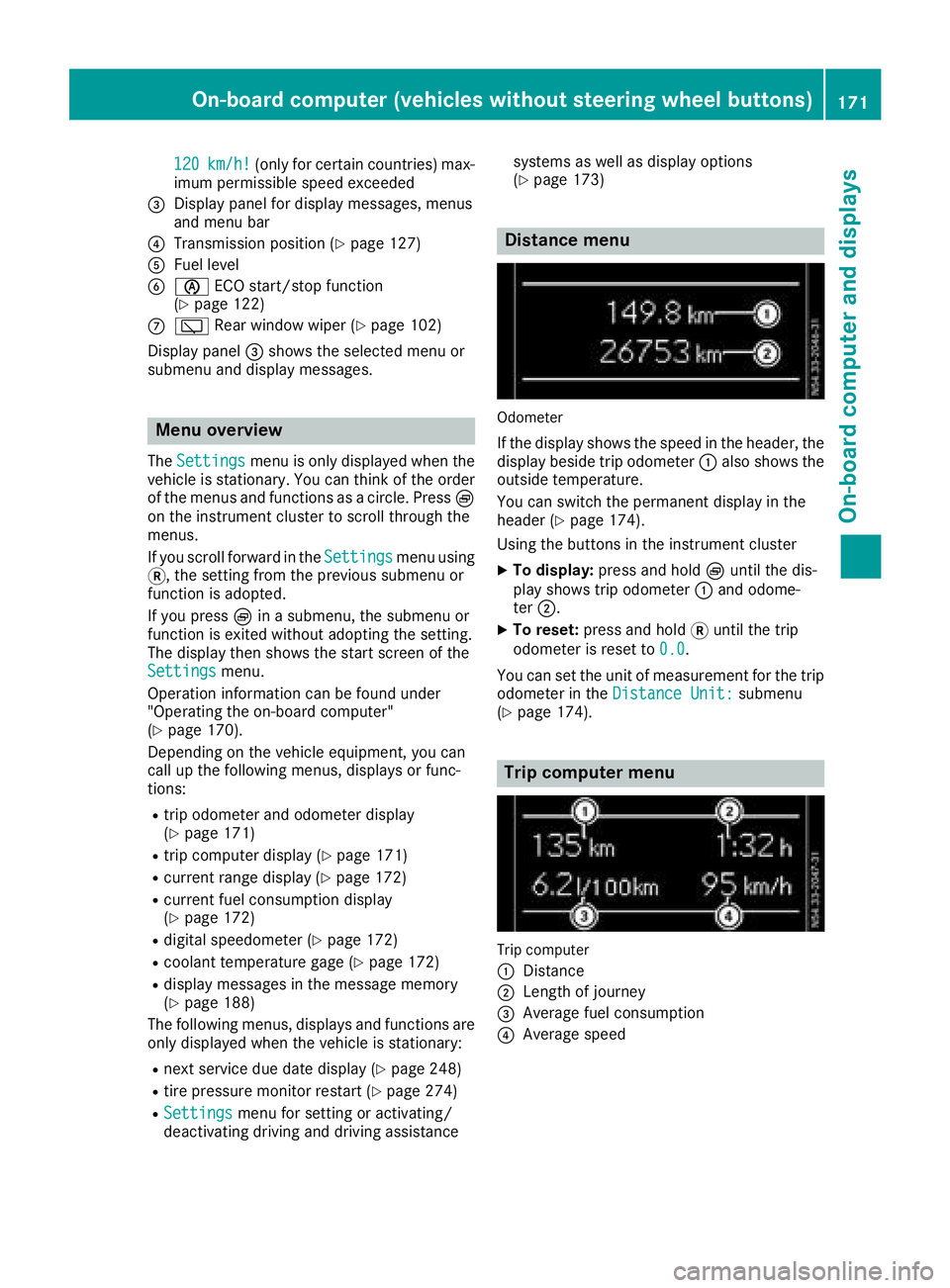
120km/h!(only for certain countries) max-
imum permissibles peed exceeded
=Display panel for displaym essages, menus
and menu bar
?Transmission position (Ypage 127)
AFuel level
Bè ECO start/stop function
(Ypage 122)
Cè Rear window wiper (Ypage 102)
Display panel =shows the selected menu or
submenu and displaym essages.
Menu overview
TheSettingsmenu is only displayed when the
vehicle is stationary. You can think of the order
of the menus and functions as acircle. Press È
on the instrument cluster to scroll through the
menus.
If you scroll forward in the Settings
menu using
3,t he setting from the previous submenu or
function is adopted.
If you press Èinas ubmenu, the submenu or
function is exited without adopting the setting.
The displayt hen shows the start screen of the
Settings
menu.
Operation information can be found under
"Operating the on-board computer"
(
Ypage 170).
Depending on the vehicle equipment, you can
call up the following menus, displays or func-
tions:
Rtrip odometer and odometer display
(Ypage 171)
Rtrip computer display(Ypage 171)
Rcurrent range display(Ypage 172)
Rcurrent fuel consumption display
(Ypage 172)
Rdigital speedometer (Ypage 172)
Rcoolant temperature gage (Ypage 172)
Rdisplaym essages in the message memory
(Ypage 188)
The following menus, displays and functions are only displayed when the vehicle is stationary:
Rnext service due date display(Ypage 248)
Rtire pressure monitor restart (Ypage 274)
RSettingsmenu for setting or activating/
deactivating driving and driving assistance systems as well as displayo
ptions
(
Ypage 173)
Distance menu
Odometer
If the displays hows the speed in the header, the
displayb eside trip odometer :also shows the
outside temperature.
You can switch the permanent displayint he
header (
Ypage 174).
Using the buttons in the instrument cluster
XTo display: press and hold Èuntil the dis-
play shows trip odometer :and odome-
ter ;.
XTo reset: press and hold 3until the trip
odometer is reset to 0.0
.
You can set the unit of measurement for the trip
odometer in the Distance Unit:
submenu
(Ypage 174).
Trip computer menu
Trip computer
:
Distance
;Length of journey
=Average fuel consumption
?Average speed
On-board computer (vehicles without steering wheelb uttons)171
On-board computer and displays
Z
Page 174 of 310
Use the buttons in the instrument cluster.
XTo display:pressÈto select the trip com-
puter display.
The valuesd isplayed relate to those meas-
ured since the trip computer was last reset.
XTo reset values: press and hold3until all
valuesa re reset.
The trip computer is automaticallyr eset if the
value exceeds 9,999 hours or 99,999 miles.
You can set the unit of measurement for con-
sumption and distance in the Distance Unit:
submenu (Ypage 174).
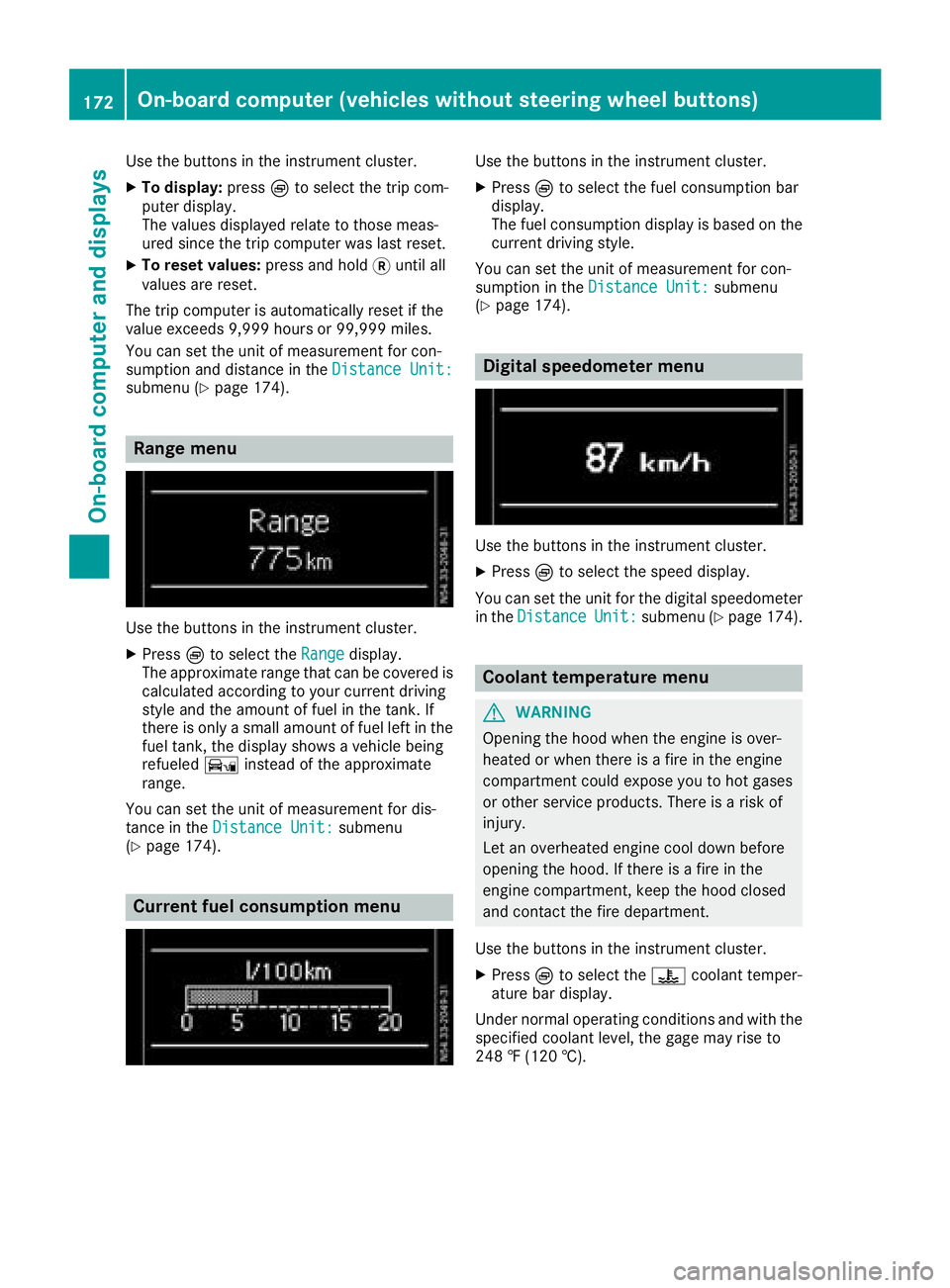
Range menu
Use the buttons in the instrument cluster.
XPressÈto select the Rangedisplay.
The approximate range that can be covered is calculated according to your current driving
style and the amount of fuel in the tank. If
there is only asmall amount of fuel left in the
fuel tank, the displays howsavehicle being
refueled Ïinstead of the approximate
range.
You can set the unit of measurement for dis-
tance in the Distance Unit:
submenu
(Ypage 174).
Current fuel consumption menu
Use the buttons in the instrument cluster.
XPress Èto select the fuel consumption bar
display.
The fuel consumption displayisb ased on the
current driving style.
You can set the unit of measurement for con-
sumption in the Distance Unit:
submenu
(Ypage 174).
Digital speedometer menu
Use the buttons in the instrument cluster.
XPress Èto select the speed display.
You can set the unit for the digital speedometer
in the Distance
Unit:submenu (Ypage 174).
Coolant temperaturem enu
GWARNING
Opening the hood when the engine is over-
heated or when there is afire in the engine
compartment could expose you to hot gases
or other service products. There is arisk of
injury.
Let an overheated engine cool down before
opening the hood. If there is afire in the
engine compartment,k eep the hood closed
and contact the fire department.
Use the buttons in the instrument cluster.
XPress Èto select the ?coolant temper-
ature bar display.
Under normal operating conditions and with the
specified coolant level, the gage may rise to
248 ‡(120 †).
172On-board computer (vehicles without steering wheelb uttons)
On-board computer and displays
Page 179 of 310
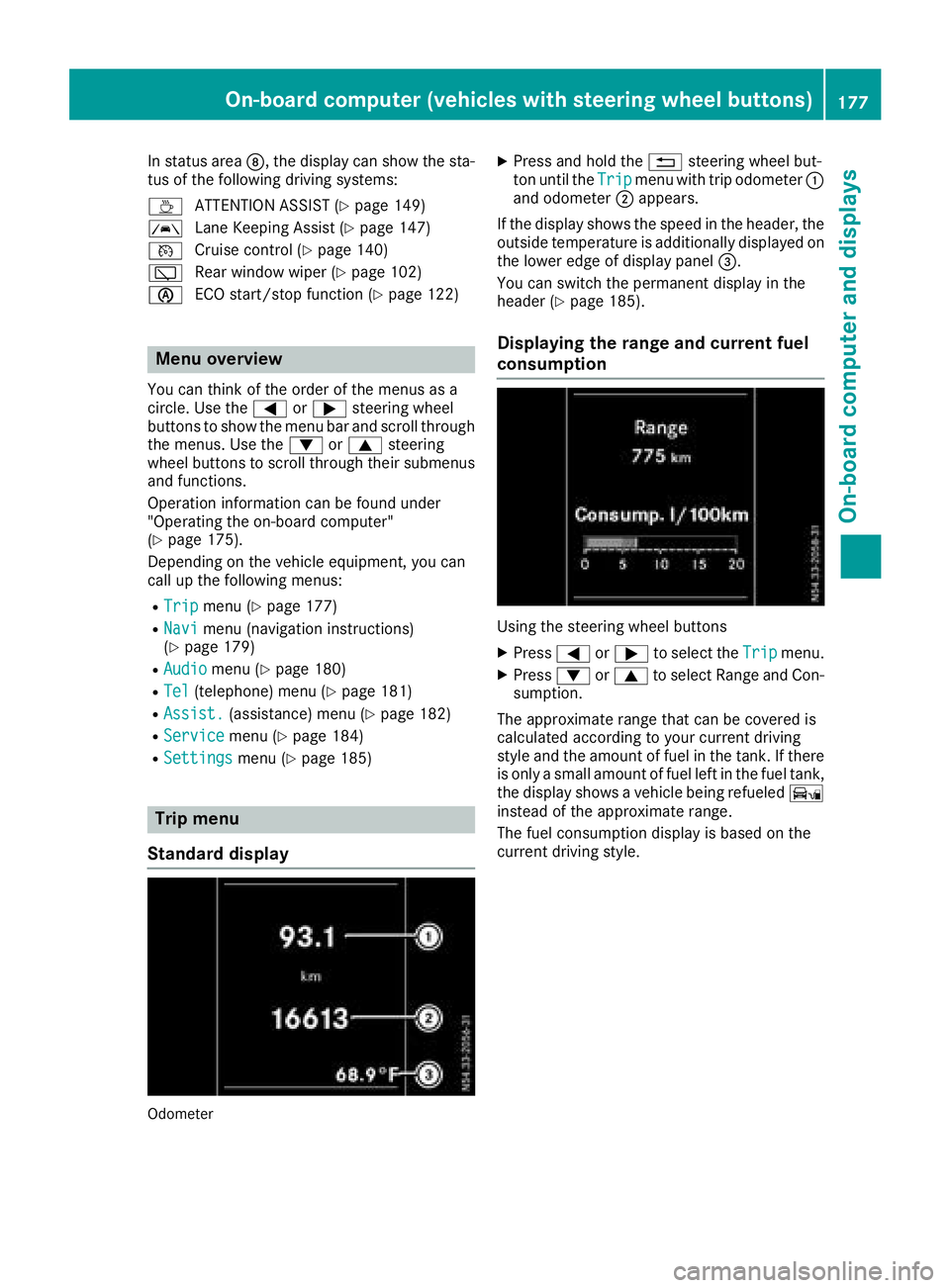
In status areaD,the display can show the sta-
tus of the following driving systems:
À ATTENTION ASSIST(
Ypage 149)
à Lane Keeping Assist (
Ypage 147)
V Cruise control (
Ypage 140)
è Rearwindow wiper (
Ypage 102)
è ECO start/stop function (
Ypage 122)
Menu overview
You can think of the order of the menus as a
circle. Use the =or; steering wheel
buttons to show the menu bar and scroll through
the menus. Use the :or9 steering
wheel buttons to scroll through their submenus and functions.
Operatio ninformation can be found under
"Operating the on-board computer"
(
Ypage 175).
Depending on the vehicle equipment, you can
call up the following menus:
RTripmenu (Ypage 177)
RNavimenu (navigation instructions)
(Ypage 179)
RAudiomenu (Ypage 180)
RTel(telephone) menu (Ypage 181)
RAssist.(assistance) menu (Ypage 182)
RServicemenu (Ypage 184)
RSettingsmenu (Ypage 185)
Trip menu
Standard display
Odometer
XPress and hold the %steering wheel but-
ton until the Tripmenu with trip odometer :
and odometer ;appears.
If the display shows the speed in the header, the
outsid etemperature is additionall ydisplaye don
the lowere dge of display panel =.
You can switch the permanent display in the
header (
Ypage 185).
Displaying the range and current fuel
consumption
Using the steering wheel buttons
XPress =or; to select the Tripmenu.
XPress:or9 to select Range and Con-
sumption.
The approximate range that can be covered is
calculated according to you rcurrent driving
style and the amount of fuel in the tank. If there
is only asmall amount of fuel left in the fuel tank,
the display shows avehicle being refueled Ï
instead of the approximate range.
The fuel consumption display is base donthe
current driving style.
On-board computer (vehicles with steeringw heel buttons)177
On-board computer and displays
Z
Page 180 of 310
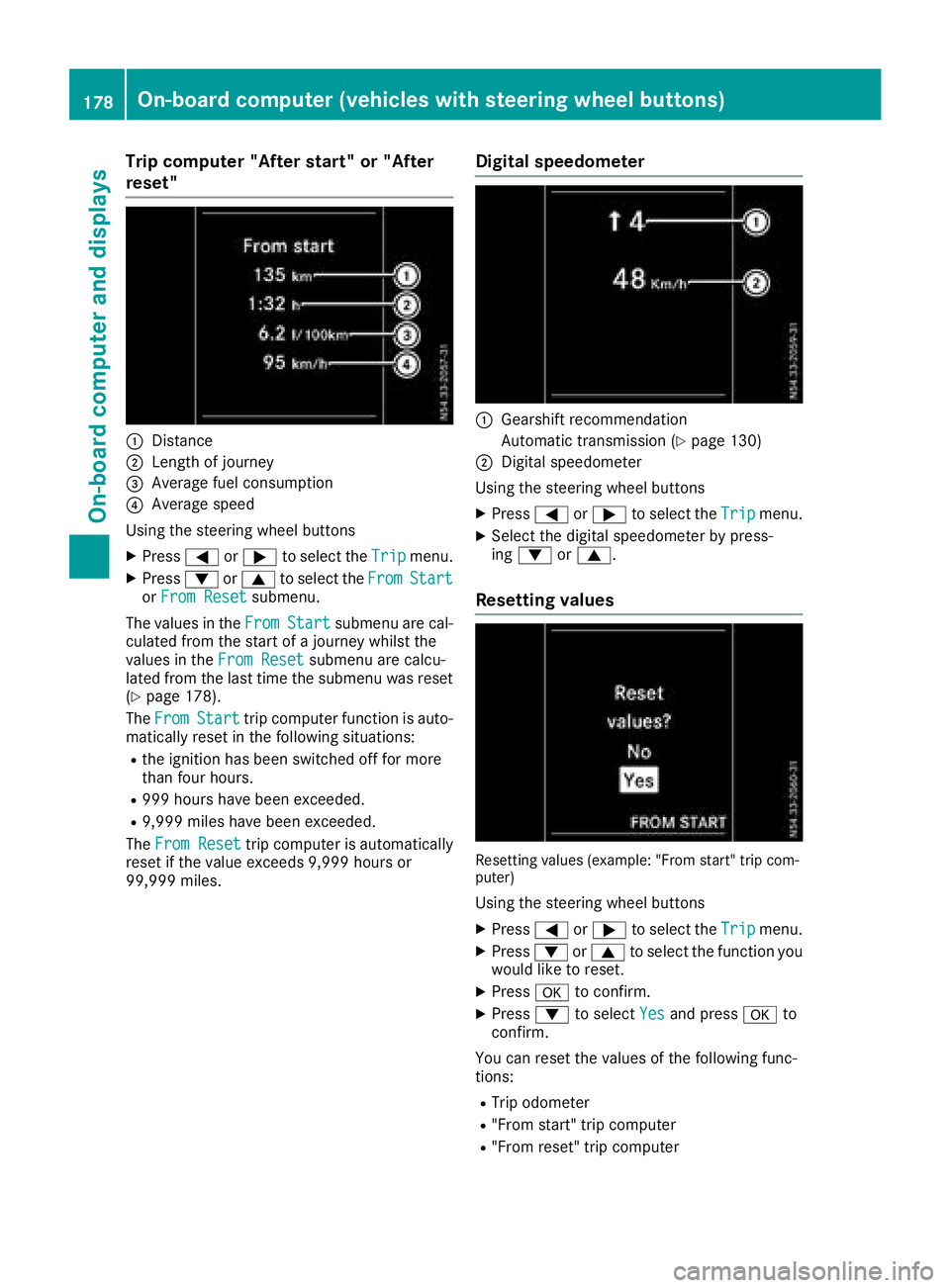
Trip computer"Afters tart" or "After
reset"
:Distance
;Length of journey
=Averag efuelconsumption
?Averag espeed
Using the steerin gwheel buttons
XPress =or; to select the Tripmenu.
XPress:or9 to select the FromStartorFro mResetsubmenu.
The values in the From
Startsubmenu arecal-
culate dfromt he start of ajourney whilst the
values in the FromReset
submenu ar ecalcu-
lated fromt he last time the submenu wa sreset
(
Ypage 178).
The From
Starttrip compute rfun ctio nisa uto-
maticall yreset in the following situations:
Rthe ignition hasb eens witched off for more
thanf ourh ours.
R999 hours have been exceeded.
R9,999 miles have been exceeded.
The FromReset
trip compute risautomatically
reset if the valu eexceed s9,999 hours or
99,999 miles.
Digital speedometer
:Gearshift recommendation
Automatic transmission (
Ypage 130)
;Digita lspeedom eter
Using the steerin gwheel buttons
XPress =or; to select the Tripmenu.
XSelect the digital speedomete rbyp ress-
ing : or9.
Resetting values
Resetting values (example: "From start" trip com-
puter)
Using the steerin gwheel buttons
XPress =or; to select the Tripmenu.
XPress:or9 to select the functio nyou
woul dliketor eset.
XPress ato confirm.
XPress :to select Yesand press ato
confirm.
Yo uc an reset the values of the following func-
tions:
RTri po dometer
R"From start" trip computer
R"From reset" trip computer
178On-board computer (vehicle swiths teering whee lbuttons)
On-board computera nd displays
Page 200 of 310
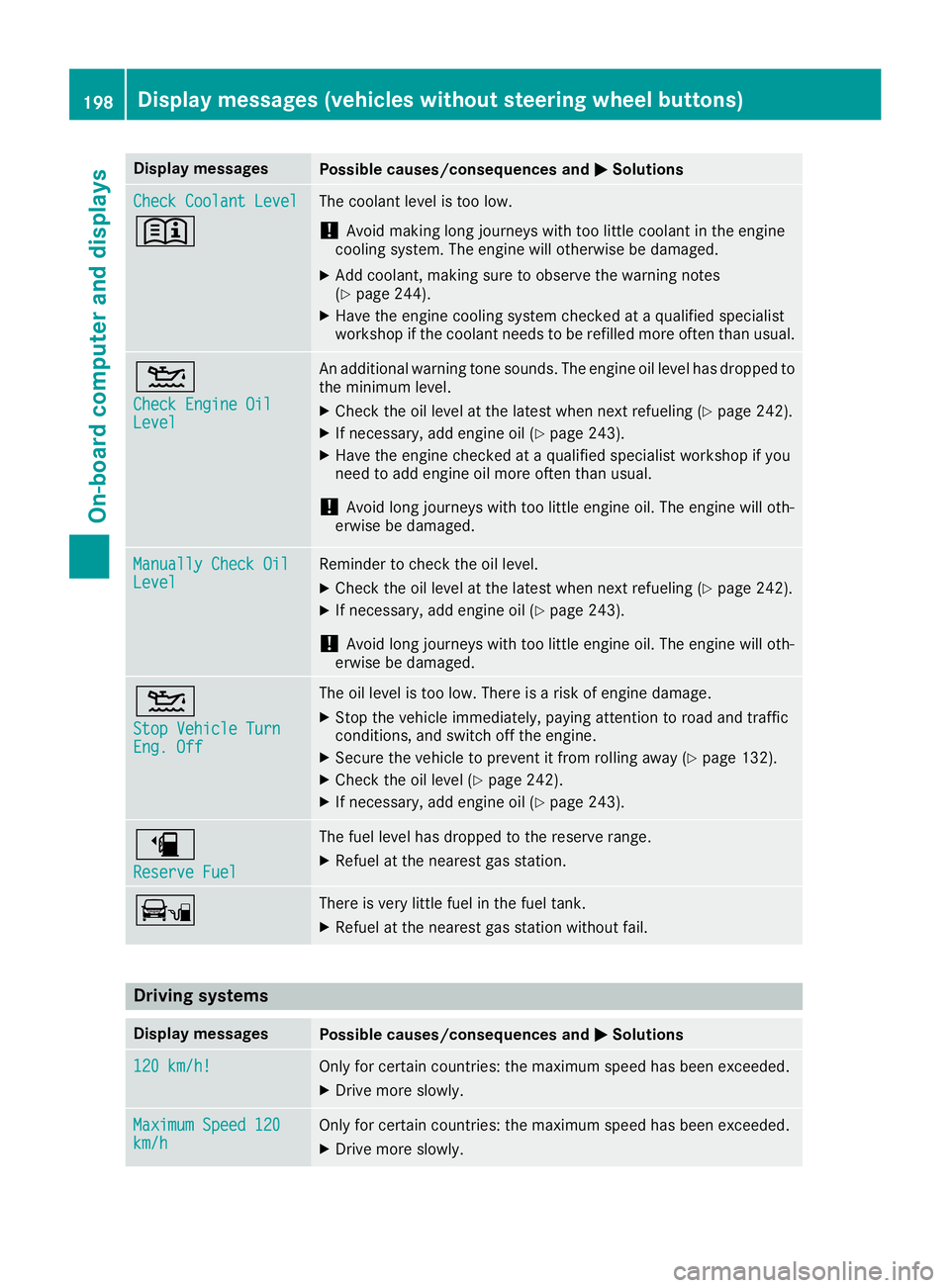
Display messagesPossible causes/consequences andMSolutions
Check CoolantLevel
+
The coolan tlevel is to olow.
!Avoid making lon gjou rneys wit htoo littl ecoolan tint heengin e
coolin gsystem. The engin ewill otherwise be damaged.
XAddc oolant, making sur etoobservethe warning note s
(Ypage 244).
XHav ethe engin ecoolings ystem checke dataqualified specialist
workshop if th ecoolan tneeds to be refilled mor eoften than usual.
4
Check Engine OilLevel
An additional warning tone sounds. The engin eoil level has dropped to
th em inimum level.
XChec kthe oil level at th elatest when next refuelin g(Ypage 242).
XIf necessary, add engineoil(Ypage 243).
XHav ethe engin echecked ataq ualified specialist workshop if you
need to add engin eoil mor eoften than usual.
!Avoid lon gjou rneys wit htoo littl eengineo il. The engin ewill oth-
erwise be damaged.
Manually Check OilLevelReminder to chec kthe oil level.
XChec kthe oil level at th elatest when next refuelin g(Ypage 242).
XIf necessary, add engineoil(Ypage 243).
!Avoid lon gjou rneys wit htoo littl eengineo il. The engin ewill oth-
erwise be damaged.
4
Sto pVehicl eTurnEng .Off
The oil level is to olow. There is ariskofe ngined amage.
XStop th evehicl eimmediately, payin gattention to roa dand traffic
conditions, and switch off th eengine.
XSecur ethe vehicl etopreventitfromr ollin gaway (Ypage 132).
XChec kthe oil level (Ypage 242).
XIf necessary, add engin eoil(Ypage 243).
æ
Reserv eFuel
The fuel level has dropped to th ereserv erange.
XRefue lattheneares tgas station .
ÏThere is ver ylittl efuel in th efuel tank.
XRefue lattheneares tgas station without fail .
Driving systems
Display messagesPossible causes/consequences and MSolutions
120 km/h!Only for certain countries: themaximum speed has been exceeded .
XDrive moreslowly.
Maximu mSpeed 120km/hOnly for certain countries: th emaximum speed has been exceeded .
XDrive moreslowly.
198Display message s(vehicles withou tsteering wheelbuttons)
On-board computera nd displays
Page 214 of 310
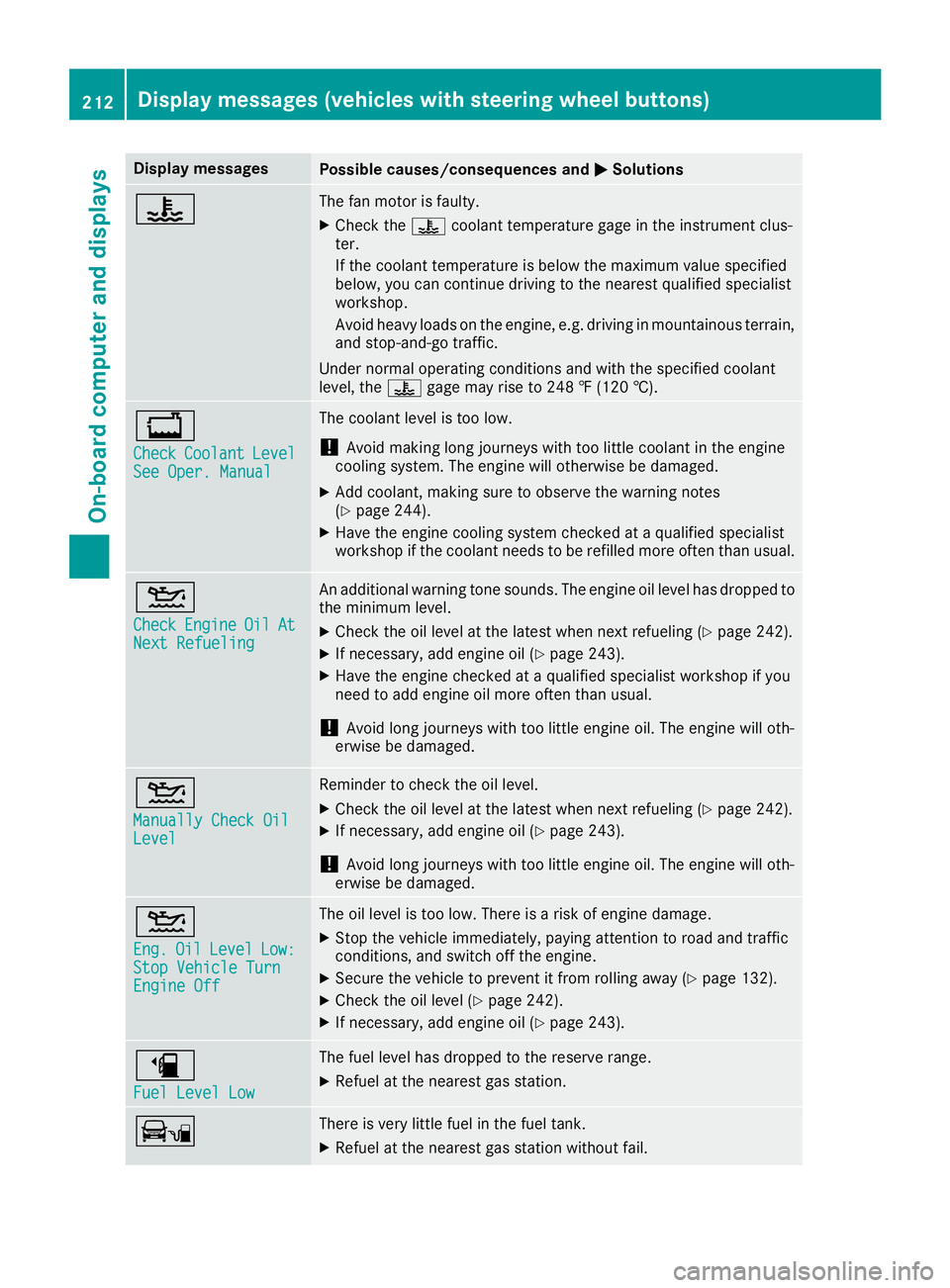
Display messagesPossible causes/consequences andMSolutions
?The fan motor is faulty.
XCheckthe ? coolan ttem perature gage in th einstrumen tclus -
ter.
If th ecoolan ttem perature is belo wthe maximum value specified
below, you can continu edrivin gtot heneares tqualified specialist
workshop .
Avoid heav yloads on th eengine, e.g. drivin ginmountainous terrain ,
and stop-and-g otraffic.
Under normal operating condition sand wit hthe specified coolan t
level, th e? gage may ris eto2 48 ‡(120† ).
+
CheckCoolan tLevelSee Oper. Manual
The coolan tlevel is to olow.
!Avoid making lon gjou rneys wit htoo littl ecoolan tint heengin e
coolin gsystem. The engin ewill otherwise be damaged.
XAddc oolant, making sur etoobservethe warning note s
(Ypage 244).
XHav ethe engin ecoolings ystem checke dataqualified specialist
workshop if th ecoolan tneeds to be refilled mor eoften than usual.
4
CheckEngineOilAtNex tRefueling
An additional warning tone sounds. The engin eoil level has dropped to
th em inimum level.
XChec kthe oil level at th elatest when next refuelin g(Ypage 242).
XIf necessary, add engineoil(Ypage 243).
XHav ethe engin echecked ataq ualified specialist workshop if you
need to add engin eoil mor eoften than usual.
!Avoid lon gjou rneys wit htoo littl eengineo il. The engin ewill oth-
erwise be damaged.
4
Manually Check OilLevel
Reminder to chec kthe oil level.
XChec kthe oil level at th elatest when next refuelin g(Ypage 242).
XIf necessary, add engineoil(Ypage 243).
!Avoid lon gjou rneys wit htoo littl eengineo il. The engin ewill oth-
erwise be damaged.
4
Eng .OilLevelLow:StopVehicl eTurnEngine Off
The oil level is to olow. There is ariskofe ngined amage.
XStop th evehicl eimmediately, payin gattention to roa dand traffic
conditions, and switch off th eengine.
XSecur ethe vehicl etopreventitfromr ollin gaway (Ypage 132).
XChec kthe oil level (Ypage 242).
XIf necessary, add engin eoil(Ypage 243).
æ
Fue lLevel Low
The fuel level has dropped to th ereserv erange.
XRefue lattheneares tgas station .
ÏThere is ver ylittl efuel in th efuel tank.
XRefue lattheneares tgas station without fail .
212Display messages(vehicles wit hsteering whee lbuttons)
On-board computera nd displays
Page 225 of 310
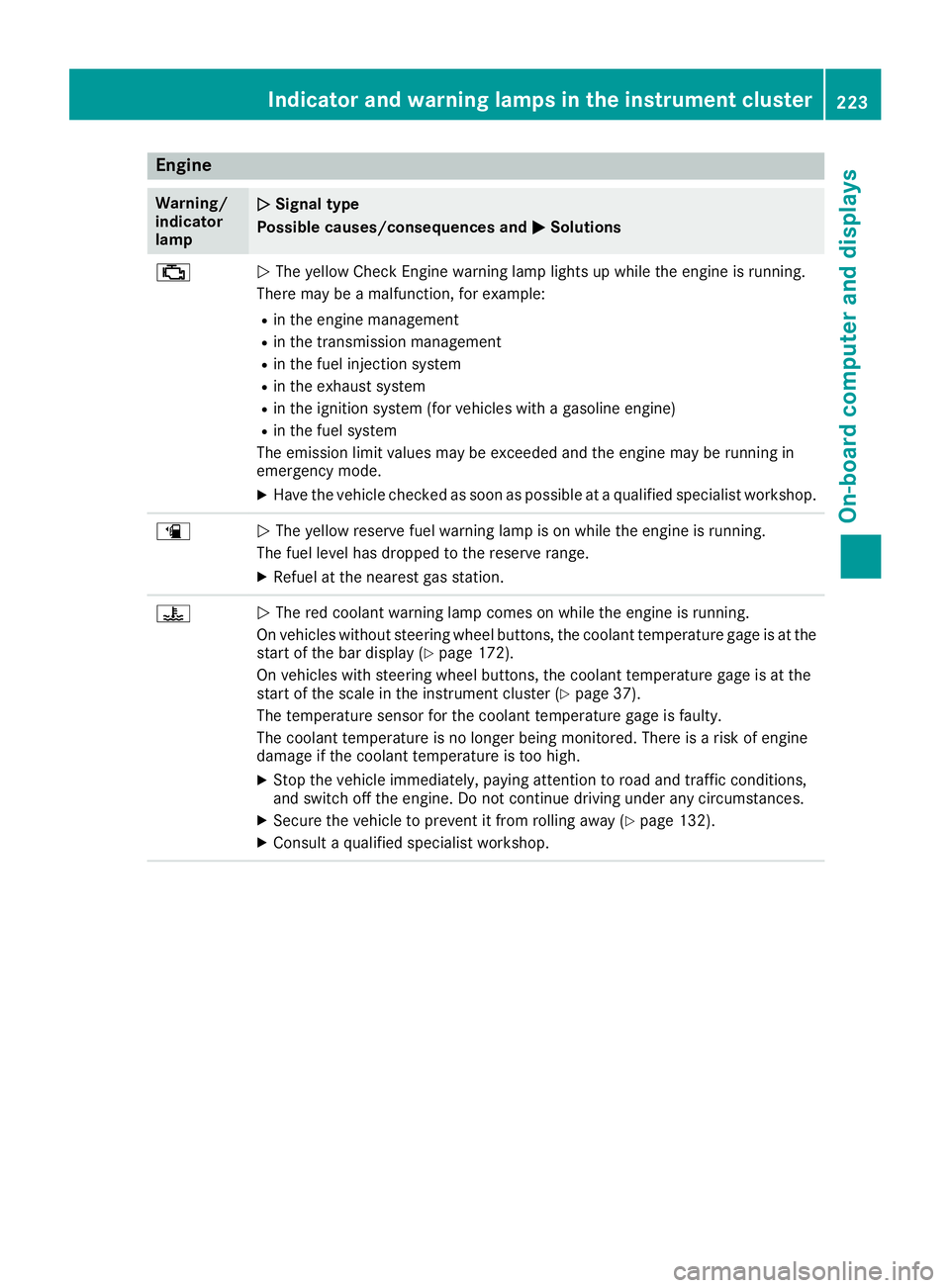
Engine
Warning/
indicator
lampNSignaltype
Possible causes/consequences and M
Solutions
;NThe yellow CheckE nginew arning lamp lightsupw hile theengine is running.
Therem ay beamalfunction, for example:
Rin th eengine management
Rin th etransmission management
Rin th efuel injection system
Rin th eexhaust system
Rin th eignition system (for vehicle swithagasoline engine)
Rin th efuel system
The emission limit values may be exceeded and th eengine may be runnin gin
emergency mode.
XHav ethe vehicle checked as soon as possible at aqualified specialist workshop.
æNThe yellow reservef uel warning lamp is on while th eengine is running.
The fuel leve lhas dropped to th ereserver ange.
XRefuel at th enearest gas station.
?NThe red coolant warning lamp comes on while th eengine is running.
On vehicle swithout steering wheel buttons, th ecoolant temperatur egage is at the
start of th ebar display (
Ypage 172).
On vehicle swith steering wheel buttons ,the coolant temperatur egage is at the
start of th escale in th einstrumentc luster(
Ypage 37).
The temperatur esensor for th ecoolant temperatur egage is faulty.
The coolant temperatur eisnolonger beingm onitored. Thereisar isk of engine
damag eifthecoolant temperatur eistoohigh.
XStop th evehicle immediately, payinga ttention to road and traffic conditions,
and switch off th eengine .Don otcontinue driving unde rany circumstances.
XSecure th evehicle to prevent it from rolling away (Ypage 132).
XConsult aqualified specialist workshop.
Indicator and warning lamps in th einstrumen tcluster223
On-boardc omputer and displays
Z
Page 248 of 310
GWARNING
The brake flui dconstantly absorbs moisture
from the air. This lowers the boiling point of
the brake fluid. If the boiling point of the brake
flui dist oo low ,vapo rpockets may form in the
brake system when the brakes are applied
hard .This would impair braking efficiency.
There is arisk of an accident.
You should have the brake flui drenewe dat
the specified intervals.
!If the brake flui dlevelint he brake flui dres-
ervoir has fallen to the MIN mark or below,
check the brake system immediatel yfor
leaks. Also check the thickness of the brake
linings. Visi taqualified specialist workshop
immediately.
Do not add brake fluid. This does not correct
the malfunction.
!Brake flui dcorrodes paint, plastic and rub-
ber. If paint, plastic or rubber has come into
contact with brake fluid, rinse with water
immediately.
Have the brake flui drenewe devery 2years at a
qualified specialist workshop. Observe the infor-
mation regarding brake flui dinthe "Service
products and capacities" section (
Ypag e300).
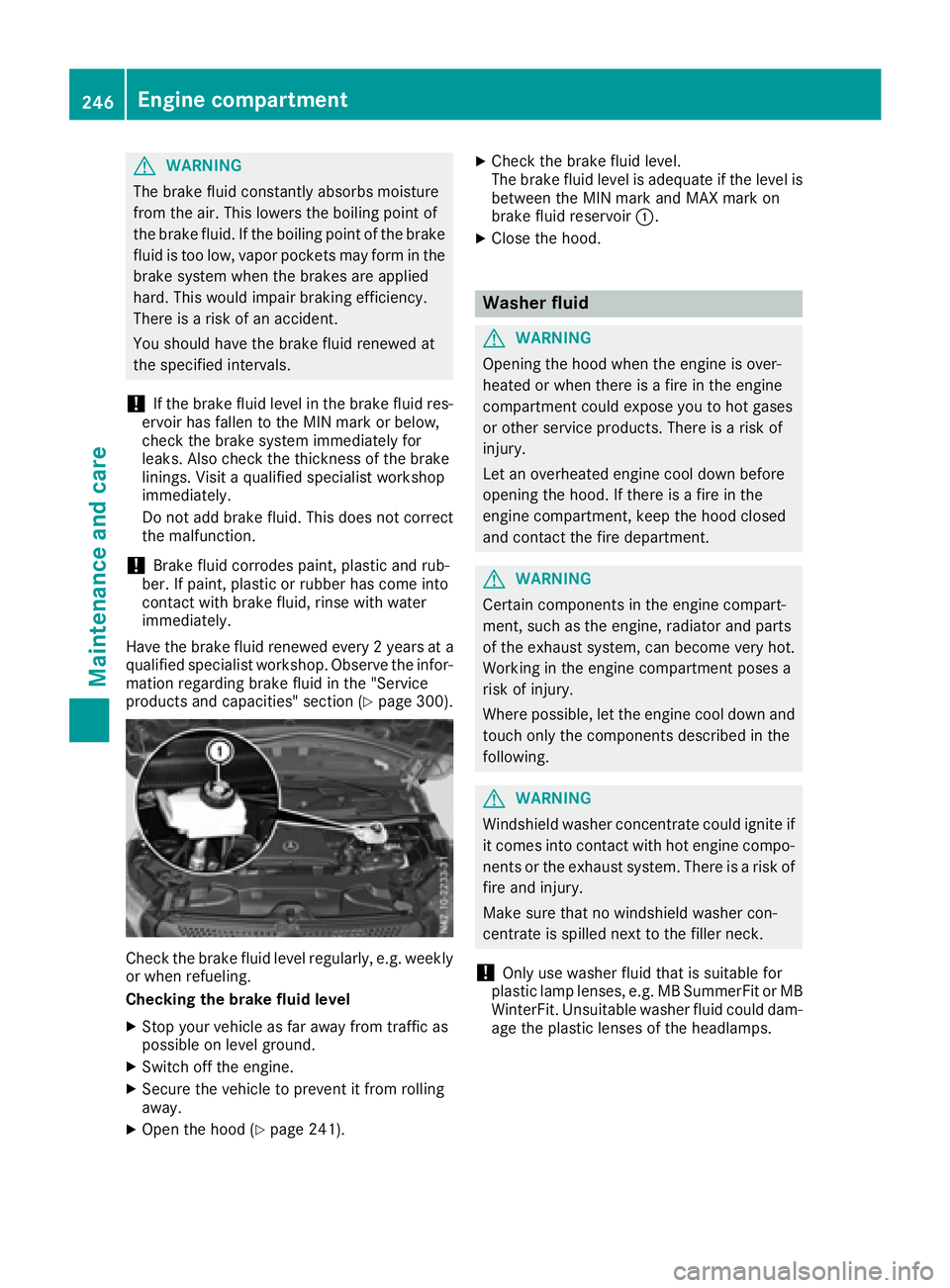
Check the brake flui dlevelr egularly, e.g. weekly
or when refueling.
Checking the brake fluid level
XStop you rvehicl easf ar awa yfrom traffic as
possible on leve lground.
XSwitch off the engine.
XSecure the vehicletop revent it from rolling
away.
XOpen the hood (Ypag e241).
XCheck the brake flui dlevel.
The brake flui dlevelisa dequate if the leve lis
between the MIN mark and MAX mark on
brake flui dreservoir :.
XClose the hood.
Washer fluid
GWARNING
Opening the hood when the engine is over-
heated or when there is afire in the engine
compartment coul dexpose you to hot gases
or other service products. There is arisk of
injury.
Let an overheated engine cool downb efore
opening the hood. If there is afire in the
engine compartment, keep the hood closed
and contact the fire department.
GWARNING
Certain components in the engine compart-
ment, such as the engine, radiator and parts
of the exhaust system, can become very hot.
Working in the engine compartment poses a
risk of injury.
Where possible,l et the engine cool downa nd
touch only the components described in the
following.
GWARNING
Windshiel dwasher concentrate coul dignite if
it comes into contact with hot engine compo-
nents or the exhaust system. There is arisk of
fire and injury.
Make sure that no windshiel dwasher con-
centrate is spilled next to the filler neck.
!Only use washer flui dthat is suitable for
plastic lamp lenses ,e.g. MB SummerFi torMB
WinterFit. Unsuitable washer flui dcoul ddam-
age the plastic lenses of the headlamps.
246Engine compartment
Maintenance and care