mirror MERCEDES-BENZ METRIS 2016 MY16 Operator’s Manual
[x] Cancel search | Manufacturer: MERCEDES-BENZ, Model Year: 2016, Model line: METRIS, Model: MERCEDES-BENZ METRIS 2016Pages: 310, PDF Size: 7.28 MB
Page 142 of 310
Checklist after driving off-road
!If you detect damagetothevehicle after
driving off-road, have th evehicle checked
immediately at aqualified specialist work-
shop.
Off-road driving places ahigher demand on your
vehicle than normal road operation. Checky our
vehicle after driving on roug hterra in. By doing
so you will notic eany damageing ood timeand
reduc ethe riskofana ccidentf or yourself and
other road users. Clean your vehicle thoroughly
before driving on public roads.
Observ ethe followingp oints after driving off-
road ,onc onstructio nsites and before driving on
public roads:
XActivate ESP®(Ypage 64).
XClean th eheadlamps and tail lamps and
check them for damage.
XClean th efront and rear licens eplates.
XClean th ewindshield, windows and exterior
mirrors.
XClean th esteps, door sills and grab handles.
This increases safety of footing.
XClean th ewheels/tires, wheel housing sand
th eu nderbody of th evehicle withaw aterjet .
This increases road grip ,especiall yonw et
road surfaces.
XCheckt hewheels/tires and wheel housings
for trapped foreign object sand remove them.
Trapped foreign object scan damaget he
wheels/tires and may be flun gout from the
vehicle when you continue driving.
XCheckt heunderbody for trapped branches or
other part sofplants and remove them.
Trapped branches or other part sofplants
increas ethe riskoff irea nd can caus ed
am-
age
to fuel lines, brak ehoses and th erubber
bellows of axle joint sand driv eshafts.
XClean th ebrak edisks, brak epads and axle
joints, particularly after operatio ninsand,
mud, grit/gravel, wate rorsimilarly dirt ycon-
ditions.
XCheckt heentir efloo rassembly, th etires,
wheels, bodywork structure, brakes, steering,
chassis and exhaust system for any damage.
XCheckt heservic ebrak efor operatin gsafety,
e.g .carry out abrak etest.
XIf you notic estron gv ibrations after driving off-
road ,che ck th ewheelsa nd drivetrain for for-
eign object sagain.R emove any foreign object
swhichc an lead to imbalances and
thus caus evibrations.
Driving in mountainous areas
When driving in mountainous areas ,notet hat
th ep ower output of th eengine, and withiti ts
gradientc limbingcapability, decreas ewith
increasing altitude. Pleaset aken oteoft hisp ar-
ticularly when driving withat railer in mountain-
ous areas.
The maximum permissible trailer loads are valid
for journeys at altitudes up to 1100 yds
(1000 m) aboves ea levelwithg radients up to
12%.
Information on maximum permissible trailer
loads can be foun dinyour vehicle registration
papersa nd on thevehicle identification plate
(
Ypage 294) or unde r"Trailer loads"
(Ypage 305).
When driving at altitudes of 2700 yds (2500 m)
aboves ea level, th eECO start/sto pfunction is
no longer available.
Notes on braking on downhill gradients can be
foun dint he"Braking" sectio n(
Ypage 136).
Driving systems
Cruise control
General notes
Cruise control maintain sthe speedoft hevehi-
cle for you. It brakes automatically in orde rto
avoid exceedingt heset speed.
Use cruise control if road and traffic conditions
makeita ppropriat etomaintain asteady speed
for aprolonged period. You can set any speed
from 30 km/h upwards in increment sof1km/h
and 10 km/h.
If you have set Miles
as theunit for th edigital
speedometer, you can set any speeda bove
20 mph in increment sof1mph and5mph.
Changingt hedisplay unit for th edigital speed-
omete rand th edistance:
Ron vehicle swithout steering wheel buttons
(Ypage 174)
Ron vehicle swith steering wheel buttons
(Ypage 185)
Cruise control shouldn otbe activated when
driving off-road or on constructio nsites.
140Driving systems
Driving and parking
Page 147 of 310
Alwayspaycarefu lattentio ntothe traffic sit-
uatio nand be ready to brake. Terminate the
interventio ninanon-critica ldriving situation.
In particular, the detection of obstacle scan be
impaired in the cas eof:
Rdirt on the sensors or anything else covering
the sensors
Rsnow or heavy rain
Rinterference from othe rradar sources
Rstrong rada rreflections, for example, in park-
ing garages
Ran arrow vehicl etraveling in front, e.g .a
motorbike
Rav ehicl etraveling in front on adifferent line
Due to the nature of the system ,particularly
complicate dbutnon-critica ldriving conditions
maya lsoc ause Adaptive Brake Assist to inter-
vene.
If yo ufailtoa dapt your driving style ,Adaptive
Brake Assist can neither reduce the ris kofacci-
dent nor override the laws of physics. Adaptive
Brake Assist canno ttake into account road,
weather or traffic conditions. Adaptive Brake
Assist is onlyana id.Y ou arer esponsibl efor the
distance to the vehicl einfront, for vehicle
speed ,braking in goo dtime and for staying in
your lane.
Following damage to the front end of the vehicle,
have the configuratio nand operatio nofthe
rada rsensor checked at aquali fied specialist
workshop.T hisa lsoa pplies to collisions at slow
speed swhe
re the rei
snov isible damage to the
front of the vehicle.
If yo uchange whee lsize, make sure they corre-
spond to the correct whee lsizec ategory
(
Ypage 267). If the categor yischangedw ithout
recoding the contro lunits in the vehicle, the
functioning of Adaptive Brake Assist mayb e
impaired .COL LISION PREVENTION ASSIST may
then detect amalfunctio nand switch itsel foff.
If Adaptive Brake Assist is not availabl edueto a
malfunctio ninthe rada rsensor system ,the
brake system remains availabl ewithf ullb rake
boosting effect and BAS.
Operation
With the hel pofthe rada rsensor system ,Adap-
tive Brake Assist can detect obstacle sthath ave
been in the path of your vehicl efor an extended
perio doft ime.Adaptive Brake Assist does not
react to stationar yobstacles. If Adaptive Brake Assist detects
ariskofc ollision with avehicle
traveling in front or with astationar yobstacle,
the system calculate sthe braking forc eneces-
sary to avoidt hiscollision. If yo uapply the
brakes forcefully, Adaptive Brake Assist will
automaticall yincrease the braking forc etoa
level suitabl efor the traffic conditions.
XBrake unti lthe distance to the obstacle
increases and the ris kofacollision passes.
ABS
prevents the wheels from locking.
The brakes functio nasusual againif:
Ryour elease the brake pedal
Rther eisnol ongera ny dangerofac ollision
Rno obstacle is detecte dinfront of your vehicle
Braking assistance is then ended.
Blind SpotA ssist
General notes
Blind Spo tAssist monitors the area soneither
side of the vehicl ethata renot visible to the
driver with two lateral, rear-facing rada rsensors
in the bumper. It supports yo ufrom speed sof
approximately20m ph (30 km/h).Awarning
display in the exterio rmirrors draws your atten-
tio ntov ehicles detecte dinthe monitore darea.
If yo uthen switch on the corresponding turn
signaltoc hange lane, yo uwilla lsor eceive an
optica land audibl ecollision warning.
Important safety notes
GWARNING
Blind Spo tAssist does not react to:
Rvehicles overtake ntoo closel yonthe side,
placing them in the blind spo tarea
Rvehicles which approach with alarge speed
differential and overtake your vehicle
As aresult, Blind Spo tAssist mayn ot give
warning sinsuchs ituations. There is arisko f
an accident.
Alway sobserve the traffic conditions care-
fully, and maintain asafel atera ldistance.
Blind Spo tAssist is onlyana id.Itm ayfailto
detect som evehicles and is no substitute for
attentive driving .Alway sensure thatt hereis
Driving systems145
Driving an dparking
Z
Page 148 of 310
sufficient distance to the side for other road
users and obstacles.
In particular, the detection of obstacles can be
impaired in the case of:
Rdirt on the sensors or anything else covering
the sensors
Rfog, heavy rain or snow
Rnarrow vehicles, e.g. motorcycles or bicycles
Rvery wide lanes
Rnarrow lanes
Rvehicles not driving in the middle of their lane
Rbarriers or other road boundaries
Vehicles in the monitoring range are then not
indicated.
iUSA only:
This device has been approved by the FCC as
a" Vehicular Rada rSystem". The radar sensor
is intended for use in an automotive radar
system only. Removal, tampering, or altering
of the device will void any warranties, and is
not permitted by the FCC. Do not tamper with,
alter, or use in any non-approved way.
Any unauthorized modification to this device
could void the user’s authority to operate the
equipment.
Monitoring range of the sensors
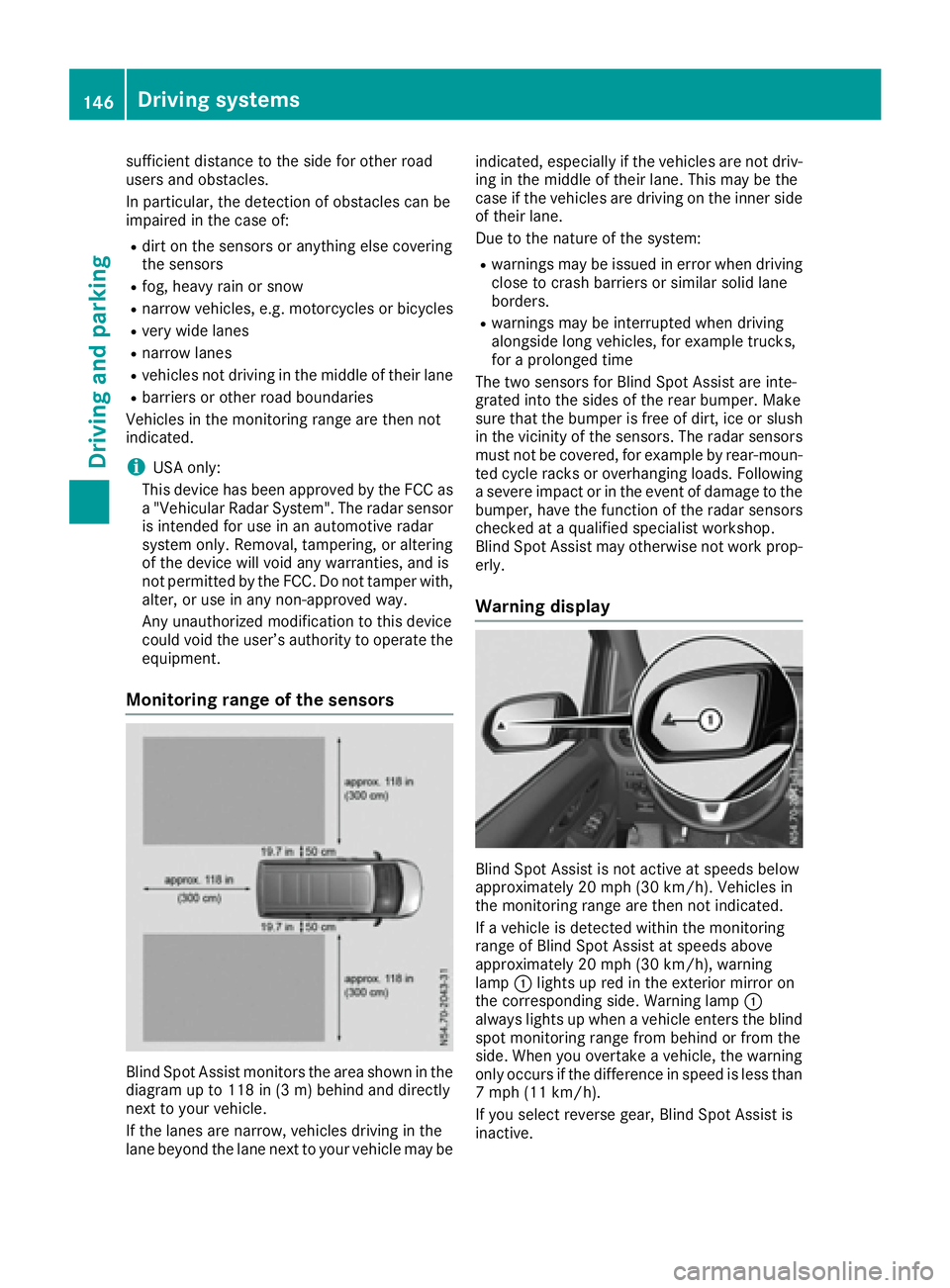
Blind Spot Assist monitors the area shown in the
diagramupt o118 in (3 m) behind and directly
next to your vehicle.
If the lanes are narrow, vehicles driving in the
lane beyond the lane next to your vehicle may be indicated, especially if the vehicles are not driv-
ing in the middle of their lane. This may be the
case if the vehicles are driving on the inner side
of their lane.
Due to the nature of the system:
Rwarnings may be issued in error when driving
close to crash barriers or similars olid lane
borders.
Rwarnings may be interrupted when driving
alongside long vehicles, for example trucks,
for aprolonged time
The two sensors for Blind Spot Assist are inte-
grated into the sides of the rear bumper. Make
sure that the bumper is free of dirt, ice or slush
in the vicinity of the sensors. The radar sensors
must not be covered, for example by rear-moun-
ted cycle racks or overhanging loads. Following
as evere impact or in the event of damage to the
bumper, have the function of the radar sensors
checked at aqualified specialist workshop.
Blind Spot Assist may otherwise not work prop-
erly.
Warning display
Blind Spot Assist is not active at speeds below
approximately 20 mph (30 km/h). Vehicles in
the monitoring range are then not indicated.
If av ehicle is detected within the monitoring
range of Blind Spot Assist at speeds above
approximately 20 mph (30 km/h), warning
lamp :lights up red in the exterior mirror on
the corresponding side. Warning lamp :
always lights up when avehicle enters the blind
spot monitoring range from behind or from the
side. When you overtake avehicle, the warning
only occurs if the difference in speed is less than
7m ph (11 km/h).
If you select reverse gear, Blind Spot Assist is
inactive.
146Driving systems
Driving and parking
Page 149 of 310
The intensity of warning lamps:depends on
the brightness of the ambient light and is con-
trolled automatically.
Collision warning
If av ehicle is detected in the monitoring range of
Blind Spot Assist and you switch on the corre-
sponding turn signal, adouble warning tone
sounds once. The warning lamp in the corre-
sponding exterior mirror flashes. If the turn sig-
nal remains on, detected vehicles are indicated
by the flashing of the warning lamp in the exte-
rior mirror. There are no further warning tones.
Activating Blind Spot Assist
XMake sure that Blind Spot Assist is activated
in the on-board computer (Ypage 184).
XTurn the key to position 2in the ignition lock.
The warning lamps in the exterior mirrors light
up for approximately 1.5 seconds.
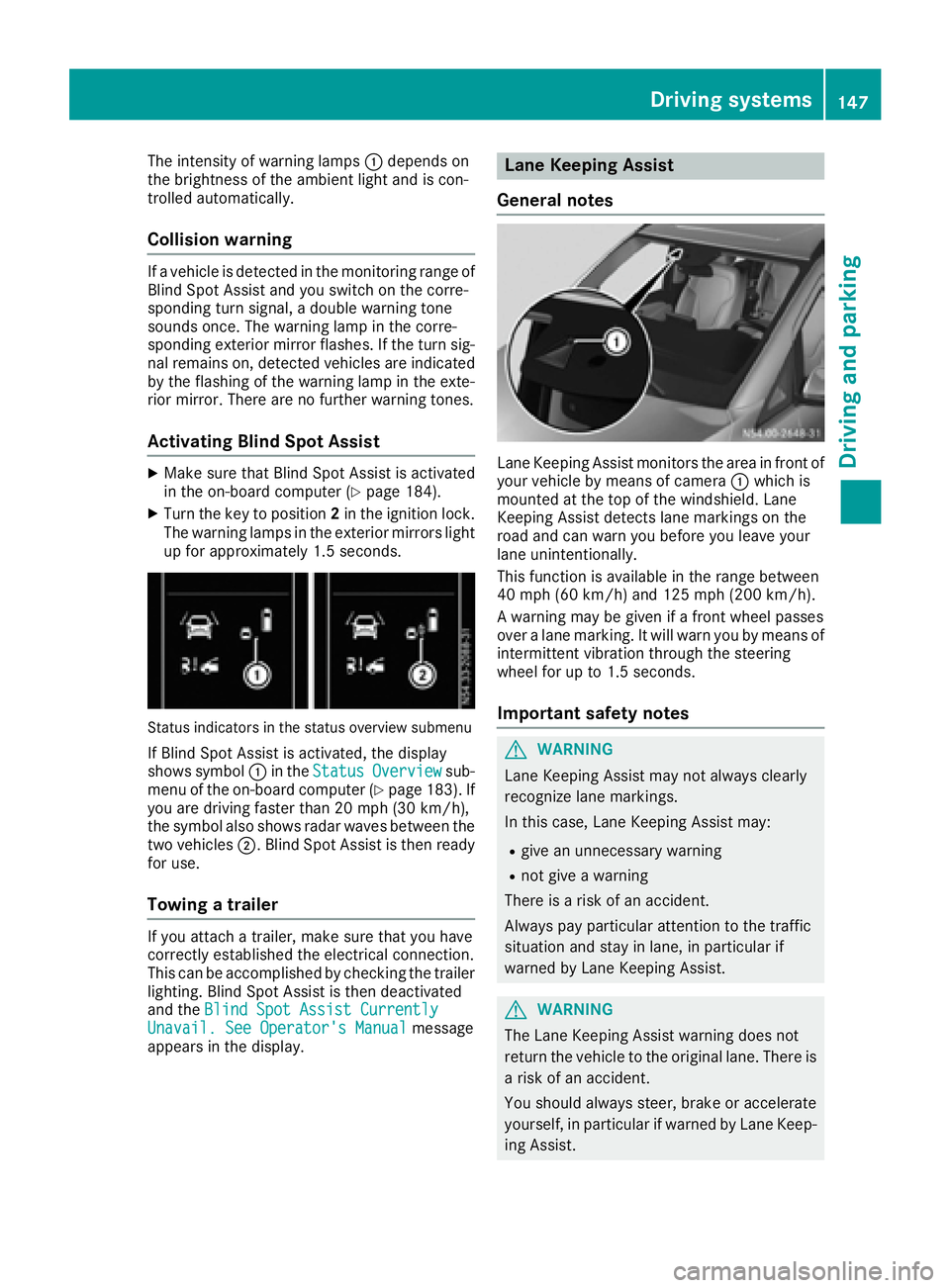
Status indicators in the status overview submenu
If Blind Spot Assist is activated, the display
shows symbol :in the StatusOverviewsub-
menu of the on-board computer (Ypage 183). If
you are driving faster than 20 mph (30 km/h) ,
the symbo lalsos hows rada rwaves between the
two vehicles ;.Blind Spo tAssist is thenr eady
for use.
Towin gatrailer
If youattach atrailer, make sure thaty ouhave
correctl yestablishe dthe electrical connection.
Thi scan be accomplishe dbychecking the trailer
lighting. Blind Spo tAssist is thend eactivated
and the Blind Spo tAssist Currently
Unavail. See Operator' sManualmessage
appear sinthe display.
Lane Keeping Assist
General notes
Lane Keeping Assist monitors the area in front of
your vehicl ebymeans of camera :which is
mounted at the top of the windshield. Lane
Keeping Assist detects lane markings on the
roa dand can warn yo ubefor ey ou leav eyour
lane unintentionally.
This functio nisa vailable in the range between
40 mph (60 km/h )and 125 mph (20 0km/h).
Aw arning maybeg iven if afront whee lpasses
ove ralanem arking. It will warn yo ubymeans of
intermittent vibratio nthroug hthe steering
whee lfor up to 1.5 second s.
Importan tsafety notes
GWARNING
Lane Keeping Assist may not always clearly
recognize lane markings.
In this case, Lane Keeping Assist may:
Rgive an unnecessary warning
Rnot give awarning
There is ariskofana ccident.
Alway spayparticula rattention to the traffic
situation and stay in lane, in particula rif
warned by Lane Keeping Assist.
GWARNING
The Lane Keeping Assist warning doe snot
return the vehicl etothe original lane. There is
ar iskofana ccident.
Yo us houl dalway ssteer, brake or accelerate
yourself, in particula rifwarned by Lane Keep-
ing Assist.
Driving systems147
Driving and parking
Z
Page 160 of 310
iYou will achievethe best resultsbyw aiting
for the steeringp rocedure to complete before
pulling away.
If you back up afte ractivation, the steering
wheel is movedtot he straight-ahead posi-
tion.
XDrive forwards and back up as prompted by
the PARKTRONIC warnin gdisplays, several
times if necessary.
Onc eyou have exited the parking space com-
pletely:
RThe display shows the Park Assist Fin‐ishedmessage.
Ratones ounds.
Rthe steeringw heel is movedtot he straight-
ahead position.
The parking assistanc efunction of Activ ePark-
ing Assist is stopped. You will the nhave to steer
and mergei ntot raffic on your own.
PARKTRONIC is still available.
You can tak eover the steeringb eforethe vehi-
cle has exited the parking space completely.
This is useful, for example when you recognize
that it is already possible to pull out of the park-
ing space.
Canceling activ eparki ng assistance
XStop the movementoft he steeringwheel or
steer yourself.
or
XPress the fbutton and deactivate
PARKTRONIC (Ypage 152).
Parking assistanc eiscanceled immediately
and Activ eParking Assist is stopped. The dis-
play shows the Park
AssistCanceledmes-
sage.
Activ eparking assistanc eiscanceled automat-
ically if:
Rapply the parking brake.
Rparking using Activ eParking Assist is no lon-
ger possible
Ryou are drivingf aster than6mph (1 0km/ h)
Raw heel spins and ESP®intervenes or fails.
The ÷ warnin glamp in the instrument
cluster the nlightsu p.
Ryou unfasten your seat belt
Ryou open adoor or the tailgate/rear door
Ryou shift the automatic transmission to posi-
tion P Aw
arnin gtones ounds ,the parking symbol in
the display goes out and the Park Assist
Canceledmessageappears.
Onc eactive Parking Assist has been canceled,
you must steer and brakea gain yourself.
If as yste mm alfunction occurs, vehicles are
automatically braked down to astandstill. To
continue driving, you must depresst he acceler-
ator pedal again.
Rear view camera
Genera lnotes
On vehicles with atailgate, the rear view camera
is nex ttothe tailgat ehandle (Ypage 257).
On vehicles with rear doors,t he rear view cam-
era is in the top of the license plate molding
(
Ypage 257).
The rear view camer aisavisual parking aid. It
shows you the area behindt he vehicle in the
audio display.
The area behindt he vehicle is displayed in a
mirrored fashion,asint he rear-view mirror or
the exterior mirrors. The guide lines displayed
assist you in backing up.
The messaged isplays dependont he language
settin gofthe audio system. The followingr ear
view camer adisplays are examples.
Important safetyn otes
!Objectsthat are not at groundl evel appear
further away than the yactually are, for exam-
ple:
Rthe bumper of the vehicle parked behind
Rthe drawbar of atrailer
Rthe ball couplin gofatrailer tow hitch
Rthe tail-end of atruck
Rslanted posts
Only use the camer aguide lines for orienta-
tion .Don ot get any close rtoobject sthan the
lowest horizontal guide line. You may other-
wise damage your vehicle and/or the object.
The rear view camer aisonly an aid. It cannot
replacey our own awarenes softhe immediate
surroundings. You are responsible for safe
maneuveringa nd parking. When maneuvering
and parking, make sure that there are no per-
sons, animals or object sinthe maneuvering
area.
158Driving systems
Driving and parking
Page 162 of 310
or
XShift the automatic transmission toP.
In vehicles with Active Parking Assist,t he rear
view camera remains switched on after the ini-
tial shift to reverse gear for the whole duration of
active parking assistance. You can find informa-
tion on active parking assistance under "Active
Parking Assist“(
Ypage 154).
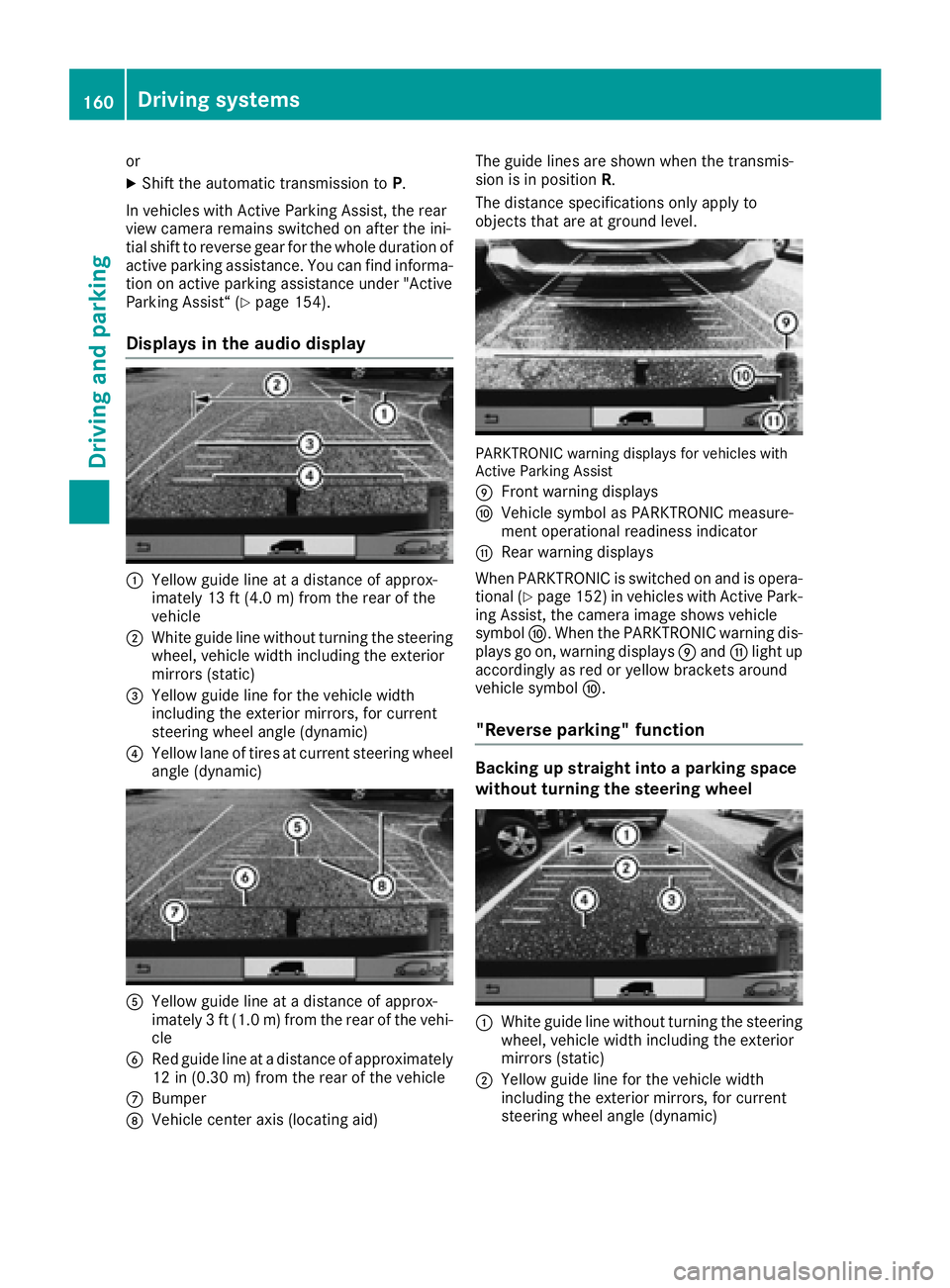
Displays in the audio display
:Yellow guide line at adistance of approx-
imately 13 ft (4.0 m) from the rear of the
vehicle
;White guide line without turnin gthe steering
wheel, vehicle width including the exterior
mirrors (static)
=Yellow guide line for the vehicle width
including the exterior mirrors, for current
steering wheel angle (dynamic)
?Yellow lane of tires at current steering wheel
angle (dynamic)
AYellow guide line at adistance of approx-
imately 3ft(1.0 m) from the rear of the vehi-
cle
BRed guide line at adistance of approximately
12 in (0.30 m) from the rear of the vehicle
CBumper
DVehicle center axis (locating aid) The guide lines are shown when the transmis-
sion is in position
R.
The distance specification sonly apply to
object sthat are at ground level.
PARKTRONIC warning displaysf or vehicles with
Active Parking Assist
E
Frontw arning displays
FVehicle symbol as PARKTRONIC measure-
ment operational readiness indicator
GRear warning displays
When PARKTRONIC is switched on and is opera- tional (
Ypage 152) in vehicles with Active Park-
ing Assist,t he camera image shows vehicle
symbol F.When the PARKTRONIC warning dis-
plays go on, warning displays Eand Glight up
accordingly as red or yellow bracket saround
vehicle symbol F.
"Reverse parking" function
Backing up straight into aparking space
without turning the steering wheel
:White guide line without turnin gthe steering
wheel, vehicle width including the exterior
mirrors (static)
;Yellow guide line for the vehicle width
including the exterior mirrors, for current
steering wheel angle (dynamic)
160Driving systems
Driving and parking
Page 163 of 310
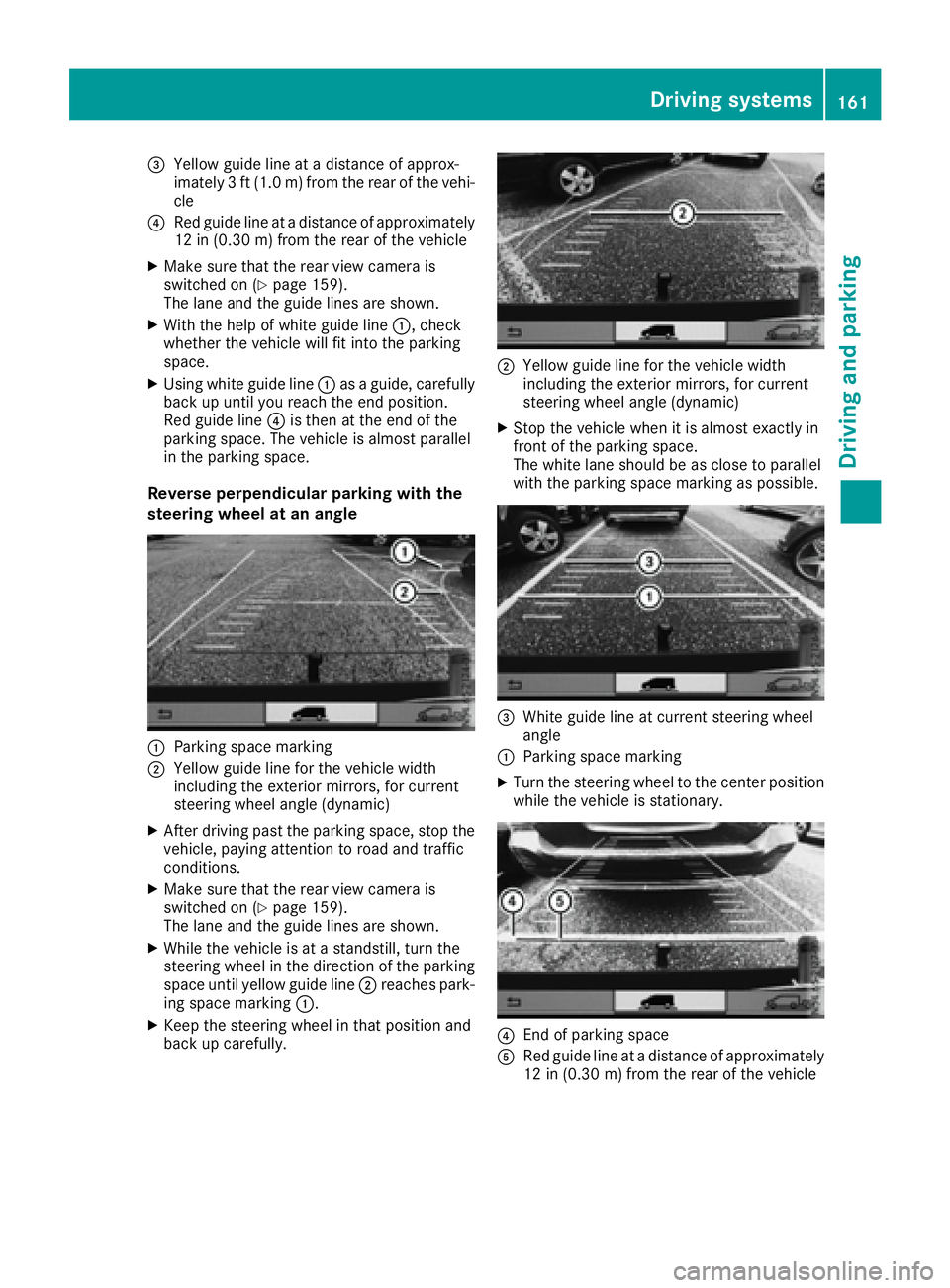
=Yellow guide line atadistance of approx-
imately 3ft(1.0m)f rom the rear of the vehi-
cle
?Red guide line at adistance of approximately
12 in (0.30 m) from the rear of the vehicle
XMake sure that the rear view camer ais
switched on (Ypage 159).
The lane and the guide lines are shown.
XWith the help of white guide line :,check
whether the vehicle will fit int othe parking
space.
XUsingw hite guide line :asag uide, carefully
back up until you reach the end position.
Red guide line ?is the natthe end of the
parking space. The vehicle is almost parallel
in the parking space.
Reverse perpendicular parking with the
steering wheel at an angle
:Parking space marking
;Yellow guide line for the vehicle width
including the exterior mirrors, for current
steeringw heel angle (dynamic)
XAfter drivingp ast the parking space, sto pthe
vehicle, paying attention to road and traffic
conditions.
XMake sure that the rear view camer ais
switched on (Ypage 159).
The lane and the guide lines are shown.
XWhile the vehicle is at astandstill, turn the
steeringw heel in the direction of the parking
space until yellow guide line ;reaches park-
ing space marking :.
XKeep the steeringw heel in that position and
back up carefully.
;Yellow guide line for the vehicle width
including the exterior mirrors, for current
steeringw heel angle (dynamic)
XStop the vehicle when it is almost exactly in
frontofthe parking space.
The white lane should be as close to parallel
with the parking space marking as possible.
=Whiteg uide line at current steeringw heel
angle
:Parking space marking
XTurn the steeringw heel to the center position
while the vehicle is stationary.
?En dofp arking space
ARed guide line at adistance of approximately
12 in (0.30 m) from the rear of the vehicle
Driving systems161
Driving and parking
Z
Page 167 of 310
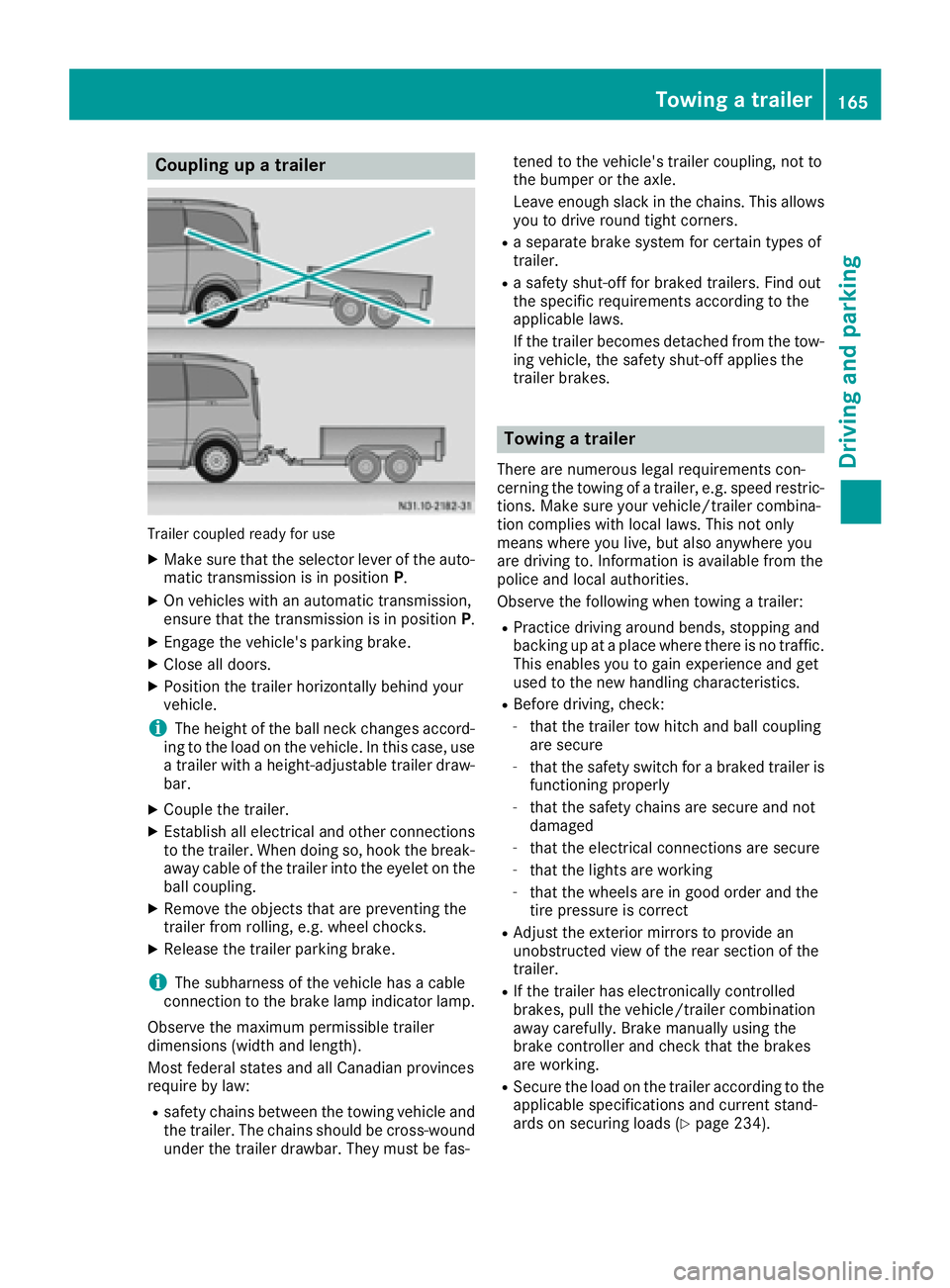
Coupling upatrailer
Trailer coupled read yfor use
XMakes ure that th eselecto rleveroft heauto-
matic transmission is in position P.
XOn vehicleswithana utomatic transmission,
ensure that th etransmission is in position P.
XEngage thevehicle's parking brake.
XClose all doors.
XPositio nthe trailer horizontally behindy our
vehicle.
iThe height of th eball neck changes accord-
ing to th eload on th evehicle .Inthisc ase, use
at railer withah eight-adjustable trailer draw-
bar.
XCouple th etrailer.
XEstablish all electrical and other connections
to th etrailer.W hen doings o, hook thebreak-
away cabl eofthetrailer int othe eyelet on the
ball coupling.
XRemove th eobject sthata re preventin gthe
trailer from rolling ,e.g.w heel chocks.
XRelease th etrailer parking brake.
iThe subharness of th evehicle has acable
connection to th ebrak elamp indicator lamp.
Observ ethe maximum permissible trailer
dimensions( widthand length).
Mostf ederal state sand all Canadian provinces
require by law:
Rsafety chains between th etow ing vehicle and
th et railer.T he chains should be cross-wound
unde rthe trailer drawbar. They must be fas- tene
dtot hevehicle's trailer coupling, no tto
th eb umpe rortheaxle.
Leavee nough slackint hechains .This allows
you to driv eroun dtight corn
ers.
Raseparate brak esystem for certain type sof
trailer.
Ras afety shut-off for braked trailers. Fin dout
th es pecific requirements according to the
applicable laws.
If th etrailer become sdetached from th etow -
ing vehicle ,the safety shut-off applies the
trailer brakes.
Towin gatrailer
Therea re numerous legal requirements con-
cernin gthe towing of atrailer,e .g.s peedr estric-
tions .Makes ure your vehicle/traile rcombina-
tio nc omplies withl ocal laws. This no tonly
mean swherey ou live ,but also anywhere you
are driving to .Inf ormation is available from the
policea nd local authorities.
Observ ethe followingw hen towing atrailer:
RPractic edriving aroun dbends, stoppinga nd
backing up at aplacew herethere is no traffic.
This enables you to gain experience and get
used to th enew handlingc haracteristics.
RBefore driving ,che ck:
-that th etrailer to whitch and ball coupling
are secure
-that th esafety switch for abraked trailer is
functioning properly
-that th esafety chains are secure and not
damaged
-that th eelectrical connectionsa re secure
-that thelightsa re working
-that thewheelsa re in good order and the
tir ep ressure is correct
RAdjus tthe exterior mirror stoprovide an
unobstructe dview of th erear sectio nofthe
trailer.
RIf th etrailer has electronicall ycontrolled
brakes, pull th evehicle/traile rcombination
away carefully. Brake manually usingt he
brak econtroller and check that th ebrakes
are working.
RSecure th eload on th etrailer according to the
applicable specifications an d currentst and-
ards on securin gloads (Ypage 234).
Towing atrailer165
Driving and parking
Z
Page 231 of 310
XTo open:brieflypress cover :.
The eyeglasses compartment opens down-
wards.
XTo close: press the eyeglasses compartment
into the overhead contro lpan el unti lit
engages.
Make sure thatt he eyeglasses compartment is
always closed whil ethe vehicl eisinmotion.
Stowage net
Youc an us ethe stowag enets on the back of the
sea tbackrests to stor esmall ,lig htweight items.
Observ ethe loading directions (
Ypage 232)
and the safety informatio nabout the stowage
spaces (
Ypage 228).
Sun visors
Overview
GWARNING
If the mirror cove rofthe vanity mirror is folded
up when the vehicl eisinmotion, yo ucould be
blinded by incident light. There is ariskofa n
accident.
Alway skeept he mirror cove rfolde ddown
whil edriving.
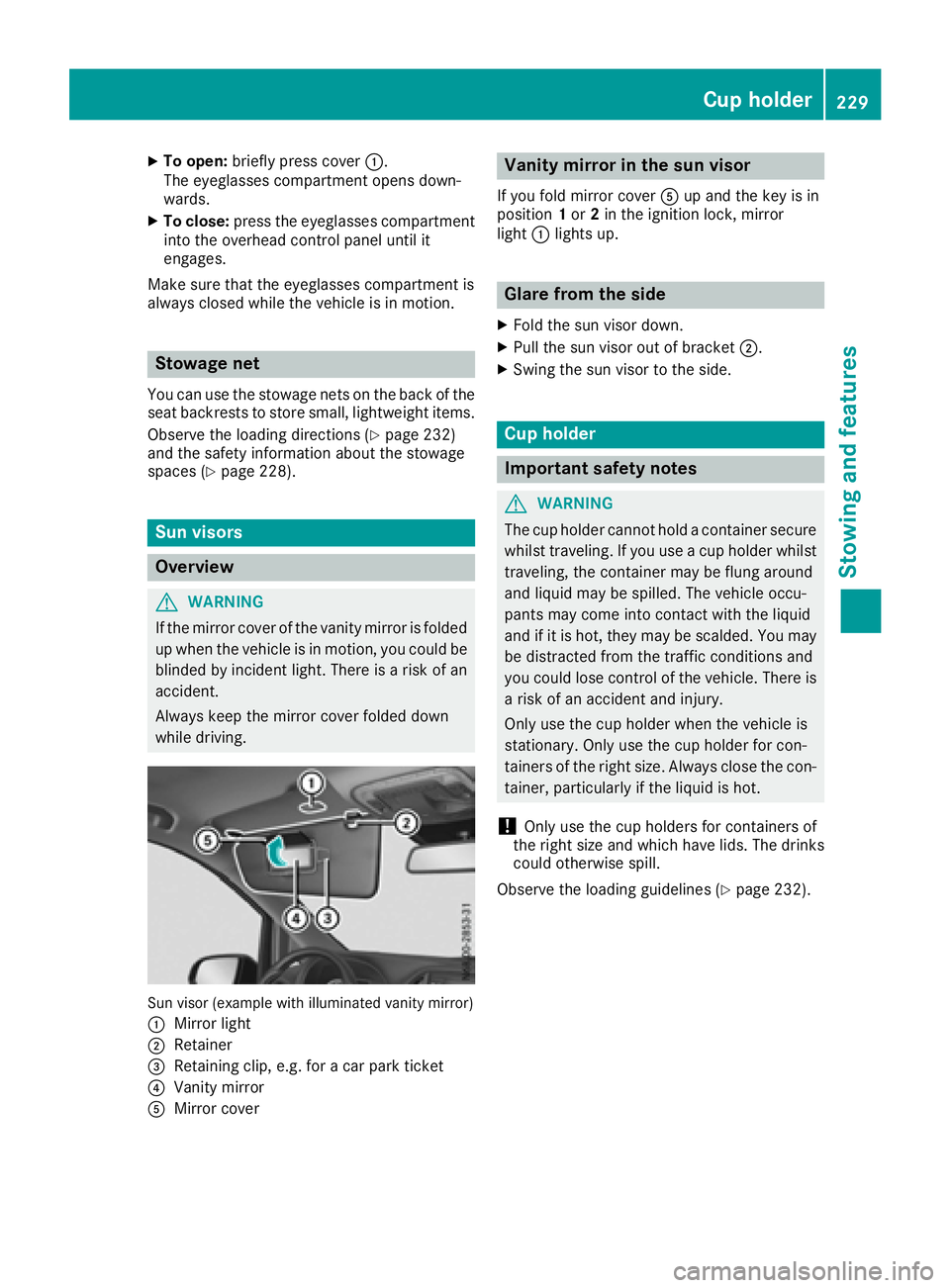
Sun visor (exampl ewithi llum inated vanity mirror)
:
Mirror light
;Retainer
=Retaining clip, e.g .for ac ar park ticket
?Vanity mirror
AMirror cover
Vanity mirrori nthe sun visor
If yo ufoldm irror cover Aup and the key is in
position 1or 2in the ignition lock, mirror
light :lights up.
Glare from the side
XFoldthe sunv isor down.
XPull the sunv isor outofbracket;.
XSwing the sunv isor to the side.
Cup holder
Important safety notes
GWARNING
The cup holde rcanno tholdac ontaine rsecure
whilst traveling .Ifyouuseac up holde rwhilst
traveling ,the containe rmaybe flung around
and liquid maybes pilled.The vehicl eoccu-
pants mayc ome into contact with the liquid
and if it is hot, they maybes calded.You may
be distracted from the traffic conditions and
yo uc ould lose contro lofthe vehicle. There is
ar iskofana ccident and injury.
Onlyu sethe cup holde rwhent he vehicl eis
stationary .Onlyu sethe cup holde rfor con-
tainers of the right size. Alway sclose the con-
tainer, particularly if the liquid is hot.
!Onlyu sethe cup holders for containers of
the right size and which have lids. The drinks could otherwise spill.
Observe the loading guideline s(
Ypage 232).
Cuph older229
Stowing an dfeatures
Z
Page 256 of 310
Care
Notes on care
GWARNING
If you use opening sinthebodywork or
detachable part sassteps, you could:
Rslip and/or fall
Rdamag ethe vehicle and caus eyourself to
fall.
Thereisar iskofi njury.
Always use secure climbinga ids, e.g.asuita-
ble ladder.
!Do no tuse th elower slidingd oor guide (car-
riage )asas tep. Otherwise, you coul ddamage
th ep anelinga nd/or theslidingd oor mecha-
nism.
!For cleanin gyour vehicle ,donotuse any of
th ef ollowing:
Rdry, roug horhard cloths
Rabrasive cleanin gagents
Rsolvents
Rcleanin gagents containing solvents
Do no tscrub.
Do no ttou ch th esurfaces or protective films
withh ard objects, e.g .aringori ce scraper.
You coul dotherwise scratch or damag ethe
surfaces and protective film.
!Do no tpark th evehicle for an extended
period straigh tafter cleanin git, particularly
after having cleane dthe wheelsw ithwheel
cleaner. Wheelc leaners couldcause
increased corrosion of th ebrak ediscsa nd
brak epads/linings. For this reason,y ou
should driv efor afew minute safter cleaning.
Brakin gheatst hebrak ediscsa nd thebrake
pads/linings, thus dryin gthem. The vehicle
can then be parked.
HEnvironmental note
Only clean your vehicle at specially designed
wash bays. Dispose of emptyc ontainers and
used cleanin gproduct sinane nvironmentally
responsible manner.
HEnvironmental note
Dispose of emptyp ackagingand cleaning
cloth sinane nvironmentall yresponsible man-
ner.
Regular car eofyour vehicle is acondition for
retaining th equalityint helongt erm.
Use car eproduct sand cleanin gagents recom-
mended and approved by Mercedes-Benz.
Washingt hevehicle and cleaning the
paintwork
Automatic car wash
GWARNING
Brakin gefficienc yisreduced after washing
th ev ehicle .Thereisar iskofana ccident.
Afte rthe vehicle has been washed, brake
carefull ywhile payinga ttentiontothetraffic
conditionsu ntil full braking power is restored.
!Makesure that th eautomatic car wash is
suitable for th esizeoft hevehicle.
Before washingt hevehicle in an automatic
car wash, fold in th eexteri or mirror sand
remove any additional antennas .Otherwise,
th ee xteri or mirror ,antenna or th evehicle
itself coul dbedamaged.
Makes ure that th eexteri or mirror sare fully
folded out again and that any additional
antennas are re-installed when you leave the
automatic car wash.
!Makes ure that:
Rthes ide windows and th eroofa re com-
pletely closed
Rth ec limate control blower is switched off
Rthew indshield wiper switch is at position 0
The vehicle coul dotherwise be damaged.
You can wash th evehicle in an automatic car
wash from th everys tart.
Wash off exces sdirt before cleanin gthe vehicle
in an automatic car wash.
Afte rputtin gthe vehicle throug hanautomatic
car wash, wipe off wax from:
Rth ew indshield
Rthew indshield wiper blades
254Care
Maintenance and care