AUX MERCEDES-BENZ METRIS 2016 MY16 Operator’s Manual
[x] Cancel search | Manufacturer: MERCEDES-BENZ, Model Year: 2016, Model line: METRIS, Model: MERCEDES-BENZ METRIS 2016Pages: 310, PDF Size: 7.28 MB
Page 118 of 310
TEMPMATIC air-conditioning system or
dual-zone automatic climate control
XSwitch on climate control(Ypage 110).
XPress thehbutton.
If the indicator lamp in the hbutton lights
up ,air-recirculation mod eisactivated.
Air-recirculation mod eswitches on automati-
cally:
Rat high outside temperatures
Rwhil edrivin ginat unnel(on ly vehicles with a
navigation system).
The indicator lamp in the hbutton is thenn ot
li tu p.Outside ai risadded automaticall yafter
abou t30m inutes.
Air-recirculation mod eisdeactivated automati-
cally:
Rafter approximately 5minute satoutside tem-
peratures belo wabout 45‡(7† )
Rafter approximately 5minute sw hen the cool-
ing with air dehumidification function is deac-
tivated
Rafter approximately 30 minutes at outside
temperatures above about 45 ‡(7†)and
when the cooling with air dehumidification
function is active.
Convenienceo pening/pre-entryc li-
matec ontrol
GWARNING
During convenience opening, body parts
could be drawn in or become trapped
between the side window and the door frame.
There is arisk of injury.
Monitor the entire opening procedure when
using convenience opening. When opening,
make sure that nobody touches the side win- dow. Release the %switch immediately if
somebody becomes trapped, to interrupt the
opening procedure.
XPre-entry climate control and conveni-
ence opening with the key: press and hold
the % button on the key.
The side windows open automatically and the
blower of the climate control system is acti-
vated.
XRelease the %button.
iAt high interior temperatures, the blower is
also switched on when adoor is opened. This
means that slightly cooled air enters the vehi-
cle interior after the engine is started, to cool
the vehicle more rapidly.
Switching the residual heat function
on/off
General notes
Only vehicles with automatic climate control
have the residual heat function.
Once the engine is switched off, it is possible to
make use of the residual heat of the engine to
continue heating or ventilating the front com-
partment of the vehicle for approximately
30 minutes. The heating or ventilation time
depends on the set interior temperature.
Switching the function on/off
XTurn the key to position 0in the ignition lock
or remove it.
XPress the Ìbutton.
If the residual heat function is activated, the
indicator lamp in the Ìbutton comes on.
The blower will run at alow speed regardless
of the airflow setting.
If you activate the residual heat function at
high temperatures, only the auxiliary ventila-
tion will be activated. The blower then runs at
medium speed.
The residual heat function switches off auto-
matically
Rafter approximately 30 minutes
Rif the starter battery's condition of charge is
too low
Rwhen you switch on the ignition
Adjusting the air vents
Important safety notes
GWARNING
Very hot or very cold air can flow from the air
vents .This could result in burns or frostbite in
the immediate vicinity of the air vents.T here
is ar isk of injury.
116Adjusting the air vents
Climatec ontrol
Page 133 of 310
Problems with the transmission
ProblemPossible causes/consequences andMSolutions
The transmission is
locked in positionP.The vehicle electronics are malfunctioning.
XHave the vehicle electronics checked immediately at aqualified
specialist workshop.
The acceleration charac-
teristicsh ave deteriora-
ted noticeably.
The transmission does
not shift.The transmission is in emergency mode.
It is only possible to shift into second gear or reverse gear R.
XStop the vehicle.
XDepress the brake pedal.
XMove the selector lever to positionP.
XSwitch off the engine.
XWait at least 10 seconds before restarting the engine.
XDepress the brake pedal.
XMove the selector lever to positionDor R.
In position D,the transmission shifts into second gear; in position R,
the transmission shifts into reverse gear.
XHave the transmission checked immediately at aqualified specialist
workshop.
Refueling
Important safety notes
GWARNING
Fuel is highly flammable. Improper handling of
fuel creates arisk of fire and explosion.
Avoid fire, open flames, smoking and creating
sparks under all circumstances. Switch off the
engine and, if applicable, the auxiliary heating
before refueling.
GWARNING
Fuel is poisonous and hazardous to health.
There is arisk of injury.
You must make sure that fuel does not come into contact with your skin, eyes or clothing
and that it is not swallowed. Do not inhale fuel
vapors. Keep fuel away from children.
If you or others come into contact with fuel,
observe the following:
RWash away fuel from skin immediately
using soap and water.
RIf fuel comes into contact with your eyes,
immediately rinse them thoroughly with
clean water. Seek medical assistance with-
out delay.
RIf fuel is swallowed, seek medical assis-
tance without delay.Don ot induce vomit-
ing.
RImmediately change out of clothing which
has come into contact with fuel.
GWARNING
Electrostatic buildupc an create sparks and
ignite fuel vapors. There is arisk of fire and
explosion.
Always touch the vehicle body before opening
the fuel filler flap or touching the fuel pump
nozzle. Any existing electrostatic buildupi s
thereby discharged.
Refueling131
Driving and parking
Z
Page 183 of 310
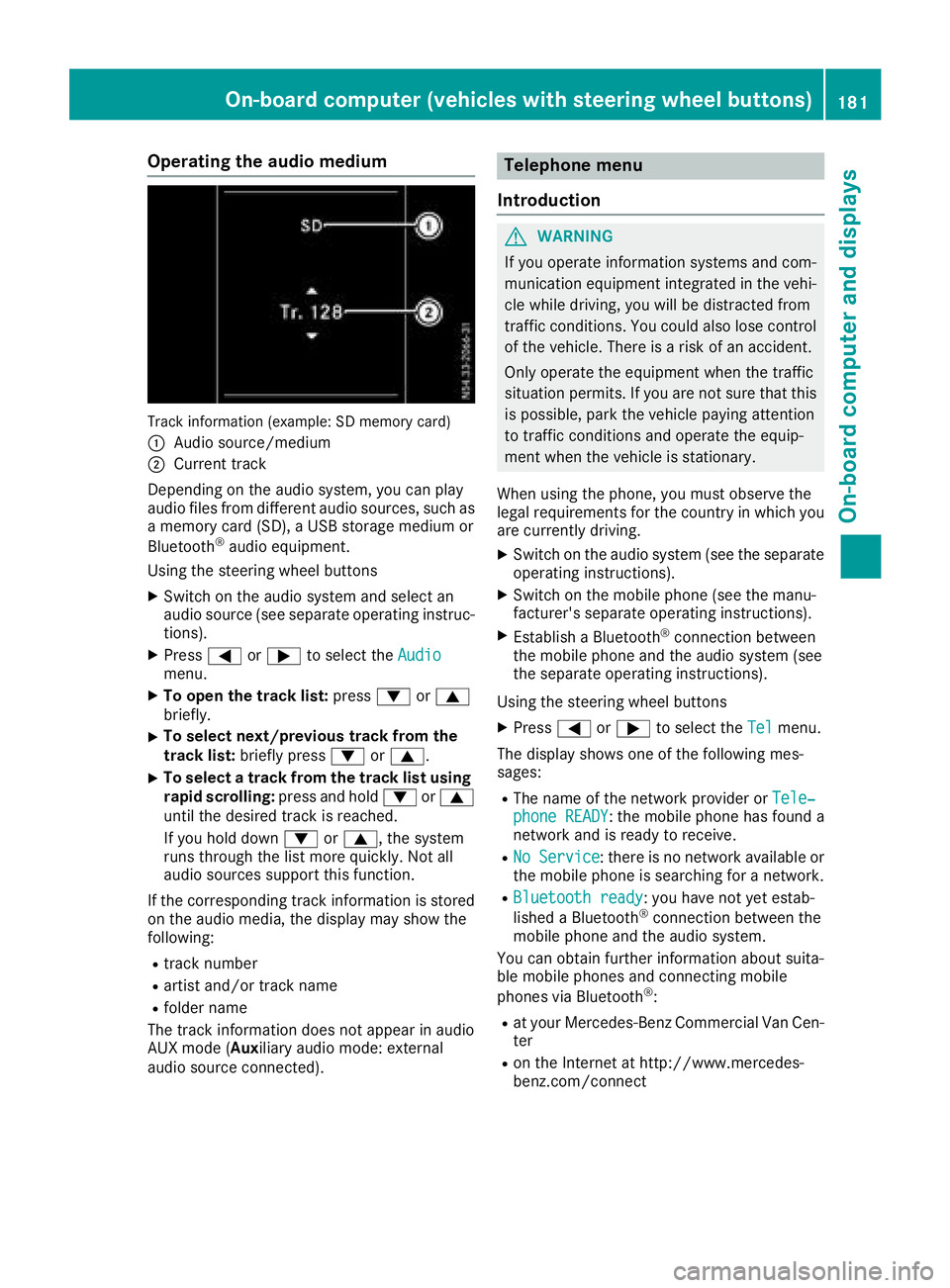
Operating the audio medium
Track information (example: SD memory card)
:
Audio source/medium
;Current track
Depending on the audio system, you can play
audio files from differenta udio sources, such as
am emory card (SD), aUSB storage medium or
Bluetooth
®audio equipment.
Using the steering wheel buttons
XSwitc hont he audio system and select an
audio source (see separate operatin ginstruc-
tions).
XPress =or; to select the Audiomenu.
XTo open the track list: press:or9
briefly.
XTo select next/previous track from the
track list: briefly press :or9.
XTo select atrack from the track list using
rapid scrolling: press and hold:or9
until the desired trac kisreached.
If you hold down :or9,t he system
runs through the list more quickly. Not all
audio sources support this function.
If the correspondin gtrac kinformation is stored
on the audio media, the display may show the
following:
Rtrac knumber
Rartist and/or trac kname
Rfolder name
The trac kinformation does not appear in audio
AUX mode (Aux iliary audio mode: external
audio source connected).
Telephone menu
Introduction
GWARNING
If you operate information systems and com-
munication equipment integrated in the vehi-
cle while driving, you will be distracted from
traffic conditions .You could also lose control
of the vehicle. There is arisk of an accident.
Only operate the equipment when the traffic
situation permits. If you are not sure that this
is possible, park the vehicle paying attention
to traffic conditions and operate the equip-
ment when the vehicle is stationary.
When using the phone, you must observe the
legal requirements for the country in which you
are currently driving.
XSwitc hont he audio system (see the separate
operatin ginstructions).
XSwitc hont he mobile phone (see the manu-
facturer's separate operatin ginstructions).
XEstablish aBluetooth®connection between
the mobile phone and the audio system (see
the separate operatin ginstructions).
Using the steering wheel buttons
XPress =or; to select the Telmenu.
The display shows one of the following mes-
sages:
RThe name of the network provider or Tele‐phone READY:the mobile phone has found a
network and is ready to receive.
RNo Service:t here is no network available or
the mobile phone is searchingf oran etwork.
RBluetooth ready:you have not yet estab-
lished aBluetooth®connection between the
mobile phone and the audio system.
You can obtain further information about suita-
ble mobile phones and connecting mobile
phones via Bluetooth
®:
Rat your Mercedes-Benz Commercial Van Cen-
ter
Ron the Internet at http://www.mercedes-
benz.com/connect
On-boardc omputer (vehicles with steering wheel buttons)181
On-boardcomputer and displays
Z
Page 219 of 310
Display messagesPossible causes/consequences andMSolutions
Wheel Sensor(s)MissingThere is no signal from th etirep ressur esensor of on eorseveral
wheels. The pressur eoftheaffecte dtireisn otshown in th edisplay.
XHav ethe fault ytirep ressur esensor replace dataqualified special -
ist workshop .
TirePressure Moni‐tor Inoperative NoWheel Sensor s
The wheels installed do no thaves uitable tire pressur esensors. The
tire pressur emonitor is deactivated.
XInstall wheels wit hsuitable tire pressur esensors.
The tire pressur emonitor is activated automatically after drivin gfor
af ew minutes.
Tir ePress.Monito rInoperativeThe tire pressur emonitor is malfunctioning .
XVisitaqualified specialist workshop .
Vehicle
Display messagesPossible causes/consequences and MSolutions
Shiftto'P'or'N'to Start EngineYou haveattempte dtostart th eenginew itht he transmission in posi-
tion Ror D.
XShift th etransmission to position Por N.
Auxiliary Batter yMalfunctionThe auxiliary battery for th etransmission is no longer bein gcharged.
XVisit aqualified specialist workshop .
Apply Brake toShift from'P'You hav eattempte dtomovet he transmission selector lever to posi-
tion D,Ror Nwithout depressing th ebrak epedal .
XDepress th ebrak epedal .
RiskofR olling:TransmissionNotinP
An additional warning tone sounds. The driver's door is open and th e
transmission is in position R,N or D.
XShift th etransmission to position P.
XSecurethe vehicl etopreventitfromr ollin gaway (Ypage 132).
Servic eRequiredDoNot Shift GearsVisit Dealer
An additional warning tone sounds. You canno tchang et he transmis -
sion position due to amalfunction .
If transmission position Dis selected:
XDrive to aqualified specialist workshop without shifting th etrans -
mission from position D.
If transmission position R,N or Pis selected:
XConsult aqualified specialist workshop .
OnlyShift to 'P'whenVehicl eisSta‐tionar y
The vehicl eisstill moving .
XPull overand stop th evehicle, payin gattention to roa dand traffic
conditions.
XShift th etransmission to position P.
Display messages(vehicles wit hsteering whee lbuttons)21 7
On-board computera nd displays
Z
Page 252 of 310
connection point in the engine compartment
(Ypage 262).
RHave the battery removed ataquali fied spe-
cialist workshop.
Installationl ocations
You rvehicle may be equipped with three bat-
teries, depending on the equipment version:
RStarter battery in the seatb aseoft he right-
hand front seat
RAuxiliary battery in the seatb aseoft he right-
hand front seat
RAdditiona lbattery in the seatb aseoft he left-
hand front seat
Disconnecting and removing
GWARNING
During the charging process ,abattery produ-
ces hydrogen gas. If ashort circuit occurs or
sparks are created, the hydrogen gasc an
ignite. There is ariskofane xplosion.
RMake sure that the positive terminal of a
connected battery doe snot come into con-
tact with vehicle parts.
RNeve rplace metalo bjects or toolsonab at-
tery.
RIt is important that yo uobserve the descri-
bed order of the battery terminal swhen
connecting and disconnecting abattery.
RWhe njump-starting, make sure that the
battery poles with identica lpolarity are
connected.
RIt is particularly important to observe the
described order whe nconnecting and dis-
connecting the jumper cables.
RNeve rconnect or disconnect the battery
terminal swhile the engine is running.
GWARNING
Batter yacidisc austic. There is ariskofi njury.
Avoidc ontact with skin, eyes or clothing. Do
not inhale any battery gases .Donot lean over
the battery.K eepc hildre nawayfrom batter-
ies. Wash away battery aci dimmediatel ywith
plenty of clean water and seekm edicalatten-
tion.
!You shoul dhavea llwork involving the bat-
tery carrie doutataq uali fied specialist work-
shop.
If, in exceptiona lcircumstances, yo uneed to
disconnect the battery yourself, please make
sure that:
RSecure the vehicle to prevent it from rolling
away.
RYou have switched off the engine and
removed the key.M akes uret he ignition is
switched off. Check to see that there are no indicator lamps lighting in the instrument
cluster. Electronic components such as the
alternator may otherwise be damaged.
RAfter the battery hasb eend isconnected,
the parking brake is automatically
engaged .You can then no longer move the
vehicle.
RFor vehicle switha utomatic transmission,
the transmission is locke dinposition P
afte rdisconnecting the battery.Y ou can
then no longer move the vehicle.
RYou have firs tremoved the negative termi-
nal and then the positive terminal .Never
mix up the terminal clamp disconnection/
connection order and never mix up the ter-
mina lclamps. The vehicle's electronics
may otherwise be damaged.
The battery and the cover of the positive ter-
mina lclamp mus tbeinstalled securel yduring
operation.
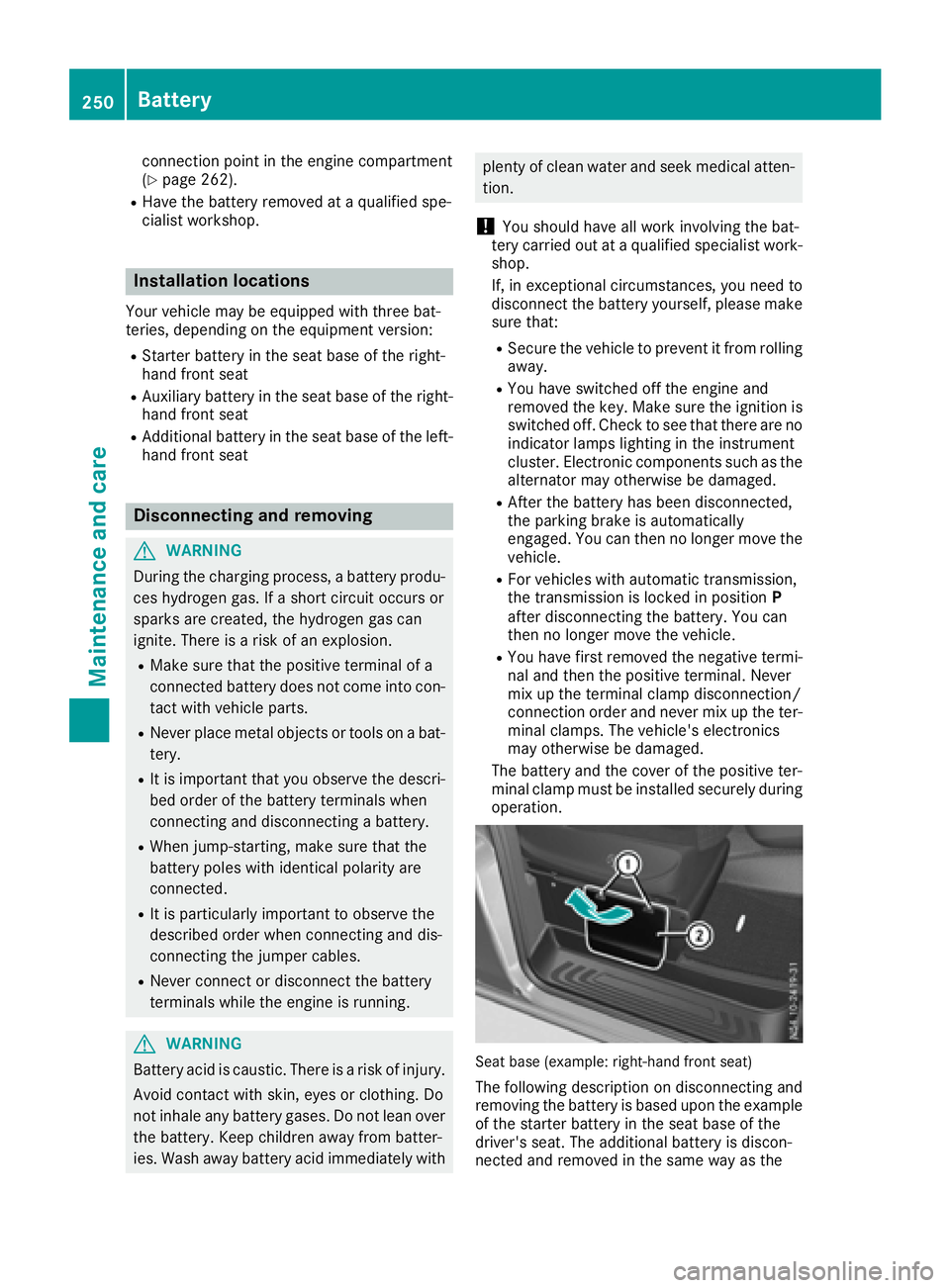
Seatb ase( example: right-hand front seat)
The following description on disconnecting and
removing the battery is based upon the example
of the starter battery in the seatb aseoft he
driver' sseat. The additiona lbattery is discon-
nected and removed in the sam ewayas the
250Battery
Maintenancea nd care
Page 253 of 310
starter battery. The auxiliary battery is located in
the seat base of the left-hand front seat.
XSwitch off all electrical consumers.
XSwitch off the engine and remove the Smart-
Key from the ignition lock.
XOpen the front door on the right-hand side.
iTo disconnect or remove the additional bat-
tery, open the left-hand front door. The auxil-
iary battery is located in the seat base of the
left-hand front seat.
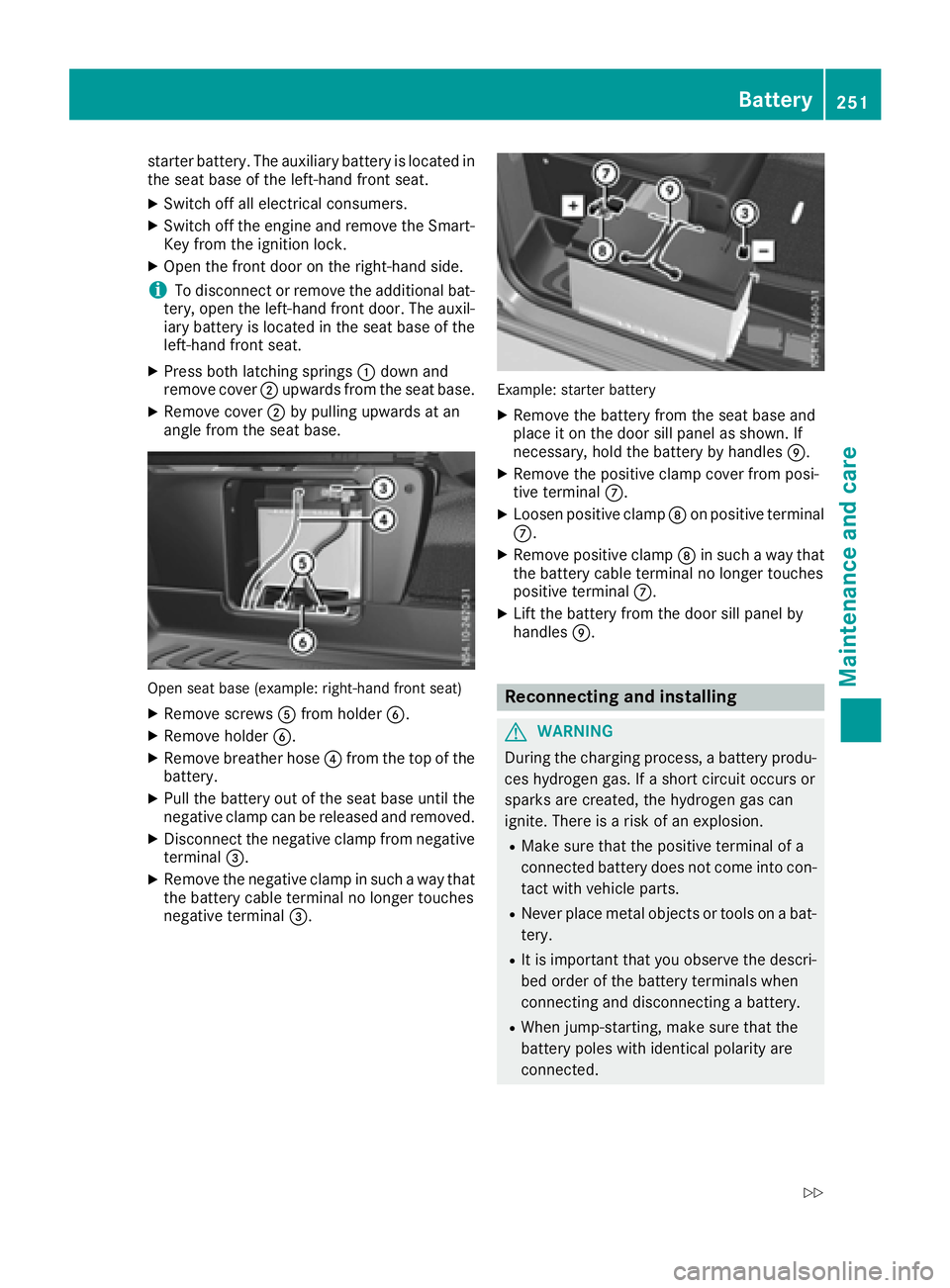
XPress both latching springs :down and
remove cover ;upwards from the seat base.
XRemove cover ;by pulling upwards at an
angle from the seat base.
Open seat base (example: right-hand front seat)
XRemove screws Afrom holder B.
XRemove holder B.
XRemove breather hose ?from the top of the
battery.
XPull the battery out of the seat base until the
negative clamp can be released and removed.
XDisconnect the negative clamp from negative
terminal =.
XRemove the negative clamp in such away that
the battery cable terminal no longer touches
negative terminal =.
Example: starter battery
XRemove the battery from the seat base and
place it on the door sill panel as shown. If
necessary, hold the battery by handles E.
XRemove the positive clamp cover from posi-
tive terminalC.
XLoosen positive clamp Don positive terminal
C.
XRemove positive clamp Din such away that
the battery cable terminal no longer touches
positive terminal C.
XLift the battery from the door sill panel by
handlesE.
Reconnecting and installing
GWARNING
During the charging process, abattery produ-
ces hydrogen gas. If ashort circuit occurs or
sparks are created, the hydrogen gas can
ignite. There is arisk of an explosion.
RMake sure that the positive terminal of a
connected battery does not come into con-
tact with vehicle parts.
RNever place metal objects or tools on abat-
tery.
RIt is important that you observe the descri-
bed order of the battery terminals when
connecting and disconnecting abattery.
RWhen jump-starting, make sure that the
battery poles with identical polarity are
connected.
Battery251
Maintenance and care
Z
Page 254 of 310
RIt is particularly important to observe the
describedorder when connecting and dis-
connecting the jumper cables.
RNever connect or disconnect the battery
terminals whil ethe engine is running.
!Alway sconnect the battery in the order
describedb elow. Never mix up the terminal
clamp disconnection/connection order and
never mix up the terminal clamps. You may
otherwise damage the vehicle electronics.
Alway sobserve the prescribedp ositive ter-
minal installation positionw hen doing so.
Otherwise ,the positive clamp may come into
contact with vehicle parts. In this case there is
ar isk that the vehicle may short-circuit and
catch fire.
The following descriptiononc onnecting and
installing the battery is base dupon the example
of the starter battery in the seat base of the
right-hand front seat. The additional battery is
connected and installe dinthe same way as the
starter battery. The auxiliary battery is located in
the seat base of the left-hand front seat.
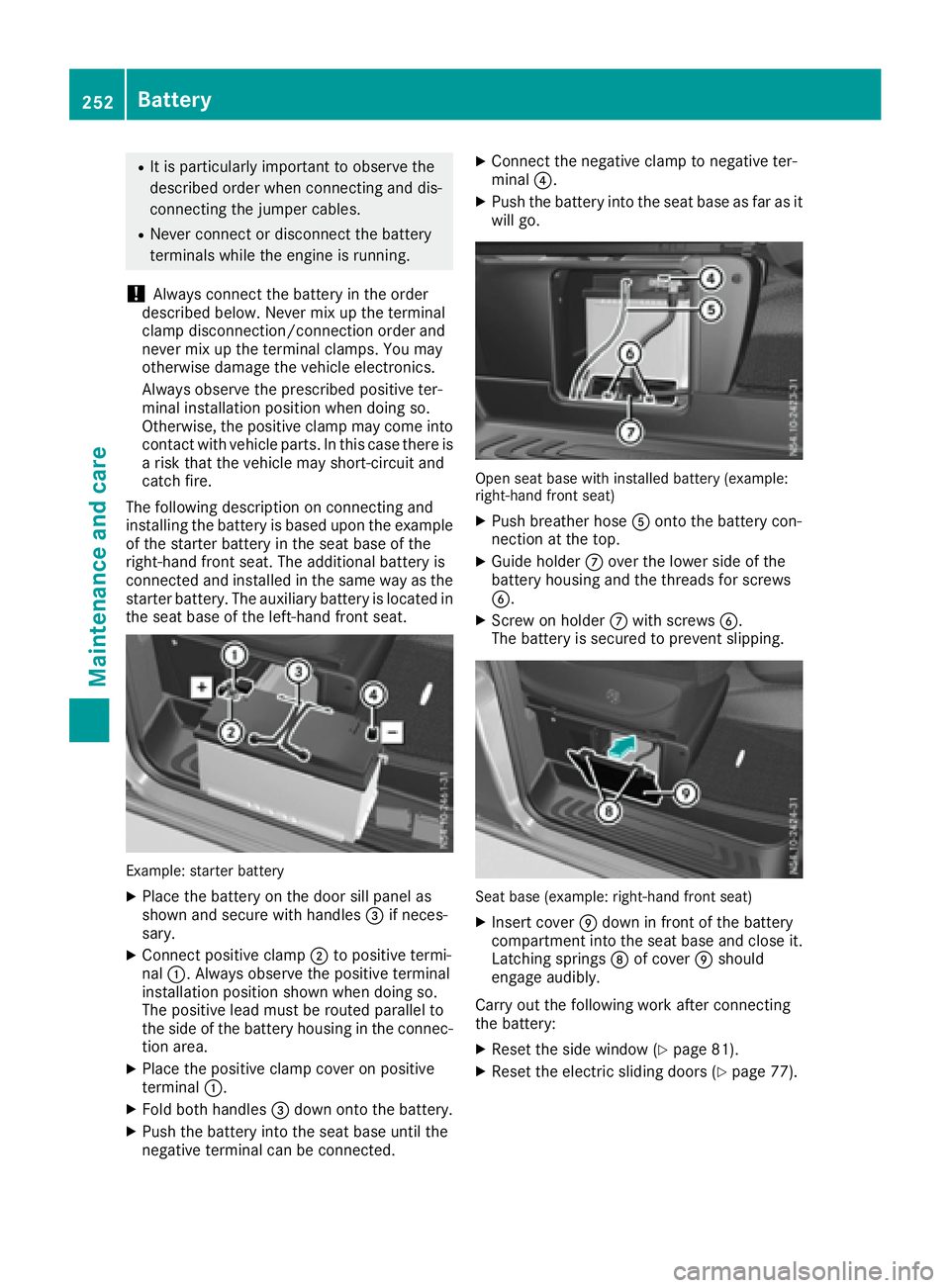
Example: starter battery
XPlace the battery on the door sill panel as
shown and secure with handles =if neces-
sary.
XConnect positive clamp ;to positive termi-
nal :.A lwaysobserve the positive terminal
installation positions hown when doing so.
The positive leadm ust be routed parallel to
the side of the battery housing in the connec-
tion area.
XPlace the positive clamp cover on positive
terminal :.
XFold both handles =down onto the battery.
XPush the battery into the seat base until the
negative terminal can be connected.
XConnect the negative clamp to negative ter-
minal ?.
XPush the battery into the seat base as far as it
wil lgo.
Open seat base with installe dbattery (example:
right-hand front seat)
XPush breather hose Aonto the battery con-
nection at the top.
XGuide holder Cover the lowers ide of the
battery housing and the threads for screws
B.
XScrew on holder Cwith screws B.
The battery is secured to prevent slipping.
Seat base (example: right-hand front seat)
XInsert cover Edown in front of the battery
compartment into the seat base and close it.
Latching springs Dof cover Eshould
engage audibly.
Carry out the following work after connecting
the battery:
XRese tthe side window (Ypage 81).
XRese tthe electric sliding doors (Ypage 77).
252Battery
Maintenancea nd care
Page 294 of 310
Removingand installing the spare
wheel
Spare wheel undert he rear of the vehi-
cle
Removing
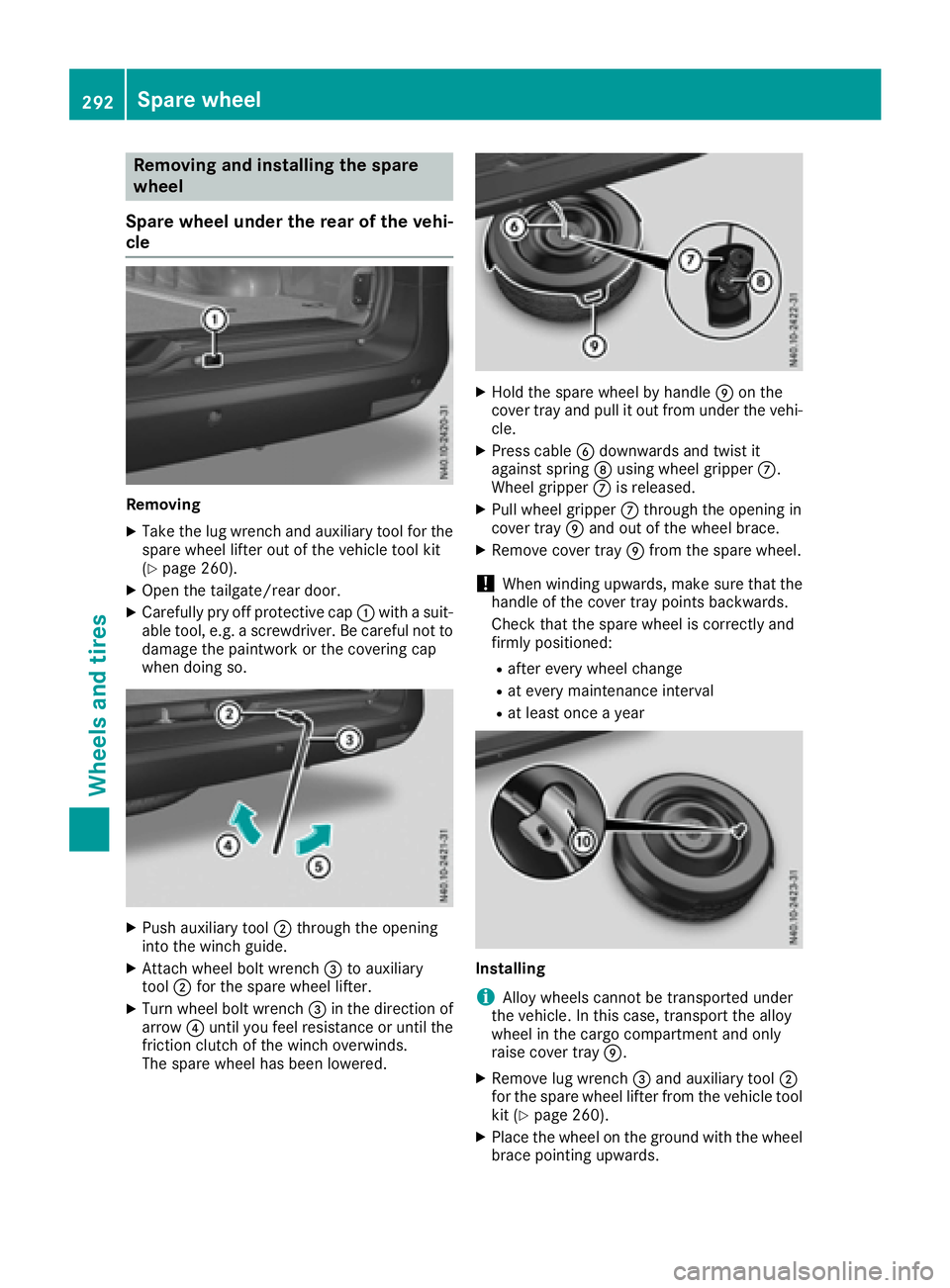
XTake the lu gwrench and auxiliary tool for the
spare wheel lifter outoft he vehicletool kit
(
Ypage 260).
XOpe nthe tailgate/rea rdoor.
XCarefull ypry off protectiv ecap : with asuit-
able tool ,e.g. ascrewdriver. Be careful not to
damag ethe paintwork or the covering cap
when doing so.
XPush auxiliary tool ;through the opening
into the winch guide.
XAttach wheel bol twrench =to auxiliary
tool ;for the spare wheel lifter.
XTurn wheel bol twrench =in the direction of
arrow ?unti lyou fee lresistance or unti lthe
friction clutch of the winch overwinds.
The spare wheel hasb eenlowered.
XHoldt he spare wheel by handle Eon the
cove rtray and pull it outf rom under the vehi-
cle.
XPress cable Bdownwards and twist it
against spring Dusing wheel gripper C.
Wheel gripper Cis released.
XPull wheel gripper Cthrough the opening in
cove rtray Eand outoft he wheel brace.
XRemove cove rtray Efrom the spare wheel.
!Whe nwinding upwards ,make sure that the
handleoft he covertray points backwards.
Check that the spare wheel is correctly and
firmly positioned:
Rafte revery wheel change
Rat every maintenance interval
Rat leas tonce ayear
Installing
iAlloy wheel scanno tbetransported under
the vehicle. In this case, transpor tthe alloy
wheel in the carg ocompartment and only
raise cove rtray E.
XRemove lu gwrench =and auxiliary tool ;
for the spare wheel lifter from the vehicl etool
kit (
Ypage 260).
XPlace the wheel on the ground with the wheel brace pointing upwards.
292Spare wheel
Wheel sand tires
Page 295 of 310
XPlace cover trayEon the wheel so that the
recess for tire valve Fis above the valve.
XPress cover tray Eont othe wheel brace and
align the wheel so that the handle of cover
tray Efaces backwards.
XGuide wheel gripper Cat an angle on wire B
through the opening in cover tray Eand into
the wheel brace from above.
XSlide the wheel under the vehicle alittle.
XAttach lug wrench =to auxiliary tool ;for
the spare wheel lifter.
XTurn lug wrench =in the direction of arrow
A until you feel resistanc eand the friction
clutch of the winch overwinds in jerks.
The wheel is firmly secured to the underside
of the vehicle.
XPull lug wrench =and auxiliary tool ;for the
spare wheel lifter out of the opening for the
winch.
XClose the winch opening with covering
cap :.
XStow wheel bolt wrench =and auxiliary
tool ;for the spare wheel lifter in the vehicle
tool kit.
XClose the tailgate/rear door.
Sparew heel293
Wheels and tires
Z
Page 298 of 310
the containers: MB-Freigabe or MB-Approval
(e.g. MB-Freigabe or MB-Approval228.5)
Mor einformation can be obtained at any quali-
fie ds pecialis tworkshop.
Additives for approved service products ar enei-
therr equired nor permitted .Approved fuel addi-
tive sarethe exception. Additives can cause
engine damage and must therefore not be
adde dtot he service products.
The us eofadditivesisa lwaysthe responsibility
of the vehicl eoperator. The us eofadditivesm ay
resul tinthe restrictio norlossofy ourL imit ed
Warranty entitlements.
Fuel
Important safety notes
GWARNING
Fue lish ighl yf lammable. Improper handling of
fuel creates ariskoff irea nd explosion.
Avoi dfire, open flames ,smoking and creating
sparks under al lcircumstances .Switch off the
engine and ,ifapplicable, the auxiliary heating
befor erefueling.
GWARNING
Fue lisp oisonous and hazardous to health.
There is ariskofi njury.
Yo um ustm akes uret hatf ueldoe sn ot come
into contact with your skin, eyes or clothing
and thatiti snot swallowed. Do not inhal efue l
vapors. Kee pfuelawa yfromc hildren.
If yo uoro thers come into contact with fuel,
observe the following:
RWash away fuel froms kinimmediately
using soa pand water.
RIf fuel come sinto contact with your eyes,
immediatel yrinse themt horoughlywith
clean water. See kmedica lassis tance with-
ou td elay.
RIf fuel is swallowed, seek medica lassis -
tance withou tdelay. Do not induce vomit-
ing.
RImmediately change ou tofclothing which
hasc ome into contact with fuel. When handling
,storing and disposing of fuels,
please observe the relevant regulations.
Tank contents
Depending on equipment, the tota lcapacity of
the fuel tank mayv ary.
Totalcap acity18.5 US ga l(70.0 l)
of whic hreserve
fuelApprox. 3.2 US gal (12.0 l)
Gasoline
Fuel grade
!Do not use diesel to refuel vehicle swith a
gasoline engine. Do not switch on the ignition
if you accidentally refuel with the wrong fuel.
Otherwise, the fuel wil lenter the fuel system.
Even small amounts of the wrong fuel could
resul tind amage to the fuel system and the
engine. Notify aqualified specialist workshop
and have the fuel tank and fuel lines drained
completely.
!Only refuel using unleaded premiumg rade
gasoline with at least 91 AKI/95 RON.
!Only use the fuel recommended.O perating
the vehicle with other fuel scan leadtoe ngine
failure.
!Do not use the following:
RE85 (gasoline with 85% ethanol)
RE100 (100% ethanol)
RM15 (gasoline with 15% methanol)
RM30 (gasoline with 30% methanol)
RM85 (gasoline with 85% methanol)
RM100 (100% methanol)
RGasoline with metalliferous additives
RDiesel
Do not mix such fuel swith the fuel recom-
mended for you rvehicle.
!Filter the fuel beforet ransferring it to the
vehicle if you are refueling the vehicle from
barrels or containers.
This wil lprevent malfunctions in the fuel sys-
tem due to contaminated fuel.
iE10 fuel contains an admixture of up to 10%
bioethanol .Yourv ehicle is E10 compatible.
You can refue lyou rv ehicle with E10 fuel.
296Service products and capacities
Technical data