center console MERCEDES-BENZ METRIS 2016 MY16 Operator’s Manual
[x] Cancel search | Manufacturer: MERCEDES-BENZ, Model Year: 2016, Model line: METRIS, Model: MERCEDES-BENZ METRIS 2016Pages: 310, PDF Size: 7.28 MB
Page 8 of 310
Cargo compartment lampChangingb ulbs ................................ 97
Cargo compartment lighting
Switching on centrally ...................... 96
Switching on locally ........................ .96
Cargo tie-down rings
Permissible tensile load ................ .304
Center console
Control s...........................................4 0
Centra llocking
Activating/deactivating the
acoustic lockin gconfirmation (on-
board computer) ............................ 187
Automatic lockin g........................... .72
Automatic lockin g(on-board com-
puter) ............................................ .187
Emergency unlocking ....................... 68
Locking/unlocking (buttons) ........... 72
Locking/unlocking (SmartKey) ........6 7
Centra llocking system
see Central locking
Changing abulb
Ambientl amp in thefront door ........ 97
Halogen headlamps ........................ .98
Mirror lamp in the headliner ............ 97
Signal and ambient light in the tail-
gate .................................................9 8
Trunk lamp in the side trim panel ....9 7
Changing bulbs
Additional tur nsignals .................. .100
Ambient lamp in tailgate .................. 97
Backup lamps ................................ 101
Brake lamps ................................... 101
Cargo compartment lamp ................ 97
Daytime running la mps .................. 100
Hi gh-b
eam headlamps ................... 100
Installing/removing arear lamp
cluster ...........................................1 01
Installing/removing the cover in
the wheel arch ................................. 99
Installing/removing the tail lamp ... 101
Interior light ..................................... 96
Interior lighting ................................ 96
Low-beam headlamps ......................9 9
Overview of lamp types (front
bulbs) ............................................... 99
Overview of lamp types (rear
bulbs) ............................................. 100 Parking lamps ................................ 100
Rear fog lamp ................................ 101
Rear interior light in the headliner ... 97
Standing lamps (front) ...................1
00
Standing lamps (rear) .................... 101
Tai llam ps ...................................... 101
Trunk lamp in the headliner ............. 96
Turn signals (front) ......................... 100
Turn signals (rear) .......................... 101
see Changing light bulbs
Changing bulbs
see Replacing bulbs
Child
Restraint system .............................. 58
Child seat
Forward-facing restraint system ...... 60
LATCH-typ e(ISOFIX) chil dseat
anchors ............................................ 59
On the front-passenger seat. ........... 60
Rearward-facing restraint system .... 60
Top Tether ....................................... 59
Child-proof locks
Important safety notes .................... 61
Sliding doo r..................................... 61
Children
Specia lsea tb eltr etractor ............... 57
Cigarette lighter ................................ 230
Cleaning
Trailer tow hitch ............................. 258
Climate control
Air conditioning in the rea rcom-
partment ........................................ 110
Control panel (dual-zone auto-
mati cclimate control ).................... 109
C o
ntrolling automaticall y............... 112
Cooling with ai rdehumidifica tion .. 111
Defrosting the window s................. 115
Defrosting the windshield .............. 114
Important safety notes .................. 107
Information on automatic climate
control (dual-zone )......................... 109
Information on TEMPMATI C(air-
conditioning system )..................... 108
Overview of system s...................... 107
Problem with the rea rwindow
defroster ........................................ 115
Rear-compartment ai rcondition-
ing ................................................. 110
6Index
Page 9 of 310
Refrigerant .....................................301
Refrigerant filling capacity ............. 302
Setting the ai rdistribution ............. 113
Setting the ai rvents ......................1 16
Setting the airflow ......................... 113
Setting the temperature ................ 112
Switching air-recirculation mode
on/off ............................................ 115
Switching on/off ........................... 110
Switching residua lheato n/off ...... 116
Switching the rear window
defroster on/off ............................ 115
Switching the synchronization
function on and off ........................ 114
TEMPMATICc ontrol panel(air
conditioning) .................................. 108
Clock
Setting (vehicle without steering
wheel buttons) ............................... 175
Cockpit
Instrument cluster (vehicle with
steering wheel buttons) ................... 37
Instrument cluster (vehicle with-
out steering wheel buttons) ............. 35
Overview .......................................... 34
see Instrument cluster
Coffee cup symbol
see ATTENTION ASSIST
COLLISIO NPREVENTION ASSIST
Activating/deactivating the dis-
tance warning function .................. 184
Adaptive Brake Assist .................... 144
Display message ............................ 213
Distance warning function ............. 143
Operation/notes ............................ 143
Collisio nwarning
see COLLISION PREVENTION ASSIST
COMAND display
Cleaning ......................................... 258
Combination switch ............................ 94
Communications equipment
Operation ....................................... 231
Typeapproval/frequency .............. 294
Consumptions tatistics
Fuel (vehicle with steering wheel
buttons) ......................................... 178
Fuel (vehicle without steering
wheel buttons) ............................... 171 Control panel
Above the windshield ....................... 41
Center console ................................ 40
Climate control ............................ .... 40
Dri ver's
door ....................................4 1
Convenience closing feature .............. 81
Convenience opening
Witht heSmartKey ........................ .116
Convenience opening feature ............ 81
Conversions/equipment .................... 30
Coolan t(en gine)
Adding ...........................................2 45
Checking the leve l......................... 244
Display messages (vehicle with
steering wheel buttons) ................. 212
Display messages (vehicle with-
out steering wheel buttons) ........... 197
Displaying the temperature (on-
board computer) ............................ 172
Filling capacity ............................... 301
Notes ............................................. 300
Temperature displa yinthe instru-
ment cluster .................................. 169
Warning lamp ................................. 223
Cooling
see Climate control
Crosswind Assist ................................. 65
Cruis econtrol
Activating ....................................... 142
Activatio nconditions ..................... 141
Cruise control leve r....................... 141
Deactivating ................................... 142
Display messages (vehicle with
steering wheel buttons) ................. 214
Display messages (vehicle with-
out steering wheel buttons) ........... 199
Displaying the speed. .................... 141
Driving system ............................... 140
Function/note s............................. 140
Important safety notes .................. 141
Problem (malfunction) ................... 143
Resuming the storeds peed ........... 142
Setting aspeed .............................. 142
Storing and maintaining current
speed ............................................. 142
Cup holder ......................................... 230
Important safety notes .................. 229
Index7
Page 33 of 310
Please observe the information concerning
Mercedes-Benz Genuine Parts (Ypage 31).
You can obtain further information from any
Mercedes-Benz Commercial Van Center.
GWARNING
The function of systems or components can
be affected by conversions or modifications
to the vehicle. They might not function prop-
erly anymore and/or jeopardize the opera-
tional safety of the vehicle. There is an
increased risk of an accident and injury.
Conversion sormodification sshould always
be carried out at qualified specialist work-
shop.
If you inten dtomake modification stoyour vehi-
cle, we strongly recommend that you contact
the distributor named on the inside of the front
cover. There you will receive all the necessary
information and acharge may be levied.
You alone accept the responsibility if body man-
ufacturers or dealers make modification sthat
affect the final certification of the engine, the
vehicle or the equipment. This also applies to
the identification and documentation of modifi-
cation stothe affected vehicle components.
You are responsible for certification and confir-
mation that:
Rall the applicable standards and regulations
that are affected by the vehicle modification
are met
Rthe modified vehicle fulfills the vehicle safety standards and emissions laws and regula-
tions
Rthe modification sorinstallation of accesso-
ries does not affect the safety of the vehicle
We are not responsible for the final certification,
product liability or warranty claims which result
from the modifications. This applies to:
Rthe modified components ,assemblies or sys-
tems
Rany resulting noncompliance with any of the
emissions laws and regulations or the motor
vehicle safety standards
Rany consequences arising from the changes
that make the vehicle less safe or even render it defective
We do not assume responsibility as the final-
stage manufacturer or for the consequential
product liability.
Notes on the radiator
Even seemingly small changes to the vehicle,
such as attaching aradiator trim for winter driv-
ing, is not permitted. Do not cover up the radi-
ator. Do not use thermal mats, insect protection
covers or anything similar.
Otherwise, the values of the diagnostic system
may be affected. Some of these values are
legally prescribed and must alwaysbec orrect.
Genuine Mercedes-Benz parts
!
Air bags and Emergency TensioningD evi-
ces, as well as control units and sensors for
these restraint systems, may be installed in
the following areas of your vehicle:
Rdoors
Rdoor pillars
Rdoor sills
Rseats
Rcockpit
Rinstrument cluster
Rcenter console
Do not install accessories such as audio sys-
tems in these areas. Do not carry out repairs or welding. You could impair the operating
efficiency of the restraint systems.
Have aftermarket accessories installed at a
qualified specialist workshop.
HEnvironmenta lnote
We supply reconditioned assemblies and
parts which are of the same quality as new
parts. The same New Vehicle Limited War-
rantya pplies as for new parts.
The operating safety of the vehicle could be
jeopardized if you use parts, tires and wheels as
well as accessories relevant to safety which
have not been approved by Mercedes-Benz.T his
could lead to malfunctions in safety-relevant
systems, e.g. the brake system. Only use genu-
ine Mercedes-Benz parts or parts of equal qual-
ity. Only use tires, wheels and accessories that
have been specifically approved for your vehi-
cle.
Introduction31
Z
Page 42 of 310
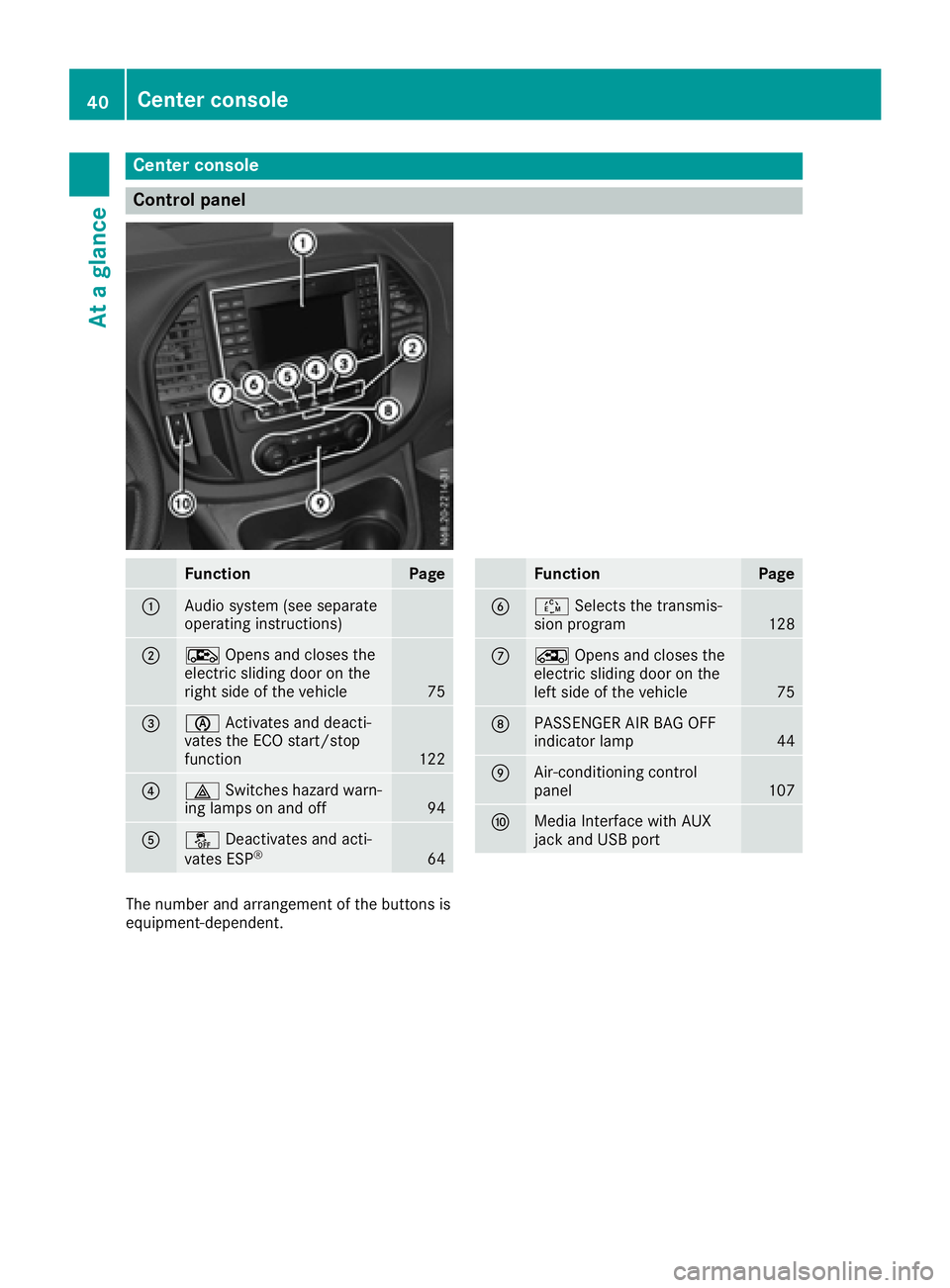
Center console
Control panel
FunctionPage
:Audiosystem (see separate
operatin ginstructions)
;Æ Opensa nd closes the
electric slidingd oor on the
righ tside of th evehicle
75
=è Activate sand deacti-
vates th eECO start/stop
function
122
?£ Switches hazard warn-
ing lamps on and off94
Aå Deactivates and acti-
vates ESP®64
FunctionPage
BÉ Select sthe transmis-
sion program128
CÅ Opensa nd closes the
electric slidingd oor on the
left side of th evehicle
75
DPASSENGER AI RBAG OFF
indicator lamp44
EAir-conditioning control
panel107
FMedia Interface withA UX
jac ka nd USBp ort
The number and arrangement of th ebuttons is
equipment-dependent.
40Center console
At ag lance
Page 51 of 310
formed correctly to the doors or door panel-
ing, as wellasdamaged doors,c an leadtothe
function of the sensors being impaired .The air
bag smight therefore not function properly
anymore. Consequently, the air bag scannot
protect vehicl eoccupants as they are
designed to do. There is an increased risk of
injury.
Never modify the doors or parts of the doors. Always have work on the doors or door pan-
eling carrie dout at aqualified specialist work-
shop.
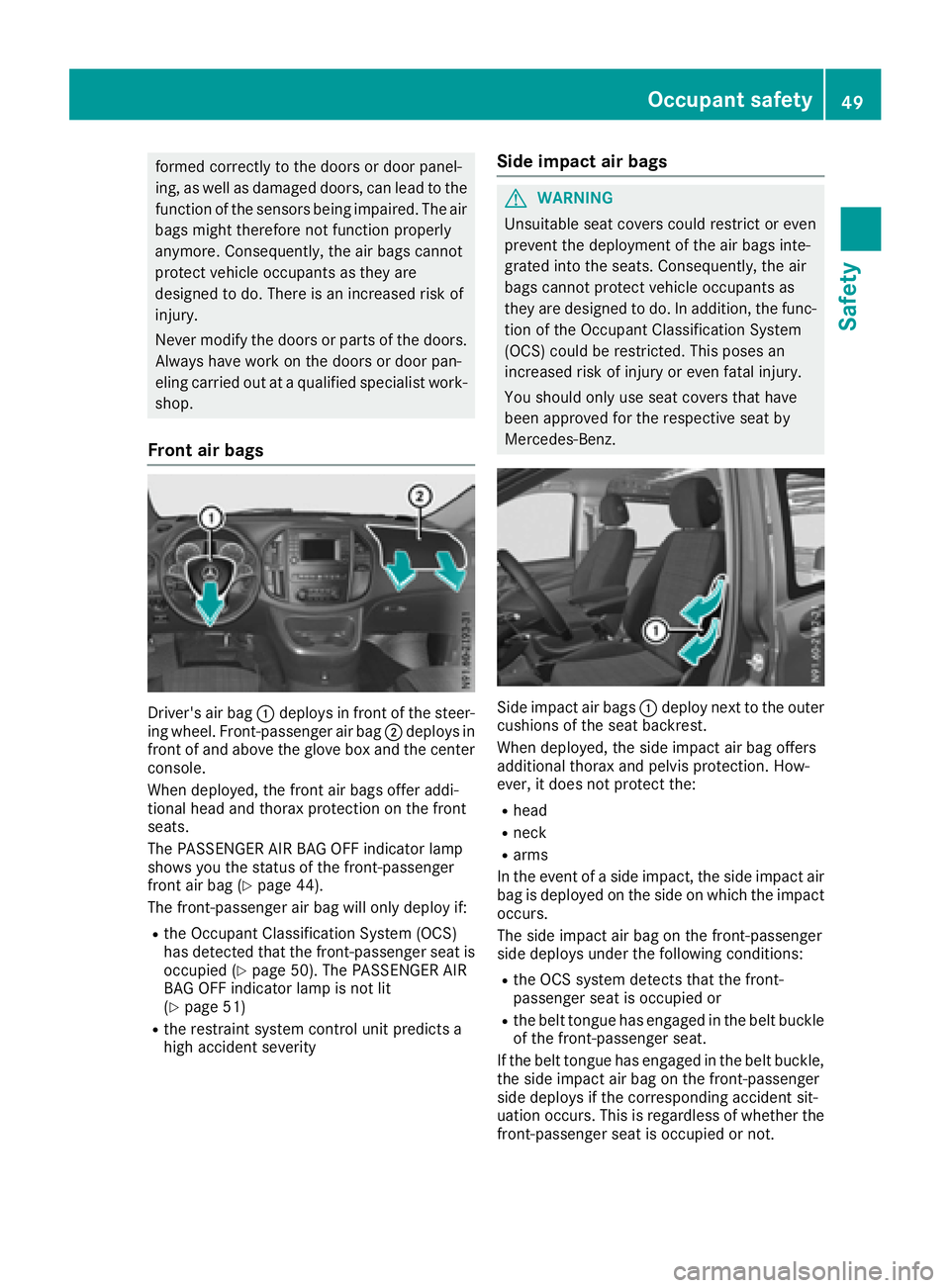
Fron tair bags
Driver's air bag :deploys in front of the steer-
ing wheel. Front-passenger air bag ;deploys in
front of and above the glove box and the center
console.
When deployed, the front air bag soffer addi-
tional heada nd thorax protection on the front
seats.
The PASSENGER AIR BAG OFF indicator lamp
showsy ou the status of the front-passenger
front air bag (
Ypag e44).
The front-passenger air bag wil lonly deploy if:
Rthe Occupant Classification System (OCS)
has detected that the front-passenger seati s
occupied (
Ypag e50). The PASSENGER AIR
BAG OFF indicator lam pisnot lit
(
Ypag e51)
Rthe restraint system control unit predicts a
high accident severity
Side impact air bags
GWARNING
Unsuitabl eseatc overs coul drestrict or even
prevent the deployment of the air bag sinte-
grated into the seats. Consequently, the air
bag scannot protect vehicl eoccupants as
they are designed to do. In addition, the func- tion of the Occupant Classification System
(OCS) coul dberestricted. This posesa n
increased risk of injury or even fatal injury.
You should only use seatc overs that have
been approved for the respective seatb y
Mercedes-Benz.
Side impact air bags :deploy next to the outer
cushions of the seatb ackrest.
When deployed, the side impact air bag offers
additiona lthorax and pelvis protection. How-
ever, it does not protect the:
Rhead
Rneck
Rarms
In the event of aside impact, the side impact air
bag is deploye donthe side on which the impact
occurs.
The side impact air bag on the front-passenger
side deploys under the following conditions:
Rthe OCS system detects that the front-
passenger seatiso ccupied or
Rthe belttongue has engaged in the beltb uckle
of the front-passenger seat.
If the beltt ongue has engaged in the beltb uckle,
the side impact air bag on the front-passenger
side deploys if the corresponding accident sit-
uation occurs. This is regardless of whethe rthe
front-passenger seatiso ccupied or not.
Occupant safety49
Safety
Z
Page 77 of 310
Rpress the correspondingsliding door but-
ton in the center console, or
Rpress the butto nonthe door frame, or
Rpull the rocker switch on door handle
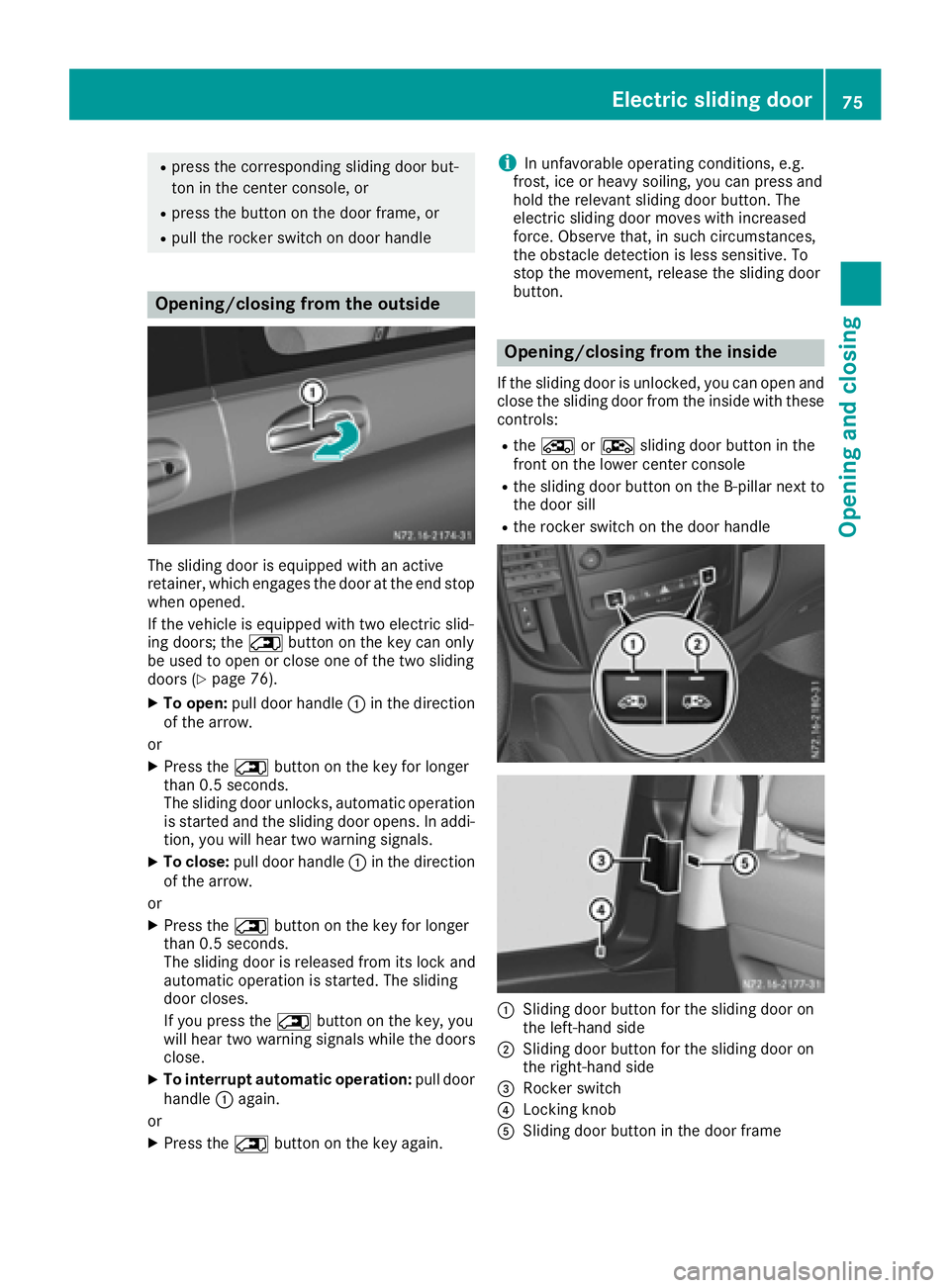
Opening/closing from the outside
The sliding door is equipped with an active
retainer, which engages the door at the end stop
when opened.
If the vehicle is equipped with two electric slid-
ing doors; the 5buttonont he key can only
be used to open or close one of the two sliding
doors (
Ypage 76).
XTo open: pull door handle :in the direction
of the arrow.
or
XPress the 5buttonont he key for longer
than 0.5 seconds.
The sliding door unlocks, automatic operation
is started and the sliding door opens. In addi-
tion ,you will hear two warning signals.
XTo close: pull door handle :in the direction
of the arrow.
or
XPress the 5buttonont he key for longer
than 0.5 seconds.
The sliding door is released from its lock and
automatic operation is started. The sliding
door closes.
If you press the 5buttonont he key, you
will hear two warning signals while the doors
close.
XTo interrupt automatic operation: pull door
handle :again.
or
XPress the 5buttonont he key again.
iIn unfavorable operatin gconditions, e.g.
frost,i ce or heavy soiling, you can press and
hold the relevant sliding door button. The
electric sliding door moves with increased
force. Observe that ,insuch circumstances,
the obstacle detection is less sensitive. To
stop the movement ,release the sliding door
button.
Opening/closing from the inside
If the sliding door is unlocked, you can open and close the sliding door from the inside with these
controls:
Rthe Å orÆ sliding door butto ninthe
frontont he lower center console
Rthe sliding door butto nonthe B-pillar nex tto
the door sill
Rthe rocker switch on the door handle
:Sliding door butto nfor the sliding door on
the left-hand side
;Sliding door butto nfor the sliding door on
the right-han dside
=Rocker switch
?Locking knob
ASliding door butto ninthe door frame
Electric sliding door75
Opening and closing
Z
Page 78 of 310
You can only openasliding door from the inside
if the child-proof lock shave not been activated.
If the sliding door is locked, the sliding door
must firstbeu nlocked.
The sliding door is equipped with an active
retainer, which engage sthe door at the end stop
when opened.
XTo open: briefly press the respective Åor
Æ sliding door button in the center con-
sole.
or
XBriefly press sliding door button in the door
frame A.
or
XBriefly pull back rocker switch =.
If the sliding door is unlocked, automatic
operation is started and the sliding door
opens.
If you use the ÅorÆ sliding door but-
ton in the center console you will hear two
warnin gsignals during the openin gproce-
dure.
The indicator lamp in the ÅorÆ sliding
door button in the center console flashes for
the duratio nofautomatic operation.
The indicator lamp in the ÅorÆ sliding
door button in the center console is lit when-
ever the respectiv esliding door is open.
Depending on the vehicle equipment, the dis-
play can also show the Sliding door open
message.
XTo close:briefly press the respective Åor
Æ sliding door button in the center con-
sole.
or
XBriefly press sliding door button in the door
frame A.
or
XBriefly press rocker switch =forwards.
The sliding door is released from its lock and
automatic operation is started. The sliding
door closes.
If you use the ÅorÆ sliding door but-
ton in the center console you will hear two
warnin gsignals during the openin gproce-
dure.
The indicator lamp in the respective Åor
Æ sliding door button in the center console
goes out whenever the sliding door is closed.
XTo interrupt automatic operation: press
the respective ÅorÆ sliding door but-
ton in the center console again.
or
XPress sliding door button in the door frame
A.
or
XBriefly pull back rocker switch =.
iIn unfavorable operating conditions, e.g.
frost, ice or heavy soiling ,you can press and
hold the relevants liding door button. The
electric sliding door movesw ith increased
force. Observe that ,insuch circumstances,
the obstacle detection is less sensitive. To
sto pthe movement, release the sliding door
button.
Programming th ekey button for the
sliding door
If the vehicle is fitted with two electric sliding
doors,t he5 sliding door button on the key
can only be programmed for one of the two slid-
ing doors.Y ou can thenopen or close the selec-
ted sliding door with the 5button on the key.
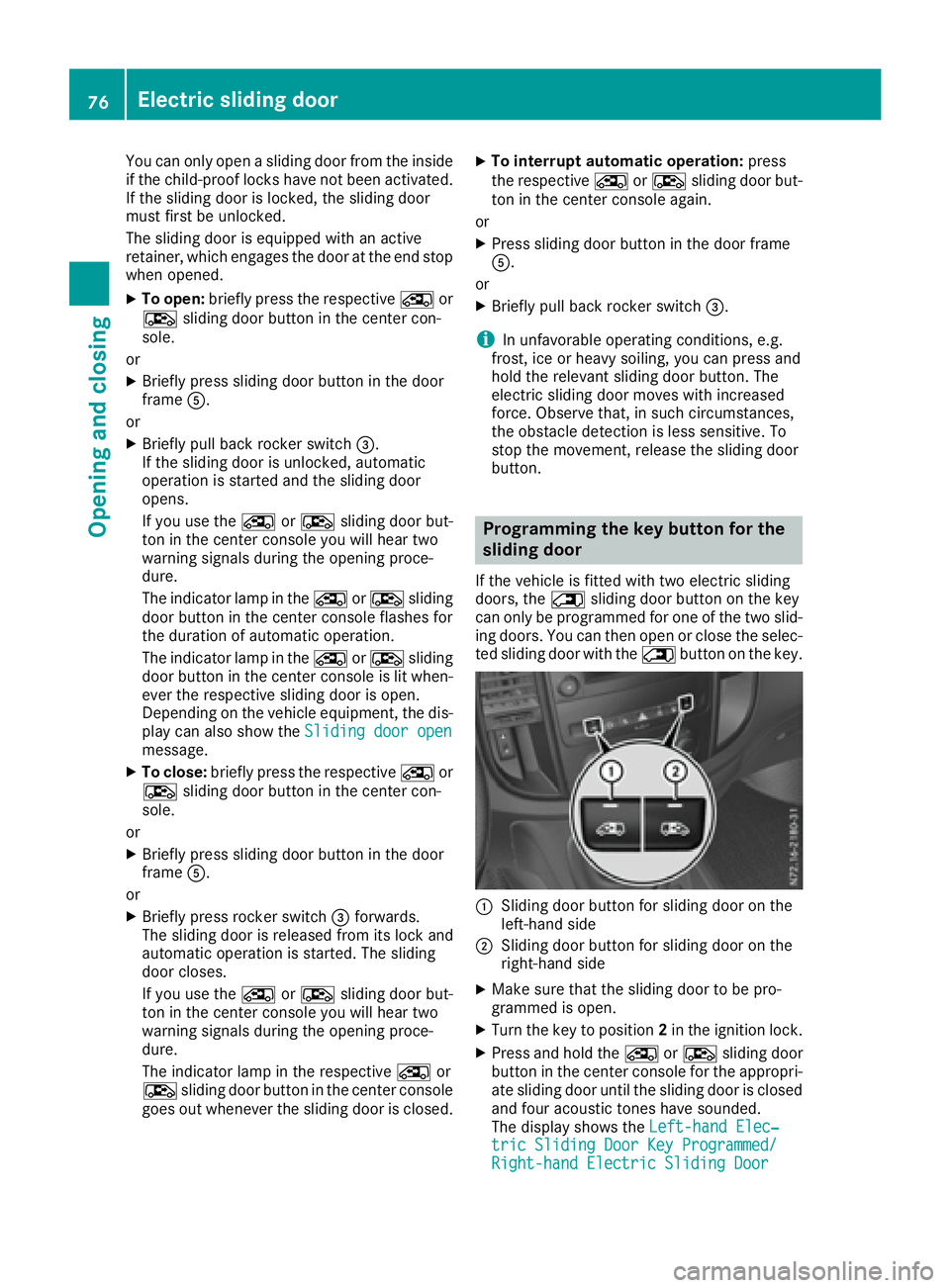
:Slidingdoor button for sliding door on the
left-han dside
;Slidin gdoor button for sliding door on the
right-han dside
XMake sure that the sliding door to be pro-
grammed is open.
XTurn the key to position 2in the ignition lock.
XPress and hold the ÅorÆ sliding door
button in the center console for the appropri-
ate sliding door until the sliding door is closed
and four acoustic tones have sounded.
The display shows the Left-handElec‐
tric Sliding Door Key Programmed/Right-hand Electric Sliding Door
76Electric sliding door
Opening and closing
Page 79 of 310
Key ProgrammedorLt. Slid. Door Pro‐grammed/Rt. Slid. Door Programmedmessage.
Resetting the sliding door
You must reset the sliding door if there has been
am alfunction or an interruption in the voltage
supply.
XIf the sliding door is open: close it by hand.
XUsing the ÅorÆ sliding door button on
the center console, open the sliding door at
least 15.8 in (40 cm )and then close the slid-
ing door completely.
XWhen the sliding door is closed, open the slid-
ing door fully using the ÅorÆ sliding
door button on the center console.
The sliding door is reset and operational.
XClose the sliding door if required.
Problems with the sliding door
The electric sliding door is locked in place.
Unfavorable operating conditions, e.g. frost, ice
or heavy soiling, may obstruct the sliding door.
XPress and hold the sliding door button until
the sliding door has opened or closed.
The sliding door moves with increased force.
Observe that, in such circumstances, the
obstacle detection is less sensitive. To stop
the movement, release the sliding door but-
ton.
XRemove the cause of the blockage at the ear-
liest opportunity.
Tailgate
Important safety notes
GWARNING
Combustion engines emit poisonous exhaust
gases such as carbon monoxide. If the tailgate
is open when the engine is running, particu-
larly if the vehicle is moving, exhaust fumes
could enter the passenger compartment.
There is arisk of poisoning.
Turn off the engine before opening the tail-
gate. Never drive with the tailgate open.
!The tailgate swings upwards and to the rear
when opened. Therefore, make sure that
there is sufficient clearance above and behind
the tailgate.
You will find details of the tailgate opening
dimensions under "Technical data"
(
Ypage 303).
Opening/closing
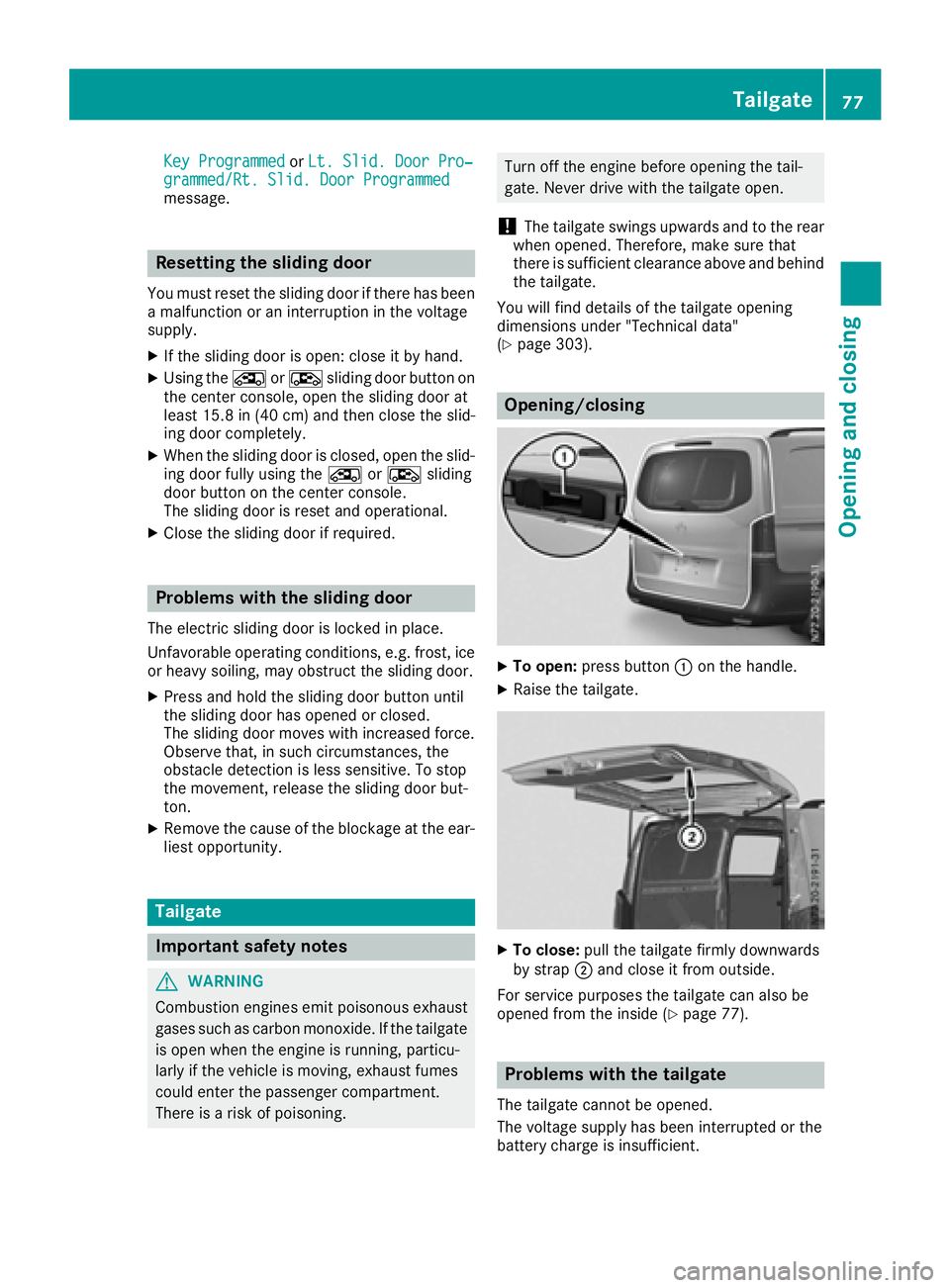
XTo open: press button :on the handle.
XRaise the tailgate.
XTo close: pull the tailgate firmly downwards
by strap ;and close it from outside.
For service purposes the tailgate can also be
opened from the inside (
Ypage 77).
Problems with the tailgate
The tailgate cannot be opened.
The voltage supplyh as been interrupted or the
battery charge is insufficient.
Tailgate77
Opening and closing
Z
Page 175 of 310
Settings menu
Introduction
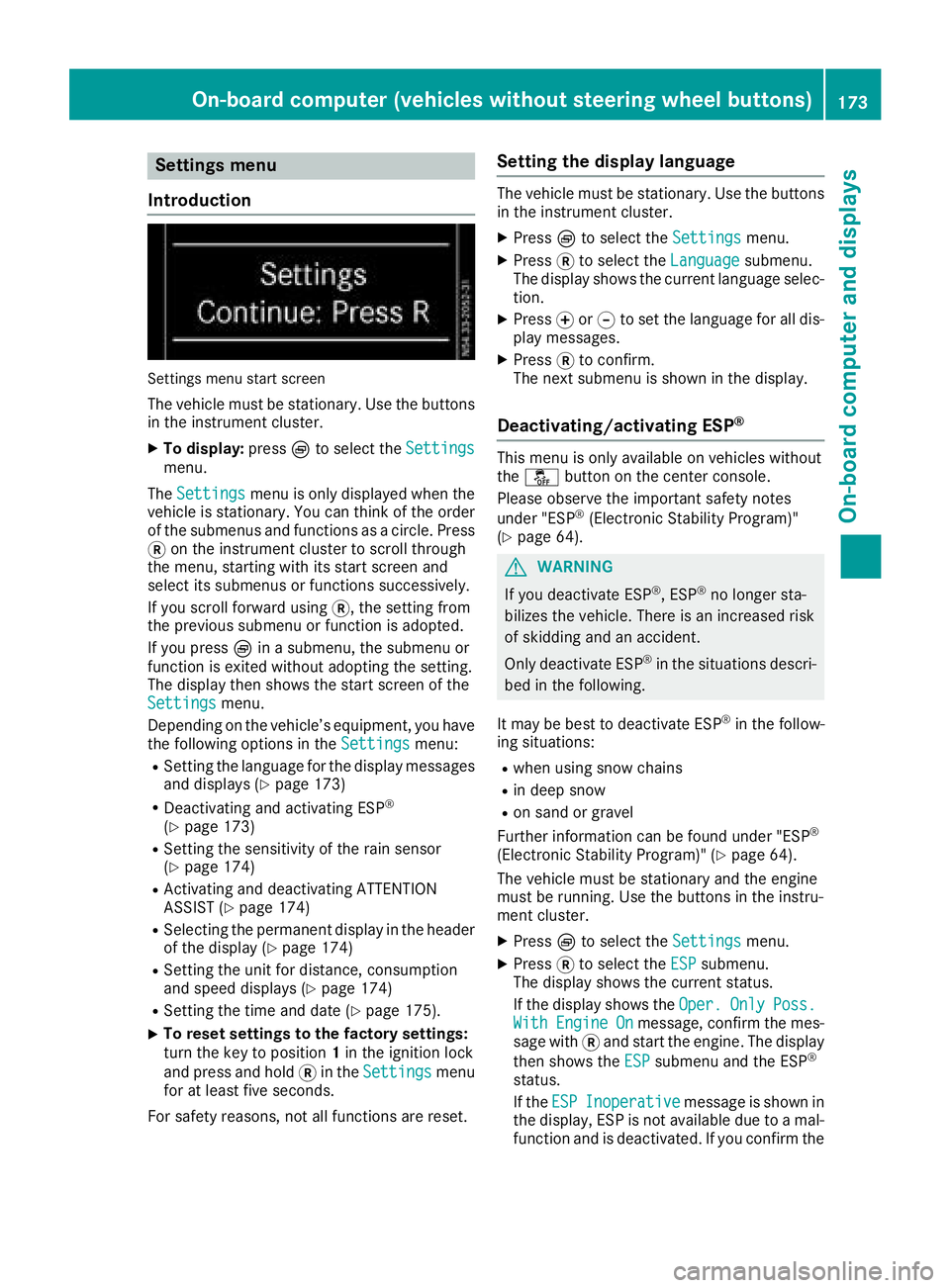
Settings menu start screen
The vehicle must be stationary. Use the buttons
in the instrumentc luster.
XTo display:pressÈto select the Settingsmenu.
The Settings
menu is only displayed when the
vehicle is stationary. You can think of the order
of the submenus and functions as acircle. Press
3 on the instrumentc luster to scroll through
the menu, startin gwith its start screen and
select its submenus or functions successively.
If you scroll forward using 3,the settingf rom
the previous submenu or function is adopted.
If you press Èinas ubmenu, the submenu or
function is exited without adopting the setting.
The display then shows the start screen of the
Settings
menu.
Depending on the vehicle’s equipment, you have the following options in the Settings
menu:
RSetting the language for the display messages
and displays(Ypage 173)
RDeactivating and activating ESP®
(Ypage 173)
RSetting the sensitivity of the rain sensor
(Ypage 174)
RActivating and deactivating ATTENTION
ASSIST (Ypage 174)
RSelectingthe permanent display in the header
of the display (Ypage 174)
RSetting the unit for distance, consumption
and speed displays(Ypage 174)
RSetting the time and date (Ypage 175).
XTo reset settings to the factory settings:
turn the key to position 1in the ignition lock
and press and hold 3in the Settings
menu
for at least five seconds.
For safety reasons, not all functions are reset.
Setting the display language
The vehicle must be stationary. Use the buttons
in the instrumentc luster.
XPressÈto select the Settingsmenu.
XPress3to select the Languagesubmenu.
The display shows the current language selec- tion.
XPress forg to set the language for all dis-
play messages.
XPress 3to confirm.
The next submenu is shown in the display.
Deactivating/activating ESP®
This menu is only available on vehicles without
the å button on the center console.
Please observe the important safety notes
under "ESP
®(Electronic Stability Program)"
(Ypage 64).
GWARNING
If you deactivate ESP
®,E SP®no longer sta-
bilizes the vehicle. There is an increased risk
of skidding and an accident.
Only deactivate ESP
®in the situations descri-
bed in the following.
It may be best to deactivate ESP
®in the follow-
ing situations:
Rwhen using snow chains
Rin deep snow
Ron sand or gravel
Further information can be found under "ESP®
(Electronic Stability Program)" (Ypage 64).
The vehicle must be stationary and the engine
must be running. Use the buttons in the instru-
ment cluster.
XPress Èto select the Settingsmenu.
XPress3to select the ESPsubmenu.
The display shows the current status.
If the display shows the Oper.
OnlyPoss.WithEngineOnmessage, confirm the mes-
sage with 3and start the engine. The display
then shows the ESP
submenu and the ESP®
status.
If theESP
Inoperativemessage is shown in
the display,E SP is not available due to amal-
function and is deactivated. If you confirm the
On-board computer (vehicles without steering wheel buttons)173
On-board computer and displays
Z
Page 185 of 310
Status overview
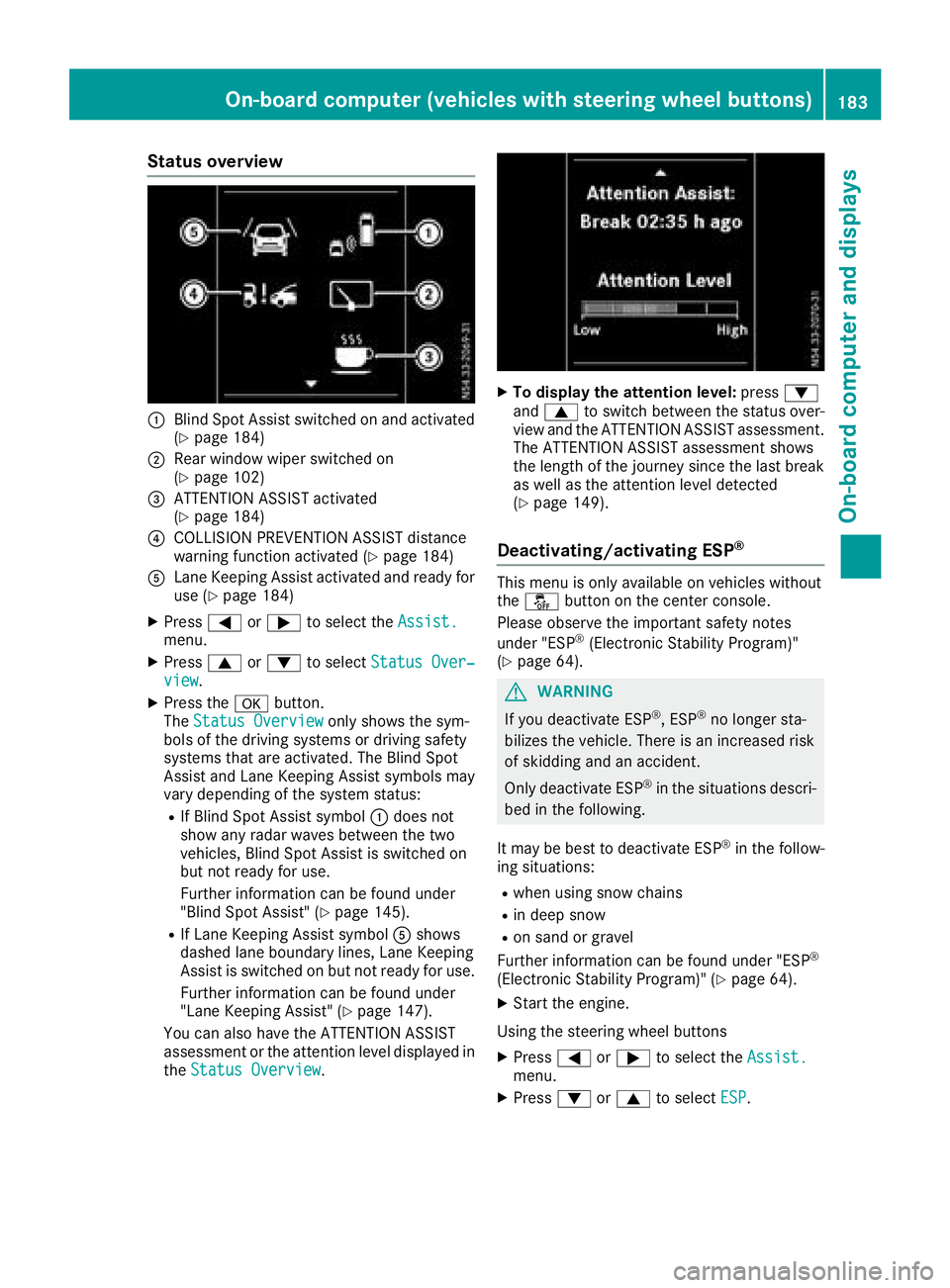
:Blind Spot Assist switched on and activated
(Ypage 184)
;Rear window wiper switched on
(Ypage 102)
=ATTENTION ASSIST activated
(Ypage 184)
?COLLISION PREVENTION ASSIST distance
warning function activated (Ypage 184)
ALane Keeping Assist activated and ready for
use (Ypage 184)
XPress=or; to select the Assist.menu.
XPress9or: to select Status Over‐view.
XPress the abutton.
The Status Overviewonly shows the sym-
bols of the driving systems or driving safety
systems that are activated. The Blind Spot
Assist and Lane Keeping Assist symbols may
vary depending of the system status:
RIf Blind Spot Assist symbol :does not
show any radar waves between the two
vehicles, Blind Spot Assist is switched on
but not ready for use.
Further information can be found under
"Blind Spot Assist" (
Ypage 145).
RIf Lane Keeping Assist symbol Ashows
dashed lane boundary lines, Lane Keeping
Assist is switched on but not ready for use.
Further information can be found under
"Lane Keeping Assist" (
Ypage 147).
You can also have the ATTENTION ASSIST
assessment or the attention level displayed in the Status Overview
.
XTo display the attention level: press:
and 9 to switch between the status over-
view and the ATTENTION ASSIST assessment.
The ATTENTION ASSIST assessment shows
the length of the journey since the last break
as well as the attention level detected
(
Ypage 149).
Deactivating/activating ESP®
This menu is only available on vehicles without
the å button on the center console.
Please observe the important safety notes
under "ESP
®(Electronic Stability Program)"
(Ypage 64).
GWARNING
If you deactivate ESP
®,E SP®no longer sta-
bilizes the vehicle. There is an increased risk
of skidding and an accident.
Only deactivate ESP
®in the situations descri-
bed in the following.
It may be best to deactivate ESP
®in the follow-
ing situations:
Rwhen using snow chains
Rin deep snow
Ron sand or gravel
Further information can be found under "ESP®
(Electronic Stability Program)" (Ypage 64).
XStart the engine.
Using the steering wheel buttons
XPress =or; to select the Assist.menu.
XPress:or9 to select ESP.
On-board computer (vehicles with steering wheel buttons)183
On-board computer and displays
Z