center console MERCEDES-BENZ METRIS 2017 MY17 Operator’s Manual
[x] Cancel search | Manufacturer: MERCEDES-BENZ, Model Year: 2017, Model line: METRIS, Model: MERCEDES-BENZ METRIS 2017Pages: 318, PDF Size: 5.01 MB
Page 80 of 318
XPress sliding door button in the door frame
A.
or
XBriefly pull back rocker switch =.
iIn unfavorable operating conditions, e.g.
frost, ice or heavy soiling, you can press and
hold the relevant sliding door button. The
electric sliding door moves with increased
force. Observe that, in such circumstances,
the obstacle detection is less sensitive. To
stop the movement, release the sliding door
button.
Programing the key button for the
sliding door
If the vehicle is equipped with two electric slid-
ing doors, the 5sliding door button on the
key can only be programmed for one of the two
sliding doors. You can then open or close the
selected sliding door with the 5button on
the key.
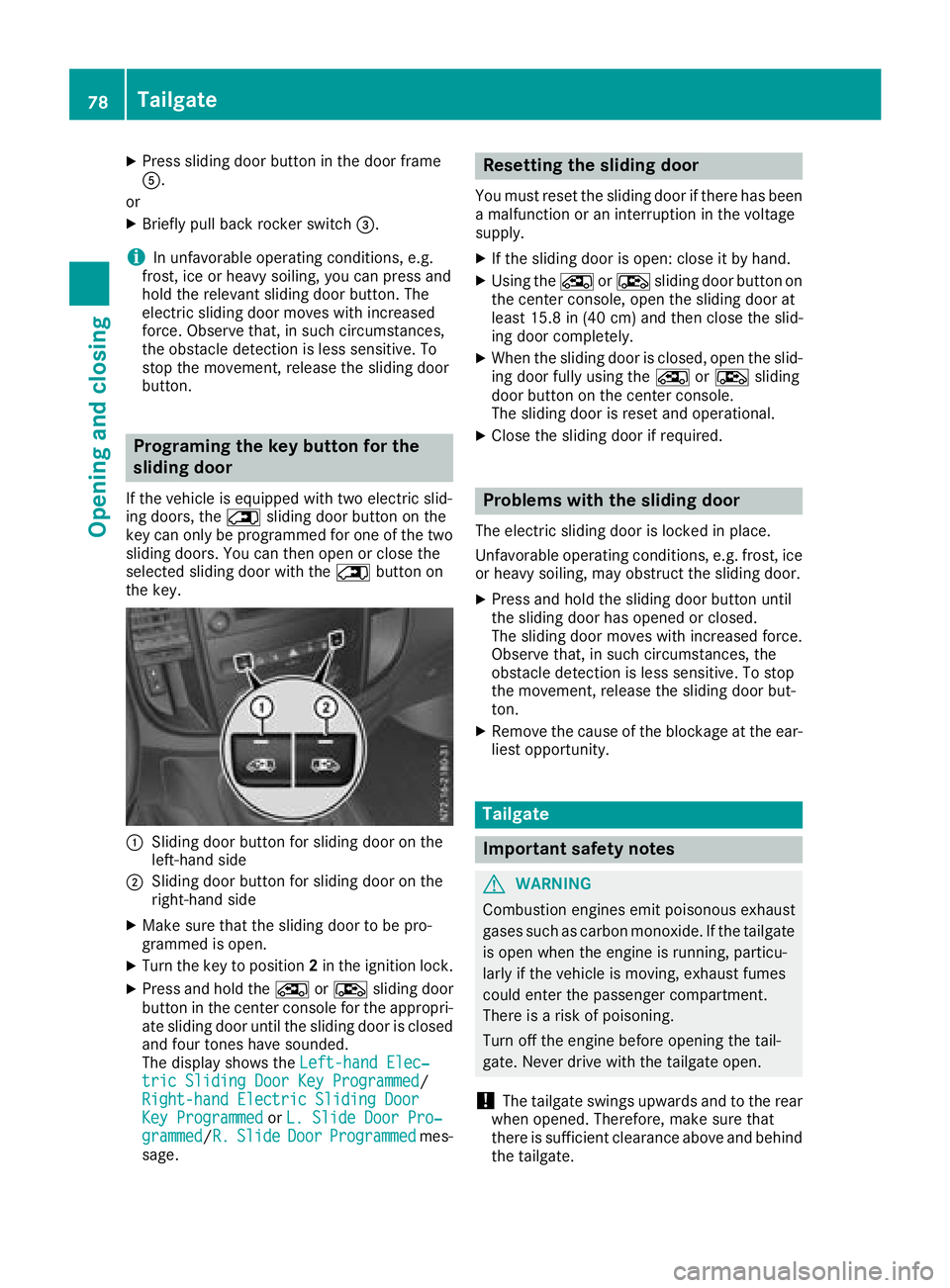
:Sliding door button for sliding door on the
left-hand side
;Sliding door button for sliding door on the
right-hand side
XMake sure that the sliding door to be pro-
grammed is open.
XTurn the key to position 2in the ignition lock.
XPress and hold the ÅorÆ sliding door
button in the center console for the appropri-
ate sliding door until the sliding door is closed
and four tones have sounded.
The display shows the Left-hand Elec‐
tric Sliding Door Key Programmed/
Right-hand Electric Sliding Door
Key Programmedor L. Slide Door Pro‐grammed/R.SlideDoorProgrammedmes-
sage.
Resetting the sliding door
You must reset the sliding door if there has been
a malfunction or an interruption in the voltage
supply.
XIf the sliding door is open: close it by hand.
XUsing the ÅorÆ sliding door button on
the center console, open the sliding door at
least 15.8 in (40 cm) and then close the slid-
ing door completely.
XWhen the sliding door is closed, open the slid-
ing door fully using the ÅorÆ sliding
door button on the center console.
The sliding door is reset and operational.
XClose the sliding door if required.
Problems with the sliding door
The electric sliding door is locked in place.
Unfavorable operating conditions, e.g. frost, ice
or heavy soiling, may obstruct the sliding door.
XPress and hold the sliding door button until
the sliding door has opened or closed.
The sliding door moves with increased force.
Observe that, in such circumstances, the
obstacle detection is less sensitive. To stop
the movement, release the sliding door but-
ton.
XRemove the cause of the blockage at the ear-
liest opportunity.
Tailgate
Important safety notes
GWARNING
Combustion engines emit poisonous exhaust
gases such as carbon monoxide. If the tailgate
is open when the engine is running, particu-
larly if the vehicle is moving, exhaust fumes
could enter the passenger compartment.
There is a risk of poisoning.
Turn off the engine before opening the tail-
gate. Never drive with the tailgate open.
!The tailgate swings upwards and to the rear
when opened. Therefore, make sure that
there is sufficient clearance above and behind
the tailgate.
78Tailgate
Opening and closing
Page 176 of 318
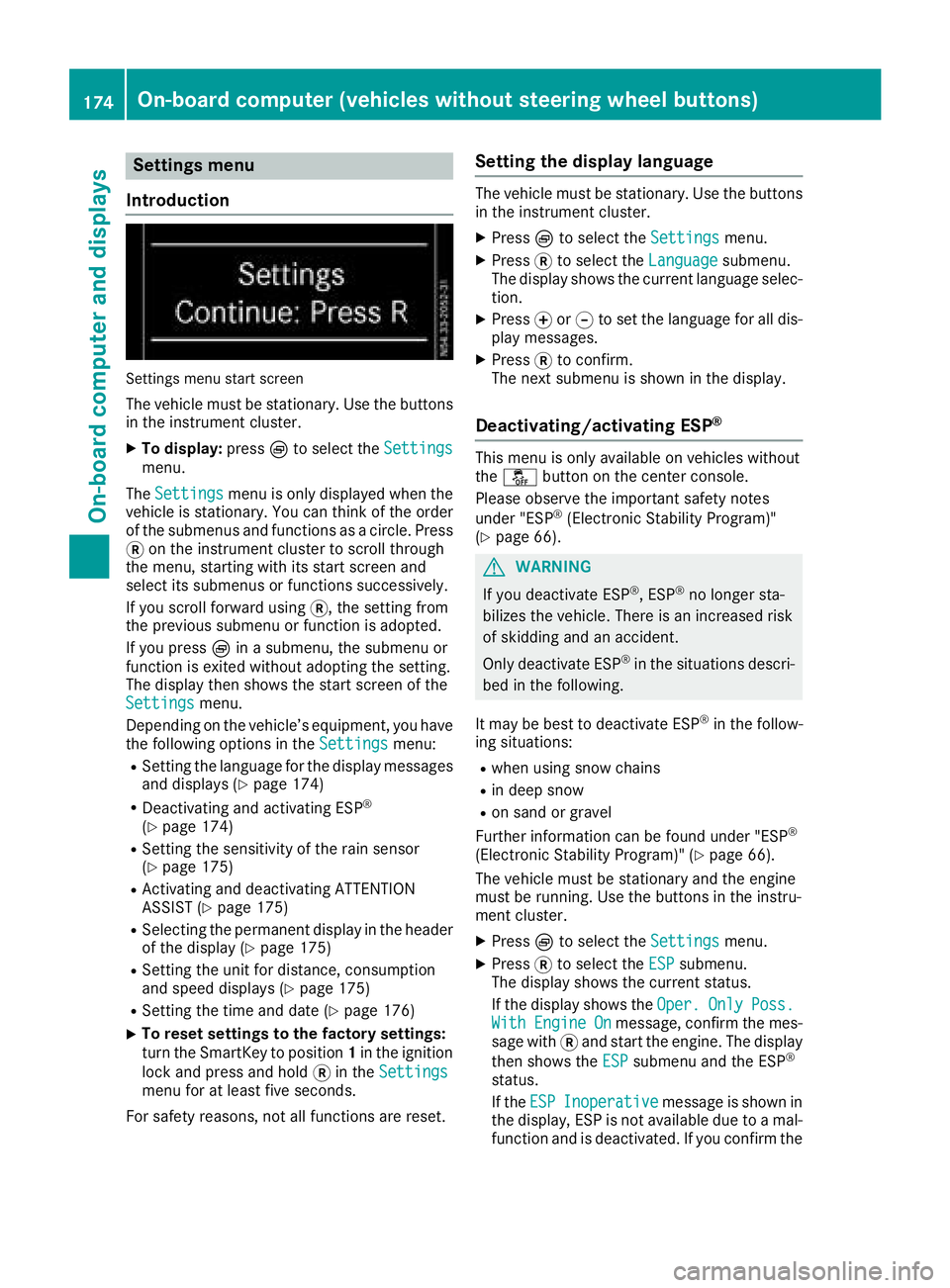
Settings menu
Introduction
Settings menu start screen
The vehicle must be stationary. Use the buttons
in the instrument cluster.
XTo display: pressÈto select the Settingsmenu.
The Settings
menu is only displayed when the
vehicle is stationary. You can think of the order
of the submenus and functions as a circle. Press
3 on the instrument cluster to scroll through
the menu, starting with its start screen and
select its submenus or functions successively.
If you scroll forward using 3, the setting from
the previous submenu or function is adopted.
If you press Èin a submenu, the submenu or
function is exited without adopting the setting.
The display then shows the start screen of the
Settings
menu.
Depending on the vehicle’s equipment, you have the following options in the Settings
menu:
RSetting the language for the display messages
and displays (Ypage 174)
RDeactivating and activating ESP®
(Ypage 174)
RSetting the sensitivity of the rain sensor
(Ypage 175)
RActivating and deactivating ATTENTION
ASSIST (Ypage 175)
RSelecting the permanent display in the header
of the display (Ypage 175)
RSetting the unit for distance, consumption
and speed displays (Ypage 175)
RSetting the time and date (Ypage 176)
XTo reset settings to the factory settings:
turn the SmartKey to position 1in the ignition
lock and press and hold 3in the Settings
menu for at least five seconds.
For safety reasons, not all functions are reset.
Setting the display language
The vehicle must be stationary. Use the buttons
in the instrument cluster.
XPress Èto select the Settingsmenu.
XPress3to select the Languagesubmenu.
The display shows the current language selec- tion.
XPress forg to set the language for all dis-
play messages.
XPress 3to confirm.
The next submenu is shown in the display.
Deactivating/activating ESP®
This menu is only available on vehicles without
the å button on the center console.
Please observe the important safety notes
under "ESP
®(Electronic Stability Program)"
(Ypage 66).
GWARNING
If you deactivate ESP
®, ESP®no longer sta-
bilizes the vehicle. There is an increased risk
of skidding and an accident.
Only deactivate ESP
®in the situations descri-
bed in the following.
It may be best to deactivate ESP
®in the follow-
ing situations:
Rwhen using snow chains
Rin deep snow
Ron sand or gravel
Further information can be found under "ESP®
(Electronic Stability Program)" (Ypage 66).
The vehicle must be stationary and the engine
must be running. Use the buttons in the instru-
ment cluster.
XPress Èto select the Settingsmenu.
XPress3to select the ESPsubmenu.
The display shows the current status.
If the display shows the Oper.
OnlyPoss.WithEngineOnmessage, confirm the mes-
sage with 3and start the engine. The display
then shows the ESP
submenu and the ESP®
status.
If theESP
Inoperativemessage is shown in
the display, ESP is not available due to a mal-
function and is deactivated. If you confirm the
174On-board computer (vehicles without steering wheel buttons)
On-board computer and displays
Page 186 of 318
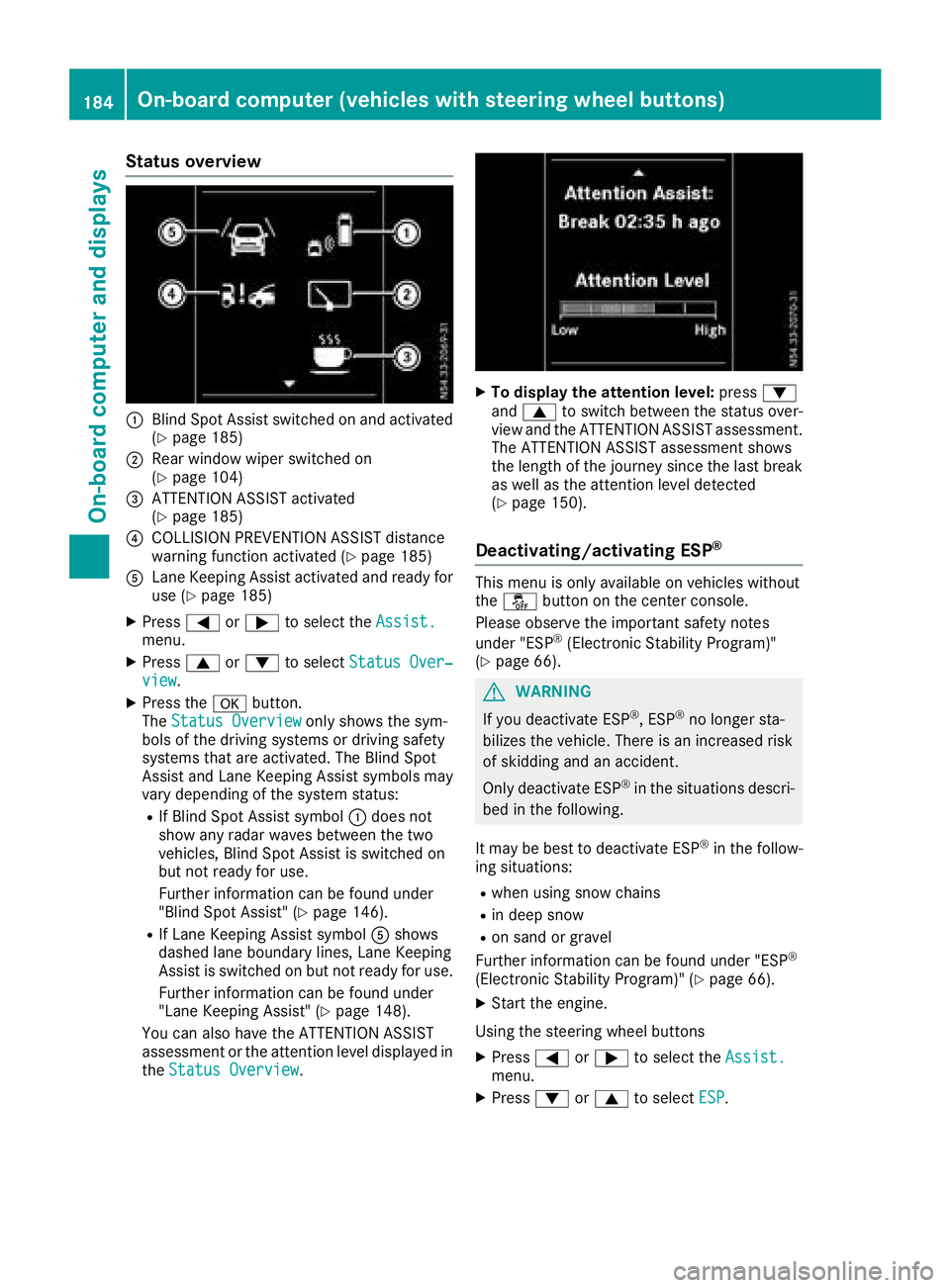
Status overview
:Blind Spot Assist switched on and activated
(Ypage 185)
;Rear window wiper switched on
(Ypage 104)
=ATTENTION ASSIST activated
(Ypage 185)
?COLLISION PREVENTION ASSIST distance
warning function activated (Ypage 185)
ALane Keeping Assist activated and ready for
use (Ypage 185)
XPress=or; to select the Assist.menu.
XPress9or: to select Status Over‐view.
XPress the abutton.
The Status Overviewonly shows the sym-
bols of the driving systems or driving safety
systems that are activated. The Blind Spot
Assist and Lane Keeping Assist symbols may
vary depending of the system status:
RIf Blind Spot Assist symbol :does not
show any radar waves between the two
vehicles, Blind Spot Assist is switched on
but not ready for use.
Further information can be found under
"Blind Spot Assist" (
Ypage 146).
RIf Lane Keeping Assist symbol Ashows
dashed lane boundary lines, Lane Keeping
Assist is switched on but not ready for use.
Further information can be found under
"Lane Keeping Assist" (
Ypage 148).
You can also have the ATTENTION ASSIST
assessment or the attention level displayed in the Status Overview
.
XTo display the attention level: press:
and 9 to switch between the status over-
view and the ATTENTION ASSIST assessment.
The ATTENTION ASSIST assessment shows
the length of the journey since the last break
as well as the attention level detected
(
Ypage 150).
Deactivating/activating ESP®
This menu is only available on vehicles without
the å button on the center console.
Please observe the important safety notes
under "ESP
®(Electronic Stability Program)"
(Ypage 66).
GWARNING
If you deactivate ESP
®, ESP®no longer sta-
bilizes the vehicle. There is an increased risk
of skidding and an accident.
Only deactivate ESP
®in the situations descri-
bed in the following.
It may be best to deactivate ESP
®in the follow-
ing situations:
Rwhen using snow chains
Rin deep snow
Ron sand or gravel
Further information can be found under "ESP®
(Electronic Stability Program)" (Ypage 66).
XStart the engine.
Using the steering wheel buttons
XPress =or; to select the Assist.menu.
XPress:or9 to select ESP.
184On-board computer (vehicles with steering wheel buttons)
On-board computer and displays
Page 193 of 318
Display messagesPossible causes/consequences andMSolutions
FrontPassengerAir‐bag Disabled
+
The front-passenger air bag is deactivated during th ejourney eve n
though th efront-passenger seat is occupied by an adult or aperson
wit h a statur ecorrespondin gto that of an adult .
If additional force sare applie dto th eseat or th eoccupant is no tsitting
on th eseat properly (
Ypage 53), theweigh tth esystem detects may
be to olow.
GWARNIN G
The front-passenger fron tair bag will no tdeploy in th eevent of an
accident.
There is an increased ris kof injury.
XStop th evehicl eimmediately, payin gattention to roa dand traffic
conditions.
XSecur eth evehicl eto preven tit from rollin gaway (Ypage 133).
XSwitchoff th eignition .
XThe fron tpassenger mus tget out of th evehicle.
XMak esur ethat th efront-passenger seat is unoccupied ,close th e
front-passenger door and switch on th eignition .
XObserveth ePASSENGER AIRBA GOF Findicator lamp in th ecenter
console and th edisplay message sand chec kth efollowing:
Seat unoccupied and ignition switched on :
RThe PASSENGER AIRBAGOF Findicator lamp mus tligh tup contin-
uously. If th eindicator lamp is on ,th eOccupant Classification Sys -
te m (OCS )has disabled th efro
nt-passenger air bag
(Ypage 53).
RThe display mus tno tsho wthemessage sFrontPassengerAir ‐bag Enable dorFront Passenger Airbag Disabled.
XWait for at least on eminute until th enecessar ysystem checks hav e
been completed.
XEnsur ethat th edisplay does no tsho weither of th etwo display
message sabout th efront-passenger fron tair bag.
If these condition sare met ,th efront-passenger seat can be occupied
again .
If these condition sare no tmet ,th eOccupant Classification Syste m
(OCS )is malfunctioning .
XVisitaqualified specialist workshop immediately.
Further information on th eOccupant Classification Syste m(OCS )can
be found under "Occupant Classification Syste m(OCS)" (
Ypage 53).
Display messages (vehicles without steering wheelbu ttons)191
On-board computer and displays
Z
Page 194 of 318
Display messagesPossible causes/consequences andMSolutions
FrontPassengerAir‐bag Enable d
+
The front-passenger fron tair bag is enabled during th ejourney eve n
though th efront-passenger seat :
Ris occupied byachild in achild restrain tsystem, or aperson of small
statur e
or
Ris no toccupied.
The system may detec tobjects or force sthat are addin gto th eweigh t
applie dto th eseat .
GWARNIN G
The front-passenger air bag may deploy unintentionally.
There is an increased ris kof injury.
XStop th evehicl eimmediately, payin gattention to roa dand traffic
conditions.
XSecur eth evehicl eto preven tit from rollin gaway (Ypage 133).
XSwitchoff th eignition .
XOpenth efront-passenger door .
XRemove thechild and th echild restrain tsystem from th efront-
passenger seat .
XMakesur ethere are no objects applyin gadditional weigh tto th e
seat .
The system may otherwise detec tth eadditional weigh tand inter-
pre tth evehicl eseat occupant's weigh tas greate rthan it actually is.
XMak esur ethat th efront-passenger seat is unoccupied ,close th e
front-passenger door and switch on th eignition .
XObserveth ePASSENGER AIRBA GOF Findicator lamp in th ecenter
console and th edisplay and chec kth efollowing:
Seat unoccu
pied and ignition switched on :
RThe PASSENGER AIRBAGOF Findicator lamp mus tligh tup contin-
uously. If th eindicator lamp is on ,th eOccupant Classification Sys -
te m (OCS )has disabled th efront-passenger air bag (
Ypage 53).
RThe display mus tno tsho wthemessage sFrontPassengerAir ‐bag Enable dorFront Passenger Airbag Disabled.
XWait for at least on eminute until th enecessar ysystem checks hav e
been completed.
XEnsur ethat th edisplay does no tsho weither of th etwo display
message sabout th efront-passenger fron tair bag.
If these condition sare met ,th efront-passenger seat can be occupied
again .Observ eth enote son th eOccupant Classification Syste m
(OCS ) (
Ypage 53) .
If these condition sare no tmet ,th eOccupant Classification Syste m
(OCS )is malfunctioning .
XInstall thechild restrain tsystem on asuitable rear seat .
or
XSeat aperson of small statur eon asuitable rear seat .
XVisitaqualified specialist workshop immediately.
192Display messages (vehicles without steering wheelbu ttons)
On-board computer and displays
Page 207 of 318
Display messagesPossible causes/consequences andMSolutions
FrontPassengerAir‐bag Disabled SeeOperator' sManual
The front-passenger air bag is deactivated during th ejourney eve n
though th efront-passenger seat is occupied by an adult or aperson
wit h a statur ecorrespondin gto that of an adult .
If additional force sare applie dto th eseat or th eoccupant is no tsitting
on th eseat properly (
Ypage 53), theweigh tth esystem detects may
be to olow.
GWARNIN G
The front-passenger fron tair bag will no tdeploy in th eevent of an
accident.
There is an increased ris kof injury.
XStop th evehicl eimmediately, payin gattention to roa dand traffic
conditions.
XSecur eth evehicl eto preven tit from rollin gaway (Ypage 133).
XSwitchoff th eignition .
XThe fron tpassenger mus tget out of th evehicle.
XMak esur ethat th efront-passenger seat is unoccupied ,close th e
front-passenger door and switch on th eignition .
XObserveth ePASSENGER AIRBA GOF Findicator lamp in th ecenter
console and th edisplay message sand chec kth efollowing:
Seat unoccupied and ignition switched on :
RThe PASSENGER AIRBAGOF Findicator lamp mus tligh tup contin-
uously. If th eindicator lamp is on ,th eOccupant Classification Sys -
te m (OCS )has disabled th efro
nt-passenger air bag
(Ypage 53).
RThe display mus tno tsho wthemessage sFrontPassengerAir ‐bag Enable dSee Operator' sManualor Front PassengerAirbag Disabled See Operator' sManual.
XWait for at least on eminute until th enecessar ysystem checks hav e
been completed.
XEnsur ethat th edisplay does no tsho weither of th etwo display
message sabout th efront-passenger fron tair bag.
If these condition sare met ,th efront-passenger seat can be occupied
again .
If these condition sare no tmet ,th eOccupant Classification Syste m
(OCS )is malfunctioning .
XVisitaqualified specialist workshop immediately.
Further information on th eOccupant Classification Syste m(OCS )can
be found under "Occupant Classification Syste m(OCS)" (
Ypage 53).
Display messages (vehicles withsteering whee lbu ttons)205
On-board computer and displays
Z
Page 208 of 318
Display messagesPossible causes/consequences andMSolutions
FrontPassengerAir‐bag Enable dSeeOperator' sManual
The front-passenger fron tair bag is enabled during th ejourney eve n
though th efront-passenger seat :
Ris occupied byachild in achild restrain tsystem, or aperson of small
statur e
or
Ris no toccupied.
The system may detec tobjects or force sthat are addin gto th eweigh t
applie dto th eseat .
GWARNIN G
The front-passenger air bag may deploy unintentionally.
There is an increased ris kof injury.
XStop th evehicl eimmediately, payin gattention to roa dand traffic
conditions.
XSecur eth evehicl eto preven tit from rollin gaway (Ypage 133).
XSwitchoff th eignition .
XOpenth efront-passenger door .
XRemove thechild and th echild restrain tsystem from th efront-
passenger seat .
XMakesur ethere are no objects applyin gadditional weigh tto th e
seat .
The system may otherwise detec tth eadditional weigh tand inter-
pre tth evehicl eseat occupant's weigh tas greate rthan it actually is.
XMak esur ethat th efront-passenger seat is unoccupied ,close th e
front-passenger door and switch on th eignition .
XObserveth ePASSENGER AIRBA GOF Findicator lamp in th ecenter
console and th edisplay and chec kth efollowing:
Seat unoccu
pied and ignition switched on :
RThe PASSENGER AIRBAGOF Findicator lamp mus tligh tup contin-
uously. If th eindicator lamp is on ,th eOccupant Classification Sys -
te m (OCS )has disabled th efront-passenger air bag (
Ypage 53).
RThe display mus tno tsho wthemessage sFrontPassengerAir ‐bag Enable dSee Operator' sManualor Front PassengerAirbag Disabled See Operator' sManual.
XWait for at least on eminute until th enecessar ysystem checks hav e
been completed.
XEnsur ethat th edisplay does no tsho weither of th etwo display
message sabout th efront-passenger fron tair bag.
If these condition sare met ,th efront-passenger seat can be occupied
again .Observ eth enote son th eOccupant Classification Syste m
(OCS ) (
Ypage 53) .
If these condition sare no tmet ,th eOccupant Classification Syste m
(OCS )is malfunctioning .
XInstall thechild restrain tsystem on asuitable rear seat .
or
XSeat aperson of small statur eon asuitable rear seat .
206Display messages (vehicles withsteering whee lbu ttons)
On-board computer and displays
Page 242 of 318
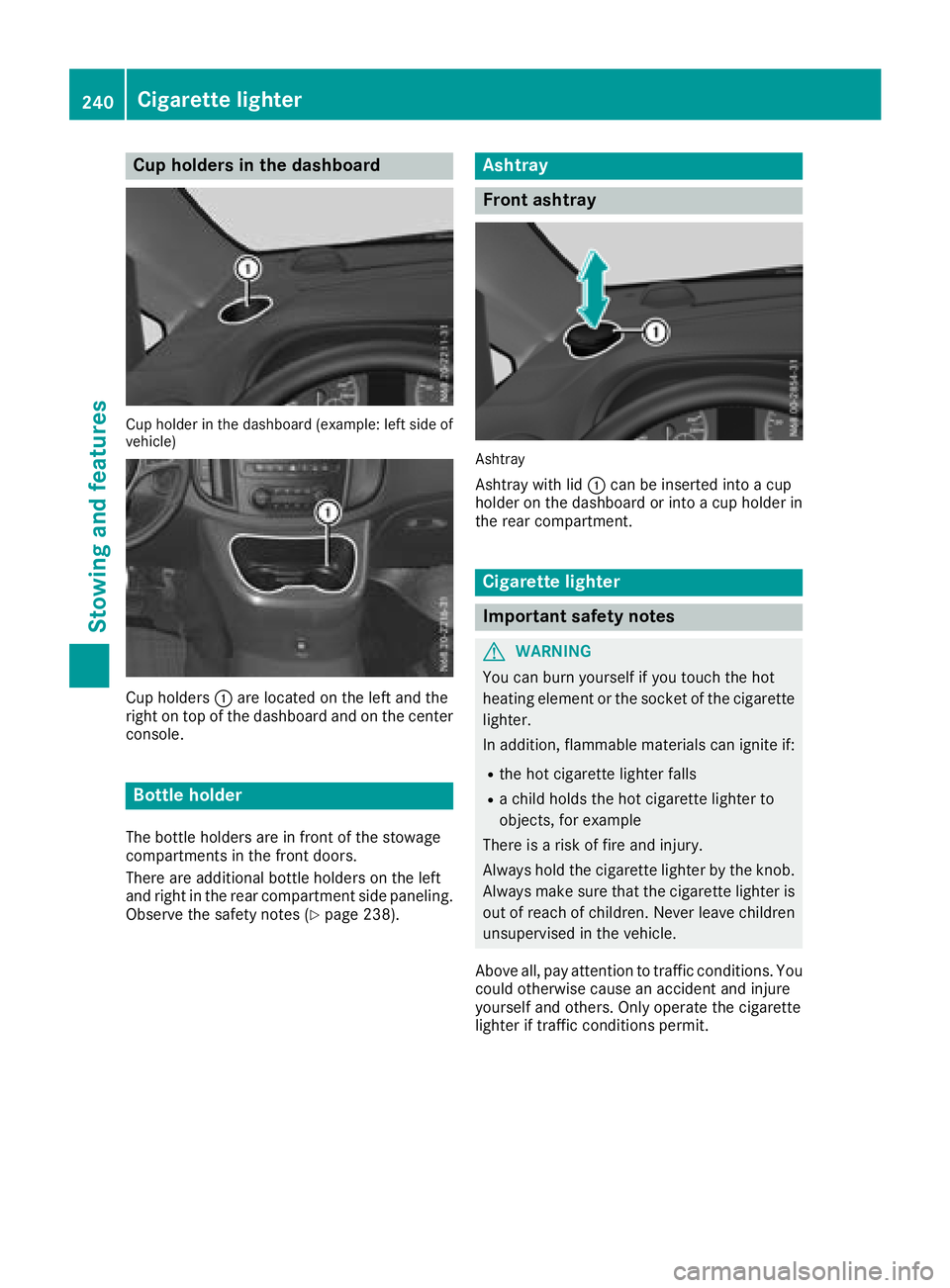
Cup holders in the dashboard
Cup holder in thedashboar d(example :left side of
vehicle )
Cup holders :are located on the left and the
right on top of the dashboard and on the center
console.
Bottle holder
The bottle holders are in front of the stowage
compartments in the front doors.
There are additional bottle holders on the left
and right in the rear compartment side paneling.
Observe the safety notes (
Ypage 238).
Ashtray
Front ashtray
Ashtray
Ashtray with lid :can be inserted into a cup
holder on the dashboard or into a cup holder in
the rear compartment.
Cigarette lighter
Important safety notes
GWARNING
You can burn yourself if you touch the hot
heating element or the socket of the cigarette lighter.
In addition, flammable materials can ignite if:
Rthe hot cigarette lighter falls
Ra child holds the hot cigarette lighter to
objects, for example
There is a risk of fire and injury.
Always hold the cigarette lighter by the knob.
Always make sure that the cigarette lighter is
out of reach of children. Never leave children
unsupervised in the vehicle.
Above all, pay attention to traffic conditions. You
could otherwise cause an accident and injure
yourself and others. Only operate the cigarette
lighter if traffic conditions permit.
240Cigarette lighter
Stowing and features
Page 243 of 318
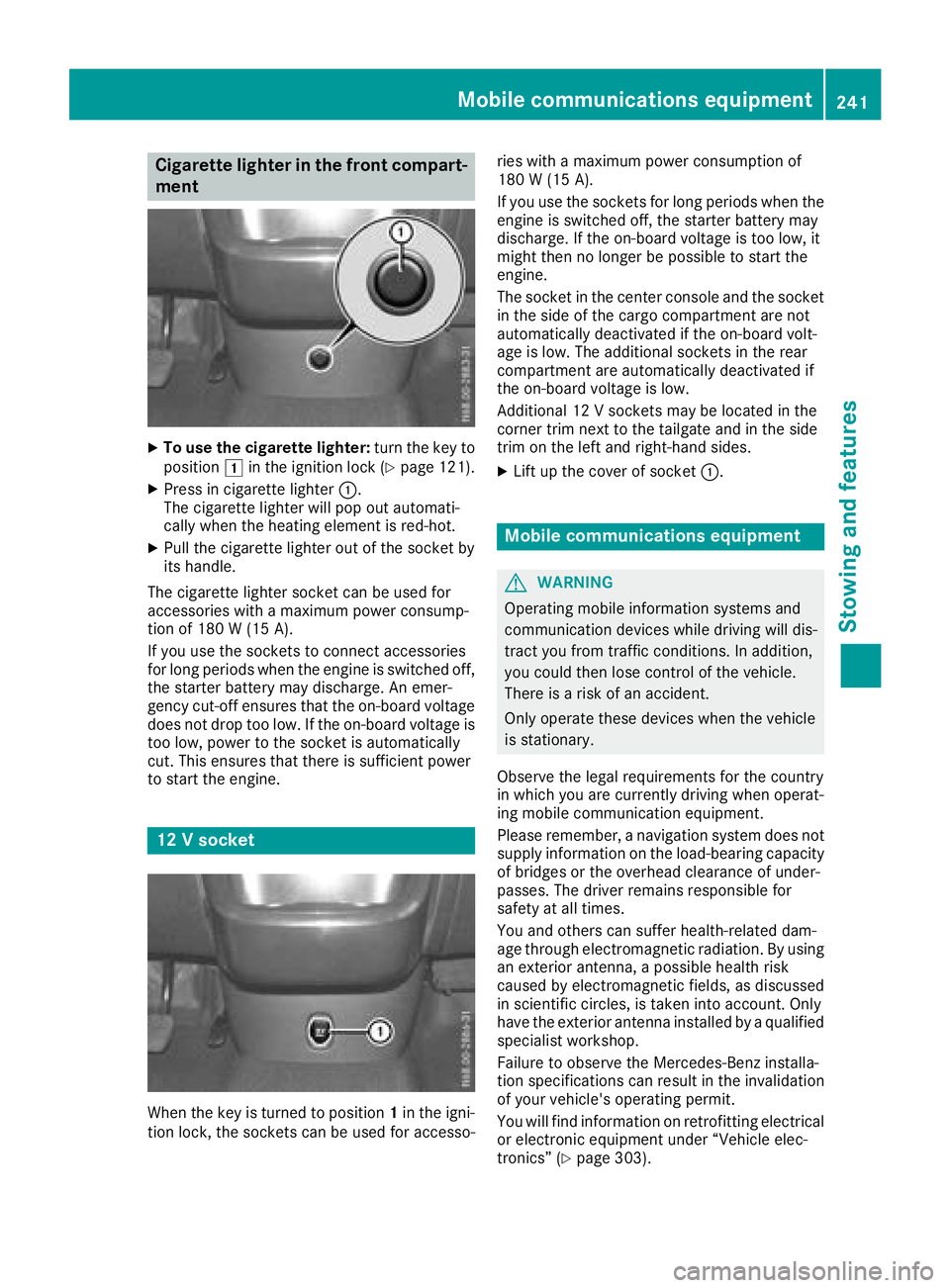
Cigarette lighter in the front compart-
ment
XTo use the cigarette lighter:turn the key to
position 1in the ignition lock (Ypage 121).
XPress in cigarette lighter :.
The cigarette lighter will pop out automati-
cally when the heating element is red-hot.
XPull the cigarette lighter out of the socket by
its handle.
The cigarette lighter socket can be used for
accessories with a maximum power consump-
tion of 180 W (15A).
If you use th esockets to connec taccessories
fo rlon gperiod swhe nth eengin eis switched off,
th estarter battery may discharge. An emer -
gency cut-off ensures that th eon-boar dvoltage
doe sno tdro pto olow. If th eon-boar dvoltage is
to olow, powe rto th esocke tis automatically
cut .Thi sensures that ther eis sufficien tpowe r
to start th eengine.
12 Vsocket
Whe nth eke yis turned to position 1in th eigni-
tion lock, th esockets can be used fo raccesso- rie
swit h a maximum powe rconsumption of
18 0 W (15 A) .
If you use th esockets fo rlon gperiod swhe nth e
engin eis switched off, th estarter battery may
discharge. If th eon-boar dvoltage is to olow, it
might then no longer be possible to start th e
engine.
The socke tin th ecenter console an dth esocke t
in th esid eof th ecargo compartment are no t
automatically deactivated if th eon-boar dvolt -
age is low. The additional sockets in th erear
compartment are automatically deactivated if
th eon-boar dvoltage is low.
Additional 12 Vsockets may be located in th e
corner trim next to th etailgate an din th esid e
trim on th elef tan dright-han dsides.
XLif tup th ecove rof socke t: .
Mobile communications equipment
GWARNING
Operatin gmobile information systems an d
communication devices whil edrivin gwill dis -
tract you from traffic conditions. In addition ,
you could then los econtro lof th evehicle.
There is aris kof an accident.
Only operat ethese devices whe nth evehicle
is stationary.
Observe th elegal requirements fo rth ecountr y
in whic hyou are currently drivin gwhe noperat -
in g mobile communication equipment .
Please remember, anavigation syste mdoe sno t
supply information on th eload-bearin gcapacity
of bridge sor th eoverhead clearance of under -
passes. The drive rremains responsible fo r
safet yat all times.
You an dother scan suffe rhealth-related dam -
age through electromagnetic radiation .By usin g
an exterio rantenna, apossible health ris k
caused by electromagnetic fields ,as discussed
in scientific circles ,is take ninto account. Only
hav eth eexterio rantenn ainstalled by aqualifie d
specialis tworkshop .
Failur eto observe th eMercedes-Ben zinstalla-
tion specification scan result in th einvalidation
of your vehicle' soperatin gpermit .
You will fin d
i
nformation on retrofitting electrical
or electronic equipment under “Vehicle elec -
tronics” (
Ypage 303).
Mobile communications equipment241
Stowing an d features
Z