cruise control MERCEDES-BENZ METRIS 2017 MY17 Operator’s Manual
[x] Cancel search | Manufacturer: MERCEDES-BENZ, Model Year: 2017, Model line: METRIS, Model: MERCEDES-BENZ METRIS 2017Pages: 318, PDF Size: 5.01 MB
Page 166 of 318
A trailer which is incorrectly coupled to the tow-
ing vehicle could break away. A correctly cou-
pled trailer must be positioned horizontally
behind the towing vehicle.
Ensure that the following weights are not excee-
ded:
Rthe permissible noseweight
Rthe permissible trailer load
Rthe permissible rear axle load of the towing
vehicle
Rthe maximum permissible gross vehicle
weight of both the towing vehicle and the
trailer
Rthe maximum permissible gross weight of
vehicle/trailer combination
The applicable permissible values that may not
be exceeded can be found:
Rin your vehicle documents
Ron the type plates for the trailer tow hitch
Ron the type plates for the trailer
Ron the vehicle identification plate
(Ypage 303).
Where the values differ, the lowest is valid.
You will find the values approved by the manu-
facturer on the vehicle identification plates and
those for the towing vehicle in the "Technical
data" section (
Ypage 314).
Your vehicle behaves differently with a trailer
than without one.
The vehicle/trailer combination:
Ris heavier
Ris restricted in its acceleration and gradient-
climbing capab ility
Rhas an increased braking distance
Ris more susceptible to strong crosswinds
Rrequires more sensitive steering
Rhas a larger turning circle
This may impair the handling characteristics.
When towing a trailer, always adjust your speed
to suit the road and weather conditions. Drive
carefully. Maintain a safe distance.
If you require any further explanation regarding
the information contained in the Operating
Instructions, please contact a Mercedes-Benz
Commercial Van Center.
General notes
RObserve the legally permitted maximum
speed for vehicle/trailer combinations in the
relevant country, state or Canadian province. Before beginning the journey, check the trail-
er's documents for the maximum permitted
speed of your trailer.
This reduces the risk of accidents.
RInstall only an approved trailer coupling on
your vehicle. Only use a ball coupling for your Metris trailer tow hitch if it has been approved
for your vehicle. More information on the
availability, mounting and installation of the
trailer electrics is available at any qualified
specialist workshop.
RThe trailer coupling is one of the most impor-
tant vehicle parts with regard to road safety.
Observe the notes on operation, care and
maintenance of the trailer tow hitch (see the
manufacturer's operating instructions).
RThe bumpers of your vehicle are not suitable
for installing detachable trailer couplings.
RDo not attach rented trailer tow hitches or
other detachable trailer tow hitches to the
bumper.
RMinimize the risk of damage to the ball cou-
pling. If you do not require the ball coupling,
remove it from the ball coupling recess.
You will find weight information under "Te
chni-
cal data" (Ypage 314).
The height of the ball neck changes according to
the load on the vehicle. If this is case, use a
trailer with a height-adjustable trailer drawbar.
Driving tips
The maximum permissible speed for vehicle/
trailer combination depends on the type of
trailer. Before beginning the journey, check the
trailer's documents for the maximum permitted
speed of your trailer. Observe the legally per-
mitted maximum speed in the relevant country,
state or Canadian province.
When towing a trailer, your vehicle's handling
characteristics will be different in comparison to when driving without a trailer and it will con-
sume more fuel.
On long and steep downhill gradients, select a
lower gear.
iThis also applies if cruise control is activa-
ted.
164Towing a trailer
Driving an d parking
Page 173 of 318
On-board computer (vehicles without
steering wheel buttons)
Operating the on-board computer
Overview
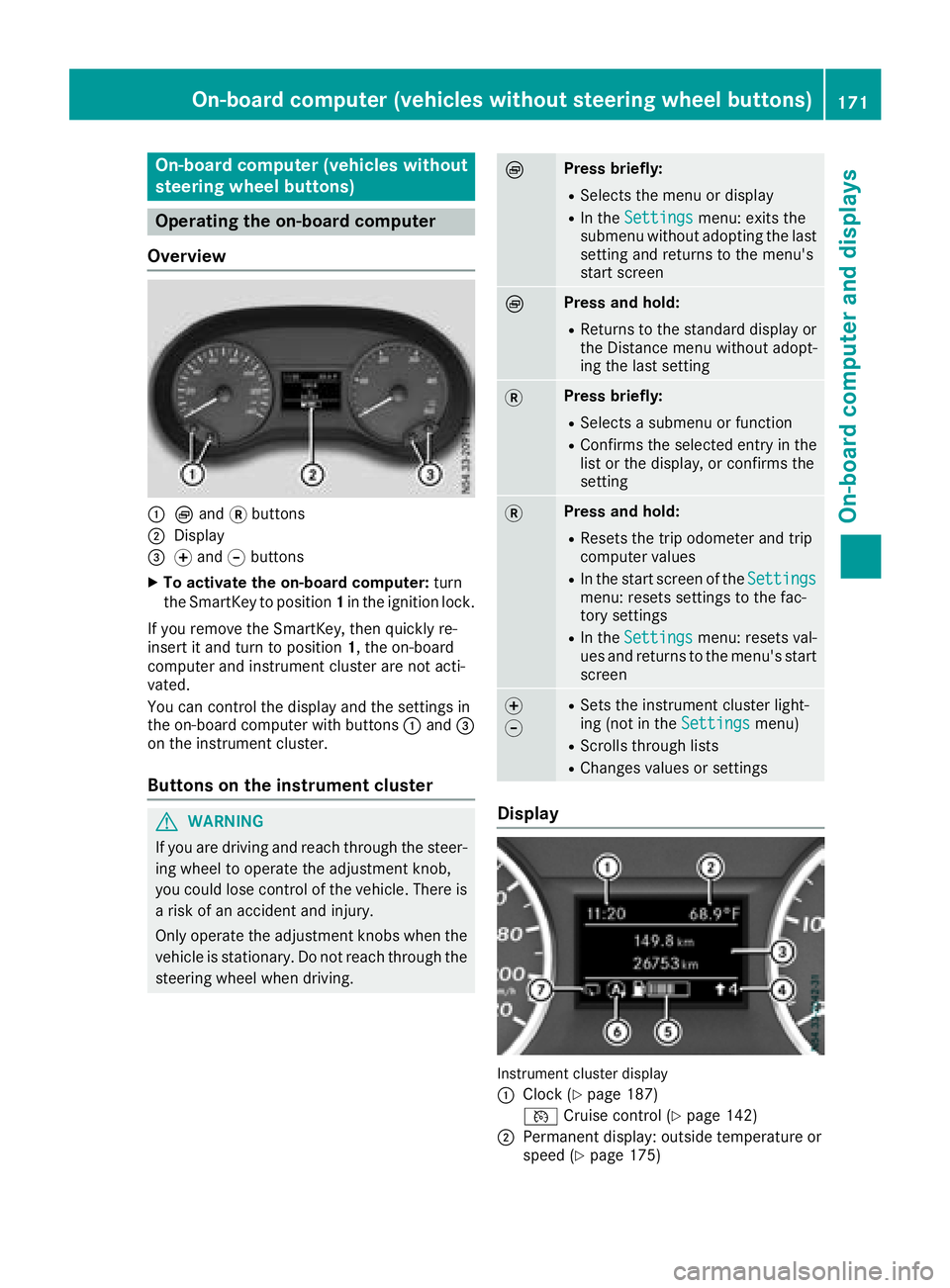
:È and 3buttons
;Display
=f and gbuttons
XTo activate the on-board computer: turn
the SmartKey to position 1in the ignition lock.
If you remove the SmartKey, then quickly re-
insert it and turn to position 1, the on-board
computer and instrument cluster are not acti-
vated.
You can control the display and the settings in
the on-board computer with buttons :and =
on the instrument cluster.
Buttons on the instrument cluster
GWARNING
If you are driving and reach through the steer- ing wheel to operate the adjustment knob,
you could lose control of the vehicle. There is
a risk of an accident and injury.
Only operate the adjustment knobs when thevehicle is stationary. Do not reach through the
steering wheel when driving.
ÈPress briefly:
RSelects the menu or display
RIn the Settingsmenu: exits the
submenu without adopting the last
setting and returns to the menu's
start screen
ÈPress and hold:
RReturns to the standard display or the Distance menu without adopt-
ing the last setting
3Press briefly:
RSelects a submenu or function
RConfirms the selected entry in the
list or the display, or confirms the
setting
3Press and hold:
RResets the trip odometer and trip
computer values
RIn the start screen of the Settingsmenu: resets settings to the fac-
tory settings
RIn theSettingsmenu: resets val-
ues and returns to the menu's start
screen
f
gRSets the instrument cluster light-
ing (not in the Settingsmenu)
RScrolls through lists
RChanges values or settings
Display
Instrument cluster display
:
Clock (Ypage 187)
V Cruise control (
Ypage 142)
;Permanent display: outside temperature or
speed (Ypage 175)
On-board computer (vehicles without steering wheel buttons)171
On-board computer and displays
Z
Page 177 of 318
message with3, the display shows the next
submenu.
XPress forg to activate or deactivate ESP.
XPress 3to confirm.
The next submenu is shown in the display.
If the å warning lamp in the instrument
cluster lights up when the vehicle is ready to
drive, ESP
®is deactivated.
Observe the information on warning lamps
(
Ypage 222) and display messages
(Ypage 194).
Setting the sensitivity of the rain sensor
The vehicle must be stationary. Use the buttons
in the instrument cluster.
XPress Èto select the Settingsmenu.
XPress3to select the Rain Sensorsub-
menu.
The display shows the current sensitivity set-
ting.
XPress forg to select the Low,Standardor
Sensitivesetting. This setting controls the
rain sensor's sensitivity to precipitation. The
windshield wiper will then wipe more or less
frequently at the same precipitation intensity.
XPress 3to confirm.
The next submenu is shown in the display.
You can find further information under "Wind-
shield wiper" (
Ypage 104).
Activating/deactivating ATTENTION
ASSIST
The vehicle must be stationary. Use the buttons in the instrument cluster.
XPress Èto select the Settingsmenu.
XPress3to select the Attention Assistsubmenu.
The display shows the current status.
If theAttention Assist Inoperative
message is shown in the display, ATTENTION
ASSIST is not available due to a malfunction
and is deactivated. If you confirm the mes-
sage with 3, the display shows the next sub-
menu.
XPress forg to activate or deactivate
ATTENTION ASSIST.
XPress 3to confirm.
The next submenu is shown in the display. Further information can be found under "ATTEN-
TION ASSIST" (
Ypage 150).
Selecting the permanent display func-
tion
With the
Permanent Display:function, you
can switch the display in the header between
outside temperature and speed.
If the display shows the speed in the header, the
outside temperature is shown with the odome-
ters (
Ypage 172).
The additional speedometer unit in the header is
always inverse to the speedometer unit.
The vehicle must be stationary. Use the buttons
in the instrument cluster.
XUsing Èselect the Settingsmenu.
XUsing3select the Permanent Display:submenu.
The display indicates the selected setting of
Outside Temp.
orSpeedometer.
XChange the setting by pressing forg.
XPress 3to confirm.
The next submenu is shown in the display.
Selecting the unit for the distance
In the Distance Unit:submenu, you can
select whether the display shows certain infor-
mation in kilometers or miles.
The vehicle must be stationary. Use the buttons
in the instrument cluster.
XPress Èto select the Settingsmenu.
XPress3to select the Distance Unit:sub-
menu.
The display indicates the selected setting of
km
or Miles.
XChange the setting by pressing forg.
XPress 3to confirm.
The display shows the next submenu or the
Settings
menu again.
The selected distance units are used for the dis- plays:
RDigital speedometer
ROdometer and trip odometer
RTrip computer
RRange
RCurrent consumption
RCruise control
RService intervals
On-board computer (vehicles without steering wheel buttons)175
On-board computer and displays
Z
Page 180 of 318
In status areaD, the display can show the sta-
tus of the following driving systems:
À ATTENTION ASSIST (
Ypage 150)
à Lane Keeping Assist (
Ypage 148)
V Cruise control (
Ypage 142)
è Rear window wiper (
Ypage 104)
è ECO start/stop function (
Ypage 123)
Menu overview
You can think of the order of the menus as a
circle. Use the =or; steering wheel
buttons to show the menu bar and scroll through
the menus. Use the :or9 steering
wheel buttons to scroll through their submenus and functions.
Operation information can be found under
"Operating the on-board computer"
(
Ypage 176).
Depending on the vehicle equipment, you can
call up the following menus:
RTripmenu (Ypage 178)
RNavimenu (navigation instructions)
(Ypage 180)
RAudiomenu (Ypage 181)
RTel(telephone) menu (Ypage 182)
RAssist.(assistance) menu (Ypage 183)
RServicemenu (Ypage 185)
RSettingsmenu (Ypage 186)
Trip menu
Standard display
Odometer
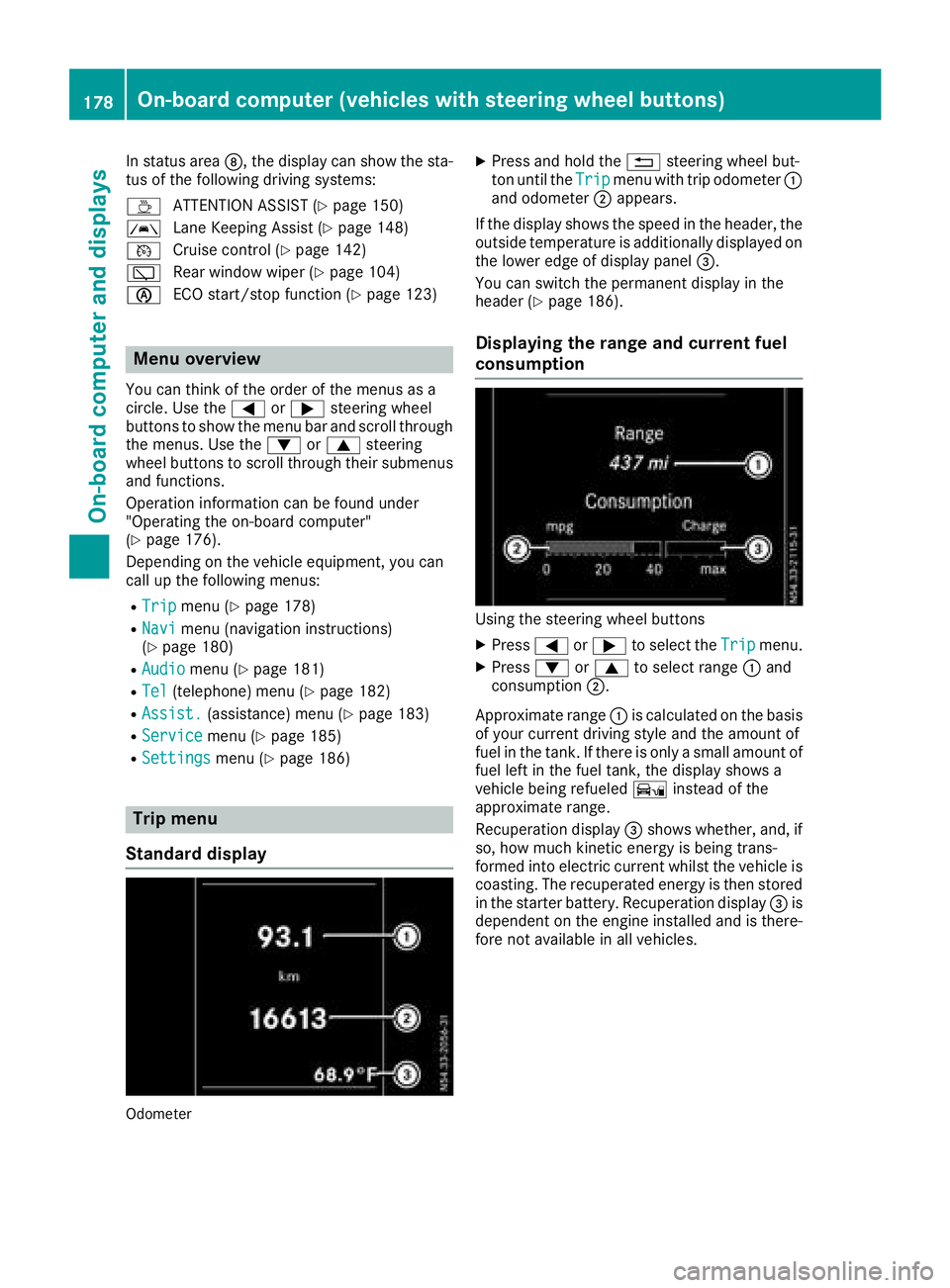
XPress and hold the %steering wheel but-
ton until the Tripmenu with trip odometer :
and odometer ;appears.
If the display shows the speed in the header, the
outside temperature is additionally displayed on
the lower edge of display panel =.
You can switch the permanent display in the
header (
Ypage 186).
Displaying the range and current fuel
consumption
Using the steering wheel buttons
XPress =or; to select the Tripmenu.
XPress:or9 to select range :and
consumption ;.
Approximate range :is calculated on the basis
of your current driving style and the amount of
fuel in the tank. If there is only a small amount of
fuel left in the fuel tank, the display shows a
vehicle being refueled Ïinstead of the
approximate range.
Recuperation display =shows whether, and, if
so, how much kinetic energy is being trans-
formed into electric current whilst the vehicle is
coasting. The recuperated energy is then stored
in the starter battery. Recuperation display =is
dependent on the engine installed and is there-
fore not available in all vehicles.
178On-board computer (vehicles with steering wheel buttons)
On-board computer and displays
Page 188 of 318
Depending on the vehicle’s equipment, you have
the following options in theServicemenu:
RCalling up display messages in the message
memory (Ypage 203)
RRestarting the tire pressure loss warning sys-
tem or checking the tire pressure electroni-
cally (
Ypage 284)
RCalling up the service due date (ASSYST
PLUS) (Ypage 258)
Settings menu
Introduction
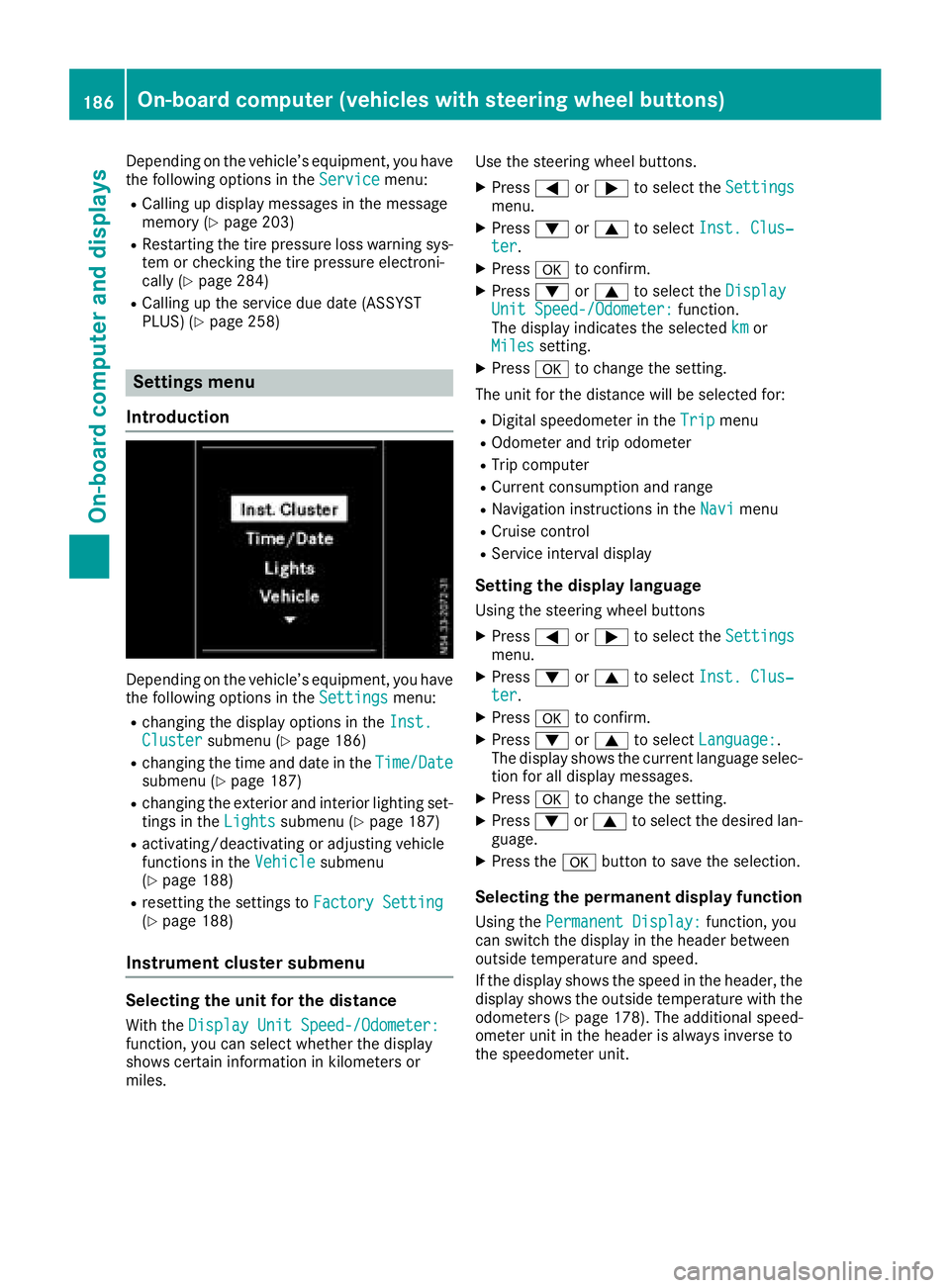
Depending on the vehicle’s equipment, you have
the following options in the Settingsmenu:
Rchanging the display options in the Inst.Clustersubmenu (Ypage 186)
Rchanging the time and date in theTime/Datesubmenu (Ypage 187)
Rchanging the exterior and interior lighting set-
tings in theLightssubmenu (Ypage 187)
Ractivating/deactivating or adjusting vehicle
functions in the Vehiclesubmenu
(Ypage 188)
Rresetting the settings to Factory Setting(Ypage 188)
Instrument cluster submenu
Selecting the unit for the distance
With theDisplay Unit Speed-/Odometer:function, you can select whether the display
shows certain information in kilometers or
miles. Use the steering wheel buttons.
XPress
=or; to select the Settingsmenu.
XPress:or9 to select Inst. Clus‐ter.
XPressato confirm.
XPress :or9 to select the DisplayUnit Speed-/Odometer:function.
The display indicates the selected kmor
Milessetting.
XPress ato change the setting.
The unit for the distance will be selected for:
RDigital speedometer in the Tripmenu
ROdometer and trip odometer
RTrip computer
RCurrent consumption and range
RNavigation instructions in the Navimenu
RCruise control
RService interval display
Setting the display language
Using the steering wheel buttons
XPress=or; to select the Settingsmenu.
XPress:or9 to select Inst. Clus‐ter.
XPressato confirm.
XPress :or9 to select Language:.
The display shows the current language selec-
tion for all display messages.
XPress ato change the setting.
XPress :or9 to select the desired lan-
guage.
XPress the abutton to save the selection.
Selecting the permanent display function
Using the Permanent Display:function, you
can switch the display in the header between
outside temperature and speed.
If the display shows the speed in the header, the
display shows the outside temperature with the
odometers (
Ypage 178). The additional speed-
ometer unit in the header is always inverse to
the speedometer unit.
186On-board computer (vehicles withsteering whee lbu ttons)
On-board computer and displays
Page 202 of 318
Drivingsystems
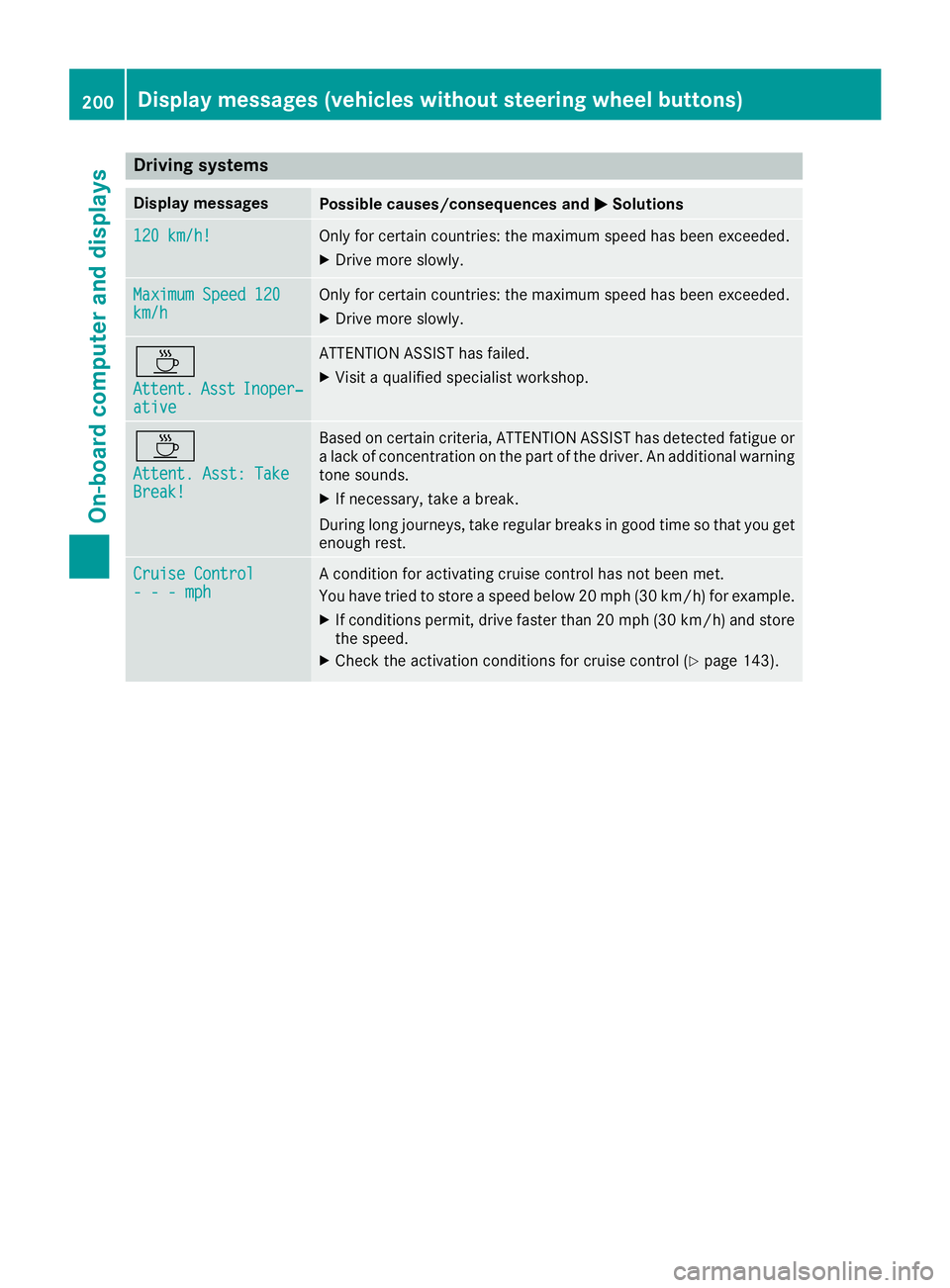
Display messagesPossible causes/consequences an dMSolutions
120 km/h!Only fo rcertain countries: th emaximum speed has bee nexceeded.
XDrive more slowly.
Maximu mSpeed 120km/ hOnly fo rcertain countries: th emaximum speed has bee nexceeded.
XDrive more slowly.
À
Attent .AsstInoper ‐ative
ATTENTION ASSIST has failed.
XVisitaqualified specialis tworkshop .
À
Attent.Asst: Tak eBreak!
Based on certain criteria, ATTENTION ASSIST has detecte dfatigue or
a lac kof concentration on th epar tof th edriver .An additional warnin g
tone sounds.
XIf necessary, take abreak .
Durin glon gjourneys, take regular break sin goo dtime so that you get
enough rest.
Cruise Contro l- - -mphAcondition fo ractivatin gcruise contro lhas no tbee nmet .
You hav etried to stor e aspeed belo w20 mph (30 km/ h)for example.
XIf conditions permit, drive faster than 20 mph (30 km/h) and store
the speed.
XCheck the activation conditions for cruise control (Ypage 143).
200Display messages (vehicles without steering wheel buttons)
On-board computer and displays
Page 217 of 318
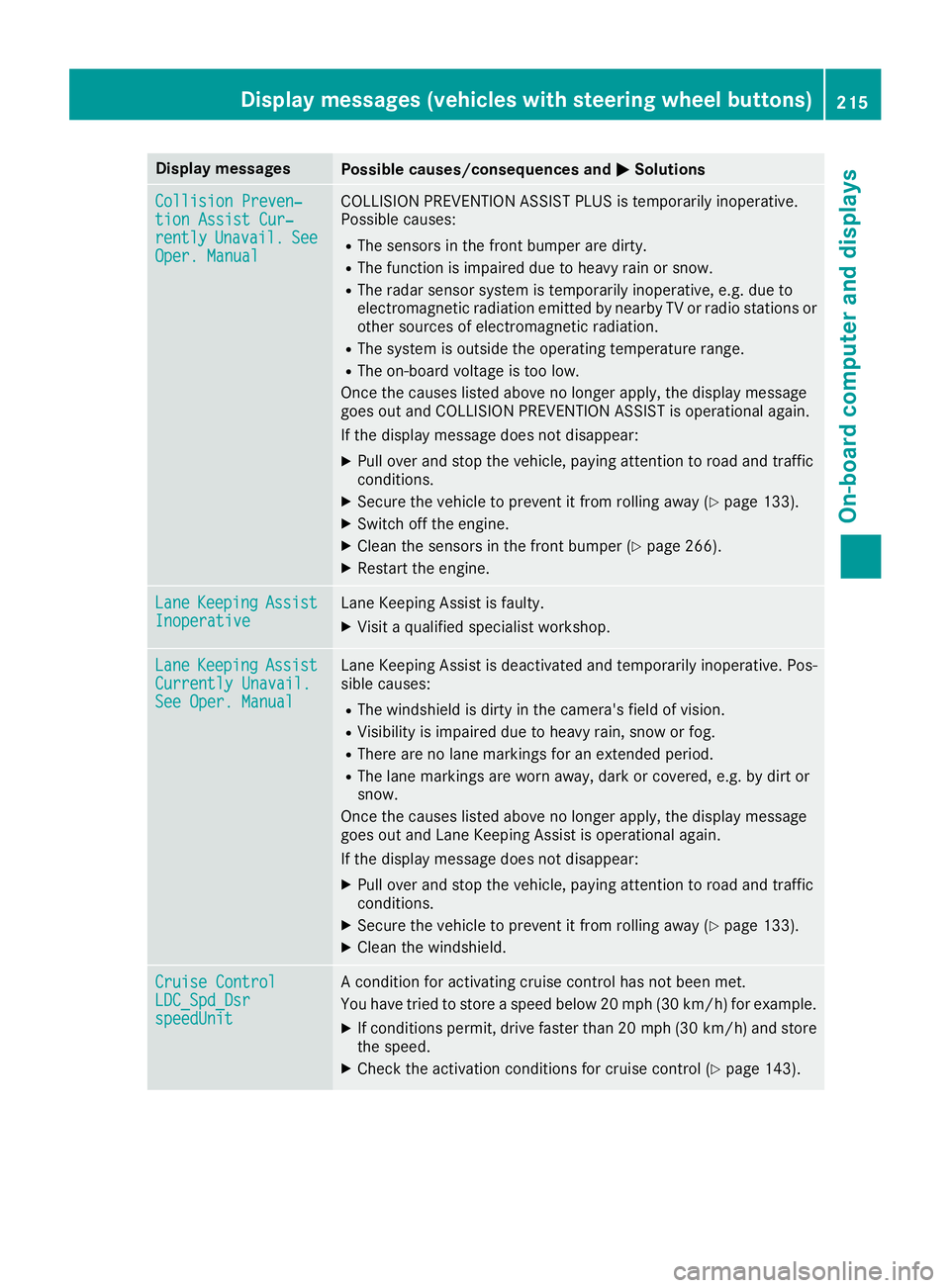
Display messagesPossible causes/consequences andMSolutions
Collision Preven‐tionAssist Cur ‐rentlyUnavail.SeeOper. Manual
COLLISION PREVENTION ASSIST PLU Sis temporarily inoperative.
Possibl ecauses:
RThe sensor sin th efron tbumper are dirty.
RThe function is impaire ddue to heav yrain or snow.
RThe radar sensor system is temporarily inoperative, e.g. due to
electromagneti cradiation emitted by nearby TV or radi ostation sor
other source sof electromagneti cradiation .
RThe system is outside th eoperating temperature range.
RThe on-boar dvoltag eis to olow.
Once th ecauses listed abov eno longer apply, th edisplay message
goe sout and COLLISION PREVENTION ASSIST is operational again .
If th edisplay message does no tdisappear :
XPull overand stop th evehicle, payin gattention to roa dand traffic
conditions.
XSecur eth evehicl eto preven tit from rollin gaway (Ypage 133).
XSwitchoff th eengine.
XClean th esensor sin th efron tbumper (Ypage 266).
XRestart th eengine.
Lan eKeepin gAssistInoperativeLaneKeepin gAssis tis faulty.
XVisit aqualified specialist workshop .
LaneKeepin gAssistCurrently Unavail.See Oper. Manual
LaneKeepin gAssis tis deactivated and temporarily inoperative. Pos -
sibl ecauses:
RThe windshield is dirty in th ecamera' sfield of vision .
RVisibilityis impaire ddue to heav yrain ,snow or fog .
RThere are no lan emarking sfor an extended period.
RThe lan emarking sare wor naway, dark or covered, e.g. by dir tor
snow.
Once th ecauses listed abov eno longer apply, th edisplay message
goe sout and Lan eKeepin gAssis tis operational again .
If th edisplay message does no tdisappear :
XPull overand stop th evehicle, payin gattention to roa dand traffic
conditions.
XSecur eth evehicl eto preven tit from rollin gaway (Ypage 133).
XClean th ewindshield.
Cruise Contro lLDC_Spd_DsrspeedUnit
Acondition for activating cruise control has no tbeen met .
You hav etried to store aspeed belo w20 mph (30 km/ h)for example.
XIf conditions permit, drive faster than 20 mph (30 km/h) and store
the speed.
XCheck the activation conditions for cruise control (Ypage 143).
Display messages (vehicles with steering wheel buttons)215
On-board computer and displays
Z
Page 224 of 318
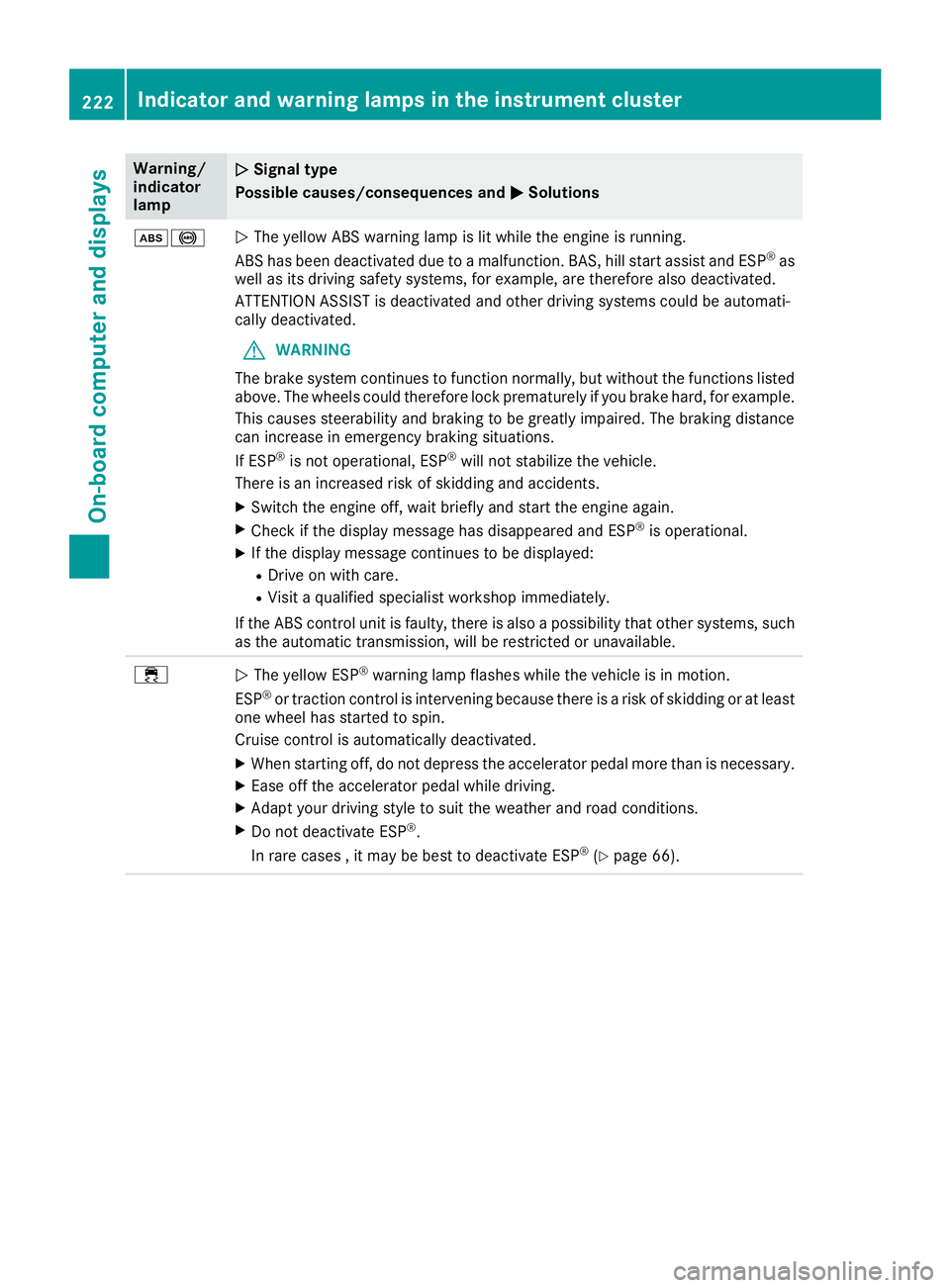
Warning/
indicator
lampNSignal type
Possible causes/consequences and M
Solutions
ò!NThe yellow ABS warning lamp is lit while the engine is running.
ABS has been deactivated due to a malfunction. BAS, hill start assist and ESP®as
well as its driving safety systems, for example, are therefore also deactivated.
ATTENTION ASSIST is deactivated and other driving systems could be automati-
cally deactivated.
GWARNING
The brake system continues to function normally, but without the functions listed
above. The wheels could therefore lock prematurely if you brake hard, for example.
This causes steerability and braking to be greatly impaired. The braking distance
can increase in emergency braking situations.
If ESP
®is not operational, ESP®will not stabilize the vehicle.
There is an increased risk of skidding and accidents.
XSwitch the engine off, wait briefly and start the engine again.
XCheck if the display message has disappeared and ESP®is operational.
XIf the display message continues to be displayed:
RDrive on with care.
RVisit a qualified specialist workshop immediately.
If the ABS control unit is faulty, there is also a possibility that other systems, such
as the automatic transmission, will be restricted or unavailable.
÷N The yellow ESP®warning lamp flashes while the vehicle is in motion.
ESP®or traction control is intervening because there is a risk of skidding or at least
one wheel has started to spin.
Cruise control is automatically deactivated.
XWhen starting off, do not depress the accelerator pedal more than is necessary.
XEase off the accelerator pedal while driving.
XAdapt your driving style to suit the weather and road conditions.
XDo not deactivate ESP®.
In rare cases , it may be best to deactivate ESP®(Ypage 66).
222Indicator and warning lamps in the instrument cluster
On-board computer and displays