tire pressure MERCEDES-BENZ METRIS 2017 MY17 Operator’s Manual
[x] Cancel search | Manufacturer: MERCEDES-BENZ, Model Year: 2017, Model line: METRIS, Model: MERCEDES-BENZ METRIS 2017Pages: 318, PDF Size: 5.01 MB
Page 174 of 318
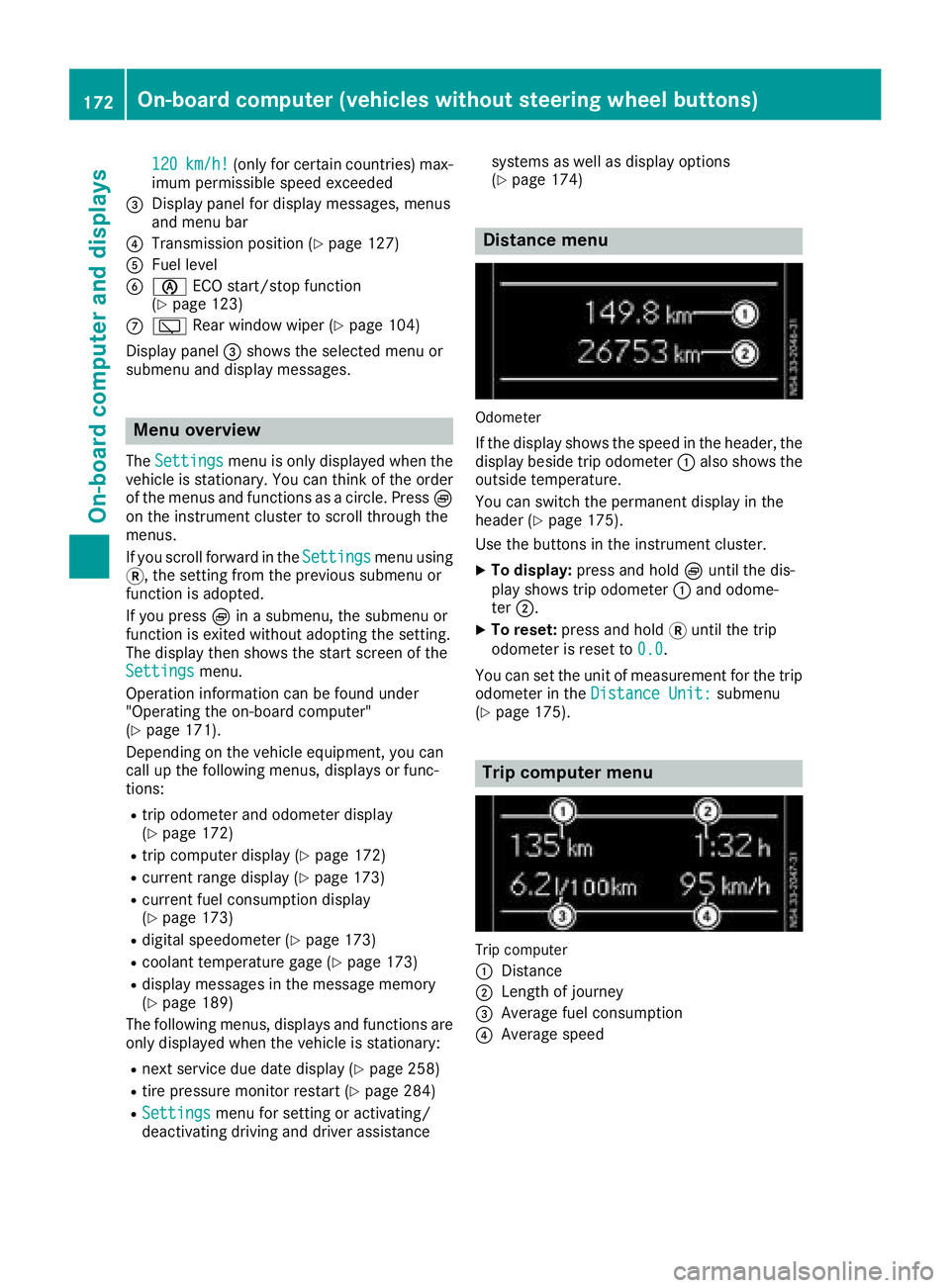
120km/h!(only for certain countries) max-
imum permissible speed exceeded
=Display panel for display messages, menus
and menu bar
?Transmission position (Ypage 127)
AFuel level
Bè ECO start/stop function
(Ypage 123)
Cè Rear window wiper (Ypage 104)
Display panel =shows the selected menu or
submenu and display messages.
Menu overview
The Settingsmenu is only displayed when the
vehicle is stationary. You can think of the order
of the menus and functions as a circle. Press È
on the instrument cluster to scroll through the
menus.
If you scroll forward in the Settings
menu using
3, the setting from the previous submenu or
function is adopted.
If you press Èin a submenu, the submenu or
function is exited without adopting the setting.
The display then shows the start screen of the
Settings
menu.
Operation information can be found under
"Operating the on-board computer"
(
Ypage 171).
Depending on the vehicle equipment, you can
call up the following menus, displays or func-
tions:
Rtrip odometer and odometer display
(Ypage 172)
Rtrip computer display (Ypage 172)
Rcurrent range display (Ypage 173)
Rcurrent fuel consumption display
(Ypage 173)
Rdigital speedometer (Ypage 173)
Rcoolant temperature gage (Ypage 173)
Rdisplay messages in the message memory
(Ypage 189)
The following menus, displays and functions are only displayed when the vehicle is stationary:
Rnext service due date display (Ypage 258)
Rtire pressure monitor restart (Ypage 284)
RSettingsmenu for setting or activating/
deactivating driving and driver assistance systems as well as display options
(
Ypage 174)
Distance menu
Odometer
If the display shows the speed in the header, the
display beside trip odometer
:also shows the
outside temperature.
You can switch the permanent display in the
header (
Ypage 175).
Use the buttons in the instrument cluster.
XTo display: press and hold Èuntil the dis-
play shows trip odometer :and odome-
ter ;.
XTo reset: press and hold 3until the trip
odometer is reset to 0.0
.
You can set the unit of measurement for the trip odometer in the Distance Unit:
submenu
(Ypage 175).
Trip computer menu
Trip computer
:
Distance
;Length of journey
=Average fuel consumption
?Average speed
172On-board computer (vehicles without steering wheel buttons)
On-board computer and displays
Page 188 of 318
Depending on the vehicle’s equipment, you have
the following options in theServicemenu:
RCalling up display messages in the message
memory (Ypage 203)
RRestarting the tire pressure loss warning sys-
tem or checking the tire pressure electroni-
cally (
Ypage 284)
RCalling up the service due date (ASSYST
PLUS) (Ypage 258)
Settings menu
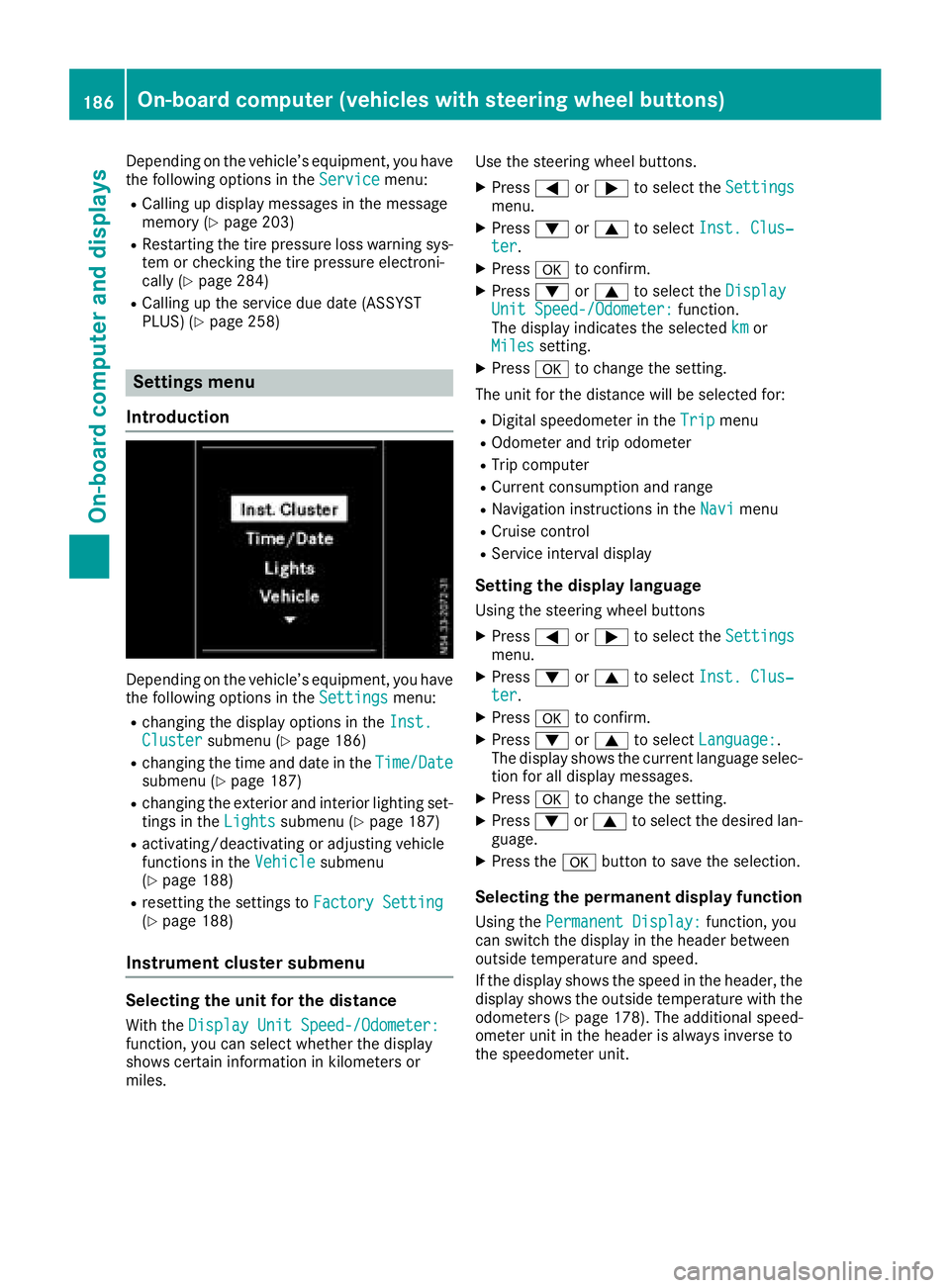
Introduction
Depending on the vehicle’s equipment, you have
the following options in the Settingsmenu:
Rchanging the display options in the Inst.Clustersubmenu (Ypage 186)
Rchanging the time and date in theTime/Datesubmenu (Ypage 187)
Rchanging the exterior and interior lighting set-
tings in theLightssubmenu (Ypage 187)
Ractivating/deactivating or adjusting vehicle
functions in the Vehiclesubmenu
(Ypage 188)
Rresetting the settings to Factory Setting(Ypage 188)
Instrument cluster submenu
Selecting the unit for the distance
With theDisplay Unit Speed-/Odometer:function, you can select whether the display
shows certain information in kilometers or
miles. Use the steering wheel buttons.
XPress
=or; to select the Settingsmenu.
XPress:or9 to select Inst. Clus‐ter.
XPressato confirm.
XPress :or9 to select the DisplayUnit Speed-/Odometer:function.
The display indicates the selected kmor
Milessetting.
XPress ato change the setting.
The unit for the distance will be selected for:
RDigital speedometer in the Tripmenu
ROdometer and trip odometer
RTrip computer
RCurrent consumption and range
RNavigation instructions in the Navimenu
RCruise control
RService interval display
Setting the display language
Using the steering wheel buttons
XPress=or; to select the Settingsmenu.
XPress:or9 to select Inst. Clus‐ter.
XPressato confirm.
XPress :or9 to select Language:.
The display shows the current language selec-
tion for all display messages.
XPress ato change the setting.
XPress :or9 to select the desired lan-
guage.
XPress the abutton to save the selection.
Selecting the permanent display function
Using the Permanent Display:function, you
can switch the display in the header between
outside temperature and speed.
If the display shows the speed in the header, the
display shows the outside temperature with the
odometers (
Ypage 178). The additional speed-
ometer unit in the header is always inverse to
the speedometer unit.
186On-board computer (vehicles withsteering whee lbu ttons)
On-board computer and displays
Page 203 of 318
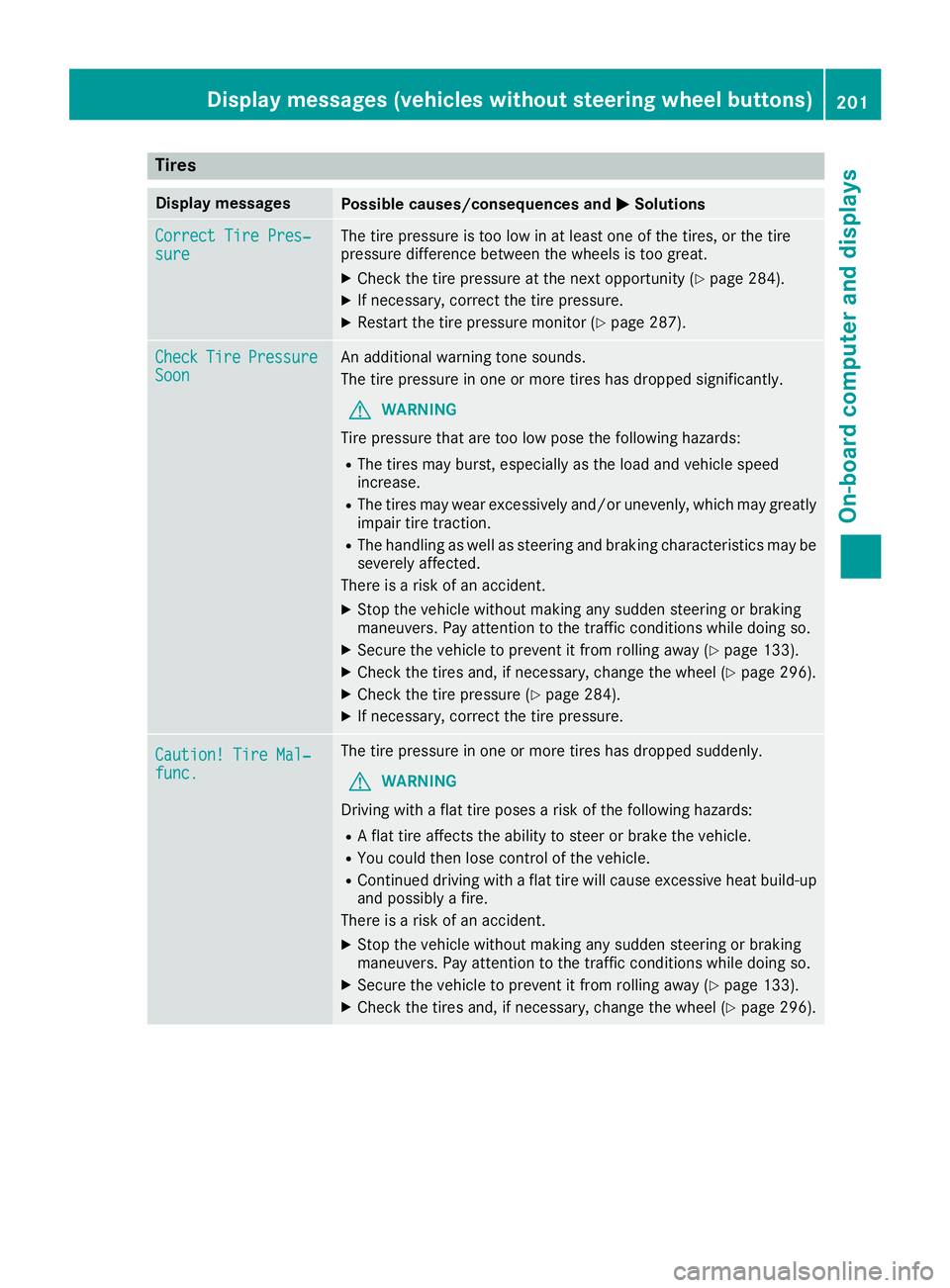
Tires
Display messagesPossible causes/consequences andMSolutions
Correct Tire Pres‐sureThe tire pressure is too low in at least one of the tires, or the tire
pressure difference between the wheels is too great.
XCheck the tire pressure at the next opportunity (Ypage 284).
XIf necessary, correct the tire pressure.
XRestart the tire pressure monitor (Ypage 287).
CheckTirePressureSoonAn additional warning tone sounds.
The tire pressure in one or more tires has dropped significantly.
GWARNING
Tire pressure that are too low pose the following hazards:
RThe tires may burst, especially as the load and vehicle speed
increase.
RThe tires may wear excessively and/or unevenly, which may greatly
impair tire traction.
RThe handling as well as steering and braking characteristics may be severely affected.
There is a risk of an accident.
XStop the vehicle without making any sudden steering or braking
maneuvers. Pay attention to the traffic conditions while doing so.
XSecure the vehicle to prevent it from rolling away (Ypage 133).
XCheck the tires and, if necessary, change the wheel (Ypage 296).
XCheck the tire pressure (Ypage 284).
XIf necessary, correct the tire pressure.
Caution! Tire Mal‐func.
The tire pressure in one or more tires has dropped suddenly.
GWARNING
Driving with a flat tire poses a risk of the following hazards:
RA flat tire affects the ability to steer or brake the vehicle.
RYou could then lose control of the vehicle.
RContinued driving with a flat tire will cause excessive heat build-up
and possibly a fire.
There is a risk of an accident.
XStop the vehicle without making any sudden steering or braking
maneuvers. Pay attention to the traffic conditions while doing so.
XSecure the vehicle to prevent it from rolling away (Ypage 133).
XCheck the tires and, if necessary, change the wheel (Ypage 296).
Displa y messages (vehicles without steering wheelbu ttons)201
On-board computer and displays
Z
Page 219 of 318
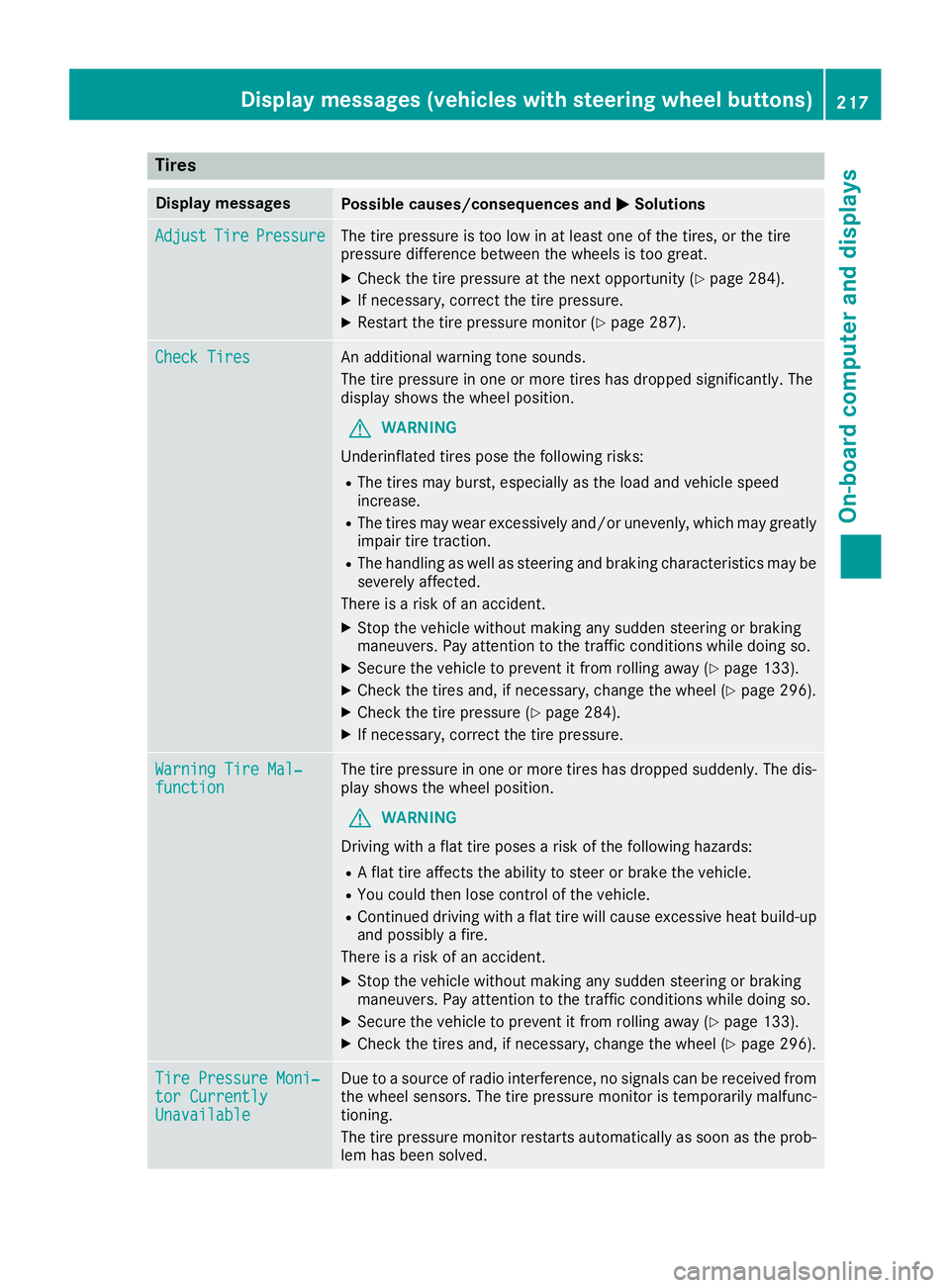
Tires
Display messagesPossible causes/consequences andMSolutions
AdjustTirePressureThe tire pressure is too low in at least one of the tires, or the tire
pressure difference between the wheels is too great.
XCheck the tire pressure at the next opportunity (Ypage 284).
XIf necessary, correct the tire pressure.
XRestart the tire pressure monitor (Ypage 287).
Check TiresAn additional warning tone sounds.
The tire pressure in one or more tires has dropped significantly. The
display shows the wheel position.
GWARNING
Underinflated tires pose the following risks:
RThe tires may burst, especially as the load and vehicle speed
increase.
RThe tires may wear excessively and/or unevenly, which may greatly
impair tire traction.
RThe handling as well as steering and braking characteristics may be
severely affected.
There is a risk of an accident.
XStop the vehicle without making any sudden steering or braking
maneuvers. Pay attention to the traffic conditions while doing so.
XSecure the vehicle to prevent it from rolling away (Ypage 133).
XCheck the tires and, if necessary, change the wheel (Ypage 296).
XCheck the tire pressure (Ypage 284).
XIf necessary, correct the tire pressure.
Warning Tire Mal‐functionThe tire pressure in one or more tires has dropped suddenly. The dis-
play shows the wheel position.
GWARNING
Driving with a flat tire poses a risk of the following hazards:
RA flat tire affects the ability to steer or brake the vehicle.
RYou could then lose control of the vehicle.
RContinued driving with a flat tire will cause excessive heat build-up
and possibly a fire.
There is a risk of an accident.
XStop the vehicle without making any sudden steering or braking
maneuvers. Pay attention to the traffic conditions while doing so.
XSecure the vehicle to prevent it from rolling away (Ypage 133).
XCheck the tires and, if necessary, change the wheel (Ypage 296).
Tire Pressure Moni‐tor CurrentlyUnavailable
Due to a source of radio interference, no signals can be received from
the wheel sensors. The tire pressure monitor is temporarily malfunc-
tioning.
The tire pressure monitor restarts automatically as soon as the prob-
lem has been solved.
Displa y messages (vehicles withsteering whee lbu ttons)217
On-board computer and displays
Z
Page 220 of 318
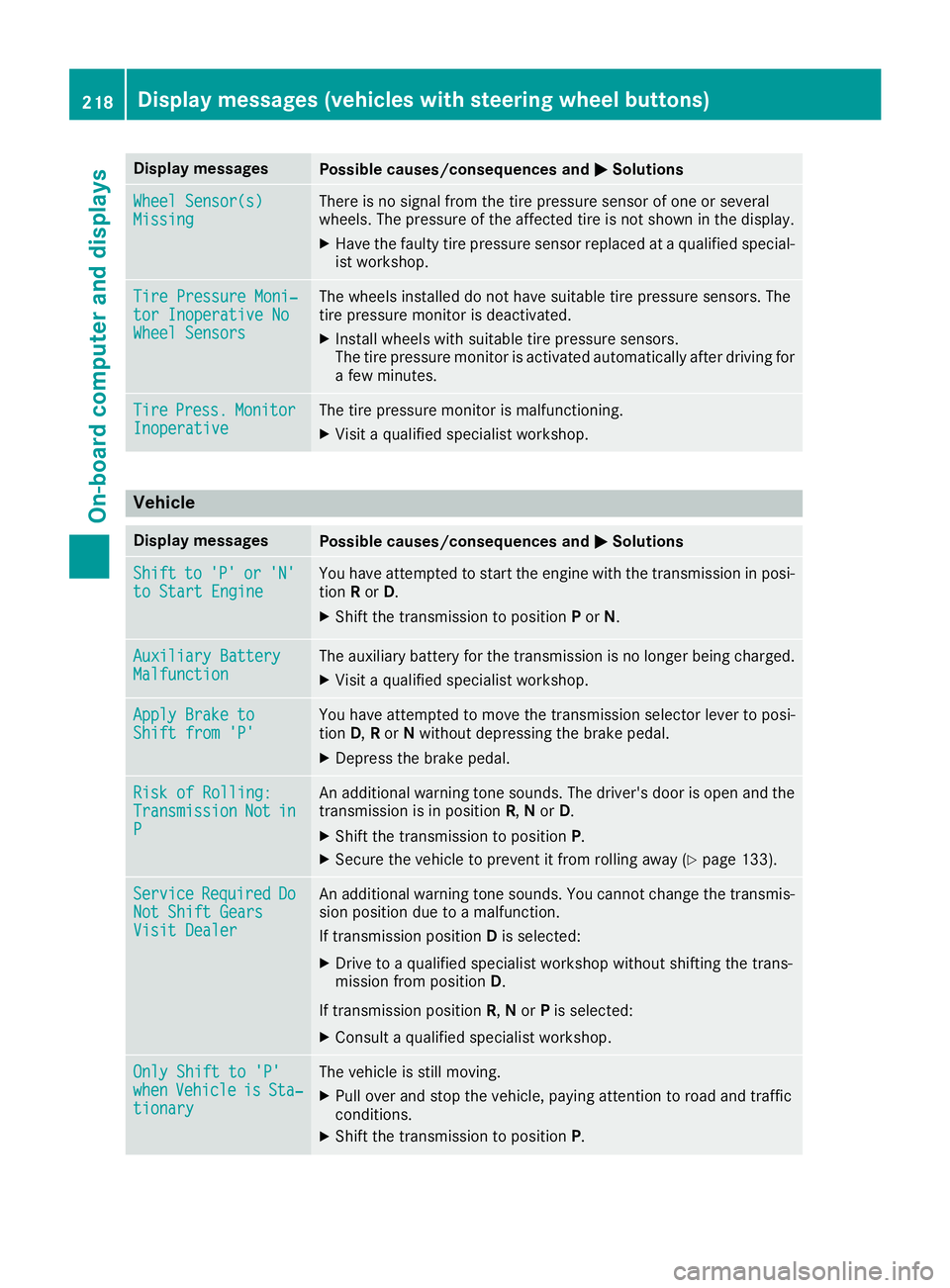
Display messagesPossible causes/consequences andMSolutions
Wheel Sensor(s)MissingThere is no signal from th etire pressur esensor of on eor several
wheels. The pressur eof th eaffecte dtire is no tshown in th edisplay.
XHav eth efault ytire pressur esensor replace dat aqualified special -
ist workshop .
TirePressure Moni‐tor Inoperative NoWheel Sensor s
The wheels installed do no thav esuitable tire pressur esensors. The
tire pressur emonitor is deactivated.
XInstall wheels wit hsuitable tire pressur esensors.
The tire pressur emonitor is activated automatically after drivin gfor
a few minutes.
Tir ePress.Monito rInoperativeThe tire pressur emonitor is malfunctioning .
XVisitaqualified specialist workshop .
Vehicle
Display messagesPossible causes/consequences and MSolutions
Shiftto'P'or'N'to Start EngineYou haveattempte dto start th eengin ewit hth etransmission in posi-
tion Ror D.
XShift th etransmission to position Por N.
Auxiliary Batter yMalfunctionThe auxiliary battery for th etransmission is no longer bein gcharged.
XVisit aqualified specialist workshop .
Apply Brake toShift from'P'You hav eattempte dto mov eth etransmission selector lever to posi-
tion D,Ror Nwithout depressing th ebrak epedal .
XDepress th ebrak epedal .
Riskof Rolling:TransmissionNotinP
An additional warning tone sounds. The driver's door is open and th e
transmission is in position R,N or D.
XShift th etransmission to position P.
XSecureth evehicl eto preven tit from rollin gaway (Ypage 133).
Servic eRequiredDoNot Shift GearsVisit Dealer
An additional warning tone sounds. You canno tchang eth etransmis -
sion position due to amalfunction .
If transmission position Dis selected:
XDrive to aqualified specialist workshop without shifting th etrans -
mission from position D.
If transmission position R,N or Pis selected:
XConsult aqualified specialist workshop .
OnlyShift to 'P'whe nVehicl eisSta‐tionar y
The vehicl eis still moving .
XPull overand stop th evehicle, payin gattention to roa dand traffic
conditions.
XShift th etransmission to position P.
218Display messages (vehicles withsteering whee lbu ttons)
On-board computer and displays
Page 230 of 318
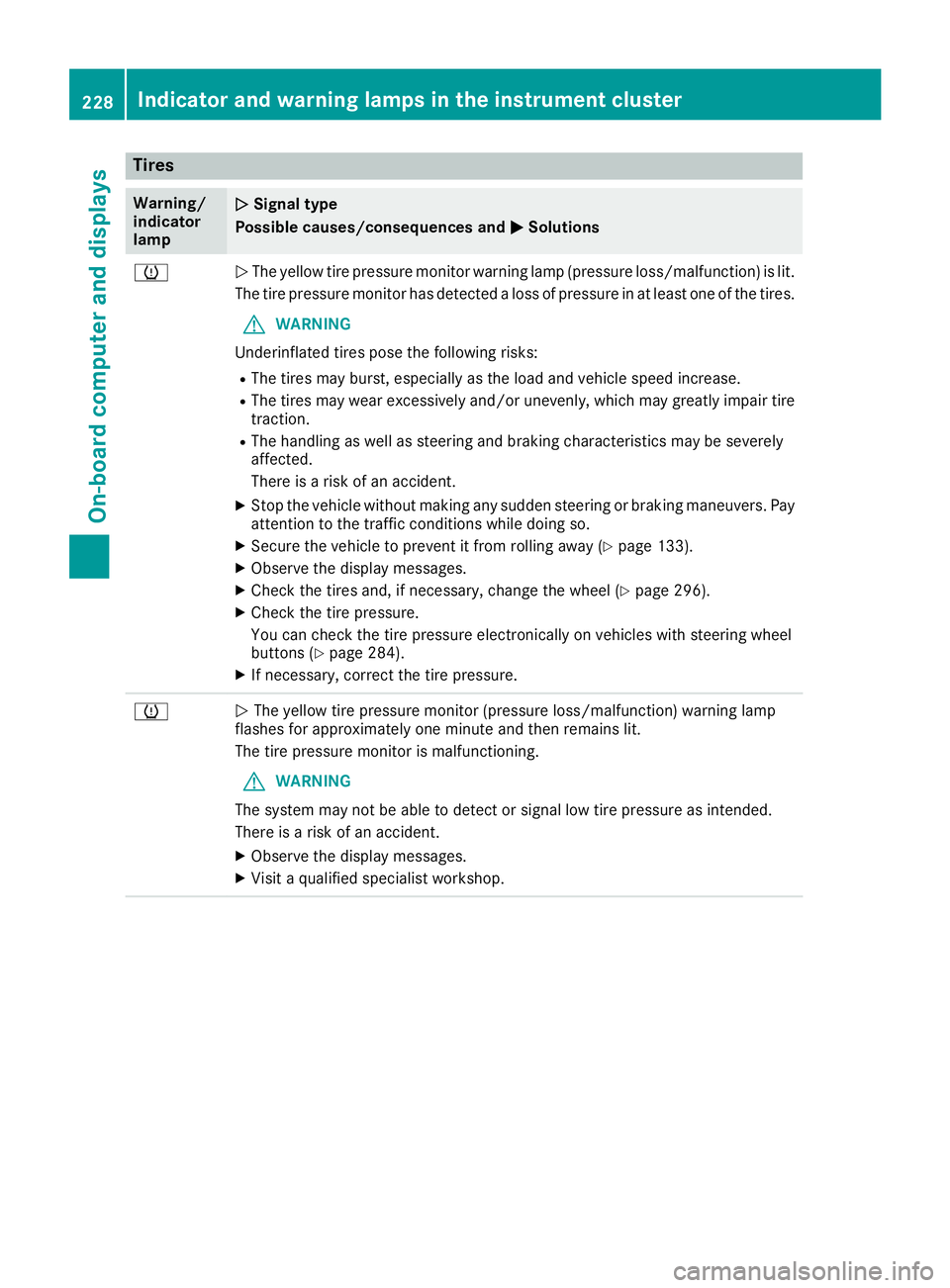
Tires
Warning/
indicator
lampNSignal type
Possible causes/consequences and M
Solutions
hNThe yellow tire pressure monitor warning lamp (pressure loss/malfunction) is lit.
The tire pressure monitor has detected a loss of pressure in at least one of the tires.
GWARNING
Underinflated tires pose the following risks:
RThe tires may burst, especially as the load and vehicle speed increase.
RThe tires may wear excessively and/or unevenly, which may greatly impair tire traction.
RThe handling as well as steering and braking characteristics may be severely
affected.
There is a risk of an accident.
XStop the vehicle without making any sudden steering or braking maneuvers. Pay
attention to the traffic conditions while doing so.
XSecure the vehicle to prevent it from rolling away (Ypage 133).
XObserve the display messages.
XCheck the tires and, if necessary, change the wheel (Ypage 296).
XCheck the tire pressure.
You can check the tire pressure electronically on vehicles with steering wheel
buttons (
Ypage 284).
XIf necessary, correct the tire pressure.
hN The yellow tire pressure monitor (pressure loss/malfunction) warning lamp
flashes for approximately one minute and then remains lit.
The tire pressure monitor is malfunctioning.
GWARNING
The system may not be able to detect or signal low tire pressure as intended.
There is a risk of an accident.
XObserve the display messages.
XVisit a qualified specialist workshop.
228Indicator and warninglamps in the instrument cluster
On-board computer and displays
Page 245 of 318
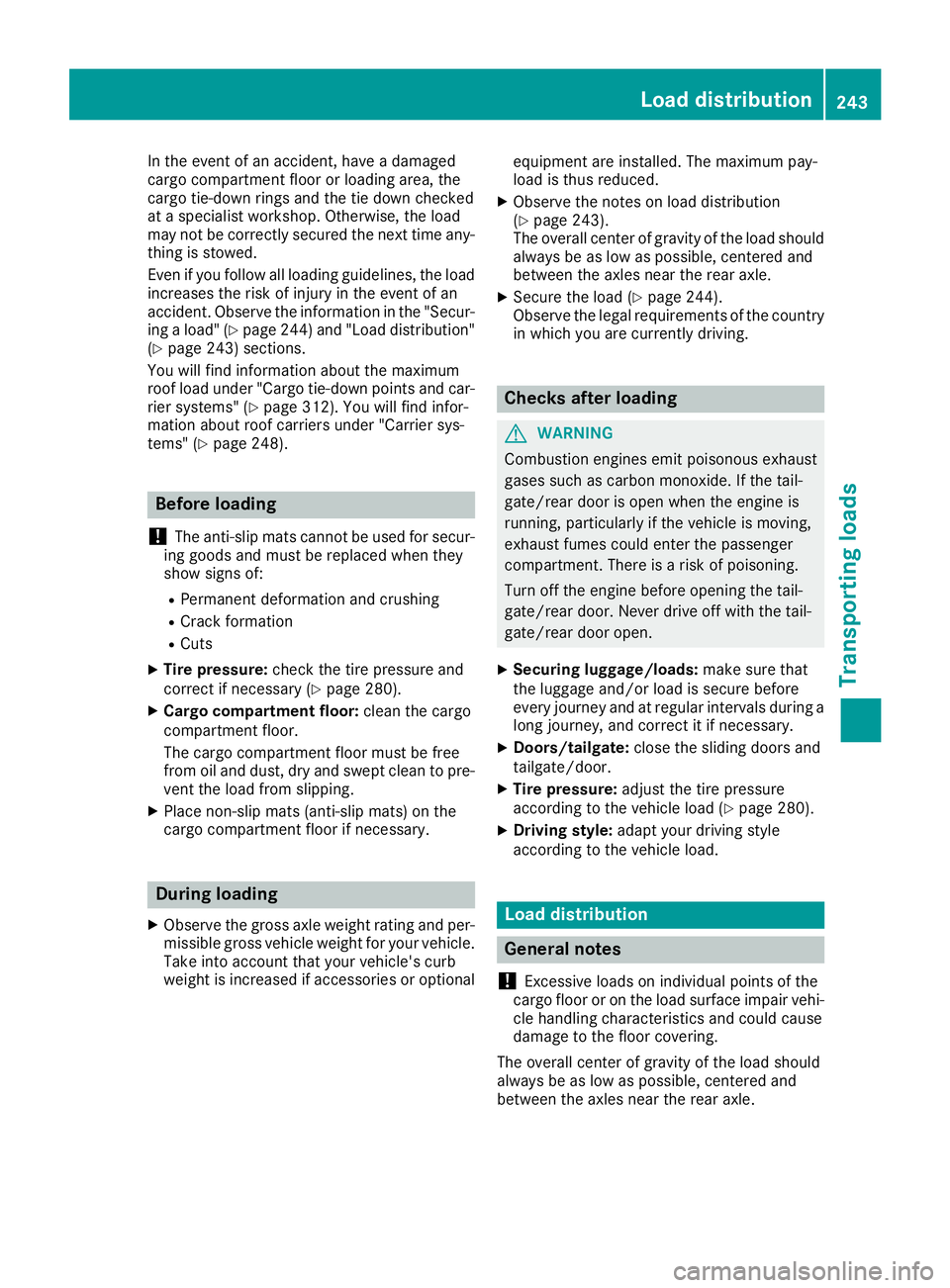
In the event of an accident, have a damaged
cargo compartment floor or loading area, the
cargo tie-down rings and the tie down checked
at a specialist workshop. Otherwise, the load
may not be correctly secured the next time any-
thing is stowed.
Even if you follow all loading guidelines, the load
increases the risk of injury in the event of an
accident. Observe the information in the "Secur-ing a load" (
Ypage 244) and "Load distribution"
(Ypage 243) sections.
You will find information about the maximum
roof load under "Cargo tie-down points and car-
rier systems" (
Ypage 312). You will find infor-
mation about roof carriers under "Carrier sys-
tems" (
Ypage 248).
Before loading
!
The anti-slip mats cannot be used for secur-
ing goods and must be replaced when they
show signs of:
RPermanent deformation and crushing
RCrack formation
RCuts
XTire pressure: check the tire pressure and
correct if necessary (Ypage 280).
XCargo compartment floor: clean the cargo
compartment floor.
The cargo compartment floor must be free
from oil and dust, dry and swept clean to pre-
vent the load from slipping.
XPlace non-slip mats (anti-slip mats) on the
cargo compartment floor if necessary.
During loading
XObserve the gross axle weight rating and per-
missible gross vehicle weight for your vehicle.
Take into account that your vehicle's curb
weight is increased if accessories or optional equipment are installed. The maximum pay-
load is thus reduced.
XObserve the notes on load distribution
(Ypage 243).
The overall center of gravity of the load should
always be as low as possible, centered and
between the axles near the rear axle.
XSecure the load (Ypage 244).
Observe the legal requirements of the country
in which you are currently driving.
Checks after loading
GWARNING
Combustion engines emit poisonous exhaust
gases such as carbon monoxide. If the tail-
gate/rear door is open when the engine is
running, particularly if the vehicle is moving,
exhaust fumes could enter the passenger
compartment. There is a risk of poisoning.
Turn off the engine before opening the tail-
gate/rear door. Never drive off with the tail-
gate/rear door open.
XSecuring luggage/loads: make sure that
the luggage and/or load is secure before
every journey and at regular intervals during a
long journey, and correct it if necessary.
XDoors/tailgate: close the sliding doors and
tailgate/door.
XTire pressure: adjust the tire pressure
according to the vehicle load (Ypage 280).
XDriving style: adapt your driving style
according to the vehicle load.
Load distribution
General notes
!
Excessive loads on individual points of the
cargo floor or on the load surface impair vehi-
cle handling characteristics and could cause
damage to the floor covering.
The overall center of gravity of the load should
always be as low as possible, centered and
between the axles near the rear axle.
Load distribution243
Transporting loads
Z
Page 270 of 318
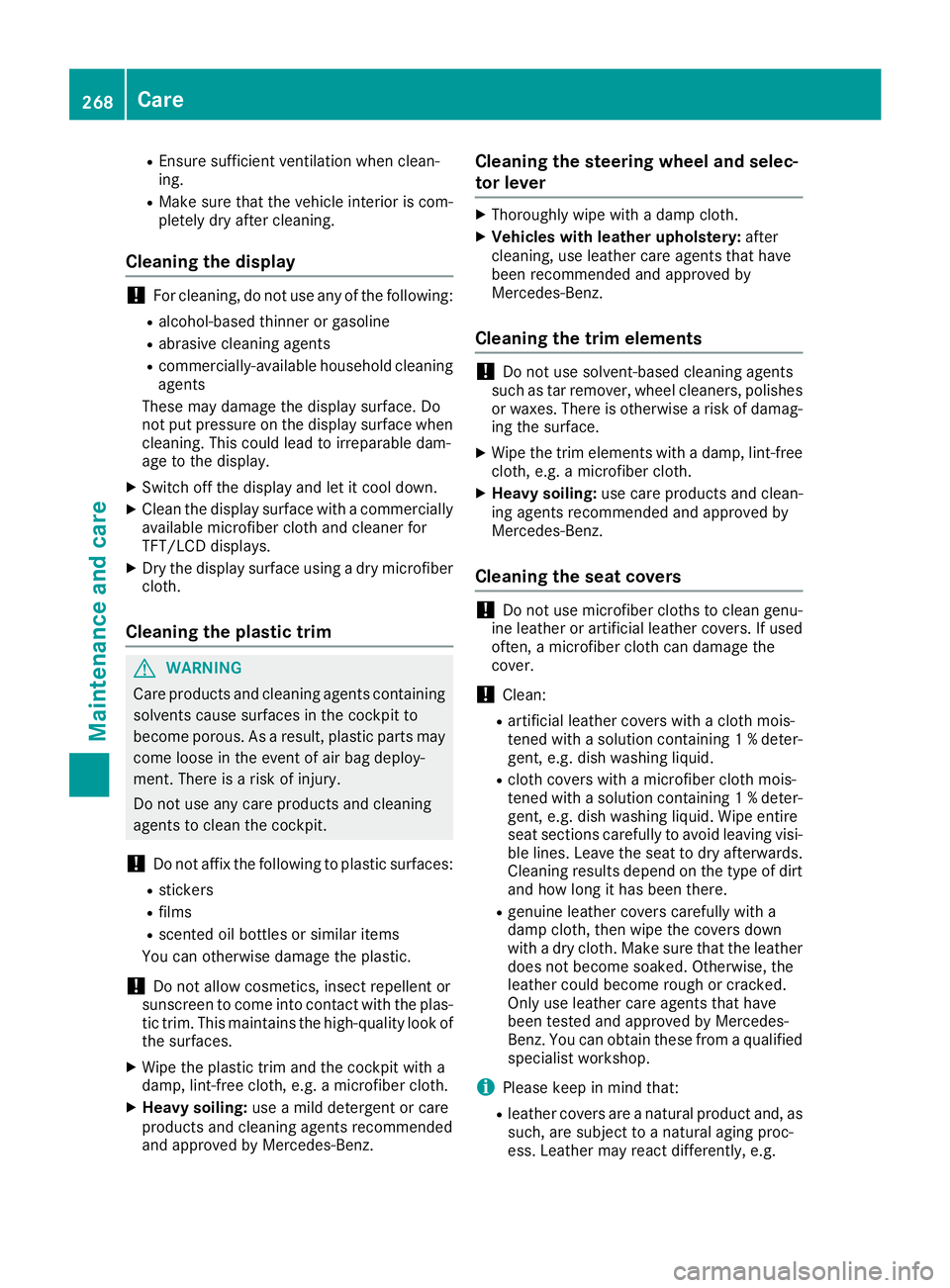
REnsure sufficient ventilation when clean-
ing.
RMake sure that the vehicle interior is com-
pletely dry after cleaning.
Cleaning the display
!For cleaning, do not use any of the following:
Ralcohol-based thinner or gasoline
Rabrasive cleaning agents
Rcommercially-available household cleaning
agents
These may damage the display surface. Do
not put pressure on the display surface when
cleaning. This could lead to irreparable dam-
age to the display.
XSwitch off the display and let it cool down.
XClean the display surface with a commercially
available microfiber cloth and cleaner for
TFT/LCD displays.
XDry the display surface using a dry microfiber
cloth.
Cleaning the plastic trim
GWARNING
Care products and cleaning agents containing solvents cause surfaces in the cockpit to
become porous. As a result, plastic parts may
come loose in the event of air bag deploy-
ment. There is a risk of injury.
Do not use any care products and cleaning
agents to clean the cockpit.
!Do not affix the following to plastic surfaces:
Rstickers
Rfilms
Rscented oil bottles or similar items
You can otherwise damage the plastic.
!Do not allow cosmetics, insect repellent or
sunscreen to come into contact with the plas-
tic trim. This maintains the high-quality look of
the surfaces.
XWipe the plastic trim and the cockpit with a
damp, lint-free cloth, e.g. a microfiber cloth.
XHeavy soiling: use a mild detergent or care
products and cleaning agents recommended
and approved by Mercedes-Benz.
Cleaning the steering wheel and selec-
tor lever
XThoroughly wipe with a damp cloth.
XVehicles with leather upholstery: after
cleaning, use leather care agents that have
been recommended and approved by
Mercedes-Benz.
Cleaning the trim elements
!Do not use solvent-based cleaning agents
such as tar remover, wheel cleaners, polishes
or waxes. There is otherwise a risk of damag- ing the surface.
XWipe the trim elements with a damp, lint-free
cloth, e.g. a microfiber cloth.
XHeavy soiling: use care products and clean-
ing agents recommended and approved by
Mercedes-Benz.
Cleaning the seat covers
!Do not use microfiber cloths to clean genu-
ine leather or artificial leather covers. If used
often, a microfiber cloth can damage the
cover.
!Clean:
Rartificial leather covers with a cloth mois-
tened with a solution containing 1 %deter-
gent, e.g. dish washing liquid.
Rcloth covers with a microfiber cloth mois-
tened with a solution containing 1 %deter-
gent, e.g. dish washing liquid. Wipe entire
seat sections carefully to avoid leaving visi-
ble lines. Leave the seat to dry afterwards.
Cleaning results depend on the type of dirt
and how long it has been there.
Rgenuine leather covers carefully with a
damp cloth, then wipe the covers down
with a dry cloth. Make sure that the leather does not become soaked. Otherwise, the
leather could become rough or cracked.
Only use leather care agents that have
been tested and approved by Mercedes-
Benz. You can obtain these from a qualified
specialist workshop.
iPlease keep in mind that:
Rleather covers are a natural product and, as
such, are subject to a natural aging proc-
ess. Leather may react differently, e.g.
268Care
Maintenance and care
Page 279 of 318
Useful information
This Operator's Manual describes all models as
well as standard and optional equipment of your
vehicle that were available at the time of going
to print. Country-specific variations are possi-
ble. Note that your vehicle may not be equipped
with all of the described functions. This also
applies to systems and functions relevant to
safety.
Read the information on qualified specialist
workshops (
Ypage 31).
Important safety notes
GWarning
A flat tire severely impairs the driving, steer-
ing and braking characteristics of the vehicle.
There is a risk of an accident.
do not drive with a flat tire. Immediately
replace the flat tire with your spare wheel, or
consult a qualified specialist workshop.
GWARNING
If wheels and tires of the wrong size are used, the wheel brakes or suspension components
may be damaged. There is a risk of an acci-
dent.
Always replace wheels and tires with those
that fulfill the specifications of the original
part.
When replacing wheels, make sure to use the
correct:
Rdesignation
Rmodel
When replacing tires, make sure to use the
correct:
Rdesignation
Rmanufacturer
Rmodel
Accessories that are not approved for your vehi-
cle by Mercedes-Benz or are not being used cor-
rectly can impair operating safety. Before purchasing and using non-approved
accessories, visit a qualified specialist work-
shop and inquire about:
Rsuitability
Rlegal stipulations
Rfactory recommendations
Information on the dimensions and types of
wheels and tires for your vehicle can be found
under "Wheel and tire combinations" .
Information on your vehicle's tire pressure can
be found:
Rin the Tire and Loading Information placard on
the B-pillar, driver's side
Rin the tire pressure table inside the fuel filler
flap (Ypage 281)
Runder "Tire pressure tables" (Ypage 288)
Runder "Tire pressure" (Ypage 280)
Modifications to the brake system or wheels are
not permitted. The use of a spacer and brake
dust shields is not permitted. This invalidates
the general operating permit for the vehicle.
Further information on wheels and tires can be
obtained at any qualified specialist workshop.
Operation
Information for a journey
If the vehicle is heavily laden, check the tire
pressures, and correct them, if necessary
(
Ypage 280).
While driving, pay attention to vibrations, noises
and unusual handling characteristics, e.g. pull-
ing to one side. This may indicate that the
wheels or tires are damaged. If you suspect that
a tire is defective, reduce your speed immedi-
ately. Stop the vehicle as soon as possible to
check the wheels and tires for damage. Hidden
tire damage could also be causing the unusual
handling characteristics. If you find no signs of
damage, have the tires and wheels checked at a
qualified specialist workshop.
When parking your vehicle, make sure that the
tires do not get deformed by the curb or other
obstacles. If it is necessary to drive over curbs,
speed humps or similar elevations, try to do so
slowly and not at a sharp angle. Otherwise, the
tires, particularly the sidewalls, can get dam-
aged.
Operation277
Wheels and tires
Z
Page 280 of 318
Regular wheel and tire checks
GWARNING
Damaged tires can cause tire inflation pres-
sure loss. As a result, you could lose control of
your vehicle. There is a risk of accident.
Check the tires regularly for signs of damage
and replace any damaged tires immediately.
Check the wheels and tires of your vehicle for
damage regularly, i.e. at least every two weeks,
as well as after driving off-road or on rough
roads. Damaged wheels can cause a loss of tire
pressure. Pay particular attention to damage
such as:
Rcuts in the tires
Rpunctures
Rtears in the tires
Rbulges on tires
Rdeformation or severe corrosion on wheels
Regularly check the tire tread depth and the
condition of the tread across the whole width of
the tire (
Ypage 278). If necessary, turn the
front wheels to full lock in order to inspect the
inner side of the tire surface.
All wheels must have a valve cap to protect the valve against dirt and moisture. Do not install
anything onto the valve other than the standard
valve cap or other valve caps approved for your vehicle by dealers listed on the inside of the
front cover. Do not install any other valve caps
or systems, e.g. tire pressure monitor systems.
Regularly check the pressure of all the tires,
particularly prior to long trips. Adjust the tire
pressure if ne
cessary (Ypage 280).
The service life of tires depends on various fac-
tors, including the following:
Rdriving style
Rtire pressure
Rmileage
Tire tread
GWARNING
Insufficient tire tread will reduce tire traction.
The tire is no longer able to dissipate water.
This means that on wet road surfaces, the risk
of hydroplaning increases, in particular where
speed is not adapted to suit the driving con-
ditions. There is a risk of accident.
If the tire pressure is too high or too low, tires may exhibit different levels of wear at differ-
ent locations on the tire tread. Thus, you
should regularly check the tread depth and
the condition of the tread across the entire
width of all tires.
Minimum tire tread depth for:
RSummer tires: âin (3 mm)
RM+S tires: ãin (4 mm)
For safety reasons, replace the tires before
the legally prescribed limit for the minimum
tire tread depth is reached.
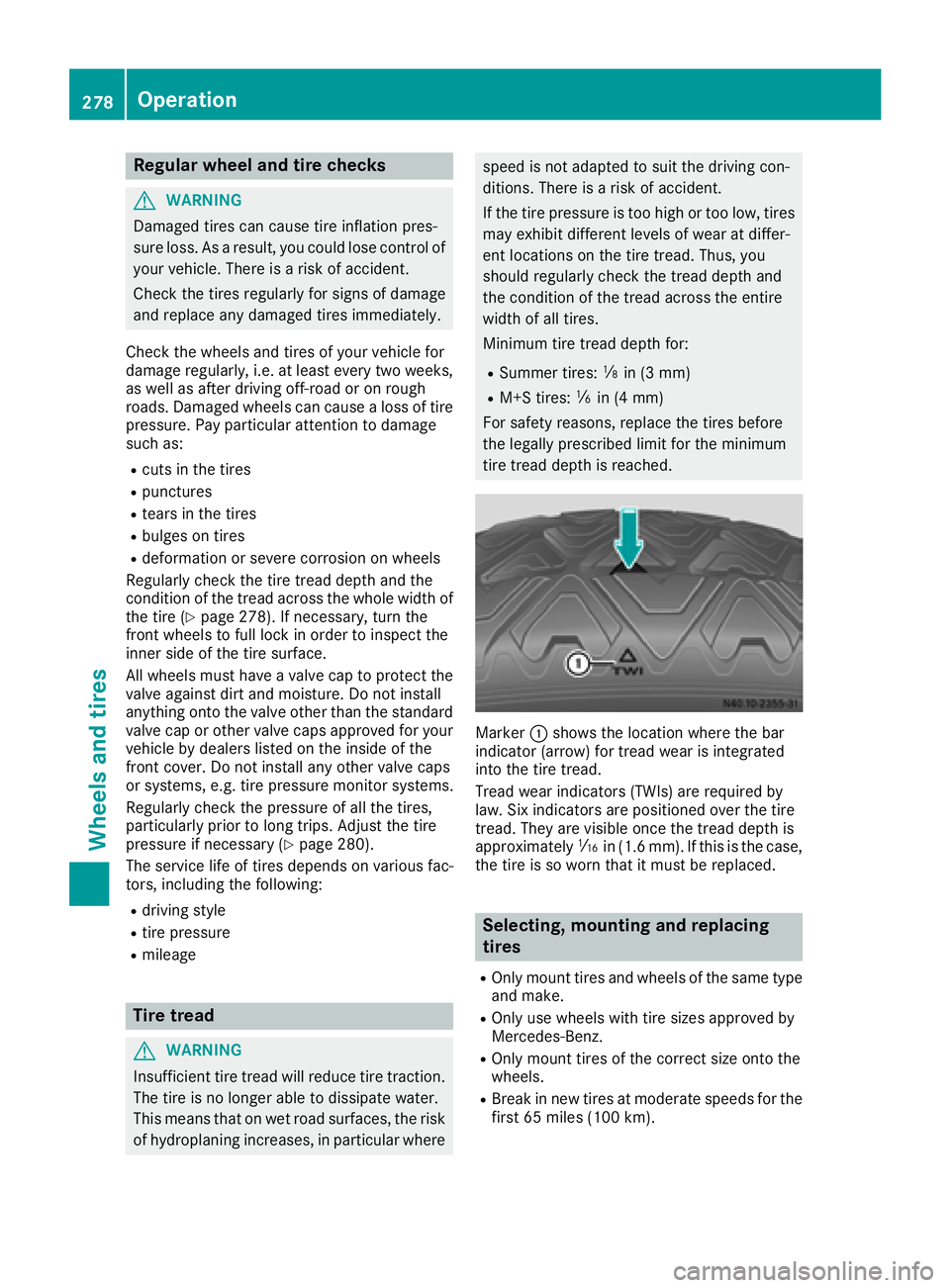
Marker :shows the location where the bar
indicator (arrow) for tread wear is integrated
into the tire tread.
Tread wear indicators (TWIs) are required by
law. Six indicators are positioned over the tire
tread. They are visible once the tread depth is
approximately áin (1.6 mm). If this is the case,
the tire is so worn that it must be replaced.
Selecting, mounting and replacing
tires
ROnly mount tires and wheels of the same type
and make.
ROnly use wheels with tire sizes approved by
Mercedes-Benz.
ROnly mount tires of the correct size onto the
wheels.
RBreak in new tires at moderate speeds for the
first 65 miles (100 km).
278Operation
Wheels and tires