tow bar MERCEDES-BENZ METRIS 2017 MY17 Operator’s Manual
[x] Cancel search | Manufacturer: MERCEDES-BENZ, Model Year: 2017, Model line: METRIS, Model: MERCEDES-BENZ METRIS 2017Pages: 318, PDF Size: 5.01 MB
Page 170 of 318
rating (GCWR), nor the maximum permissible
gross axle weight rating (GAWR) and trailer
drawbar noseweight rating of your vehicle.
RAdd the drawbar noseweight on the ball cou-
pling (TWR) to the rear axle load. This will pre-vent you from exceeding the permissible
gross axle weight (GAWR).
RAdd the drawbar noseweight on the ball cou-
pling (TWR) to the vehicle payload. This will
ensure that you do not exceed the permissi-
ble gross vehicle weight rating (GVWR).
Checking the vehicle and trailer weight
RMake sure the weights of the towing vehicle
and the trailer comply with the maximum per-missible values. Have the vehicle/trailer com-
bination weighed on a calibrated weigh-
bridge. The vehicle/trailer combination con-
sists of the towing vehicle including the driver,
passengers and load, as well as the loaded
trailer.
RCheck the maximum permissible gross axle
weight rating of the front and rear axles
(GAWR), the gross trailer weight (GTW), the
gross combination weight rating (GCWR) and
the noseweight of the trailer drawbar (TWR).
Trailer power supply
!
Incorrect wiring of the connector plug could,
under certain circumstances, cause malfunc-
tions in the vehicle's other electronic sys-
tems. We therefore recommend having the
connector plug wired at a qualified specialist
workshop.
!You can connect accessories with a maxi-
mum power consumption of 240 W to the
permanent power supply.
You must not charge a trailer battery using the
power supply.
Your vehicle may be equipped with various elec-
trical installations for trailer towing. Depending
on your trailer, you may need an adapter to con-
nect the electrical system of the trailer with that
of the vehicle.
The trailer socket of your vehicle is equipped at
the factory with a permanent power supply.
The permanent power supply is on the trailer
socket pin assignment 4.
Note that the permanent power supply of the
trailer is not switched off when the on-board voltage is low. This can completely discharge
the starter battery of your vehicle.
Further information on the electrical equipment
currently installed on your vehicle and on instal-
ling trailer electrics can be obtained at any quali-
fied specialist workshop.
168Towing a trailer
Driving and parking
Page 183 of 318
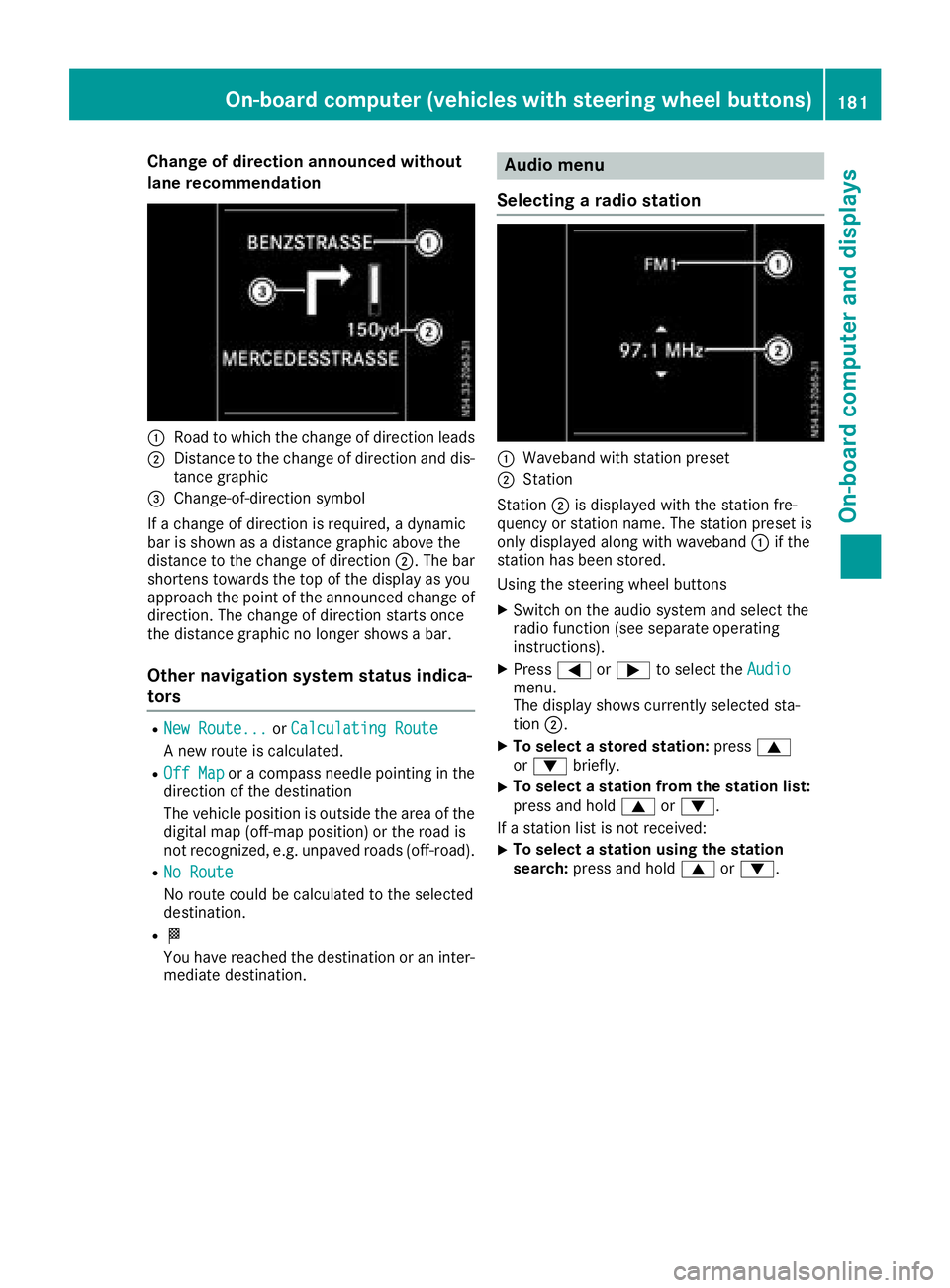
Change of direction announced without
lane recommendation
:Road to which the change of direction leads
;Distance to the change of direction and dis-
tance graphic
=Change-of-direction symbol
If a change of direction is required, a dynamic
bar is shown as a distance graphic above the
distance to the change of direction ;. The bar
shortens towards the top of the display as you
approach the point of the announced change of
direction. The change of direction starts once
the distance graphic no longer shows a bar.
Other navigation system status indica-
tors
RNew Route...or Calculating Route
A new route is calculated.
ROff Mapor a compass needle pointing in the
direction of the destination
The vehicle position is outside the area of the
digital map (off-map position) or the road is
not recognized, e.g. unpaved roads (off-road).
RNo Route
No route could be calculated to the selected
destination.
RO
You have reached the destination or an inter-
mediate destination.
Audio menu
Selecting a radio station
:Waveband with station preset
;Station
Station ;is displayed with the station fre-
quency or station name. The station preset is
only displayed along with waveband :if the
station has been stored.
Using the steering wheel buttons
XSwitch on the audio system and select the
radio function (see separate operating
instructions).
XPress =or; to select the Audiomenu.
The display shows currently selected sta-
tion;.
XTo select a stored station: press9
or : briefly.
XTo select a station from the station list:
press and hold 9or:.
If a station list is not received:
XTo select a station using the station
search: press and hold 9or:.
On-board computer (vehicles with steering wheel buttons)181
On-board computer and displays
Z
Page 237 of 318
XTo enter the passkey:enter an easy to
remember, four-digit number using the x
to s number keys.
XTo confirm the entry: select OK.
The Bluetooth®device is authorized.
XSelect Bluetooth®device name MB Blue-
tooth on the device.
XEnter the four-digit number selected previ-
ously on the Bluetooth®device, and confirm.
XConfirm possible prompts using the Blue-
tooth®device.
The Authorization successful.message
is shown in the display. You will see the Blue-
tooth
®name of the Bluetooth®device in the
display/selection window.
iWhen the Authorization failed.mes-
sage is displayed, you may have exceeded the
prescribed time period. Repeat the proce-
dure.
If the pairing process was successful, the
Bluetooth
®device is automatically connected
to the multimedia system.
Unpairing a Bluetooth®device
XPress the %button.
or
XSelect the Bluetooth®audio function.
XPress the :button repeatedly until the
menu bar is selected.
XSelect Telephone/BT Audio.
XBluetooth telephones/Bluetoothdevice list.
The display shows all paired Bluetooth®devi-
ces. The current Bluetooth®device is identi-
fied by the #dot.
XSelect the Bluetooth®device to be unpaired.
XSelect the list symbol next to the entry using
the ; button.
XSelect De-authorize.
A prompt appears in the display asking
whether the Bluetooth
®device should be de-
authorized.
XTo unpair: select Yes.
The Bluetooth®device is unpaired and
deleted from the device list.
XTo cancel the unpairing process : selectNo.
The Bluetooth®device is not unpaired from
the multimedia system. You have canceled
the process.
Ending a Bluetooth®connection
iIf you end the Bluetooth®connection, the
Bluetooth®device is not deleted from the
multimedia system memory.
A Bluetooth
®connection can be ended in the
following ways:
Rdeactivate the Bluetooth®function of the
multimedia system.
Rdeactivate the Bluetooth®function of your
Bluetooth®device.
Rswitch off the multimedia system.
Rswitch off the Bluetooth®device.
Media mode
Memory card audio playback
XTo insert the SD memory card: insert the
SD memory card into the SD slot with the
contacts at the front and facing downwards.
XPress the Õbutton repeatedly, until the
display in the menu bar shows SD.
Playback starts.
iIf the multimedia system cannot find any
readable files on the SD memory card, the
display shows No Playable Files
.
XTo remove the SD memory card: press the
SD memory card.
The multimedia system ejects the SD memory
card.
USB device audio playback
The connection for USB devices is located in the
left-hand stowage compartment, next to the
multimedia system.
Audio 15235
Multimedia systems in brief
Z
Page 276 of 318
XConnect the negative terminal clamp of the
jumper cable to negative terminal;of the
donor veh icle's battery, and then to earth
contact ?of your own veh icle.
XInsert the key into the ignition lock and start
the engine.
You can now switch electrical consumers
back on except the lighting system.
XBefore disconnecting the jumper cables, let
the engine run for several minutes.
XDisconnect the negative terminal of the
jumper cable from earth contact ?and then
from negative terminal ;of the donor veh i-
cle's battery.
XDisconnect the positive terminal clamp of the
jumper cable from positive terminal Aon the
jump-starting connection point, and then
from positive terminal =of the donor veh i-
cle's battery.
Contact protection cover :isautomatically
returned forwards to its original position by
the spring force and the jump-starting con-
nection pointis closed.
XPosition the cover on positive terminal =of
the donor veh icle's battery.
You can now switch on the lighting system.
XHave the battery checked at a qualified spe-
cialist workshop.
Tow-starting and towing away
Important safety notes
GWAR NING
Functions relevant to safety are restricted or
no longer availab leif:
Rthe engine isnot running.
Rthe brake system or the power steering is
malfunctioning.
Rthere isa malfunction inthe voltage supply
or the veh icle's electrical system.
If your veh icle is bein g towed, much more
force may benecessary to steer or brake.
There isa risk of an acc ident.
In such cases, use a tow bar. Before to wing,
make sure that the steering moves freely.
GWARNING
You can no longer steer the vehicle ifthe
steering wheel lock has been engaged. There
is a risk of an accident.
Alwa ysswit ch off the ignition when to wingthe
vehicle with a tow cable or a tow bar.
GWARNING
When to wingor tow-starting another vehicle
and its weight isgreater than the permissible
gross weight of your vehicle, the:
Rthe to wingeye could detach itself
Rthe vehicle /trailer combination could roll-
over.
There is a risk of an accident.
When towing or tow-starting another vehicle,
its weight should not be greater than the per- missible gross weight of your vehicle.
In formation on the gross vehicle weight can be
found on the vehicle identification plate
(
Ypage 303).
!Secure the tow rope or tow bar to the to wing
eye or trailer tow hitch only. Otherwise, the
vehicle could become damaged.
!Do not use the to wingeye for recovery, this
could damage the vehicle. If indoubt, recover
the vehicle with a crane.
!Drive slowly and smoothly when to wing.
Excessive tractive power could otherwise
damage the vehicles.
!Shift the automatic transmission to Nand
do not open the driver's or front passenger's
door during to wing. The automatic transmis-
sion may otherwise shift to position P,whic h
could damage the transmission.
!The vehicle can be towed a maximum of
30 miles (50km ).The to wingspeed of 30 mph
(50 km/h) must not be exceeded.
If the vehicle has to betowed more than
30 mile
s(50k
m) ,the entire vehicl emust be
raised and transported.
When towing away, you must observe the legal
requirements for the country in which you are
currently driving.
It is better to have the vehicle transported than
to have it towed.
274Tow-starting and towing away
Breakdown assistance
Page 278 of 318
Towing the vehicle with both axles on
the ground
Important safety notes
GWARNING
You can no longer steer the vehicle if the
steering wheel lock has been engaged. There
is a risk of an accident.
Always switch off the ignition when towing the
vehicle with a tow cable or a tow bar.
!Do not exceed the towing speed of 30 mph
(50 km/h). You could otherwise damage the
transmission.
Please observe the important safety notes
before towing your vehicle (
Ypage 274).
Towing vehicles with automatic trans-
mission
XTurn the key to position 2in the ignition lock.
XDepress the brake pedal and keep it
depressed.
XShift the automatic transmission to position
N.
XLeave the key in position 2in the ignition lock.
XSwitch on the hazard warning lamps
(Ypage 96).
XRelease the parking brake.
XRelease the brake pedal.
XDo not exceed the towing speed of 30 mph
(50 km/h).
Recovering a vehicle that is stuck
!
When recovering a vehicle that has become
stuck, pull it as smoothly and evenly as pos-
sible. Excessive tractive power could damage
the vehicles.
If the drive wheels get trapped on loose or
muddy ground, recover the vehicle with the
utmost care. This is especially the case if the
vehicle is laden.
Never attempt to recover a vehicle with a trailer
attached.
Pull out the vehicle backwards, if possible, using
the tracks it made when it became stuck.
Transporting the vehicle
!
You may only secure the vehicle by the
wheels, not by parts of the vehicle such as
axle or steering components. Otherwise, the
vehicle could be damaged.
The towing eye or trailer tow hitch can be used
to pull the vehicle onto a trailer or transporter if
you wish to transport it.
XTurn the key to position 2in the ignition lock.
XShift the transmission to position N.
XRelease the parking brake.
If the vehicle is loaded:
XShift the transmission to position P.
XTurn the key to position 0in the ignition lock
and remove it.
XMake sure the parking brake is applied.
XLash down the vehicle.
Tow-starting (emergency engine
starting)
General notes
!Vehicles with automatic transmission must
not be tow-started. You could otherwise dam-
age the automatic transmission.
You can find information on jump-starting under
"Jump-starting“ (
Ypage 272).
Electrical fuses
The fuse allocation chart and important safety
information on the fuses can be found in the
"Fuse allocation chart" supplement.
276Electrical fuses
Breakdown assistance
Page 298 of 318
TIN (Tire Identification Number)
A unique identification number which can be
used by a tire manufacturer to identify tires, for
example for a product recall, and thus identify
the purchasers. The TIN is composed of the
manufacturer identification code, tire size, tire
model code and manufacturing date.
Load bearing index
The load bearing index (also load index) is a code
that contains the maximum load bearing capa-
city of a tire.
Traction
Traction is the result of friction between the tires
and the road surface.
TWR (permissible trailer drawbar load)
The TWR is the maximum permissible weight
that may act on the ball coupling of the trailer
tow hitch.
Wear indicator
Narrow bars (tread wear bars) that are distrib-
uted over the tire tread. If the tire tread is level
with the bars, the wear limit of áin (1.6 mm)
has been reached.
Distribution of the vehicle occupants
The distribution of vehicle occupants over des-
ignated seat positions in a vehicle.
Maximum permissible payload weight
Nominal load and goods/luggage load plus
68 kg (150 lb s)multiplied by the number of
seats in the vehicle.
Changing wheels
Rotating the wheels
GWARNING
Interchanging the front and rear wheels may
severely impair the driving characteristics if
the wheels or tires have different dimensions. The wheel brakes or suspension components
may also be damaged. There is a risk of acci-
dent.
Rotate front and rear wheels only if the wheels and tires are of the same dimensions.
!On vehicles equipped with a tire pressure
monitor, electronic components are located
in the wheel.
Tire-mounting tools should not be used near
the valve. This could damage the electronic
components.
Only have tires changed at a qualified spe-
cialist workshop.
Always observe the instructions and safety
notes under "Mounting a wheel" (
Ypage 297).
The wear patterns on the front and rear tires
differ, depending on the operating conditions.
Rotate the wheels before a clear wear pattern
has formed on the tires. Front tires typically
wear more on the shoulders and the rear tires in the center.
If your vehicle's tire configuration allows, you
can rotate the tires according to the intervals in
the tire manufacturer's warranty book in your
vehicle documents. If no warranty book is avail-
able, the tires should be rotated every 3,000 to
6,000 miles (5,000 to 10,000 km) or earlier if
tire wear requires. Do not change the direction
of rotation.
Clean the contact surfaces of the wheel and the
brake disc thoroughly every time a wheel is rota-
ted. Avoid oily or greasy cleaning agents.
Check the tire pressure and reactivate the tire
pressure monitor if necessary.
Direction of rotation
Tires with a specified direction of rotation have
additional benefits, e.g. if there is a risk of hydro-
planing. You will only gain these benefits if the
correct direction of rotation is observed.
An arrow on the sidewall of the tire indicates its
correct direction of rotation.
You may mount a spare wheel against the direc-tion of rotation. Observe the time restriction on
use as well as the speed limitation specified on
the spare wheel.
Storing wheels
Store wheels that are not being used in a cool,
dry and preferably dark place. Protect the tires
from contact with oil, grease and fuel.
296Changing wheels
Wheels and tires
Page 315 of 318
Guide/load rails
The maximum tensile load for the cargo tie-
down points on a guide/load rail is:
Cargo tie-down
pointPermissible nomi-nal tensile load
Guide rail786.5 lbf
(350 daN)
Load rails on cargo
compartment floor1124.0 lbf (500 daN)
Load rail on sidewall225.0 lbf
(100 daN)
The values specified apply only to loads placed
on the cargo compartment floor if:
Rthe load is secured to two cargo tie-down
points on the rail and
Rthe distance to the nearest load-securing
point on the same rail is approximately 3 ft
(1 m)
Maximum roof load
GWARNING
If you use openings in the bodywork or
detachable parts as steps, you could:
Rslip and/or fall
Rdamage the vehicle and cause yourself to
fall.
There is a risk of injury.
Always use secure climbing aids, e.g. a suita-
ble ladder.
!Do not use the lower sliding door guide (car-
riage) as a step. Otherwise, you could damage
the paneling and/or the sliding door mecha-
nism.
GWARNING
When you load the roof, the center of gravity
of the vehicle rises and the driving character-
istics change. If you exceed the maximum roof
load, the driving characteristics, as well as
steering and braking, will be greatly impaired.
There is a risk of an accident.
Never exceed the maximum roof load and
adjust your driving style.
!The weight of any load carried on the roof,
including the roof carrier, must not exceed
the maximum permissible roof load.
The roof carrier supports must be mounted at
equal distances.
Install rail carriers in front of and behind the
middle prop.
!For safety reasons, Mercedes-Benz recom-
mends that you only use roof carrier systems
which have been tested and approved for
Mercedes-Benz vehicles. This will help to
avoid damage.
Maximum roof load330 lbs (150 kg)
with at least three
pairs of support
points
The data is valid for a load distributed evenly
over the entire roof area.
Reduce the load on shorter roof carriers pro-
portionately. The maximum load per pair of roof
carrier supports is 110 lbs (50 kg). The maxi-
mum load of a rail carrier bar is 220 lbs (100 kg).
Loading guidelines and other information con-
cerning load distribution and load securing can
be found in the "Transporting" section
(
Ypage 242).
Trailer tow hitch
General notes
Mercedes-Benz recommends having a trailer
tow hitch retrofitted at an authorized Mercedes-
Benz Van Dealer.
Use only a trailer tow hitch that has been tested
and approved specially for your vehicle by the
distributor named on the inside of the front
cover. Only use a ball coupling for your Metris
trailer tow hitch if it has been approved for your
vehicle. You can also find information on the
permitted dimensions of the ball coupling on the
identification plate of the trailer tow hitch.
You can obtain advice from a qualified specialist
workshop. Also observe the information on tow-
ing a trailer in the "Driving and parking" section
(
Ypage 163).
Vehicle data313
Technical data
Z