brakes MERCEDES-BENZ METRIS 2017 MY17 Operator’s Manual
[x] Cancel search | Manufacturer: MERCEDES-BENZ, Model Year: 2017, Model line: METRIS, Model: MERCEDES-BENZ METRIS 2017Pages: 318, PDF Size: 5.01 MB
Page 148 of 318
In such cases, Adaptive Brake Assist can:
Rintervene unnecessarily
Rnot intervene
There is a risk of an accident.
Always pay careful attention to the traffic sit- uation and be ready to brake. Terminate the
intervention in a non-critical driving situation.
In particular, the detection of obstacles can be
impaired in the case of:
Rdirt on the sensors or anything else covering
the sensors
Rsnow or heavy rain
Rinterference from other radar sources
Rstrong radar reflections, for example, in park-
ing garages
Ra narrow vehicle traveling in front, e.g. a
motorbike
Ra vehicle traveling in front on a different line
Due to the nature of the system, particularly
complicated but non-critical driving conditions
may also cause Adaptive Brake Assist to inter-
vene.
If you fail to adapt your driving style, Adaptive
Brake Assist can neither reduce the risk of acci-
dent nor override the laws of physics. Adaptive
Brake Assist cannot take into account road,
weather or traffic conditions. Adaptive Brake
Assist is only an aid. You are responsible for the
distance to the vehicle in front, for vehicle
speed, braking in good time and for staying in
your lane.
Following damage to the front end of the vehicle,
have the configuration and operation of the
radar sensor checked at a qualified specialist
workshop. This also applies to collisions at slow
speeds where there is no visible damage to the
front of the vehicle.
If you change wheel size, make sure they corre- spond to the correct wheel size category
(
Ypage 277). If the category is changed without
recoding the control units in the vehicle, the
functioning of Adaptive Brake Assist may be
impaired. COLLISION PREVENTION ASSIST may
then detect a malfunction and switch itself off.
If Adaptive Brake Assist is not available due to a
malfunction in the radar sensor system, the
brake system remains available with full brake
boosting effect and BAS.
Operation
With the help of the radar sensor system, Adap-
tive Brake Assist can detect obstacles that have been in the path of your vehicle for an extended
period of time. Ada
ptive Brake Assist does not
react to stationary obstacles. If Adaptive Brake
Assist detects a risk of collision with a vehicle
traveling in front or with a stationary obstacle,
the system calculates the braking force neces-
sary to avoid this collision. If you apply the
brakes forcefully, Adaptive Brake Assist will
automatically increase the braking force to a
level suitable for the traffic conditions.
XBrake until the distance to the obstacle
increases and the risk of a collision passes.
ABS prevents the wheels from locking.
The brakes function as usual again if:
Ryou release the brake pedal
Rthere is no longer any danger of a collision
Rno obstacle is detected in front of your vehicle
Braking assistance is then ended.
Blind Spot Assist
General notes
Blind Spot Assist monitors the areas on either
side of the vehicle that are not visible to the
driver with two lateral, rear-facing radar sensors
in the bumper. It supports you from speeds of
approximately 20 mph (30 km/h). A warning
display in the exterior mirrors draws your atten-
tion to vehicles detected in the monitored area.
If you then switch on the corresponding turn
signal to change lane, you will also receive an
optical and audible collision warning.
Important safety notes
GWARNING
Blind Spot Assist does not react to:
Rvehicles overtaken too closely on the side,
placing them in the blind spot area
Rvehicles which approach with a large speed
differential and overtake your vehicle
As a result, Blind Spot Assist may not give
warnings in such situations. There is a risk of
an accident.
146Driving systems
Driving and parking
Page 154 of 318
parking and pulling away. Make sure that there
are no persons, animals or objects in the maneu-
vering area while maneuvering and parking in/
leaving parking spaces.
!Pay particular attention to obstacles above
or below the sensors when parking, such as
flower pots or trailer towbars. PARKTRONIC
does not recognize such objects when they
are in the immediate vicinity of the vehicle.
You could damage the vehicle or objects.
PARKTRONIC can suffer interference from:
Rultrasonic sources such as a truck's
compressed-air brakes, an automatic car
wash or a pneumatic drill
Rattachments to the vehicle, e.g. rear moun-
ted racks
Rnumber plates (vehicle license plates) that
are not affixed flat against the bumper
Rdirty or icy sensors
Remove a detachable trailer coupling if it is no
longer required. PARKTRONIC measures the
minimum detection range to an obstacle from
the bumper, not the ball coupling.
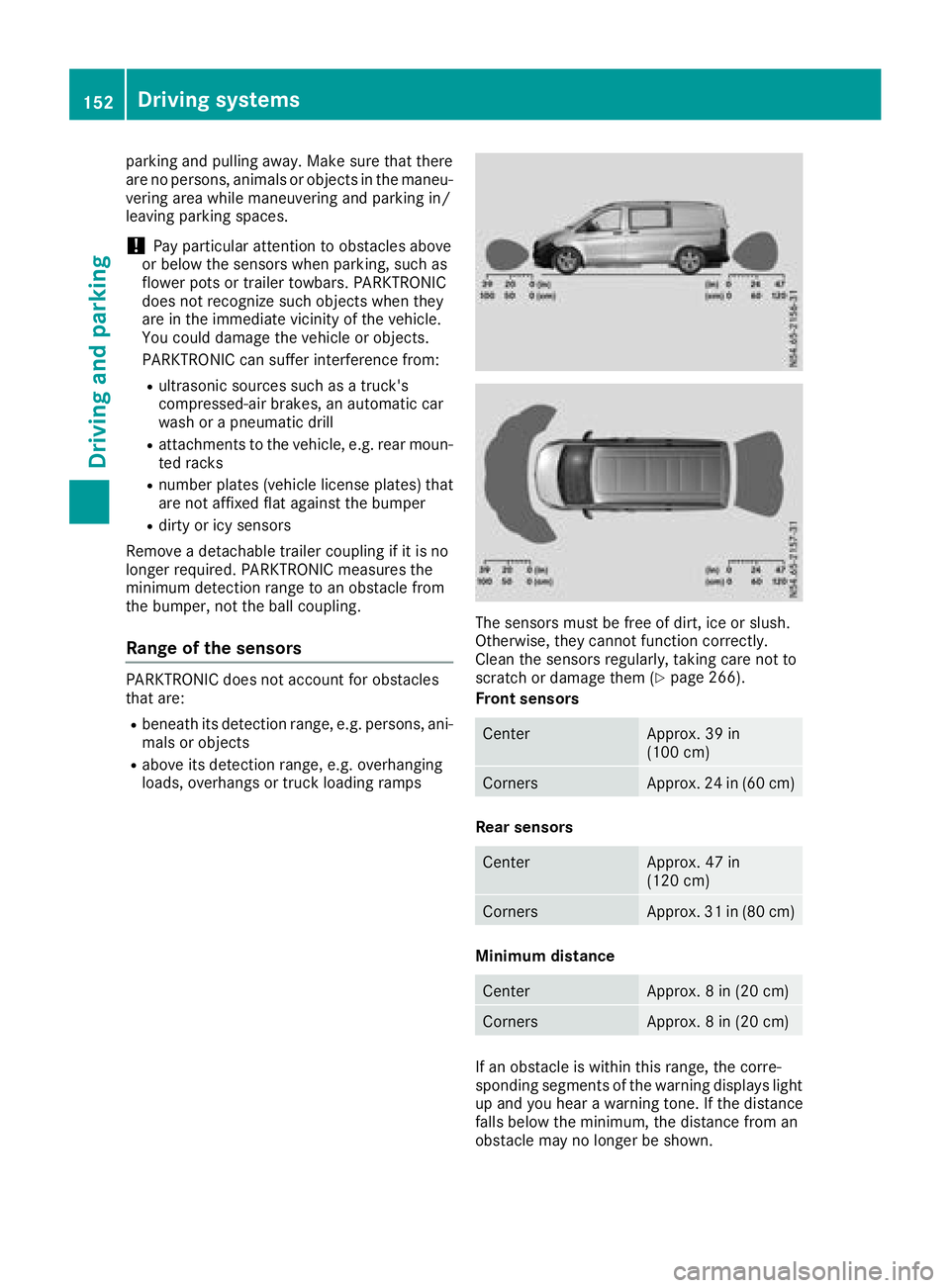
Range of the sensors
PARKTRONIC does not account for obstacles
that are:
Rbeneath its detection range, e.g. persons, ani-
mals or objects
Rabove its detection range, e.g. overhanging
loads, overhangs or truck loading ramps
The sensors must be free of dirt, ice or slush.
Otherwise, they cannot function correctly.
Clean the sensors regularly, taking care not to
scratch or damage them (
Ypage 266).
Front sensors
CenterApprox. 39 in
(100 cm)
CornersApprox. 24 in (60 cm)
Rear sensors
CenterApprox. 47 in
(120 cm)
CornersApprox. 31 in (80 cm)
Minimum distance
CenterApprox. 8 in (20 cm)
CornersApprox. 8 in (20 cm)
If an obstacle is within this range, the corre-
sponding segments of the warning displays light
up and you hear a warning tone. If the distance
falls below the minimum, the distance from an
obstacle may no longer be shown.
152Driving systems
Driving and parking
Page 158 of 318
Active Parking Assist does not assist you park-
ing in spaces at right angles to the direction of
travel if:
Rtwo parking spaces are located directly next
to one another
Rthe parking space is directly next to a low
obstacle such as a low curb
Ryou forward park
Active Parking Assist does not assist you park-
ing in spaces that are parallel or at right angles
to the direction of travel if:
Rthe parking space is on a curb
Rthe system reads the parking space as being
blocked, for example by foliage or grass pav-
ing blocks
Rthe area is too small for the vehicle to maneu-
ver into
Rthe parking space is bordered by an obstacle,
e.g. a tree, a post or a trailer
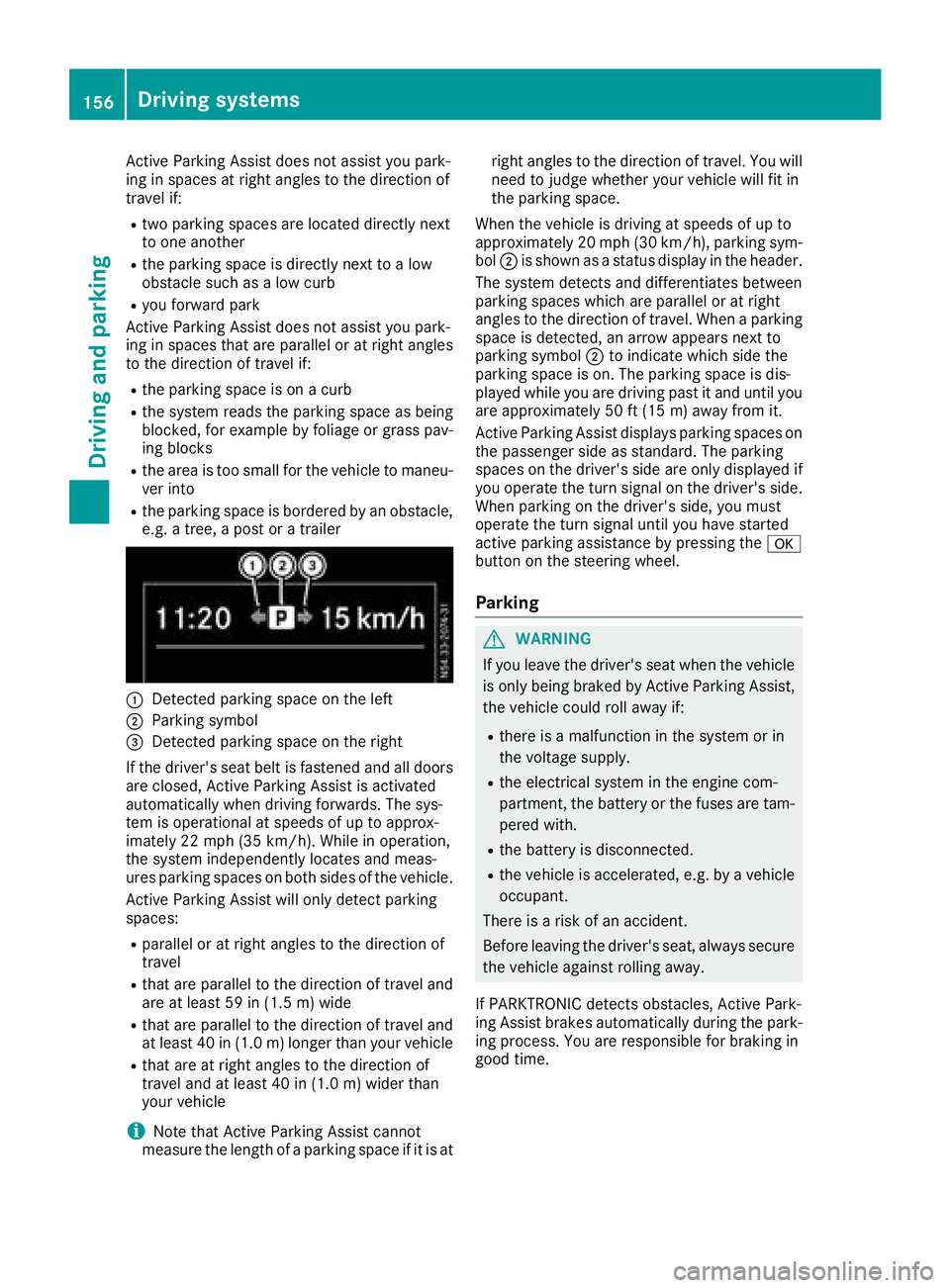
:Detected parking space on the left
;Parking symbol
=Detected parking space on the right
If the driver's seat belt is fastened and all doors
are closed, Active Parking Assist is activated
automatically when driving forwards. The sys-
tem is operational at speeds of up to approx-
imately 22 mph (35 km/h). While in operation,
the system independently locates and meas-
ures parking spaces on both sides of the vehicle.
Active Parking Assist will only detect parking
spaces:
Rparallel or at right angles to the direction of
travel
Rthat are parallel to the direction of travel and are at least 59 in (1.5 m) wide
Rthat are parallel to the direction of travel and
at least 40 in (1.0 m) longer than your vehicle
Rthat are at right angles to the direction of
travel and at least 40 in (1.0 m) widerthan
your vehicle
iNote that Active Parking Assist cannot
measure the length of a parking space if it is at right angles to the direction of travel. You will
need to judge whether your vehicle will fit in
the parking space.
When the vehicle is driving at speeds of up to
approximately 20 mph (30 km/h), parking sym-
bol ;is shown as a status display in the header.
The syste m d
etects and differentiates between
parking spaces which are parallel or at right
angles to the direction of travel. When a parking
space is detected, an arrow appears next to
parking symbol ;to indicate which side the
parking space is on. The parking space is dis-
played while you are driving past it and until you
are approximately 50 ft (15 m) away from it.
Active Parking Assist displays parking spaces on
the passenger side as standard. The parking
spaces on the driver's side are only displayed if
you operate the turn signal on the driver's side.
When parking on the driver's side, you must
operate the turn signal until you have started
active parking assistance by pressing the a
button on the steering wheel.
Parking
GWARNING
If you leave the driver's seat when the vehicle is only being braked by Active Parking Assist,
the vehicle could roll away if:
Rthere is a malfunction in the system or in
the voltage supply.
Rthe electrical system in the engine com-
partment, the battery or the fuses are tam-
pered with.
Rthe battery is disconnected.
Rthe vehicle is accelerated, e.g. by a vehicle
occupant.
There is a risk of an accident.
Before leaving the driver's seat, always secure the vehicle against rolling away.
If PARKTRONIC detects obstacles, Active Park-
ing Assist brakes automatically during the park- ing process. You are responsible for braking in
good time.
156Driving system s
Driving an d parking
Page 159 of 318
XBring the vehicle safely to a stop when the
parking symbol shows the desired parking
space in the instrument cluster.
XShift the transmission to positionR.
The display shows the Start
ParkAssist?Yes: OKNo:%message and the location
of the parking space.
XTo cancel the process: press the%but-
ton on the steering wheel or drive off.
or
XTo park using active parking assistance:
press the abutton on the steering wheel.
The display shows the Park Assist
Active: Accelerate and BrakeObs.Surroundingsmessage.
XLet go of the steering wheel.
XReverse the vehicle, being ready to brake at
all times. Exit the parking space slowly and do
not drive faster than 6 mph (10 km/h). Oth-
erwise parking assistance is canceled and
Active Parking Assist is stopped.
Active Parking Assist brakes the vehicle to a
standstill when the vehicle approaches the
rear border of the parking space.
Maneuvering may be required in tight parking
spaces. The display shows the Park Assist
Active: Select DObs. Surroundingsmes-
sage.
XWhile the vehicle is stationary, shift the trans-
mission to position D.
Active Parking Assist immediately steers in
the other direction. The display shows the
Park Assist Active: Accelerate and
BrakeObs. Surroundingsmessage.
iYou will achieve the best results by waiting
for the steering procedure to complete before
pulling away.
XDrive forwards and be ready to brake at all
times.
Active Parking Assist brakes the vehicle to a
standstill.
The Park Assist Active: Select R
Obs.Surroundingsmessage is shown in the display.
As soon as the parking procedure is complete,
the Park Assist Finished
message appears
in the display and a tone sounds. The parking
assistance function of Active Parking Assist is
stopped. The vehicle is parked and kept station-
ary without the driver having to depress the
brake pedal. The braking effect is canceled
when you depress the accelerator pedal. Active Parking Assist no longer supports you
with steering interventions and brake applica-
tions. Once active parking assistance has been
stopped, you must steer and brake again your-
self. PARKTRONIC is still available.
Parking tips:
RThe way your vehicle is positioned in the park-
ing space after parking is dependent on vari-
ous factors. These include the position and
shape of the vehicles parked in front and
behind it and the conditions of the location. It
may be the case that Active Parking Assist
guides you too far into a parking space, or not
far enough into it. In some cases, it may also
lead you across or onto the curb. In this case,
cancel the active parking assistance.
RYou can also select transmission position D
prematurely. The vehicle redirects and does
not drive as far into the parking space. If you
change direction too early, parking assis-
tance is canceled and Active Parking Assist is
stopped. It is then not possible to achieve a
sensible parking position from the current
position.
Exiting a parking space
In order that Active Parking Assist can assist you
when exiting the parking space:
Rthe border of the parking space must be high
enough at the front and the rear. A curb is too
small, for example.
Rthe border of the parking space must not be
too wide. Your vehicle can be maneuvered
into a position at a maximum of 45° to the
starting position in the parking space.
Ra maneuvering distance of at least 3.3 ft
(1.0 m) must be available .
Active Parking Assist can only assist you with
exiting a parking space if you have parked the
vehicle parallel to the direction of travel using
Active Parking Assist.
If PARKTRONIC detects obstacles, Active Park-
ing Assist brakes automatically when exiting
from the parking space. You are responsible for
braking in good time.
XStart the engine.
XSwitch on the turn signal in the direction in
which you are pulling away.
XShift the transmission to position Dor R.
The display shows the Start
ParkAssist?Yes: OKNo:%message.
Driving systems157
Driving an d parking
Z
Page 160 of 318
XTo cancel the process:press the%but-
ton on the steering wheel or drive off.
or
XTo exit the parking space using active
parking assistance: press theabutton
on the steering wheel.
The display shows the Park Assist
Active: Accelerate and BrakeObs.Surroundingsmessage.
XLet go of the steering wheel.
XPull away, being ready to brake at all times.
Exit the parking space slowly and do not drive
faster than 6 mph (10 km/h). Otherwise park-
ing assistance is canceled and Active Parking
Assist is stopped.
Active Parking Assist brakes the vehicle to a
standstill when the vehicle approaches a bor-
der of the parking space.
XWhile the vehicle is stationary, shift the trans-
mission to position Dor Ras required or
according to the message.
Active Parking Assist immediately steers in
the other direction. The display shows the
Park Assist Active: Accelerate and
BrakeObs. Surroundingsmessage.
iYou will achieve the best results by waiting
for the steering procedure to complete before
pulling away.
If you back up after activation, the steering
wheel is moved to the straight-ahead posi-
tion.
XDrive forwards and reverse as prompted by
the PARKTRONIC warning displays, several
times if necessary.
Once you have exited the parking space com-
pletely:
RThe display shows the Park Assist Fin‐ishedmessage.
Ra tone sounds.
Rthe steering wheel is moved to the straight-
ahead position.
The parking assistance function of Active Park-
ing Assist is stopped. You will then have to steer
and merge into traffic on your own.
PARKTRONIC is still available.
You can take over the steering before the vehi-
cle has exited the parking space completely.
This is useful, for example when you recognize
that it is already possible to pull out of the park-
ing space.
Canceling active parking assistance
XStop the movement of the steering wheel or
steer yourself.
or
XPress the fbutton and deactivate
PARKTRONIC (Ypage 153).
Parking assistance is canceled immediately
and Active Parking Assist is stopped. The dis-
play shows the Park
AssistCanceledmes-
sage.
Active parking assistance is canceled automat-
ically if:
Ryou apply the parking brake.
Rparking using Active Parking Assist is no lon-
ger possible.
Ryou are driving faster than 6 mph (10 km/h).
Ra wheel spins and ESP®intervenes or fails.
The ÷ warning lamp in the instrument
cluster then lights up.
Ryou unfasten your seat belt.
Ryou open a door or the tailgate/rear door
Ryou shift the automatic transmission to posi-
tion P
A warning tone sounds, the parking symbol in
the display goes out and the Park Assist
Canceledmessage appears.
Once active Parking Assist has been canceled,
you must steer and brake again yourself.
If a system malfunction occurs, vehicles are
automatically braked down to a standstill. To
continue driving, you must depress the acceler-
ator pedal again.
Rear view camera
General notes
On vehicles with a tailgate, the rear view camera
is next to the tailgate handle (Ypage 267).
On vehicles with rear doors, the rear view cam-
era is in the top of the license plate molding
(
Ypage 267).
The rear view camera is a visual parking aid. It
shows you the area behind the vehicle in the
audio display.
The area behind the vehicle is displayed in a
mirrored fashion, as in the rear-view mirror or
the exterior mirrors. The guide lines displayed
assist you in backing up.
158Driving systems
Driving an d parking
Page 167 of 318
This enables you to utilize the engine's braking
effect and you do not need to brake so heavily to
keep the correct speed. This relieves the load on
the brake system and prevents the brakes from
overheating and wearing too quickly. If you needto brake additionally, to not depress the brake
pedal constantly, but periodically.
Observe the notes on ESP
®trailer stabilization
(Ypage 67).
Driving tips
If the trailer begins to swing from side to side:
XDo not accelerate.
XDo not counter-steer.
XBrake if necessary.
iYou can reduce the risk of the trailer swing-
ing and rocking by retrofitting anti-roll bars or trailer stability programs. Further information
is available at your authorized Mercedes-Benz
Van Dealer.
RMaintain a greater distance than you would
when driving without towing a trailer.
RAvoid sudden braking. Apply the brakes gen-
tly at first to allow the trailer brake to overrun.
Then, increase the brake force quickly.
RThe figures for the gradient climbing capabil-
ities from a standstill refer to sea level. When
driving in mountainous areas, note that the
power output of the engine, and with it its
gradient climbing capability, decrease with
increasing altitude.
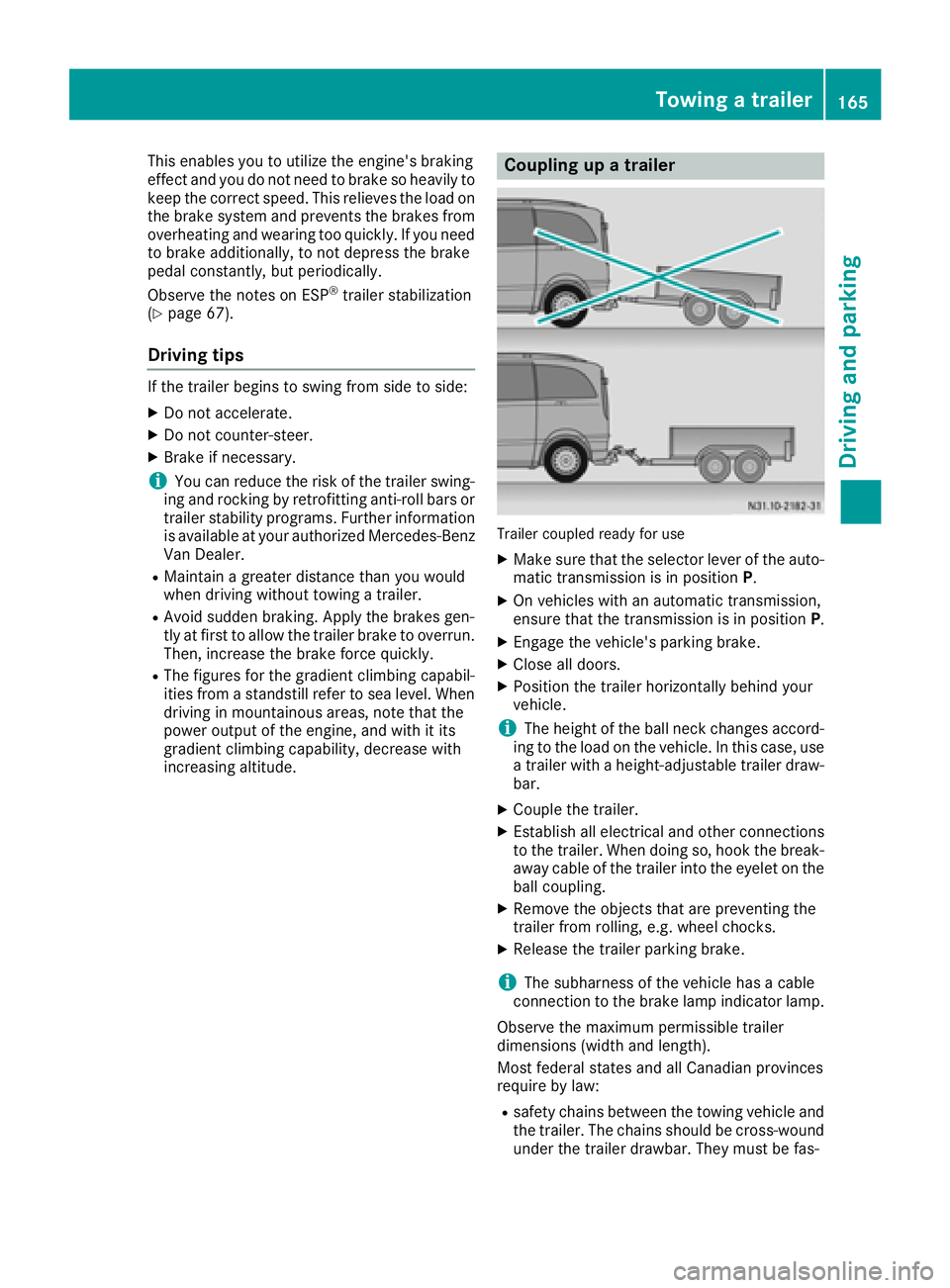
Coupling up a trailer
Trailer coupled ready for use
XMake sure that the selector lever of the auto-
matic transmission is in position P.
XOn vehicles with an automatic transmission,
ensure that the transmission is in position P.
XEngage the vehicle's parking brake.
XClose all doors.
XPosition the trailer horizontally behind your
vehicle.
iThe height of the ball neck changes accord-
ing to the load on the vehicle. In this case, use
a trailer with a height-adjustable trailer draw-
bar.
XCouple the trailer.
XEstablish all electrical and other connections to the trailer. When doing so, hook the break-
away cable of the trailer into the eyelet on the
ball coupling.
XRemove the objects that are preventing the
trailer from rolling, e.g. wheel chocks.
XRelease the trailer parking brake.
iThe subharness of the vehicle has a cable
connection to the brake lamp indicator lamp.
Observe the maximum permissible trailer
dimensions (width and length).
Most federal states and all Canadian provinces
require by law:
Rsafety chains between the towing vehicle and the trailer. The chains should be cross-wound
under the trailer drawbar. They must be fas-
Towing a trailer165
Driving and parking
Z
Page 168 of 318
tened to the vehicle's trailer coupling, not to
the bumper or the axle.
Leave enough slack in the chains. This allows
you to drive round tight corners.
Ra separate brake system for certain types of
trailer.
Ra safety shut-off for braked trailers. Find out
the specific requirements according to the
applicable laws.
If the trailer becomes detached from the tow-
ing vehicle, the safety shut-off applies the
trailer brakes.
Towing a trailer
There are numerous legal requirements con-
cerning the towing of a trailer, e.g. speed restric-
tions. Many states require a separate functional
braking system for your trailer once a certain
weight limit is exceeded. For reasons of safety,
it is recommended that all trailers use a sepa-
rate functional braking system. Make sure yourvehicle/trailer combination complies with local
laws. This not only means where you live, but
also anywhere you are driving to. Information on
this can be obtained from the police and local
authorities.
Observe the following when towing a trailer:
RPractice driving around bends, stopping and
backing up at a place where there is no traffic.
This enables you to gain experience and get
used to the new handling characteristics.
RBefore driving, check:
-that the trailer tow hitch and ball coupling
are secure
-that the safety switch for a braked trailer is
functioning properly
-that the safety chains are secure and not
damaged
-that the electrical connections are secure
-that the lights are working
-that the wheels are in good order and the
tire pressure is correct
RAdjust the exterior mirrors to provide an
unobstructed view of the rear section of the
trailer.
RIf the trailer is equipped with a separate func-
tional braking system, check before each
journey whether the brakes are functioning
correctly.
RSecure the load on the trailer according to the
applicable specifications and current stand-
ards on securing loads (
Ypage 244).
RWhen driving with a trailer, check at regular
intervals that the load is secured and that the
brakes and lights are working.
RBear in mind that the handling will be less
stable when towing a trailer than when driving
without one. Avoid sudden steering move-
ments.
RThe vehicle/trailer combination is heavier,
accelerates more slowly and has a decreased
gradient climbing capability and a longer
braking distance.
It is more susceptible to crosswinds and
requires cautious steering.
RIf possible, do not brake suddenly, but rather
moderately at first so that the trailer can acti-
vate its brakes. Then increase the force on the
brake pedal.
RIf the automatic transmission repeatedly
shifts between gears when driving on inclines,
restrict the shift range. Select shift range
4,3 ,
2 o
r 1.
Driving in a low gear and at a low speed
reduces the risk of damaging the engine.
RWhen driving on a downhill gradient, shift to a
low gear and take advantage of the engine's
braking effect.
Avoid continuous brake application as this
may overheat the vehicle brakes and, if instal-
led, the trailer brakes.
RIf the coolant temperature increases dramat-
ically while the air-conditioning system is
switched on, switch off the air-conditioning
system.
Coolant heat can also be dissipated by
switching the airflow and the temperature of
the air conditioning to the maximum level.
Open the windows if necessary.
RWhen overtaking, pay particular attention to
the extended length of your vehicle/trailer
combination.
Due to the length of your vehicle/trailer com- bination you need an additional distance
before you can return to your original lane.
166Towing a trailer
Driving an d parking
Page 257 of 318
Adding coolant
XIfthe coolant drops under marker bar=in
the filler neck, add coolant.
Observe the information on the correct cool-
ant mixture rat ioand the required water qual-
ity under "Service products and capacities"
(
Ypage 309). To prevent damage to the
engine co oling system, use only appr oved
corrosion inh ibitor/antifreeze that co mplies
wit h the Mercedes-Benz Specifications for
Service Products.
XReplac e cap:and tighten ina clock wise
dire ction.
XStart the engine.
XSet the temperature inthe veh icleinterior to
the maximum output on the air-conditioning
system control panel.
XAfter approximate lyfive minutes, switch off
the engine again and allow itto cool down.
XCheck the coolant level again and add coolant
ifnecessary.
XClose the hood.
Brake fluid
GWAR NING
Service products may be poisonous and haz-
ardous to health. There isa risk of injury.
Comp ly with instructions on the use, storage
and dispo sal of service products on the labels
of the respective original containers. Always
store service products sealed intheir original
containers. Always keep service products out
of the reach of ch ildren.
GWAR NING
Opening the hood when the engine isover-
heated or when there isa fire inthe engine
compartment could expose you to hot gases
or other service products. There isa risk of
injury.
Let an overheated engine cool downbefore
opening the hood. Ifthere isa fire inthe
engine compartment, keep the hood closed
and contact the fire department.
GWARNING
Certain components in the engine compart-
ment, such as the engine, radiator and parts
of the exhaust system, can become very hot.
Working in the engine compartment poses a
risk of injury.
Where possible, let the engine cool downand
touch only the components describe d in the
foll owin g.
Brake fluid is hazardous to health. Also observe the safety notes under "Service products and
capacities" (
Ypage 304).
GWARNING
The brake fluid constantly absorbs moisture
from the air. This lowers the boiling point of
the brake fluid. Ifthe boilin g point of the brake
fluid is too low,vapor pockets may form in the
brake system when the brakes are applied
hard. This would impair braking efficiency.
There is a risk of an accident.
You should have the brake fluid renewed at
the specified intervals.
!If the brake fluid level in the brake fluid res-
ervoir has fallen to the MIN mark or below,
check the brake system immediately for
leaks. Also check the thickness of the brake
linings. Visit a qualified specialist workshop
immediately.
Do not add brake fluid. This does not correct
the malfunction.
!Brake fluid corrodes paint, plastic and rub-
ber. Ifpaint, plastic or rubber has come into
contact with brake fluid, rinse with water
immediately.
Have the brake fluid renewed every two years at a qualified specialist workshop. Observe the
information regarding brake fluid in the "Service
products and capacities" section (
Ypage 309).
Engine compartment255
Maintenance and care
Z
Page 265 of 318
installed in the vehicle. The vehicle's elec-
tronics system may otherwise be damaged.
!Only charge the battery using the jump-
starting connection point.
A battery charger unit specially adapted for
Mercedes-Benz vehicles and tested and
approved by Mercedes-Benz is available as an
accessory. Only this device permits the charging
of the battery in its installed position. Contact an
authorized Mercedes-Benz Commercial Van
Center for information and availability. Read the
operating instructions for your charger before
charging the battery.
Recharge the battery more frequently if you use the vehicle mainly for short trips and/or drive at
low outside temperatures.
Only charge the installed battery with a battery
charger that has been tested and approved by
Mercedes-Benz, using the jump-start connec-
tion point in the engine compartment.
XConnect the battery charger to the positive
terminal and ground terminal in the same
order as when connecting the donor battery in
the jump-starting procedure (
Ypage 272).
iIf a battery is not installed and not in service,
you should charge it every three months. This
will counter self-discharging and prevent bat-
tery damage.
Care
!
Dirty battery clamps and battery surfaces
cause leak currents which lead to the batter-
ies discharging.
!Do not use cleaning agents containing fuel.
Cleaning agents containing fuel corrode the
battery housing.
!If dirt gets into the battery cell, battery self-
discharge will increase and the battery may
be damaged.
The following points on battery care must be
observed:
XRegularly check the battery terminals and the
fastening of the negative cable to the chassis
to ensure that they are firmly seated.
XAlways keep the battery terminals and battery
surfaces clean and dry.
XLightly grease the undersides of the battery
terminals with acid-resistant grease.
XOnly clean the battery casing with a commer-
cially available cleaning product.
Care
Notes on care
GWARNING
If you use openings in the bodywork or
detachable parts as steps, you could:
Rslip and/or fall
Rdamage the vehicle and cause yourself to
fall.
There is a risk of injury.
Always use secure climbing aids, e.g. a suita-
ble ladder.
!Do not use the lower sliding door guide (car-
riage) as a step. Otherwise, you could damage
the paneling and/or the sliding door mecha-
nism.
!For cleaning your vehicle, do not use any of
the following:
Rdry, rough or hard cloths
Rabrasive cleaning agents
Rsolvents
Rcleaning agents containing solvents
Do not scrub.
Do not touch the surfaces or protective films
with hard objects, e.g. a ring or ice scraper.
You could otherwise scratch or damage the
surfaces and protective film.
!Do not park your vehicle for a long period of
time directly after cleaning, particularly after
cleaning the wheel rim with wheel cleaner.
Wheel cleaner can lead to the increased cor-
rosion of the brake discs and pads. Therefore,
drive for a few minutes after cleaning. By
heating up the brakes, the brake discs and
pads dry. The vehicle can then be parked for a
long period of time.
HEnvironmental note
Only clean your vehicle at specially designed
wash bays. Dispose of empty containers and
Care263
Maintenance and care
Z
Page 268 of 318
Exterior
Cleaning the wheels
!Do not use any acidic or alkaline cleaning
agents. They can cause corrosion on the
wheel bolts or the retainer springs for the
wheel-balancing weights.
!Do not park your vehicle for a long period of
time directly after cleaning, particularly after
cleaning the wheel rim with wheel cleaner.
Wheel cleaner can lead to the increased cor-
rosion of the brake discs and pads. Therefore,
drive for a few minutes after cleaning. By
heating up the brakes, the brake discs and
pads dry. The vehicle can then be parked for a
long period of time.
If you clean the wheels with a power washer,
observe the safety notes for the power washer
(
Ypage 264). You could otherwise damage the
tires.
Cleaning the wiper blades
GWARNING
You could become trapped by the windshield wipers if they start moving while cleaning the
windshield or wiper blades. There is a risk of
injury.
Always switch off the windshield wipers and
the ignition before cleaning the windshield or
wiper blades.
!Do not fold the windshield wipers away from
the windshield unless the hood is closed. Oth-
erwise, you could damage the hood.
!Do not pull the wiper blade. Otherwise, the
wiper blade could be damaged.
!Do not clean wiper blades too often and do
not rub them too hard. Otherwise, the graph-
ite coating could be damaged. This could
cause wiper noise.
!Hold the wiper arm securely when folding
back. The windshield could be damaged if the
wiper arm smacks against it suddenly.
XTurn the SmartKey to position 0in the ignition
lock or remove the SmartKey.
XFold the windshield wiper arms away from the
windshield until you feel them engage.
XCarefully clean the wiper blades with a damp
cloth.
XFold back the wiper arms before switching on
the ignition.
Cleaning the exterior lighting
!Only use cleaning agents or cleaning cloths
which are suitable for plastic light lenses.
Unsuitable cleaning agents or cleaning cloths
could scratch or damage the plastic light len- ses.
XClean the plastic covers of the exterior light-
ing with a damp sponge and a mild cleaning
agent, e.g. Mercedes-Benz car shampoo, or
with cleaning cloths.
Cleaning the sensors
!Do not use dry, coarse or hard cloths and do
not scrub. You will otherwise scratch or dam-
age the sensors.
If you clean the sensors with a power washer
or steam cleaner, observe the information
provided by the manufacturer regarding the
distance to be maintained between the vehi-
cle and the nozzle of the power washer.
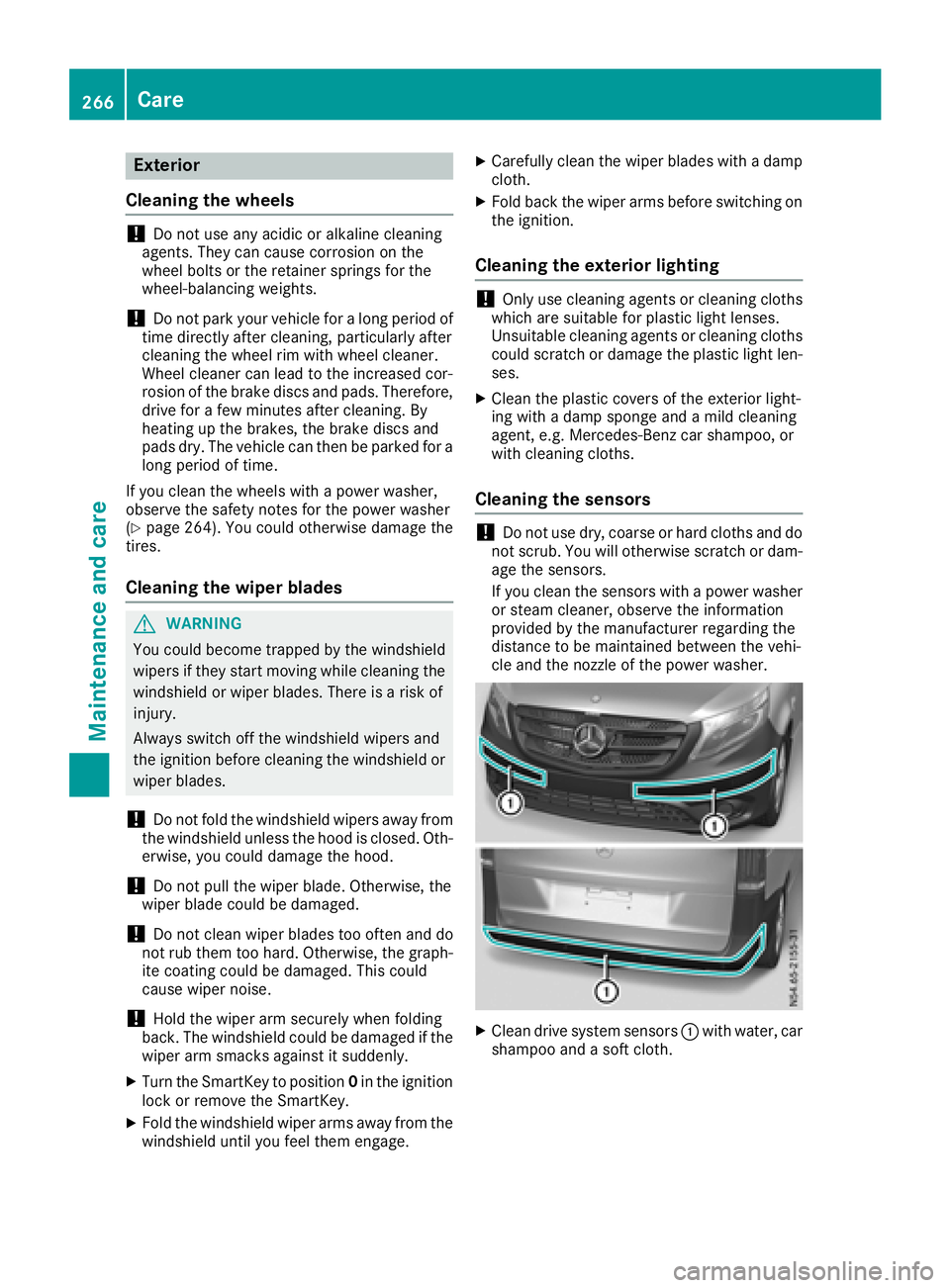
XClean drive system sensors :with water, car
shampoo and a soft cloth.
266Care
Maintenance and care