check engine MERCEDES-BENZ METRIS 2017 MY17 Operator’s Manual
[x] Cancel search | Manufacturer: MERCEDES-BENZ, Model Year: 2017, Model line: METRIS, Model: MERCEDES-BENZ METRIS 2017Pages: 318, PDF Size: 5.01 MB
Page 143 of 318
drive over obstacles, have the front
passenger direct you.
iWe recommend that you additionally carry a
shovel and a recovery rope with shackle in the
vehicle.
REnsure that loads and items of luggage are
securely stowed or lashed down
(
Ypage 242).
RBefore driving off-road, stop the vehicle and
shift to a low gear.
RIf the surface requires, temporarily deactivate
ESP®when pulling away (Ypage 66).
ROnly drive off-road with the engine running
and a gear engaged.
RDrive slowly and smoothly. Walking pace is
necessary in many situations.
RAvoid spinning the drive wheels.
RMake sure that the wheels always remain in
contact with the ground.
RDrive with extreme care over unknown terrain
where you can only see for a short distance.
As a precaution, get out of the vehicle to take
a look at the route to be taken in advance.
RCheck the water depth before fording.
RWatch out for obstacles (e.g. rocks, holes,
tree stumps and ruts).
RAvoid edges where the surface could crumble
or break away.
Checklist after driving off-road
!If you detect damage to the vehicle after
driving off-road, have the vehicle checked
immediately at a qualified specialist work-
shop.
Off-road driving places a higher demand on your
vehicle than normal road operation. Check your
vehicle after driving on rough terrain. By doing
so you will notice any damage in good time and
reduce the risk of an accident for yourself and
other road users. Clean your vehicle thoroughly
before driving on public roads.
Observe the following points after driving off-
road, on construction sites and before driving on
public roads:
XActivate ESP®(Ypage 66).
XClean the headlamps and tail lamps and
check them for damage.
XClean the front and rear license plates.
XClean the windshield, windows and exterior
mirrors.
XClean the steps, door sills and grab handles.
This increases safety of footing.
XClean the wheels/tires, wheel housings and
the underbody of the vehicle with a water jet. This increases road grip, especially on wet
road surfaces.
XCheck the wheels/tires and wheel housings
for trapped foreign objects and remove them.
Trapped foreign objects can damage the
wheels/tires and may be flung out from the
vehicle when you continue driving.
XCheck the underbody for trapped branches or
other parts of plants and remove them.
Trapped branches or other parts of plants
increase the risk of fire and can cause dam-
age to fuel lines, brake hoses and the rubber
bellows of axle joints and drive shafts.
XClean the brake disks, brake pads and axle
joints, particularly after operation in sand,
mud, grit/gravel, water or similarly dirty con-
ditions.
XCheck the entire floor assembly, the tires,
wheels, bodywork structure, brakes, steering,
chassis and exhaust system for any damage.
XCheck the service brake for operating safety,
e.g. carry out a brake test.
XIf you notice strong vibrations after driving off-
road, check the wheels and drive train for for- eign objects again. Remove any foreign
objects which can lead to imbalances and
thus cause vibrations.
Driving in mountainous areas
When driving in mountainous areas, note that
the power output of the engine, and with it its
gradient climbing capability, decrease with
increasing altitude. Please take note of this par-
ticularly when driving with a trailer in mountain-ous areas.
The maximum permissible trailer loads are valid
for journeys at altitudes up to 1100 yds
(1000 m) above sea level with gradients up to
12%.
Information on maximum permissible trailer
loads can be found in your vehicle registration
papers and on the vehicle identification plate
(
Ypage 303) or under "Trailer loads"
(Ypage 314).
Driving tips141
Driving and parking
Z
Page 161 of 318
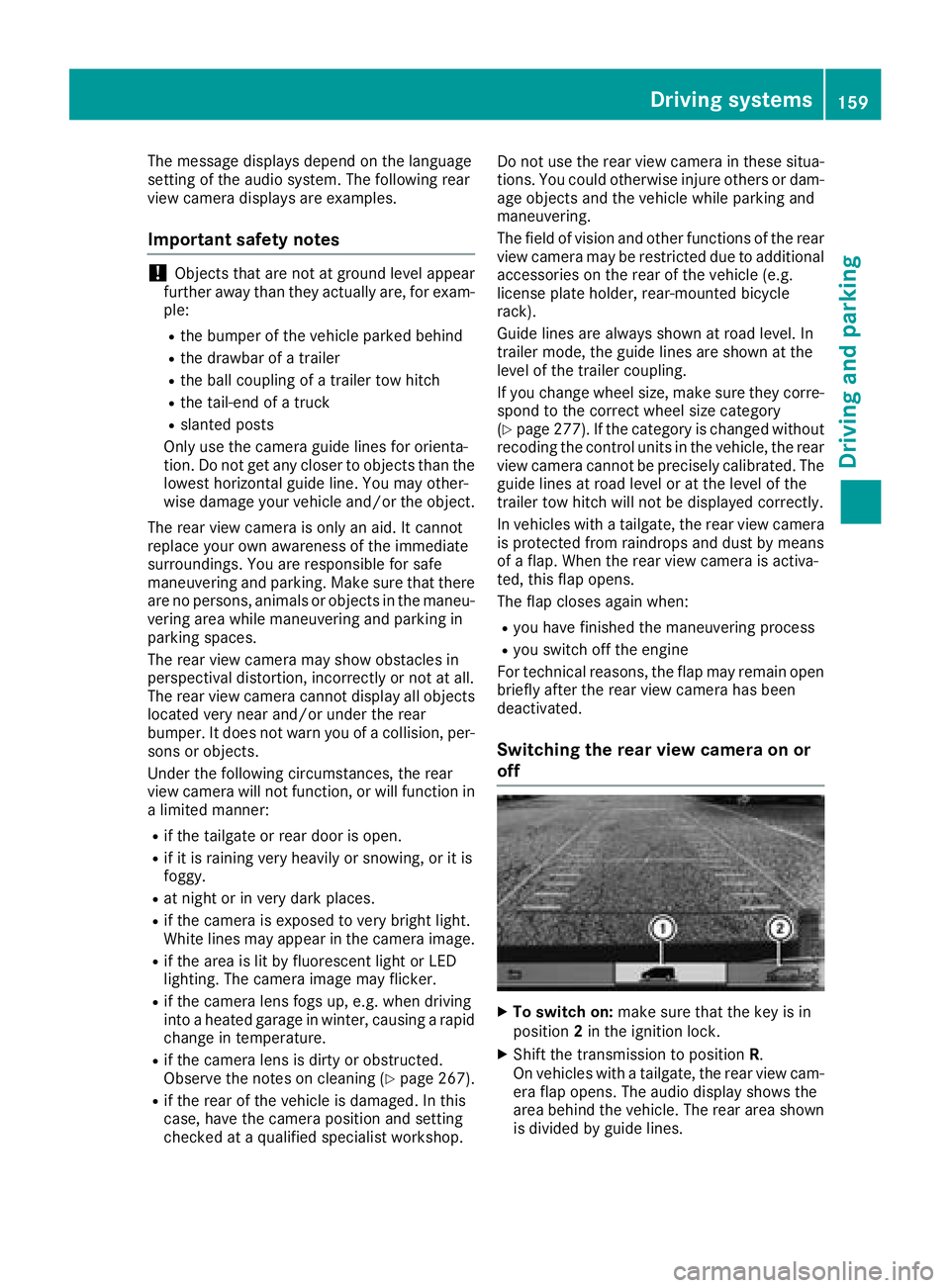
The message displays depend on the language
setting of the audio system. The following rear
view camera displays are examples.
Important safety notes
!Objects that are not at ground level appear
further away than they actually are, for exam-
ple:
Rthe bumper of the vehicle parked behind
Rthe drawbar of a trailer
Rthe ball coupling of a trailer tow hitch
Rthe tail-end of a truck
Rslanted posts
Only use the camera guide lines for orienta-
tion. Do not get any closer to objects than the
lowest horizontal guide line. You may other-
wise damage your vehicle and/or the object.
The rear view camera is only an aid. It cannot
replace your own awareness of the immediate
surroundings. You are responsible for safe
maneuvering and parking. Make sure that there
are no persons, animals or objects in the maneu- vering area while maneuvering and parking in
parking spaces.
The rear view camera may show obstacles in
perspectival distortion, incorrectly or not at all.
The rear view camera cannot display all objects
located very near and/or under the rear
bumper. It does not warn you of a collision, per-
sons or objects.
Under the following circumstances, the rear
view camera will not function, or will function in
a limited manner:
Rif the tailgate or rear door is open.
Rif it is raining very heavily or snowing, or it is
foggy.
Rat night or in very dark places.
Rif the camera is exposed to very bright light.
White lines may appear in the camera image.
Rif the area is lit by fluorescent light or LED
lighting. The camera image may flicker.
Rif the camera lens fogs up, e.g. when driving
into a heated garage in winter, causing a rapid
change in temperature.
Rif the camera lens is dirty or obstructed.
Observe the notes on cleaning (Ypage 267).
Rif the rear of the vehicle is damaged. In this
case, have the camera position and setting
checked at a qualified specialist workshop. Do not use the rear view camera in these situa-
tions. You could otherwise injure others or dam-
age objects and the vehicle while parking and
maneuvering.
The field of vision and other functions of the rear view camera may be restricted due to additional
accessories on the rear of the vehicle (e.g.
license plate holder, rear-mount
ed bicycle
rack).
Guide lines are always shown at road level. In
trailer mode, the guide lines are shown at the
level of the trailer coupling.
If you change wheel size, make sure they corre- spond to the correct wheel size category
(
Ypage 277). If the category is changed without
recoding the control units in the vehicle, the rear
view camera cannot be precisely calibrated. The
guide lines at road level or at the level of the
trailer tow hitch will not be displayed correctly.
In vehicles with a tailgate, the rear view camera
is protected from raindrops and dust by means
of a flap. When the rear view camera is activa-
ted, this flap opens.
The flap closes again when:
Ryou have finished the maneuvering process
Ryou switch off the engine
For technical reasons, the flap may remain open
briefly after the rear view camera has been
deactivated.
Switching the rear view camera on or
off
XTo switch on: make sure that the key is in
position 2in the ignition lock.
XShift the transmission to position R.
On vehicles with a tailgate, the rear view cam-
era flap opens. The audio display shows the
area behind the vehicle. The rear area shown
is divided by guide lines.
Driving systems159
Driving and parking
Z
Page 168 of 318
tened to the vehicle's trailer coupling, not to
the bumper or the axle.
Leave enough slack in the chains. This allows
you to drive round tight corners.
Ra separate brake system for certain types of
trailer.
Ra safety shut-off for braked trailers. Find out
the specific requirements according to the
applicable laws.
If the trailer becomes detached from the tow-
ing vehicle, the safety shut-off applies the
trailer brakes.
Towing a trailer
There are numerous legal requirements con-
cerning the towing of a trailer, e.g. speed restric-
tions. Many states require a separate functional
braking system for your trailer once a certain
weight limit is exceeded. For reasons of safety,
it is recommended that all trailers use a sepa-
rate functional braking system. Make sure yourvehicle/trailer combination complies with local
laws. This not only means where you live, but
also anywhere you are driving to. Information on
this can be obtained from the police and local
authorities.
Observe the following when towing a trailer:
RPractice driving around bends, stopping and
backing up at a place where there is no traffic.
This enables you to gain experience and get
used to the new handling characteristics.
RBefore driving, check:
-that the trailer tow hitch and ball coupling
are secure
-that the safety switch for a braked trailer is
functioning properly
-that the safety chains are secure and not
damaged
-that the electrical connections are secure
-that the lights are working
-that the wheels are in good order and the
tire pressure is correct
RAdjust the exterior mirrors to provide an
unobstructed view of the rear section of the
trailer.
RIf the trailer is equipped with a separate func-
tional braking system, check before each
journey whether the brakes are functioning
correctly.
RSecure the load on the trailer according to the
applicable specifications and current stand-
ards on securing loads (
Ypage 244).
RWhen driving with a trailer, check at regular
intervals that the load is secured and that the
brakes and lights are working.
RBear in mind that the handling will be less
stable when towing a trailer than when driving
without one. Avoid sudden steering move-
ments.
RThe vehicle/trailer combination is heavier,
accelerates more slowly and has a decreased
gradient climbing capability and a longer
braking distance.
It is more susceptible to crosswinds and
requires cautious steering.
RIf possible, do not brake suddenly, but rather
moderately at first so that the trailer can acti-
vate its brakes. Then increase the force on the
brake pedal.
RIf the automatic transmission repeatedly
shifts between gears when driving on inclines,
restrict the shift range. Select shift range
4,3 ,
2 o
r 1.
Driving in a low gear and at a low speed
reduces the risk of damaging the engine.
RWhen driving on a downhill gradient, shift to a
low gear and take advantage of the engine's
braking effect.
Avoid continuous brake application as this
may overheat the vehicle brakes and, if instal-
led, the trailer brakes.
RIf the coolant temperature increases dramat-
ically while the air-conditioning system is
switched on, switch off the air-conditioning
system.
Coolant heat can also be dissipated by
switching the airflow and the temperature of
the air conditioning to the maximum level.
Open the windows if necessary.
RWhen overtaking, pay particular attention to
the extended length of your vehicle/trailer
combination.
Due to the length of your vehicle/trailer com- bination you need an additional distance
before you can return to your original lane.
166Towing a trailer
Driving an d parking
Page 192 of 318
Safety systems
Display messagesPossible causes/consequences andMSolutions
ABS,ESPInoperative
+
ABS, BAS, hill start assist, and ESP®as well as its driving safety sys-
tems are unavailable due to a malfunction.
ATTENTION ASSIST is deactivated and other driving systems could be
automatically deactivated.
GWARNING
The brake system continues to function normally, but without the
functions listed above. The wheels could therefore lock if you brake
hard, for example.
This causes steerability and braking to be greatly impaired. The brak-
ing distance can increase in emergency braking situations.
If ESP
®is not operational, ESP®will not stabilize the vehicle.
There is an increased risk of skidding and accidents.
XSwitch the engine off, wait briefly and start the engine again.
XCheck if the display message has disappeared and ESP®is opera-
tional.
XIf the display message continues to be displayed:
RDrive on with care.
RVisit a qualified specialist workshop immediately.
ABS, ESP Curr.Unavail.
+
ABS, BAS, hill start assist, and ESP®as well as its driving safety sys-
tems are temporarily unavailable.
ATTENTION ASSIST is deactivated and other driving systems could be
automatically deactivated.
For example, the on-board voltage may be insufficient.
GWARNING
The brake system continues to function normally, but without the
functions listed above. The wheels could therefore lock if you brake
hard, for example.
This causes steerability and braking to be greatly impaired. The brak-
ing distance can increase in emergency braking situations.
If ESP
®is not operational, ESP®will not stabilize the vehicle.
There is an increased risk of skidding and accidents.
XDrive on with care and on a suitable stretch of road make slight
steering movements at a speed above 12 mph (20 km/h).
XSwitch the engine off, wait briefly and start the engine again.
XCheck if the display message has disappeared and ESP®is opera-
tional.
XIf the display message continues to be displayed:
RDrive on with care.
RVisit a qualified specialist workshop immediately.
190Display messages (vehicles without steering wheel buttons)
On-board computer and displays
Page 196 of 318
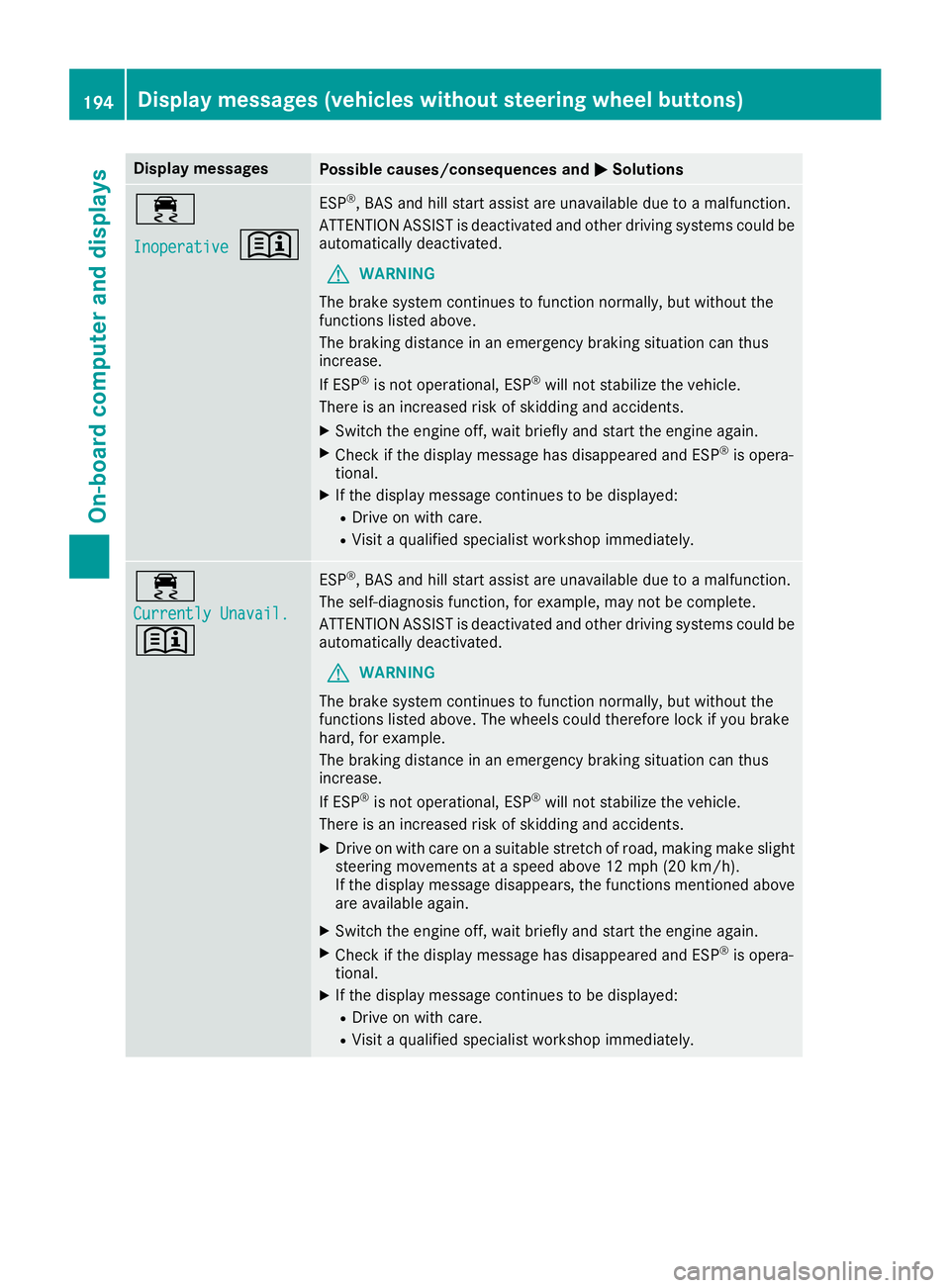
Display messagesPossible causes/consequences andMSolutions
÷
Inoperative+
ESP®,BA Sand hill start assist are unavailable due to amalfunction .
ATTENTION ASSIST is deactivated and other drivin gsystems could be
automatically deactivated.
GWARNIN G
The brak esystem continues to function normally, but without th e
function slisted above.
The braking distanc ein an emergenc ybraking situation can thus
increase.
If ES P
®is no toperational, ES P®will notstabiliz eth evehicle.
There is an increased ris kof skiddin gand accidents .
XSwitchth eengin eoff ,wait briefl yand start th eengin eagain .
XCheckif th edisplay message has disappeared and ES P®is opera-
tional.
XIf th edisplay message continues to be displayed:
RDrive on wit hcare.
RVisit aqualified specialist workshop immediately.
÷
Currently Unavail.
+
ES P®,BA Sand hill start assist are unavailable due to amalfunction .
The self-diagnosis function ,for example, may no tbe complete.
ATTENTION ASSIST is deactivated and other drivin gsystems could be
automatically deactivated.
GWARNIN G
The brak esystem continues to function normally, but without th e
function slisted above. The wheels could therefor eloc kif you brak e
hard, for example.
The braking distanc ein an emergenc ybraking situation can thus
increase.
If ES P
®is no toperational, ES P®will notstabiliz eth evehicle.
There is an increased ris kof skiddin gand accidents .
XDrive on withcar eon asuitable stretch of road, making mak eslight
steering movement sat aspeed abov e12 mph (20 km/ h).
If the display message disappears, the functions mentioned above
are available again.
XSwitch the engine off, wait briefly and start the engine again.
XCheck if the display message has disappeared and ESP®is opera-
tional.
XIf the display message continues to be displayed:
RDrive on with care.
RVisit a qualified specialist workshop immediately.
194Display messages (vehicles without steering wheel buttons)
On-board computer and displays
Page 200 of 318
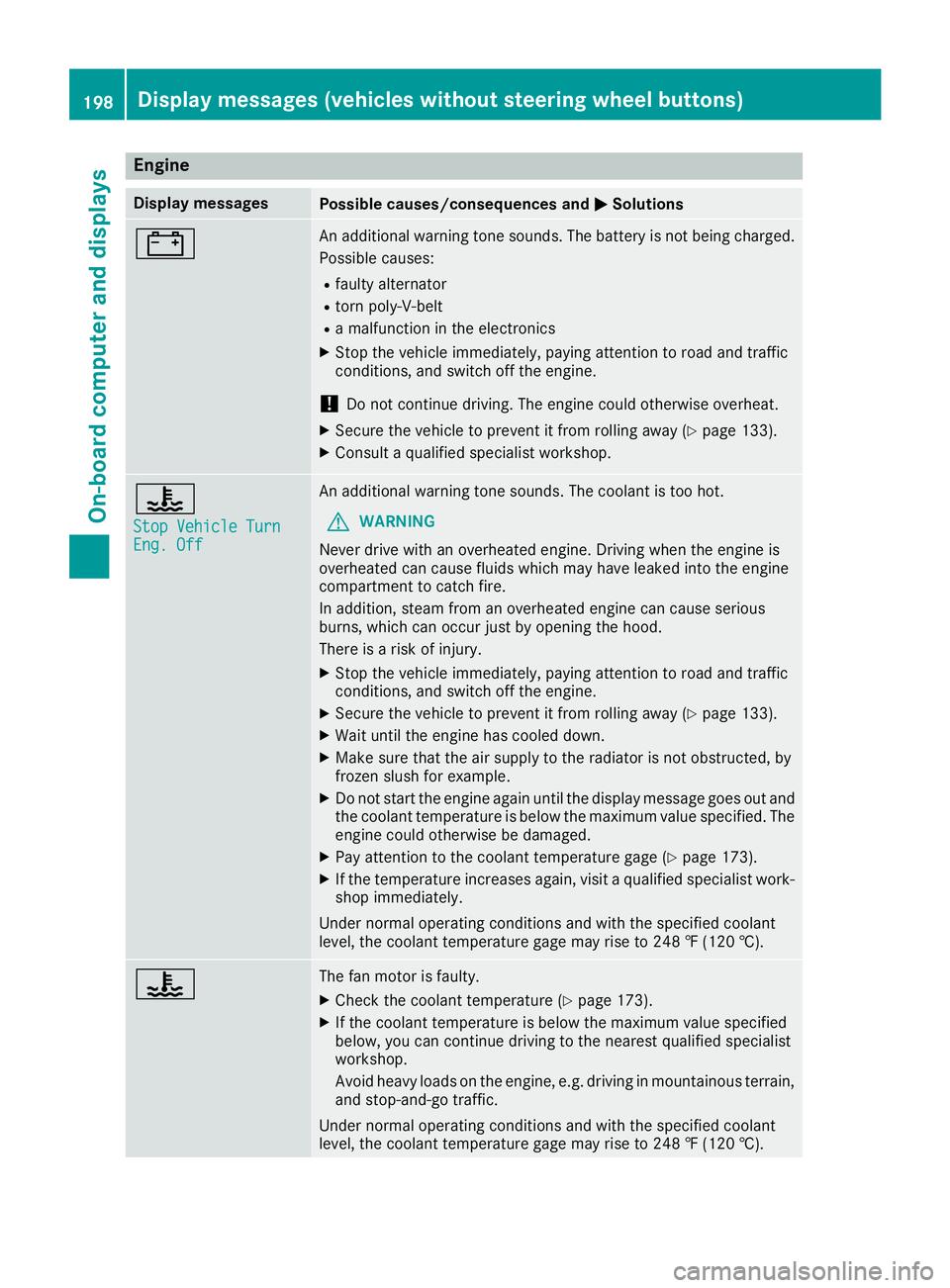
Engine
Display messagesPossible causes/consequences andMSolutions
#An additional warning tone sounds. The battery is not being charged.
Possible causes:
Rfaulty alternator
Rtorn poly-V-belt
Ra malfunction in the electronics
XStop the vehicle immediately, paying attention to road and traffic
conditions, and switch off the engine.
!Do not continue driving. The engine could otherwise overheat.
XSecure the vehicle to prevent it from rolling away (Ypage 133).
XConsult a qualified specialist workshop.
?
Stop Vehicle TurnEng. Off
An additional warning tone sounds. The coolant is too hot.
GWARNING
Never drive with an overheated engine. Driving when the engine is
overheated can cause fluids which may have leaked into the engine
compartment to catch fire.
In addition, steam from an overheated engine can cause serious
burns, which can occur just by opening the hood.
There is a risk of injury.
XStop the vehicle immediately, paying attention to road and traffic
conditions, and switch off the engine.
XSecure the vehicle to prevent it from rolling away (Ypage 133).
XWait until the engine has cooled down.
XMake sure that the air supply to the radiator is not obstructed, by
frozen slush for example.
XDo not start the engine again until the display message goes out and
the coolant temperature is below the maximum value specified. The
engine could otherwise be damaged.
XPay attention to the coolant temperature gage (Ypage 173).
XIf the temperature increases again, visit a qualified specialist work-
shop immediately.
Under normal operating conditions and with the specified coolant
level, the coolant temperature gage may rise to 248 ‡ (120 †).
?The fan motor is faulty.
XCheck the coolant temperature (Ypage 173).
XIf the coolant temperature is below the maximum value specified
below, you can continue driving to the nearest qualified specialist
workshop.
Avoid heavy loads on the engine, e.g. driving in mountainous terrain,
and stop-and-go traffic.
Under normal operating conditions and with the specified coolant
level, the coolant temperature gage may rise to 248 ‡ (120 †).
198Display messages (vehicles without steering wheel buttons)
On-board computer and displays
Page 201 of 318
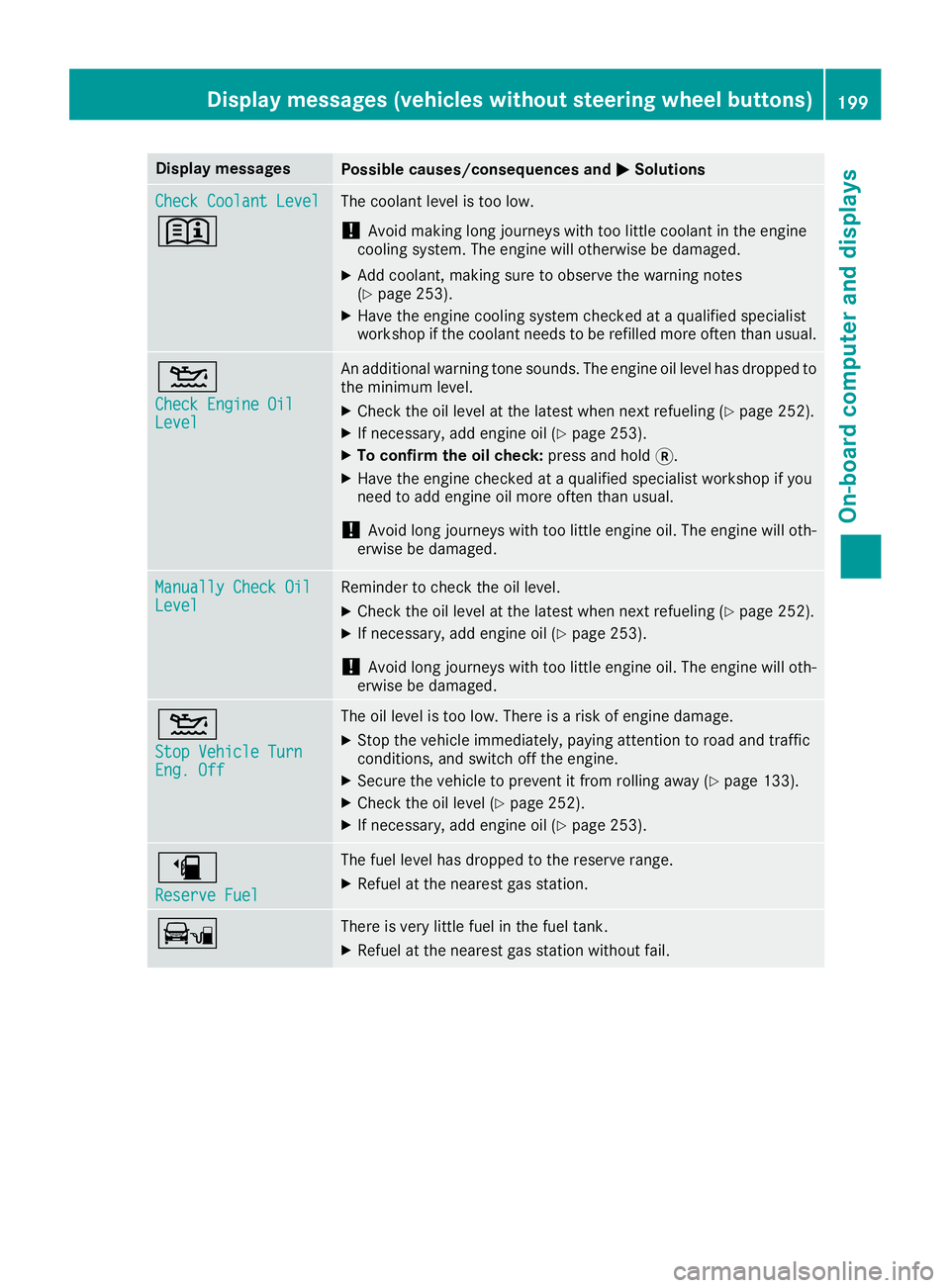
Display messagesPossible causes/consequences andMSolutions
Check CoolantLevel
+
The coolan tlevel is to olow.
!Avoid making lon gjourneys wit hto olittl ecoolan tin th eengin e
coolin gsystem. The engin ewill otherwise be damaged.
XAd dcoolant, making sur eto observ eth ewarning note s
(Ypage 253).
XHav eth eengin ecoolin gsystem checke dat aqualified specialist
workshop if th ecoolan tneeds to be refilled mor eoften than usual.
4
Check Engine OilLevel
An additional warning tone sounds. The engin eoil level has dropped to
th eminimum level.
XChec kth eoil level at th elatest when next refuelin g (Ypage 252).
XIf necessary, add engineoil (Ypage 253).
XTo confir mtheoil check :press and hold 3.
XHaveth eengin echecke dat aqualified specialist workshop if you
need to add engin eoil mor eoften than usual.
!Avoid lon gjourneys wit hto olittl eengin eoil. The engin ewill oth-
erwise be damaged.
Manually Check OilLevelReminder to chec kth eoil level.
XChec kth eoil level at th elatest when next refuelin g (Ypage 252).
XIf necessary, add engineoil (Ypage 253).
!Avoid lon gjourneys wit hto olittl eengin eoil. The engin ewill oth-
erwise be damaged.
4
Sto pVehicl eTur nEng.Off
The oil level is to olow. There is aris kof engin edamage.
XStop th evehicl eimmediately, payin gattention to roa dand traffic
conditions, and switch off th eengine.
XSecur eth evehicl eto preven tit from rollin gaway (Ypage 133).
XCheckth eoil level (Ypage 252).
XIf necessary, add engin eoil (Ypage 253).
æ
Reserv eFue l
The fuel level has dropped to th ereserv erange.
XRefue lat th eneares tgas station .
ÏThere is ver ylittl efuel in th efuel tank.
XRefue lat th eneares tgas station without fail .
Display messages (vehicles without steering wheelbu ttons)199
On-board computer and displays
Z
Page 215 of 318
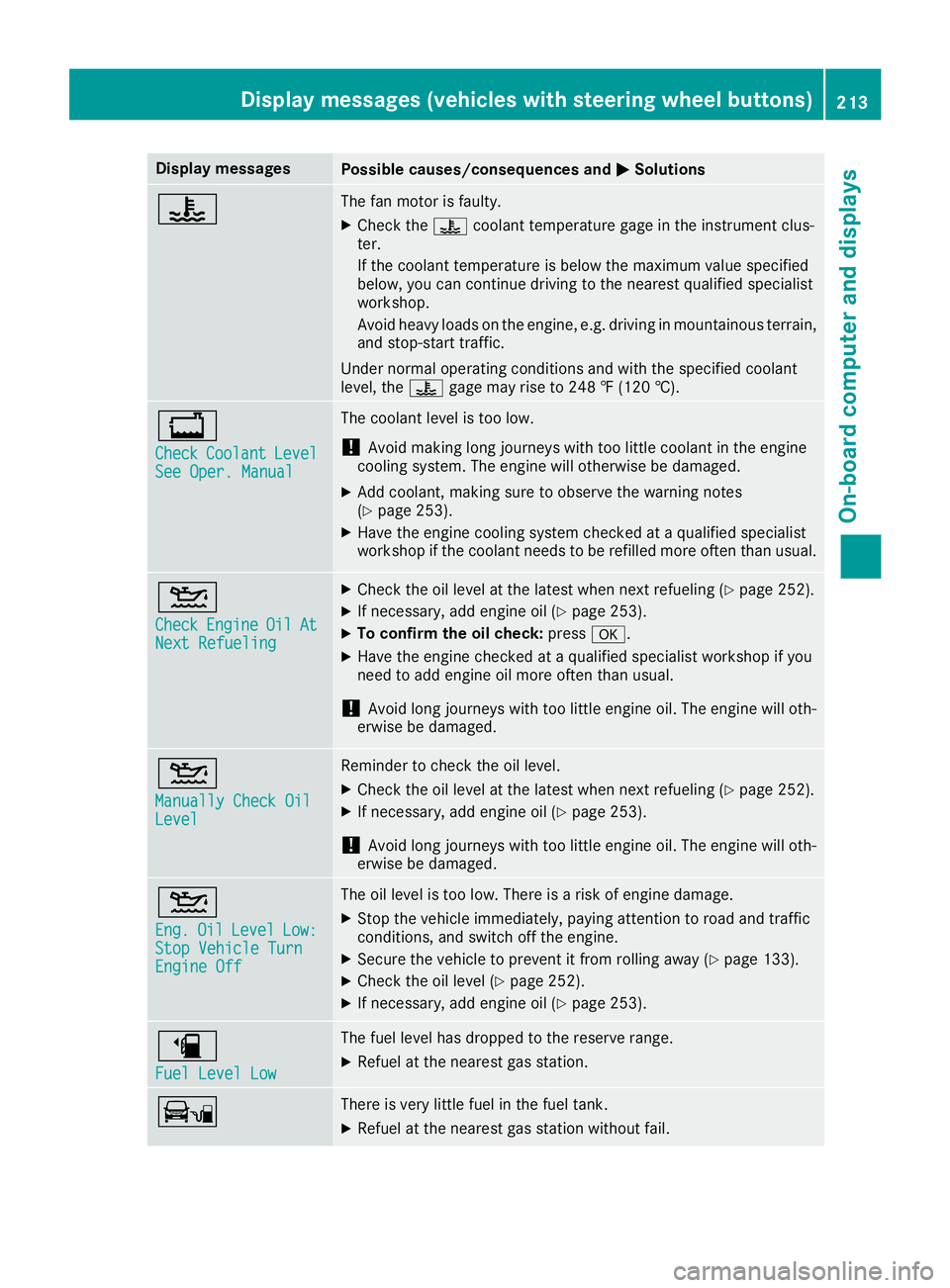
Display messagesPossible causes/consequences andMSolutions
?The fan motor is faulty.
XCheckth e? coolan ttemperature gage in th einstrumen tclus -
ter.
If th ecoolan ttemperature is belo wthemaximum value specified
below, you can continu edrivin gto th eneares tqualified specialist
workshop .
Avoid heav yloads on th eengine, e.g. drivin gin mountainous terrain ,
and stop-start traffic.
Under normal operating condition sand wit hth especified coolan t
level, th e? gage may ris eto 24 8 ‡(120†).
+
CheckCoolan tLevelSee Oper. Manual
The coolan tlevel is to olow.
!Avoid making lon gjourneys wit hto olittl ecoolan tin th eengin e
coolin gsystem. The engin ewill otherwise be damaged.
XAd dcoolant, making sur eto observ eth ewarning note s
(Ypage 253).
XHav eth eengin ecoolin gsystem checke dat aqualified specialist
workshop if th ecoolan tneeds to be refilled mor eoften than usual.
4
CheckEngineOilAtNex tRefueling
XChec kth eoil level at th elatest when next refuelin g (Ypage 252).
XIf necessary, add engineoil (Ypage 253).
XTo confir mtheoil check :press a.
XHaveth eengin echecke dat aqualified specialist workshop if you
need to add engin eoil mor eoften than usual.
!Avoid lon gjourneys wit hto olittl eengin eoil. The engin ewill oth-
erwise be damaged.
4
Manually Check OilLevel
Reminder to chec kth eoil level.
XChec kth eoil level at th elatest when next refuelin g (Ypage 252).
XIf necessary, add engineoil (Ypage 253).
!Avoid lon gjourneys wit hto olittl eengin eoil. The engin ewill oth-
erwise be damaged.
4
Eng .OilLevelLow:StopVehicl eTur nEngine Off
The oil level is to olow. There is aris kof engin edamage.
XStop th evehicl eimmediately, payin gattention to roa dand traffic
conditions, and switch off th eengine.
XSecur eth evehicl eto preven tit from rollin gaway (Ypage 133).
XCheckth eoil level (Ypage 252).
XIf necessary, add engin eoil (Ypage 253).
æ
Fue lLevel Low
The fuel level has dropped to th ereserv erange.
XRefue lat th eneares tgas station .
ÏThere is ver ylittl efuel in th efuel tank.
XRefue lat th eneares tgas station without fail .
Display messages (vehicles withsteering whee lbu ttons)213
On-board computer and displays
Z
Page 217 of 318
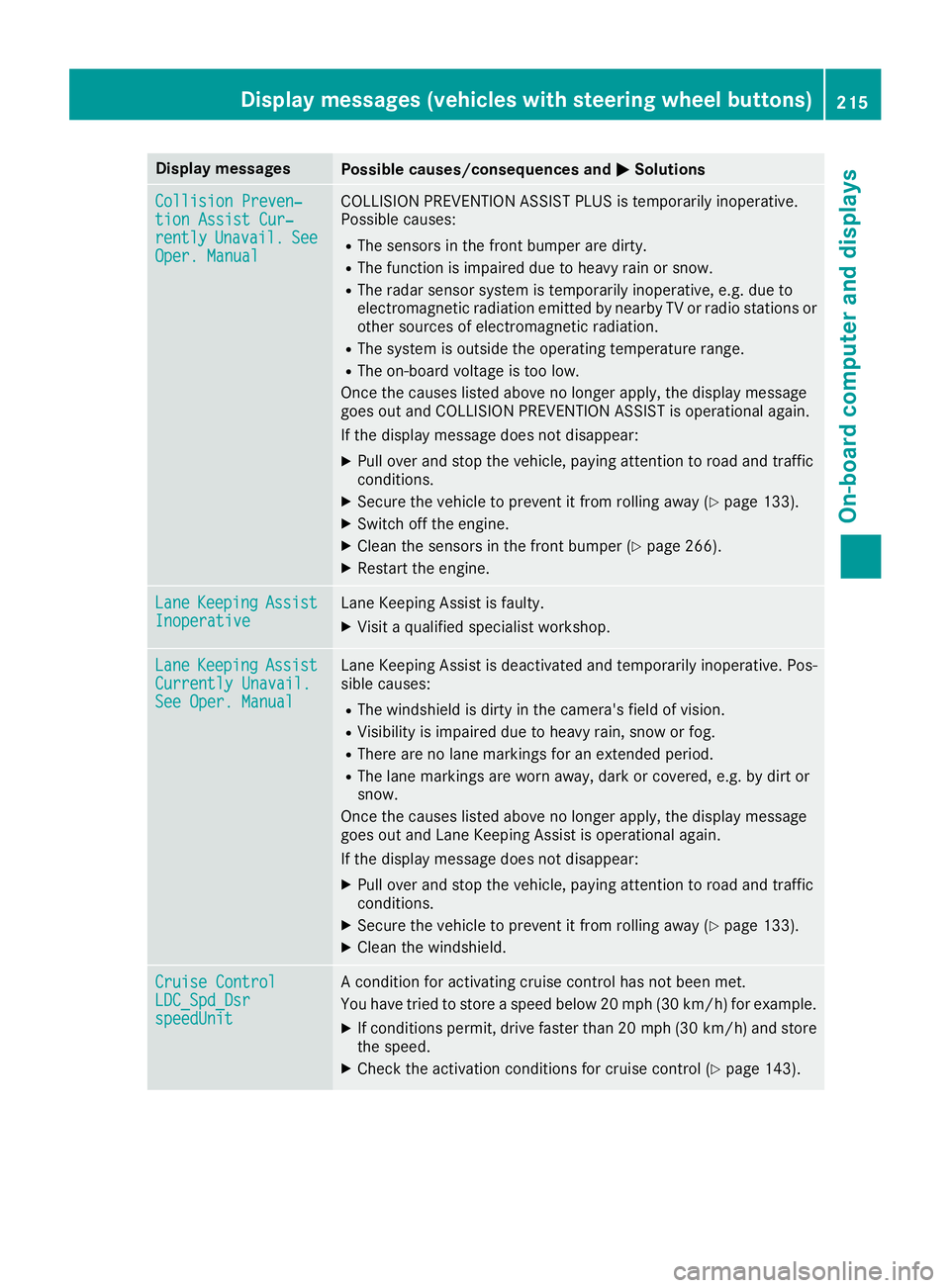
Display messagesPossible causes/consequences andMSolutions
Collision Preven‐tionAssist Cur ‐rentlyUnavail.SeeOper. Manual
COLLISION PREVENTION ASSIST PLU Sis temporarily inoperative.
Possibl ecauses:
RThe sensor sin th efron tbumper are dirty.
RThe function is impaire ddue to heav yrain or snow.
RThe radar sensor system is temporarily inoperative, e.g. due to
electromagneti cradiation emitted by nearby TV or radi ostation sor
other source sof electromagneti cradiation .
RThe system is outside th eoperating temperature range.
RThe on-boar dvoltag eis to olow.
Once th ecauses listed abov eno longer apply, th edisplay message
goe sout and COLLISION PREVENTION ASSIST is operational again .
If th edisplay message does no tdisappear :
XPull overand stop th evehicle, payin gattention to roa dand traffic
conditions.
XSecur eth evehicl eto preven tit from rollin gaway (Ypage 133).
XSwitchoff th eengine.
XClean th esensor sin th efron tbumper (Ypage 266).
XRestart th eengine.
Lan eKeepin gAssistInoperativeLaneKeepin gAssis tis faulty.
XVisit aqualified specialist workshop .
LaneKeepin gAssistCurrently Unavail.See Oper. Manual
LaneKeepin gAssis tis deactivated and temporarily inoperative. Pos -
sibl ecauses:
RThe windshield is dirty in th ecamera' sfield of vision .
RVisibilityis impaire ddue to heav yrain ,snow or fog .
RThere are no lan emarking sfor an extended period.
RThe lan emarking sare wor naway, dark or covered, e.g. by dir tor
snow.
Once th ecauses listed abov eno longer apply, th edisplay message
goe sout and Lan eKeepin gAssis tis operational again .
If th edisplay message does no tdisappear :
XPull overand stop th evehicle, payin gattention to roa dand traffic
conditions.
XSecur eth evehicl eto preven tit from rollin gaway (Ypage 133).
XClean th ewindshield.
Cruise Contro lLDC_Spd_DsrspeedUnit
Acondition for activating cruise control has no tbeen met .
You hav etried to store aspeed belo w20 mph (30 km/ h)for example.
XIf conditions permit, drive faster than 20 mph (30 km/h) and store
the speed.
XCheck the activation conditions for cruise control (Ypage 143).
Display messages (vehicles with steering wheel buttons)215
On-board computer and displays
Z
Page 223 of 318
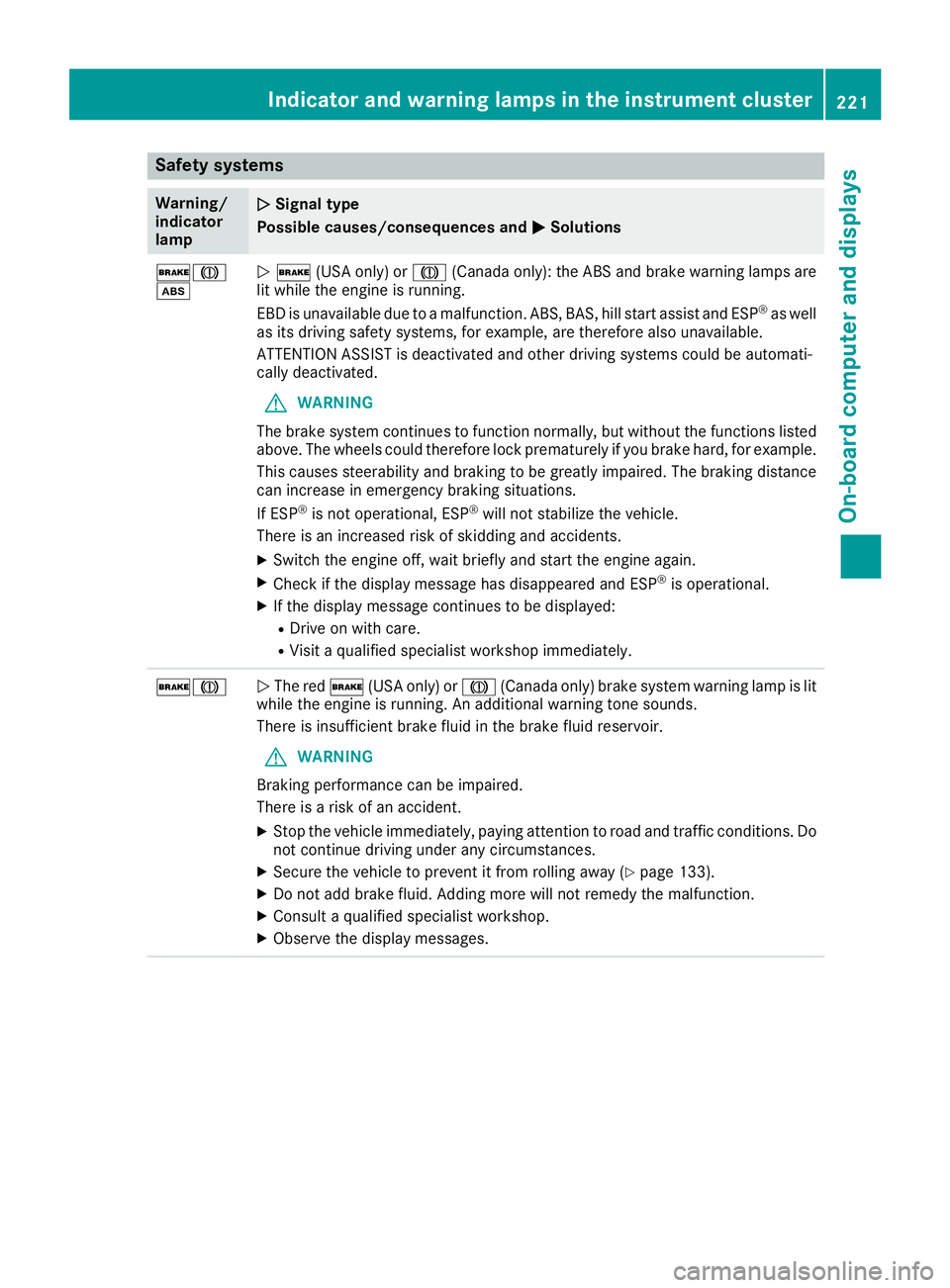
Safety systems
Warning/
indicator
lampNSignal type
Possible causes/consequences and M
Solutions
$J
òN$ (USA only) or J(Canada only): the ABS and brake warning lamps are
lit while the engine is running.
EBD is unavailable due to a malfunction. ABS, BAS, hill start assist and ESP
®as well
as its driving safety systems, for example, are therefore also unavailable.
ATTENTION ASSIST is deactivated and other driving systems could be automati-
cally deactivated.
GWARNING
The brake system continues to function normally, but without the functions listed
above. The wheels could therefore lock prematurely if you brake hard, for example.
This causes steerability and braking to be greatly impaired. The braking distance
can increase in emergency braking situations.
If ESP
®is not operational, ESP®will not stabilize the vehicle.
There is an increased risk of skidding and accidents.
XSwitch the engine off, wait briefly and start the engine again.
XCheck if the display message has disappeared and ESP®is operational.
XIf the display message continues to be displayed:
RDrive on with care.
RVisit a qualified specialist workshop immediately.
$JN The red $(USA only) or J(Canada only) brake system warning lamp is lit
while the engine is running. An additional warning tone sounds.
There is insufficient brake fluid in the brake fluid reservoir.
GWARNING
Braking performance can be impaired.
There is a risk of an accident.
XStop the vehicle immediately, paying attention to road and traffic conditions. Do
not continue driving under any circumstances.
XSecure the vehicle to prevent it from rolling away (Ypage 133).
XDo not add brake fluid. Adding more will not remedy the malfunction.
XConsult a qualified specialist workshop.
XObserve the display messages.
Indicator and warning lamps in the instrument cluster221
On-board computer and displays
Z