door lock MERCEDES-BENZ METRIS 2017 MY17 Operator’s Manual
[x] Cancel search | Manufacturer: MERCEDES-BENZ, Model Year: 2017, Model line: METRIS, Model: MERCEDES-BENZ METRIS 2017Pages: 318, PDF Size: 5.01 MB
Page 78 of 318
You must reset the electric sliding door if there
has been a malfunction or an interruption in the
voltage supply (
Ypage 78).
iPlease note, if the child-proof locks have
been activated, you cannot open the sliding
door from the inside. You can only open a
sliding door from the inside if the child-proof
locks have not been activated. Further infor-
mation can be found under "Child-proof locks
for the sliding door" (
Ypage 63) and "Open-
ing/closing from the inside" (Ypage 77).
Obstacle detection with reversing
feature
The sliding door is equipped with automatic
obstacle detection with reversing feature. If a
solid object blocks or restricts the sliding door
during the automatic closing process, the slid-
ing door opens again automatically. If the sliding
door is obstructed during the opening proce-
dure, it moves back a few centimeters in the
opposite direction and stops.
Automatic obstacle detection with reversing
feature is only an aid. It is not a substitute for
your attentiveness when closing the electrical
sliding door.
If an obstacle is detected, the display shows the
Left-hand Electric Sliding Door
ObstructionDetectedmessage for example,
and five warning tones sound.
GWARNING
The reversing feature does not react:
Rto soft, light and thin objects, e.g. small fin-
gers
Rover the last 8 mm of the closing movement
This means that the reversing feature cannot
prevent someone being trapped in these sit-
uations. There is a risk of injury.
When closing, make sure that no-one has any
parts of the body within the closing area.
If someone is trapped:
Rpress the 5button on the SmartKey, or
Rpull the exterior door handle, or
Rpress the corresponding sliding door but-
ton in the center console, or
Rpress the button on the door frame, or
Rpull the rocker switch on door handle
Opening/closing from the outside
The sliding door is equipped with an active
retainer, which engages the door at the end stop
when opened.
If the vehicle is equipped with two electric slid-
ing doors; the 5button on the SmartKey can
only be used to open or close one of the two
sliding doors (
Ypage 78).
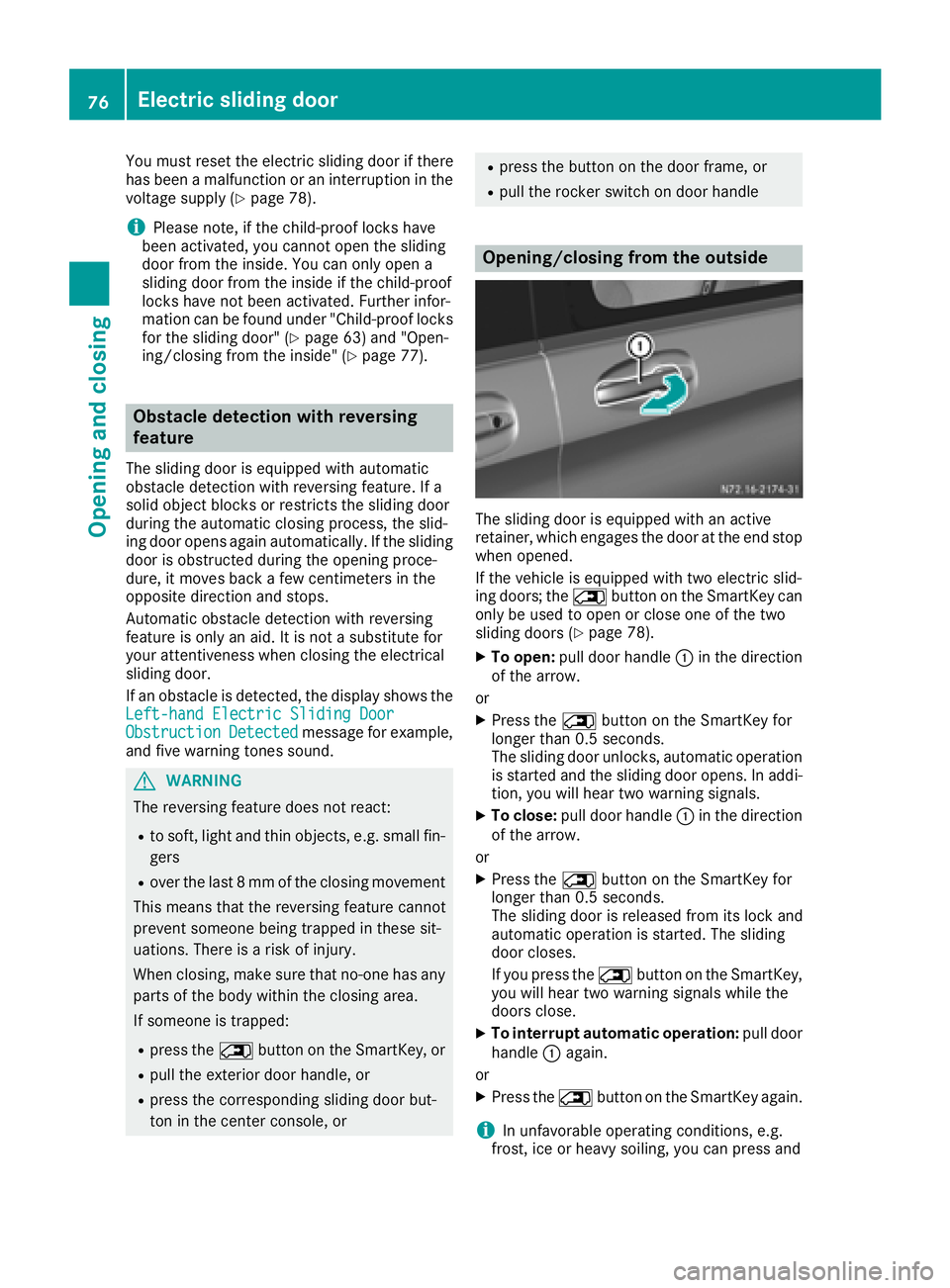
XTo open: pull door handle :in the direction
of the arrow.
or
XPress the 5button on the SmartKey for
longer than 0.5 seconds.
The sliding door unlocks, automatic operation
is started and the sliding door opens. In addi-
tion, you will hear two warning signals.
XTo close: pull door handle :in the direction
of the arrow.
or
XPress the 5button on the SmartKey for
longer than 0.5 seconds.
The sliding door is released from its lock and
automatic operation is started. The sliding
door closes.
If you press the 5button on the SmartKey,
you will hear two warning signals while the
doors close.
XTo interrupt automatic operation: pull door
handle :again.
or
XPress the 5button on the SmartKey again.
iIn unfavorable operating conditions, e.g.
frost, ice or heavy soiling, you can press and
76Electric sliding door
Opening and closing
Page 79 of 318
hold the relevant sliding door button. The
electric sliding door moves with increased
force. Observe that, in such circumstances,
the obstacle detection is less sensitive. To
stop the movement, release the sliding door
button.
Opening/closing from the inside
If the sliding door is unlocked, you can open andclose the sliding door from the inside with these
controls:
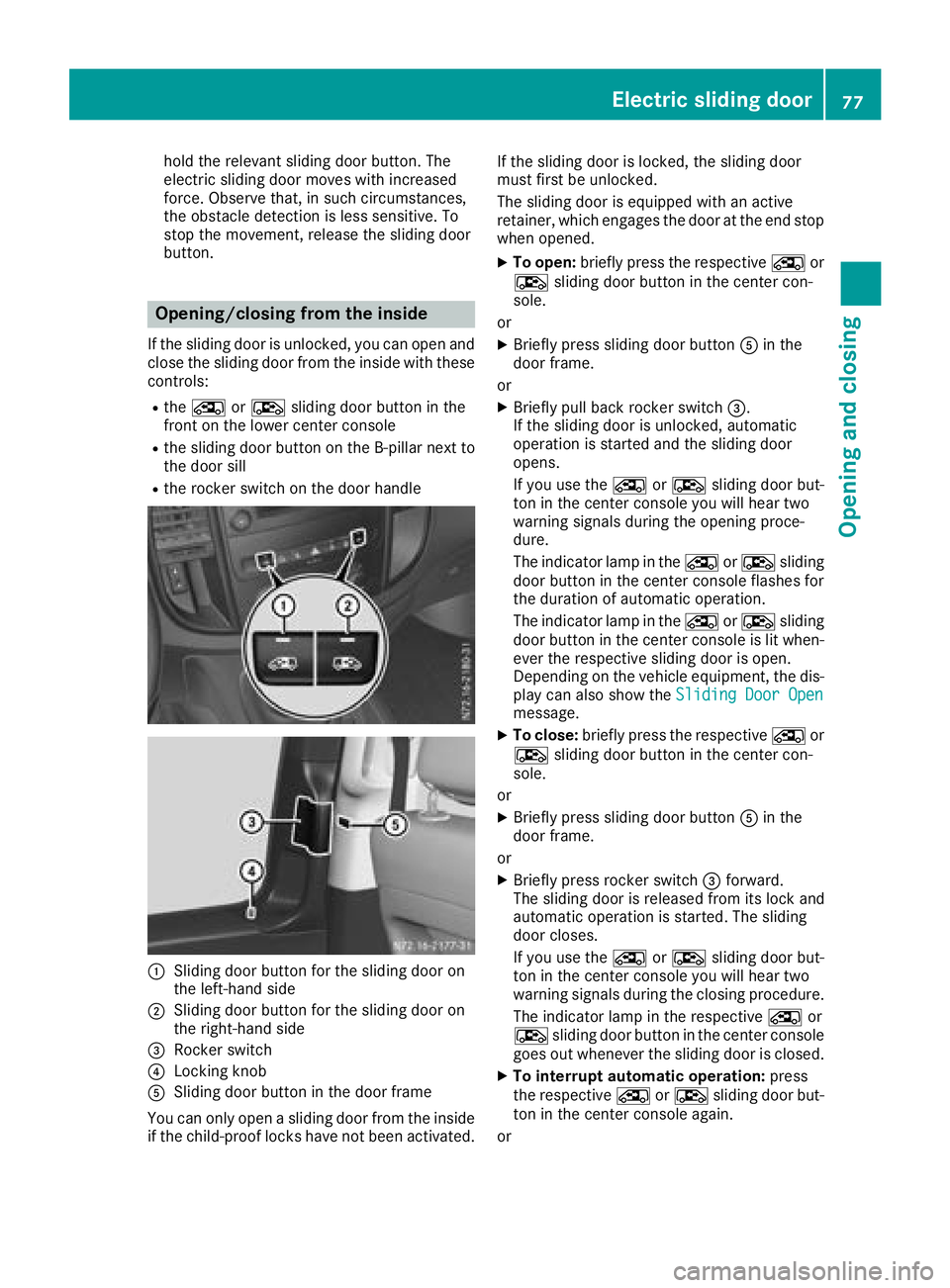
Rthe Å orÆ sliding door button in the
front on the lower center console
Rthe sliding door button on the B-pillar next to
the door sill
Rthe rocker switch on the door handle
:Sliding door button for the sliding door on
the left-hand side
;Sliding door button for the sliding door on
the right-hand side
=Rocker switch
?Locking knob
ASliding door button in the door frame
You can only open a sliding door from the inside if the child-proof locks have not been activated. If the sliding door is locked, the sliding door
must first be unlocked.
The sliding door is equipped with an active
retainer, which engages the door at the end stop
when opened.
XTo open:
briefly press the respective Åor
Æ sliding door button in the center con-
sole.
or
XBriefly press sliding door button Ain the
door frame.
or
XBriefly pull back rocker switch =.
If the sliding door is unlocked, automatic
operation is started and the sliding door
opens.
If you use the ÅorÆ sliding door but-
ton in the center console you will hear two
warning signals during the opening proce-
dure.
The indicator lamp in the ÅorÆ sliding
door button in the center console flashes for
the duration of automatic operation.
The indicator lamp in the ÅorÆ sliding
door button in the center console is lit when-
ever the respective sliding door is open.
Depending on the vehicle equipment, the dis-
play can also show the Sliding Door Open
message.
XTo close:briefly press the respective Åor
Æ sliding door button in the center con-
sole.
or
XBriefly press sliding door button Ain the
door frame.
or
XBriefly press rocker switch =forward.
The sliding door is released from its lock and
automatic operation is started. The sliding
door closes.
If you use the ÅorÆ sliding door but-
ton in the center console you will hear two
warning signals during the closing procedure.
The indicator lamp in the respective Åor
Æ sliding door button in the center console
goes out whenever the sliding door is closed.
XTo interrupt automatic operation: press
the respective ÅorÆ sliding door but-
ton in the center console again.
or
Electric sliding door77
Opening and closing
Z
Page 80 of 318
XPress sliding door button in the door frame
A.
or
XBriefly pull back rocker switch =.
iIn unfavorable operating conditions, e.g.
frost, ice or heavy soiling, you can press and
hold the relevant sliding door button. The
electric sliding door moves with increased
force. Observe that, in such circumstances,
the obstacle detection is less sensitive. To
stop the movement, release the sliding door
button.
Programing the key button for the
sliding door
If the vehicle is equipped with two electric slid-
ing doors, the 5sliding door button on the
key can only be programmed for one of the two
sliding doors. You can then open or close the
selected sliding door with the 5button on
the key.
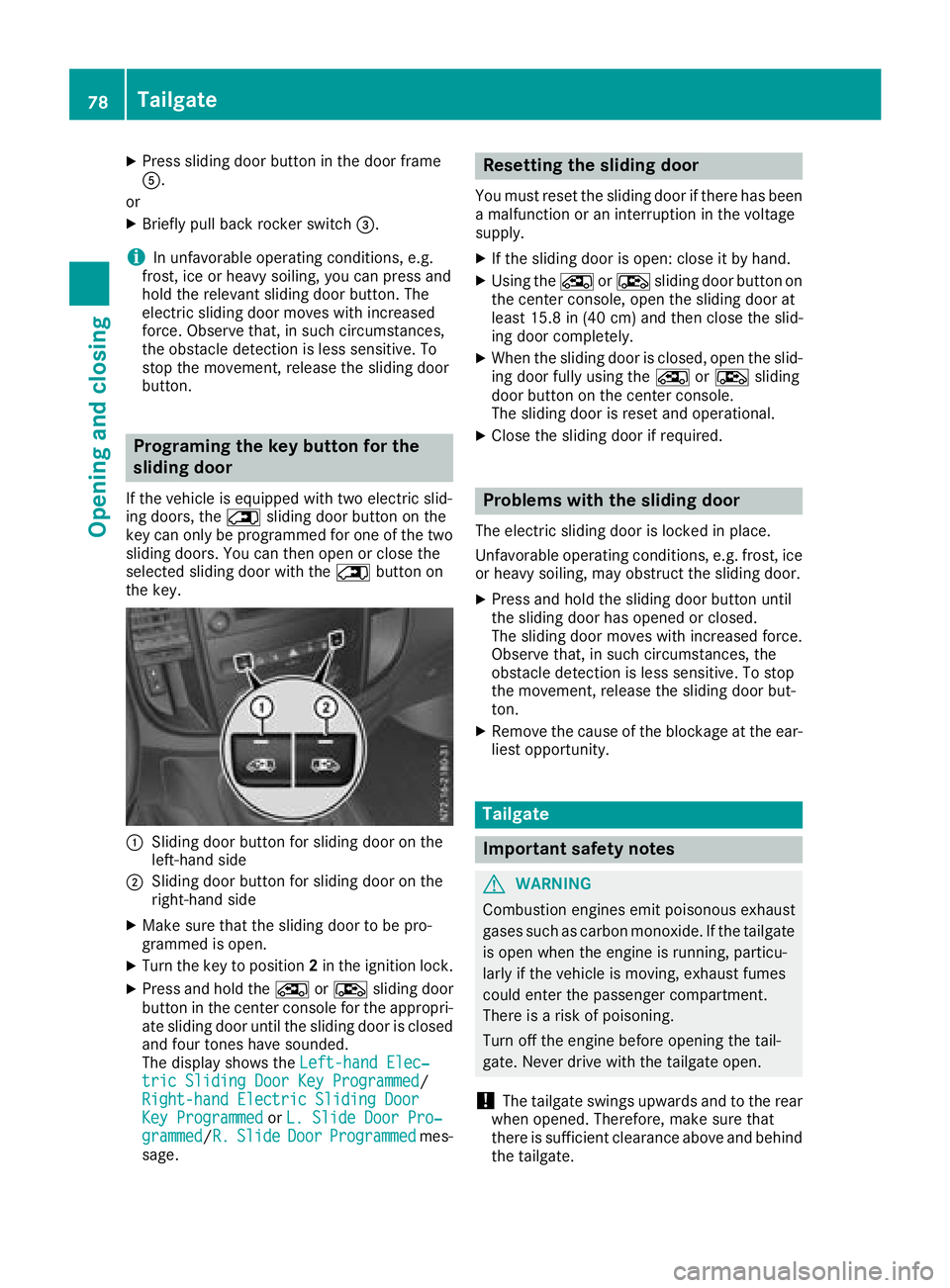
:Sliding door button for sliding door on the
left-hand side
;Sliding door button for sliding door on the
right-hand side
XMake sure that the sliding door to be pro-
grammed is open.
XTurn the key to position 2in the ignition lock.
XPress and hold the ÅorÆ sliding door
button in the center console for the appropri-
ate sliding door until the sliding door is closed
and four tones have sounded.
The display shows the Left-hand Elec‐
tric Sliding Door Key Programmed/
Right-hand Electric Sliding Door
Key Programmedor L. Slide Door Pro‐grammed/R.SlideDoorProgrammedmes-
sage.
Resetting the sliding door
You must reset the sliding door if there has been
a malfunction or an interruption in the voltage
supply.
XIf the sliding door is open: close it by hand.
XUsing the ÅorÆ sliding door button on
the center console, open the sliding door at
least 15.8 in (40 cm) and then close the slid-
ing door completely.
XWhen the sliding door is closed, open the slid-
ing door fully using the ÅorÆ sliding
door button on the center console.
The sliding door is reset and operational.
XClose the sliding door if required.
Problems with the sliding door
The electric sliding door is locked in place.
Unfavorable operating conditions, e.g. frost, ice
or heavy soiling, may obstruct the sliding door.
XPress and hold the sliding door button until
the sliding door has opened or closed.
The sliding door moves with increased force.
Observe that, in such circumstances, the
obstacle detection is less sensitive. To stop
the movement, release the sliding door but-
ton.
XRemove the cause of the blockage at the ear-
liest opportunity.
Tailgate
Important safety notes
GWARNING
Combustion engines emit poisonous exhaust
gases such as carbon monoxide. If the tailgate
is open when the engine is running, particu-
larly if the vehicle is moving, exhaust fumes
could enter the passenger compartment.
There is a risk of poisoning.
Turn off the engine before opening the tail-
gate. Never drive with the tailgate open.
!The tailgate swings upwards and to the rear
when opened. Therefore, make sure that
there is sufficient clearance above and behind
the tailgate.
78Tailgate
Opening and closing
Page 81 of 318
You will find details of the tailgate opening
dimensions under "Technical data"
(
Ypage 311).
Opening and closing
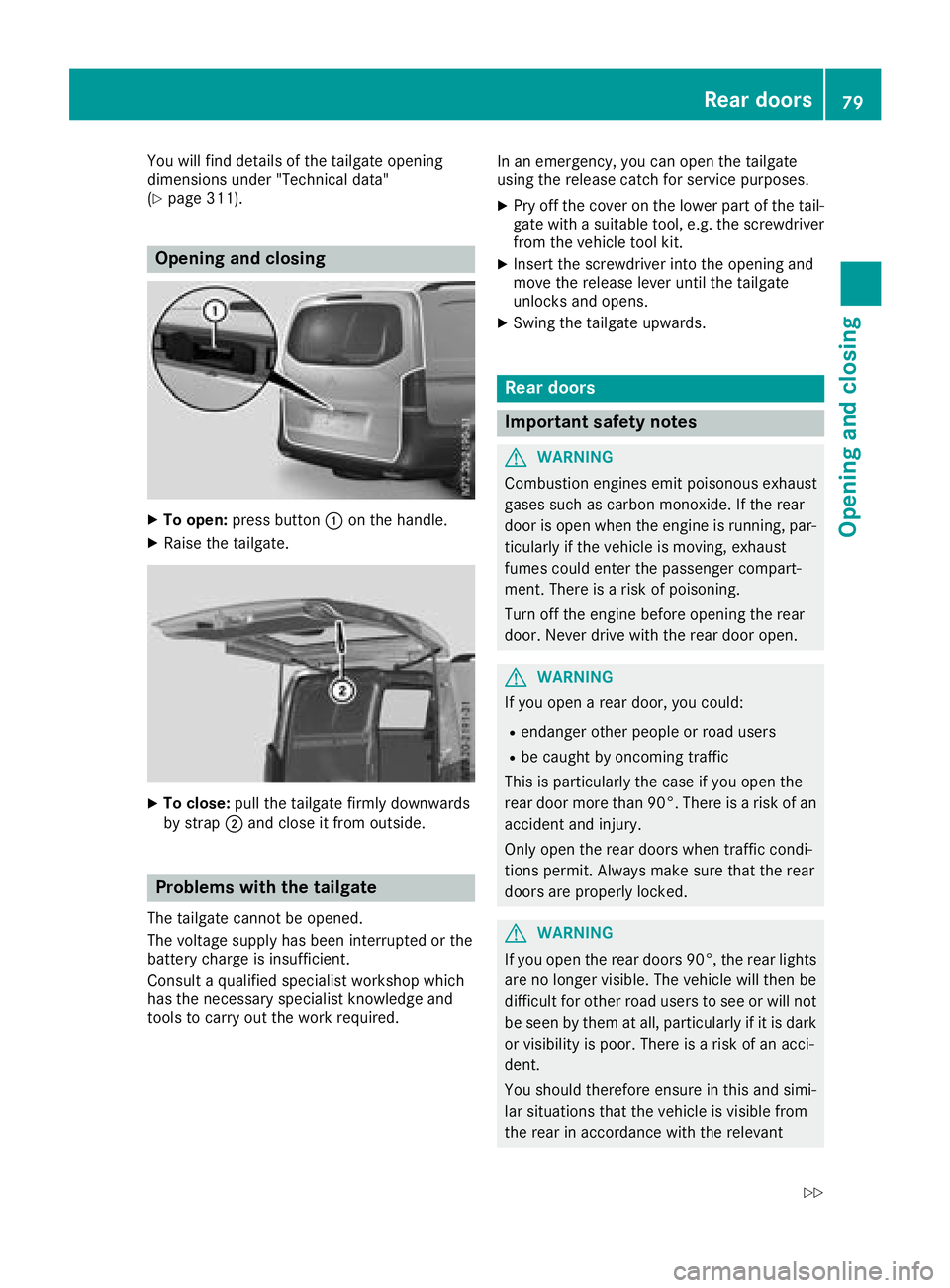
XTo open:press button :on the handle.
XRaise the tailgate.
XTo close: pull the tailgate firmly downwards
by strap ;and close it from outside.
Problems with the tailgate
The tailgate cannot be opened.
The voltage supply has been interrupted or the
battery charge is insufficient.
Consult a qualified specialist workshop which
has the necessary specialist knowledge and
tools to carry out the work required. In an emergency, you can open the tailgate
using the release catch for service purposes.
XPry off the cover on the lower part of the tail-
gate with a suitable tool, e.g. the screwdriver from the vehicle tool kit.
XInsert the screwdriver into the opening and
move the release lever until the tailgate
unlocks and opens.
XSwing the tailgate upwards.
Rear doors
Important safety notes
GWARNING
Combustion engines emit poisonous exhaust
gases such as carbon monoxide. If the rear
door is open when the engine is running, par-
ticularly if the vehicle is moving, exhaust
fumes could enter the passenger compart-
ment. There is a risk of poisoning.
Turn off the engine before opening the rear
door. Never drive with the rear door open.
GWARNING
If you open a rear door, you could:
Rendanger other people or road users
Rbe caught by oncoming traffic
This is particularly the case if you open the
rear door more than 90°. There is a risk of an
accident and injury.
Only open the rear doors when traffic condi-
tions permit. Always make sure that the rear
doors are properly locked.
GWARNING
If you open the rear doors 90°, the rear lights are no longer visible. The vehicle will then be
difficult for other road users to see or will not
be seen by them at all, particularly if it is dark
or visibility is poor. There is a risk of an acci-
dent.
You should therefore ensure in this and simi-
lar situations that the vehicle is visible from
the rear in accordance with the relevant
Rear doors79
Opening and closing
Z
Page 82 of 318
national regulations, by using the warning tri-
angle, for instance.
!Make sure that there is sufficient clearance
when opening the rear doors. You could oth-
erwise damage the vehicle and objects in
close range of the rear doors.
You can lock the rear doors at an angle of
approx. 90° and, if necessary, 180° or 270°.
Always make sure that the open rear door is
correctly engaged in the detent.
Opening and closing from the outside
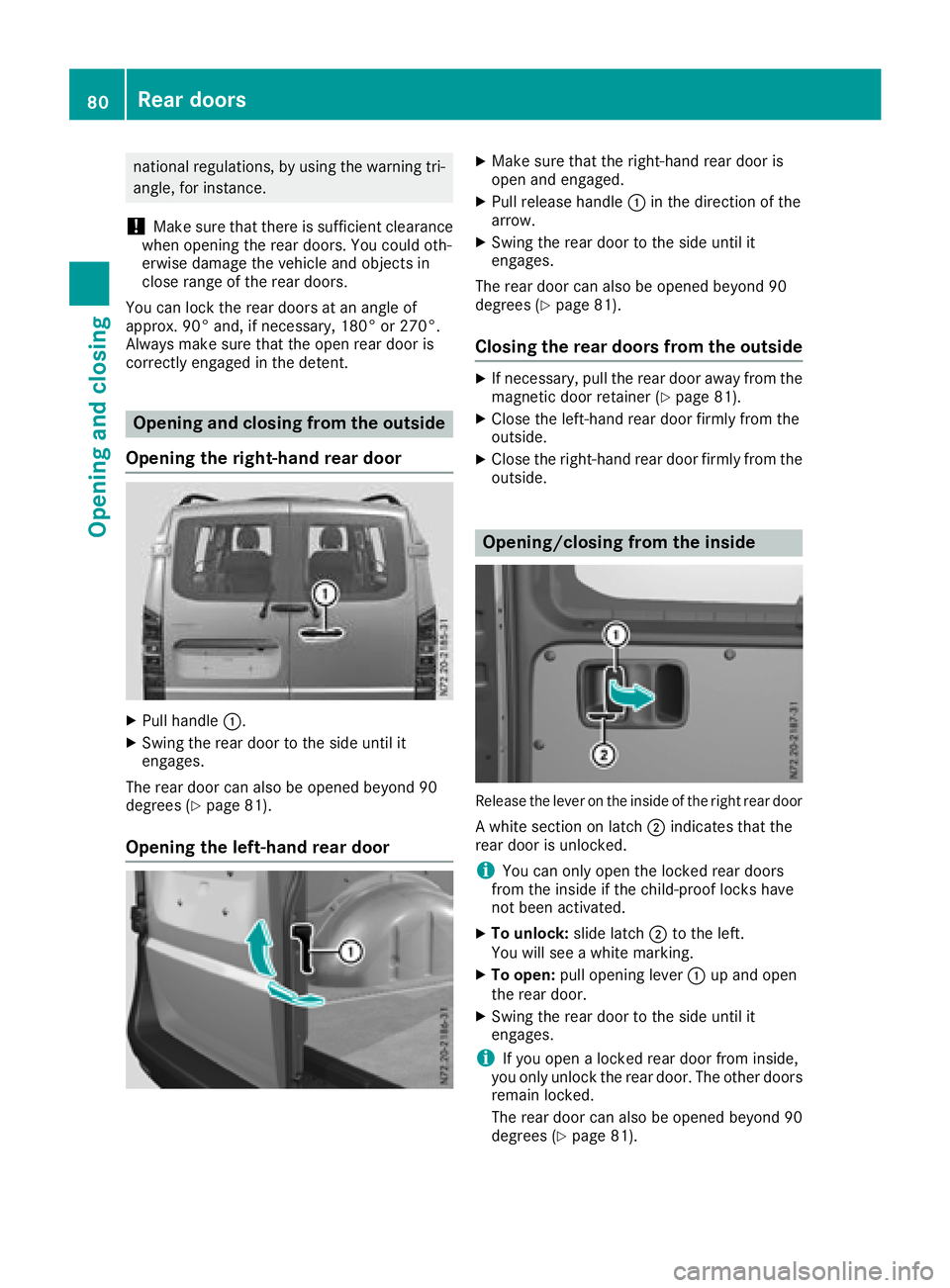
Opening the right-hand rear door
XPull handle :.
XSwing the rear door to the side until it
engages.
The rear door can also be opened beyond 90
degrees (
Ypage 81).
Opening the left-hand rear door
XMake sure that the right-hand rear door is
open and engaged.
XPull release handle :in the direction of the
arrow.
XSwing the rear door to the side until it
engages.
The rear door can also be opened beyond 90
degrees (
Ypage 81).
Closing the rear doors from the outside
XIf necessary, pull the rear door away from the
magnetic door retainer (Ypage 81).
XClose the left-hand rear door firmly from the
outside.
XClose the right-hand rear door firmly from the outside.
Opening/closing from the inside
Release the lever on the inside of the right rear door
A white section on latch ;indicates that the
rear door is unlocked.
iYou can only open the locked rear doors
from the inside if the child-proof locks have
not been activated.
XTo unlock: slide latch;to the left.
You will see a white marking.
XTo open: pull opening lever :up and open
the rear door.
XSwing the rear door to the side until it
engages.
iIf you open a locked rear door from inside,
you only unlock the rear door. The other doors
remain locked.
The rear door can also be opened beyond 90
degrees (
Ypage 81).
80Rear doors
Opening and closing
Page 83 of 318
XTo close:make sure that the left-hand rear
door is closed.
XPull the rear door firmly by the door handle to
close it.
XTo lock: slide latch ;to the right.
The white section is no longer visible.
Opening at an angle of 180° or 270°
Depending on the vehicle equipment, you can
open the rear doors up to an angle of 180° or
270° (side wall).
!When you open the sliding door, first make
sure that:
Rthe rear door is not opened to an angle of
270°.
Rthe rear door is not clipped into the door
retainer.
The sliding door could otherwise collide with
the opened rear door and the doors could be
damaged.
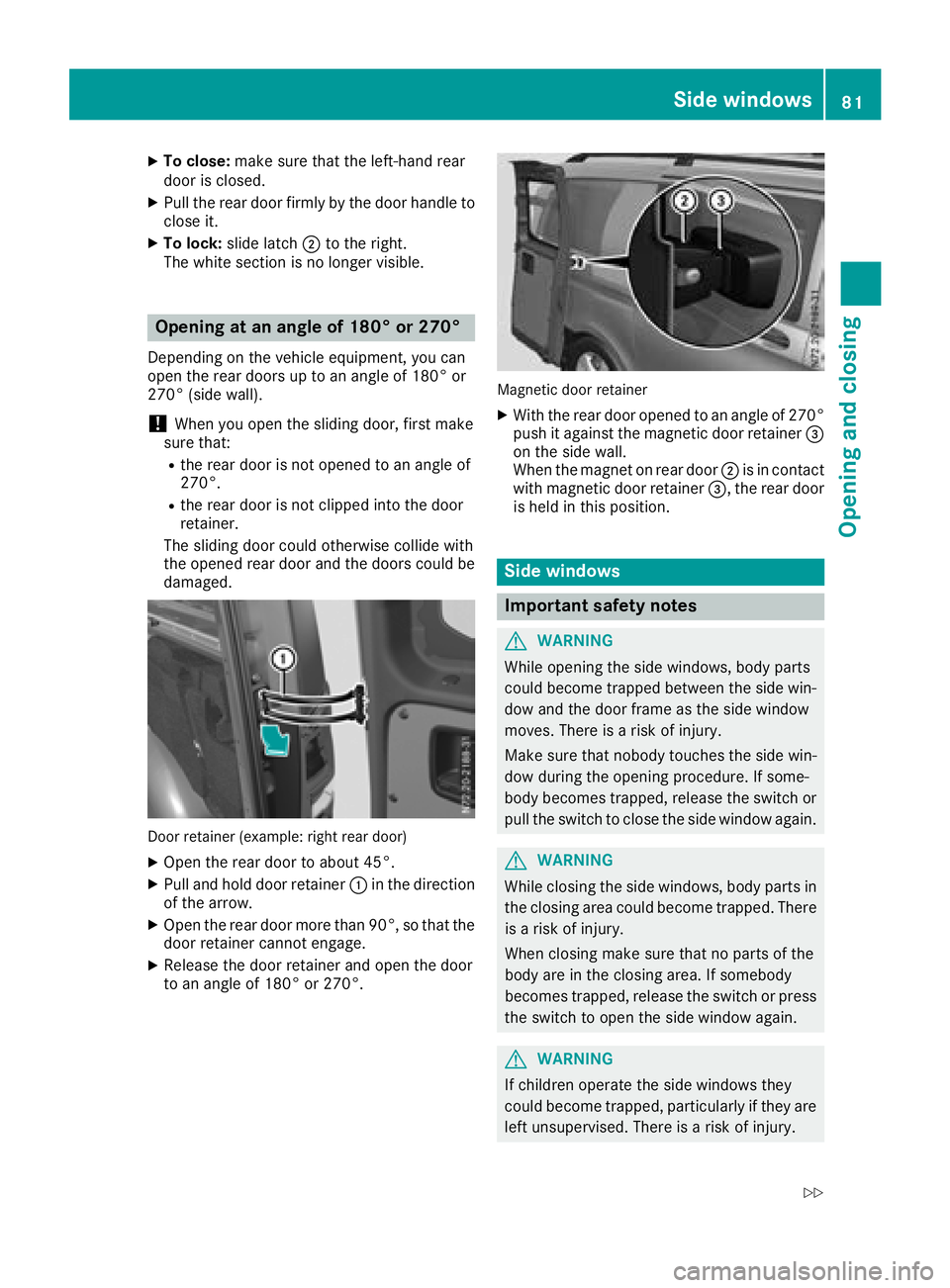
Door retainer (example: right rear door)
XOpen the rear door to about 45°.
XPull and hold door retainer :in the direction
of the arrow.
XOpen the rear door more than 90°, so that the
door retainer cannot engage.
XRelease the door retainer and open the door
to an angle of 180° or 270°.
Magnetic door retainer
XWith the rear door opened to an angle of 270° push it against the magnetic door retainer =
on the side wall.
When the magnet on rear door ;is in contact
with magnetic door retainer =, the rear door
is held in this position.
Side windows
Important safety notes
GWARNING
While opening the side windows, body parts
could become trapped between the side win-
dow and the door frame as the side window
moves. There is a risk of injury.
Make sure that nobody touches the side win-
dow during the opening procedure. If some-
body becomes trapped, release the switch or
pull the switch to close the side window again.
GWARNING
While closing the side windows, body parts in
the closing area could become trapped. There is a risk of injury.
When closing make sure that no parts of the
body are in the closing area. If somebody
becomes trapped, release the switch or press
the switch to open the side window again.
GWARNING
If children operate the side windows they
could become trapped, particularly if they are left unsupervised. There is a risk of injury.
Side windows81
Opening and closing
Z
Page 84 of 318
Activate the override feature for the rear sidewindows. When leaving the vehicle, always
take the SmartKey with you and lock the vehi-
cle. Never leave children unsupervised in the
vehicle.
GWARNING
If persons, particularly children are subjected to prolonged exposure to extreme heat or
cold, there is a risk of injury, possibly even
fatal. Never leave children unattended in the
vehicle.
Side window reversing feature
The front side windows are equipped with an
automatic reversing feature. If a solid object
blocks or restricts a side window from moving
upwards during the automatic closing process,
the side window opens again automatically. Dur-
ing the manual closing process, the side window
only opens again automatically after the corre-
sponding switch is released. The automatic
reversing feature is only an aid and is no substi-
tute for your attention when closing a side win-
dow.
GWARNING
The reversing feature does not react:
Rto soft, light and thin objects, e.g. small fin-
gers
Rwhile resetting
This means that the reversing feature cannot
prevent someone being trapped in these sit-
uations. There is a risk of injury.
Make sure that no body parts are in close
proximity during the closing procedure. If
someone becomes trapped, press the switch
to open the side window again.
Opening and closing the side win-
dows
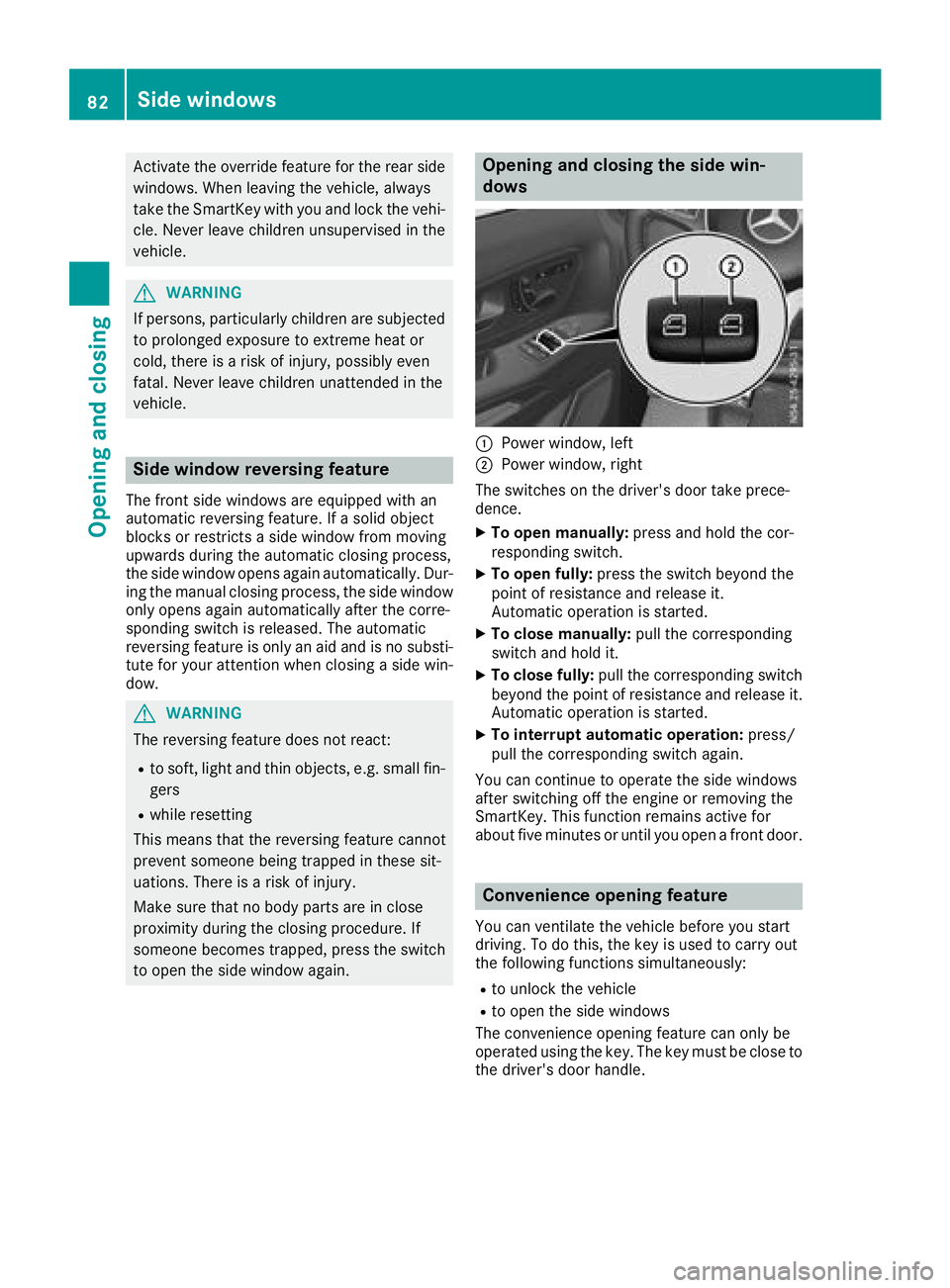
:Power window, left
;Power window, right
The switches on the driver's door take prece-
dence.
XTo open manually: press and hold the cor-
responding switch.
XTo open fully: press the switch beyond the
point of resistance and release it.
Automatic operation is started.
XTo close manually: pull the corresponding
switch and hold it.
XTo close fully: pull the corresponding switch
beyond the point of resistance and release it.
Automatic operation is started.
XTo interrupt automatic operation: press/
pull the corresponding switch again.
You can continue to operate the side windows
after switching off the engine or removing the
SmartKey. This function remains active for
about five minutes or until you open a front door.
Convenience opening feature
You can ventilate the vehicle before you start
driving. To do this, the key is used to carry out
the following functions simultaneously:
Rto unlock the vehicle
Rto open the side windows
The convenience opening feature can only be
operated using the key. The key must be close to
the driver's door handle.
82Side windows
Opening and closing
Page 85 of 318
XConvenience opening:point the tip of the
key at the driver's door handle.
XPress and hold the %button until the side
windows are in the desired position.
XTo interrupt convenience opening: release
the % button.
Convenience closing feature
GWARNING
When using the convenience closing feature,
parts of the body could be trapped in the clos-
ing area when a side window is being closed.
There is a risk of injury.
Observe the complete closing procedure
when the convenience closing feature is oper-
ating. Make sure that no body parts are in
close proximity during the closing procedure.
When you lock the vehicle, you can close the
side windows at the same time.
The SmartKey must be close to the driver's door
handle.
Observe the notes on the automatic reversing
feature for the side windows (
Ypage 82).
XConvenience closing feature: point the tip
of the SmartKey at the driver's door handle.
XKeep the &button pressed until all side
windows are fully closed.
XMake sure that all side windows are closed.
XTo interrupt convenience closing feature:
release the &button.
Resetting the side windows
You must reset the side windows if there has
been a malfunction or an interruption in the volt-
age supply.
XTurn the SmartKey to position 2in the ignition
lock.
XPull the two power window switches and hold
for approximately one second after closing
the side window.
XIf the side windows remain closed after the
button has been released, they have been
reset correctly. If this is not the case, repeat
the steps above for the open window.
Problems with the side windows
GWARNING
If you close a side window again immediately
after it has been blocked or reset, the side
window closes with increased or maximum
force. The reversing feature is then not active. Parts of the body could be trapped in the clos-
ing area in the process. This poses an
increased risk of injury or even fatal injury.
Make sure that no parts of the body are in the
closing area. To stop the closing process,
release the switch or push the switch again to
reopen the side window.
If you cannot completely open or close a side
window:
If there are no objects or leaves in the window
guide that prevent the sliding sunroof from clos-
ing, there has been a malfunction or the on-
board voltage has been interrupted.
XReset the side window (Ypage 83).
Side windows83
Opening and closing
Z
Page 96 of 318
Useful information
This Operator's Manual describes all models as
well as standard and optional equipment of your
vehicle that were available at the time of going
to print. Country-specific variations are possi-
ble. Note that your vehicle may not be equipped
with all of the described functions. This also
applies to systems and functions relevant to
safety.
Read the information on qualified specialist
workshops (
Ypage 31).
Exterior lighting
Important safety notes
For reasons of safety, Mercedes-Benz recom-
mends that you drive with the lights switched on
even during the daytime. There may be differ-
ences in operation due to legal requirements
and voluntary recommendations in some coun-
tries.
Light switch
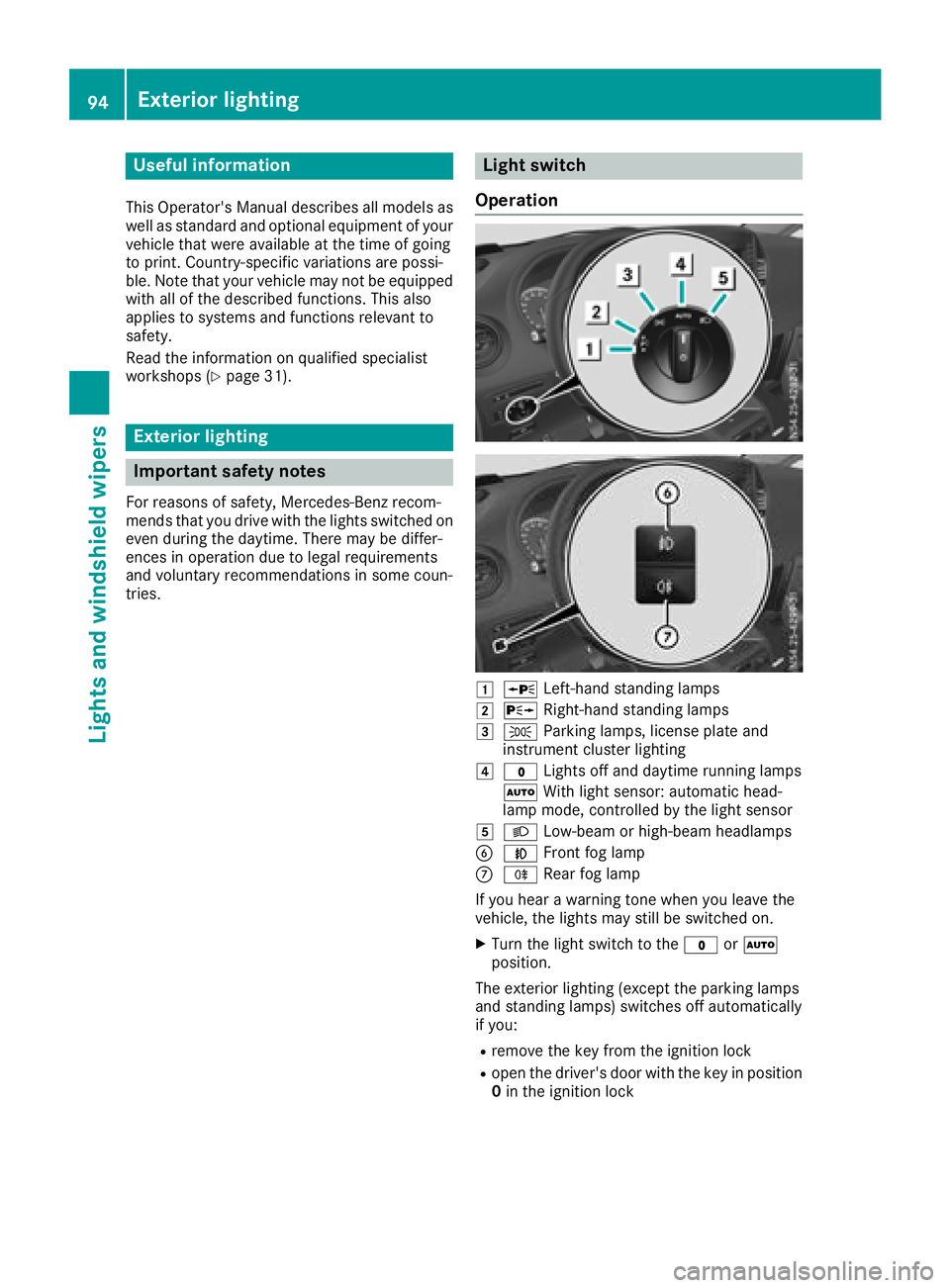
Operation
1W Left-hand standing lamps
2XRight-hand standing lamps
3TParking lamps, license plate and
instrument cluster lighting
4$ Lights off and daytime running lamps
à With light sensor: automatic head-
lamp mode, controlled by the light sensor
5L Low-beam or high-beam headlamps
BNFront fog lamp
CRRear fog lamp
If you hear a warning tone when you leave the
vehicle, the lights may still be switched on.
XTurn the light switch to the $orÃ
position.
The exterior lighting (except the parking lamps
and standing lamps) switches off automatically
if you:
Rremove the key from the ignition lock
Ropen the driver's door with the key in position
0 in the ignition lock
94Exterior lighting
Lights and windshield wipers
Page 98 of 318
Switching on the standing lamps:
XTurn the key to position0(Ypage 121) in the
ignition lock or remove the key.
XRight-hand standing lamp: turn the light
switch to position X.
XLeft-hand standing lamp: turn the light
switch to position W.
Combination switch
Turn signal lamps
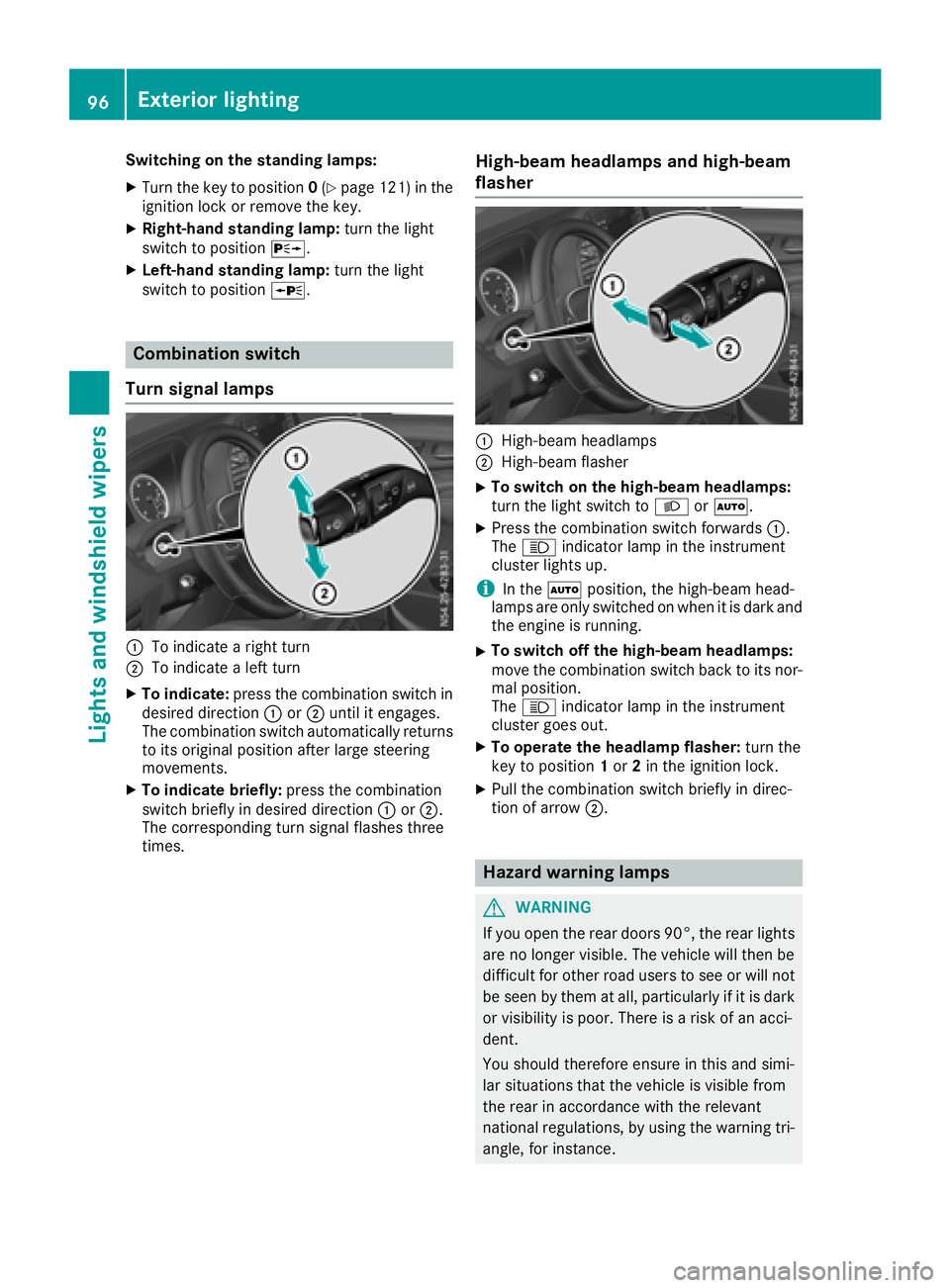
:To indicate a right turn
;To indicate a left turn
XTo indicate: press the combination switch in
desired direction :or; until it engages.
The combination switch automatically returns
to its original position after large steering
movements.
XTo indicate briefly: press the combination
switch briefly in desired direction :or;.
The corresponding turn signal flashes three
times.
High-beam headlamps and high-beam
flasher
:High-beam headlamps
;High-beam flasher
XTo switch on the high-beam headlamps:
turn the light switch to LorÃ.
XPress the combination switch forwards :.
The K indicator lamp in the instrument
cluster lights up.
iIn the Ãposition, the high-beam head-
lamps are only switched on when it is dark and
the engine is running.
XTo switch off the high-beam headlamps:
move the combination switch back to its nor-
mal position.
The K indicator lamp in the instrument
cluster goes out.
XTo operate the headlamp flasher: turn the
key to position 1or 2in the ignition lock.
XPull the combination switch briefly in direc-
tion of arrow ;.
Hazard warning lamps
GWARNING
If you open the rear doors 90°, the rear lights are no longer visible. The vehicle will then be
difficult for other road users to see or will not
be seen by them at all, particularly if it is dark
or visibility is poor. There is a risk of an acci-
dent.
You should therefore ensure in this and simi-
lar situations that the vehicle is visible from
the rear in accordance with the relevant
national regulations, by using the warning tri-
angle, for instance.
96Exterior lighting
Lights and windshield wipers